ignition AUDI Q7 2010 Owner´s Manual
[x] Cancel search | Manufacturer: AUDI, Model Year: 2010, Model line: Q7, Model: AUDI Q7 2010Pages: 390, PDF Size: 93.04 MB
Page 42 of 390
Opening and closing
Opening and closing
Keys
Key set
C !
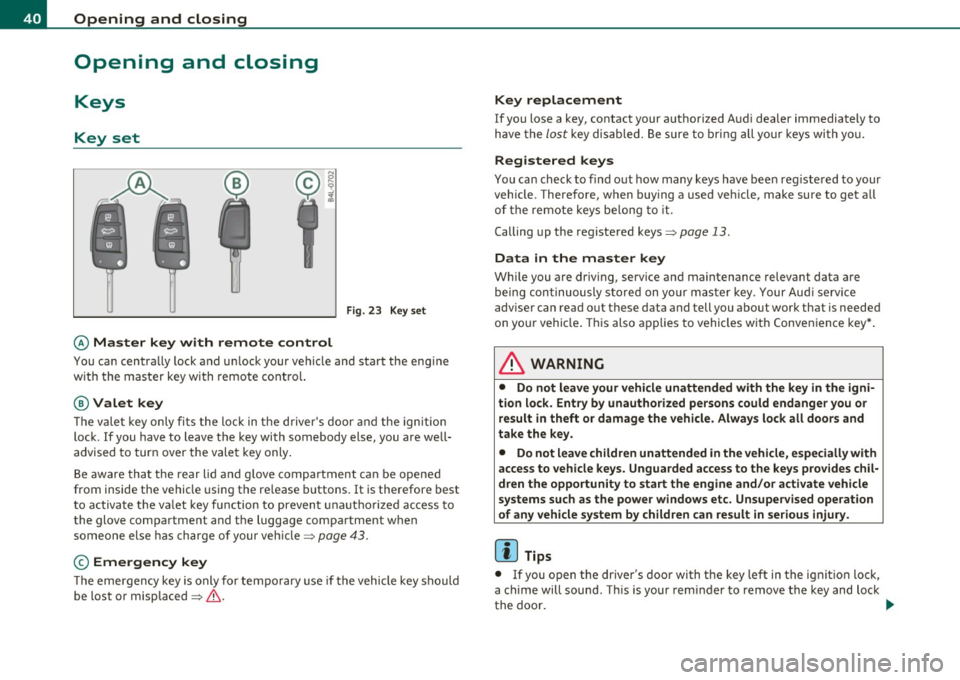
Fig. 23 Key set
© Ma ster key with remote control
You can centrally lock and u nlock your vehicle and start the eng ine
with the master key with remote cont ro l.
@ Valet key
The v alet key only fi ts the loc k in t he d river's doo r and the ignition
lock. If you have to leave the key with somebody else, you are well
advised to tur n over the vale t key only .
Be aware tha t the rear lid a nd g love compa rtment ca n be opened
from inside the vehicle using the release b uttons . It is therefore best
t o activ ate t he va let key fu nction to preven t unauth oriz e d ac cess to
the glove compartment and the luggage compartment when
someone else has charge of your vehicle=>
page 4 3.
© Emergency key
Th e emergency key is only for tempo rary use if the vehicle key should
be lost or misp laced =>
&.
Key replacement
If you lose a key, contact your authorized Aud i dealer immediately to
h ave the
lost key disab le d . B e sure to bri ng all you r keys wi th yo u.
Registered keys
You can check to find out how many keys have been reg iste red to your
vehicle. Therefore, when b uying a used veh icle, make sure to get all
of the remote keys be long to it.
Calling up the registered keys=>
page 13.
Data in the master key
Wh ile you are driv ing, service and maintenance relevant data are
be in g con tinuously s tored on yo ur mast er key. Your Aud i serv ice
adviser can read out these data and tell you about work that is needed
on yo ur vehi cle. T hi s also app lies to vehi cles w it h Conve nience key* .
& WARNING
• Do not leave your vehicle unattended with the key in the igni
tion lock. Entry by unauthor ized persons could endanger you or
result in theft or damage the vehicle. Alway s lock all doors and
take the key.
• Do not leave children unattended in the vehicle, especially with
access to vehicle keys. Unguarded access to the keys prov ides chil
dren the opportunity to start the engine and /or a ctivate vehicle
systems such as the power windows etc. Unsupervised operation
of any vehicle system by children can result in serious injury .
[ i ] Tips
• If you open t he dr iver's doo r wi th t he key left in the igni tion lock ,
a ch ime will sound. Thi s is your reminder to remove the key and lock
the doo r. _.,,
Page 43 of 390
• For security reasons, replacement keys are only available from
Audi dealers. •
Master key with remote control
The remote control allows you to lock or unlock the
vehicle electronically .
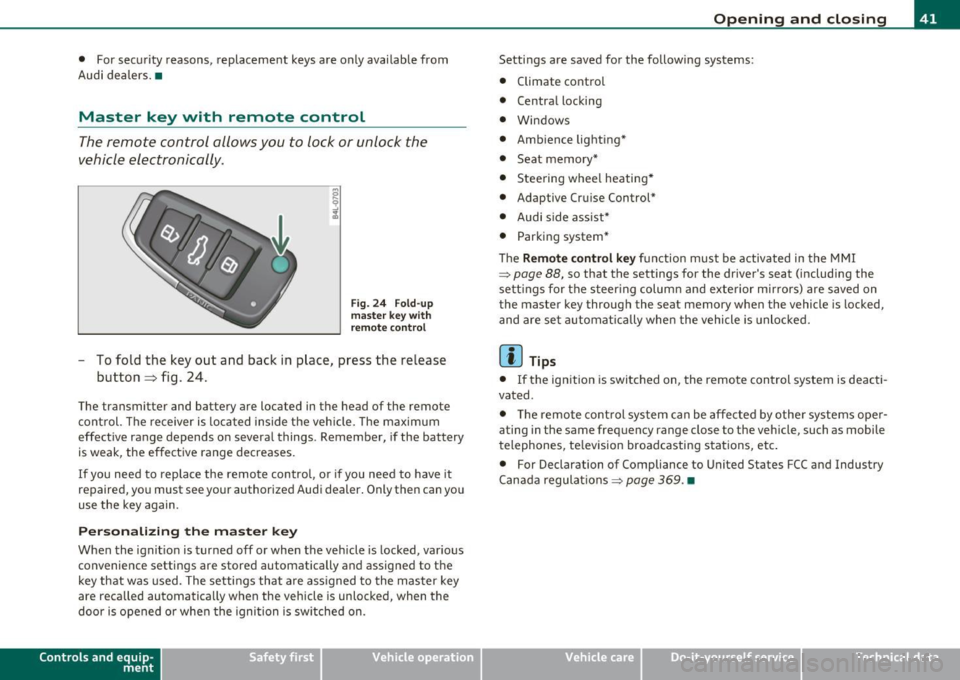
Fig. 24 Fold-up
master key with
remote control
- To fold the key out and back in place, press the release
button~ fig. 24.
The transmitter and battery are located in the head of the remote
control. The receiver is located inside the vehicle. The maximum
effective range depends on several things . Remember, if the battery
is weak, the effective range decreases.
If you need to replace the remote control, or if you need to have it
repaired, you must see your authorized Audi dealer. Only then can you
use the key again.
Personalizing the master key
When the ignition is turned off or when the vehicle is locked, various
convenience settings are stored automatically and assigned to the
key that was used. The settings that are assigned to the master key
are reca lled automatically when the vehicle is unlocked, when the
door is opened or when the ignition is switched on.
Contro ls a nd e quip ·
m en t Vehicle
OP-eration
Opening and closing
Settings are saved for the follow ing systems:
• Climate control
• Central locking
• Windows
• Ambience lighting*
• Seat memory*
• Stee ring wheel heating*
• Adaptive Cruise Control*
• Audi side assist*
• Parking system*
Th e
Remote control key function must be activated in the MMI
~ page 88, so that the settings for the driver's seat (including the
settings for the steering column and exterior mirrors) are saved on
the master key through the seat memory when the vehicle is locked,
and are set automatically when the vehicle is unlocked.
[ i ] Tips
• If the ignition is switched on, the remote control system is deacti·
vated .
• The remote control system can be affected by other systems oper·
ating in the same frequency range close to the vehicle, such as mobile
telephones, television broadcasting stations, etc.
• For Declaration of Compliance to United States FCC and Industry
Canada regulations~
page 369. •
Vehicle care Do-it-yourselt service iTechnical data
Page 45 of 390
- Place the cov er w ith t he new battery on t he k ey bas e and
press bot h parts together .
For the sake of the environment
Dispose of dead batter ies proper ly so as not to po llute the envi ron
ment.
(I) Tips
Th e replaceme nt ba ttery mus t be the same spec ifica tion as the
orig inal. •
Electronic immobilizer
The immo bili zer helps t o prevent unauth ori zed use of
your v ehicl e.
A compu ter chip ins ide you r key au toma tically deac tiva tes the elec
tr on ic immob ilizer whe n you inse rt the key in the ignition lock, o r on
vehicles with Convenience key *, when the key is inside the ve hicle.
W hen you remove the key from the ignition lock, or on vehicles with
Conven ience key, when you remove the key from the vehicle, the elec
tr on ic immo biliz er is a utomat ic al ly activa ted once aga in.
& WARNING
Always take the key with you when you leave the vehicle . The key
can di sarm the elect ronic engine immobilizer and permit an unau
thor ized per son to start the engine and enable operation of the
vehicle systems such a s power w indow or Panoramic sliding
s unroof* leading to serious personal injur y.
(I) Tips
• Th e immobi lize r prevent s unauthori zed use of t he ve hicle. The
vehicle cannot be started if an unauthorized key is used. The vehicle
Controls and equip
ment Safety first
Opening and closing
may not start if another rad
io dev ice such as a key for another vehicle
or a transponder is loc ated on t he key ring.
• For Declaration of Compliance to United States FCC and Industry
Ca nad a regulat ions :::>
page 369. •
Valet key function
The val et key function prevents unauthorized persons
from opening the glove compartment or rear lid.
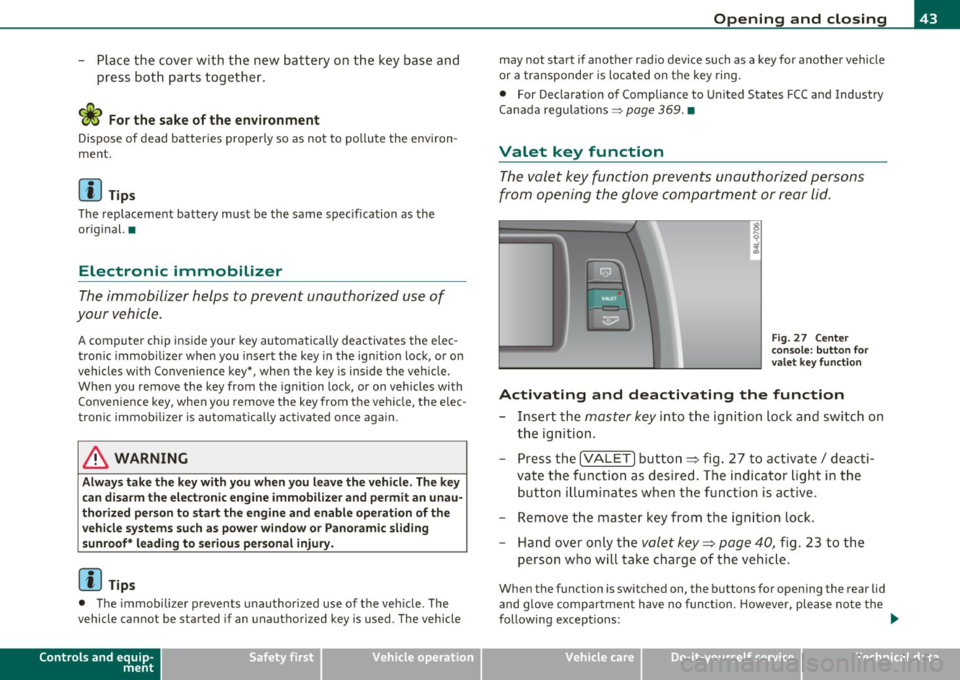
Fig. 27 Center
cons ole : butt on for
v a le t key functio n
Activating and deactivating the function
- Insert t he master key into the ignition lock a nd switch on
t h e ign it ion .
- Press th e
[VA LET] button~ fig . 27 to activate/ deac ti
va te the fu nction a s desired. The indicato r light in t he
butto n illum inates when the f uncti on is ac tive.
- Remove the mas ter key f rom t he ign ition lock.
- Hand ove r on ly t he
valet key~ page 40, fig. 23 to t he
person w ho will take charge of the vehi cle.
Whe n the function is switched on, the b uttons fo r open ing the rear lid
and glove comp artment have no funct ion. However, please note the
following exceptions:
~
Vehicle care Technical data
Page 46 of 390
Opening and closing
Exceptions
If the ignition has been switched on using the master key, you can
st ill open the glove compartment and the rear lid.
As long as the ignit ion is switched off, you can still open the rear lid
using the rear lid button on the
master key c:5 . The same holds true
for using the rear lid release handle in conjunction with the Conve
nience key* .
For this reason, be sure to only hand over the
valet key to the person
who wi ll take charge of your vehicle.
[ i J Tips
Be sure to activate the function before handing over the valet key to
someone else . The valet key only fits the lock in the driver 's door and
the ignition lock. •
Power locking system
General description
The power locking system locks or unlocks all doors and
the rear lid simultaneously .
The power locking system in your vehicle incorporates the following
functions :
• Central locking function
• Selective unlock feature=>
page 47
• Remote contro l feature => page 41
• Convenience key*=> page 53
• Anti -theft alarm system=> page 55
All the doors and the rear lid are locked by the central locking system
when you lock the vehicle. You can set whether generally only the
dr iver's door or all doors and the rear lid should be unlocked when yo u open the vehicle in
the MMI menu
Central locking to suit your indi
vidual desires =>
page 47.
Unlocking the vehicle
You can unlo ck the vehicle from outside e ither by using the remote
control
or by insert ing and turning the key in the driver 's door lock.
When you
unlock yo ur vehicle:
• The anti-theft alarm system is deactivated briefly.
• Th e vehicle inter ior lights illuminate for approximately 30
seconds.
• All turn signal lights will flash twice when the car is unlocked .
• After unlocking the vehicle, you have 60 seconds to open a door or
the rear lid. Afte r 60 seconds , the ve hicle automatically locks and the
anti-theft alarm system activates again.
Th e rear lid can be locked or unlocked eithe r by using the remote
control
or by insert ing and turning the key in the driver's door lock.
Unlocking the vehicle with the remote control will on ly
unlock the
rear lid, to
open it, the lid hand le needs to be pressed.
Locking the vehicle
You can lock the vehicle from outside e ither by using the remote
control
or by inserting and turning the key in the drivers's door lock.
When you
lock the veh icle:
• All doors and the rear lid are locked.
• All turn signal lights will flash once when the car is locked.
• The anti-theft alarm system is activated . The horn of the anti
theft alarm system w ill sound and the anti -theft alarm system readi
ness light, located in the upper part of the driver's door panel, will
start to blink .
• The vehicle interior lights turn off .
Unlocking and lock ing with Convenience key*
On vehicles which are equipped with the Convenience key* authoriza
tion system, the doors are unlocked
without a key by means of a prox-
im ity sensor in the door handle. The doors are similarly locked ....
Page 52 of 390

Open ing and closing
(I) Tip s
• If the rear lid is open or not properly closed when the ignition is
turned on, the door and rear lid warning ~
page 24 appears in the
instrument cluster display.
• Should you not be able to open the rear lid as described, make sure
the valet key function is not activated
~ page 43. •
App lies to veh icles: with automatic rear lid /trunk lid ope rat ion
Automatic rear lid/trunk lid operation
The trunk lid can be opened and closed automatically.
F ig. 35 Drive r's door:
Unlocking the re ar lid
F ig. 36 Lock ing sw itch
i n t he rear lid
Op ening rear lid
- Press the middle button e:> on the remote key for at least
one second, or
- Press the unlock button
e:> in the driver's door=> fig . 35,
or
- Press the hand le on the rear lid =>
page 49, fig. 34.
- The opening process
is stopped immediate ly if the middle
button
e:> on the remote key is pressed again for at least
one second or the unlock button
e:> in the driver's door is
pressed again or the handle in the rear lid is pressed again .
-Middle button in the remote key and unlock button in the
driver's door:
The opening process is continued by
pressing one of the buttons again .
Handle in the rear lid: the rear lid is closed again by
pressing the hand le again =>& .
Closing rear lid /trunk lid
Press the close button in the open rear lid=> fig . 36. The
trunk lid moves to the closed position by itself and soft
close locks it automatically =>& .
- The closing process
i s stopped immediately if the close
button in the rear lid is pressed again.
- By pushing the button again, the rear lid is opened again.
Saving the opening angle of the rear lid
- Bring the rear lid manually or automatically to the desired
opening position and leave it in this position. ..,_
Page 55 of 390

If the child safety lock has been activated on the left and on the right
side, t he rear cont rols are locke d on veh icles wi th re ar a ir-c ondi
tioning* . Dashes" ---" are shown in the displays for the rear climate
controls, and t he rear ai r-conditioning can only be operate d from the
cl imate contro ls in the cabin ::::;, page 116 .
[I) Tips
• In order to activate t he child safety lock on the left and the r ight
side, yo u have to press the two safety b uttons in success ion.
• Make certain that the c heck light comes on in t he correspondi ng
safety switch when the c hild safety loc k is activated. •
Convenience key
App lies to vehicl es: w ith Conven ience key
Description
A ccess and vehicl e opera tion based on: Mas ter key
remains in driver 's pocket.
Th e Conve nience key vehicle a uth o rization syste m allows keyless
unlocking, lock ing and start ing of the vehicle. You only have to car ry
th e master key on your perso n.
It makes no d ifference whether the master key is i n your jacke t pocke t
or in your br ief case . As soon as you approach yo ur vehicle, the Conve
nie nce key recog nizes the reques t fo r access, checks for author izat io n
and enab les the fo llow ing functions:
• Unlo cking the vehicle ::::;, page 54.
• Locking the vehicle ::::;, page 54.
• Switching on ignition and start ing the eng ine by press ing the
[ S T ART ] button; the master key does not have to be in t he ign it ion
switch::::;, page 12 7.
Controls and equip
ment Safety first
Opening and closing
& WARNING
•
When you lock your vehicle from outside, nobody -especially
children - should remain in side the vehicle . Remember, when you
lock the vehicle from the outside the windows cannot be opened
from the inside .
• When you leave the vehicle, always remove the ignition key
and take it with you. This will prevent pa ssenger s (children, for
example ) from accidentally being locked in the vehicle should
they accidentally press the power locking switch in the front
doors .
• Do not leave children in side the vehicle unsupervised. In an
emergency it would be impossible to open the doors from the
outside w ithout the key .
[ i ] Tips
• In order for the Convenience key to function , you must a lways
carry the master key with yo u.
• In order to be able to unloc k or loc k the vehicle, the a utho rized
master key must be within a range of about S feet (1.5 meters) from
the door o r the rear lid.
• Of course, you can still unlock and lock your veh icle using the
buttons on the master key . T he se lecto r lever must be in the P posi
tion .
• F or Declar ation o f Compliance to Uni ted St ates FCC a nd I ndu stry
Canada regulations::::;, page 369 . •
Vehicle care Technical data
Page 57 of 390
& WARNING
• Wh en you lock your vehicle from outs ide , nobody - especially
c hildren - should remain in side the vehicle . Remember , when you
lo ck the vehicle from the outside the windows cannot b e opened
from the inside .
• When you lea ve the vehicle, always remove the ignit ion key
and take it with you. This will prevent pa ssenger s (c hildren, for
e xample ) from a ccidentally be ing locked in the vehicle should
they accidentally pres s the power locking switch in the front
doors .
• Do not leave children inside the vehicle unsuperv ised . In an
e mergency it would be impossible to open the door s from the
outside without the key.
[I] Tips
It is not possible to re -open the door fo r a b rief period directly after
clos ing it . This a llows you to ensure that the doors are p roper ly
loc ked .•
Anti-theft alarm system
The an ti-theft alarm triggers an al arm if any one
attempts to break into the vehicle .
The a nti-theft alarm system trigge rs an a udible a larm and t urns o n
th e emergen cy flas her if an unau thori zed inte rfe rence wi th t he
vehicle is sensed by the system.
How is the anti-theft alarm system sw itched on?
T he anti-theft alarm system is switched on when you lock the vehicle.
Th e system is activa ted app rox ima tely 30 seconds after the vehicle is
locked. The indicator light on top o f the doo r trim start flashing
r a pidly fo r 30 seconds and then blink s low ly .
Controls and equip
ment Safety first
Opening and closing
How is the anti-theft alarm system switched off?
Th
e an ti- the ft alarm system is switche d off on ly when yo u unlock your
veh icle . If you do not o pen a door wit hin 60 seconds after you have
unlocked wit h the remote control , the vehicle will lock itself again
automa tically .
When will the anti-theft alarm system be
triggered?
When the vehicle is locked, the a larm system monitors and protects
the following parts of the veh icle:
• engine compartment
• lu ggage compa rtment
• doors
• ignition
Whe n the system is activated, the alarm will be triggered if one of the
doors, the engine hood or the rear lid are opened, or if the ignition is
t ur ne d on . The anti-t heft a la rm system will a lso go off when the
ba ttery is d isco nnected.
You can also trigger the alarm by pressing the PANIC button on your remote con trol. This will alert o ther peop le in case of eme rge ncy.
Press the
PANIC butto n aga in to turn off the a larm .
How is the anti-theft alarm switched off when
triggered?
Th e alarm sys tem is swi tched off whe n yo u un lo ck the veh icle o r whe n
the ignit ion is sw itched on . The a larm will also switch itself off when
i t comes to the end o f its cy cl e.
Emergency flasher and horn
Th e emerge ncy fl ashe r will blink briefly and the hor n sounds whe n
the doo rs, engine hood and rear lid a re prope rly closed.
If the eme rgency flashers do not blink, o r th e horn does no t soun d,
check the doo rs, eng ine hood and rear lid to make s ure they a re prop
er ly closed.
If you close a door, the hood o r the rear lid with the anti -
Vehicle care Technical data
Page 58 of 390
![AUDI Q7 2010 Owner´s Manual Opening and closing
theft alarm switched on, the emergency flashers will blink and the ....
horn will so und only after you have closed the doo r o r li d.
[ i ] Tips
For the](/img/6/40275/w960_40275-57.png "AUDI Q7 2010 Owner´s Manual Opening and closing
theft alarm switched on, the emergency flashers will blink and the ....
horn will so und only after you have closed the doo r o r li d.
[ i ] Tips
For the")
Opening and closing
theft alarm switched on, the emergency flashers will blink and the ....
horn will so und only after you have closed the doo r o r li d.
[ i ] Tips
For the anti -t h eft a larm system to function p rope rly, ma ke sure all
vehicle doors a nd windows are closed before leaving the vehicle .•
Power windows
Controls
Switches for front door windows
@ operates the window in the driver's door.
Fig. 42 Drive r's doo r:
power wind ow
switche s
® operates the window in the front passenger 's door .
Switches for rear w indows
© operates the left rear window .
® operates the right rear window .
Safety switch
© Safety switch for rear w indow operat io n.
& WARNING
• Do not leav e children unatt ended in the vehicle , especially with
a cces s to vehicle key s. Un supervi sed use of the keys can re sult in
starting of the engine and use of vehicle sy stems such as power
window s, etc . which could result in seriou s injury .
• Remember -you can still open or close the power windows for
about ten minutes after the ignition is switched off . Only when
e ith er of the front doors are opened are the power windows
s witched off.
• Be careful when clos ing th e window s. Check to see that no one
is in the way, or serious injury could re sult !
• Always remo ve the ign ition key whenever you leave your
vehicle.
• If you lock your vehicle f rom the outside, no one, especially
children, should remain in the vehicle.
• Do not st ick anything on the windows o r the windshield that
may interfere with the driver 's field of vi sion .
[I] Tips
In a ddit ion to the sw itches in t he driver's doo r there is a separate
switch in each door for the power window in that door =>
page 57,
fig. 4 3. a
Switches in the driver 's door
The driver can operate all windows.
If the respective sw itch is pus hed or pu lled the w indow will
open or close . T he power window switches have a
two-posi-
tion function : ..,
Page 60 of 390
Opening and closing
Opening the windows
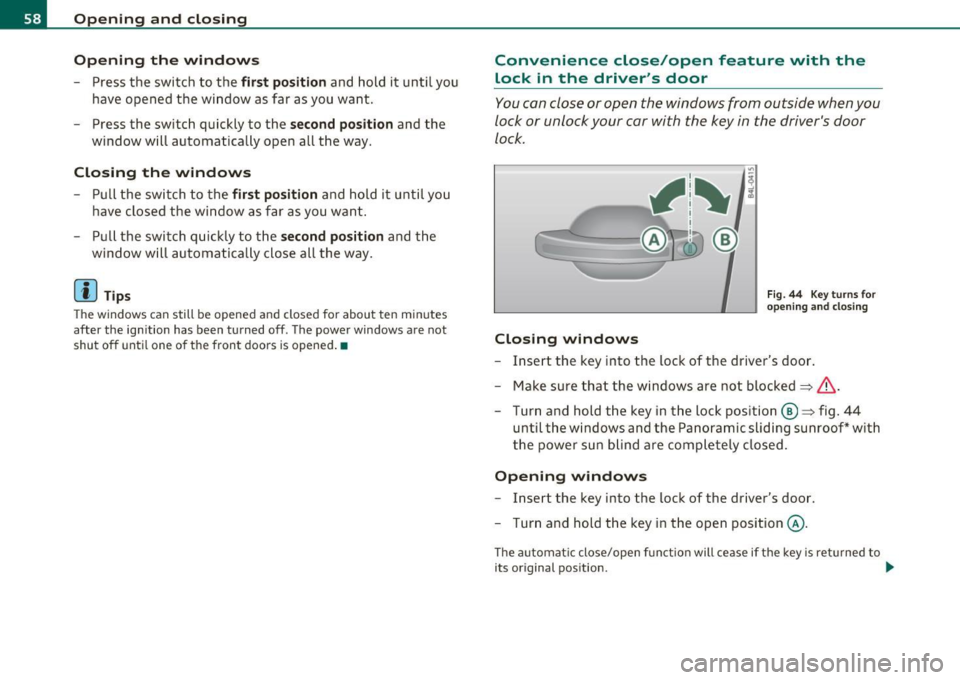
-Press the switch to the first position and hold it until you
have opened the window as far as you want.
- Press the switch quickly to the
second position and the
window will automatically open all the way.
Closing the windows
Pull the switch to the first position and hold it until you
have closed the window as far as you want .
- Pull the switch quickly to the
second position and the
window will automatically close all the way .
[ i ] Tips
The windows can still be opened and closed for about ten minutes
after the ignition has been turned off . The power windows are not
shut off until one of the front doors is opened .•
Convenience close/open feature with the
lock in the driver 's door
You can close or open the windows from outside when you
lock or unlock your car with the key in the driver's door
lock.
Closing windows
Fig . 44 Key turns for
opening and closing
-Insert the key into the lock of the driver's door .
- Make sure that the windows are not blocked
=> &.
- Turn and hold the key in the lock position @=> fig. 44
until the windows and the Panoramic sliding sunroof* with
the power sun blind are completely closed .
Opening windows
-Insert the key into the lock of the driver's door.
- Turn and hold the key in the open position @.
The automat ic close/open function will cease if the key is returned to
its original position . .._
Page 61 of 390
& WARNING
• Be careful when closing the windows . Check to see that no one
is in the way , or seriou s injury could re sult!
• Always read and heed WARNING~
& in "General description "
on
page 44. •
Reactivating the system after battery
disconnection
If the vehicle batt ery is disco nnec ted and then reconnec ted,
the automat ic closing and open ing f unction will not wor k
unt il it is react ivated . To reactivate th is feature , perform the
fo llow ing steps :
Reactivating close/open feature
-Pu ll an d ho ld t he power window switc h until t he window is
com pletely clo sed .
- Release the swi tch.
- Pull t he switch again for one second . The a utomat ic
closi ng/opening is now reactivated .•
Panoramic sliding sunroof
Ap plies to ve hicle s: w ith Panor am ic s lidin g sunr oof
Description
The Pano ram ic sli ding sunroof of two individual glas s roof segments,
w hich can be adjusted e lec trically independen tly of each ot he r.
T he front segmen t can be tilted and s lid open . The rear segmen t ca n
be tilted, but it cannot be slid open .
Contro ls a nd e quip
m en t Vehicle
OP-eration
Opening and closing
The Panoramic slid ing sunroof is operated by the driver or pa ssen ger
w hen the ig nitio n is o n with a rot ary switch ( for the fro nt roof
segment) and a rocker switch (rear roof segment) .
After the ignition has b een switch ed off , the Panoramic slid ing
s u nroof can still be ope ned o r closed for abo ut 10 minu tes. Howeve r,
as soon as the d rive r's o r pa ssenger's door is opened, the sw itches for
t he Panoram ic sliding s unroof are i noperative .
0 Note
You should always close the Pa n oramic slid ing su nroo f whe n you
leave your vehicle. Sudden ra in can drench the in terior equ ipmen t and
damage the electronic conven ience feat ures in your vehicle .
[ i ] Tips
If you park your ve hicle in the s un, we recommen d that you clo se both
s u n blinds ~
page 61. •
App lies to v ehicl es: w ith P anoramic sl id in g sun roof
Tilting/sliding open Panoramic sliding
sunroof
Vehicle care
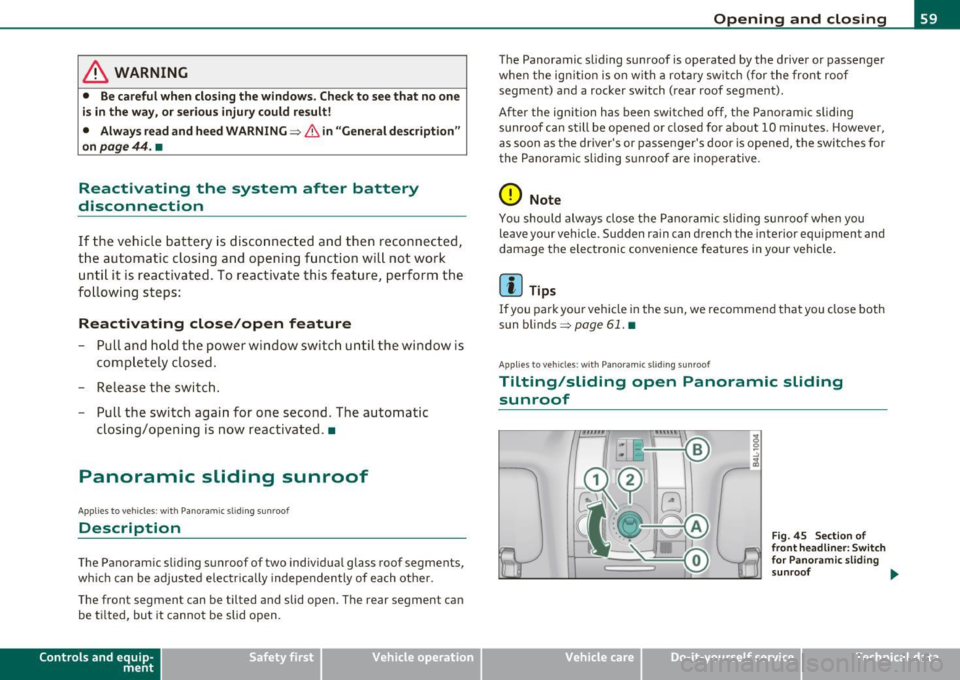
F ig . 45 Se ction of
fr ont headliner : Switch
for Pa no ram ic sl id ing
sunroof ...
Do-it-yourselt service iTechnical data