display AUDI Q7 2010 Owner´s Manual
[x] Cancel search | Manufacturer: AUDI, Model Year: 2010, Model line: Q7, Model: AUDI Q7 2010Pages: 390, PDF Size: 93.04 MB
Page 146 of 390
1111..__A_ d_a_ p,__ t_iv _ e_ C_r _u _ i_ s _e _ C_ o_ n_t _ r_ o _ L ___________________________________________ _
Appli es to veh icles : wi th Adap tiv e Crui se Con tro l
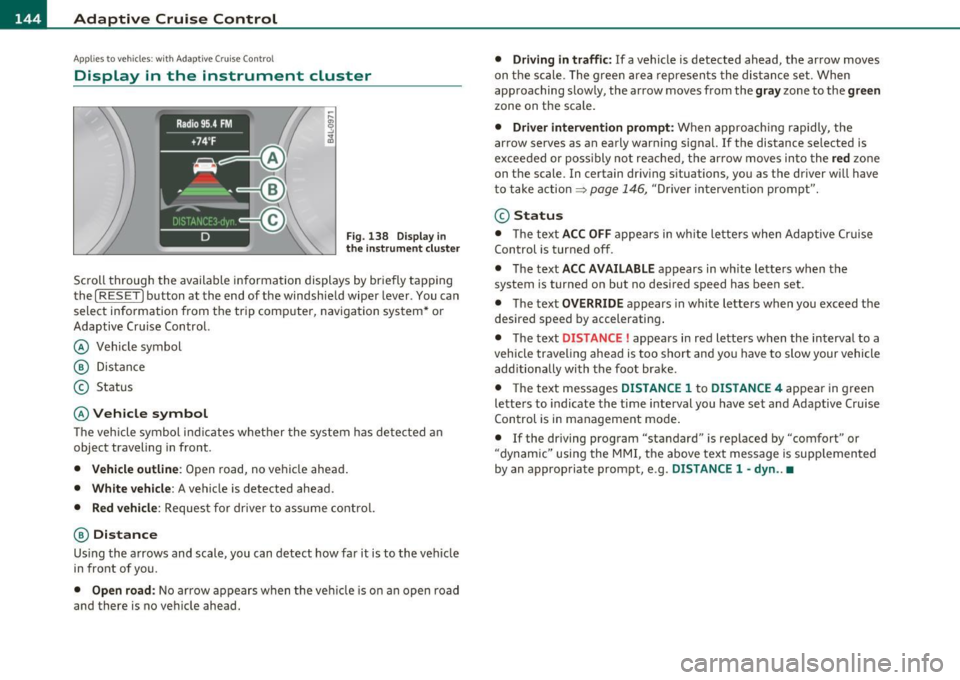
Display in the instrument cluster
Fig. 138 Dis pl ay in
the instrum ent clu ster
Scroll throug h the available informa tion displays by briefly tapping
the
[ RESE T] button at the end of the windshie ld wiper lever . You can
select information from the tr ip comp uter, navigation sys tem * or
Adaptive Cr uise Control.
@ Vehicle symbol
@ Dis tance
© Status
© Vehicle symbol
Th e veh icle symbol i ndi cates w het her the sys tem has de te ct ed an
object traveling in front .
• Vehicle outline : Open road, no vehicle ahead .
• White vehicle : A vehicle is detected ahead.
• Red vehicle : Request for driver to ass ume control.
® Distance
Us ing the a rrows and scale, you can det ect how far it is to the vehi cle
in front of you.
• Open road : No ar row app ears when the ve hicle is o n an o pen road
and there is no ve hicle ahead.
• Driving in t raffic : If a vehicle is detected ahead, the arrow moves
on t he sc ale. The g ree n area represents the distan ce set . When
approaching slow ly, the arrow moves from the
gray zone to the green
zone on the scale .
• Driver intervention prompt: When appro aching rapid ly, the
arrow serves as an early warn ing signa l.
If the distance selected is
excee ded or poss ibly no t reache d, t he arrow moves in to the
red zon e
on t he scale. In certain dr iving s ituations , you as the driver wi ll have
t o take action =>
page 146, "Driver in tervent io n prompt".
@ Status
• T he text ACC OFF ap pears in wh ite le tters when Ad aptive Cr uise
Control is turned off .
• T he text
ACC AVAILABLE appears in wh ite lette rs when t he
system is turned on but no desired speed has been set .
• T he text
OVERRIDE appears in white l etters when you exceed the
desired speed by accelerating .
• T he text
DISTANCE! appears in red letters when the in terva l to a
vehicle traveling ahead is too short and you have to slow your vehicle
add itionally with the foot brake .
• T he te xt messages
DISTANCE 1 to DISTANCE 4 appea r in gree n
le tte rs to indicate the time interval you have se t and Adaptive Cruise
Con trol is in management mo de.
• If the driving program "standard" is replaced by "comfort" or
"dynam ic" usin g the M MI, the above text message is supp lemen ted
by an appropriate prom pt, e .g .
DISTANCE 1 -dyn .. •
Page 147 of 390

Adaptive Cruise Control IJ!II __________________________ ...:....:..;:_....;_,,!,_ ______ _
App lies to vehicl es: wi th Adaptive Cru ise Con trol
System status indicator
The text messages and symbols shown in this area of the
displ ay are not displayed permanently .
Time intervals (such as e::::, ____ e::::,)
Fig. 139 Sy stem
st atu s indicator
The d ifferent symbols for the time interva ls (distance) appear if you
change the settings~ fig . 139.
Thr ee wh ite dots .. . ap pear if a set ting c annot be made w ith the o pe r
ating lever . The following are possible reasons
• If you pull the control lever towa rds you to resume speed but no
requested speed was set .
• If you push the lever up to increase (or down to re d uce) speed
when no speed has been set previo usly .
• If yo u push the lever up to increase (o r down to red uce) spee d and
this speed is outside the 20 to 95 mph (30 to 150 km/h) speed ra nge .
ACC not available
The text message ACC not ava ilable appears, for examp le, if the
t empe ra tu re o f the brakes is excessive. Adap tive Cru ise Con trol is
temporar ily not avai lab le. A warning tone sounds as a reminder .
Controls and equip
ment Safety first
ACC not available !
Th
e text message ACC not available! appears in the event o f a
ma lfunction . Adaptive Cru ise Contro l is tur ned off .
A warn in g tone
so unds as a reminder. Have the system inspected by a q ualified dea l
ersh ip .
ACC sensor blocked !
The text message ACC sensor blocked ! appears w hen the ACC System
can no longer acc urately detect vehi cles movi ng up ahead in your lane
o f travel. Adaptive C ruise Cont rol is tu rned off. A wa rning tone a lso
so unds as a reminder .
T o decide w hethe r it is ne cess ary to switch off the ACC (ACC senso r
blocked
!) or if it is only a temporary condition (ACC Functionally
limited), the sys tem w ill also takes into considera tion the outside
temperature and/or the w indshield wiper operation .
T he ACC sensor is d irty or b locked (e .g . leaves, snow).
Th e ACC senso r is lo ca ted be hind t he a rea to the right o f th e front
license plate.
If the ACC sensor is dirty or blocked, clean the area to
restore sy stem o per ation.
ESP activation
T he text message ESP activation appears if the Electro nic St abil iz a
tion Program (ESP) has intervened. In this case the Adaptive Cruise
Con trol is au tomat ica lly tu rned off. This is accompan ied by a warn ing
tone.
Speed
The set speed in mph (Canada km/h) always appears when saving or
c hangi ng the speed in Ad aptive C ruise Cont rol~
page 138, "How is
the speed stored?" and~
page 138, "Changing stored speed" .
ACC functionality Limited
The message ACC functionality limited appears when the ACC
System does no t detec t any moving vehicles up a head in your lane of
trave l for a longer period of time. Dur ing t his time, the d istance to
movi ng ve hicles in you r lan e of tra ve l up ahead i s not being m ain-
~
Vehicle care Technical data
Page 148 of 390

llffl..__A_ d_a_ p,__ t_iv _ e_ C_r _u _ i_ s _e _ C_ o_ n_t _ r_ o _ L ___________________________________________ _
tained. The ACC system is not switched off, and increased attention
to the traffic situation is absolutely necessary. The followi ng may be
reasons why the message
ACC functionality limited appears:
• The ACC sensor is dirty . The ACC system is not reacting, or is not
reacting correctly, to moving vehicles up ahead in yo ur la ne of travel.
• There may be very light traffic on and there is nothing that marks
the side of the road (for example , guard rai ls, traffic signs, trees). As
soon as a moving vehicle up ahead is detected aga in, ACC becomes
active again and the message disappears.
The ACC sensor is located behind the area to the right of the front
license plate.
If the ACC sensor is dirty or blocked, clean the area to
restore system operation .
Parking brake !
The text message Parking brake! appears, when the parking brake is
applied. ACC is turned off. A warning tone so unds as a reminder.
Stationary object ahead
The text message Stationary object ahead appears, when you want
to activate the system and there is a stationary vehicle or an object
immediately in front of you.
Gradient too steep
The text message Gradient too steep appears when the max imum
gradient for proper ACC operation has been exceeded. Adaptive
Cru ise Control is turned off . A warning tone also sounds as a
reminder.
ACC off: manual control !
The text message ACC off: manual control! appears after the vehicle
has been brought to a standst ill by the Adapt ive Cruise Control. In
this case you must depress the brake pedal to prevent the vehicle
from rolling . A warn ing tone sounds as a reminder.
Selector lever position I
Th e text message Selector lever position! appears when the selector
lever is moved to position
N. In th is position, Adaptive Cruise Cont rol
is not available. •
Applies to vehicles : w it h Adap tiv e Cru ise Control
Driver intervention prompt
The driver intervention prompt calls on the driver to take
over the situation.
Fig . 140 I nstrument
cluster: Driver inter·
vention prompt
In certain situations, the brak ing power of the Adaptive Cruise
Control is not enough to maintain an adequate distance to the vehicle
up ahead. In these situations, the Adaptive C ruise Control calls the
driver to take action.
The
driver intervention prompt a lerts you vis ually and aud ibly to take
over .
• A red vehicle is shown in the instrument cluster display
:::::,fig. 140.
• T he text
DISTANCE! appears in the status line.
• The indicator light
<::::>11, ,~ in the speedometer blinks red .
• A warning tone sounds.
Page 151 of 390
__________________________________________ A_ d_a""" p:....- t_iv _ e_ C_ r_ u _is _ e_C_ o_n_ t_ r_ o_ L_....J_
A pp lies to veh icles : with Adapt ive C ru ise C ontro l
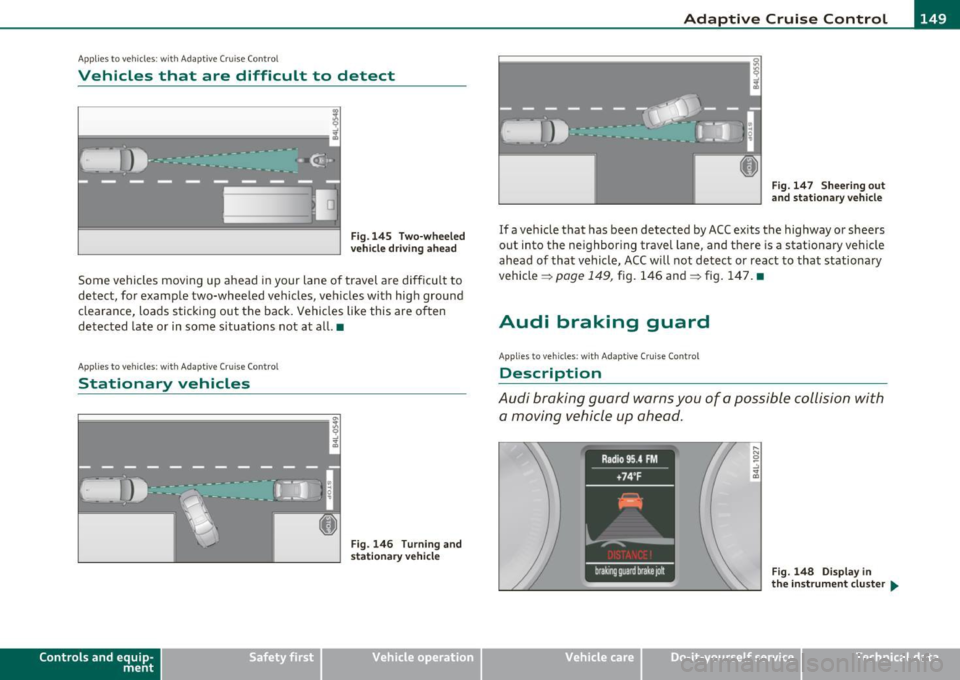
Vehicles that are difficult to detect
------------------1
Fig .145 Two-wheeled
vehicle driving ahead
Some vehicles moving up ahead in your lane of travel are difficult to
detect, for example two-wheeled vehicles, vehicles with high ground
clearance, loads sticking out the back. Vehicles like this are often
detected late or in some situations not at all. •
Applies to v ehicles: with Adap tiv e Cruis e Contro l
Stationary vehicles
Contro ls a nd e quip
m en t
Fig. 146 Turning and
stationary vehicle
Vehicle OP-eration
Fig. 147 Sheering out
and stationary vehicle
If a vehicle that has been detected by ACC exits the highway or sheers
out into the neighboring travel lane , and there is a stationary vehicle
ahead of that vehicle, ACC will not detect or react to that stationary
vehicle =>
page 149, fig. 146 and=> fig. 147. •
Audi braking guard
App lies to ve hicles: w ith Adaptive Crui se Cont rol
Description
Audi braking guard warns you of a possible collision with
a moving vehicle up ahead.
Fig. 148 Display in
the instrument cluster ...
Vehicle care Do-it-yourselt service iTechnical data
Page 152 of 390
1111....__A_ d_ a_,_ p_t _i_ v _e _ C_r_ u_ i_ s_ e_ C_ o_ n_ t_ r_ o_ l __________________________________________ _
The Audi braking guard is active from a speed of approx. 20 mph
(30 km/h) and works within the system limits=>
page 147 even when
the Adaptive Cruise Control is deactivated.
A radar sensor is built into the front of the vehicle=>
page 136,
fig. 129. The system is intended to measure the distance to reflective
surfaces. If a measurement is not possible, the system does not
respond.
When the measurement has been taken, the system can recognize a
possibly hazardous situation, for example, when a vehicle up ahead in
your lane of travel suddenly brakes or when your own vehicle is moving at high speed towards a much s lower vehicle up ahead . As
soon as the system senses that a possible collision w ith the vehicle up
ahead can only be avoided by immediate full brake application or by
an avoidance maneuver, a warning appears.
The system has a default response time to be able to signal before a
collision occurs. This system response time is automatically reduced
if you accelerate actively, for example to join a highway . Braking,
transverse acceleration and the steering ang le can lead to a reduced
system response time . The warning is deactivated if you begin to
overtake with full acceleration.
Th e system can make you aware of two different hazardous situa
tions:
Distance
T he distance warning is given if the system calculates that there is not
enough distance to the vehicle up ahead a period of more than 5
seconds. If the distance is less than 30 feet (9 meters) at 50 mph (80
km/h) , fo r example, an optical disp lay comes on in the inst rument
cluster=> fig. 148.
If the vehicle ahead brakes sharply, Audi braking guard cannot he lp
you to avoid a coll is ion, even in the case of an immed iate response.
T ake immediate action to avoid the collision and increase the
distance to the vehicle up ahead.
Speed
If there is a much s lower vehicle moving up ahead in your lane, or if
the vehicle a head brakes sharply, the Audi braking guard calculates
the point from which a collision can only be avo ided by full braking or
by an avo idance maneuver. If a warn ing does sound, a possible colli
sion with the vehicle in front can only be avoided through an evasive
maneuver or by braking.
The warn ing is given in two stages:
• Pre-warning : A visual display appears in the instrument cluste r
and a warning tone sounds .
• Acute warning: If you do not respond to the pre-warning, the
second stage warni ng is given . A quick brake application helps to
direct your attention to the road and traffic situation .
Under heavy braking, the brake assistant=>
page 136 also helps you
benefit from maximum braking effic iency.
& WARNING
Inattention can cause collisions, other accidents and serious
personal injuries.
• Always pay close attention to the traffic , even when the Audi
braking guard is switched on. The Audi braking guard provides a
warning but does not brake the car for you. You must apply the
brakes yourself!
• Always keep the safe and legal distance between your vehicle
and vehicles up ahead.
• Audi braking guard works within limits and will not respond
outside the system limits, for example when approaching a
stopped vehicle or stationary obstacle (end of a traffic jam or
vehicle that has broken down in traffic).
• Always remember that the radar sensor for the Audi braking
guard works within defined detection and range limits that may
prevent the proper detection of other vehicles. _,.,
Page 153 of 390

Adaptive Cruise Control -
----------------
& WARNING (continued)
• The r adar sen sor's function and range can be reduced b y rain ,
s now and heavy spray . Moving vehicl es up ahead may not b e
p romptl y detected or may not be detected at all .
• Always pay careful attention to th e traffic situation and be
ready to intervene and be ready to take complete control when
ever necessary.
• Refle cti ve surfaces including cr ash barriers or tunnel ent rances
may impair the function of the radar sensor .•
Applies to vehicle s: wit h A dap tiv e Cru is e Contro l
Settings in the MMI
The settings of the Audi braking guard are performed in
the MMI.
- Selec t: Funct io n button I CA R]> Systems *> Audi braking
guard .
• System -the Audi braking guard system can be switched On and
Off .
• Early warning -
the acoustic warn ing and the messages can be
s witched
On and Off .
(I] Tips
When handing ove r th e keys to another per son, the p revious settings
are adopted if the Audi braking guard is activated~ page
45. •
Controls and equip
ment Safety first
A
pp lies to vehicles : w ith Ad apt ive Cr uise Cont rol
Driver's information in the instrument
cluster display
braking guard brake jolt
Th is message appears when the Audi braking guard applies the
bra kes dur ing a second st age ( acu te) warn ing.
brak ing guard off
Thi s message appea rs when t he system has bee n deactivated v ia the
MMI. This message a lso appears briefly at each beginn ing of a t rip if
t he system is swit ched off.
Th is message also appears when the system is not available because
o f a mal function or i f ESP is switched to the Offroad
mode ~ page
252 . The system can no longer warn of an impending
co llision. •
Vehicle care Technical data
Page 160 of 390
1111....__A_ u_ d_i_ s_ id_ e_ a_s _s_ i_ s _t _________________________________________________ _
@ Signal on outside mirror does not light up
If you activate your turn signa l in driving situation @, the signal still
does not light up on the outside mirror~
& in "Safety tips" on
page 160. •
Applies to vehicles : w ith side assist
MMI settings
The basic brightness setting of the signal on the outside
mirror can be adjusted via the MMI.
-Select: Function button ( CAR j > Systems * > Audi side
assist .
The brightness of the signal l ight for both the info rmationa l and alert
stages is automatically adjusted to ambient light conditions . In addi
tion , you can adjust the
basic brightness separate ly, via the bright
ness function.
Whi le mak ing the adjustment, the new brightness setting is
displayed briefly . The br ightness d isplayed is that of the informa
tional stage signal. The alert stage signal br ightness is linked to the
info rmational stage signal brightness.
The informational stage signal brightness should be adjusted so that
you notice the signal illumination when you look in the outside
mirror, but not when you look forward through the windshield.
In very dark or light surroundings, the automatic brightness setting
adjusts signal light brightness to maximum or minimum intensity, as
needed. In circumstances such as these, you may not notice any
change in the brightness on the outside mirror when adjusting the
basic brightness.
You may not notice the change until lighting conditions are normal
again.
W Tips
• Side assist is not active when the basic br ightness is adjusted. The
signal light comes on brief ly to help you make the adjustment.
• Your settings are automatically stored and ass igned to the remote
control key being used. •
Appli es to vehicles: w it h si de assis t
General information
Side ass ist has limits and cannot detect vehicles under all road and
weather conditions . Please remember system limitations and never
rely on the system, especially when:
• driving through curves~
page 158,
• lanes a re of different width s~ page 159 . •
Ap plies to vehicles: w ith side ass ist
When driving through curves
Side assist cannot detect vehicles in curves with a turning radius of
less than 328 feet (100 m).
When driving through a curve, it is poss ible that side assist may
registe r a vehicle two lanes over, and the signal on the outside mir ror
will light up.•
Page 161 of 390
_________________________________________________ A_ u_d _ i_ s_id _ e_ a_s _s_ i_s _t __ _
App lies to vehicles : with sid e assist
Lane width
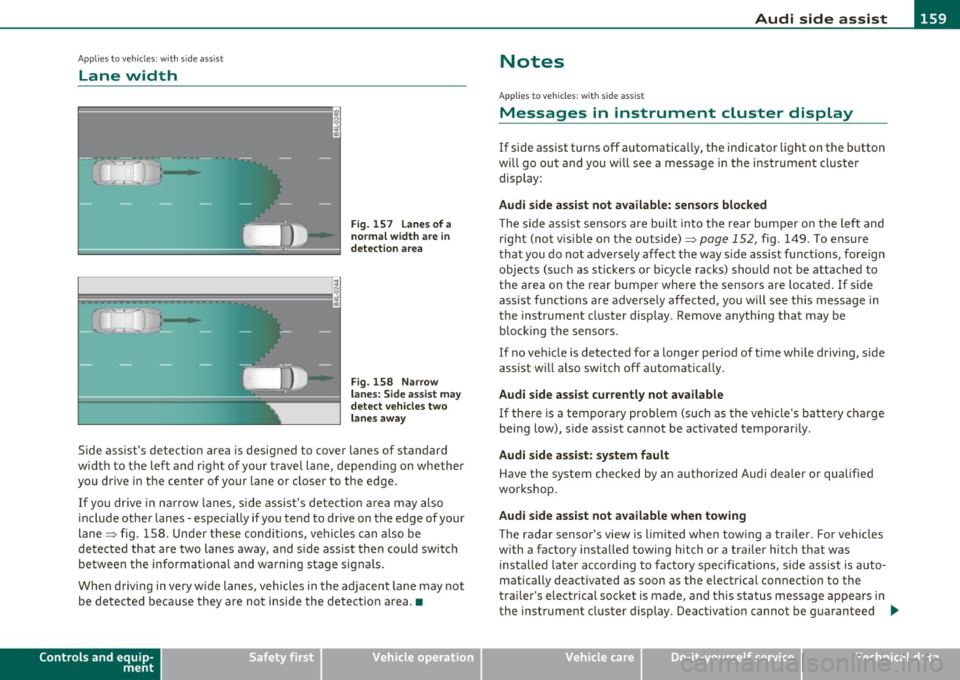
Fig. 157 Lanes of a
normal width are
in
detection area
Fig. 158 Narrow
lanes: Side assist may
detect vehicles two
lanes away
Side assist's detection area is designed to cover lanes of standard
width to the left and right of your travel lane, depending on whether
you drive in the center of your lane or closer to the edge.
If you drive in narrow lanes, side assist's detection area may also
include other lanes - especially if you tend to drive on the edge of your
lane => fig . 158. Under these conditions, vehicles can also be
detected that are two lanes away, and side assist then could switch
between the informational and warning stage signals.
When driving in very wide lanes, vehicles in the adjacent lane may not
be detected because they are not inside the detection area .•
Controls and equip
ment Safety first
Notes
Ap
plies to veh icles: with s ide ass ist
Messages in instrument cluster display
If side assist turns off automatically, the indicator light on the button
will go out and you will see a message in the instrument cluster
display :
Audi side assist not available: sensors blocked
The side assist sensors are built into the rear bumper on the left and
right (not visible on the outside)=>
page 152, fig. 149 . To ensure
that you do not adversely affect the way side assist functions, foreign
objects (such as stickers or bicycle racks) should not be attached to
the area on the rear bumper where the sensors are located. If side
assist functions are adversely affected, you will see this message in
the instrument cluster display . Remove anything that may be
blocking the sensors.
If no vehicle is detected for a longer period of time while driving, side
assist will also switch off automatically.
Audi side assist currently not available
If there is a temporary problem (such as the vehicle's battery charge
being low), side assist cannot be activated temporarily .
Audi side assist: system fault
Have the system checked by an authorized Audi dealer or qualified
workshop.
Audi side assist not available when towing
The radar sensor's view is limited when towing a trailer. For vehicles
with a factory installed towing hitch or a trailer hitch that was
installed later according to factory specifications, side assist is auto
matically deactivated as soon as the electrical connection to the
trailer's electrical socket is made, and this status message appears in
the instrument cluster display . Deactivation cannot be guaranteed .,,_
Vehicle care Technical data
Page 164 of 390
1111 ...... _A_ u_ t_o _m_ a_ t_ic _ t_ r_ a_ n_s _ m __ is_s_ , _·o _ n ____________________________________________ _
The selector lever must be in Nor P. If one of the driv ing positions is
eng aged a sa fety swi tch will p reven t the eng ine fr om being s tarted.
See also=>
page 125.
Before you move t he selecto r lever from t he P position, yo u m ust
a lw ay s a pply the brake ped al befo re a nd whi le de press ing the bu tton
in the handle of the selector lever.
& WARNING
• Unintended vehicle movement can cause serious injury.
- When the selector lever is in a driving position, the vehicle
may creep , even at idle speed. Therefore do not release the
parking brake or foot brake until you are ready to move,
because power is transmitted to the wheels as soon as a driving
position i s engaged .
- Do not accelerate while selecting a driv ing position . At this
time the engine must be at idle speed so that undue stre ss is
not placed on the clutches in the transmission .
- Remember: • even when stopped briefly with the automatic
transmission in "D", "S " or "R", engine power is being trans·
mitted to the wheels . Your vehicle could "creep " forward or
backward. When stopped, keep the brake pedal fully
depre ssed and use the parking brake if necessary to keep the
vehicle from roll ing .
• If the selector lever is unintentionally moved into N while you
are driving, take your foot off the accelerator pedal and wait for
the engine to return to idle speed before selecting a driving posi
tion .
• Never shift into "R" or "P " when the vehicle is in motion.
• Never get out of the d riv er 's seat when the engine is running.
• If you must get out of the vehicle, move the selector lever
securely into the P position and apply the parking brake firmly.
• If the engine must remain running, nev er have any driving
position engaged when checking under the hood. Make sure the
s e lector lever has securely engaged and is locked in "P " with the
& WARNING (co ntinued )
parking brake firmly set=> page 286, "Engine compartment".
Otherwise, any increa se in engine speed may set the vehicle in
motion, even with the parking brake applied. •
Selector Lever positions
Thi s sec tion describes the select or le ver p osit io ns and
driving ranges.
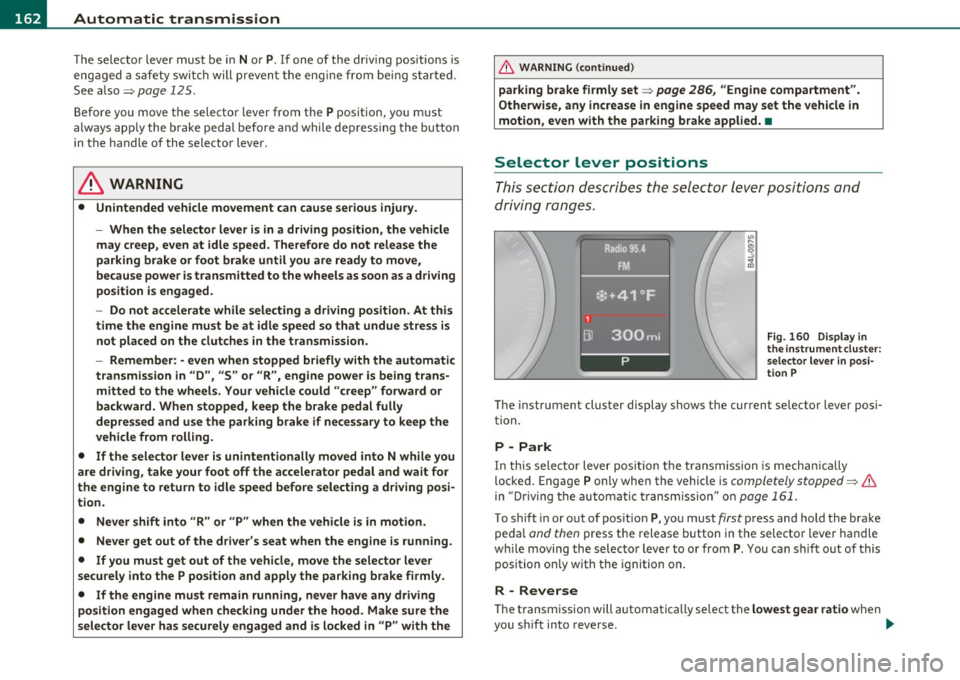
Fig. 160 Di spl ay in
th e in strument clu ster :
s elect or lever in posi·
t ion P
The instrument cluster display shows the current se lector lever posi
t ion.
P -Park
In th is selector lever posi tion t he transmission is mecha nically
loc ked. Engage P only when th e vehicle is
completely stopped=> &
in "Driving t he automatic transm ission" o n page 161.
To shift in or out of pos ition P, yo u must first press and hold the brake
pe dal
and then press t he release button in the selector leve r handle
w hil e moving the selec to r lever to or from P. Y ou ca n shi ft out of this
position on ly w it h the ignition o n.
R -Reverse
Th e transm ission will automatica lly select the lowest gear ratio when
you s hift into reverse . _,,
Page 166 of 390

1111....__A_ u_ t_o _m_ a_ t_ic _ t_ r_ a_ n_s _m_ i _s_ s_ i_ o_ n ____________________________________________ _
Automatic selector lever lock
The selector lever is locked in the P and N positions when the ignition
is turned on . To move the lever from these positions the driver must
depress the brake pedal. As a reminder to the driver, the following
warning appears in the instrument cluster display when the selector
is in
P and N:
When stationary apply foot brake while selecting gear
A time delay element prevents the selector lever from locking when
it is moved through the
N position (going from R to D). The locking
element will lock the selector lever if the lever is left in N (Neutral) for
more than approximately 1 second, without the brake pedal being
pressed .
At speeds above about 3 mph (5 km/h) the Automatic Shift Lock is
automatically deactivated in the
N position.
Interlock button
The lock button on the selector lever prevents the lever from being
accidentally shifted into ce rtain positions. Pressing this button deac
tivates the selector lever lock. Depending on the direction of the
shift, the selector lever locks at different positions . The positions are
highlighted in the illustration ~
page 163, fig. 161.
Ignition key safety interlock
The key cannot be removed from the ignition unless the selector lever
is in the
P park position . When the ignition key is removed, the
selector lever will be locked in the
P position. •
Kick-down
The kick-down feature allows the vehicle to generate
maximum acceleration.
When you press the accelerator pedal beyond the resistance point
that is reached at full throttle, the transmission will select a lower
gear ratio based on vehicle speed and engine RPM. The engine RPM
will be controlled to produce maximum vehicle acceleration as long as you continue to press the accelerator pedal beyond this
resistance
point .
& WARNING
Be careful when using the kick-down feature on slippery roads.
Rapid acceleration may cause the vehicle to skid. •
Dynamic shift program (DSP)
The automatic transmission is electronically controlled.
The transmission is self adapting and will automatically select the
best shift program suited to the driving conditions and driving style.
The transmission will select one of the
economy programs when you
drive at a steady speed or a gradually changing speed without heavy
acceleration . This achieves optimum fuel efficiency, with early
upshifting and delayed downshifting.
The transmission will automatically select the
sporty shift programs
when you drive at higher speeds, or with heavy acceleration and
frequently changing speeds. Upshifts are delayed to make full use of
engine power . Downshifting takes place at higher engine speeds than
in the economy programs.
The selection of the most suitable shift program is a continuous ,
automatic process. The driver can also make the transmission switch
to a sporty program by
quickly pressing down the gas pedal.
This causes the transmission to shift down to a lower gear to achieve rapid acceleration, e .g. for quickly passing another vehicle. You do
not need to press the gas pedal into the kick -down range . After the
transmission has upshifted, the original program is selected
according to your driving style.
An additional shift program allows the automatic transmission to
select the proper gear for uphill and downhill gradients.
This keeps the transmission from shifting up and down unnecessarily
on hills. The transmission will shift down to a lower gear when the .,_