light AUDI Q7 2010 Owner´s Manual
[x] Cancel search | Manufacturer: AUDI, Model Year: 2010, Model line: Q7, Model: AUDI Q7 2010Pages: 390, PDF Size: 93.04 MB
Page 89 of 390
Seat memory
Applies to veh icles: with seat memory
Driver's seat memory
The seat adjustment settings for two drivers can be
stored using the memory buttons in the driver's door.
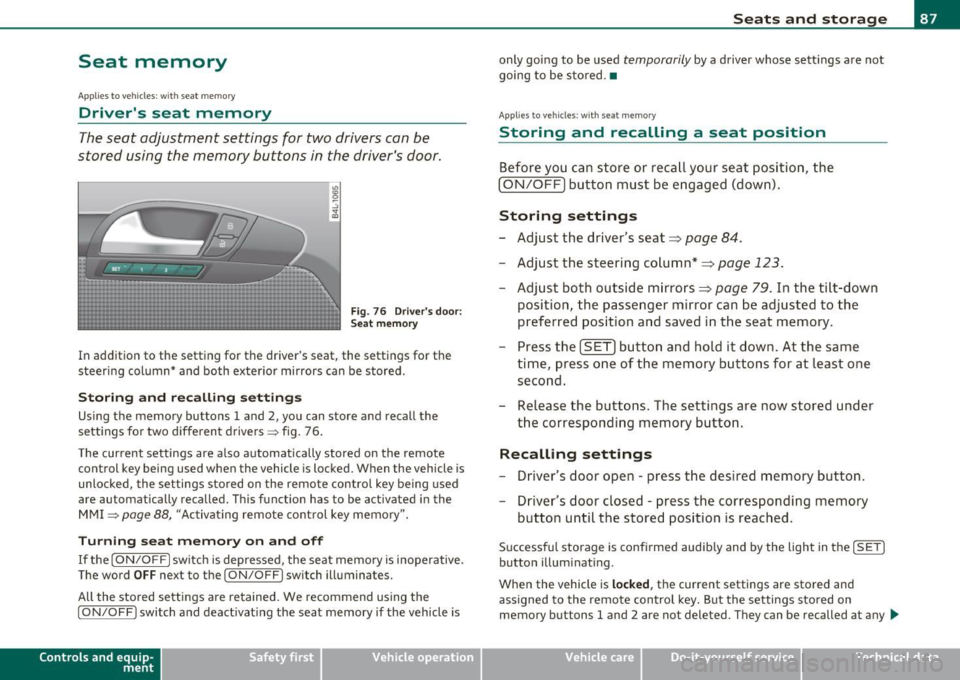
Fig . 76 Driver's door:
Seat memory
In addition to the setting for the driver's seat, the settings for the
steering column* and both exterior mirrors can be stored.
Storing and re calli ng setting s
Using the memory buttons 1 and 2, you can store and recall the
settings for two different drivers => fig . 76 .
T he current settings are also automatically stored on the remote
control key being used when the vehicle is locked. When the vehicle is
unlocked, the settings stored on the remote contro l key being used
a re automatically recalled. This function has to be activated in the
MMI
=> page 88, "Activat ing remote control key memory ".
T urning se at m em ory on and off
If the [ ON/OFF] switch is depressed , the seat memory is inoperative .
The word
OFF next to the [ ON/OFF] switch illuminates.
All the stored settings are retained. We recommend using the
[ ON/OFF ] switch and deact ivat ing the seat memory if the vehicle is
Con tro ls a nd e quip
m en t Vehicle
OP-eration
Seats and storage
only going to be used temporarily by a driver whose settings are not
going to be stored .•
App lies to vehi cles : w it h seat memo ry
Storing and recalling a seat position
Before you can store or recall your seat position, the
(ON/OFF) button must be engaged (down) .
Storing settings
-Adjust the driver 's seat => page 84.
- Adjust the steering column*=> page 123.
Adjust both outside mirrors=> page 79. In the tilt -down
position, the passenger mirror can be adjusted to the
preferred position and saved in the seat memory.
- Press the
(SET) button and hold it down. At the same
time, press one of the memory buttons for at least one second.
- Release the buttons. The settings are now stored under
the corresponding memory button.
Rec alling settings
- Driver's door open -press the desired memory button.
- Driver's door closed -press the corresponding memory
button until the stored position is reached .
Successful storage is confirmed audib ly and by the light in the [ SET]
button illuminating.
When the vehicle is
loc ked , the current settings are stored and
assigned to the remote control key. But the settings stored on
memory buttons 1 and 2 are not deleted. They can be recalled at any
~
Vehicle care Do-it-yourselt service iTechnical data
Page 98 of 390
Seats and storage
Applies to veh icles : w ith cargo net
Cargo net
The cargo net prevents light objects from sliding around
in the luggage compartment.
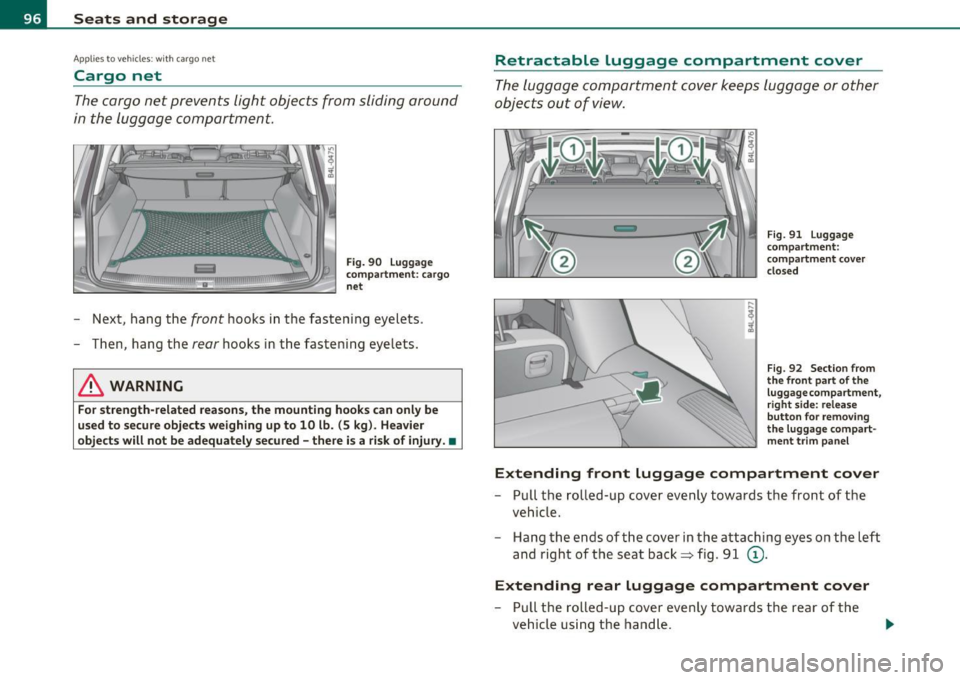
Fig. 90 Luggage
compartment: cargo
net
- Next , hang the front hooks in the fastening eyelets .
- Then, hang the
rear hooks in the fastening eyelets.
& WARNING
For strength-related reasons, the mounting hooks can only be
used to secure objects weighing up to 10 lb. (5 kg). Heavier
objects will not be adequately secured -there is a risk of injury. •
Retractable luggage compartment cover
The luggage compartment cover keeps luggage or other
objects out of view.
Fig. 91 Luggage
compartment:
compartment cover
closed
Fig. 92 Section from
the front part of the
luggage compartment,
r ight side: release
button for removing
the luggage compart
ment trim panel
Extending front Luggage compartment cover
- Pull the rolled-up cover evenly towards the front of the
vehicle.
- Hang the ends of the cover in the attaching eyes on the left
and right of the seat back~ fig . 91
(D .
Extending rear Luggage compartment cover
- Pull the rolled-up cover evenly towards the rear of the
vehicle using the handle .
I})-
Page 99 of 390

-Hook t he ends of the rod in t he openings in the left and
r ight side trim panels==>
page 96, fig. 9 1 @ .
Rolling up front Luggage compartment cover
- Pull the ends of the cover out of the attachi ng eyes in the
seat back.
- Allow the cover to ro ll up slow ly.
Rolling up rear Luggage compartment cover
- Pull t he rod out o f the op enings in t he side trim panels.
- Allow the cover to ro ll up slow ly.
Removing the Luggage compartment cover
- Pull t he lever in the direc tion of the arrow==> page 96,
fig. 92 and at the same time lift the cover up and out .
Installing the Luggage compartment cover
-Lay the cov er i n the left retaine r in the side trim and then
press it in to the right re tainer until it la tches.
& WARNING
Whenever driving, nev er place any hard or he avy objects on the
luggage compartment or allow pets to sit on the luggage
compa rtment cover . They could become a hazard to v ehicle occu
pants in the e vent of sudden b raking o r in an accident.
0 Note
• Make sure that the heating wires in the rear lid do not get
damaged by objects scraping agai nst them .
• The two inner attach ing eyes on the left and right in the seatback
=> page 96, fig. 9 1 (D are not suitable for tying down cargo - r isk of
Con tro ls a nd e quip
m en t Vehicle
OP-eration
Seats and storage
damage . Only the luggage compartment cover should be attached
here.
[ i ] Tips
• You can use the luggage compartment cover to sto re light we ight
clothi ng or articles but do not leave any heavy o r sharp objects in the
pockets of the clothing.
• Remember that plac ing clothing or articles on the luggage
compartment cover can block the driver's vision i n the rea r view
m irror. This also applies especially when you have to transport large
objects.
• So that stale a ir can escape from the vehicle be sure not to cover
the vent ilation slot between the rear lid a nd the luggage compa rt
ment cover .•
Protective liner
D ir ty or wet objects can be transported under the cargo
floor in a protective tray .
Fig. 93 C argo floor :
fo lde d upr ight ~
Vehicle care Do-it-yourselt service iTechnical data
Page 101 of 390
Applies to veh icles : w ith ski sac k
Ski sack
The ski sack allows a maximum of 4 pairs of skis or 2
snowboards to be carried inside the vehicle.
Loading
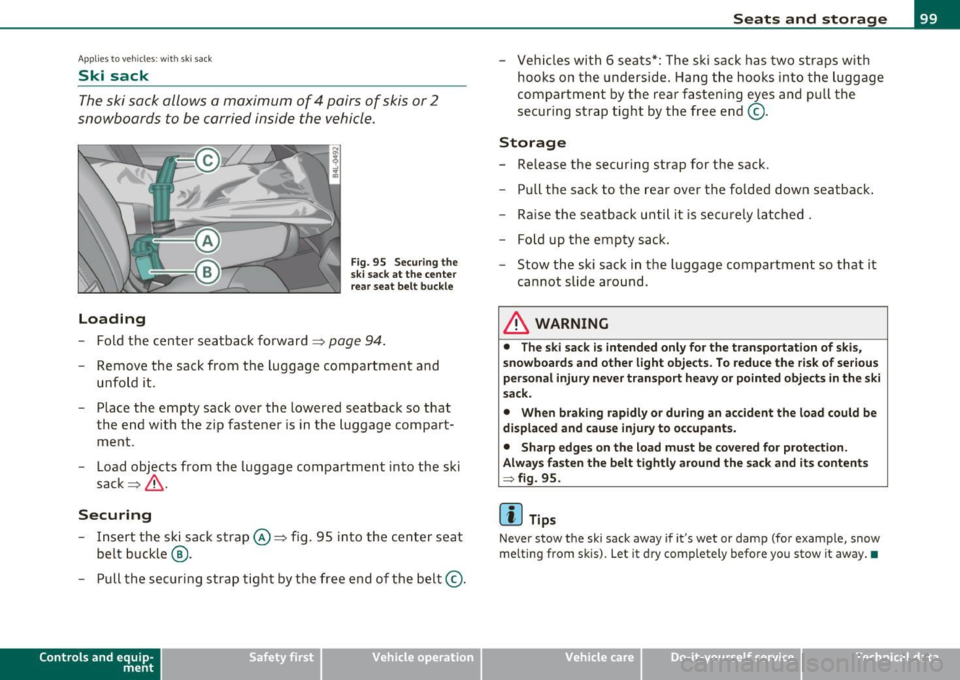
Fig. 95 Securing the
ski sack at the center
rear seat belt buckle
- Fold the center seatback forward==> page 94.
-Remove the sack from the luggage compartment and
unfold it.
- Place the empty sack over the lowered seatback so that the end with the zip fastener is in the luggage compart
ment .
- Load objects from the luggage compartment into the ski
sack ==>& .
Securing
- Insert the ski sack strap©==> fig. 95 into the center seat
belt buckle @.
- Pull the securing strap tight by the free end of the belt ©.
Con tro ls a nd e quip
m en t Vehicle
OP-eration
Seats and storage
-Vehicles with 6 seats*: The ski sack has two straps with
hooks on the underside. Hang the hooks into the luggage
compartment by the rear fastening eyes and pull the
securing strap tight by the free end ©-
Storage
- Release the securing strap for the sack.
- Pull the sack to the rear over the folded down seatback.
- Raise the seatback until it is securely latched .
- F old up the empty sack.
- Stow the ski sack in the luggage compartment so that it
cannot slide around .
& WARNING
• The ski sack is intended only for the transportation of skis,
snowboards and other light objects. To reduce the risk of serious
personal injury never transport heavy or pointed objects in the ski
sack.
• When braking rapidly or during an accident the load could be
displaced and cause injury to occupants.
• Sharp edges on the load must be covered for protection.
Always fasten the belt tightly around the sack and its contents
:::} fig. 95.
(I] Tips
Never stow the ski sack away if it's wet or damp (for example, snow
melting from skis). Let it dry completely be fore you stow it away. •
Vehicle care Do-it-yourselt service iTechnical data
Page 106 of 390
ffl..__S_ e _ a_t _s _ a_n_ d_ s_ t_o _r _a _,g:.- e ______________________________________________ _
Removing ashtray insert
Press the fron t of the ope n lid downward in the direction
of the arrow=>
page 103, fig. 101 -the ashtray ins ert
pops out slight ly.
- Lift the ashtray insert up and out .
Reinstalling ashtray insert
-Open t he lid on t he ash tray insert a nd press the insert i nto
t h e housing as far it ca n go .
& WARNING
Never put wa ste paper in the ashtray . Hot ashe s or other hot
obje cts in the ashtray could set waste paper on fir e.•
Outlet
An elect rical accessory can be con nected to the 12-vol t
power outlet.
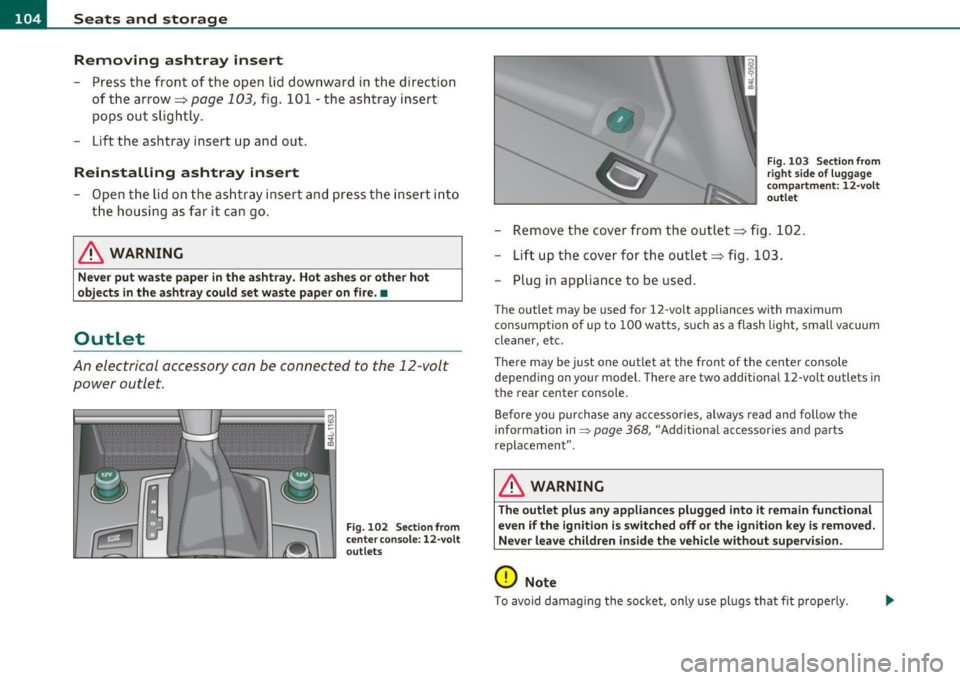
F ig. 102 Sec tion from
cente r conso le: 12-v o lt
o ut let s
•
Fig. 103 Secti on fr om
rig ht s ide of lu ggage
c omp artment: 12-v olt
o utle t
- Re move the cover from the outlet=> fig . 102 .
- Lift up the cover for the outle t => fig. 103.
- Plug in appliance to be used.
The outlet may be used for 12 -volt appliances with maximum
consumption of up to 10 0 wat ts, s uch as a flash light, small vacuum
cleaner, etc .
T here may be j ust one out let at the front of the ce nter console
depending on yo ur model. There are two additional 12-volt outlets in
the rear center console .
Before you purchase any accessor ies, always read and follow t he
information in=>
page 368, "Additional accessor ies and parts
replacement ".
& WARNING
The outlet plus any appliance s plugged into it rem ain functional
even if the ignition i s switched off or the ignition key is removed.
Never leave children in side the vehi cle w ithout supervision.
0 Note
T o avoid damag ing the socket, only use plugs that fit prope rly .
Page 107 of 390

_______________________________________________ S_ e_a _t_ s_ a_n_ d_ s_ t_o _r_a _, g::;.,_ e __ _
[I) Tips
When the engi ne is off and accessories are st ill plugged in and a re o n,
the vehicle battery can sti ll be drained .•
Storage
General overview
There are numerou s places to store items in your vehi cle .
Glove com pa rt me nt
Cooling box in glove compartment
Sto ra g e com partmen t in roof
Coat hooks
Storage in the door panels
Storage net in footwell
Storage net in the front seat backs
Storage net in luggage compartment
=> page 1 OS
=> page 10 7
=> page 107
=::;,page 107
=> page 108
::::;, page 108
Sto rage com partment bene ath car go floo r => page 97
& WARNING
• Always remove objects from the inst rument panel. Any items
not stored could slide around inside the vehicle while driving or
when accelerating or when applying the brakes or when driv ing
around a corner .
• When you are dri ving make sure that anything you may have
pla ced in the center console or other storage locations cannot fall
out into the footwells. In case of sudden braking you would not be
able to brake or accelerate.
Controls and equip
ment Safety first
& WARNING (
co ntinued )
• Any articles of clothing that you have hung up must not inter
fere with the driver's view. The coat hooks are designed only for lightweight clothing. Never hang any clothing with hard, pointed
or heavy objects in the pockets on the coat hooks . Dur ing sudden
braking or in an accident - especially if the airbag is deployed -
these objects could injure any passengers in side the vehicle. •
Glove compartment
To open glove compartment
Fig. 104 Unlock in g
button for g love
compartment
- Press th e button ::!I----~ fi g. 104 (arrow) - t he lid opens
au tomatica lly .
To close glove compartment
- Push t he g love compartme nt li d up u nti l the lock e nga ges.
In the g love compartment lid yo u w ill find a place to store a pen and
a pad of paper. _.,
Vehicle care Technical data
Page 109 of 390
_______________________________________________ S_ e_ a_t _s_ a_n_ d_ s_ t_ o _ r_a """g::;. e _ __.ffl'I
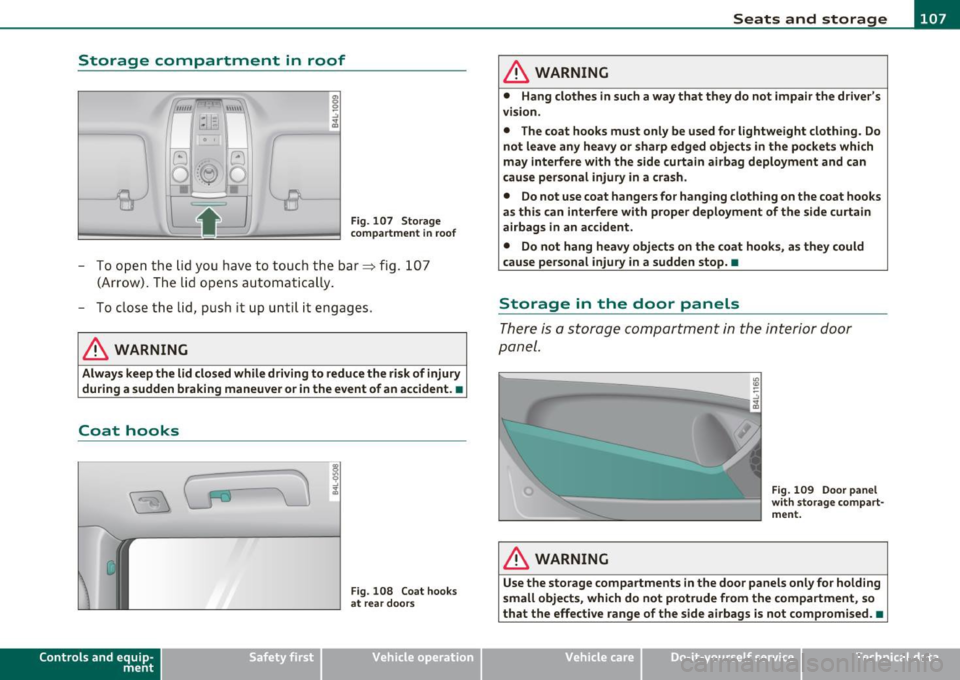
Storage compartment in roof
Fig. 107 Storage
compartment in roof
- To open the lid you have to touch the bar~ fig. 107
(Arrow). The lid opens automatically.
- To close the lid, push it up until it engages .
& WARNING
Always keep the lid closed while driving to reduce the risk of injury
during a sudden braking maneuver or in the event of an accident. •
Coat hooks
Controls a nd e quip ·
m en t
Fig . 108 Coat hooks
at rear doors
Vehicle OP-eration
& WARNING
• Hang clothes in such a way that they do not impair the driver's
vision.
• The coat hooks must only be used for lightweight clothing. Do
not leave any heavy or sharp edged objects in the pockets which
may interfere with the side curtain airbag deployment and can
cause personal injury in a crash.
• Do not use coat hangers for hanging clothing on the coat hooks
as this can interfere with proper deployment of the side curtain
airbags in an accident.
• Do not hang heavy objects on the coat hooks, as they could
cause personal injury in a sudden stop. •
Storage in the door panels
There is a storage compartment in the interior door
panel.
& WARNING
"'
"'
Fig. 109 Door panel
with storage compart·
ment.
Use the storage compartments in the door panels only for holding
small objects, which do not protrude from the compartment, so
that the effective range of the side airbags is not compromised. •
Vehicle care Do-it-yourselt service iTechnical data
Page 111 of 390

_______________________________________________ w __ a _r _m _ a_ n_d _ c_o _ l_ d __ _
Warm and cold
Climate control
Description
The air conditioner is fully automatic and is designed to
maintain a comfortable and uniform climate inside the
vehicle.
We recommend the following settings:
- Set the temperature to 72
°F (+22 °C).
- Press the
[AUTO] button.
With this setting, you attain maximum comfort in the least amount
of time. Change this setting , as desired , to meet your personal needs.
The climate controls are a combination of heating, ventilation and cooling systems, which automatically reduce humidity and cool the
air inside your vehicle .
The air temperature, air flow and air distribution are automatically regulated to achieve and maintain the desired passenger compart
ment temperature as quickly as possible.
The system automatically compensates for changes in outside
temperature and for the intensity of the sunlight entering the
vehicle. We recommend you use the
Automatic mode ~ page 112
for year-round comfort .
Please note the following:
Turn on the air conditioner to reduce humidity in the vehicle. This also
prevents the windows from fogging up.
When the outside temperature is high and the air is very humid,
condensation from the evaporator may drip under the vehicle . This is
normal and does not indicate a leak.
Controls and equip
ment Safety first
If the outside temperature is
low, the fan normally only switches to a
higher speed once the engine coolant has warmed up sufficiently .
The air conditioner temporarily switches off when you drive off from
a standstill using full throttle to save engine power.
The compressor also switches off if the coolant temperature is too
high, so that the engine can be adequately cooled under extreme
loads.
Air pollutants filter
The air pollutants filter (a combined particle filter and activated char
coal filter) reduces or prevents outside air pollution (dust, or pollen)
from entering the vehicle. The air is also filtered in air recirculation
mode.
The air pollutants filter must be changed at the intervals specified in
your Warranty
& Maintenance booklet, so that the air conditioner can
properly work.
If you drive your vehicle in an area with high air pollution, the filter
may need to be changed more frequently than specified in your Audi
Warranty
& Maintenance booklet. If in doubt, ask your authorized
Audi Service Advisor for advice .
Key coded settings
The air conditioner settings selected are automatically stored and
assigned to the key being used. When the vehicle is started, the air
conditioner automatically selects the settings assigned to that key.
This way every driver will maintain his/her own personal settings and
does not have to reset them manually.
If a different driver uses your key and changes the air conditioner
settings, the latest adjustments will erase and replace the settings
you have stored. _.,
Vehicle care Technical data
Page 113 of 390

Warm and cold -
----------------
The left display indicates the temperature selected for the driver's
side, t he r igh t display ind icates the temperature se lec ted for the
passenger's side.
T he settings you make are shown in the MMI display for a few seconds
when MMI is tu rned on.
Each function is turned on or off by briefly pressing the corresponding
bu tton. The indicato r light in the b utton ill uminates when the func
tion is act ive.
Button(s) Function Page
ION/OFFI Climate control on/off => page 111
Air conditioner on/off =:;,page 112
Automatic mode => page 112
Temperature selection => page 112
Seat heating * => page 119
Seat ventilation * -::::;, page 11 9
Fan => page 112
Air distribution => page 113
Defrost => page 113
Manual recirculation -::::;, page 113
Hea ted re a r window ::::> page 113
a) The regulator is also used to set the fan speed, air dis tr ibution, seat heating
and seat ventilation.
Synchronizing climate control
By pressing and holding the regulator on the drive r's side, the
temperature setting on the driver's side can be sw itched to the
p assenge r's s ide, an d vi ce ve rsa. T he new temper ature is s hown in the
display.
Controls and equip
ment Safety first
Synchronizing four-zone automatic comfor
t air
conditioning*
By press ing and hold ing t he regulato r o n the dr ive r's side, the
temperat ure sett ing on the driver 's side can be switched to the
passenger 's side and to t he oute r rear seats . The new temperat ure is
shown in the disp lay.
B y simu ltaneously p ressing and ho ldi ng t he regu la tors o n the drive r's
side and front passenger's side, the temperature setting on the
dr iver's side can be switc hed to the fron t passenger's side . The new
tempe ra ture is shown in the disp lay .
[I] Tips
The grille on the contro ls must remain unobstructed and mus t not be
taped over. Measuri ng sensors are located behind it.•
Turning on and off [ ON/OFF]
Turning the air conditioning on
-Press the [ O N/OFF] butt on , or
- Press th e [A UTO] b utto n.
Turning the air conditioning off
- Press t he [ O N/OFF] button to switch the ai r co nditio ning
o ff and to b lock the air supp ly from the outside.
The air conditioner turns back on when you press the temperature
regulator
or one o f the b uttons.
[I] Tips
With the ignition turned o ff, you can ac tivate t he resid ua l heat func
tion by pressing the
I ON/OFF ) button. The residual heat from the
coo lant can be used to heat the vehicle interior.•
Vehicle care Technical data
Page 116 of 390
llffl..__w __ a _r _m __ a_n _ d_ c_ o_ ld ________________________________________________ _
The rear window defogger works only when the engine is running . The
light in the switch will illum inate when the defogger is on.
The rear window defogger will switch off automatically after a short time . The time the rear window defogger remains on will vary
depending on the outs ide temperature.
At very low outside temperatures, the rear window defogger can be switched on continuously by pushing the QW button for mo re than 2
seconds. This remains stored until the ign ition is switched off .
A rear window defogger that was switched on also remains stored for 1 5 minutes afte r th e ign itio n is switched off. If the engine is
restarted within these 15 minutes, the rear window defogger is also
act ivated , depending on outside tempe rature. With a vehicle that is
parked for a short time, the rear w indow defogger does not need to
be manua lly a ct ivated aga in.
'£> For the sake of the environment
T urn the defogger off when the rear window is clear. When you save
electricity, you save fuel. •
Air outlets
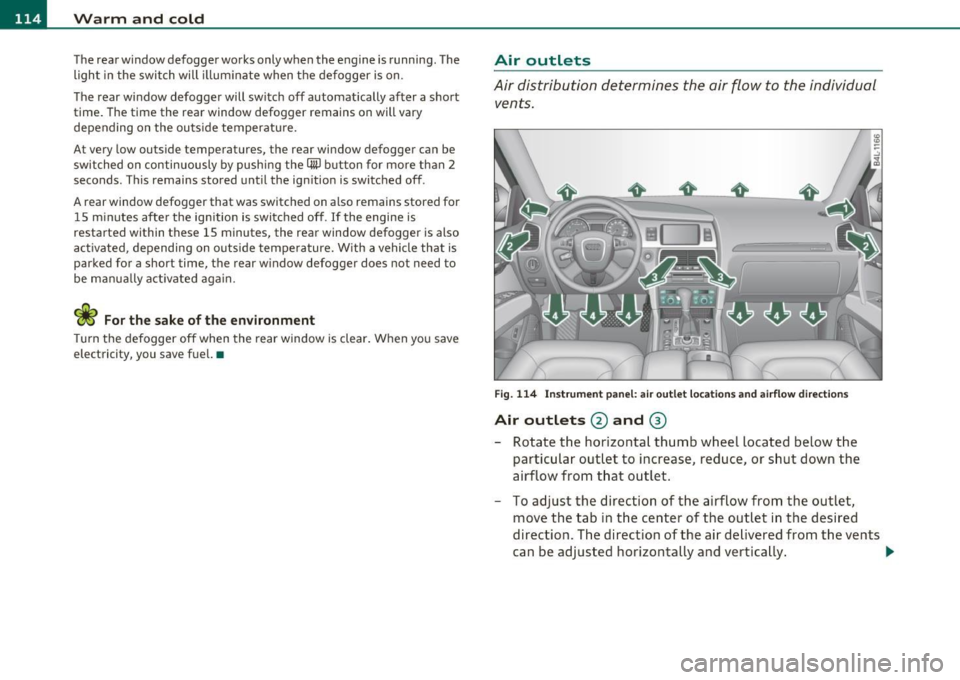
Air distribution determines the air flow to the individual
vents.
Fi g. 114 I nst rum ent pa nel: air o ut let locat ion s a nd airfl ow directi ons
Air outlets @ and ®
-Rotate the horizontal thumb wheel located below the
particular outlet to increase, reduce , or sh ut down the
airflow from t hat outlet .
- To adjust the direction of the airflow from the outlet,
move the tab in t he center of the outlet in the desired
direction. The direction of the air delivered from the vents
can be adj usted horizontally and vertically . ..,