light AUDI Q7 2010 Owner´s Manual
[x] Cancel search | Manufacturer: AUDI, Model Year: 2010, Model line: Q7, Model: AUDI Q7 2010Pages: 390, PDF Size: 93.04 MB
Page 117 of 390
Warm and cold Ill
----------------
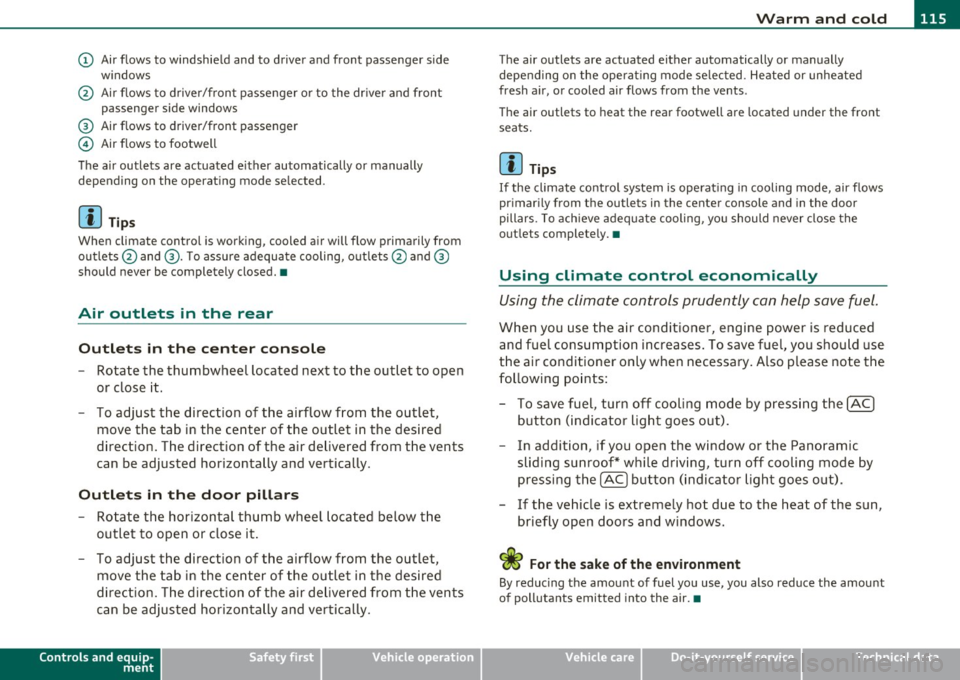
(D Air flows to windshield and to driver and front passenger side
w indows
@ Air flows to driver/front passenger or to the dr iver and front
passenger side windows
® Air flows to driver/front passenger
© Air flows to footwell
The air outlets are actuated e ither automatically or manually
depending on the operating mode selected.
[ i ] Tips
When climate control is working, cooled air will flow primarily from
outlets @and ®· T o assure adequate cooling, outlets @and ®
should never be completely closed. •
Air outlets in the rear
Outlets in the center console
-Rotate the thumbwheel located next to the outlet to open
or close it.
- To adjust the direction of the airflow from the outlet,
move the tab in the center of the outlet in the desired
direction. The direction of the air delivered from the vents
can be adjusted horizontally and vertically .
Outlets in the door pill ars
- Rotate the horizontal thumb wheel located below the
outlet to open or close it .
- To adjust the direction of the airflow from the outlet,
move the tab in the center of the outlet in the desired
direction. The direction of the air delivered from the vents
can be adjusted horizontally and vertically.
Controls and equip
ment Safety first
The air
outlets are actuated either automatically or manually
depending on the operat ing mode se lected. Heated or unheated
fresh air, or cooled air flows from the vents.
T he air outlets to heat the rear footwell are located under the front
seats.
[I) Tip s
If the climate cont rol system is operat ing in cooling mode, air flows
primarily from the outlets in the center console and in the door
pillars . To ach ieve adequate cooling, you should never close the
outlets completely. •
Using climate control economically
Using the climate controls prudently can help save fuel.
When you use the air conditioner, engine power is reduced
and fuel consumption increases . To save fuel, you should use
the air conditioner only when necessary . Also p lease note the
following points:
- To save fuel, turn off cooling mode by pressing the
[AC)
button (indicator light goes out).
- In addition, if you open the window or the Panoramic
sliding sunroof* while driving, turn off cooling mode by
pressing the
[AC] button (indicator light goes o ut).
- If the vehic le is extremely hot due to the heat of the sun,
briefly open doors and windows.
<£' For the sake of the environment
By reducing the amount of fuel you use, you also reduce the amount
of pollutants emitted into the air.•
Vehicle care Technical data
Page 118 of 390

lffll..__w __ a _r _m __ a_n _ d_ c_ o_ ld ________________________________________________ _
Rear Air Conditioning
Applies to vehicles: with four-zone automat ic co mfort air conditioning
Rear air conditioning -controls
This overview is to assist you in familiarizing yourself with
the rear air conditioning controls.
F ig. 1 15 R ear air
c o nditi oni ng con trol s
The left display indicates the temperature selected for the rear left
passenger, the right display indicates the tempe rature selected fo r
the rear right passenger. If the settings for seat heat ing *, air distr i
bu tion or the a ir conditioni ng fan are changed, the relev ant indicator
w ill appear briefly on the d isp lay.
Func tions are set by rotating the contro l o r are swi tched o n and
off by
tapping the butto ns. The indicator light in the button illuminates
when the function is active .
Button(s)
Function Page
[ON/OFF) Climate control on/off => page 116
(AU TO ) Automa tic mode => page 117
Regulatora> G T emper ature se lec tion => page 11 7
Button(s) Function
~ Seat heating*
-
Fan
Air dis tribution
Page
::!> page 120
-
=> page 117
::!> page 117
al T he regulator is also used to set the fan speed, a ir d istr ibution and seat
heating.
-
Synchronizing r ear air conditioning: By pressing and holding the
regu lator on the rear left side, the temperature setting of the rear
left side can be switched to the rear right s ide a nd v ice versa. The new
temperature is shown in the display. •
Applies to vehicles: with four -zone auto matic comfo rt air con ditioning
Turning on and off [ ON/OFF ]
Turning on rear air conditioning
-Press th e I ON/OFF) butt on, o r
- Press the !A UTO] b utton .
Turning off rear air conditioning
- Press the [ O N/OFF] but ton to sw itch the air condition ing
off and to bloc k th e air supply from the outs ide .
The air conditioner turns back on when yo u press the temperature
regu lator
or one of t he buttons .
[ i ] Tips
If the power child safety loc k is o n, the rear ai r cond it ion ing contro l
element will not operate. In this case, dashes" ••• " will appear in the
a ir conditioning con trol element display. •
Page 128 of 390

-L~O~n~t:_!h~e=....!:r~o~a~d~ --------------------------------------------
- Turn the ig nition key to position (D -the glow plu g i nd i
cator lig ht
~ ill um inates when t he g low plug system is
act ive.
- When the indica tor light
'1.., swi tches off, turn the ignition
k e y to position @ but do not p ress the acce lerator pe dal.
- Re lease the ignition key once the e ngi ne starts. The
s ta rter m ust not conti nue r unning .
A cold engine may sound loud after it has been started . This is due to
t he hydra ulic valves building up o il pressure . This is norma l an d is not
a need for concern .
If the engine does not start immediately, stop trying after 10 seconds
and then try to rest art the engi ne about 30 seco nds la ter.
Glow plug system*
Diesel engines are eq uipped with a glow p lug system whose
preheating t ime is controlled
by the coo lant and outs ide tempera
ture. Sta rt the engi ne
immediat ely after the glow pl ug ind icator lig ht
switches off.
Th e g low pl ug indica tor light w ill on ly ill uminate fo r approximately 1
second when the engine is warm or the outside temperature is higher
t han 46 ° F (8 °C). That means you can sta rt the eng ine
immediately .
& WARNING
Never start or let the engine run in a confined or enclosed area.
Exhaust fumes from the engine contain carbon mono xide, a color
le ss and odorless gas. Carbon monoxide can be fatal if inhaled .
• Never leave the engine idling unattended. An unattended
vehicle with a running engine poses a danger of person al injury or
theft.
0 Note
• Avoid high e ng ine speeds, fast a cce le ration or heavy eng ine loads
w hile the engine is still co ld. This co uld damage the engine .
• The eng ine ca nnot be sta rted by p ush ing or tow ing the veh icle.
'ii? For the sake of the environment
T o avoid unnecessa ry engine w ea r and to reduce exhaust em iss ions,
do not let your vehicle stand and warm up . Be ready to drive off imme
diately after sta rting yo ur vehicle . M aintain mode rate speed u ntil the
eng ine is complete ly warm . Remember, the engine performs best at
operat ing temper ature. •
Stopping the engine
- Tur n the ign it ion key to position @ ==> page 125, fig. 12 2.
& WARNING
• Never turn off the engine until the vehicle has come to a
complete stop .
• The brake booster and servotronic only work when the engine
i s running . With the ignition turned off, you have to apply more
force when steering or b raking. Since you cannot stee r and stop
normally, this can lead to accidents and serious injuries.
• The radi ator fan can continue to run for up to 10 minute s even
after you have turned off the engine and removed the ignition key.
The radiator fan can also turn on again if the engine coolant heats up because of intense sunlight or heat build-up in the engine
compartment. ..,,
Page 129 of 390
_________________________________________________ O_ n_ t_ h_ e_ r _o_ a_d _ __.fflll
0 Note
Do not stop the engine immediately after hard or extended driving .
Keep the engine running for approximately two minutes to prevent
excessive heat build-up.•
Starting and stopping the engine
with Convenience key
Applies to veh icle s: with Con venie nce ke y
Starting the engine with the {START) button
This button switches on the ignition and starts the
engine.
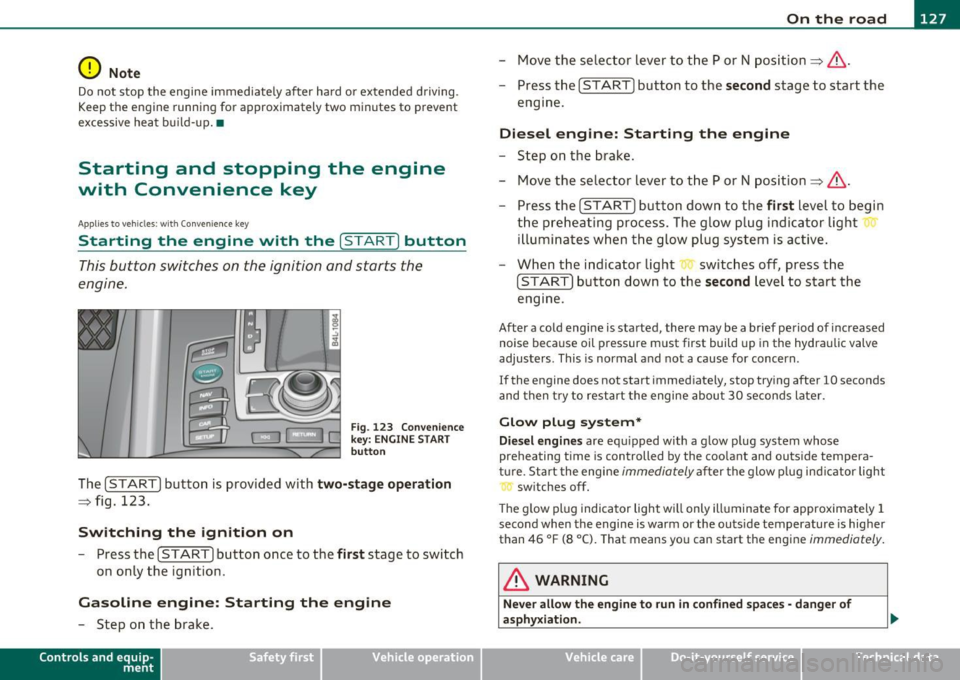
Fig . 123 Convenience
key: ENGINE START
button
The [START] button is provided with two-stage operation
=:> fig. 123.
Switching the ignition on
- Press the [ START] button once to the first stage to switch
on only the ignition .
Gasoline engine: Starting the engine
-Step on the brake.
Contro ls a nd e quip
m en t Vehicle
OP-eration
-Move the selector lever to the P or N position =:>& .
- Press the
[START] button to the second stage to start the
engine.
Diesel engine: Starting the engine
- Step on the brake.
- Move the selector lever to the P or N position =:>& .
- Press the
[START] button down to the first level to begin
the preheating process. The glow plug indicator light
illuminates when the glow plug system is active.
- When the indicator light switches off, press the
[START] button down to the second level to start the
engine.
After a cold engine is started, there may be a brief period of increased
noise because oil pressure must first build up in the hydraulic valve
adjusters . This is normal and not a cause for concern .
If the engine does not start immediately, stop trying after 10 seconds
and then try to restart the engine about 30 seconds later.
Glow plug system*
Diesel engines are equipped with a glow plug system whose
preheating time is controlled by the coolant and outside tempera
ture . Start the engine
immediately after the glow plug indicator light
switches off.
Th e glow plug indicator light will only illuminate for approximately 1
second when the engine is warm or the outs ide temperature is higher
than 46 °F (8 °C). That means you can start the engine
immediately.
& WARNING
Never allow the engine to run in confined spaces· danger of
asphyxiation.
Vehicle care Do-it-yourselt service iTechnical data
Page 132 of 390

IIIIL-_O.::...:. n.:....: t:.:.h.:.. e::....: r...: o:.. a .::..: d,;__ ________________________________________________ _
Applying parking brake
- Press the pedal down forcefully=> page 129, fig. 125 @
in the direc tion of the a rrow.
Releasing parking brake
- Pull the handle to the rear @in the d irection of the arrow
=> & .
If yo u shou ld drive off w it h the pa rking brake still set, a warning tone
w ill sou nd and the following will appear in t he instrument cluste r to
remind you to release the parking brake:
Parking brake i s applied
The park ing brake warning comes on only after you have driven for
longer than 3 seconds and fas ter than 5 mph (5 km/h).
Th e parking b rake wa rni ng light
:Ill , (USA)/ © (CON ) illuminates when
the parking brake is set and you switch on the ignition .
& WARNING
Always release the pa rking brake completely . A partially engaged
brake will overheat the rear brakes, reduce th eir effectivene ss and
c ause ex cessive we ar. This could lead to brake failure and an acci·
dent .
0 Note
Only af ter the veh icle h as come to complete stop, sho uld you firmly
set the park ing brake and move the se lector lever into "P". •
Parking
To p re vent a p arked vehicle f ro m rolling away, th ere ar e
a fe w things you sh ould do.
When you park your vehicle, do the following
- Stop the veh icle using the brake pedal.
- Apply the pa rking brake firm ly .
- Mov e the selector lever i nto the
P posi tion =>& .
- Switch o ff the e ngi ne and remove t he ignition key from
the ig nition loc k.
When you park your vehicle on hills, do the
following
- Stop the veh icle us ing t he brake pedal.
- Apply the par king b rake firm ly .
- If you are par king h eaded downhill , turn th e fro nt wheels
toward th e curb.
- If you are parking headed
uphill , turn the front wheels
away from the cu rb .
- M ove the selector lever i nto the
P position.
- Swit ch off t he engine and remove t he ig nition key from
the ignit ion loc k.
& WARNING
This i s how you can reduce the risk of injury when leaving your
vehicle.
• Never park the vehicle where it can come in contact with dry
grass, spilled fuel or any othe r flammable materials.
Page 134 of 390

Ill On the road ..___ ______________ _
Cruise control
Switching the system on
The cruise control sys te m mak es it possibl e to d rive at a
cons tant sp eed sta rting at 20 mp h (30 km /h).
Fig . 126 Control lever
w it h set button
Fig . 127 Di spl ay:
Selected spee d
-Pull t he leve r to pos ition (D => fig . 12 6 to s witch the
system on.
- Driv e at the speed you wish to s et.
- Press bu tton @to se t th at sp eed .
The disp lay=> fig. 127 will show the se t speed . The d isplay may va ry
depending on the type of display in your vehicle. The indicator light
CRUISE (US mode l)/ 0 (Ca nadian mod el) will a lso ligh t up in t he
i n strum ent cluste r.
& WARNING
• Always pay attention to traffic even when the cruise control is
switched on. You are always responsible for your speed and the
di stan ce between your vehicle and other vehicle s.
• For safety reasons , the cruise control should not be used in the
city, in stop-and -go traffic, on twisting roads and when road
conditions are poor (such as ice , fog, gravel , heavy rain and hydro
planing) -risk of accident.
• Turn off the cruise control temporarily when entering turn
lanes , highway exit lane s or in construction zone s.
• Please note that inadvertently " re sting" you r foot on the accel
erator pedal causes the cruise control not to brake. This is because
the cruise control is overridden by the driver's acceleration .
• Never use the cruise control when driving off-road or on
unpaved roads . The Cruise control is intended for use only when
the vehicle is being operated on paved roads, and is not suitable
for use off-road or on unpaved roads.
[ i ] Tips
The cruise control cannot ma inta in a constant speed when d riving
dow nhill. The ve hicl e will accele rate unde r its own we igh t. D ownshift
to a Lower gear or use the brakes to slow down .•
Changing speed
- Press lever in the 0 or O d ire ct ion=> fig. 1 26 to i ncrease
or decre as e your s peed.
- Release the lever to save that s peed.
Page 135 of 390
On the road -
----------------
Change speed in increments of 1 mph (1 km/h) by lightly pressing the
lever. If you keep the lever pressed down, you w ill alter your speed in
5 mph (10 km/h) increments.
You can also press the accelerator pedal down to increase your speed,
e .g . if you want to pass someone. The speed you saved earlier will
resume as soon as you release the accelerator pedal.
If, however, you exceed your saved speed by 5 mph (10 km/h) for
longer than 5 minutes, the cruise control will turn off temporarily .
The symbo l will go out but the saved speed will be retained. •
Presetting your speed
You can preset your desired speed while the vehicle is not
moving.
- Turn on the ignition.
- Pull lever into position
(D => page 132, fig. 126.
- Press the lever in the 0 or O direction to increase or
decrease your speed .
- Re lease the lever to save that speed .
This function makes it possible, for example, to save the speed you
want befo re driving on the h ighway . Once on the h ighway, act ivate
the cruise control by pulling the lever toward
(D. •
Switching the system off
Temporary deactivation
- Press the brake pedal, or
- Press the lever into position@ (not clicked into place)
=> page 132, fig. 126, or
Controls and equip
ment Safety first
-
Drive for longer than 5 m inutes at more than 5 mph
(10 km/h) above the stored speed.
Sw itching off completely
- Press lever into position@ (clicked into place), or
- Switch the ignition off.
The system retains the saved speed if you deactivate the cruise
cont rol tempo rar ily. To resume the saved speed, release the brake
pedal and pull the lever to position
(D.
Switching the ignition off e rases the saved speed.
& WARNING
You sho uld onl y retu rn to the saved sp ee d if it i s not t oo fast f or
the cu rrent tr affic condition s -ris k of an accident! •
Vehicle care Technical data
Page 140 of 390

IIIIL......:.A:::::: d:.::a :.!p:.. t.::: i:...: v :...: e::...: C:.: r:..: u::.:.: i s:.: e::...: C:.. o::.:.. n:..:t :.:. r_:o :.: l:..._ ________________________________________ _
Applies to veh icles : w ith Adaptive C ru ise Contro l
How is the speed stored?
Fig. 1 31 Co ntro l
lever : Sto ring spee d
With the sys tem sw itch ed on the speed is stored as follows:
- Drive at the speed you want .
- Press the [SET] button =>
page 138, fig. 131 to store the
desired speed.
After the ! SET I button is released, the current speed is stored and
maintained . If you are dr iving at a speed below 20 mph (30 km/h),
t he min imum speed setting of 20 mph (30 km/h) wi ll be set.
The saved speed is now shown in the LED display in the speedometer
by one or two illumina ted red light diodes~
page 143. At the sam e
time, the saved speed is also shown for a short time in the Informa·
tion line~
page 145.
[ i J Tip s
Fo r safety re asons, the stored speed is eras ed wh en the ignition o r
the ACC is turned off .•
App lies to veh icles : w ith Adaptive Cruise Control
Changing stored speed
The speed can be changed without touching the acceler
ator or brake pedal.
Incre asing speed
....
"' M ~ w .,
"'
Fig . 1 32 Contro l
l eve r: Cha ngi ng spee d
Press the lever briefly upwards 0 => fig. 132. USA
models : the speed increases by about 2 .5 mph . Canada
models : speed will increase by one mark on the speedom
eter scale .
- Press the lever upwards
0 and hold it. As long as you hold
the control switch down, the light diode display in the
speedometer LED display in the speedometer moves
forward and the speed is increased .
Reducing speed
- Press the lever briefly downwards Q. USA models : the
speed decreases by 2 .5 mph . Canada models: speed will
decrease by one mark on the speedometer scale . _,,.
Page 142 of 390

1111..__A_ d_a_ p '-- t_iv _ e_ C_r_ u_ i_ s _e_ C_ o_ n_t_ r_ o_ L ___________________________________________ _
Reactivating control
- To resume the speed and distance contro l, re lease t he
b rake pedal a nd press the lever in the direction of t he
arrow (D.
Display in the speedometer
© Current vehicle speed=> fig. 134
® Saved speed
As long as a speed is saved the se t des ired s peed will be d is p la yed in
the LED d isplay in the speedometer by one or two illum inated red
light d iodes . When t he control function is resumed the Adaptive
Ap plies to veh icles: w it h A daptiv e C ru ise Cont ro l
How is the distance (time interval) set?
D istan ce can be set in four stages.
Increasing distance
Fig . 1 35 Co ntrol
l e ve r: Se tti ng di stance
-Push theslide rswitc honce tothe righ t0 ~fig. 135. T he
d istance curre ntly s et is shown for 3 seco nds in th e i nstru
me nt clu ster d isplay .
Cruise Contro l acce lerates to reach t he des ired speed if no slower
veh icle ahead is detec ted.
& WARNING
Improper use of the Adaptive Cruise Control can cau se colli sions ,
other accidents and se riou s personal injuries.
• Never resume the stored speed if the speed is too high for
prevailing road , traffic or weather conditions.
(I) Tips
When the system is turned off temporari ly, t he speed set at that time
is stored. •
-Push the sli der swi tch again to the righ t 0 to incre ase the
d ist anc e by on e step.
Reducing distance
Pus h the slider switc h once to the left Q. The distance
c u rrentl y set is shown for 3 seconds in the instrume nt
cluste r display.
- Push t he s lider sw itch
again to the le ft O to decrease the
dista nce by one step .
The distance at which the Adaptive Cr uise Control follows a vehicle in
fron t is de termined by
time inte rval s. A t ime i nterv al to a vehicle in
front is established and maintained. T his produces a speed-depen
de nt i nterv al. The higher the speed, t he greate r the s afety in terv al in
feet (meters)
=> & . _,.
Page 144 of 390
lll'..__A_ d_a_ p,__ t_iv _ e_ C_r _u _ i_ s _e _ C_ o_ n_t _ r_ o _ L ___________________________________________ _
& WARNING
Following other v ehicles too clo sely increases the risk of a crash
and serious per sonal injury.
• Following other vehicles too closely, particularly at higher
speeds in crea ses the ri sk of collisions and seriou s personal injury.
• Setting short distances to the traffic ahe ad reduces the time
and distance avail able to bring your vehicl e to a safe stop and
makes it even more necessary to pay close attent io n to t raffic.
• Always select a speed and distance to traffic ahead that is safe
and appropriate under the pre vailing traffic, road , weathe r and
lighting conditions.
• Never rely on the distance control feature of ACC alone to
prevent rear-end collisions . Always be pr epared to brake and take
evasive action to a void collisions and other accident situations.
• Never allow the closing sp eed b etween you and other vehicles
to be so high that the Adapti ve Cruise Control may not be able to
s low your vehicle safely . If closing speed is too high, you must
apply the brakes yourself to reduce the r isk of a rear -end crash.
• Always select a greater following di stance to the vehicle ahead
on wet roads than on dry roads.
• Always read and h eed the information and WARNINGS=>
& in
"Description" on page 134.
(I] Tips
The distance setting is reset to the factory de fault DIS TANCE 3 the
next time the igni tion is t urn ed on .•
Driver information
Applies to veh icles: with Adapt ive Cruise Control
Displays in the instrument cluster
Depending on the driving situation, driver info rmation is
displayed in the instrument cluster.
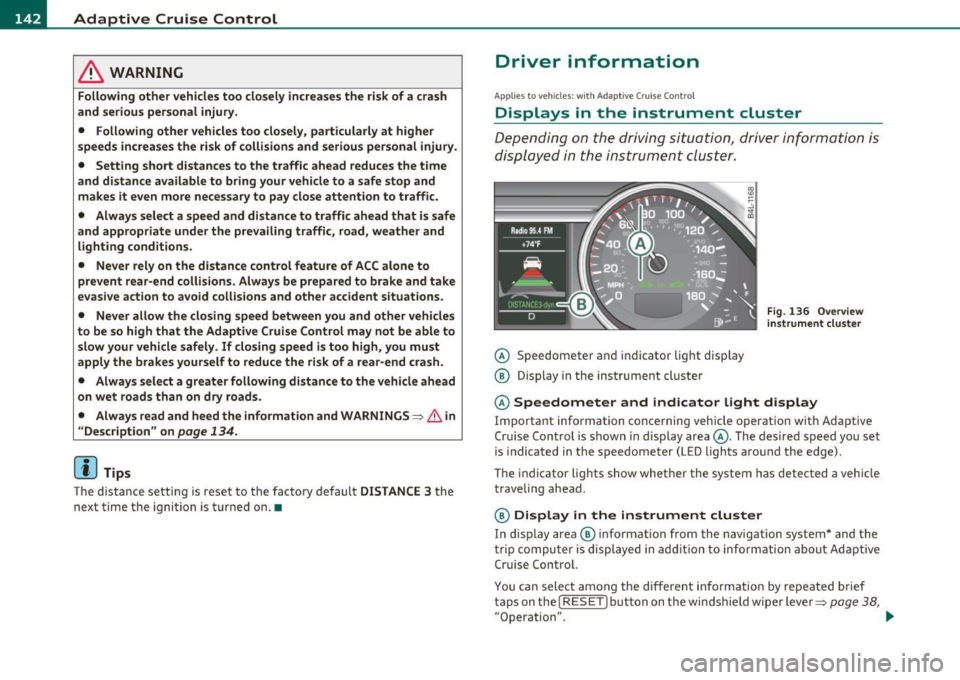
@ Speedometer an d indicator lig ht disp lay
@ Display in the instrument cluster
Fig . 136 O ve rvi ew
in strum ent clu ster
@ Speedometer and indicator Light d isplay
Important information concerning vehicle operation w ith Adaptive
Cru ise Control is shown in d isp lay area @. The des ired speed yo u set
is indicated in the speedometer (LED lights around the edge).
T he in dicator lights show whe ther the system has detec ted a veh icle
traveli ng ahead .
@ Display in the instrument cluster
In display area ® informat ion from the navigation system * and the
t rip compu ter i s displayed in a dditio n t o info rmation abou t Ad aptive
Cru ise Contro l.
You ca n sele ct among the dif ferent informatio n by repeated brief
t aps on the!
RESET) button on the windsh ield w ipe r leve r=> page 38,
"Operation". .,.