heating AUDI Q7 2010 Owner´s Manual
[x] Cancel search | Manufacturer: AUDI, Model Year: 2010, Model line: Q7, Model: AUDI Q7 2010Pages: 390, PDF Size: 93.04 MB
Page 11 of 390
Instruments and controls
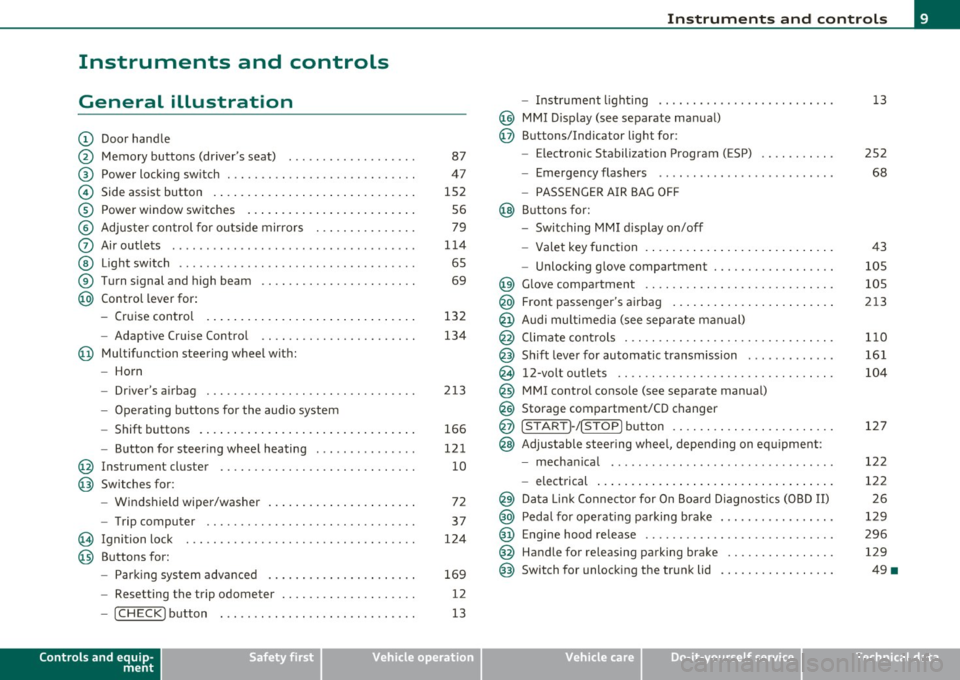
General illustration
(D Door handle
@ Memory buttons (driver's seat) .................. .
@ Power locking sw itch ........................... .
© Side assist button ... .. ... ... ... .. .. .. ... . .. ... .
® Power window sw itches ... .... .. .. .. .. .. ... ... . .
© Adjuster con trol for outs ide mir rors .............. .
0 Air outlets .......... .... .. .... ............... .
@ Light switch ...... .. .... ... .. .. .. ... ... .. .. ... .
® Turn s ignal and high beam ...................... .
@ Control lever for:
- Cru ise control . .... ... ... .. .. .. .. .. .. .. .. ... .
- Adaptive Cruise Control .. .. ................ .. .
@ Mu ltifunction steering wheel with:
- Horn
- Driver's airbag .............................. .
- O pera ti ng butto ns for the audio system
- Shift buttons . ... .. .. .. .... .. .. .. .. .. ...... . .
- Button for steer ing whee l heating ..... ... ...... .
@ Instrument cluster ............................ .
@ Switches for:
- Windshield wiper/washer ... ...... .. ..... .... . .
- Trip computer .............................. .
@ Ignition lock ................................. .
@ Buttons for:
- Par king sys tem advance d .... ..... .. .. ... .. .. . .
- Resetting the trip odometer ................... .
- ICHECK ]button ......................... ... .
Controls and equip
ment Safety first
87
47
1S2 S6
79
1 14
6S
69
132
134
2 13
166
12 1
10
72
37
124
169
12
13
Instruments and controls
- Instrument lighting ......................... .
@ MMI Disp lay (see separate ma nual)
@ Buttons/Indicator light for:
- Electronic Stabilization Program (ESP) .......... .
- Emergency flashers ...... .. ................. .
- PASS ENGER A IR BAG O FF
@ B uttons for:
- Switching MMI d isplay on/off
- Valet key function .. .. .. .. .. .. .. ...... ... .. .. .
- Unlocking g love compartment ................. .
@ Glove compartment ........................... .
@ Front passenger's airbag ...... ..... .. ..... .. .. . .
@ Audi mu ltime dia (see separate man ual)
@ Climate cont rols .............................. .
@ Shift leve r for automatic transmission ............ .
@ 12-volt outlets ............................... .
@ MMI contro l console (see separate manua l)
@ Storage compartment/CD changer
@ ISTART]-/ISTOP] button ....................... .
@ Adjustable stee ring whee l, depending on eq uipme nt:
- mecha nical .... .. .... ... .. .. .. ... .... ..... . .
- electrical ..... . ... .. .. .. .... .... .. .. .. ... .. .
@ Da ta Lin k Connecto r for On Boa rd Diagnos tics (OBD II)
@ Peda l for operating pa rking brake ................ .
@ Engine hood release ............. ... .. ......... .
@ Handle for releasing parking brake ............... .
@ Switch for unlocking the trunk lid ................ .
Vehicle care
13
2S2
68
43
105
105
213
1 10
161
104
127
12 2
122 2 6
129
296 129
49 •
Technical data
Page 43 of 390
• For security reasons, replacement keys are only available from
Audi dealers. •
Master key with remote control
The remote control allows you to lock or unlock the
vehicle electronically .
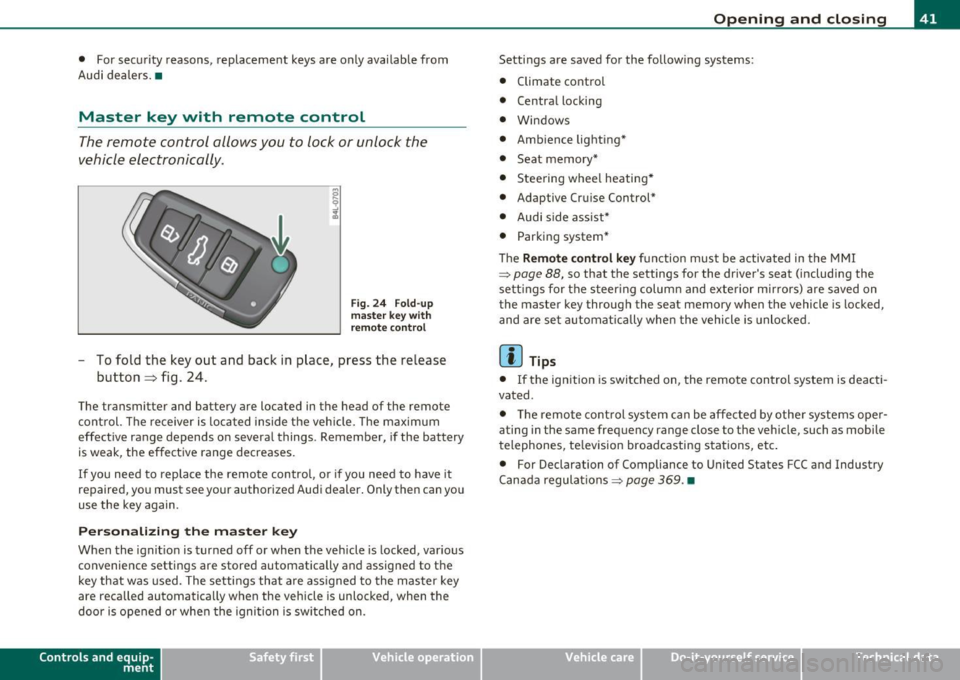
Fig. 24 Fold-up
master key with
remote control
- To fold the key out and back in place, press the release
button~ fig. 24.
The transmitter and battery are located in the head of the remote
control. The receiver is located inside the vehicle. The maximum
effective range depends on several things . Remember, if the battery
is weak, the effective range decreases.
If you need to replace the remote control, or if you need to have it
repaired, you must see your authorized Audi dealer. Only then can you
use the key again.
Personalizing the master key
When the ignition is turned off or when the vehicle is locked, various
convenience settings are stored automatically and assigned to the
key that was used. The settings that are assigned to the master key
are reca lled automatically when the vehicle is unlocked, when the
door is opened or when the ignition is switched on.
Contro ls a nd e quip ·
m en t Vehicle
OP-eration
Opening and closing
Settings are saved for the follow ing systems:
• Climate control
• Central locking
• Windows
• Ambience lighting*
• Seat memory*
• Stee ring wheel heating*
• Adaptive Cruise Control*
• Audi side assist*
• Parking system*
Th e
Remote control key function must be activated in the MMI
~ page 88, so that the settings for the driver's seat (including the
settings for the steering column and exterior mirrors) are saved on
the master key through the seat memory when the vehicle is locked,
and are set automatically when the vehicle is unlocked.
[ i ] Tips
• If the ignition is switched on, the remote control system is deacti·
vated .
• The remote control system can be affected by other systems oper·
ating in the same frequency range close to the vehicle, such as mobile
telephones, television broadcasting stations, etc.
• For Declaration of Compliance to United States FCC and Industry
Canada regulations~
page 369. •
Vehicle care Do-it-yourselt service iTechnical data
Page 64 of 390

Opening and closing
from heating up, you should close both sunshades when you
park your vehicle in the sun.
Opening and closing front sunshade
Tap the rear -:c;"J" of the rocker switch~ page 61, fig. 47 or
the rocker switch for rear-seat passengers~
page 61,
fig. 48 briefly to open the sunshade fully.
- Tap the front
·'J.rT of the rocker switch briefly to close the
sunshade fully~& .
- To set an intermediate position manually, press the front or rear of the rocker switch (depending on the position of
the shade)
until the desired position is reached ~ & .
Opening and closing rear sunshade
-Hold the sunshade by the grip and push it to the desired
position.
& WARNING
Never close the sunshade without paying attention or checking -
danger of injury! •
Applies to veh icles : w ith Panoram ic sliding sunroof
Emergency closing
In an emergency, the Panoramic sliding sunroof can be
closed electrically.
If the Panoramic sliding sunroof detects an object in its path
when it is closing, it will open again automatically. In this
case, you can close the roof with the power emergency
closing function .
Emergency closing of front roof segment
- Turn the switch~ page 59, fig . 45 @ to the normal posi
tion @.
- Within five seconds after the sunroof opens automati
cally, pull the switch until the roof segment closes.~&.
The driver's and front passenger's doors must be closed.
- If the power emergency closing function is not possible, you must close the roof manually~
page 63.
Emergency closing of rear roof segment
-Within five seconds after the sunroof opens automati
cally, press the front
e:> of the rocker switch~ page 59,
fig. 45 ® until the roof segment closes~&. The driver's
and front passenger's doors must be closed.
- If the power emergency closing function is not possible,
you must close the roof manually ~
page 64.
& WARNING
Improper use of the Panoramic sliding sunroof can cause serious
personal injury.
• Be careful when closing the Panoramic sliding sunroof. Not
paying attention could cause you or others to be trapped and
injured as the Panoramic sliding sunroof closes.
• Always take the key with you when you leave the vehicle to
prevent injuries caused by the Panoramic sliding sunroof closing
• Never leave children or persons requiring assistance alone in
the vehicle, especially when they could access the vehicle keys.
Unsupervised use of the keys can result in the engine being started
or use of vehicle systems such as the power windows, etc. which
could result in serious injury. The doors could be locked with the
remote key, delaying help in an emergency. .,,.
Page 97 of 390
& WARNING (cont inued )
damage to webbing, bindings , buckles, or retractors must be
replaced.
& WARNING
Always read and heed WARNINGS=> & in "Loading the luggage
compartment " on
page 195.
0 Note
• When fo lding the backrest back i nto place, ma ke sure the safety
bel t does no t ge t ca ugh t, b ec ause i t can be damaged .
A damaged bel t
can fail to provide safe rest raint.
• Th e heating wires in th e rear w indow ca n be damaged by abrasive
objects on t he parcel s he lf . •
Tie-down rings
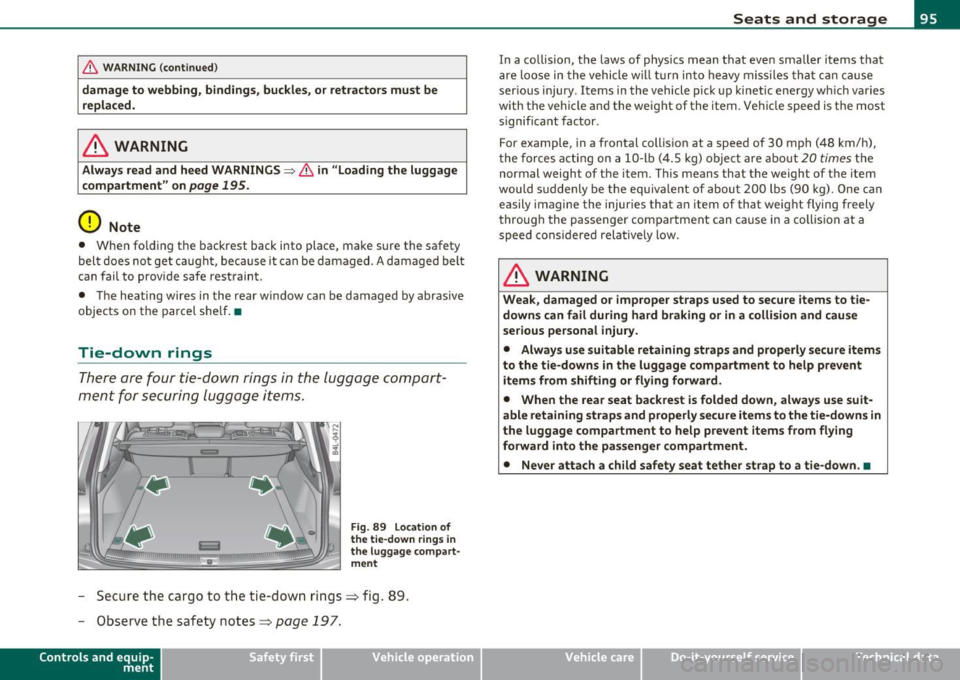
Th er e a re f our tie-d own rings in the lu ggage com part
m en t for s ecuring lugg age items.
Fig . 89 Loca tion of
the tie-down rings in
the lug gag e c ompa rt ·
ment
- Sec ure the c argo to the tie-dow n rings => fig. 89 .
- Observe the safety notes=:> p age 19 7.
Con tro ls a nd e quip
m en t Vehicle
OP-eration
Seats and storage
In a co llision, the laws of physics mean that eve n smaller items that
a re lo ose in the vehicle w ill turn in to heavy mis siles th at can c ause
ser ious injury. Items in the vehicle pick up kinet ic en ergy w hich varies
with the ve hicle an d th e we ight of the item. Vehi cle speed is the most
signif ica nt factor .
For example, in a frontal collis ion at a speed of 30 mph (48 km/ h),
t he force s acti ng on a 10- lb
(4 .5 kg) object a re a bout 20 times the
normal weight of t he item. T his means that t he weight of t he item
wou ld su ddenly be t he e quiva le nt of abou t 200 lbs (9 0 k g). One can
easily imagine the injur ies that an item of that weight flying freely
t hroug h the passenger com par tment can cause in a collis ion at a
speed considered relative ly low .
& WARNING
Weak , damaged or improper straps used to secure items to tie
downs can fail during hard braking or in a collision and cause
serious personal injury.
• Always use suitable r etaining straps and properly secure items
to the tie -downs
in the luggage compartment to help prevent
items from shifting or flying forward .
• When the rear seat backrest is folded down, always use suit·
able retaining straps and properly secure items to the tie-downs in
the luggage compartment to help prevent items from flying
forward into the passenger compartment.
• Never attach a child safety seat tether strap to a tie-down .•
Vehicle care Do-it-yourselt service iTechnical data
Page 99 of 390

-Hook t he ends of the rod in t he openings in the left and
r ight side trim panels==>
page 96, fig. 9 1 @ .
Rolling up front Luggage compartment cover
- Pull the ends of the cover out of the attachi ng eyes in the
seat back.
- Allow the cover to ro ll up slow ly.
Rolling up rear Luggage compartment cover
- Pull t he rod out o f the op enings in t he side trim panels.
- Allow the cover to ro ll up slow ly.
Removing the Luggage compartment cover
- Pull t he lever in the direc tion of the arrow==> page 96,
fig. 92 and at the same time lift the cover up and out .
Installing the Luggage compartment cover
-Lay the cov er i n the left retaine r in the side trim and then
press it in to the right re tainer until it la tches.
& WARNING
Whenever driving, nev er place any hard or he avy objects on the
luggage compartment or allow pets to sit on the luggage
compa rtment cover . They could become a hazard to v ehicle occu
pants in the e vent of sudden b raking o r in an accident.
0 Note
• Make sure that the heating wires in the rear lid do not get
damaged by objects scraping agai nst them .
• The two inner attach ing eyes on the left and right in the seatback
=> page 96, fig. 9 1 (D are not suitable for tying down cargo - r isk of
Con tro ls a nd e quip
m en t Vehicle
OP-eration
Seats and storage
damage . Only the luggage compartment cover should be attached
here.
[ i ] Tips
• You can use the luggage compartment cover to sto re light we ight
clothi ng or articles but do not leave any heavy o r sharp objects in the
pockets of the clothing.
• Remember that plac ing clothing or articles on the luggage
compartment cover can block the driver's vision i n the rea r view
m irror. This also applies especially when you have to transport large
objects.
• So that stale a ir can escape from the vehicle be sure not to cover
the vent ilation slot between the rear lid a nd the luggage compa rt
ment cover .•
Protective liner
D ir ty or wet objects can be transported under the cargo
floor in a protective tray .
Fig. 93 C argo floor :
fo lde d upr ight ~
Vehicle care Do-it-yourselt service iTechnical data
Page 108 of 390

ffl..__S_e _ a_t _s _ a_n_ d_ s_t _o _r _a _,g:.- e ______________________________________________ _
& WARNING
To reduce the risk of personal injury in an accident or sudden stop,
always keep the glove compartment closed while driving.
(I] Tips
Should you not be able to open the glove compartment as described,
make sure the valet key function is not activated~
page 43. •
Cooling box in glove compartment
The cooling box works only when the air-conditioning is in
cooling mode.
Fig. 105 Glove box
with cooling box open
and switched on
- Open the glove compartment=> page 105, fig. 104.
- Turn the rotary switch © counter-clockwise to switch the
cooling on. The symbols on the rotary switch must be
displayed=> fig. 105 accordingly.
- Turn the rotary switch © clockwise to switch the cooling
off.
The cooling box works only in the cooling mode. If the climate control
is in the heating mode, we recommend switching the cooling box
off.•
Emergency unlocking of glove
compartment
The glove compartment can be unlocked in an emer
gency.
Fig. 106 Instrument
panel right: pry off
security cover
- Remove the cover with the aid of a screwdriver => fig. 106.
- Now press the locking pin inward with the screwdriver .•
Page 111 of 390

_______________________________________________ w __ a _r _m _ a_ n_d _ c_o _ l_ d __ _
Warm and cold
Climate control
Description
The air conditioner is fully automatic and is designed to
maintain a comfortable and uniform climate inside the
vehicle.
We recommend the following settings:
- Set the temperature to 72
°F (+22 °C).
- Press the
[AUTO] button.
With this setting, you attain maximum comfort in the least amount
of time. Change this setting , as desired , to meet your personal needs.
The climate controls are a combination of heating, ventilation and cooling systems, which automatically reduce humidity and cool the
air inside your vehicle .
The air temperature, air flow and air distribution are automatically regulated to achieve and maintain the desired passenger compart
ment temperature as quickly as possible.
The system automatically compensates for changes in outside
temperature and for the intensity of the sunlight entering the
vehicle. We recommend you use the
Automatic mode ~ page 112
for year-round comfort .
Please note the following:
Turn on the air conditioner to reduce humidity in the vehicle. This also
prevents the windows from fogging up.
When the outside temperature is high and the air is very humid,
condensation from the evaporator may drip under the vehicle . This is
normal and does not indicate a leak.
Controls and equip
ment Safety first
If the outside temperature is
low, the fan normally only switches to a
higher speed once the engine coolant has warmed up sufficiently .
The air conditioner temporarily switches off when you drive off from
a standstill using full throttle to save engine power.
The compressor also switches off if the coolant temperature is too
high, so that the engine can be adequately cooled under extreme
loads.
Air pollutants filter
The air pollutants filter (a combined particle filter and activated char
coal filter) reduces or prevents outside air pollution (dust, or pollen)
from entering the vehicle. The air is also filtered in air recirculation
mode.
The air pollutants filter must be changed at the intervals specified in
your Warranty
& Maintenance booklet, so that the air conditioner can
properly work.
If you drive your vehicle in an area with high air pollution, the filter
may need to be changed more frequently than specified in your Audi
Warranty
& Maintenance booklet. If in doubt, ask your authorized
Audi Service Advisor for advice .
Key coded settings
The air conditioner settings selected are automatically stored and
assigned to the key being used. When the vehicle is started, the air
conditioner automatically selects the settings assigned to that key.
This way every driver will maintain his/her own personal settings and
does not have to reset them manually.
If a different driver uses your key and changes the air conditioner
settings, the latest adjustments will erase and replace the settings
you have stored. _.,
Vehicle care Technical data
Page 112 of 390

ffl..__w __ a _r _m __ a_n _ d_ c_ o_ ld ________________________________________________ _
Energy management
To prevent the battery from being discharge d and to res tore the
balance o f energy, compone nts wh ich require large amo unts o f
energy a re tempora rily cut back or sw itched off=>
page 259. Heating
systems in part icular requ ire a grea t dea l of energy . If you notice, for
example, that the seat* or rear w indow heating is not heating, they
have been t empo rar ily c ut b ack o r switched off by
energy manage
ment .
These systems are available aga in as soon as the energy
b ala nce has been resto red.
& WARNING
Reduced visibility is dangerous and can cause accidents.
• For safe driving it is very important that all windows be free of
ice, snow and condensation.
• Completely familiarize yourself with the proper use and func
tion of the heating and ventilation system and especially how to
defog and defrost the windows.
• Never use the windshield wiper /washe r system
in freezing
weather until you have warmed the windshield first , using the
heating and ventilation system . The washer solut ion may freeze
on the windshield and reduce vi sibility.
0 Note
• If you suspe ct that the clima te co ntro l system has been damaged,
switch the system off to avoid furt her damages, and have it inspected
by a qua lified deale rs h ip.
• Repa irs to the A udi a ir conditioner require special technica l know l
edge and special tools . Contac t an au thor ized A udi d ealer for assis
tance .
[I] Tips
• Keep the air inta ke s lot s (in front of the w in d shield) free from ice,
snow and debris in or der to maintain the proper function of the
cl ima te control sys tem .
• Air ins ide the veh icle escapes through air vents located in the si de
t rim panels be neat h the rea r side wi ndows . M ake sure that the outlet
slots are not covered by clothing, etc.
• Climate control works most effective ly i f the windows and the
Panoram ic sliding sunroof * are closed. However, if the interio r of a
pa rked vehi cle is ex tremely hot from the sun 's rays, br iefly ope ning
the windows can speed up the coo ling process .•
Controls
Thi s overvi ew will h elp y ou to fa miliari ze yours elf with the
air conditioning controls .
a • •
Fig. 113 Air co nd iti oning contr ol element s
Page 113 of 390

Warm and cold -
----------------
The left display indicates the temperature selected for the driver's
side, t he r igh t display ind icates the temperature se lec ted for the
passenger's side.
T he settings you make are shown in the MMI display for a few seconds
when MMI is tu rned on.
Each function is turned on or off by briefly pressing the corresponding
bu tton. The indicato r light in the b utton ill uminates when the func
tion is act ive.
Button(s) Function Page
ION/OFFI Climate control on/off => page 111
Air conditioner on/off =:;,page 112
Automatic mode => page 112
Temperature selection => page 112
Seat heating * => page 119
Seat ventilation * -::::;, page 11 9
Fan => page 112
Air distribution => page 113
Defrost => page 113
Manual recirculation -::::;, page 113
Hea ted re a r window ::::> page 113
a) The regulator is also used to set the fan speed, air dis tr ibution, seat heating
and seat ventilation.
Synchronizing climate control
By pressing and holding the regulator on the drive r's side, the
temperature setting on the driver's side can be sw itched to the
p assenge r's s ide, an d vi ce ve rsa. T he new temper ature is s hown in the
display.
Controls and equip
ment Safety first
Synchronizing four-zone automatic comfor
t air
conditioning*
By press ing and hold ing t he regulato r o n the dr ive r's side, the
temperat ure sett ing on the driver 's side can be switched to the
passenger 's side and to t he oute r rear seats . The new temperat ure is
shown in the disp lay.
B y simu ltaneously p ressing and ho ldi ng t he regu la tors o n the drive r's
side and front passenger's side, the temperature setting on the
dr iver's side can be switc hed to the fron t passenger's side . The new
tempe ra ture is shown in the disp lay .
[I] Tips
The grille on the contro ls must remain unobstructed and mus t not be
taped over. Measuri ng sensors are located behind it.•
Turning on and off [ ON/OFF]
Turning the air conditioning on
-Press the [ O N/OFF] butt on , or
- Press th e [A UTO] b utto n.
Turning the air conditioning off
- Press t he [ O N/OFF] button to switch the ai r co nditio ning
o ff and to b lock the air supp ly from the outside.
The air conditioner turns back on when you press the temperature
regulator
or one o f the b uttons.
[I] Tips
With the ignition turned o ff, you can ac tivate t he resid ua l heat func
tion by pressing the
I ON/OFF ) button. The residual heat from the
coo lant can be used to heat the vehicle interior.•
Vehicle care Technical data
Page 114 of 390
![AUDI Q7 2010 Owner´s Manual -Warm and cold .,,, ___________________ _
Air Conditioner On /Off !AC]
Switching off the air conditioner saves fuel.
- Press the [AC] button to switch the air conditioner on or](/img/6/40275/w960_40275-113.png "AUDI Q7 2010 Owner´s Manual -Warm and cold .,,, ___________________ _
Air Conditioner On /Off !AC]
Switching off the air conditioner saves fuel.
- Press the [AC] button to switch the air conditioner on or")
-Warm and cold .,,, ___________________ _
Air Conditioner On /Off !AC]
Switching off the air conditioner saves fuel.
- Press the [AC] button to switch the air conditioner on or
off.
When the air conditioner is switched on, the indicator lamp in the
button will illuminate and the heating/ventilation system is
controlled automatically.
Please keep in mind that with the air conditioner switched off, the
interior temperature cannot be lower than the outside temperature.
The air will not be cooled or dehumidified. The windows can fog up.•
Automatic mode !AUTO]
The automatic mode is the standard setting for all
seasons.
- Select temperature between 60 °F (+16 °() and 84 °F
(+28 °().
- Press the [AUTO] button.
Automatic operation ensures constant temperatures in the interior
and dehumidifies the air inside the vehicle. Air temperature, volume
and distribution are controlled automatically to reach or maintain the
desired interior temperature as quickly as poss ible. Fluctuations in
exterior temperature and the effects of temperature from the posi
tion of the sun are compensated for automatically.
This operating mode works only in the adjustable temperature range,
from
60 °F (+16 °() to 84 °F ( + 28 °() . If a temperature below 60 °F
( + 16 °C) is selected, LO appears in the display. At temperatures above
84 °F (+28 °C) , HI is displayed. At both extreme settings , climate
control runs continuously at maximum cooling or heating power.
There is no temperature regulation. •
Setting the temperatur e
Separate temperatures can be selected for the driver's
and front passenger's side.
- Rotate the regulator to the left to reduce the tempera-
ture, or to the right to increase the temperature.
The selected temperature appears on the climate control display . The
temperature setting will also appear for a few seconds in the MMI
display .•
Fan @
The automatically preset fan speed can be reduced or
increased.
- Press the I~] button.
- Rotate the regulator to the desired fan speed.
The climate control system automatically regulates fan speed
depending on interior temperature. You can adjust the volume of air
produced by the fan to your own requirements.
The fan speed setting will appear for a few seconds in the MMI display.
[ i] Tips
It is possible that the fan speed may change automatically. This
occurs to ensure that the desired temperature setting is reached as
quickly as possible.•