fuel AUDI Q7 2011 Owner´s Manual
[x] Cancel search | Manufacturer: AUDI, Model Year: 2011, Model line: Q7, Model: AUDI Q7 2011Pages: 392, PDF Size: 93.29 MB
Page 32 of 392
Driver information display
On-Board Diagnostic system (OBD)
Malfunction Indicator Lamp (MIL)
The Malfunction Indicator Lamp (MIL) • in the instrument cluster
::::>
page 14, fig. 7 is part of the On-Board Diagnostic (OBD II) system.
Th e warn ing/indicator light illuminates when the ignition is switched
on and goes out after the engine starts and the idle has stabilized.
Thi s ind icates that the MIL is working properly.
If
the light does not go out after the engine is started, or illuminates
while you are driving , a ma lfunction may exist in the engine system.
If the light illuminates, the catalytic converter could be damaged.
Continue driving
with reduced power (avoiding sustained high
speeds and/or rapid accelerat ions) and have the condition corrected .
Contact your authorized Audi dealer .
If the light i lluminates, the electronic speed limiter may also be
malfunctioning. For more information::::>
page 30, "Electronic speed
limiter".
An improperly closed fuel filler cap may also cause the MIL light to
illuminate (only vehicles with gasoline engine)::::>
page 294. •
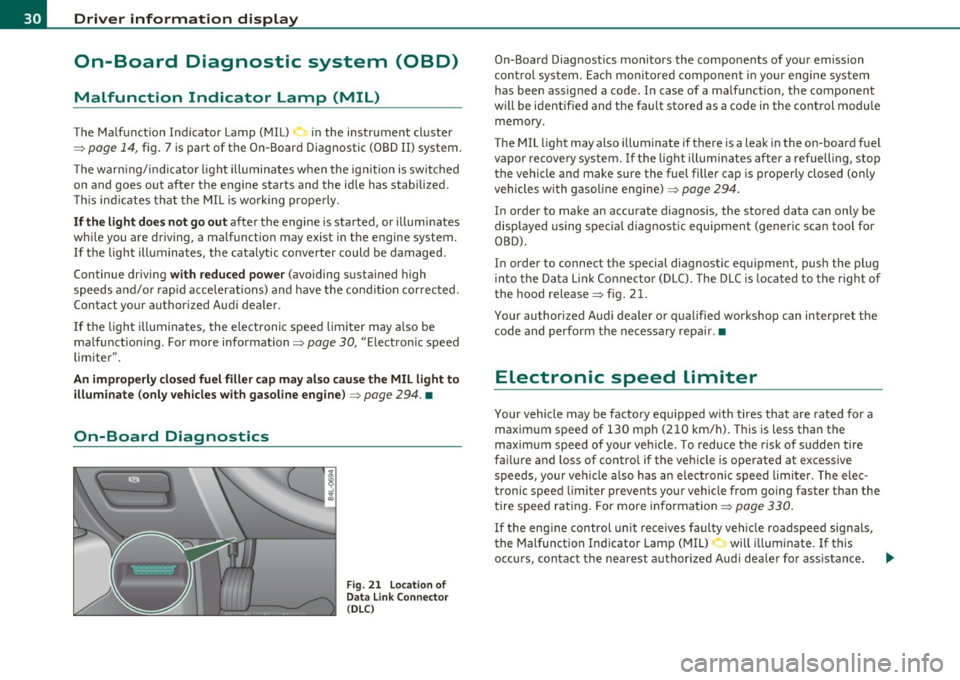
On-Board Diagnostics
Fig . 21 Location of
Data Link Connector
( DLC )
On-Board Diagnostics monitors the components of your emission
control system. Each monito red component in you r engine system
has been ass igned a code. I n case of a malfunct ion, the component
wi ll be ident ified and the fau lt stored as a code in the control module
memory .
The MIL light may also illuminate if there is a leak in the on-board fuel
vapor recovery system. If the light illuminates after a refuelling, stop
the vehicle and make sure the fuel filler cap is properly closed (only
vehicles with gasoline engine)::::>
page 294.
In order to make an accurate diagnosis, the stored data can only be
displayed using special diagnostic equipment (generic scan tool for
OBD).
In order to connect the special diagnostic equipment, push the plug
into the Data Link Connector (DLC). The DLC is lo cated to the right of
the hood release
::::> fig. 21.
Your authorized Audi dealer or qualified workshop can interpret the
code and perform the necessary repair .•
Electronic speed limiter
Your vehicle may be factory equ ipped w ith tires that are rated for a
maximum speed of 130 mph (210 km/h). This is less than the
maximum speed of your veh icle. To reduce the risk of sudden tire
failure and loss of control if the vehicle is operated at excessive
speeds, your vehicle also has an electronic speed limiter . The elec
tronic speed limiter prevents your vehicle from going faster than the
tire speed rating . For more information ::::>
page 330.
If the engine control unit receives faulty vehicle roadspeed signals,
the Malfunction Indicator Lamp (MIL)
0 will illuminate . If this
occurs, contact the nearest authorized Aud i dea ler for ass istance.
~
Page 38 of 392

Driver information display
& WARNING (continued)
• Never open the hood if you see or hear steam or coolant
escaping from the engine compartment -you risk being scalded.
Wait until you can no longer see or hear steam or coolant
escaping.
• The engine compartment of any vehicle is a dangerous area.
Before you perform any work in the engine compartment, turn of
the engine and allow it to cool. Follow the warning stickers
=> page 290, "Engine compartment".
0 Note
Do not continue driving if the_¥_ symbol illuminates. There is a
malfunction in the engine cooling system -you could damage your
engine. •
Engine oil pressure malfunction 't:::f:
The red engine oil pressure warning symbol requires
immediate service or repair. Driving with a low-oil-pres
sure indication is likely to inflict severe damage to the
engine.
If the ~ symbol appears in the display and blinks, the oil
pressure is too low. An additional driver message can also be
displayed by pressing the
[CHECK] button :
Switch off engine! Oil pressure too low
Immediate actions
- Pull off the road.
- Stop the vehicle.
- Turn off the engine .
-Check the engine oil level with the dipstick => page 305.
Dipstick readings checks too low
- Top off oil to the proper level=> page 306 .
Make sure that the oil pressure warning symbol~
appears no longer in the display before you start driving
again.
Dipstick reading checks OK
- If the oil pressure warning symbol ~ starts flashing
again even though the engine oil level checks OK on the
dipstick,
do not continue driving and do not let the
engine run in idle.
Instead, contact your authorized Audi
dealer for assistance.
[I) Tips
• The engine oil pressure symbol~ is not an indicator for a low
engine oil level. Do not rely on it. Instead, check the oil level in your
engine at regular intervals, preferably each time you refuel, and
always before going on a long trip.
• The yellow oil level warning indication
~ requires oil refill or
workshop service without delay. Do not wait until the red oil pres
sure warning ~ starts to flash before you respond to the low oil
level warning
..'!' . By then, your engine may already have suffered
serious damage. •
Steering malfunction i
If there is a malfunction in the electronic steering column
lock, the steering cannot be unlocked.
If the i symbol in the display blinks, there is a malfunction
in the electronic steering column lock. An additional driver
~
Page 39 of 392

message can also be dis played by press ing the [ CHECK)
butto n:
Do not drive vehicle: steering defective
- Contact your nearest author ized Audi dealer or q uali fied
wor kshop.
- Do
not tow your veh icle.
& WARNING
Your veh icle must not be towed in the event of a malfunction in
the electronic steering column lock because it cannot be steered
due to the locked steering.
If it is towed with the stee ring locked ,
there i s the risk of an ac cident. •
Ignition lock malfunction ~
A malfunction in the ignition lock must be repaired imme
d iately .
If the .Pe symbo l in t he display b links, the re is a malfunc tion
in the electronic ignition lock . A n add itional driver message
can a lso be disp laye d by pressing the [
CHE CK) button:
Ignition lock defective. Contact workshop !
- Do not tu rn th e engine off .
- Drive immed iately to an authorized Aud i dea ler to have
the malfu nct io n correc ted .
If there is a malfunction in the e lectron ic ignition loc k, the ignit ion
c anno t be t urned off. D rive immediate ly to an au th o rized Audi dea le r
to have the cause of the malfunction corrected.
Controls and equip
ment Safety first Driver information display
On veh icles with Convenience key*, the eng ine should not be switched
o ff using the
!STO P] button be ca u se the eng ine c annot be st arted
again after the ignitio n is switched off .•
Yellow symbols
Ay ello w symbo l means WARNING.
Fig . 2 5 Displ ay: lo w
fuel leve l w arning
( pr io ri ty 2 )
Yellow symbols ind icate a p rior ity 2 malfunct ion - Warn ing!
When a yellow warning symbo l appears,
one warning tone sounds. A
dr ive r message appe ars as we ll to exp la in the ma lf u nction in more
detail. The driver warn ing goes out after about 5 seconds, but it can
be brought up again a t any time by pressi ng the
I CHECK ] button.
Check the d isp layed fu nction as soon as possible . If
more than one
pr iority 2 malfunction is detected, all symbo ls will appear one after
the othe r for about 2 seconds.
Yellow symbols mean:
Convenience key*
K ey no t in vehicle
USA models:
Defective b ra ke light
Canada models: Defective b rake light
Vehicle care
~ page 131
~page24
~page2 4
Technical data
Page 40 of 392
Driver information display
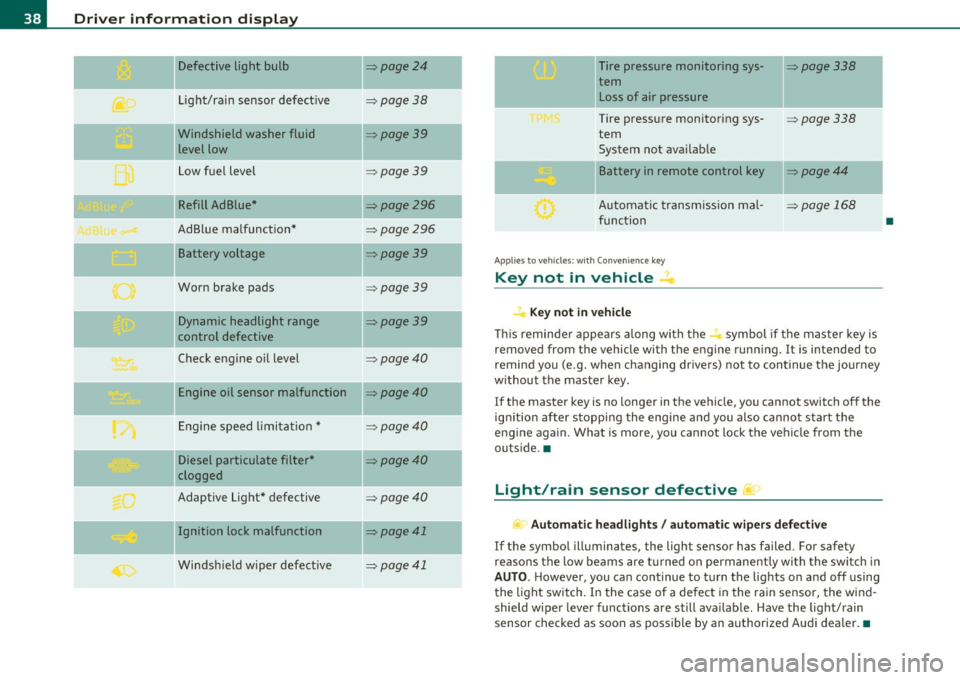
Defective light bulb ::::>page24
._ -
Light/rain sensor defective :::>page 38
-Windshield washer fluid =>page39
level low
Low fuel level
::::>page39
Refill Ad Blue* ::::>page296
AdBlue malfunction* =>page 296
-Battery voltage ::::>page39
Worn brake pads ::::>page39
Dynamic headlight range ::::>page39
control defective
-
Check engine oil level ::::>page40
Engine oil sensor malfunction =>page40
Engine speed limitation* ::::>page40
Diesel particulate filter* ::::>page40
clogged
Adaptive Light* defective
=>page40
Ignition lock malfunction ::::>page41
--
Windshield wiper defective => page 41
-
-
-
-
-
-
Tire pressure monitoring sys-::::>page338
tern Loss of air pressure
Tire pressure monitoring sys-=> page338
tern
System not available
- -
11
sattery in remote control key ::::>page44
Automatic transmission mal-=> page 168
function
Applies to veh icles: with Conven ience key
Key not in vehicle ..Z..
Key not in vehicle
This reminder appears along with the -i. symbol if the master key is
removed from the vehicle with the engine running. It is intended to
remind you (e.g. when changing drivers) not to continue the journey
without the master key.
If the master key is no longer in the vehicle, you cannot switch off the
ignition after stopping the engine and you also cannot start the
engine again. What is more, you cannot lock the vehicle from the
outside. •
Light/rain sensor defective ~'j.
Automatic headlights/ automatic wipers defective
If the symbol illuminates, the light sensor has failed. For safety
reasons the low beams are turned on permanently with the switch in
AUTO. However, you can continue to turn the lights on and off using
the light switch. In the case of a defect in the rain sensor, the wind
shield wiper lever functions are still available. Have the light/rain
sensor checked as soon as possible by an authorized Audi dealer. •
•
Page 41 of 392
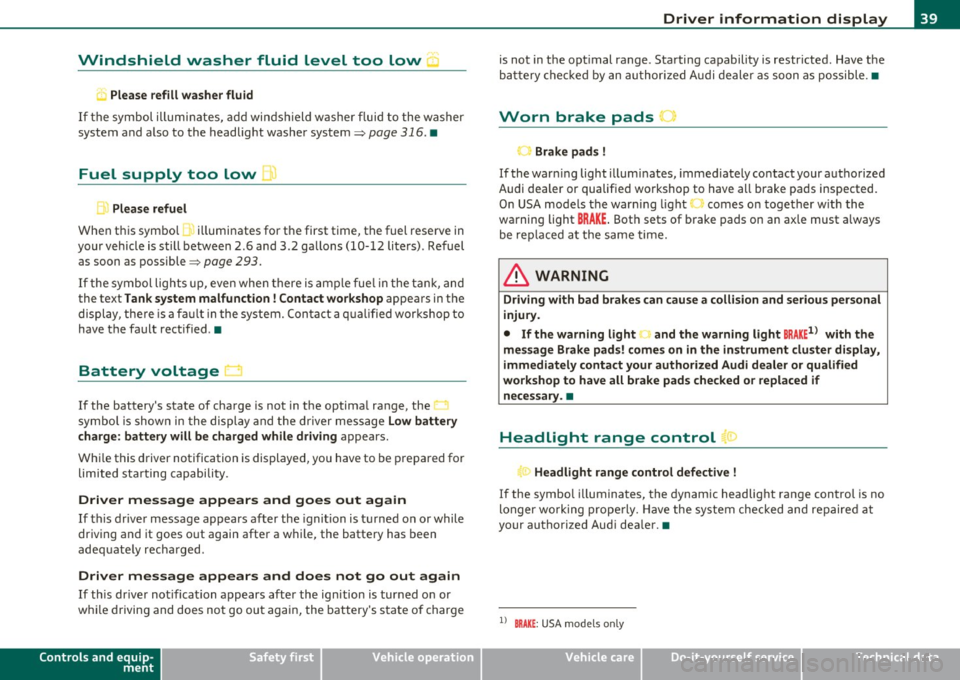
Windshield washer fluid Level too Low :5
Please refill washer fluid
If the symbol illumi nates, add winds hield washe r fluid to the washer
system and also to the headlight washer system=>
page 316. •
Fuel supply too Low ""~
A Plea se refuel
When t his symbo l illuminates for t he first time, the fuel reserve in
your vehicle is still between 2 .6 and 3 .2 gallons (10- 12 li te rs) . Refuel
as soon as possible =>
page 293.
If the symbol lights up, even whe n there is ample fue l in the t ank, and
the text Tank system malfunction! Contact workshop appears in the
displ ay, the re is a fa ult in the system. Con tact a qualified workshop to
have the fault rectified .•
Battery voltage U
If the battery's state of charge is not in the optima l range, the -,
s ymbo l is show n in the display and the d river mess age Low battery
charge: battery will be charged while driving appears.
Wh ile this driver notification is displayed, you have to be prepared for
limited sta rting capabili ty .
Driver message appears and goes out again
If th is driver message appears a fter the ignit ion is t urned on or while
driving and it goes o ut again after a while, the battery has been
adequate ly recharged.
Driver message appears and does not go out again
If th is dr iver no tification appears after the ign ition is turned o n or
whi le driving and does not go ou t agai n, the battery 's s ta te of charge
Controls and equip
ment Safety first
Driver information display
is not in the opt
imal range . Starting capability is restricted. Have the
ba ttery che cked by an au thor ized A udi dealer as soon as possible. •
Worn brake pads ~
-Brake pad s !
If the warning light illum inates, immediately contact your a uthorized
Audi dealer or qualified wo rkshop to have all brake pads inspected.
On USA mode ls the warn ing light
t comes o n together w it h the
warning light
BRAKE . Both sets of brake pads on an axle must a lways
be re place d at the same time.
& WARNING
Driving with bad brakes can cause a collision and serious personal
injury.
• If the warning light', and the warning light
8RAKE1l with the
me ssage Brake pads! comes on in the in strument cluster display ,
immediately contact your authorized Audi dealer or qualified
workshop to have all brake pads checked or replaced if necessary. •
Headlight range control 1©
"'Headl ight range control defective !
If the symbo l illuminates, the dynamic headlight range contro l is no
longer wo rking prope rly. Have the syste m checked and repaired at
your authorized Aud i dea ler. •
ll BRAKE : USA mode ls on ly
Vehicle care Technical data
Page 49 of 392
You can unlock the vehicle from the inside by :
• removing the key from the ignition switch (the vehicle will auto
matically unlock itself) or
• pressing the unlock part of the power lock switch@ or
• pulling the door handle (twice to open the rear doors).
& WARNING
• When you lock your vehicle from outside , nobody -especially
children -should remain inside the vehicle. Remember, when you
lock the vehicle from the outside the windows cannot be opened
from the inside.
• When you leave the vehicle, always remove the ignition key
and take it with you. This will prevent passengers (children, for
example) from accidentally being locked in the vehicle should
they accidentally press the power locking switch in the front
doors.
• Do not leave children inside the vehicle unsupervised . In an
emergency it would be impossible to open the doors from the
out side without the key.
(I) Tips
• In the event of a crash w ith airbag deployment all locked doors
will be automatically unlocked to give access to the vehicle occupants
from the outside.
• If the power locking system should malfunction, you can lock each
door ind ividually us ing the veh icle key =>
page SO.
• If the power locking system should fail, you can still open the fuel
t ank flap in an emergency=>
page 296.
• You are well advised not to keep valuables inside an unattended
vehicle, visible or not. Even a proper ly locked veh icle cannot provide
the security of a safe. •
Contro ls a nd e quip
m en t Vehicle
OP-eration
Opening and closing
Unlocking and Locking the vehicle with the
remote control
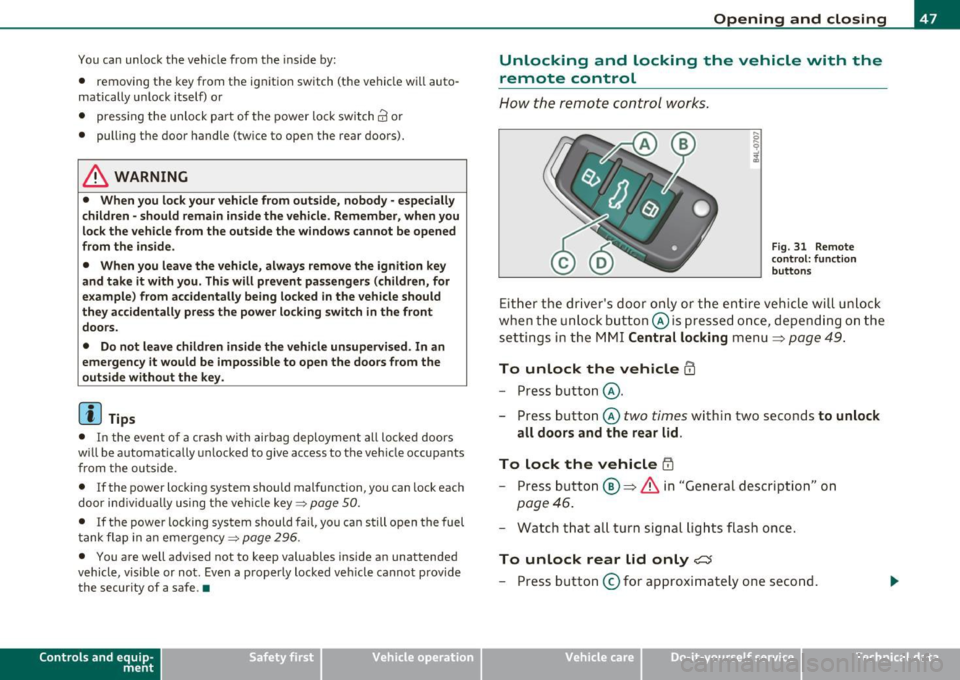
How the remote control works.
Fig. 31 Remote
con trol: function
buttons
Either the driver's door only or the entire vehicle will unlock
when the unlock button @is pressed once, depending on the
settings in the MMI Central locking menu
=> page 49.
To unlock the vehicle CD
- Press button @.
- Press button @
two times within two seconds to unlock
all doors and the rear lid.
To lock the vehicle i'.D
- Press button ®=> & in "General description" on
page 46.
- Watch that all turn signal lights flash once.
To unlock rear lid only <::::::5
-Press button @for approximately one second.
Vehicle care Do-it-yourselt service Technical data
Page 104 of 392
IIII.___S_ e_a _t_ s_ a_ n_ d_ s_t _o _r_ a...: g,,._ e ______________________________________________ _
Roof rack
First things first
A roof rack can be fitted to carry additional luggage on
the roof.
- A lways read and follow the instruct io ns prov ided by the
roof rack manufacturer when the roof rack system m ust
be installed .
If you are tra nspo rting l uggage or other objects on the roof, please
note the following:
• Your vehicle has specially designed aerodynamic roof rails. Only
install a roof rack specifica lly designed fo r you r model. Contact the
nearest authorized Audi dea ler for information on approved mod ular
roof rac ks for your vehicle .
• T hese approved roof racks a re the basis for a complete roof rack
system. Add itiona l attachments for the basic roof rack are necessary
to safe ly transport luggage, bicycles, surf boa rds, skis or sma ll boats .
All necessary hardwa re for these systems is ava ilable at yo ur a utho
r ized Audi dealer .
• We recommend that you keep t he installat ion inst ruct ions for
your roof rack system together with your Owner's literature in the
vehicle.
When should the roof rack be remo ved?
• Before going through an automat ic car wash (it is best to ask the
car wash operator for advice) .
• When not in use, to reduce fuel consumption, wind noise and to
guard against theft .
& WARNING
• Use of an unapproved roof rack or incorrect mounting of an
approved roof r ack can cau se the roof rack or the items atta ched
to it to fall off the roof onto the road.
• Object s falling from the roof of a v ehicle can cau se a crash and
personal injury .
• Only mount the system b etween the markings shown in
=> fig. 99 .
• The roof rack sy stem must be in stall ed e xactly ac cording to the
instructions provided.
0 Note
• Your vehicle warranty does not cover any damages to the vehicle
caused by using roof ra ck s or mounting s truc tures not appr oved by
Audi for your veh icle . The same applies to damage result ing from
incor re ct roof rac k ins tallat io n.
• Always check the roof rack mountings and hardware before each
t rip and dur ing a trip to ma ke sure everyth ing is sec urely tig htened. If
necessary, ret ighten the mountings and check the entire system from
t ime to time.
• After mounting a roof rack system, or when yo u transport objects
on the roof of your veh icle, t he heigh t of the vehicle is natura lly
increased . Be careful whe n driving under low br idges or in park ing
g ar ages for ex ample . This could ca use damage to the lo ad and even
the vehicle itself .•
Page 105 of 392
_______________________________________________ S_ e_ a_t _s_ a_n_ d_ s_ t_ o _ r_a """g::;. e _ __.fflll
Roof rack mounting locations
Roof racks must be installed only at the locations marked
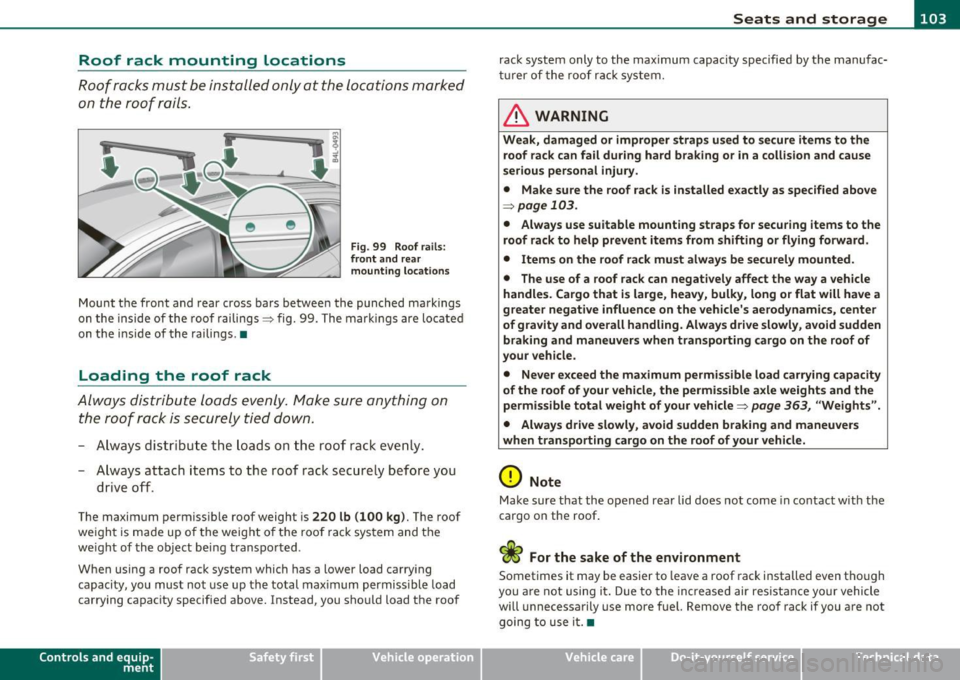
on the roof rails .
Fig. 99 Roof ra ils :
fr ont and rear
m ounting l ocations
Mount the front and rear cross bars betwee n the punched markings
on the inside of the roof railings :::> fig. 99 . The marki ngs are lo cate d
on t he inside of the railings .•
Loading the roof rack
Always dist ribu te loads evenly . Make sure anything on
the roof rack is securely tied down.
- A lways distr ibu te the loads o n the roof rack even ly.
- A lways attach items to the roof rack secure ly before you
drive o ff.
The maximum permiss ible roof weight is 220 lb (100 kg ). The roof
we ight is made up o f the weight of the roof rack system and the
we ight of the object being transported .
When using a roof rack system which has a lower load carry ing
capacity, you must not use up th e total max imum permiss ible load
carrying capac ity specified above. Instead, you should load the roof
Con tro ls a nd e quip
m en t Vehicle
OP-eration
rack system only to the max imum capacity specified by the manufac
tur er of the roof ra ck system.
& WARNING
Weak, damaged or improper straps u sed to secure item s to the
roof rack can fail during hard braking or in a collision and cause
s e riou s personal injury .
• Make sure the roof rack is i nstalled e xactly as spe cified abo ve
~ page 103 .
• Always u se suitable mounting strap s fo r se curing items to the
roof rack to help pre vent items from shifting or fl ying forward .
• Item s on the roof rack mu st alwa ys be secu rel y mounted.
• The use of a roof rac k can negati vely affect the way a vehicle
handle s. Cargo that i s large , he avy , bulky, long or flat will have a
greater negative influence on the vehicle 's a erodynami cs, center
of gr avit y and overall h andling . Alway s drive slowl y, avoid sudden
braking and maneuvers when tran sporting cargo on the roof of
your veh icle .
• Never e xceed the maximum permi ssible load carr ying capacity
of the r oof of your vehicle , the permi ssible a xle weight s and the
permissible tot al weight of your v ehicl e=>
page 363 , "W eights ".
• Alway s drive slowly , avoid sudden braking and maneuver s
when t ran sport ing cargo on th e ro of of y our veh icle.
0 Note
Make sure that the opened rear lid does not come in contact with the
cargo on the roof .
c£> For the sake of the environment
Sometimes it may be easier to leave a roof rack installed even tho ugh
you a re not using i t. Due to the inc reased air res istance your vehicle
will unnecessarily use more fuel. Remove the roof rack if you are not
going to use it. •
Vehicle care Do-it-yourselt service iTechnical data
Page 116 of 392
![AUDI Q7 2011 Owner´s Manual 1111....__w __ a _r_ m __ a_n_ d_ c_ o _ l_d _______________________________________________ _
Air Condition er On /Off
!AC]
Switching off the air conditioner saves fuel.
- Press the [](/img/6/40276/w960_40276-115.png "AUDI Q7 2011 Owner´s Manual 1111....__w __ a _r_ m __ a_n_ d_ c_ o _ l_d _______________________________________________ _
Air Condition er On /Off
!AC]
Switching off the air conditioner saves fuel.
- Press the [")
1111....__w __ a _r_ m __ a_n_ d_ c_ o _ l_d _______________________________________________ _
Air Condition er On /Off
!AC]
Switching off the air conditioner saves fuel.
- Press the [AC] button to switch the air conditioner on or
off.
When the air conditioner is switched on, the indicator lamp in the
button will illuminate and the heating/ventilation system is
controlled automatically.
Please keep in mind that with the air conditioner switched off, the
interior temperature cannot be lower than the outside temperature.
The air will not be cooled or dehumidified. The windows can fog up.•
Automatic mode !AUTO]
The automatic mode is the standard setting for all
seasons.
- Select temperature between 60 °F (+16 °() and 84 °F
(+28 °().
- Press the [AUTO] button.
Automatic operation ensures constant temperatures in the interior
and dehumidifies the air inside the vehicle. Air temperature, volume
and distribution are controlled automatically to reach or maintain the
desired interior temperature as quickly as poss ible. Fluctuations in
exterior temperature and the effects of temperature from the posi
tion of the sun are compensated for automatically.
This operating mode works only in the adjustable temperature range,
from
60 °F (+16 °() to 84 °F ( + 28 °() . If a temperature below 60 °F
( + 16 °C) is selected, LO appears in the display. At temperatures above
84 °F (+28 °C) , HI is displayed. At both extreme settings , climate
control runs continuously at maximum cooling or heating power.
There is no temperature regulation. •
Setting the temperatur e
Separate temperatures can be selected for the driver's
and front passenger's side.
- Rotate the regulator to the left to reduce the tempera-
ture, or to the right to increase the temperature.
The selected temperature appears on the climate control display . The
temperature setting will also appear for a few seconds in the MMI
display .•
Fan @
The automatically preset fan speed can be reduced or
increased.
- Press the I~] button.
- Rotate the regulator to the desired fan speed.
The climate control system automatically regulates fan speed
depending on interior temperature. You can adjust the volume of air
produced by the fan to your own requirements.
The fan speed setting will appear for a few seconds in the MMI display.
[ i] Tips
It is possible that the fan speed may change automatically. This
occurs to ensure that the desired temperature setting is reached as
quickly as possible.•
Page 118 of 392
lffll..__w __ a _r _m __ a_n _ d_ c_ o_ ld ________________________________________________ _
The rear window defogger works only when the engine is running . The
light in the switch will illum inate when the defogger is on.
The rear window defogger will switch off automatically after a short time . The time the rear window defogger remains on will vary
depending on the outs ide temperature.
At very low outside temperatures, the rear window defogger can be switched on continuously by pushing the QW button for mo re than 2
seconds. This remains stored until the ign ition is switched off .
A rear window defogger that was switched on also remains stored for 1 5 minutes afte r th e ign itio n is switched off. If the engine is
restarted within these 15 minutes, the rear window defogger is also
act ivated , depending on outside tempe rature. With a vehicle that is
parked for a short time, the rear w indow defogger does not need to
be manua lly a ct ivated aga in.
'£> For the sake of the environment
T urn the defogger off when the rear window is clear. When you save
electricity, you save fuel. •
Air outlets
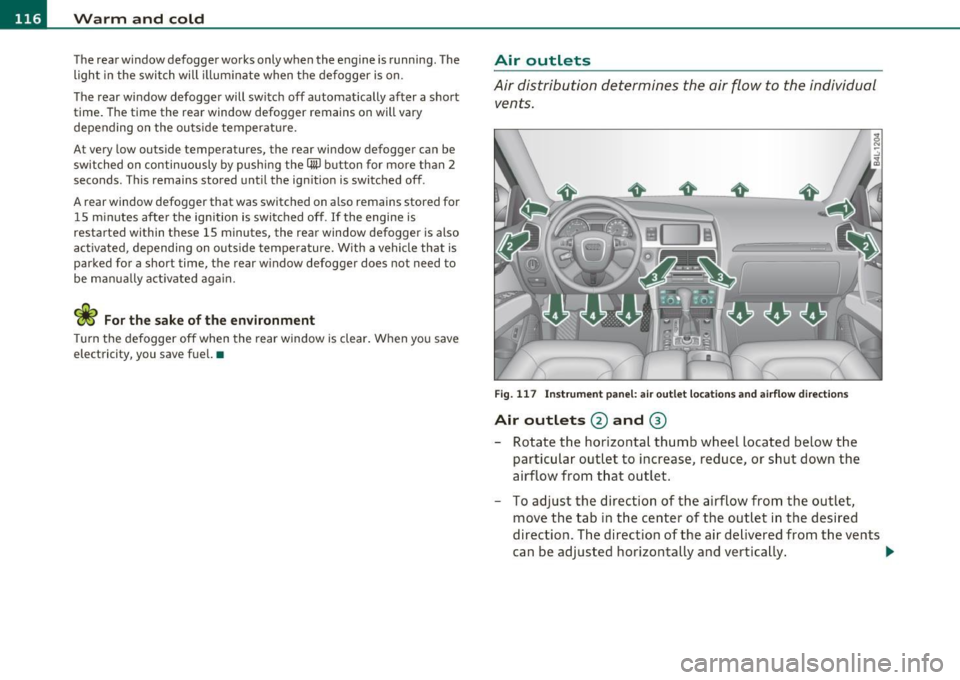
Air distribution determines the air flow to the individual
vents.
Fi g. 117 In st rum ent pa nel: air o ut let locat ion s a nd airfl ow directi ons
Air outlets @ and ®
-Rotate the horizontal thumb wheel located below the
particular outlet to increase, reduce , or sh ut down the
airflow from t hat outlet .
- To adjust the direction of the airflow from the outlet,
move the tab in t he center of the outlet in the desired
direction. The direction of the air delivered from the vents
can be adj usted horizontally and vertically . ..,