key AUDI Q7 2011 Owner´s Manual
[x] Cancel search | Manufacturer: AUDI, Model Year: 2011, Model line: Q7, Model: AUDI Q7 2011Pages: 392, PDF Size: 93.29 MB
Page 58 of 392

Opening and closing
Applie s to veh icl es : wi th Conv enie nce key
Unlocking the vehicle
The doors and the rear lid can be unlocked without oper
ating the master key.
Fig. 43 Convenience
key: unlocking vehicle
door
- Take hold of the door handle . The door is unlocked auto-
matically.
- Pull the handle to open the door.
A door is unlocked as soon as you approach the door handle and the
system recognizes an authorized master key . The vehicle can be
unlocked at any door. The authorized master key only has to be within
a range of about 5 feet (1.5 meters) from the respective door.
When a door is unlocked, the driver's door is always unlocked as well.
It depends on the settings in the central locking menu in the MMI
whether the entire vehicle is unlocked or only certain doors
~ page 49.
[I] Tips
If your vehicle has been standing for an extended period, please note
the following : •
The proximity sensors are deactivated after a few days to save
power . You then have to pull on the door handle once to unlock the
vehicle and a second t ime to open the vehicle.
• To prevent the battery from being discharged and to preserve your
vehicle 's ability to start for as long as possible, the energy manage
ment system gradually switches off unnecessary convenience func
tions . It is possible that you will not be able to unlock your veh icle
using these convenience functions. •
Appli es to vehicles : wit h Con venie nce key
Locking the vehicle
The vehicle can be locked without operating the master
key.
Fig . 44 Convenience
k ey: Locking the
vehicle
- Move the selector lever to the P position .
- Press the locking button in the door handle to lock the
vehicle =>& .
The vehicle can be locked at any door . The authorized master key only
has to be within a range of about 5 feet (1.5 meters) from the parti c
ular door.
T he selector lever must be in the P position, otherwise the vehicle
cannot be locked.
Page 59 of 392
& WARNING
• Wh en you lock your vehicle from outs ide , nobody - especially
c hildren - should remain in side the vehicle . Remember , when you
lo ck the vehicle from the outside the windows cannot b e opened
from the inside .
• When you lea ve the vehicle, always remove the ignit ion key
and take it with you. This will prevent pa ssenger s (c hildren, for
e xample ) from a ccidentally be ing locked in the vehicle should
they accidentally pres s the power locking switch in the front
doors .
• Do not leave children inside the vehicle unsuperv ised . In an
e mergency it would be impossible to open the door s from the
outside without the key.
[I] Tips
It is not possible to re -open the door fo r a b rief period directly after
clos ing it . This a llows you to ensure that the doors are p roper ly
loc ked .•
Anti-theft alarm system
The an ti-theft alarm triggers an al arm if any one
attempts to break into the vehicle .
The a nti-theft alarm system trigge rs an a udible a larm and t urns o n
th e emergen cy flas her if an unau thori zed inte rfe rence wi th t he
vehicle is sensed by the system.
How is the anti-theft alarm system sw itched on?
T he anti-theft alarm system is switched on when you lock the vehicle.
Th e system is activa ted app rox ima tely 30 seconds after the vehicle is
locked. The indicator light on top o f the doo r trim start flashing
r a pidly fo r 30 seconds and then blink s low ly .
Controls and equip
ment Safety first
Opening and closing
How is the anti-theft alarm system switched off?
Th
e an ti- the ft alarm system is switche d off on ly when yo u unlock your
veh icle . If you do not o pen a door wit hin 60 seconds after you have
unlocked wit h the remote control , the vehicle will lock itself again
automa tically .
When will the anti-theft alarm system be
triggered?
When the vehicle is locked, the a larm system monitors and protects
the following parts of the veh icle:
• engine compartment
• lu ggage compa rtment
• doors
• ignition
Whe n the system is activated, the alarm will be triggered if one of the
doors, the engine hood or the rear lid are opened, or if the ignition is
t ur ne d on . The anti-t heft a la rm system will a lso go off when the
ba ttery is d isco nnected.
You can also trigger the alarm by pressing the PANIC button on your remote con trol. This will alert o ther peop le in case of eme rge ncy.
Press the
PANIC butto n aga in to turn off the a larm .
How is the anti-theft alarm switched off when
triggered?
Th e alarm sys tem is swi tched off whe n yo u un lo ck the veh icle o r whe n
the ignit ion is sw itched on . The a larm will also switch itself off when
i t comes to the end o f its cy cl e.
Emergency flasher and horn
Th e emerge ncy fl ashe r will blink briefly and the hor n sounds whe n
the doo rs, engine hood and rear lid a re prope rly closed.
If the eme rgency flashers do not blink, o r th e horn does no t soun d,
check the doo rs, eng ine hood and rear lid to make s ure they a re prop
er ly closed.
If you close a door, the hood o r the rear lid with the anti -
Vehicle care Technical data
Page 60 of 392
![AUDI Q7 2011 Owner´s Manual Opening and closing
theft alarm switched on, the emergency flashers will blink and the ....
horn will so und only after you have closed the doo r o r li d.
[ i ] Tips
For the](/img/6/40276/w960_40276-59.png "AUDI Q7 2011 Owner´s Manual Opening and closing
theft alarm switched on, the emergency flashers will blink and the ....
horn will so und only after you have closed the doo r o r li d.
[ i ] Tips
For the")
Opening and closing
theft alarm switched on, the emergency flashers will blink and the ....
horn will so und only after you have closed the doo r o r li d.
[ i ] Tips
For the anti -t h eft a larm system to function p rope rly, ma ke sure all
vehicle doors a nd windows are closed before leaving the vehicle .•
Power windows
Controls
Switches for front door windows
@ operates the window in the driver's door.
F ig. 45 D rive r's doo r:
power wind ow
switche s
® operates the window in the front passenger 's door .
Switches for rear w indows
© operates the left rear window .
® operates the right rear window .
Safety switch
© Safety switch for rear w indow operat io n.
& WARNING
• Do not leav e children unatt ended in the vehicle , especially with
a cces s to vehicle key s. Un supervi sed use of the keys can re sult in
starting of the engine and use of vehicle sy stems such as power
window s, etc . which could result in seriou s injury .
• Remember -you can still open or close the power windows for
about ten minutes after the ignition is switched off . Only when
e ith er of the front doors are opened are the power windows
s witched off.
• Be careful when clos ing th e window s. Check to see that no one
is in the way, or serious injury could re sult !
• Always remo ve the ign ition key whenever you leave your
vehicle.
• If you lock your vehicle f rom the outside, no one, especially
children, should remain in the vehicle.
• Do not st ick anything on the windows o r the windshield that
may interfere with the driver 's field of vi sion .
[I] Tips
In a ddit ion to the sw itches in t he driver's doo r there is a separate
switch in eac h door for the power window in that door=>
page 59,
fig. 46. a
Switches in the driver 's door
The driver can operate all windows.
If the respective sw itch is pus hed or pu lled the w indow will
open or close . T he power window switches have a
two-posi-
tion function : ..,
Page 62 of 392
Opening and closing
Opening the windows
-Press the switch to t he first position and hold it until you
have opened the window as far as you want.
- Press the switch quickly to the
second position and the
window w ill automatica lly open all the way.
Closing the windows
Pull the sw itch to the first position and hold it u ntil you
have closed t he win dow as fa r as you wa nt.
- Pu ll t he swi tch quic kly to the
second position and th e
wi ndow w ill automatically close all the way .
[ i ] Tips
T he windows can still be opened a nd closed for about ten mi nutes
after the ign ition has been turned off . The power windows are not
shu t off unt il one o f the front doors is opened .•
Convenience close/open feature with the
lock in the driver 's door
You can cl ose or o pen the windows from outside when you
loc k or unlock your car with the key in the driver 's door
lock.
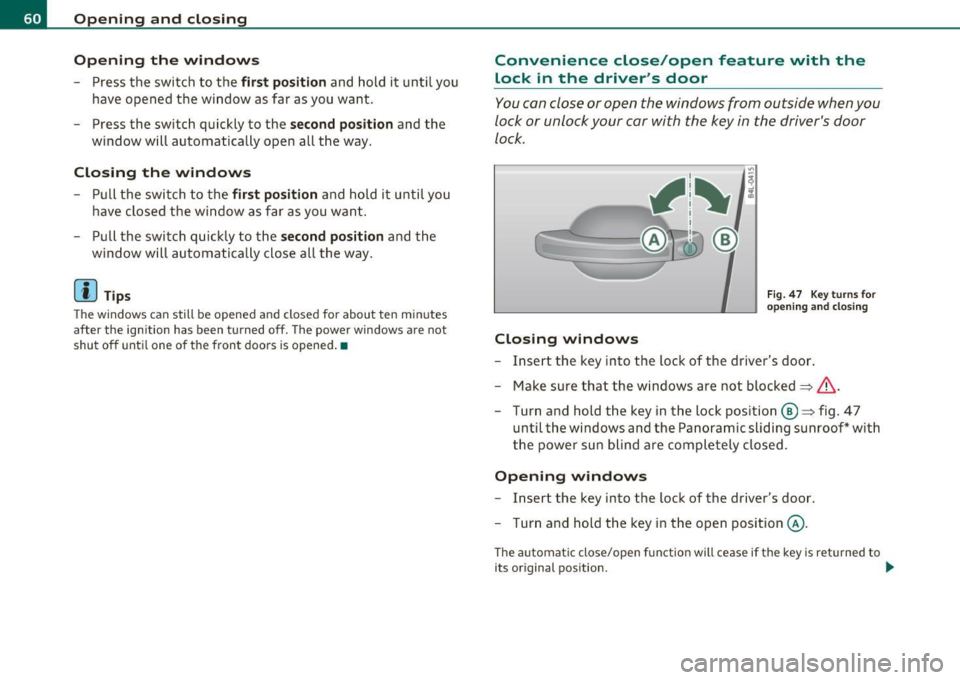
Closing windows
Fig . 47 Key turns for
o pen ing and clos ing
- Insert the key into the loc k of the driver's door .
- Make sure that the w indows ar e not bl ocke d
=> &.
- Tur n and hold t he k ey in t he loc k position @=> fi g. 4 7
until t he w indows an d the Pa noramic sli ding sunroo f* with
th e p ower su n blind ar e comp lete ly clos ed .
Opening windows
- Insert the key into the loc k of the dr iver's door.
- Tur n and hold t he key in the open posi tion @.
The a utomat ic close/open f unct io n will ce ase if t he key is re turned to
its original pos ition . .._
Page 65 of 392

-To set an intermediate position manually, press the rocker
switch in the front area
e:> until the roof segment has
reached the desired tilt position==>& .
& WARNING
Improper use of the Panoramic sliding sunroof can cause serious
personal injury.
• Be careful when closing the Panoramic sliding sunroof. Not
paying attention could cause you or others to be trapped and
injured as the Panoramic sliding sunroof closes.
• Always take the key with you when you leave the vehicle to
prevent injuries caused by the Panoramic sliding sunroof closing
• Never leave children or persons requiring assistance alone in
the vehicle, especially when they could access the vehicle keys.
Unsupervised use of the keys can result in the engine being started
or use of vehicle systems such as the power windows, etc. which
could result in serious injury. The doors could be locked with the
remote key, delaying help in an emergency.
• The Panoramic sliding sunroof will continue to operate until
the ignition key has been removed and one of the front doors has
been opened. •
Applies to vehicles : w ith Panoram ic sliding sunroof
Convenience closing feature
The Panoramic sliding sunroof can be closed from outside
with the key in the driver's door lock .
-Insert the key into the driver's door lock.
- Turn and hold the key in the lock position ®==>
page 48,
fig. 32 until the Panoramic sliding sunroof is completely
closed ==> & in "Closing Panoramic sliding sunroof" on
page 62. The power sun blind is also closed.
Con tro ls a nd e quip
m en t Vehicle
OP-eration
Opening and closing
& WARNING
Be careful when closing the Panoramic sliding sunroof. Not paying
attention could cause you or others to be trapped and injured as
the Panoramic sliding sunroof closes. •
Applies to v ehicl es: w ith Panoramic slid in g sunroof
Opening and closing sunshade
I .~ "'
r~ 1~· I
0 g
"I ..!J
"' a,
' ~
G
{(e)
B
0
0 ..
~ ~ ffl ""'
[f 'd 11 -I
t _, $
b l•,:,,,;; =·:::"' == ;'·== ··.••,:::-= ·•,::: ::::= ·•=·· = ·=· ======· •=··•·•-,· =,~=·,., .. c":::'• .. ·= '·"•' :::· ,=••,•s ::::::::: j ~
Fig. SO Section of
front headliner: Switch
for sunshade
Fig. 51 Section of
headliner in rear:
I>· .. ,.:._::;::-_·;r .,;:;, :::;>:,: -:-·. _::: ;:::'·;-}.- .::,.:.-: ::::: :~ ,.:.·-:- -":-· Switch for sunshade
The two segments of the Panoramic sliding sunroof are each
equipped with a sunshade for protection against the sun's
rays. The front shade is power operated, the rear shade is
opened and closed manually . To prevent the vehicle interior _.,
Vehicle care Do-it-yourselt service iTechnical data
Page 66 of 392

Opening and closing
from heating up, you should close both sunshades when you
park your vehicle in the sun.
Opening and closing front sunshade
Tap the rear -:c;"J" of the rocker switch~ page 63, fig. 50 or
the rocker switch for rear-seat passengers~
page 63,
fig. 51 briefly to open the sunshade fully.
- Tap the front
·'J.rT of the rocker switch briefly to close the
sunshade fully~& .
- To set an intermediate position manually, press the front or rear of the rocker switch (depending on the position of
the shade)
until the desired position is reached ~ & .
Opening and closing rear sunshade
-Hold the sunshade by the grip and push it to the desired
position.
& WARNING
Never close the sunshade without paying attention or checking -
danger of injury! •
Applies to vehicles : w ith Panoram ic s liding sunroof
Emergency closing
In an emergency, the Panoramic sliding sunroof can be
closed electrically.
If the Panoramic sliding sunroof detects an object in its path
when it is closing, it will open again automatically. In this
case, you can close the roof with the power emergency
closing function .
Emergency closing of front roof segment
- Turn the switch~ page 61 , fig. 48 @ to the normal posi
tion @.
- Within five seconds after the sunroof opens automati
cally, pull the switch until the roof segment closes.~&.
The driver's and front passenger's doors must be closed.
- If the power emergency closing function is not possible, you must close the roof manually~
page 65.
Emergency closing of rear roof segment
-Within five seconds after the sunroof opens automati
cally, press the front
e:> of the rocker switch~ page 61,
fig. 48 ® until the roof segment closes~&. The driver's
and front passenger's doors must be closed.
- If the power emergency closing function is not possible,
you must close the roof manually ~
page 66.
& WARNING
Improper use of the Panoramic sliding sunroof can cause serious
personal injury.
• Be careful when closing the Panoramic sliding sunroof. Not
paying attention could cause you or others to be trapped and
injured as the Panoramic sliding sunroof closes.
• Always take the key with you when you leave the vehicle to
prevent injuries caused by the Panoramic sliding sunroof closing
• Never leave children or persons requiring assistance alone in
the vehicle, especially when they could access the vehicle keys.
Unsupervised use of the keys can result in the engine being started
or use of vehicle systems such as the power windows, etc. which
could result in serious injury. The doors could be locked with the
remote key, delaying help in an emergency. .,,.
Page 67 of 392
& WARNING (continued)
• The Panoramic sliding sunroof will continue to operate until
the ignition key has been removed and one of the front doors has
been opened .•
A pp lies to vehicles : w ith Panoram ic sl iding sunroof
Mechanical emergency closing for front
roof segment (Step 1)
The Panoramic sliding sunroof can be closed manually in
an emergency.
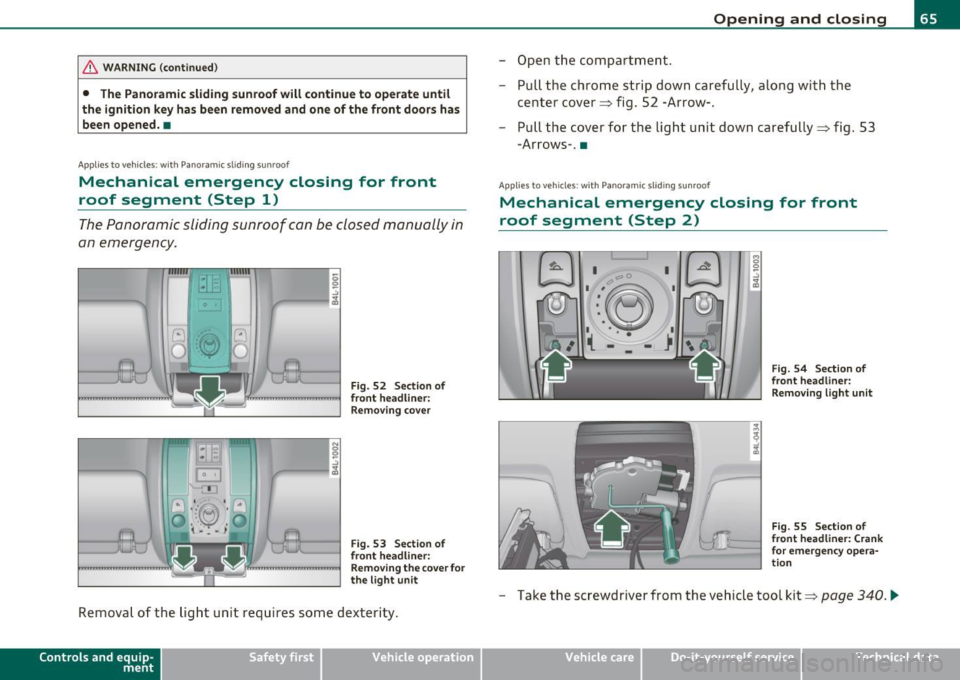
Fig. 52 Section of
front headliner: Removing cover
Fig. 53 Section of
front headliner:
Removing the cover for
the light unit
Removal of the light unit requires some dexterity.
Contro ls a nd e quip
m en t Vehicle
OP-eration
Opening and closing
-Open the compartment.
- Pull the chrome strip down carefully, along with the
center cover~ fig. 52 -Arrow-.
- Pull the cover for the light unit down carefully~ fig. 53
-Arrows-. •
Applies to v ehicles: w ith Pano ramic slid ing sun roof
Mechanical emergency closing for front
roof segment (Step 2)
I 0
'-:'~
-~ •-- 1 I • • •
( -
I
I I
Fig. 54 Section of
front headliner:
Removing light unit
Fig. 55 Section of
front headliner: Crank
for emergency opera
tion
- Take the screwdriver from the vehicle tool kit~ page 340 . .,_
Vehicle care Do-it-yourselt service iTechnical data
Page 74 of 392
Clear vision
0 Note
Do no t use the hig h beam or hea dlight fl asher if you know that these
cou ld blind oncoming traffic.•
Interior lights
Front interior Lights
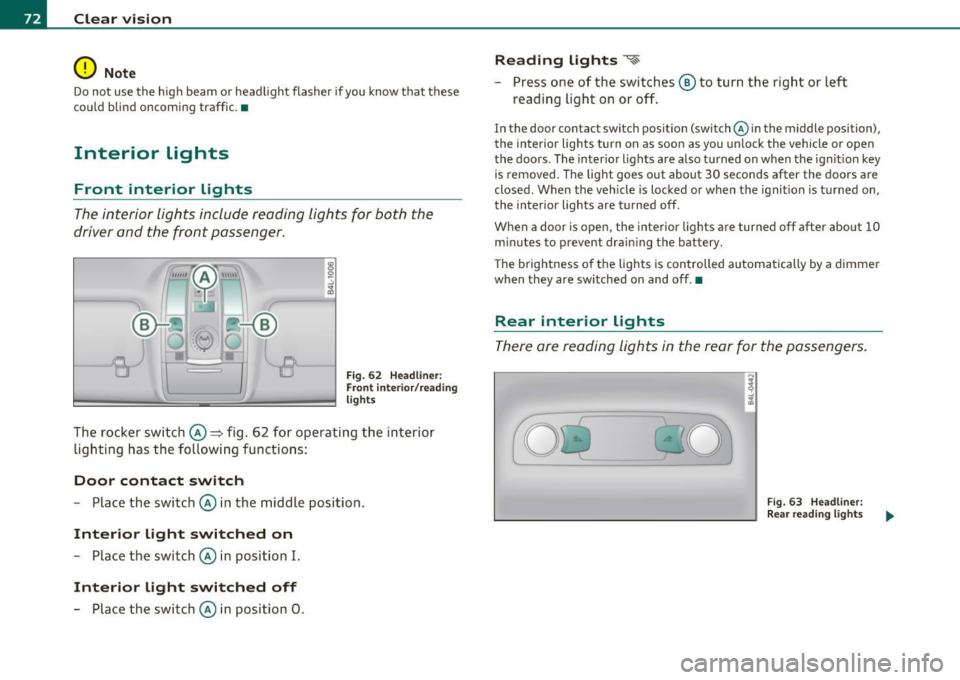
The interior lights include reading lights for both the
driver and the f ront passenger .
Fig . 62 Headlin er:
Fr ont inte ri or/ rea ding
lights
The rocker switch©=> fig . 62 for operating the interior
lighti ng has the followi ng functions :
Door contact switch
-Place the switc h© in the middle position.
Interior light switched on
-Place the switch © in position I.
Interior light switched off
- Place the switch © in position 0 .
Reading lights ~
- Press one of the switches ® to turn the right or left
reading light on or off.
In the door contact sw itch position (switch @in the middle position),
the interior lights turn on as soon as you un lock the vehicle or open
the doors . The inter io r lights are also t urned on when the ign it ion key
is removed . The light goes out about 30 seconds after the doors are
closed. W hen the vehicle is locked or when the ignit ion is t urned on,
the interior lights are turned off.
When a door is ope n, the interior lights a re turned o ff afte r about 10
m inutes to prevent dra in ing the battery.
T he brightness o f the lights is controlled automatica lly by a dimmer
when they are sw itched on and off. •
Rear interior Lights
The re are reading lights in the rear for the passengers.
Fi g. 63 Headli ner:
Rear re a din g ligh ts
Page 83 of 392
• Do not attach any st ickers to the w indshield in front of the light
sensor*, as t his wou ld interfere with the au toma tic ope ra tion of the
headlights and the automat ic dimming of the ins ide mirror.
• Be aware that automatic dimming o f the ins ide mir ror can on ly
operate proper ly if the rear w indow sun b lin d* is retracted . •
Outside mirrors
The outside mirrors are electrically adjusted.
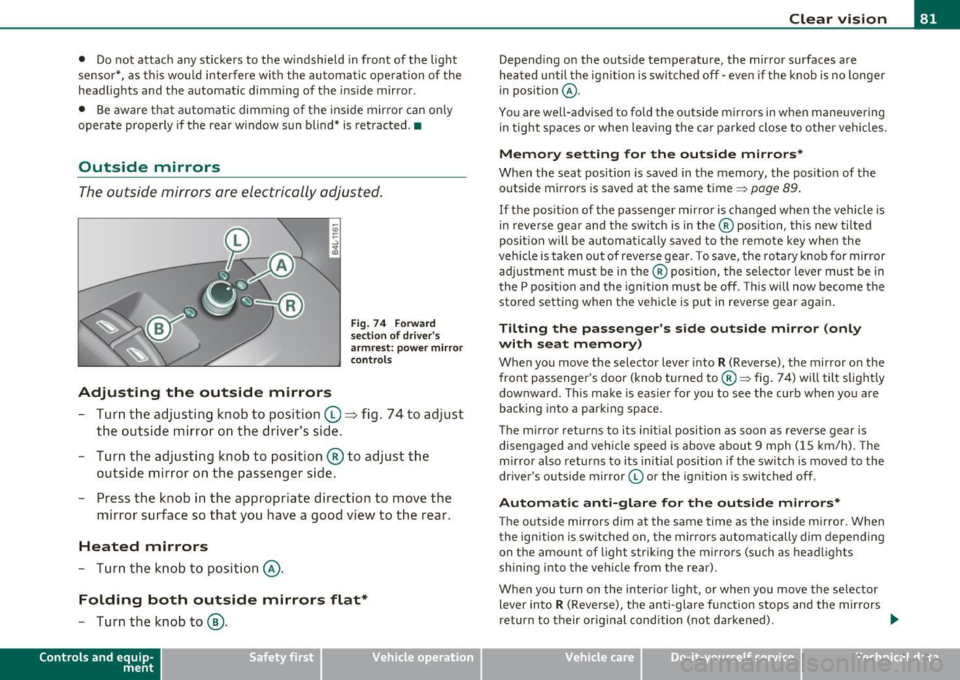
Adjusting the outside mirrors
F ig . 7 4 Forward
sec tion of d riv e r's
a rmr est: po wer mirr or
con trols
- Tur n the adjus ting k nob to position (0 ~ fig. 74 to adjust
the outside mi rror on the driver's sid e.
- Turn the adjusting knob to position ® to adjust the
outside mirror on the passenger side .
- Press the knob in the appropriate direction to move the
mirror surface so that you have a good view to the rear .
Heated mirrors
-Turn the knob to position @.
Folding both outside mirrors flat*
-Turn the knob to@ .
Con tro ls a nd e quip
m en t Vehicle
OP-eration
Clear vision
Depend ing on the outs ide temperature, the mirror surfaces are
heated until t he ignit ion is sw itched off -eve n if the knob is no longe r
in pos ition
@ .
You are well-advised to fold the o utside mirrors in when maneuver ing
in tight spaces or w hen leaving the ca r pa rked close to othe r veh icles .
Memor y setting for the out side mirrors*
When the seat position is saved in the memory, the posit ion of the
outside mirrors is saved at the same time~
page 89.
If the pos it io n of t he passe nger m irror is changed when the vehicle is
in reverse gear and the switch is in the ® position, this new tilted
posit ion w ill be a utoma tica lly saved to the remote key when the
vehicle is taken out of reverse gear . To save, the rotary knob for mirror
adjus tment mus t be in the ® position, the se lec to r l ever must be in
the P position and the ignition must be off . T hi s will now become the
stored setti ng when the vehicle is put in reve rse gear agai n.
Tilting the passenger 's side outside mirror (only
with seat memory)
Whe n you move the selector lever into
R (Reverse), the mir ror o n the
front passenger 's doo r (knob tur ned to® ~ fig . 7 4) will tilt s light ly
dow nward. This make is eas ier for you to see the curb when you are
backing into a parking space.
Th e m irro r returns to its in it ial posi tion as soon as rever se gear is
disengaged and veh icle speed is above about 9 mph (15 km/h) . T he
mirror also returns to i ts initia l position i f the swit ch is moved to the
dr iver 's outs ide mirror © or the ign it ion is switched off .
Automatic anti-glare for the out side mirror s*
The outside mirrors dim at the same time as the inside m irror. When
t he ign ition is sw itched on, the mir rors automatic ally dim depending
on the amount of light str ik ing the m irrors (such as headlights
shining into the veh icle from t he rear) .
When you t urn on the interio r light, or when you move the selector
lever into R (Reve rse), the anti -glare f unction stops and the mirrors
return to their orig inal condition (not darkened) . -.,
Vehicle care Do-it-yourselt service iTechnical data
Page 89 of 392
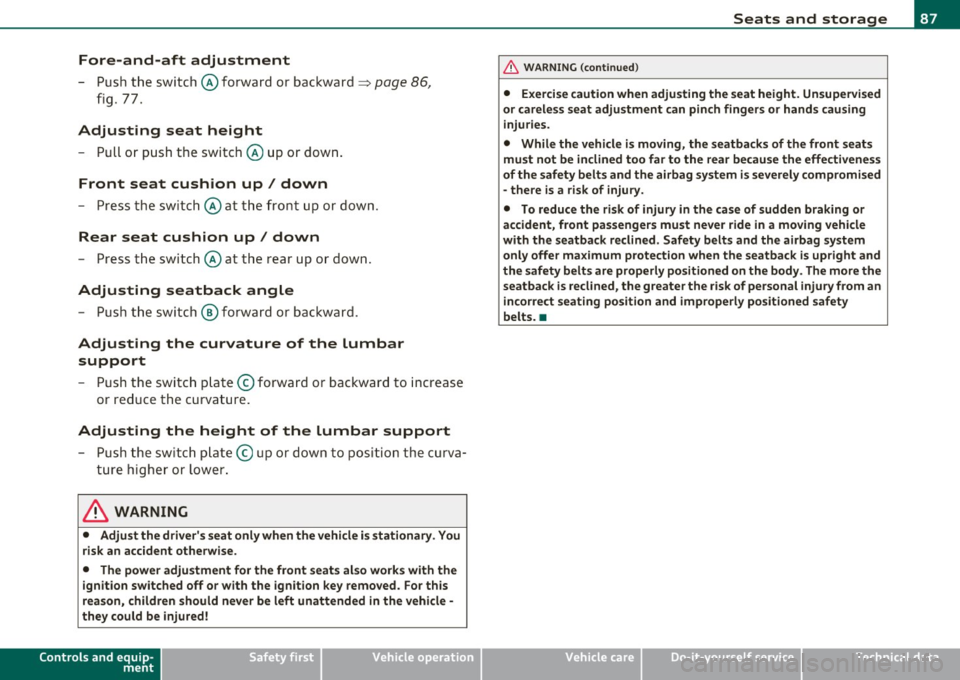
Fore-and-aft adjustment
- Push the switch@forward or backward~ page 86,
fig. 77.
Adjusting seat height
- Pull or push the switch © up or down.
Front seat cushion up/ down
- Press the switch © at the front up or down.
Rear seat cushion up/ down
- Press the switch © at the rear up or down.
Adjusting seatback angle
- Push the switch @ forward or backward.
Adjusting the curvature of the lumbar
support
- Push the switch plate © forward or backward to increase
or reduce the curvature.
Adjusting the height of the lumbar support
- Push the switch plate © up or down to position the curva
ture higher or lower.
& WARNING
• Adjust the driver's seat only when the vehicle is stationary. You
risk an accident otherwise.
• The power adjustment for the front seats also works with the
ignition switched off or with the ignition key removed. For this
reason, children should never be left unattended in the vehicle -
they could be injured!
Controls and equip
ment Safety first
Seats and storage
& WARNING
(continued)
• Exercise caution when adjusting the seat height. Unsupervised
or careless seat adjustment can pinch fingers or hands causing
injuries.
• While the vehicle is moving, the seatbacks of the front seats
must not be inclined too far to the rear because the effectiveness
of the safety belts and the airbag system is severely compromised
- there is a risk of injury.
• To reduce the risk of injury in the case of sudden braking or
accident, front passengers must never ride in a moving vehicle
with the seatback reclined. Safety belts and the airbag system
only offer maximum protection when the seatback is upright and
the safety belts are properly positioned on the body. The more the seatback is reclined, the greater the risk of personal injury from an
incorrect seating position and improperly positioned safety
belts. •
Vehicle care Technical data