warning lights AUDI Q7 2011 Owner´s Manual
[x] Cancel search | Manufacturer: AUDI, Model Year: 2011, Model line: Q7, Model: AUDI Q7 2011Pages: 392, PDF Size: 93.29 MB
Page 79 of 392
As soon as the reverse gear is engaged and the front w ipers are
turned on and operat ing at the same time, the rear wiper a lso tu rns
on automatically.
& WARNING
Wiper bla des ar e c rucia l for safe driv ing ! Onl y in good c ond ition
are the y able to cl ear the wi ndow s pr operl y to prov ide unr estricted
vi sib ilit y. W orn or fra yed wi per bl ad es are a safety hazard !
=> page 78, "Repla cing wind shi eld wiper blade s"
0 Note
In freezing or near freezing conditions:
• Always check that the w iper blades are not frozen to the glass
befo re you turn the wiper on. Loosen a w iper b lade w hich is frozen in
place before operat ing the w iper to prevent damage to the wiper
blade or the wiper motor.
• Do not use the wiper to clear a frosted window. Using the wipers
as a convenient ice scraper will dest roy the w iper blades. •
Applies to veh icles: with head light washer sys tem
Headlight washer system
The headlight washer system cleans the headlights.
- Operate the windsh ie ld wiper/washer system:::::, page 74,
fig. 68 ® with the headlights turned on by ho lding the
lever for longer than one second .
The washer jets extend forward o ut of the front bumper dr iven by
water pressure to spray the front headlights w ith water .
You shou ld inspect the headlights regularly (for example when refu
eling) and clean off any solid dirt o r insects from the lenses .
To ensure the system works properly in winter, keep the washer jets
free of snow and remove any ic e using a de-ic ing sp ray .•
Controls and equip
ment Safety first
Clear v
ision
Service position
The wiper blades can only be changed in the service posi
tion.
- I f the wiper blades are not frozen to the windshie ld, bring
the windsh ield wiper l ever to the basic position ®
=:, page 74, fig. 68.
- Select: Function button
I CAR]> System s*> Windshield
wipers > Serv ice positio n.
• On -chang ing the windsh ield wiper blades can only be done if you
bring the wiper arms to the service position. You will also avoid paint
damage to the hood when working on the wipers in this position .
• Off -the w indshield wipers are moved to their initial position
again.
0 Note
Never maneuver yo ur vehicle w ith the front windshie ld wiper arms
ra ised since they will automatically be moved back to their basic posi
tion above a speed of 3 mph (6 km/h) and can scratch the hood .
[ i ] Tips
• You can also use the service posi tion, for example, if you want to
protect the windshield from icing by using a cover .
• T he serv ice position automa tically switches to
Off when you
operate the windsh ield w iper lever, or speed exceeds 3 mph (6
km/h) .•
Vehicle care Technical data
Page 82 of 392
Clear vision
Applies to veh icles : w ith automat ically dimm ing inside mirror
Automatically dimming inside mirror
The automatic dimming function can be turned on and
off if required .
Disabling auto dimming
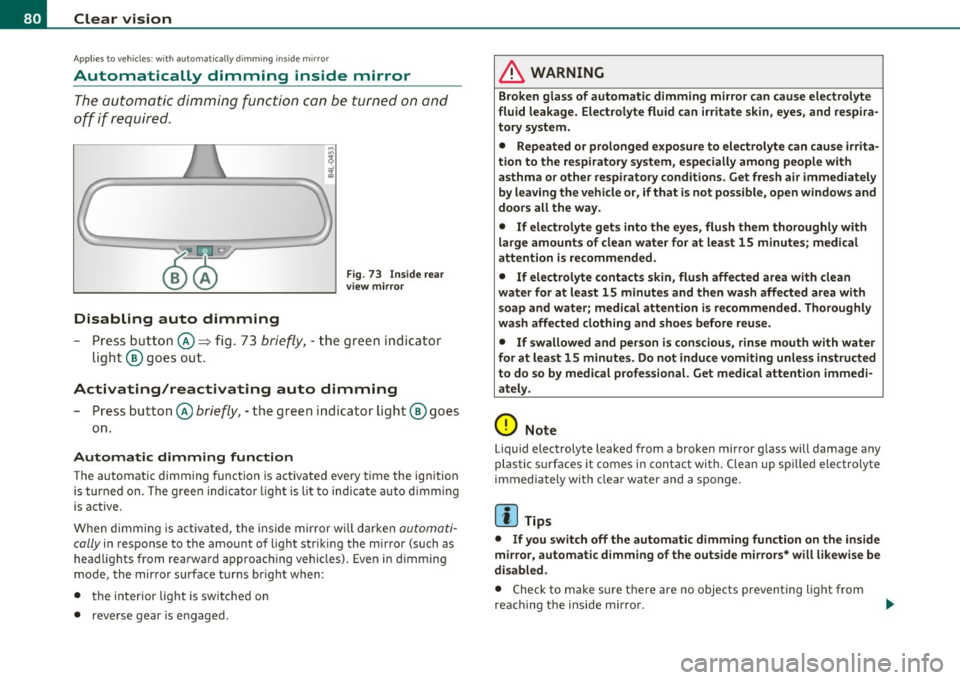
Fig . 7 3 I nside rea r
v ie w mirror
- Pre ss butt on @ ~ fig . 73 brie fly, -the green indic ator
light ® goes out.
Activating/reactivating auto dimming
- Press button @ briefly, -the green i ndicator ligh t® goes
on.
Automat ic dimming function
The automatic dimming function is activated every time the ignition
is turned on. The g ree n indicator light is lit to indica te auto d imming
is active.
W hen dimm ing is act iv a ted, the inside mir ror w ill darke n
automati
cally
in response to the amou nt of light striking the mirror (such as
head lights from rearward approaching vehicles). Even in d imming
mode, the mirror surface turns br ight when:
• the interior light is switched on
• reverse gear is engaged.
& WARNING
Broken glass of automatic dimming mirror can cause electrolyte
fluid leakage . Electrolyte fluid can irritate skin , eyes, and respira
tory system .
• Repeated or p rolonged expo sur e to electrolyte can cau se irrita
tion to the resp iratory system, esp ecially among people with
asthma or other respiratory conditions. Get fre sh air immediately
by leaving the vehicl e or, if that is not po ssible , open window s and
doors all the way.
• If ele ctrolyte gets into the eyes, flush them thoroughly with
large am ount s of clean water for at lea st 15 minute s; medical
attention is re commended.
• If electrolyte contacts skin , flush affected area with clean
water for at l east 15 minutes and then wash aff ected area with
s oap and water; medical attention is rec ommended. Thoroughly
wash affected clothing and shoe s before reu se.
• If swallowed and person is con sciou s, rinse mouth with water
for at least 15 minutes. Do not induce vomit ing unle ss instru cted
to do so by medical profe ssional. Get medical attenti on immedi
ate ly .
0 Note
Liquid e lectrolyte leaked from a broken mir ror g lass will damage any
plastic surfaces it comes in contact with. Clean up spi lled electrolyte
immedia tely with clear wate r and a spo nge.
[I) Tips
• If you switch off the automatic dimming function on the inside
mirror, automatic dimming of the outside mi rro rs* will l ikewise be
di sabled .
• Check to make s ure there are no objects preventing light from
reac hing t he i nside m irro r.
Page 84 of 392
Clear vision
0 Note
• Curved ( i.e. co nvex) mir ror s urfaces increase your field of view.
Remember that vehicles or other objects will ap pear smaller and
f art her away th an whe n seen in a fla t mi rror. If you use th is mi rro r to
estimate distances of follow ing ve hicles when chang ing lanes, you
could estimate i nco rre ct ly and ca u se an a cci dent .
• If the mir ror ho using is moved un inte ntionally (for examp le, whi le
par king yo ur veh icle), then you m ust fir st f old the mir ror ele ctrically.
Do not read just the mirro r hous ing manually. You could damage the
mot or w hic h con trols the mi rror .
• If you take the vehicle to an automatic car wash, yo u m ust fo ld the
exterior mirrors flat to preven t dam aging the m. Powe r fol ding ex te
r ior mirrors" m ust not be folded in or out by hand. Use the powe r
f unc tion!
[ i ) Tips
If th ere should be a malfu nction in the ele ct rical sys tem , you can still
adjust the outs ide mirrors by pressing the edge of the m irror. •
App lies to ve hicles : w ith auto mat ic dim mi ng fo r outs ide m ir ro rs
Automatic dimming for outside mirrors
Th e ou tside mir rors are d immed toge ther w it h t he a utoma tic
dimming of the ins ide mirror . When the ignition is switched on, t he
m irrors da rken a utomat ically depe nd ing on the light s trik ing t hem
(e .g . headlights from the r ea r) .
W hen the interio r light ing is switched on and when reverse gear is
engaged , the m irrors are sw itche d back to their or ig inal bright ness
(not d immed).
& WARNING
Broken glass of automatic dimming mirror can cause electrolyte
fluid leakage. Electrolyte fluid can irritate skin, eyes, and respira
tory system.
• Repeated or prolonged exposure to electrolyte can cause irrita
tion to the respiratory system, especially among people with
asthma or other respiratory conditions. Get fresh air immediately
by leaving the vehicle or, if that is not possible, open windows and
doors all the way.
• If electrolyte gets into the eyes, flush them thoroughly with
large amounts of clean water for at least 15 minutes; medical
attention is recommended.
• If electrolyte contacts skin, flush affected area with clean
water for at least 15 minutes and then wash affected area with
soap and water; medical attention is recommended. Thoroughly
wash affected clothing and shoes before reuse.
• If swallowed and person is conscious, rinse mouth with water
for at least 15 minutes. Do not induce vomiting unless instructed
to do so by medical professional. Get medical attention immedi
ately.
0 Note
Electro lyte lea king from a broke n m irror g lass a ttacks the vehicle
paint and plastic surfaces . Clean up spilled electrolyte imme diate ly
w ith clear water and a sponge .
(I) Tips
• If automatic dimming for the inside mirror i s switched off, the
outside mirrors are also not dimmed automatically .
• Automatic d imm ing fo r the mir ro r only op erates p roperly if the
s u nshade* fo r th e rear w indow is ret racted, o r the light strik ing t he
inside m irror is not h indere d by ot her objec ts. •
Page 146 of 392

1111..__A_ d_a_ p,__ t_iv _ e_ C_r _u _ i_ s _e _ C_ o_ n_t _ r_ o _ L ___________________________________________ _
& WARNING
Following other v ehicles too clo sely increases the risk of a crash
and serious per sonal injury.
• Following other vehicles too closely, particularly at higher
speeds in crea ses the ri sk of collisions and seriou s personal injury.
• Setting short distances to the traffic ahe ad reduces the time
and distance avail able to bring your vehicl e to a safe stop and
makes it even more necessary to pay close attent io n to t raffic.
• Always select a speed and distance to traffic ahead that is safe
and appropriate under the pre vailing traffic, road , weathe r and
lighting conditions.
• Never rely on the distance control feature of ACC alone to
prevent rear-end collisions . Always be pr epared to brake and take
evasive action to a void collisions and other accident situations.
• Never allow the closing sp eed b etween you and other vehicles
to be so high that the Adapti ve Cruise Control may not be able to
s low your vehicle safely . If closing speed is too high, you must
apply the brakes yourself to reduce the r isk of a rear -end crash.
• Always select a greater following di stance to the vehicle ahead
on wet roads than on dry roads.
• Always read and h eed the information and WARNINGS=>
& in
"Description" on page 136.
(I] Tips
The distance setting is reset to the factory de fault DIS TANCE 3 the
next time the igni tion is t urn ed on .•
Driver information
Applies to veh icles: with Adapt ive Cruise Control
Displays in the instrument cluster
Depending on the driving situation, driver info rmation is
displayed in the instrument cluster.
@ Speedometer an d indicator lig ht disp lay
@ Display in the instrument cluster
Fig . 1 39 Ove rvi ew
in strum ent clu ster
@ Speedometer and indicator Light d isplay
Important information concerning vehicle operation w ith Adaptive
Cru ise Control is shown in d isp lay area @. The des ired speed yo u set
is indicated in the speedometer (LED lights around the edge).
T he in dicator lights show whe ther the system has detec ted a veh icle
traveli ng ahead .
@ Display in the instrument cluster
In display area ® informat ion from the navigation system * and the
t rip compu ter i s displayed in a dditio n t o info rmation abou t Ad aptive
Cru ise Contro l.
You ca n sele ct among the dif ferent informatio n by repeated brief
t aps on the!RESET)button on the windsh ield w ipe r leve r=>
page 27,
"Operation". .,.
Page 147 of 392
__________________________________________ A_ d_a""" p:....- t_iv _ e_ C_ r_ u _is _ e_C_ o_n_ t_ r_ o_ L_....J_
Certa in pieces of information in the bottom part of the display are not
shown permanent ly. Information is displayed only if you set or
change the speed setting, change the t ime interval, when messages
are displayed or if the Adapt ive Cruise Control is turned off for safety
reasons. •
Applies to veh icles: with Adaptiv e Cruise Contro l
Display in the speedometer
Desired speed
Fig . 140 Display in
the speedometer
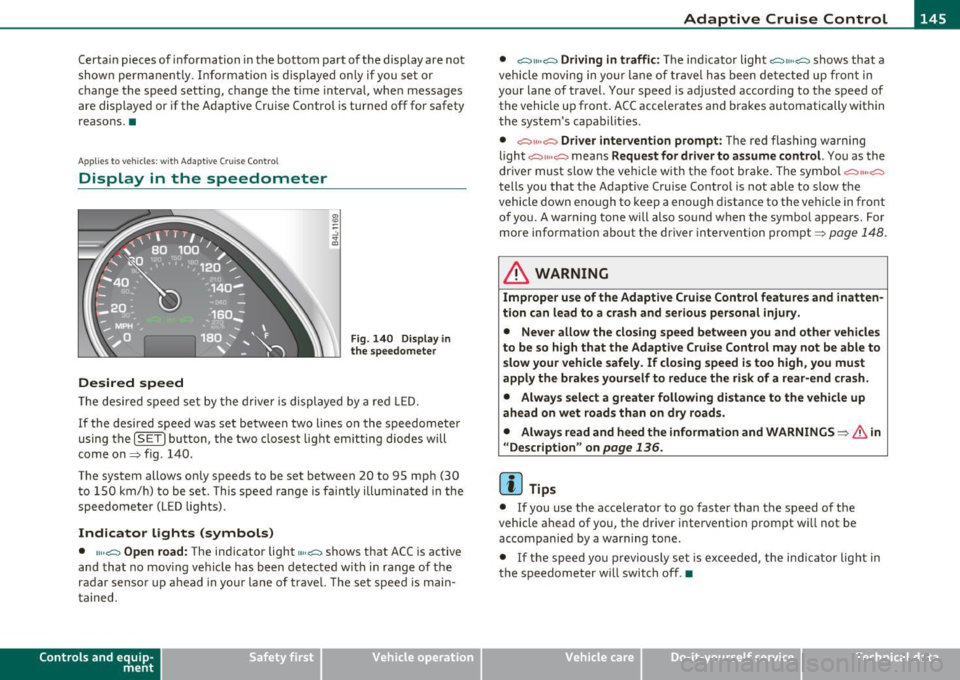
Th e desired speed set by the driver is displayed by a red LED.
If the desired speed was set between two lines on the speedometer
using the
[SET) bu tton, the two closest light emitting diodes w ill
come on=> fig. 140.
The system allows only speeds to be set between 20 to 95 mph (30 t o 150 km/h) to be set. This speed range is fa int ly illumina ted in the
speedometer (LED lights).
Indicator lights (symbols)
• ""~ Open road: The indicator light""~ shows that ACC is active
and that no mov ing vehicle has been detected with in range of the
radar sensor up ahead in your lane of travel. The set speed is main
ta ined.
Con tro ls a nd e quip
m en t Vehicle
OP-eration •
~" "~ Driving in traffic:
The indicator light ~11 .. c::::., shows that a
vehicle moving in yo ur lane of travel has been detected up front in
your lane of travel. Your speed is adjusted accord ing to the speed of
the vehicle up front. ACC accelerates and brakes automatically within
the system's capabilit ies .
• ~" "~ Driver intervention prompt: The red flashing warning
light
c::::., 11 .. o::::::) means Request for driver to assume control. You as the
driver must slow the veh icle with the foot brake . T he symbol
~""o::::::)
tells you that the Adaptive Cruise Control is not able to slow the
vehicle down enough to keep a enough distance to the vehicle in front
of you. A warning tone will also sound when the symbol appears. For
more information about the driver intervention prompt=>
page 148.
& WARNING
Improper use of the Adaptive Cruise Control features and inatten
tion can lead to a crash and serious personal injury.
• Never allow the closing speed between you and other vehicles
to be so high that the Adaptive Cruise Control may not be able to
slow your vehicle safely. If closing speed is too high, you must
apply the brakes yourself to reduce the risk of a rear-end crash.
• Always select a greater following distance to the vehicle up
ahead on wet roads than on dry roads.
• Alway s read and heed the information and WARNINGS=>
& in
" Description" on
page 136.
[ i ] Tips
• If you use the accelerator to go faster than the speed of the
vehicle ahead of you, the driver intervention prompt will not be
accompanied by a warn ing to ne.
• If the speed yo u previously set is exceeded, the indica tor light in
the speedometer will switch off .•
Vehicle care Do-it-yourselt service iTechnical data
Page 167 of 392

______________________________________________ A_ u_ t.:.. o_;__ m_ a_ t_;__ ic.......; t_r_a _ n_:.. s_m _:_: i.:: s ..:s:....: i..:o :....: n_;____,J-
When the ignition is on, the backup lights illuminate when the
selector lever is moved into
R.
N -Neutral
The transmission is in neutral in th is posi tion . Sh ift to this posit ion
for standing with the brakes applied~
page 165.
When the vehicle is stationary or at speeds below 3 mph (5 km/h),
you must always apply the footbrake before and wh ile moving the
lever out of
N .
D -Normal position for driving forward
Position D is for normal city and highway driving. It ranges from zero
to top speed and all gears shift automatically, depending on engine
load, driving speed and automatically selected shift programs.
When the vehicle is stat ionary or at speeds below 3 mph (5 km/h),
you must always app ly the foot brake before and while moving the
lever to
D out of N.
In certain circumstances it may be advantageous to temporarily
switch to the manual shift program to manua lly select gear rat ios to
match specific driving conditions~
page 167.
S -Sport position
Select this position for sportier performance. In this position, the
transmission will not upshift as soon, allowing the vehicle to use the
increased power available at higher engine speeds to ach ieve livelier
acceleration.
When the vehicle is stat ionary or at speeds below 3 mph (5 km/h),
you must always apply the foot brake before and while moving the
lever to
S out of N.
& WARNING
Read and follow all WARNINGS ~ & in "Driving the automatic
transmission " on page
163 .
Contro ls a nd e quip
m en t Vehicle
OP-eration
0 Note
Coasting downh ill with the transmission in N and the engine not
running will result in damage to the automatic transmission and
poss ibly the catalytic converter .•
Automatic Shift Lock (ASL)
The Automatic Shift Lock safeguards you against acci
dentally shifting into a forward or the reverse gear and
causing the vehicle to move unintentionally .
Fig. 164 Shift gate:
selector lever lock posi
tions and interlock
button highlighted
The selector lever lock is released as follows:
- Turn the ignition on.
- Step on the brake pedal.
At the same time press and hold
the interlock button on the side of the gear selector knob
=> fig . 164 with your thumb un til you have moved the
selector lever to the desired position.
Automatic selector lever lock
The selector lever is locked in the P and N positions when the ignition
is turned on. To move the lever from these positions the driver must
depress the brake pedal. As a reminder to the driver, the following
~
Vehicle care Do-it-yourselt service iTechnical data
Page 175 of 392
Parking system -
----------------=-------'
Applies to veh icles : w ith par king system advanced
Switching on and off
Th e rear view camera switches on automatically together
with the acoustic and visual park assist when you put the
vehicle in reverse.
Switching on
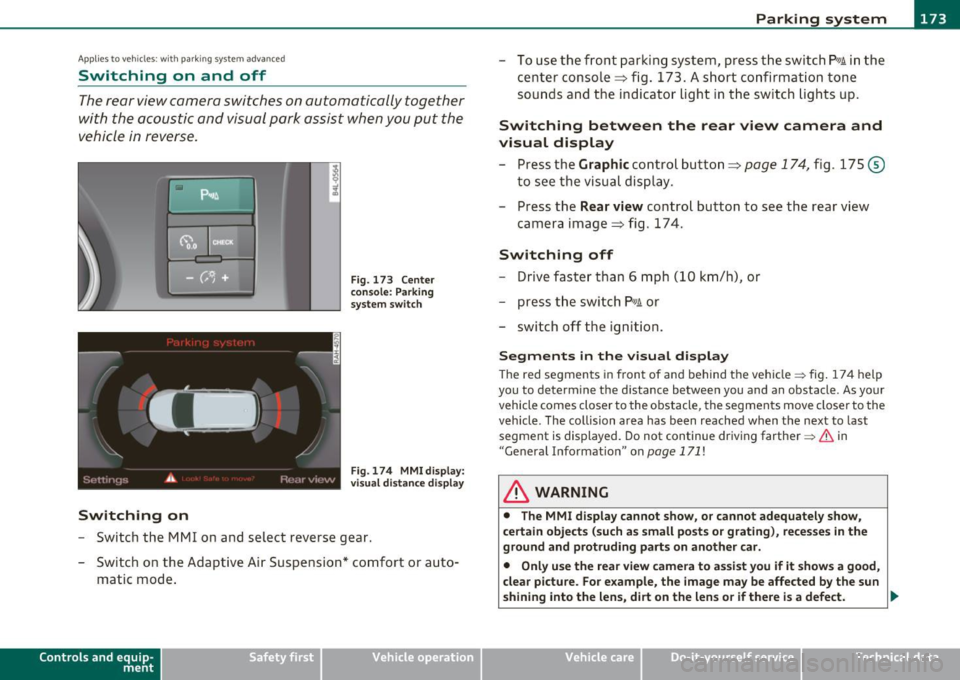
F ig. 173 Cente r
c on sole: Pa rki ng
sys tem swi tch
Fig . 174 MMI display:
v is ual d istance disp la y
- Switch the MMI on and select reverse gear.
- Switch on the Adaptive Air Suspension * comfort or auto-
matic mode .
Contro ls a nd e quip
m en t Vehicle
OP-eration
-To use the front parking system , press the switch P11.1A in the
center console ~ fig . 173 . A short confirmat ion tone
sou nds an d the indicator light in the sw itch lights up.
Switching between the rear view camera and
visual display
- Press the Graphic control button~ page 174, fig. 175 @
to see the visual dis pla y.
- P ress the
Rear view control button to see the rear view
camera image~ fig . 174.
Switching off
Drive faster than 6 mph ( 10 km/h), or
- press th e swi tch
P111 A or
- switch off the ignition .
Segments in the visual display
The red segments i n front of and behind the vehicle=> fig . 174 help
you to determine the distan ce between you and an obstacle . As your
vehicle comes closer to the obstacle, the segm ents move closer to the
veh icle . The co llision area has been reached when t he next to last
segmen t is displayed . Do not cont inue dr iv ing farthe r=>
& in
"Ge neral Information " on
page 171 !
& WARNING
• The MMI display cannot show , or cannot adequately show ,
c ertain objects (such a s small posts or grating ), reces ses in the
ground and protruding parts on another car.
• Onl y use the rear view camera to a ssist you if it show s a good ,
clear picture. For e xample, the image may be affected by the sun
shining into the lens , dirt on the len s or if there is a defect. .,_
Vehicle care Do-it-yourselt service Technical data
Page 193 of 392
________________________________________________ D_ r_ i_ v _i_n ""'g "-- S_a_ f_ e_ l _,,y'-- __
Important things to do before driving
Safety is everybody's job! Vehicle and occupant safety always depends on the informed and careful driver.
For your safety and the safety of your passengers, before
driving always:
- Make sure that all lights and signals are operating
correctly.
- Make sure that the tire pressure is correct.
- Make sure that all windows are clean and afford good visi-
bility to the outside.
- Secure all luggage and other items carefully::::>
page 107.
-Make sure that nothing can interfere with the pedals.
- Adjust front seat, head restraint and mirrors correctly for your height .
- Instruct passengers to adjust the head restraints according to their height.
- Make sure to use the right child restraint correctly to
protect children ::::,
page 233, "Child Safety".
- Sit properly in your seat and make sure that your passen gers do the same::::,
page 85, "General recommenda
tions".
- Fasten your safety belt and wear it properly. Also instruct
your passengers to fasten their safety belts properly
=:> page 201. •
Controls and equip
ment Safety first Vehicle operation
What impairs driving safety?
Safe driving is directly related to the condition of the
vehicle, the driver as well as the driver's ability to concen
trate on the road without being distracted .
The driver is responsible for the safety of the vehicle and all
of its occupants. If your ability to drive is impaired, safety
risks for everybody in the vehicle increase and you also
become a hazard to everyone else on the road::::,,& . There
fore:
Do not let yourself be distracted by passengers or by using
a cellular telephone.
NEVER drive when your driving ability is impaired (by
medications, alcohol, drugs, etc.).
- Observe all traffic laws, rules of the road and speed limits
and plain common sense .
- ALWAYS adjust your speed to road, traffic and weather
conditions.
- Take frequent breaks on long trips. Do not drive for more than two hours at a stretch.
- Do NOT drive when you are tired, under pressure or when
you are stressed .
& WARNING
Impaired driving safety increases the risk of serious personal
injury and death whenever a vehicle is being used.•
Vehicle care Do-it-yourself service Technical data
Page 204 of 392
... Safety belts PNM-- -=-------------------------------
Before driving off, always:
-Fasten your safety belt and mak e sure you are wea ring i t
p roperly .
- Make sure that your passengers also buckle up and prop
erly wear their safety be lts.
- Prot ect ch ildren w ith a child rest raint system appropriate
for the size and age.
T he warning light -if. in the instrument cluster lights up when the igni
tion is sw itched on as a reminder to fasten the safety belts. In addi
tion, you will hear a warning tone for a certa in period of time.
Fasten your safety belt and make s ure that your passenger s al so
properly put on their safety belts .
& WARNING
• Safety belts are the single most effective means available to
reduce the ri sk of serious injury and death in automobile a cci
dents. Fo r your protection and that of your passengers , always
c orrectly wear safety belts when the vehicle is moving.
• Failure to pay attention to the warning light that come on ,
could lead to personal injury. •
Why safety belts?
Frontal collisions and the law of physics
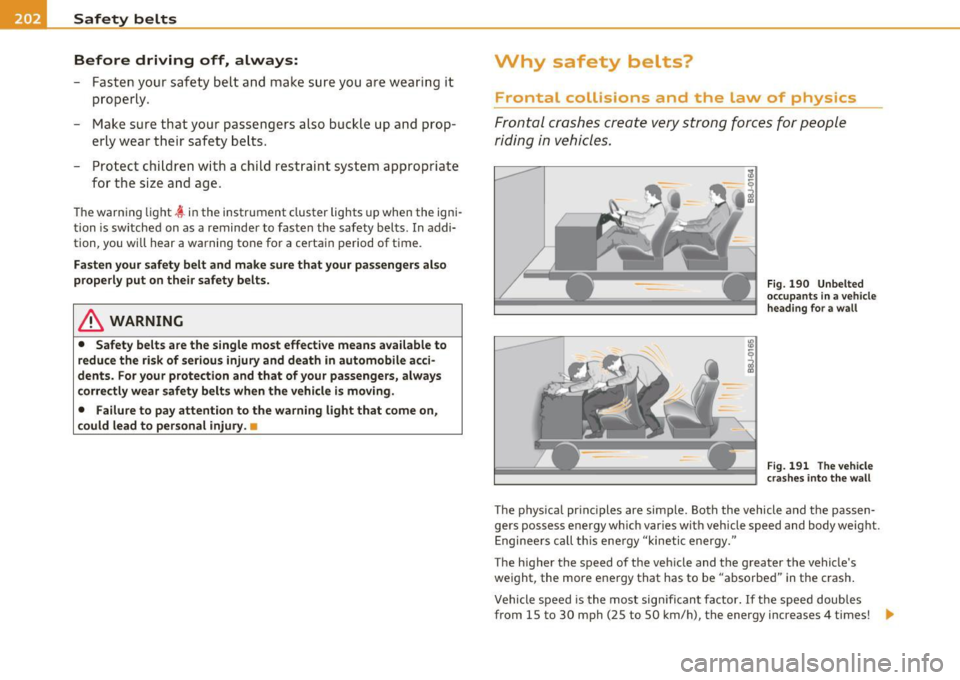
Frontal crashes cre ate very stron g forc es for people
ri din g i n vehi cles.
Fig . 19 0 Unbelted
o ccupa nts in a v ehicle
h eading f or a w all
Fig . 191 Th e vehicle
cr as hes into the wall
T he p hys ica l pr inc iples are simple. Both the vehicle and the passen
gers possess energy which var ies wit h veh icle speed and body weight.
E nginee rs ca ll t his ene rgy "kinetic energy."
The higher the speed of the veh icle and t he greater the vehicle's
we ight, the more energy that has to be "abso rbed" in the crash .
Vehicle speed is the most sig nifican t fa ctor. If t he speed doubles
from 15 to 30 mph (25 to 50 km/h), the energy increases 4 times! .,
Page 270 of 392
Driving and environment
Avoid full throttle
Driving at moderate speeds saves fuel and improves your
mileage.
-Try and keep well below your car's maximum speed.
Accelerating gently reduces fuel consumption, engine wear, and does
not disturb the environment.
Fuel consumption , exhaust emiss ions and eng ine no ise increase
disproportionately at high speeds . If you drive at approximately three
quarte rs of top speed, fuel consumption will be reduced by one ha lf.
Never drive faster than the posted speed limit and weather condi
tions permit. •
Reducing unnecessary idling
Even when your car is just idling it burns up fuel.
- Shut the engine off when you are not driving the vehicle.
- Do not warm up the vehicle by letting the engine run at
idle .
It makes sense to shut off the engine in traffic jams, when waiting for
trains to pass at railroad crossings , or at traffic lights that have long
waits on red. Turning the engine off for just 30-40 seconds saves
more fuel than is burned starting the engine aga in.
It takes a long time for the engine to warm up fully when it is running
at idle . However, wea r and noxious emiss ions are especially high
when the engine is warming up. So you should drive away as soon as
you start the engine and avoid running at high rpms while the engine
is still warming up .
0 Note
Do not leave engine idling unattended after starting. If warning
lights should come on to indicate improper operation, they would go
unheeded. Extended idling also produces heat, which could result in
ove rheating or other damage to the vehicle or other property. •
Regular maintenance
A badly tuned engine unnecessarily wastes a lot of fuel .
-Have your vehicle serviced at regular intervals .
By having your vehicle regularly serv iced by an authorized Aud i dealer
helps to ensure that it runs properly and economically. The condition
of your vehicle not only affects its safety and ability to hold its value,
it a lso affects
fuel consumption.
Check your oil each time you fill your tank.
The amount of oil used is related to engine load and speed .
It is norma l for the oil consumption of a new engine to reach its
lowest value after a certain mileage has been d riven.
You must drive your vehicle about 3,000 miles (5,000 kilometers) befo re you can properly assess oi l consumption.
This also app lies to fuel consumption and engine output .
0 Note
• Have your veh icle ma inta ined properly and in accordance w ith the
service recommendations in your Warranty
& Maintenance booklet.
Lack of proper maintenance as well as im proper use of the vehicle will
impair the function of the emission control system and could lead to
damage .
• Do not alter or remove any component of the Emission Control
System un less approved by the manufacturer. ._