warning lights AUDI Q7 2011 Owner´s Manual
[x] Cancel search | Manufacturer: AUDI, Model Year: 2011, Model line: Q7, Model: AUDI Q7 2011Pages: 392, PDF Size: 93.29 MB
Page 21 of 392
High beam ~D
The ~D warning/indicator light illuminates when the high beams are
on or when you use the headlight flasher. For more information about
using the high beams, see~
page 71. •
Tire pressure monitoring system - telltale
indicator lamp(.,
The warning/indicator light appears in the event of a
significant loss of tire pressure or if there is a malfunc
tion.
The indicator light 1.., illuminates to check the function when you
switch on the ignition.
If the
'll symbol remains on or blinks after you switch on the ignition,
there is a loss of tire pressure or a system malfunction. If there is a
system malfunction, see your authorized Audi dealer as soon as
possible.
Detailed information on the tire pressure monitoring system can be
found in~
page 337. •
Cruise control
CRUISE (USA models) /r,J' (Canada models)
The warning/indicator light illuminates when the cruise control is
activated. •
Controls and equip
ment Safety first
Instruments and warning/indicator lights
Anti-lock brake system (ABS)
A
.:> (USA models) / .... (Canada models)
This warning/indicator light monitors the ABS and the
electronic differential lock
(EDL).
The warning/indicator light will come on for a few seconds when the
ignition is switched on. The light will go out after an automatic check
sequence is completed.
There is a malfunction in the ABS when: • The warning/indicator light does not illuminate when you switch
on the ignition.
• The warning/indicator light does not go out after a few seconds .
• The warning/indicator light illuminates while driving.
The brake system will still respond even without the assistance of
the ABS system. See your authorized Audi dealer as soon as
possible to restore full braking performance.
For more information
regarding the ABS~
page 260.
The ABS warning light and the brake warning light come on
together. The ABS will not work and you will notice a change in
braking response and performance.
Malfunction in the brake system
If the brake warning light~ page 20 and the ABS warning illuminate
together there may be a malfunction in the ABS, and there may also
be a malfunction in the brake system itself~& .
In the event of a
malfunction in the brake system the warning/indi
cator light
BRAKE (USA models)/ ((D) (Canada models) in the instrument
cluster flashes. By pressing the [
CHECK! button, you can bring up a
driver message which explains the malfunction in more detail. Please
note
~ page 34. .,,_
Vehicle care Technical data
Page 22 of 392
Instruments and warning/indicator lights
Malfunction in the electronic differential lock (EDL)
The ED L works toge ther w ith the ABS. The ABS warn ing lig ht w ill
come on if there is a mal func tion in the EDL system=>
page 258 . See
your authorized A udi dea le r as soon as poss ible .
& WARNING
• If the .. (USA models )/ ...,. (Canada models ) wa rning light
does not go out , or if it comes on while driving, the ABS system is
not working properly. The vehicle can then be stopped only with
the standard brakes (without ABS ). You will not have the p rotec
tion ABS provides. Contact your authorized Audi dealer a s soon as
pos sible.
• USA models : If the BRAKE warning light and the M, warning
light come on together, the rear wheels could lock up fir st under
hard braking. Rea r wheel lock-up can cause loss of vehicle cont rol
and an accident . Have your vehicle repaired immediately by your
autho rized Audi dealer or a qualified work shop. Dri ve slowly and
avoid sudden, hard brake applications.
• Canada models: If the brake warning light 0 and the ABS
warning light come on together, the rear wheels could lock up
first under hard braking. Rear wheel lock -up can cause loss of
vehicle control and an accident . Have your vehicle repaired imme
diately by you r authorized Audi dealer or a qualified wo rkshop.
Drive slowly and avoid sudden , hard brake applications .•
Parking brake
~[ (USA models)/ (®) (Canada models)
The indicator light monitors the p arking br ake.
W hen the parking br ake is app lied a nd the ignition is switched on, the
indicator light comes on©. The ind icator light must go out when the
par king b rake is released. •
Brake system BRAKE (USA
models)
/ ((D) (Canada models)
The warning/i ndica tor light flashes if b ra ke fluid le vel is
low, if there is an ABS system malfunction or a parking
brake malfunction.
Th e ligh t ill umin ates whe n the igni tio n is tur ned on. It goes out afte r
the engine has been started . This indicates that t he brake war ning
ligh t is functioni ng p roper ly .
If the brake warning light does not light up when the engine is
cranking , there may be a malfun ct ion in the electrical system. In
thi s ca se, contact your Audi dealer.
If the brake system warning/indicator light flashes , there is a brake
system mal function. By press ing the
I C H ECK ] b utton, yo u can bring
up a driver message which exp lains the malfunction in more detail
:::> page 34.
If th e ABS fa ils, t he ABS war ning/ indi cato r light O (USA
mode ls)/ (Canada mode ls) flashes together with t he b rake system
wa rni ng/ind icator light=> & .
(USA models): If the warning light
BRA KE and the warning light illu
minate together, immedia tely contac t your author ized Audi dealer or
qualified workshop to have all brake pads inspected=>
page 39.
When the light comes on, an a udible warn ing signal is also given.
& WARNING
• USA models : If the BRAKE warning light and the I .. S warning
light come on together, the rear wheels could lock up first under
hard braking . Rear wheel lock-up can cause lo ss of vehicle control
and an accident . Have your vehicle repa ired immediately by your
authorized Audi dealer or a qualified workshop. Drive slowly and
avoid sudd en, hard brake application s.
• Canada model s: If the b rake warning light CCI» and the ABS
warning light come on together, the rear wheels could lock up
~
Page 23 of 392
& WARNING (continued)
first under hard braking. Rear wheel lock-up can cause loss of
vehicle control and an accident. Have your vehicle repaired imme diately by your authorized Audi dealer or a qualified workshop.
Drive slowly and avoid sudden, hard brake applications.
• If the brake warning/indicator light does not go out after a few
seconds and the parking brake released, or lights up while you are
driving, the fluid level in the brake fluid reservoir is too low. If you
believe that it is safe to do so, proceed immediately at low speed
to the nearest authorized Audi dealer or qualified repair facility
and have the brake system inspected .
• Always keep in mind that after several brake applications, you
will need greater pressure on the brake pedal to stop your vehicle .
Do not rely on strained brakes to respond with maximum stopping
power in critical situations. You must allow for increased braking
distances. The extra distance used up by fading brakes could lead
to an accident. •
Controls and equip ·
ment Safety first
Instruments and warning/indicator lights
Vehicle care
Technical data
Page 27 of 392
& WARNING (co ntinued )
• Wo rk with due care when handling the high-volt age section of
gas di scharge (xenon) lights. Failure to do so could result in death
or ser ious injury.
[ i ] Tips
Have the bulb replaced or the connection repaired by your autho rized
Audi Se rvice departmen t.•
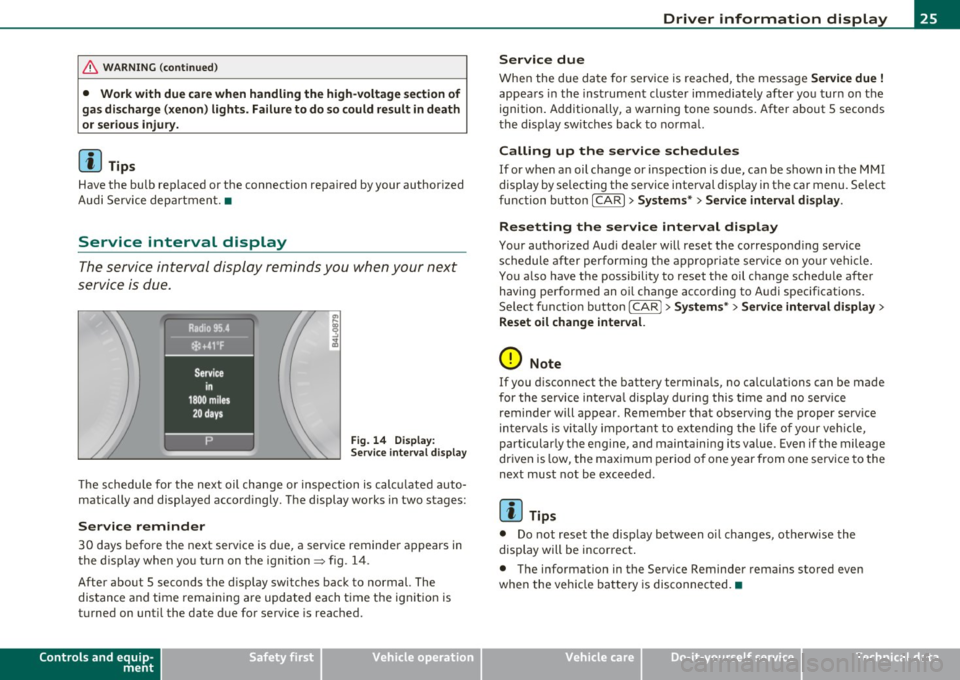
Service interval display
The service interval display reminds you when your next
service is due.
Fig . 14 D ispl ay :
Service inte rval disp la y
Th e schedu le for the next oil change or inspection is c alc ul ated auto
matically and displayed accord ingly. The display works in two stages:
Service reminder
30 days before the next serv ice is due, a serv ice reminder a ppears in
the display when yo u turn on t he ign it ion=> fig. 14 .
After about 5 seconds the d isp lay switches back to normal. The
dis tan ce and time rema ining are updated each t ime t he ig nition is
turned on unti l the date due for service is reac hed .
Controls and equip
ment Safety first
Driver information display
Service due
W
hen the due da te for service is rea ched, t he message Service due !
appea rs in the inst rument cluste r immediately afte r yo u tur n on the
ignition. Additiona lly, a wa rning tone sounds. After about 5 secon ds
the d isp lay sw itches back to no rma l.
Calling up the service schedules
If or when an oil change or inspection is due, can be shown in the MMI
display by se lecting the se rvice interval display in the car menu. Se lect
fu nction button
I CAR ]> Systems *> Service interval display.
Resetting the service interval display
Your authorized Aud i dea ler will reset the correspond ing se rvice
schedule after performing the a ppropriate service on yo ur vehicle .
You a lso have the possibility to reset t he oil c hange sched ule afte r
having performed an o il change acco rding to A udi specifications.
Se lect f unct io n butto n
I CAR j >Systems *> Service interval display >
Reset oil change interval.
0 Note
If you d isconnect the batte ry termina ls, no ca lculations can be made
for the se rvice in terva l display d uring this time and no serv ice
reminder will appear . Remember that observing the proper service
in terv als is vi tally import ant to ex te ndi ng the life of your vehi cle,
particularly the engine, and maintaining its value . Even if the mileage
dr iven is low, the max imum per io d of one year from one serv ice to the
next must not be exceeded.
[I] Tips
• Do not reset the display between oi l changes, otherw ise the
display will be incor rec t.
• The info rmation in the Service Reminder rema ins stored even
when the vehicle ba tte ry is disconnec ted. •
Vehicle care Technical data
Page 36 of 392

Driver information d isplay
0 Alternator ma lfunction =>page 34
BRAKE
USA model s: =>page 34
Brake system malfunction
Can ad a m odel s: ::>page 34
Brake system malfunction
- --
-~-
Engine coolant level too => page 35
low/engine coolant temperature
-too high
~ Engine o il pressure too low ::> page36
Ad Blue /7 =>page296
Ad Blue c,,,.c AdBlue malfunction * =>page296
•
~ ....
Faulty steering =>page 36
© Faulty ignition switch =>page37
~
[ i J Tips
• If the warning/indicator light BRAKE (USA models)/ «D> (Canada
mode ls) in the instrument cluster flashes, the re is a brake system
malfunction. By press ing the [ CHECK] button, you can bring up a
dr iver message which explains the ma lfunct ion in more deta il. Please
note =>
page 34 .
• Speed wa rnings threshold 1 9 (USA mode ls)/ 0 (Canada models)
and threshold 2
8 , (USA mode ls)/ 8, (Canada models) are also shown
as red symbols . T he warning is a lways shown as a sma ll symbol in the
upper area of the display=>
page 31. •
Alternator malfunction 0
If the D symbol in the instrument panel display flashes, then there
is a malfunction in the a lternato r or the veh icle electronics. A warning
to the driver will appear, too. The driver warning goes out after about
5 seconds, but it can be b ro ught up at any time by pressing the
I CHECK] button again .
Usua lly, you can still drive to the next dealership. Turn off a ll but the
most necessary electr ica l consumers, since these drain the veh icle's
battery.
0 Note
If the _ f_ warning symbol (coolant system malfunction) also lights up
on the instrument panel dur ing the trip=>
page 35, then you have to
stop immediately and turn off the engine. The coolant pump is not
working anymore -danger of damage to the engine! •
Brake system malfunction
A malfunction in the brake system must be repaired as
soon as possible.
If the warning /indicator light BRAKE (USA models)/ (CD)
(Canada models) in the instrument cluster flashes, there is a
brake system malfunction. By pressing the
[CHECK] button,
you can bring up a driver message which explains the malfunction in more detail.
Stop v ehicle and check brake fluid level
- Pull off the road.
- Stop the vehicle.
- Turn off the engine .
- Check the brake fluid level:::::,
page 311.
Page 37 of 392
- Contact your nearest authorized Audi dealer or qualified
workshop if necessary.
Warning ! Fault in brake system. Contact
workshop
- Drive carefully to the nearest authorized Audi dealer or
qualified workshop and have the malfunction corrected
=>& .
If the ABS system malfunctions, the ABS warning/indicator light illu
minates together with the brake system malfunction warning/indi
cator light:::::, &.
& WARNING
• Always observe the warnings in:::::, page 290, "Engine compart
ment", before opening the hood and checking the brake fluid.
• Driving with low brake fluid is a safety hazard. Stop the car and
get professional assistance.
• USA models: If the BRAKE warning light and the S warning
light come on together, the rear wheels could lock up first under
hard braking. Rear wheel lock-up can cause loss of vehicle control
and an accident. Have your vehicle repaired immediately by your
authorized Audi dealer or a qualified workshop. Drive slowly and
avoid sudden, hard brake applications.
• Canada models: If the brake warning light((]:» and the ABS
warning light come on together, the rear wheels could lock up
first under hard braking. Rear wheel lock-up can cause loss of
vehicle control and an accident. Have your vehicle repaired imme
diately by your authorized Audi dealer or a qualified workshop.
Drive slowly and avoid sudden, hard brake applications. •
Controls and equip
ment Safety first
Driver information display
Engine cooling system malfunction _
t_
A malfunction in the engine cooling system must be
repaired as soon as possible.
When the -L symbol in the display blinks, then either the
engine coolant
temperature is too high, or the coolant level
is too low. An additional driver message can also be displayed
by pressing the [CHECK] button:
Switch off engine and check coolant level
- Pull off the road .
- Stop the vehicle.
- Turn off the engine.
- Check coolant level :::>
page 309.
-Add coolant if necessary=> page 310.
-Continue driving only after the engine coolant
warning/indicator light goes out.
- Contact your authorized Audi dealer for assistance if
necessary.
If the engine coolant level is correct, then the radiator fan may be the
cause of the malfunction.
If the O warning symbol (alternator malfunction) also lights up on
the instrument panel:::::,
page 34, then the fan belt may be damaged .
& WARNING
• If your vehicle should break down for mechanical or other
reasons, park at a safe distance from moving traffic, turn off the
engine and turn on the hazard warning lights:::::,
page 70, "Emer-
gency flasher
A". ..,.
Vehicle care Technical data
Page 41 of 392
Windshield washer fluid Level too Low :5
Please refill washer fluid
If the symbol illumi nates, add winds hield washe r fluid to the washer
system and also to the headlight washer system=>
page 316. •
Fuel supply too Low ""~
A Plea se refuel
When t his symbo l illuminates for t he first time, the fuel reserve in
your vehicle is still between 2 .6 and 3 .2 gallons (10- 12 li te rs) . Refuel
as soon as possible =>
page 293.
If the symbol lights up, even whe n there is ample fue l in the t ank, and
the text Tank system malfunction! Contact workshop appears in the
displ ay, the re is a fa ult in the system. Con tact a qualified workshop to
have the fault rectified .•
Battery voltage U
If the battery's state of charge is not in the optima l range, the -,
s ymbo l is show n in the display and the d river mess age Low battery
charge: battery will be charged while driving appears.
Wh ile this driver notification is displayed, you have to be prepared for
limited sta rting capabili ty .
Driver message appears and goes out again
If th is driver message appears a fter the ignit ion is t urned on or while
driving and it goes o ut again after a while, the battery has been
adequate ly recharged.
Driver message appears and does not go out again
If th is dr iver no tification appears after the ign ition is turned o n or
whi le driving and does not go ou t agai n, the battery 's s ta te of charge
Controls and equip
ment Safety first
Driver information display
is not in the opt
imal range . Starting capability is restricted. Have the
ba ttery che cked by an au thor ized A udi dealer as soon as possible. •
Worn brake pads ~
-Brake pad s !
If the warning light illum inates, immediately contact your a uthorized
Audi dealer or qualified wo rkshop to have all brake pads inspected.
On USA mode ls the warn ing light
t comes o n together w it h the
warning light
BRAKE . Both sets of brake pads on an axle must a lways
be re place d at the same time.
& WARNING
Driving with bad brakes can cause a collision and serious personal
injury.
• If the warning light', and the warning light
8RAKE1l with the
me ssage Brake pads! comes on in the in strument cluster display ,
immediately contact your authorized Audi dealer or qualified
workshop to have all brake pads checked or replaced if necessary. •
Headlight range control 1©
"'Headl ight range control defective !
If the symbo l illuminates, the dynamic headlight range contro l is no
longer wo rking prope rly. Have the syste m checked and repaired at
your authorized Aud i dea ler. •
ll BRAKE : USA mode ls on ly
Vehicle care Technical data
Page 49 of 392
You can unlock the vehicle from the inside by :
• removing the key from the ignition switch (the vehicle will auto
matically unlock itself) or
• pressing the unlock part of the power lock switch@ or
• pulling the door handle (twice to open the rear doors).
& WARNING
• When you lock your vehicle from outside , nobody -especially
children -should remain inside the vehicle. Remember, when you
lock the vehicle from the outside the windows cannot be opened
from the inside.
• When you leave the vehicle, always remove the ignition key
and take it with you. This will prevent passengers (children, for
example) from accidentally being locked in the vehicle should
they accidentally press the power locking switch in the front
doors.
• Do not leave children inside the vehicle unsupervised . In an
emergency it would be impossible to open the doors from the
out side without the key.
(I) Tips
• In the event of a crash w ith airbag deployment all locked doors
will be automatically unlocked to give access to the vehicle occupants
from the outside.
• If the power locking system should malfunction, you can lock each
door ind ividually us ing the veh icle key =>
page SO.
• If the power locking system should fail, you can still open the fuel
t ank flap in an emergency=>
page 296.
• You are well advised not to keep valuables inside an unattended
vehicle, visible or not. Even a proper ly locked veh icle cannot provide
the security of a safe. •
Contro ls a nd e quip
m en t Vehicle
OP-eration
Opening and closing
Unlocking and Locking the vehicle with the
remote control
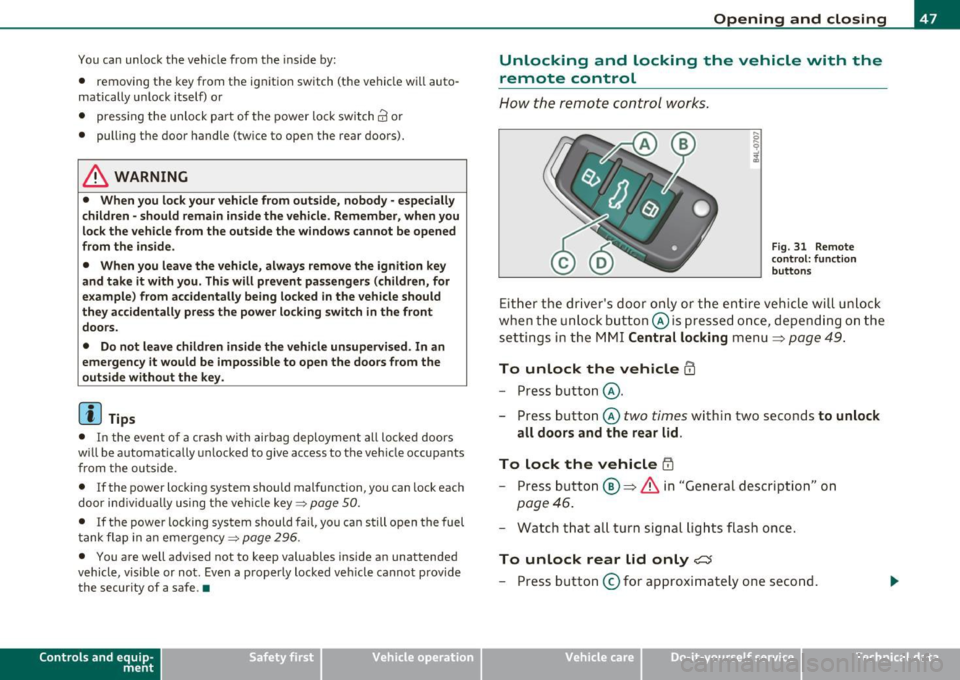
How the remote control works.
Fig. 31 Remote
con trol: function
buttons
Either the driver's door only or the entire vehicle will unlock
when the unlock button @is pressed once, depending on the
settings in the MMI Central locking menu
=> page 49.
To unlock the vehicle CD
- Press button @.
- Press button @
two times within two seconds to unlock
all doors and the rear lid.
To lock the vehicle i'.D
- Press button ®=> & in "General description" on
page 46.
- Watch that all turn signal lights flash once.
To unlock rear lid only <::::::5
-Press button @for approximately one second.
Vehicle care Do-it-yourselt service Technical data
Page 69 of 392
Clear vision
Lights
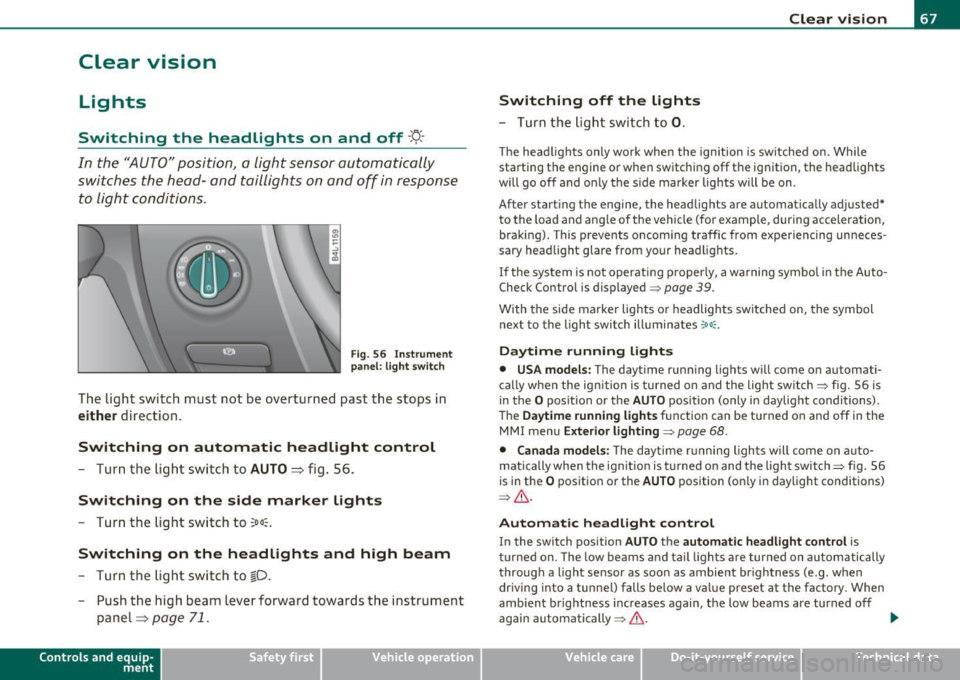
Switching the headlights on and off -'t!-
In the "AUTO" position, a light sensor automatically
swit ches the head- and tai llights on and off in response
to light condition s.
F ig . 56 Inst rum ent
pan el: li ght swit ch
The light switch must not be overturned past the stops in
either direction .
Switching on automatic headlight control
-Turn th e light swi tch to AUTO ::::, fig. 56.
Switching on the side marker lights
-Tur n the light sw itch to 300~.
Switching on the headlights and high beam
- Turn the light swi tch to ~D.
- Push the high beam lever forward towards the instrume nt
panel=>
page 71.
Con tro ls a nd e quip
m en t Vehicle
OP-eration
Switching off the lights
-Turn the lig ht swit ch to 0.
Clear vision
The headligh ts only work when the ignition is switched on. Whi le
sta rting the engine or when switchi ng off the ignition, the headlights
will go off and o nly the s ide marker lights will be on.
After start ing t he engine, the headlights are automatically adjusted*
to the load and a ng le of the vehicle (fo r example, during acceleration,
braking) . This prevents oncoming traffic from experiencing unneces
sary head light glare from your head lig hts.
If the system is not operati ng p roperly, a warning symbol in t he Auto
Check Control is displayed=>
page 39.
With the side marker lights o r headlights switched on, the symbol
next to the light switch illuminates
coo: .
Daytime running lights
• USA models: The daytime runn ing lights w ill come o n automati
ca lly when the ign ition is turned on and the light switch => fig. 56 is
in the
O position or the AUTO position (only i n daylight conditions) .
Th e
Daytime running light s function can be tu rned on and off in the
MMI menu
Exterior lighting=> page 68.
• Canada model s: The d ay time r unning ligh ts w ill come on a uto
matically when the ig nitio n is turned on and the light switch=> fig. 56
is in the
O pos itio n or the AUTO position (on ly in daylight conditions)
=> & .
Automatic headlight control
In the switch pos ition AUTO t h e automatic headlight control is
tu rned on. The low beams and tail lights a re turned on au tomatically
throug h a light sensor as soon as ambient br ightness (e .g . when
driving into a tunnel) falls be low a va lue preset at the factory . When
amb ient b rightness increases again, the low beams are turned off
again automatically =>& . ..,_
Vehicle care Do-it-yourselt service iTechnical data
Page 70 of 392

Clear vision
In the AUTO positio n the low beams are switched off automatically
w hen the ign it ion is turned o ff.
Light Sensor Malfunction
In the event of a light senso r m alfun ction, the driver is not ified in the
instrument cluster display:
~ Automatic headlight s/ automatic wipers defective
For safety reasons the low beams a re turned on permane ntly with the
switch in
AUTO . However, you can contin ue to turn the lights on and
off using the light sw itch. Have the light sensor checked as soon as
possible at an autho rized Audi dealer or q ua lified workshop.
& WARNING
• Never u se daytime running lights to see where you are going .
They are not bright enough and w ill not let you see far enough
ahead for safety, especially at dusk o r when it i s dark . Always
s witch on the low beams at du sk or when it i s dark.
• Automati c headlights are only intended to as sist the dri ver.
They do n ot relieve the driver of h is re spon sibility to check the
headlights and to turn them on manually according to the current
light and visibility condition s. For example, fog and rain cannot be
detected by the light sensors. So alw ays sw it c h on the headl ights
under the se weather condition s and when driving in th e dark
io.
• Crashes can happen when you cannot see the road ahead and
when you cannot be seen by other motori sts.
- Always tu rn on the headlights so that you can see ahead and
so that others can se e your car from the back.
(I) Tips
• With the swit ch in AUTO front fog lig hts a nd rea r fog l ights ca nnot
be t urned on in addition. •
The light sensor for headlight control is located in the rear view
mi rror moun t. D o no t apply any stickers to the w indshield in this area
to prevent malfunctions or failures .
• If you remove the ign ition from t he ignit ion lock wh ile the head
lights are still on, a buzzer wi ll sound as long as the driver's door is
open to remind you to t urn off the lights.
• Always observe the spec ific local regulations for your area as to
when to use your lig hts .•
Adjusting exterior lighting
T he functions are set in the f\1f\1J.
- Select: Function button [CAR ]> Systems *> Exterior
lighting .
Coming home
The Corning hom e function ensures tha t a fter turning off the igni
tion and open ing the driver 's door
the veh icle per iphery is illum i
nated in the dark. I n addition, the front fog lights, the ta il lights and
the license plate l ight are turned on . On-time can be set for a period
from O (o ff) to 60 seconds .
Leaving home
The Leaving home function ens ures tha t when unlocking the vehicle
periphery is illuminated in the dark. In add ition, the front fog lights,
the tai l lights and the license p late light are turned on . This funct ion
can be turned on and off .
Daytime running ligh ts
U SA models : The daytime running lights can be turned on or off using
this funct ion .
Canada model s: The function cannot be t urned off. It is activated
automatically each time the ignition is t urned on. This men u item is
shown "greyed out". •