wheel AUDI Q7 2011 Owner´s Manual
[x] Cancel search | Manufacturer: AUDI, Model Year: 2011, Model line: Q7, Model: AUDI Q7 2011Pages: 392, PDF Size: 93.29 MB
Page 138 of 392

IIIIL---=..A...;:.=: d:...:a ;;.i:p;;;... t.=. i:....: v :....: e::.....: C::.: r:....: u:;.:....: is:...e::.....: C;;;... o.::....:.. n:....:t :.:. r:....:o :....: l;__ ________________________________________ _
Adaptive Cruise Control
Speed and distance control system
Applies to veh icles : w it h Adap tive Cru ise Cont ro l
Description
Th e Adaptiv e Cruis e Control driver a ssistanc e program is
a co mbine d speed and d istan ce contr ol s ys tem.
Fig. 131 Front
bumper: Po sition of
rada r sensor (not
v isible from outs ide )
Adaptive Cru ise Cont rol can h elp ma ke driving mo re relaxed and less
t iri ng , par ticularly d uring lon g trips on i nte rs t a tes o r oth er hig hways
that are generally straig ht. The system can a lso assist in stop and go
tr aff ic.
T he A da pti ve Cr uise Co ntro l w ork s w ithin a spee d ran ge between 0
and 95 mph ( 150 km/h). Set ACC to mainta in a constant, legal t ravel
speed betwee n 20 and 95 m ph ( 30 -15 0 km/ h) that is appropr iate
for p revailing traffic conditions . Select a followi ng distance to the
vehicle ahe ad and A CC will adjust your s peed to mai ntain that
distance down to a stop . At a speed below 20 mph (30 km/h) , the
m inim um sp eed s ett ing of 2 0 mp h (30 k m/h) w ill be se le cte d a uto
matically .
Adaptive Cruise Control has technica l limitat ions that you must know ,
so p lease re ad th is s ect io n car efully, und erstan d how th e syst em
works and use it proper ly at all times.
How does it work?
You can operate the Adaptive Cruise Control usi ng the lever on t he
stee ring wheel col umn =:>
page 14 0, "Ho w is t he s peed stored?" and
=:>
page 142, " H ow is the distance (time interval) set?".
Driver information
Important information is bro ught up in the speedometer a nd in the
i n stru men t cluster dis play as the ve hicle is be ing dr iven =:>
page 14 4,
"Driver i nfo rmat io n".
What is important for you to know
The Adapt ive Cruise Contro l is set with system -specifie d limits; that
i s , as a drive r, you will hav e to adjus t the sp eed and dis tance to the
v ehicle ahead in some instances =:>
page 148, "Drive r inte rve ntion
pro mpt" and =:>
page 14 9, "Sy stem limi ta tio ns".
& WARNING
Improper use of the Adaptive Cruise Control can cause collisions,
other accidents and serious personal injury.
• Always remember that the Adaptive Cruise Control has limits -
it will not slow the vehicle down or maintain the set distance when
you drive towards an obstacle or something on or near the road
that is not moving, such as vehicles stopped in a traffic jam, a
stalled or disabled vehicle.
• Always remember that the Adaptive Cruise Control cannot
detect a vehicle that is driving towards you in your traffic lane and
that it cannot detect narrow vehicles such as motorcycles and bicy
cles.
• Never drive at speeds that are too fast for traffic, road and
weather conditions.
• Never follow a vehicle so closely that you cannot stop your
vehicle safely. The Adaptive Cruise Control cannot slow or brake _.,
Page 153 of 392

Adaptive Cruise Control -____________ ___,__ __ ____.
App lies to veh icles : with Adapt ive C ru ise C ontro l
Vehicles that are difficult to detect
------------------1
Fig .1 48 T wo-wheele d
ve hicle driv in g ahea d
Some vehicles moving up ahead in your lane of travel are difficu lt to
detect, for example two-wheeled vehicles, veh icles with high ground
clearance, loads sticking out the back. Vehicles like this are often
detected late or in some s ituations not at all. •
Applies to v ehicles: with Adap tiv e Cruis e Contro l
Stationary vehicles
Contro ls a nd e quip
m en t
Fig. 149 Turning and
stat iona ry v ehi cle
Vehicle OP-eration
Fig. 1 50 Shee ring out
a nd s tation ary ve hicl e
If a vehicle that has been detected by ACC ex its the highway or sheers
out into the neighboring travel lane, and there is a stat ionary vehicle
ahead of that vehicle, ACC will not detect or react to that stationary
vehicle =>
page 151, fig. 149 and=> fig. 150. •
Audi braking guard
Applies to ve hicles: w ith Adaptive Cru is e Cont rol
Description
Audi braking guard warns you of a possible collision with
a moving vehicle up ahead.
Fig. 151 Disp lay i n
th e in st rum ent cl ust er ...
Vehicle care Do-it-yourselt service iTechnical data
Page 166 of 392
1111....__A_ u_ t_o _m_ a_ t_ic _ t_ r_ a_ n_s _m_ i _s_ s_ i_ o_ n ____________________________________________ _
Before you move the selector lever from t he P position, yo u must
a lw ays app ly the b rake ped al befo re and while dep ress ing the bu tton
in the handle of the selector lever.
& WARNING
• Unintended vehicle movement can cause serious injury.
- When the selector lever is in a driving position, the vehicle
may creep, even at idle speed. Therefore do not release the
parking brake o r foot brake until you are ready to move ,
because power is transmitted to the wheel s as soon as a driving
position i s engaged.
- Do not accelerate while selecting a driving position. At this
time the engine must be at idle speed so that undue stre ss is
not placed on the clutches in the tran smission.
- Remember: -even when stopped briefly with the automatic
tran smission in "D ", "S" or "R ", engine power is being trans
mitted to the wheels. Your vehicle could "creep" forward or
backward. When stopped, keep the brake pedal fully
depressed and use the parking brake if necessary to keep the
vehicle from rolling .
• If the selector lever is unintentionally moved into N while you
are driving, take your foot off the acc elerator pedal and wait for
the eng ine to return to idle speed before selecting a driv ing posi
tion .
• Never shift into "R " or "P" when the vehicle is in motion.
• Never get out of th e driver's seat when the engine is running .
• If you must get out of the vehicle, move the selector lever
securely into the P pos ition and apply the parking brake firmly.
• If the engine must remain running, never have any driving
position engaged when checking under the hood . Ma ke sure the
s elector lever ha s securely engaged and is locked in "P" with the
parking brake firmly set=> page
290, "Engi ne compartment".
Otherwise, any increa se in engine speed may set the vehicle in
motion, even with the parking brake applied. •
Selector lever positions
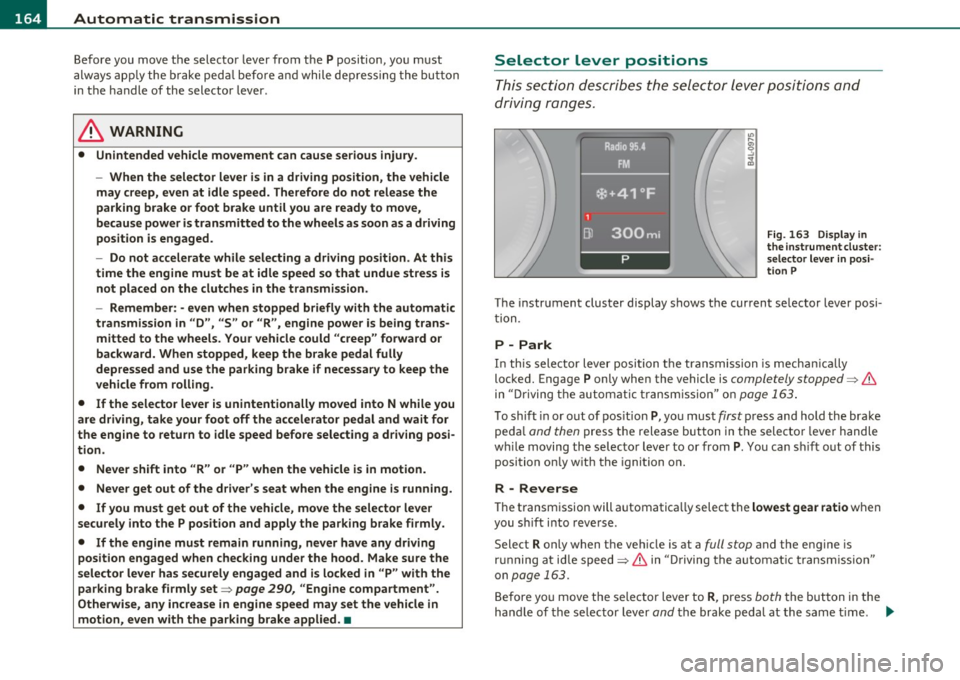
This s ectio n de scri bes the selector leve r posi tio ns and
driving ranges.
"' ....
"' 0 ..:, ;g
Fig. 16 3 Displ ay in
the i nstrument cluster :
s electo r le v e r in posi
ti on P
The instrument cluster display shows the current se lector lever posi
t ion.
P -Park
In th is sele ctor lever posi tion t he transmi ssion is mecha nica lly
locked. Engage
P only when the vehicle is completely stopped=> &
in "Driving t he automa tic tr ansm ission" o n page 163 .
To shift in or out of pos ition P , yo u must first press and hold the bra ke
peda l
and then press t he release button in t he selecto r leve r handle
w hile moving the selecto r lever to or from
P. You ca n shi ft o ut of this
position on ly w ith the ignition o n.
R -Reverse
Th e transm ission will automatica lly select the lowest gea r ratio when
you sh ift i nto reve rse .
Select
R only when the veh icle is at a full stop and the engine is
r un ning a t id le speed=>
& in "D riving the a utomat ic tr ansm issio n"
on
page 163.
B efore yo u move the se lector lever to R , press both the but ton in the
hand le of the se lector lever
and t he brake peda l at the same t ime. ~
Page 170 of 392
ffl..__A_ u_ t_ o_ m_ a_ t _ ic_ t_r_a _ n_ s_m _ i_ s _s_ i_ o _ n _____________________________________________ _
Applie s to veh icles : wi th tip tron ic -s te eri ng whe el
Steering wheel with tiptronic ®
The shift buttons on the steering wheel allow the driver to
shift gears manually.
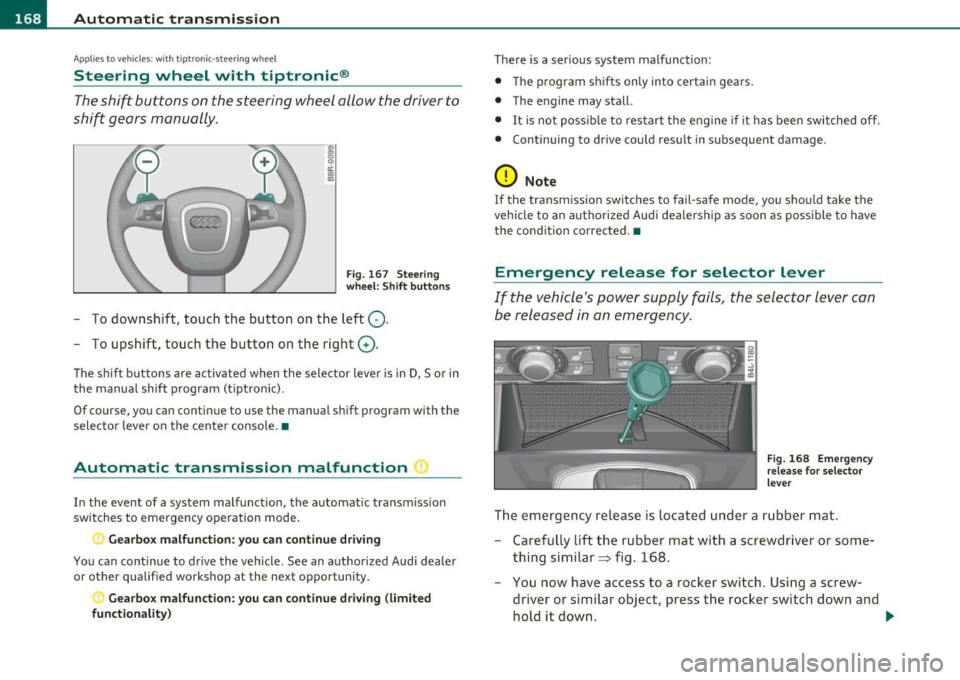
Fig. 167 Steering
wheel: Shift buttons
- To downshift, touch the button on the left Q.
- To upshift, touch the button on the right G).
The shift buttons a re activated when the selector lever is in D, Sor in
the manual shift program (t iptronic).
Of course, you can continue to use the manual shift program with the
selector lever on the center console. •
Automatic transmission malfunction I
In the event of a system malfunction, the automat ic transmission
switches to emergency operation mode .
., Gearbox malfunction: you can continue driving
You can continue to drive the vehicle. See an authorized Audi dealer
or other qualified workshop at the next opportunity .
Gearbox malfunction: you can continue driving (limited
functionality )
There is a serious system malfunction:
• The program shifts only into certain gears.
• The engine may stall.
• It is not poss ible to restart the engine if it has been switched off.
• Continuing to drive could result in subsequent damage .
0 Note
If the transmission switches to fail-safe mode, you should take the
vehicle to an authorized Audi dealership as soon as poss ible to have
the condition corrected. •
Emergency release for selector lever
If the vehicle's power supply fails, the selector lever can
be released in an emergency.
Fig. 168 Emergency
release for selector
lever
The emergency release is located under a rubber mat.
- Carefully lift the rubber mat with a screwdriver or some
thing similar=> fig. 168.
- You now have access to a rocker switch . Using a screw
dr iver or similar object, press the rocker switch down and
hold it down. ._
Page 176 of 392

llffl..__P_ a_r _k _i_n -=g ::...._ s..:y ;... s_ t_ e_ m ________________________________________________ _
& WARNING (continued)
• Use the rear view camera only with the rear lid completely
closed. Make sure any objects you may have mounted on the rear
lid do not block the rear view camera.
[ i ) Tips
• The sensors must be kept clean and free of snow and ice for the
park assist to operate.
• The visual display is shown in the illustration of the rear view
camera . This display shows where the sensors have detected an
obstacle.
• You can change the volume and pitch of the signals as well as the
display =>
page 176.
• Please follow the instructions for towing a trailer=> page 177 .
• What appears in the display is time-delayed. •
Applies to veh icles: wit h pa rking sy ste m adv anc ed
Reverse Parking
Parking mode 1 can be used when parking in a garage or
into a parking space.
Fig.175 MMidisplay:
aiming at a parking
spot Fig. 176
MMI display:
aligning the vehicle
-Switch the MMI on and select reverse gear.
- Turn the steering wheel until the orange orientation lines
(D appear in the parking spot=> fig. 175. Use the mark
ings @to help you estimate the distance from an
obstacle. Each marking represents 3
ft (1 meter) . The blue
area represents an extension of the vehicle's outline by
approximately 16 ft (5 meters) to the rear.
- While driving in reverse gear, adjust the steering wheel
angle to fit the parking space with the aid of the orange
orientation lines=>
0. ® marks the rear bumper. Stop
the vehicle when the red orientation line© borders an
object=> &.
& WARNING
• The rear view camera does not show the entire area behind the
vehicle =>
page 171, fig. 171. Watch out especially for small chil·
dren and animals . The rear view camera cannot always detect
them, posing risk of an accident!
• Please note that objects not touching the ground can appear to
be further away than they really are (for example, the bumper of
a parked vehicle, a trailer hitch, or the rear of a truck). In this case, .,
Page 177 of 392
Parking system -
----------------=-------'
& WARNING (continued )
you should not use the help lines to help with parking, which
poses danger of an accident!
0 Note
In the MMI display , the direction of travel of the vehicle rear is repre
sen te d dependin g on the s teering wheel ang le . The vehicle fron t
swings out more than the vehicle rear. Maintain plenty of distance so
that your outside mirror or a corner of your vehicle does not collide
with any obstacles. This can damage to your vehicle. •
Applies to ve hicles : w ith pa rk ing system advanced
Parallel Parking
Use parking mode 2 to help you parallel pork along the
side of a street.
Con tro ls a nd e quip
m en t
Fig . 177 MMI display:
blue surface in the
parking spot
Vehicle OP-eration
Fig. 178 MMI display:
Blue curve on the curb
The following steps apply only when there is no obstacle such
as a wall near the parking spot. Otherwise, please read the information provided in the "Parking Next to Obstacles"
section.
- Activate the turn signal.
- Position your vehicle parallel to the edge of the street,
approximately 3 ft (1 meter) from a parked vehicle.
- Switch the MMI on and select reverse gear . The parking aid
turns on and parking mode 1 appears on the display .
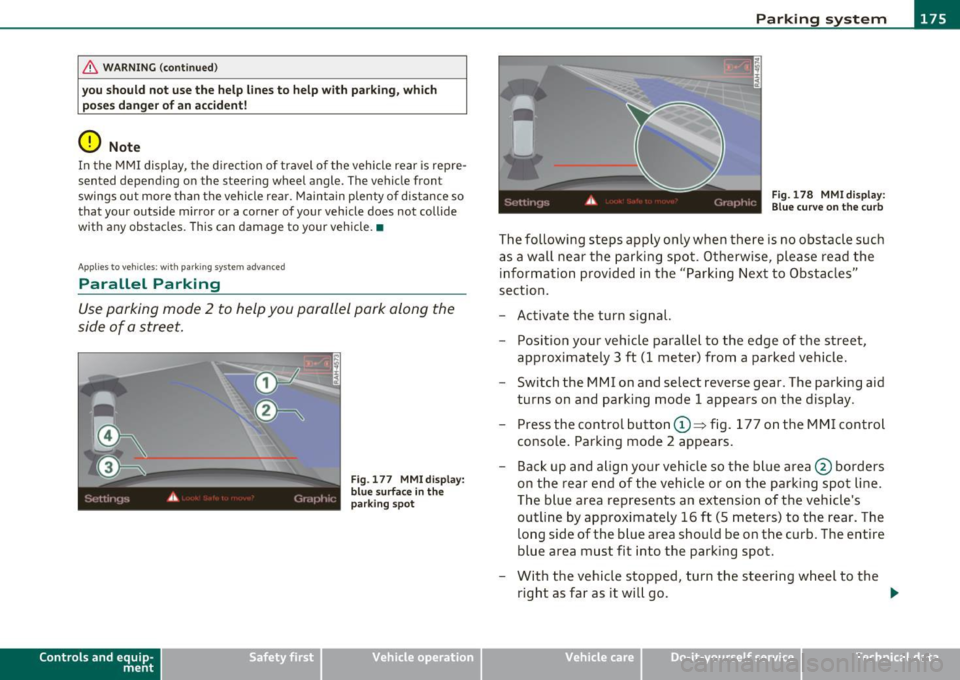
Press the control button©~ fig. 177 on the MMI control
console. Parking mode 2 appears.
- Back up and align your vehicle so the blue area @ borders
on the rear end of the vehicle or on the parking spot line.
The blue area represents an extension of the vehicle's
outline by approximately 16 ft (5 meters) to the rear. The
long side of the blue area should be on the curb. The entire
blue area must fit into the parking spot.
- With the vehicle stopped, turn the steering wheel to the
right as far as it will go. _.,
Vehicle care Do-it-yourselt service iTechnical data
Page 178 of 392

lfflJ.___P_ a_r_k _ i_n ...::g::- s-= y...._ s_t _e _m ________________________________________________ _
- Back into the parking spot until the blue c urve touches t he
curb==>
page 175, fig. 178 . Stop the vehicle .
- With t he vehicle stopped, turn the steeri ng whee l to the
left as far as it wi ll go.
- Continue to back into the parking spot until the vehicle is
parked paralle l to the curb.@ marks the rear bumper .
Stop the vehic le w hen t he re d orientation line© borders
an object ==>& . Ke ~ an eye on the fro nt o f your ve hicle
whi le doing this==><.!).
Parking next to ob stacles
When there is an obstacle (such as a wall) next to the parking spot,
choose a spo t w it h more space on the sides. Position t he long side of
the blue area so that there is sufficient space from the curb. The area
must not be on the curb. You will also need to star t turning the
steer ing wheel much earlier. There should be a suff icie nt amount of
space between the c urb and the b lue c urve, and t he b lue c urve
=> page 175, fig . 178 must not touch the curb .
& WARNING
• The rear view camer a does not show the entire area beh ind the
vehicle =>
page 171, fig. 171 . Watch out e specially for small chil
dr en and animals. The rear view camera cannot always detect
them, p osing ri sk of an ac cident!
• Please note that object s not touching the g round can appear to
be further away than th ey r eally are (for example, the bumper of
a parked vehicle, a trailer hitch, or th e rear of a t ruck) . In this case,
you should not us e the help line s to h elp with parking , which
po se s danger of an accid ent !
0 Note
In the MMI display, the direct io n of travel of the vehicle rea r is rep re
sented depending on the steering wheel angle . The vehicle front sw
ings out more than the vehicle rear . Maintain plenty of d istance so
t ha t your ou tside mirror or a corner of your vehicle does no t collide
w ith any obstacles . This can damage to you r vehicle.
(I] Tips
The left or right or ientation lines and surfaces w ill be displayed,
depending on the turn signa l being used. •
Applies to vehicles: w it h rear park ass ist/pa rking sys tem advance d
Adjusting the display and warning
tones
T he display * and warning tones can be adjusted in the
fv1 fv1I.
- Select: Function but ton [CAR ]> System s*> Parking
system.
Displ ay*
• Off -when the parking system is switched off, only audible signals
are g iven .
• On -when the parking system is switched on, either the visual
display o r the picture from the rear v iew c amera is displayed.
Warning tones
• Front volume * -front sensor vol ume
• Front frequen cy * -front sensor frequency
• Rear volume -rear sensor vo lume
• Rear frequenc y-rear senso r freq uency
• In-car entertainment fader -when the parking system is switched
on, the vol ume of t he active audio source is lowered.
The newly adjusted va lue is briefly heard from the signal generator . .,
Page 194 of 392
• ....__D_ r_iv _i_ n_, g=-- S_ a _ f_e _,Ly _ ______________________________________________ _
Proper occupant seating positions
Proper seating position for the driver
The proper driver seating position is important for safe,
relaxed driving.
Fig. 186 Correct
seating position
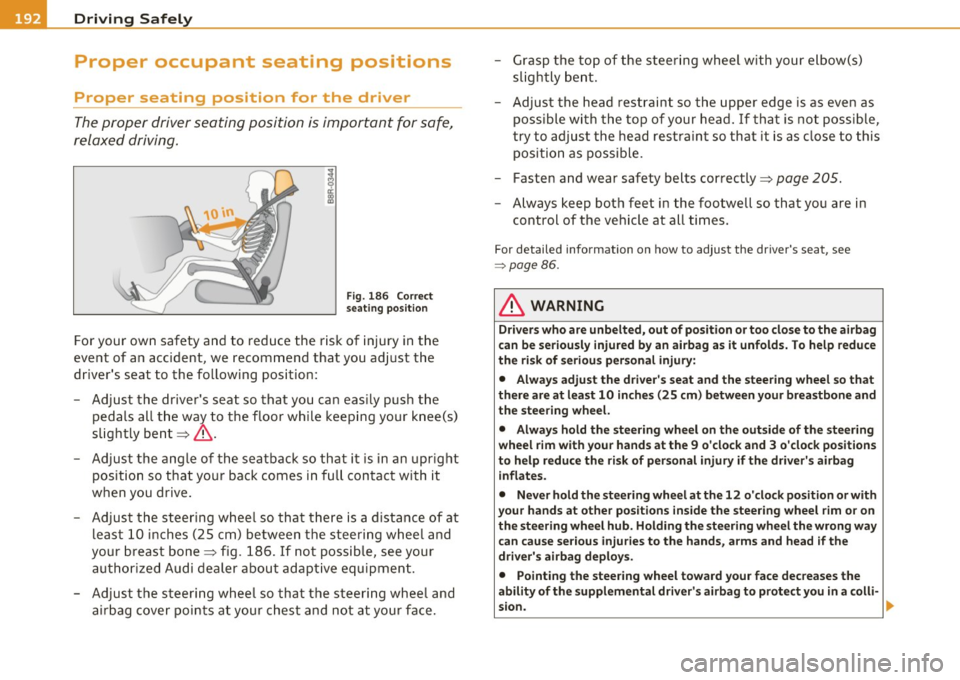
For your own safety and to reduce the risk of injury in the
event of an accident, we recommend that you adjust the
driver's seat to the following position:
- Adjust the driver's seat so that you can easily push the
pedals all the way to the floor while keeping your knee(s)
slightly bent~&.
- Adjust the angle of the seatback so that it is in an upright
position so that your back comes in full contact with it
when you drive.
- Adjust the steering wheel so that there is a distance of at least 10 inches (25 cm) between the steering wheel and
your breast bone~ fig. 186. If not possible, see your
authorized Audi dealer about adaptive equipment.
- Adjust the steering wheel so that the steering wheel and airbag cover points at your chest and not at your face. -
Grasp the top of the steering wheel with your elbow(s)
slightly bent.
- Adjust the head restraint so the upper edge is as even as
possible with the top of your head. If that is not possible,
try to adjust the head restraint so that it is as close to this
position as possible.
- Fasten and wear safety belts correctly~
page 205.
-Always keep both feet in the footwell so that you are in
control of the vehicle at all times.
For detailed information on how to adjust the driver's seat, see
=> page 86.
& WARNING
Drivers who are unbelted, out of position or too close to the airbag
can be seriously injured by an airbag as it unfolds. To help reduce
the risk of serious personal injury:
• Always adjust the driver's seat and the steering wheel so that
there are at least 10 inches (25 cm) between your breastbone and
the steering wheel.
• Always hold the steering wheel on the outside of the steering
wheel rim with your hands at the 9 o'clock and 3 o'clock positions
to help reduce the risk of personal injury if the driver's airbag
inflates.
• Never hold the steering wheel at the 12 o'clock position or with
your hands at other positions inside the steering wheel rim or on
the steering wheel hub. Holding the steering wheel the wrong way
can cause serious injuries to the hands , arms and head if the
driver's airbag deploys.
• Pointing the steering wheel toward your face decreases the
ability of the supplemental driver's airbag to protect you in a colli-
sion.
~
Page 205 of 392
Because the passengers of this vehicle are not using safety belts
=> page 202, fig. 190, they will keep moving at the same speed the
vehicle was moving just before the crash, until something stops them
- here, the wall =>
page 202, fig. 191.
The same principles apply to people sitting in a vehicle that is
involved in a frontal collision. Even at city speeds of 20 to 30 mph (30
to SO km/h), the forces acting on the body can reach one ton (2,000
lbs. or 1,000 kg) or more. At greater speeds, these forces are even
higher .
People who do not use safety belts are also not attached to their
vehicle. In a frontal collision they will also keep moving forward at
the speed their vehicle was travelling just before the crash . Of course,
the laws of physics don't just apply to frontal collisions, they deter
mine what happens in all kinds of accidents and collisions.•
What happens to occupants not wearing
safety belts?
In crashes unbelted occupants cannot stop themselves
from flying forward and being injured or killed. Always
wear your safety belts!
Safety first
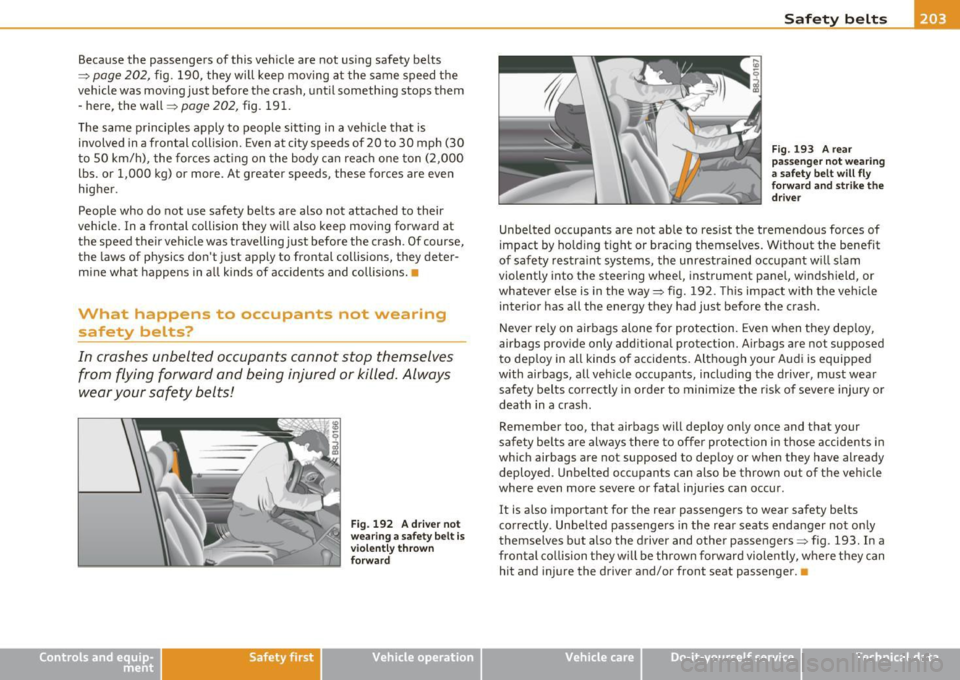
Fig. 192 A driver not
wearing a safety belt is violently thrown
forward
Vehicle OP-eration
Safety belts
Fig. 193 A rear
passenger not wearing
a safety belt will fly
forward and strike the driver
Unbelted occupants are not able to resist the tremendous forces of
impact by holding tight or bracing themselves. Without the benefit
of safety restraint systems, the unrestrained occupant will slam
violently into the steering wheel, instrument panel, windshield, or
whatever else is in the way=> fig. 192. This impact with the vehicle
interior has all the energy they had just before the crash.
Never rely on airbags alone for protection. Even when they deploy,
airbags provide only additional protection. Airbags are not supposed
to deploy in all kinds of accidents. Although your Audi is equipped
with airbags, all vehicle occupants, including the driver, must wear safety belts correctly in order to minimize the risk of severe injury or
death in a crash.
Remember too, that airbags will deploy only once and that your
safety belts are always there to offer protection in those accidents in
which airbags are not supposed to deploy or when they have already
deployed. Unbelted occupants can also be thrown out of the vehicle
where even more severe or fatal injuries can occur.
It is also important for the rear passengers to wear safety belts
correctly. Unbelted passengers in the rear seats endanger not only
themselves but also the driver and other passengers=> fig . 193. In a
frontal collision they will be thrown forward violently, where they can
hit and injure the driver and/or front seat passenger. •
Vehicle care Do-it-yourselt service iTechnical data
Page 213 of 392
Airbag system -----------------=--=---
Airbag system
Important things to know
Importance of wearing safety belts and
sitting properly
Airbags are only supplemental restraints. For airbags to
do their job, occupants must always properly wear their
safety belts and be in a proper seating position.
For your safety and the safety of your passengers, before
driving off, always:
- Adjust the driver's seat and steering wheel properly
=>
page 192,
- Adjust the front passenger's seat properly=> page 86,
-Wear safety belts properly=> page 204,
-Always properly use the proper child restraint to protect
children=>
page 233.
In a collision, airbags must inflate within the blink of an eye and with
considerable force. The supplemental airbags can cause injuries if the
driver or the front seat passenger is not seated properly. Therefore in
order to help the airbag to do its job, it is important, both as a driver
and as a passenger to sit properly at all times.
By keeping room between your body and the steering wheel and the
front of the passenger compartment, the airbag can inflate fully and
completely and provide supplemental protection in certain frontal
collisions =:,
page 192, "Proper occupant seating positions" . For
details on the operation of the seat adjustment controls=>
page 86.
It's especially important that children are properly restrained
=:,
page 233.
Controls and equip ment Safety first Vehicle operation
There
is a lot that the driver and the passengers can and must do to
help the individual safety features installed in your Audi work
together as a system .
Proper seating position is important so that the front airbag on the
driver side can do its job. If you have a physical impairment or condi
tion that prevents you from sitting properly on the driver seat with
the safety belt properly fastened and reaching the pedals, or if you
have concerns with regard to the function or operation of the
Advanced Airbag System, please contact your authorized Audi dealer
or qualified workshop, or call Audi Customer CARE at 1-800-822-
2834 for possible modifications to your vehicle.
When the airbag system deploys, a gas generator will fill the airbags,
break open the padded covers, and inflate between the steering
wheel and the driver and between the instrument panel and the front
passenger . The airbags will deflate immediately after deployment so
that the front occupants can see through the windshield again
without interruption.
All of this takes place in the blink of an eye, so fast that many people don't even realize that the airbags have deployed . The airbags also
inflate with a great deal of force and nothing should be in their way
when they deploy . Front airbags in combination with properly worn
safety belts slow down and limit the occupant's forward movement .
Together they help to prevent the driver and front seat passenger
from hitting parts of the inside of the vehicle while reducing the
forces acting on the occupant during the crash. In this way they help to reduce the risk of injury to the head and upper body in the crash .
Airbags do not protect the arms or the lower parts of the body.
Both front airbags will not inflate in all frontal collisions . The trig
gering of the airbag system depends on the vehicle deceleration rate
caused by the collision and registered by the electronic control unit.
If this rate is below the reference value programmed into the control
unit, the airbags will not be triggered, even though the car may be
badly damaged as a result of the collision . Vehicle damage, repair
9J),
Vehicle care Do-it-yourself service Technical data