air condition AUDI Q7 2012 Owner´s Manual
[x] Cancel search | Manufacturer: AUDI, Model Year: 2012, Model line: Q7, Model: AUDI Q7 2012Pages: 342, PDF Size: 86.42 MB
Page 100 of 342

98 Warm and cold
Synchronizin g rear ai r conditioni ng: By
pressing and holding the regulator on the rear
left side, the temperature setting of the rear
left side can be switched to the rear r ight side
and v ice versa. The new temperature is shown
in the display .
Turning on and off~
App lies to vehicles: with four -zone automat ic comfort a ir
co nd it io nin g
Tu rning on rear air conditi on ing
"' Press the !ON/OFF I button, or
"' Press the
!AU TO I button.
Turning off r ear air condit ioning
"' Press the !ON /O FF I button to swi tch the air
conditioning off and to b lock the air supp ly
from the outside .
The air conditioner turns back on when yo u
press the
temp eratu re reg ula tor or one of the
buttons .
{D) Tips
If the power child safety lock is on, the
rea r air condi tioning control element wi ll
not operate . In this case, dashes" ••• " wi ll
appear in the air condit ion ing control ele
ment d isp lay.
Automat ic mode in rear~
Applies to vehicles: with four-zone automat ic comfort a ir
co nd it io nin g
The automatic mode is the standard setting
for all seasons.
"' Se lect temperature between 60 °F (+16 °C)
and
84 °F (+28 °().
"' Press the
!AUTO I button.
Automatic operation ensu res constant tem
pe ratures in the inter io r and dehum idifies the
a ir i nside the vehicle. Ai r temperature, vo lume
and d istr ibu tion a re con trolled a utomat ically
to reach or maintain the desired inter ior tem
perat ure as quickly as possible . Fl uctuations
in exterior t emperat ure and the effects of temperature from the position of the s
un are
compensated for automatically .
T his operating mode works on ly in the adj ust
able temperature range, from
60 ° F (+ 16 °C )
to
84 °F ( + 28 °C) . If a temperature below 60
°F (+ 16 °C) is se lected, LO appears in the dis
play . At temperatures above
84 ° F (+ 28 °(),
HI is displayed . At bot h extreme sett ings, cli
mate control runs contin uously at maximum
cooling o r heating power . There is no temper
ature regulat ion.
Setting rear temperature
App lies to vehicles: wit h four-zone auto matic comfort air
conditio ning
The temperature can be separately adjusted
for the rear left and right sides .
"' Rotate the regulator to the left to red uce
the temperature, or to the r ight to increase
the temperature .
T he selected temperature appea rs on the cl i
mate control display.
Rear fan~
Appl ies to vehicles : wit h four-zone auto matic co mfo rt air
condition ing
The automatically preset fan speed can be re
duced or increased .
"' Press the~ butto n.
"' Rotate the regulator to the des ired fan
speed.
The climate control system automatically reg u lates fan speed depending on inter ior tem
perature. You ca n adjust the volume of air p ro
duced by the fan to your own requirements .
(D Tips
It is possible that the fan speed may
change automatically. This occurs to en
su re that the des ired temperature setting
i s reached as quickly as possible.
Page 101 of 342

Rear air distribution ~
Applies to vehicles: with four-zone automatic comfort air
conditioning
The automatically controlled air distribution
con be changed manually.
.. Press the Gil button.
.. Rotate the regu lator to the desired setting .
You can adj ust the air circulation so that air
flows from specific vents .
- In position
:J, all air flows from the vents in
the center console and the outlets to the
door pilla rs.
- In position
:0, air flows from the outlets in
the door p illars.
- In position
!,8, air flows from the outlets un-
der the front seats.
There are additional combinations available to
adjust air d istr ibut io n as needed.
To regulate air distribution automatically,
sw itch to
IAU TO I.
Basic settings
General
The basic climate control settings con be ad
justed in the MMI.
.,. Select: Funct io n button ICAR I > Control but
ton
AC . Or
.,. Se lect: Funct ion button
ICAR I > Control but-
ton
Car sy stem s* > AC.
The follow ing funct ions can be selected :
- Auto recirculation
c> page 99
- Synchronization c> page 99
-Supplementary heater * ¢page 100
-Rear opera tion* c> poge 100
Warm and c old 99
Automatic recirculation mode
An air quality sensor detects increased con
centrations of pollutants in the outside air
and automatically switches to recirculation
mode .
We recommend that you always keep auto
matic a ir recirculation ON to p revent polluted
outside air from enteri ng the veh icle inter ior.
If the
a ir qu ality sensor l ocated in the air con
ditioning system detects polluted outs ide a ir,
the sensor dec ides whether the air pollut ion
can be reduced by the facto ry-installed pollu
ta nt fi lter or whethe r it is necessary to switc h
to air recirc ulation. With heavy conce ntra ti ons
of pollu tants, the a ir condit ion ing system is
switched automatica lly to recirc ulation mode
and the supp ly of outside air is blocked . As
soon as the concentration of pollutants in the
outside air drops, fresh air is supplied to the
vehicle interior aga in.
In the event that the windows fog up during
automat ic air rec irculat ion, you must press
the® button immediately.
Under certa in ope rating cond itions, a utomatic
air recirculation is switched off automatica lly.
With outside temperatures be low about 50 °F
(+10 °C), automatic air rec irculat ion is limited
to 30 seconds. W it h outside temperatures be
low about 30 °F ( -1 °C) a nd with the air condi
tione r switched off, the a utomatic air recircu
l ation is limited to 15 seconds.
Synchronization
One climate control setting for the driver and
front passenger seats .
With synchro nization active, the driver's set
tings a re adopted for the passenger o r vice
versa . All the othe r setti ngs that were made
are t ransferred to t he other seat . This in
cl udes all the cl ima te co ntro l settings, excep t
for the se at heating/ven tilat ion* .
If a different setting is selected at a
"synchron ized seat ", synchronization is can
c e lled.
Page 102 of 342

100 Warm and cold
Synchronization
Applies to vehicles: with four -zone automat ic comfort a ir
co ndit io ning
One climate control setting for all seats .
With synchronizat ion active, the driver's set
tings are adopted for the front passenger and
the rear left and right seats. A ll the other set
tings that were made are transferred to the
other seats. This includes all the climate con
trol settings, except for the seat heat ing/ven
tilation* .
If a different setting is se lected at a
"synchroni zed seat", synchron iz ation is can
celled.
Supplementary heater
App lies to vehicles: with d iesel eng ine
" Select : Funct ion button ICARI > Control but
ton
AC > SuppL heater. Or
" Select : Funct ion button
~IC_A_R~I > Control but-
ton
Car systems* > AC > SuppL heater.
Vehicles with diesel engines are equipped
with a supp lementary heater to warm the in
ter ior of the vehicle more quickly. The supp le
men tary heater switches itself on and off au
tomatically when the outside temperature is
be low SO °F (10 °C) and the engine is running,
depending on the coolant temperature, interi
or temperature and the se lected temperature.
Rear operation
Applies to vehicles: with four -zone automat ic comfo rt a ir
co nd it io nin g
The air conditioning in the rear of the vehicle
con be controlled from the cockpit .
" Se lect: Funct ion button ICARI > Contro l but
ton
AC > Rear operation . Or
" Select : Funct ion button
ICARI > Control but
ton
Car systems*> AC> Rear cabin set
tings.
The driver or front passenger can control the
air conditioning in the rear of the vehicle us
ing
his/her own controls.
Heated Seats
Heated front seats~
Applies to veh icles: w it h electrically heated fro nt seats
The sea t cushion and the seotbock of the
front seats con be heated electrically.
" Press the Ill button.
" Rotate the regulator to the des ired setting.
In position O the heating for the seats is
turned off. The range of adjustment is be
tween 1 and 6 .
The heater for the front seats can be turned on when the weight of the particular seat's oc
cupant is detected. However, the front seats
can be pre-heated for about 10 m inutes using
the activated seat heater. After th is time has
elapsed, the seat heater automatically turns
off if it does not detect an occupant's we ight
for the particular seat.
_&. WARNING
Individuals with reduced sensitiv ity to pain
or temperature could develop burns when
using the seat heating function . To reduce
the r isk of injury , these ind ividuals should
not use seat heating .
(D Note
To avoid damage to the heating elements
i n the seats, do not kneel on the seats or
place heavy loads on a small area of the
seat.
(D Tips
Please note that the weight of objects
placed on the seat wi ll also be detected.
This weight may be enough to cause the
seat heater to turn on.
Front seat ventilation ~
Applies to veh icles: w it h front seat ve ntil at ion
The seat cushion and the seatback on the
front seats con be ventilated .
" Press the~ button.
" Rotate the regulator to the desired setting .
ll-
Page 103 of 342
When the regulator is in the O position, the
seat ventilation is switched off. The range of
adjustment is between 1 and 6.
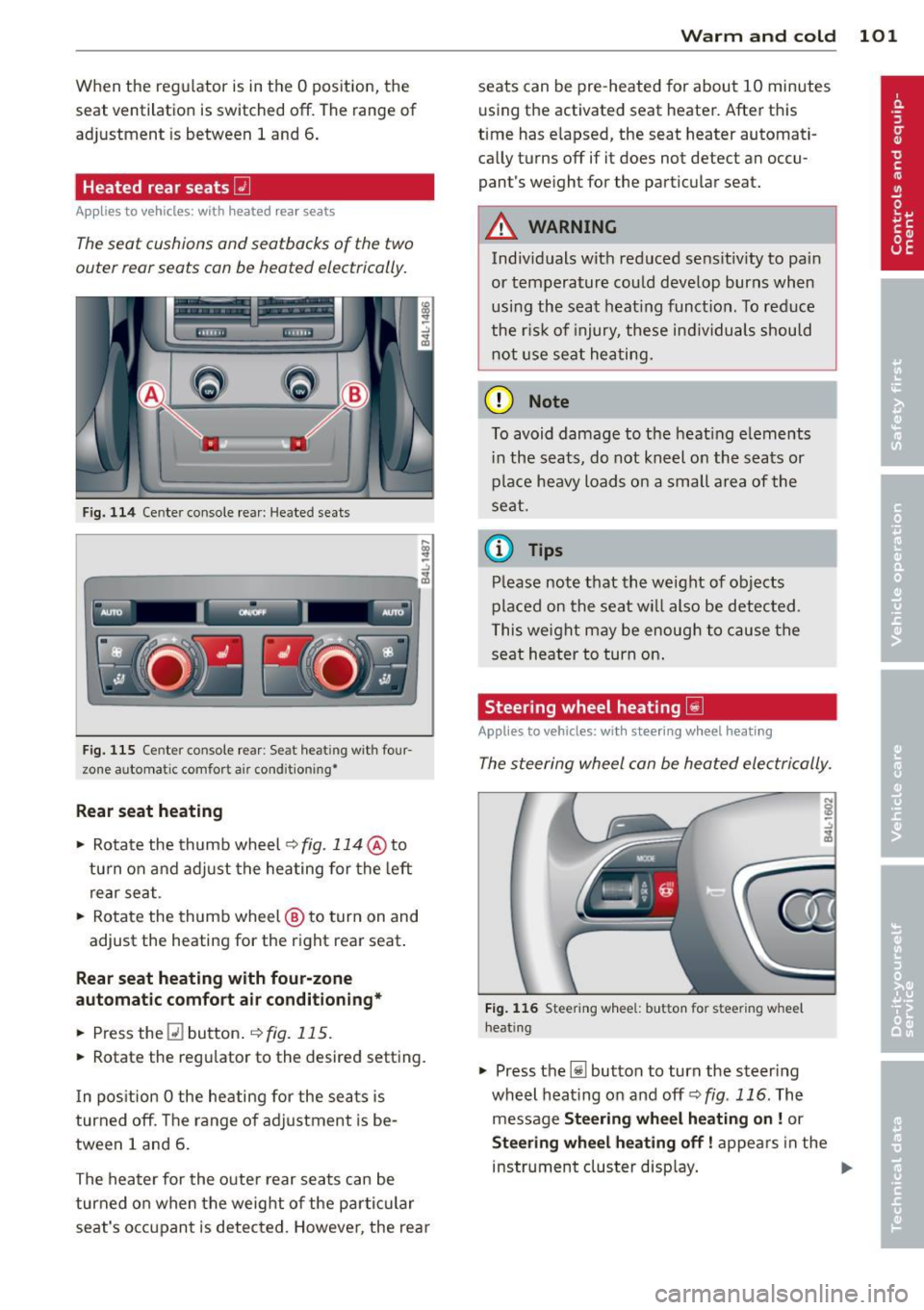
Heated rear seats~
Applies to vehicles: with heated rear seats
The seat cushions and seatbacks of the two
outer rear seats can be heated electrically.
F ig. 114 Ce nter console rea r: Heated sea ts
i
-..:,
---------------<%
F ig. 1 15 Ce nter console rear : Se at heat ing with four
zone automat ic comfort a ir cond it ion ing•
Rear seat he ating
• Rotate the thumb wheel ~fig. 114 @to
turn on and adjust the heating for the left
rear seat .
• Rotate the thumb wheel @ to turn on and
adjust the heating for the right rear seat.
Rear seat heating w ith four-zone
automatic comfo rt air conditioning *
• Press the Q] button . ~ fig. 115.
• Rotate the regu lator to the desired setting .
I n pos ition O the heating for the seats is
turned off . T he range of ad justment is be
tween 1 and 6 .
The heater for the outer rear seats can be
turned on when the weight of the parti cular
seat's occ upant is detected. Howeve r, the rea r
Warm and cold 101
seats can be pre-heated for about 10 minutes
using the activated seat heater. After this
time has e lapsed, the seat heater automati
ca lly turns off if it does not detect an occu
pant's weight for the particular seat.
A WARNING
Individuals wit h reduced se ns itiv ity to pa in
or temperature could develop burns when
usi ng the seat heat ing funct ion . To reduce
the r isk of injury, these ind ividuals shou ld
not use se at hea ting.
(D Note
To avoid damage to the heat ing e lements
i n the seats, do not kneel on the seats or
place heavy loads o n a sma ll a rea of the
seat.
© Tips
P lease not e that the weight of objects
placed on the seat wi ll also be detected .
This weight may be enough to cause the
seat heater to turn on .
Steering wheel heating~
Applies to vehicles: with steering wheel heating
The steering wheel can be heated electrically.
F ig . 1 16 Steer ing wheel: button for steering whee l
heat ing
• Press the [j] button to turn the steer ing
whe el heat ing on and
off <=>fig . 116. The
message
Steering wheel h eating on! or
Steering wheel heating off! appears in the
instrument cluster disp lay. ..,.
Page 152 of 342
150 Adapti ve Air Susp en sion
Adaptive Air
Suspension
Air suspension and damping
Description
App lies to vehicles: with Adapt ive Air Suspe nsion
Air suspension and damping can be adjusted
separately.
Adaptive Air Suspension is an electronically
controlled springing and damping system .
This chassis system makes it easier on the
driver by adapt ing to the particular situat ion
through imperceptible control processes.
The
Ad apti ve Air Su sp ension component reg
ulates ground clearance depending on vehicle
speed and driver input. It functions independ
ently from the load condition . Accelerating to
a speed above a predetermined limit will make the vehicle lower itself . On the other
hand, driving more slowly results in the vehi
cle raising aga in at specific speeds.
The
d am ping component provides individual
control of the damping forces. For example,
with damping characterist ics set to prov ide
greater comfort, damping is set somewhat
harder for a brief per iod only as required, for
example, when going around a curve or when brak ing .
Set tings
Adapt ive A ir Suspension provides the driver
with the opportun ity to set the chassis charac
teristics also to their individual prefe rence.
W ith the dr iv ing modes
Comfort, Automatic
and Dynamic the driver has three chassis set
tings available, ranging from comfort to spor
ty. The
Offrood mode can be selected for driv
ing on poor quality stretches of road. In addi
tion,
Lift provides a fifth mode, which can be
selected when exceptionally high ground
clearance is needed
c::> page 150, Chassis con
trols.
The modes are set in MMI r:::;, poge 152.
A WARNING
The height of the parked vehicle can
change due to temperature fluctuations or
changes in load.
([) Note
- Whenever you park your vehicle, a lways
make sure there is adequate clearance
above and below the vehicle. The he ight
of the parked vehicle can change as the
result of temperature f luctuations,
changes in load cond ition and changes in
the driving mode (ground clearance).
- If the vehicle is being t ransported (e.g.
by tow truck, train, sh ip, etc.), mount the
tie-down chains/cables over the running
surface (circumference) of the tires. Nev
er secure the vehicle by the axle, the sus
pension struts or the front or rear tow
line eye. For technical reasons, the pres
sure in the suspens ion struts may change
during the transport, which could result
in the vehicle no longer be ing secured
properly .
- If you are going to tow a trailer with a trailer hitch that was
not installed ac
cording to factory specif ications, you
must activate the tra iler operation mode
manually
c;, page 154.
(D Tips
- Before you can raise your vehicle us ing
the vehicle jack (for example, when
changing a f lat t ire) or a veh icle lift, yo u
must activate the jac king mode
c::>poge 154.
-On some mode ls, the vehicle can reach
its maxim um speed only in the
Automat
ic
and Dynamic modes.
Chassis controls
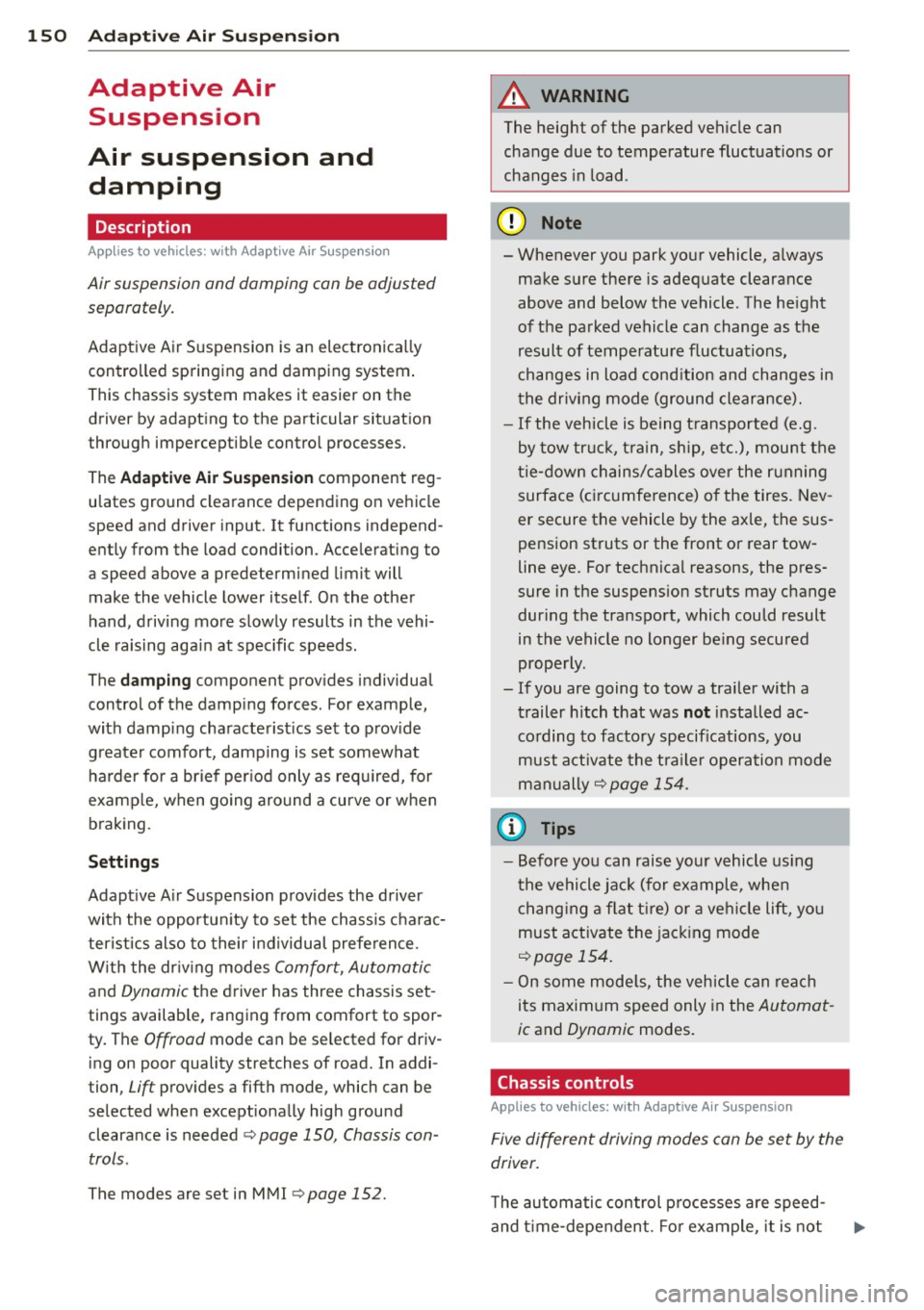
Applies to vehicles: wit h Adaptive A ir Suspensio n
Five different driving modes con be set by the
driver.
The automatic control processes are speed
and t ime -dependent . Fo r example, it is not
Page 154 of 342
152 Adaptive Air Suspension
emphasis on comfo rt are se lected in this
mode.
- Automatic lowering: When a speed of
about 75 mph (120 km/h) is exceeded for
more than 30 seconds, the vehicle is auto
matically lowered by 0.6 inch (15 mm) to
low level.
-Automatic raising: The vehicle is automati
ca lly raised to
normal level again, if the
speed falls below about 44 mph (70 km/h)
for a period of 2 minutes . The vehicle is
raised immediately when speed falls below
about 22 mph (35 km/h) .
Offroad
Select the offroad mode when you have to
travel over poor quality sections of road (e.g. trails). In th is mode, the vehicle is ra ised to
high level 1, and damping characteristics for
poor road stretches are selected . When
switch ing to offroad mode, the Adaptive Air
Suspension indicator appears automat ically in
the instrument cluster display ¢
page 153.
The offroad mode can only be activated at
speeds below 37 mph (60 km/h). Offroad mode ends automat ically and the automatic
mode is activated when a speed of approxi
mately SO mph (80 km/h) is exceeded.
Lift
Select the lift mode when except ionally high
ground clearance is needed at a reduced
speed. In thi s mode, the vehicle is ra ised to
high level 2. When switching to lift mode, the
Adaptive A ir Suspension indicator appears au
tomatically in the instrument cluster display
c!) page 153.
The lift mode can be activated only at speeds
below 12 mph (20 km/h) . When a speed of
about 25 mph (40 km/h) is exceeded , the sys
tem automatically leaves lift mode and the
offroad mode is activated. The instrument
cluster display automat ically switches the dis
p lay to Adaptive Air Suspension to indicate re
duced ground clearance.
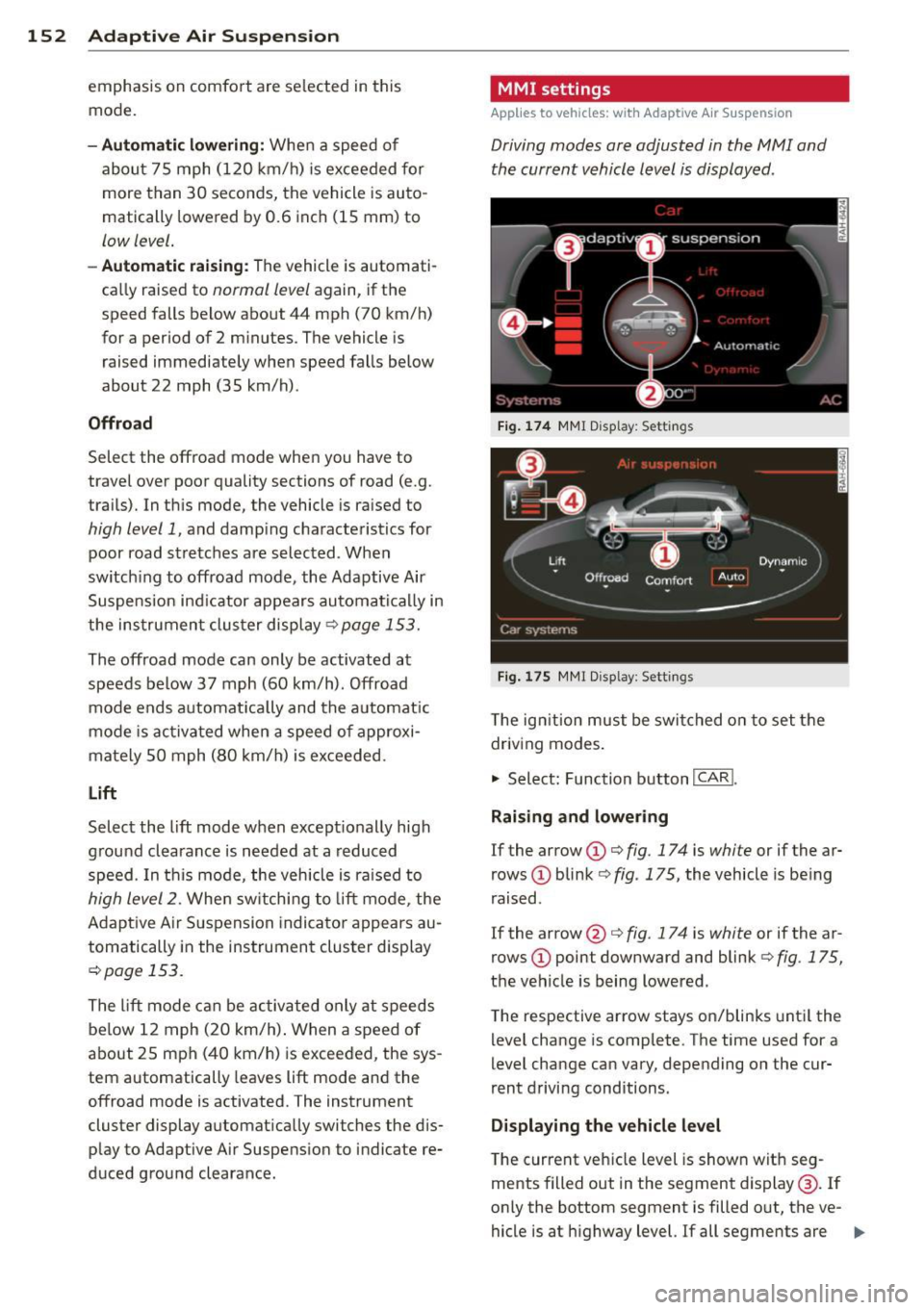
MMI settings
Applies to vehicles: with Adaptive Air Suspension
Driving modes are adjusted in the MMI and
the current vehicle level is displayed .
Fig. 174 MMI Display: Sett ings
Fig. 175 MMI Display: Settings
T he ign ition must be switched on to set the
driving modes .
.,. Select: Function button
I CAR!.
Raising and lowering
If the arrow (D Q fig. 174 is white or if the ar
rows
(D blink ¢ fig. 175, the vehicle is be ing
raised .
If the arrow @ Q fig. 17 4 is white or if the ar
rows
(D point downward and blink¢ fig. 175,
the vehicle is being lowered.
T he respective arrow stays on/blinks until the
level change is complete. The time used for a
level change can vary, depending on the cur
rent driving conditions.
Displaying the vehicle level
The current veh icle level is shown with seg
ments filled out in the segment display @. If
only the bottom segment is filled out, the ve-
hicle is at highway level.
If all segments are Ill>
Page 155 of 342
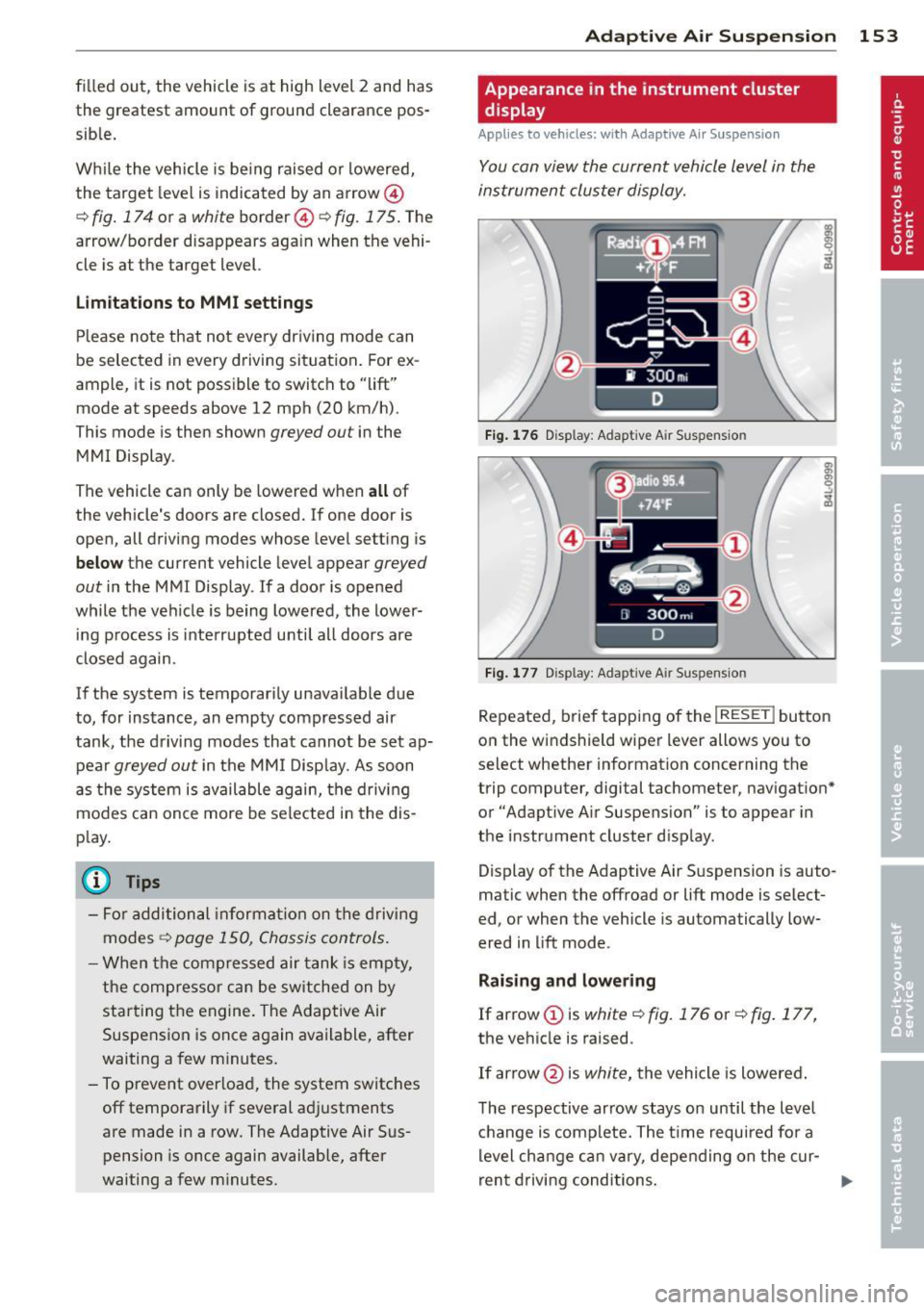
filled out, the vehicle is at high level 2 and has
the greatest amount of ground clearance pos
sib le.
Wh ile the vehicle is be ing raised or lowered,
the target level is indica ted by an arrow@
¢ fig. 174 or a white border @~ fig. 175 . The
arrow/border disappears aga in when the vehi
cle is at the target level.
Limitation s to MMI s ettin gs
Please note that not eve ry dr iving mode can
be selected in every driving situation . For ex
ample , it is not possible to switch to "lift"
mode at speeds above 12 mph (20 km/h) .
This mode is then shown
greyed out in the
MMI Display .
The vehicle can only be lowered when
a ll of
the vehicle's doors are closed. If one door is open, all driving modes whose level setting is
belo w the current vehicle level appear
greyed
out
in the MMI Display . If a door is opened
while the veh icle is being lowered , the lower
ing process is inte rrupted until all doors are
closed again.
If the system is temporarily unava ilable due
to, for instance, an empty compressed air
tank, the driving modes that cannot be set ap pear
greyed out in the MM I Disp lay. As soon
as the system is available again, the drivi ng
modes can once more be selected in the dis
p lay.
@ Tips
- For additional informat io n on the driving
modes ~
page 150, Chassis controls .
-When the compressed air tank is empty,
the comp ressor can be switched on by
starting the engine. The Adaptive Air
Suspension is once again available, after
waiting a few minutes.
- To prevent overload, the system switches off temporarily if several adjustments
are made in a row. The Adaptive Air Suspension is once again available, after
waiting a few m inutes.
Ad apti ve A ir Sus pension 15 3
Appearance in the instrument cluster
d isplay
Appl ies to vehicles: wi th Adaptive A ir Suspensio n
You can view the current vehicle level in the
instrument cluster display.
Fi g. 17 6 Disp lay: Adapt ive A ir Suspensio n
Fig. 177 Disp lay: Adapt ive A ir Suspension
Repeated, brief tapping of the I RESE T I button
on the windshield wiper lever allows you to
select whether information concerning the
trip computer, digital tachometer, navigat ion *
or "Adapt ive A ir Suspens ion" is to appear in
the instrument cluster d isp lay.
Display of the Adaptive Air S uspension is auto
matic when the offroad or lift mode is select
ed, or when the vehicle is automatically low
ered in lift mode.
Rai sing and lowe ring
If arrow (Dis
white¢ fig. 176 or~ fig. 177,
the vehicle is raised .
If arrow @is
white, the vehicle is lowered .
The respective arrow stays on until the level
c hange is complete. The time required for a
level cha nge can va ry, depending on the cur -
ren t driving conditions . .,..
Page 169 of 342
to reduce the risk of injury when the vehi
cle is not be ing used.
- After closing the rear lid, always make
sure that it is properly closed and locked.
- Never leave your vehicle unattended es
pecially with the rear lid left open . A
child could crawl into the vehicle through
the luggage compartment and close the
rear lid becoming trapped and unable to
get out . Be ing trapped in a vehicle can
lead to serious persona l injury .
- Never let children play in or around the vehicle .
- Never let passe ngers r ide in the luggage
compartment . Ve hicle occupants must
always be properly restrained in one of
the vehicle's seating positions.
(D Tips
- Air c irculation helps to reduce window
fogging . Sta le air escapes to the outside
th rough vents in the trim pane l. Be su re
to keep these slots free and open .
-The t ire pressure must correspond to the
load. The t ire pressur e is shown o n the
tire p ress ure label. The tire pressure la
bel is loc ated on the d river's s ide B-pi ll a r.
The t ire pressure label lists the recom
mended cold ti re inflat ion pressu res for
the vehicle at its maximum capacity
weig ht and the tires that were on you r
vehicle at the time it was man ufactured .
For recommended t ire pressures fo r nor
mal load conditions, please see chap ter
c:> page278 .
Tie-downs
The luggage compartment is equipped with
four tie-downs to secure luggage and other
items .
Use the tie-downs to secure your cargo prop
erly
c:> page 166, Loading the luggage com
partment.
In a coll is ion, the l aws of phys ics mean that
even smalle r items that are loose in the vehi
cle will become heavy missiles that can cause
Dr iving S afel y 167
serious injury. Items in the ve hicle possess en
ergy which vary with vehicle speed and th e
weight o f the item . Vehicle speed is the most
s ignificant factor.
Fo r example, in a fronta l collision at a speed
of 30 mph (48 km/h), the forces acting on a
10 -lb (4.5 kg) object are about 20 t imes the
no rmal weight of the item. This means t hat
the weigh t of the item would sudden ly be
about 200 lbs. (90 kg) . You can imag ine the
i njur ies that a 200 lbs . (90 kg) item fly ing
fr eely th ro ugh the passenger compar tme nt
c ould cause in a co lli sion like this.
A WARNING
We ak, dam aged or imprope r str aps used
to secure items to tie -downs can fail dur
ing hard braking or in a collision and cause
serio us personal injury .
-Always use s uita ble mount ing stra ps and
properly secu re items to the tie-downs in
the l uggage compa rtme nt to he lp pre
vent items from shift ing or f ly ing fo r
ward as dangerous missiles .
-When the rea r seat backrest is folded
down, a lways use suitable mounting
straps and properly secure items to the
tie-downs in the luggage compartment
to hel p prevent items from fly ing for
ward as da ngerous missiles into the pas
s enger compartment .
- Never attach a chi ld safety seat te th er
s trap to a t ie- down .
Reporting Safety
Defects
Applicable to U.S.A.
If you b elieve that your v ehi cle
has a d efe ct whi ch could cause
a crash or could cause injury or
d eath, you should imm ediately
inform the National Highway
Tr affic Safet y Admini stration ..,.
•
•
Page 186 of 342
184 Airbag system
conditions is impossible in all conceiva
ble situations that may happen during
the useful life of your vehicle.
- The Advanced Airbag System can deploy
in accordance with the "low risk" option
under the U.S. Federal Standard if a child
that is heavier than the typical one-year
old child is on the front passenger seat
and the other conditions for airbag de
ployment are met.
-Accident statistics have shown that chil
dren are generally safer in the rear seat
area than in the front seating position.
- For their own safety, all children, espe
cially 12 years and younger, should al
ways ride in the back properly restrained
for their age and size.
Advanced front airbag system
Your vehicle is equipped with a front Advanced
Airbag System in compliance with United
States Federal Motor Vehicle Safety Standard
208 as applicable at the time your vehicle was
manufactured.
The front Advanced Airbag System supple ments the safety belts to provide additional
protection for the driver's and front passeng
er's heads and upper bodies in frontal crashes .
The airbags inflate only in frontal impacts
when the vehicle deceleration is high enough.
The front Advanced Airbag System for the
front seat occupants is not a substitute for
your safety belts. Rather, it is part of the over
all occupant restraint system in your vehicle.
Always remember that the airbag system can
only help to protect you, if you are sitting up
right , wearing your safety belt and wearing it
properly. This is why you and your passengers
must always be properly restrained, not just
because the law requires you to be.
The Advanced Airbag System in your vehicle has been certified to meet the "low risk" re
quirements for 3 and 6 year-old children on
the passenger side and very small adults on
the driver side. The low risk deployment crite
ria are intended to help reduce the risk of in- jury through interaction with the front airbag
that can occur, for example, by being too close to the steering wheel and instrument
panel when the airbag inflates.
In addition, the system has been certified to
comply with the "suppression" requirements
of the Safety Standard, to turn off the front
airbag for infants 12 months old and younger
who are restrained on the front passenger
seat in child restraints that are listed in the Standard
~ page 202, Child restraints and
Advanced Airbags .
"Suppression" requires the front airbag on the
passenger side to be turned off if:
- a child up to about one year of age is re
strained on the front passenger seat in one
of the rear-facing or forward-facing infant
restraints listed in Federal Motor Vehicle
Safety Standard 208 with which the Ad
vanced Airbag System in your vehicle was
certified. For a listing of the child restraints
that were used to certify your vehicle's com
pliance with the US Safety Standard
~page 202,
-weight less than a threshold level stored in
the control unit is detected on the front pas
senger seat.
When a person is detected on the front pas senger seat, weighing more than the total
weight of a child that is about 1 year old re
strained in one of the rear-facing or forward
facing infant restraints (listed in Federal Mo
tor Vehicle Safety Standard 208 with which
the Advanced Airbag System in your vehicle
was certified), the front airbag on the passen ger side may or may not deploy.
The
PASSENGER AIR BAG OFF light comes on
when the electronic control unit detects a to
tal weight on the front passenger seat that re quires the front airbag to be turned off. If the
PASSENGER AIR BAG OFF light does not
come on, the front airbag on the passenger
side has not been turned off by the control
unit and can deploy if the control unit senses
an impact that meets the conditions stored in
its memory.
ll-
Page 191 of 342
-when the weight on the front passenger
seat as sensed by the Advanced Airbag Sys
tem indicates that the front airbag on the
passenger side has to be turned off by the
electronic control unit (the
PASSENGER AIR
BAG OFF
light comes on and stays on)
A WARNING
Sitting in the wrong position can increase
the risk of serious injury in crashes.
- To reduce the risk of injury when the air
bags inflate, the driver and passengers
must always sit in an upright position,
must not lean against or place any part
of their body too close to the area where
the airbags are located.
- Occupants who are unbelted, out of posi
tion or too close to the airbag can be se
riously injured by an airbag as it unfolds
with great force in the blink of an eye
c> page 181.
A WARNING -
A child in a rearward-facing child safety
seat installed on the front passenger seat
will be seriously injured and can be killed if
the front airbag inflates -even with an Ad
vanced Airbag System.
- The inflating airbag will hit the child
safety seat or infant carrier with great
force and will smash the child safety seat
and child against the backrest, center
armrest, door or roof.
- Always install rear-facing child safety
seats on the rear seat.
- If you must install a rearward-facing
child safety seat on the front passenger
seat because of exceptional circumstan
ces and the
PASSENGER AIR BAG OFF
light does not come on and stay on, im
mediately install the rear-facing child
safety seat in a rear seating position and
have the airbag system inspected by your
authorized Audi dealer .
Airbag system 189
A WARNING
Objects between you and the airbag will
increase the risk of injury in a crash by in
terfering with the way the airbag unfolds
or by being pushed into you as the airbag inflates .
- Never hold things in your hands or on
your lap when the vehicle is in use.
- Never transport items on or in the area
of the front passenger seat . Objects
could move into the area of the front air
bags during braking or other sudden ma
neuvers and become dangerous projec
tiles that can cause serious personal in
jury if the airbags inflate.
- Never place or attach accessories or oth
er objects (such as cupholders, tele
phone brackets, large, heavy or bulky ob
jects) on the doors, over or near the area marked "AIRBAG" on the steering wheel,
instrument panel, seat backrests or be
tween those areas and yourself . These
objects could cause injury in a crash, es
pecially when the airbags inflate.
- Never recline the front passenger's seat
to transport objects. Items can also
move into the area of the side airbag or
the front airbag during braking or in a sudden maneuver. Objects near the air
bags can become projectiles and cause
injury, particularly when the seat is re
clined.
- Never tilt the front passenger seat back
rest forward when the vehicle is moving.
An inflating airbag will force the back
rest backward and can injure rear seat oc
cupants.
A WARNING
The fine dust created when airbags deploy
can cause breathing problems for people
with a history of asthma or other breath ing conditions.
-
- To reduce the risk of breathing problems,
those with asthma or other respiratory
.___ c_ o_ n_ d_ it_ i_o _ ns_ sh_o_ u_ l_ d _:g:_ e_ t _f_re _s_ h_ a_ i_r _ri ..:::g :....h _t __
_J ~
•
•