battery AUDI Q7 2012 Owner´s Manual
[x] Cancel search | Manufacturer: AUDI, Model Year: 2012, Model line: Q7, Model: AUDI Q7 2012Pages: 342, PDF Size: 86.42 MB
Page 53 of 342

How is the anti-theft alarm system
switched off?
The anti -theft a la rm system is switched off
on ly when you unlock yo ur vehicle. If yo u do
not open a door w ith in 60 seconds after you
have unlocked with the remote control , the
ve hicle w ill lock itse lf again automat ically .
When will the anti-theft alarm sy stem be
triggered?
W hen the ve hicle is locked, the alarm system
mon itors and protects the following parts of
the vehicle:
- engi ne compartment
- lu ggage compartment
- doo rs
- i gnition
When the system is activated, the alarm will be tr iggered if on e of the doo rs, the eng ine
h ood or t he rear lid a re opened, o r if the ig ni
tion is tur ned on. The anti-t heft alarm sys tem
will also go off when the battery is discon
nected .
You can a lso tr igge r the alarm by p re ssing t he
P ANIC button o n your remote con trol. T his
will alert other peop le in case of emergency.
Press the
PANIC b utton again to t urn off the
a larm.
How is the anti-theft alarm switched off
when triggered?
The a larm system is switc hed off when you
un lock the vehicle o r whe n the ignition is
sw itched on. The alarm will also switch itself
off when it comes to the end of its cycle.
Emergency flasher and horn
The emergency flas her wi ll blink brief ly and
the hor n sounds when the doors, engine hood
and rear lid are proper ly closed .
If th e emergen cy fl ashe rs do no t blink , or the
horn does no t sound, check the doors, engine
h ood an d rear lid to make sure they are p rop
erly closed.
If you close a door, t he hood o r
the rear lid w ith the anti-theft alarm sw itched
on, the emergency flashers will b link and the
Opening and clo sin g 51
horn wi ll sou nd on ly afte r you have closed the
door or li d.
(D Tips
For the anti-theft ala rm sys te m to fu n c
tion properly, make sure all ve hicle doors
and win dows are closed before leavi ng t he
vehicle .
Power windows
Controls
Fig. 4 6 Drive r's doo r: power w indow sw itches
Switches for front door windows
@ o p erates the w indow in the d river's door.
® opera tes the w indow in the front passe ng-
er's door .
Switches for rear windows
© operates the left rear window.
@ operates the r ight rear wi ndow.
Safety switch
® Safety switch for rear window operat ion.
A WARNING
- Do not lea ve c hildren unattended in t he
ve hicle, especially wi th access to veh icle
keys. Unsupervi sed us e of the keys can
resu lt in start ing of the engi ne and use
o f vehicle system s such as po wer w in
dows, etc. w hich co uld res ult in se riou s
in jur y.
- R eme mber -you can s till ope n or close
the powe r win dows for about ten mi
n utes after the ign ition is switc hed off.
O nl y w hen eit her of t he fro nt doors are
Page 56 of 342
54 Opening and closing
Reactivating the system after battery
disconnection
If the vehicle battery is disconnected and then
reconnected, the a utomatic closing and open
ing function wilt not work until it is reactivat
ed. To reactivate this feature, perform the fol
lowing steps:
Reactivating close /open feature
., Pull and hold the power window switch un
til the window is completely closed .
., Release the switch .
., Pull the switch again for one second. The
automatic closing/opening is now reactivat
ed .
Panoramic sliding
sunroof
Description
App lies to vehicles: with Pa noramic slidi ng sunroo f
The Panoramic sliding sunroof of two individu
al glass roof segments, wh ich can be adjusted
e lectr ically independently of each other.
The front segment can be tilted and slid open.
The rear segment can be tilted, but it cannot be slid open .
The Panoramic s liding sunroof is operated by
the driver or passenger when the ignition is on
wi th a rotary switch (for the fron t roof seg
ment) and a rocker switch (rear roof seg
ment) .
After the ignit ion has been switched off , the
Panoramic sliding sunroof can still be opened
or closed for about 10 m inutes . However, as
soon as the dr iver's or passe nger's door is
opened, the switches for the Panoramic slid
ing sun roof are inope rat ive.
0 Note
You should always close the Panoramic
sliding sunroof when you leave you r vehi
cle. Sudden rain can drench the interior
equ ipment and damage the electronic con
venience features in your vehicle.
(D Tips
If you park your vehicle in the sun, we rec
ommend that you close both sun blinds
c>page56.
Tilting/sliding open Panoramic sliding
sunroof
Applies to vehicles: w ith Panoramic sliding sunroof
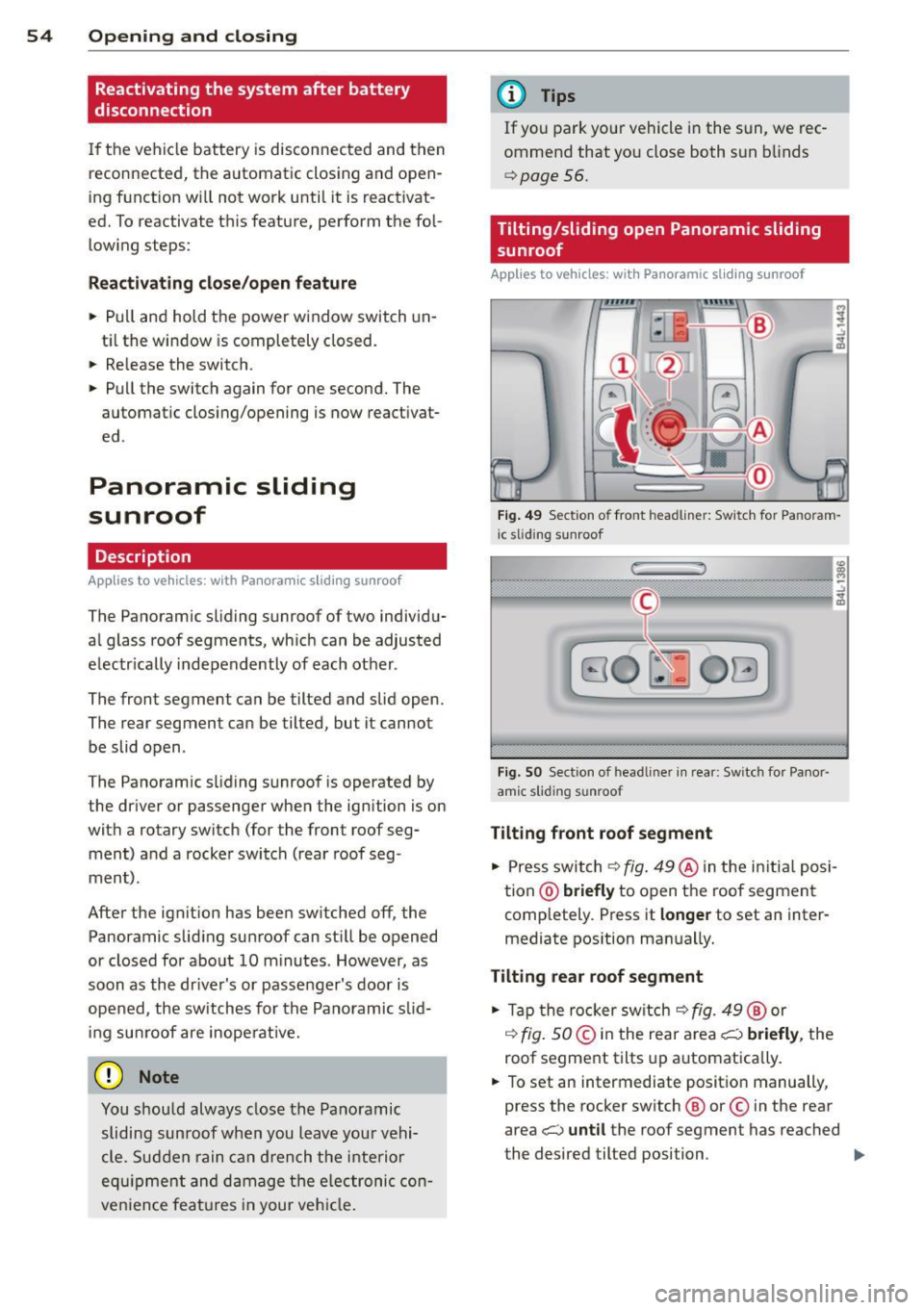
Fig. 49 Se ction o f fro nt headline r: Sw itch for Pa noram
i c slid ing sunroof
Fi g. SO Sect ion of head liner in rear : Switc h for Panor
amic s lidin g sunroof
Tilting front roof segment
., Press switch c>fig. 49@ in the in itia l posi
tion @)
briefly to open the roof segment
completely . Press it
longer to set an inter
mediate pos ition manually.
Tilting rear roof segment
., Tap the rocker switch c> fig. 49 ® or
,:¢, fig. SO@in the rear area i;:::) briefly, the
roof segment tilts up automatica lly.
., To set an intermediate position manually,
press the rocker switch ® or© in the rear
area
i;:::) until the roof segment has reached
the desired tilted position . ..,.
Page 63 of 342
Notes o n these featur es
- The turn signals only work with t he ignition
turned on . T he indicator light s
B or LI in
the instrument cluster¢
page 14 also blink.
- After yo u have turned a corner, the turn sig-
nal switches off automatica lly.
- The
high beam works only when the head
lights are on. The indicator light
II in the
instrument cluster i lluminates when the
high beams a re on.
- The
headlight flasher wo rks only as long as
you hold the lever -even if there are no
lights turned on . The indicator light
II in
the ins trument clus ter illuminates when you
use the headlight flasher .
A WARNING
-
Do not use the high beam or headlight
flasher if you know that these cou ld blind
oncoming traffic.
Interior lights
Front interior lights
The interior lights include reading lights for
both the driver and the front passenger .
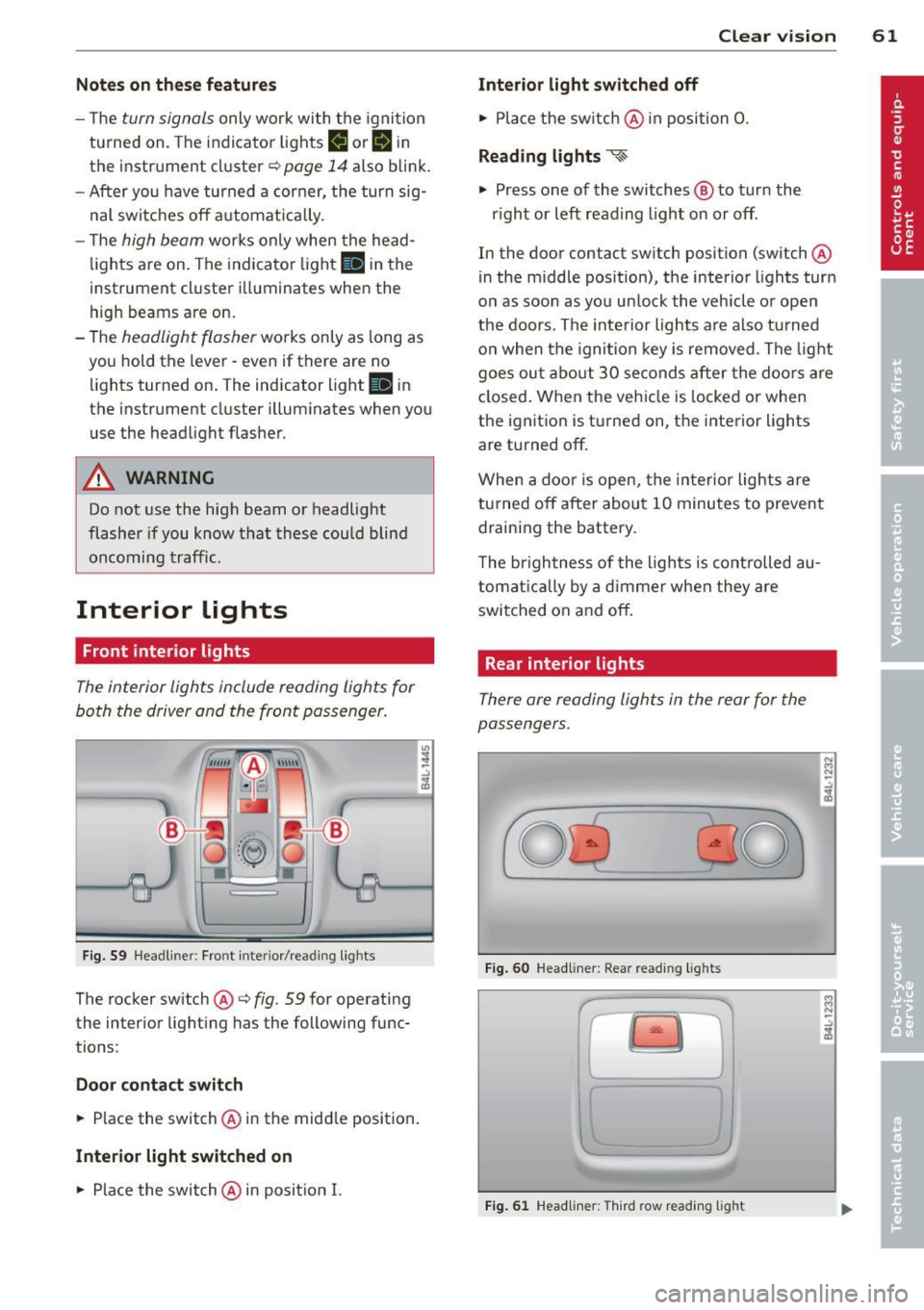
Fig. 59 Headlin er: Fro nt in te rior /re adi ng light s
The rocker switch @¢ fig. 59 for ope rating
the inter ior lighting has the follow ing func
tions :
Door cont act switch
.,. Place the switch @ in the midd le position.
Interior light switched on
.,. Place the switch @ in posit ion I.
.,,
:! .:,
1A
Clear vision 61
Interior light switch ed off
.,. Place the sw itch @ in position 0.
Re ading light s ~
.,. Press one of the switches @ to turn the
r ight or left reading light on or off .
In the door contact swi tch position (switch @
in the m iddle position), the interior l ights tur n
o n as soon as you unlock the vehicle o r open
the doors . The inte rior lights are also turned
o n when the igni tion key is removed . The light
goes ou t about 30 seconds after the doo rs are
closed. When the veh icle is locked or when
the igni tion is turned on, the i nterior lights
are turned off .
When a door is open, the interior lights are
tu rned off after about 10 minutes to prevent
draining the battery.
T he brigh tness of the lights is cont rolled au
tomat ic all y by a dimme r when they are
switched on and off.
Rear interior lights
There are reading lights in the rear for the
passengers .
0
...
Fig . 60 Headli ner: Rear read ing lig h ts
>l!i:.
r -
' \,
Fi g. 61 Headlin er: Third row r eading light
N .., N
.:,
1A
:::i N
-.:,
1A
Page 64 of 342
62 Clear vis ion
• Press one of the switches ~~ to tu rn the
right or left reading light on or off~
fig. 60.
For vehicles w ith third row seating*, the lug
gage compartment light can be switched on
and off with the button'*' and used as a read
ing light
~fig. 61. The rear lid has to be
closed.
The lights in the l uggage compartment and in
the rear lid sw itch on and off automatically
when the lid is opened and closed .
@ Tips
If the rear lid remains open longer than 10
minutes, the luggage compartment lights
turn off a utomatically to prevent the vehi
cle battery from discharging.
Ambience lighting
App lies to vehicles: with amb ience light ing
The ambience lighting con be adjusted in the
MMI .
• Se lect: Funct ion button ICARI > Cont ro l bu t
ton
Systems * > Ambience lighting. Or
• Se lect: Funct ion button
ICARI > Contro l but
ton
Car systems* > Vehicle settings > Inte
rior lighting .
When the vehicle is unlocked, t he standard
lighting turns on automatically and dims after
approx. 2 minutes, and when the ignition is
turned o n it switches off immediately .
The following interior lighting is
controlled :
-Front footwe ll
- Rea r footwell
- Front door panel
- Re ar doo r panel
Vision
Sun visors
Using the sun visors makes driving safer .
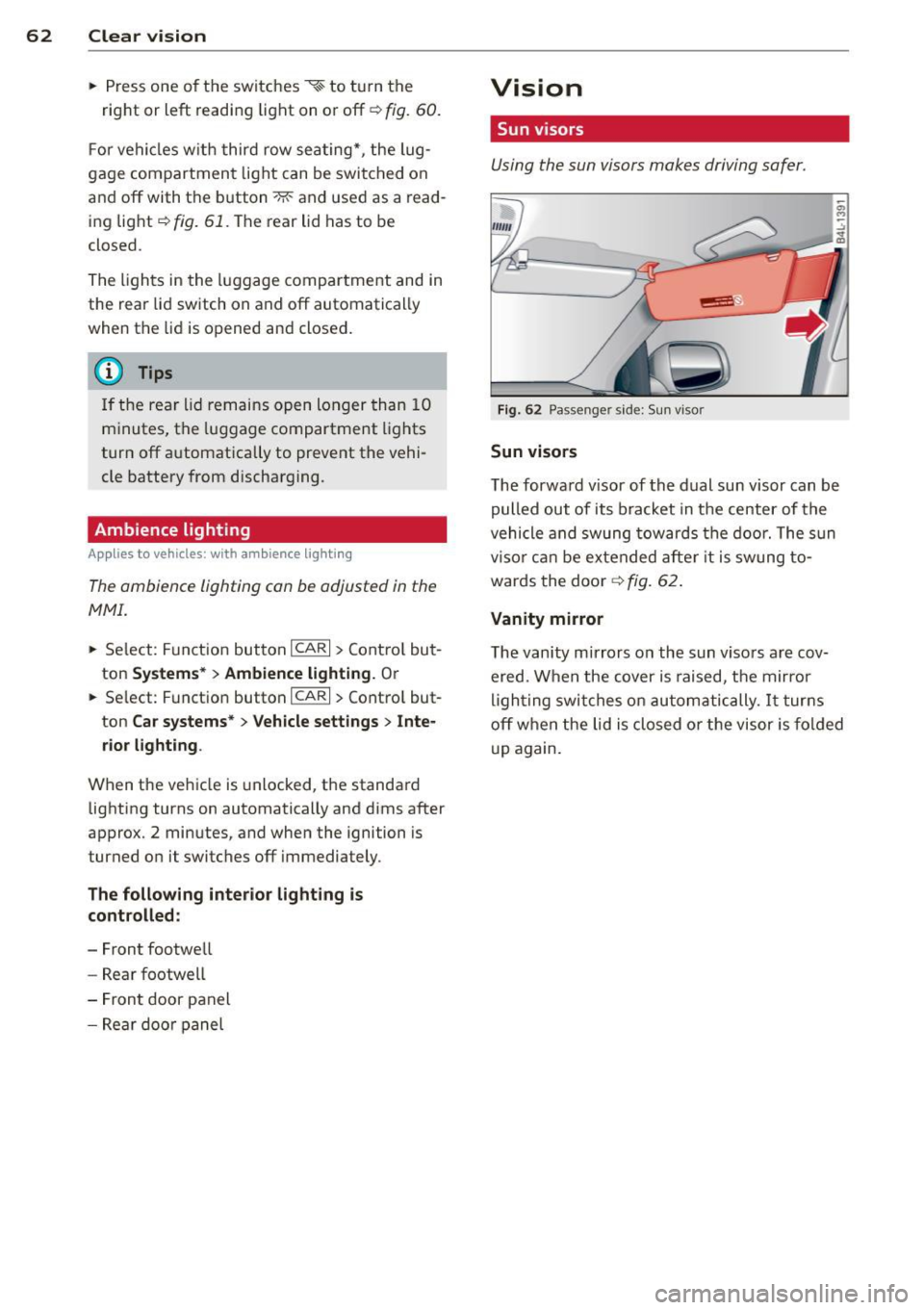
Fig. 62 Passe nger side: Su n visor
Sun visors
The forwa rd v isor of the dual sun visor can be
pulled out of its bracket in the center of the
vehicle and swung tow ards the doo r. The s un
vi so r ca n be e xtended afte r it is swung to
wards the doo r
~fig. 62.
Vanity mirror
The van ity mirrors on the sun viso rs are cov
ered. When the cover is raised, the mirror
l igh ting swit ches on au tom atic ally.
It tur ns
off when the lid is closed or the visor is fo ld ed
u p again.
Page 93 of 342
Warm and cold Climate control
Description
The air conditioner is fully automatic and is
designed to maintain a comfortable and uni
form climate inside the vehicle .
We recommend the following settings:
~ Set the temperature to 72 °F (+22 °C).
~ Press the !AUTO I button.
With this setting, you attain maximum com
fort in the least amount of time. Change this
setting, as desired, to meet your personal
needs.
The climate controls are a combination of
heating, ventilation and cooling systems,
which automatica lly reduce humidity and cool
the air inside your vehicle.
The air temperature, air flow and air distribu
tion are automatica lly regu lated to achieve
and maintain the desired passenger compart
ment temperature as quickly as possible.
The system automatically compensates for
changes in outside temperature and for the
intensity of the sunlight entering the ve hicle.
We recommend you use the
Automatic mode
¢ page 94 for year-round comfort.
Please note the following:
Turn on the air conditioner to reduce humidity
in the vehicle. This also prevents the windows
from fogging up .
When the outside temperature is high and the
air is very hum id,
condensation from the
evaporator may drip under the vehicle. This is
normal and does not indicate a leak.
If the outside temperature is low, the fan nor
mally only switches to a h igher speed once
the engine coolant has warmed up sufficient
l y.
The a ir conditioner temporarily switches off
when you drive off from a standstill using full
throttle to save engine power.
Warm and cold 91
The compressor also switches off if the cool
ant temperature is too high , so that the en
gine can be adequately cooled under extreme
loads .
Air pollutants filter
The air pollutants filter (a combined particle
filter and activated charcoa l filter) reduces or
prevents outside air pollution (dust, or pollen)
from entering the vehicle. The air is a lso fil
tered in a ir recirculation mode.
The air pollutants filter must be changed at
the interva ls specified in your Warranty
&
Maintenance booklet, so that the a ir cond i
tioner can properly work.
If you drive your vehicle in an area with high
air pollution, the filter may need to be
changed more frequently than specified in
your Audi Warranty
& Maintenance booklet. If
in doubt, ask your authorized Audi Serv ice Ad
visor for advice .
Key coded settings
The air conditioner settings selected are auto
matically stored and assigned to the key be ing
used. When the vehicle is started, the air con
ditioner automa tically selects the settings as
s igned to that key . This way every driver w ill
mainta in his/her own personal settings and
does not have to reset them manually.
If a different dr iver uses your key and changes
the air cond itioner settings, the latest adjust
ments will erase and replace the sett ings you
have stored.
Energy management
To prevent the battery from being discharged
and to restore the balance of energy, compo
nents which require large amounts of energy
are temporarily cut back or switched off
¢ page 225. Heat ing systems in particular re
quire a great deal of ene rgy. If you notice , fo r
example, that the seat* or rear window hea t
ing is not heating, they have been temporarily
cut back or switched off by
energy manage
ment .
These systems are availab le aga in as
soon as the energy balance has been restored . .,.
Page 137 of 342

Lane width
Applies to vehicles: with side assist
-· Fig. 155 Lan es o f a norma l wid th a re in detect ion area
Fig . 156 Narrow lanes: Side ass ist may detect vehicles
two la nes away
Side assist's detection area is designed to cov
e r l anes of standard w idth to the left and
r ight of your travel lane, depending on wheth
er you dr ive in the center of your lane or closer
to the edge.
I f you drive in narrow lanes, s ide ass ist's de
tec tion a rea may a lso incl ude other lanes -es
pec ia lly if you tend to drive on the edge of
your lane
c:::> fig. 156 . Under these cond it ions,
ve hicles can also be detected that are two
lanes away, and side assist then could switch
between the informat ional and warn ing stage
signals.
When driving in very wide lanes, vehicles in
the adjacent lane may not be detected be
cause they are not inside the detection area.
Notes
Messages in instrument cluster display
Applies to vehicles: with side assist
If s ide ass ist t urns off automa tically, the ind i
cator l igh t on the button wi ll go ou t and you
Aud i side assist 135
will see a message in the instrument cluster
display:
Audi side assist not available: sensors
bloc ked
The side assist sensors are built into the rear
bumper on the left and r ight (not visible on
the outside)
c:::> page 129, fig . 147. To ensure
that you do not adversely affect the way side
ass ist functions, foreign objects (such as stick
ers or bicycle racks) should not be attached to
the area on the rear bumper where the sen
sors a re located . If side ass ist functions are
adverse ly affec ted, you w ill see th is message
in the instrument cluster disp lay . Remove any
th ing t hat may be blocking the sensors.
If no vehicle is detected for a longer per iod of
t ime wh ile dr iv ing, s ide ass ist w ill also switch
off automatically.
Audi s ide as sist cu rrentl y not available
If there is a temporary problem (such as the
vehicle 's battery charge be ing low), side assist
cannot be act ivated temporar ily .
Audi side assis t: sy stem fault
Have the system checked by an author ized Au
di dealer or qualified workshop.
Audi side assist not availabl e when
towing
The radar sensor's view is limited when tow
ing a tra iler. For vehicles with a factory instal
led towing hitch or a trailer hitch that was in
stalled later according to facto ry specifica
tions, s ide ass ist is automatically deact ivated
as soon as the ele ctrical connection to the
trailer's e lectrical socke t is made, and this sta
tus message appears in the instrument clus
ter display. Deactivation cannot be guaran
teed when using a retrofitted towing hitch
that was
not installed according to factory
specifications.
Page 144 of 342
142 Automatic transmission
(D Note
If the transmission switches to emergency
mode, you should take the vehicle to an
authorized Audi dealership as soon as pos
sible to have the condition corrected.
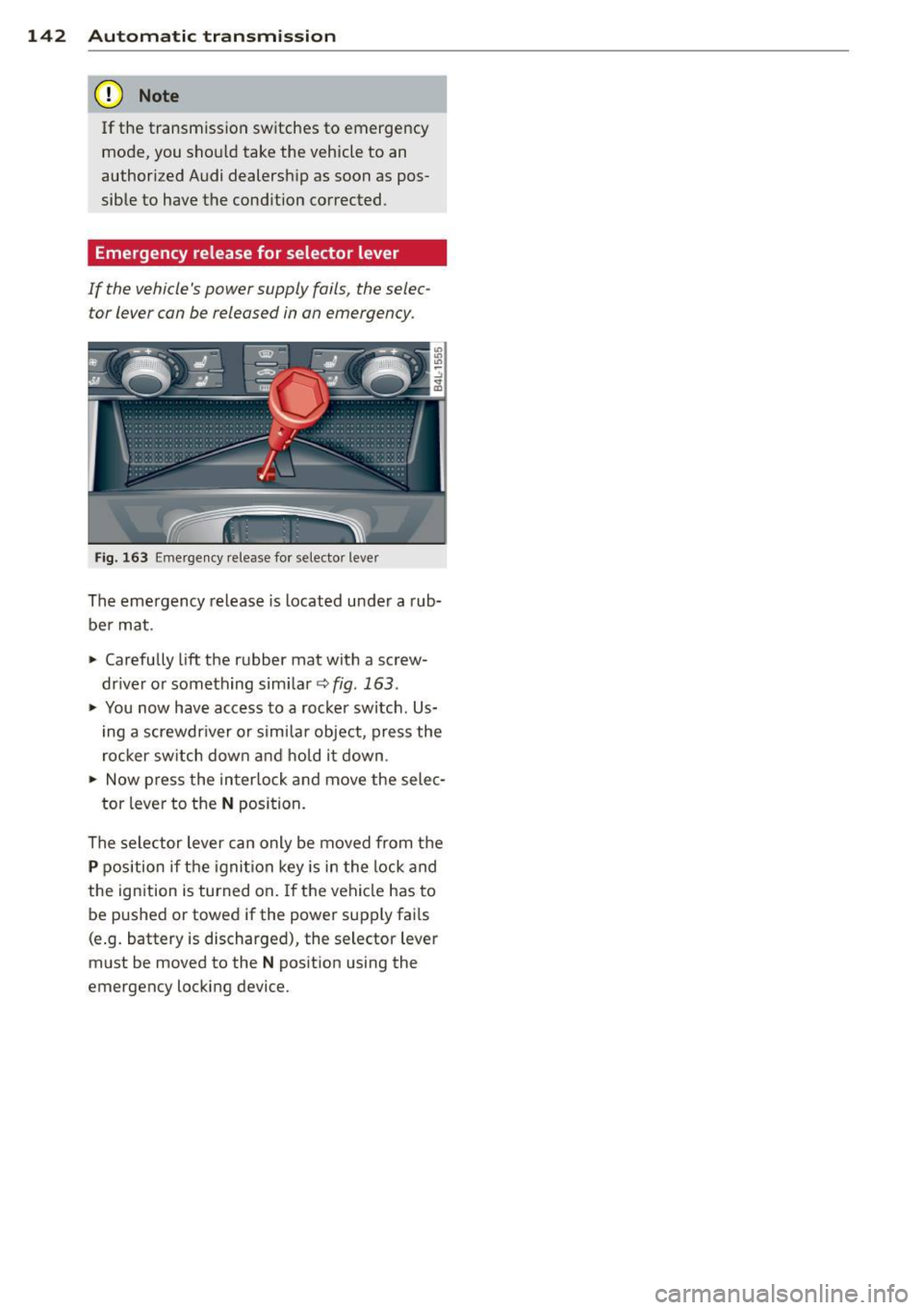
Emergency release for selector lever
If the vehicle's power supply fails, the selec tor lever can be released in an emergency .
Fig. 163 Emergency release fo r selecto r lever
The emergency release is located under a rub
be r mat .
.,. Carefully
lift the rubber mat with a screw
driver or something similar~
fig. 163 .
.,. You now have access to a rocker switch . Us
ing a screwdr iver or similar object, press the
rocker switch down and hold it down .
.,. Now press the interlock and move the selec-
tor lever to the
N position.
The selector lever can only be moved from the
P position if the ignition key is in the lock and
the ignition is turned on . If the vehicle has to
be pushed or towed if the power supply fai ls
(e .g. battery is discharged), the selector lever
must be moved to the
N position using the
emergency locking device.
Page 228 of 342
226 Intelligent technology
can result in there being insufficient energy
avai lab le to start the engine .
I ntell igent energy management in your vehi
cle handles the distribution of electrical ener
gy . Starting abi lity is markedly improved and
the life of the battery is extended .
Basically , energy management consists of
battery diagnosis , idling current manage
ment
and dynamic energy management.
Battery diagnosis
Battery diagnosis continuously determines
the state of the battery. Sensors determine
battery volta ge, battery current and battery
temperature. This determines the current
state of charge and the power of the battery.
Idling current management
Idling current management reduces energy
consumption while the vehicle is stand ing.
With the ignition switched off, it contro ls the
energy supply to the various e lectrica l compo
nents. Data from battery diagnosis is consid
ered.
Depending on the battery's state of charge,
individua l consumers are gradually turned off
to prevent excessive discharge of the battery
and thus maintain starting capability.
Dynamic energy management
While the vehicle is being dr iven , dynamic en
e rg y management distributes the energy gen
erated according to the needs of the individu
a l components. It regulates consumption, so
that more ele ctrical energy is not being used
than is being generated and ensures an opti mal state of cha rge for the battery.
{D) Tips
- But even energy management cannot
negate the limits of physics. Consider
that the power and life of a battery are
limited .
- If starting ab ility is threatened, you are
i nformed by a warn ing
c> page 22 7,
Driver notification in the instrument
cluster display .
What you should know
The highest priority is given to maintaining
starting capability .
The battery is seve rely taxed in shor t-distance
driving, in city tra ffic and dur ing the cold time
of year . Abundant electrical energy is re
quired, but only a little is generated . It is also
critical if the engine is not running and e lectri
ca l components are turned on . In this in
stance energy is being consumed but none is
being generated.
It i s in precisely these situations that you will
notice energy management actively regulat
ing the distribution of energy.
Vehicle stands for an extended period
If you do not drive your vehicle over a period
of several days or weeks , e lectr ica l compo
nents are gradually cut back or sw itched off.
T his reduces energy consumption and main
ta ins start ing capability over a longer period .
Take into consideration that when you unlock
your vehicle , some conven ience functions ,
s uc h as the inte rior lights or the power seat
adjustment, may not be available. The con
venience functions will be available again
when you turn on the ignition and start the e ngine .
With the engine turned off
If you listen to the radio, for example, w ith
the engine turned off or use other MMI func
tions, the battery is being discharged .
If starting capability is jeopardized due to en
ergy consumption , the following warning ap
pears in the MMI display:
Please start engine, otherwise system will
switch off in 3 minutes .
The warning indicates that the system will be
turned off automatically after 3 minutes . If
you w ish to continue using the funct ions, you
have to sta rt the eng ine.
1111>
Page 229 of 342
With the engine running
Although electrical energy is generated when
the vehicle is being driven, the battery can be
come discharged. This happens most ly when
litt le energy is being generated and a great
deal consumed and the battery's state of
charge is not optimal.
To bring the energy balance back into equili
brium, consumers which require especia lly
large amounts of energy are temporarily cut
back or switched off. Heating systems in par
ticular requ ire a great deal of energy. If you
notice, for example, that the heated seats* or
the heated rear window are not heating, they h ave been temporar ily cut back or switched
off. These systems will be available again as
soon as the energy ba lance has been restored.
You will also notice that engine idle speed has
been increased slightly. This is normal and not
a cause for concern . By increasing engine idle
speed the additional energy required is gener
ated and the battery is charged .
Driver notification in the instrument
cluster display
If battery power drops into the range where it
can limit the ab ility of the engine to start, th is
is shown in the instrument cluster display
with the following driver message:
(•i Low battery charge: battery will be
charged while driving
This notification reminds you that the starting
capability of the engine may be limited. As
soon as you start driving again, the battery
will be recharged and the notification will go
out.
Driver notification appears and goes out
again
If th is driver notification appears after the ig
nition is turned on or while driving and it goes
out again after a wh ile, the battery has been
adequately recharged.
Intelligent technology 22 7
Driver notification appears and does not
go out again
If this driver notification appears after the ig
nition is turned on or whi le driving and does
not go out again, the battery's state of charge
is not in the optimal range. Starting ab ility is
restricted . Have the battery checked as soon
as possible by an authorized Aud i dealer or
qualified workshop.
•
•
Page 261 of 342
-Apply the parking brake.
- Move selector lever to "P" (Park).
- Always let the engine cool down. Hot
components will burn skin on contact.
- To reduce the risk of being burned, never
open the hood if you see or hear steam
or coolant escaping from the engine
compartment. Wa it until no steam or
coolant can be seen or heard before care
fully opening the hood.
- Keep children away from the engine com
partment .
- Never spill fluids on hot engine compo
nents. They can cause a fire.
- Never touch the radiator fan. The auxili
ary electric fan is temperature controlled
and can switch on suddenly.
- Never open the coolant reservoir cap
when the engine is still warm. The cool
ant system is pressurized and hot cool
ant could spray out .
- Protect your face, hands and arm from
steam or hot engine coolant by placing a
thick rag over the cap when you open the
coolant reservoir .
- If work on the fuel system or the electri
cal system is necessary:
- Always disconnect the battery.
- Never smoke or work near heaters or
open flames. Fluids in the engine com
partment could start a fire.
- Keep an approved fire extinguisher im
mediately available.
- To avoid electrical shock and personal in
jury while the engine is running or being
started, never touch:
- Ignition cables
- Other components of the high voltage
electronic ignition system.
-If you must perform a check or repair
with the engine running:
- First, fully apply the parking brake,
move selector lever to "P" (Park).
Checking and filling 259
-Always use extreme caution to prevent
clothing, jewelry, or long hair from get
ting caught in the radiator fan, V-belts
or other moving parts, or from contact ing hot parts . Tie back hair before
starting, and do not wear clothing that
will hang or droop into the engine.
- Minimize exposure to emission and
chemical hazards
9 .&, .
&_ WARNING
California Proposition 65 Warning:
- Engine exhaust, some of its constituents,
and certain vehicle components contain
or emit chemicals known to the State of
California to cause cancer and birth de
fects and reproductive harm. In addition,
certain fluids contained in vehicles and
certain products of component wear con
tain or emit chemicals known to the
State of California to cause cancer and birth defects or other reproductive harm.
- Battery posts, terminals and related ac
cessories contain lead and lead com
pounds, chemicals known to the State of
California to cause cancer and reproduc
tive harms. Wash hands after handling .
(D Note
When adding fluids, always make sure that
they are poured into the proper container
or filler opening, otherwise serious dam
age to vehicle systems will occur.
@ For the sake of the environment
To detect leaks in time, inspect the vehicle
floor pan from underneath regularly. If
you see spots from oil or other vehicle flu
ids, have your vehicle inspected by an au
thorized Audi dealer. •
•