brake light AUDI Q7 2012 Owner´s Manual
[x] Cancel search | Manufacturer: AUDI, Model Year: 2012, Model line: Q7, Model: AUDI Q7 2012Pages: 342, PDF Size: 86.42 MB
Page 36 of 342

34 Driver information display
Do not drive vehicle: steering defective
• Contact you r nearest authorized Audi dea le r
or qualified workshop.
• Do
not tow yo ur vehicle .
& WARNING
-
Your vehicle must not be towed in the
event of a malfunction in the electronic
steering column lock because it cannot be
steered due to the locked steering. If it is
towed w ith the steering locked, there is
the risk of an accident .
~ Ignition lock malfunction
A malfunction in the ignition lock must be re
paired immediately.
If the . symbo l in the display blinks, there is
a ma lfunction in the electronic ignition lock.
An addit ional driver message ca n also be d is
played by pressing the
! CHECK I button:
Ignition lock defective. Contact workshop !
• Do not turn the eng ine off.
• Drive immediately to an authorized Audi
dealer to have the ma lf u nction corrected.
If there is a ma lfunction in the e lectronic igni
tion lock, the ignition cannot be turned off.
Drive immediately to an authorized Audi dea l
er to have the cause of the ma lfunction cor
rected.
On vehicles with Convenience key*, the engine
should not be switched off using the
! STOP !
button beca use the engine ca nnot be sta rted
again after the ignition is switched off.
' Yellow symbols
A yellow symbol means WARNING.
Fig . 26 Display: low fuel level warning (priority 2)
Yellow symbo ls indicate a priority 2 malfunc
t ion - Warning!
When a yellow war ning symbol appears,
one
warning tone sounds . A driver message ap
pears as well to explain the malfunction in
more de tail. The driver warning goes out after
about 5 seconds, but it can be brought up
again at any time by pressing the
! CHECK I but
ton .
Check the displayed function as soon as possi
ble. If
more than one priority 2 ma lf u nction is
detected, all symbols will appear one after
the other for about 2 seconds .
Yellow symbols mean:
"
Convenience key"
Key not in vehicle
c> page 108
•
USA models: Defective
brake light
c>pa ge 23
[fl
Canada models: Defective
brake light
c> page 23
~:)
Defective light bulb
c>page 23
raa
light/rain sensor defective
c> page35
~
Windshield washer fluid Lev-
el low
c>page3 5 1 ...
Page 37 of 342
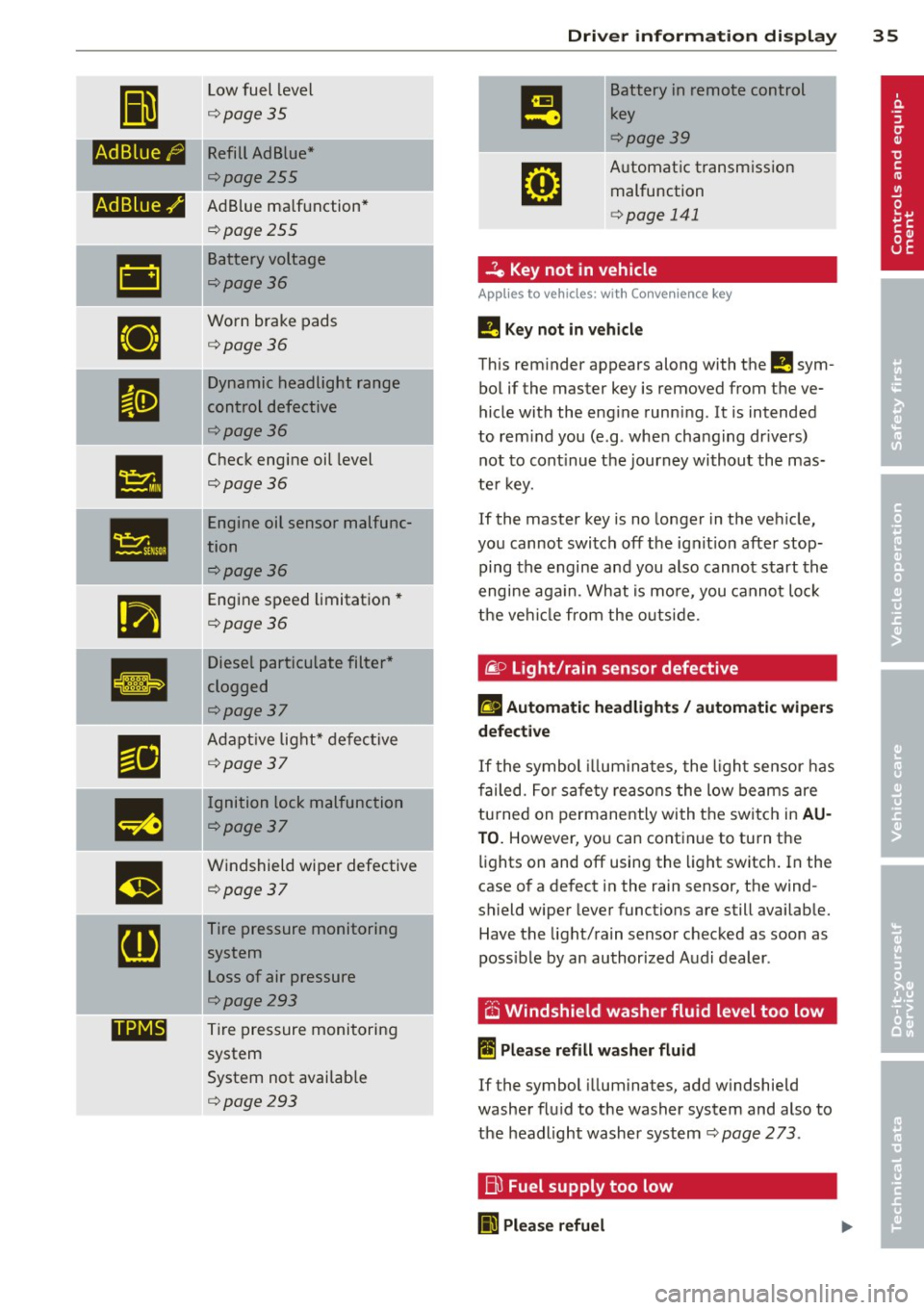
II
Low fuel level
¢page 35
fi.fl1::jfl1-j Kefill Ad Blue*
¢page255
-Ad Blue,/'
•
•
•
••NI@
AdBlue ma lfunction*
¢poge255
Battery voltage
¢poge36
Worn brake pads
¢poge36
Dy namic headlight range
control defective
¢poge36
Check eng ine oil level
¢poge36
Engine oil sensor malfunc
tion
¢poge36
Engine speed limitat ion*
¢poge36
Diesel particulate filter *
clogged
¢poge37
A dapt ive lig ht* defec tive
¢poge37
-Ignition lock malfunction
¢poge37
W indshield wiper defective
¢poge37
Tire pressure monitoring
sys tem
Loss of air pressure
¢poge293
T ire pressure monitoring
system
System not availab le
¢poge293
Dri ver information di spla y 35
Battery in remote control
key
¢poge39
A utomat ic transm iss ion
malfunction
¢ page 141
...?c, Key not in vehicle
Applies to vehicles: with Convenience key
!!I Key not in vehicle
This reminder appears along with the !!I sym
bol if the master key is removed from the
ve
hicle with the engine runn ing. It is intended
to rem ind you (e .g. whe n cha ng ing dr ive rs)
not to cont inue the journey without the mas
te r k ey.
If the master key is no longer in the ve hicle ,
you cannot swi tch off t he ig nit io n after stop
ping the engine an d you also cannot start the
engine aga in. What is mo re, you cannot lo ck
t he ve hicl e from the o utsi de.
@. D Light/rain sensor defective
fll Automatic headlights/ automatic wipers
defective
If t he symbol illumina tes, the l ight se nsor has
f ailed. For safe ty rea sons the low beams are
tu rned on permanently with t he switc h in
AU
TO. However , yo u can cont inue to tu rn the
li g hts on and off using the light switch . In the
case of a defect in the rain sensor, t he wind
shield wiper lever functions are still availab le.
Have the light/rain senso r ch ecked as soon as
poss ible by an author ized Audi dealer .
6 Windshield washer fluid level too low
~ Please refill washer fluid
If the symbol illuminates, add w indshie ld
washe r fl ui d to the washer system and also to
t h e headlight washer system
¢ page 2 73 .
Bl Fuel supply too low
II Please refuel
Page 38 of 342

36 Driver in formation d isplay
When this symbo l (I illuminates for the f irst
time, the fuel reserve in your vehicle is sti ll
between 2 .6 and 3 .2 gallons (10- 12 liters) .
Refue l as soon as possib le
¢ page 252.
If the symbol lights up, even when there is
ample fuel in the tank, and the text
T a nk sys
tem malfunct ion! Cont act wor kshop
appears
in the display, there is a fault in the system.
Contact a qualified workshop to have the fau lt
rectified.
t::l Battery voltage
If the battery's state of charge is not in the
optimal range, the
f• ) symbol is shown in the
d isplay and the dr iver message
Low battery
c harge : battery will be charg ed while driving
appears.
Wh ile this dr iver not ificat io n is displayed, you
have to be p repared for lim ited start ing capa
b ili ty.
Driv er m essage appears and goes out
again
I f t his driver message appears after the igni
tion is turned o n or wh ile driving and it goes
out again after a while, the battery has been
adequately recharged .
Driver message app ears and does not go
out again
If th is driver notification appears after the ig
nition is turned on or while driving and does
not go out again, the battery's state of charge
is not in the opt imal range. Starting capability
is restricted. Have the battery checked by an
author ized Audi dealer as soon as poss ible .
{0 : Worn brake pads
El Brake pads !
If the warn ing light illum inates, immediately
contact your authorized Audi dealer or quali
fied workshop to have all brake pads inspect
ed . On USA models the wa rning light
El
l ) - : USA mod els only
comes on together with the warning light
- · Both sets of bra ke pads on an ax le
must a lways be rep laced at the same time.
A WARNING
=
Driving w it h bad brakes can cause a colli-
sion and ser ious personal in jury.
- If the warn ing light
El and the warning
light
11111> with the message Brake
pads!
comes o n in the inst rument cluster
d isp lay, immediately contact your au
thor ized Audi dealer or qualified wo rk
shop to have all b rake pads checked or
re placed if ne cessa ry.
~(i) Headlight range control
II He adlight range control defective !
-
If the symbol illuminates, the dynamic head
li ght rang e control is no longer work ing prop
erly. Have the system checked and repa ired at
yo ur aut horized Aud i dea le r.
~ -Engine oil level
l!I Plea se check oil level
When the symbol illuminates, check the en
gine o il leve l as soon as possible
¢ page 263.
T op off t he oil at your ear liest opportu nity
¢ page 264 .
't::r.~ Engine oil sensor defective
II Oil level ! Sensor defective
If the symbol illum ina tes, contact yo ur au
thorized Aud i dea le r and have the oil sensor
inspected. Unti l yo u have this done, check t he
oi l level each time you refue l just to be on the
safe s ide
¢ page 263.
!?) Engine speed limitation
Applies to vehicles: wit h engine speed limitatio n
II! Do not e xceed ma x. engine speed of X XXX
rpm .,,.
Page 73 of 342
Seats and storage
General recommen
dations
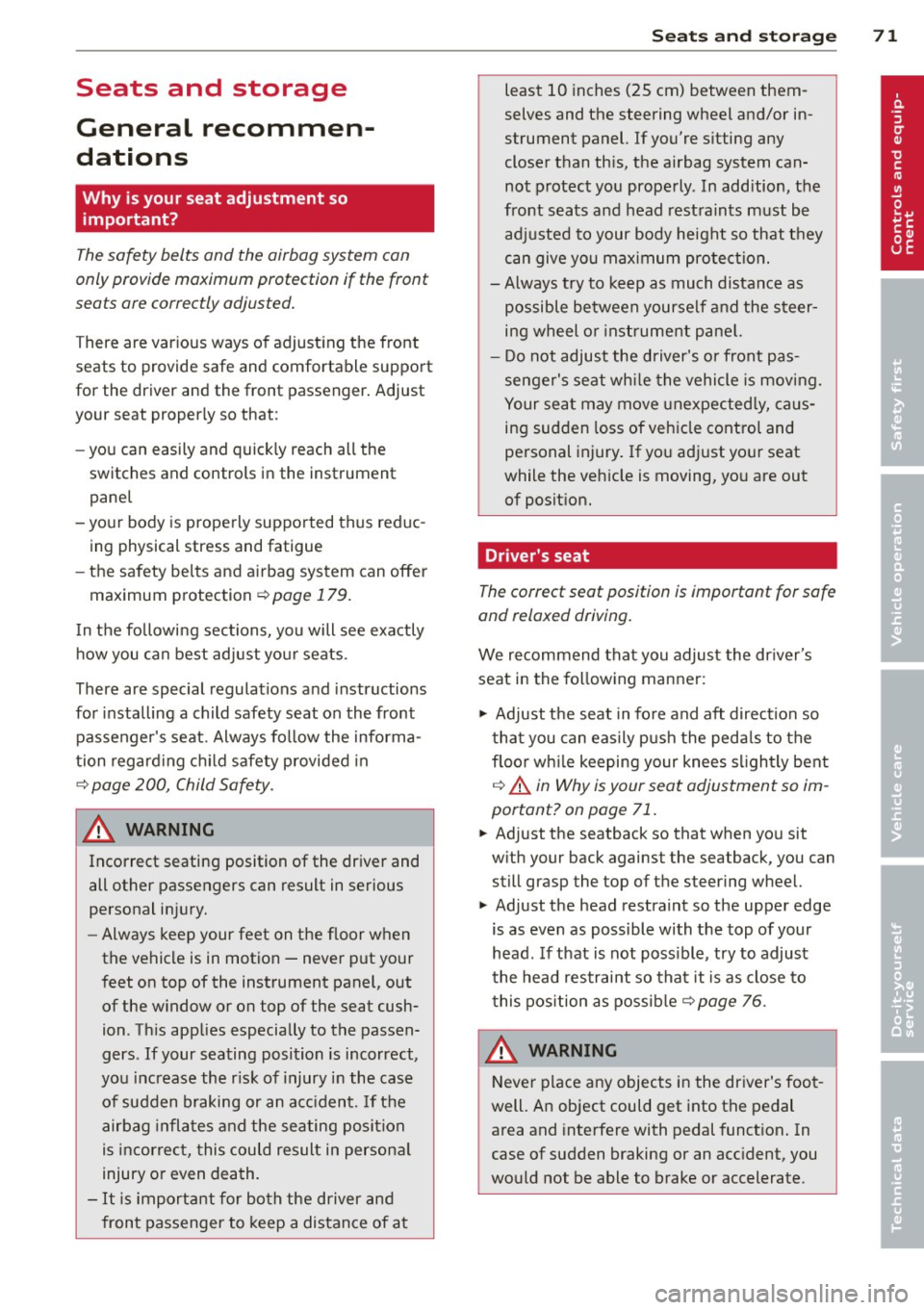
Why is your seat adjustment so important?
The safety belts and the airbag system can
only provide maximum protection if the front
seats are correctly adjusted.
There are various ways of adjusting the front
seats to provide safe and comfortable support
for the driver and the front passenger. Adjust
your seat properly so that :
- you can easily and quick ly reach all the
switches and controls in the instrument
panel
- your body is properly supported thus reduc ing physical stress and fatigue
- the safety belts and airbag system can offe r
maximum protection
¢ page 179.
In the following sections, you will see exactly
how you can best adjust your seats .
There are special regulations and instructions
for installing a child safety seat on the front passenger's seat. Always follow the informa
tion regard ing child safety provided in
¢ page 200, Child Safety.
A WARNING
Incorrect seating position of the driver and
all other passengers can result in serious
personal injury.
- Always keep your feet on the f loor when
the vehicle is in motion -never p ut your
feet on top of the instrument panel, out
of the w indow or on top of the seat cush
ion. Th is applies especially to the passen
gers . If your seating position is incorrect,
you increase the r isk of injury in the case
of sudden braking or an acc ident. If the
airbag inflates and the seating position
is incorrect, this could result in persona l
injury or even death.
- It is important for bo th the driver and
front passenger to keep a distance of a t
Seat s an d sto rage 71
least 10 inches (25 cm) between them
selves and the steering wheel and/or in
strument panel. If you're s itting any
closer than th is, the airbag system can
not protect you properly. In addition, the
front seats and head restraints must be
adjusted to your body height so that t hey
can give you maximum protect ion.
- Always try to keep as much distance as
possible between yourself and the s teer
ing wheel o r instrument pane l.
- Do not adjust the driver's or front pas
senger's seat whi le the vehicle is moving.
Your sea t may move unexpected ly, caus
ing sudden loss of vehicle cont rol and
personal injury . If you adjust yo ur seat
while the veh icle is moving, yo u are out
of posit ion.
Driver's seat
The correct seat position is important for safe
and relaxed driving.
We recommend that you adjus t the dr iver's
seat in the fo llowing manner:
.,. Adjust t he seat in fore and aft direction so
that you can easily push the peda ls to the
floor wh ile keeping your knees s lightly bent
i:::> A in Why is your seat adjustment so im
portant? on page 71.
.,. Adjust the seatback so that when you sit
w ith your back against the seatback, you can
still grasp the top of the steering wheel.
.,. Adjust the head restraint so the upper edge
is as even as possible with the top of your head . If that is not poss ible , try to adjust
the head res traint so that it is as close to
this pos ition as possib le
i:::> page 76.
A WARNING
Never place any objects in the dr iver's foot
well. An object could get into the pedal
area and interfere with pedal funct ion . In
case of sudden braking or an acc ident, you
wo uld not be able to brake or accelerate.
Page 89 of 342
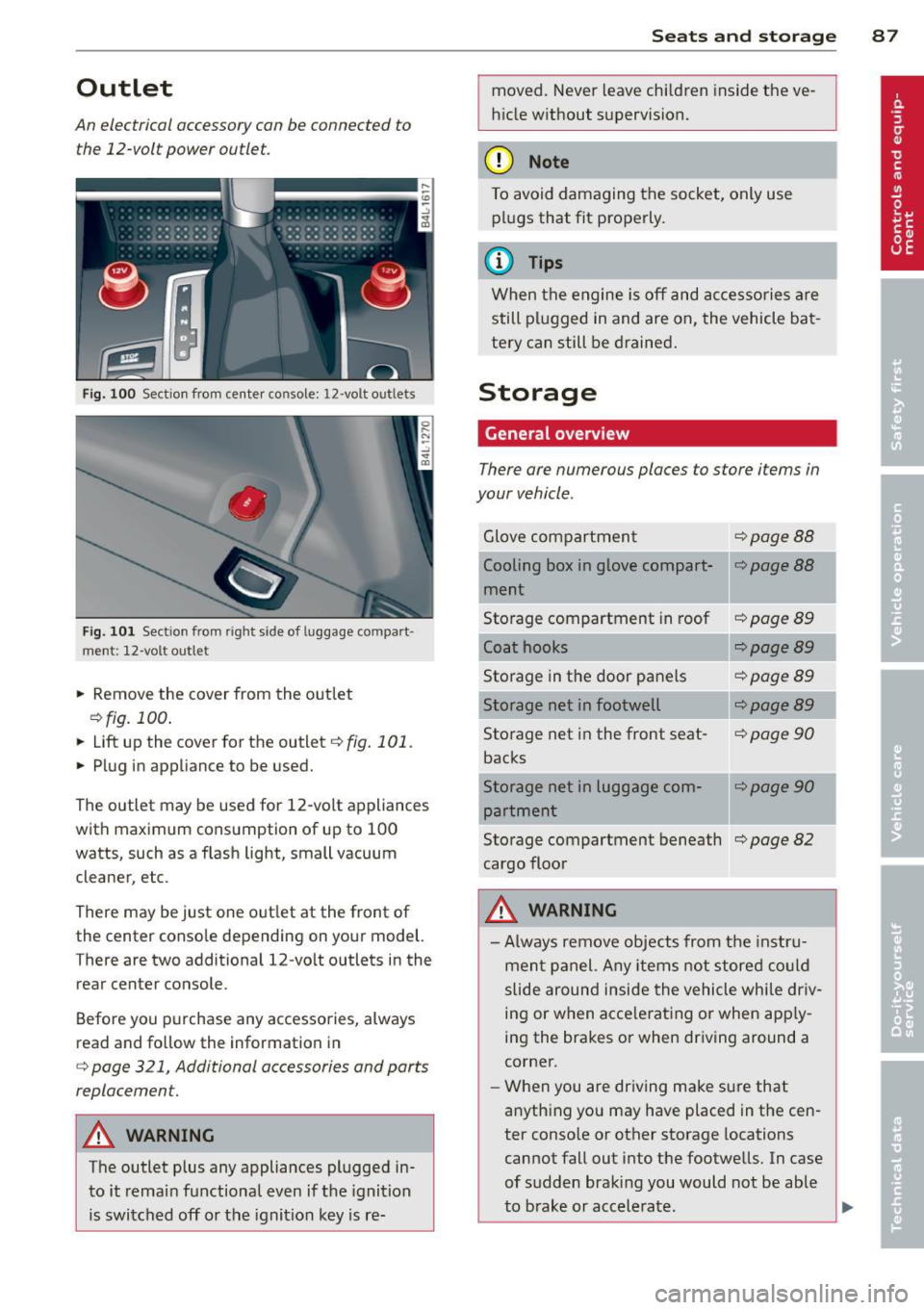
Outlet
An electrical accessory can be connected to
the 12-volt power outlet.
Fig. 100 Section from center console: 12 -volt outlets
Fig. 101 Sect ion from right side of luggage compart·
ment: 12-volt ou tlet
.. Remove the cover from the outlet
c::>fig. 100.
.. Lift up the cover for the outlet c::> fig. 101.
.. Plug in appliance to be used.
The outlet may be used for 12-vo lt appliances
with maximum consumption of up to 100
watts, such as a flash light, small vacuum
cleaner, etc.
There may be just one out let at the front of
the center conso le depending on your model.
There are two additional 12-volt outlets in the
rear center console.
Before you purchase any accessories, always
read and follow the information in
c:;, page 321, Additional accessories and parts
replacement.
A WARN ING
The outlet plus any appliances plugged in
to it remain functional even if the ignition
is switched off or the ignition key is re-
Sea ts a nd s to rage 87
moved. Never leave chi ldren inside the ve
hicle without supervision.
(D Note
To avoid damaging the socket, only use plugs that fit properly.
@ Tips
When the engine is off and accessories are
still plugged in and are on, the vehicle bat
tery can still be drained.
Storage
General overview
There are numerous places to store items in
your vehicle .
Glove compartment c::>page88
Cooling box in glove compart-c:;.page 88
ment
Storage compartment in roof
c::>page89
Coat hooks <=:>page 89
Storage in the door panels c::>page 89
Storage net in footwell <=:>page 89
Storage net in the front seat-c::> page 90
backs
Storage net in luggage com-
c::>poge90
partment
Storage compartment beneath
c::> page 82
cargo floor
A WARNING
- Always remove objects from the instru-
ment panel. Any items not stored co uld
slide around inside the vehicle while dr iv-
ing or when acce lerating or when app ly-
ing the brakes or when dr iving around a
corner.
- When you are driving make sure that
anything you may have placed in the cen
ter conso le or other storage locations
cannot fall out into the footwells. In case
of sudden braking you would not be able
I
-
to brake or accelerate. Ill>-
Page 108 of 342

106 On the road
Starting and stopping
the engine
Starting the engine
The engine can only be started with your orig
inal Audi key.
Fig. 120 I gni tion key positio ns
Vehicles with gasoline engine:
.. Step on the brake .
.. Move the selector lever into P or N
¢ A.
.. Tu rn the ignition key to position @
9 fig. 120 -do not depress the gas pedal
when starting the engine.
Vehicles with diesel engine:
.. Step on the brake.
.. Move the selector lever into P or N
¢ &.
.. Turn the ignition key to position ©- the
glow plug indicator light
m illuminates
when the glow plug system is act ive .
.,. When the indicator light
&J switches off,
turn the ignition key to pos it ion @ but do
not press the accelerator pedal.
.. Re lease the ignition key once the engine
sta rts. The starter must not continue run
ning.
A cold engine may sound loud after it has
been started . This is due to the hydraulic
va lves building up oil pressure. This is normal
and is not a need for concern.
If the engine does not start immediately, stop
trying after 10 seconds and then try to restart
the engine about 30 seconds Later.
Glow plug system*
Diesel engines are equipped with a glow plug
system whose preheating t ime is controlled by the coo
lant and outs ide temperature . Start
the engine
immediately after the glow plug
indicator light
m switches off .
The glow plug indicator light will only illumi
nate for approximate ly 1 second when the en
gine is warm or the outside temperature is
higher than 46 °F (8 °C). That means you can
start the engine
immediately .
A WARNING
-Never start or let the engine run in a con-
fined or enclosed area. Exhaust fumes
from the engine contain carbon monoxide,
a colorless and odorless gas . Carbon mon
oxide can be fatal if in haled.
- Never leave the engine idling unattend
ed. An unattended veh icle w ith a runn ing
engine poses a danger of personal injury
or theft .
(D Note
- Avo id high engine speeds, fast accelera
tion or heavy engine loads while the en gine is still cold. This could damage the
eng ine .
- Th e engine cannot be started by pushing
or towing the vehicle .
@ For the sake of the environment
To avoid unnecessary engine wear and to
reduce exhaust emissions, do not let your
vehicle stand and warm up. Be ready to
drive off immediately after starting your
vehicle. Maintain moderate speed until the
engine is completely warm . Remember,
the engine performs best at operating
temperature.
· Stopping the engine
.,. Turn the ignition key to position @
¢page 106, fig . 120 .
A WARNING
-
-Never turn off the engine until the vehi-
cle has come to a complete stop.
Page 109 of 342

-The brake booster and servotronic only
work when the engine is running. With
the ignition turned off, you have to apply
more force when steering or braking .
S ince you cannot steer and stop normal
ly, this can lead to accidents and ser ious
injuries.
- The rad iator fan can continue to run for
up to 10 min utes even after you have
turned off the engine and removed the ign ition key. The radiator fan can also
turn on again if the engine coolant heats
up because of intense sunlight or heat
build -up in the engine compartment.
«I) Note
Do not stop the engine immed iate ly after
hard or extended dr iving. Keep the engine
running for approximately two minutes to
prevent excessive heat build-up .
Starting and stopping
the engine with
Convenience key
Starting the engine with the~
button
App lies to vehicles: with Convenie nce key
This bu tton swi tches on the ign ition and
starts the engine .
Fig. 121 Co nvenie nce k ey: ENG INE START b utton
The I S TAR T! button is provided w ith two -sta ge
o p era tion
¢ fig. 121.
Switching the ignition on
.. Press the !START I button once to the fir st
stage to switch on only the ign ition .
On th e road 107
Gasoline eng in e: St arting th e engine
.. Step on the brake.
.. Move the se lector lever to the P or N posi
tion ¢,&. .
.. Press the
r::1s=Tc:- A=RT =I button to th e seco nd
stage to start the engine .
Diesel en gine : Starting the engine
.. Step on the brake.
.. Mov e the selector lever to the P or N posi
tion ¢,&. .
.. Press the
r::1s=TAc:-=R T=I button down to the fi rst
level to begin the preheating process . The
glow plug indica tor light &; illuminates
when the glow plug sy stem is active .
.. When the indicator light
m;J switches off,
press the
I S TA RT ! button down to the se c
ond
level to start the eng ine .
After a cold engine is started, there may be a br ief period of increased no ise because oil
pressure must first build up in the hydraulic
valve adjuste rs. This is norma l and not a cause
for concern .
If the engine does not start immediately, stop
trying after 10 seconds and then try to restart
the engine abou t 30 seconds later .
Glow plug system *
Di ese l engine s
are equ ipped with a glow plug
system whose preheating time is controlled
by the coo lant and outs ide temperature . Start
the engine
immediately afte r the glow plug
indicator light
m switches off.
The glow plug indicator light will only illumi
nate fo r approximate ly 1 second when the en
gine is warm or the outs ide temperature is
higher than 46 °F (8 °C) . That means yo u can
star t the eng ine
immediately .
WARNING
Never allow the engine to run in confined
spaces -danger of asphyxiation .
(D Note
-Avo id h igh engine rpm, full thrott le and
heavy engine loads until the eng ine has
Page 112 of 342
110 On the road
The parking brake warning light. (USA)/ .
(CON) illuminates when the parking brake is
set and you switch on the ignition.
_& WARNING
-
Always release the parking brake com
pletely. A partially engaged brake will
overheat the rear brakes, reduce their ef
fectiveness and cause excessive wear. This could lead to brake failure and an accident .
(D Note
Only after the vehicle has come to com plete stop, should you firmly set the park
ing brake and move the selector lever into
"P".
Parking
To prevent a parked vehicle from rolling
away, there are a few things you should do .
When you park your vehicle, do the
following
• Stop the vehicle using the brake pedal.
• Apply the parking brake firmly .
• Move the selector lever into the
P position
~ &.
• Switch off the engine and remove the igni-
tion key from the ignition lock.
When you park your vehicle on hills, do
the following
• Stop the vehicle using the brake pedal.
• Apply the parking brake firmly.
• If you are parking headed downhill, turn
the front wheels
toward the curb.
• If you are parking headed uphill, turn the
front wheels
away from the curb.
• Move the selector lever into the
P position.
• Switch off the engine and remove the igni
tion key from the ignition lock.
_& WARNING
This is how you can reduce the risk of in
jury when leaving your vehicle. -
Never park the vehicle where it can come
in contact with dry grass, spilled fuel or
any other flammable materials.
- When parking on hills, always turn the
wheels so that the front wheels will first
roll into the curb, if the vehicle should
start to roll.
- Never allow anyone - especially small
children - to remain in the vehicle when
it is locked. locked doors make it more
difficult for rescuers to access the pas
senger compartment in the event of an
emergency. Danger to life!
- Never leave children unsupervised in the
vehicle. Children could release the park
ing brake or move the gearshift lever out
of gear. The vehicle could start to roll
away and cause an accident.
- No matter what the season is, the tem
perature in a parked vehicle can reach
dangerous levels.
@ Note
-Please exercise care when you park your
vehicle in parking areas with parking bar
riers or curbs. Parking barriers and curbs
vary in height and could damage your
bumper and related components as the
front of your vehicle moves over a barrier or curb that is too high, as you park or as
you back out of a parking spot. In order to be sure that no such damage can oc
cur, you may wish to stop short of having
the front tires of your car touch the park
ing barrier or curb.
- Please also exercise exceptional care
when you drive up or down steep ramps
or drive over curbs or other obstacles, for
which the vehicle is not designed, be
cause components of the vehicle close to
the ground, such as bumper covers, spoilers and suspension and exhaust sys
tem components, may become dam aged.
Starting on hills
Hill Hold makes it easier to start on hills.
Page 113 of 342

The system is activated when the brake pedal
is depressed
for a few seconds. For this, the
veh icle must be standing in uphill driving di
rection .
After releasing the brake pedal, the brake
power is held for a
brief moment to prevent
the vehicle from rolling back when starting. At
this time, you can easily begin to move your
vehicle.
A WARNING
- If you did not begin moving immediately
after releasing the brake pedal, under
certain circumstances, the vehicle would
begin to roll backward. Depress the
brake pedal immediately or engage the
parking brake.
- Should the engine stall, depress the
brake pedal immediately or engage the
parking brake.
- In order to prevent the vehicle from roll ing back unintentionally when starting in
stop-and -go traffic, keep the brake pedal
depressed for a few seconds before driv
ing
off.
- When you leave the vehicle -even if only
briefly -, switch
off the ignition and
make sure to remove the ignition key. Al
so engage the
parking brake to prevent
your vehicle from rolling unintentionally. This particularly applies if ch ildren are
left in the veh icle -danger of acc ident!
On the road 111
Cruise control
Switching the system on
The cruise control system makes it possible to
drive at a constant speed starting at 20 mph (30 km/h) .
®-
Fig. 124 Co ntro l l ever w ith set bu tton
Fig. 125 Disp lay : Se lected speed
.. Pull the lever to position @<=:> fig. 124 to
sw itch the system on .
.. Drive at the speed you wish to set.
.. Press button @to set that speed.
T he display
c::> fig . 125 will show the set speed.
The display may vary depending on the type of
display in your vehicle. The indicator light
tB;m~1~ (US model)/ . (Canadian model) will
also light up in the instrument cluster .
A WARNING
-Always pay attention to traffic even when
the cruise control is switched on . You are
always responsible for your speed and
the distance between your vehicle and
other veh icles.
- For safety reasons, the cruise control
should not be used in the city, in stop
and-go traffic, on twisting roads and
when road conditions are poor (such as
Page 114 of 342
112 On the road
ice, fog, grave l, heavy rai n and hydro
planing) -risk of accident.
- Turn off the cruise control temporari ly
when entering turn lanes, highway exit
lanes or in construction zones.
- Please note that inadvertent ly "resting"
yo ur foot on the accelerator peda l causes
the cruise control not to brake. Th is is
because the cruise control is overridden
by the driver's accelerat ion .
- Never use the cru ise control when dr iv ing
off-road or on unpaved roads . The Cruise
control is intended for use on ly when the
vehicle is be ing operated on paved roads,
and is not suitable fo r use off-road o r on
unpaved roads.
({) Tips
The cruise control cannot mainta in a con
stant speed when driving dow nhill. The ve
hicle will acce le rate under its own we ight.
Downshift to a lower gea r or use the
brakes to slow down.
Changing speed
.,. Press lever in the 0 or 0 direction
Q page 111, fig. 124 to increase or decrease
yo ur speed.
.,. Re lease the lever to save that speed.
Change speed in increments of 1 mph (1 km/
h) by light ly pressing the lever. If you keep the
lever pressed down, you will alter your speed
i n 5 mph (10 km/h) increments.
You can a lso press the accelerato r peda l down
to increase your speed, e.g. if yo u want to
pass someone. The speed you saved earlier
will resume as soon as you release the acceler
ator pedal.
If, however, you exceed your saved speed by 5 mph (10 km/h) for longer than 5 minutes,
the cruise contro l will turn off temporarily .
The symbol will go out but the saved speed
will be retained.
Presetting your speed
You can preset your desired speed while the
vehicle is not moving.
.,. Turn on the ign ition .
.,. Pull lever into position
(D Q page 111,
fig . 124.
.,. Press the leve r in the
0 or 0 direction to
increase or decrease your speed.
.,. Release the leve r to save tha t speed .
This function makes it poss ible, for example,
to save the speed you want before dr iving on
the highway. Once on the h ighway, act ivate
the cr uise con trol by pulling the lever toward
(D .
Switching the system off
Temporary d eactivat ion
.,. Press the b rake peda l, or
.,. Press the lever into position @(not clicked
into p lace) Qpage 111, fig. 124, or
.,. Drive for longer than 5 min utes at more
than 5 mph (10 km/h) above the stored speed .
Switching off complete ly
.,. Press lever into position @(clicked into
p lace), or
.,. Switch the ignit ion off.
The system retains the saved speed if you de
activate the cruise control temporarily . To re
sume the saved speed, re lease the brake ped
al and pull the lever to pos it ion
(D .
Switching the ignition off erases the saved
speed.
__& WARNING "'---
You sho uld only ret urn to the saved speed
if it is not too fast for the c urrent traffic
conditions -risk of an accident!