brake light AUDI Q7 2012 Owner´s Manual
[x] Cancel search | Manufacturer: AUDI, Model Year: 2012, Model line: Q7, Model: AUDI Q7 2012Pages: 342, PDF Size: 86.42 MB
Page 118 of 342
116 Adapti ve crui se control
-Never drive with you r foot underneath
t h e brake pedal.
- Always read and heed the information
and WARNINGS
c:;, .&. in Description on
page 113.
A WARNING
- Never rely on the distance control fea
ture of ACC alone to prevent rear-end col
lisions . Always be prepared to brake and
take evasive action to avoid collisions and other acc ident situations.
- Never allow the clos ing speed between
yo u and other vehicles to be so h igh that
the adaptive c ruise control may not be
able to slow your vehi cle safe ly. If clos
ing speed is too high, you m ust app ly the
brakes yourself to reduce the risk of a
rear-end crash.
(D Tips
Please note that t he amo un t of a ccelera
tion the adapt ive cr uise control uses de
pends on the Distance setting selected .
DISTANCE 1 g ives you acce lerat ion that is
dynamic and sporty. DISTANCE 4, on the
other hand, gives more moderate acce lera
tion. For more information about the time
intervals
c:;, page 118 , How is the distance
(time interval) set? .
-Please note that if the adaptive cruise
control has begun braking the vehicle
and the d river chooses to brake the vehi
cle add itiona lly, t he b rakes may fee l
"h ard". This is simply due to the pressure
b uild- up of the initial b raking.
- Adaptive cruise control is sw itched off af
te r pressing the footbrake. The speed
saved u p this poin t can be resumed. To
res ume the saved speed, release the
b rake pedal and p ull th e control leve r to
ward you
c:;, page 118 , Turning adaptive
cruise control off temporarily .
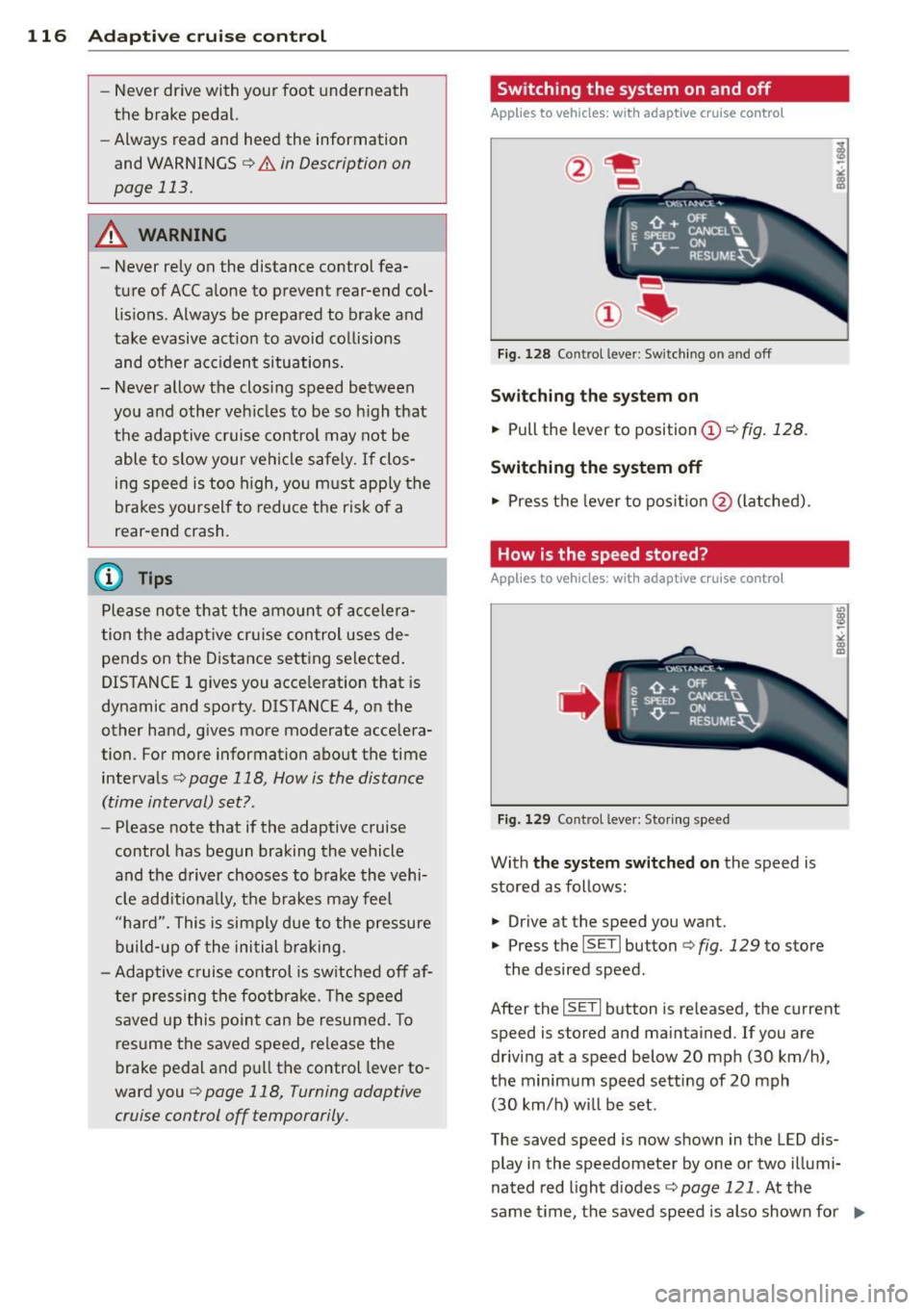
Switching the system on and off
Applies to vehicles: with adaptive cruise contro l
Fig. 128 Control lever: Sw itching on and off
S w itching the sy stem on
.,. Pull the lever to position (D c::> fig. 128 .
Switching the system off
.,. Pres s th e lever to pos it ion @ (latched).
How is the speed stored?
Applies to vehicles: wit h adaptive cruise contro l
,' ts ~:_" ';;;", ' , E Sl'EEO CANCELU
. T ,0. -ON ... . RESUME~
Fig. 1 29 Co ntrol lever: Storing s peed
With the sy stem switched on the speed is
stored as follows:
• Drive at the speed you want .
.,. Press the
ISET I button c:;, fig. 129 to store
the desired speed.
After the
ISE TI button is re leased, the current
speed is stored and maintained . If you are
driv ing at a speed below 20 mph (30 km/ h),
the minimum speed setting of 20 mph
(30 km/h) will be set .
The saved speed is now shown in the LED d is
play in the speedometer by one or two illumi
nated red light d iodes
c::> page 121. At the
same time, the saved speed is also shown for ..,.
Page 120 of 342

118 Adaptive cruise control
Turning adaptive cruise control off
temporarily
Applies to vehicles: with adaptive cruise co ntrol
In some situations it makes sense to turn
adaptive cruise control off temporarily.
®
Fig. 131 Con tro l lever : Turning adapt ive cruise co ntro l
off tempo rarily
Fig. 132 D isplay in the speedomete r
Turning control off temporarily
" To shut off the control with the save func
t ion, either depress the brake pedal, or
" Press the lever in the direction of the arrow
@qfig .131 .
How is the distance (time interval) set?
Applies to vehicles: with adaptive cruise co ntrol
Distance can be set in four stages.
Fig. 133 Contro l lever: Setting d istance
Reactivating control
" To resume the speed and distance control,
release the brake pedal and press the lever
in the direction of the arrow@.
Display in the speedometer
@ Current vehicle speed~ fig. 132
@ Saved speed
As long as a speed is saved the set desired
speed will be displayed in the LED display in
the speedometer by one or two illuminated
red light diodes . When the control function is
resumed the adaptive cruise control acceler
ates to reach the desired speed if no slower
vehicle ahead is detected.
&_ WARNING
Improper use of the adaptive cruise con
trol can cause collisions, other accidents
and serious personal injuries.
- Never resume the stored speed if the
speed is too high for prevailing road,
traffic or weather conditions .
(0 Tips
When the system is turned off temporari
l y, the speed set at that time is stored.
Increasing distance
-
" Push the slider switch once to the right 0
q fig. 133 . The distance current ly set is
shown for 3 seconds in the instrument clus
ter display.
" Push the slider switch
again to the right 0
to increase the distance by one step. ..,.
Page 122 of 342
120 Adapti ve crui se control
_&. WARNING
-
Following other vehicles too closely in
creases the risk of a crash and serious per
sonal injury .
- Following other vehicles too closely, par
ticu larly at higher speeds increases the
risk of coll is ions and serious personal in
jury.
- Setting short distances to the traffic
ahead reduces the time and distance
available to bring your vehicle to a safe
stop and makes it even more necessary
to pay close attention to traffic .
- Always select a speed and distance to
traffic ahead that is safe and appropriate
under the prevailing traff ic, road, weath
er and lighting conditions.
- Never rely on the distance control fea
ture of ACC a lone to prevent rear-end col
lis ions. Always be prepared to b rake and
take evasive act io n to avoid co llisions
and other ac cident situations.
- Never allow the clos ing speed between
yo u a nd other vehicles to be so h igh that
the adaptive cruise control may not be
able to slow your vehicle safe ly . If clos
ing speed is too high, yo u m ust app ly the
brakes yourself to reduce the risk of a
rear-end crash.
- Always select a greater following dis
tance to the veh icle ahead on wet roads
than on dry roads.
- Always read and heed the information
and WARNINGS
¢ &. in Description on
page 113.
(D Tips
The distance setting is reset to the factory
default
DIS TANCE 3 the next time the ig
nition is turned on.
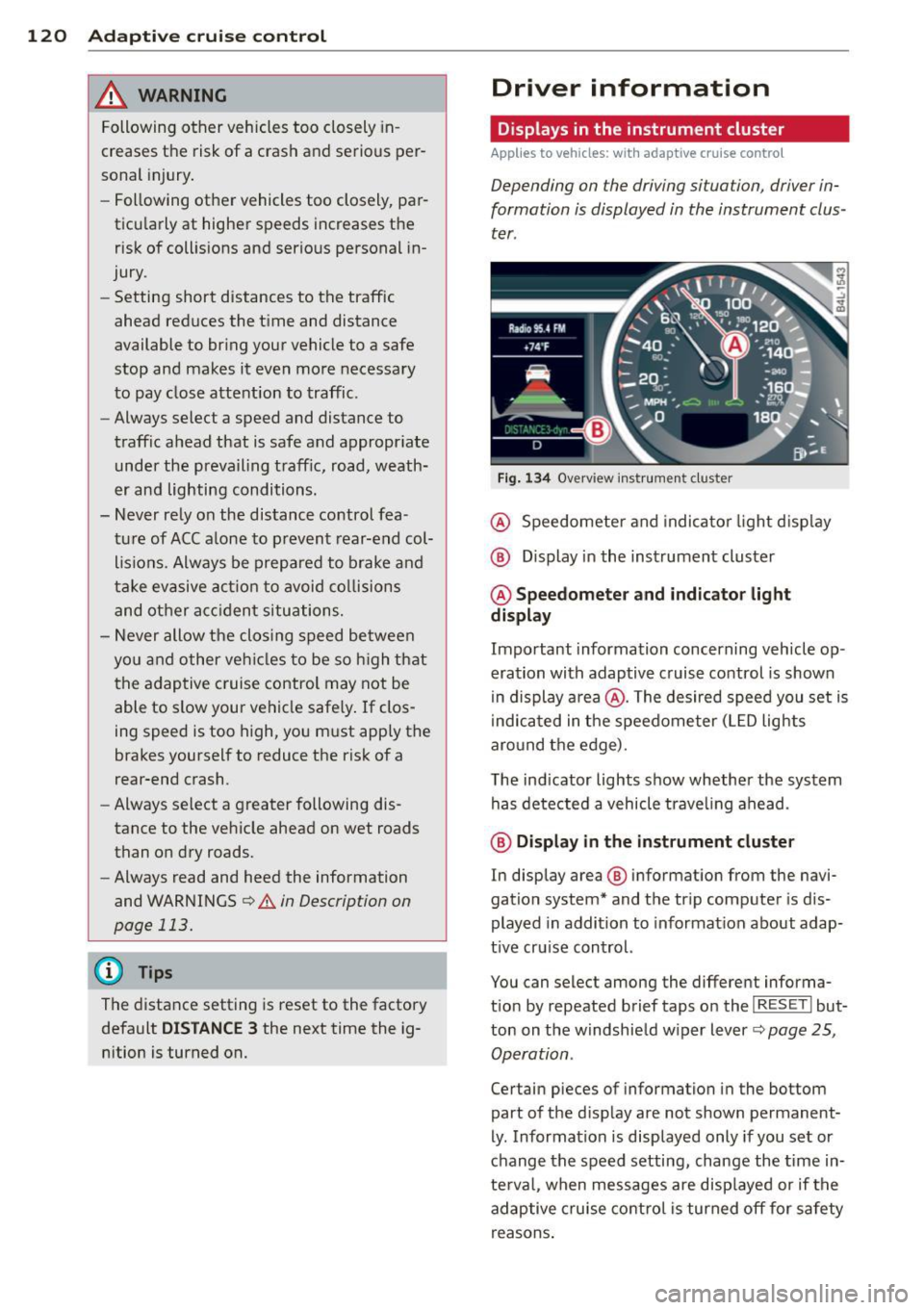
Driver information
Displays in the instrument cluster
Applies to veh icles: w ith adaptive cruise contro l
Depending on the driving situation, driver in
formation is displayed in the instrument clus
ter .
Fig . 1 34 Overview ins tr u me nt cluster
@ Speedometer and indica to r li ght d isp lay
@ Display in the instrument cluster
@ Speedometer and indi cato r light
display
Important information concerning vehicle op
eration with adaptive cruise control is shown
in display a rea @. The desired speed you set is
i ndica ted in the speedometer (L ED lights
aro und the edge).
T he ind icator lights show whether the system
has detected a vehicle trave ling ahead .
@ Display in the in strument cluster
In display area @ information from the navi
gation system* and the tr ip computer is dis
played in addition to informat ion about adap
t ive cru ise control.
You can select among the different informa
t io n by repeated brief taps on the
I RESET I but
ton on the w indshie ld w iper lever
c::> page 25,
Operation .
Certain pieces of information in the bottom
part of the d isplay are not shown permanent
ly . Information is displayed only if you set or
change the speed setting, change the time in
te rva l, when messages are disp layed or if the
adaptive cruise contro l is turned off for safety
reasons .
Page 123 of 342

Display in the speedometer
Applies to vehicles: with adaptive cruise control
Fig. 135 D isplay in t he s pee domete r
Des ired spe ed
The desired speed set by the driv er is dis
p layed by a red L ED.
If the desi red speed was set between two
lines on the speedometer using the
I SE TI but
ton, the two closest light emitting diodes will
come on <=>
fig. 135.
The system a llows only speeds to be set be
tween 20 to 95 mph (30 to 150 km/h) to be
set. This speed range is faint ly illuminated in
the speedometer (L ED lights).
Ind icator light s (symbol s)
-- Open road:
T he ind icator light _
shows that ACC is active and that no moving
veh icle has been detected with in range of
the radar sensor up ahead in your lane of
your lane of travel. Your speed is adjusted according to the speed of the vehicle up
front . ACC acce lerates and brakes automati
ca lly within the system's capab ilities .
-- Driver int ervention prompt : The
red flashing warning light- means
Request for dri ver to assum e co ntr ol. You
as the dr iver must s low the vehicle with the
f oot brake. The symbol - tells you
t h at the adaptive cruise control is not able
to slow the vehicle down enough to keep a
e nough distance to the vehicle in front of
you. A warning tone will also sound when
Ad apti ve crui se control 121
the symbol appears. For more information
about the driver intervention prompt
r::!) page 124.
_& WARNING
Improper use of the adaptive cruise con
trol features and inattent ion can lead to a
crash and serious personal injury.
- Never allow the closing speed between
you and othe r vehicles to be so high that
the adaptive cruise control may not be ab le to slow your vehicle safely . If clos
ing speed is too high, you must apply the
brakes yo urself to reduce the risk of a
rear-end crash.
- Always select a greater following d is
tance to the vehicle up ahead on wet
roads than on dry roads.
- Always read and heed the info rmation
and WARNINGS <=>
& in Description on
page 113 .
(D Tips
-If you use the accelerator to go faste r
t han t he speed of the vehicle ahead of
you , the dr iver intervention prompt will
not be accompan ied by a warn ing tone.
- If the speed you previously set is exceed
ed, the indicator light in the speedome
ter will switch off.
Display in the instrument cluster
Appl ies to vehicles: wit h adaptive cruise control
F ig. 136 D isp lay in the in strument clust er
-
Scroll through the available information dis
plays by br iefly tapp ing the
I RES ET! button at
the end of the windshield wipe r lever . You can ..,.
Page 125 of 342

the 20 to 95 mph (30 to 150 km/h) speed
range .
ACC not available
The text message ACC not available appears,
for example, if the temperature of the brakes
i s excessive. Adaptive cruise control is tempo
rarily not available. A warning tone sounds as
a reminder .
ACC not available!
The text message ACC not available! appears
in the event of a malf uncti on. Adaptive cruise
control is tu rned off . A warning tone sounds
as a reminder. Have the system inspected by a
qua lified dealership.
ACC sensor blocked !
The text message ACC sensor blocked ! ap
pears when the ACC System can no longer ac
curately detect vehicles moving up ahead in
your lane of travel. Adaptive cr uise control is
turned off. A warning tone also sounds as a re minder.
To decide whether it is necessary to switch off
the ACC (ACC sensor blocked
!) or if it is only a
temporary condition (ACC Functionally limit
ed), the system will a lso takes into cons idera
tion the outside temperature and/or the wind
shield wiper operation .
The ACC sensor is dirty or blocked (e.g. leaves,
snow).
The ACC sensor is loca ted behind the area to
the right of the front license plate . If the ACC
sensor is dirty or blocked, clean the area to re
store system operat ion.
Stability program
The text message Stability program appea rs
if the Electronic Stability Control (ESC) has in
tervened . In th is case the adaptive cr uise con
trol is automatically turned off. Th is is accom
panied by a warn ing tone.
Speed
The set speed in mph (Canada km/h) always
appears when saving or changing the speed in
Adaptive cruise control 123
adaptive cruise control c:::> page 116, How is
the speed stored?
and c:::> page 117, Changing
stored speed.
ACC functionality limited
T he message ACC functionality limited ap
pears when the ACC System does not detect
any moving vehicles up ahead in your lane of
trave l for a longer period of time . During t his
time, the distance to moving vehicles in your
lane of travel up ahead is not being main
ta ined . The ACC system is not switched off,
and increased attention to the traffic situation
is absolutely necessary. The following may be
reasons why the message
ACC functionality
limited
appears:
- The ACC sensor is d irty. The ACC system is
not reacting, or is not reacting co rrectly, to
moving vehicles up ahead in your lane of
travel.
- There may be very light traffic on and there
is noth ing that marks the side of the road
(for examp le, guard ra ils, traffic signs,
t rees). As soon as a moving vehicle up ahead
is detected again, ACC becomes active again
and the message disappears.
T he ACC senso r is located behind the area to
the right of the front license p late.
If the ACC
sensor is dirty or blocked, clean the area to re
store system operation.
Parking brake!
The text message Parking brake! appears,
whe n the parking brake is applied. ACC is
turned off. A warning tone sounds as a re
minder.
Stationary object ahead
T he text message Stationary object ahead ap
pears, whe n you want to activate the system
and there is a stationary vehicle or an object
immediately in front of you .
Gradient too steep
The text message Gradient too steep appears
when the maximum gradient for prope r ACC
operation has been exceeded. Adaptive cruise .,.
Page 126 of 342
124 Adaptive cruise control
control is turned off . A warning tone also
sounds as a reminder.
ACC off: manual control !
The text message ACC off: manual control !
appears after the vehicle has been brought to
a standstill by the adaptive cruise control. In
this case you must depress the brake pedal to
prevent the vehicle from rolling . A warning
tone sounds as a reminder .
Selector lever position !
The text message Selector lever position ! ap
pears when the selector lever is moved to po
sition
N . In this position, adaptive cruise con
trol is not available .
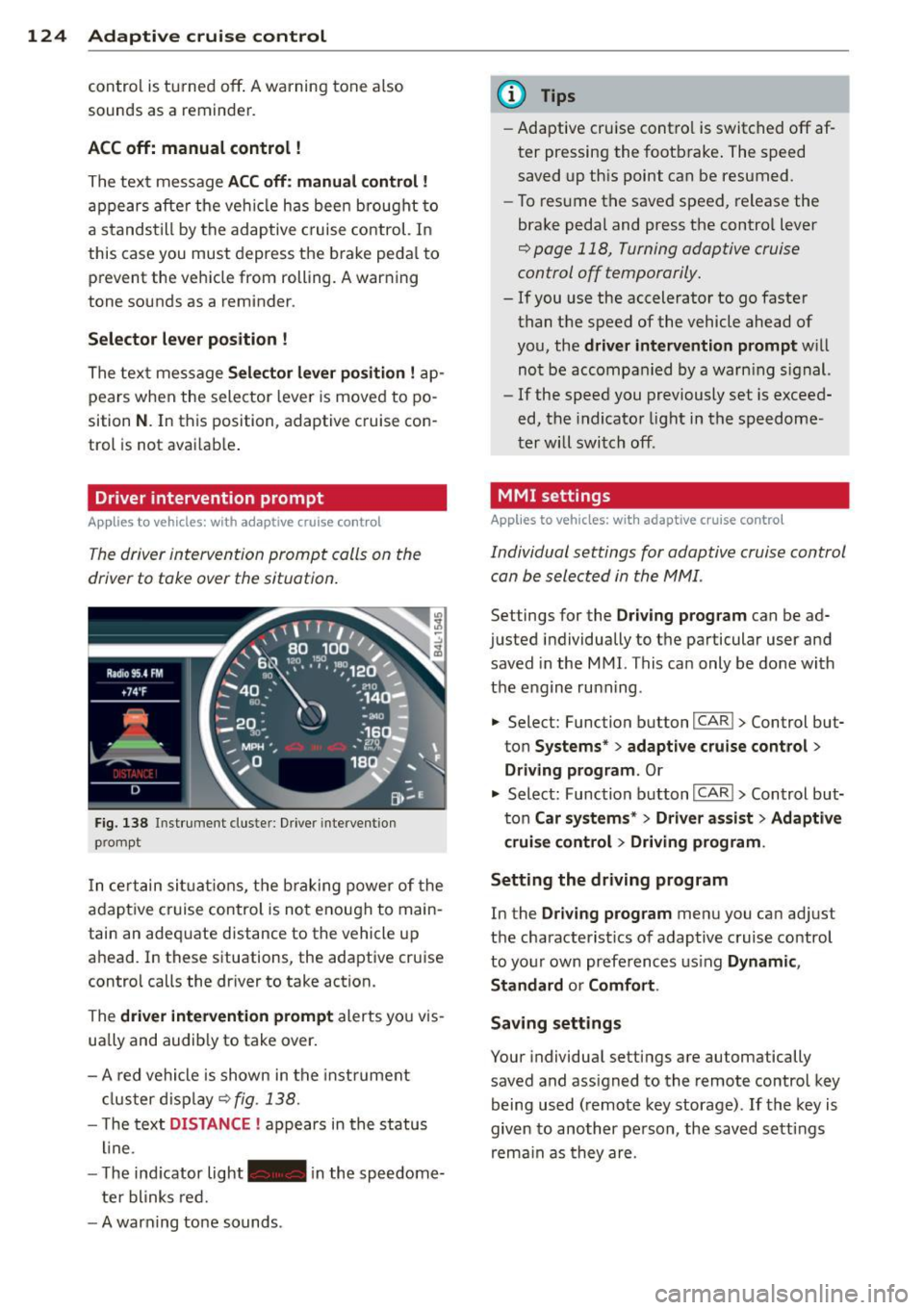
Driver intervention prompt
Applies to vehicles: with adaptive cruise co ntrol
The driver intervention prompt calls on the
driver to toke over the situation.
Fig. 138 Inst rument clus te r: Driv er in tervent ion
p romp t
In certain situations, the braking power of the
adapt ive cr uise control is not enough to main
tain an adequate distance to the vehicle up
ahead . In these situat ions, the adaptive cruise
contro l calls the dr iver to take action.
The
driver intervention prompt alerts you vis
ually and audib ly to take over.
- A red vehicle is shown in the instrument
cluster display ¢
fig. 138.
- T he text DISTANCE ! appears in the status
line .
- T he indicator light- in the speedome
ter blinks red.
- A warning tone sounds .
(D Tips
-Adaptive cruise contro l is switched off af
ter pressing the footbrake. The speed
saved up this point can be resumed.
- To resume the saved speed, release the
brake pedal and press the control lever
¢ page 118, Turning adaptive cruise
control off temporarily.
- If you use the accelerator to go faster
than the speed of the vehicle ahead of
you, the
driver intervention prompt w ill
not be accompanied by a warn ing s ign al.
- If the speed you previously set is exceed
ed, the indicator light in the speedome
ter will switch off.
MMI settings
Applies to vehicles: wit h adaptive cruise contro l
Individual settings for adaptive cruise control
can be selected in the MMI.
Settings for the Driving program can be ad
justed individually to the particular user and
saved in the MMI. This can only be done with
the engine ru nning .
• Select: Function button
I CAR !> Control but
ton
Systems * > adaptive cruise control >
Driving program . Or
.,. Select: Function b utton I CAR !> Control but
ton
Car systems* > Driver a .ssist > Adaptive
cruise control
> Driving program .
Setting the driving program
In the Driving program menu you can adjus t
the characterist ics of adaptive cruise control
to your own preferences using
Dynamic,
Standard
o r Comfort .
Saving settings
Your individual settings are automatically
saved and ass igned to the remote control key
being used (remote key storage) .
If the key is
given to another person , the saved settings
remain as they are .
Page 139 of 342
Automatic transmission
tiptronic ®
General information
Your vehicle is equipped with an electronically
controlled automatic transmission. Upshifting
and downshifting takes p lace
automatically.
The transmission is also equipped with tip
tronic ®. It allows the driver to shift gears
manually if desired ¢ page 140.
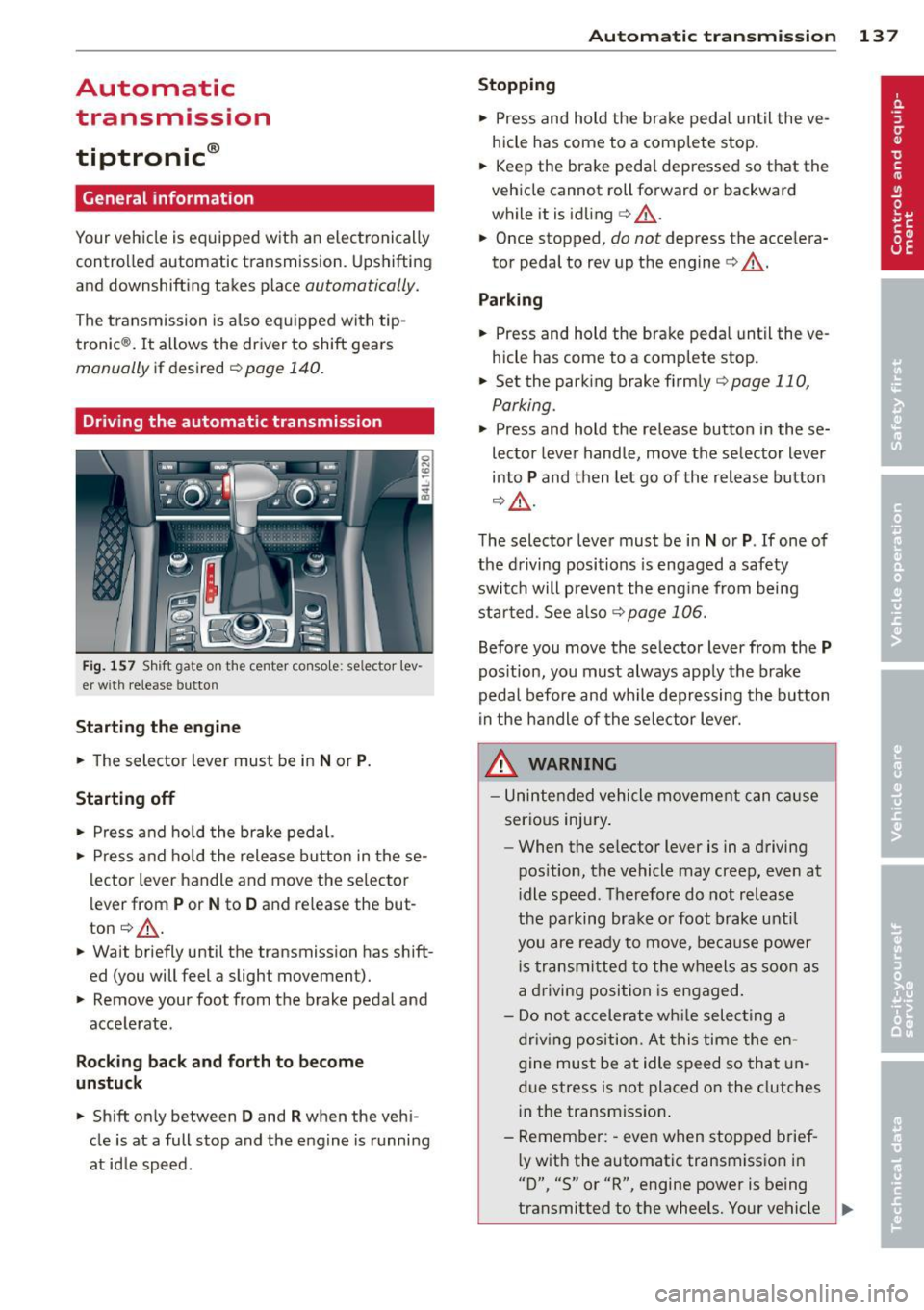
Driving the automatic transmission
Fig. 157 Shift gate o n the center console : se lector lev
er with release button
Starting the engine
.. The selector lever must be in Nor P.
Starting off
.. Press and hold the brake pedal.
.. Press and hold the release button in these
lector lever handle and move the selector
lever from
P or N to D and release the but
ton ¢.&,. .
.. Wait briefly until the transmission has shift
ed (you will feet a slight movement).
.. Remove your foot from the brake pedal and
accelerate.
Rocking back and forth to become
unstuck
.. Shift only between D and R when the vehi
cle is at a full stop and the engine is running
at id le speed.
Autom atic transm ission 13 7
Stopping
.. Press and hold the brake pedal until the ve
hicle has come to a complete stop.
.. Keep the brake pedal depressed so that the
vehicle cannot roll forward or backward
while it is idling
c> .&,. .
.. Once stopped,
do not depress the accelera
tor pedal to rev up the engine
c> .&, .
Parking
.. Press and hold the brake peda l until the ve
hicle has come to a comp lete stop.
.. Set the parking brake firmly
¢page 110,
Parking .
.. Press and hold the release button in these
lector lever handle, move the selector lever
into
P and then let go of the release button
¢ .&,.
The selector lever must be in Nor P. If one of
the driving positions is engaged a safety
switch will p revent the eng ine from being
started . See also
<=>page 106.
Before you move the selector lever from the P
position, you must always apply the brake
pedal before and while depressing the button
in the handle of the selector lever.
A WARNING
-Unintended vehicle movement can cause
serious injury .
- When the se lector lever is in a driving
pos ition, the vehicle may creep, even at
i dle speed . Therefore do not release
the parking brake o r foot brake until
you are ready to move, because power
i s transmitted to the wheels as soon as
a driving position is engaged .
- Do not accelerate while selecting a
driving position. At this time the en
gine must be at idle speed so that un
due stress is not placed on the clutches
in the transmission .
- Remember: -even when stopped brief-
l y with the automatic transmission in
"D", "S" or "R", engine power is being
transmitted to the wheels. Your vehicle
~
Page 140 of 342
138 Automatic transmi ssion
co uld "creep" forward or backward.
When stopped, keep the brake pedal
fully depressed and use the parking brake if necessary to keep the vehicle
from ro lling .
- If the selector lever is unintentionally
moved into N wh ile you are driving, take
yo ur foot off the accele rato r pedal and
wa it for the engine to return to idle
speed befo re selecting a d rivi ng position .
- Never shift into "R" or "P" when the vehi
cle is in mot ion.
- Never get out of the dr iver 's seat when
the engine is runn ing .
- If you must get out of the vehicle, move
the se lector lever securely into the P po
sit io n and apply the par king brake f irm ly.
- If the eng ine must remain ru nning, never
hav e any driv ing pos ition engaged when
c hec king under the hood . M ake sure t he
sele ctor lever has securely eng aged and
is locke d in "P" with the par king brake
firmly set ¢
page 248, Engine compart
ment .
Otherw ise, any increase in eng ine
speed may set the vehicle in m otion,
even w ith the par kin g brake applied.
Selector lever positions
This section describes the selector lever posi
tions and driving ranges.
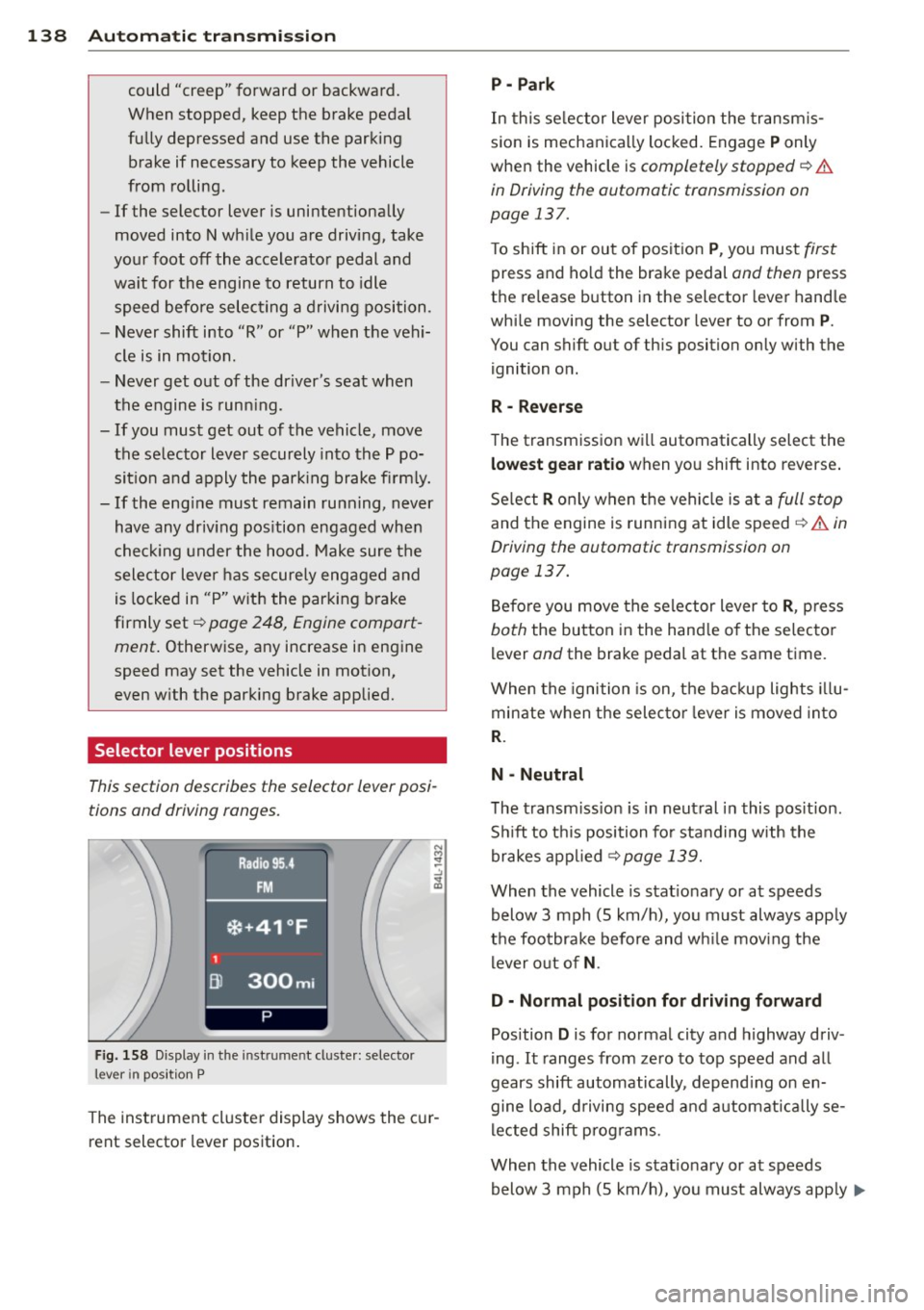
F ig. 158 Display in t he in st rum en t cluste r: selecto r
lev er in po sit ion P
The inst rumen t cluste r display shows the c ur
rent selector lever position .
P - Park
In this selector lever posi tion the transm is
s ion is mechanica lly locked. Engage
P only
whe n the vehicle is
completely stopped¢&.
in Driving the automatic transmission on
page 137.
T o shift in or out of posit ion P , you mus t first
press and ho ld the brake pedal and then press
the re lease button in the selector leve r hand le
whi le moving the selector lever to or from
P .
You can shift out of th is position only with the
ignition o n.
R • Reverse
The transm iss ion w ill automatically select the
lowest gear ratio when you shift into reverse .
Se lect
R o nly when t he vehi cle is at a full stop
and the engine is running at idle speed¢&. in
Driving the automatic transmission on
page 137.
B efore you move the se lector lever to R , press
both the button in the hand le o f the se lecto r
lever and the brake pedal at the same t ime.
W hen the ignition is on, the bac kup light s illu
minate w hen t he selec to r l ever is
moved in to
R .
N -Neutral
The transm iss io n is in neut ral in this pos it ion .
S hi ft to t his position fo r standing with the
brakes app lied
¢ page 139.
When the vehicle is stat iona ry or at speeds
below 3 mph (5 km/h) , you must always app ly
t h e foo tbrake before and wh ile mov ing the
l ever o ut o f
N.
D - Normal position for driving forward
Position D is for no rma l city and highway driv
ing . It ranges from zero to top speed and all
gears shift automatically , depend ing on en
gine load, d riving speed and a utomat ically se
l ected shift p rog rams.
When the vehicle is stat iona ry or at speeds
below 3 mph (5 km/h), you must always app ly
IJ,,
Page 158 of 342
156 Hom eli nk®
Homelink ®
Universal remote
control
General information
Applies to vehicles: with Home link® universal remote
control
The Homelink ® feature can learn up to three
radio frequency codes for most current trans
mitters used for operating garage doors, es tate gates, home or outdoor lighting sys
tems, and other devices.
You must first program the Homelink ® trans
mitter before you can use the system
~ page 157, Programming the Homelink ®
transmitter.
In order to program the Home link ® transmit
ter for devices utilizing rolling code, a second
person on a ladder who can safe ly reach the
garage door opener motor is recommended. I t is also necessary to locate the "learn" but
ton on your garage door opener motor . Refer
to the operating instructions for the opener,
as the location and color of this button may
vary by manufacturer.
You can still use the origina l remote control
for the device at any time .
.&_ WARNING
-
- Never use the Homelink ® transmitter
with any garage door opener that does
have not the safety stop and reverse fea
ture as requ ired by federa l safety stand
ards. Th is includes any garage door open
er model manufactured before April 1,
1982.
- A garage door opener which cannot de
tect an object, signa ling the door to stop
and reverse does not mee t current feder
al safety s tandards. Using a garage doo r
opener without these features increases
risk of serious inj ury or death.
- F or sa fety reasons never release the
parking brake or start the engine w hile
anyone is stand ing in front of the vehicle . -
A garage door or an estate gate may
sometimes be set in mot ion when the
Homelink ® remote control is being pro
grammed. If the device is repeatedly ac
tivated, this can overstrain motor and
damage its e lectr ical components -an
overheated moto r is a fire hazard!
- To avo id possible injuries or property
damage, please always make abso lutely
certain that no persons o r objects are lo
cated in the range of motion o f any
equ ipment being ope rated .
(D Tips
-If you would like more information on
Homel ink ®, where to purchase the
Homel ink ® compatib le produc ts, or
would like to purchase the Homelink ®
Home Lighting Package, please call to ll
free: 1-800-355-3515 .
- For Declaration of Compliance to United States FCC and Ind ustry Canada reg ula
tions~
page 322.
Page 159 of 342
Programming the Homelink®
transmitter
A pplies to vehicles: with Home link® universa l remote
co ntrol
The transmitter is programmed in two phas·
es. For rolling code transmitters, a third
phase is also necessary .
.- :-::::: . ... ........ -. ----· . ...... ........ .l
-·-·-· -·-· -·..: ··-· ---- -·- ·· ..._~ -- · ····
111111
-
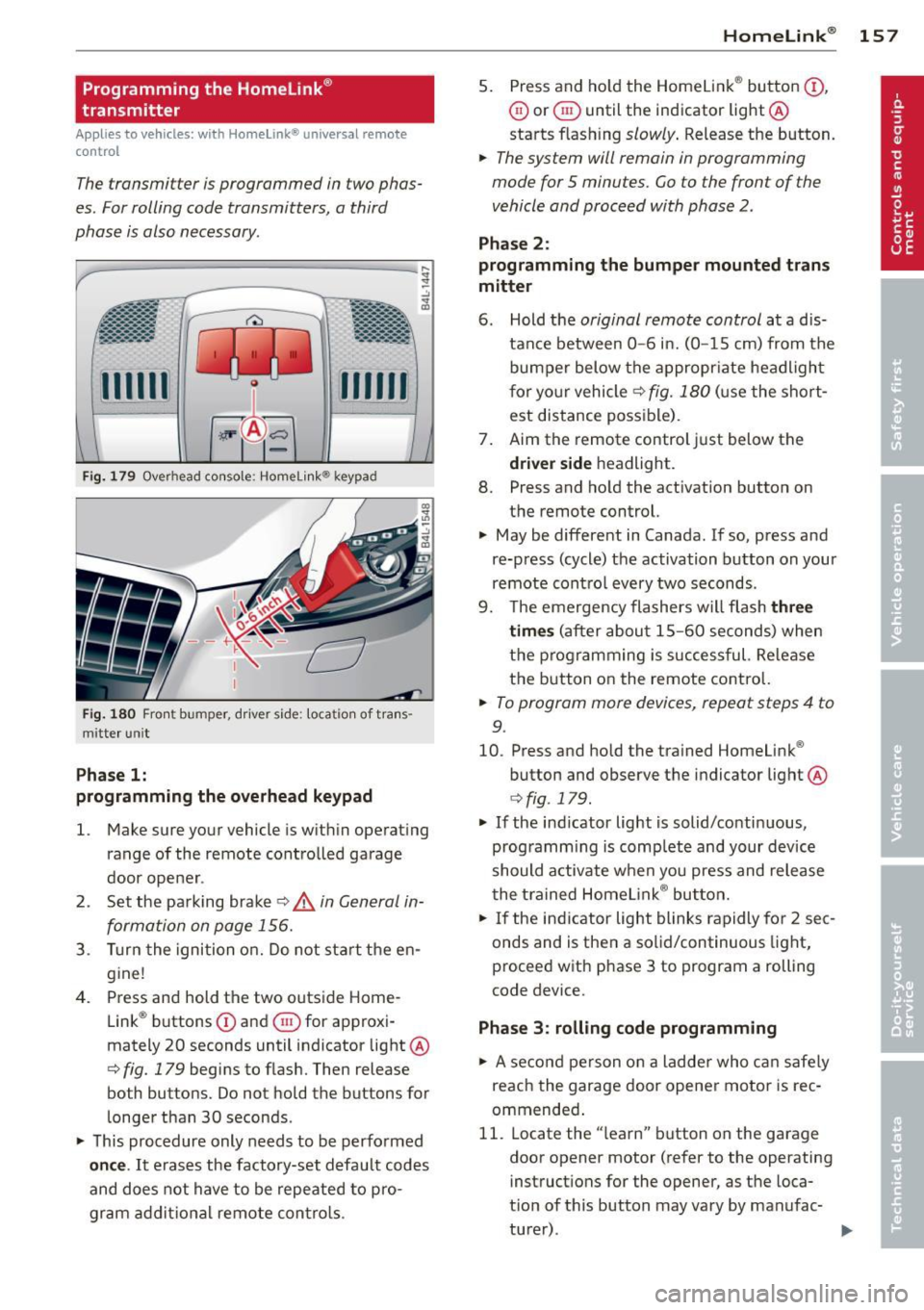
Fi g. 1 79 Overhead console: Homelink ® keypad
Fig. 1 80 Front bumper, d rive r side: loca tion of tra ns
mitter un it
Pha se 1:
programming the o verhead keypad
l. Make sure your vehicle is wit hin ope rating
range of the remote controlled garage
door ope ner .
2 . Set the pa rking brake
c:> .& in General in
formation on page 156.
3 . Turn the ignition o n. D o not sta rt the en
g ine!
4. Press and hold the two outs ide Home
Link ® buttons
(D and ® for approxi
mately 20 seconds until indicator light @
c:> fig. 179 begins to flash. Then release
both buttons. Do not hold the buttons for
l onger than 30 seconds .
~ This procedure only needs to be perfo rmed
on ce .
It erases the factory-set default codes
and does not have to be repeated to p ro
gram ad dit io na l remote contro ls .
Homelink ® 15 7
5. Press and ho ld the Homelink ® button (D ,
0 or ® until the indicator light@
starts flash ing
slowly . Release the button.
~ The system will remain in programming
mode for 5 minutes.
Go to the front of the
vehicle and proceed with phase 2 .
Phase 2 :
programming the bumper mounted trans
mitter
6 . Hold the
original remote control at a d is
tance between
0 -6 in. (0 -15 cm) from the
bumper below the appropr iate headligh t
f or yo ur vehicle
c:> fig. 180 (u se the short
est distance possible) .
7 . Aim the remote control just below the
driver s ide headlight.
8. Press and ho ld the activation button on
the remote control.
~ May be different in Canada. If so, press and
re-press (cycle) the activation button on your
remote cont ro l every two seconds .
9. The emergency flashers w ill flash
three
time s
(a fter about 15 -60 seconds) when
the programming is successful. Re lease
t h e button on the remote contro l.
~ To program more devices, repeat steps 4 to
9.
10. Press and hold the trained Homelink ®
button and observe the indicator light @
c:>fig . 179 .
~ If the indicator light is solid/contin uous,
programm ing is comp lete and your device
should a ctivate when you press and release
t he t rained Homelink ® bu tton.
~ If the ind icator light blinks rapidly for 2 sec
onds and is then a solid/continuous light,
proceed w ith phase 3 to program a rolling
code device.
Phase
3: rolling code programming
~ A se con d person o n a ladde r who c an safe ly
reach the garage door opener motor is rec
ommended .
11. Locate the "learn" button on the garage
door opener motor (refer to the operating
instruct ions for the opener, as the loca·
t ion of t his button may vary by manufac-
turer) . .,.