trailer AUDI Q7 2012 Owner´s Manual
[x] Cancel search | Manufacturer: AUDI, Model Year: 2012, Model line: Q7, Model: AUDI Q7 2012Pages: 342, PDF Size: 86.42 MB
Page 151 of 342
-On -when the parking system is switched
on, either the visual display or the picture
from the rearview camera is disp layed .
Warning tones
- Front volume* -
front sensor vo lume
- Front frequency* -front sensor frequency
-Rear volume -rear sensor volume
-Rear frequency -rear sensor frequency
-In -ca r entertainment fader/Music volume
while parking -
when the parking system is
switched on, the volume of the active audio source is lowered.
The newly adjusted value is briefly heard from
the signal generator.
(D} Tips
- The warning tones can also be adjusted
direct ly by the v isual disp lay* or the pic
ture from the rearview camera*. Simply
press the
Settings* control button .
- Changed settings are activated when
parking system is switched on aga in.
- The settings are automatically stored
and ass igned to the remote control key.
Trailer hitch
Applies to vehicles: with rear park assist/Audi parking sys·
tem plus with rearview camera and trailer hitch
For vehicles with a factory installed trai ler
hitch, or a trai ler hitch installed according to
factory specifications, the parking system rear
sensors do not come on whenever you shift in
to reverse gear or when you press the P
11,
switch*. If you install a hitch yourself, th is
function may not work . In general the follow
limitations may come up:
Rear park assist*
There is no warning for distances to the rear.
Audi parking system plus with rearview
came ra*
There is no warning for distances to the rear .
The front sensors remain activated. The visual
display switches to the trailer towing mode.
The picture from the rearview camera will not
Parking system 149
show the orientation lines nor the blue surfa
ces.
Error messages
Applies to vehicles: with rear park assist/Audi parking sys
tem plus with rearview camera
There is an error in the system if the LED on
the
P" 1! switch* is blinking and you hear a con
tinuous alarm for a few seco nds after switch
ing on the park ing system or when the park
ing system is already activated. Have your au
thorized Audi dea ler correct the error .
(D Tips
If the error is not corrected before you
switch off the ignition, when you switch on
the parking system again, the LED in the
p,,1, switch* will blink .
Page 152 of 342
150 Adapti ve Air Susp en sion
Adaptive Air
Suspension
Air suspension and damping
Description
App lies to vehicles: with Adapt ive Air Suspe nsion
Air suspension and damping can be adjusted
separately.
Adaptive Air Suspension is an electronically
controlled springing and damping system .
This chassis system makes it easier on the
driver by adapt ing to the particular situat ion
through imperceptible control processes.
The
Ad apti ve Air Su sp ension component reg
ulates ground clearance depending on vehicle
speed and driver input. It functions independ
ently from the load condition . Accelerating to
a speed above a predetermined limit will make the vehicle lower itself . On the other
hand, driving more slowly results in the vehi
cle raising aga in at specific speeds.
The
d am ping component provides individual
control of the damping forces. For example,
with damping characterist ics set to prov ide
greater comfort, damping is set somewhat
harder for a brief per iod only as required, for
example, when going around a curve or when brak ing .
Set tings
Adapt ive A ir Suspension provides the driver
with the opportun ity to set the chassis charac
teristics also to their individual prefe rence.
W ith the dr iv ing modes
Comfort, Automatic
and Dynamic the driver has three chassis set
tings available, ranging from comfort to spor
ty. The
Offrood mode can be selected for driv
ing on poor quality stretches of road. In addi
tion,
Lift provides a fifth mode, which can be
selected when exceptionally high ground
clearance is needed
c::> page 150, Chassis con
trols.
The modes are set in MMI r:::;, poge 152.
A WARNING
The height of the parked vehicle can
change due to temperature fluctuations or
changes in load.
([) Note
- Whenever you park your vehicle, a lways
make sure there is adequate clearance
above and below the vehicle. The he ight
of the parked vehicle can change as the
result of temperature f luctuations,
changes in load cond ition and changes in
the driving mode (ground clearance).
- If the vehicle is being t ransported (e.g.
by tow truck, train, sh ip, etc.), mount the
tie-down chains/cables over the running
surface (circumference) of the tires. Nev
er secure the vehicle by the axle, the sus
pension struts or the front or rear tow
line eye. For technical reasons, the pres
sure in the suspens ion struts may change
during the transport, which could result
in the vehicle no longer be ing secured
properly .
- If you are going to tow a trailer with a trailer hitch that was
not installed ac
cording to factory specif ications, you
must activate the tra iler operation mode
manually
c;, page 154.
(D Tips
- Before you can raise your vehicle us ing
the vehicle jack (for example, when
changing a f lat t ire) or a veh icle lift, yo u
must activate the jac king mode
c::>poge 154.
-On some mode ls, the vehicle can reach
its maxim um speed only in the
Automat
ic
and Dynamic modes.
Chassis controls
Applies to vehicles: wit h Adaptive A ir Suspensio n
Five different driving modes con be set by the
driver.
The automatic control processes are speed
and t ime -dependent . Fo r example, it is not
Page 156 of 342

154 Adapti ve Air Susp en sion
Di spl ay ing the vehicl e lev el
The cu rrent vehicle level is shown w ith seg
ments fi lled out in the segment disp lay @ . If
only the bottom segment is filled out, the ve
hicle is at highway level. If all segments are
fi lled out, the vehicle is at high level 2 and has
the greatest amount of ground clearance pos
sible.
While the vehicle is being raised or lowered,
the target leve l is indicated by an arrow ©
¢
fig. 176 or a white border ©¢ fig. 177. The
arrow/border disappears aga in when the vehi
cle is at the target level.
Jacking mode when changing a flat tire
Appl ies to vehicles: with Adaptive Air Suspens ion
This mode must be activated in the MMI be
fore raising the vehicle with a jack or on a ve
hicle lift.
,. Select: Funct ion button ICARI > Function
button
! SETUP I> Jacking mode . Or
,. Select : Funct ion button
ICARI > Control but
ton
Car sy stem s* > Serv icing & ch eck s > Air
su sp .: tire ch ang e.
The vehicle jack mode must be activated be
fore changing a wheel so that the automatic
control processes for the a ir suspension do
not make lifting with the vehicle jack more dif
ficu lt.
The check lamp
II in the instrument cluster
d isplay illuminates in v ehicle jack mode.
(D) Tips
The vehicle jack mode is switched off auto
mat ically at speeds above 9 mph (15 km/
h).
Towing a trailer
Appl ies to vehicles: with towing hitch and Adapt ive Air
Suspension
Automatic lowering is not desirable when
towing a trailer.
,. Se lect: Function button ICARI > Function
button
! SE TUP I> Towi ng mod e. Or ,.
Select: Function b utton
I CAR !> Control but
ton
Car s ystem s* > Vehicle setting s > Air
su sp.: towing .
As long as towing mode is activated, a vehicle
with a trai ler appears in the
adap tiv e air su s
pen sion
main menu.
Level Ad ju stment when towing a t railer
- Before hitching up the tra ile r and before ad
jus ting the tongue weight at the trailer, the
automatic or comfo rt mode
mu st be se lect
ed so that the ve hicle can be at normal level
¢ page 152, MMI settings .
-If driving in dynamic mode is desired, this
mode
mu st be selected before hitching up
the trailer and before ad justing the tongue
weight. However, note that your vehicle is lowered and ground clearance is reduced.
- If you have to drive under difficult road con
ditions, you can select offroad or lift mode,
after hitching up the trailer or after adjust ing the tongue weight .
- If the veh icle is at
normal level, and you se
lect offroad mode wh ile traveling at speeds
higher than 22 mph (35 km/h), the veh icle
w ill not be ra ised . Offroad mode will appear
as the active mode in the MM I Disp lay.
- If the veh icle is in offroad mode at
high level
1 ,
it automa tically lowers to normal level
when the vehi cle is t ravel ing at speeds ex
ceed ing approximate ly 31 mph (SO km/h) .
The vehicle is automatically raised to
high
level 1
again when the traveling speed falls
be low approximately 25 mph (40 km/h).
Rest rictions when ope rating with a tr ailer
When operating w ith a trailer, the lift mode
can on ly be selected up to about 12 mph (20
km/h). Lift mode is automatically cance led
again w hen a speed of about 25 mph (40 km/
h) is exceeded.
If t he vehicle is in au toma tic , comfo rt, offroad
or lift mode before the trai ler towing mode is
activated, the dynamic mode cannot be acti
vated.
If t he vehicle is in dynamic mode before tow -
ing opera tion is activated, it can be driven in
11>-
Page 157 of 342
this mode. If the suspension is switched from
this mode to another mode, dynamic mode
cannot be re-se lected .
{D) Tips
-For vehicles with a factory installed tow
ing hitch or a trailer hitch that was in
stalled later accord ing to factory specifi
cations, the system recognizes "Trailer
tow ing mode" and activates this special
mode automatically, as soon as the elec
trical connection on the trailer socket is
connected . The mode ceases automat i
cally when the elect rical connection to
the trailer socket is d isconnected.
- If the tra iler towing mode has been act i
vated, the vehicle will not drop to the l ow or highway level.
Cargo mode
A pp lies to vehicles: wit h Adap tive Air S uspe nsio n
The rear of the vehicle con be lowered to
make it easier to load .
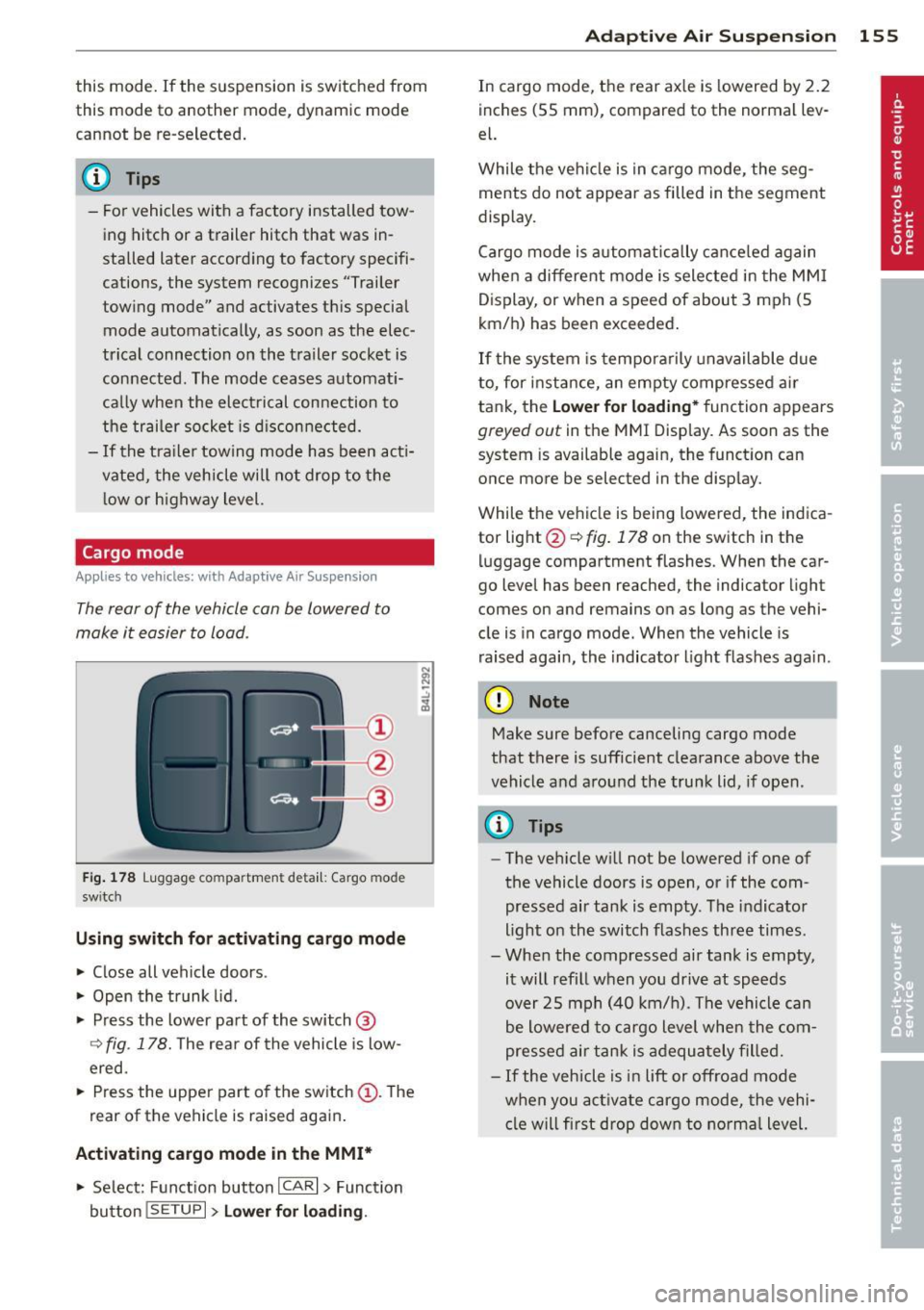
Fig. 178 Luggage compa rtment detail: Cargo mode
sw itc h
Using sw itch for activating cargo mode
~ Close all vehicle doors .
~ Open the trunk lid .
~ Press the lower pa rt of the switch@
Q fig. 178. The rear of the vehicle is low
ered.
~ Press the uppe r part of the sw itch (D . The
rear of the vehi cle is raised aga in .
Activating cargo mode in the MMI*
~ Se lect: Function button ICAR I > Function
button
! SE TUP I> Lower f or load in g. Ad
apti ve A ir Sus pension 155
In cargo mode, the rear ax le is lowered by 2 .2
inches (55 mm), compared to the normal lev
el.
While the ve hicl e is in ca rgo mode, the seg
ments do not appear as filled in the segment
display.
Cargo mode is a utomatically c ance led again
when a different mode is selected in the MM I
D isplay, or when a speed of about 3 mph (5
km/ h) has been exceeded.
If the system is tempora rily unavailable due
to, for instance, an empty compressed ai r
tank, the
Lower fo r loading* function appears
greyed out in the MMI Display. As soon as the
system is available again, the function can
once more be selected in the disp lay.
While the vehicle is being lowered, the indica
tor light @~
fig. 178 on the switch in the
luggage compartment flashes. When the car
go level has been reached, the indicator light
comes on and remains on as long as the vehi
cle is in cargo mode. When the vehicle is
raised agai n, the indicator l ight f las hes aga in.
(D Note
Make sure before canceling cargo mode
that there is sufficient clearance above the
vehicle and around the tru nk lid , if open .
(D Tips
-The ve hicle w ill not be lowered if one of
the vehicle doors is open, or if the com
pressed air tank is empty . T he indicator
light on the switch flashes three times.
- When the compressed air tank is empty,
it will refill when you drive at speeds
over 25 mph (40 km/ h). The vehicle can
be lowered to cargo level when the com
pressed air tank is adequately fille d.
- If the veh icle is i n lift or off road mode
when you act ivate cargo mode, the vehi
cl e w ill first drop dow n to norma l level.
Page 237 of 342

Trailer towing Driving with a trailer
General information
Your Audi was designed primarily for passen
ger transportation .
If you plan to tow a trailer, p lease remember
that the additional load will affect durability,
economy and performance .
Trailer towing not on ly places more stress on
the vehicle, it also calls for more concentra
tion from the driver.
F or this reason, always fo llow the operating
and driving instructions provided and use
common sense.
(D Note
If you are going to tow a trai ler, you must
activate the trailer operation mode
q page 154, Towing a trailer.
Technical requirements
Traile r hitch
Use a weight-carrying hitch conforming to the
gross trailer weight. The hitch must be suita ble for your vehicle and trailer and must be
mounted securely on the vehicle's chassis at a
technically sound location. Use only a trailer
hitch with a removable ball mount. A lways
check with the trai ler hitch manufacturer to
make sure that you are using the correct
hitch.
Do not use a bumper hitch.
The hitch must be installed in such a way that
it does not interfere with the impact-absorb
i ng bumper system. No mod ifications should
be made to the vehicle exhaust and brake sys
tems . From time to time, check that all hitch
mounting bo lts remain securely fastened.
When you are not towing a trailer, remove the
trai ler hitch ball mount. This prevents the
hitch from causing damage should your veh i
cle be struck from behind~.&.
Trailer towing 235
Trailer brakes
If your trailer is equipped with a brak ing sys
tem, check to be sure that it conforms to all
regulations.
T he trailer hydraulic bra ke system must not be
directly connected to the vehicle's hydraulic
brake system
q .& .
Safety chains
Always use safety chains between your veh icle
and the trai le r.
Trailer lights
Trailer lights must meet all regulations. Be
sure to check with your authorized Audi dealer
for correct wiring, sw itches, and relays.
M irr ors
If you are unable to see the traffic behind you
using the regular outside mirrors, then you
must install extended mirrors.
It is important
that you always have clear v is ion to the rear.
_&. WARNING
- If a trailer has electrical brakes please
note that these brakes are not activated
by the factory-fitted control unit -risk of
accident!
- After removing the trailer hitch, do not
store it in you r vehicle. In case of sudden
brak ing, the hitch could fly forward and
injure you or your passengers.
- The Gross Vehicle Weight Rating for your
Audi Q7 vehicle, found on the safety
compliance labe l on the driver's side 8 -
pillar, must never be exceeded under any
circumstances. Exceeding the Gross Vehi
cle Weight Rating of your vehicle is likely
to damage your veh icle, and such dam
age will not be covered by your Limited New Vehicle Warranty. Exceeding the
Gross Vehicle Weight Rat ing will a lso
change the performance and handling
characteristics of your vehicle, which
could cause a crash resulting in serious
injury or death.
-
•
•
Page 238 of 342
236 Trailer to wing
-The Gross Vehicle Weight Rating for yo ur
Audi Q7 would be exceeded if your vehi
cle is simultaneously equ ipped w ith Pan
oramic sl iding sunroof; th ird-row seat
ing; trailer towing equipment (factory or
dealer-installed), and running boards
(dea le r-installed) . UNDER NO C IRCUM
STANC ES MAY AL L SUC H ITE MS BE IN
STALLED ON THE SAM E VEH ICLE.
Operating instructions
MAX 6 .9 "
MAX175mm
E
"' E
"' .... a)
rt
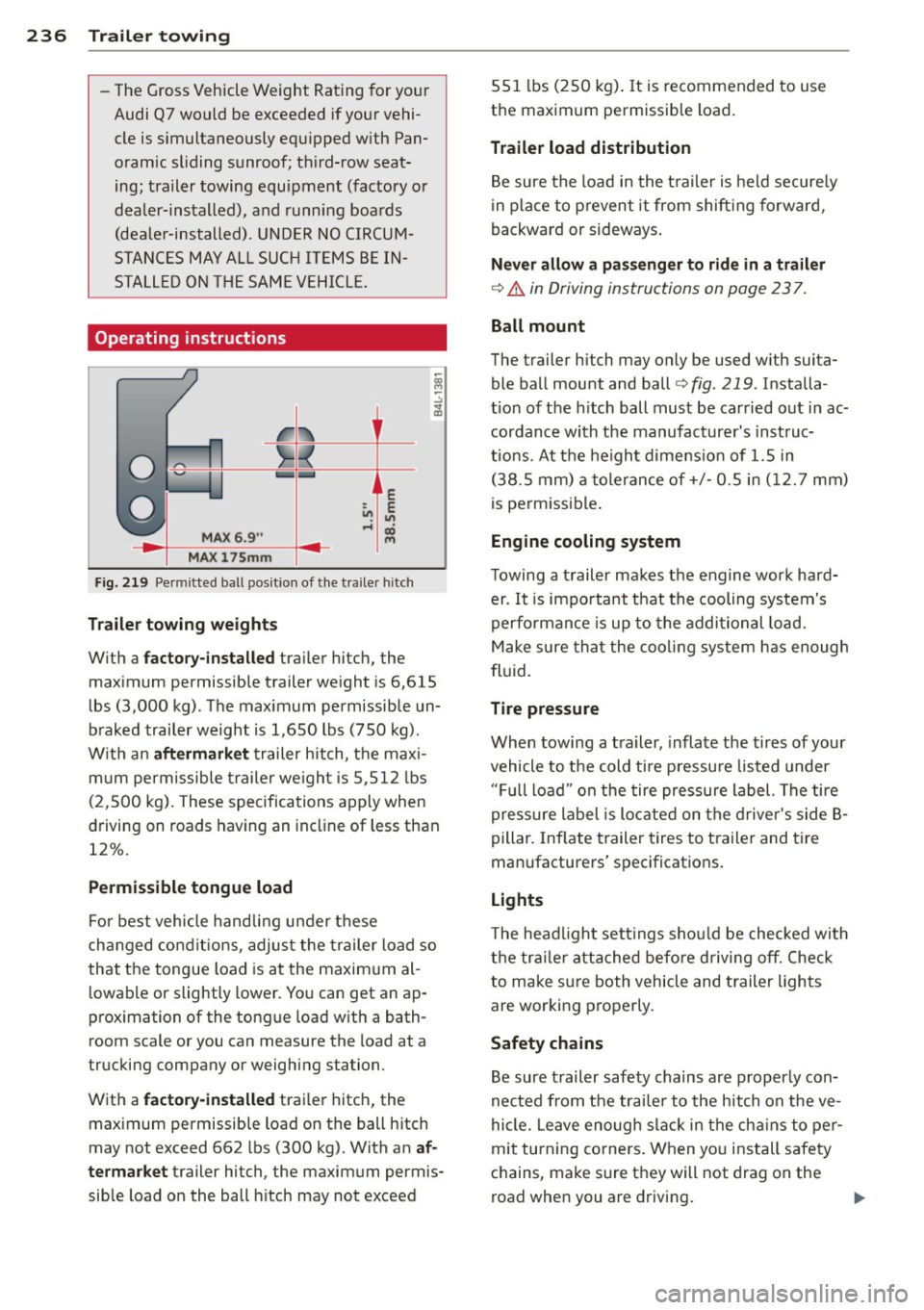
Fig. 219 Permi tted ball p osit ion of the t ra iler hitc h
Traile r to wing we ight s
W it h a fac tor y-ins talled trailer hitch, the
maximum permissible trailer we ight is 6 ,615
lbs (3,000 kg) . The maximum permissible un
braked trailer weight is 1,650 lbs (750 kg) .
W ith an aft er mar ket trailer hitch, the maxi
m um permissible trailer we ight is 5,512 lbs
(2,500 kg) . These specifica tions apply when
driving on roads having an incline of less than
12%.
Perm issible tongue load
F or best vehicle handli ng u nder these
changed condit ions, adjust the trailer load so
that the tongue load is at the maxim um al
l owable or slightly lower. Yo u can get an ap
proximation of the tongu e load with a bath
room scale o r you c an measu re the load at a
trucking company or weighing s ta tion.
With a factory-in stalled trailer hitch, the
maximum permissib le load on the ball hitch
may not exceed 662 lbs (300 kg). With an af
termarket trailer hi tch, the maximum permis
sib le load on the ball h itch may not exceed 551
lbs (250 kg) . It is recommended to use
the maximum permissible load.
Trailer load distribution
Be sure the load in the t ra iler is held secure ly
in place to prevent it from shift ing forward,
backward or sideways.
Nev er allow a pas seng er t o rid e in a trai ler
¢&. in Driving instructions on page 23 7.
Ball m ount
The trailer hi tch may only be used w ith suita
ble ball mount and ball¢
fig. 219 . Installa
tion of the h itch ball must be carried out in ac
cordance with the manufacturer's inst ruc
tions . At the height dimens ion of 1.5 in
(38 .5 mm) a tolerance of+/- 0.5 in ( 12. 7 mm)
is permissible .
Engine cooling system
Towing a trailer makes the engine work hard er . It is impo rtant that the cooling system's
performance is up to the additional load.
Make sure that the cooling system has enough
fluid.
T ire pressur e
When towing a trailer, inflate the tires of your
vehicle to the cold ti re pressu re listed under
" F u ll load" on the tire pressure label. The tire
pressure label is located on the drive r's side B
pillar . Inflate trailer tires to t railer and tire
manufacturers' specifications.
Lights
T he headlight settings should be checked wi th
t h e trai ler attached before d riving
off. Check
to make s ure both vehicle and trailer lights
are worki ng properly.
Safety chains
Be sure trailer safety chains are properly con
nected from the trai le r to the hitch on the ve
hicle. Leave enough slack in the ch ains to pe r
mit turning corners. When you install safety
chains, make sure they will not drag on the
road when you are driving. ..,.
Page 239 of 342
The chains should cross under the trai ler
tongue to prevent it from dropping in case of
separation from the hitch.
([) Note
If you are going to tow a trai le r, you must
activate the trailer operation mode
¢ page 154, Towing a trailer.
Driving instructions
Driving with a trailer always requires extra
care and consideration .
To obtain the best poss ible handling o f vehicle
and trai ler, p lease note the following:
~ Do not tow a loaded trailer whe n your car it
self is not loaded.
~ Be especially careful when passing other ve
hicles.
~ Observe speed limits .
~ Do not drive at the maximum permissible
speed .
~ Always apply brakes early.
~ Monitor the temperature gauge .
Weight distribution
Towing a loaded trai ler with an empty car re
sults in a highly unstable distribution of
weight . If this cannot be avoided, drive at very
low speeds only to avoid the risk of losing
steering control.
A "balanced" rig is easier to operate and con
trol. This means that the tow vehicle should be loaded to the extent possible and permissi
ble, wh ile keeping the trailer as light as poss i
ble under the circumstances . Whenever possi
b le, transfer some cargo to the luggage com
partment of the tow vehicle wh ile observing
tongue load requirements and vehicle loading
considerations.
Speed
The higher the speed, the more difficult it be
comes for the drive r to control the rig. Do not
drive at the maximum permissible speed. Re
duce your speed even more if load, weather or
Trailer towing 237
wind conditions are unfavorable -pa rticularly
when going downhill.
Reduce veh icle speed
immediately if the trail
er shows the slightest s ign of sway ing .
Do not
try to stop the swaying by accelerating.
Observe speed limits. In some a reas, speeds
for vehicles tow ing tra ilers are lower than for
regular veh icles .
Always apply brakes early. When driving
down hill, shift into a lower gear to use the en
gine braking effect to s low the vehicle . Use of
the brakes alone can cause them to overheat
and fail.
Coolant temperature
The coolant temperature gauge¢ page 10
must be observed carefully. If the need le
moves close to the upper end of the scale, re
duce speed immediately and/or turn off the
air conditioner.
If the coolant temperature warning light in
the instrument cluster starts flashing ., pull
off the road, stop and let the engine
idle for
about two minutes to prevent heat build -up .
A WARNING ~
Anyone not properly restrained in a mov-
ing vehicle is at a much greater risk in an
accident. Never let anyone ride in your car
who is not properly wearing the restraints
prov ided by Audi.
Trailer towing tips
Important to know
Your vehicle handles differently when towing
-
a trailer because of the additional weight and
different weight distr ibution . Safety, perform
ance and economy will great ly depend on how
carefully you load your trailer and operate
your rig .
Before you actua lly tow your tra iler, practice
turning, stopping and backing up in an area away from traffic. Keep practicing until you
have become completely familiar w ith the way.,.
•
•
Page 240 of 342
238 Trailer towing
your vehicle-trai ler combination behaves and
responds.
Backing up is difficult and requires practice.
Backing up with a trailer genera lly requi res
steering action opposite to that when backing
up your vehicle without a trailer .
Maintain a greater distance between your ve
hicle and the one in front of you. You will need
mo re room to stop. To compensate for the
trai ler, you will need a larger than norma l
turning radius.
When passing, remember that you cannot ac
celerate as fast as you normally would be
cause of the added load. Make sure you have
enough room to pass. After passing, allow
plenty of room for your trai ler before chang
ing lanes again.
Avoid jerky starts, sharp turns or rapid lane
changes.
(D Tips
- Do not tow a trailer during the break-in
period of your vehicle.
- If you tow a trailer, you r A ud i may re
quire more frequent maintenance due to
the extra load
~page 319.
Parking on a slope
Do not pork on a slope with a trailer. If it can
not be avoided , do so only ofter doing the fol
lowing:
When parking:
.. Apply the foot brake .
.. Have someone place chocks under both the
vehicle and the trai ler wheels .
.. With chocks in p lace, slowly re lease the
brakes until the whee l chocks absorb the
load .
.. Turn the wheels towards the curb .
.. Apply the parking brake .
.. Move the selector lever to
P.
When restarting after parking:
.. Apply the foot brake .
.. Start the engine. ..
Move the selector lever to
D.
.. Release the parking brake and s low ly pull
out and away from the wheel chocks .
.. Stop and have someone retrieve the wheel
chocks .
(D Tips
If you move the selector lever of the auto
matic transmission to
P before applying
the parking brake and before blocking the
wheels, you may have to use more force later to move the lever out of the
P posi
tion.
Page 282 of 342
28 0 T ire s and wheel s
-Always make su re that t he tota l load be
ing t ransp orted -includ ing the we ight of
a tra ile r hitch a nd the tongue weight of a
loaded trailer -does not make the veh i
cle heav ier than the veh icle's Gross Vehi
cl e Weight Rating.
A WARNING
- Incorrect tire pressures and/or underin
flation can lead to a serious or fatal acci
dent .
- Incorrect tire pressures and/o r underin
flation cause increased tire wear and can affect the handling of the vehicle.
- Incor rect tire pressures and/or underin
fla tion can also lead to sudden tire fa il
ure, incl uding a b lowo ut and sudden de
flation, causing loss of vehicle control.
Checking tire pressure
The correct tire pressure for the tires original
ly installed on your vehicle is listed on the tire
pressure label loc;ated on driver's side 8-pil
lar.
The recommended t ire p ress ures are o n the
tire pressure label and in the tab le
¢ page 278, Cold tire inflation pressure.This
means that the pressure must be checked and
ad justed when the tire has not been driven for
more than a couple of m iles (kilometers) at
l ow speeds during the previous three hours.
A ir in the tires expands when the tire heats up
as a result of internal fr iction as it flexes in
use . The t ire pressure is higher when the tire
has wa rmed up than when it is "cold ."
It is the inflat ion pressure in a "cold" tire that
counts. Therefore, you should never let air out
of a warm t ire to match "Cold tire inflation
p ressu re" recommendations ¢
page 2 78. The
tires would then be under inflated and cou ld
fa il suddenly .
The t ire pressure label on you r Audi lists the
r ecommended cold t ire inflat io n pressu res at
maximum capacity fo r the new, o rigi na l
eq uipment t ires that were on your vehicle at the time
it was man ufactu red. Fo r the loca
tion of the labe l
~page 278, fig . 237.
Most tires lose air natur ally over t ime. They
can a lso lose some air if yo u drive over a pot
hole or hit a curb while park ing.
It is usually
not possible to see whether the radial tires
u sed today are underinflated just by looking
at them.
The re fore, be sure to check ti re p ress ures at
least once a mo nth and a lways before going
on a long trip . Make s ure to take the n umber
of peop le and the amount of luggage into ac
count when adjust ing tire pressure for a trip -
even one that you wou ld not consider to be
"long. " See
~ page 2 82, Tires and vehicle
load limits
for mo re important information .
Always use an accurate tire pressure gauge
when checking and adjusting inflat ion pres
s ur es. Check all of the tires and be sure not to
forget the spare tire .
If the pressure in any t ire
i s too high when the t ire is "cold," let air out
of the t ire s low ly w ith the edge of the tire
gauge and keep checking the pressure until
yo u reach the pressure that is correct for the
l oad (passengers and l uggage) and kind of
driv ing you plan to do.
If the pressure in any ti re is too low, note the
difference between the pressure in the co ld
tire and the pressure you need and add the air
that you need to reach the correct pressure for
the vehicle load (passengers and luggage) for
the tires on your vehicle as listed on the on
your vehicle and in this ma nual and the kind
of d riving you plan to do.
Ne ver e xceed the ma ximum infl ation pres
sure listed on the ti re sidewall for an y rea
son .
Remember that the vehicle manufacturer, not
the tire manufact urer, determines the correct
t ire press ure for the tires on your vehicle.
It is important to check the ti re pressure whe n
the tires are co ld.
- Read the required tire pressure from the t ire
pressure labe l. The tire pressure label is lo -
cated o n the driver's side B-pillar . T he tire
liJJ>
Page 284 of 342
28 2 T ire s and wheel s
Tires and vehicle load limits
There are limits to the amount of load or
weight that any veh icle and any t ire can carry.
A vehicle that is overloaded wi ll not handle
well and is more difficult to stop. Overload ing
can not on ly lead to loss of vehicle control
,
but can a lso damage impo rtant parts of the
vehicle and can lead to sudden tire failure in-
,
eluding a blowout and sudden deflation that
can cause the veh icle to crash .
Your safety and that of your passengers a lso
depends on making sure that load limits are not exceeded. Vehicle load includes everybody
and everyth ing in and on the vehicle . These
load limits are tech nically referred to as the
vehicle 's
Gr oss Vehicl e W eig ht Rating
("GVWR").
The "GVWR" includes the we ight of the basic
vehicle, all factory installed accessories , a full
tank of fuel , oi l, coo lant and other fluids plus
maximum load. The maxim um load includes
the number of passengers that the vehicle is intended to carry ("seating capacity") with an
assumed weight of 150 lbs (68 kg) for each
passenger at a designated seating position
and the tota l weight of any l uggage in the ve
h icle. If you tow a trailer, the weight of the
trailer h itch and the tongue weight of the
loaded trailer must be included as part of the
ve hicle load .
The
G ro ss Ax le We ight Rat ing ("GAWR") is
the maximum load that can be applied at each
of the vehicle's two axles .
The Gross Vehicle Weight Rating and the
Gross Axle Weight Rating are listed on the
safety compliance st icker label located on the
driver's side B -p illar . Your Audi has 5 seating
positions, 2 in the front and 3 i n the rear for
total seating capacity of 5. On vehicles w ith
six seats*, your veh icle has two front seats,
two seats in the second row seating and two
seats in the third row seating . On vehicles
with seven seats*, your vehicle has two front
seats, three seats in the second row seating
and two seats in the third row seating . Each seating position has a seat belt
q
page 170,
Safety belts .
The fact that there is an upper limit to yo ur
vehicle's Gross Vehicle Weight Rating means
that the total weight of whatever is being car
ried in the vehicle (including the weight of a
trailer hitch and the tongue weight of the
loaded tra iler) is lim ited. The more passen
gers in the vehicle or passengers who are
heavier than the standard we ights assumed
mea n that less we ight can be carr ied as lug
gage .
The tire pressure label on your Audi also lists
the maximum combined weig ht of a ll of the
occupants and luggage or other cargo that
the vehicle can carry . Fo r the location of the
label qpage278, fig. 237.
_& WARNING
Overloading a vehicle can cause loss of ve
h icle cont ro l, a crash or other accident, se
rious personal injury, and even death.
- Ca rrying more we igh t than your veh icle
was des igned to carry wi ll prevent the
vehicle from handling properly and in
crease the risk of the loss of vehicle con
trol.
- The brakes on a vehicle that has been
overloaded may not be able to stop the
veh icle w ith in a safe distance.
- Tires on a vehicle that has been over load
ed can fail s uddenly, including a blowout
and sudden deflation, causing loss of
control and a crash .
- Always make sure that the total load be
ing transported -including the weight of
a trailer hitch and the tongue we ight of a
loaded trailer -does not ma ke the vehi
cle heavi er than the vehicle's Gross Vehi
cle Weight Rating.
Determining correct load limit
U se t he exa mple b elo w t o ca l
c ulat e th e t otal w eight of the
pa sseng ers a nd luggage or