ABS AUDI Q7 2012 Owner´s Manual
[x] Cancel search | Manufacturer: AUDI, Model Year: 2012, Model line: Q7, Model: AUDI Q7 2012Pages: 342, PDF Size: 86.42 MB
Page 240 of 342
238 Trailer towing
your vehicle-trai ler combination behaves and
responds.
Backing up is difficult and requires practice.
Backing up with a trailer genera lly requi res
steering action opposite to that when backing
up your vehicle without a trailer .
Maintain a greater distance between your ve
hicle and the one in front of you. You will need
mo re room to stop. To compensate for the
trai ler, you will need a larger than norma l
turning radius.
When passing, remember that you cannot ac
celerate as fast as you normally would be
cause of the added load. Make sure you have
enough room to pass. After passing, allow
plenty of room for your trai ler before chang
ing lanes again.
Avoid jerky starts, sharp turns or rapid lane
changes.
(D Tips
- Do not tow a trailer during the break-in
period of your vehicle.
- If you tow a trailer, you r A ud i may re
quire more frequent maintenance due to
the extra load
~page 319.
Parking on a slope
Do not pork on a slope with a trailer. If it can
not be avoided , do so only ofter doing the fol
lowing:
When parking:
.. Apply the foot brake .
.. Have someone place chocks under both the
vehicle and the trai ler wheels .
.. With chocks in p lace, slowly re lease the
brakes until the whee l chocks absorb the
load .
.. Turn the wheels towards the curb .
.. Apply the parking brake .
.. Move the selector lever to
P.
When restarting after parking:
.. Apply the foot brake .
.. Start the engine. ..
Move the selector lever to
D.
.. Release the parking brake and s low ly pull
out and away from the wheel chocks .
.. Stop and have someone retrieve the wheel
chocks .
(D Tips
If you move the selector lever of the auto
matic transmission to
P before applying
the parking brake and before blocking the
wheels, you may have to use more force later to move the lever out of the
P posi
tion.
Page 247 of 342
The MMI control console should be cleaned
with a brush first so that no dirt is trapped be
tween the buttons and the housing . We rec
ommend giv ing the MMI control console a fi
nal w ipe with a cloth mo istened with water
and d ish washing detergent.
Q;) Note
To prevent damage, make sure that no flu
id ever gets into the MMI control console .
Aluminum trim
Use only neutr al- pH products to remove spots
and depos its from alum inum surfaces.
C hr ome ca re products and alkaline cleaners
will attack alum in um s urfaces and can dam
age them ove r time.
& WARNING
Always read and heed a ll WARNINGS and
other information
¢ page 239 .
Fabrics and fabric coverings
Fabrics and fabric coverings (e .g. seats, door
trim panels, etc.) should be cleaned at regu lar
intervals with a vacuum cleaner . Th is removes
surface dirt particles which could become em bedded in the fabr ic through use. Steam
cleaners should not be used, because the
steam tends to push the dirt deeper into the
fabric and lock it there.
Norm al cleaning
Generally, we recommend using a soft sponge
or a lint-free microfiber cloth to the clean fab
ric. Brushes should only be used for carpets
a nd floor mats, since other fabric surfaces
could be harmed by b rushes.
Normal surface sta ins can be cleaned using a
commercia lly available foam cleaner . Spread
the foam on the surface of the fab ric with a
soft sponge and work it in gently. Do not sat u
r ate the fabric. Then pat the foam dry using
absorbent, dry cloths (e .g. microfiber cloth)
and vacuum it after it has dried comp lete ly.
Cleaning and protec tion 245
Cl ean ing sta in s
Stains caused by beverages (e.g . coffee, fruit
juice, etc.) can be treated with a mild deter
gent solution. Apply the detergent sol ution
with a sponge. In the case of stubborn stains, a detergent paste can be applied directly to
the s tain and worked into the fabric . After
wards, use copious amounts of clean water to
remove the rema ining detergent . Apply the
water with a damp cloth or sponge and pat
the fabric dry with an abso rbent, dry cloth.
Stains from chocolate or makeup should have detergent paste (e .g . ox -gall soap) rubbed in
to them . Afterwards, remove the soap with
water (damp sponge).
Alcohol can be used to treat stains from
grease, o il, lipstick or a ballpoint pen . Melted
grease or dye must be patted off using ab
sorbent mater ial. It may be necessa ry to re
treat the areas with detergent paste and wa
te r.
In the case of general soiling of the uphols
tery and cover material, we recommend hir ing
a specia list that has the eq uipment to clean
the seat cove rs and othe r fabr ic surfaces by
shampooing and spray extraction.
A WARNING
A lways read and heed all WARNINGS and
the information
¢ page 239.
(D Tips
Open Ve lcro fas teners on yo ur cl othing can
damage the seat cover . Please make sure
that Ve lcro fasteners are closed .
Plastic parts and instrument panel
Always use a clean cloth moistened in clear
water to clean these areas. For persistent d irt
use an Aud i approved
s olvent-fre e plastic
clea ner/protectant . .,.. •
•
Page 249 of 342
preservative creme that contains UV
blockers and that works into the leather .
This creme w ill nourish and mo istur ize
the leather, he lp ing it to breathe and
stay supple. It also helps to build up a
protective coating on the surface.
- Clean the leather every 2 - 3 months,
and clean any areas that get soiled.
- Remove fresh marks made by ballpoint pens, ink, lipst ick, shoe polish, etc. as
soon as possib le.
- Preserve the color of the leather as need
ed by using a special colored leather care
creme to touch up areas of uneven color .
Cleaning and caring for leather
upholstery and trim
Applies to vehicles: with natural leather
Natural leather requires special care and at
tention.
Norm al cleaning
.,. Clean soiled areas w ith a slightly mo istened
cotton or woolen cloth.
Mor e stub born dir t
.,. More stubborn dirt can be removed using a
cloth saturated with a m ild soap so lution (2
tablespoons m ild liquid soap) .
.,. Never allow the soap solution to saturate
the leather, and make certa in that no water
soaks into the seams .
.,. Wipe off the soap solut ion with a soft, dry
cl oth.
Cleaning spots
.,. Remove fresh water -b ased spots (such as
coffee, tea, ju ices, blood) w ith an absorbent
cloth or paper towel.
.,. Remove fresh
gr eas e or oil -ba sed spot s
(such as b utter, mayon naise , chocolate) wi th
an absorbe nt cloth or paper towe l, or use
the cleaner from the leat her ca re kit i f the
spot has not yet penetrated into the s urface
of the leather .
.,. Use an oil/grease disso lv ing spray, if
oil /
grease spots h ave d ried on.
Cleaning and protec tion 247
.,. Remove specific k inds of spots (ba llpoint
pe n, fe lt marker, fingernai l polish, water
based pa int, shoe po lish, etc .) with a spot
remover specifically formu lated for leather.
L e ather care
.,. Every half year use an approved leather care
product (available from your authorized Au
di dea ler) to care for the leather .
.,. App ly the product very sparingly.
.,. Wipe it off with a damp cloth.
If you have any q uestions about cleaning and
caring for the leather in yo ur vehicle, it is best
to contact your a uthorized Audi dea ler, who
will be g lad to help you and tell you about our
full range of leather care products, such as :
- Leather cleaning and care kit
- Creams to ca re fo r colored leather
- Spot removers for ballpoin t pens, shoe pol-
ish, etc.
- Oil/grease d issolving spr ay
- New and upcom ing products .
.&_ WARNING
Always read and heed all WARN INGS and
other in formation
r::!)page 239 .
(D Note
- Never use chem ica l so lvents (e .g . lighte r
fluid, tu rpe nti ne), waxes, s hoe polish o r
simi la r prod ucts on the lea ther surfaces
i n yo ur Audi .
- T o avoid damage, have stubbo rn sta ins
remove d by a comme rci al clean ing spe
c ialist .
Cleaning Alcantara ® (synthetic suede)
Applies to vehicles: with Alcantara upholstery
Removing du st and dirt
.,. Mois ten a cloth, squeeze out excess water
and wipe down the seat surfaces .
Removing stains
.,. Moisten a cloth with lukewa rm wate r o r
w ith di luted
ethyl (rubbing ) alc ohol.
•
•
Page 271 of 342
thoroughly checked by an authorized Audi
dealer or qualified workshop and the cause
corrected .
If the brake fluid level is too low ,
the brake warning/indicator light will i llum i
nate. Con tact an au thori zed Aud i dealer
im ·
mediately .
@ Tips
The brake fluid reservoir is located under
neath the cover.
Changing brake fluid
Have the brake fluid changed by an experi
enced technician .
Brake fluid absorbs moist ure from the a ir. If
the water content in the brake fluid is too
h igh, corrosion in the brake system may result
after a per iod of t ime . The bo iling po int of the
brake fluid w ill also decrease considerably and
decrease b raking performance .
Therefore, the brake flu id must be changed
every two years . Always use new brake fluid
which conforms to Federal Motor Vehicle
Standa rd "FMVSS 116 DOT 4".
The brake f lu id reservoir can be difficult to
reach, therefore, we recommend that yo u
have the brake f lu id changed by your author
i zed
Audi dea ler . Your deale r has the co rrect
too ls, the right b rake fluid and the know-how
to do this fo r you.
_& WARNING
- Br ake fluid is po isonous . It must be s to r
ed only in the closed orig inal con tainer
o ut of the reac h of c hildren!
- Br ake f ailure can resu lt from old or in ap
propr iate b ra ke fluid. Observe these pre
caut ions:
- Use on ly brake fluid that meets SAE
specif ication
J 1 703 and conforms to
Federal Motor V ehicle Sta ndard 116.
A lways check wi th you r auth o riz ed Audi
deale r to ma ke s ure you are using the
correct brake flu id . T he correc t type of
Checkin g and fillin g 269
brake f luid is also ind icated on t he
brake f luid rese rvoir.
- The bra ke fl uid must be new. Heavy use
of the brakes can cause a vapo r lock if
the brake fluid is left in the system too
l ong. This can seriously affect the effi
c iency of the brakes as well as your
safe ty. This co uld resu lt in an accide nt.
(1) Note
Brake fluid will damage the paint of your
vehicle.
@) For the sake of the environment
Because o f the prob lem of proper disposal
of brake fluid as well as the spec ial too ls
required and the necessary expertise, we
recomme nd that you have the brake flu id
changed by you r autho rized Aud i deale r.
Battery
General information
U nder normal operating cond itions, the bat
tery in your Audi does not need any ma inte
nance. With
high outside temperatures or
long da ily drives we recommend that you have
the e lectrolyte level chec ked by an au thorized
Audi dealer or qualified wo rkshop . The elec
t ro lyte level should also be che cked each time
t h e battery is cha rged
~ page 271.
Have the battery checked when you take your
vehicle in for se rv ice . You a re well advised to
replace a battery that is o lde r th an 5 years .
With certain types of airbag deployment, the ba tte ry is disconnected from the ve hicle elec
t rical sys tem for safety reasons
~ A in Re
pair, care and disposal of the airbags on
page 193.
Disconnecting the battery terminals
Some vehicle fu nctions (power window regu
lators, fo r example) are lost if the battery te r
mina ls are disconn ected . T hese functions have
to be relearned after the bat tery termina ls are
conne cte d ag ain. To p revent t his, the battery .,. •
•
Page 272 of 342
2 70 Chec king and filling
should only be disconnected from the vehicle
e lectrical system when absolutely necessary
for repairs.
Vehicles not driven for long periods
If you do not drive your vehicle over a pe riod
of several days or weeks, electrical compo
nents are gradually cut back or switched off.
This reduces energy consumption and main
tains starting capab ility over a longer period
c;, page225.
Take into consideration that when you un lock
your vehicle, some convenience functions, such as the interior lights or the power seat
adjustment, may not be available. The con
venience functions will be available again
when you turn on the ignition and start the
engine .
Winter operation
During the winter months, battery capacity
tends to decrease as temperatures drop . This
is because more power is also consumed while
starting, and the headlights, rear window de
fogger, etc., are used more often .
Avoid unnecessary power consumption, par
ticularly in city traffic or when traveling only
short d istances . Let your authorized Audi
dealer check the capacity of the vehicle bat
tery before w inte r sets in
¢ page 271. A well
cha rged battery w ill not only prevent starting
p rob lems when the weather is cold, but will
a lso last longer.
(D Tips
If your vehicle is left standing for several
weeks at extremely low temperatures, the
vehicle battery should be removed and
stored where it will not freeze . This wi ll
prevent it from being damaged and having
to be replaced.
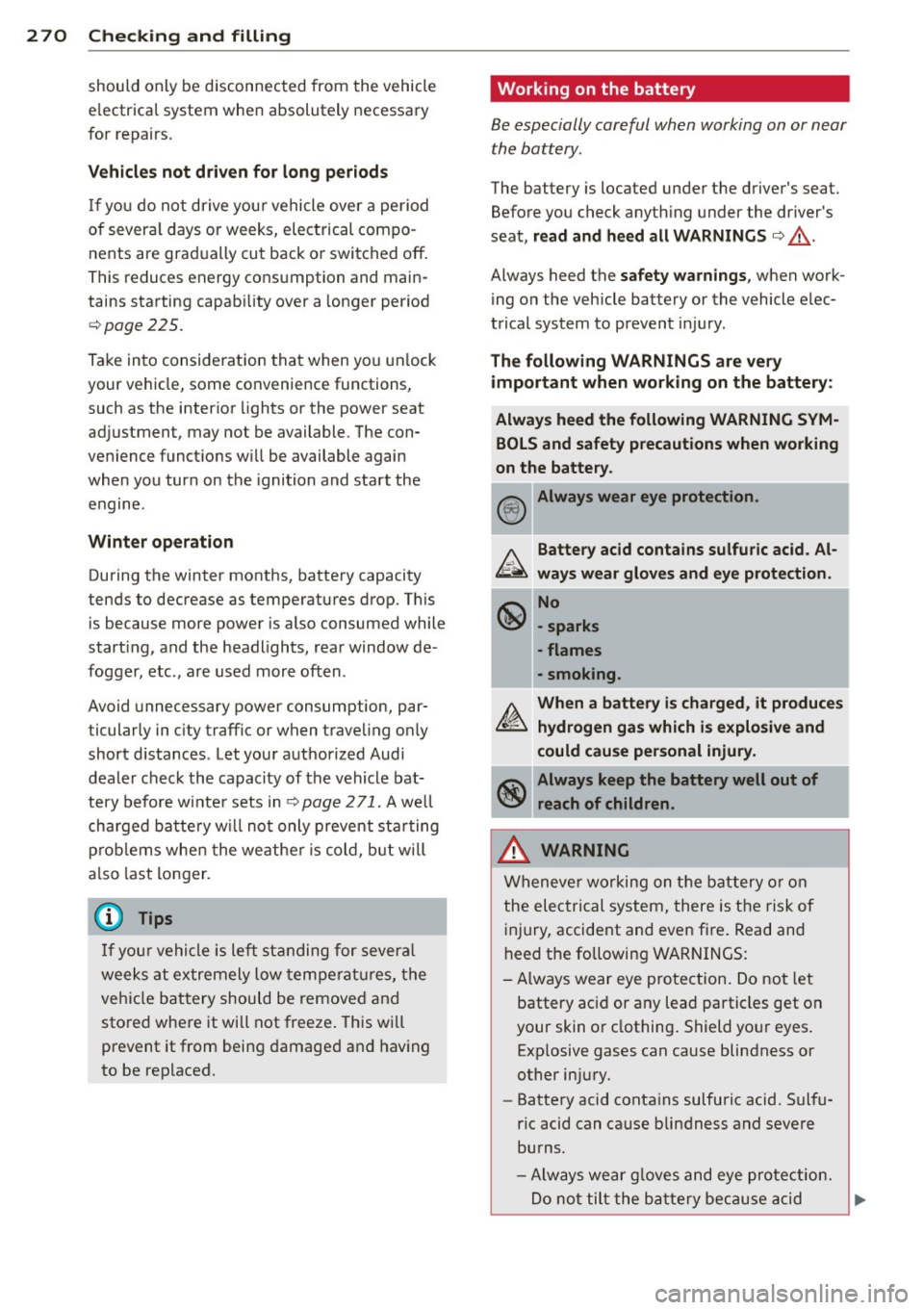
Working on the battery
Be especially careful when working on or near
the battery.
The battery is located under the driver 's seat.
Before you check anyth ing under the driver 's
seat,
read and heed all WARNINGS c:;, _&.
Always heed the safety warnings, when work
ing on the vehicle battery or the vehicle elec
trical system to prevent injury.
The following WARNINGS are very
important when working on the battery:
Always heed the following WARNING SYM BOLS and safety precautions when working
on the battery.
@!) Always wear eye protection .
b.. Battery acid contains sulfuric acid . Al
~ ways wear gloves and eye protection.
~ No
\!:51 -sparks
- flames
- smoking.
A. When a battery is charged, it produces
~ hydrogen gas which is explosive and
could cause personal injury.
~ Always keep the battery well out of
~ reach of children.
,&. WARNING
Whenever working on the battery or on
the electrical system, there is the risk of
injury, accident and even fire . Read and
heed the following WARNINGS:
- Always wear eye protection. Do not let
battery ac id or any lead particles get on
your skin or clothing. Shield your eyes .
Exp losive gases can cause blindness or
other injury.
- Battery acid contains sulfuric acid. Sulfu
ric acid can cause blindness and severe
burns.
- Always wear g loves and eye protection.
-
Do not tilt the battery because acid ~
Page 295 of 342

TPMS malfunction indicator is combined with
the low tire pressure tellta le . When the sys·
tern detects a malfunction, the telltale will
flash for approximately one minute and then
remain continuously illuminated. This se·
quence will continue upon subsequent vehicle
start-ups as long as the malfunction ex ists .
When the malfunc tion indicator is illuminat·
ed, the system may not be able to detect or
signal low tire pressure as intended. TPMS
malfunct ions may occur for a variety of rea·
sons, including the installation of replace·
mentor alternate tires or wheels on the vehi·
cle that prevent the TPMS from functioning
properly. Always check the TPMS malfunction
telltale after replacing one or more tires or
wheels on your vehicle to ensure that the re
p lacement or alternate tires and wheels allow
the TPMS to continue to function properly.
Tire pressure indicator appears
The tire pressure indicator in the instrument
cluster informs you if the tire pressure is too
low or if there is a system malfunction.
-
-
;g
Fig. 242 Display: underinflat io n warning
Fig. 243 Display: Syste m ma lfunct io n
Using the ABS sensors , the tire pressure moni·
toring system compares the tire tread circum·
Tires and wheels 293
ference and vibration characteristics of the in
dividual tires. If the pressure decreases in one
or more tires, this is indicated in the instru
ment cluster with a warning symbol
[I] and a
message
c;, fig. 242 . The driver message in the
display goes out after S seconds . The driver
message can be displayed again by pressing
the
ICHECKI button . If only one tire is affect·
ed, the disp lay wi ll indicate its posit ion.
The tire pressure monitoring must be reset via
MMI each time the pressures are adjusted (e.
g. when switching between part ial and fu ll
load pressu re) o r after changing or replacing a
tire on your vehicle
c;, page 294. You can find
the recommended tire pressures for your vehi ·
cle on the label on the driver's door pillar
c;,page 278.
Tire tread circumference and vibration charac·
teristics can change and cause a tire pressure
warning if:
- the tire pressure in one or more tires is too
low,
- the tir e has structural damage ,
- the tir e pressure was changed, wheels rotat-
ed or replaced but the TPMS was not reset
c;,page294 .
Warning symbols
[I] loss of pressure in at least one tire c;, .&, .
Check the tire or tires and replace or repair if
necessary . The indicator light
[I] in the instru·
ment cluster also illum inates
c;, page 14.
Check/correct the pressures of all four tires
and reset TPMS via MMI.
IIQ§S, (Tir e Pressure Monitoring System) Tire
pressure! System malfunction . If llQ§f:1 ap·
pears after switching the ignition on or while
driv ing
c;, fig. 243 and the indicator light [I] in
the instr ument cluster blinks for approxi
mately one minute and then stays on, there is
a system malfunction . See your authorized
Audi dealer as soon as possible.
Page 296 of 342

29 4 T ire s and wheel s
,8. WARNING
-If the t ire pressure indicator appears in
the instrument cluster display, one or
more of your tires is s ignificantly under
inflated. Reduce your speed immediately
and avoid any hard steering or bra king
maneuvers. Stop as soon as possible and
check the tires and their pressures. In
flate the tire pressure to the proper pres sure as indicated on the vehicle 's tire
pressure label
c> page 2 78. Driving on a
significantly under-inflated tire causes
the tire to overheat and can lead to tire
failure. Under-inflation also is likely to impair the vehicle's handling and stop
ping ab ility.
- The driver is responsible for ma inta ining
the correct tire pressures. You must check the t ire pressures regularly.
- Under certain cond itions (such as a spor
ty driving style, winter condit ions or un
paved roads), the pressure mon itor ind i
cator may be de layed.
- Ask your author ized Audi dealer if run
flat tires may be used on your veh icle.
Your vehicle registrat ion becomes inval id
if you use these tires when not permit
ted. Damage to your vehicle or accidents
cou ld also resu lt.
(D Tips
- The tire pressure monitoring system
stops working when there is an ESC/ABS
malfunction.
- Using snow chains may result in a system
malfunction.
- The tire pressure monitoring system on
you r A udi was ca lib rated using tires with
the "AO" or "RO" identification. We rec
ommend using these tires .
Reset tire pressure monitoring system
If the tire pressure is adjusted, wheels are ro
tated or changed, the TPMS must be reset via
MMI .
.. Turn on the ignition. ..
Select: Function b utton
I CAR !> Control but
ton
S ys tem s* > Tire p re ss ure mo nitoring >
Sto re no w. Or
.. Select: Function button
I CAR !> Control but
ton
Ca r systems * > Servi cing & checks >
Tire pre ss ure mon itoring > Stor e tire pr es
s ure s.
(D Tips
Before resetting the TPMS, the current
pressures of all four tires must correspond
to the specified values. Adjust the tire pressure and reset the pressure in the t ire
pressure monitoring system acco rding to
the load you are car ry ing
.:>page 278.
Page 297 of 342
What do I do now?
Jack, tools and
inflatable spare tire
Tools
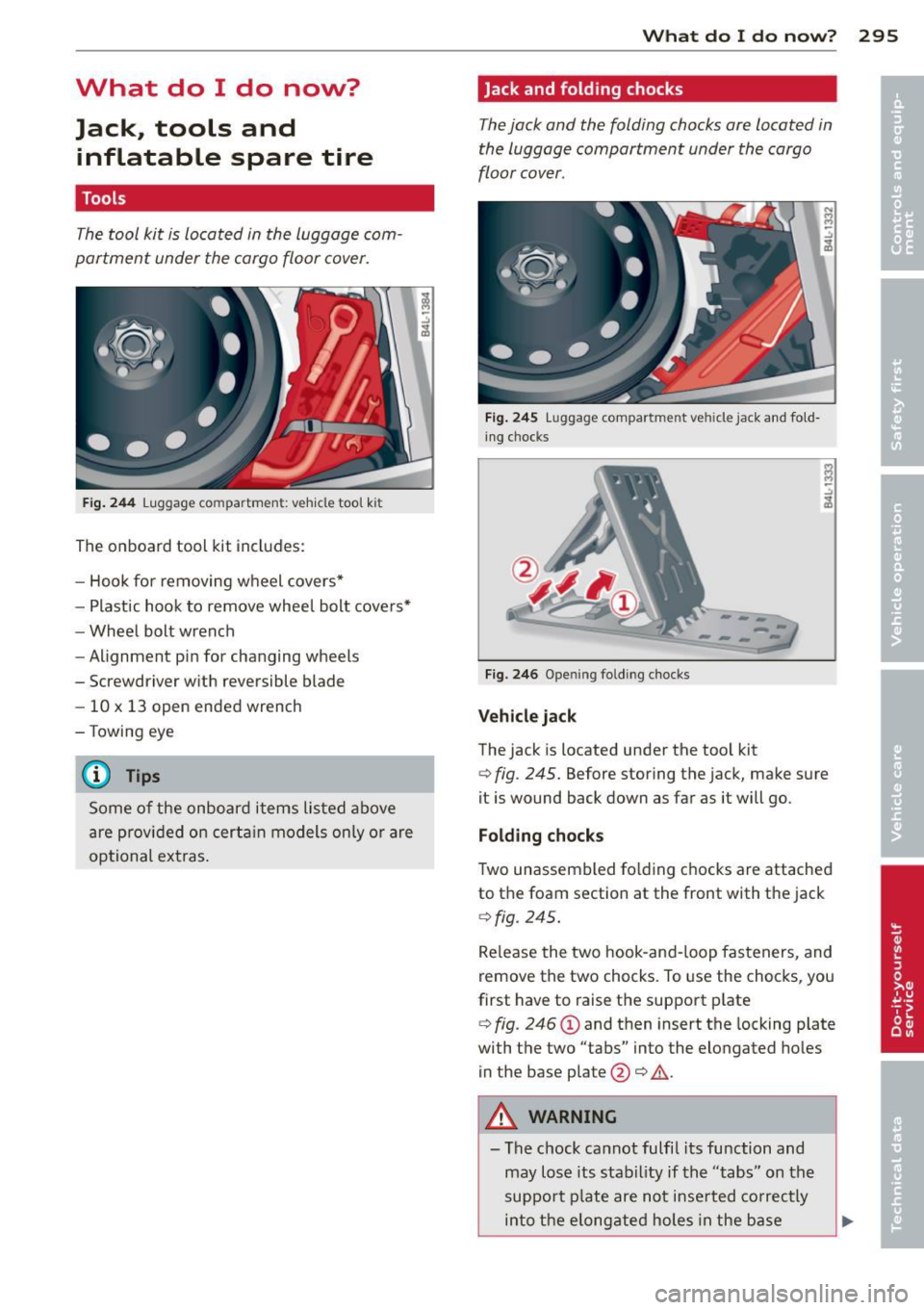
The tool kit is located in the luggage com
partment under the cargo floor cover.
F ig . 2 4 4 Luggage compa rtme nt: ve hicle tool ki t
The on board tool kit includes:
- Hook for removing wheel covers*
- Plastic hook to remove wheel bolt cove rs*
- Wheel bolt wrench
- Alignment pin for changing wheels
- Screwdriver with reversible blade
- 10 x 13 open ended wrench
- Towing eye
@ Tips
Some of the onboard items listed above
are prov ided on certa in models only or are
optional extras .
What do I do now ? 295
Jack and folding chocks
The jack and the folding chocks are located in
the luggage compartment under the cargo
floor cover.
F ig . 2 4 5 Luggage compar tme nt ve hicle jack and fold·
i ng chocks
--------
F ig. 246 Ope ning fo ldi ng chocks
Vehi cle jack
The jack is located under the tool kit
¢ fig . 245. Before storing the jack, make sure
it is wound back down as far as it will go.
Folding chocks
Two unassembled fo lding c hocks are attached
to the foam section at the front with the jack
¢fig . 245.
Re lease the two hook-and-loop fasteners, and
remove the two chocks. To use the chocks, you
first have to raise the support plate
¢ fig . 246 (D and then insert the locking plate
with the two "tabs" into the elongated ho les
in the base plate @¢.&. .
A WARNING
-The chock cannot fulfil its function and
may lose its stability if the "tabs" on the
support p late are not inse rted co rrectly
into the elong ated holes in the base
Page 298 of 342
2 96 What do I do now ?
plate. If this happens, the vehicle may
start to move while a wheel is being changed.
- Never use the folding chocks if they are
damaged or if they have not been assem
bled correctly.
A WARNING
Improper use of the vehicle jack can cause
ser ious persona l injuries.
- Never use the jack supplied with your Au
di on anothe r vehicle, pa rticularly on a
heavier one. The jack is only suitable for
use on the vehicle it came w ith.
- Us ing a bumper jack to raise the vehicle
will damage the bump er system. The
jack may slip, causing in jury.
- Never support your veh icle on cinder
blocks, b ricks or other objec ts. These
may no t be ab le to suppor t the load and
c ou ld cau se injury whe n they fail.
- Never start o r run the engine while the
vehicle is supported by the j ack.
- If you must wo rk under the vehicle, al
ways use safety stands specifically de
signed for this purpose.
- Always make su re the inf latable spare
ti re and even a flat tire a re se cu red in
pla ce and not loose, otherwise t hey
c ou ld f ly forward, causing personal in jury
to passengers in the veh icle in an acc i
dent o r sudden mane uver.
Removing bass box
Applies to vehicles: with bass box
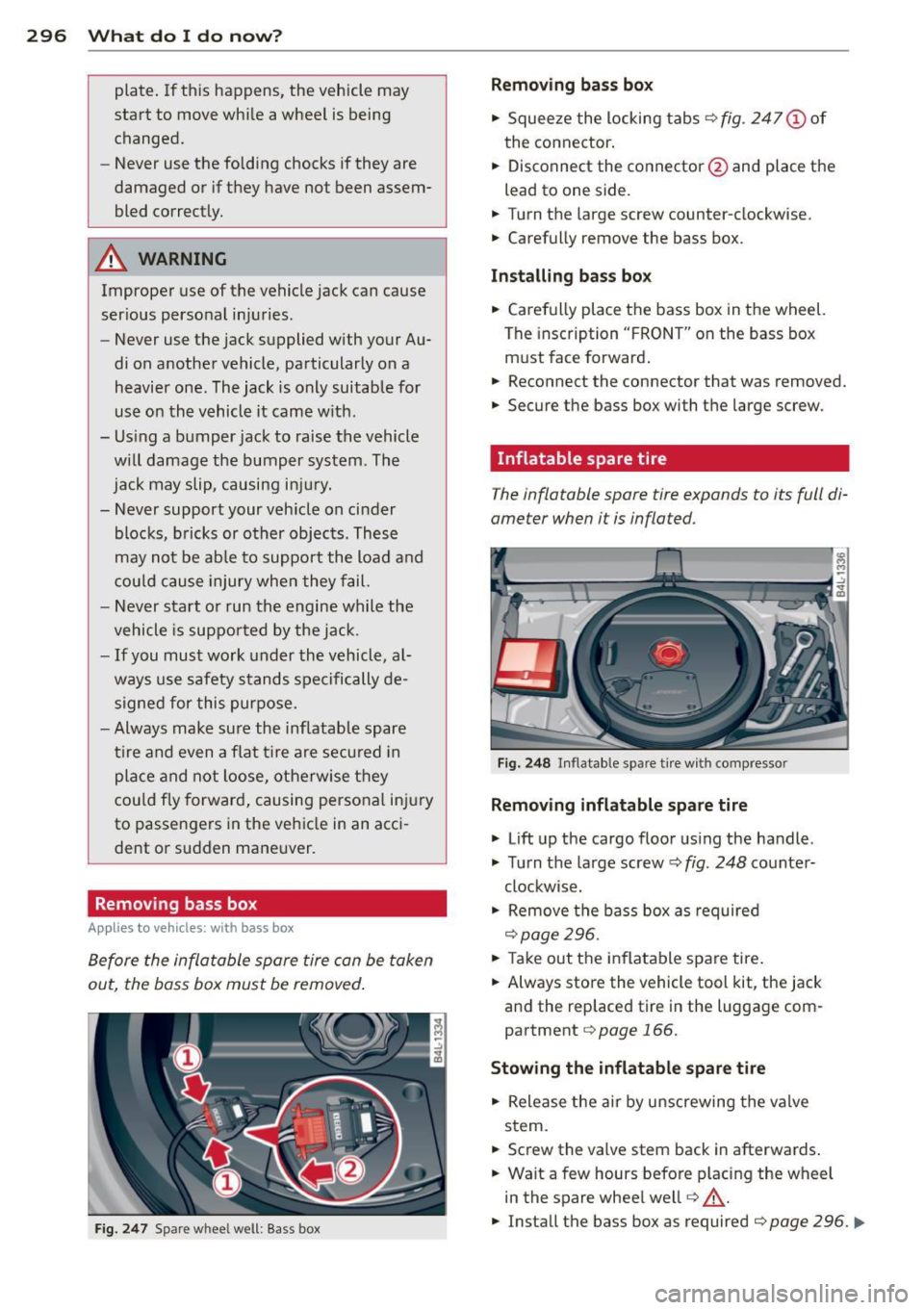
Before the inflatable spare tire can be taken
out, the bass box must be removed .
Fig. 247 Spare wheel well: Bass box
Removing bass box
" Squee ze the locking tabs ¢ fig. 247 (!) of
the connector .
" Disconnect the connector @and place the
lead to one side.
" Turn t he large screw counter-clockwise.
" Carefully
remove the bass box.
Installing bass bo x
" Carefully place the bass box in the wheel.
The insc ription " FRO NT" on the bass box
m ust face forward .
" Reconnect the connector that was removed.
" Secure the bass box with t he large screw.
· Inflatable spare tire
The inflatable spare tire expands to its full di
ameter when it is inflated.
Fi g. 2 48 In flatable spare t ire w ith compressor
Removing inflatable spare tire
" Lift up the cargo floor us ing the handle .
" Tu rn the large screw¢
fig. 248 co unter-
clockwise.
" Remove the bass box as required
¢page 296.
" Take out the inflatable spare tire .
" Always sto re the vehicle tool kit, the jack
and the replaced tire in the luggage com
partment
¢page 166.
Stowing the inflatable spar e tire
" Release the air by unscrewing the valve
stem.
" Screw the
valve stem back in afterwards .
" Wait a few hours befo re p lacing the wheel
in the spare whee l we ll
r=:, _.&.
" Install the bass box as required r=:, page 296 . ..,.
Page 327 of 342
Alternator Malfunction . . . . . . . . . . . . . . . . . . . . . . . 31
Ambience lighting Lighting p rofiles .......... .. .. .. .... 62
Anti-freeze
refer to Engine coolant system .. ... .. 265
Anti-lock brake system How the ABS system works . .. .. .. .. . 223
War ning/ indicator lights ... .. .. .. .. .. 18
Anti-Slip Regulation System (ASR) How t he system works .. ... .. .. .. .. . 22 1
Anti-theft systems Anti- theft alarm system . . . . . . . . . . . . . SO
E lect ronic immobilize r ..... .. .. .. .. .. 40
App roach/departure angle . ......... .. 232
Ashtray ..... ... .. .. ..... ... .. .. .... 86
ASR How t he A nti-Sli p Regula tion System
works ... .. ................. .. ... 22 1
Aster isk
What does it mean whe n someth ing is
marked with an aste risk? . . . . . . . . . . . . . . 6
Aud i brak ing guard ......... .. .. .. .. . 126
Error messages .......... .... .. ... 128
Sett ings ................... ... ... 128
Stat us messages .... ..... .. .. .. .. . 128
Sw itching on and off ...... .. .. .. .. . 128
Aud i parking system plus with rearv iew
camera ... .. ................. .. ... 144
Adjusting the display ......... .... .. 148
Adjusting the warni ng tones .. .. .. .. . 14 8
Rearview camera - pa rking mode 1 ... . 147
Rearview camera - pa rk ing mode 2 . .. . 14 7
Safety precau tions ........ .. .. .. .. . 14 4
Sw itch ing on and off ... ... .. .. .. .. . 146
Trailer hitch . . . . . . . . . . . . . . . . . . . . . . 14 9
Aud i Servic e Repa ir Manuals and Litera-
ture .. .. .. .. ................. .. .. . 319
Auto-Check Control . . . . . . . . . . . . . . . . . . 30
Automatic belt retrac to r . . . . . . . . . . . . . 17 4
Automatic ca r wash
refer to Was hing ......... .. .. .. .. . 24 0
Automatic mode Four- zone automatic comfort a ir cond i-
tioning .. ............ ...... .... ... 98
Automatic S hift Lock (ASL) . ... .. .. ... 139
Inde x 325
Automat ic transm iss ion .. ..... ... .. .. 137
Automatic Shift Lock (ASL) ... ... .. .. 139
Driving ... .. .. .. .. . .. ... .... ... .. 137
Dynam ic shift program ............. 140
Emergency mode . ................. 141
Emergency re lease for selecto r lever .. 142
Ig nition key safety lock . .. .. ... ... .. 105
Ki ck-down . . . . . . . . . . . . . . . . . . . . . . . . 140
Manua l shift prog ram .......... .... 140
Se lector lever .. .. .... ........... .. 138
S hi ft buttons . . . . . . . . . . . . . . . . . . . . . 141
Steering wheel with tiptronic ®
A UTO mode 141
AC climate cont ro ls . . . . . . . . . . . . . . . . . 94
Auto Safety Hotline ............. .... 167
Ave rage speed . . . . . . . . . . . . . . . . . . . . . . . 24
Avoid damaging the vehicle .......... . 230
B
Bass box . .. .. .. .. ... ... ... .. .. .. .. 296
Battery . ... .. .... .. . .. .. ..... ... .. 269
Battery location .. .. . ... .... ... .. .. 270
Charg ing .. .. .. .. ................. 271
Important warnings when working on
the battery .. .. .. .. . .. .. ..... ... .. 270
Jump start ing .. .. .. ............... 308
Low .. .. .. .. .. .. .. . .. .... .... .... 225
Rep lac ing the battery .......... .. .. 273
State of cha rge . .. ................. 225
Voltage ... .. .. .. .... ........... .. . 36
Win ter operation ... . .. ..... ... .. .. 269
Working on the battery . ..... ... .. .. 270
Befo re d rivi ng . .. .. .. ............... 160
B lended gasoline .. ............. .. .. 2SO
Body cavity sealing ... . .. ..... ... .. .. 244
Boos ter seats ..... .. ............... 208
B rake assistant .. .... . ... ...... ... .. 224
B ra ke booste r ... .. .... ............. 223
Brake fluid Changi ng the brake fluid . .......... . 269
Checking the brake fluid level ....... . 268
Rese rvoir . .. .. .. .. . ....... ..... .. 268
What is the correct bra ke fluid level? .. 268
Wha t should I do i f the brake fluid w arn-
ing light comes on? .. .. ..... ... .. .. 2 68
B rake light
Defec tive . . . . . . . . . . . . . . . . . . . . . . . . . 23
•
•