ECO mode AUDI Q7 2012 Owner´s Manual
[x] Cancel search | Manufacturer: AUDI, Model Year: 2012, Model line: Q7, Model: AUDI Q7 2012Pages: 342, PDF Size: 86.42 MB
Page 130 of 342

128 Adapti ve crui se co ntrol
-The radar sensor's function and range
can be reduced by rain, snow and heavy
spray. Moving vehicles up ahead may not be promptly detected or may not be de
tected at all.
- Always pay careful attention to the traf
fic s ituation and be ready to intervene
and be ready to take complete control
whenever necessary.
- Reflective surfaces includ ing crash barri
ers or tunnel entrances may impair the
function of the radar sensor.
Settings in the MMI
Applies to vehicles: with adaptive cruise control
T he settings of the Audi braking guard are
performed in the MMI.
._ Select : Funct ion button ICARI > Control but
ton Systems * > Audi brak ing guard . Or
._ Select : Funct ion button
ICARI > Control but
ton Car system s* > Driver as sist> Audi
braking guard .
- System -the Audi braking guard system can
be switched
On and Off .
-Earl y warning - the acoustic warning and
the messages can be switched
On and Off .
(D) Tips
When handing over the keys to another pe rson, the prev ious settings are adopted
if the Audi braking guard is act ivated
~ page 43.
Driver's information in the instrument
cluster display
Applies to vehicles: with adaptive cruise co ntrol
braking gua rd activated
This message appears whe n the Audi braking
guard applies the b rakes during a second
stage (acute) warning .
braking gua rd off
This message appears whe n the system has
been deact ivated v ia the MMI. This message also appears briefly at each beginning of a trip
if the system is switched off.
T his message a lso appears when the system is
not availab le because of a ma lf u nct ion or if
E SC is switched to the Off road
mode ~
page 219. The system can no longer
warn of an impending coll is ion .
Page 146 of 342

144 Parking system
Audi parking system
plus with rearview
camera
Introduction
Appl ies to vehicles: with Audi parking system plus w ith
rearview camera
Fig. 164 Pa rking mo de 1 : Backing into a parkin g space
Fig. 165 Parking mode 2: parallel parking
Vehicles with the Audi park ing system plus
with rearview camera a re equipped w ith a
r ea rvie w ca mera in addition to the acoust ic
and v isual park ing system.
You can chooses between park ing modes to
he lp you when parking your vehicle. Use
"park ing mode
1" when parking in a parking
space or garage
r=;, fig. 164. If you are going to
be paralle l parking, use "park ing mode 2"
r::;:, fig. 165.
General Information
Applies to vehicles: w ith Audi park ing system plus with
rearview camera
F ig . 1 66 Area covered © and area not covered @by
the rea rview came ra.
F ig. 167 Rea r lid : Location of the rearview camera
Sen so rs in the bumper
Sensors are located in the front and rear
bumpers. If these detect an obstacle, audible
and visual signals warn you. The range at
which the sensors begin to measure is approx
imately:
fro nt side
3 ft (0.90
m)
center 4 ft (1.20 m)
side 2 ft (0.60 m)
rea
r
center 5.2 ft (1.60 m)
The closer you get to the obstacle, the shorter
the interval between the aud ible signals. A
continuous tone sounds when the obstacle is
less than approximately 1 foot (0.30 meters)
away . Do not continue dr iv ing farther .
If the distance to an obstacle remains con
sta nt, the volume of the distance warning
gradually drops after about four seconds (this
doe s not apply in the cont inuo us tone range). .,._
Page 147 of 342
Rearv iew cam era c overage a rea
The MM I display shows the area covered by
the rearview camera c:>
fig. 166 (!). Objects
that are not in the area covered @are not
shown on the MMI display .
We recommend that yo u practice parking with
the rearview camera in a traffic-free location
or parking lot to become familiar with the sys
tem, the orientation lines, and their function.
When do ing th is, there should be good light
and weather conditions.
I n the MMI disp lay, objects or vehicles appear
closer or further away if:
- you are driving in reverse gear from a level
s u rface onto an incline, or a downward
s lope,
- you are driving in reverse gear toward pro
truding objects,
- the vehicle is carrying too much load in the
rear .
The accuracy of the or ientat ion lines and blue
surfaces dimin ishes if:
- the Adaptive A ir Suspension* is faulty or the
dynamic, offroad or lift mode is on,
- the rearv iew camera does not provide a reli
able image, for example, in poor visibility
cond it ions or if the lens is dirty,
- the image on the screen is not visible due to sun glare and reflection.
Ca ring for the rear view c amer a len s
The rearview camera is located above the rear
license plate bracket . For the parking system
to operate, the lens
c:> fig. 167 must be kept
clean:
- Dampen the lens with a househo ld alcoho l
based glass cleaner, and then wipe the lens
clean with a dry cloth c:>0 .
- Remove snow with a hand brush and ice
preferably with a de-icing spray
c:> ([).
A WARNING
-The parking system cannot rep lace the
dr iver's attention. The driver alone is re-
-
Par king system 145
sponsib le for parking and simi lar d riving
maneuvers.
- Sensors have blind spots in which objects
cannot be detected. Pay spec ia l attention
to small children and an imals because
the sensors cannot always detect them.
-Always keep your eyes on the vehicle's surroundings, us ing the rearview mirror
as well.
- Do not allow yourself to be distracted
from traffic by the rearv iew camera pic
tures .
- If the position and the installation angle
of the camera has changed, for example,
after a rear end collision, do not continue
to use the system for safety reasons.
H ave it checked by a qualified dea le rship.
(D Note
- Low obstacles a lready s ignaled by a
warning can disappear from the system's
detect ion range as they are approached
and w ill not continue to be s ignaled. Ob
jects such as ba rr ie r chains, trai le r d raw
bars, thin painted vert ica l poles or fen
ces may not be detected by the system,
posing r isk of damage .
- Never use warm or hot wate r to remove
snow or ice from the rearview camera
lens -this could cause the lens to crack!
- When cleaning the lens, never use prod
ucts that are ab rasive.
Page 151 of 342
-On -when the parking system is switched
on, either the visual display or the picture
from the rearview camera is disp layed .
Warning tones
- Front volume* -
front sensor vo lume
- Front frequency* -front sensor frequency
-Rear volume -rear sensor volume
-Rear frequency -rear sensor frequency
-In -ca r entertainment fader/Music volume
while parking -
when the parking system is
switched on, the volume of the active audio source is lowered.
The newly adjusted value is briefly heard from
the signal generator.
(D} Tips
- The warning tones can also be adjusted
direct ly by the v isual disp lay* or the pic
ture from the rearview camera*. Simply
press the
Settings* control button .
- Changed settings are activated when
parking system is switched on aga in.
- The settings are automatically stored
and ass igned to the remote control key.
Trailer hitch
Applies to vehicles: with rear park assist/Audi parking sys·
tem plus with rearview camera and trailer hitch
For vehicles with a factory installed trai ler
hitch, or a trai ler hitch installed according to
factory specifications, the parking system rear
sensors do not come on whenever you shift in
to reverse gear or when you press the P
11,
switch*. If you install a hitch yourself, th is
function may not work . In general the follow
limitations may come up:
Rear park assist*
There is no warning for distances to the rear.
Audi parking system plus with rearview
came ra*
There is no warning for distances to the rear .
The front sensors remain activated. The visual
display switches to the trailer towing mode.
The picture from the rearview camera will not
Parking system 149
show the orientation lines nor the blue surfa
ces.
Error messages
Applies to vehicles: with rear park assist/Audi parking sys
tem plus with rearview camera
There is an error in the system if the LED on
the
P" 1! switch* is blinking and you hear a con
tinuous alarm for a few seco nds after switch
ing on the park ing system or when the park
ing system is already activated. Have your au
thorized Audi dea ler correct the error .
(D Tips
If the error is not corrected before you
switch off the ignition, when you switch on
the parking system again, the LED in the
p,,1, switch* will blink .
Page 153 of 342
possible to raise the suspension to a high leve l
above certain speeds .
When a speed of about 75 mph (120 km/h) is
exceeded for more than 30 seconds, the vehi
cle is automatically lowe red to
low level when
in comfort and automatic mode. Ground
clearance is about 0.6 inch (15 mm) less,
compared to the
normal level.
When a speed of about 100 mph (160 km/h)
is exceeded for more than 20 seconds , the ve
h icle is automat ica lly lowered to
highway lev
el
when in automatic and dynamic mode.
Ground clearance is about 1.4 inches (35 mm)
less, compared to the
normal level. Road
holding is opt imized as a result of the lower
center of gravity, and fuel consumption is re
duced as a result of reduced wind resistance .
Level adjustment
high level 2
high level 1
normal leve l
low level
highway level
Ground clearance
about 9 .4 inches
(240 mm)
about
8 inches
(205 mm)
about 7 inches (180 mm)
about 6 .5 inches
(165 mm)
about 5.7 inches (145 mm)
The segment disp lay @ in the MMI Display
c:::> page 152 or in the instrument cluster dis
p lay
i:> page 153 shows the current vehicle
level.
Automatic
Select the automatic mode if you prefer a bal
anced, comfortable suspension setting . The
damping characteristics are adjusted accord
ingly.
- Automatic lowe ring: When a speed of
about 75 mph (120 km/h) is exceeded for
more than 30 seconds, the vehicle is auto
matically lowered by about 0.6 inch (15
mm) to the
low level, wh ich is more suitable
for highway speeds. Road hold ing is opti
mized as a result of the lower center of grav-
Ad aptive Air Su sp en sion 15 1
ity and fuel consumption is reduced as a re
sult of reduced wind resistance . When a
speed of about 100 mph (160 km/h) is ex
ceeded for more than 20 seconds, the veh i
cle is automatically lowered by an addit ional
0 .8 inch (20 mm) to
highway level.
- Automat ic raising: When the vehicle is at
highway level and the speed falls below
about 80 mph (130 km/h) for more than 20
seconds, the vehicle is automatically raised
to
low level. T he ve hicle is automat ica lly
ra ised aga in to
normal level if the speed
fa lls below abo ut 44 mph (70 km/h) for a
period of 2 minutes . The vehicle is raised im
mediately when speed fa lls below abo ut 22
mph (35 km/h).
Dynamic
Se lect the dynamic mode if you prefer a spo r
ty suspension setting. In t his mo de, the veh i
cle is lowered to
low level while it is still sta
tionary and sporty damping characteristics
are se lected . The warning light
Ill in the in
strument cl uster will come on for a few sec
onds just to rem ind you of the reduced ground
clearance .
If you switc h off the engine whi le the vehicle
is in the dynamic mode and then switch on the
ignition once aga in, the
Ill warning light will
also come on aga in for a few seconds as a re
minder .
-Automa tic lo weri ng : When a speed of
about 100 mph (160 km/h) is exceeded for
more than 20 seconds, the vehicle is auto
matically lowered by 0 .8 inch (20 mm) to
highway level .
-Automat ic ra is ing: The veh icle is automati
cally ra ised to
low level aga in, if the speed
fa lls below about 80 mph (130 km/h) fo r a
pe riod of 20 seconds. The veh icle is raised
immed iate ly w hen speed falls be low about
22 mph (35 km/h).
Comfort
Select the comfort mode if you desire a s us
pension setting with a special emp hasis on
comfort . Damp ing cha racte ristics w ith a clea r
Iii-
Page 154 of 342
152 Adaptive Air Suspension
emphasis on comfo rt are se lected in this
mode.
- Automatic lowering: When a speed of
about 75 mph (120 km/h) is exceeded for
more than 30 seconds, the vehicle is auto
matically lowered by 0.6 inch (15 mm) to
low level.
-Automatic raising: The vehicle is automati
ca lly raised to
normal level again, if the
speed falls below about 44 mph (70 km/h)
for a period of 2 minutes . The vehicle is
raised immediately when speed falls below
about 22 mph (35 km/h) .
Offroad
Select the offroad mode when you have to
travel over poor quality sections of road (e.g. trails). In th is mode, the vehicle is ra ised to
high level 1, and damping characteristics for
poor road stretches are selected . When
switch ing to offroad mode, the Adaptive Air
Suspension indicator appears automat ically in
the instrument cluster display ¢
page 153.
The offroad mode can only be activated at
speeds below 37 mph (60 km/h). Offroad mode ends automat ically and the automatic
mode is activated when a speed of approxi
mately SO mph (80 km/h) is exceeded.
Lift
Select the lift mode when except ionally high
ground clearance is needed at a reduced
speed. In thi s mode, the vehicle is ra ised to
high level 2. When switching to lift mode, the
Adaptive A ir Suspension indicator appears au
tomatically in the instrument cluster display
c!) page 153.
The lift mode can be activated only at speeds
below 12 mph (20 km/h) . When a speed of
about 25 mph (40 km/h) is exceeded , the sys
tem automatically leaves lift mode and the
offroad mode is activated. The instrument
cluster display automat ically switches the dis
p lay to Adaptive Air Suspension to indicate re
duced ground clearance.
MMI settings
Applies to vehicles: with Adaptive Air Suspension
Driving modes are adjusted in the MMI and
the current vehicle level is displayed .
Fig. 174 MMI Display: Sett ings
Fig. 175 MMI Display: Settings
T he ign ition must be switched on to set the
driving modes .
.,. Select: Function button
I CAR!.
Raising and lowering
If the arrow (D Q fig. 174 is white or if the ar
rows
(D blink ¢ fig. 175, the vehicle is be ing
raised .
If the arrow @ Q fig. 17 4 is white or if the ar
rows
(D point downward and blink¢ fig. 175,
the vehicle is being lowered.
T he respective arrow stays on/blinks until the
level change is complete. The time used for a
level change can vary, depending on the cur
rent driving conditions.
Displaying the vehicle level
The current veh icle level is shown with seg
ments filled out in the segment display @. If
only the bottom segment is filled out, the ve-
hicle is at highway level.
If all segments are Ill>
Page 157 of 342
this mode. If the suspension is switched from
this mode to another mode, dynamic mode
cannot be re-se lected .
{D) Tips
-For vehicles with a factory installed tow
ing hitch or a trailer hitch that was in
stalled later accord ing to factory specifi
cations, the system recognizes "Trailer
tow ing mode" and activates this special
mode automatically, as soon as the elec
trical connection on the trailer socket is
connected . The mode ceases automat i
cally when the elect rical connection to
the trailer socket is d isconnected.
- If the tra iler towing mode has been act i
vated, the vehicle will not drop to the l ow or highway level.
Cargo mode
A pp lies to vehicles: wit h Adap tive Air S uspe nsio n
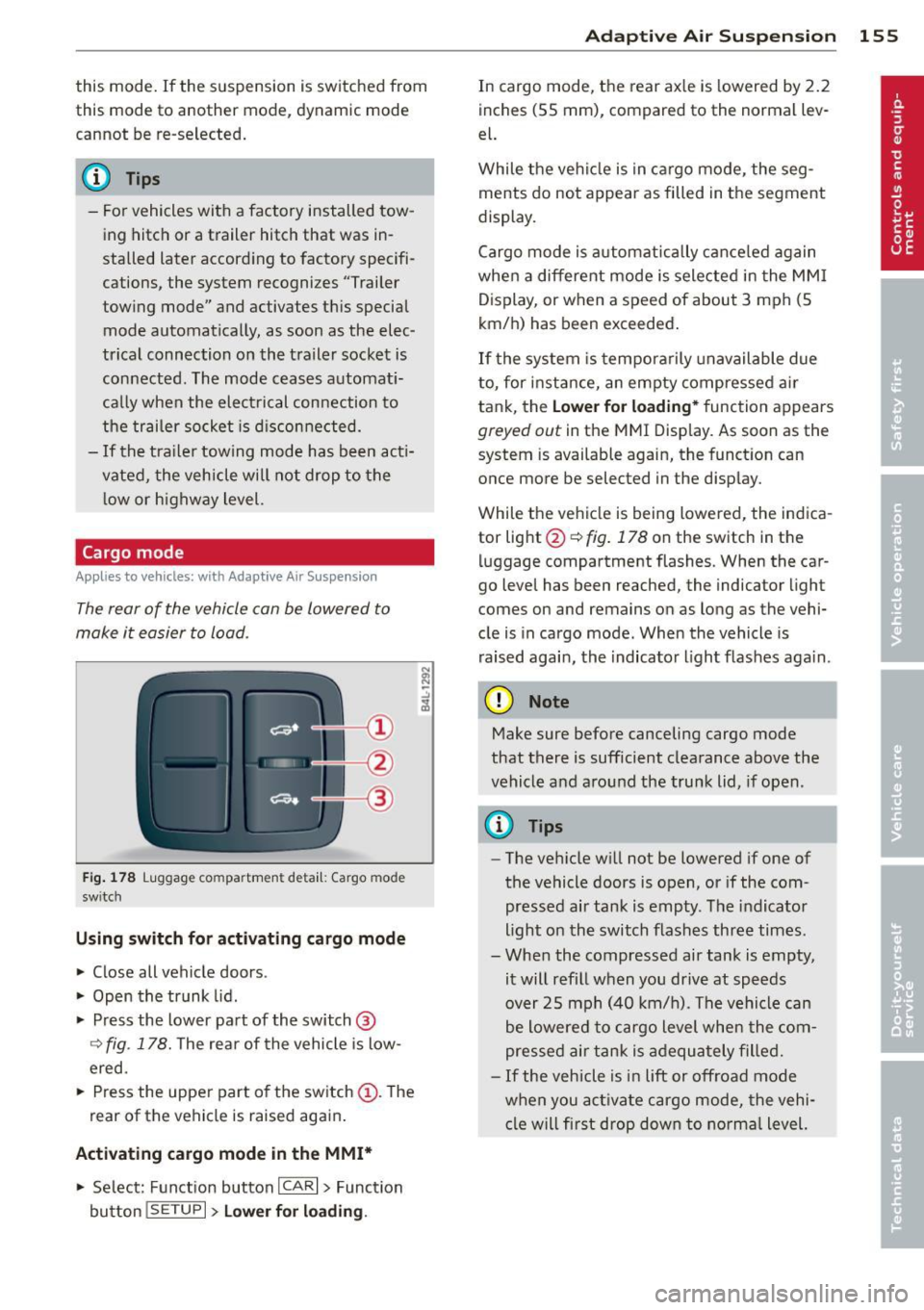
The rear of the vehicle con be lowered to
make it easier to load .
Fig. 178 Luggage compa rtment detail: Cargo mode
sw itc h
Using sw itch for activating cargo mode
~ Close all vehicle doors .
~ Open the trunk lid .
~ Press the lower pa rt of the switch@
Q fig. 178. The rear of the vehicle is low
ered.
~ Press the uppe r part of the sw itch (D . The
rear of the vehi cle is raised aga in .
Activating cargo mode in the MMI*
~ Se lect: Function button ICAR I > Function
button
! SE TUP I> Lower f or load in g. Ad
apti ve A ir Sus pension 155
In cargo mode, the rear ax le is lowered by 2 .2
inches (55 mm), compared to the normal lev
el.
While the ve hicl e is in ca rgo mode, the seg
ments do not appear as filled in the segment
display.
Cargo mode is a utomatically c ance led again
when a different mode is selected in the MM I
D isplay, or when a speed of about 3 mph (5
km/ h) has been exceeded.
If the system is tempora rily unavailable due
to, for instance, an empty compressed ai r
tank, the
Lower fo r loading* function appears
greyed out in the MMI Display. As soon as the
system is available again, the function can
once more be selected in the disp lay.
While the vehicle is being lowered, the indica
tor light @~
fig. 178 on the switch in the
luggage compartment flashes. When the car
go level has been reached, the indicator light
comes on and remains on as long as the vehi
cle is in cargo mode. When the vehicle is
raised agai n, the indicator l ight f las hes aga in.
(D Note
Make sure before canceling cargo mode
that there is sufficient clearance above the
vehicle and around the tru nk lid , if open .
(D Tips
-The ve hicle w ill not be lowered if one of
the vehicle doors is open, or if the com
pressed air tank is empty . T he indicator
light on the switch flashes three times.
- When the compressed air tank is empty,
it will refill when you drive at speeds
over 25 mph (40 km/ h). The vehicle can
be lowered to cargo level when the com
pressed air tank is adequately fille d.
- If the veh icle is i n lift or off road mode
when you act ivate cargo mode, the vehi
cl e w ill first drop dow n to norma l level.
Page 158 of 342
156 Hom eli nk®
Homelink ®
Universal remote
control
General information
Applies to vehicles: with Home link® universal remote
control
The Homelink ® feature can learn up to three
radio frequency codes for most current trans
mitters used for operating garage doors, es tate gates, home or outdoor lighting sys
tems, and other devices.
You must first program the Homelink ® trans
mitter before you can use the system
~ page 157, Programming the Homelink ®
transmitter.
In order to program the Home link ® transmit
ter for devices utilizing rolling code, a second
person on a ladder who can safe ly reach the
garage door opener motor is recommended. I t is also necessary to locate the "learn" but
ton on your garage door opener motor . Refer
to the operating instructions for the opener,
as the location and color of this button may
vary by manufacturer.
You can still use the origina l remote control
for the device at any time .
.&_ WARNING
-
- Never use the Homelink ® transmitter
with any garage door opener that does
have not the safety stop and reverse fea
ture as requ ired by federa l safety stand
ards. Th is includes any garage door open
er model manufactured before April 1,
1982.
- A garage door opener which cannot de
tect an object, signa ling the door to stop
and reverse does not mee t current feder
al safety s tandards. Using a garage doo r
opener without these features increases
risk of serious inj ury or death.
- F or sa fety reasons never release the
parking brake or start the engine w hile
anyone is stand ing in front of the vehicle . -
A garage door or an estate gate may
sometimes be set in mot ion when the
Homelink ® remote control is being pro
grammed. If the device is repeatedly ac
tivated, this can overstrain motor and
damage its e lectr ical components -an
overheated moto r is a fire hazard!
- To avo id possible injuries or property
damage, please always make abso lutely
certain that no persons o r objects are lo
cated in the range of motion o f any
equ ipment being ope rated .
(D Tips
-If you would like more information on
Homel ink ®, where to purchase the
Homel ink ® compatib le produc ts, or
would like to purchase the Homelink ®
Home Lighting Package, please call to ll
free: 1-800-355-3515 .
- For Declaration of Compliance to United States FCC and Ind ustry Canada reg ula
tions~
page 322.
Page 159 of 342
Programming the Homelink®
transmitter
A pplies to vehicles: with Home link® universa l remote
co ntrol
The transmitter is programmed in two phas·
es. For rolling code transmitters, a third
phase is also necessary .
.- :-::::: . ... ........ -. ----· . ...... ........ .l
-·-·-· -·-· -·..: ··-· ---- -·- ·· ..._~ -- · ····
111111
-
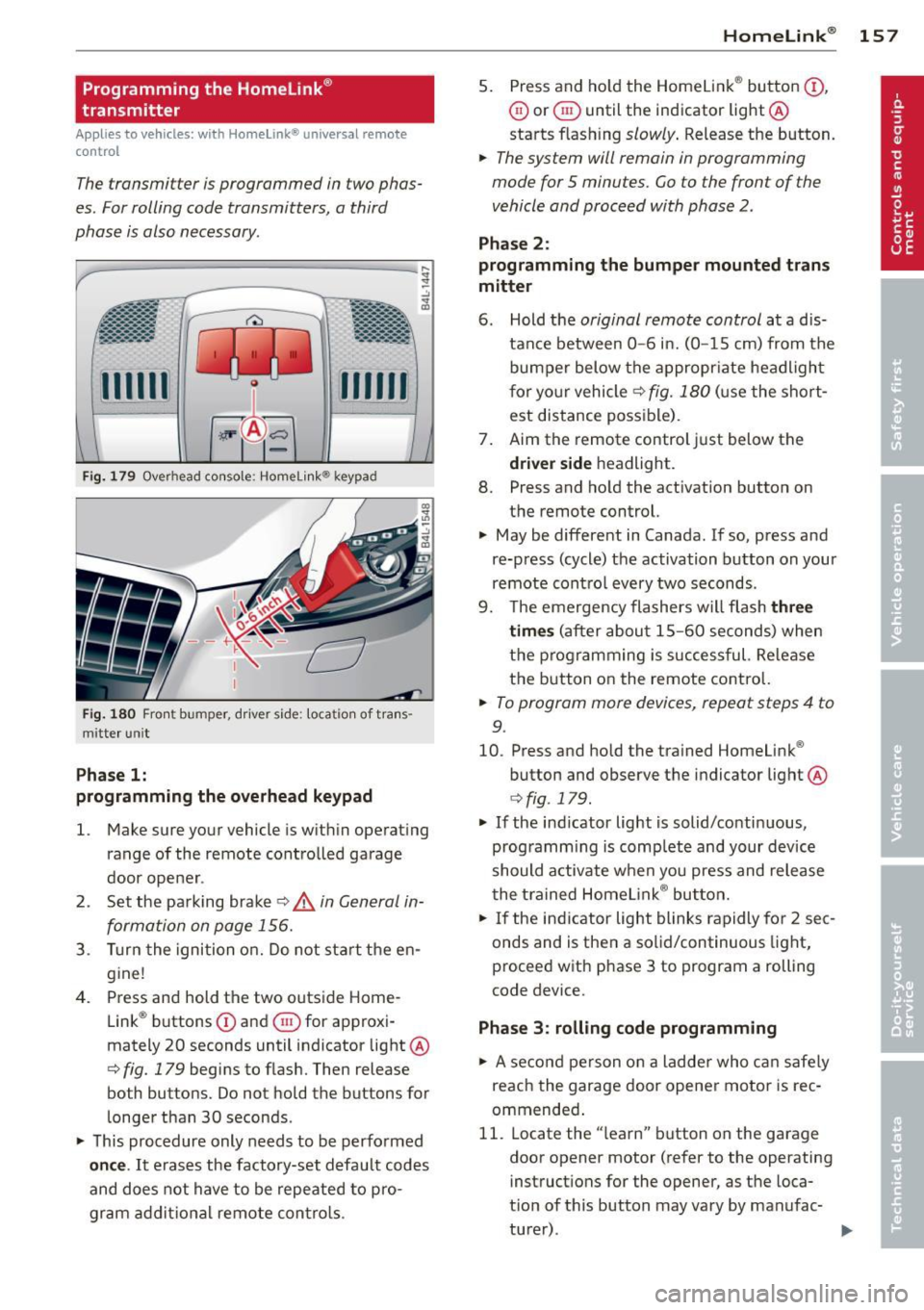
Fi g. 1 79 Overhead console: Homelink ® keypad
Fig. 1 80 Front bumper, d rive r side: loca tion of tra ns
mitter un it
Pha se 1:
programming the o verhead keypad
l. Make sure your vehicle is wit hin ope rating
range of the remote controlled garage
door ope ner .
2 . Set the pa rking brake
c:> .& in General in
formation on page 156.
3 . Turn the ignition o n. D o not sta rt the en
g ine!
4. Press and hold the two outs ide Home
Link ® buttons
(D and ® for approxi
mately 20 seconds until indicator light @
c:> fig. 179 begins to flash. Then release
both buttons. Do not hold the buttons for
l onger than 30 seconds .
~ This procedure only needs to be perfo rmed
on ce .
It erases the factory-set default codes
and does not have to be repeated to p ro
gram ad dit io na l remote contro ls .
Homelink ® 15 7
5. Press and ho ld the Homelink ® button (D ,
0 or ® until the indicator light@
starts flash ing
slowly . Release the button.
~ The system will remain in programming
mode for 5 minutes.
Go to the front of the
vehicle and proceed with phase 2 .
Phase 2 :
programming the bumper mounted trans
mitter
6 . Hold the
original remote control at a d is
tance between
0 -6 in. (0 -15 cm) from the
bumper below the appropr iate headligh t
f or yo ur vehicle
c:> fig. 180 (u se the short
est distance possible) .
7 . Aim the remote control just below the
driver s ide headlight.
8. Press and ho ld the activation button on
the remote control.
~ May be different in Canada. If so, press and
re-press (cycle) the activation button on your
remote cont ro l every two seconds .
9. The emergency flashers w ill flash
three
time s
(a fter about 15 -60 seconds) when
the programming is successful. Re lease
t h e button on the remote contro l.
~ To program more devices, repeat steps 4 to
9.
10. Press and hold the trained Homelink ®
button and observe the indicator light @
c:>fig . 179 .
~ If the indicator light is solid/contin uous,
programm ing is comp lete and your device
should a ctivate when you press and release
t he t rained Homelink ® bu tton.
~ If the ind icator light blinks rapidly for 2 sec
onds and is then a solid/continuous light,
proceed w ith phase 3 to program a rolling
code device.
Phase
3: rolling code programming
~ A se con d person o n a ladde r who c an safe ly
reach the garage door opener motor is rec
ommended .
11. Locate the "learn" button on the garage
door opener motor (refer to the operating
instruct ions for the opener, as the loca·
t ion of t his button may vary by manufac-
turer) . .,.
Page 162 of 342
160 Driving Safel y
Driving Safely
General notes
Safe driving habits
Please remember -safety first!
This chapter contains important information,
tips, instructions and warnings that you need
to read and observe for your own safety, the
safety of your passengers and others . We have
summarized here what you need to know
about safety belts, a irbags, ch ild restra ints as
well as child safety. Your safety is for us
priori
ty number 1.
Always observe the info rmat ion
and warn ings in th is sect ion -fo r yo ur own
safety as well as that of your passengers .
The information in this se ction app lies to all
model ve rsions of your veh icle . Some of the
feat ures desc ribed in this sec tions may be
standard equipment on some models, or may be optional equipment on others . If you are
not sure, ask your authorized Aud i dealer.
A WARNING
- Always make sure that you follow the in
struct ions and heed the WARNINGS in
this Manual. It is in your interest and in
the inte rest of you r passengers.
- Always keep the complete Owner's Liter
ature in your Audi when you lend or sell
yo ur vehicle so that this important info r
mation will always be ava ilable to the
dr iver and passengers.
- Always keep the Owner's literature handy
so that you can find i t eas ily if you have
ques tions.
Safety equipment
The safety features are part of the occupant
restraint system and work together to help
redu ce the risk of injury in a wide variety of
accident situations.
Your safety and the safety of your passenge rs
should not be left to chance. Advances in
technology have made a varie ty o f fea tures
avai la bl e to he lp re duce the risk of inj ury in an accident
. The following is a list of just a few of
the safety features in your Audi:
- sophis tic ated s afety be lts for d rive r and a ll
passenger sea ting pos it ions,
- be lt te nsione rs fo r th e fro nt sea ts a nd the
ou ter sea ting posit ions in the second row
seating,
- be lt h eight adjustment fo r th e front sea ts
an d the o ute r seat ing pos itions in the sec
ond row seating,
- he ad restra ints for e ach sea ting pos ition,
- front airbags,
- side airbags in the fro nt seats and the outer
seating positions in the second row seat ing*,
- side curta in ai rbags,
- specia l LATCH anchorages for child re-
st raints,
- ad justab le steering colum n.
These individual safety features, can work to gether as a system to he lp protect you and
your passengers in a wide range of accidents .
These features cannot work as a system if
they are not always correctly adjusted and cor rectly used .
Safety is everybody's responsibil ity!
Important things to do before driving
Safety is everybody 's job! Vehicle and occu
pant safety always depends on the informed
and careful driver.
For yo ur safety and the safety of your passen
gers,
before driving always:
.. Make s ure that all lights and signa ls a re op
erati ng correctly .
.. Ma ke s ure that the tire pressure is correct .
.. Make s ure that all windows are clean and
afford good v is ibility to the o utside.
.. Secure a ll luggage a nd other items carefu lly
¢ page 87.
.. Make su re that nothing can in terfe re with
the peda ls.
.. Adjust fron t se at, head restraint and mir
rors co rrec tly for you r heigh t.