unlock AUDI Q7 2013 Owner´s Manual
[x] Cancel search | Manufacturer: AUDI, Model Year: 2013, Model line: Q7, Model: AUDI Q7 2013Pages: 348, PDF Size: 87.72 MB
Page 50 of 348
48 Openin g and clo sing
- As soon as the electrical connec tion to
the trailer socket is completed on
vehicles with a factory installed towing
hitch, or a trailer hitch that was installed
later according to factory specifications,
the automatic rear lid function can only be operated v ia the handle in the rear lid.
Rear lid emergency unlocking
If the rear lid cannot be opened, an emergen
cy release is provided .
1----------------- --,l~ N
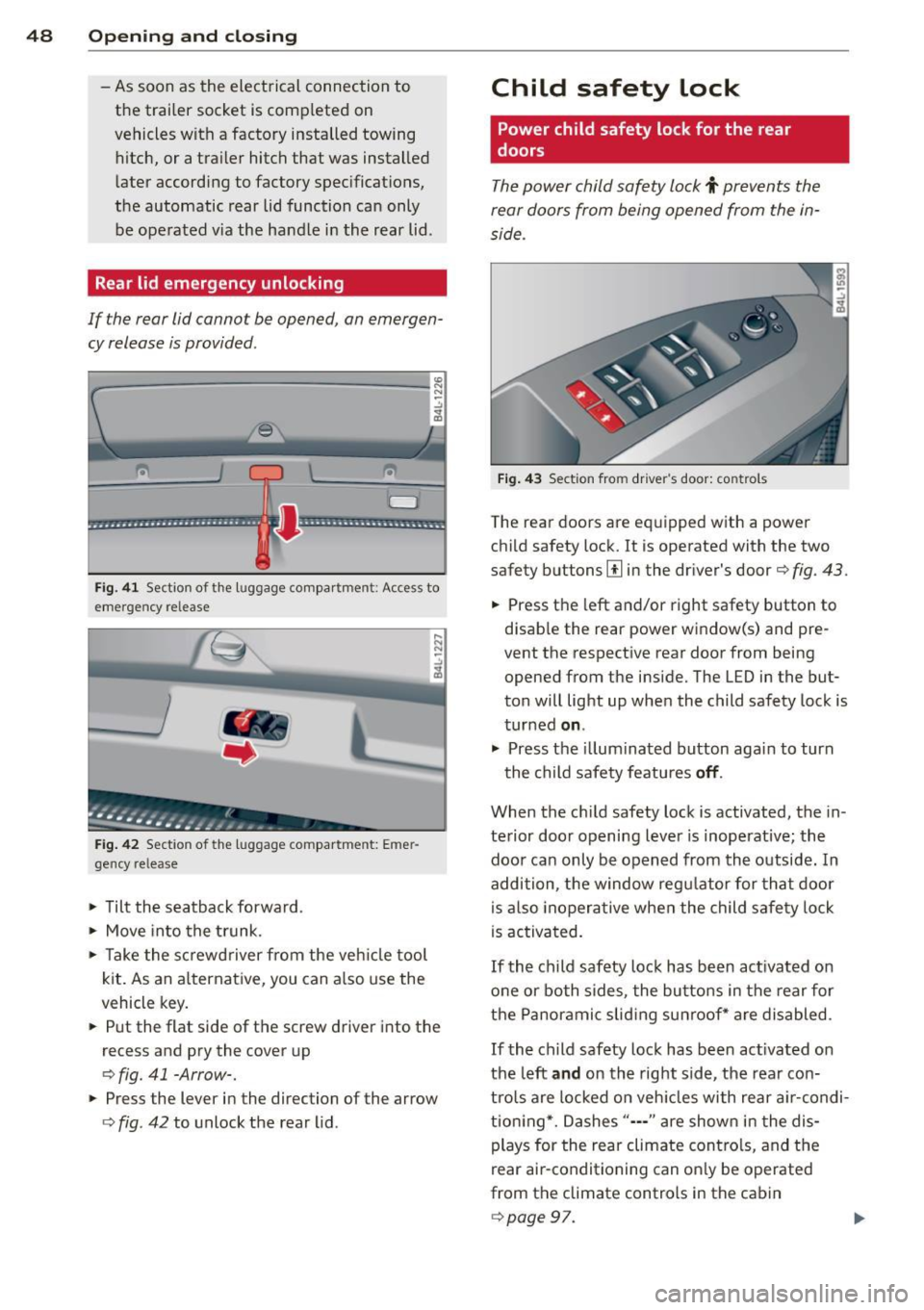
Fig . 4 1 Section of the luggage compar tment : Access to
emerge ncy re lease
Fig . 42 Sect ion of the luggage compartment: Emer
gency release
,.. Tilt the seatback forward .
,.. Move into the t runk.
,.. Take the sc rewd river from the veh icle tool
kit . As an alternat ive, you can a lso use the
vehicle key.
• Put the flat side of the screw driver into the
recess and pry the cover up
o fig. 41 -Arrow-.
• Press the lever in the direction of the arrow
ofig . 42 to unlock the rear lid .
Child safety lock
Power child safety lock for the rear
doors
The power child safety lock t prevents the
rear doors from being opened from the in
side .
Fig . 43 Sect ion fro m driver's door: controls
The rear doors are equipped with a power
child safety lock.
It is operated with the two
safety buttons
III in the dr iver's door o fig. 43.
• Press the left and/or right safety button to
disab le the rear power window(s) and pre
vent the respective rear door from being
opened from the inside. The LED in the but
ton will light up when the child safety lock is
turned
on .
,.. Press the illum inated button aga in to turn
the child safety featu res
off .
When the c hild safety lock is activated, the in
te rior door opening lever is inoperative; the
doo r can only be opened from th e outside. In
addition, the window reg ulator for that doo r
is also inoperative when the child safety lock
is activa ted.
If the child safety lock has been ac tivated on
one or both sides, the butto ns in the rear for
the Panoramic slid ing su nroof* are disabled .
If the child safety lock has been act ivated on
the left
and on the right side, the rear con
tro ls are locked on veh icles with rear a ir-condi
tion ing *. Dashes" ••• " are show n in t he dis
plays for the rear climate contro ls, and the
rear air-conditioning can on ly be operated
from the climate controls in the cabin
opage 97.
Page 51 of 348
@ Tips
-In order to activate the chi ld safety lock
on the left and the right side, you have to press the two safety buttons in succes
sion.
- Make certain that the check light comes
on in the corresponding safety sw itch
when the child safety lock is activated.
Convenience key
Description
A pp lies to vehicles: with Convenie nce key
Access and vehicle operation based on: Mas
ter key remains in driver 's pocket .
The Convenience key veh icle authorization
system allows
keyless unlock ing , locking and
starting of the vehicle . You only have to carry
the master key on your pe rson.
It makes no d ifference whether the master
key is in your jacket pocket or in your brief
case . As soon as you approach your vehicle,
the Convenience key recognizes the request
for access, checks for a uthorization and ena
b les the fo llowing functions:
- Unlocking the vehicle~
page 49.
-Locking the vehicle~ page 50.
-Switching on ignition and starting the en -
gine by pressing the
I START! button; the
master key does not have to be in the igni
t ion switch
~page 107.
_& WARNING
-When you lock your vehicle from outside,
nobody- especially ch ildren -should re
main inside the vehicle. Remember,
when you lock the vehicle from the out
side the windows cannot be opened from
the ins ide .
- When you leave the vehicle, always re
move the ignition key and take it with
you. This will prevent passengers (chil
dren, for example) from accidentally be
ing locked in the veh icle should they acci-
Opening and clo sin g 49
dentally press the power locking switch
in the front doors.
- Do not leave chi ldren inside the vehicle
unsupervised. In an emergency it would
be imposs ible to open the doors from
the outside without the key.
(D Tips
- In order for the Convenience key to func
tion, you must a lways carry the master
key with you .
- In order to be able to unlock or lock the
vehicle, the author ized master key must
be within a range of about S feet (l.S
meters) from the door or the rear lid.
- Of course, you can still unlock and lock
your vehicle using the buttons on the
master key . The selector lever must be in
the P position .
- For Declaration of Compliance to United
States FCC and Industry Canada regula
tions ~
page 328.
Unlocking the vehicle
App lies to vehicles : wit h Co nve nience key
The doors and the rear lid can be unlocked
without operating the master key .
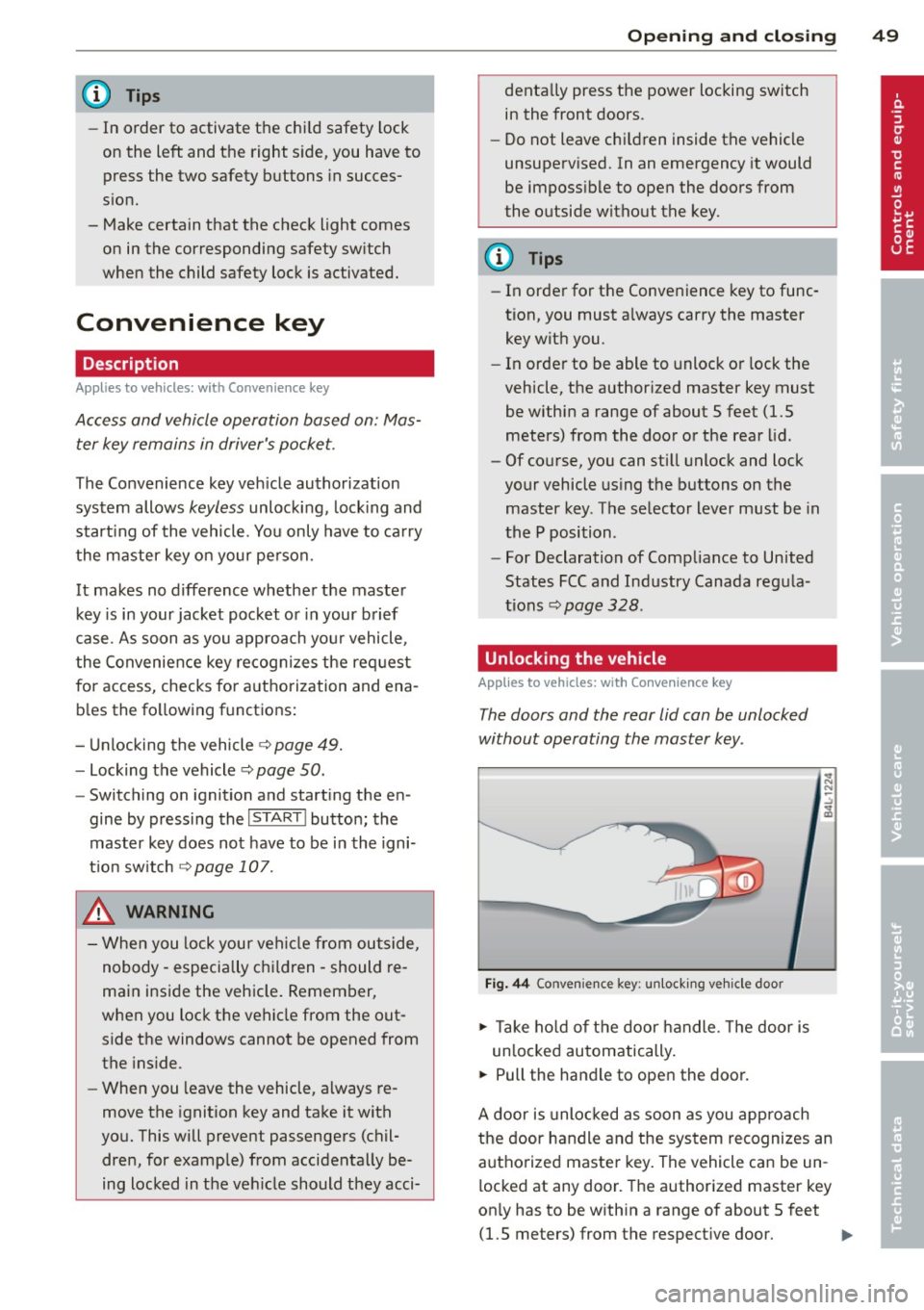
Fig. 44 Convenie nce key : unlocking vehicle door
.,. Ta ke hold of the door handle. The door is
un locked automatically.
.,. Pull the handle to open the door.
A door is unlocked as soon as you approach
the door handle and the system recognizes an
authorized master key. The vehicle can be un
locked at any door. The authorized master key
on ly has to be within a range of about 5 feet
(1.5 meters) from the respective doo r.
II>-
Page 52 of 348
50 Openin g and clo sing
When a door is unlocked, the driver 's door is
a lways unlocked as we ll.
It depends on the
settings in the central locking menu in the
MMI whether the entire vehicle is unlocked or
only certain doors ¢
page 44.
{O) Tips
If your vehicle has been stand ing for an ex
tended period, please note the following:
- The proximity sensors are deactivated af-
ter a few days to save power. You then
have to pull on the door handle once to
unlock the vehicle and a second time to
open the veh icle.
- To prevent the battery from being dis
charged and to preserve your veh icle's
ability to start for as long as possible,
the energy management system gradu
a lly switches off unnecessary co nven
i ence f unct io ns.
It is possible that you
will not be able to unlock your vehicle us
ing these convenience f unctions.
Locking the vehicle
Applies to vehicles: with Conve nience key
The vehicle can be locked without operating
the master key.
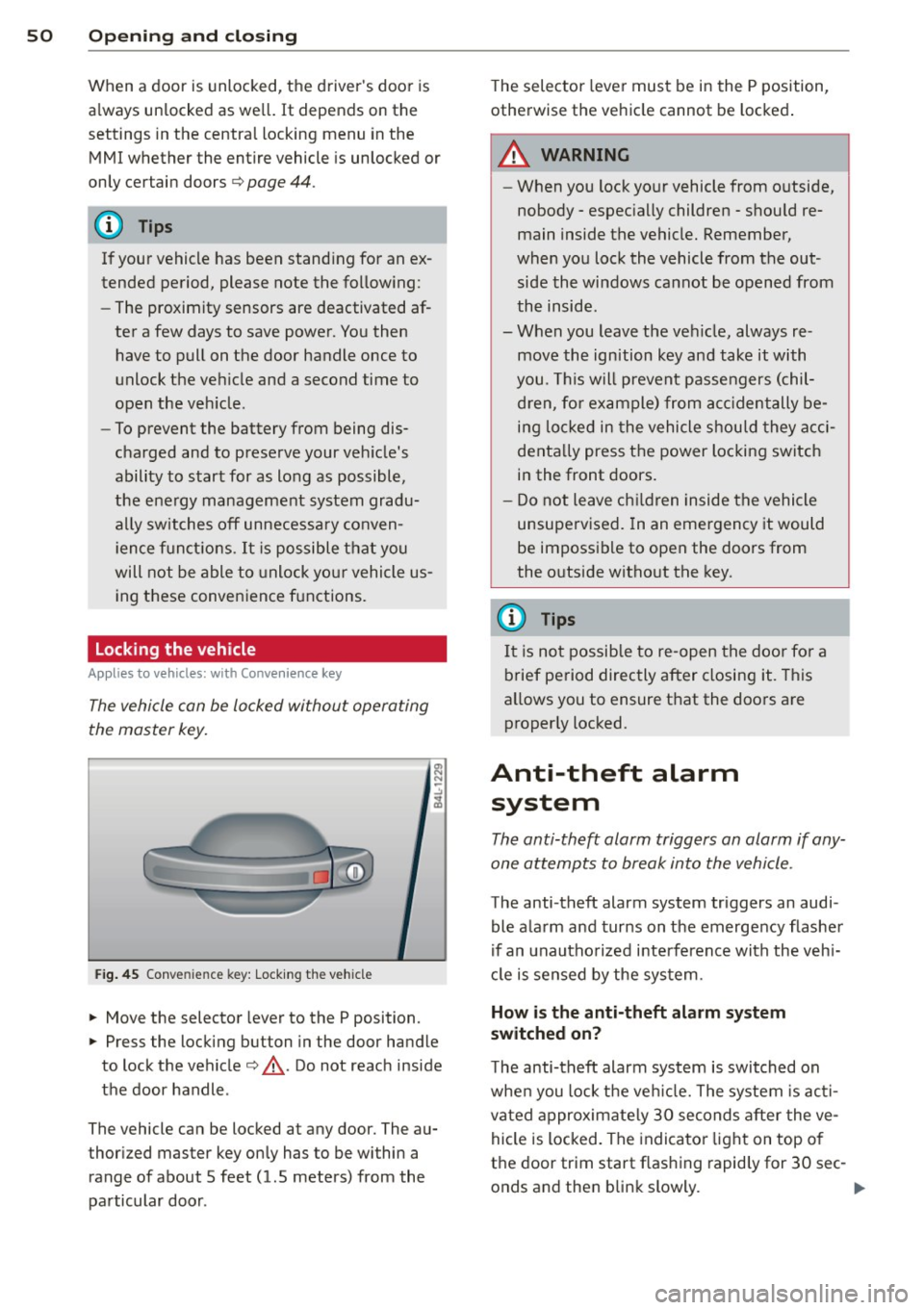
Fig . 45 Conve nience key: Lock ing th e ve hicle
.. Move the selector lever to the P position.
.. Press the locking button in the door handle
to lock the vehicle¢,&.. Do not reach inside
the door handle .
The vehicle can be locked at any door. The au
thor ized master key on ly has to be within a
range of about 5 feet (1.5 meters) from the
pa rticular door . T
he selec tor lever must be in the P position,
otherwise the ve hicle cannot be locked .
A WARNING
--When you lock yo ur vehicle from o utside,
nobody - espec ia lly children - shou ld re
main inside the vehicle. Remember,
when you lock the vehicle from the out
side the wi ndows cannot be opened from
the inside.
- When you leave the veh icle, always re
move the ign ition key and take it with
you. This will prevent passengers (chil
d ren, fo r ex ample) from acci dentally be
i n g lo cked in the vehicle shou ld they acci
denta lly press the power locking switch
in the front doors.
- Do not leave ch ildren inside the vehicle
unsupervised. In an emergency it would
be impossible to open the doors from
the o utside witho ut the key.
(J} Tips
It i s no t possible to re -open the doo r fo r a
brief pe riod directly after closing it. This
allows you to ensure that the doo rs are
properly locked.
Anti-theft alarm system
The anti-theft alarm triggers an alarm if any
one attempts to break into the vehicle.
The anti-theft alarm system triggers an audi
ble ala rm and turns on the emergency flashe r
if an unautho rized interfe rence with the veh i
cl e is sensed by the sys tem.
How is the anti-theft alarm system
switched on?
T he anti-theft alarm system is switched on
whe n you lock the ve hicle. The system is ac ti
vated approximate ly 30 seconds after the ve
hicle is locked. The indicato r ligh t on top o f
the door trim start flashing rapid ly for 30 sec -
onds and then blink slowly. ..,.
Page 53 of 348
How is the anti-theft alarm system
switched off?
The anti -theft a la rm system is switched off
on ly when you unlock yo ur vehicle. If yo u do
not open a door w ith in 60 seconds after you
have unlocked with the remote control , the
ve hicle w ill lock itse lf again automat ically .
When will the anti-theft alarm sy stem be
triggered?
W hen the ve hicle is locked, the alarm system
mon itors and protects the following parts of
the vehicle:
- engi ne compartment
- lu ggage compartment
- doo rs
- i gnition
When the system is activated, the alarm will be tr iggered if on e of the doo rs, the eng ine
h ood or t he rear lid a re opened, o r if the ig ni
tion is tur ned on. The anti-t heft alarm sys tem
will also go off when the battery is discon
nected .
You can a lso tr igge r the alarm by p re ssing t he
P ANIC button o n your remote con trol. T his
will alert other peop le in case of emergency.
Press the
PANIC b utton again to t urn off the
a larm.
How is the anti-theft alarm switched off
when triggered?
The a larm system is switc hed off when you
un lock the vehicle o r whe n the ignition is
sw itched on. The alarm will also switch itself
off when it comes to the end of its cycle.
Emergency flasher and horn
The emergency flas her wi ll blink brief ly and
the hor n sounds when the doors, engine hood
and rear lid are proper ly closed .
If th e emergen cy fl ashe rs do no t blink , or the
horn does no t sound, check the doors, engine
h ood an d rear lid to make sure they are p rop
erly closed.
If you close a door, t he hood o r
the rear lid w ith the anti-theft alarm sw itched
on, the emergency flashers will b link and the
Opening and clo sin g 51
horn wi ll sou nd on ly afte r you have closed the
door or li d.
(D Tips
For the anti-theft ala rm sys te m to fu n c
tion properly, make sure all ve hicle doors
and win dows are closed before leavi ng t he
vehicle .
Power windows
Controls
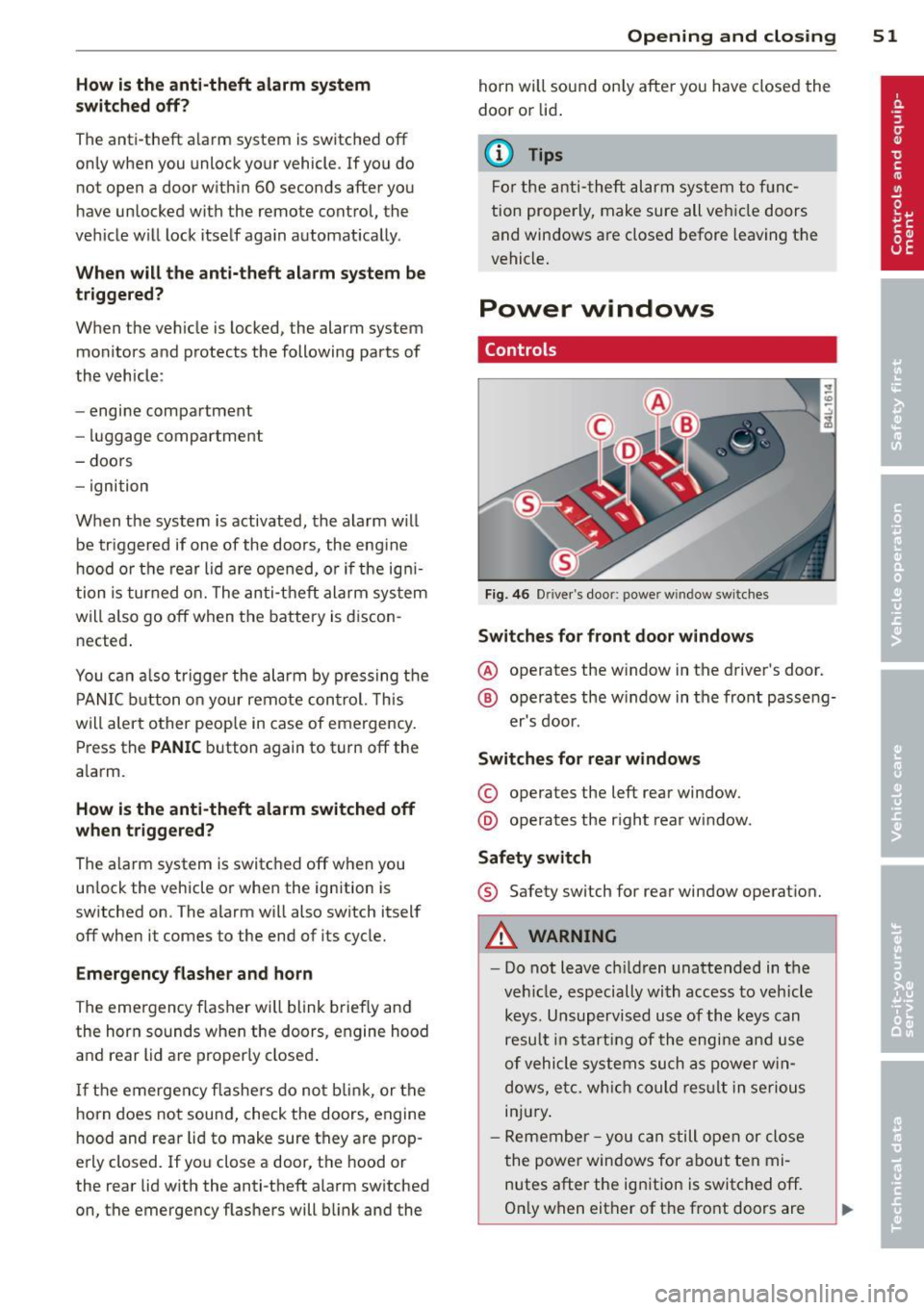
Fig. 4 6 Drive r's doo r: power w indow sw itches
Switches for front door windows
@ o p erates the w indow in the d river's door.
® opera tes the w indow in the front passe ng-
er's door .
Switches for rear windows
© operates the left rear window.
@ operates the r ight rear wi ndow.
Safety switch
® Safety switch for rear window operat ion.
A WARNING
- Do not lea ve c hildren unattended in t he
ve hicle, especially wi th access to veh icle
keys. Unsupervi sed us e of the keys can
resu lt in start ing of the engi ne and use
o f vehicle system s such as po wer w in
dows, etc. w hich co uld res ult in se riou s
in jur y.
- R eme mber -you can s till ope n or close
the powe r win dows for about ten mi
n utes after the ign ition is switc hed off.
O nl y w hen eit her of t he fro nt doors are
Page 55 of 348
switch when the chi ld safety lock is acti
vated .
Switch in the front passenger 's door and
on the rear doors
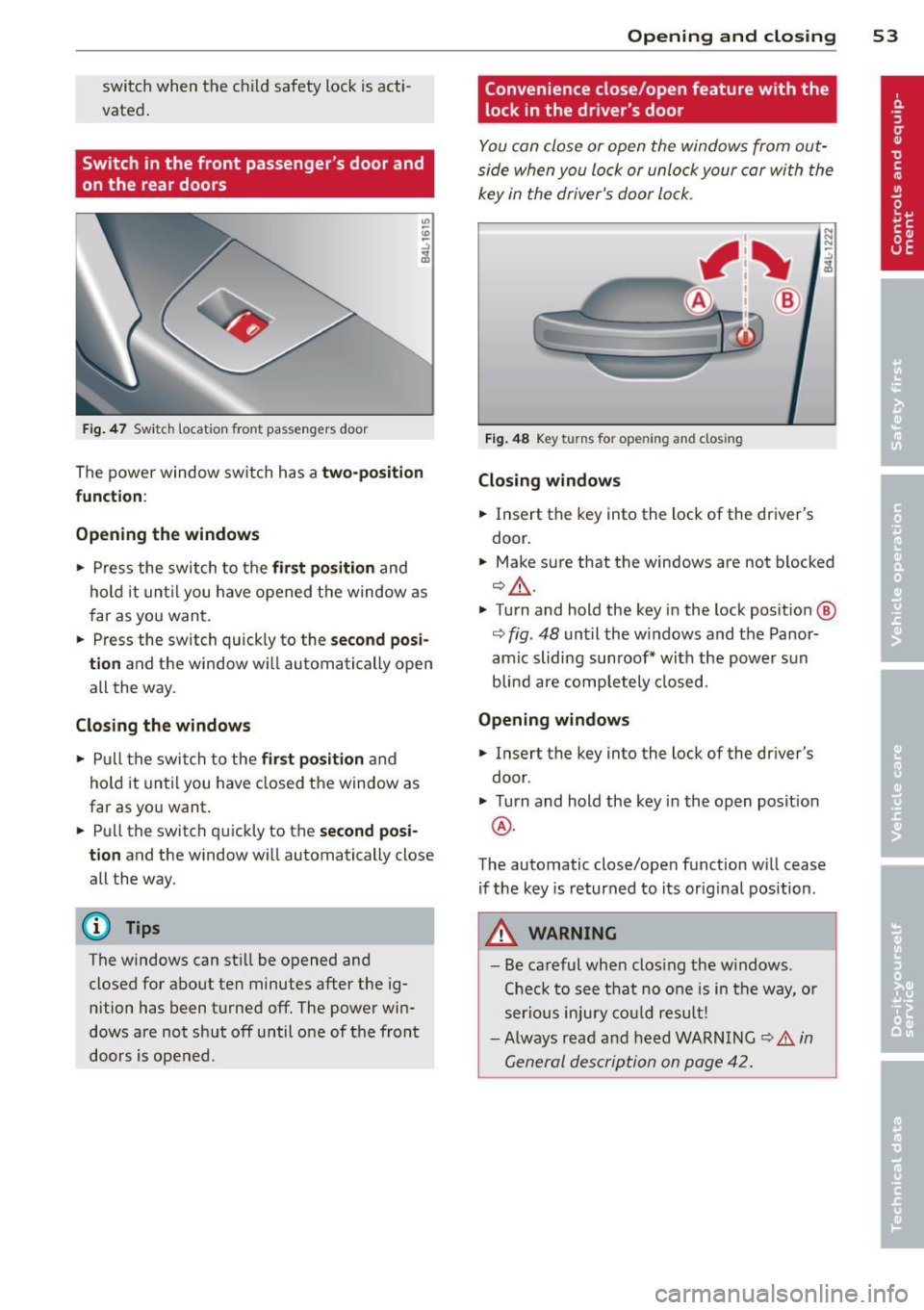
F ig. 4 7 Swit ch loca tion front pass engers door
The power window sw itch has a two-po sit ion
function :
Opening the windows
.. Press the switch to the fir st position and
hold it until you have opened t he window as
f ar as yo u wan t.
.. Press the sw itch quickly to the
second posi
tion
and the window w ill automatically open
all the way .
Closing the windows
.. Pull t he swi tch to the first position and
hold it until you have closed the window as
far as yo u want .
.. Pull the switch q uickly to the
second posi
tion
and the window wi ll automatically close
all the way.
(D Tips
The windows can st ill be opened and
closed for abo ut ten minutes after the ig
nition has been t urned off . The powe r win
dows are not sh ut off until o ne of t he front
doors is opened .
Opening and clo sin g 53
Convenience close/open feature with the
lock in the dr iver 's door
I
You can close or open the windows from out
side when you lock or unlock your car wi th the
key in the driver's door lo ck .
Fig. 48 Key turns for opening and closing
Closing windows
.. Insert the key into the lock of the dr iver's
door .
.. Make su re that the windows are not blocked
¢ _& .
.. Turn and hold the key i n the lock pos it io n @
¢ fig . 48 unt il the windows and the Panor
amic sliding sunroof * with the power s un
blin d are comp letely closed.
Opening windows
.. Insert the key into the lock of the driver's
door .
.. Turn and hold the key in the open posit ion
@ .
The automatic close/open f unction w ill cease
if the key is returned to its orig inal pos ition .
A WARNING
-
- Be careful wh en clos ing the w indows .
Che ck to see t hat no one is in the way, o r
ser ious injury could result!
- Always rea d an d h eed WARN ING
¢ A in
G eneral descrip tion on p age 42.
Page 60 of 348
58 Clear vis ion
li g ht sensor checked as soo n as poss ible at an
author ized Audi dealer or qua lified wor kshop .
.&_ WARNING
-Daytime ru nning lights and automatic
headlights are only intended to assist
the driver. They do not relieve the driver
of his respons ib ility to check the head
lights and to turn them on manually ac
co rding to the current light and v is ibi lity
condit ions. For example, fog cannot be
dete cted by the light sensors*. So alw ays
switch on the headlights
io u nder these
weather conditions and when driving in
the dark.
- Crashes can happen when yo u cannot see
the road ahead and when you cannot be seen by other motorists. Always turn on
the headlights so that you can see ahead
and so that others can see yo ur car from
the back.
- Please obey a ll laws when using the
lighting systems described here.
@ Tips
- With the switch in AUTO front fog lights
and rear fog lights cannot be turned on in addition.
- The light senso r for headlight contro l is
l ocated in the rear view m irror mount.
You should therefore not app ly any st ick
ers to the windsh ield in this area in o rder
to preve nt ma lfunctions o r failures.
- Some exterior lighting functions can be
adjusted
c:> page 58.
-When you remove your key from the igni
tion while the vehicle's lights are turned
on, a buzzer sou nds as long as the driv
er's door is open .
- In coo l o r damp weather, t he ins ide of
t h e headlights, turn signa ls and tail
li ghts can fog ove r du e to t he tempera
tu re diffe re n ce between the inside and
outside. They will cle ar sho rtly after
swi tching them on. This does not affect
t h e service li fe of the lighting . -
In the event o f a light sensor malfunc
tion, the driver is notified in the instru
ment cl uster display
c:> page 35 .
Adjusting exterior lighting
The functions are set in the MMI.
• Select: I CAR I func tion button > Systems *
cont ro l but to n > Exterior lighting . Or
.. Select:
!CAR ! function b utton> Car sys
tem s* contro l button > Vehicle setting s >
Exterior lighting.
Coming home (Lights when leaving car ),
Leaving home (Lights when unlock ing car )
T he coming home f unction ill umi nates the
area o utside the vehicle when you tu rn the ig
nition off and open t he driver's door. Depend
ing on vehicle eq uipment, the f unction can be
switched on and off or the length of t ime the
lights remain on* can be adjusted .
The leaving home illum inates the area outside
the vehicle when you unlock the vehicle. This
funct ion can be switched on and off .
The Coming home and Leaving home func
tions only operate when it is dark and the light switch is in the AUTO position.
Daytime running lights
USA models: The daytime r unning lights can
be turned on or off using th is function.
Canad a model s: Th e fu nction ca n no t be
tu rned off .
It is activated automati cally each
time the ignition is t urned on. This menu item
is shown "greyed out" .
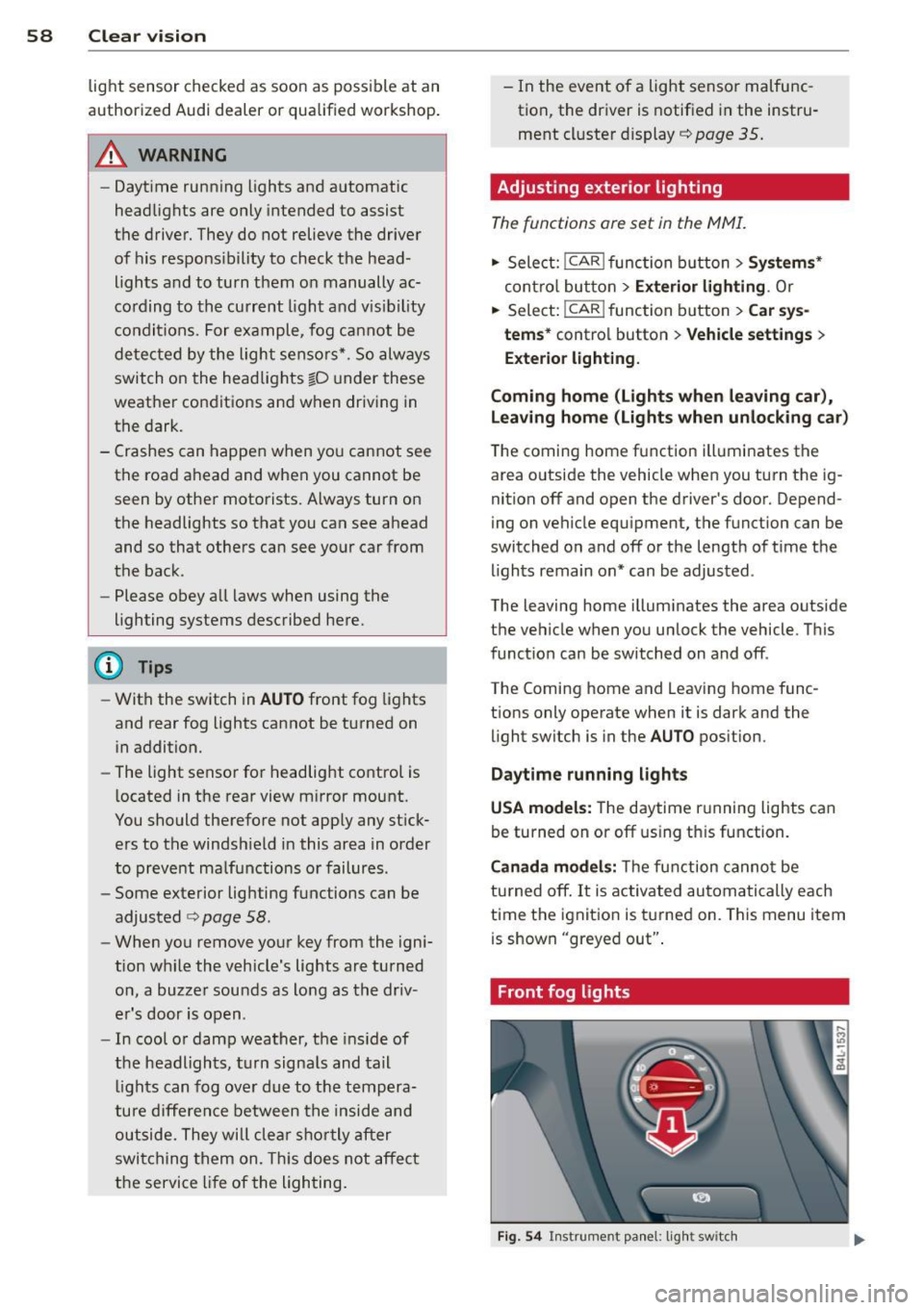
Front fog lights
Fig . 54 Instrument pa nel: light switch
Page 61 of 348
The light switch must not be overturned past
the stops in
either d irectio n.
Switching on the front fog lights }0
~ Turn the light swit ch to :oo: or to io.
~ P ull t he ligh t sw itch to the first stop @.
When the front fog lights are on, the symbol
}O n ext to the lig ht switch will illum inate.
@ Tips
W ith the switch in AUTO front fog lights
and rear fog lights cannot be turned o n in
add it io n.
Rear fog lights
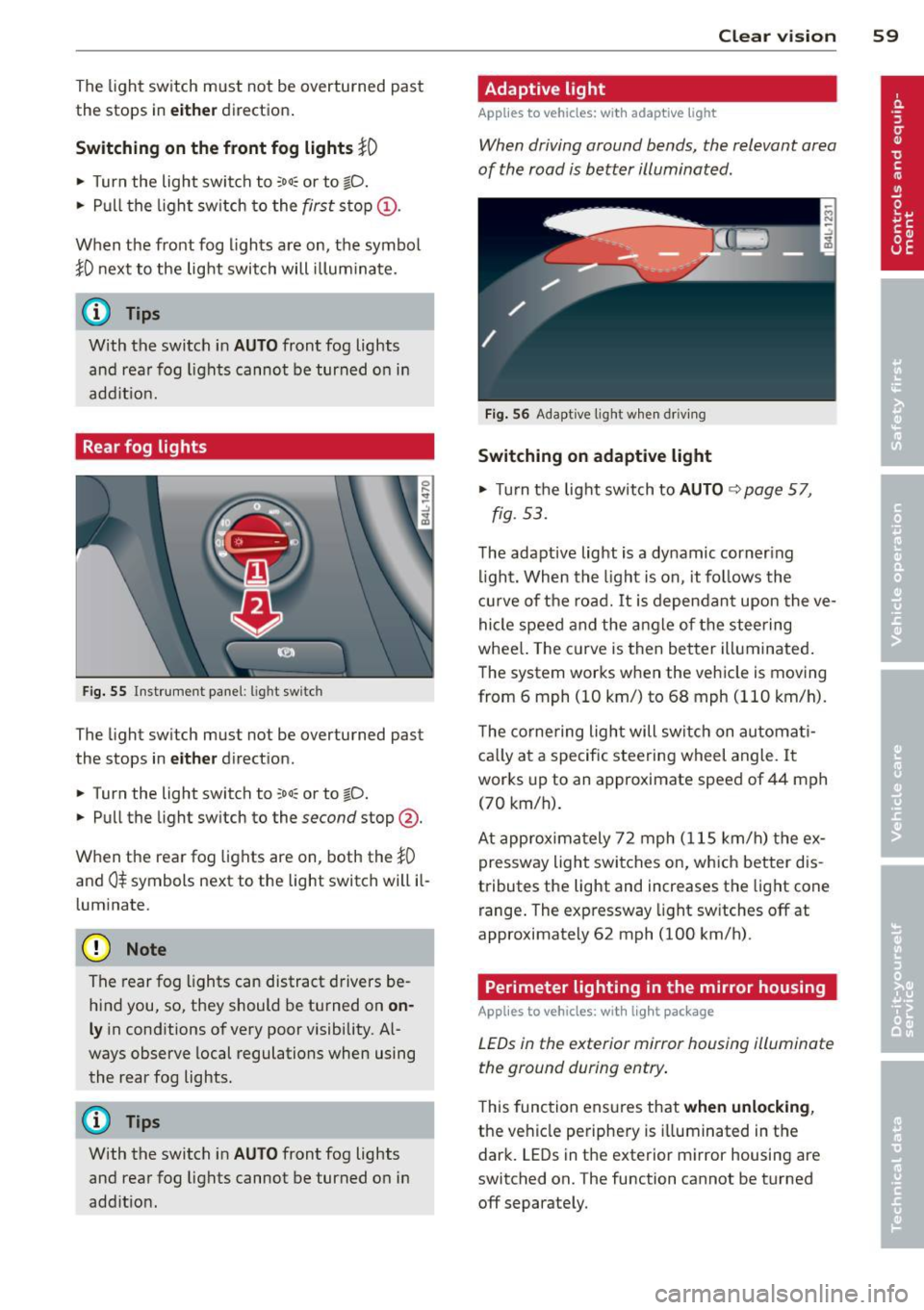
Fig. 55 Inst rument pa ne l: lig ht sw itc h
The light sw itch must not be overturned past
the stops in
either d irect ion.
~ Turn the light switch to :oo: or to io.
~ Pu ll the light sw itch to the second stop @.
When the rear fog lights are on, both the
}0
and 0$ symbols next to the light switch will il
l um inate.
(D Note
The rear fog lights can distract d rivers be
h ind you, so, they should be turned on
on
ly in cond itions of very poor visibility. Al
ways observe local regulations when using
the rear fog lights.
{D) Tips
With the switch in AUTO front fog lights
and rea r fog lights cannot be turned on in
add it io n.
Clear vi sion 59
Adaptive light
Applies to vehicles: wit h adaptive light
When driving around bends, the relevant area
of the road is better illuminated .
Fig. 56 Adapt ive light w hen driv ing
Switching on adaptive light
~ Turn the lig ht switch to AUTO ~ page 57,
fig . 5 3.
The adaptive lig ht is a dy namic corner ing
li ght. Wh en th e light is on, it fo llows th e
cur ve of t he road. It is depen dan t upon the ve
hi cle spee d and the a ngle of the stee ring
whee l. The c urve is then bette r illuminated .
The system wor ks when the vehicle is moving
from 6 mph (10 km/) to 68 mph (110 km/h).
T he co rne ring ligh t will swi tch on automa ti
ca lly a t a specif ic steering wheel angle. I t
wor ks up to an a pproximate speed of 44 mph
(70 km/h).
At approx im at ely 72 mph ( 115 km/h) t he ex
p ressway light swi tches on, which better dis
tributes the light and increases the light cone
r ange . The exp ressway light sw itches
off at
approximate ly 62 mph (100 km/h) .
Perimeter lighting in the mirror housing
Applies to vehicles: wit h lig ht pac kage
LEDs in the exterior mirror housing illuminate
the ground during entry .
This func tion ens ures that when unlocking ,
the vehicle pe riphe ry is illuminated in t he
dar k. LEDs in t he e xterior m irror housing are
switched on. The function cannot be turned
off separate ly.
Page 63 of 348
Notes o n these featur es
- The turn signals only work with t he ignition
turned on . T he indicator light s
II or Ill in
the instrument cluster
¢ page 14 also b link.
- After you have turned a corner , the tur n sig-
nal switches off automatica lly.
- The
high beam works only when the head
lights are on. The indicator light
II in t he
instrument cluster i lluminates when the
high beams a re on.
- The
headlight flasher wo rks only as long as
you hold the lever -even if there are no
lights turned on . The indicator light
II in
the ins trument cluster illuminate s when you
u se the headlight flasher .
A WARNING
-
Do not use the high beam or headlight
flasher if you know that thes e cou ld blind
oncoming traffic.
Interior lights
Front interior lights
The interior lights include reading lights for
both the driver and the front passenger .
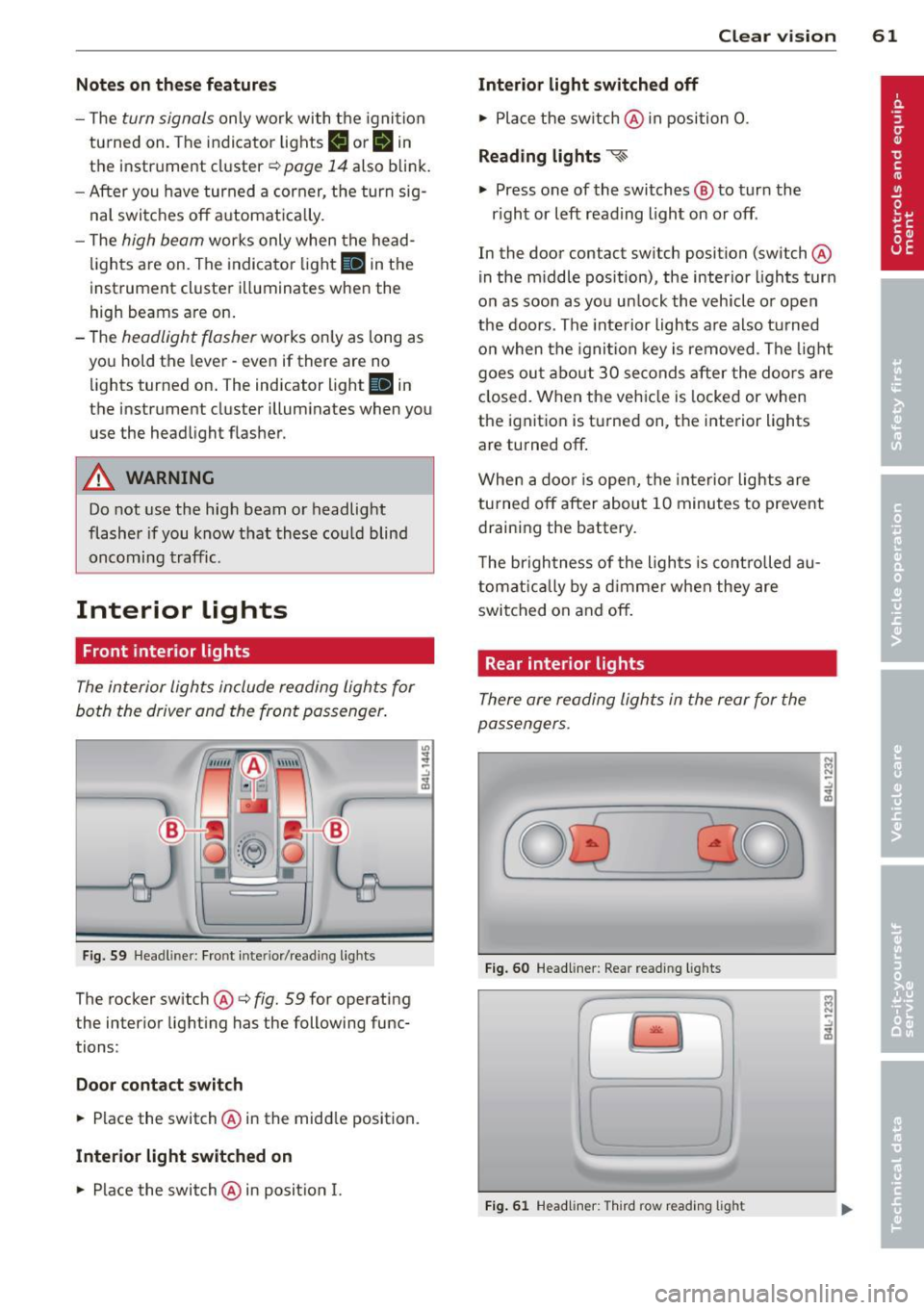
Fig. 59 Headlin er: Fro nt in te rior /re adi ng light s
The rocker switch @¢ fig. 59 for ope rating
the in ter ior lighting has the follow ing func
tions :
Door cont act switch
.,. Place the switch @ in the midd le position.
Interior light switched on
.,. Place the switch @ in posit ion I.
.,,
:! .:,
1A
Clear vision 61
Interior light switched off
.,. Place the sw itch @ in position 0.
Re ading lights ~
.,. Press one of the switches @ to turn the
r ight or left reading light on or off .
In the door contact swi tch position (switch @
in the m iddle position), the interior l ights tur n
o n as soon as you unlock the vehicle o r open
the doors . The inte rior lights are also turned
o n when the igni tion key is removed . The light
goes ou t about 30 seconds after the doo rs are
closed. When the veh icle is locked or when
the igni tion is turned on, the i nterior lights
are turned off .
When a door is open, the interior lights are
tu rned off after about 10 minutes to prevent
draining the battery.
T he brigh tness of the lights is cont rolled au
tomat ic all y by a d imme r when they are
switched on and off.
Rear interior lights
There are reading ligh ts in the rear for the
passengers .
0
...
Fig . 60 Headli ner: Rear read ing lig h ts
>l!i:.
r -
' \,
Fi g. 61 Headlin er: Third row r eading light
N .., N
.:,
1A
:::i N
-.:,
1A
Page 64 of 348
62 Clear vis ion
• Press one of the switches ~~ to tu rn the
right or left reading light on or off~
fig. 60.
For vehicles w ith third row seating*, the lug
gage compartment light can be switched on
and off with the button'*' and used as a read
ing light
~fig. 61. The rear lid has to be
closed.
The lights in the l uggage compartment and in
the rear lid sw itch on and off automatically
when the lid is opened and closed .
@ Tips
If the rear lid remains open longer than 10
minutes, the luggage compartment lights
turn off a utomatically to prevent the vehi
cle battery from discharging.
Ambience lighting
App lies to vehicles: with amb ience light ing
The ambience lighting con be adjusted in the
MMI .
• Se lect: ICARI f u nct ion button > Sy stem s*
control button > Ambience lighting . Or
• Se lect:
ICARI function button > Ca r sy s
tems*
control button > Vehicle settings >
Interior l ighting .
When the ve hicle is unlocked, t he standard
lighting turns on automatically and d ims after
approx. 2 minutes, and when the ignition is
turned on it switches off immediately .
The following interior lighting is controlled :
- Front footwe ll
- Rea r footwell
- Front door panel
- Rear doo r panel
Vision
Sun visors
Using the sun visors makes driving safer .
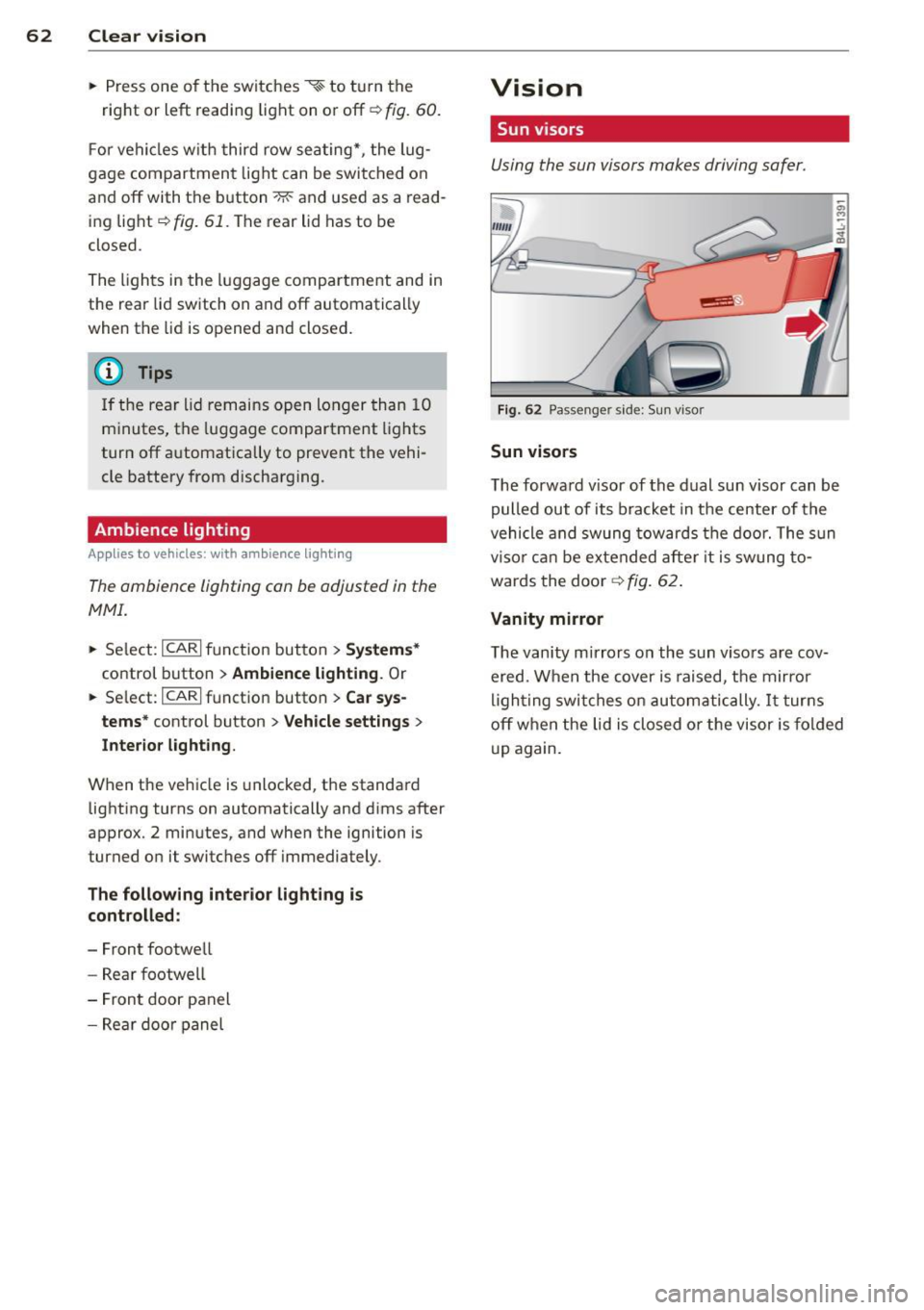
Fig . 62 Passe nger side: Su n visor
Sun visors
The forwa rd v isor of the dual sun visor can be
pulled out of its bracket in the center of the
vehicle and swung tow ards the door. The s un
vi so r ca n be e xtended afte r it is swung to
wards the door
~ fig. 62.
Vanity mirror
The vanity mirrors on the sun viso rs are cov
ered. When the cover is raised, the mirror
l igh ting swit ches on au tom atic ally.
It tur ns
off when the lid is closed or the visor is fol ded
u p again.
Page 76 of 348
7 4 Seats and stor age
• Driver's door closed -press the correspond
ing memory button unti l the stored position
is reached.
Successf ul s torage is conf irmed a ud ibly and
by the l ight i n the
!SET ! button illuminating .
When the ve hicle is
locked , the cur rent set
tings are stored and ass igned to the remo te
control key. Bu t th e set tings stored on memo
ry buttons 1 and 2 are not deleted. They can
be reca lled at any time . When the vehicle is
unlocked , the settings assigned to the remote
control key are restored.
If you r vehicle is driven by other persons using
your remote control key, you should save yo ur
individua l seat position on one of the memory
buttons. You can reca ll your settings aga in
simply and conve niently by pressing the corre
spond ing memory butto n. When the vehicle is
l oc ked, these setti ngs are automatically re-as
signed to t he remote control key and stored.
.&_ WARNING
- F or safe ty re ason s, the sea t sett in g can
only be rec alled w hen the veh icle is st a
t ionary -othe rwise you r isk having an ac
cident.
- In an emergency, the recall operation
can be stoppe d by pressin g the
!ON/OFF I
button or by br iefly p ress ing any given
memory button.
Activating remote control key memory
A ppl ies to veh icles: with seat memo ry
To assign the driver's seat settings to the re
mote contro l key when locking the vehicle, the
function must be activated in the MMI.
• Se lect:
I CARI f u nct ion button > Systems *
control button > Seat adjustment > Driver 's
seat > Key mem. p rofile > On .
Or
• Se lect:
ICARI funct io n button > Car sy s
tems *
control bu tton > Vehicle settings >
Seats > Driver's seat > Remote control key
> On .
(D Tips
If you do not want anothe r driver's set
tings to be assigned to the remote control key, switch off the memory function using
the MMI or the
I ON/OF F! button
c> page 73.
Rear seats
General information
Safe transportation of passengers on the rear
seats requires proper safety pre cautions.
All passengers on the rear seats mus t be seat
ed in comp lian ce with the safety guide lines
exp lained in
c> page 175 and c>page 184.
T he co rrec t seating pos ition is cr it ic al f or the
sa fe ty of front
and rear seat passenge rs a like
c>page 168 .
A WARNING
--Occupants in the f ront and rear seats
m ust always be proper ly restrained.
- Do not let anyone ride in the ve hicle
witho ut the head restraints prov ided.
Head restraints help to reduce injuries.
- Loose items inside the passenge r com
pa rtment, can fly forward in a crash or
sudden maneuve r and injure occupants.
Always store a rticles i n the luggage com
pa rtment an d use the fastening eyes, es
pecially w he n the rea r seatbac ks hav e
been fo lded down.
- Read and heed all WARNI NGS
c> pag e 168, Proper s eating positions
for passengers in rear sea ts.