unlock AUDI Q7 2013 Owner´s Manual
[x] Cancel search | Manufacturer: AUDI, Model Year: 2013, Model line: Q7, Model: AUDI Q7 2013Pages: 348, PDF Size: 87.72 MB
Page 11 of 348
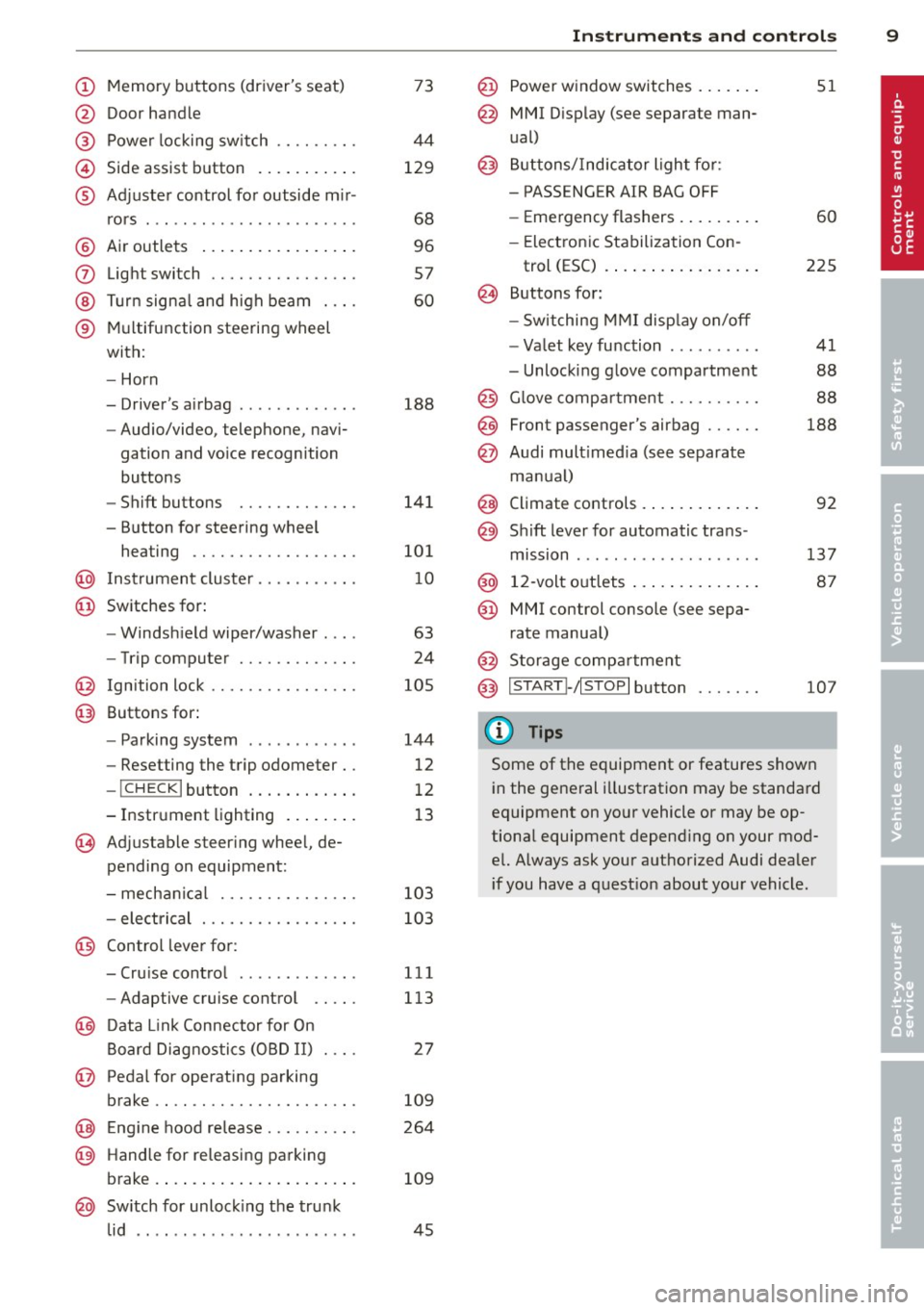
(!) Memory buttons (driver's seat)
@ Door handle
@ Power locking switch .... .. .. .
© Side assist button .......... .
® Adjuster control for outside m ir-
rors .... ... ............... .
@ Air outlets ................ .
(J) Light switch ........... .... .
@ Turn signal and high beam . .. .
® Multifunction steering wheel
with:
- Horn
- Driver's airbag ............ .
- Audio/video, telephone, navi-
gation and vo ice recognition
buttons
- Shift buttons ........ .. .. .
- Button for steering wheel heating ............. .... .
@ Instrument cluster ...... .. .. .
@ Switches for:
- Windshield wiper/washer . .. .
- Trip computer ........ .. .. .
@ Ignition lock ........... .... .
@ Buttons for:
- Parking system
- Resetting the trip odometer ..
- !CHECK lbutton ... ' ... .... .
- Instrument lighting ....... .
'3 Adjustable steer ing wheel, de
pending on equipment:
- mechanical .......... .... .
- electrical ............ .... .
@ Control lever for: 73
44
129
68
96
57
60
188
141
101
10
63
24
105
144
12
12
13
103
103
- Cru ise control . . . . . . . . . . . . . 111
- Adaptive cruise control . . . . . 113
@ Data Link Connector for On
Board Diagnostics (OBD II) . . . . 27
@ Pedal for operating parking
brake . . . . . . . . . . . . . . . . . . . . . . 109
@ Engin e hood release . . . . . . . . . . 264
@ Handle for releasing parking
brake. ..... .... .... ... .. .. . 109
@ Switch for unlock ing the trunk
lid . . . . . . . . . . . . . . . . . . . . . . . . 45
Instruments and controls 9
@ Power window switches ...... .
@ MMI Display (see separate man
ual)
@ Buttons/Indicator light for:
- PASS ENG ER AIR BAG OFF
- Emergency flashers ........ .
- Electronic Stabilization Con-
trol (ESC) ...... . ......... .
@ Buttons for:
- Switching MMI display on/off
- Valet key function ......... .
- Unlocking glove compartment
@ Glove compartment ......... .
@ Front passenger's airbag ..... .
@ Audi multimed ia (see separate
manua l)
@ Climate controls . .. .. .. ..... .
@) Sh ift lever for automatic trans -
mission ....... .. .......... .
@ 12-volt outlets ... . .. .. ..... .
@ MMI control console (see sepa
rate manual)
@ Storage compartment
@ IS TART I- / IS T OPI button
(D Tips
51
60
225
41
88
88
188
92
137
87
107
Some of the equipment or features shown
in the general illustration may be standard
equipment on your vehicle or may be op
tional equipment depend ing on your mod
el. Always ask your authorized Audi dealer
i f you have a question about your vehicle .
Page 35 of 348
~ Contact your authorized Audi dea ler fo r as -
sistance if necessary.
If the engine coolant level is co rrect, then the
radiato r fan may be the cause of the malfunc
tion.
If the . warning symbol (alternator ma l
f u nction) a lso l ights up on the instr ument
panel ¢
page 31, then the fan belt may be
damaged .
A WARNING
- If your vehicle should break down for
mechanica l or other reasons, park at a
safe distance from moving traffic, turn off the engine and turn on the hazard
warning lights¢
page 60, Emergency
flasher.
-
- Never open the hood if you see or hear
steam o r coolant escap ing from the en
gine compartment - you risk being scald
ed. Wait until you can no longe r see or
hear steam or coo lant escaping.
- The e ngine compartment of any veh icle
is a da ngerous a rea. Before you perfo rm
any wor k in the engine compar tment,
t ur n o f the eng ine and allow it to cool.
Follow the warning stickers¢
page 255,
Engine compartment .
(D Note
Do not cont in ue d riving if the . symbol
illuminates. There is a ma lf u nct ion in the
engine cooling system -you co uld damage
your eng ine.
9=:7-Engine oil pressure malfunction
The red engine oil pressure warning symbol
requires immediate service or repair. Driving
with a low-oil -pressure indication is likely to
inflict severe damage to the engine.
If the . symbol appears in the display and
b links, the oil press ure is too low . An addition
a l dr iver message can also be disp layed by
press ing the
I CH ECKi button:
Switch off engine! Oil p ressure too low
Dri ver information di spla y 33
Immediate act ions
~ Pull off the road.
~ Stop the vehicle.
~ T ur n off the engine .
~ Check the engine oil level with the dipstick
¢ page
269 .
Dipstick readings check s too low
~ Top off oil to the prope r level ¢ page 2 70 .
~ Make sure that the oil pressure wa rning
symbo l. appears no longer in the d isp lay
before you sta rt driving again.
Dipstick read ing checks OK
~ If the oil p ress ure warning symbol.
s t arts flashing aga in even though the en
gine oil level checks OK on t he dipstick,
do
not continue d riving and do not let the en
gine run in idle .
Instead, contact your au
thorized A udi dealer for assistance.
(D Tips
- The engine oil pressure symbol. is
not an indi cator for a low eng ine o il lev
el. Do not rely on it . Instead, check the
oil level in your engine at regula r inter
vals, preferably each time you refuel,
and always before going on a long trip .
- The yellow oil lev el warn ing indication
II requires oil r efill or work shop serv
i ce without delay . Do not wait until th e
red oil pressure warning. start s to
flash bef ore you re spond to th e low oil
le vel warning
l!I . By then , your engine
ma y already have suffe red serious dam
age.
i Steering malfunction
If there is a malfunction in the electronic
steering column lock, the steering cannot be
unlocked .
If the . symbo l in the display b links, there is
a malfunction in the electro nic steering col
u mn lock. An additional driver message can
also be displayed by pressing the
ICHECK I but-
ton:
~
Page 40 of 348
38 Opening and closing
Opening and closing
Keys
Key set
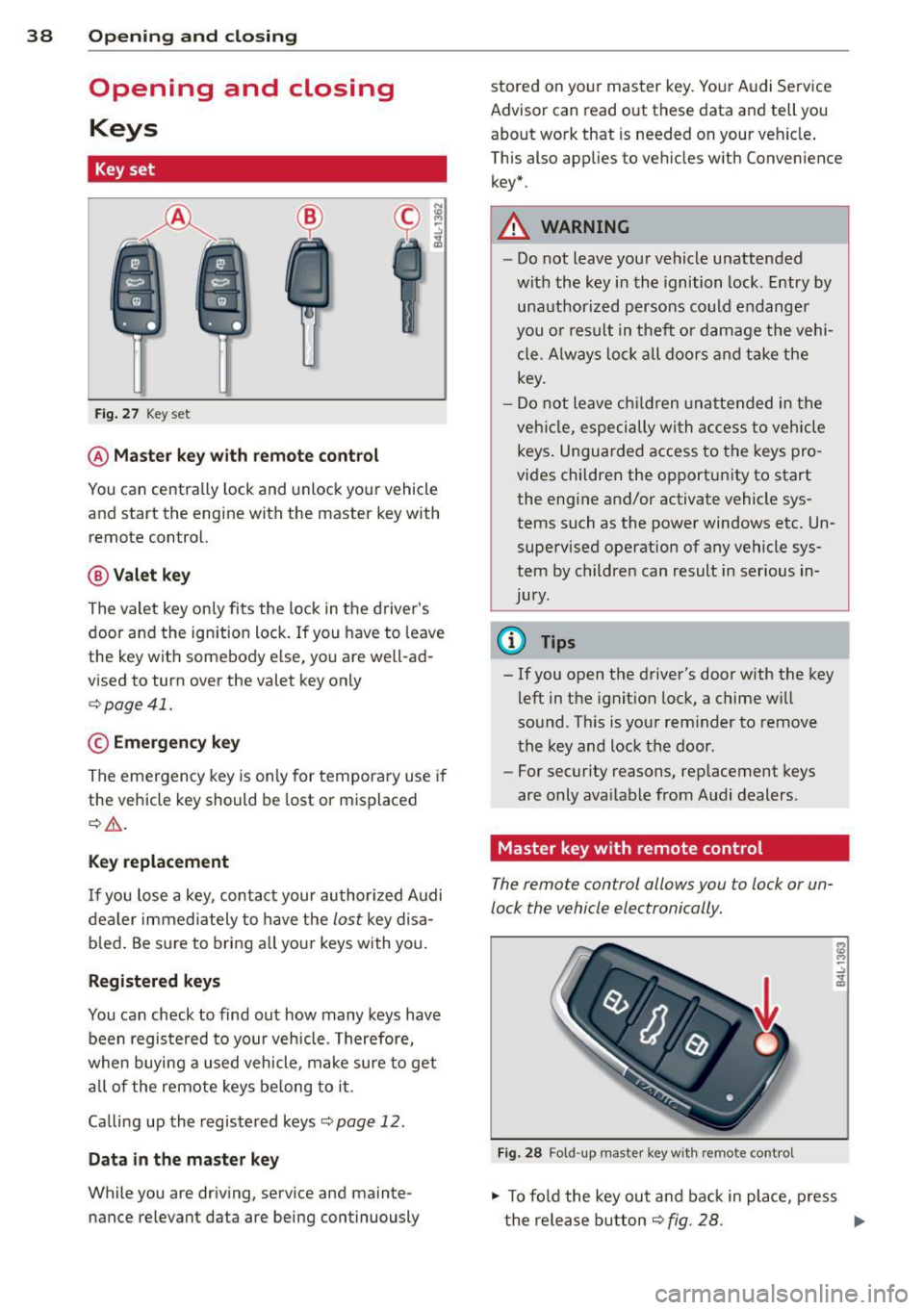
Fig. 27 Key set
@ Master key with remote control
You can centrally lock and unlock your vehicle
and start the engine with the master key with
remote control.
@ Valet key
The valet key only fits the lock in the driver's
door and the ignition lock . If you have to leave
the key with somebody else, you are well-ad
vised to turn over the valet key only
¢ page 41.
© Emergency key
The emergency key is only for temporary use if
the vehicle key should be lost or misplaced
¢ .&. .
Key replacement
If you lose a key, contact your authorized Audi
dealer immediately to have the
lost key disa
b led . Be sure to bring all your keys with you.
Registered keys
You can check to find out how many keys have
been registered to your vehicle. Therefore,
when buying a used vehicle, make sure to get
all of the remote keys be long to it .
Ca lling up the registered keys¢
page 12.
Data in the master key
While you are driving, serv ice and mainte
nance relevant data are being continuously stored on your master key. Your Audi
Service
Advisor can read out these data and tell you
about work that is needed on your vehicle .
This also app lies to vehicles w ith Convenience
key*.
A WARNING
--
- Do not leave your vehicle unattended
with the key in the ignition lock. Entry by
unauthorized persons could endanger
you or result in theft or damage the vehi
cle. A lways lock all doors and take the
key.
- Do not leave children unattended in the
veh icle, especially with access to vehicle
keys . Unguarded access to the keys pro
vides children the opportun ity to start
the engine and/or activate vehicle sys
tems such as the power windows etc. Un
supervised operation of any vehicle sys
tem by children can result in serious in
Jury .
(D Tips
- If you open the driver's door with the key
left in the ignition lock, a chime w ill
sound. T his is your reminder to remove
the key and lock the door.
- For security reasons, replacement keys
are only ava ilable from Audi dealers.
Master key with remote control
The remote control allows you to lock or un
lock the vehicle electronically .
Fig. 28 Fold-up maste r key with remo te control
., To fold the key out and back in place, press
t he release button ¢
fig. 28. .,.
Page 41 of 348
The transmitter and battery a re located in the
head of the remote control. The receiver is lo
cated inside the vehicle. The maxim um effec
tive range depends on several things. Remem
ber, if the battery is weak, the effective range
decrease s.
If you need to replace the remote contro l, or if
you need to have it repaired, you must see
your author ized Audi dealer. Only then can
you use the key again .
Personalizing the ma ster key
When t he ignit ion is t urned off or when the
veh icle is locked, vari ous conven ience settings
are stored automatically and assigned to the
key that was used . The settings that are as
signed to the maste r key are recalled auto
ma ticall y when the veh icle is unlocked, when
the door is opened o r when th e ignition is
sw itched on .
Sett ings are saved for the following systems :
- Climate control
- Central lock ing
-W indows
- Am bien ce light ing*
- Seat memory*
- Steering w heel heat ing*
- Adaptive cruise control*
- Audi side ass ist*
- Pa rking system*
The
Remote control key f unc tion mus t be ac
t iv at ed in t he MMI ¢
page 74, so that the
set tings for the driver 's seat (i ncluding the
settings for the steering co lumn and exter ior
mirrors) are saved on the master key through
the seat memory when the vehicle is locked,
and a re set automatically when the ve hicle is
u nl ocked.
(D Tips
- If
the ignition is sw itched on, t he remote
contr ol system is deact ivated.
- The remote control system can be affec t
ed by other systems operating in the
same frequency range close to the vehi-
Opening and clo sin g 39
cle, such as mo bile telep hones, televi
sion broadcast ing stations, etc .
- F or Declara tion of Com pliance to United
States FCC and In du stry Canada re gula
ti ons¢
page 328 .
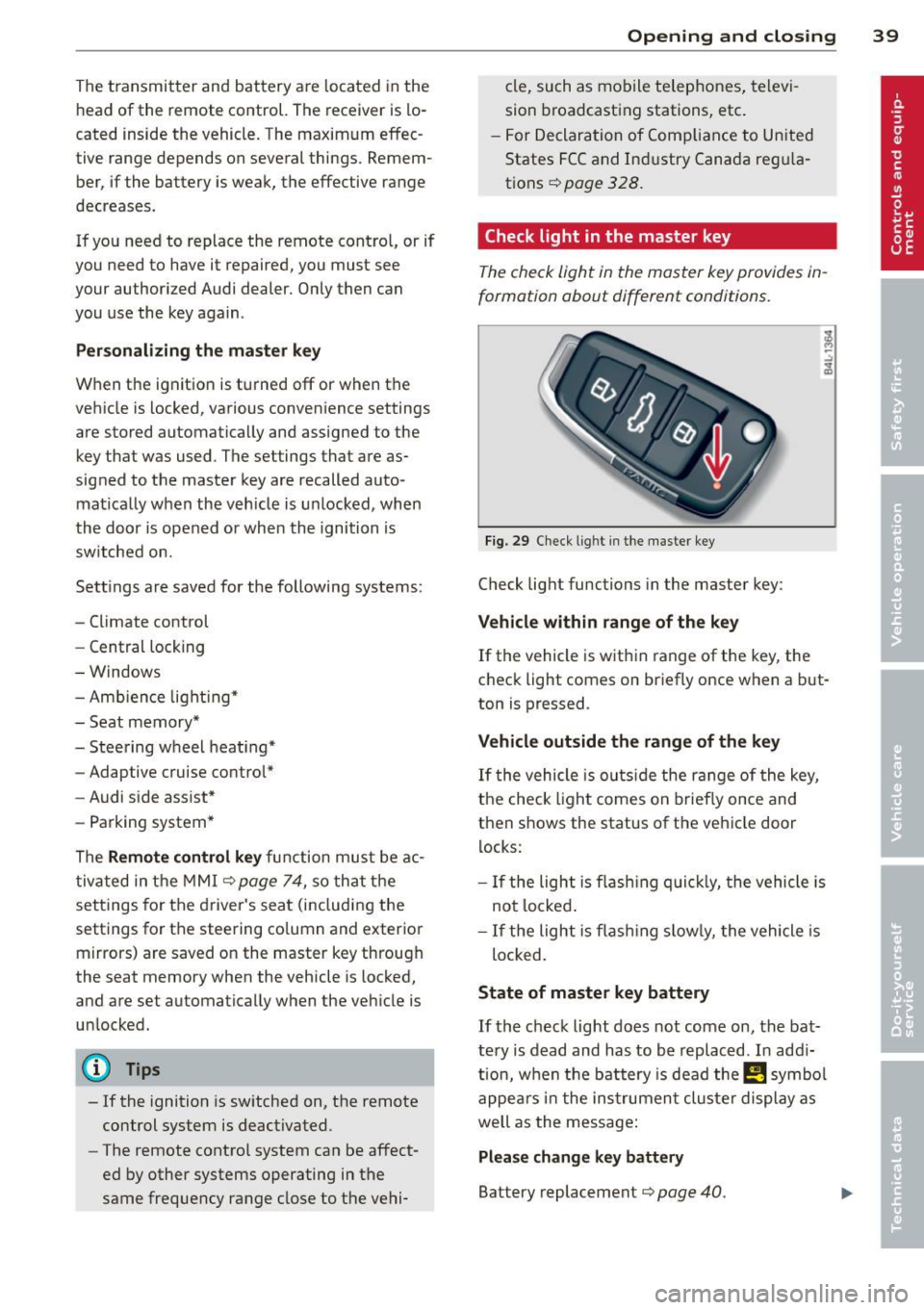
Check light in the master key
The check light in the m aster key provides in
formation about different conditions .
Fig. 29 Ch eck l ig ht in t he m aster key
Check lig ht functions in the master key :
Vehicle within range of the key
If
the vehicle is w it hi n range of the key, the
c heck light comes on br iefly once when a b ut
ton is pressed .
Vehicle outside the range of the key
If
t he vehicle is ou ts id e the r ange of the key,
the check light comes on brie fly once and
then shows the status of the vehicle door l ocks:
- If the ligh t is fla shin g qu ickl y, the vehicle is
no t locke d.
- If the ligh t is f lash ing slow ly, the vehicle is
loc ked .
State of master key battery
If
t h e ch ec k light does not come on, the bat
te ry is d ead and has to b e re pla ced . In ad di
tio n, w hen the b attery is dea d
the m symbo l
appe ars in t he instrumen t clu ster displ ay a s
well as the mess age:
Please change key battery
Battery replacement ¢ page 40.
Page 43 of 348
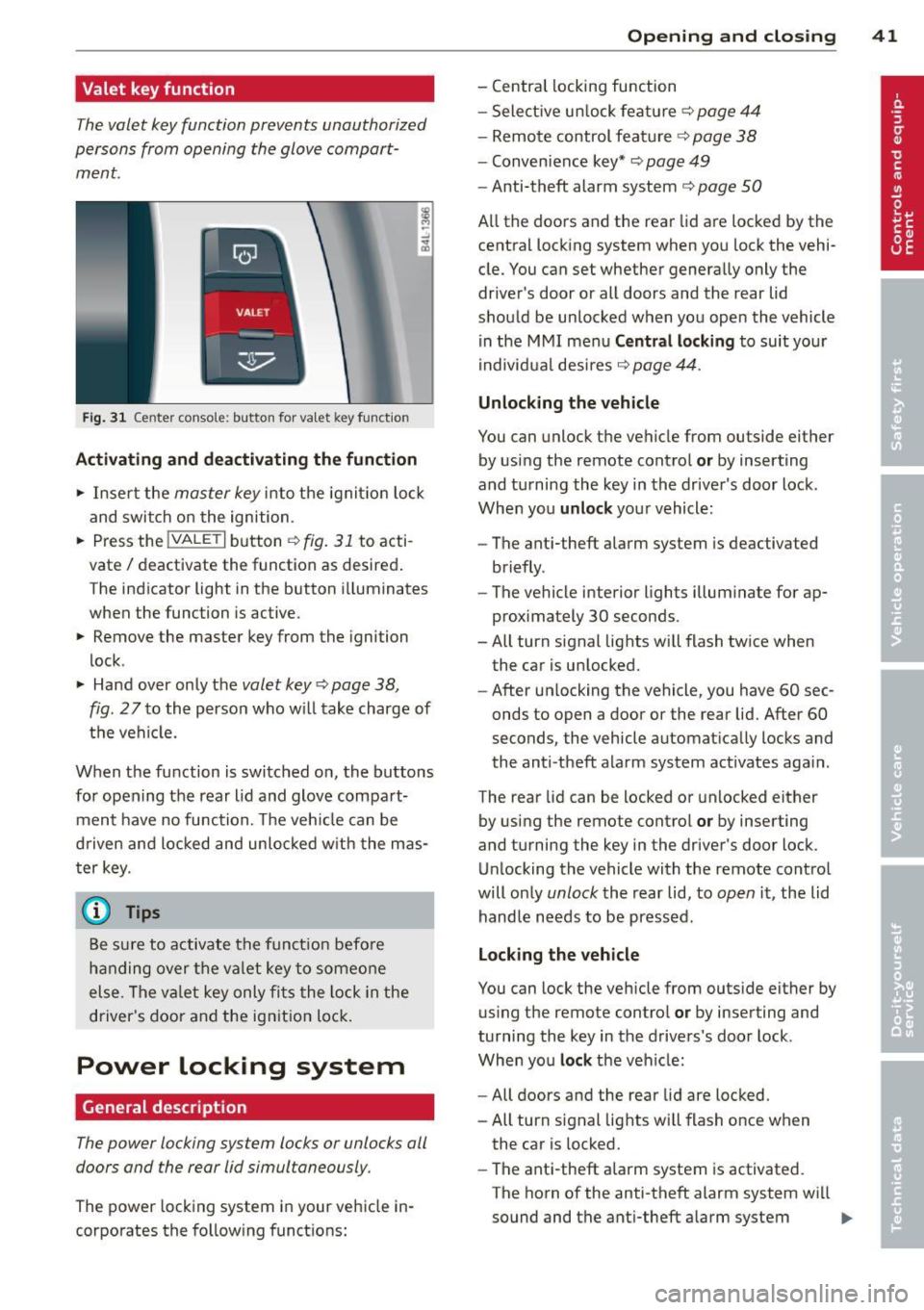
Valet key function
The valet key function prevents unauthorized
persons from opening the glove compart
ment.
Fig. 31 Center conso le: button for va let key funct ion
Activating and deactivating the function
.,. Insert the master key into the ignit io n lock
and switch on the ignition .
.,. Press the
!VALET I button c:::;, fig. 31 to acti
vate/ deactivate the function as desired .
The indicator light in the button i lluminates
when the function is active.
.,. Remove the master key from the ignition
lock .
.,. Hand over only the
valet key c:::;, page 38,
fig .
27 to the person who will take charge of
the vehicle.
When the function is switched on, the buttons for opening the rear lid and glove compart
ment have no function. The vehicle can be
d riven and locked and unloc ked w ith the mas
ter key.
(j) Tips
Be sure to activate the funct ion befo re
handing over the valet key to someone
else . The va let key only fits the lock in the
driver's door and the ignition lock.
Power locking system
General description
The power locking system locks or unlocks all
doors and the rear lid simultaneously.
The power locking system in your vehicle in
corporates the fo llowing functions:
Opening and closing 41
- Central locking function
- Select ive un lock feature ¢
page 44
-Remote control feature ¢ page 38
-Convenience key*¢ page 49
-Anti-theft alarm system ¢ page 50
All the doors and the rear lid are locked by the
central locking system when you lock the vehi
cle. You can set whether generally only the
driver 's door or all doors and the rear lid
should be unlocked when you open the vehicle
in the MMI menu
Central locking to suit your
individual desires
c:::;, page 44.
Unlocking the vehicle
You can unlock the vehicle from outside either
by using the remote control
or by inserting
and turning the key in the driver's door lock .
When you
unlock your vehicle :
- The anti-theft alarm system is deactivated
briefly .
- The vehicle interior lights illuminate for ap
proximately 30 seconds .
- All turn signal lights will flash twice when
the car is unlocked .
- After un locking the vehicle, you have 60 sec
onds to open a door or the rear lid. After 60
seconds, the vehicle automatically locks and
the anti-theft alarm system act ivates aga in .
The rear lid can be locked or unlocked either
by using the remote control
or by inserting
and turning the key in the driver's door lock.
Unlocking the vehicle with the remote control
will on ly
unlock the rear lid, to open it, the lid
handle needs to be pressed .
Locking the vehicle
You can lock the vehicle from outside either by
using the remote control
or by inserting and
turning the key in the drivers's door lock .
When you
lock the veh icle:
- All doors and the rear lid are locked.
- All turn signal lights will flash once when
the car is locked.
- The ant i-theft alarm system is activated.
The horn of the anti-theft alarm system wi ll
sound and the anti-theft alarm system
IJJ,-
Page 44 of 348
42 Openin g and clo sing
readiness light, located in the upper part of
the driver's door panel, will start to blink.
- T he vehicle interior lights turn off.
Unlocking and l ocking with Conven ience
k ey*
On vehicles which a re equipped w ith the C o n
ve nience k ey*
authorization system, the
doors are unlocked without a key by means of
a proximity sensor in the door handle. The
doors are simi larly locked without a key using
the locking button. Each door has a proximity
sensor and a locking button .
Automatic l ock ing
The automatic locking feature locks all the ve
hicle doors and the rear lid when you drive
faster than 9 mph (15 km/h). This function can be turned on and off in the MMI
C entr al
lo cking
Menu c:> page 44.
You can un lock the vehicle from the inside by :
- removing the key from the ign it ion sw itch
(the vehicle will automat ica lly unlock itself)
or
- pressing the unlock part of the power lock
switch @or
- pull ing the door handle (twice to open the
rear doors).
Unintent ionall y locking yourself out
In the following cases there safeguards to
prevent you locking your remote master key in
the vehicle :
- The veh icle does not lock with the power
locking sw itch
c:> page 44 if the driver's
door is open.
- On vehicles with Convenience key* , if the
most recently used master key is in the lug
gage compartment, the rear lid is automati
cal ly unloc ked aga in after it is closed.
Do not lock your vehicle with the
r e mot e m as
t e r k ey or Convenienc e key*
until all doors
and the rea r lid are closed. In t his way you
avoid locking yourse lf out accidenta lly.
A WARNING
- When you lock your vehicle from outside,
nobody- espec ially children -should re
main inside the vehicle . Remember,
when you lock the vehicle from the out
side the windows cannot be opened from
the inside.
- When you leave the veh icle, always re
move the ignition key and take it with
you . This will prevent passengers (chil
dren, for example) from accidentally be
ing locked in the vehicle should they acci
dentally press the power locking switch
in the front doors.
- Do not leave children inside the vehicle
unsupervised. In an emergency it would
be imposs ible to open the doors from
the outside without the key.
(D Tips
- In the event of a crash with airbag de
ployment all locked doors will be auto
matically unlocked to give access to the
vehicle occupants from the outside.
- If the power locking system sho uld mal
function, you can lock each door individ
ually using the vehicle key
c:> page 45 .
-If the power locking system shou ld fa il,
you can still open the fuel tank flap in an
emergency
c:> page 261 .
-You are well advised not to keep va lua
bles inside an unattended vehicle, v is ible
or not. Even a properly locked vehicle
cannot p rov ide the secur ity of a safe .
Page 45 of 348
Unlocking and locking the vehicle with
the remote control
How the remote control works.
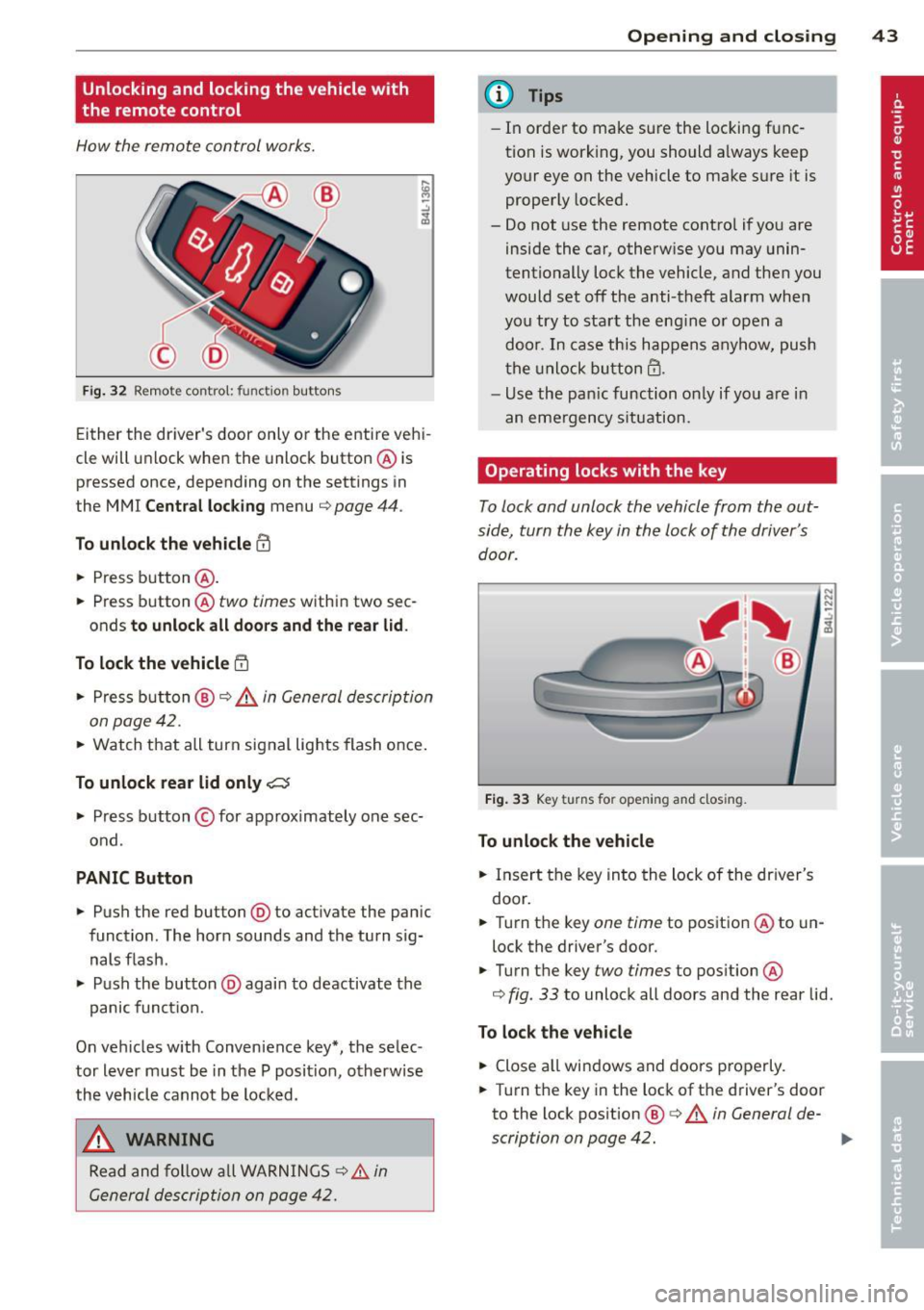
Fig. 32 Remot e contr ol: fun ctio n but ton s
Either the driver 's door only or the entire vehi
cle will unlock when the unlock button @ is
pressed once, depending on the settings in
the MMI
Central locking menu ¢ page 44 .
To unlock the vehicle CD
.. Press button @.
.. Press button @two
times within two sec
onds
to unlock all doors and the rear lid .
To lock the vehicle 5'.l
.. Press button @¢.&. in General description
on page 42 .
.. Watch that all turn signal lights flash once.
To unlock rear lid only~
.. Press button © for app roximately one sec
ond .
PANIC Button
.. Push the red button@) to act ivate the panic
function. The horn sounds and the turn sig nals flash .
.. Push the button @again to deactivate the
panic function.
On vehicles w ith Convenience key*, the selec
tor lever must be in the P posit ion, otherwise
the vehicle cannot be locked.
_& WARNING
Read and follow all WARNINGS ¢&. in
General description on page 42.
-
Opening and closing 43
@ Tips
-In order to make sure the locking func
tion is working, you should a lways keep
your eye on the vehicle to make s ure it is
properly locked.
- Do not use the remote control if you are
inside the car, otherwise you may unin
tentionally lock the vehicle, and then you
would set off the anti-theft alarm when
you try to start the eng ine or open a
door . In case this happens anyhow, push
the unlock button@.
- Use the pan ic function on ly if you are in
an emergency s ituation.
Operating locks with the key
To lock and unlock the vehicle from the out
side, turn the key in the lock of the driver's door .
Fig. 33 Key turns fo r open in g and clos ing .
To unlock the vehicle
.. Insert the key into the lock of the driver's
door .
N N N :;
~
.. Turn the key one time to position @to un
lock the driver's door.
.. Turn the key
two times to position @
¢
fig . 33 to unlock all doors and the rear lid .
To lock the vehicle
.. Close all windows and doors properly.
.. Turn the key in the lock of the driver's door
to the lock pos ition @ ¢
A in General de-
scription on page 42. ..,.
Page 46 of 348
44 Opening and clo sing
& WARNING
Read and follow all WARNINGS c> .&. in
General description on page 42.
Settings in the MMI
The driver can determine the functions for
power locking in the MMI.
• Se lect : ICARI funct ion button> S ystem s*
control button > Cent ral locking . Or
• Se lect :
ICARI function button > Ca r sys
tems *
control button > Vehicle setting s >
(Central lo ck ing) *.
Pa ssenger 's door *, Left rea r door *, Right re ar
door *, Trunk lid /tailgate * -
You can specify
which doors should unlock when you unlock
the vehicle .
- If you se lect
On and then press the [@) but
ton on the remote control key, the corre
sponding door w ill unlock .
- If you se lect
Off and then press the[@] but
ton on the remote control key , the corre
sponding door w ill not unlock. If you press
the
Im button twice, all doors and the lug
gage compartment will unlock . When lock
ing the vehicle, all of the doors and the lug
gage compar tme nt lock a utoma tica lly.
Unlock doors * -You can spec ify if all doors o r
only the d river's doo r shou ld un lock wh en un
l oc king t he ve hicle.
- If you select All and press the
l@J button o n
the remote control key, a ll of the doors and
the luggag e compartment will un lock .
- If you select
Driv er and then press the Im
button on the remote control key, only the
dr ive r's door w ill unlock. If you press the
l@J
button twice, all doors and the luggage
compar tment will u nlock. When lo cking the
vehicle, a ll of the doors and the luggage
compartment lock a utomatically. In vehicles
with a convenience key*, on ly t he door
whose hand le you pu ll w ill unlock.
Auto l ocking /Lo ck when d riv in g -If you se
lect
On , the doors and the luggage compart
ment will lock automatically .
(D Tips
The central locking settings are stored in
the remote contro l key .
Locking and unlocking the vehicle from
inside
The vehicle can be locked or unlocked from
the inside using the power locking switches .
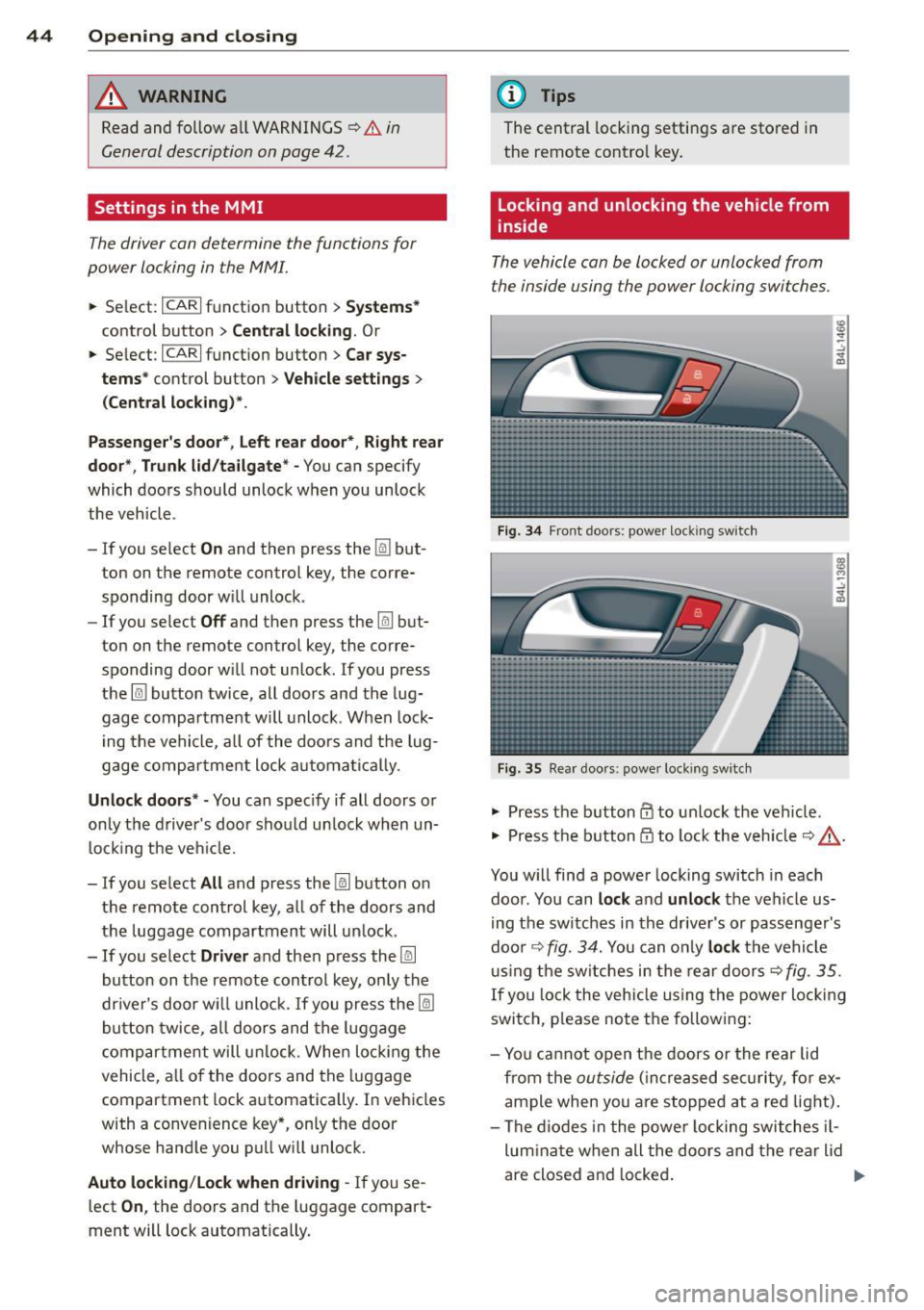
Fig. 34 Front doors : powe r lock ing swit ch
Fig. 35 Rear doors : powe r locking sw itc h
• Press the b utton CD to unlock the veh icle .
• Press the b utton
tfJ to lock the veh icle c> & -
You w ill find a power locking switch in eac h
doo r. You can
lock and unlock the vehicle us
i ng the switches in the drive r's or passenger's
doo r¢
fig. 3 4. You can o nly lock the vehicle
u sing the sw itches in the rear doors
c>fig . 35.
If you lock the veh icle using the power locking
switch, p lease note the following:
- Yo u ca nnot open the doors or the rear lid
from the
outside ( in cr eased se cur it y, for ex
ample when you are stopped at a red light).
- The diodes in the powe r locking switches il-
lum ina te when all the doors and the rear lid
are close d and locked .
Page 47 of 348
-Front doors: you can un lock and open the
doors from the inside by pulling on the door
handle.
- Rear doors: pu ll the door handle
once to re
lease the lock. Pull the hand le
again to open
the doo r.
- If the driver's door is opened (after you have
locked the vehicle from the inside using the
power locking switch), the door will remain
unlocked to prevent you from locking your
self out of your vehicle . After you close the
door, you have to lock the driver 's door
again .
- If you have a crash and the airbag is act ivat
ed, the doors automatically unlock.
A WARNING
- If you use the powe r locking switch with
the doors closed, remember that all the
vehicle doors will lock.
- Locked doors make it more difficult for
emergency workers to get into the vehi
cle, which puts lives at risk. Do not leave
anyone behind in the vehicle, especially
children.
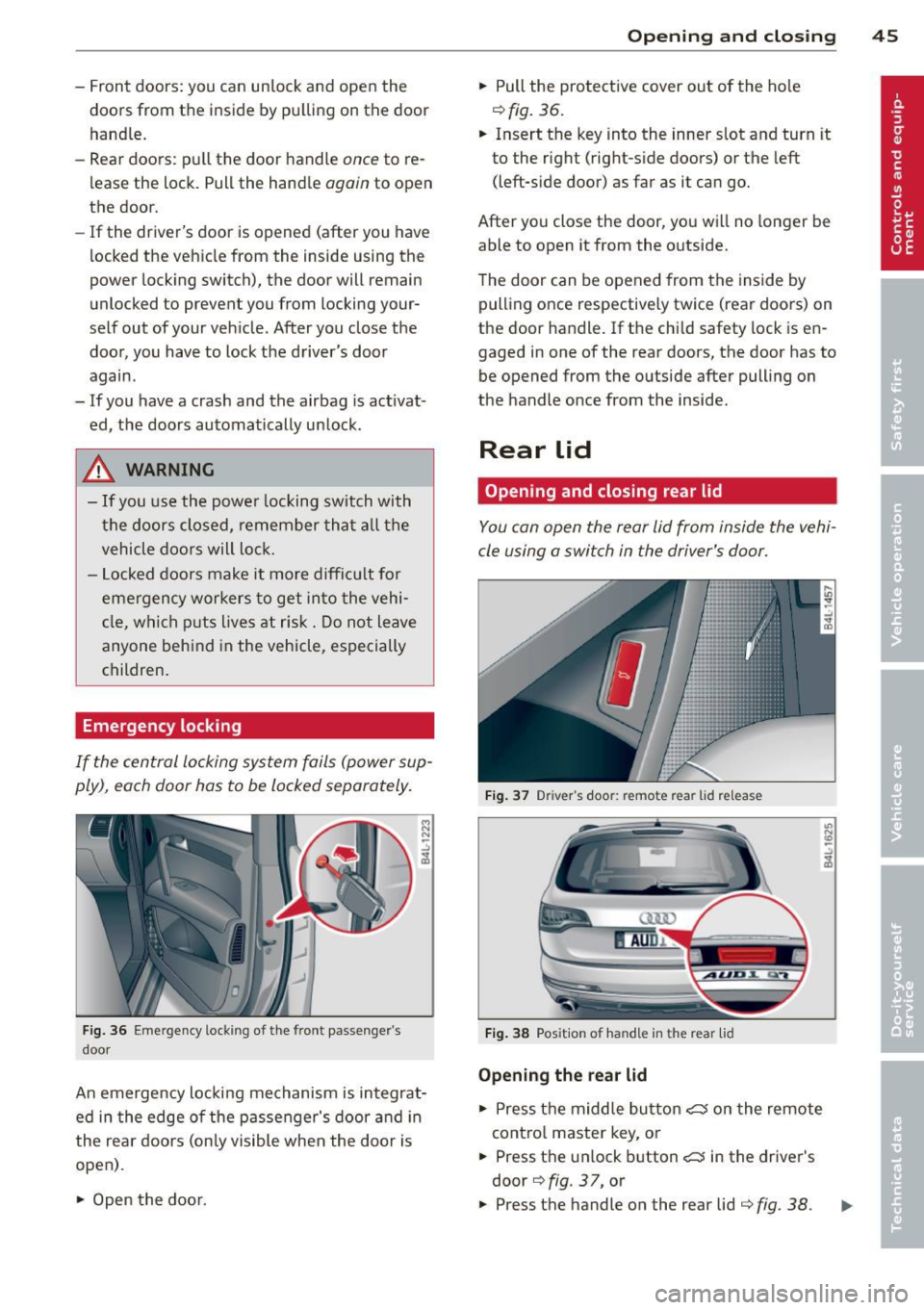
Emergency locking
If the central locking system fails (power sup
ply), each door has to be locked separately.
Fig. 36 Em ergency lockin g o f the front passe nger's
doo r
i:i N
-..:,
~
An emergency locking mechanism is integrat
ed in the edge of the passenger's door and in
the rear doors (only visible when the doo r is
open) .
~ Open the door.
Opening and closing 45
~ Pull the protective cover out of the hole
¢fig. 36.
~ Insert the key into the inner slot and turn it
to the right (right-s ide doors) or the left
(left-s ide door) as far as it can go.
After you close the door, you will no longer be
able to open it from the outside.
T he door can be opened from the inside by
pulling once respectively twice (rear doors) on
the door handle . If the chi ld safety lock is en
gaged in one of the rear doors, the door has to
be opened from the outside after pull ing on
the handle once from the inside.
Rear lid
Opening and closing rear lid
You can open the rear lid from inside the vehi
cle using a switch in the driver's door.
Fig. 37 Driver 's doo r: remote rear lid release
Fig. 38 Posit io n of ha ndle in t he re ar lid
Opening the rear lid
~ Press the middle button C::5 on the remote
cont rol master key, or
~ Press the un lock button C::5 in the driver's
door
¢ fig . 37, or
U) N
"' -..:,
i3
~ Press the handle on the rear lid ¢ fig. 38 . .,.
Page 48 of 348
46 Opening and clo sing
• The rear lid un locks automatically and
opens slight ly.
• Lift the rear lid .
Clos ing the r ear lid
• Pull the rear lid down and allow it to drop
gently. The lid is then closed automat ica lly
Q A .
A WARNING
-After closing the rear lid, always pull up
on it to make sure that it is properly
closed. Otherw ise it could open sudden ly
when the vehicle is moving .
- To help prevent po isonous exhaust gas
from being drawn into the veh icle , al
ways keep the rear lid closed while dr iv
ing . Never transport objects larger than
those which fit completely into the lug
gage area, because then the rear lid can
not be fully closed .
- Never leave you r vehicle unattended es
peci ally wi th the re ar lid left open. A
c h ild could c rawl into the ca r th rough the
l u ggage compartment and pull the lid
shut, becom ing trapped and unab le to
get out. To reduce the risk of persona l in
jury, never let children play in or around yo ur vehicle . A lways keep the rear lid as
well as the vehicle doors closed when not
in use .
- Always ensure that no one is w ith in
range of the rear lid when it is mov ing, in
part icula r close to the h inges -fingers o r
hands can be pinched.
@ Tips
- If the rear lid is open or not properly
clos ed w hen the ig nition is turned on,
the door and rea r lid war ning
Q page 22
appears in the ins trument clus ter dis
play.
- Should you not b e able to open the re ar
li d as desc ribed, make sure the valet key
func tion is not ac tiv at ed
~ page 41.
Automatic rear lid/trunk lid operation
Applies to vehicles: with automatic rear lid/trunk lid oper
ation
The trunk lid can be opened and closed auto
matically.
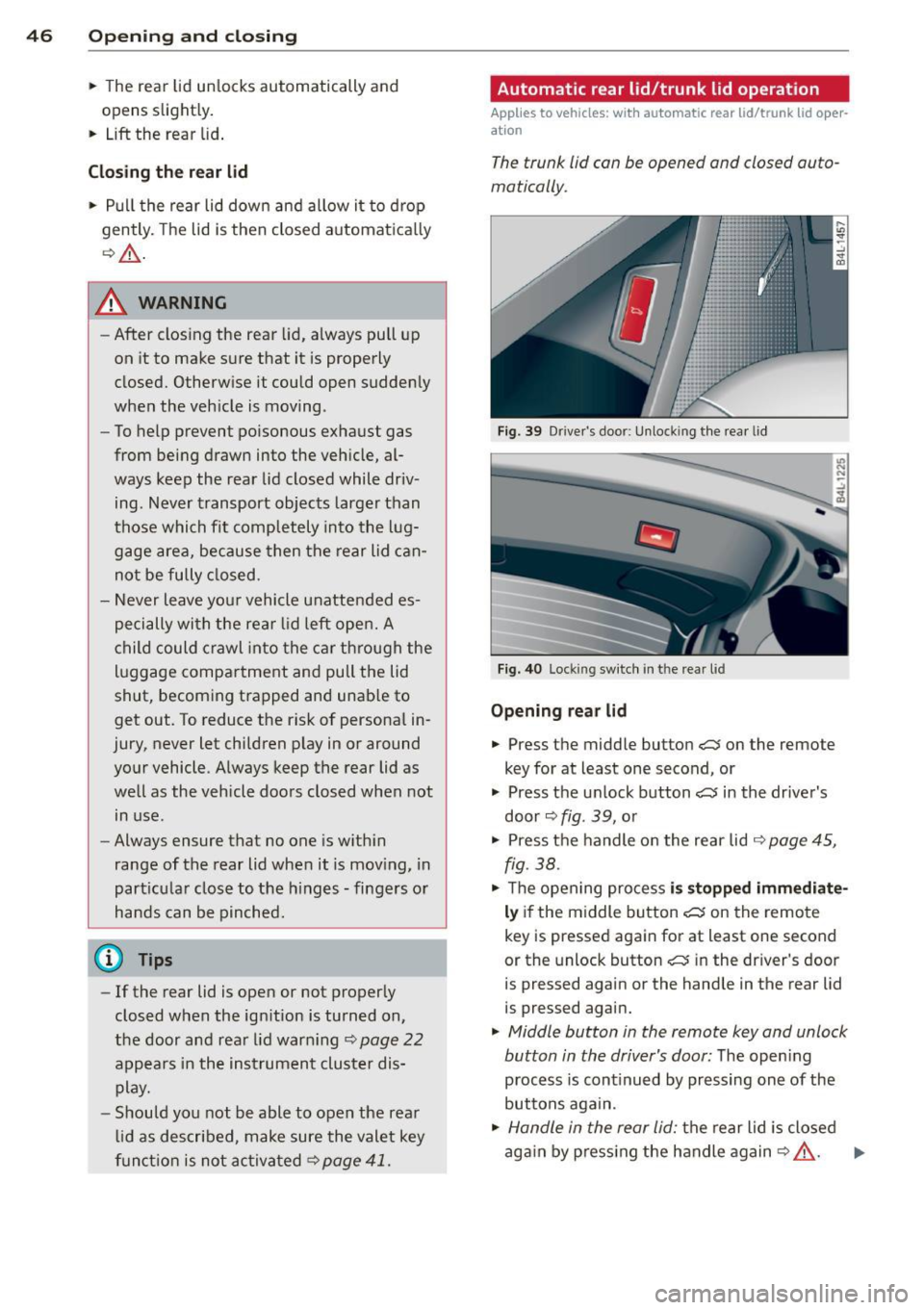
Fig. 39 D rive r's doo r: Unlock ing t he rea r lid
Fi g. 4 0 Lock ing sw itc h in t he rear l id
Opening rear lid
• Press the middle button C:$ on the remote
key for at least one second, or
• Press the u nlock button
c:5 in the driver's
door ~
fig. 39, o r
• Press the handle o n the rear lid
¢ page 45,
fig. 38 .
• Th e open ing pro cess is stopped immediate
ly if the middle button c:5 on the remote
key is pressed again for at least one second
or the unlock button
c:5 in the dr iv e r's door
is pressed again or the hand le in the rear lid
is pressed aga in.
• Middle button in the remote key and unlock
button in the driver's door:
T he open ing
p rocess is cont inued by pressing on e of the
buttons aga in.
• Handle in the rear lid: the rear l id is closed
ag ain by p ress ing the handle again
Q A . ..,.