media AUDI Q7 2013 Owner´s Manual
[x] Cancel search | Manufacturer: AUDI, Model Year: 2013, Model line: Q7, Model: AUDI Q7 2013Pages: 348, PDF Size: 87.72 MB
Page 108 of 348
106 On the road
Starting and stopping
the engine
Starting the engine
The engine can only be started with your orig
inal Audi key.
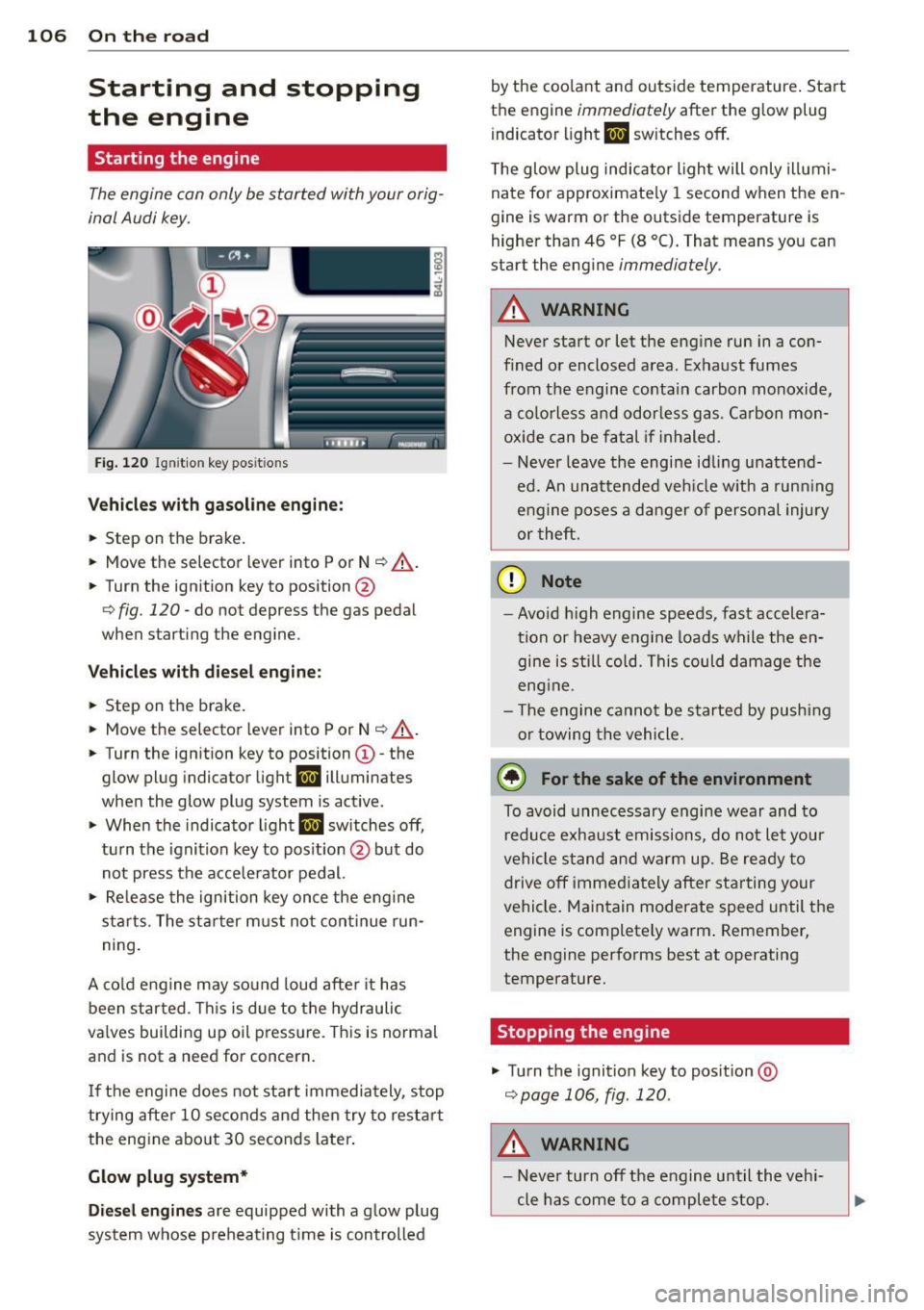
Fig. 120 I gni tion key positio ns
Vehicles with gasoline engine:
.. Step on the brake .
.. Move the selector lever into P or N
¢ A.
.. Tu rn the ignition key to position @
9 fig. 120 -do not depress the gas pedal
when starting the engine.
Vehicles with diesel engine:
.. Step on the brake.
.. Move the selector lever into P or N
¢ &.
.. Turn the ignition key to position ©- the
glow plug indicator light
m illuminates
when the glow plug system is act ive .
.,. When the indicator light
I.I switches off,
turn the ignition key to pos it ion @ but do
not press the accelerator pedal.
.. Re lease the ignition key once the engine
sta rts. The starter must not continue run
ning.
A cold engine may sound loud after it has
been started . This is due to the hydraulic
va lves building up oil pressure. This is normal
and is not a need for concern.
If the engine does not start immediately, stop
trying after 10 seconds and then try to restart
the engine about 30 seconds Later.
Glow plug system*
Diesel engines are equipped with a glow plug
system whose preheating t ime is controlled by the coo
lant and outs ide temperature . Start
the engine
immediately after the glow plug
indicator light
m sw itches off.
The glow plug indicator light will only illumi
nate for approximate ly 1 second when the en
gine is warm or the outside temperature is
higher than 46 °F (8 °C). That means you can
start the engine
immediately .
A WARNING
-Never start or let the engine run in a con-
fined or enclosed area. Exhaust fumes
from the engine contain carbon monoxide,
a colorless and odorless gas . Carbon mon
oxide can be fatal if inhaled.
- Never leave the engine idling unattend
ed. An unattended veh icle w ith a runn ing
engine poses a danger of personal injury
or theft .
(D Note
- Avo id high engine speeds, fast accelera
tion or heavy engine loads while the en gine is still cold. This could damage the
eng ine .
- Th e engine cannot be started by pushing
or towing the vehicle .
@ For the sake of the environment
To avoid unnecessary engine wear and to
reduce exhaust emissions, do not let your
vehicle stand and warm up. Be ready to
drive
off immediately after starting your
vehicle. Maintain moderate speed until the
engine is completely warm . Remember,
the engine performs best at operating
temperature.
· Stopping the engine
.,. Turn the ignition key to position @
¢page 106, fig . 120 .
A WARNING
-
-Never turn off the engine until the vehi-
cle has come to a complete stop.
Page 109 of 348
-The brake booster and servotronic only
work when the engine is running. With
the ignition turned off, you have to apply
more force when steering or braking .
S ince you cannot steer and stop normal
ly, this can lead to accidents and ser ious
injuries.
- The rad iator fan can continue to run for
up to 10 min utes even after you have
turned off the engine and removed the ign ition key. The radiator fan can also
turn on again if the engine coolant heats
up because of intense sunlight or heat
build -up in the engine compartment.
«I) Note
Do not stop the engine immed iate ly after
hard or extended dr iving. Keep the engine
running for approximately two minutes to
prevent excessive heat build-up .
Starting and stopping
the engine with
Convenience key
Starting the engine with the~
button
App lies to vehicles: with Convenie nce key
This bu tton swi tches on the ign ition and
starts the engine .
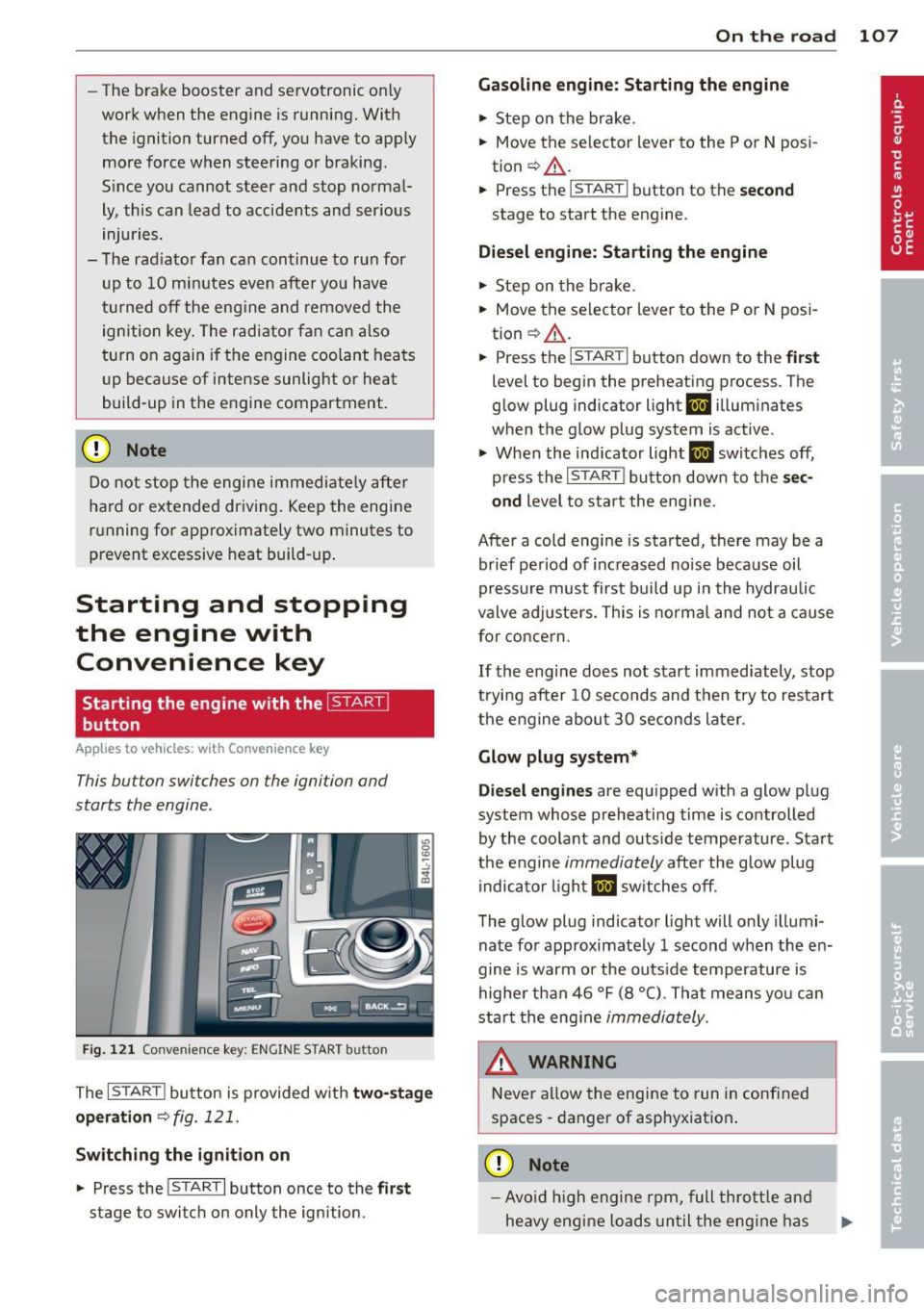
Fig. 121 Co nvenie nce k ey: ENG INE START b utton
The I S TAR T! button is provided w ith two -sta ge
o p era tion
¢ fig. 121.
Switching the ignition on
.. Press the !START I button once to the fir st
stage to switch on only the ign ition .
On th e road 107
Gasoline eng in e: St arting th e engine
.. Step on the brake.
.. Move the se lector lever to the P or N posi
tion ¢,&. .
.. Press the
r::1s=Tc:- A=RT =I button to th e seco nd
stage to start the engine .
Diesel en gine : Starting the engine
.. Step on the brake.
.. Mov e the selector lever to the P or N posi
tion ¢,&. .
.. Press the
r::1s=TAc:-=R T=I button down to the fi rst
level to begin the preheating process . The
glow plug indica tor light
II illumina tes
when t he glow plug system is active .
.. When the indicator light
II switches off,
press the
I ST ART ! button down to the se c
ond
level to star t the eng ine .
After a cold engine is started, there may be a br ief period of increased no ise because oil
pressure must first build up in the hydraulic
valve adjuste rs. This is norma l and not a cause
for concern .
If the engine does not start immediately, stop
trying after 10 seconds and then try to restart
the engine abou t 30 seconds later .
Glow plug system *
Di ese l engine s
are equ ipped with a glow plug
system whose preheating time is controlled
by the coolant and outs ide temperature . Start
the engine
immediately afte r the glow plug
indicator light
II sw itches off .
The glow plug indicator light will only illumi
nate fo r approximate ly 1 second when the en
gine is warm or the outs ide temperature is
highe r than 46 °F (8 °C) . That means yo u can
start the eng ine
immediately .
WARNING
Never allow the engine to run in confined
spaces -danger of asphyxiation .
(D Note
-Avo id h igh engine rpm, full thrott le and
heavy engine loads until the eng ine has
Page 113 of 348
vehicle must be standing in uphill driving direction.
After releasing the brake pedal , the brake
power is held for a
brief moment to prevent
the vehicle from rolling back when starting. At
this time, you can easily beg in to move your
veh icle.
A WARNING
- If you did not begin moving immediately
after releasing the brake pedal, under
certain circumstances, the vehicle would
begin to roll backward . Depress the
brake pedal immediately or engage the
park ing brake.
- Should the engine stall, depress the
brake pedal immediately or engage the
par king brake.
- In order to prevent the vehicle from ro ll
ing back un intentionally when sta rting in
stop-and-go traffic, keep the brake pedal depressed for a few seconds before d riv
ing off.
- When you leave the vehicle -even if only
briefly - , switch off the ignition and
make sure to remove the ignition key . Al
so engage the
p a rking b rake to prevent
your vehicle from rolling unintentionally. Th is particu larly applies if ch ildren are
left in the veh icle -danger of acc ident!
Cruise control
Switching the system on
The cruise control system makes it possible to
drive at a constant speed starting at
20 mph
(30 km/h).
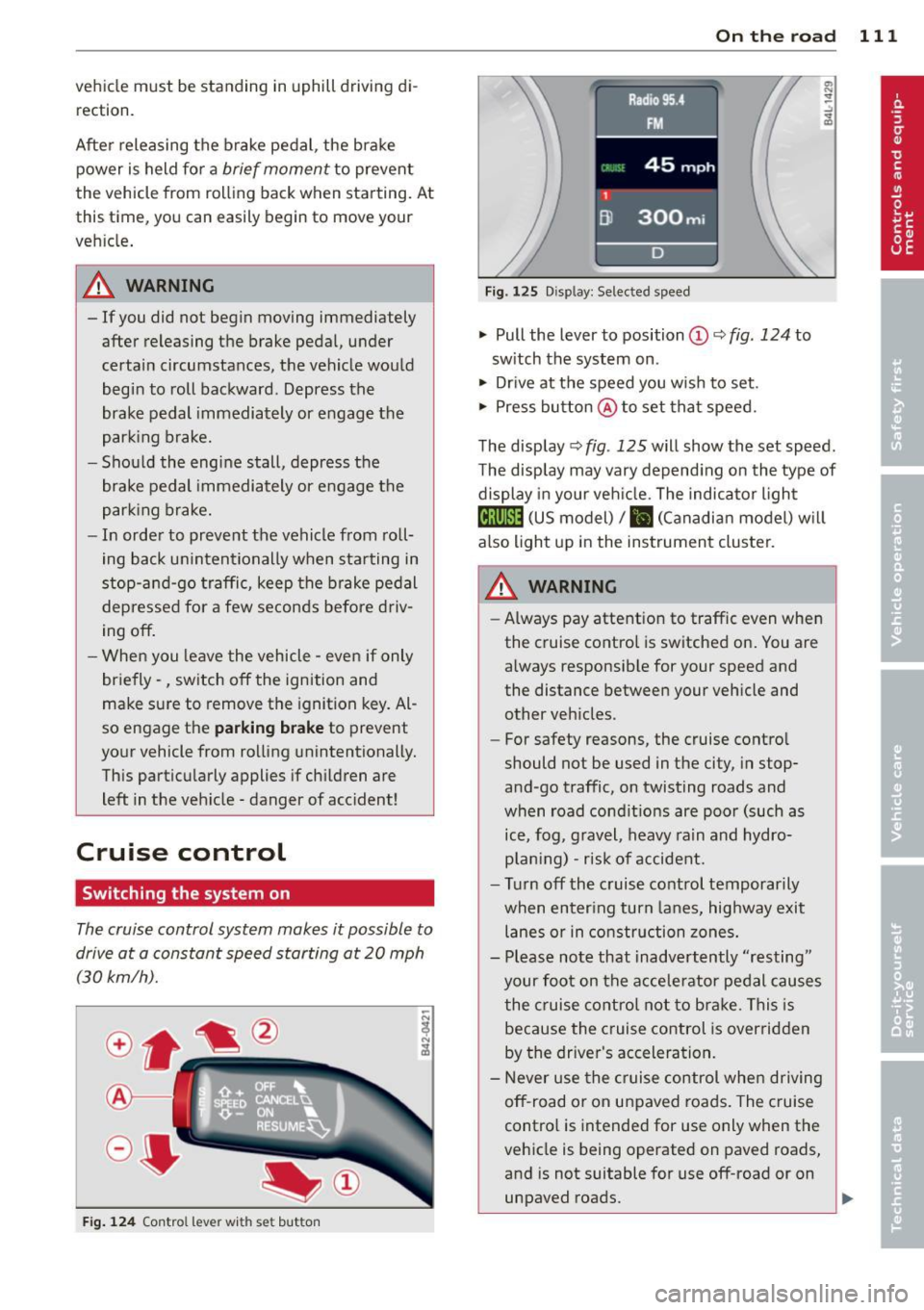
F ig . 124 Con tro l le ver w ith set button
On th e road 111
Fig. 1 2 5 Disp lay: Se lec te d speed
.. Pull the lever to position@c::> fig. 124 to
sw itch the system on .
.. Drive at the speed you wish to set .
.. Press button @to set tha t speed.
The display c::>
fig. 125 will show the set speed .
T he display may vary depend ing on the type of
display in your veh icle. The indicato r light
@;\1)~1~ (US model)/ B (Canadian model) w il l
also light up in the instrument cluster.
_& WARNING
- Always pay attention to traffic even when
the cruise control is switched on. You are
always responsible for your speed and
the distance between your veh icle and
other vehicles .
- For safety reasons, the cruise contro l
should not be used in the city , in stop
and -go traffic, on twisting roads and
when road condit ions are poor (such as
ice, fog , gravel , heavy rain and hydro
p lan ing) -risk of accident.
- Turn off the cruise control temporarily
when enter ing turn lanes, highway exit
lanes or in construction zones.
- Please note that inadvertently "resting"
your foo t on the accelerator pedal causes
the cruise contro l not to bra ke. This is
because the c ruise control is overridden
by the driver's acceleration.
- Never use the cruise control whe n driving
off -road or on unpaved roads. The c ruise
contro l is intended for use only when the
vehicle is being operated on paved roads,
and is not suitable for use off-road or on
unpaved roads.
1J1,,,
Page 126 of 348
124 Adaptive cruise control
Stationary object ahead
The text message Stationary object ahead ap
pears, when you want to activate the system
and there is a stationary vehicle or an object
immediately in front of you .
Gradient too steep
The text message Gradient too steep appears
when the max imum gradient for proper ACC
operation has been exceeded. Adaptive cruise
contro l is turned
off . A warning tone also
sounds as a reminder.
Shift lever position!
The text message Shift lever position! ap
pears when the selector lever is moved to po
sition
N . In this position, adaptive cruise con
trol is not ava ilab le .
Driver intervention prompt
Applies to vehicles: with adaptive cruise co ntrol
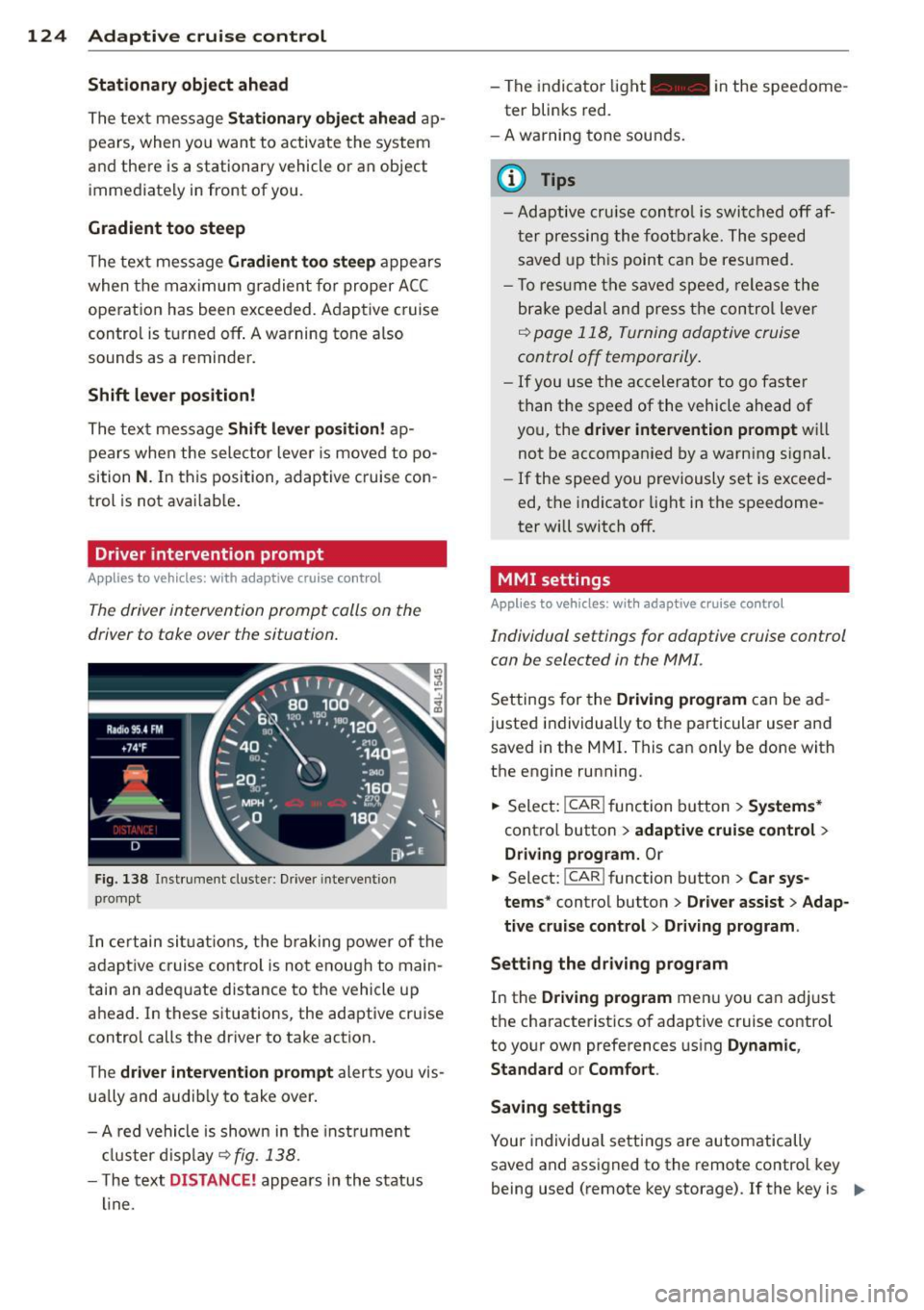
The driver intervention prompt calls on the
driver to toke over the situation.
Fig. 138 I n st rument cluste r: Drive r in terven tion
prompt
I n certain situat ions , the braking power of the
adapt ive cr uise control is not enough to main
tain an adequate distance to the vehicle up
ahead. In these situations, the adaptive cruise
control calls the driver to take action.
The
driver intervention prompt alerts you vis
ually and audib ly to take over.
- A red vehicle is shown in the instrument
cluster display ~
fig. 138.
- T he text DISTANCE! appears in the status
line. -
The indicator light- in the speedome
ter blinks red.
- A warning tone sounds.
0) Tips
-Adaptive cruise control is switched off af
ter pressing the footbrake. The speed
saved up this point can be resumed.
- To res um e the saved speed, release the
brake pedal and press the control lever
~ page 118, Turning adoptive cruise
control off temporarily.
-If you use the accelerator to go faster
than the speed of the vehicle ahead of
you, the
driver intervention prompt wi ll
not be accompanied by a warning s ignal.
- If the speed you previously set is exceed
ed, the indicator light in the speedome
ter will switch
off.
MMI settings
Applies to vehicles : with adaptive cruise contro l
Individual settings for adoptive cruise control
con be selected in the
MMI.
Settings for the Driving program can be ad
justed individually to the particular user and
saved in the MMI. This can only be done with
the engine running .
.,. Select:
!CAR ! function button> Systems*
cont ro l button > adaptive cruise control >
Driving program. Or
.,. Select: !CAR ! function button> Car sys·
tems *
control button > Driver assist > Adap
tive cruise control > Driving program .
Setting the driving program
In the Driving program menu you can ad just
the characteristics of adaptive cruise control
to your own preferences using
Dynamic,
Standard
or Comfort .
Saving settings
Your individual settings are automatically
saved and assigned to the remote control key
being used (remote key storage) . If the key is ..,_
Page 129 of 348
Audi braking guard
Description
Applies to vehicles: with a daptive cruise co ntrol
Audi braking guard warns you of a possible
collision with a moving vehicle up ahead .
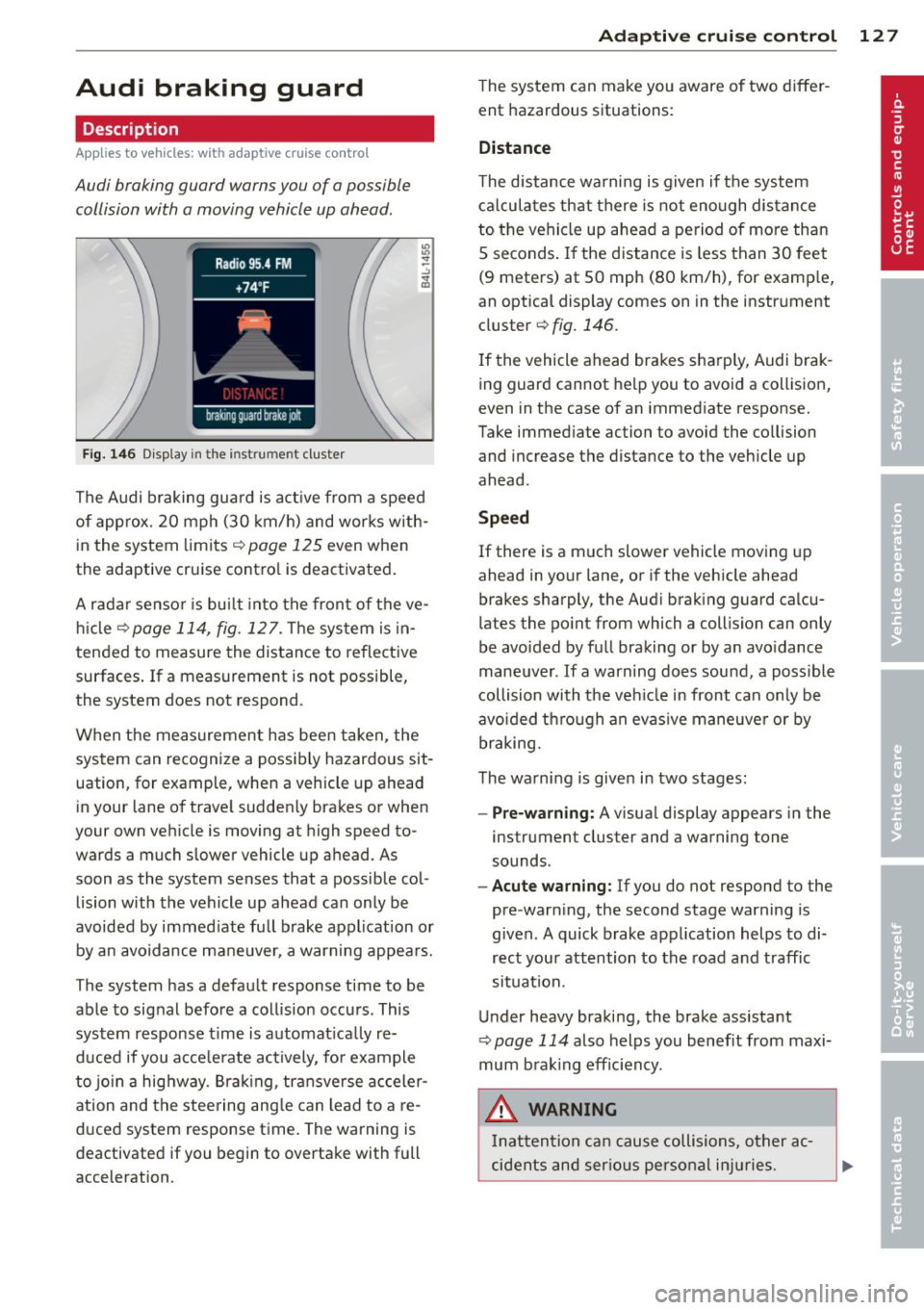
Fig. 146 Display in the instrument cluster
The Audi braking guard is active from a speed
of approx. 20 mph (30 km/h) and works with
in the system limits¢
page 125 even when
the adaptive cruise contro l is deactivated.
A radar sensor is bu ilt into the front of the ve
hicle
¢page 114, fig. 127. The system is in
tended to measure the distance to reflective
surfaces .
If a measurement is not possible,
the system does not respond.
When the measurement has been taken, the
system can recognize a possibly hazardous sit
uation, for example, whe n a vehicle up ahead
in your lane of trave l sudden ly brakes or when
your own vehicle is moving at high speed to
wards a much slower vehicle up ahead . As
soon as the system senses that a possible col
lision with the vehicle up ahead can only be
avoided by immed iate full brake application or
by an avoidance maneuver, a warning appears.
The system has a defau lt response time to be
able to signal before a collision occurs. This
system response time is automat ica lly re
duced if you acce lerate actively, fo r example
to join a highway. Braking, transverse acceler
ation and the steering angle can lead to a re
duced system response time. The warning is
deactivated if you begin to overtake with full
acceleration .
Adaptive cruise control 127
The system can make you aware o f two differ
ent hazardous situations:
Distance
The distance warning is given if the system
calculates that there is not enough distance
to the vehicle up ahead a period of more than
S seconds . If the distance is less than 30 feet
(9 meters) at SO mph (80 km/h), for examp le,
an optical display comes on in the instrument
cluster¢
fig. 146.
If the vehicle ahead brakes sharp ly, Audi brak
ing guard cannot help you to avoid a collision,
even in the case of an immediate response.
Take immed iate action to avoid the co llision
and increase the distance to the vehicle up
ahead.
Speed
If there is a much slower vehicle moving up
ahead in your lane, or if the vehicle ahead
brakes sharply, the Aud i brak ing guard calcu
lates the po int from which a collision can only
be avoided by full braking or by an avoidance
maneuver. If a warning does sound, a poss ible
collision with the ve hicle in front can on ly be
avo ided through an evasive maneuver or by
braking.
The warning is given in two stages :
-Pre-warning: A visual display appears in the
instrument cluster and a warning tone
sounds.
- Acute warning: If you do not respond to the
pre-warn ing, the second stage warning is
given. A quick brake application helps to di
rect your attention to the road and traffic
situation.
Under heavy braking, the brake ass istant
¢
page 114 also helps you benef it from maxi
mum brak ing efficiency.
A WARNING
Inatt ention can cause collisions, other ac
cidents and serious personal injuries.
Page 143 of 348
To upshift
• Push the selec tor leve r forw ard to the pl us
pos ition
0 ¢ fig. 160 .
To downshift
• Push the lever to the m in us position
Q .
When acce lerating, the transm iss ion w ill au
tomatically sh ift into the next gear before the
e ngine reaches its maxim um RPM .
If you app ly a light throttle when accelerat
ing , tiptronic ® will automatically shift from
1st to 2nd gear to save fuel. If you apply a
h eavy thrott le, the transmission will stay in
1st gear unt il n ear maximum R PM is reached,
or until the d river sh ifts i nto 2nd gear .
If you take your foot off the accelerator peda l
when dr iv ing down a steep incli ne , tiptronic ®
will downshift from th e se lected gear into the
n ex t lowe r gear until it reaches 1st gea r,
b ased on ro ad s peed and eng ine RPM . A uto
mat ic downshifting is in ter rupted as soon as
you apply t he thrott le again.
@ Tips
- Wh en you sh ift i nto the next lower ge ar,
t h e transmiss io n will dow nshift only
whe n there is no possibility of over-rev
v ing the engine.
- When the kick -down comes on, t he
transmission will s hift down to a lower
gear, depending on ve hicle and engine
speeds .
- tiptron ic® is inoperative w hen the trans
mission is in the fail-sa fe mode.
Autom atic transm ission 141
Steering wheel with tiptronic ®
Applies to vehicles: w ith t iptronic-steering wheel
T he shift buttons on the steering wheel allow
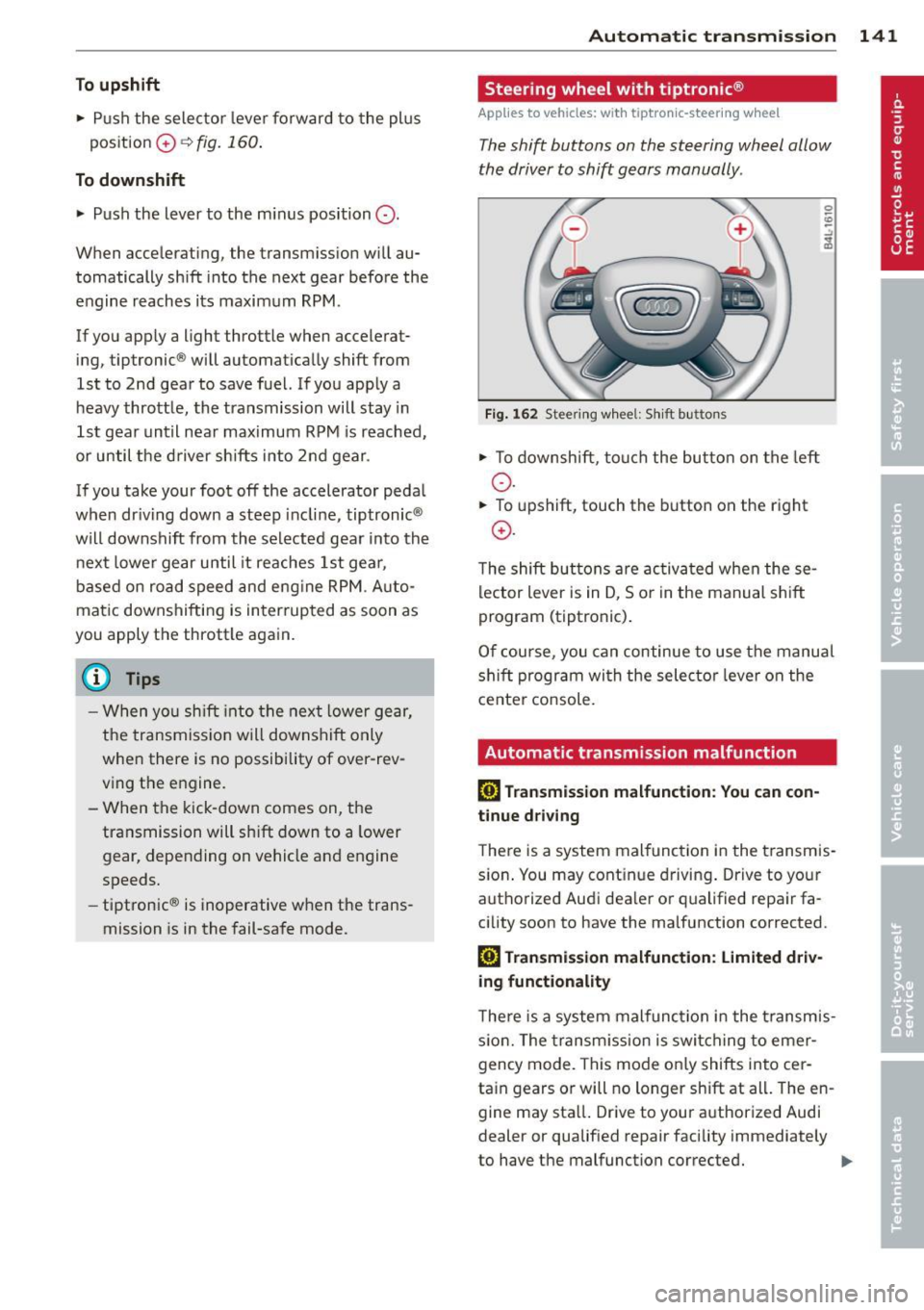
the driver to shift gears manually .
Fig. 162 Steering w hee l: S hift b utt ons
• To down shi ft, tou ch the bu tton on t he left
o .
• To upshift, touch the button on the right
0 .
The shift bu ttons are activ at ed when these
lector lever is in D, So r in the manual s hift
program (tiptronic) .
O f c ourse , you can c ontinue to use the manu al
s hift p rogram wi th the selecto r leve r on the
cente r co nsole.
Automatic transmission malfunction
[O] Transmission malfunction : You can con
tinue driving
T he re is a system mal function in the t ransmis
s io n. You may cont in u e dr iving . Drive to yo ur
a utho rized Aud i dea ler or qualified repa ir fa
cility soon to have the malfunction corrected.
[O] Trans mission malfunction : Lim ited driv
ing functionality
T he re is a system mal func tion i n the t ransm is
s io n. The transm ission is swi tching to emer
gency mode. This mode on ly shifts into cer
ta in gears o r will no longer shift at all . The en
gine may sta ll. Drive to your a uthorized Audi
dealer or qualif ied repair facility immediately
to have the malfunction correcte d.
IJJ,,
Page 158 of 348
156 Adapti ve Air Susp en sion
possible to raise the suspension to a h igh level
above certain speeds .
When a speed of about 75 mph (120 km/h) is
exceeded for more than 30 seconds, the vehi
cle is automatically lowered to
low level when
in comfort and automatic mode. Ground
clearance is about 0.6 inch (15 mm) less,
compared to the
normal level .
When a speed of about 100 mph (160 km/h)
is exceeded for more than 20 seconds, the ve
h icle is automat ica lly lowered to
highway l ev
el
when in automatic and dynamic mode.
G round clearance is about 1.4 inches (35 mm)
less, compared to the
normal level. Road
hold ing is optimized as a result of the lower
center of gravity, and fuel consumption is re
duced as a result of reduced wind resistance .
I
Level adjustment
high level 2
high level 1
normal level
low level
highway level
Ground clearance
about 9.4 inches
(240 mm)
about
8 inches
(205 mm)
about 7 inches (180 mm)
about 6 .5 inches
(165 mm)
about 5 .7 inches
(145 mm)
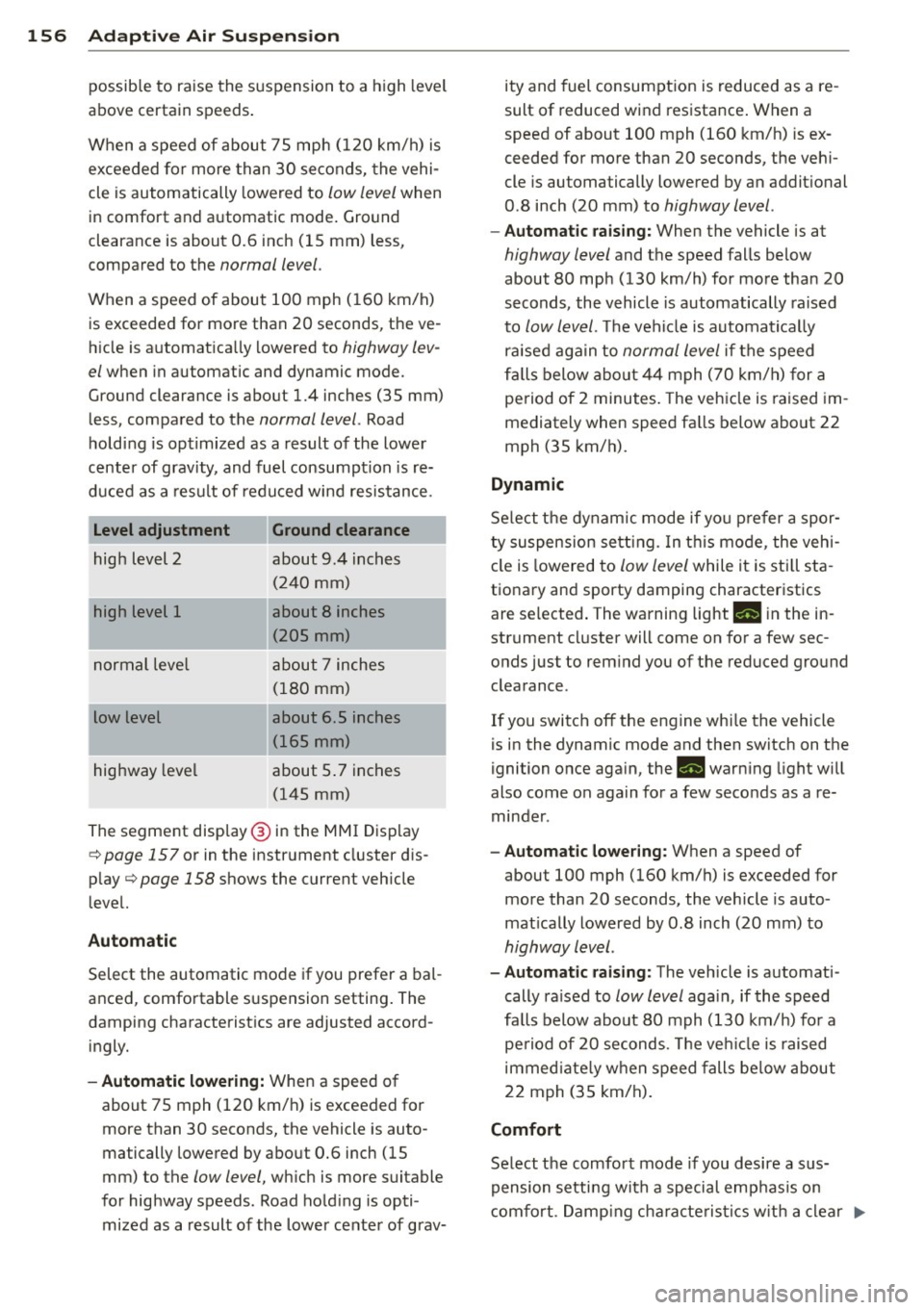
The segment disp lay @ in the MMI Display
c:::> page 157 or in the instr ument cluste r dis
p lay
c:::> page 158 shows the current veh icle
level.
Automatic
Select the automatic mode if you prefer a bal
anced, comfortable suspension setting . The
damping characteristics are adjusted accord ingly.
- Automatic lowe rin g: When a speed of
about 75 mph (120 km/h) is exceeded for
more than 30 seconds, the vehicle is auto
matically lowered by about 0.6 inch (15
mm) to the
low level, wh ich is more suitable
for highway speeds . Road hold ing is opti
mized as a result of the lower ce nter of grav- ity and fuel consumption is reduced as a re
sult of r educed wind resistance . When a
speed of about 100 mph (160 km/h) is ex
ceeded for more than 20 seconds, the veh i
cle is automa tically lowered by an addi tional
0 .8 inch (20 mm) to
highway level .
-Automat ic raising: When the vehicle is at
highway level and the speed falls below
about 80 mph (130 km/h) for more than 20
seconds , the vehicle is automatically raised
to
low level. Th e vehicle is automatica lly
raised aga in to
normal level if the speed
fa lls below about 44 mph (70 km/h) for a
pe riod of 2 minutes . The vehicle is raised im
mediately when speed fa lls below about 22
mph (35 km/h) .
Dynamic
Select the dynam ic mode if yo u pre fer a spor
ty suspension se tti ng. In t his mode , the veh i
cle is lowered to
low level while it is still sta
t ionary and sporty damping characteristics
are selected . The warning light
Ill in the in
strument cluster will come on for a few sec
onds just to rem ind you of the reduced ground
clearance .
If you switch off the engine whi le the vehicle
is in the dynamic mode and then switch on the
igni tion once aga in, the
Ill warn ing light will
also come on again for a few seconds as a re minder .
-Automat ic lowe ring: When a speed of
about 100 mph (160 km/h) is exceeded for
more than 20 seconds , the veh icle is auto
mat ically lowered by 0 .8 inch (20 mm) to
highway level .
-Automa tic raising: The vehicle is automati
cally ra ised to
low level again , if the speed
fa lls below about 80 mph (130 km/h) for a
pe riod of 20 seconds. The ve hicle i s raised
immed iate ly when speed falls be low about
22 mph (35 km/h).
Comfort
Select the comfort mode if you desire a s us
pension setti ng w ith a special emp hasis on
comfort . Damp ing cha racte ris tics w ith a clear .,.
Page 159 of 348
emphasis on comfort are selected in this
mode.
- Automatic lowering : When a speed of
abo ut 75 mph (120 km/h) is exceeded for
more than 30 seconds, the vehicle is auto
matically lowered by 0.6 inch (15 mm) to
low level .
-Automatic raising: The vehicle is automati
ca lly raised to
normal level again, if the
speed falls below about 44 mph (70 km/h)
for a period of 2 minutes . The vehicle is
raised immediately when speed falls below
about 22 mph (35 km/h) .
Offroad
Select the offroad mode when you have to
travel over poor quality sections of road (e .g.
trails). In th is mode, the vehicle is raised to
high level 1, and damp ing characteristics for
poor road stretches are selected . When
sw itch ing to offroad mode, the Adaptive Air
Suspension indicator appears automat ically in
the instrument cluster display ¢
page 158.
The offroad mode can only be activated at
speeds below 37 mph (60 km/h) . Offroad
mode ends automatically and the automatic
mode is activated when a speed of approxi
mately 50 mph (80 km/h) is exceeded.
Lift
Select the lift mode when except ionally high
ground clearance is needed at a reduced
speed. In this mode, the vehicle is raised to
high level 2. When switching to lift mode , the
Adaptive A ir Suspension indicator appears au
tomatically in the instrument cluster display
¢ page 158.
The lift mode can be activated only at speeds
be low 12 mph (20 km/h) . When a speed of
about 25 mph (40 km/h) is exceeded, the sys
tem automatically leaves lift mode and the
offroad mode is activated. The instrument
cluster display automat ically switches the dis
play to Adaptive Air Suspens ion to indicate re
duced ground clearance .
Adaptive Air Suspension 15 7
MMI settings
Applies to vehicles: wit h Adaptive A ir Suspension
Driving modes are adjusted in the MMI and
the current vehicle level is displayed .
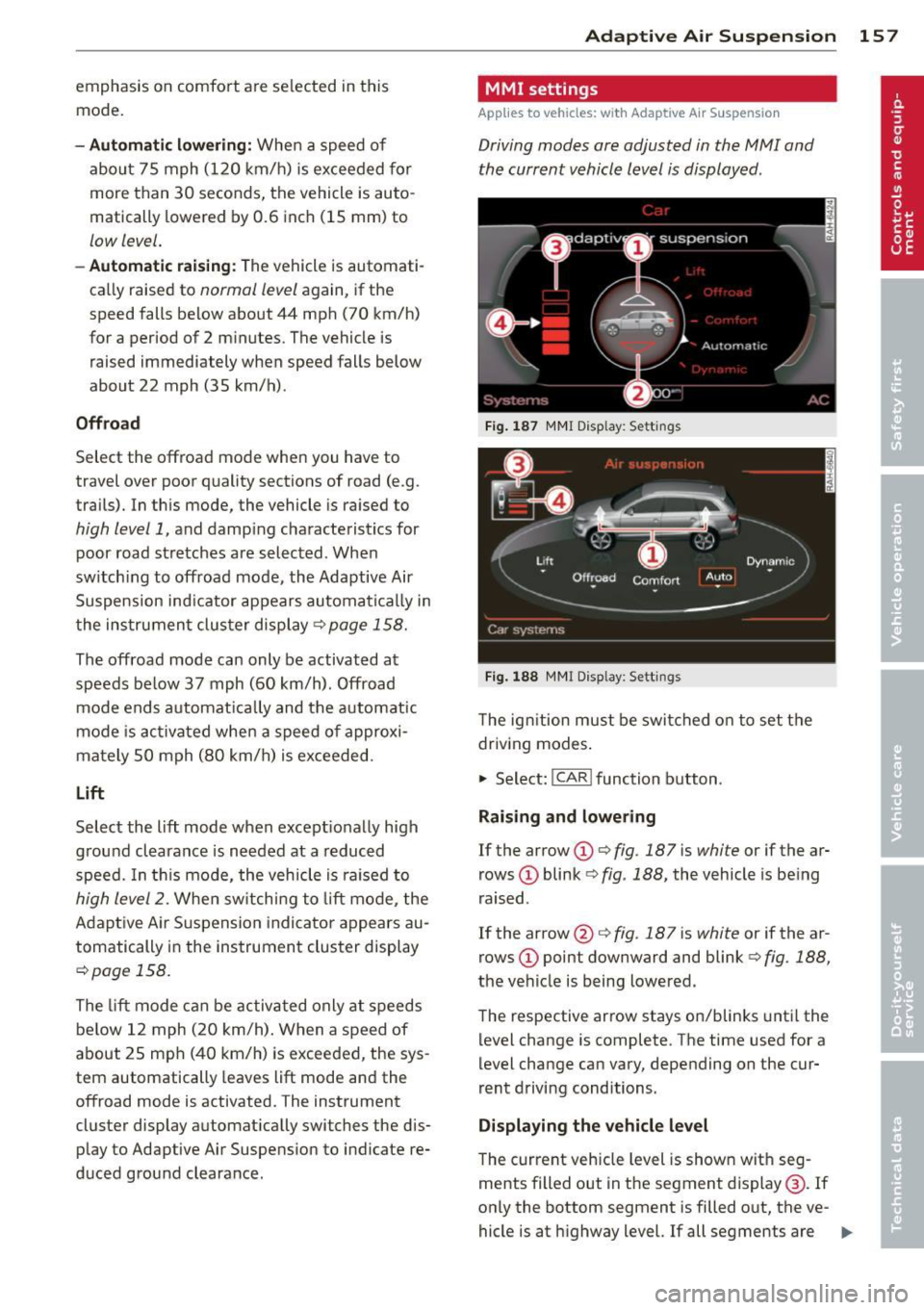
Fig. 187 MMI Display: Sett ings
Fig. 188 MMI Display: Sett ings
Th e ign ition must be switched on to set the
driving modes.
1-Select: !CAR ! function button .
Raising and lowering
If the arrow (D ¢ fig. 187 is white or if the ar
rows
(D blink ¢ fig. 188, the vehicle is being
raised .
If the arrow @¢
fig. 187 is white or if the ar
rows
(D point downward and blink ¢ fig. 188,
the vehicle is being lowered .
The respective arrow stays on/blinks until the
level change is complete . The time used for a
level change can vary, depending on the cur
rent driving conditions .
Displaying the vehicle level
The c urrent vehicle level is shown with seg
ments filled out in the segment display@. If
only the bottom segment is filled o ut, the ve-
hicle is at highway level. If all segments are
IJJ>-
Page 174 of 348
172 Driving Safel y
to reduce the risk of inj ury when the vehi
cle is not be ing used.
- After closing the rear lid, always make
sure that it is properly closed and locked.
- Never leave your vehicle unattended es
pecially with the rear lid left open . A
child could crawl into the vehicle through
the luggage compartment and close the
rear lid becoming trapped and unable to
get out . Be ing trapped in a vehicle can
lead to serious persona l injury.
- Never let children p lay in or around the
vehicle .
- Never let passengers r ide in the luggage
compartment . Veh icle occupan ts must
always be proper ly restrained in one of
the vehicle's seating positions.
(D Tips
- Air circulation helps to reduce window
fogging . Sta le air escapes to the o utside
th rough vents in the trim pane l. Be su re
to keep these slots free and open.
- The tire pressure must correspond to the
load . The t ire pr essure is shown on the
tire p ressu re label. The tire pressure la
bel is loc ate d on the driver's s ide B-pi lla r.
The tire pressure label lists the recom
men ded cold t ire inflat ion pressu res for
the veh icle at its maximum capacity
weight and the tires that were on your
vehicle at the time it was manufact ured.
For recommended t ire pressures for nor
mal load conditions, please see chapter
Q page284.
Tie-downs
The luggage compartment is equipped with
four tie-downs to secure luggage and other
items .
Use the tie-downs to secure your cargo prop
erly ¢ page 171 , Loading the luggage com
partment .
In a coll is ion, the laws of phys ics mean that
even smaller items that are loose in the vehi
cle will become heavy missiles that can cause se
rious injury. Items in t he vehi cle possess en
ergy which vary with vehicle speed and the
weight of t he item . Vehicle speed is the most
s ignificant factor.
F or example, in a frontal collision at a speed
of 30 mph (48 km/h), the forces acting on a 10 -lb (5 kg) object a re abo ut 20 times the
normal weight of the item. This means that
the weight of the item would sudden ly be
about 200 lbs . (90 kg) . You can imag ine the
injur ies that a 200 lbs . (90 kg) item fly ing
fr ee ly t hro ugh the passenger compa rtment
cou ld cause in a col lision like this.
_& WARNING
We ak, damaged or imprope r straps used
to secure items to tie-downs can fail dur
i ng hard braking or in a collision and cause
se rious pe rsonal injury.
-Always use s uita ble mo unt ing straps an d
p roperly secu re items to the tie-downs in
the l uggage compa rtment to he lp pre
vent items from shift ing or fly ing fo r
ward as dangerous missiles.
- When the rea r seat backrest is folded
down, a lways use suitable mounting
straps and properly secure items to the
tie-downs in the luggage compartment
to hel p prevent items from fly ing for
ward as dangerous missiles into the pas
senger compartment.
- Never attach a chi ld safety seat t ether
s trap to a t ie-down .
Reporting Safety
Defects
Applicable to U.S.A.
If yo u b eli eve that your vehi cle
has a def ect whi ch could cau se
a crash or could cau se injury or
death, you should immediately
inform the National Highway
Traffic Safet y Administration ""
Page 175 of 348
(NHTSA) in addition to notify
ing Audi of America, Inc.
If NHTSA receives similar com
plaints, it may open an investi
gation, and if it finds that a
safety defects exists in a group
of vehicles, it may order a recall
and remedy campaign. Howev
er, NHTSA cannot become in
volved in individual problems between you, your dealer, or
Audi of America, Inc.
To contact the NHTSA, you may
either call:
Tel.: 1-888-327-4236 (TTY: 1-800-424-9153)
or
1-800-424-9 3 9 3
or you may write to: NHTSA
U.S. Department of Transporta
tion 1200 New Jersey Ave., S. E.
West Building
Washington, DC 20590
You can also obtain other infor
mation about motor vehicle
safety from:
http:/ /www.safercar.gov
Driving Safely 173
Applicable to Canada
If you live in Canada and you believe that your vehicle has a
defect that could cause a crash,
injury or death, you should im
mediately inform Transport
Canada, Defect Investigations
and Recalls. You should also no
tify Volkswagen Group Canada, Inc.
Canadian customers who wish
to report a safety-related de
fect to Transport Canada, De
fect Investigations and Recalls,
may either call Transport Cana
da toll-free at:
Tel.: 1-800-333-0510 or
Tel.: 1-819-994-3328 (Ottawa region and from other coun
tries)
TTY for hearing impaired: 1-888-675-6863
or contact Transport Canada by
mail at:
Transport Canada Motor Vehicle Safety Investiga
tions Laboratory
80 Noel Street
Gatineau, QC
J8Z 0Al
•
•
'