light AUDI Q7 2013 Owner´s Manual
[x] Cancel search | Manufacturer: AUDI, Model Year: 2013, Model line: Q7, Model: AUDI Q7 2013Pages: 348, PDF Size: 87.72 MB
Page 90 of 348
88 Seats and storage
-Any articles of clothing that you have
hung up must not interfere with the driv
er's view. The coat hooks are designed
only for lightweight clothing. Never hang any clothing with hard, pointed or heavy
objects in the pockets on the coat hooks .
Dur ing sudden braking or in an a ccident -
especi ally if the airbag is deployed -
these objects could injure a ny passe n
gers inside the vehicle.
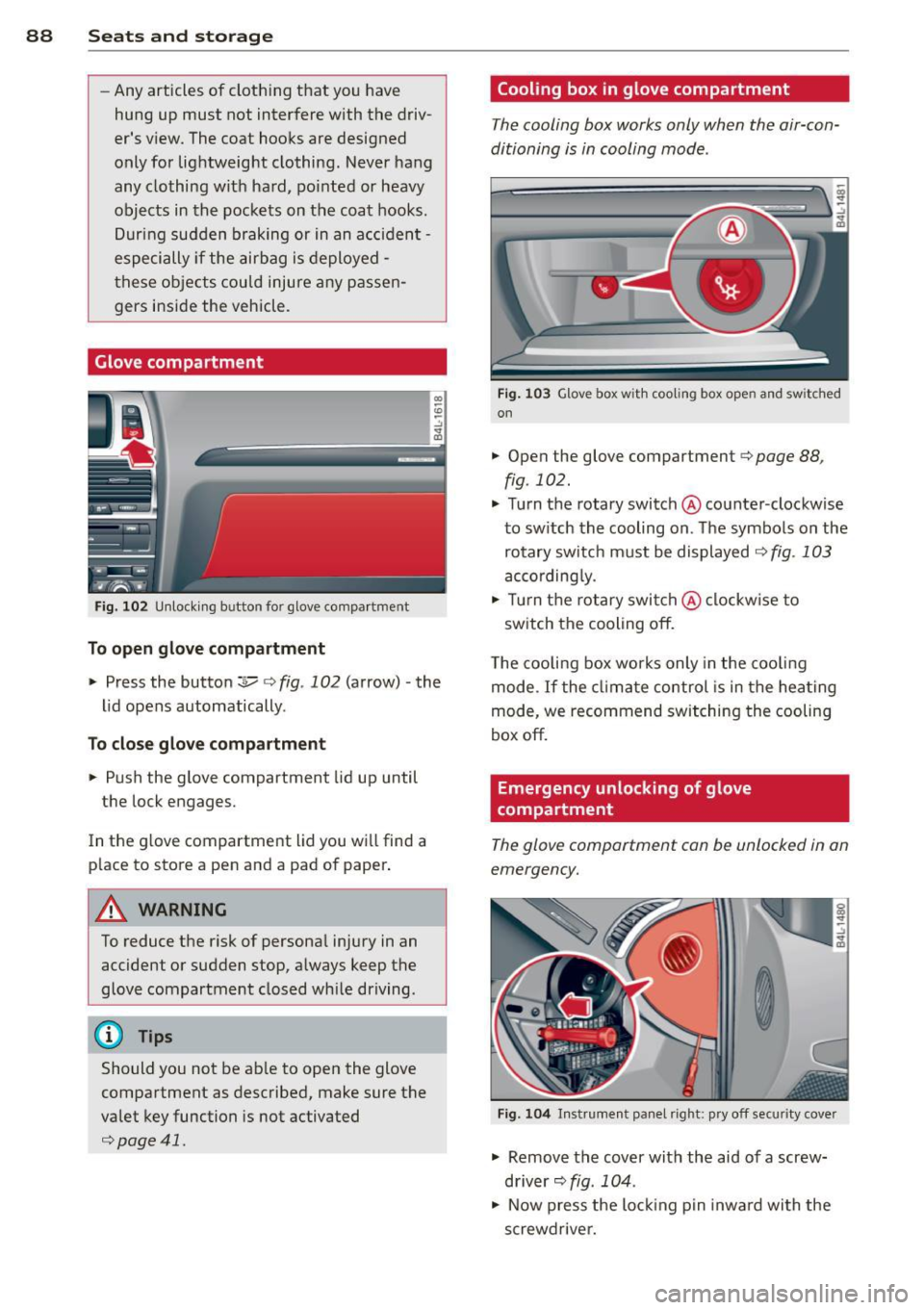
Glove compartment
F ig . 102 U nlocki ng button for glove compa rtment
To open glove compartment
• Press the button :::!l.....-¢ fig . 102 (arrow) -the
lid opens automatically .
To close glove compartment
• Push the glove compartment lid up until
the lock engages.
In the g love compartment lid you wi ll find a
p lace to store a pen and a pad of paper .
A WARNING
To reduce the risk of personal injury in an
accident or sudden stop, a lways keep the
glove compartment closed wh ile driving.
@ Tips
Should you not be ab le to open the glove
compartment as described, make sure the
valet key function is not activated
¢page 41.
Cooling box in glove compartment
The cooling box works only when the air-con
ditioning is in cooling mode.
F ig . 1 03 Glove box with coo ling box open and sw itched
on
• Open the glove compartment¢ page 88,
fig. 102.
• Turn the rotary switch @counter-clockwise
to sw itch the cooling on. The symbo ls on the
rotary switch must be displayed
¢ fig . 103
according ly.
• Tur n the rotary swi tch@ clockw ise to
switch the cooling off.
T he cooling box wor ks only in the coo ling
mode. If the cl imate control is in the hea ting
mode, we recommend switching the cooling
box off.
Emergency unlocking of glove
compartment
The glove compartment can be unlocked in an
emergency.
F ig. 10 4 In strument panel right: pry off secur it y cover
• Remove the cover with the aid of a screw
driver~
fig . 104 .
• Now press the lo cking p in inwa rd with the
screwdrive r.
Page 91 of 348
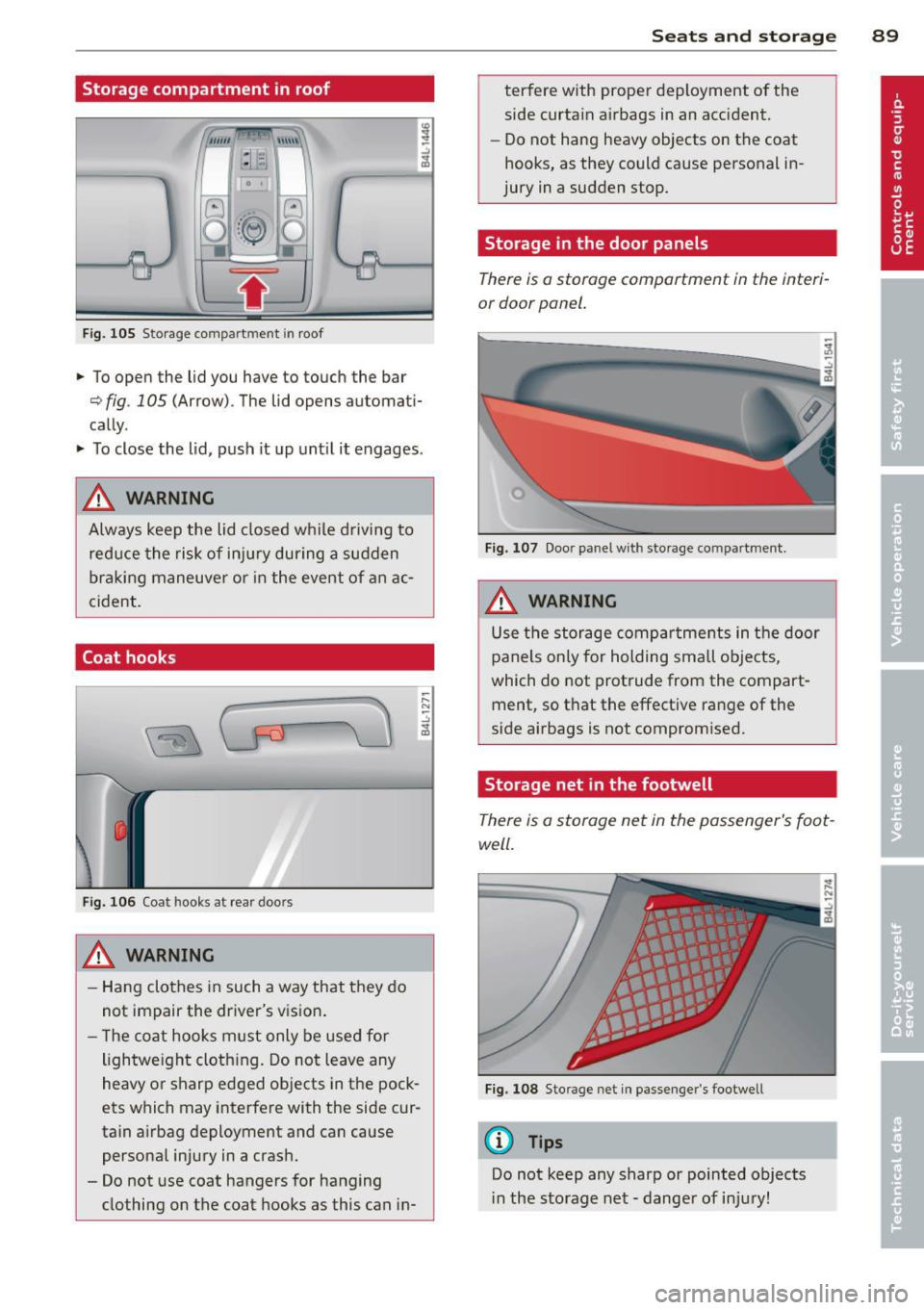
Storage compartment in roof
""'' \\\ \\
:1 :-1
F ig. 105 S torage co mpar tm en t in roof
.. To open the lid you have to touch the bar
¢ fig . 105 (Arrow) . The lid opens automati
cally .
.. To close the lid, push it up unt il it engages .
A WARNING
Always keep the lid closed while driving to
reduce the risk of injury during a sudden
braking maneuve r or in the event of an ac
cident.
Coat hooks
Fig. 106 Coat hooks at rear doors
A WARNING
- Hang clothes in such a way that they do
not impair the driver's vision .
- The coat hooks must only be used for
lightwe ight cloth ing. Do not leave any
heavy or sharp edged objects in the pock
ets which may interfere with the side cur
tain airbag deployment and can cause
persona l injury in a crash.
- Do not use coat hangers for hanging
clothing on the coat hooks as this can in-
;::: N ~ -" "' ID
Seats and storage 89
terfere with proper deployment of the
side curtain a irbags in an acc ident.
- Do not hang heavy objects on the coat
hooks, as they could cause personal in
jury in a sudden stop.
Storage in the door panels
There is a storage comportment in the interi
or door panel.
Fig. 107 Door pa nel w it h sto rage co mpartment.
A WARNING
Use the storage compartments in the door
panels only for holding sma ll objects,
which do not protrude from the compart
ment, so t hat the effective range of the
side airbags is not compromised.
Storage net in the footwell
There is a storage net in the passenger's foot
well.
Fig. 108 Storage net in passenge r's footwell
(D Tips
Do not keep any sharp or pointed objects
in the storage net - dange r of injury!
Page 93 of 348
Warm and cold Climate control
Description
The air conditioner is fully automatic and is
designed to maintain a comfortable and uni
form climate inside the vehicle .
We recommend the following settings:
~ Set the temperature to 72 °F (+22 °C).
~ Press the !AUTO I button.
With this setting, you attain maximum com
fort in the least amount of time. Change this
setting, as desired, to meet your personal
needs.
The climate controls are a combination of
heating, ventilation and cooling systems,
which automatica lly reduce humidity and cool
the air inside your vehicle.
The air temperature, air flow and air distribu
tion are automatica lly regu lated to achieve
and maintain the desired passenger compart
ment temperature as quickly as possible.
The system automatically compensates for
changes in outside temperature and for the
intensity of the sunlight entering the ve hicle.
We recommend you use the
Automatic mode
¢ page 94 for year-round comfort.
Please note the following:
Turn on the air conditioner to reduce humidity
in the vehicle. This also prevents the windows
from fogging up .
When the outside temperature is high and the
air is very hum id,
condensation from the
evaporator may drip under the vehicle. This is
normal and does not indicate a leak.
If the outside temperature is low, the fan nor
mally only switches to a h igher speed once
the engine coolant has warmed up sufficient
l y.
The a ir conditioner temporarily switches off
when you drive off from a standstill using full
throttle to save engine power.
Warm and cold 91
The compressor also switches off if the cool
ant temperature is too high , so that the en
gine can be adequately cooled under extreme
loads .
Air pollutants filter
The air pollutants filter (a combined particle
filter and activated charcoa l filter) reduces or
prevents outside air pollution (dust, or pollen)
from entering the vehicle. The air is a lso fil
tered in a ir recirculation mode.
The air pollutants filter must be changed at
the interva ls specified in your Warranty
&
Maintenance booklet, so that the a ir cond i
tioner can properly work.
If you drive your vehicle in an area with high
air pollution, the filter may need to be
changed more frequently than specified in
your Audi Warranty
& Maintenance booklet. If
in doubt, ask your authorized Audi Serv ice Ad
visor for advice .
Key coded settings
The air conditioner settings selected are auto
matically stored and assigned to the key be ing
used. When the vehicle is started, the air con
ditioner automa tically selects the settings as
s igned to that key . This way every driver w ill
mainta in his/her own personal settings and
does not have to reset them manually.
If a different dr iver uses your key and changes
the air cond itioner settings, the latest adjust
ments will erase and replace the sett ings you
have stored.
Energy management
To prevent the battery from being discharged
and to restore the balance of energy, compo
nents which require large amounts of energy
are temporarily cut back or switched off
¢ page 231. Heat ing systems in particular re
quire a great deal of ene rgy. If you notice , fo r
example, that the seat* or rear window hea t
ing is not heating, they have been temporarily
cut back or switched off by
energy manage
ment .
These systems are availab le aga in as
soon as the energy balance has been restored . .,.
Page 95 of 348
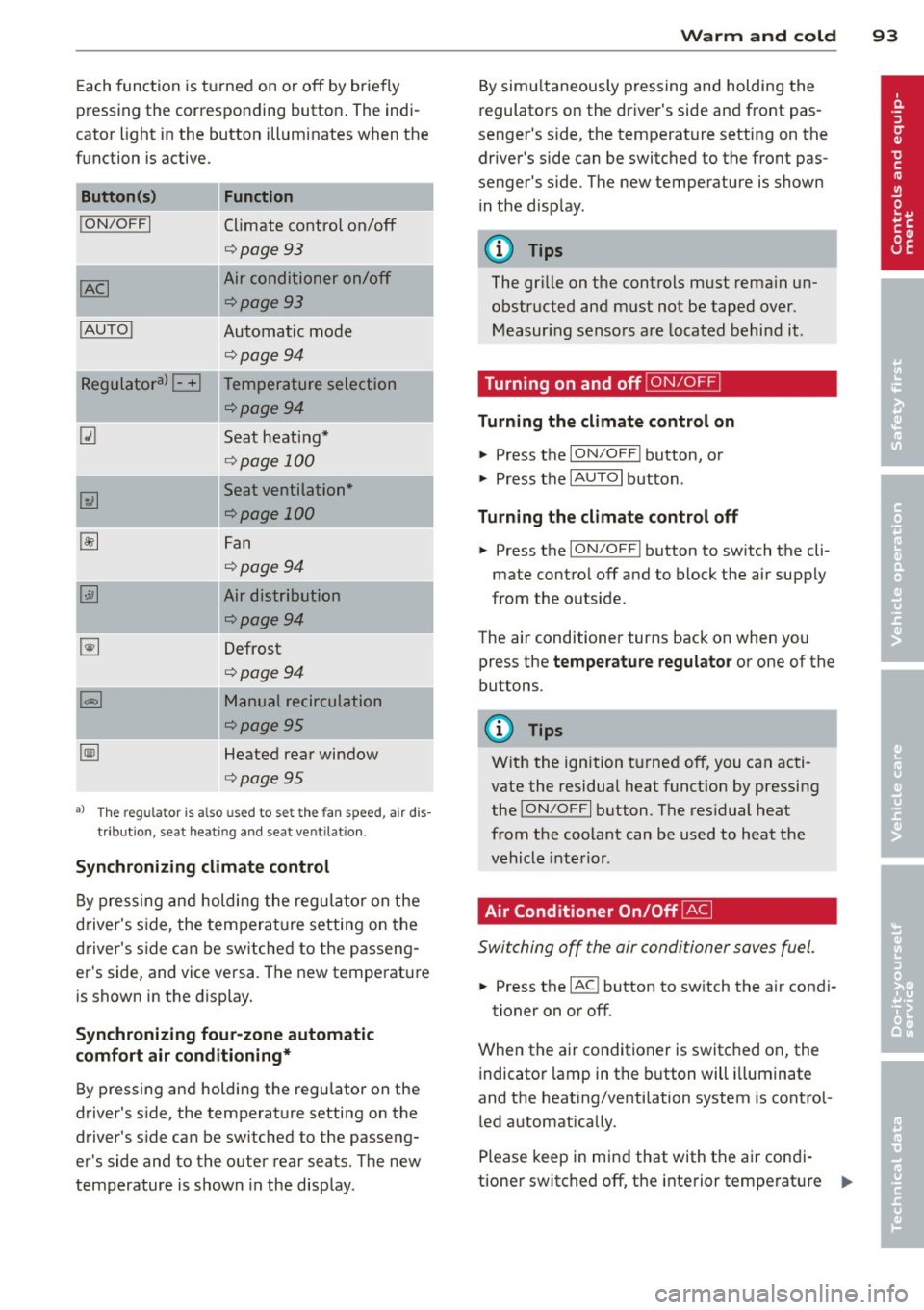
Each function is turned on or off by briefly
pr essing the corresponding button . The indi
cator light in the button illuminates when the
func tion is ac tive.
Button (s )
!ON/OFFI
! AUTO !
Function
Climate control on/off
<=>page 93
Air conditioner on/off
<=>page 93
Automatic mode
<=>page94
-~~~,--
Regulatora) G Temperature selection
~
I
<=>page94
Seat heating*
<=> page 100
Seat ventilation*
<=>page 100
Fan
<=> page94
Air distribution
<=>page94
Defrost
<=>page94
Manual recirculation
¢page95
Heated rear window
<=>page95
al Th e regulat or is also used to set t he fa n speed, air dis
tributio n, seat he ating and sea t ve ntilat io n.
Synchronizing climate control
By pressing and holding the regu lator on the
d river's side , the tempera ture setting on the
d river's side can be switched to the passeng
er's side, and vice versa . The new temperature
is shown in the display.
Synchroniz ing fou r-zone automatic
comf ort air c ond iti oning*
By pressing and holding the regu lator on the
drive r's side, the temperature setting on the
drive r's s ide can be sw itched to the passeng
er's side and to the ou ter rear seats. The new
temperature is shown in the display .
Warm and c old 93
By sim ultaneously pressing and holding the
regulators on the driver 's s ide and front pas
senger 's s ide, the temperat ure setting on the
driver's side can be switched to the front pas
senge r's s ide. T he new temperature is shown
in the d isp lay .
@ Tips
The gr ille on the controls must rema in un
obstructed and must not be taped over.
Measur ing senso rs are located behind it .
Turning on and off~
Turning the climate control on
"' Press the ION/O FF! button, or
"' Press the
IAUTO I button.
Turning the climat e control off
"' Press the ION/O FF! button to sw itch the cli
mate contro l off and to block the air supply
from the ou tside.
The air conditioner turns back on when yo u
press the
temper atu re regulator or one of the
buttons.
(D Tips
Wit h the ignition t urned off, you can acti
vate the residual heat funct ion by pressing
the
! ON/O FF I button . The res idual heat
from the coolant can be used to heat the
vehicle inte rior .
Air Conditioner On/Off~
Switching off the air condi tioner saves fuel .
"' Press the IAC ! button to sw itch the a ir condi-
tioner on or off .
When the air conditioner is switc hed on, the
indicator lamp in the b utton will illuminate
and the heat ing/venti lation system is control
led automatically .
Please keep in mind that with the air condi
tione r switc hed off, the interior temperat ure
1JJ>
Page 97 of 348
~ Press the~ button again, or press the
IAUTOI button to turn it off.
Temperature is controlled automatically. The
maximum amount of air flows main ly from
the vents below the windshield.
To defog the rear side windows, the air ve nts
i n the door pillars shou ld be open and d irect
ed at the windows.
Manual air recirculation ~
Air recirculation prevents exhaust fumes or
other pollution from entering the vehicle.
Tu rning on air r ecircul ation
~ Press the 1.,..,1 button ~ .&
Tu rning off air recircul ation
~ Press the~ button again, or
~ press the IAUTO I button, or
~ press the~ button.
In the air recirculation mode, the air in the
passenger compartment is recirculated and
filtered to prevent exhaust fumes and other
pollution from entering the vehicle . We rec
ommend that you use the manual air recircu lation under the following conditions:
- when driving through tunnels
- in a traffic jam.
A WARNING
Do not use the air recirculation mode for
extended per iods of t ime. The windows
could fog up since no fresh a ir can enter
the vehicle.
If the windows fog up, press
the air recirculation button again immed i-
,
Warm and c old 95
ately to switch off the air recirculation
f u nction or select defrost.
Rear window defogger~
The rear window defogger clears the rear win
dow of condensation .
~ Press the QW button to turn the rear window
defogger on and
off.
T he rear window defogger wo rks only when
the engine is runn ing. The light in the sw itch
will i lluminate when the defogger is on.
T he rear window defogger w ill sw itch
off au
tomat ica lly after a short t ime. The t ime the
rear w indow defogger remains on w ill vary de
pending on the outside temperature.
At very low outs ide temperatures, the rear
window defogger can be sw itched on continu
o usly by pushing the
QW button for more than
2 seconds . This remains stored until the igni
tion is switched
off.
A rea r w indow defogger that was switched on
also remains stored for 15 m inu tes after the
ignition is switched
off . If the engine is re
started within these 15 min utes, the rear win
dow defogger is a lso activated, depending on
outside temperature. With a vehicle that is
parked for a short time, the rear window de
fogger does not need to be manually activat ed again.
@ For the sake of the environment
Turn the defogger off when the rear win
dow is clear. When you save electric ity, you
save fuel.
Page 99 of 348
@ Tips
If the climate control system is operating
in cooling mode, a ir flows primarily from
the outlets in the center conso le and in the
door pillars. To achieve adequate cooling,
you should never close the outlets com
pletely .
Using climate control economically
Using the climate controls prudently can help
save fuel.
When you use the air conditioner, engine pow
er is reduced and fuel consumption increases.
To save fuel, you should use the air condition
e r only when necessary. Also please note the
following points :
.,. To save fuel, turn off cooling mode by press
ing the
I AC ! button (indicator light goes
out) .
.,. In add ition, if you open the window or the
Panoramic sliding sunroof* while driving,
turn off cooling mode by p ress ing the
IACI
button (indicator light goes out).
.,. If the vehicle is extremely hot due to the
heat of the sun, briefly open doors and win
dows.
@ For the sake of the environment
By reducing the amount of fue l you use,
you also reduce the amount of poll utants
emitted into the air. W
arm and cold 9 7
Rear Air Conditioning
Rear air conditioning - controls
Applies to vehicles: with four-zone automatic comfort air
conditio nin g
This overview is to assist you in familiarizing
yourself with the rear air conditioning con
trols.
lll ... :;
- --- ------------....... ~
Fig . 113 Rea r air conditioning controls
The left display indicates the temperature se
lected for the rear left passenger, the right
display indicates the temperature selected for
the rear right passenger . If the settings for
seat heating *, air distribution or the air condi
tioning fan are changed, the relevant indica
tor will appear br iefly on the display .
Funct io ns are set by ro tating the control or
are switched on and off by tapping the but
tons. The indicator light in the button illumi
nates when the function is active.
Button (s) Function
ION/OFFI Climate control on/off
¢ page98
-
IAUTOI Automatic mode
¢page98
Regulatoral El Temperature selection
¢page98
Qi Seat heating *
¢page 101
~
Fan
¢page98
~
Air distribution
¢page99
a) The regu lator is also u sed to set the fan sp ee d, air dis-
tribut ion and seat heating .
IIJ,
Page 108 of 348
106 On the road
Starting and stopping
the engine
Starting the engine
The engine can only be started with your orig
inal Audi key.
Fig. 120 I gni tion key positio ns
Vehicles with gasoline engine:
.. Step on the brake .
.. Move the selector lever into P or N
¢ A.
.. Tu rn the ignition key to position @
9 fig. 120 -do not depress the gas pedal
when starting the engine.
Vehicles with diesel engine:
.. Step on the brake.
.. Move the selector lever into P or N
¢ &.
.. Turn the ignition key to position ©- the
glow plug indicator light
m illuminates
when the glow plug system is act ive .
.,. When the indicator light
I.I switches off,
turn the ignition key to pos it ion @ but do
not press the accelerator pedal.
.. Re lease the ignition key once the engine
sta rts. The starter must not continue run
ning.
A cold engine may sound loud after it has
been started . This is due to the hydraulic
va lves building up oil pressure. This is normal
and is not a need for concern.
If the engine does not start immediately, stop
trying after 10 seconds and then try to restart
the engine about 30 seconds Later.
Glow plug system*
Diesel engines are equipped with a glow plug
system whose preheating t ime is controlled by the coo
lant and outs ide temperature . Start
the engine
immediately after the glow plug
indicator light
m sw itches off.
The glow plug indicator light will only illumi
nate for approximate ly 1 second when the en
gine is warm or the outside temperature is
higher than 46 °F (8 °C). That means you can
start the engine
immediately .
A WARNING
-Never start or let the engine run in a con-
fined or enclosed area. Exhaust fumes
from the engine contain carbon monoxide,
a colorless and odorless gas . Carbon mon
oxide can be fatal if inhaled.
- Never leave the engine idling unattend
ed. An unattended veh icle w ith a runn ing
engine poses a danger of personal injury
or theft .
(D Note
- Avo id high engine speeds, fast accelera
tion or heavy engine loads while the en gine is still cold. This could damage the
eng ine .
- Th e engine cannot be started by pushing
or towing the vehicle .
@ For the sake of the environment
To avoid unnecessary engine wear and to
reduce exhaust emissions, do not let your
vehicle stand and warm up. Be ready to
drive
off immediately after starting your
vehicle. Maintain moderate speed until the
engine is completely warm . Remember,
the engine performs best at operating
temperature.
· Stopping the engine
.,. Turn the ignition key to position @
¢page 106, fig . 120 .
A WARNING
-
-Never turn off the engine until the vehi-
cle has come to a complete stop.
Page 109 of 348
-The brake booster and servotronic only
work when the engine is running. With
the ignition turned off, you have to apply
more force when steering or braking .
S ince you cannot steer and stop normal
ly, this can lead to accidents and ser ious
injuries.
- The rad iator fan can continue to run for
up to 10 min utes even after you have
turned off the engine and removed the ign ition key. The radiator fan can also
turn on again if the engine coolant heats
up because of intense sunlight or heat
build -up in the engine compartment.
«I) Note
Do not stop the engine immed iate ly after
hard or extended dr iving. Keep the engine
running for approximately two minutes to
prevent excessive heat build-up .
Starting and stopping
the engine with
Convenience key
Starting the engine with the~
button
App lies to vehicles: with Convenie nce key
This bu tton swi tches on the ign ition and
starts the engine .
Fig. 121 Co nvenie nce k ey: ENG INE START b utton
The I S TAR T! button is provided w ith two -sta ge
o p era tion
¢ fig. 121.
Switching the ignition on
.. Press the !START I button once to the fir st
stage to switch on only the ign ition .
On th e road 107
Gasoline eng in e: St arting th e engine
.. Step on the brake.
.. Move the se lector lever to the P or N posi
tion ¢,&. .
.. Press the
r::1s=Tc:- A=RT =I button to th e seco nd
stage to start the engine .
Diesel en gine : Starting the engine
.. Step on the brake.
.. Mov e the selector lever to the P or N posi
tion ¢,&. .
.. Press the
r::1s=TAc:-=R T=I button down to the fi rst
level to begin the preheating process . The
glow plug indica tor light
II illumina tes
when t he glow plug system is active .
.. When the indicator light
II switches off,
press the
I ST ART ! button down to the se c
ond
level to star t the eng ine .
After a cold engine is started, there may be a br ief period of increased no ise because oil
pressure must first build up in the hydraulic
valve adjuste rs. This is norma l and not a cause
for concern .
If the engine does not start immediately, stop
trying after 10 seconds and then try to restart
the engine abou t 30 seconds later .
Glow plug system *
Di ese l engine s
are equ ipped with a glow plug
system whose preheating time is controlled
by the coolant and outs ide temperature . Start
the engine
immediately afte r the glow plug
indicator light
II sw itches off .
The glow plug indicator light will only illumi
nate fo r approximate ly 1 second when the en
gine is warm or the outs ide temperature is
highe r than 46 °F (8 °C) . That means yo u can
start the eng ine
immediately .
WARNING
Never allow the engine to run in confined
spaces -danger of asphyxiation .
(D Note
-Avo id h igh engine rpm, full thrott le and
heavy engine loads until the eng ine has
Page 112 of 348
110 On the road
The parking brake warning light. (USA)/ .
(CON) illuminates when the parking brake is
set and you switch on the ignition.
A WARNING
-
Always release the parking brake com
pletely. A partially engaged brake will
overheat the rear brakes, reduce their ef
fectiveness and cause excessive wear. This could lead to brake failure and an accident .
(D Note
Only after the vehicle has come to com
plete stop, should you firmly set the park
ing brake and
move the selector lever into
"P".
Parking
When you park your vehicle, do the
following
• Stop the vehicle using the brake pedal.
• Apply the parking brake firmly.
• Move the selector lever into the P position
c:>A .
• Switch off the engine and remove the igni-
t ion key from the ignition lock.
When you park your vehicle on hills, do
the following
• Stop the vehicle using the brake pedal.
• Apply the parking brake firmly.
• If you are parking headed
downhill, turn
the front wheels
toward the curb.
• If you are parking headed uphill, turn the
front wheels
away from the curb.
• Move the selector lever into the
P position.
• Switch off the engine and remove the igni
tion key from the ignition lock.
A WARNING
This is how you can reduce the risk of in
jury when leaving your vehicle.
- Never park the vehicle where it can come
in contact with dry grass, spilled fuel or
any other flammable materials. -
When parking on hills, always turn the
wheels so that the front wheels will first roll into the curb, if the vehicle should
start to roll.
- Never allow anyone - especially small
children - to remain in the vehicle when
it is locked. Locked doors make it more
difficult for rescuers to access the pas
senger compartment in the event of an
emergency. Danger to life!
- Never leave children unsupervised in the
vehicle. Children could release the park
ing brake or
move the gearshift lever out
of gear. The vehicle could start to roll
away and cause an accident.
- No matter what the season is, the tem
perature in a parked vehicle can reach
dangerous levels.
(D Note
- Please exercise care when you park your
vehicle in parking areas with parking bar riers or curbs. Parking barriers and curbs
vary in height and could damage your
bumper and related components as the
front of your vehicle moves
over a barrier
or curb that is too high, as you park or as
you back out of a parking spot. In order
to be sure that no such damage can oc
cur, you may wish to stop short of having
the front tires of your car touch the park
ing barrier or curb.
- Please also exercise exceptional care
when you drive up or down steep ramps
or drive over curbs or other obstacles, for
which the vehicle is not designed, be
cause components of the vehicle close to
the ground, such as bumper covers, spoilers and suspension and exhaust sys
tem components, may become dam
aged.
Starting on hills
Hill Hold makes it easier to start on hills.
The system is activated when the brake pedal is depressed
for a few seconds. For this, the ll-
Page 113 of 348
vehicle must be standing in uphill driving direction.
After releasing the brake pedal , the brake
power is held for a
brief moment to prevent
the vehicle from rolling back when starting. At
this time, you can easily beg in to move your
veh icle.
A WARNING
- If you did not begin moving immediately
after releasing the brake pedal, under
certain circumstances, the vehicle would
begin to roll backward . Depress the
brake pedal immediately or engage the
park ing brake.
- Should the engine stall, depress the
brake pedal immediately or engage the
par king brake.
- In order to prevent the vehicle from ro ll
ing back un intentionally when sta rting in
stop-and-go traffic, keep the brake pedal depressed for a few seconds before d riv
ing off.
- When you leave the vehicle -even if only
briefly - , switch off the ignition and
make sure to remove the ignition key . Al
so engage the
p a rking b rake to prevent
your vehicle from rolling unintentionally. Th is particu larly applies if ch ildren are
left in the veh icle -danger of acc ident!
Cruise control
Switching the system on
The cruise control system makes it possible to
drive at a constant speed starting at
20 mph
(30 km/h).
F ig . 124 Con tro l le ver w ith set button
On th e road 111
Fig. 1 2 5 Disp lay: Se lec te d speed
.. Pull the lever to position@c::> fig. 124 to
sw itch the system on .
.. Drive at the speed you wish to set .
.. Press button @to set tha t speed.
The display c::>
fig. 125 will show the set speed .
T he display may vary depend ing on the type of
display in your veh icle. The indicato r light
@;\1)~1~ (US model)/ B (Canadian model) w il l
also light up in the instrument cluster.
_& WARNING
- Always pay attention to traffic even when
the cruise control is switched on. You are
always responsible for your speed and
the distance between your veh icle and
other vehicles .
- For safety reasons, the cruise contro l
should not be used in the city , in stop
and -go traffic, on twisting roads and
when road condit ions are poor (such as
ice, fog , gravel , heavy rain and hydro
p lan ing) -risk of accident.
- Turn off the cruise control temporarily
when enter ing turn lanes, highway exit
lanes or in construction zones.
- Please note that inadvertently "resting"
your foo t on the accelerator pedal causes
the cruise contro l not to bra ke. This is
because the c ruise control is overridden
by the driver's acceleration.
- Never use the cruise control whe n driving
off -road or on unpaved roads. The c ruise
contro l is intended for use only when the
vehicle is being operated on paved roads,
and is not suitable for use off-road or on
unpaved roads.
1J1,,,