turn AUDI Q7 2013 Owner´s Manual
[x] Cancel search | Manufacturer: AUDI, Model Year: 2013, Model line: Q7, Model: AUDI Q7 2013Pages: 348, PDF Size: 87.72 MB
Page 90 of 348
88 Seats and storage
-Any articles of clothing that you have
hung up must not interfere with the driv
er's view. The coat hooks are designed
only for lightweight clothing. Never hang any clothing with hard, pointed or heavy
objects in the pockets on the coat hooks .
Dur ing sudden braking or in an a ccident -
especi ally if the airbag is deployed -
these objects could injure a ny passe n
gers inside the vehicle.
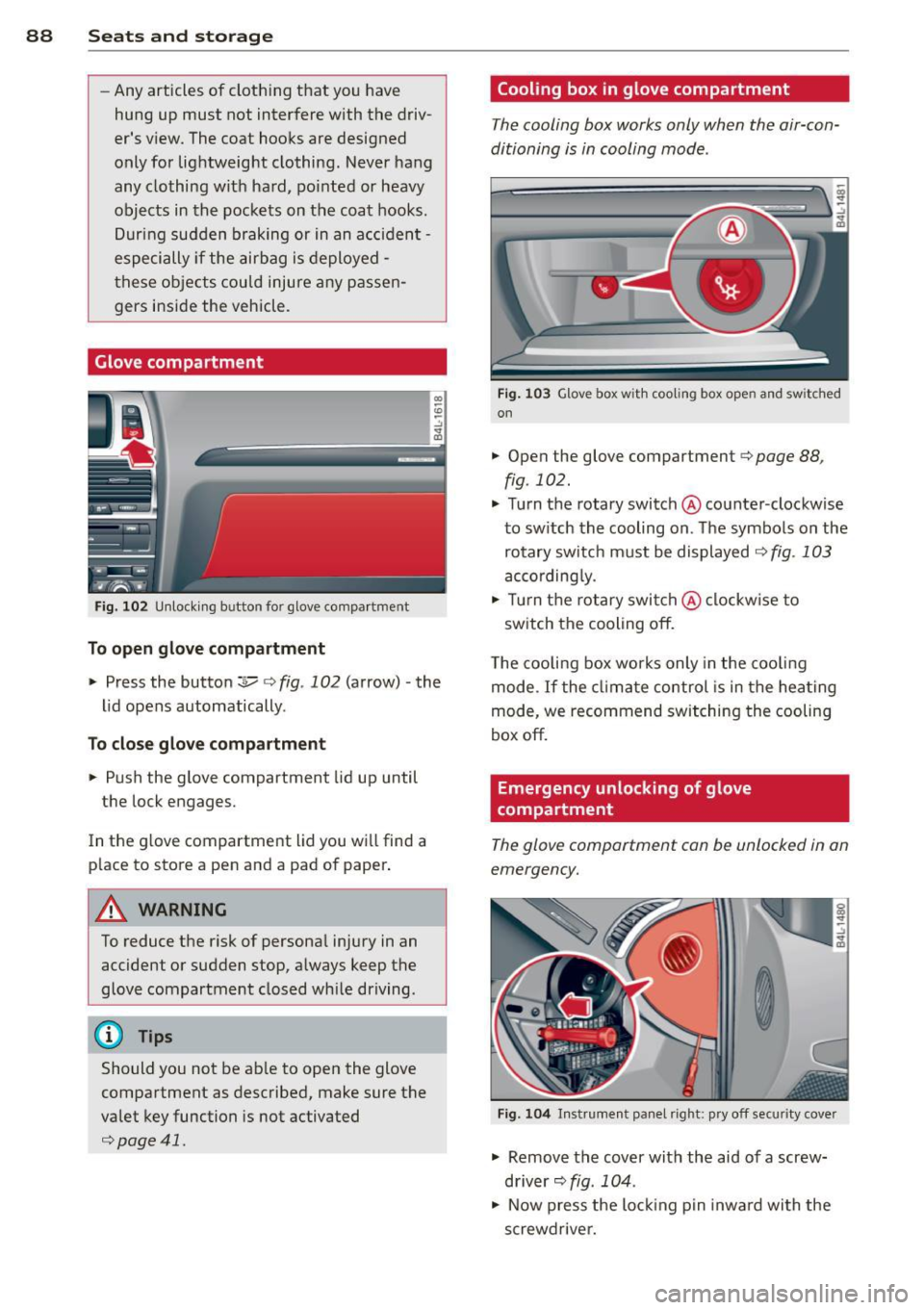
Glove compartment
F ig . 102 U nlocki ng button for glove compa rtment
To open glove compartment
• Press the button :::!l.....-¢ fig . 102 (arrow) -the
lid opens automatically .
To close glove compartment
• Push the glove compartment lid up until
the lock engages.
In the g love compartment lid you wi ll find a
p lace to store a pen and a pad of paper .
A WARNING
To reduce the risk of personal injury in an
accident or sudden stop, a lways keep the
glove compartment closed wh ile driving.
@ Tips
Should you not be ab le to open the glove
compartment as described, make sure the
valet key function is not activated
¢page 41.
Cooling box in glove compartment
The cooling box works only when the air-con
ditioning is in cooling mode.
F ig . 1 03 Glove box with coo ling box open and sw itched
on
• Open the glove compartment¢ page 88,
fig. 102.
• Turn the rotary switch @counter-clockwise
to sw itch the cooling on. The symbo ls on the
rotary switch must be displayed
¢ fig . 103
according ly.
• Tur n the rotary swi tch@ clockw ise to
switch the cooling off.
T he cooling box wor ks only in the coo ling
mode. If the cl imate control is in the hea ting
mode, we recommend switching the cooling
box off.
Emergency unlocking of glove
compartment
The glove compartment can be unlocked in an
emergency.
F ig. 10 4 In strument panel right: pry off secur it y cover
• Remove the cover with the aid of a screw
driver~
fig . 104 .
• Now press the lo cking p in inwa rd with the
screwdrive r.
Page 93 of 348
Warm and cold Climate control
Description
The air conditioner is fully automatic and is
designed to maintain a comfortable and uni
form climate inside the vehicle .
We recommend the following settings:
~ Set the temperature to 72 °F (+22 °C).
~ Press the !AUTO I button.
With this setting, you attain maximum com
fort in the least amount of time. Change this
setting, as desired, to meet your personal
needs.
The climate controls are a combination of
heating, ventilation and cooling systems,
which automatica lly reduce humidity and cool
the air inside your vehicle.
The air temperature, air flow and air distribu
tion are automatica lly regu lated to achieve
and maintain the desired passenger compart
ment temperature as quickly as possible.
The system automatically compensates for
changes in outside temperature and for the
intensity of the sunlight entering the ve hicle.
We recommend you use the
Automatic mode
¢ page 94 for year-round comfort.
Please note the following:
Turn on the air conditioner to reduce humidity
in the vehicle. This also prevents the windows
from fogging up .
When the outside temperature is high and the
air is very hum id,
condensation from the
evaporator may drip under the vehicle. This is
normal and does not indicate a leak.
If the outside temperature is low, the fan nor
mally only switches to a h igher speed once
the engine coolant has warmed up sufficient
l y.
The a ir conditioner temporarily switches off
when you drive off from a standstill using full
throttle to save engine power.
Warm and cold 91
The compressor also switches off if the cool
ant temperature is too high , so that the en
gine can be adequately cooled under extreme
loads .
Air pollutants filter
The air pollutants filter (a combined particle
filter and activated charcoa l filter) reduces or
prevents outside air pollution (dust, or pollen)
from entering the vehicle. The air is a lso fil
tered in a ir recirculation mode.
The air pollutants filter must be changed at
the interva ls specified in your Warranty
&
Maintenance booklet, so that the a ir cond i
tioner can properly work.
If you drive your vehicle in an area with high
air pollution, the filter may need to be
changed more frequently than specified in
your Audi Warranty
& Maintenance booklet. If
in doubt, ask your authorized Audi Serv ice Ad
visor for advice .
Key coded settings
The air conditioner settings selected are auto
matically stored and assigned to the key be ing
used. When the vehicle is started, the air con
ditioner automa tically selects the settings as
s igned to that key . This way every driver w ill
mainta in his/her own personal settings and
does not have to reset them manually.
If a different dr iver uses your key and changes
the air cond itioner settings, the latest adjust
ments will erase and replace the sett ings you
have stored.
Energy management
To prevent the battery from being discharged
and to restore the balance of energy, compo
nents which require large amounts of energy
are temporarily cut back or switched off
¢ page 231. Heat ing systems in particular re
quire a great deal of ene rgy. If you notice , fo r
example, that the seat* or rear window hea t
ing is not heating, they have been temporarily
cut back or switched off by
energy manage
ment .
These systems are availab le aga in as
soon as the energy balance has been restored . .,.
Page 94 of 348
92 Warm and cold
A WARNING
Reduced visibility is dangerous and can
cause acci dents.
-
- For safe dr iv ing it is very important that
all windows be free of ice, snow and con
densation.
- Completely fami liarize yourself with the
proper use and function of the heating
and ventilation system and especia lly
how to defog and defrost the windows.
- Never use the windshie ld wiper/washer
system in freezing weather until you
have warmed the windshield first, us ing
the heat ing and ventilat ion system. The
washe r solution may freeze on the wind
shield and reduce visibility.
(D Note
- If you suspect that the climate control
system has been damaged, switch the
system off to avo id further damages,
and have it inspected by a q ualified deal
ership.
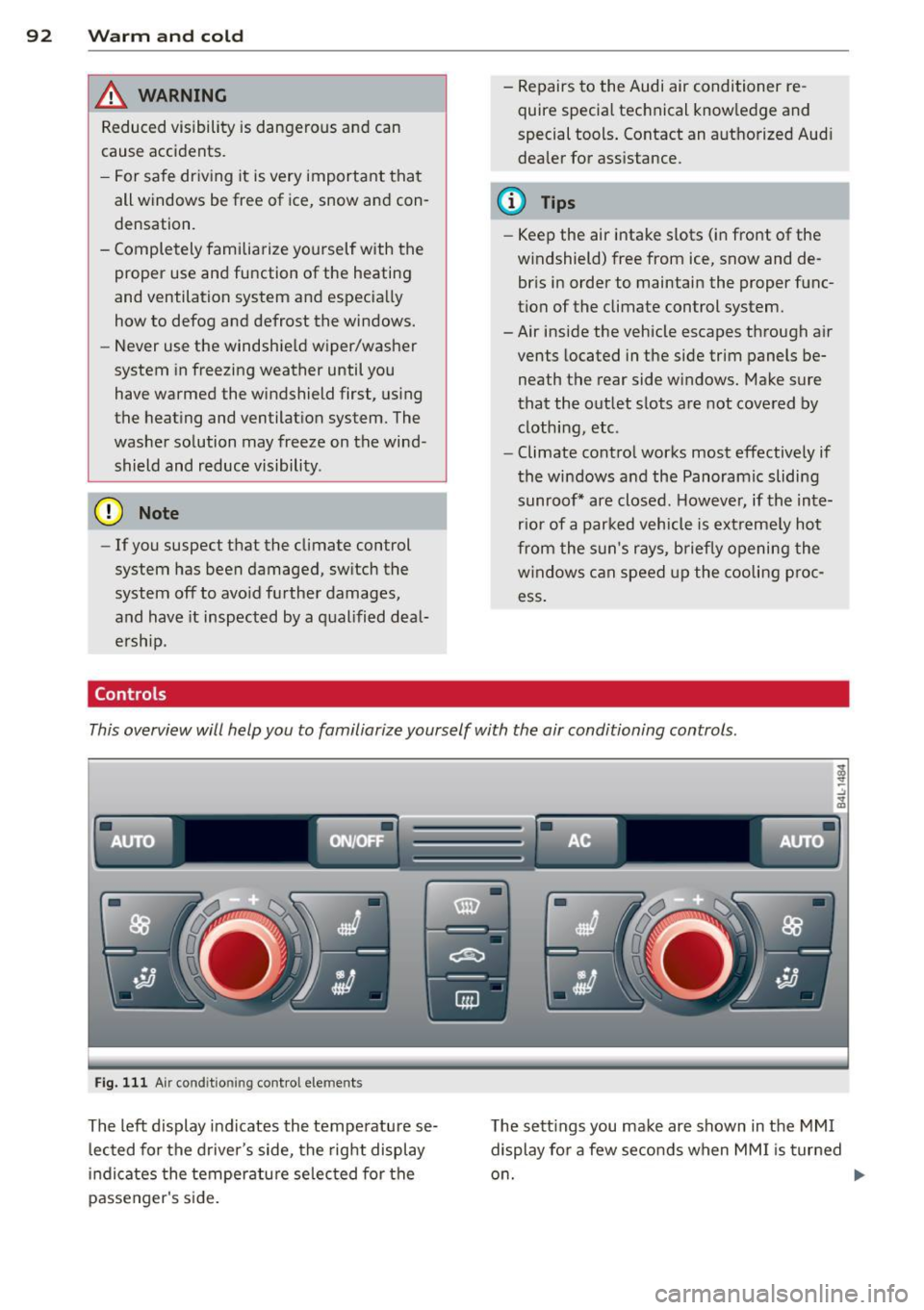
Controls -
Repairs to the Audi air conditioner re
quire special technical know ledge and
special tools . Contact an authorized Aud i
dealer for ass istance.
@ Tips
- Keep the air intake s lots (in front of the
w indshield) free from ice, snow and de
br is in order to maintain the proper func
tion of the climate control system.
-Air inside the vehicle escapes through air vents located in t he side trim panels be
neath the rear side windows. Make sure
that the outlet slots are not cove red by
clothing, etc.
- Climate control works most effectively if
the windows and the Panoram ic sliding
sunroof* are closed. However, if the inte
r ior of a par ked vehicle is ext reme ly hot
from the s un's rays, briefly opening the
w indows can speed up the cooling p roc
ess .
This overview will help you to familiarize yourself with the air conditioning controls .
Fig. 111 Air cond it ion ing co ntro l elements
Th e left display indicates the temperatu re se
l ected for the driver's side, the right display
i n dicates the temperatu re se lected for the
passenger's s ide. T
he sett ings you make are shown in the MMI
display for a few seconds when MM I is turned
o n.
Page 95 of 348
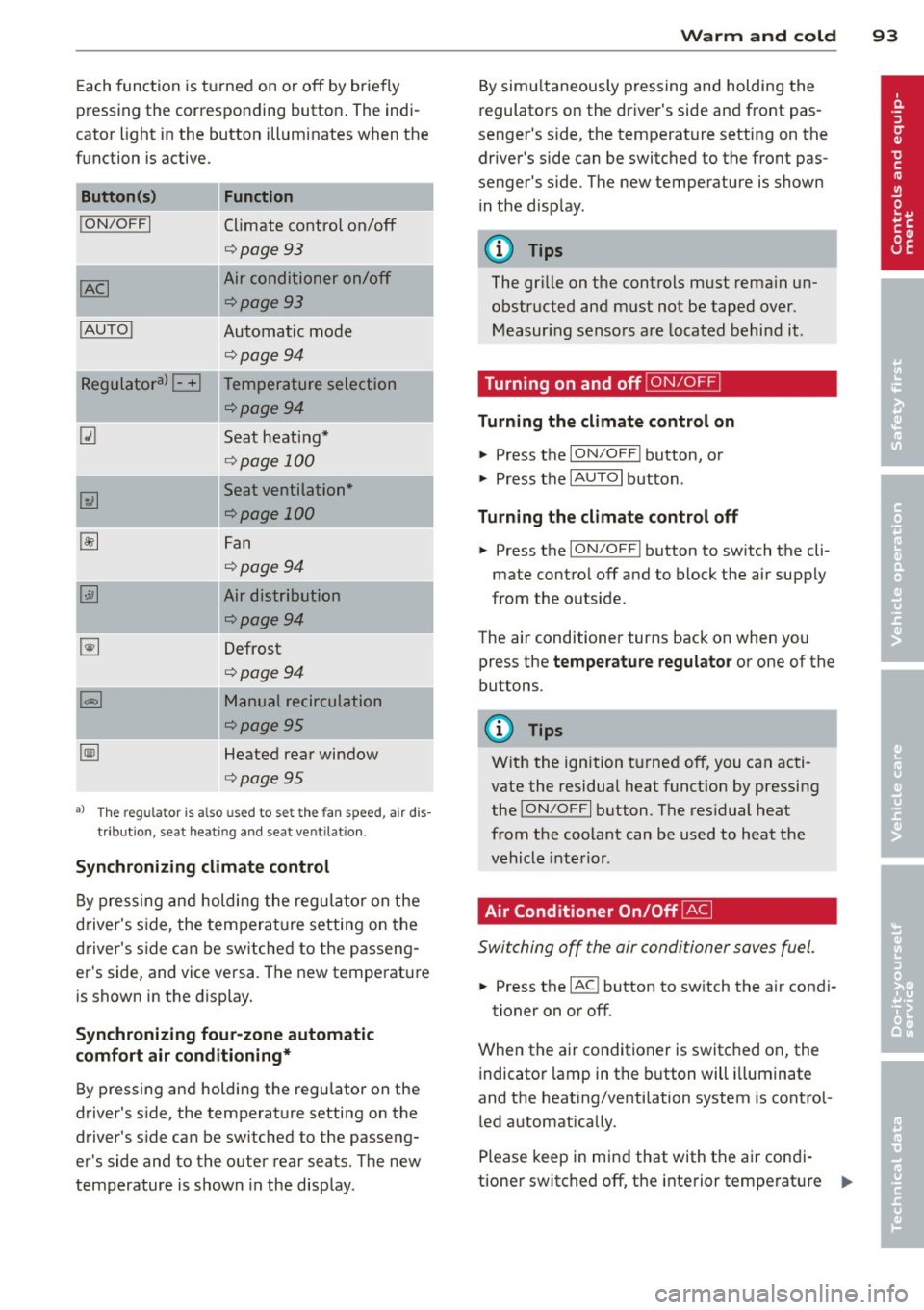
Each function is turned on or off by briefly
pr essing the corresponding button . The indi
cator light in the button illuminates when the
func tion is ac tive.
Button (s )
!ON/OFFI
! AUTO !
Function
Climate control on/off
<=>page 93
Air conditioner on/off
<=>page 93
Automatic mode
<=>page94
-~~~,--
Regulatora) G Temperature selection
~
I
<=>page94
Seat heating*
<=> page 100
Seat ventilation*
<=>page 100
Fan
<=> page94
Air distribution
<=>page94
Defrost
<=>page94
Manual recirculation
¢page95
Heated rear window
<=>page95
al Th e regulat or is also used to set t he fa n speed, air dis
tributio n, seat he ating and sea t ve ntilat io n.
Synchronizing climate control
By pressing and holding the regu lator on the
d river's side , the tempera ture setting on the
d river's side can be switched to the passeng
er's side, and vice versa . The new temperature
is shown in the display.
Synchroniz ing fou r-zone automatic
comf ort air c ond iti oning*
By pressing and holding the regu lator on the
drive r's side, the temperature setting on the
drive r's s ide can be sw itched to the passeng
er's side and to the ou ter rear seats. The new
temperature is shown in the display .
Warm and c old 93
By sim ultaneously pressing and holding the
regulators on the driver 's s ide and front pas
senger 's s ide, the temperat ure setting on the
driver's side can be switched to the front pas
senge r's s ide. T he new temperature is shown
in the d isp lay .
@ Tips
The gr ille on the controls must rema in un
obstructed and must not be taped over.
Measur ing senso rs are located behind it .
Turning on and off~
Turning the climate control on
"' Press the ION/O FF! button, or
"' Press the
IAUTO I button.
Turning the climat e control off
"' Press the ION/O FF! button to sw itch the cli
mate contro l off and to block the air supply
from the ou tside.
The air conditioner turns back on when yo u
press the
temper atu re regulator or one of the
buttons.
(D Tips
Wit h the ignition t urned off, you can acti
vate the residual heat funct ion by pressing
the
! ON/O FF I button . The res idual heat
from the coolant can be used to heat the
vehicle inte rior .
Air Conditioner On/Off~
Switching off the air condi tioner saves fuel .
"' Press the IAC ! button to sw itch the a ir condi-
tioner on or off .
When the air conditioner is switc hed on, the
indicator lamp in the b utton will illuminate
and the heat ing/venti lation system is control
led automatically .
Please keep in mind that with the air condi
tione r switc hed off, the interior temperat ure
1JJ>
Page 96 of 348
94 Warm and cold
cannot be lower than the outside tempera
ture. The air wi ll not be cooled or
dehumid ified. The windows can fog up .
Automatic mode~
The automatic mode is the standard setting
for all seasons .
.,. Se lect temperature between 60 °F ( +16 °C)
and 84 °F (+28 °C) .
.,. Press the
!AU TO I button .
Automatic operation ens ures constant tem
peratures in the inter ior and dehumidifies the
air inside the vehicle . Air temperature, volume
and distribution are controlled automatically
to reach or maintain the desired interior tem perature as quickly as possible. Fluctuations
in exterior temperature and the effects of
temperature from the pos ition of the sun are
compensated for automat ically .
This operat ing mode works only in the adjust
ab le temperature range, from 60 °F ( +16 °C)
to
84 °F (+28 °C) . If a temperature below 60
°F (+16 °C) is selected, LO appears in the d is
p lay. At temperatures above 84 °F ( +28 °C) ,
HI is disp layed. At both extreme settings, cl i
mate control r uns continuously at maximum
cooling or heat ing power . There is no temper
ature reg ulation.
Setting the temperature
Separate temperatures con be selected for the driver's and front passenger's side.
.,. Ro tate the reg ulator to the left to reduce
the temperature, or to the right to increase
the temperature.
The selected temperature appea rs on the cli
mate con trol d isp lay. The tempe ratu re set ting
will also appear for a few seconds in the MMI
display . Fan
~
The automatically preset fan speed con be re
duced or increased .
.,. Press the~ button .
.,. Ro tate the regulator to t he des ired fan
speed.
The climate control system automatically reg
ulates fan speed depending on inter ior tem
perature. You can adjust the volume of air pro
duced by the fa n to your own requirements .
The fan speed setting will appear for a few
seconds in the MMI display.
(D Tips
It is possible that the fan speed may
change automatica lly. This occurs to en
sure that the des ired temperature setting
i s reached as quickly as possible .
Air distribution ~
The automatically controlled air dis tribution
con be changed manually.
.,. Press the~ button.
.,. Rotate the regulator to the des ired setting.
You can adjust the air distribut ion so that air
flows from specific vents . In position
:,J air
flows on ly to the windows, in posit ion
:0, it
flows to the driver or passenger, and in pos i
t ion~ it flows to the footwell. The re a re ad
ditional comb inations ava ilab le to adjust air
dist ribution as needed .
To regulate air d istribution a utomat ically,
switch to
IAUTOI.
The air distribution setting wi ll appea r fo r a
few seconds in the MMI display .
Defrosting ~
The windshield and side windows ore rapidly
defrosted or defogged .
.,. Press the~ button to turn on the defrost
er .
Page 97 of 348
~ Press the~ button again, or press the
IAUTOI button to turn it off.
Temperature is controlled automatically. The
maximum amount of air flows main ly from
the vents below the windshield.
To defog the rear side windows, the air ve nts
i n the door pillars shou ld be open and d irect
ed at the windows.
Manual air recirculation ~
Air recirculation prevents exhaust fumes or
other pollution from entering the vehicle.
Tu rning on air r ecircul ation
~ Press the 1.,..,1 button ~ .&
Tu rning off air recircul ation
~ Press the~ button again, or
~ press the IAUTO I button, or
~ press the~ button.
In the air recirculation mode, the air in the
passenger compartment is recirculated and
filtered to prevent exhaust fumes and other
pollution from entering the vehicle . We rec
ommend that you use the manual air recircu lation under the following conditions:
- when driving through tunnels
- in a traffic jam.
A WARNING
Do not use the air recirculation mode for
extended per iods of t ime. The windows
could fog up since no fresh a ir can enter
the vehicle.
If the windows fog up, press
the air recirculation button again immed i-
,
Warm and c old 95
ately to switch off the air recirculation
f u nction or select defrost.
Rear window defogger~
The rear window defogger clears the rear win
dow of condensation .
~ Press the QW button to turn the rear window
defogger on and
off.
T he rear window defogger wo rks only when
the engine is runn ing. The light in the sw itch
will i lluminate when the defogger is on.
T he rear window defogger w ill sw itch
off au
tomat ica lly after a short t ime. The t ime the
rear w indow defogger remains on w ill vary de
pending on the outside temperature.
At very low outs ide temperatures, the rear
window defogger can be sw itched on continu
o usly by pushing the
QW button for more than
2 seconds . This remains stored until the igni
tion is switched
off.
A rea r w indow defogger that was switched on
also remains stored for 15 m inu tes after the
ignition is switched
off . If the engine is re
started within these 15 min utes, the rear win
dow defogger is a lso activated, depending on
outside temperature. With a vehicle that is
parked for a short time, the rear window de
fogger does not need to be manually activat ed again.
@ For the sake of the environment
Turn the defogger off when the rear win
dow is clear. When you save electric ity, you
save fuel.
Page 99 of 348
@ Tips
If the climate control system is operating
in cooling mode, a ir flows primarily from
the outlets in the center conso le and in the
door pillars. To achieve adequate cooling,
you should never close the outlets com
pletely .
Using climate control economically
Using the climate controls prudently can help
save fuel.
When you use the air conditioner, engine pow
er is reduced and fuel consumption increases.
To save fuel, you should use the air condition
e r only when necessary. Also please note the
following points :
.,. To save fuel, turn off cooling mode by press
ing the
I AC ! button (indicator light goes
out) .
.,. In add ition, if you open the window or the
Panoramic sliding sunroof* while driving,
turn off cooling mode by p ress ing the
IACI
button (indicator light goes out).
.,. If the vehicle is extremely hot due to the
heat of the sun, briefly open doors and win
dows.
@ For the sake of the environment
By reducing the amount of fue l you use,
you also reduce the amount of poll utants
emitted into the air. W
arm and cold 9 7
Rear Air Conditioning
Rear air conditioning - controls
Applies to vehicles: with four-zone automatic comfort air
conditio nin g
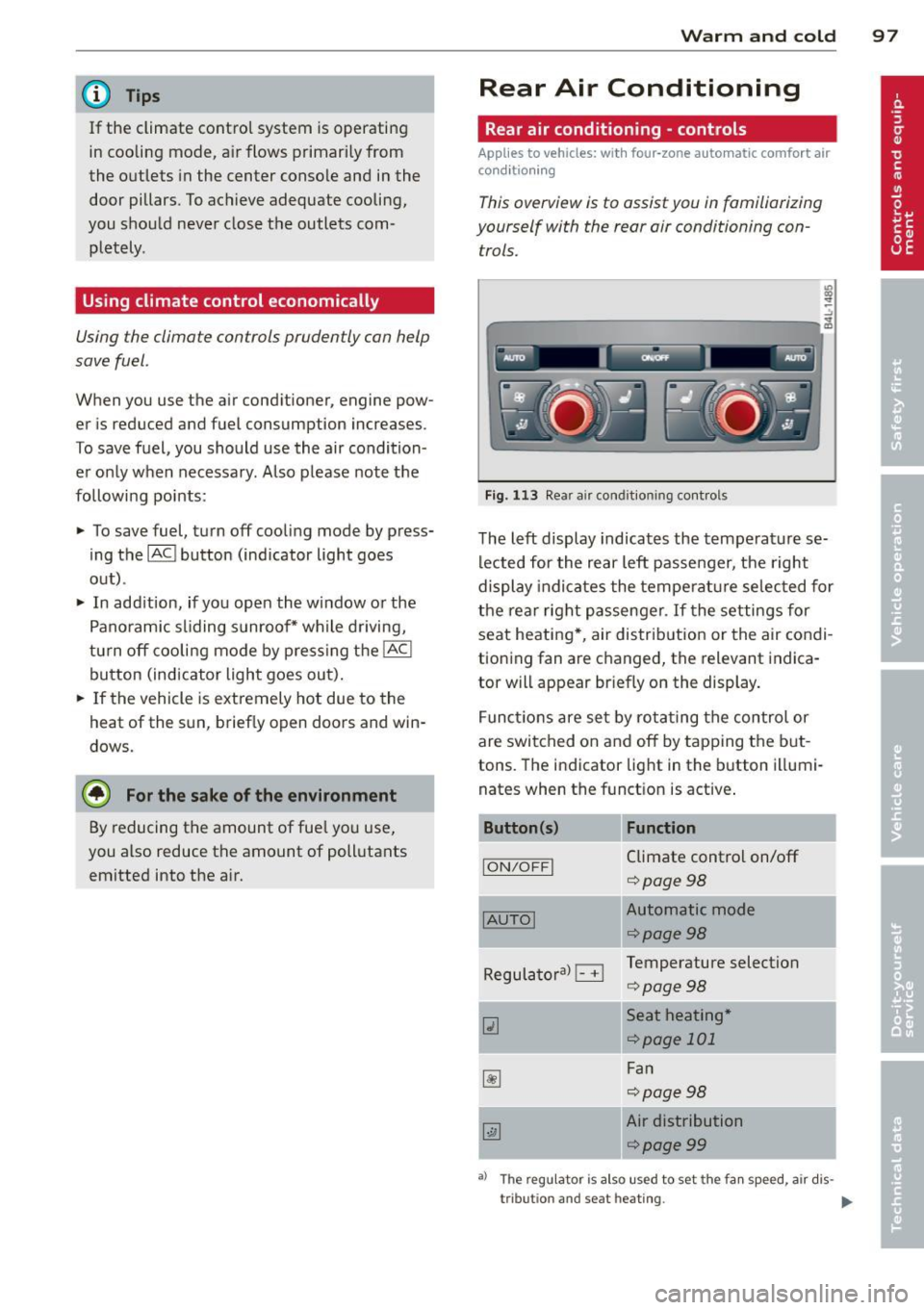
This overview is to assist you in familiarizing
yourself with the rear air conditioning con
trols.
lll ... :;
- --- ------------....... ~
Fig . 113 Rea r air conditioning controls
The left display indicates the temperature se
lected for the rear left passenger, the right
display indicates the temperature selected for
the rear right passenger . If the settings for
seat heating *, air distribution or the air condi
tioning fan are changed, the relevant indica
tor will appear br iefly on the display .
Funct io ns are set by ro tating the control or
are switched on and off by tapping the but
tons. The indicator light in the button illumi
nates when the function is active.
Button (s) Function
ION/OFFI Climate control on/off
¢ page98
-
IAUTOI Automatic mode
¢page98
Regulatoral El Temperature selection
¢page98
Qi Seat heating *
¢page 101
~
Fan
¢page98
~
Air distribution
¢page99
a) The regu lator is also u sed to set the fan sp ee d, air dis-
tribut ion and seat heating .
IIJ,
Page 100 of 348
98 Warm and cold
Synchronizin g rear ai r conditioni ng: By
pressing and holding the regulator on the rear
left side, the temperature setting of the rear
left side can be switched to the rear r ight side
and v ice versa. The new temperature is shown
in the display .
Turning on and off~
App lies to vehicles: with four -zone automat ic comfort a ir
co nd it io nin g
Tu rning the clim ate co ntro l on
"' Press the !ON /OFF I button , or
"' Press the
!AU TO I button.
Tu rning the climate con trol off
"' Press the !ON /O FF I button to swi tch the cli
mate control off and to b lock the air supply
from the outside .
The air conditioner turns back on when you
press the
temp eratu re reg ula tor or one of the
buttons .
{D) Tips
If the power child safety lock is on, the
rea r air condi tioning control element wi ll
not operate . In this case, dashes" ••• " wi ll
appear in the air condit ion ing control ele
ment d isp lay.
Automat ic mode in rear~
Applies to vehicles: with four-zone automat ic comfort a ir
co nd it io nin g
The automatic mode is the standard setting
for all seasons.
"' Se lect temperature between 60 °F (+16 °C)
and
84 °F (+28 °().
"' Press the
!AUTO I button.
Automatic operation ensu res constant tem
pe ratures in the inter io r and dehum idifies the
a ir i nside the vehicle. Ai r temperature, vo lume
and d istr ibu tion a re con trolled a utomat ically
to reach or maintain the desired inter ior tem
perat ure as quickly as possible . Fl uctuations
in exterior t emperat ure and the effects of temperature from the position of the s
un are
compensated for automatically .
T his operating mode works on ly in the adj ust
able temperature range, from
60 ° F (+ 16 °C )
to
84 °F ( + 28 °C) . If a temperature below 60
°F (+ 16 °C) is se lected, LO appears in the dis
play . At temperatures above
84 ° F (+ 28 °(),
HI is displayed . At bot h extreme sett ings, cli
mate control runs contin uously at maximum
cooling o r heating power . There is no temper
ature regulat ion.
Setting rear temperature
App lies to vehicles: wit h four-zone auto matic comfort air
conditio ning
The temperature can be separately adjusted
for the rear left and right sides .
"' Rotate the regulator to the left to red uce
the temperature, or to the r ight to increase
the temperature .
T he selected temperature appea rs on the cl i
mate control display.
Rear fan~
Appl ies to vehicles : wit h four-zone auto matic co mfo rt air
condition ing
The automatically preset fan speed can be re
duced or increased .
"' Press the~ butto n.
"' Rotate the regulator to the des ired fan
speed.
The climate control system automatically reg u lates fan speed depending on inter ior tem
perature. You ca n adjust the volume of air p ro
duced by the fan to your own requirements .
(D Tips
It is possible that the fan speed may
change automatically. This occurs to en
su re that the des ired temperature setting
i s reached as quickly as possible.
Page 102 of 348
100 Warm and cold
Synchronization
Applies to vehicles: with four -zone automat ic comfort a ir
co ndit io ning
One climate control setting for all seats .
With synchronizat ion active, the driver's set
tings are adopted for the front passenger and
the rear left and right seats. A ll the other set
tings that were made are transferred to the
other seats. This includes all the climate con
trol settings, except for the seat heat ing/ven
tilation* .
If a different setting is se lected at a
"synchroni zed seat", synchron iz ation is can
celled.
Supplementary heater
App lies to vehicles: with d iesel eng ine
" Select : ICARI function button > AC control
button
> Suppl.heater . Or
" Select :
I C ARI funct ion button > Car sys-
tems*
contro l button > AC > Suppl. heater .
Vehicles with d iesel eng ines are equipped
with a supp lementary heater to warm the in
ter io r of the vehicle more quickly. The supp le
men tary heater switches itself on and off au
tomatically when the outside temperature is
be low SO °F (10 °C) and the engine is running,
depending on the coolant temperature, interi
or temperature and the se lected temperature.
Rear operation
Applies to vehicles: with four -zone automat ic comfo rt a ir
co nd it io nin g
The air conditioning in the rear of the vehicle
con be controlled from the cockpit .
" Se lect: I CAR I funct ion button > AC control
button
> Rear operation. Or
" Select :
I C ARI funct ion button > Car sys
tems *
control button > AC > Rear cabin set
tings.
The drive r or front passenger can control the
air conditioning in the rea r of the vehicle us
ing
his/her own controls.
Heated Seats
Heated front seats~
Applies to veh icles: w it h electrically heated fro nt seats
The seat cushion and the seotbock of the
front seats con be heated electrically.
" Press the Ill button.
" Rotate the regulator to the des ired setting.
In position O the heating for the seats is
turned off. The range of adjustment is be
tween 1 and 6 .
The heater for the front seats can be turned on when the weight of the particular seat's oc
cup ant is detected . However, the front seats
can be pre-heated for about 10 m inutes using
the activated seat heater. After th is time has
elapsed, the seat heater automatically turns
off if it does not detect an occupant's we ight
for the particular seat.
_&. WARNING
Individuals with reduced sensitiv ity to pain
or temperature could develop burns when
using the seat heating function . To reduce
the r isk of injury , these ind ividuals should
not use seat heating .
(D Note
To avoid damage to the heating elements
i n the seats, do not kneel on the seats or
place heavy loads on a small area of the
seat.
(D Tips
Please note that the weight of objects
placed on the seat wi ll also be detected.
This weight may be enough to cause the
seat heater to turn on.
Front seat ventilation [it)
Applies to veh icles: w it h front seat ve ntil at ion
The seat cushion and the seatback on the
front seats con be ventilated .
" Press the~ button.
" Rotate the regulator to the desired setting .
ll-
Page 103 of 348
When the regulator is in the O position, the
seat ventilation is switched off. The range of
adjustment is between 1 and 6.
Heated rear seats~
Applies to vehicles: with heated rear seats
The seat cushions and seatbacks of the two
outer rear seats can be heated electrically.
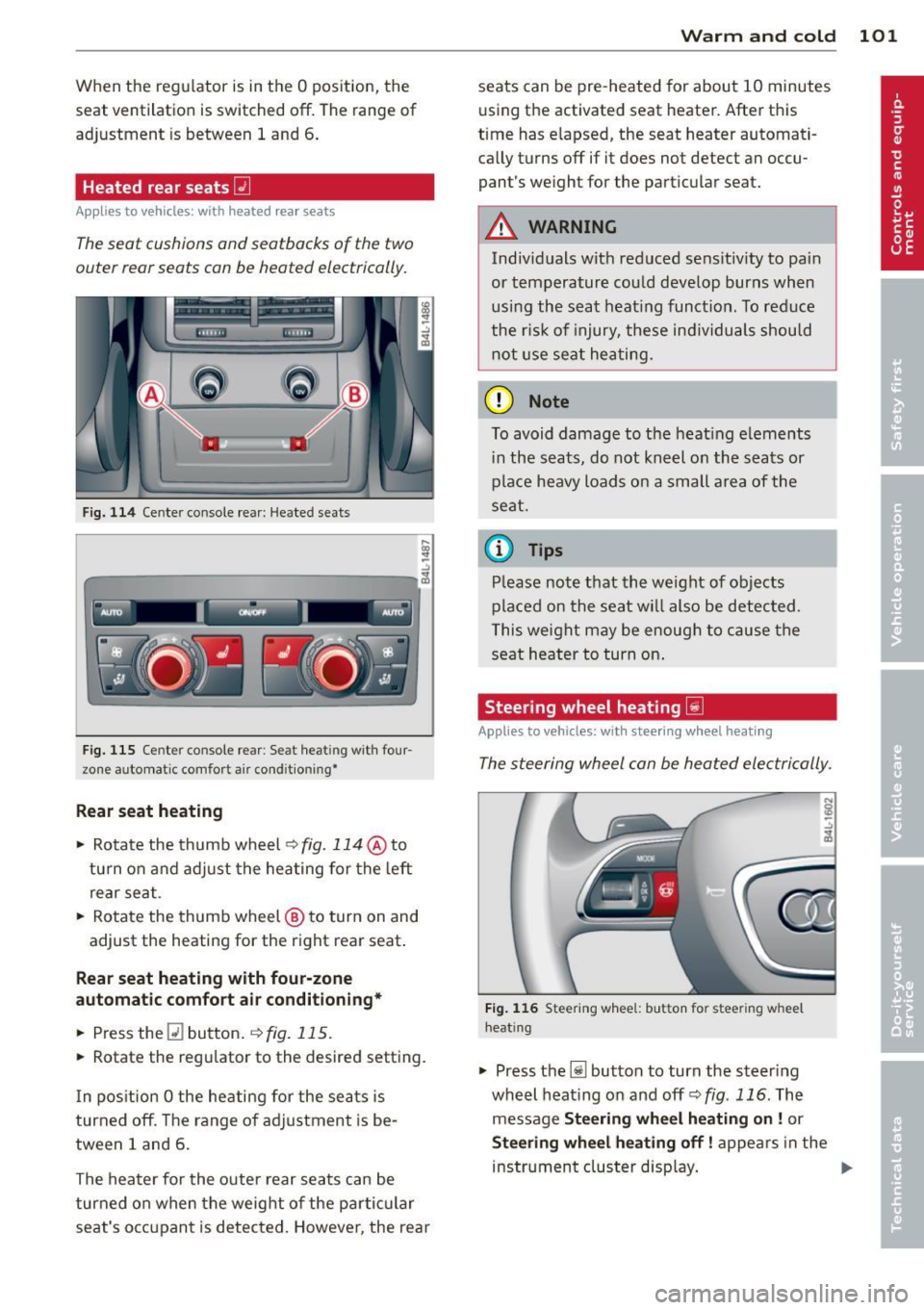
F ig. 114 Ce nter console rea r: Heated sea ts
i
-..:,
---------------<%
F ig. 1 15 Ce nter console rear : Se at heat ing with four
zone automat ic comfort a ir cond it ion ing•
Rear seat he ating
• Rotate the thumb wheel ~fig. 114 @to
turn on and adjust the heating for the left
rear seat .
• Rotate the thumb wheel @ to turn on and
adjust the heating for the right rear seat.
Rear seat heating w ith four-zone
automatic comfo rt air conditioning *
• Press the Q] button . ~ fig. 115.
• Rotate the regu lator to the desired setting .
I n pos ition O the heating for the seats is
turned off . T he range of ad justment is be
tween 1 and 6 .
The heater for the outer rear seats can be
turned on when the weight of the parti cular
seat's occ upant is detected. Howeve r, the rea r
Warm and cold 101
seats can be pre-heated for about 10 minutes
using the activated seat heater. After this
time has e lapsed, the seat heater automati
ca lly turns off if it does not detect an occu
pant's weight for the particular seat.
A WARNING
Individuals wit h reduced se ns itiv ity to pa in
or temperature could develop burns when
usi ng the seat heat ing funct ion . To reduce
the r isk of injury, these ind ividuals shou ld
not use se at hea ting.
(D Note
To avoid damage to the heat ing e lements
i n the seats, do not kneel on the seats or
place heavy loads o n a sma ll a rea of the
seat.
© Tips
P lease not e that the weight of objects
placed on the seat wi ll also be detected .
This weight may be enough to cause the
seat heater to turn on .
Steering wheel heating~
Applies to vehicles: with steering wheel heating
The steering wheel can be heated electrically.
Fig . 1 16 Steer ing wheel: button for steering whee l
heat ing
• Press the [j] button to turn the steer ing
whe el heat ing on and
off <=>fig . 116. The
message
Steering wheel h eating on! or
Steering wheel heating off! appears in the
instrument cluster disp lay. ..,.