turn AUDI Q7 2013 Owner´s Manual
[x] Cancel search | Manufacturer: AUDI, Model Year: 2013, Model line: Q7, Model: AUDI Q7 2013Pages: 348, PDF Size: 87.72 MB
Page 133 of 348
next to the lane you are using
¢page 135.
Operation
Applies to vehicles: with side assist
Side assist compares the distance and differ
ence in speed of detected vehicles with the
speed of your vehicle . Whenever the differ
ence in speed and d istance is registered as no
table if you were to change lanes, a signal l ight appea rs on the respective mirror.
The signal can light up if you are passed by a
vehicle or if you are pass ing another vehicle.
If you pass another vehicle s lowly (difference
in speed less than 9 mph, or 15 km/h), the
signal light will come on as soon as the other
vehicle is in your blind spot and is detected by
side assist . When the difference in speed is
g reater, the signal light will not come on.
Informational and alert stage signals
Applies to vehicles: with side assist
Side assist has two signal stages:
- the informational stage signal, and
- the alert stage signal.
Side assist he lps you by using the appropriate
signal stage, depending on whether or not
you have activated the turn signal, and thus have indicated that you are or are not chang
in g lanes .
Informational stage signal
As long as you have not activated the turn sig
nal, side assist informs you of detected
vehicles that are registered as being in a nota
b le location if you were to change lanes.
Whenever the detected vehicle's difference in speed and distance is registered by side assist
as notable, the signal light on the respective
mirror produces muted illuminat ion.
The br ightness of the informat ional stage sig
nal is designed not to be as intense, so that it
does not interfere with your view of the road
when yo u are driving and have no intention of
changing lanes. When you look i n the outside
Aud i side assist 131
mirror, you can clearly see the informational
stage signal.
Alert stage signal
When you activate the turn signal, and s ide
ass ist has detected a vehicle in a notable loca
t ion on that part icular s ide, the signa l light on
this side mirror flashes brightly. The repeated
brief and bright flashing of the alert stage
signal reminds you to carefully check traffic to
the rear in the outside mirror and over your
shoulder, so that you can safely complete the lane change
¢ A in Safety tips on page 136 .
@ Tips
The brightness of the signal light on the
outside mirrors can be adjusted with the
MMI ¢page 134.
Driving situation: Fast approaching
vehicles
Applies to vehicles: with side assist
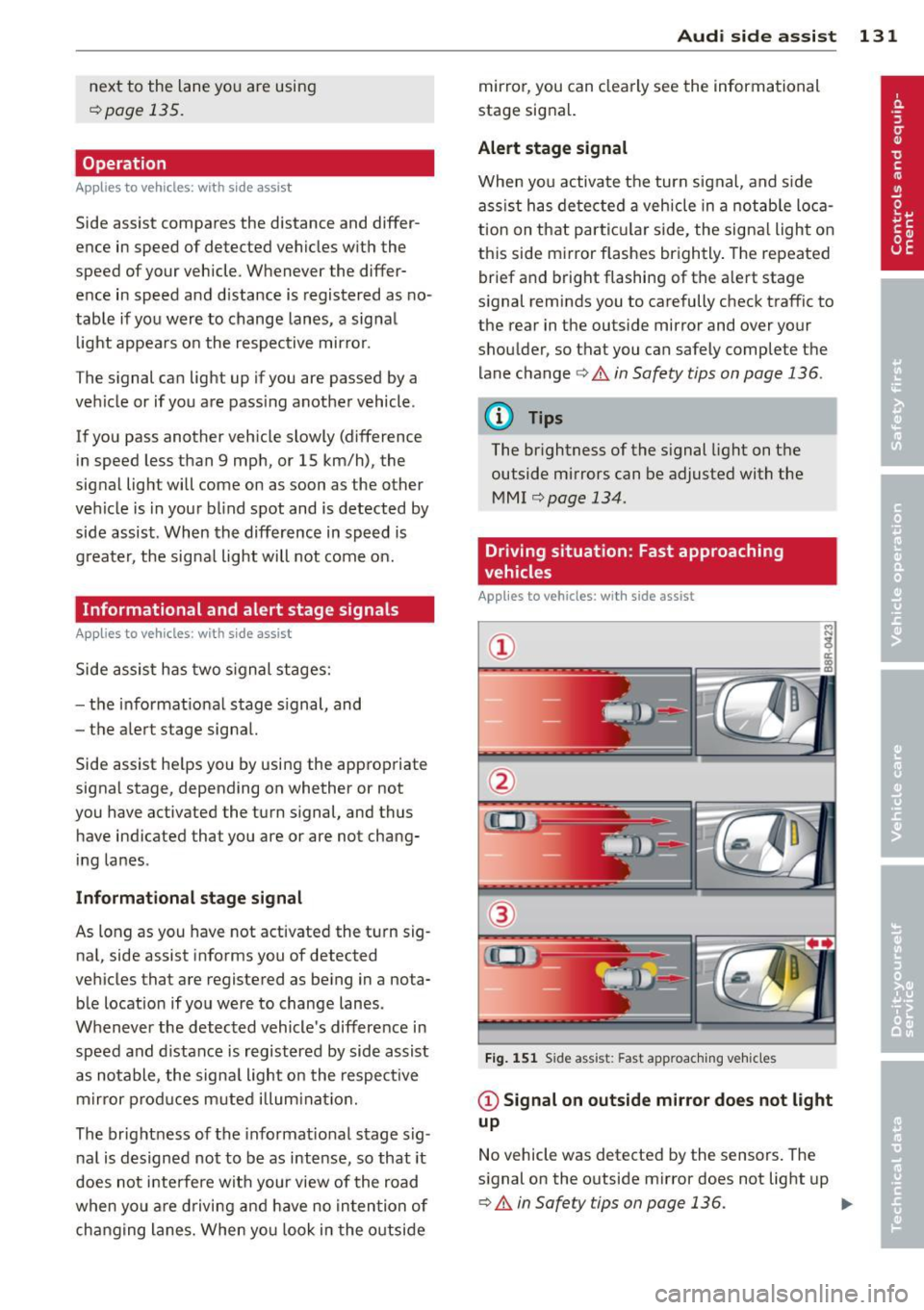
Fig. 151 Side assist : Fast app roaching vehicles
@ Signal on outside mirror does not light
up
No vehicle was detected by the sensors. The
signal on the outside mirror does not light up
¢ A in Safety tips on page 136. IJJ,,
Page 134 of 348

132 Audi side assist
@ Informational stage signal lights up
A fast approaching veh icle - in the left-hand
l ane for examp le - was detected by the sen
sors . Although this vehicle is sti ll far away, it
should be taken into account if you were to
change lanes, due to the considerable differ
ence in speed. The informational stage signal
on the outside m irror lights up
c::;, page 131.
@ Alert stage signal flashes
If you activate your turn signal in driving sit
uation @, the signal briefly f lashes repeated
ly. Side ass ist is alerting you to a veh icle that
you may not have noticed.
@ Tips
- The faster a vehicle approaches from the
rear, the sooner the signal on the outside
mirror lights up. Side assist will signa l,
at the latest, when a detected vehicle en
ters your "blind spot" .
- When vehicles approach very quickly,
changing lanes can be dangerous even if
the signal on the outside mirror does not
light up.
Driving situation: Slowly approaching
vehicles
Applies to vehicles : wi th side assist
@
Fig. 152 Side assist: S low ly approac hing veh icles and
veh icles in yo ur blind spot
@ Signal on outside mirror does not light
up
A vehicle approaching slowly -in the left-hand
lane for example - was detec ted by the sen
sors. Because of the small d ifference in speed
and the considerable distance from your vehi
cle, the signal on the outside mirror will not
light up
c::;, &. in Safety tips on page 136.
@ Informational stage signal lights up
The distance between your vehicle and that of
the slow ly approaching vehicle has narrowed .
The informationa l stage signal on the outside
mirror lights up.
As soon as the differe nce in speed and dis
tance is registered as notable if you were to
change lanes, a signa l on the mirror lights up.
Side assist will signal at the latest when a de-
tected vehicle enters your "b lind spot". .,,.
Page 135 of 348
@ Alert stage signal flashes
If you activate your turn signal in driving sit
uation @, the signa l light briefly flashes re
peatedly. Side assist is alerting you of a vehi
cle that you may not have noticed .
@ Tips
-The faster a vehicle approaches from the
rear, the sooner the signa l on the outside
mirror lights up. Side assist will signa l,
at the latest, when a detected vehicle en
ters your "blind spot".
- When vehicles approach very quickly,
changing lanes can be dangerous even if
the signal on the outside mirror does not
light up.
Driving situation: Vehicles dropping
back slowly
Applies to vehicles: with side assist
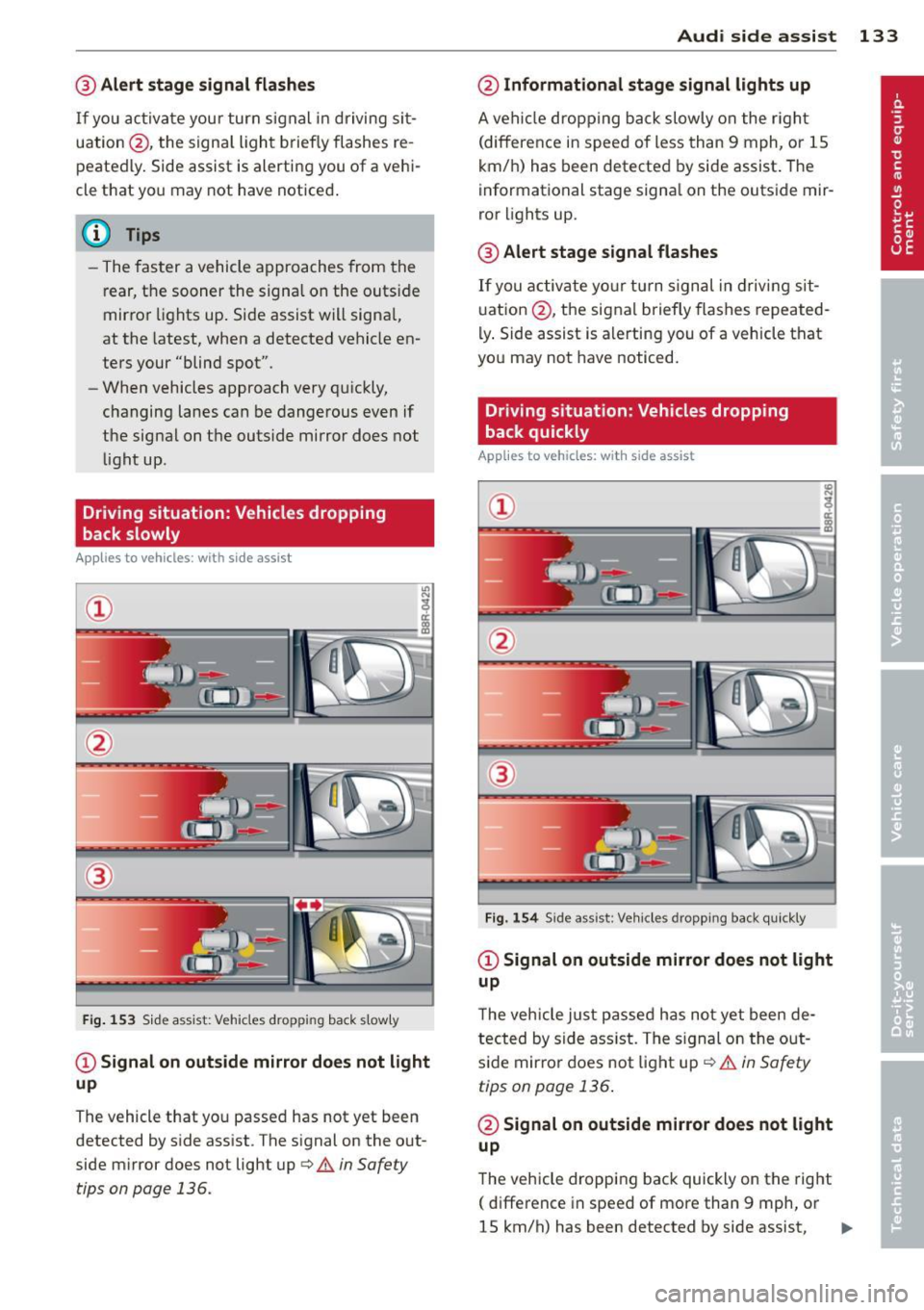
®
Fig . 153 Side assist: Vehicles dropp ing back s lowly
CD Signal on outs ide mirror does not light
up
The vehicle that you passed has not yet been
detected by side assist . The signal on the out
side mirror does not light up
q .& in Safety
tips on page 136.
Audi side assist 133
@ Informational stage signal lights up
A vehicle dropping back slowly on the r ight
(difference in speed of less than 9 mph, or lS
km/h) has been detected by side assist. The
informational stage signa l on the outside mir
ror lights up.
@ Alert stage signal flashes
If you activate yo ur turn signal in driving sit
uation @, the signal briefly flashes repeated
ly. Side assist is alerting you of a vehicle that
you may not have noticed.
Driving situation: Vehicles dropping
back quickly
Applies to vehicles: with side assist
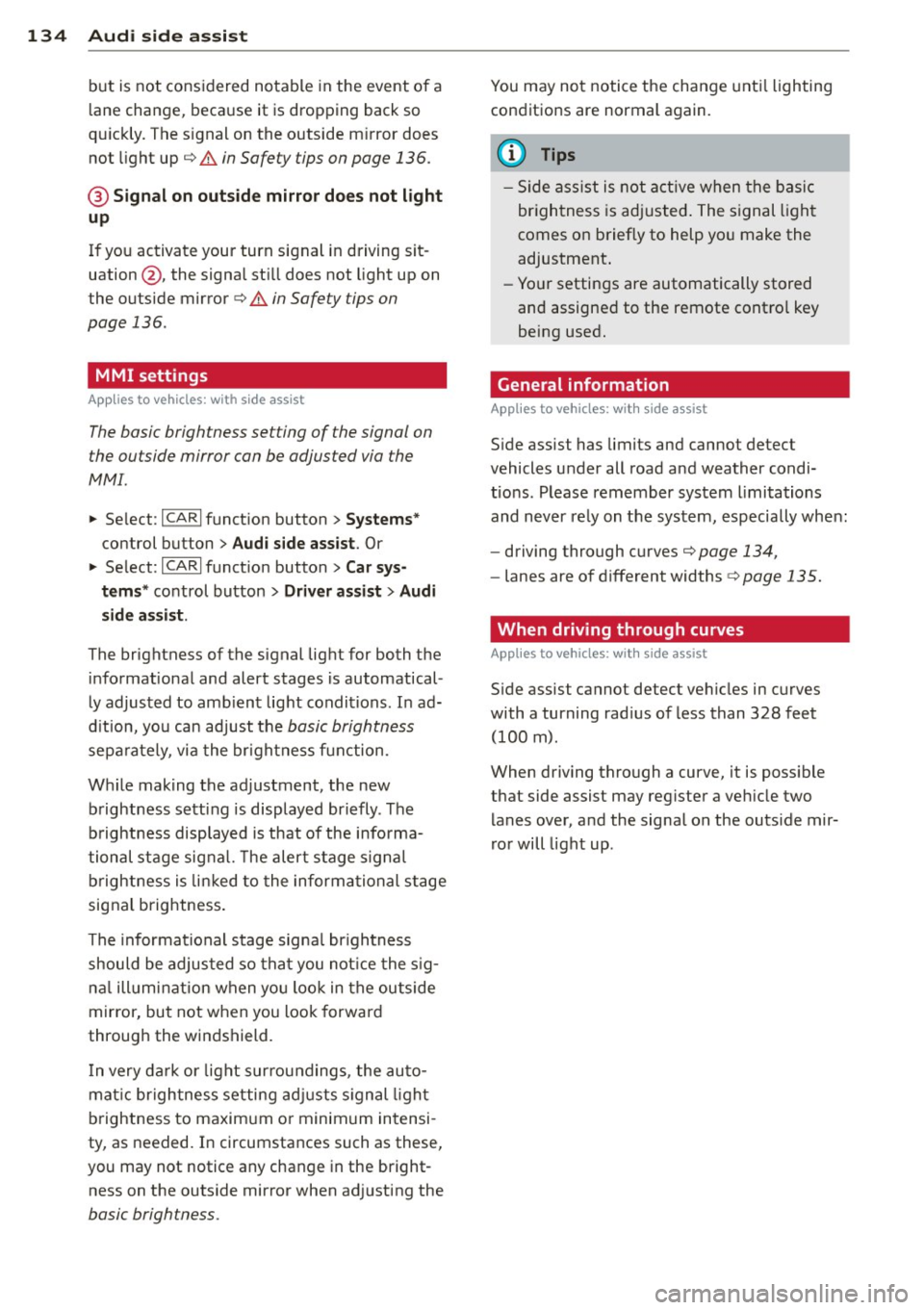
®
Fig. 154 Side assist: Veh icles dropp ing back quickly
CD Signal on outside mirror does not light
up
T he vehicle just passed has not yet been de
tected by side ass ist. The sign al on the out
side mirror does not light up
q .& in Safety
tips on page 136 .
@ Signal on outside mirror does not light
up
The vehicle dropping back quickly on the right
( difference in speed of more than 9 mph, or
lS km/h) has been detected by side assist,
1J1>
Page 136 of 348
134 Audi side assist
but is not considered notable in the event of a
lane change, because it is dropping back so
quickly. The signal on the outside mirror does not light up¢.&.
in Safety tips on page 136.
@ Signal on outside mirror does not light
up
If you activate your turn signal in driving sit
uation @, the signal still does not light up on
the outside mirror¢.&.
in Safety tips on
page 136.
MMI settings
App lies to vehicles: with side assist
The basic brightness setting of the signal on
the outside mirror can be adjusted via the
MMI.
.. Select : ICARI function button> Systems*
control button > Audi side assist. Or
.. Select:
I CARI function button > Car sys
tems*
control button > Driver assist > Audi
side assist.
The brightness of the signal light for both the
informational and alert stages is automatical
ly adjusted to ambient light conditions. In ad
dition, you can adjust the
basic brightness
separately, via the brightness function.
While making the adjustment, the new brightness setting is displayed briefly . The
brightness displayed is that of the informa
tional stage signal. The alert stage signal
brightness is linked to the informational stage
signal brightness.
The informational stage signal brightness
should be adjusted so that you notice the sig
nal illumination when you look in the outside
mirror, but not when you look forward
through the windshield.
In very dark or light surroundings, the auto
matic brightness setting adjusts signal light
brightness to maximum or minimum intensi
ty, as needed. In circumstances such as these,
you may not notice any change in the bright
ness on the outside mirror when adjusting the
basic brightness.
You may not notice the change until lighting
conditions are normal again.
(D Tips
- Side assist is not active when the basic
brightness is adjusted. The signal light
comes on briefly to help you make the
adjustment.
- Your settings are automatically stored
and assigned to the remote control key
being used.
· General information '
App lies to vehicles : wit h side assist
Side assist has limits and cannot detect
vehicles under all road and weather condi
tions . Please remember system limitations
and never rely on the system, especially when:
- driving through curves¢
page 134,
-lanes are of different widths¢ page 135.
' When driving through curves
Applies to vehicles: wit h side assist
Side assist cannot detect vehicles in curves
with a turning radius of less than 328 feet
(100 m).
When driving through a curve, it is possible
that side assist may register a vehicle two
lanes over, and the signal on the outside mir
ror will light up.
Page 138 of 348
136 Audi side a ssis t
Safety tips
App lies to vehicles: wit h side ass ist
The s ide ass ist detect ion may be lim ited when
d riving around narrow street corners , on hilly
streets, and under poor weathe r cond itions.
It is poss ible that the radar sensors may also
detect other objects , such as high or stag
gered guardra ils .
Side assist does not measure actual lane
width . The system assumes a fixed lane w idth .
Detection in the left and r ight lanes is based
on this assumed lane width . When driving on
na rrow roads or when driving to the left or
right of the center of a travel lane , it is possi
b le that vehicles will be detected that are
not
in the lane next to the lane you are using.
A WARNING
- Improper reliance on the s ide assist sys
tem can cause collisions and serious per
sonal injury :
- Never rely only on side assist when
changing lanes .
- Always check rear view mirrors to make
sure that it is safe to change lanes.
- Side ass ist cannot detect a ll vehicles un
der all cond itions- danger of accident!
- Side ass ist cannot detect vehicles in time
to alert you when they approach from beh ind at very h igh speeds or drop back
very quick ly .
- T he radar sensor's
vision can be reduced
or entirely blocked by rain, snow, and
heavy spray. This can result in side assist
not adequately detecting vehicles or, in
some cases, not detecting them at a ll.
Always keep an eye on the direction you are traveling and the relevant area
around the vehicle .
- Please note that side assist indicates
there are approaching vehicles, or
vehicles in your blind spot, only after
your vehicle has reached a driving speed
of at least 19 mph (30 km/h). -
Side assist signa l does not work around
tight corners (turning radius less than
328 feet, or 100 m).
- Side assist is no replacement for the driv
er 's full attention. The driver alone is re
sponsible for lane changes and sim ilar
driving maneuvers. Always keep an eye
on the d irect ion you are traveling and the
re levant area around the vehicle.
(D Note
To ensure that side assist is not adversely
affected, you should not block the area on
the rear bumper where the radar sensors
are located with foreign objects (such as
with stickers or bi cycle racks).
(D Tips
If the pos itions of the radar sensors have
been changed as a result of a rear end-co l
lision, for instance, have s ide assist
checked by an autho rized Aud i dealer for
safety reasons.
Page 140 of 348
138 Automatic transmi ssion
co uld "creep" forward or backward.
When stopped, keep the brake pedal
fully depressed and use the parking brake if necessary to keep the vehicle
from ro lling .
- If the selector lever is unintentionally
moved into N wh ile you are driving, take
yo ur foot off the accele rato r pedal and
wa it for the engine to return to idle
speed befo re selecting a d rivi ng position .
- Never shift into "R" or "P" when the vehi
cle is in mot ion.
- Never get out of the dr iver 's seat when
the engine is runn ing .
- If you must get out of the vehicle, move
the se lector lever securely into the P po
sit io n and apply the par king brake f irm ly.
- If the eng ine must remain ru nning, never
hav e any driv ing pos ition engaged when
c hec king under the hood . M ake sure t he
sele ctor lever has securely eng aged and
is locke d in "P" with the par king brake
firmly set ¢
page 255, Engine compart
ment .
Otherw ise, any increase in eng ine
speed may set the vehicle in m otion,
even w ith the par kin g brake applied.
Selector lever positions
This section describes the selector lever posi
tions and driving ranges.
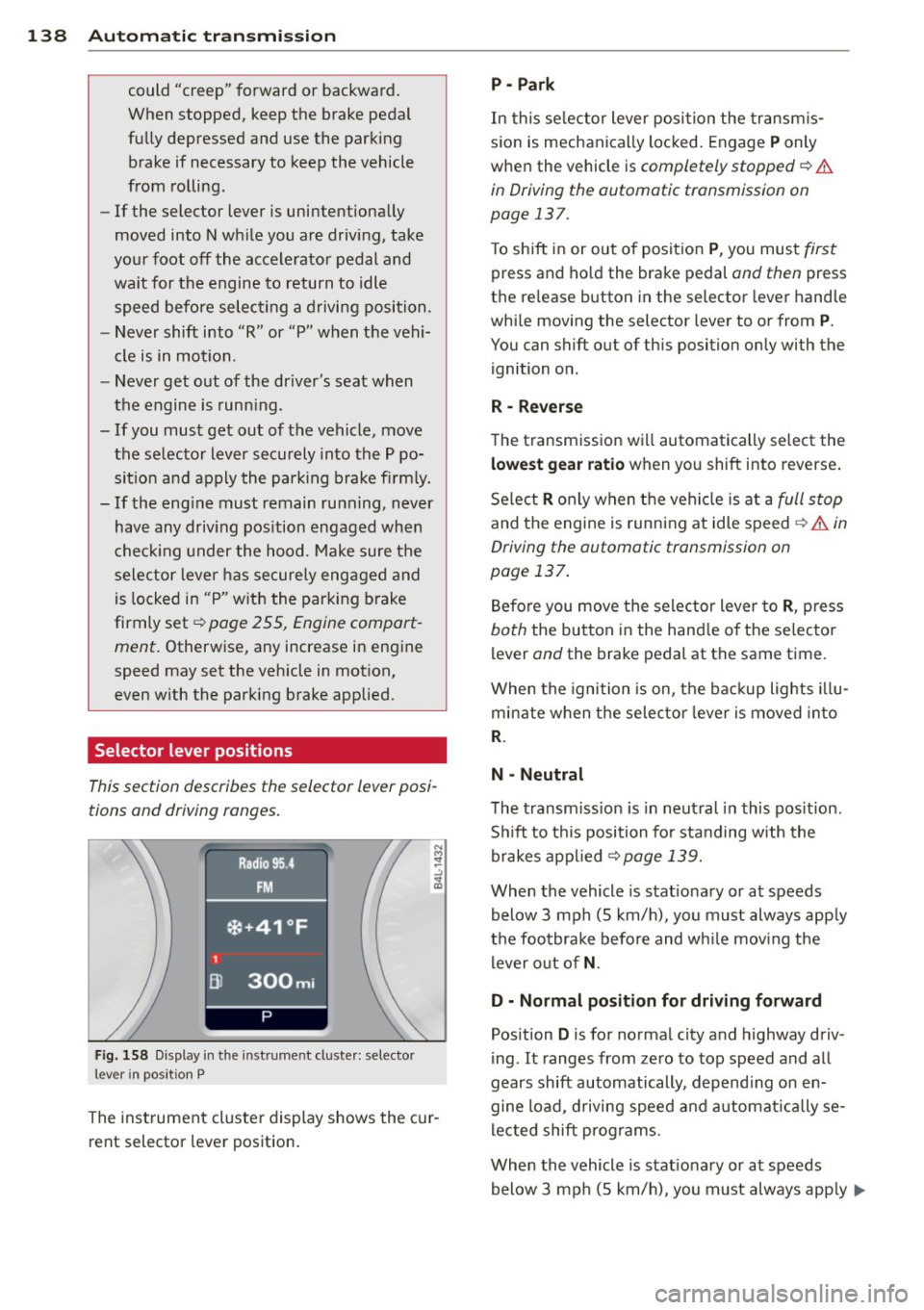
F ig. 158 Display in t he in st rum en t cluste r: selecto r
lev er in po sit ion P
The inst rumen t cluste r display shows the c ur
rent selector lever position .
P - Park
In this selector lever posi tion the transm is
s ion is mechanica lly locked. Engage
P only
whe n the vehicle is
completely stopped¢&.
in Driving the automatic transmission on
page 137.
T o shift in or out of posit ion P , you mus t first
press and ho ld the brake pedal and then press
the re lease button in the selector leve r hand le
whi le moving the selector lever to or from
P .
You can shift out of th is position only with the
ignition o n.
R • Reverse
The transm iss ion w ill automatically select the
lowest gear ratio when you shift into reverse .
Se lect
R o nly when t he vehi cle is at a full stop
and the engine is running at idle speed¢&. in
Driving the automatic transmission on
page 137.
B efore you move the se lector lever to R , press
both the button in the hand le o f the se lecto r
lever and the brake pedal at the same t ime.
W hen the ignition is on, the bac kup light s illu
minate w hen t he selec to r l ever is
moved in to
R .
N -Neutral
The transm iss io n is in neut ral in this pos it ion .
S hi ft to t his position fo r standing with the
brakes app lied
¢ page 139.
When the vehicle is stat iona ry or at speeds
below 3 mph (5 km/h) , you must always app ly
t h e foo tbrake before and wh ile mov ing the
l ever o ut o f
N.
D - Normal position for driving forward
Position D is for no rma l city and highway driv
ing . It ranges from zero to top speed and all
gears shift automatically , depend ing on en
gine load, d riving speed and a utomat ically se
l ected shift p rog rams.
When the vehicle is stat iona ry or at speeds
below 3 mph (5 km/h), you must always app ly
IJ,,
Page 141 of 348
the foot brake before and while moving the lever to
D o ut of N .
In ce rt a in circumst ances i t may be advan ta
geous to tempor arily swi tch to the manu al
shift p ro g ram to manually se lect gear ratios
to matc h specif ic dr iving conditions
r::!) page 140.
S - Sport position
Select this pos ition for sport ie r perfo rmance.
I n t his posi tion , the transm iss ion w ill not up
shift as soon, allowing the vehicle to use the increased power avai lab le at higher engine
speeds to achieve live lier acce lerat ion.
W hen the ve hicle is st ationary o r at speeds
be low 3 mph (5 km/h), you must a lways a pply
the foot brake before and while moving t he
l ever to
S out of N .
A WARNING
Read and follow a ll WARNI NGS <=> & in
Driving th e automatic transmission on
page 137.
(D Note
-
Coast ing downh ill with the transmission in
N and the engine not running w ill result in
damage to the automatic transmiss io n
and possibly t he catalytic converte r.
Automatic Shift Lock (ASL)
The Automa tic Shift Lock safeguards you
against accidentally shifting into a forward or
the reverse gear and causing th e vehicle to
move unintentionally .
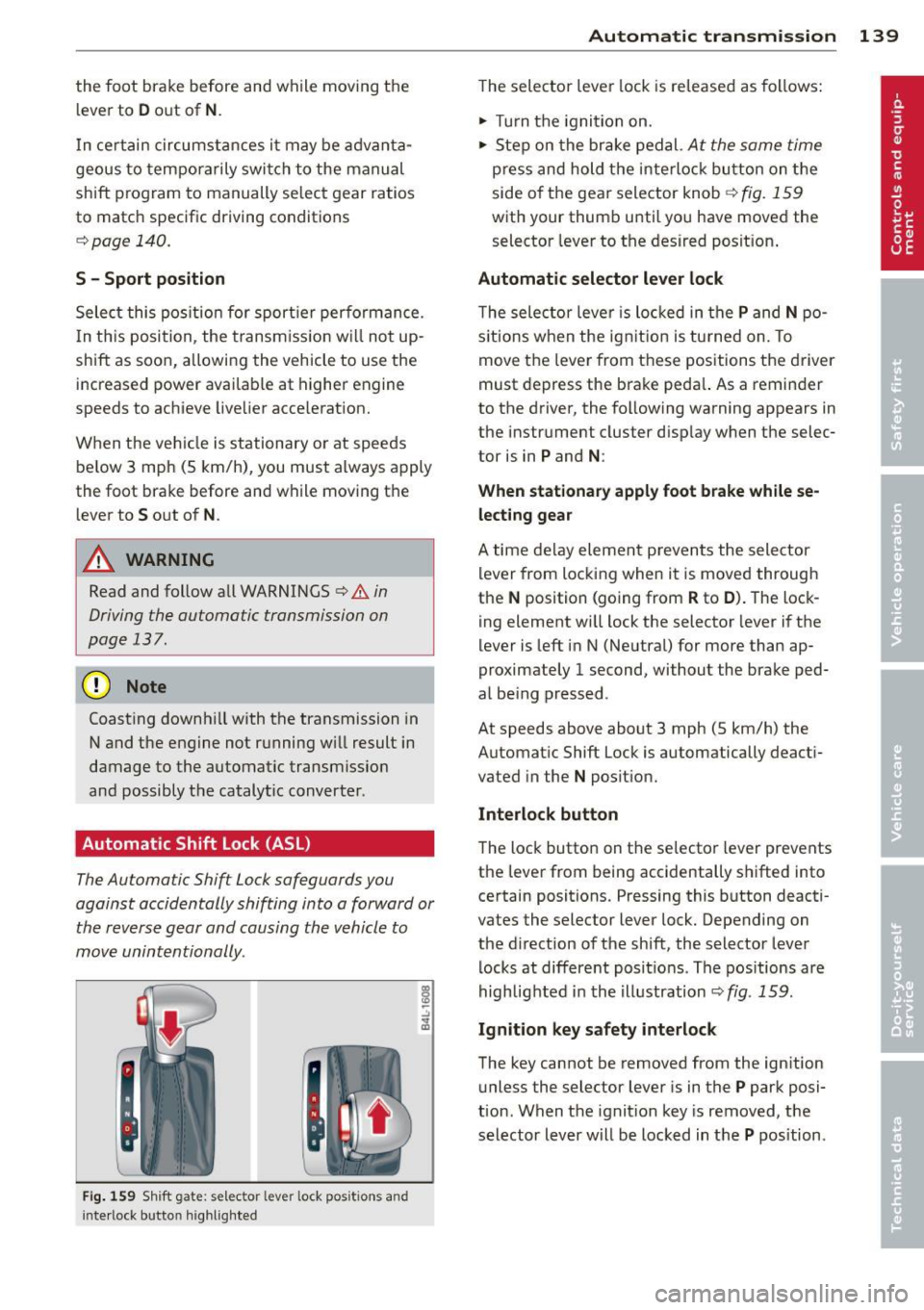
Fig. 159 Shift gate: s elec tor lever lock pos itions and
i n te rl ock bu tt on highli ght ed
Autom atic transm ission 139
T he selector lever lock is re leased as follows:
.. Turn t he igni tion on .
.. Ste p on the bra ke pedal.
At the same time
press and hold the inte rlock bu tton on the
side o f the gea r sele ctor knob
r::!) fig . 159
w ith your thum b until yo u have moved the
selector leve r to the desired posit ion .
Automatic selector lever lock
The selecto r leve r is lo cked in the P and N po
s itions w hen the ig nitio n is tu rned on. To
move t he lever from these posit ions the driver
must de press the brake peda l. As a remin der
to the d river, the following warning appears in
the instr ument cluster d isp lay w hen the selec
tor is in
P and N :
When stationary apply foot brake while se
lecting gear
A time de lay eleme nt preven ts the sele ctor
l ever from locking when it is moved through
the
N position (going from R to D ). T he lock
ing element wi ll lock the selector lever i f the
lever is left i n N (Ne utral) for more than ap
proximately 1 second, without the brake ped
al be ing pressed .
At speeds above about 3 mph (5 km/h) the
Automat ic Shift Lock is automatically deact i
vated in the
N posit ion.
Interlock button
The loc k button on t he selecto r lever prevents
the lever from being accidentally s hifted into
certain positions. Pressing this b utton deacti
vates the selector lever lock. Depending on
the d irection of the shift, the selector lever
l ocks at differe nt pos it io ns. Th e pos itions are
highlig hted i n the i llustration
r::!) fig . 159.
Ignition key safety interlock
The key cannot be removed from the ign ition
u nless the selector lever is in t he
P park posi
tion . When the ignit ion key is removed, t he
selector lever w ill be locked in t he
P pos ition.
Page 144 of 348
142 Automatic transmission
(D Note
If the transmission switches to emergency
mode, you should take the vehicle to an
authorized Audi dealership as soon as pos
sible to have the condition corrected.
Emergency release for selector lever
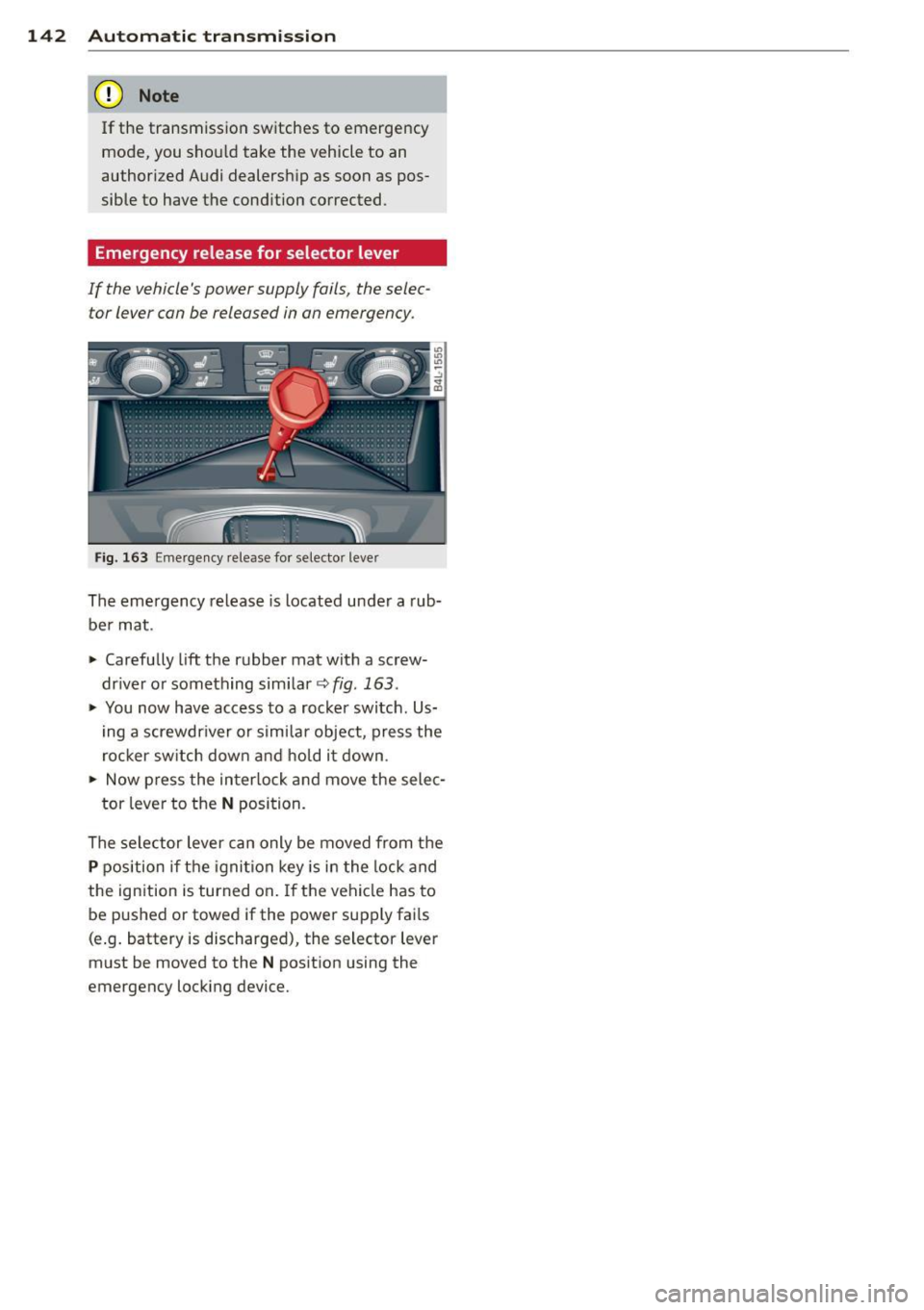
If the vehicle's power supply fails, the selec tor lever can be released in an emergency .
Fig. 163 Emergency release fo r selecto r lever
The emergency release is located under a rub
be r mat .
.,. Carefully
lift the rubber mat with a screw
driver or something similar~
fig. 163 .
.,. You now have access to a rocker switch . Us
ing a screwdr iver or similar object, press the
rocker switch down and hold it down .
.,. Now press the interlock and move the selec-
tor lever to the
N position.
The selector lever can only be moved from the
P position if the ignition key is in the lock and
the ignition is turned on . If the vehicle has to
be pushed or towed if the power supply fai ls
(e .g. battery is discharged), the selector lever
must be moved to the
N position using the
emergency locking device.
Page 149 of 348
-You can change the volume and pitch of
the signals as well as the display
Qpage 153.
Cross parking
Applies to vehicles: with Audi parking system plus w ith
rearview camera
This view may be used when parking in a ga
rage or in a parking space.
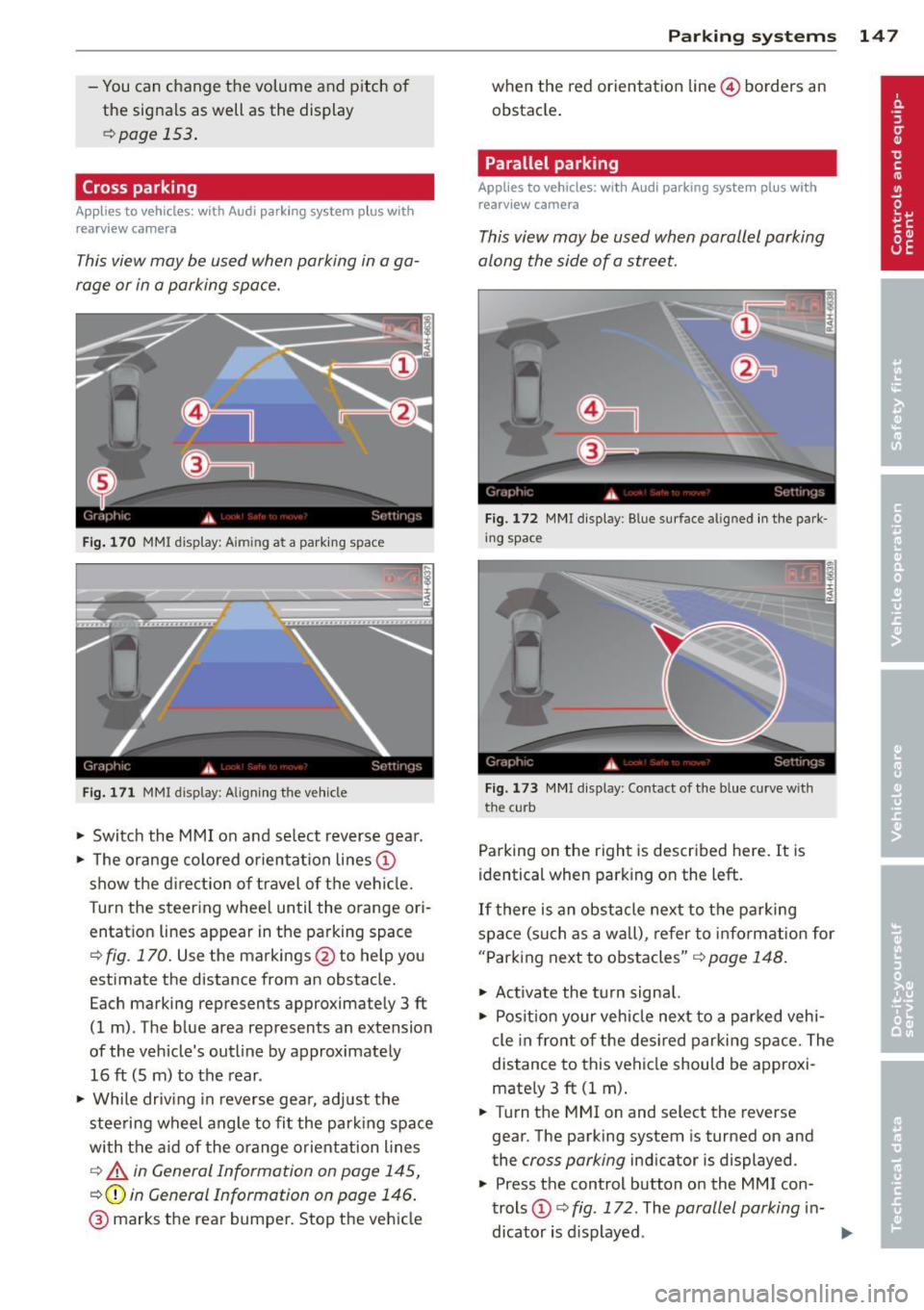
Fig. 170 MMI display: A im ing at a parking space
Fig. 171 MMI display: Aligning the vehicle
"' Switch the MMI on and select reverse gear.
"' The orange colored orientation lines@
show the direction of travel of the vehicle.
Turn the steering wheel until the orange ori
entation lines appear in the parking space
Q fig. 170. Use the markings @to help you
estimate the distance from an obstacle.
Each marking represents approximately 3 ft
(1 m) . The blue area represents an extension
of the vehicle's outline by approximately
16 ft (Sm) to the rear .
"' While driving in reverse gear, adjust the
steering wheel angle to fit the parking space
with the aid of the orange orientation lines
c::> A in General Information on page 145,
Q@in General Information on page 146.
@ marks the rear bumper. Stop the vehicle
Parking systems 147
when the red orientation line© borders an
obstacle.
Parallel parking
Applies to vehicles: with Audi parking system plus with
rearview camera
This view may be used when parallel parking
along the side of a street.
Fig. 172 MMI display: Blue surface aligned in the park
ing space
Fig. 173 MMI display : Contact of the blue curve w ith
the cu rb
Parking on the right is described here. It is
identical when parking on the left.
If there is an obstacle next to the parking
space (such as a wall), refer to information for
"Parking next to obstacles"
c::> page 148.
"' Activate the turn signal.
"' Position your vehicle next to a parked vehi
cle in front of the desired parking space. The
distance to this vehicle should be approxi
mately 3
ft (1 m).
"' Turn the MMI on and select the reverse
gear. The parking system is turned on and
the
cross parking indicator is displayed .
"' Press the control button on the
MMI con
trols
(D c::> fig. 172. The parallel parking in-
dicator is displayed.
II>
Page 150 of 348
148 Parking system s
• Back up and align you r vehicle so the b lue
area @ borders on the rear end of the vehi
cle or on the parking space line
c:> A in Gen
eral Information on page 145,
c:> (D in Gen
eral Information on page 146 .
The blue
area represents an extension of the vehicle's
outline by app rox imately 16 ft (5 m) to the
rear. The long side of the b lue a rea shou ld
be o n the curb. The enti re blue area must fit
i n to the par kin g space.
• With the veh icle stopped, turn the steer ing
wheel to the right as far as it wi ll go .
• Back into the parking space until t he b lue
curve
c:> fig. 173 touches the curb c:> A in
General Information on page 145,
c:> (D in
General Information on page 146.
Stop the
vehicle .
• With the veh icle stopped, turn the steer ing
wheel to the left as far as it will go .
• Co ntin ue to bac k into the park ing space un
t il the vehicle is parked p aralle l to the c urb
c:> A in General Information on page 145,
c:> (D in General Information on page 146 .
® marks the rear bumper. Stop the vehicle,
at the latest, when the red orientation line
@ borders an obstacle . Keep an eye on the
front of your vehicle wh ile doing this.
P ar king ne xt to ob stacle s
When there is an obstacle (s uch as a wall)
next to the parking space, choose a space with
more space on the sides. Pos ition the long
side of the blue area so that there is sufficient
space from the curb . The area must not be on
the curb . You w ill also need to start turning
the steering whee l much earl ie r. T he re shou ld
be a suffi cient amount of space between the
curb and the b lue curve, and the blue curve
c:> fig. 173 mus t not touch the curb.
@ Tips
The left or right orientation lines and sur
faces wi ll be displayed, depending on the
t urn signa l bei ng use d.
Audi parking system
plus with front- and
rearview camera
Introduction '
Applies to vehicles: with Aud i parking system plus with
front- and rearview camera
In addition to an acoustic and visual parking
system, this parking system contains a front
and rearview camera
c:> page 146. You are as
s isted by various views, such as corner v iews
at the front and rear of the ve hicle, and views
directly in front of or behind the vehicle.
General information
Appli es to vehicles: with Audi parking system plus with
front- and rearview camera
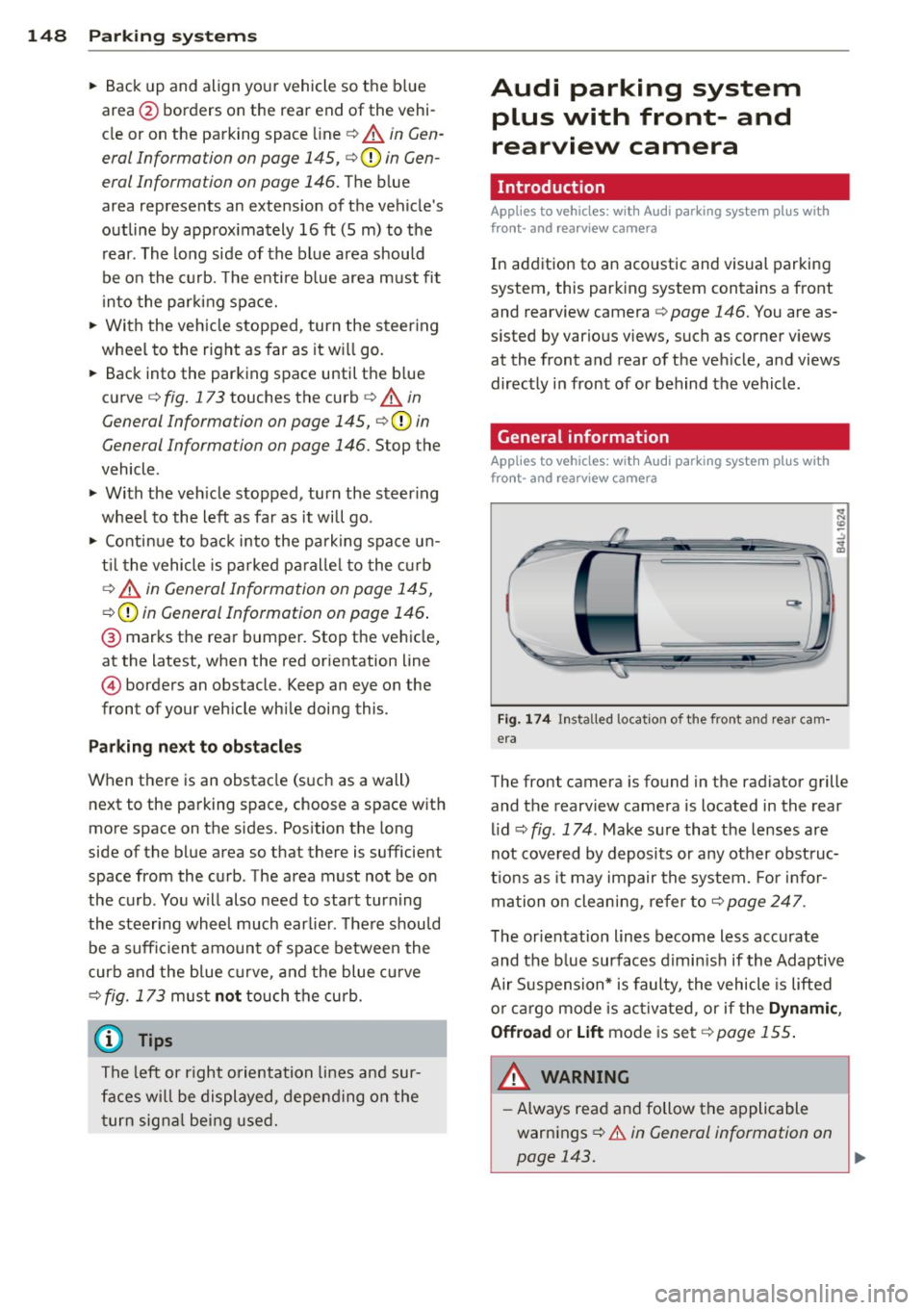
Fig . 1 74 Ins talled locat ion of the front and rea r cam
era
The front camera is found in the radiator grille and the rearview camera is located in the rear
l id
c:> fig . 174 . Make sure that t he lenses are
not cover ed by deposits or any other obst ruc
tio ns as it may impair the system. Fo r in for
mation o n clean ing, re fer to
c:> page 247 .
The orientation lines become less accurate
and the b lue surfaces d imin is h if the Adaptive
Air S uspension* is faulty, the vehicle is lifted
o r car go mode is acti va ted , or if the
Dynami c,
Offroad or Lift
mode is set c:> page 155.
A WARNING
-Always rea d and follow the applicable
warnings
c:> .& in General information on
-
page 143. .,..