air condition AUDI Q7 2014 Owner´s Manual
[x] Cancel search | Manufacturer: AUDI, Model Year: 2014, Model line: Q7, Model: AUDI Q7 2014Pages: 340, PDF Size: 85.02 MB
Page 101 of 340
Synchronizing rear air conditioning: By
pressing and holding the regulator on the rear
left side, the temperature sett ing of the rear
left side can be switched to the rear right side
and v ice versa. The new temperature is shown
in the display .
Turning on and off~
App lies to vehicles: with four-zone automatic comfort air
cond it ioning
Turning the climate control on
• Press the !ON/OFF I button, or
• Press the
!AU TO I button.
Turning the climate control off
• Press the !ON/O FF I button to switch the cli
mate control off and to block the air supply
from the outside .
The air conditioner turns back on when you
press the
temperature regulator or one of the
buttons.
(D Tips
If the power child safety lock is on, the
rea r air conditioning control element will
not operate . In this case, dashes" ••• " wi ll
appear in the air conditioning control ele
ment disp lay.
Automatic mode in rear~
Applies to vehicles: with four-zone automatic comfort air
conditioning
The automatic mode is the standard setting
for all seasons.
• Se lect temperature between 60 °F (+16 °C)
and
84 °F (+28 °().
• Press the
!AUTO I button.
Automatic operation ensures constant tem
peratu res in the inter ior and dehumidifies the
air inside the vehicle. Ai r temperature, volume
and distribution are controlled automatically
to reach or maintain the desired interior tem
perature as quickly as possible. Fluctuations
in exterior temperature and the effects of
Warm and cold 99
temperature from the position of the sun a re
compensated for automatically .
T his operating mode works on ly in the adjust
able temperature range, from
60 °F (+ 16 °()
to
84 °F ( +28 °C) . If a temperature below 60
°F (+ 16 °C) is se lected, LO appears in the dis
play . At temperatures above
84 °F (+ 28 °(),
HI is displayed . At both extreme sett ings, cli
mate control runs continuously at maximum
cooling or heating power . There is no temper
ature regulat io n.
Setting rear temperature
Applies to vehicles: with four -zone automatic comfort air
conditioning
The temperature can be separately adjusted
for the rear left and right sides.
• Rotate the regulator to the left to reduce
the temperature, or to the right to increase
the temperature .
T he selected temperature appears on the cli
mate control display.
Rear fan~
Applies to vehicles: with four-zon e automatic comfort air
conditioning
The automatically preset fan speed can be re
duced or increased.
• Press the~ button .
• Rotate the regulator to the desired fan
speed .
The climate control system automatically reg
ulates fan speed depending on inter ior tem
perature. You ca n adjust the volume of air pro
duced by the fan to your own requirements .
(D Tips
It is possible that the fan speed may
change automatically. This occurs to en
sure that the desired temperature setting
i s reached as quickly as possible.
Page 102 of 340
100 Warm and cold
Rear air distribution ~
Applies to vehicles: wit h fou r-zone a utomat ic comfort a ir
co ndit io ning
The automatically controlled air distribution
con be changed manually.
., Press the [a button.
., Rotate the regulator to the desired setting.
You can adjust the air circulation so that air
flows from specific vents.
- In position
:J, all air flows from the vents in
the center console and the outlets to the
door pillars.
- In position
:0, air flows from the outlets in
the door pillars.
- In position~, air flows from the outlets un-
der the front seats.
There are additional combinations available to
adjust air distribution as needed.
To regulate air distribution automatically,
switch to IAUTOI.
Basic settings
General
The basic climate control settings con be ad
justed in the MMI.
., Select : I CAR ! function button > AC control
button . Or
., Select : ICAR !function button>
Car systems*
control button > AC.
The following functions can be selected:
- Auto recirculation
r::;, page 100
-Synchronization r::;, page 100
- Supplementary heater* c;,poge 101
- Rear operation* c;,poge 101
Automatic recirculation mode '
An air quality sensor detects increased con
centrations of pollutants in the outside air
and automatically switches to recirculation
mode .
We recommend that you always keep auto
matic air recirculation ON to prevent polluted
outside air from entering the vehicle interior.
If the
air quality sensor located in the air con
ditioning system detects polluted outside air,
the sensor decides whether the air pollution
can be reduced by the factory-installed pollu
tant filter or whether it is necessary to switch
to air recirculation. With heavy concentrations
of pollutants, the air conditioning system is
switched automatically to recirculation mode
and the supply of outside air is blocked. As
soon as the concentration of pollutants in the
outside air drops, fresh air is supplied to the
vehicle interior again.
In the event that the windows fog up during
automatic air recirculation, you must press
the® button immediately .
Under certain operating conditions, automatic
air recirculation is switched off automatically.
With outside temperatures below about SO °F
(+10 °(), automatic air recirculation is limited
to 30 seconds. With outside temperatures be low about 30 °F
( - 1 °() and with the air condi
tioner switched off, the automatic air recircu lation is limited to 15 seconds.
Synchronization
One climate control setting for the driver and
front passenger seats .
With synchronization active, the driver's set
tings are adopted for the passenger or vice
versa. All the other settings that were made
are transferred to the other seat . This in
cludes all the climate control settings, except
for the seat heating/ventilation* .
If a different setting is selected at a
"synchronized seat ", synchronization is can
celled.
Page 103 of 340
Synchronization
Applies to vehicles: with four-zone automatic comfort air
conditioning
One climate control setting for all seats .
With synchroni zation active, the driver's set
tings are adopted for the front passenger and
the rear left and right seats. All the other set
tings that were made are transfer red to the
other seats. This includes a ll the climate con
t rol settings, except for the seat heat ing/ven
tilation* .
If a different setting is se lected at a
"synchroni zed seat", synchron iz at ion is can
celled .
Supplementary heater
Applies to vehicles: with diesel engine
" Select: I CARI funct ion button > AC control
button >
Suppl. heater. Or
" Se lect :
I C ARI funct ion button > Car system s*
control b utton > AC > S uppl. h eater .
The supplementary heater warms the inter ior
of vehicles with dies el engines* mo re quick ly .
The supplementa ry heater is controlled auto
mat ica lly in the
Aut o setting .
Rear operation
Applies to vehicles: with four-zone automatic comfort air
conditioning
The air conditioning in the rear of the vehicle
con be controlled from the cockpit.
" Se lect : ICAR I funct ion button> AC control
button >
Rea r ope ration . Or
" Select:
I CARI funct ion button > C ar sy st e m s*
control button > AC > Rear cabin setting s.
The driver or front passenger can control the
air cond ition ing in the rear of the vehicle us
i ng
his/her own controls .
Warm and c old 101
Heated Seats
Heated front seats Q]
Applies to vehicles: with electrically heated front seats
The seat cushion and the seotbock of the
front seats con be heated electrically.
" Press the Ill button.
" Rotate the regulator to the des ired setting.
In position O the heat ing for the seats is
turned off. The range of adjustment is be
tween 1 and 6.
A WARNING
Indiv iduals with reduced sens itiv ity to pain
or temperature cou ld deve lop burns when
using the seat heat ing funct ion. To reduce
the r isk of injury, these ind ividuals shou ld
not use seat heating.
(D Note
To avoid damage to the heat ing e lements
i n the seats, do not kneel on the seats or
place heavy loads on a small area of the
seat.
Front seat ventilation [i]
Applies to vehicles: with front seat ventilation
The seat cushion and the seotbock on the
front seats con be ventilated.
" Press the~ button .
" Rotate the regulato r to the des ired setting.
When the regulator is in the O position, the
seat ventilation is sw itched off . The ra nge of
adjustment is between 1 and 6 .
Page 104 of 340
![AUDI Q7 2014 Owner´s Manual 102 Warm and cold
Heated rear seats [i]
Applies to vehicles: with heated rear seats
The seat cushions and seatbacks of the two
outer rear seats can be heated electrically.
Fig. 11](/img/6/40279/w960_40279-103.png "AUDI Q7 2014 Owner´s Manual 102 Warm and cold
Heated rear seats [i]
Applies to vehicles: with heated rear seats
The seat cushions and seatbacks of the two
outer rear seats can be heated electrically.
Fig. 11")
102 Warm and cold
Heated rear seats [i]
Applies to vehicles: with heated rear seats
The seat cushions and seatbacks of the two
outer rear seats can be heated electrically.
Fig. 114 Center console rea r: Heated seats
lo
=" ..,
---- ------- ------,,;g
Fig. 115 Cente r console rea r: Seat heat ing wit h fou r
zone automatic comfort
air cond it io nin g*
Rear seat heating
.. Rotat e the thumb wheel ¢ fig. 114 @to
turn on and adjust the heating for the left
rear seat .
• Rotate the thumb wheel® to turn on and
adjust the heating for the r ight rear seat.
Rear seat heating with four- zone
automatic comfort air conditioning*
.. Press the~ button.¢ fig. 115 .
.. Rotate the regulator to the desired setting .
In position O the heating for the seats is
turned off. The range of adjustment is be
tween 1 and 6.
A WARNING
Individuals with reduced sensitivity to pain
or temperature could develop burns when
using the seat heating function. To reduce
the risk of injury, these individuals should
not use seat heating.
(D Note
To avoid damage to the heating elements
in the seats, do not kneel on the seats or
place heavy loads on a small area of the
seat.
Steering wheel heating~
Applies to vehicles: wit h stee ring wheel heat ing
The steering wheel can be heated electrically.
Fig. 1 16 Stee ring whee l: butto n for steer ing w heel
h e atin g
.. Press the [ii button to turn the steering
wheel heat ing on and off
¢fig. 116 . The
message
Steering wheel heating on ! or
Steering wheel heating off! appears in the
instr umen t cluster disp lay.
A nearly constant temperature is maintained
when the steering wheel heating is switched
on.
T he last setting se lected for the steering
whee l heating (on or off) is automatically
saved when the vehicle is shut off and is as
s igned to the remote key .
Page 143 of 340
Gear selection with paddle levers*
The shift buttons are activated when these
lector lever is in D, Sor the tiptronic manual
shift program .
.,. To upsh ift, touch the button on the right
0
¢fig. 161.
.,. To downshift, touch the button on the left
0-
... If you do not press a shift button within a
short time while in the Dor S position, the
transmission will return to automatic mode .
To keep shifting using the shift buttons, move the selector lever to the right out of
the D position.
The transmission automatically shifts up or
down before critical engine speed is reached.
The transmission only allows manua l shifting
when the engine speed is within the permit
ted range.
(D Tips
- When you sh ift into the next lower gear,
the transmiss ion will downshift only
when there is no possibility of over-rev
ving the engine .
- When the kick-down comes on, the
transmission will sh ift down to a lower
gear, depending on vehicle and engine
speeds.
- Tiptronic is inoperat ive when the trans
mission is in the fail-safe mode .
Kick-down
Kick-down enables maximum acceleration.
When you depress the accelerator pedal be
yond the resistance point, the automatic
transmission downshifts into a lower gear, de pending on vehicle speed and engine speed.
The upshift into the next higher gear takes
p lace once the maximum spec ified eng ine
speed is reached.
Autom atic transm ission 141
A WARNING
Please note that the drive wheels can spin
if kick-dow n is used on a smooth slippery
road -there is a risk of skidding .
Transmission malfunction
[O] Transmission malfunction: You can con
tinue driving
There is a system malfunction in the transmis
sion. You may continue driving . Drive to your
authorized Aud i dea ler or qualified repair fa
cility soon to have the malfunction corrected.
[O] Transmission malfunction: limited driv
ing functionality
There is a system malfunction in the transmis
sion. The transmission is switching to emer gency mode . This mode only shifts into cer
ta in gears or will no longer shift at all. The en
gine may sta ll. Drive to your authorized Audi
dealer or qualified repair facility immediately
to have the malfunction cor rected.
(D Note
If the transmission switches to emergency
mode, you should take the vehicle to an
a utho rized Aud i dealership as soon as pos
sible to have the condition corrected.
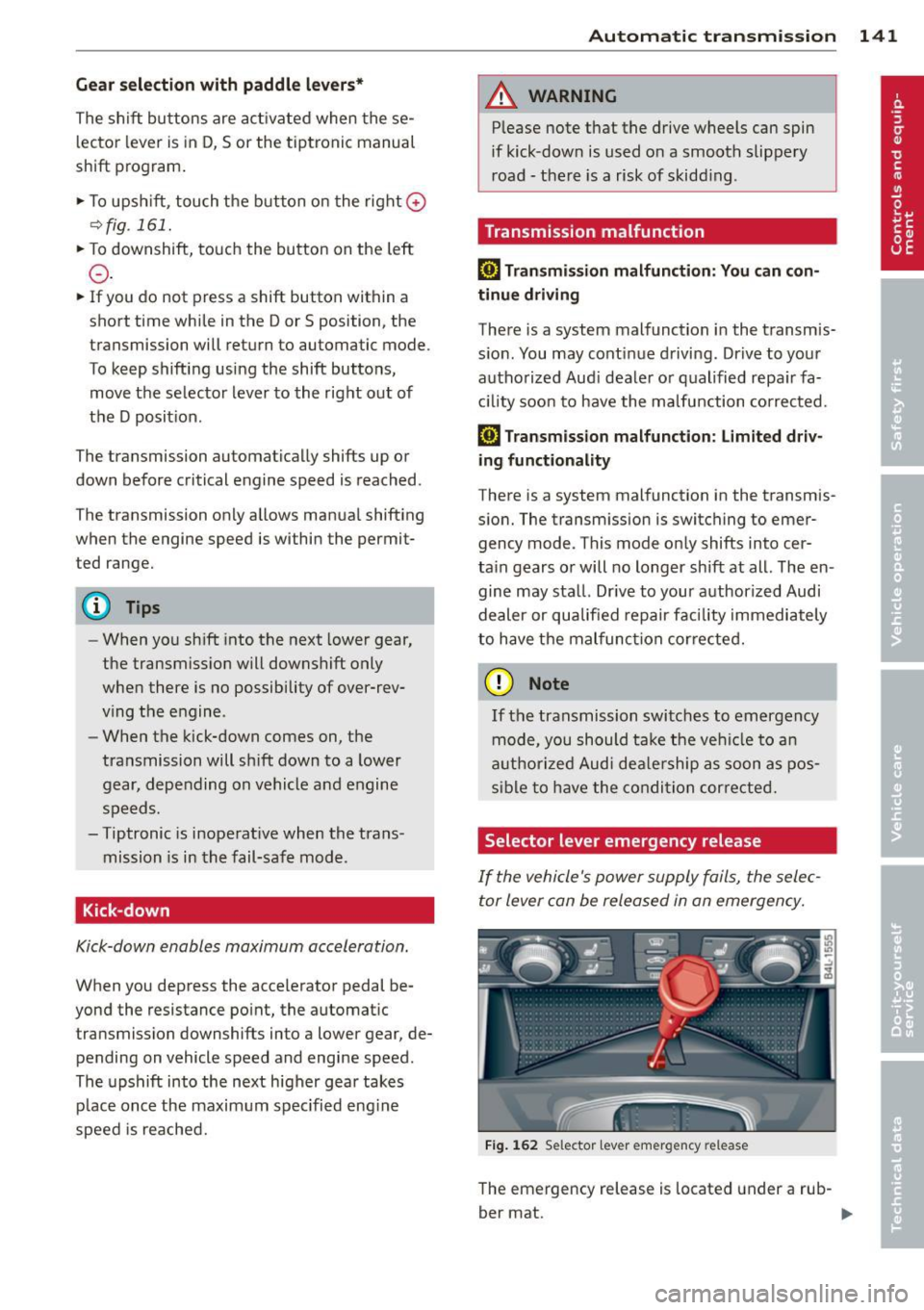
Selector lever emergency release
If the vehicle's power supply fails, the selec
tor lever can be released in an emergency.
Fig. 162 Selector lever emergency release
The emergency release is located under a rub-
ber mat. ..,.
Page 157 of 340

Adaptive Air Suspension
Air suspension and damping
Description
App lies to vehicles: with Adapt ive Air S uspe nsio n
Air suspension and damping con be adjusted
separately.
Adaptive A ir Suspension is an electronically
controlled springing and damping system.
This chassis system makes it easier on the
driver by adapt ing to the particular situation
through imperceptible control processes.
The
Adaptive Air Suspension component reg
ulates ground clearance depending on vehicle
speed and driver input. It functions independ
ently from the load condition . Accelerating to
a speed above a predetermined limit will make the vehicle lower itself. On the other
hand, driving more slowly results in the vehi
cle raising again at specific speeds.
The
damping component provides individual
control of the damping forces . For example,
w ith damping characterist ics set to provide
greater comfort, damping is set somewhat
harder for a br ief per iod only as required, for
example, when go ing aro und a curve or when
braking.
Settings
Adapt ive Air Suspension prov ides the driver
with the opportun ity to set the chassis charac
ter istics also to their individual preference.
W ith the driving modes
Comfort, Automatic
and Dynamic the driver has three chassis set
tings available, ranging from comfort to spor
ty. The
Offrood mode can be selected for driv
ing on poor quality stretches of road. In addi
tion,
Lift provides a fifth mode, which can be
selected when exceptionally high ground
clearance is needed
c::;, page 155, Chassis con
trols .
The modes are set in MMI <::;,page 157.
Adaptive A ir Suspension 155
A WARNING
The height of the parked vehicle can
change due to temperature fluctuations or
changes in load .
@ Note
- Whenever you park your vehicle, a lways
make sure there is adequate clearance
above and below the vehicle. The he ight
of the parked vehicle can change as the
result of temperature fluctuations,
changes in load condition and changes in
the driving mode (ground clearance).
- If the vehicle is being transported (e.g .
by tow truck, train, ship, etc.), mount the
tie-down chains/cables over the running
surface (circumference) o f the tires. Nev
er secure the vehicle by the axle, the sus
pension struts or the front or rear tow
line eye . For technica l reasons, the pres
sure in the suspens ion struts may change
during the transport, which could result
in the vehicle no longer being secured
properly .
- If you are going to tow a trailer with a
trailer hitch that was
not installed ac
cording to factory specif ications, you
must activate the traile r operation mode
man ually
<::;,page 159.
(D Tips
-Before you can raise your vehicle using
the vehicle jack (for example, when
chang ing a flat tire) or a vehicle lift, yo u
must activate the jacking mode
c::;, page 159.
- On some models, the vehicle can reach
its maximum speed only in the
Automat
ic
and Dynamic modes.
Chassis controls
App lies to vehicles : wit h Adaptive A ir Suspensio n
Five different driving modes can be set by the
driver.
T he automatic control processes are speed
and t ime-dependent. For example, it is not
Page 159 of 340
emphasis on comfort are selected in this
mode.
- Automatic lowering : When a speed of
abo ut 75 mph (120 km/h) is exceeded for
more than 30 seconds, the vehicle is auto
matically lowered by 0.6 inch (15 mm) to
low level .
-Automatic raising: The vehicle is automati
ca lly raised to
normal level again, if the
speed falls below about 44 mph (70 km/h)
for a period of 2 minutes . The vehicle is
raised immediately when speed falls below
about 22 mph (35 km/h) .
Offroad
Select the offroad mode when you have to
travel over poor quality sections of road (e .g.
trails). In th is mode, the vehicle is raised to
high level 1, and damp ing characteristics for
poor road stretches are selected . When
sw itch ing to offroad mode, the Adaptive Air
Suspension indicator appears automat ically in
the instrument cluster display ¢
page 158.
The offroad mode can only be activated at
speeds below 37 mph (60 km/h) . Offroad
mode ends automatically and the automatic
mode is activated when a speed of approxi
mately 50 mph (80 km/h) is exceeded.
Lift
Select the lift mode when except ionally high
ground clearance is needed at a reduced
speed. In this mode, the vehicle is raised to
high level 2. When switching to lift mode , the
Adaptive A ir Suspension indicator appears au
tomatically in the instrument cluster display
¢ page 158.
The lift mode can be activated only at speeds
be low 12 mph (20 km/h) . When a speed of
about 25 mph (40 km/h) is exceeded, the sys
tem automatically leaves lift mode and the
offroad mode is activated. The instrument
cluster display automat ically switches the dis
play to Adaptive Air Suspens ion to indicate re
duced ground clearance .
Adaptive Air Suspension 15 7
MMI settings
Applies to vehicles: wit h Adaptive A ir Suspension
Driving modes are adjusted in the MMI and
the current vehicle level is displayed .
Fig. 186 MMI Display: Sett ings
Fig. 187 MMI Display: Sett ings
Th e ign ition must be switched on to set the
driving modes.
1-Select: !CAR ! function button .
Raising and lowering
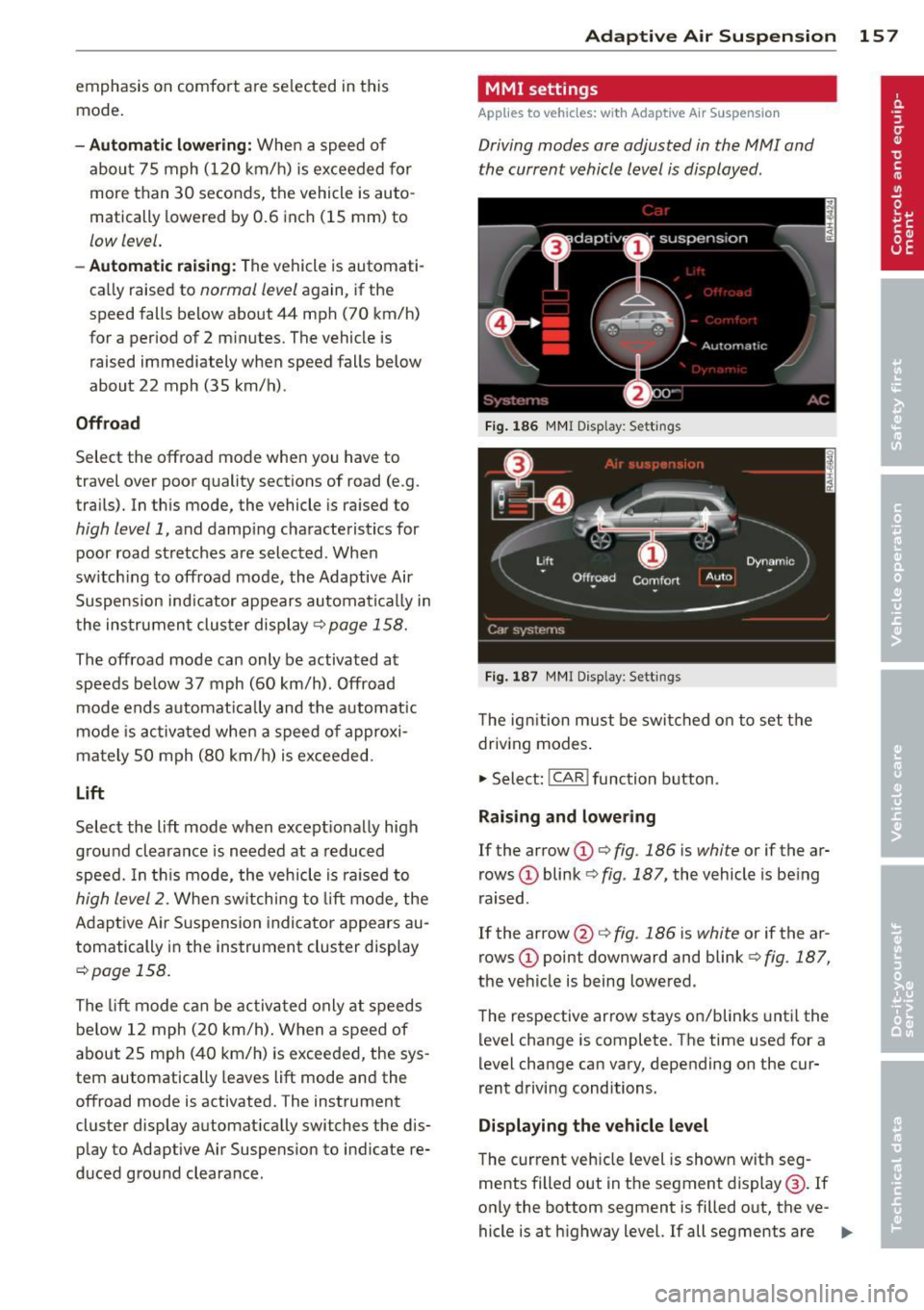
If the arrow (D ¢ fig. 186 is white or if the ar
rows
(D blink ¢ fig. 187, the vehicle is being
raised .
If the arrow @i=>
fig. 186 is white or if the ar
rows
(D point downward and blink ¢ fig. 187,
the vehicle is being lowered .
The respective arrow stays on/blinks until the
level change is complete . The time used for a
level change can vary, depending on the cur
rent driving conditions .
Displaying the vehicle level
The c urrent vehicle level is shown with seg
ments filled out in the segment display@. If
only the bottom segment is filled o ut, the ve-
hicle is at highway level. If all segments are
IJJ>-
Page 160 of 340
158 Adapti ve Air Suspens ion
fi lled out, the vehicle is at high level 2 and has
the greatest amount of ground clearance pos
sib le.
While the vehicle is being raised or lowered,
the target level is indicated by an arrow@
c::> fig. 186 or a white border @ c::> fig. 187 . The
arrow/border disappears aga in when the vehi
cle is at the target level.
Limitations to MMI s etting s
Please note that not eve ry dr iving mode can
be selected in every d riving situation . For ex
ample, it is not possible to switch to "lift"
mode at speeds above 12 mph (20 km/h) .
This mode is then shown
greyed out in the
MMI Display.
The vehicle can only be lowered when
all of
the vehicle's doors are closed. If one door is
open, all driving modes whose level sett ing is
belo w the current vehicle level appear
greyed
out
i n the MMI Display. If a door is opened
while the veh icle is being lowered, the lower
ing p rocess is interrupted u ntil all doors are
closed again .
If the system is temporar ily unava ilable due
to, for instance, an empty compressed air
tank, the driving modes that cannot be set ap pear
greyed out in the MM I Disp lay. As soon
as the system is available again, the driv ing
modes can once more be selected in the dis
p lay .
(D} Tips
- Fo r addition al in forma tion on the driv ing
modes
c:;> page 155, Chassis controls.
- When the compressed air tank is empty,
the compressor c an be switched on by
starting the engine . The Adaptive Air
Suspension is once again available, after
waiting a few minutes .
- To prevent over load, the system switches
off tempera rily if seve ral adj ustments
are made in a row. The Adaptive Air Sus
pension is once again available, after
waiting a few minutes. Appearance in the instrument cluster
display
Applies to veh
icles: w ith Adapt ive A ir Suspens ion
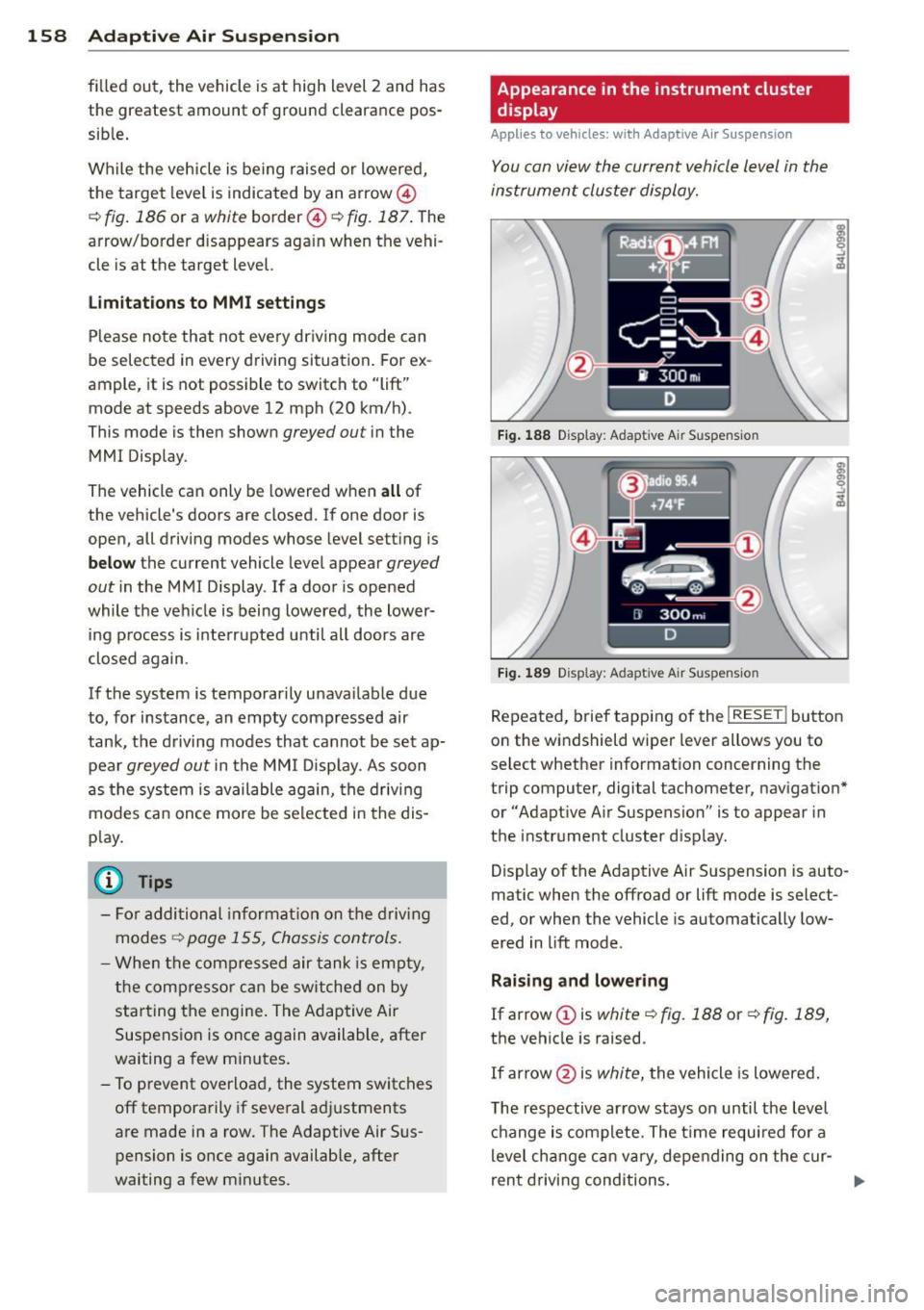
You can view th e current vehicle l evel in the
instrument cluster display.
Fi g. 1 88 Display: Adaptive Air Suspension
F ig . 1 89 Display: Adaptive Air Suspension
Repeated, brief tapping of the I RESET ! button
on the windshield wiper lever allows you to
se lect whether information concerning the
trip computer, digital tachometer, nav igat ion*
or "Adapt ive A ir Suspension" is to appear in
t h e instrument cluster d isp lay .
Display of the Adaptive A ir S uspension is auto
matic when the offroad or lift mode is select
ed, or when the vehicle is automatically low
ered in lift mode.
Rai sing and lowe ring
If arrow
(J) is white c::> fig. 188 or c::> fig . 189,
the vehicle is raised.
If arrow @is
white, the vehicle is lowered .
The respective arrow stays on until the level ch ange is complete. The time requ ired fo r a
level change can vary, depending on the cur-
ren t drivi ng conditions . ..,_
Page 173 of 340
to reduce the risk of inj ury when the vehi
cle is not be ing used.
- After closing the rear lid, always make
sure that it is properly closed and locked.
- Never leave your vehicle unattended es
pecially with the rear lid left open . A
child could crawl into the vehicle through
the luggage compartment and close the
rear lid becoming trapped and unable to
get out . Be ing trapped in a vehicle can
lead to serious persona l injury .
- Never let children play in or around the vehicle .
- Never let passengers r ide in the luggage
compartment . Veh icle occupants must
always be properly restrained in one of
the vehicle's seating positions.
(D Tips
- Air c irculation helps to reduce window
fogging . Sta le air escapes to the outside
th rough vents in the trim pane l. Be sure
to keep these slots free and open .
-The t ire pressure must correspond to the
load. The t ire pressure is shown on the
tire p ress ure label. The tire pressure la
bel is located on the d river's s ide B-pi llar.
The t ire pressure label lists the recom
mended cold tire inflat ion pressures for
the vehicle at its maximum capacity
weight and the tires that were on your
vehicle at the time it was manufactured .
For recommended t ire pressures for nor
mal load conditions, please see chapter
c:> page277 .
Tie-downs
The luggage compartment is equipped with
four tie-downs to secure luggage and other
items .
Use the tie-downs to secure your cargo prop
erly
c:> page 1 70, Loading the luggage com
partment.
In a coll is ion, the l aws of phys ics mean that
even smaller items that are loose in the vehi
cle will become heavy missiles that can cause
Dr iving S afel y 171
serious injury. Items in the veh icle possess en
ergy which vary with vehicle speed and th e
weight of the item . Vehicle speed is the most
s ignificant factor.
For example, in a fronta l collision at a speed
of 30 mph (48 km/h), the forces acting on a
10 -lb (5 kg) object are about 20 times the
normal weight of the item. This means th at
the weigh t of the item would suddenly be
about 200 lbs. (90 kg) . You can imagine the
i njur ies that a 200 lbs . (90 kg) item flying
freely th rough the passenger compartment
could cause in a co llision like this.
A WARNING
Weak, damaged or improper straps used
to secure items to tie-downs can fail dur
ing hard braking or in a collision and cause
serious personal injury.
-Always use s uitable mount ing straps and
properly secu re items to the tie-downs in
the l uggage compartment to he lp pre
vent items from shift ing or f lying fo r
ward as dangerous missiles.
- When the rear seat backrest is folded
down, a lways use suitable mounting
straps and properly secure items to the
tie-downs in the luggage compartment
to help p revent items from fly ing for
ward as dangerous missiles into the pas
senger compartment .
- Never attach a chi ld safety seat tether
strap to a t ie-down .
Reporting Safety
Defects
Applicable to U.S.A.
If yo u b elieve that your vehicle
ha s a defec t w hi ch could cau se
a c rash or co uld cause i njur y or
d ea th, you sh ould imm ediat ely
inform th e National Hi ghwa y
Tr affi c Sa fet y Admini strati on ..,.
•
•
Page 190 of 340
188 Airbag system
conditions is impossible in all conceiva
ble situations that may happen during
the useful life of your vehicle.
- The Advanced Airbag System can deploy
in accordance with the "low risk" option
under the U.S. Federal Standard if a child
that is heavier than the typical one-year
old child is on the front passenger seat
and the other conditions for airbag de
ployment are met.
-Accident statistics have shown that chil
dren are generally safer in the rear seat
area than in the front seating position.
- For their own safety, all children, espe
cially 12 years and younger, should al
ways ride in the back properly restrained
for their age and size.
Advanced front airbag system
Your vehicle is equipped with a front Advanced
Airbag System in compliance with United
States Federal Motor Vehicle Safety Standard
208 as applicable at the time your vehicle was
manufactured.
The front Advanced Airbag System supple ments the safety belts to provide additional
protection for the driver's and front passeng
er's heads and upper bodies in frontal crashes .
The airbags inflate only in frontal impacts
when the vehicle deceleration is high enough.
The front Advanced Airbag System for the
front seat occupants is not a substitute for
your safety belts. Rather, it is part of the over
all occupant restraint system in your vehicle.
Always remember that the airbag system can
only help to protect you, if you are sitting up
right , wearing your safety belt and wearing it
properly. This is why you and your passengers
must always be properly restrained, not just
because the law requires you to be.
The Advanced Airbag System in your vehicle has been certified to meet the "low risk" re
quirements for 3 and 6 year-old children on
the passenger side and very small adults on
the driver side. The low risk deployment crite
ria are intended to help reduce the risk of in- jury through interaction with the front airbag
that can occur, for example, by being too close to the steering wheel and instrument
panel when the airbag inflates.
In addition, the system has been certified to
comply with the "suppression" requirements
of the Safety Standard, to turn off the front
airbag for infants 12 months old and younger
who are restrained on the front passenger
seat in child restraints that are listed in the Standard
~ page 206, Child restraints and
Advanced Airbags .
"Suppression" requires the front airbag on the
passenger side to be turned off if:
- a child up to about one year of age is re
strained on the front passenger seat in one
of the rear-facing or forward-facing infant
restraints listed in Federal Motor Vehicle
Safety Standard 208 with which the Ad
vanced Airbag System in your vehicle was
certified. For a listing of the child restraints
that were used to certify your vehicle's com
pliance with the US Safety Standard
~page 206,
-weight less than a threshold level stored in
the control unit is detected on the front pas
senger seat.
When a person is detected on the front pas senger seat, weighing more than the total
weight of a child that is about 1 year old re
strained in one of the rear-facing or forward
facing infant restraints (listed in Federal Mo
tor Vehicle Safety Standard 208 with which
the Advanced Airbag System in your vehicle
was certified), the front airbag on the passen ger side may or may not deploy.
The
PASSENGER AIR BAG OFF light comes on
when the electronic control unit detects a to
tal weight on the front passenger seat that re quires the front airbag to be turned off. If the
PASSENGER AIR BAG OFF light does not
come on, the front airbag on the passenger
side has not been turned off by the control
unit and can deploy if the control unit senses
an impact that meets the conditions stored in
its memory.
ll-