page 27 AUDI Q7 2014 Owner´s Manual
[x] Cancel search | Manufacturer: AUDI, Model Year: 2014, Model line: Q7, Model: AUDI Q7 2014Pages: 340, PDF Size: 85.02 MB
Page 21 of 340
Instruments and warning/indicator lights 19
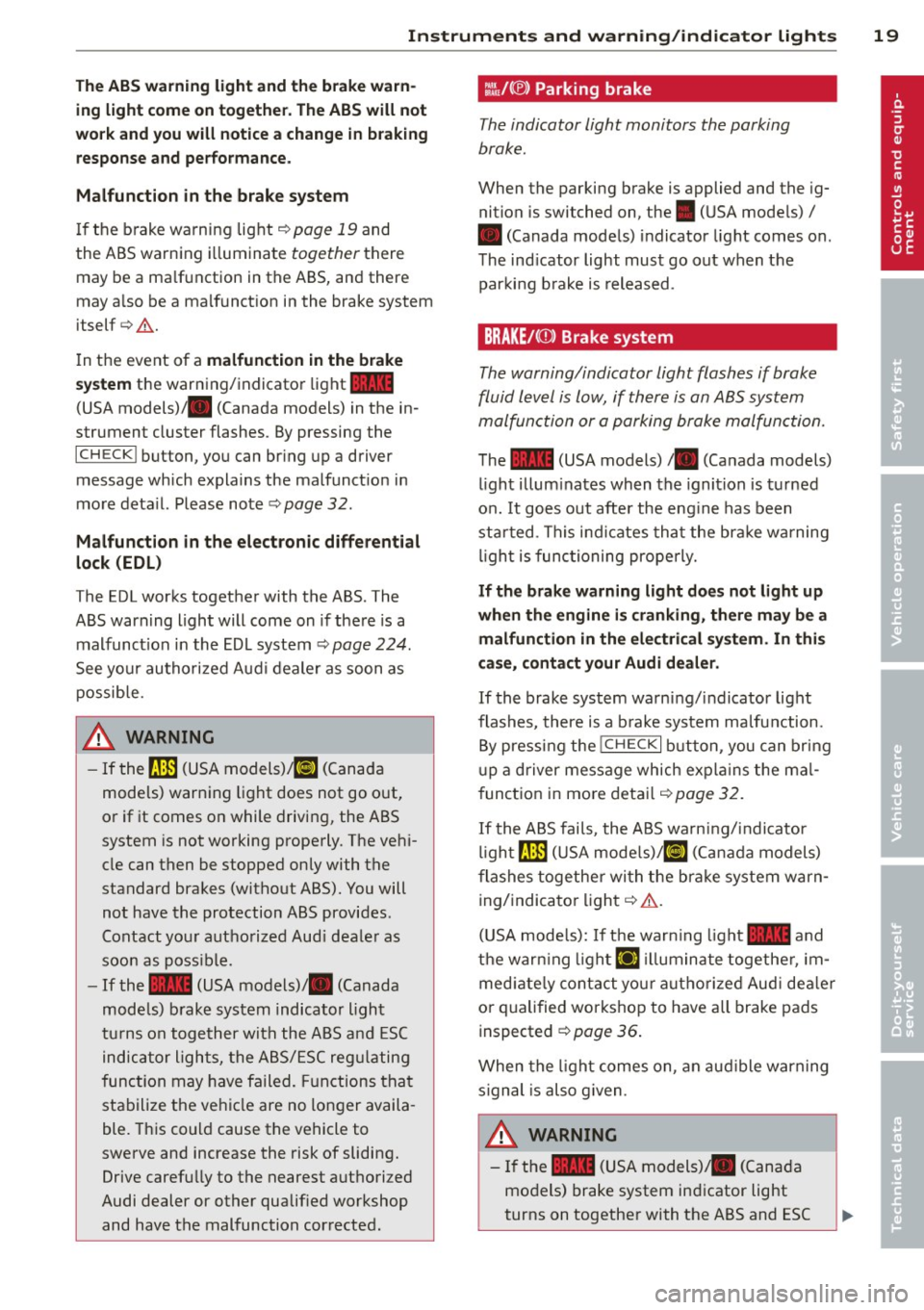
The ABS warning light and the brake warn ing light come on together. The ABS will not
work and you will notice a change in braking response and performance.
Malfunction in the brake system
If the brake warning light <=>page 19 and
the ABS warning illuminate
together there
may be a malfunction in the ABS, and there
may also be a malfunction in the brake system
itself <=>,&. .
In the event of a
malfunction in the brake
system
the warning/indicator light 1111
(USA models);III (Canada models) in the in
strument cluster flashes. By pressing the
ICHECKI button, you can bring up a driver
message which explains the malfunction in
more detail. Please note
<=>pag e 32.
Malfunction in the electronic differential
lock (EDL)
The EDL works together with the ABS. The
ABS warning light will come on if there is a
malfunction in the EDL system
<=> page 224.
See your authorized Audi dealer as soon as
possible.
.&, WARNING
-
- If the f!B (USA models);tlJ (Canada
models) warning light does not go out,
or if it comes on while driving, the ABS
system is not working properly. The vehi
cle can then be stopped only with the
standard brakes (without ABS). You will
not have the protection ABS provides.
Contact your authorized Audi dealer as
soon as possible.
- If the
1111 (USA models)/ . (Canada
models) brake system indicator light
turns on together with the ABS and ESC
indicator lights, the ABS/ESC regulating
function may have failed. Functions that
stabilize the vehicle are no longer availa
ble. This could cause the vehicle to
swerve and increase the risk of sliding.
Drive carefully to the nearest authorized
Audi dealer or other qualified workshop
and have the malfunction corrected.
:l~ /(® ) Parking brake
The indicator light monitors the parking
brake.
When the parking brake is applied and the ig
nition is switched on, the. (USA models) /
• (Canada models) indicator light comes on.
The indicator light must go out when the
parking brake is released.
BRAKE/CCDl Brake system
The warning/indicator light flashes if brake
fluid level is low, if there is an
ABS system
ma/function or a parking brake ma/function.
The 1111 (USA models)/ . (Canada models)
light illuminates when the ignition is turned
on.
It goes out after the engine has been
started . This indicates that the brake warning
light is functioning properly.
If the brake warning light does not light up
when the engine is cranking, there may be a malfunction in the electrical system. In this
case, contact your Audi dealer.
If the brake system warning/indicator light
flashes, there is a brake system malfunction .
By pressing the
I CH ECK i button , you can bring
up a driver message which explains the mal
function in more detail
<=>page 32.
If the ABS fails, the ABS warning/indicator
light~ (USA
models)/KCJ (Canada models)
flashes together with the brake system warn
ing/indicator light<=>,&. .
(USA models): If the warning light
1111 and
the warning light
El illuminate together , im
mediately contact your authorized Audi dealer
or qualified workshop to have all brake pads
inspected ¢
page 36.
When the light comes on, an audible warning
signal is also given .
.&, WARNING ~ ~
-If the 1111 (USA models) ;III (Canada
models) brake system indicator light
turns on together with the ABS and ESC
Page 23 of 340

Driver information
display
Introduction
General notes
The driver information display inside the in
strument cluster provides you, the driver ,
with much useful information .
Fig. 9 In st ru men t cl uster: ce nte r dis p lay
Info rmation from the Drive r Information Sys
tem is shown in the display in the center of
t he instrument cl uster .
When you turn on the ignition and while you
are driving, some functions and vehicle com ponents are scanned fo r their operating sta
t us. Malfunc tions or required service proce
dures are signal led aud ibly and shown by red
and yellow lighted symbols and rem inders to
the dr iver in the display.
T he driver i s also shown information abou t ra
d io and CD operation and directions for the
nav igation system . You can f ind additional in
formation on these subjects in the MMI man
ua l.
The Driver Information System prov ides the
following functions:
Sound system disp lay ¢
page 21
Outside air temperature ¢page 22
Digital speedometer ¢
page 22
Door open indicator ¢page 22
D efective light b ulb ¢
poge23
Serv ice i nte rval display ¢page 23
Auto Check system ¢
page 30
Driver information ¢
page 30
Driver inform ation di spl ay 21
Speed warning system ¢page28
T rip computer ¢
page24
Cruise con trol ¢page 111
Adapt ive cruise control* ¢
page 113
Selector lever pos ition ¢page 137
Adapt ive Air Suspension * i=>
page 158
Tire pressure monitoring ¢page 291
(D Tips
In the event of a malfunction either a red
or yellow icon appears in the display . Red
symbols indicate
Dang er ¢ page 31 . Yel
l ow symbo ls indicate a
Warning
¢ page 34.
Sound system display
Fig. 10 D isp lay: so un d syste m
If priority 1 or pr iority 2 faults are not shown
by the Auto Check Control, the name of the ra
dio station you are tuned to or t he frequency
and the recept ion range are shown in the up
per area of the d isplay.
When the CD is in use, the tit le of the track
being played is shown . T he number of the CD
(CDI to CD6) cur rently be ing played is also
shown.
Page 27 of 340

Fue l consumption is reca lculated at interva ls
of 33 yards (30 meters). When the vehicle is
stationary, the most recent fue l consumption
is displayed .
Average speed
The average speed in mph (km/h) since the
l ast time the disp lay was reset appears in the
display .
Elapsed time
The length of time that you have been driving
since you last reset the memory appears in
this display.
Distance
The distance that has been covered since the
l ast time the memory was cleared appears in
the disp lay.
(D Tips
- Fuel consumptions (ave rage and cur
rent), range and speed are displayed in
metric units on Canadian models.
-All stored va lues w ill be lost if the veh i
cle battery is disconnected .
Memories
The trip computer is equipped with two fully
automatic memories as well as an efficiency
program".
Fig. 17 Trip computer d isplay: memo ry level 1
You can switch between the trip computer 1
and 2 and the efficiency program* by pressing
the
! RESET I button @¢ page 25, fig. 18.
You can tell which memo ry level is cur rently
active by the number or the sign in the display
Driver information display 25
¢ fig. 17. The data from the single-trip mem
ory (memory level 1) is being displayed if a
D
appears in the display . If a fJ is shown, then
the data from the total-trip memory is being
displayed (memory level 2). The fuel pump nozzle
iii indicates the efficiency program*
¢page 26.
Single-trip memory (Trip computer 1)
The single-trip memory stores the trip infor
mation from the time the ignition is turned on
until it is turned off. If the trip is continued
within 2 hours from the time the ignition was
turned off, the new data will be included in
the calculat ion of the current trip informa
tion. If the trip is interrupted for
more than 2
hours
the memory is reset automatically.
Total-trip memory (Trip computer 2)
Unlike the single -trip memory, the total -trip
memory is not reset automat ical ly. This per
mits you to evaluate your driv ing data for the
entire period between manua l resets.
Efficiency program*
The efficiency program can help you to use
less fuel ¢
page 26.
Operation
The trip computer is controlled by two
switches on the windshield wiper lever .
Fig. 18 Windsh ield wiper lever : contro ls for the t rip
computer
.. To display the trip computer memory levels,
press the
I RESET ! button®¢ fig. 18 re
peatedly until the desired memory level is
shown in the display . .,.
Page 28 of 340
26 Driver in formation d isplay
• To d isplay trip information within a memory
l evel, press the top or bottom part of the
function selection switch
@ .
The trip computer wi ll not operate unless the
ignition is on. When you turn on the ignition,
the function that was in use when you last
turned the ignit ion off will be d isp layed.
I n addition to information on the trip comput
e r (trip computer 1, 2 and efficiency pro
gram*), the digital speedometer and informa
tion regard ing the nav igat ion system* can al
so be displayed. To switc h the display between
the different information, tap the
I RES ET I but
ton @ briefly .
Setting value s to zer o
To erase the single or total trip comp uter va l
ues, se lect the des ired funct ion and press and
hold the
I RESET ! button@ for at least one
second . You can also erase* the values with
the MMI
¢ page 26 .
All values currently displayed in the efficiency
program* are a lso erased with the s ingle tr ip
computer .
(D Tips
All stored values will be lost if the vehicle
battery is disconnected.
MMI settings
Basic settings for the trip computer can be
made in the MMI.
• Se lect : I CAR ! function button > Systems *
control button > Instrument cluster > On·
board computer 1 or On-boa rd computer 2 .
The values i n the single -t rip or the total -trip
memory can a ll be reset to zero at the same
time under
Reset in the menu .
I n addition, you can de termine what informa
tion from the trip computer sho uld be shown
in the instrument cluster display. If one of the
p ieces of dr iver information is turned
Off , that
driver information w ill not be shown in the
d isplay. The information will con tinue to be ca
lculated by the tr ip comp ute r and can be
turned back
On at any time .
(D Tips
- This function is not available on all
vehicles .
- T he d riving info rm ation in the eff ic iency
program * is also reset to zero with the
sing le-trip memory.
Efficiency program
Description
Applies to vehicles: with efficiency program
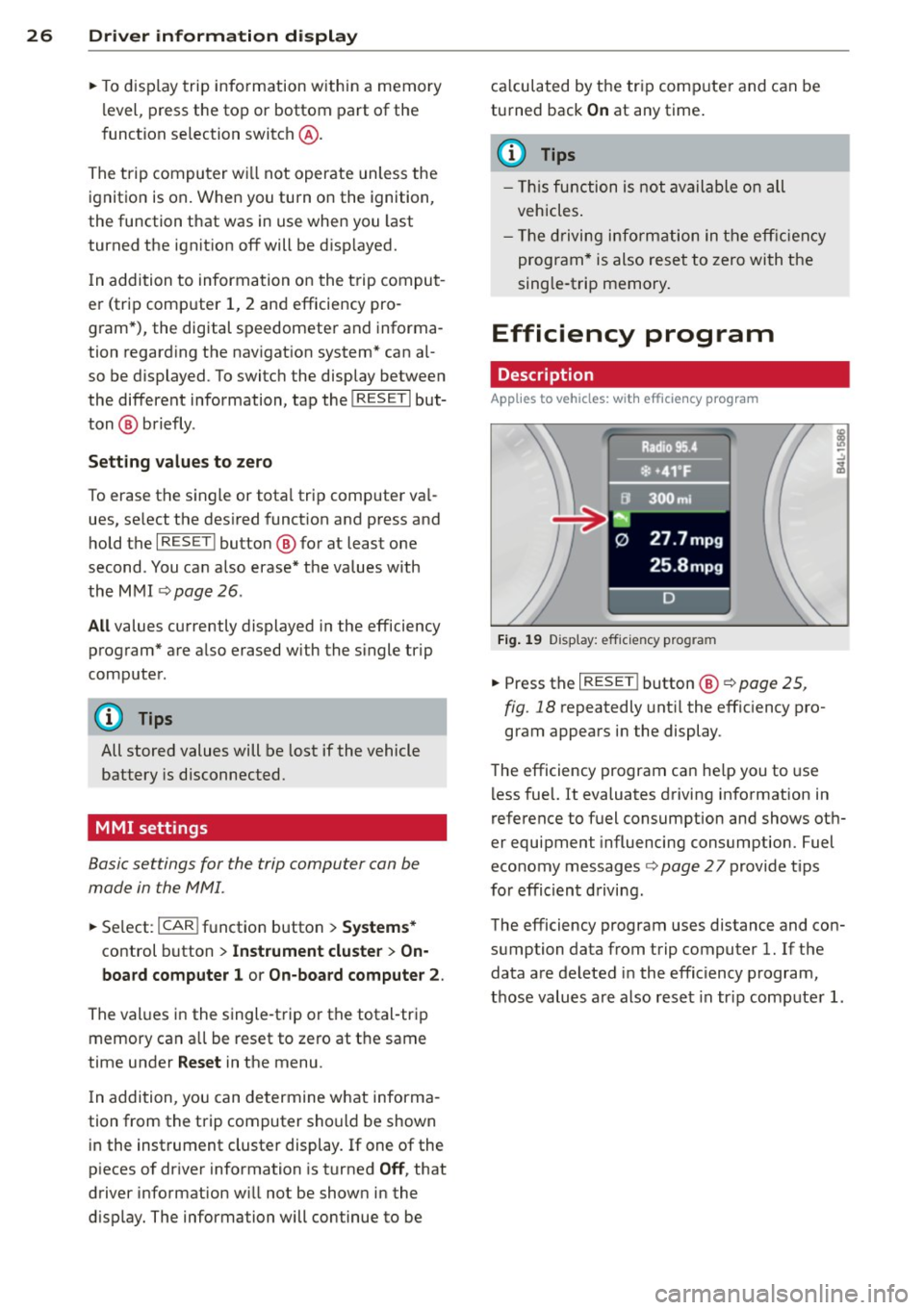
Fig. 1 9 Display: eff icie ncy pro gram
• Press the I RESE T! button @¢ page 25 ,
fig . 18
repeatedly unt il the effic iency pro
gram appears i n the display .
T he efficiency program ca n he lp you to use
l ess fuel. It evaluates driving info rmation in
reference to fuel consumption and shows ot h
er equipment influencing consumption. Fuel
economy messages
¢ page 27 provide t ips
for effic ient d riving.
The efficiency program uses distance and con
sumption data from trip computer
l. If the
data are deleted in the efficiency program,
those values a re also reset in tr ip comp ute r
l.
Page 29 of 340
Other equipment
Applies to vehicles: with efficiency program
Fig. 20 D isplay : ot her equipment
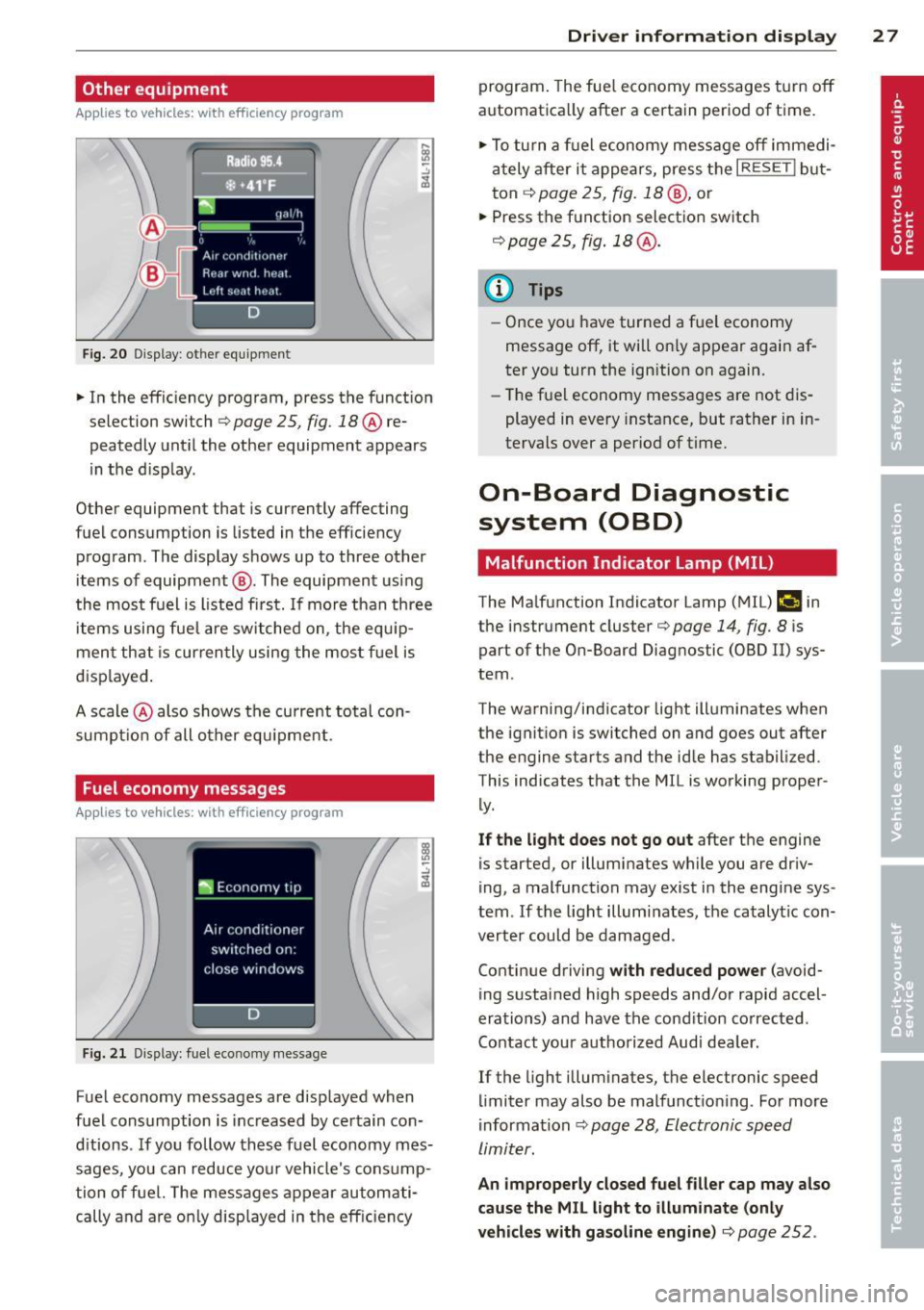
• In the efficiency program, press the function
s elec tion switch
q page 25 , fig. 18@ re
peatedly until the other equipment appears
in the d isplay .
Other equipment that i s cu rrently affecting
f uel consumption is lis ted in the eff iciency
program . The display shows up to three other
items of equipment @. The equipment using
the most fuel is l isted first. If more than three
items using fue l are switched on, the equ ip
ment that is currently using the mos t fu el is
d isp layed .
A scale @also shows the current total con
sumpt io n of all other equ ipment .
Fuel economy messages
Applies to vehicles: with efficiency program
Fig. 2 1 Dis pl ay: fuel e co n omy messa ge
-.:,
~
Fuel economy messages are displayed when
fuel consumption is inc reased by certain con
d itions . If you follow these fuel economy mes
sages, you can reduce your vehicle's consump
tion of fuel. The messages appear automati
cally and are o nly displayed in the eff ic iency
Dri ver inform ation di spl ay 2 7
program . The fue l economy messages t urn off
automatica lly after a certain period of time .
• To tu rn a f uel economy message off immedi
ately after it appears, press the
I RESE TI but
ton ¢
page 25 , fig. 18 @, or
• Press the function selection switch
r::!) page 2 5, fig . 18 @ .
{I) Tips
-Once you have turned a fuel economy
message off, it will o nly appear again af
ter yo u turn the ign ition on again.
- Th e fuel economy messages are not dis
played in
every i nstance, but rather in in
tervals
over a period of time.
On-Board Diagnostic
system (OBD)
Malfunction Indicator Lamp (MIL)
The Malfunction Indicator Lamp (M IL) ("4 in
the instrument cluster¢
page 14, fig. 8 is
part of the On-Board Diagnos tic (OBD II) sys
tem .
The warning/ind icator light ill um inates when
the ignition is switched on and goes out after
the engine star ts and the id le has stabilized.
This indicates that the M IL is working prope r
ly .
If the light does not go out after the engine
is started , or illumina tes while you are dr iv
ing, a malfunction may exist in the engine sys
tem . If the light illuminates, the catalytic con
verter could be damaged .
Con tinue driving
with reduced powe r (avoid
ing sustained high speeds and/or rapid accel
erations) and have the cond ition co rrected .
Contact your a uthorized Aud i dea ler.
If the light illum inates, the elec tronic speed
limiter may also be malfunctioning . For more
information ¢
page 28, Electronic speed
limiter.
An improperl y closed fuel filler cap ma y also
cau se the MIL light to illum inate (onl y
vehicl es with gas oline engine )¢
page 252 .
Page 30 of 340
28 Driver information d isplay
On-Board Diagnostics
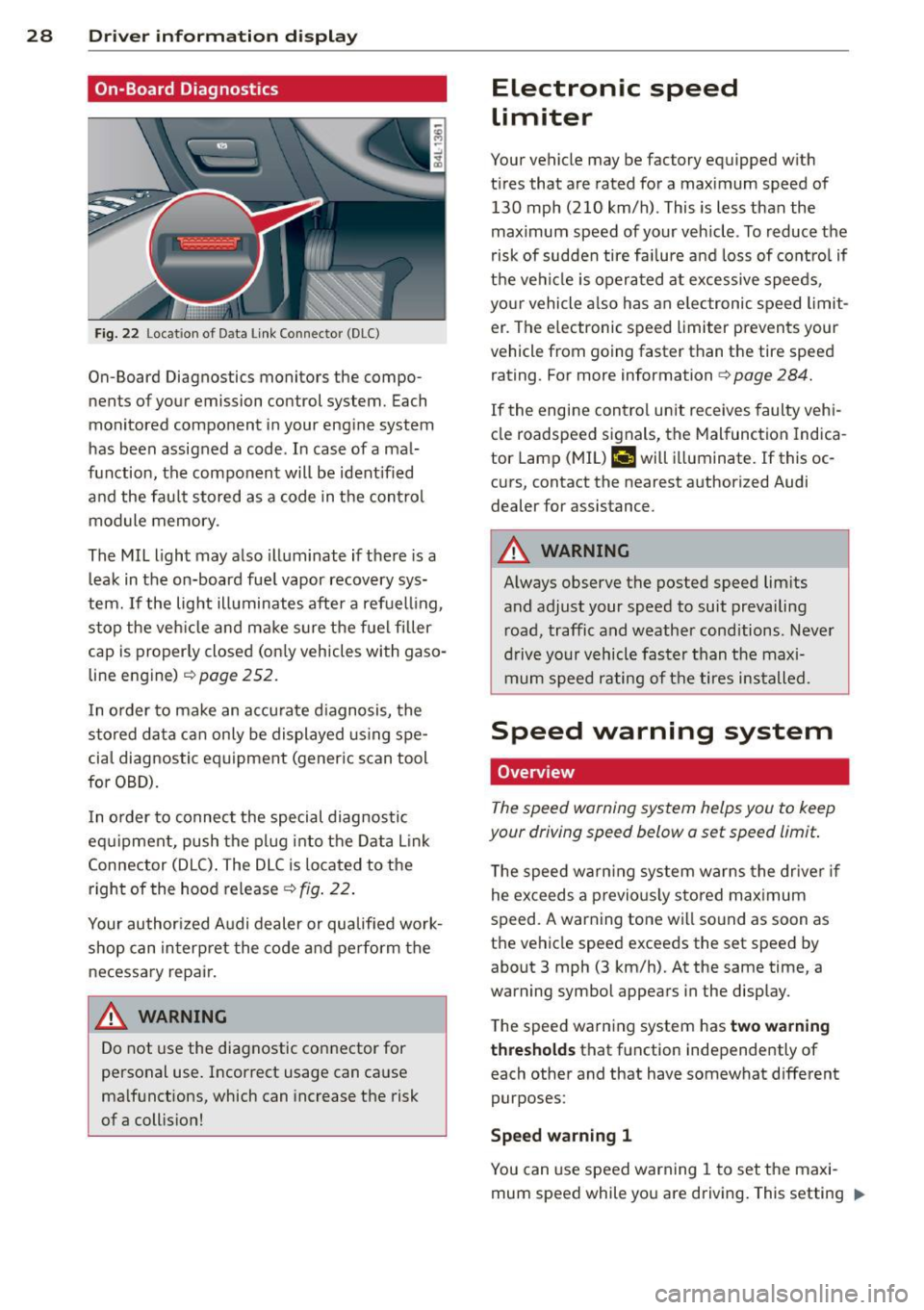
Fig. 22 Locat ion of Data Link Connector (DLC)
On-Board Diagnostics monitors the compo
nents of your emission control system. Each
monitored component in your engine system
has been assigned a code . In case of a mal
function, the component will be ident ified
and the fault stored as a code in the control
module memory .
The MIL light may also illuminate if there is a
leak in the on-board fue l vapor recovery sys
tem.
If the light illuminates after a refuelling ,
stop the veh icle and make sure the fuel filler
cap is proper ly closed (on ly vehicles with gaso
line engine)
c::>page 252.
In o rder to make an accurate d iagnosis, the
stored data can only be displayed using spe
cial diagnostic equipment (generic scan tool
for OBD).
I n o rder to connect the special diagnostic
equipment, push the plug into the Data Link
Connector (DLC) . The DLC is located to the
right of the hood release
c::> fig . 22.
Your author ized Audi dealer or qualified work
shop can interpret the code and perform the
necessary repair.
A WARNING
Do not use the diagnostic connector for
personal use. Incorrect usage can cause
ma lfunctions, which can increase the risk
of a collis ion!
Electronic speed
limiter
Your vehicle may be factory equipped w ith
t ir es that are rated for a maximum speed of
130 mph (210 km/h) . This is less than the
maximum speed of your vehicle . To reduce the
risk of sudden tire fa ilure a nd loss of contro l if
the vehicle is operated at excessive speeds,
your vehicle also has an elec tronic speed limit
er . The e lectronic speed limiter prevents your
vehicle from going faster than the tire speed
rating . For more information
c::> page 284.
If the engine control unit receives faulty vehi
cle roadspeed signals, the Malfunction Indica
tor Lamp (MIL)
II will illuminate. If this oc
curs, contact the nearest authorized Audi
dealer for assistance.
A WARNING
-
Always observe the posted speed limits
and adjust your speed to suit prevailing
road, traffic and weather cond itions . Never
drive your vehicle faster than the maxi
mum speed rating of the tires installed.
-
Speed warning system
Overview
The speed warning system helps you to keep
your driving speed below a set speed limit.
T he speed warning system warns the driver if
he exceeds a previo usly stored maximum
speed . A warning tone wi ll so und as soon as
the vehicle speed exceeds the set speed by about 3 mph (3 km/h). At the same time, a
warning symbol appears in the display.
The speed warning system has
two warning
thresholds
that function independently of
each other and that have somewhat different
purposes:
Speed warning 1
You can use speed warning 1 to set the maxi
mum speed while you are driving. This setting "'
Page 31 of 340
will remain in effect until you turn off the igni
tion, assum ing that you have not changed or
reset the setting.
The speed warning symbol. (USA models)/
• (Canada mode ls) in the warning 1 display
appears when you exceed the maximum
speed . It goes out when the speed falls below
t he stored maximum speed.
The speed warning symbo l wi ll also go out if
the speed exceeds the stored maximum speed
by more than about 2S mph (40 km/h) for at
least 10 seconds. The stored maximum speed
is deleted .
Setting speed warning 1 <:!;>page 29.
Speed warn ing 2
Storing warn ing 2 is recommended if you al
ways want to be reminded of a certa in speed ,
for example when you a re traveling in a coun
try that has a general maximum speed limit,
or if you do not want to exceed a specified
speed for winter tires .
The speed warning 2 symbol, . (USA mod
els)/ . (Canada models) appears in the d is
p lay when you exceed the stored speed limit.
Unlike warning 1, it will not go out unti l the
vehicle speed drop s below the stored speed
limit.
Setting speed warning 2
r:!;> page 29.
@ Tips
Even though your vehicle is equipped with
a speed warning system, you should sti ll
watch the speedometer to make sure you
are not driving faster than the speed lim it.
Dri ver inform ation di spl ay 29
Speed warning 1: setting a speed limit
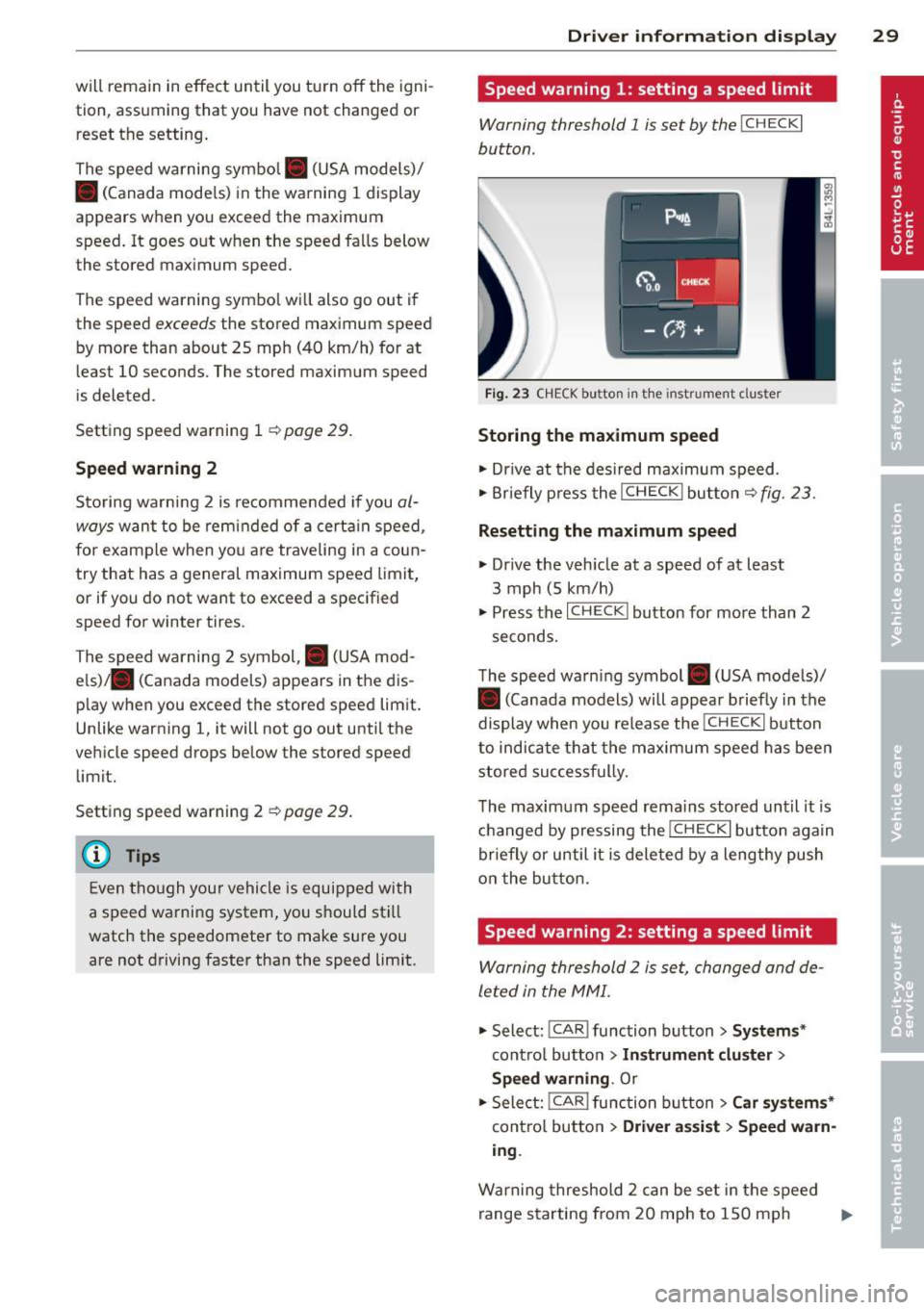
Warning threshold 1 is set by the I CH ECKi
button .
Fig . 23 CHECK button in the instr umen t clu ster
Storing the ma ximum speed
.,. Dr ive at the desired maximum speed .
.,. Briefly p ress the
I CHECK I but to n c::> fig. 23.
Resetting the m aximum speed
.,. Dr ive the veh icle at a speed of at least
3 mph (5 km/h)
.,. Press the
I CHECK ! button for more than 2
seconds.
T he speed warn ing symbol . (USA models)/
• (Canada models) will appear briefly in the
display when you release the
!CH ECK I button
to indicate t hat the maximum speed has been
stored suc cessf ully.
T he maximum speed rema ins stored until it is
changed by pressing the
! CHECK I button again
briefly or until it is deleted by a lengthy push
o n the bu tton.
Speed warning 2: setting a speed limit
Warning threshold 2 is set, changed and de
le ted in the MMI .
.,. Select:
I CAR I function button > Sys tem s*
contro l button > In strum ent clu ste r >
Spe ed warning .
Or
.,. Select: !CAR I function b utton > C ar sy ste m s*
cont ro l butto n > Driver a ssist > Speed w arn
ing .
Warning threshold 2 can be set in the speed
range starting from 20 mph to 150 mph ..,.
Page 33 of 340
For example, the symbol II appears in the
display, indicating low windshield washer flu
id level. The follow ing message also appears:
Pleas e refill w asher fl uid
The driver message disappears after a few
seconds. The driver message can be displayed
again by briefly pressi ng the
!CHECK I button.
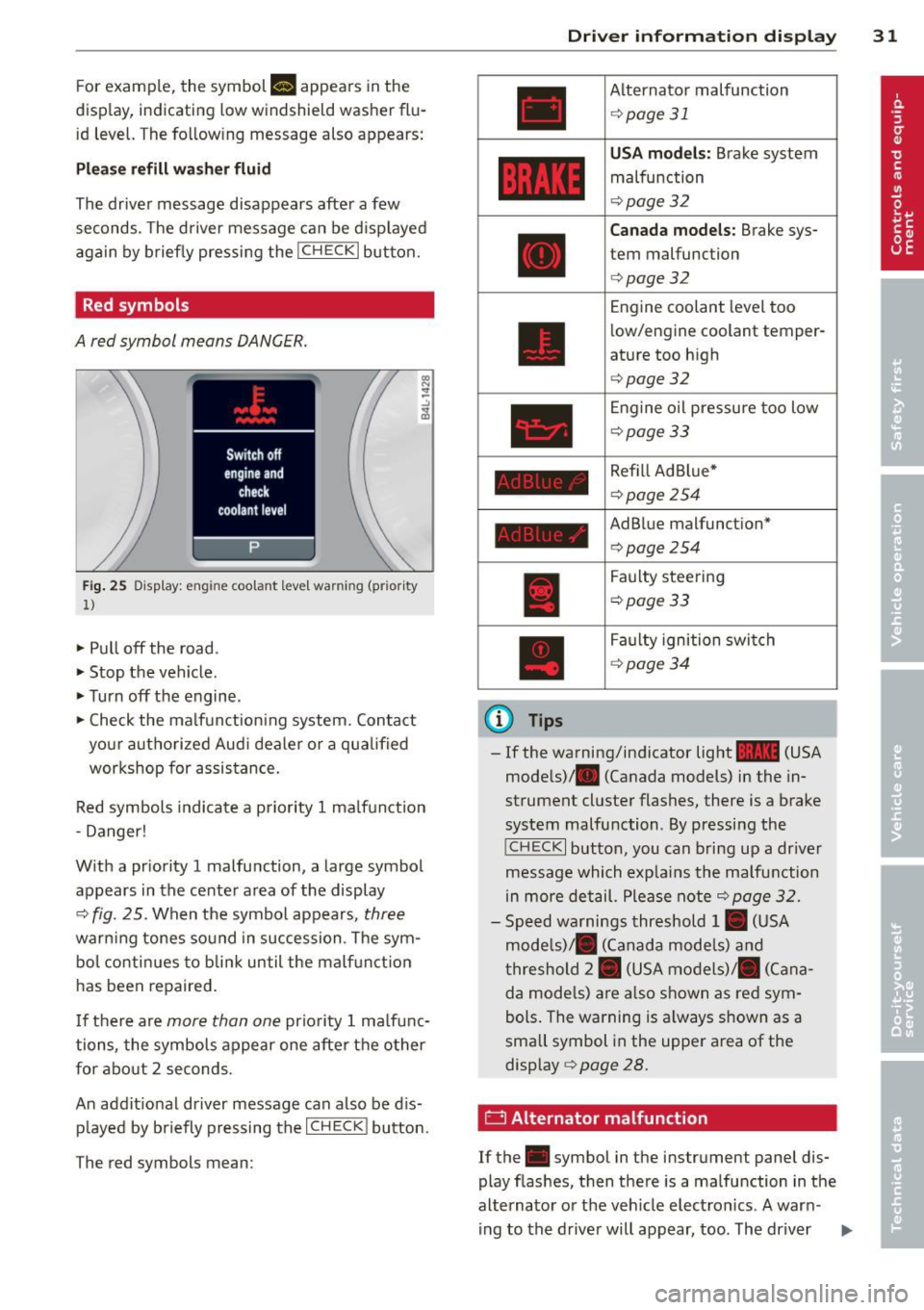
Red symbols
A red symbol means DANGER.
Fig. 25 Display: engine coolant level warning (prior ity
1)
• Pull off the road.
• Stop the vehicle .
• Turnoff the engine.
• Check the ma lfunction ing system. Contact
your authorized Aud i dea ler o r a qualified
workshop for assistance.
Red symbols indicate a priority 1 ma lfunction
- Danger!
W ith a pr iority 1 malfunction, a large symbol
appears in the center area of the display
¢ fig. 25. When the symbol appears, three
warning tones sound in succession. The sym
bo l conti nues to blin k until the malf unct io n
has been repaired .
I f there are
more than one prio rity 1 ma lfunc
tions, the symbols appear one afte r the other
for about 2 seconds.
An addit ional driver message can also be d is
p layed by briefly pressing the
I CHECK ! button.
The red symbols mean:
(D Tips
Driver inform ation di spl ay 31
Alternator malfunction
¢page 31
USA mod els: Brake system
malfunction
¢page 32
Canada mo del s: Brake sys
tem malfunction
¢page 32
Engine coolant level too
low/engine coolant temper
ature too high
¢ page 32
Engine o il pressu re too low
¢page33
Refill Ad Blue*
¢page254
AdBlue malfunction*
c:!> page 254
Faulty steering
¢page33
Faulty ignition swi tch
¢ page34
-If the warning/indicator light 1111 (USA
models)/ . (Canada models) in the in
strument cluster flashes, there is a brake
system malfunction. By pressing the
! CHECK I button, you can bring up a dr iver
message which exp lains the malfunction
in more detail. Please note
¢ page 32.
- Speed warnings threshold 1. (USA
mode ls)/ . (Canada mode ls) and
t hreshold 2. (USA models)/ . (Cana
da mode ls) a re a lso shown as red sym
bols. The warning is a lways shown as a
small symbol in the upper area of the
display¢
page 28.
0 Alternator malfunction
If the . symbol in the instrument panel dis
play flashes, then there is a malfunction in the
alternato r or the veh icle elect ron ics. A war n-
ing to the drive r will appear, too. The driver .,.
Page 34 of 340
32 Driver in formation d isplay
warning goes out after about 5 seconds, but it
can be brought up at any time by pressing the
I CHECK ! button again .
Usually , you can still drive to the next dealer
ship. Turn off all b ut the most necessary elec
trica l cons umers, sinc e these drain the vehi
cle's battery.
(D Note
If the . warning symbol (coolant system
malfunction) also lights up on the instru
ment panel during the trip ¢
page 32,
then you have to stop immediately and
turn off the eng ine . The coolant pump is
not working anymore -danger of damage
to the eng ine!
BRAKE/( ©) Brake system malfunction
A malfunc tion in the brake system mus t be
repaired as soon as possible .
If the warn ing /indicator light~ (USA
models)/ . (Canada mode ls) in the instru
ment cluster flashes, there is a brake system
malfunction . By pressing the
I CH ECK ! button,
you can bring up a dr iver message which ex
p la ins the ma lfu nction in more detail.
Stop vehicle and check brake fluid level
> Pull off the road.
> Stop the vehicle.
>T urnoff the engine .
> Check the brake fluid level¢
page 267 .
> Co ntact you r neares t auth orized Audi dea ler
o r q ualified workshop if necessa ry.
Warning! Fault in brake system. Contact
workshop
> Drive carefu lly to the nearest a utho rized
Audi de aler or qua lified workshop and h ave
the mal function cor rected ¢
&_.
If the A BS system malfunctions, the ABS
war ning/ indica to r li ght illum inates toge ther
with the bra ke system mal func tion warning/
indicator light¢&. .
A WARNING
-Always observe the war nings in
¢
page 257, before opening the hood
a nd checking the brake flu id.
- Dr iving with low brake flu id is a safety
hazard . Stop the car and get professiona l
assis tance .
- If the ~ (USA models) . (Canada
models) brake system ind icator light
turns on toget he r with the ABS and ESC
i n dicator lights, the A BS/ ESC regulat ing
fu nction may have failed. Func tio ns that
s tabilize the vehicle a re no longer av aila
b le. This could ca use the vehicle to
swerve and inc rease the r isk of s liding.
Drive carefully to the nearest authorized
Aud i dealer or other q ualified workshop
and have the ma lfu nction corrected .
-L Engine cooling system malfunction
A malfunction in the engine cooling system
must be repaired as soon as possible .
When the. symbo l in t he display blinks,
t h en eit her the engine coo la nt
temperature is
too high, o r the coo lant
level is too low. An
additional driver message can also be dis
played by pressing the
I CHECK ! button:
Switch off engine and check coolant level
> Pull off t he road.
> Stop the vehicle.
> Tur noff the engine .
> Check coolant level ¢
page 265.
> Add coo lant if necessary ¢ page 266.
> Continue dr iv ing on ly after the engine cool
ant warning/ind icator light goes out.
> Contact your authorized Aud i dealer for as -
sistance if necessa ry.
If the engine coolant level is correct, then the
radiator fa n may be the cause of the malfunc
t ion .
If the . warning symbo l (a lternator mal
funct ion) also lights up on the instrument
panel ¢
page 31, then the fan be lt may be
damaged .
Page 35 of 340
& WARNING
-If your veh icle should break down for
mechanical or other reasons, park at a
safe distance from moving traffic, turn off the engine and turn on the ha zard
warning lights¢
page 60, Emergency
flasher .
-
-Never open the hood if you see or hear
steam or coolant escap ing from the en
gine compartme nt -you risk being scald
ed . Wa it until you can no longe r see or
hear stea m or coo la nt escaping.
- The eng ine compartment of a ny veh icle
is a dangerous a rea . Before you perfo rm
any wor k in the engine compa rtme nt,
t ur n o f the eng ine and allow it to cool.
F ollow the warning stick ers ¢
page 257.
(D Note
Do not co nti nu e d riving if the . symbol
illumi nates. T here is a m alf unct io n in the
eng ine cooling system -you co uld dam age
your eng ine .
"t:::7: Engine oil pressure malfunction
The red engine oil pressure warning symbol
requires immediate servi ce or repair. Driving
with a low -oil -pressure indication is likely to
inflict severe damage to the engine .
If the. symbol appe ars in the display and
b links, the oil press ure is too low . An addition
a l driver message can also be disp layed by
pressing the
I CH ECK i button :
Switch off engine! Oil pre ssure too low
Immediate actions
~ Pull off the road .
~ Stop the vehicle.
~T urnoff the engine .
~ Check the engine oil lev el with the dipsti ck
¢page 262.
Dipstick readings checks too low
~ Top off o il to the proper level¢ page 263 .
Driver information di spla y 33
~ Make s ure that the oi l pressure wa rning
symbo l. appears no longer in the disp lay
befo re you sta rt driv ing again.
Dipstick reading checks OK
~ If the oil press ure warning symbol.
starts flashing aga in even thoug h the en
gine oil leve l checks OK on the dipstick,
do
not continue driving and do not let the en
gine run in idle .
Instead, contact your au
thori zed A udi dealer for assistance.
(D Tips
- The engine oil pressure symbol. is
not an indicator for a low engine o il lev
el. Do not rely on it . Instead, check the
oil level in your engine at regular inter
vals, preferably each time you refuel,
and always b efore going on a long trip .
- The yellow oil level warning indication
l!I requires oil refill or workshop serv
ice without delay . Do not wait until the
red oil pressure warning. start s to
fla sh before you. respond to th e low oil
level warning l!I. By then, your engine
may already have suffered serious dam
age.
i Steering malfunction
If there is a malfunction in the electronic
steering column lock, the steering cannot be
unlocked .
If the . symbo l in the display b links, the re is
a malfunction i n the elect ro nic steer ing col
u mn lock. An additional driver message can
also be displayed by pressing the
ICHECK I but
ton:
Do not drive vehicle: steering defective
~ Contact your nea rest au thori zed Aud i deale r
or qu alified worksho p.
~ Do not tow your ve hicle. .,..