fuel AUDI Q7 2015 Owner´s Manual
[x] Cancel search | Manufacturer: AUDI, Model Year: 2015, Model line: Q7, Model: AUDI Q7 2015Pages: 350, PDF Size: 86 MB
Page 35 of 350
M N
0 ...J
'SI: ,...., \!) 1.1"1 ,...., 1.1"1 ,....,
-The e ngine com partment of any ve hicle
is a dangerous area. Before you perform
any work in the engine compartment,
turn of the eng ine and allow it to cool.
Follow the wa rning stickers~
page 256.
(D Note
Do not contin ue driving if the. symbo l
illuminates. There is a ma lfunct ion in the
eng ine cooling system -you cou ld damage
your engine.
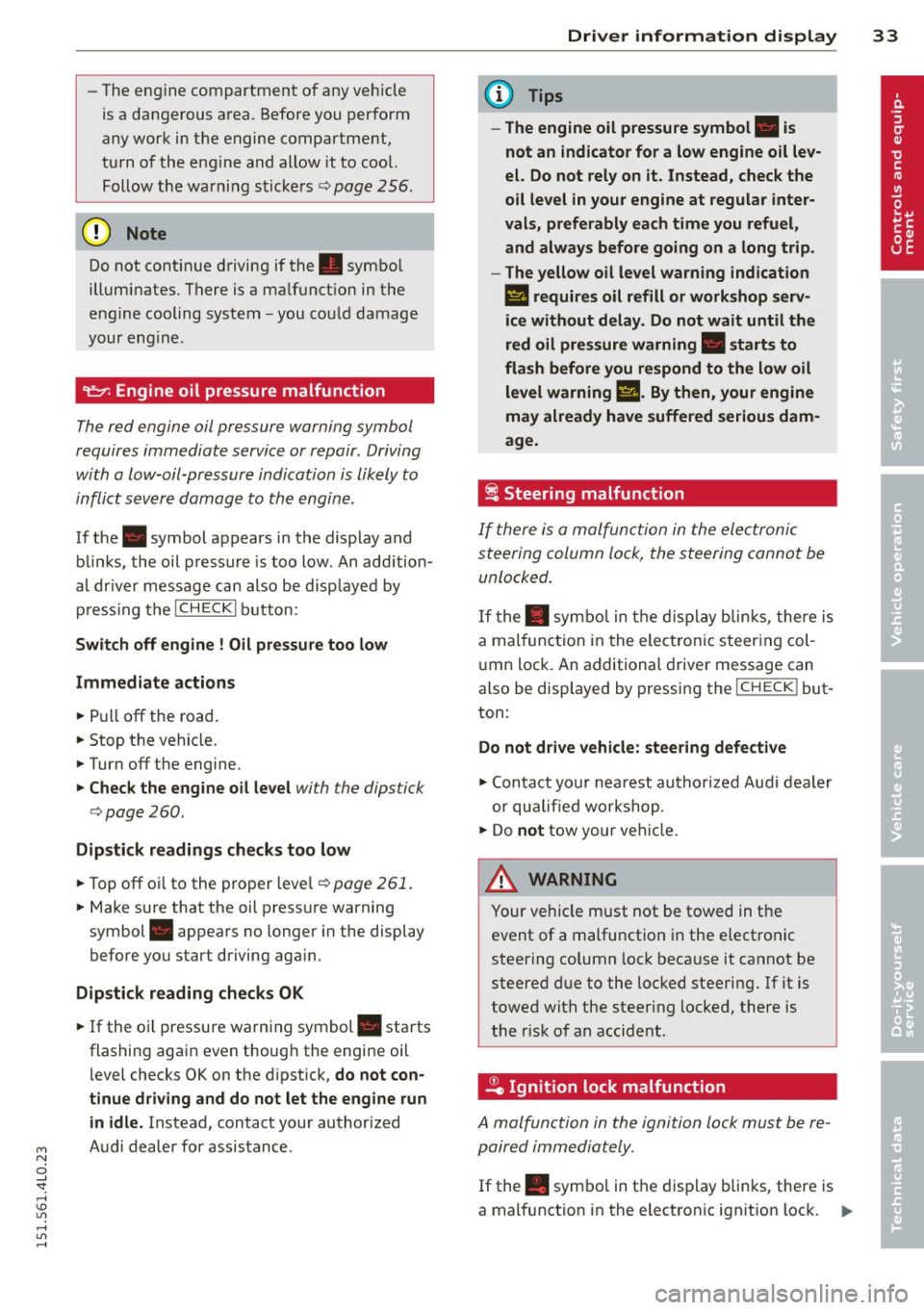
9=:7-: Engine oil pressure malfunction
The red engine oil pressure warning symbol
requires immediate service or repair. Driving
with a low-oil-pressure indication is likely to
inflict severe damage to the engin e.
If the . symbol appears in the display and
b links, the oil pressure is too low. An addition
a l dr ive r message can also be d isp layed by
p ress ing t he
I CH ECKi b utton:
Switch off engine I Oil pressur e too low
Immediate a ction s
~ Pull off the road.
~ Stop the vehicle.
~ Turnoff the engine.
~ Check the engine oil le vel with the dipstick
i=> page
260.
Dipstick reading s checks too low
~ Top off oi l to the proper level~ page 261.
~ Make sure that the oil pressure warning
symbol . appears no longer in the display
before you start driving aga in.
Dipstick reading checks OK
~ If the o il pressure warning symbol. starts
flashing again even though the engi ne oil
l evel checks OK on the d ipst ick,
do not con
tinue driving and do not let the engine run in idle.
Instead , contact your authorized
A udi dealer for assistance.
Dri ver information di spla y 33
(D Tips
- The engine oil pressure symbol. is
not an indicator for a low engine oil lev
el. Do not rely on it . Instead, check the
o il level in your engine at regular inter
vals, preferably each time you refuel, and always before going on a long trip .
- The yellow oil level warn ing indication
l!I requires oil refill or workshop serv
ice without delay . Do not wait until the
red oil pressure warning. start s to
flash before you respond to the low oil
level warning
m. By then, your engine
may already have suffered serious dam
age.
i Steering malfunction
If there is a malfunction in the ele ctronic
steering column lock, the steering cannot be
unlocked .
If the . sym bo l in t he d isplay b links, there is
a mal func tion in the ele ct ronic s teer ing col
u mn lock. An additional drive r message can
also be displayed by pressing the
I CHECK ! but
ton:
Do not d rive vehicle: steering defective
~ Contact your nea rest autho riz ed Aud i dea le r
or qualifie d wo rkshop.
~ Do not tow your ve hicle.
A WARNING
= -
Your ve hicle must not be towed in t he
event of a malfunction in the electro nic
steering column lock beca use it cannot be
steered d ue to the loc ked steering. If it is
t o wed with the steer ing locked, there is
the r isk of an accident .
~ Ignition lock malfunction
A malfunction in the ignition lock must be re
paired immedia tely.
If the . symbol in t he display blinks, there is
a mal function in the electronic ign it ion lock. ..,_
Page 36 of 350
34 Driver in formation d isplay
An additional driver message can also be dis
p layed by pressing the
! CHECK I button:
Ignit ion lo ck d efec tive. C ontact w ork sh op !
.. Do
not turn the eng ine off .
.. Drive immed iate ly to an authorized Audi
dealer to have the ma lfunction co rrected .
If there is a malfunction in the electronic igni
tion lock, the ign ition cannot be turned off .
Drive immediately to an authorized Audi dea l
e r to have the cause of the ma lfunction co r
rected.
On vehicles w ith Convenience key*, the engine
should not be sw itched off using the
! STOP !
button because the eng ine cannot be started
aga in after the ignition is switched off.
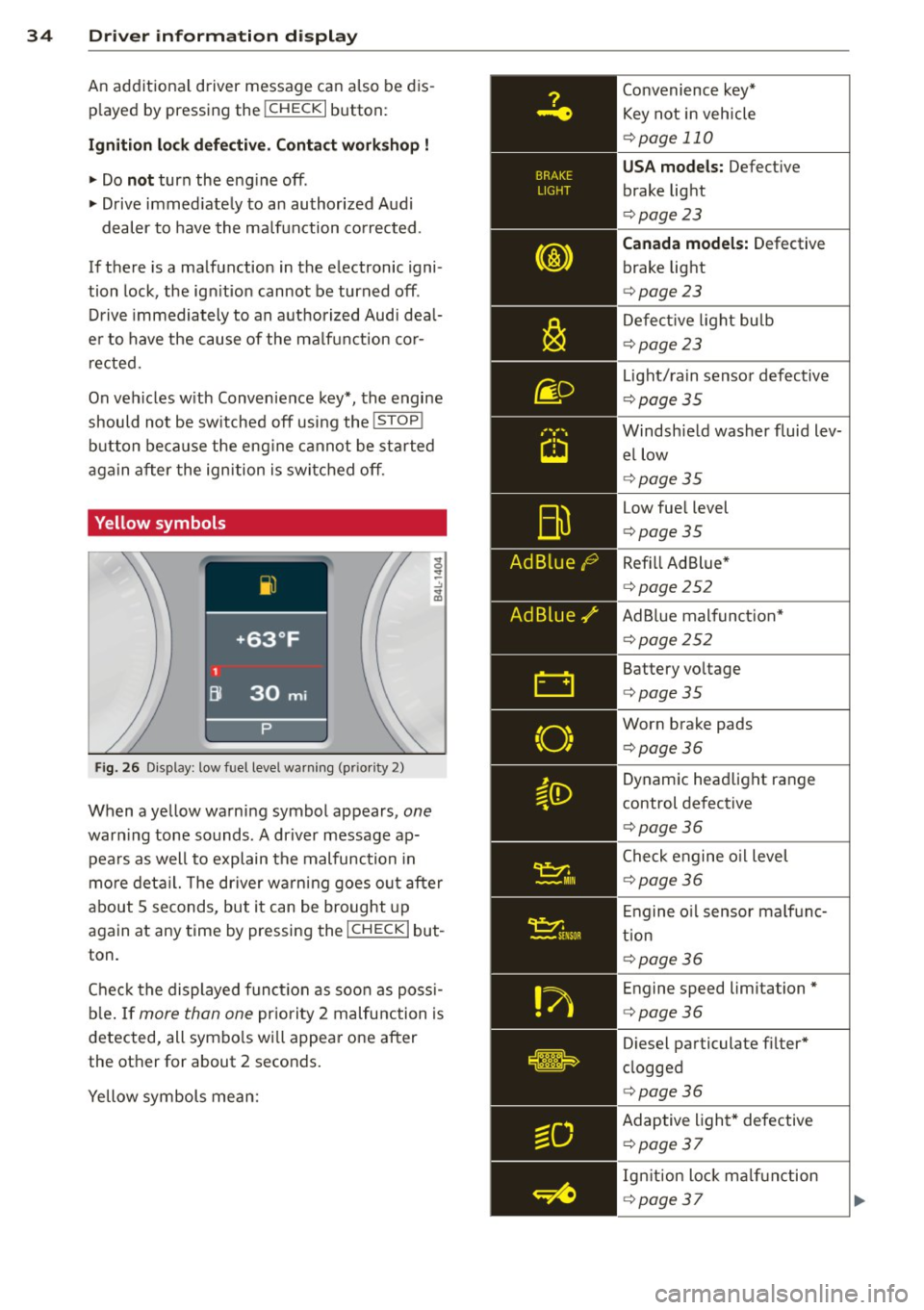
Yellow symbols
Fig. 26 Disp lay: low fuel level warning (p riority 2)
When a yel low warning symbol appears, one
warn ing tone sounds . A dr iver message ap
pea rs as well to explain the malfunc tion in
mo re deta il. The driver warning goes o ut after
about 5 seconds, but it can be brought up
again at any time by pressing the
I CHECK I but
ton .
Chec k the displayed funct ion as soon as poss i
b le . If
more than one pr iority 2 malfunction is
detected, all symbo ls wi ll appea r one after
the other for about 2 seconds.
Yellow symbols mean: Convenience key*
Key not in vehicle
¢
page 110
USA models: Defect ive
brake light
¢ page 23
Canada model s: Defective
brake light
¢ page 23
Defect ive light bulb
¢ page 23
Light/ra in sensor defective
¢ page35
Windsh ield washer fluid lev
el low
¢ page35
Low fue l level
¢page 35
Refill Ad Blue *
¢page 252
AdBlue malfunct ion*
¢ page252
Battery vo ltage
¢ page35
Worn brake pads
¢page36
Dynamic headlight range
control defective
¢ page36
Check engine o il level
¢ page 36
Engine o il sensor malf unc
tion
¢ page 36
Engine speed limitation*
¢page36
Diesel particulate f ilter*
clogged
¢ page36
Adaptive light * defective
¢ poge37
Ign ition lock ma lfunction
¢ page 37
Page 37 of 350
M N
0 ...J
'SI: ,...., \!) 1.1'1 ,...., 1.1'1 ,....,
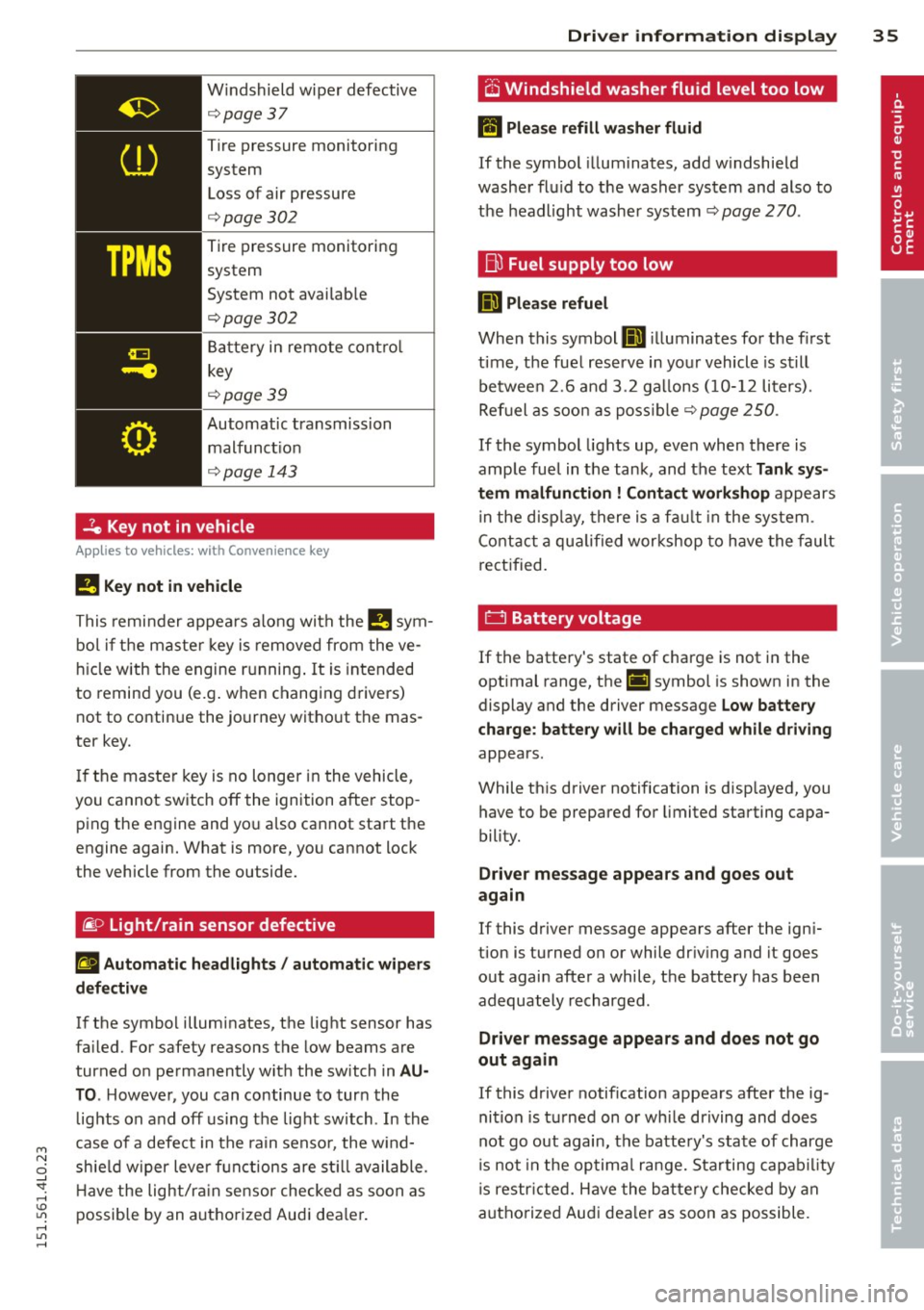
Windshield wiper defective
¢ page37
Tire pressure monitoring
system
Loss of air pressure
¢ page302
Tire pressure monitoring
system
System not avai lab le
¢page302
Battery in remote contro l
key
¢ page39
Automatic transmission
malfunct io n
¢ page 143
-7e Key not in vehicle
Applies to vehicles: with Convenie nce key
!I Key not in vehicle
This remi nder appea rs along with the !!I sym
bo l if the maste r key is removed from the ve
hi cle with the engine running . It is intended
to remind you (e.g . when changing drivers)
not to continue the journey without the mas
ter key .
I f the master key is no longer in the vehicle,
you cannot switch off the ignition after stop p ing the engine and yo u also cannot start the
engine again. What is more, you cannot lock
the vehicle from the outside.
~ o Light/rain sensor defective
II Automatic headlights / autom atic w ipers
d efect iv e
If the symbo l illuminates, the light sensor has
fa iled. For safety reasons the low beams are
turned o n permanently with the switch in
AU
TO . Howeve~youcancontinuetoturnthe
lights on and off us ing the light switch . In the
case of a defe ct in the ra in senso r, the w ind
sh ie ld w iper lever f unctions are st ill available .
H ave the light/ra in sensor checked as soon as
possible by an autho rized Audi dea le r.
Dri ver information di spla y 35
O Windshield washer fluid level too low
lffl Please refill w asher fluid
If the symbol illuminates, add w indshie ld
washe r flu id to the washer system and also to
the headlight washer system¢
page 270.
Bu Fuel supply too low
D Please refuel
When this symbol llD illuminates for t he first
time, the fuel reserve in your vehicle is still
betwee n
2.6 and 3 .2 ga llons (1 0- 12 liters).
Ref uel as soo n as poss ib le
¢ page 250.
If the symbol lights up, even when there is
amp le fue l in the tank, and the text
Tank sys
tem malfun ction
! Contact work shop appears
in the disp lay, there is a fa ult in the system .
C ont act a qua lified wor kshop to have the fault
re ct ified.
0 Battery voltage
If the batte ry's state of charge is not in the
optimal range, the(•) symbol is shown in the
display and the driver message
Low battery
charge: battery will be charged while driving
appears .
While th is driver notification is disp layed, you
have to be prepared for limited starting capa
bility.
Driver message appear s and goes out
ag ain
If this driver message appears after the ign i
tion is turned on or while dr iv ing and it goes
out again after a while, the battery has been
adequately recharged .
Driver message appears and d oes not go
out again
If this driver notification appears after the ig
nition is t urned on o r whi le dr iving and does
not go out again, the batte ry's state of charge
is not in the op tima l range. S tarting capab il ity
is restr icted. Have the ba ttery checked by an
authorized Aud i dea ler as soon as possible.
Page 44 of 350
42 Openin g and clo sing
readiness light, located in the upper part of
the driver's door panel, will start to blink.
- T he vehicle interior lights turn off.
Unlocking and l ocking with Conven ience
k ey*
On vehicles which a re equipped w ith the C o n
ve nience k ey*
authorization system, the
doors are unlocked without a key by means of
a proximity sensor in the door handle. The
doors are simi larly locked without a key using
the locking button. Each door has a proximity
sensor and a locking button .
Automatic l ock ing
The automatic locking feature locks all the ve
hicle doors and the rear lid when you drive
faster than 9 mph (15 km/h). This function can be turned on and off in the MMI
C entr al
lo cking
Menu c:> page 44.
You can un lock the vehicle from the inside by :
- removing the key from the ign it ion sw itch
(the vehicle will automat ica lly unlock itself)
or
- pressing the unlock part of the power lock
switch @or
- pull ing the door handle (twice to open the
rear doors).
Unintent ionall y locking yourself out
In the following cases there safeguards to
prevent you locking your remote master key in
the vehicle :
- The veh icle does not lock with the power
locking sw itch
c:> page 44 if the driver's
door is open.
- On vehicles with Convenience key* , if the
most recently used master key is in the lug
gage compartment, the rear lid is automati
cal ly unloc ked aga in after it is closed.
Do not lock your vehicle with the
r e mot e m as
t e r k ey or Convenienc e key*
until all doors
and the rea r lid are closed. In t his way you
avoid locking yourse lf out accidenta lly.
A WARNING
- When you lock your vehicle from outside,
nobody- espec ially children -should re
main inside the vehicle . Remember,
when you lock the vehicle from the out
side the windows cannot be opened from
the inside.
- When you leave the veh icle, always re
move the ignition key and take it with
you . This will prevent passengers (chil
dren, for example) from accidentally be
ing locked in the vehicle should they acci
dentally press the power locking switch
in the front doors.
- Do not leave children inside the vehicle
unsupervised. In an emergency it would
be imposs ible to open the doors from
the outside without the key.
(D Tips
- In the event of a crash with airbag de
ployment all locked doors will be auto
matically unlocked to give access to the
vehicle occupants from the outside.
- If the power locking system sho uld mal
function, you can lock each door individ
ually using the vehicle key
c:> page 45 .
-If the power locking system shou ld fa il,
you can still open the fuel tank flap in an
emergency
c:> page 2 52 .
-You are well advised not to keep va lua
bles inside an unattended vehicle, v is ible
or not. Even a properly locked vehicle
cannot p rov ide the secur ity of a safe .
Page 70 of 350
68 Clear vis ion
Int ermittent w iping
.. Push the w iper lever forward to the first po
sition @~
fig. 69. The rear window wiper
will wipe the window approx. every four sec onds .
Automatic wiper /washer function
.. Push the w iper lever fo rward to the second
stop,
posi tion (!), and hold it there for as
l ong as you want the rear wiper/washer to
operate.
.. Re lease the lever aga in . the wiper wi ll keep
runn ing for approx. four seconds.
Switching interm ittent wip er action off
.. Pull the lever all the way back to the or iginal
position .
As soon as the reverse gea r is engaged and
the front wipe rs are turned on and operat ing
at the same time, the rear wipe r also turns on
automatically.
A WARNING
Wipe r blades are crucial for safe d riving!
On ly in good condition are they able to
clear the windows properly to provide un
restricted visibility. Worn or frayed wipe r
blades are a safety hazard! ¢
page 69,
Replacing windshield wiper blades
CD Note
In freezing or near freezing condit ions:
- Always check that the wiper blades are
not frozen to the glass before you turn
the wiper on. Loosen a wiper blade which i s frozen in p lace before operating the
wipe r to prevent damage to the wiper
blade o r the wiper motor .
- Do not use the wiper to clear a frosted
window . U si ng the w ipers as a conven
i ent ice sc raper will destroy the wiper
blades.
-
Headlight washer system
App lies to vehicles : wi th headlight washe r system
The headlight washer system cleans the
headlights.
.. Operate the w indshield wiper/washer sys
tem ¢
page 66, fig. 68 ® with the head
lights turned on by ho lding the lever for lon
ger than one second .
The washer jets extend forward out of the
front bumper driven by water pressu re to
spray the fro nt headlights w ith water .
You should inspect the headlights regu larly
(for example whe n refueling) and clean off
any solid di rt or i nsects from the le nses .
To ensure the system wor ks proper ly in w inter,
keep the washer jets free of snow and remove
any ice using a de-icing spray.
Service position
The wiper blades can only be changed in the
service position .
.. If the wiper blades are not frozen to the
windshie ld, bring the windshie ld wiper lever
to the basic pos ition @¢
page 66, fig. 68.
.. Select: !CAR I function button> Systems *
control button> Windshield wipers > Serv
ic e po sition .
Or
.. Select:
!CARI function button> Car sy stems*
cont ro l butto n > Servicing & checks > Wip er
s ervi ce po sition .
-On -changing the windshield wipe r blades
can o nly be done if you b ring the wiper arms
t o the servi ce position. Yo u will a lso avoid
pa int damage to the hood when wor king on
t he wipe rs in this position .
-Off -the w indshie ld w ipers are moved to
t heir initia l posi tion again .
CD Note
Never ma ne uver you r vehicle with the
front windshie ld w iper arms raised s ince
t hey will automatically be moved bac k t o
Page 90 of 350
88 Seats and storage
maneuvers when transporting cargo on
the roof of your vehicle.
- Never exceed the maximum permissible
load carrying capacity of the roof o f your
vehicle, the perm issib le axle weights and
the permiss ible total weight of your veh i
cle
c:> page 323, Weights.
CD Note
Make sure that the opened rear lid does
not come in contact with the cargo on the
roof.
@) For the sake of the environment
As a resu lt of the increased wind resist
ance created by a roof rack, your vehicle is
using fuel unnecessarily. So remove the
roof rack after using it .
Cupholder
Front cupholders
The cupholders ore located in the center arm
rest.
Fig . 99 Ce nter a rmrest: Be verage holder
• Open the cover at the recess on the side
c:> fig . 99.
A maxim um of two beverages can be accom
modated in the cent er armrest . T he second
beverage holder is located under a cove r.
A WARNING
Spilled hot liquid can cause an accident
and personal injury .
-
-Never carry any beverage containers with
hot liquids, such as hot coffee or hot tea, in the vehicle while it is moving
. In case
of an acc ident, sudden braking or other
veh icle movement, hot liquid could spill,
causing scalding burns . Spilled hot liquid
can also cause an accident and personal
in ju ry .
- Use o nly soft cups in the cupholder . Hard
cups and glasses can cause injury in an
accident.
CD Note
Only drink conta iners with lids should be
carried in the cupholder. Liquid could spill
out and damage you r vehicle's electron ic
equipment or stain the upholstery, etc.
(upholder in the rear center armrest
The cupholder is located in the center con
sole .
Fig. 100 R ear center arm rest : cuph older exten ded
• To open the cupholder, press on the symbo l
'i c:>fig . 100.
• To close the cupholder, press the corrugated
area @ and fold the cover down.
The holder @adjusts to the beve rage holder .
The cupholder is designed to ho ld no more
than two cups or cans.
A WARNING
-
Spilled hot liqu id can cause an accident
and personal injury .
-
-Never carry any beverage conta iners with
hot liquids, such as hot coffee or hot tea,
in the vehicle while it is moving. In case
of an acc ident, sudden braking or other
veh icle movement, hot liquid could spill,
Page 98 of 350

96 Warm and cold
Each function is turned on or off by briefly
pressing the corresponding button . The indi
cator light in the button illum inates when the
function is active.
Button(s ) Function
ION/OFFI Climate control on/off
c> page96
IA/Cl Air conditioner on/off
c>page96
IAU TO I Automatic mode
¢page 97
Regulatora) G Temperature selection
c>page 97
[tl Seat heating*
¢page 103
~
Seat ventilation*
i=>page 103
~ Fan
¢ page 97
Qi] Air distr ibut ion
c> page 97
~ Defrost
i=>page 97
~ Manua l recircu lation
c>page98
~ Heated rear window
i=>page 98
al The re gula tor is also used to set th e fan speed, air dis
t ribution, seat heating and seat vent ilat ion.
Synchroniz ing clim ate control
By pressing and holding the regu lator on the
d river's s ide, the temperature setting on the
driver's side can be switched to the passeng
e r's side, and vice versa. The new temperature
is shown in the display.
Synchronizing four-zone automatic
comfort air conditi oning*
By pressing and holding the regu lator on the
driver's side, the temperature setting on the
driver's side can be switched to the passeng
er's side and to the outer rear seats. The new
temperature is shown in the disp lay. By sim
ultaneously pressing and holding the
regulators o n the driver's side and front pas
senger's s ide, the temperature setting on the
driver's side can be switched to the front pas
senger's side . The new temperature is shown
i n the disp lay .
(D Tips
The gr ille on the controls m ust rema in un
obstr ucted and m ust not be taped over.
Measur ing sensors are located behind it.
Turning on and off~
Turning the climate control on
.,. Press the ION/O FF! button, or
.,. Press the
IAUTO I button.
Turning the climate control off
.,. Press the ION/O FFj button to sw itch the cli
mate contro l off and to block the air supply
from the outside.
The air conditioner turns bac k on when you
press the
temperature regulator or one of the
buttons.
(D Tips
With the ign ition t urned off, you can acti
vate the residua l heat funct ion by pressing
the
ION/O FF I button. The res idual heat
from the coolant can be used to heat the
vehicle interior .
Air Conditioner On/Off~
Switching off the air conditioner saves fuel.
.,. Press the IAIC I button to switch the air con-
ditioner on or off.
When the air conditioner is switched on, the
indicator lamp in the button will illum inate
and the heat ing/venti lation system is control
led automatically.
P lease keep in mind that with the air condi
tione r switched off, the interior tempe rat ure ..,_
Page 102 of 350
100 Warm and cold
@ Tips
If the climate control system is ope rating
in cooling mode, a ir flows primari ly from
the outlets in the center conso le and in the
door pillars. To achieve adequate cooling,
you should never close the outlets com
pletely .
Using climate control economically
Using the climate controls prudently can help
save fuel.
When you use the air cond it ioner , engine pow
er is reduced and fuel consumption increases.
To save fuel, you should use the air condition
er only when necessary . Also please note the
following points :
.,. To save fuel, turn off cooling mode by press
ing the
I A/Cl button (indicator light goes
out) .
.,. In add it ion, if you open the w indow or the
Panoramic sliding sunroof* wh ile driving,
tu rn off cooling mode by press ing the
IA/C l
button (indicator light goes out).
.,. If the vehicle is extremely hot due to the
heat of the sun, briefly open doors and win
dows.
@ For the sake of the environment
By reducing the amount of fue l you use,
you also reduce the amount of pollutants emitted into the air.
Rear Air Conditioning
Rear air conditioning - controls
Applies to veh icles: w ith four -zo ne automatic comfort ai r
condit io ning
This overview is to assist you in familiarizing
yourself with the rear air conditioning con
trols.
....
"' (0 :;
-------------~ -----~
Fig. 116 Rea r air conditioning controls
The left display indicates the temperature se
lected for the rear left passenger, the right
display indicates the temperature selected for
the rear right passenger . If the settings for
seat heating *, air distr ib ution or the air cond i
tioning fan are changed, the relevant indica
tor will appear briefly on the display .
Functions are set by rotating the control or
are switched on and off by tapping the but
tons. The indicator light in the button illumi
nates when the funct ion is active .
Button(s) Function
ION/OFFI Climate control on/off
¢ page 101
IAUTOI Automatic mode
¢page 101
Regulatoral B Temperature selection
¢page 101
Q] Seat heating*
<=:>page 104
~
Fan
c::> page 101
~
Air distribution
¢page 102
•> The regu lator is also used to set the fan speed , air dis-
tr ibut ion and seat heating.
II-
Page 114 of 350
112 On the road
The parking brake warning light. (USA)/ .
(CON) illuminates when the parking brake is
set and you switch on the ignition.
A WARNING
-
Always release the parking brake com
pletely. A partially engaged brake will
overheat the rear brakes, reduce their ef
fectiveness and cause excessive wear . This
could lead to brake failure and an accident .
(D Note
Only after the vehicle has come to com
plete stop, should you firmly set the park
ing brake and move the selector lever into
P.
Parking
• Press the brake pedal to stop the vehicle .
• Apply the parking brake firmly
r=,> page 111,
fig. 126 @.
• Move the selector lever to P.
.. Turn the engine off
r=,> _& .
.. When on inclines or declines, turn the steer
ing wheel so that the vehicle will roll into
the curb if it begins to move.
A WARNING
This is how you can reduce the risk of in
jury when leaving your vehicle.
- Never park the vehicle where it can come
in contact with dry grass, spilled fuel or
any other flammable materials.
- When parking on hills, always turn the
wheels so that the front wheels will first
roll into the curb, if the vehicle should
start to roll.
- Never allow anyone - especially small
children - to remain in the vehicle when
it is locked. Locked doors make it more
difficult for rescuers to access the pas
senger compartment in the event of an
emergency. Danger to life!
- Never leave children unsupervised in the
vehicle. Children could release the park
ing brake or move the gearshift lever out
-
of gear. The vehicle could start to roll
away and cause an accident.
- No matter what the season is, the tem
perature in a parked vehicle can reach
dangerous levels.
Q) Note
- Please exercise care when you park your
vehicle in parking areas with parking bar
riers or curbs. Parking barriers and curbs
vary in height and could damage your
bumper and related components as the
front of your vehicle moves over a barrier
or curb that is too high, as you park or as
you back out of a parking spot. In order
to be sure that no such damage can oc
cur, you may wish to stop short of having
the front tires of your car touch the park
ing barrier or curb.
- Please also exercise exceptional care
when you drive up or down steep ramps
or drive over curbs or other obstacles, for
which the vehicle is not designed, be
cause components of th@ vehicle close to
the ground, such as bumper covers,
spoilers and suspension and exhaust sys
tem components, may become dam
aged.
Starting on hills
Hill Hold makes it easier to start on hills.
The system is activated when the brake pedal
is depressed
for a few seconds . For this, the
vehicle must be standing in uphill driving di rection.
After releasing the brake pedal, the brake power is held for a
brief moment to prevent
the vehicle from rolling back when starting. At
this time, you can easily begin to move your
vehicle .
A WARNING
- If you did not begin moving immediately
after releasing the brake pedal, under
certain circumstances, the vehicle would
begin to roll backward. Depress the ..,.
Page 141 of 350
Automatic
transmission
tiptronic
Introduction
The automatic transmission is controlled elec
tronically. The transmission upshifts or down
shifts automatically depending on which drive
program is selected. The power is transferred
by a torque converter .
When a
mode rate d riv in g s ty le is used, the
transmission selects the most econom ica l
driving mode. It w ill then change up early and
delay the downshifts to g ive better fuel econ
omy.
T he transmission switches to a sporty mode
after a k ick-down or when the driver uses a
spo rty driving sty le characterized by quick ac
celerator pedal movements, heavy accelera
tion, frequent changes in speed and traveling
at the maximum speed.
If desired, the driver can a lso select the gears
manually ( tiptronic mode ) ¢ page 142.
Selector lever positions
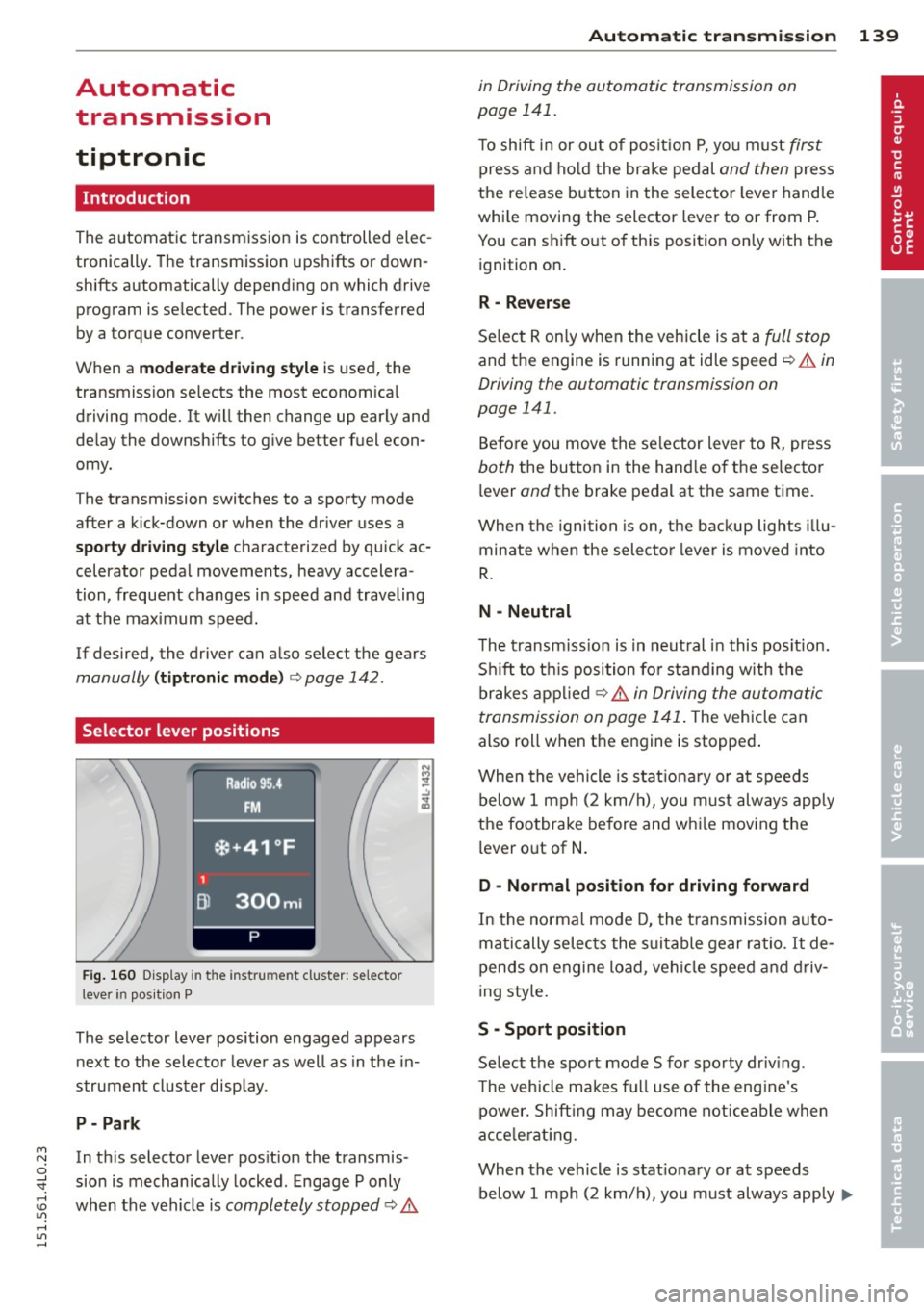
Fig. 160 D isp lay in t he i nst ru m en t cluster: selecto r
l ever in pos it ion P
The selector lever position engaged appears
next to the selecto r lever as well as in the in
strument clus ter disp lay.
P- P ark
M N In th is selector lever pos ition the transmis-o
;;f_ sion is mechan ically locked . Engage P only
~ when the vehicle is completely stopped ¢ 11::.. 1.1'1 ,...., 1.1'1 ,....,
Automatic tran sm iss ion 139
in Driving the automatic transmission on
page 141.
T o shift in or out of posit io n P , yo u m ust first
press and ho ld the brake pedal and then press
the re lease button in the selector leve r handle
whi le moving the selector lever to or from P.
You can shift out of th is position only with the
ignition on.
R -Reverse
Se lect R on ly when the vehicle is at a full stop
and the engine is running at idle speed ¢ 11::.. in
Driving the automatic transmission on
page 141.
Before you move the se lector lever to R, press
both the button in the hand le o f the selector
lever
and the brake pedal at the same t ime.
When the ignition is on, the backup lights illu
minate when the selecto r lever is moved into
R .
N -Neutral
The t ransm iss ion is in neut ral in this pos ition.
S hi ft to t his position fo r standing with the
brakes appl ied ¢
11::.. in Driving the automatic
transmission on page 141 .
The vehicle can
also roll when the engine is stopped .
When the vehicle is stat iona ry or at speeds
below 1 mph (2 km/h), yo u m ust always apply
the footbrake before and whi le mov ing the
lever o ut of
N .
D - Normal position for driving forward
In the no rma l mode D, the t ransmission auto
matically selects the s uitable gear ratio.
It de
pends on engine load, vehicle speed and driv
i ng sty le.
S -Sport posit ion
Se lect the sport mode S for spo rty dr iv ing .
T he vehicle makes fu ll use of the eng ine's
power. Shift ing may become noticeable when
acce lerat ing.
When the vehicle is stat ionary or at speeds
below 1 mph (2 km/h), you must always app ly ...,