turn signal AUDI Q7 2015 Owner´s Manual
[x] Cancel search | Manufacturer: AUDI, Model Year: 2015, Model line: Q7, Model: AUDI Q7 2015Pages: 350, PDF Size: 86 MB
Page 63 of 350
light sensor checked as soon as possible at an
authorized Audi dealer or qualified workshop.
A WARNING
- Daytime running lights and automatic
headlights are only intended to assist
the driver. They do not relieve the driver
of his responsibility to check the head
lights and to turn them on manually ac
cording to the current light and visibility
conditions. For example, fog cannot be
detected by the light sensors*. So always
switch on the headlights
~D under these
weather conditions and when driving in
the dark.
- Crashes can happen when you cannot see
the road ahead and when you cannot be
seen by other motorists. Always turn on
the headlights so that you can see ahead
and so that others can see your car from
the back.
- Please obey all laws when using the
lighting systems described here.
@ Tips
-With the switch in AUTO front fog lights
and rear fog lights cannot be turned on in addition.
- The light sensor for headlight control is
located in the rear view mirror mount.
You should therefore not apply any stick
ers to the windshield in this area in order
to prevent malfunctions or failures.
- Some exterior lighting functions can be
adjusted ¢
page 61.
-When you remove your key from the igni
tion while the vehicle's lights are turned
on, a buzzer sounds as long as the driv
er's door is open.
- In cool or damp weather, the inside of
the headlights, turn signals and tail
lights can fog over due to the tempera
ture difference between the inside and
outside. They will clear shortly after
M "' switching them on. This does not affect 0
~ the service life of the lighting.
rl I.O
"' rl
"' rl
Clear vision 61
-In the event of a light sensor malfunc
tion, the driver is notified in the instru
ment cluster display¢
page 35.
Adjusting exterior lighting
The functions are set in the MMI.
.,. Select: !CAR ! function button > Systems*
control button > Exterior lighting. Or
.,. Select:
I CAR I function button > Car systems*
control button > Vehicle settings > Exterior
light ing.
Coming home (Lights when leaving car),
Leaving home (Lights when unlocking car)
The coming home function illuminates the
area outside the vehicle when you turn the ig
nition off and open the driver's door. Depend
ing on vehicle equipment, the function can be
switched on and off or the length of ti me the lights remain on* can be adjusted .
The leaving home illuminates the area outside
the vehicle when you unlock the vehicle . This
function can be switched on and off .
The Coming home and Leaving home func
tions only operate when it is dark and the light switch is in the
AUTO position.
Daytime running lights
USA models: The daytime running lights can
be turned on or off using this function.
Canada models: The function cannot be
turned
off. It is activated automatically each
time the ignition is turned on. This menu item is shown "greyed out" .
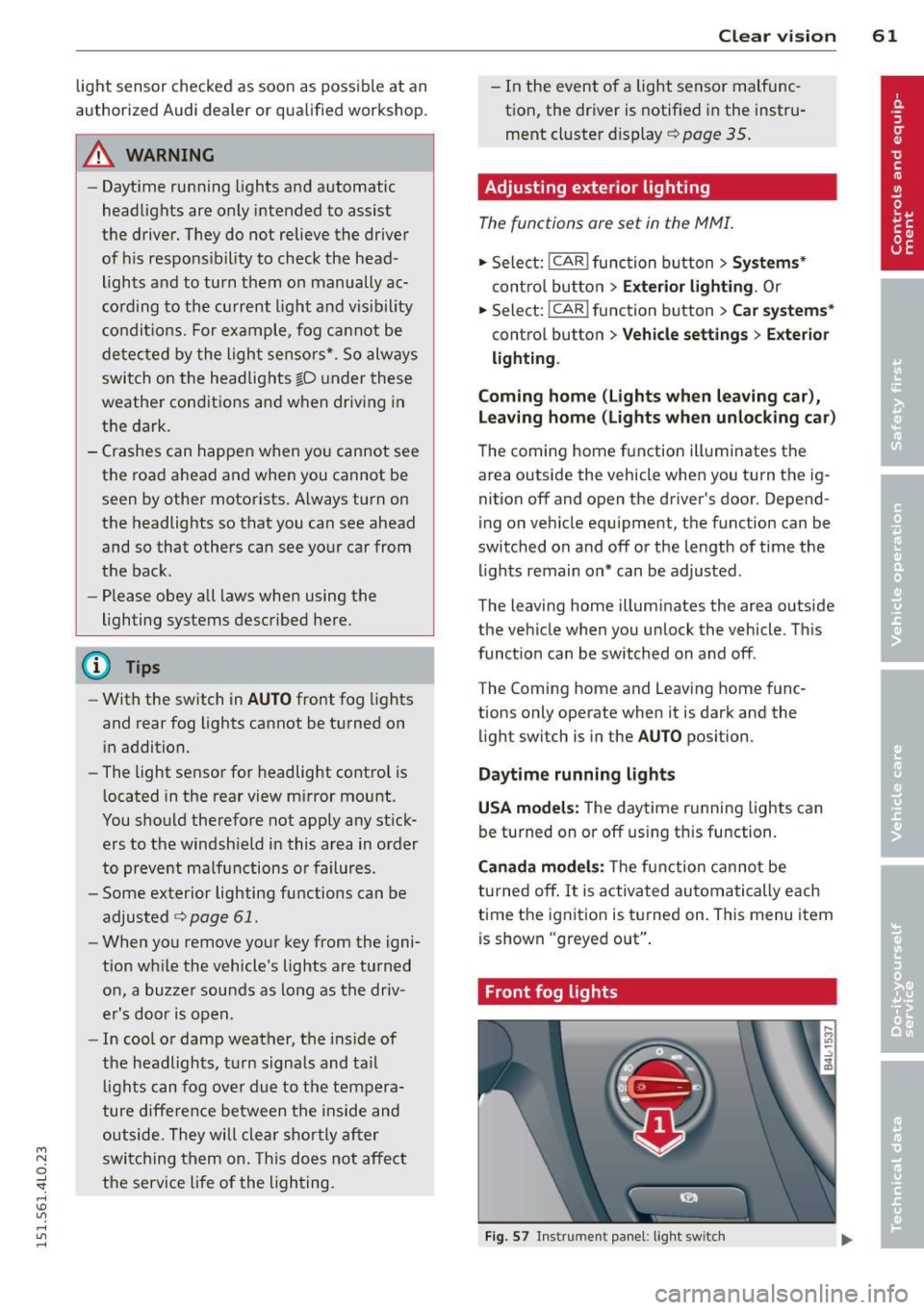
Front fog lights
Fig. 57 Instrument panel: light switch
Page 65 of 350
M
"' 0 ..J
"". rl I.O
"' rl
"' rl
Emergency flasher
The emergency flasher makes other motorists
aware that you or your vehicle are in an emer
gency situation.
,r--,a.
-------------------
Fi g. 6 0 Center console: em ergency flasher sw itch
.. Press the sw itch ~ ~ fig. 60 to turn the
emergency flashers on or off .
When the emerge ncy flashe r is on, al l four
turn signals blink at the same time. The t urn
signal indicator lights
11111 in the instru
ment cluster, as well as the light in the emer
gency f lasher switch ~ blink likewise.
The emergency flashers will turn on automati cally if you are in an accident where the airbag
has dep loyed .
@ Tips
You shou ld tu rn on the emergency flashers
when:
- you are the l ast vehicle st anding in a tr af
fi c jam so that any other vehicles coming
can see you, or when
- your vehicle h as broken down or yo u are
i n an emergency si tuation, or when
- your vehicle is being towed by a tow
tru ck or if you are towing another vehicle
behind you.
Clear vi sion 63
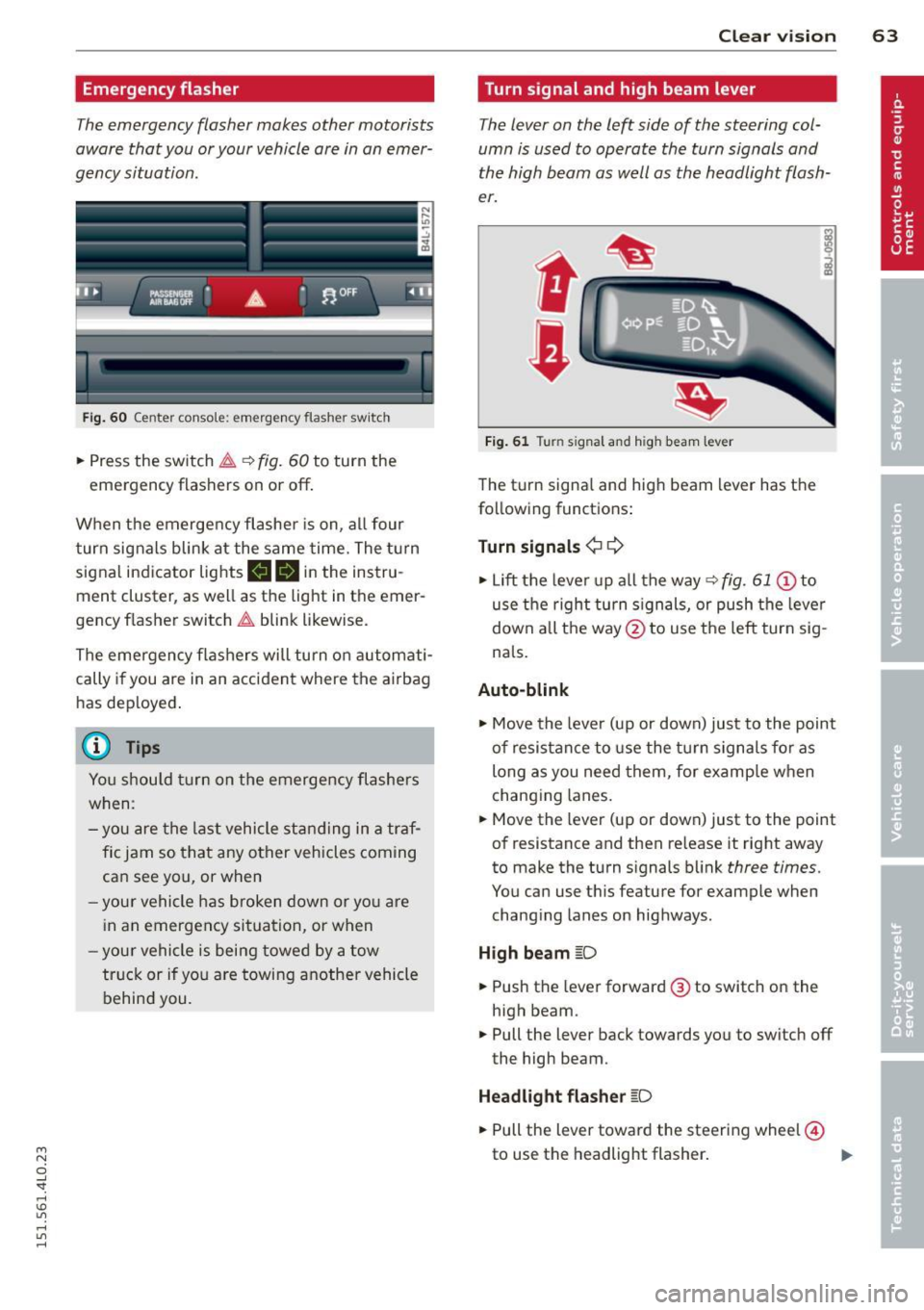
Turn signal and high beam lever
The lever on the left side of the steering col
umn is used to operate the turn signals and
the high beam as well as the headlight flash
er.
t
'
Fi g. 61 Turn signal and high beam lever
The turn signa l and high beam lever has t he
following functions :
Turn signals ¢¢
.. Lift the leve r up a ll the way ~ fig. 61 @to
use t he right turn s ignals, or push the leve r
down all the way@to use t he left tur n sig
na ls .
Auto -blink
.. Move the leve r (up or down) just to the point
of resistan ce to use the turn signa ls fo r as
long as you need them, for example w hen
chang ing lanes.
.. Move the lever (up or down) just to the point
of resistance and then release it right away
to make the turn signals blink
three times.
You can use t his feature for example when
chang ing lanes on highways.
H igh beam [D
.. Push the lever forward @ to sw itch on the
high beam .
.. Pull the lever back towards you to switch off
the high beam.
Headlight flasher [D
.. Pull the lever toward the steering wheel@
to use the headlight flasher .
~
Page 66 of 350
64 Clear vision
Notes on the se feature s
- The turn signals only work with the ignition
tu rned on. The indicator lights
II or ii in
the instr ument cluster ¢
page 14 also b link .
- After you have turned a corner, the turn sig -
nal switches off a utomat ically.
- T he
high beam works only when the head
lights are on. The indicator light
SI in the
instrument cluste r illuminates when the
high beams a re on.
- The
headlight flasher works on ly as long as
yo u hold the leve r - even if there are no
lights turned on . The ind icator light
SI in
the instrument cl uster illum inates when you
use the head light flasher.
A WARNING
Do not use the hig h beam o r headlight
flasher if you know that th ese cou ld blind
oncoming traffic.
Interior lights
Front interior lights
-
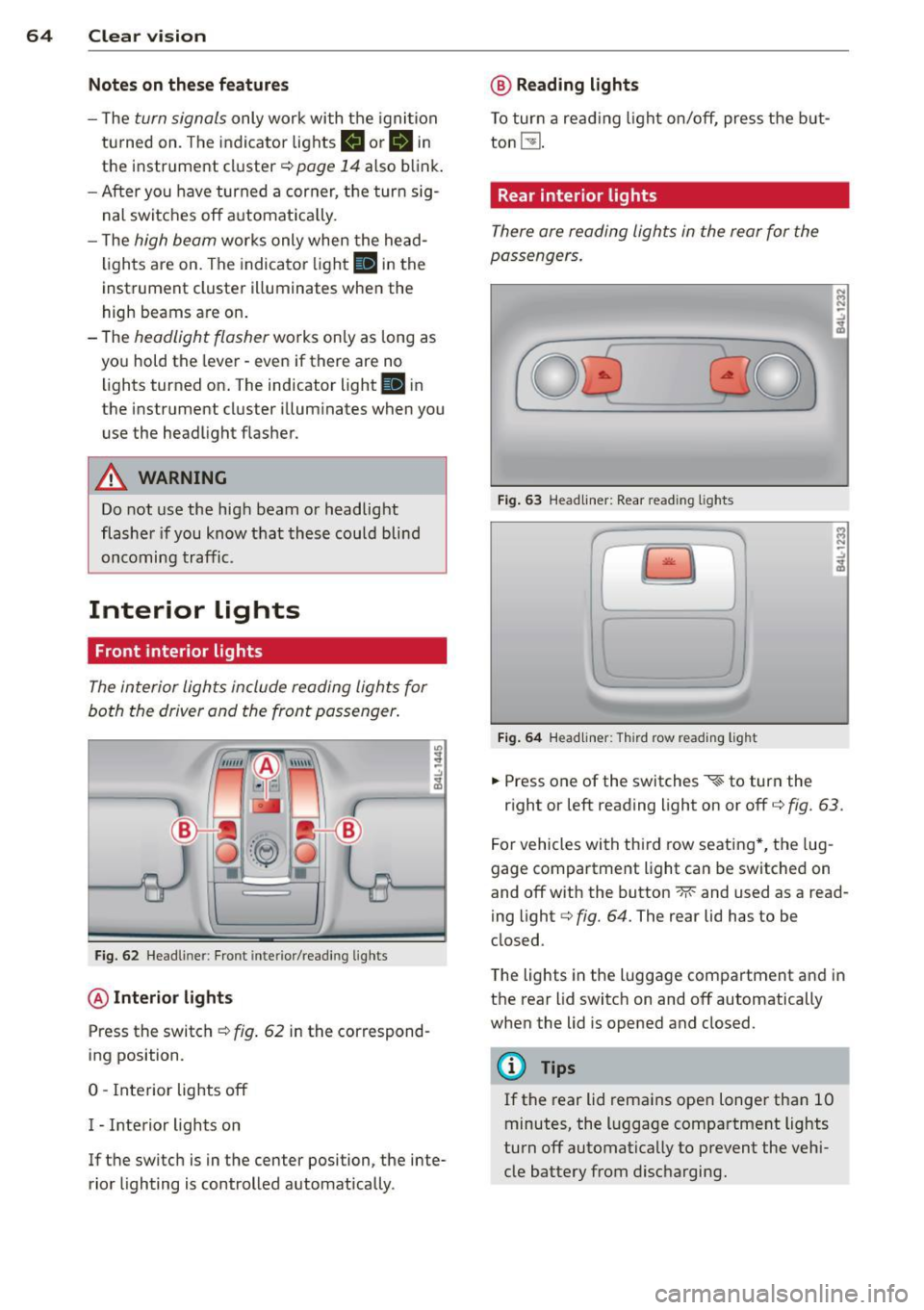
The interior ligh ts include reading lights for
bo th the driver and the front passenger .
Fig. 6 2 Headli ner: Fro nt inte rior/read ing lights
@ Interior lights
Press the switch ¢ fig. 62 in the correspond
ing position.
0 -Interior lights off
I - Inte rior lights on
If the switch is in the center position, the inte
rior lighting is controlled automatica lly.
@ Reading lights
T o tur n a read ing light on/off, press the b ut
ton
t!J .
Rear interior lights
There are reading lights in the rear for the
passengers .
Fig. 63 Head liner: Rear read ing lights
~
--
' ~ '-
Fig . 64 Head liner: Third row read ing light
.. Press one of the switches ~ to turn the
N .., N
.:,
~
::i N -.:,
~
right or left reading light on or off c::;, fig. 63.
For vehicles with thi rd row seating *, the lug
gage compartment light can be switched on
and off with the button -M-and used as a read
ing light
c::;, fig. 64. The rear lid has to be
closed.
The lights in the luggage compartment and in
t h e rear lid switch on and off automatically
when the lid is opened and closed.
@ Tips
If the rear lid remains ope n longer than 10
minutes, the l uggage compartment lights
turn off automatically to prevent the vehi
cle battery from disc harging .
Page 126 of 350

124 Adaptive cruise control
select information from the trip computer,
navigation system* or adaptive cruise control.
@ Vehicle symbol
@ Distance
© Status
@Vehicle symbol
The vehicle symbol indicates whether the sys
tem has detected an object traveling in front .
-Vehicle outline: Open road, no vehicle
ahead.
- White vehicle: A vehicle is detected ahead.
-Red vehicle : Request for driver to assume
control.
@ Distance
Using the arrows and scale, you can detect
how far it is to the vehicle in front of you.
- Open road: No arrow appears when the ve
hicle is on an open road and there is no vehi
cle ahead.
- Driving in traffic: If a vehicle is detected
ahead, the arrow moves on the scale. The
green area represents the distance set.
When approach ing slow ly, the arrow moves
from the
gray zone to the green zone on the
scale .
-Driver intervention prompt : When ap
proaching rapidly, the arrow serves as an
early warning signal. If the d istance select
ed is exceeded or possibly not reached, the
arrow moves into the
red zone on the scale.
In certa in driving situations, you as the driv
er w ill have to take action
c::> page 126, Driv
er intervention prompt.
@Status
- The text ACC: Off appears in white letters
when adaptive cruise control is turned off.
- The text
ACC: Standby appears in white let
ters when the system is turned on but no
desired speed has been set.
- The text
ACC: override appears in white let
te rs when you exceed the desired speed by
acce lerat ing. - The text
D
ISTANC E! appears in red letters
when the interva l to a vehicle traveling
ahead is too short and you have to slow your
veh icle additionally with the foot brake.
- The text messages
DISTANCE 1 to DIS
TANCE
4 appear in green letters to indicate
the t ime interval you have set and adapt ive
cruise control is in management mode.
- If the driving program "standard" is re
placed by "comfort" or "dynam ic" using the
MMI , the above text message is supple
mented by an appropriate prompt, e.g.
DIS
TANCE
1 -dyn .
System status indicator
Applies to vehicles : wi th adap tive c ruise contro l
The text messages and symbols shown in this
area of the display are not displayed perma
nently.
Fig. 140 System status indicator
Time intervals (such as.::::::, ____ .::::::,)
The different symbols for the time intervals
(distance) appear if you change the settings
c::> fig. 140 .
Three white dots ... appear if a setting cannot
be made w ith the operating lever. The follow
ing are possible reasons
- If you pull the cont ro l lever towards you to
resume speed but no requested speed was
set.
- If you push the lever up to increase (or down
to reduce) speed when no speed has been
set previously.
- If you push the lever up to increase (or down
to red uce) speed and this speed is outs ide
Ill>
Page 133 of 350
M
"' 0 _,
"". rl I.O
"' rl
"' rl
Audi side assist Lane Change Assistant
Description
App lies to vehicles: with side assist
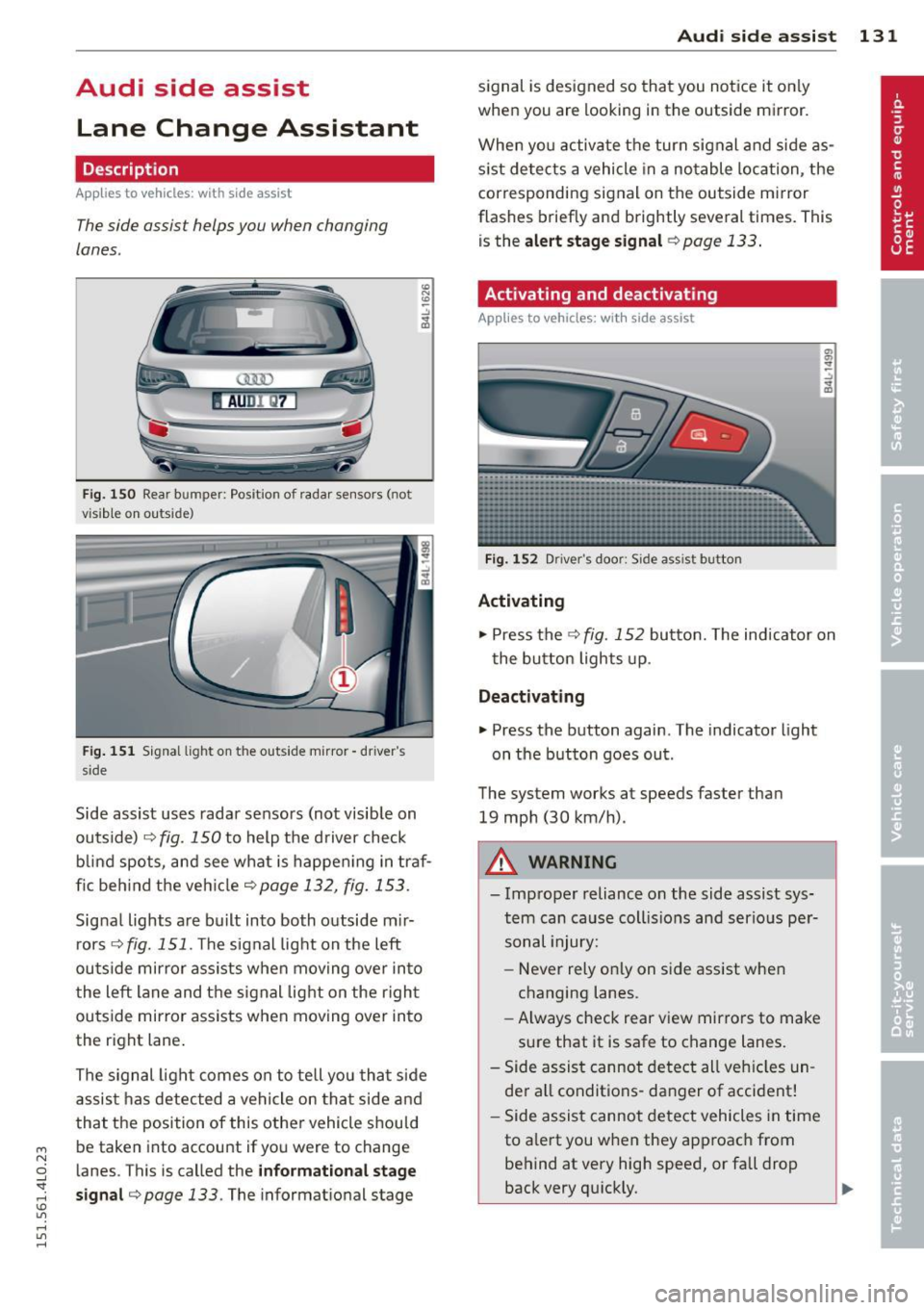
The side assist helps you when changing
lanes .
AUDl Q7
Fig. 150 Rear b umper: Pos it ion of radar sensors (not
v is ib le on outside)
F ig .
15 1 Signal light on the outside mirror -driver 's
s ide
~ -..:, .. (D
Side assist uses radar sensors (not visib le on
outside) ¢
fig. 150 to help the d river check
b lind spots, and see what is happen ing in traf
fic beh ind the veh icle
¢ page 132, fig. 153.
Signa l lights are bu ilt into both outside m ir
r ors ¢
fig. 151 . The signal light on the left
ou tside mirror assists when moving over into
the left lane and the signal light on the r igh t
ou tside mirror assists when moving over in to
the right lane .
The s ignal lig ht comes on to tell yo u that side
assis t has detec ted a vehicle on tha t side and
that t he position of this othe r vehicle shou ld
be taken into account if yo u were to change
l anes. This is called the
informationa l stage
sign al¢ page 133.
The informat ional stage
Aud i side assist 131
signal is designed so that you notice it on ly
when you are looking in the outside mirror.
When yo u activate the turn signal and side as
s ist de tects a vehicle in a no table location, the
corresponding signal on the outside mi rror
flashes briefly and brightly several times. Th is
is the
alert stage signal ¢page 133.
Activating and deactivating
Applies to vehicles: wit h side assist
Fi g.
1 52 D river 's doo r: Side assist button
Activating
.,. Press the
¢ fig. 152 button. The indicator on
t he button lights up .
Deactivating
.,. Press the button again. The indicator light
on the button goes ou t.
The system works at speeds faster than
19 mph (30 km/h) .
A WARNING
-Imp roper reliance on the side assist sys
tem can cause coll is ions and serio us pe r
sonal injury:
- Never rely on ly on side assist when
changing lanes.
- Always check rear view mirrors to make
su re that it is safe to change lanes.
- Side assist canno t detect all veh icles un
de r all conditions- danger of accident!
- Side assist canno t detect vehicles in time
to a lert you w hen they app roac h from
behind at very hig h speed, or fall drop
back very qu ickly.
~
Page 134 of 350
132 Audi side assist
-The radar sensor's vision can be reduced
or entirely blocked by rain, snow, and
heavy spray . This can result in side assist
not adequately detecting vehicles or, in
some cases, not detecting them at all.
Always keep an eye on the direction you
are traveling and the relevant area
around the vehicle.
- Please note that side assist indicates
there are approaching vehicles, or
vehicles in your blind spot, only after
your vehicle has reached a driving speed
of at least 19 mph (30 km/h).
- Side assist signal does not work around
tight corners (turning radius less than
328 feet, or 100 m).
- Side assist is no replacement for the driv
er's full attention. The driver alone is re
sponsible for lane changes and similar
driving maneuvers. Always keep an eye
on the direction you are traveling and the relevant area around the vehicle.
- To ensure that you do not adversely af
fect side assist, do not block the area on
the rear bumper where the radar sensors
are located with foreign objects (such as
stickers or bicycle racks).
- Make sure that the signal light on the
outside mirror is not blocked by stickers
or other items.
(Di Tips
- Side assist automatically deactivates if it
detects that the radar sensors are
blocked ¢
page 13 7. The indicator light
on the button goes out .
- The area on the bumper where the radar
sensors are located must consistently re
main free of snow, ice, and heavy soiling
so that side assist can function properly.
Follow the additional notes on
¢page 138.
-For vehicles with a factory installed tow
ing hitch* or a trailer hitch* that was in
stalled later according to factory specifi
cations, side assist is automatically deac- tivated
as soon as the electrical connec
tion to the trailer electrical socket is made
¢ page 137.
-For vehicles with a trailer hitch that was
not installed according to factory specifi
cations, switch off the side assist when
towing a trailer .
- Additional tinting on the front side win
dows can make it harder to see and cor
rectly understand the signal light on the
outside mirror.
- For Declaration of Compliance to United
States FCC and Industry Canada regula
tions¢
page 329.
Sensor detection area
Applies to vehicles: with side assist
-----··· .... ·--·--
@ / ,
--
ill b''T -
Fig. 153 Sc hematic illustration: Sensor detectio n area
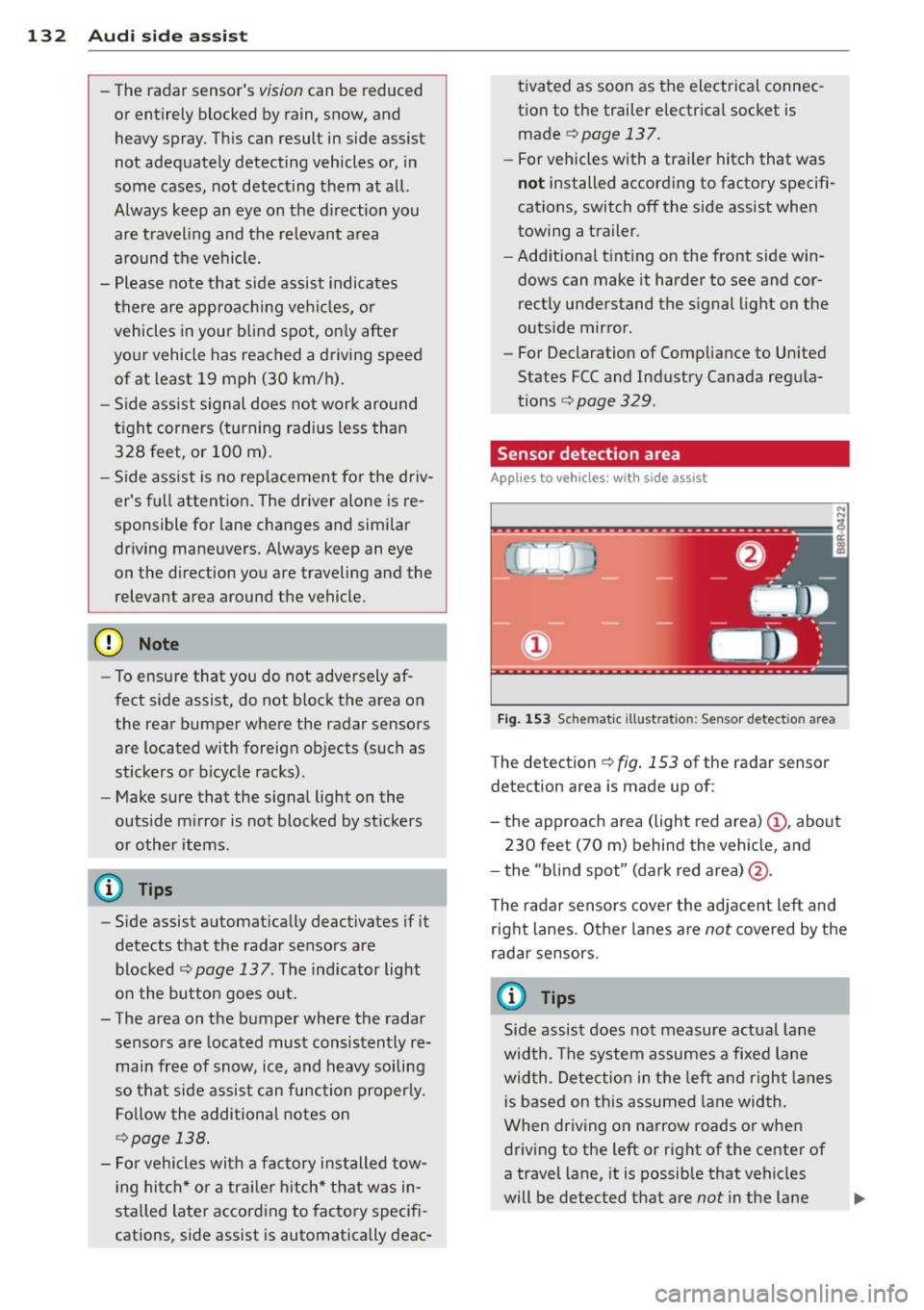
The detection ¢ fig. 153 of the radar sensor
detection area is made up of:
-
- the approach area (light red area) (D, about
230 feet (70 m) behind the vehicle, and
- the "blind spot" (dark red area) @.
The radar sensors cover the adjacent left and
right lanes. Other lanes are
not covered by the
radar sensors.
(D Tips
Side assist does not measure actual lane
width. The system assumes a fixed lane
width . Detection in the left and right lanes
is based on this assumed lane width.
When driving on narrow roads or when
driving to the left or right of the center of
a travel lane, it is possible that vehicles
will be detected that are
not in the lane
Page 135 of 350
M
"' 0 ..J
"". rl I.O
"' rl
"' rl
next to the lane you are using
¢ page 137.
Operation
Applies to vehicles: with side assist
Side ass ist compares the distance and diffe r
ence in speed of detected vehicles with the
speed of your vehicle . Whenever the differ
ence in speed and d istance is registered as no
table if yo u were to change lanes, a signal
l ight appea rs o n the respective mirror.
T he s ignal ca n ligh t up if you are passed by a
ve hicle or if you are pass ing another vehicle .
If you pass another veh icle s lowly (difference
in speed less than 9 mph, or 15 km/h), the
signal light will come on as soon as the other
ve hicle is in your blind spot and is detected by
side assist . When the difference in speed is
g reater, the sig na l light will not come on.
Informational and alert stage signals
Applies to vehicles: with side assist
Side assist has two s ignal stages:
- th e inf ormat io na l stage s ignal, and
- the a lert stage signa l.
Side assist he lps you by usi ng the app ropriate
signal stage, depending on whether or not
you have activated the turn signal , and thus
have indicated that you are or are not chang
i ng lanes .
Informational sta ge signal
As long as you have not activated the t urn sig
na l, side assist informs you of detected
ve hicles that are registered as be ing in a nota
b le location if you were to change lanes .
Whenever the detected vehicle 's differe nce in
speed and dist ance is registered by side assist
as notable, the signa l light o n the respec tive
mirror prod uces m ute d illum inat io n.
The br ightness of the informat io nal stage sig
nal is designed not to be as inte nse, so that it
does not i nterfere wit h your view of the road
when yo u are driving and have no in ten tion of
changing lanes. When y ou look i n the o utsi de
Aud i side assist 13 3
mirror, you can clearly see the informational
stage sig nal.
Alert stage signal
W hen yo u activate the turn signal, and s ide
ass ist h as detecte d a vehicle in a not ab le lo ca
t ion on that pa rticul ar side , the signa l light o n
this s ide mi rror flashes brightly . The repeated
brief and bright flashing of the a le rt stage
s ignal reminds you to carefully check traffic to
the rear in the outside mirror and over your
sho ulder , so that you can sa fe ly comp lete t he
lane change
¢ A in Safety tips on page 138 .
@ Tips
The brightness of the s ignal light on the
outside m irrors can be adjusted with the
M MI ¢ page 136.
Driving situation: Fast approaching
vehicles
Applies to vehicles: wit h side assist
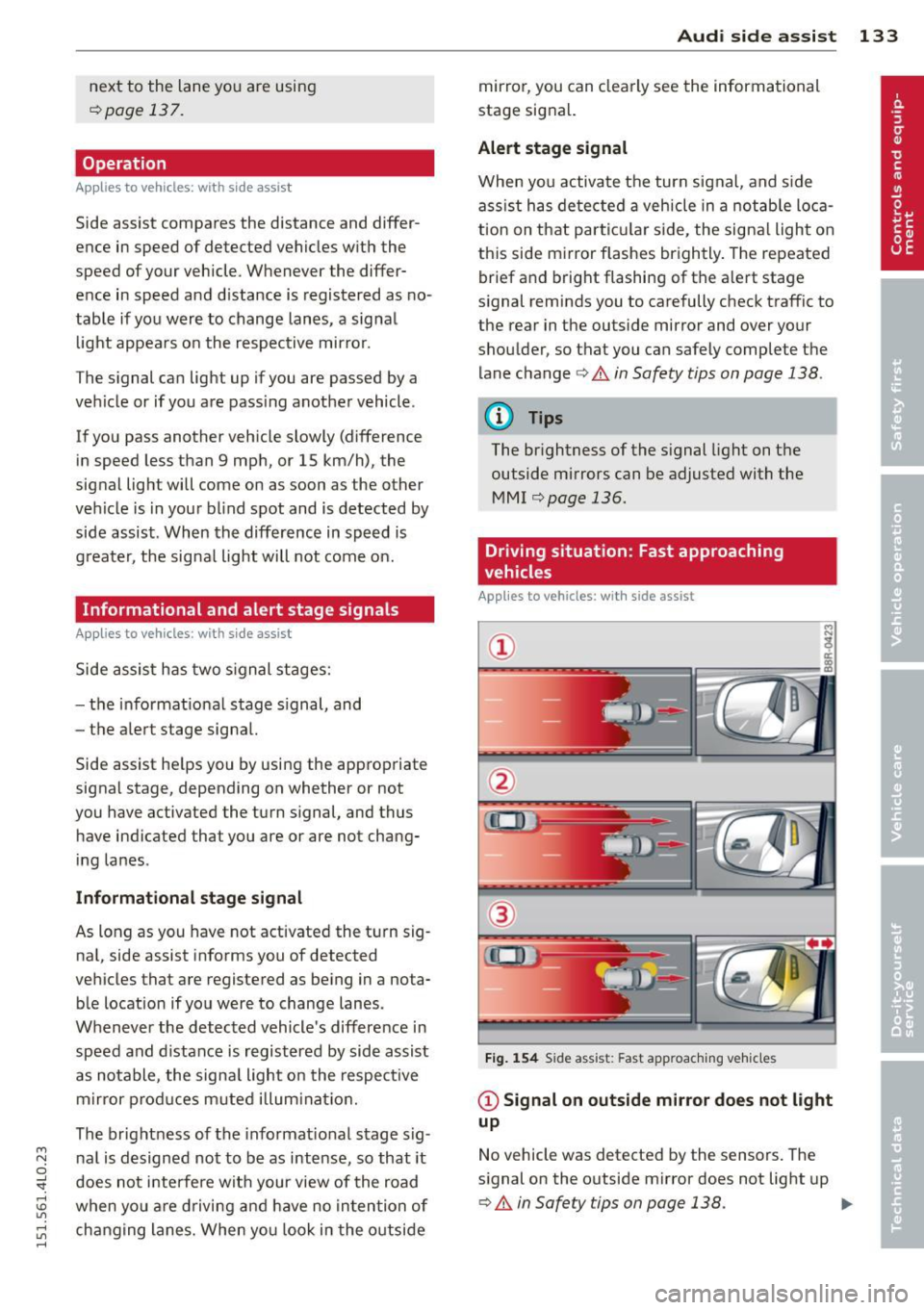
Fig. 1 54 Side ass ist: Fast app roac hing vehi cles
@ Signal on outside mirror does not light
up
No vehicle was detected by the sensors . The
s ignal on the o utside mirror does not light up
¢ A in Safety tips on page 138 . IJJ,,
Page 136 of 350
134 Audi side assist
@ Informational stage signal lights up
A fast approaching veh icle - in the left-hand
l ane for examp le - was detected by the sen
sors . Although this vehicle is sti ll far away, it
should be taken into account if you were to
change lanes, due to the considerable differ
ence in speed. The informational stage signal
on the outside m irror lights up
c::;, page 133.
@ Alert stage signal flashes
If you activate your turn signal in driving sit
uation @, the signal briefly f lashes repeated
ly. Side ass ist is alerting you to a veh icle that
you may not have noticed.
@ Tips
- The faster a vehicle approaches from the
rear, the sooner the signal on the outside
mirror lights up. Side assist will signa l,
at the latest, when a detected vehicle en
ters your "blind spot" .
- When vehicles approach very quickly,
changing lanes can be dangerous even if
the signal on the outside mirror does not
light up.
Driving situation: Slowly approaching
vehicles
Applies to vehicles : wi th side assist
@
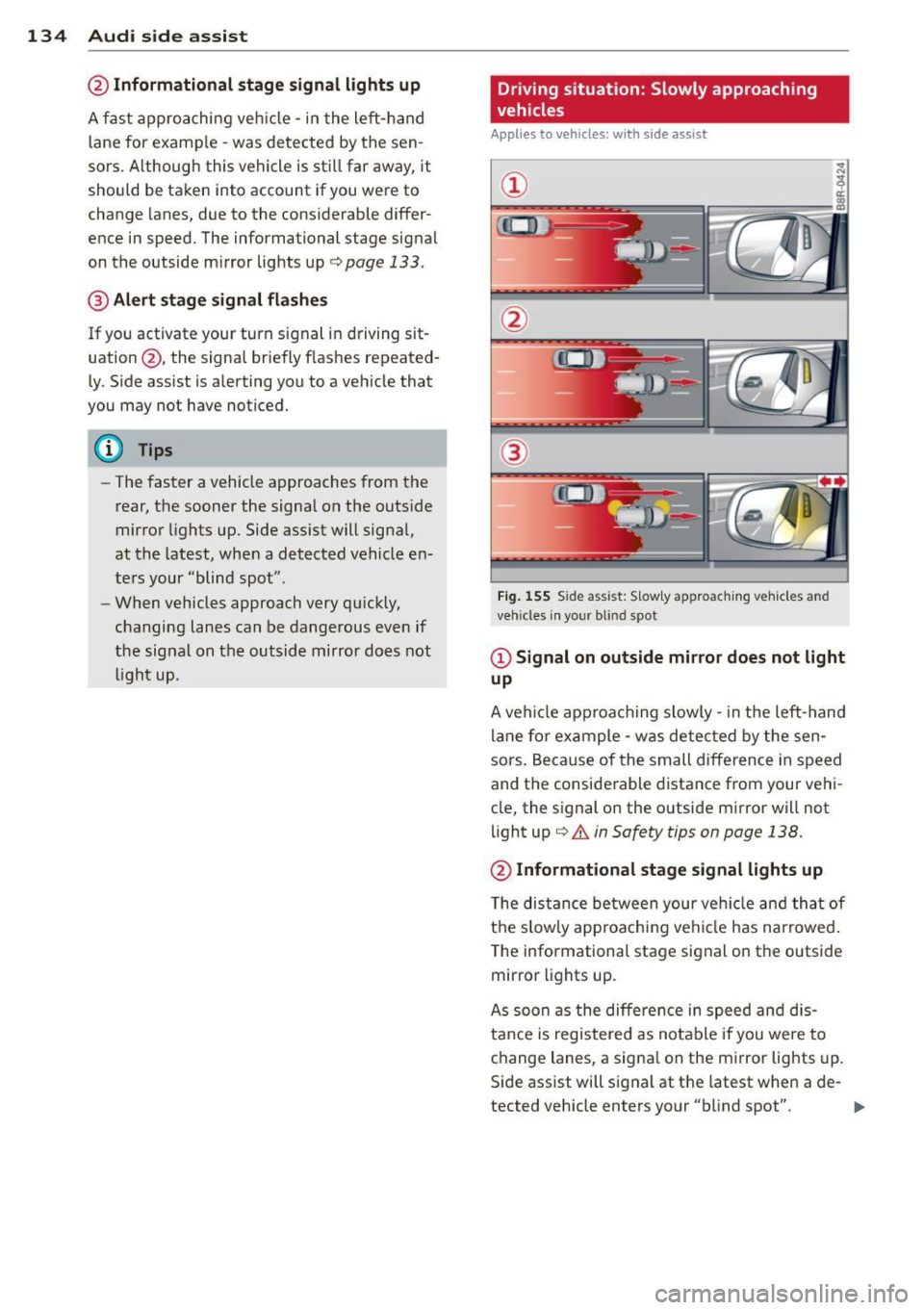
Fig. 15 5 Side assist: S low ly approac hing veh icles and
veh icles in yo ur blind spot
@ Signal on outside mirror does not light
up
A vehicle approaching slowly -in the left-hand
lane for example - was detec ted by the sen
sors. Because of the small d ifference in speed
and the considerable distance from your vehi
cle, the signal on the outside mirror will not
light up
c::;, &. in Safety tips on page 138.
@ Informational stage signal lights up
The distance between your vehicle and that of
the slow ly approaching vehicle has narrowed .
The informationa l stage signal on the outside
mirror lights up.
As soon as the differe nce in speed and dis
tance is registered as notable if you were to
change lanes, a signa l on the mirror lights up.
Side assist will signal at the latest when a de-
tected vehicle enters your "b lind spot". .,,.
Page 137 of 350
M
"' 0 _,
"". rl I.O
"' rl
"' rl
@ Alert stage signal flashes
If you activate your turn signal in driving sit
uation @, the signa l light briefly flashes re
peatedly. Side assist is alerting you of a vehi
cle that you may not have noticed .
@ Tips
-The faster a vehicle approaches from the
rear, the sooner the signa l on the outside
mirror lights up. Side assist will signa l,
at the latest, when a detected vehicle en
ters your "blind spot".
- When vehicles approach very quickly,
changing lanes can be dangerous even if
the signal on the outside mirror does not
light up.
Driving situation: Vehicles dropping
back slowly
Applies to vehicles: with side assist
®
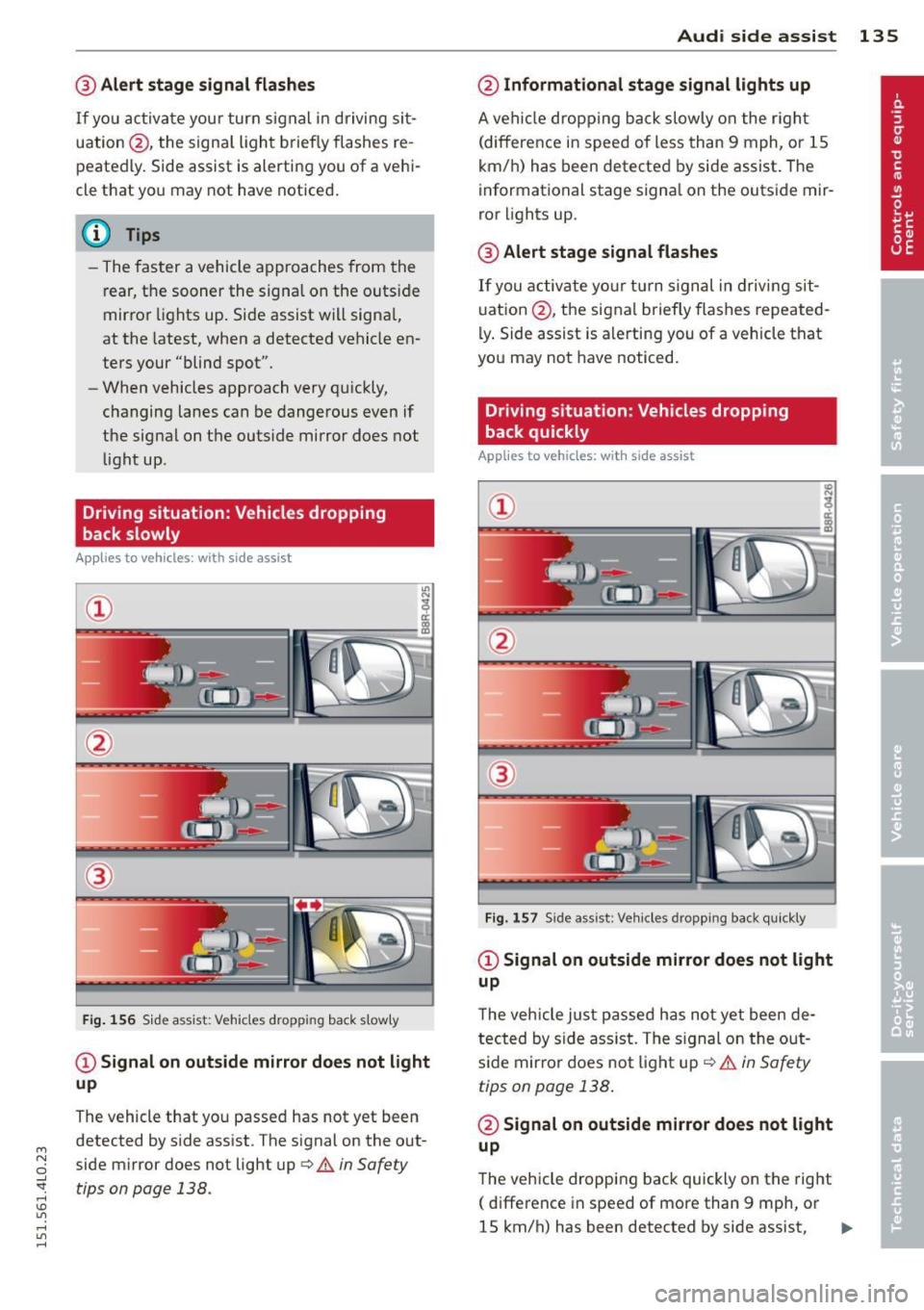
Fig . 156 S id e assist: Vehicles dropp ing back s lowly
CD Signal on outs ide mirror does not light
up
The vehicle that you passed has not yet been
detected by side assist . The signal on the out
side mirror does not light up
q .& in Safety
tips on page 138.
Audi side assist 135
@ Informational stage signal lights up
A vehicle dropping back slowly on the r ight
(difference in speed of less than 9 mph, or lS
km/h) has been detected by side assist. The
informational stage signa l on the outside mir
ror lights up.
@ Alert stage signal flashes
If you activate yo ur turn signal in driving sit
uation @, the signal briefly flashes repeated
ly. Side assist is alerting you of a vehicle that
you may not have noticed.
Driving situation: Vehicles dropping
back quickly
Applies to vehicles: with side assist
®
Fig. 157 Side assist: Veh icles dropp ing back quickly
CD Signal on outside mirror does not light
up
T he vehicle just passed has not yet been de
tected by side ass ist. The sign al on the out
side mirror does not light up
q .& in Safety
tips on page 138 .
@ Signal on outside mirror does not light
up
The vehicle dropping back quickly on the right
( difference in speed of more than 9 mph, or
lS km/h) has been detected by side assist,
1J1>
Page 138 of 350

136 Audi side assist
but is not considered notable in the event of a
lane change, because it is dropping back so
quickly. The signal on the outside mirror does not light up¢.&.
in Safety tips on page 138.
@ Signal on outside mirror does not light
up
If you activate your turn signal in driving sit
uation @, the signal still does not light up on
the outside mirror¢.&.
in Safety tips on
page 138.
MMI settings
App lies to vehicles: with side assist
The basic brightness setting of the signal on
the outside mirror can be adjusted via the
MMI.
.. Select : I CARI function button> Systems*
control button > Audi side assist. Or
.. Select :
I CAR ! function button > Car systems*
control button > Driver assist > Audi side
assist.
The brightness of the signal light for both the
informational and alert stages is automatical
ly adjusted to ambient light conditions. In ad
dition, you can adjust the
basic brightness
separately, via the brightness function.
While making the adjustment, the new
brightness setting is displayed briefly . The
brightness displayed is that of the informa
tional stage signal. The alert stage signal
brightness is linked to the informational stage
signal brightness.
The informational stage signal brightness
should be adjusted so that you notice the sig
nal illumination when you look in the outside
mirror, but not when you look forward
through the windshield.
In very dark or light surroundings, the auto
matic brightness setting adjusts signal light
brightness to maximum or minimum intensi
ty, as needed. In circumstances such as these,
you may not notice any change in the bright
ness on the outside mirror when adjusting the
basic brightness.
You may not notice the change until lighting
conditions are normal again.
(D Tips
- Side assist is not active when the basic
brightness is adjusted. The signal light
comes on briefly to help you make the
adjustment.
- Your settings are automatically stored
and assigned to the remote control key
being used.
· General information '
App lies to vehicles : wit h side assist
Side assist has limits and cannot detect
vehicles under all road and weather condi
tions . Please remember system limitations
and never rely on the system, especially when:
- driving through curves¢
page 136,
-lanes are of different widths¢ page 137.
' When driving through curves
Applies to vehicles: wit h side assist
Side assist cannot detect vehicles in curves
with a turning radius of less than 328 feet
(100 m).
When driving through a curve, it is possible
that side assist may register a vehicle two
lanes over, and the signal on the outside mir
ror will light up.