turn signal AUDI Q7 2015 Owner´s Manual
[x] Cancel search | Manufacturer: AUDI, Model Year: 2015, Model line: Q7, Model: AUDI Q7 2015Pages: 350, PDF Size: 86 MB
Page 151 of 350
M
"' 0 ..J
"". rl I.O
"' rl
"' rl
-You can change the volume and pitch of
the signals as well as the display
Qpage 155.
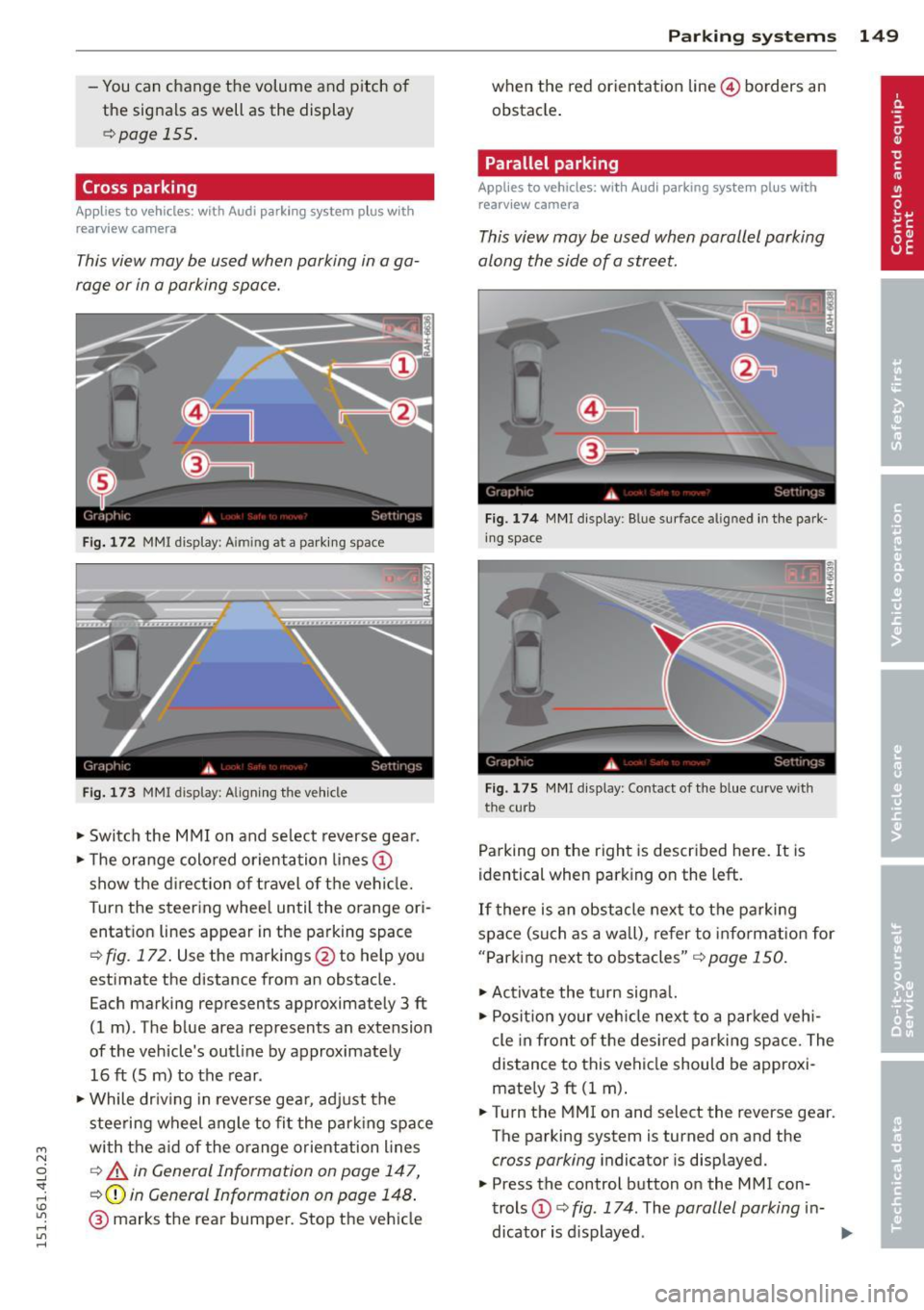
Cross parking
Applies to vehicles: with Audi parking system plus w ith
rearview camera
This view may be used when parking in a ga
rage or in a parking space.
Fig. 172 MMI display: A im ing at a parking space
Fig. 173 MMI display: Aligning the vehicle
"'Switch the MMI on and select reverse gear.
"'Th e orange colored orientation lines@
show the direction of travel of the vehicle.
Turn the steering wheel until the orange ori
entation lines appear in the parking space
Q fig. 172. Use the markings @to help you
estimate the distance from an obstacle.
Each marking represents approximately 3 ft
(1 m) . The blue area represents an extension
of the vehicle's outline by approximately
16 ft (5 m) to the rear .
"'Wh ile driving in reverse gear, adjust the
steering wheel angle to fit the parking space
with the aid of the orange orientation lines
c::> A in General Information on page 147,
Q@in General Information on page 148.
@ marks the rear bumper. Stop the vehicle
Parking systems 149
when the red orientation line© borders an
obstacle.
Parallel parking
Applies to vehicles: with Audi parking system plus with
rearview camera
This view may be used when parallel parking
along the side of a street.
Fig.174 MMI display: Blue surface aligned in the park
ing space
Fig. 175 MMI display : Contact of the blue curve w ith
the cu rb
Parking on the right is described here. It is
identical when parking on the left.
If there is an obstacle next to the parking
space (such as a wall), refer to information for
"Parking next to obstacles"
c::> page 150.
"'Activate the turn signal.
"' Position your vehicle next to a parked vehi
cle in front of the desired parking space. The
distance to this vehicle should be approxi
mately 3
ft (1 m).
"' Turn the MMI on and select the reverse gear.
The parking system is turned on and the
cross parking indicator is displayed.
"' Press the control button on the MMI con
trols @
c::> fig. 174. The parallel parking in-
dicator is displayed.
II>
Page 155 of 350
M
"' 0 ..J
"". rl I.O
"' rl
"' rl
You can choose between three different views in this mode.
.. To cross park, parallel park, or position the
vehicle in front of a trailer, press the ® con
trol button on the controls repeatedly until
the symbol for the desired mode is selected .
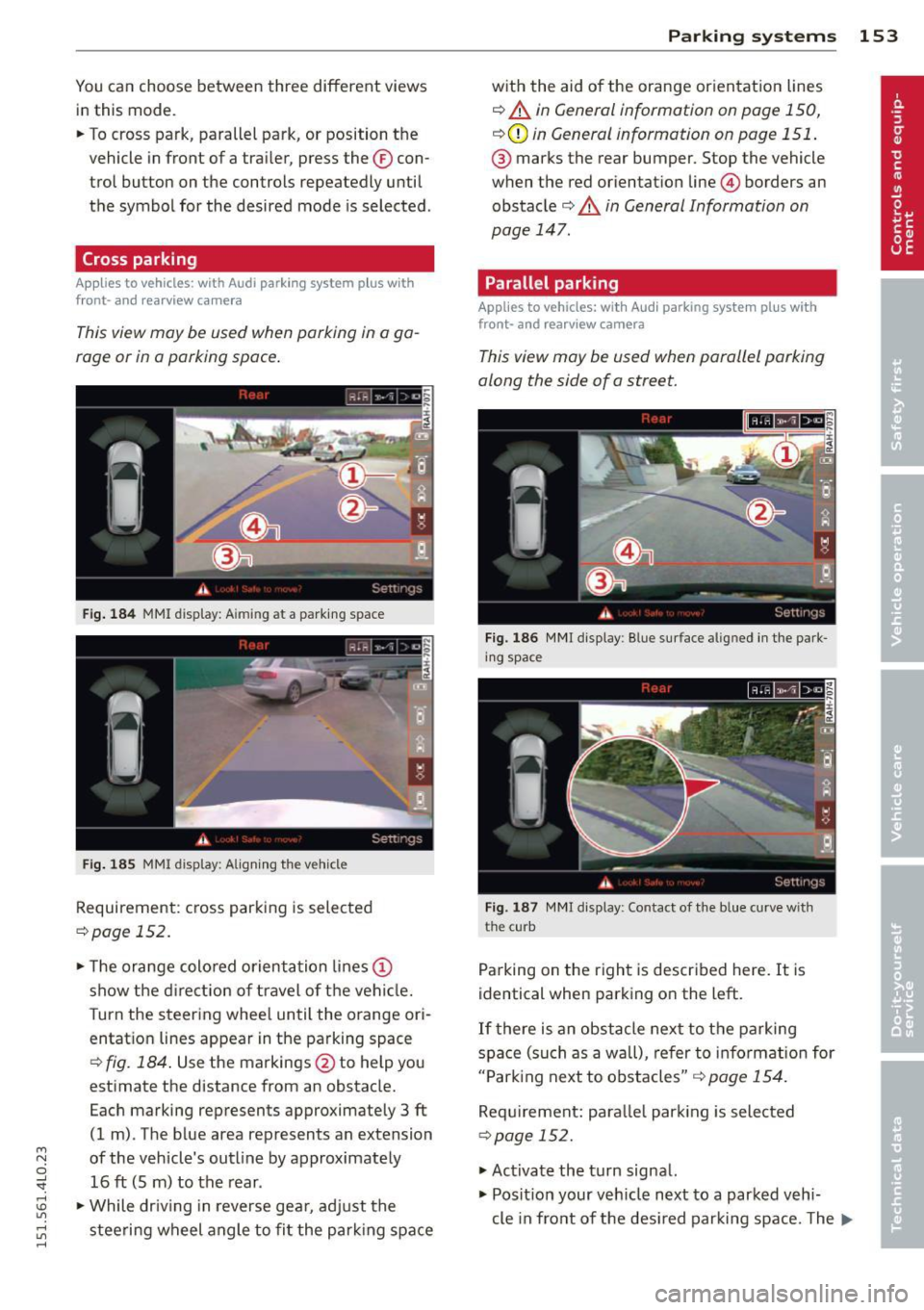
Cross parking
Applies to vehicles: with Audi parking system p lus w it h
fr ont- an d rearview ca mera
This view may be used when parking in a ga
rage or in a parking space.
Fig. 184 MMI display: A iming at a parkin g space
Fig. 185 MMI display: Aligning the vehicl e
Requirement : cross parking is selected
¢page 152 .
.. The orange colored orientation lines@
show the direction of travel of the vehicle.
Turn the steering wheel until the orange ori
entation lines appear in the parking space
¢
fig. 184. Use the markings @to help you
estimate the distance from an obstacle.
Each marking represents approximately 3
ft
(1 m) . The blue area represents an extension
of the vehicle's outline by approximately 16
ft (5 m) to the rear .
.. While driving in reverse gear, adjust the
steering wheel angle to fit the parking space
Parking systems 153
with the aid of the orange orientation lines
¢ A in General information on page 150,
¢ CD in General information on page 151 .
® marks the rear bumper. Stop the vehicle
when the red orientation line@ borders an
obstacle¢
A in General Information on
page 147.
Parallel parking
Applies to vehicles : wit h Audi parking system pl us with
front- and rearview camera
This view may be used when parallel parking
along the side of a street.
Fig. 186 MMI display: Blue surface aligned in the park
ing space
Fig. 187 MMI display: Contact of the blue curve w ith
the curb
Parking on the right is described here. It is
identical when parking on the left.
If there is an obstacle next to the parking
space (such as a wall), refer to information for
"Parking next to obstacles"
r::!:>page 154.
Requirement: parallel parking is selected
¢page 152.
.. Activate the turn signal.
.. Position your vehicle next to a parked vehi-
cle in front of the desired parking space. The ...
Page 156 of 350
154 Parking systems
distance to this vehicle should be approxi
mately 3 ft (1 m).
• Turn the
MMI on and select the reverse gear.
The parking system is turned on and the
parallel parking indicator is displayed .
• Press the contro l button on the
MMI con
trols
(D ¢ fig . 186 . The cross parking indica
tor is displayed .
•Backup and align yo ur vehicle so the blue
area @ borders on the rear end of the vehi
cle or on the pa rking space line¢ .&.
in Gen
eral information on page 150, ¢(Din Gen
eral information on page 151 .
The blue area
represents an extension of the veh icle's out
line by approximately
16 ft (5 m) to the rear .
The long side of the blue area should be on
the curb . The entire blue area must fit into
the parking space .
• With the vehicle stopped, turn the steer ing
wheel to the right as far as it will go.
• Back into the parking space until the blue
curve ¢
fig. 187 touches the curb¢.&. in
General information on page 150,
~ CD in
General information on page 151.
Stop the
vehicle.
• With the veh icle stopped, turn the steer ing
wheel to the left as far as i t will go .
• Continue to back into the parking space un
t il the vehicle is parked pa rallel to the curb
¢.&. in General information on page 150,
¢(Din General information on page 151.
@ marks the rear bumper. Stop the vehicle,
at the latest, when the red orientation line
© borders an obstacle. Keep an eye on the
front of your vehicle while doing th is .
Parking next to obstacles
When there is an obstacle (such as a wall)
next to the parking space, choose a space w ith
mo re space on the sides. Position the long
side of the blue area so that there is sufficient
space from the curb. The area must not be on
the curb . You wi ll also need to start turning
the steering wheel much earlier . There should
be a sufficient amount of space between the
curb and the blue curve, and the blue curve
c::> fig. 187 must not touch the curb.
(D Tips
The left or right orientation lines and sur
faces will be displayed, depending on the
turn signal being used.
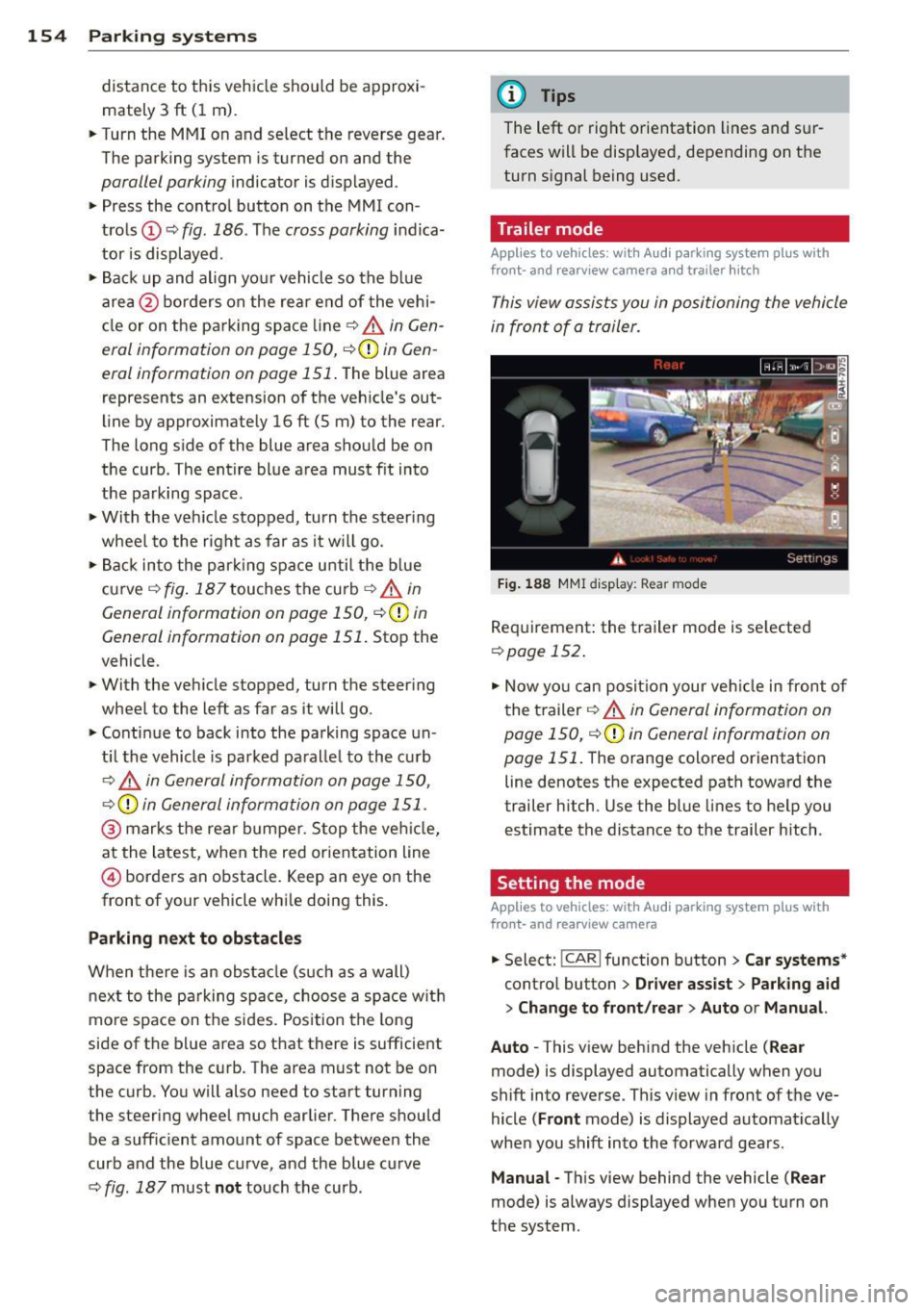
Trailer mode
Applies to vehicles: with Audi parking system plus with
front· and rearview camera a nd tra iler h itch
This view assists you in positioning the vehicle
in front of a trailer.
Fig. 188 MMI dis p lay : R ea r m od e
Requirement: the trailer mode is se lected
c:> page 152 .
• Now you can position your veh icle in front of
the trailer
c::> .&. in General information on
page 150,
c::>(D in General information on
page 151 .
The orange colored orientation
line denotes the expected path toward the
trailer h itch. Use the blue lines to help you
estimate the distance to the trailer hitch .
Setting the mode
Applies to vehicles: with Audi parking system plus with
front· and rearview camera
• Select: !CAR I function button> Car systems *
control button > Driver assist > Parking aid
> Change to front /rear > Auto or Manual.
Auto -
This v iew behind the vehicle ( Rear
mode) is displayed automatically when you
shift into reverse . This view in front of the ve
hicle
( Front mode) is displayed automat ically
whe n you shift into the forward gears.
Manual -This view behind the vehicle ( Rear
mode) is always displayed when you turn on
the system .
Page 157 of 350

M N
0 ...J
'SI: ,...., \!) ..,.,
,...., ..,., ,....,
Adjusting the display and warning tones
Applies to vehicles: with rear park assist/Audi parking sys
tem plus with rearview camera/front- and rearview cam
era
The display* and warning tones can be ad
justed in the MMI.
~ Select: ICARI function button> Systems*
control button > Parking system. Or
~ Select: ICARI function button> Car systems*
control button > Driver assist> Parking aid.
Display*
- Off -when the parking system is switched
on, only audible signals are given.
-On -when the parking system is switched
on, either the visua l display or the picture
from the rearview camera is disp layed.
Warning tones
- Front volume* -front sensor volume
- Front frequency* -front sensor frequency
- Rear volume -rear sensor volume
- Rear frequency -rear sensor frequency
- In-car entertainment fader/Music volume
while parking -when the parking system is
switched on, the volume of the active audio
source is lowered.
The new ly adjusted value is briefly heard from
the signal generator .
(D Tips
- The warning tones can also be adjusted
direct ly by the visual disp lay* or the pic
ture from the camera*. Simply press the
Settings* control button.
- Changed settings are activated when
parking system is switched on again.
- The settings are automatically stored
and assigned to the remote control key
being used. Parking
systems 155
Error messages
Applies to vehicles: with
rear park assist/Audi parking sys
tem plus with rearview camera/front- and rearview cam
era
There is an error in the system if the LED in
the~ button* is blinking and you hear a con
tinuous alarm for a few seconds after switch ing on the park ing system or when the park
ing system is already activated .
If the error is
not corrected before you switch off the igni
tion, when you switch on the parking system
again, the LED in the ~ button* will blink. If
you activate the parking system with the but
ton in this case, the continuous warning tone
will continue to sound.
Parking system plus with front and
rearview camera*
There is another system error if:
- the~·· symbol appears in the display and
the corresponding display area is shown in
blue. The camera is not working in this area.
- all segments around the vehicles are red or
if no segments are displayed.
Drive to your authorized Audi dealer or au
thorized repa ir facility immediately to have
the malfunction corrected .
Trailer hitch
Applies to vehicles: with rear park assist/Audi parking sys
tem plus with rearview camera/front- and rearview cam
era and trailer hitch
For vehicles using the trailer socket, the park
ing system rear sensors do not turn on when
you shift into reverse gear or when you press
the~ button*. This results in the follow ing
restrictions:
Rear park assist*
There is no warning for distances to the rear.
Audi parking system plus with rearview
camera/front and rearview camera*
There is no distance warning for the rear. The
front sensors remain activated. The visual dis play switches to the trailer towing mode. The
rearview camera image will not show the ori-
entat ion lines and the blue surfaces . ..,.
Page 207 of 350

M N
0 ...J
'SI: ,...., \!) ..,.,
,...., ..,., ,....,
seat. The weight of a child restraint and its
"footprint" vary for different kinds of child re
straints and for the different models of the
same kind of child restraint offered by child restra int manufacturers.
The weight ranges for the individual types, makes and mode ls of ch ild restra ints that the
NHTSA has specified in the Safety Standard
together with the we ight ranges of typical in
fants and typical 1 year-old child have been
stored in the control unit of the Advanced A ir
bag System. When a chi ld restraint is being
used on the front passenge r seat with a typi
cal 1 year -old ch ild, the A dvanced Airbag Sys
tem compares the we ight measured by the
weight sensing mat with the information stor
ed in the electronic control unit.
The electron ic contro l unit al so registers the
tension on the front passenger safety be lt.
The tension on the safety be lt for the front
passenger seat will be different for an adult
who is properly using the safety belt as com
pared to the tension on the be lt when it is
used to attach a child restraint to the seat.
The sensor below the latch for the safety belt
for the front seat passenger measures the
tension on the belt. The input from this sen
sor is t hen used w ith the we ight to "decide",
whether there is a ch ild restraint with a typ ica l
1 year-o ld child on the front passenger seat
and whether or not the airbag must be turned
off .
Child restraints and Advanced Airbags
Regard less of the child restraint that you use,
make sure that it has been certified to meet
United States Federal Motor Vehicle Safety
Standards and has been certified by its manu
facturer for use with an airbag . Always be sure
that the chi ld restraint is p roperly instal led at
one of the rear seat ing pos itions. If in excep
tional ci rcumstances you must use it on the
front passenger seat, carefu lly read all of the
information on child safety and Advanced Air
bags and heed a ll of the app licable WARN
INGS. Make certain that the child restraint is
correctly recognized by the weight-sensing
Child Sa fet y 205
mat inside the front passenger seat, that the
front passenger airbag is turned off and that
the a irbag status is always correct ly signaled
by the
PAS SENGE R AIR BAG OFF light.
Many types and models of child restraints
have been available over t he years, new mod
els are introduced regu larly incorporating new
and improved des igns and o lder models are
taken out of product ion. Ch ild restraints are
not standard ized . Child restraints of the same
type typ ically have d ifferent weights and sizes
and different 'footpr ints,' the size and shape
of the bottom of the ch ild restrai nt that sits
o n the seat, when they a re insta lled on a veh i
cle seat. These diffe rences make it v irtually
impossible to certify compliance with the re
quirements for advanced airbags with each
and every ch ild restraint that has ever been
sold in the past or will be sold over the course
of the useful life of your veh icle.
For this reason, the United States National
Highway Traffic Safety Adm inistrat ion has
published a list of spec ific type, makes and
models of child restraints that must be used
to certify comp liance of the Advanced Airbag
System in your veh icle with the suppression
requirements of Federal Motor Vehicle Safety
Standa rd 208. These chi ld restraints are:
Subpart A - Car bed child restraints
Model Manufactured on or
after
Angel Guard Angel September 25, 2007 R ide AA 2403FOF
Subpart B - Rear-facing child restraints
Model Manufactured on or
after
Century Smart Fit December 1, 1999
4543
Cosco Arriva September 25, 2007 22-013PAW and base
22-999WHO
Evenflo Discovery Ad- December 1, 1999
just Right 212
•
•
Page 340 of 350
338 Index
Improperly worn safety belts ..... .... . 180
Indicator lights . . . . . . . . . . . . . . . . . . . . . . 14
Airbag system ........... .... .. .. . 193
PASSENGER AIR BAG OFF .. .. .. .. .. . 193
Infant seats ....................... 209
In flatable spare tir e ............ .... . 305
Inflating .................. .. .... . 306
Installing child safety seats
Safety belts . . . . . . . . . . . . . . . . . . . . . . 213
Installing the upper tether strap on the
anchorage ... ... .. ..... ......... .. . 221
Instrument cluster illumination ..... ... 13
Instruments and controls ... .. .. .... .. 10
General illustration .................. 8
Interior lights Front ........... ............. ... .. 64
Rear .. .. .. .. . .......... .. .. .... .. 64
Intermittent wiping Rain sensor .............. .. .. .. .. .. 66
l
Jack .. .. .. .. ................. .... . 304
Jump -starting .............. ........ 317
Jumper cables .................. ... . 318
K
Key ... .. .. .. .. . .......... .. .. .... .. 38
Ba ttery replacement . . . . . . . . . . . . . . . . 40
Coded settings ................ ... .. 94
Convenience opening and closing of win-
dows .... ..... .... ..... ... .. .. .. .. 53
Emergency key . . . . . . . . . . . . . . . . . . . . . 38
Key replacement . . . . . . . . . . . . . . . . . . . 38
Master key . . . . . . . . . . . . . . . . . . . . . . . . 38
Valet key . . . . . . . . . . . . . . . . . . . . . . . . . . 38
Key coded settings Climate controls . . . . . . . . . . . . . . . . . . . . 94
Keyless entry remote control ... .. .. .. . . 38
Kick-down tiptronic ................... ...... 143
L
LATCH 216
D escription ................. ..... . 217
Guidance fixtures for lower anchorages 218 Installing a child restraint .......
.. .. 219
Location . . . . . . . . . . . . . . . . . . . . . . . . . 217
Mounting and releasing the anchorage
hook . .... .... .. ............. .... 219
Lateral angle .... .. ............. .... 235
Leather cleaning/protection ......... . 245
Level adjustment
refer to Adaptive Air Suspension. 157, 159
Lifting jack . .. .. .. ... .......... .. .. 309
Lifting vehicle ..... ................ . 321
Light
refer to Ambience lighting . . . . . . . . . . . 65
Lighting
refer to Ambience lighting . . . . . . . . . . . 65
Lighting in the mirror housing . .. ....... 62
Lights ......... .. ................ .. 60
Coming home ...................... 61
Daytime running lights ....... .. .... . 61
Emergency flashers . . . . . . . . . . . . . . . . . 63
Exterior lighting in the mirror housing . . 62
Exterior lights ........ ........... .. 61
Front fog lights .. .......... ...... .. 61
Headlights .... .. ............. .... . 60
High beam . . . . . . . . . . . . . . . . . . . . 60, 63
High beam warning/indicator light .. .. . 18
Interior/reading . . . . . . . . . . . . . . . . . . . . 64
Leaving home .... ................ .. 61
Rear fog lights ... ............... .. . 62
Side marker lights . . . . . . . . . . . . . . . . . . 60
Turn signals . ... . ... ... .... ... .. .. . 63
Xenon headlights . . . . . . . . . . . . . . . . . . . 60
Light sensor defective .............. .. 35
Loading the luggage compartment . .... 169
Loading the roof rack ............ .... . 87
Locking Power locking switch .............. .. 44
Rear lid/trunk lid ................ .. . 45
Remote control key ............ .... . 43
Using the key .. .. ............. .. .. . 43
Low er universal anchorage bars (Canada) 216
Lower universal anchorages (Canada) 216
Luggage Stowing ......................... 169
luggage compartment
Tie-down rings ... ................ .. 83
Page 345 of 350
M N
0 ...J
'SI: ,...., \!) 1.1"1 ,...., 1.1"1 ,....,
Synchronization
Climat e controls ... .... ... .. .. .. ... 102
Four -zone automatic comfort a ir cond i
t ioning . . . . . . . . . . . . . . . . . . . . . . . . . . 103
Synchron izing clima te con trol .. .. .. .. .. 95
T
Tac home ter . . . . . . . . . . . . . . . . . . . . . . . . . 11
Ta il lights
C leaning . ................ ...... .. 243
Tank flap Unlocking the fue l filler flap by hand .. 252
TO I clea n diese l
refer to Ad Blue ........... .... .. .. . 252
T echnica l data ................ ... ... 323
Technica l modifications .. ... .. .. .. .. . 329
Temperature Clima te con trols . . . . . . . . . . . . . . . . . . . . 9 7
F ou r-zone au tomati c comfo rt air cond i-
tioning .... .. .. ... . .... ... .. .. ... 101
Setting for the driver's and front pas-
senger 's side . ........... .. .. .. .... 97
Tethe r anchors ............ .... .. .. . 220
T ethe r strap . .... .... ... .. .. .. .. .. . 220
Textiles Cleaning ... .. .. .. .. .... ... .. .. ... 245
The first 1,000 mi les (1 ,500 km) and after-
wards . .... .. ................. .. ... 230
T ie -down r ings ............. ... ... ... 83
Tie -downs . . . . . . . . . . . . . . . . . . . . . . . . . 170
T ips fo r the env ironme nt
Saving fue l . . . . . . . . . . . . . . . . . . . . . . . . 8 7
Using the air condi tioner only when nec-
essary ..... .. .... .. .... ... .. .. ... 100
tiptronic Automatic S hift Lock (ASL) . .. .. .. .. . 14 0
D riving .... ................. .. ... 1 41
E mergency mode . . . . . . . . . . . . . . . . . . 14 3
H ill descent control .... ... .. .. .. .. . 14 2
Kick-down .. .. .... .... ... .. .. .. ... 143
M anual shift program .. ... .. .. .. .. . 1 42
Selecto r lever . ........... .. .. .. ... 139
t iptronic (au tomati c transmission) .. .. . 139
T ire pressure ............... ... ... .. 282
Tire pressure monitoring system . ... .. . 30 1
Loss of air pressure . . . . . . . . . . . . . . . . . 18
Inde x 343
Tires .. ... .. .. .... .. . .. .. ..... ... .. 271
Service life . . . . . . . . . . . . . . . . . . . . . . . 289
•
speed rating letter code ..... ... .. .. 294 •
Tire manufact uring date ............ 293
Tire specifications ................. 293
Tread depth ...... ................ 289
U ni form tire quality grading .... ... .. 297
Win ter tires ...... ...... .......... 298
Tires/Whee ls
Low aspect ratio tires ............... 300
Tire pressure mo nitoring system . . . . . . 18
Tires and vehicle load limits .... ... .. .. 286
T ires and wheels
Checking tire pressu re .......... .. .. 282
Co ld tire infl ation p ress ure ........ .. 278
Dimens ions . ... .. .. . ... ...... ... .. 291
General notes ...... . .. .. ..... ... .. 271
G lossary of tire and loading terminolo-
gy ....... .. .. .. .... ............. 273
New t ires and wheels ........... .... 291
Rep lacing . .. .. .. .... ... .... .... .. 292
Snow cha ins ...... ...... .......... 299
T ires and veh icle load limits ......... 286
Whee l bolts . .. .. .... ........... .. 299
Win ter tire s ... .. .. ............... 298
Tire service life .. .. ... ... ...... ..... 289
Too ls . ... .. .. .... ... .. .. ..... ... .. 304
T o rn o r frayed safety belts 176
Towing Front eye let . .. .. ................. 320
Rea r eyelet .. .. .. .. ... ....... ..... 320
T ow t ruck procedu res ... ....... .... . 319
TPMS Tire pressure monitoring system ... .. 301
T ra ile r tow ing . .. .. ............... .. 238
Operating instr uctions .. ..... ... .. .. 239
Pa rking systems .... . .. .. ..... ... .. 155
Technical requirements . . . . . . . . 238, 240
Tongue load . .. .. ................. 239
Trai ler towing tips ................. 240
T rai ler turn signal assembly
Warning/indicator lights ..... ... .. .. . 17
T ransmission .. .... .... .... ... .... .. 139
Malfunction ( indica to r li ght) ....... .. 143
Transport Canada .. ................. 171
T read Wear Indicator (TWI) .... ... .. .. 289
Page 346 of 350
34 4 Index
Trip computer
Fuel consumption . . . . . . . . . . . . . . . . . . 24
Mi leage . ... ... ... .... ... .. .. .... .. 24
Sing le-tr ip memory ....... .. .. .... .. 25
Total-trip memory . . . . . . . . . . . . . . . . . . 25
Trip odomete r ... . ...... ... .. .. .... .. 12
What does it mean when dEF appears in
the trip odometer disp lay? ... .. .. .. . . 12
T runk
refer to Rear lid . . . . . . . . . . . . . . . . 45, 46
Turn ing rear air conditioning on/off
Four-zone automatic comfort a ir condi-
tioning .. .. .. . .......... .. .. .... . 10 1
Turn signals .... ........... .. .. .... .. 63
War ning/ indicator lights ... .. .. .. .. . . 16
u
ULSD No. 2 (Diese l fuel) ..... .. .. .. .. . 249
Unfasten ing sa fe ty belts . . . . . . . . . . . . . 179
Unid irect iona l tires .......... ... .. .. . 272
Uniform tire quality grading ... .... .. . 297
Un lo ck ing
Powe r locking sw itch .... .. .. .. .. .. . . 44
Rear lid/trunk l id ......... .... .... .. 45
Remote control key . . . . . . . . . . . . . . . . . 43
Using the key . . . . . . . . . . . . . . . . . . . . . . 43
V
Va let key function
Activating and deactivating ... ... ... .. 41
Vanity mirror . . . . . . . . . . . . . . . . . . . . . . . . 65
Vehicle Care/clean ing ............ .. .. .... . 242
Vehicle ident ificat ion labe l ... .. .. .. .. . 323
Vehicle Identification N umber (VIN) ... . 323
Vehicle jack . . . . . . . . . . . . . . . . . . . 304, 309
Vehi cle literature . . . . . . . . . . . . . . . . . . . . . 5
Vehicle shut-down .......... ... .. .. . 232
Vent ilation
Climate controls . . . . . . . . . . . . . . . . . . . . 94
V in yl
C le a ning ... ... .......... .. .. .. .. . 24 5
w
Warning/ind icator lights . ..... .... . .. . 10
Adaptive Air Suspension . . . . . . . . . . . . . 17
Adaptive cruise control . ..... ... .. .. 123
Airbag system ... ................. . 16
Anti- lock brake system (ABS) . . . . . . . . . 18
Brake system ...... .... .... ... .. .. . 19
Cruise contro l . . . . . . . . . . . . . . . . . . . . . . 18
E lectronic power cont rol ... ...... ... . 15
El ectronic Stab ilization Contro l (ESC) .. . 16
G low p lug sys tem ............. .... . 15
Hig h beam .. .. .. ... .......... .. .. . 18
Malfunction Ind icator Lamp (M IL) .. .. . 17
Parking brake .... .. .... .... ... .. .. . 19
Safety be lt . . . . . . . . . . . . . . . . . . . . . . . . 18
Tire pressure monitoring system . . . . . . 18
Tra iler turn s ignal assembly ... .. .... . 17
Turn signals ... .. ... .. .. ... ..... .. . 16
Warning lights . . . . . . . . . . . . . . . . . . . . . . 14
Wa rranty coverages .... ... ...... .. .. 326
Washer reservo ir .... ........... .. .. 270
Wea r indica to r .. .. .. .... .... ... .. .. 289
We ights ....... ... ................ . 323
What happens if yo u wear your safety belt
too loose? .. .... .. ............. .... 178
What happens to unbelted o ccupants? .. 175
What impai rs driving safety? ....... ... 164
What shou ld I do after changing a
whee l? . .... .... .. ................. 285
Wh at shou ld I do after repla cing whee ls? 285
Wheel bolts Torque ....... ... ................ . 299
Wheels . ... .... .. ... .. ..... .... . .. 271
Checking t ire pressure .......... .. .. 282
Cleaning .. .... .. ... .......... .... 244
Co ld tire inflation pressure .. ... ... .. 278
General notes .. .. .......... ...... . 271
G lossary of tire and loading terminolo-
gy ... .. .. .. .. .. ............... .. 273
New t ires and whee ls ........... .... 291
T ires and veh icle loa d limits ..... .... 286
When must a safety be lt be replaced? .. 176
When must the airbag system be inspect -
ed? .... .... .... .. ................. 193
When should I adjus t the tire pressures? 285
When should I check the tire press ures? . 285