instrument cluster AUDI Q7 2017 Owner´s Manual
[x] Cancel search | Manufacturer: AUDI, Model Year: 2017, Model line: Q7, Model: AUDI Q7 2017Pages: 402, PDF Size: 100.39 MB
Page 64 of 402
Sea ts and stor age
Folding the backrest down/up (third row
seats)
Applies to veh icles with third row seats
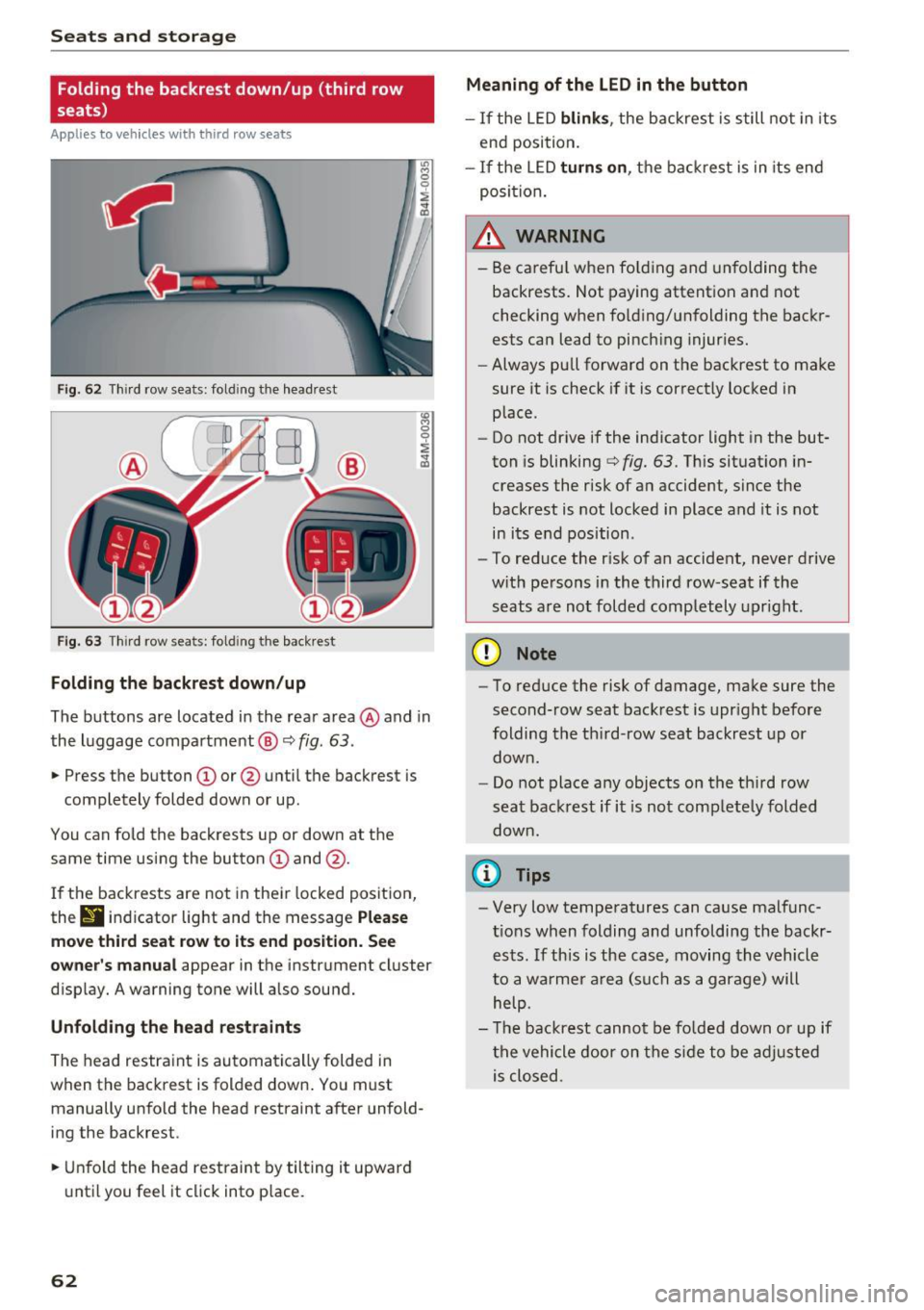
Fig. 62 T hir d row seats: fold ing the headrest
F ig . 63 Thir d row seats: fold ing the backrest
Folding the backre st down /up
The buttons are located in the rear area @and in
the luggage compartment @¢
fig. 63.
.,. Press the button CD or @ until the backrest is
completely folded down or up.
You can fo ld the backrests up or down at the
same time using the button
CD and @.
I f the backrests are not in their locked position,
thr
9 indicator light and the message P lea se
mo ve third seat r ow to it s end po sition . S ee
owner 's manual
appear in the instrument cluster
disp lay. A warning tone will a lso sound.
Unfold ing th e head re st ra int s
The head restraint is automatically folded in
when the backrest is folded down . You must
manually unfo ld the head restraint after unfold
ing the backrest .
.,. Unfold the head restraint by tilting it upward
until you feel it click into p lace.
62
Meaning of the LED in the button
- If the LED blink s, the backrest is still not in its
end position.
- If the LED turn s on, the backrest is in its end
posi tion.
_& WARNING
- Be carefu l when fo lding and unfolding the
backrests. Not paying attention and not
checking when fo ld ing/unfolding the backr
ests can lead to pinch ing injuries.
- Always pull forward on the backrest to make
sure it is check if it is correctly locked in
place.
- Do not drive if the indicator light in the but
ton is blinking
¢ fig. 63. Th is situation in
creases the risk of an accident, since the
backrest is not locked in place and it is not
in its e nd position .
- To reduce the r isk of an accident, never drive
w ith persons in the third row-seat if the
seats a re not folded comp letely upright .
(D Note
-To reduce the risk of damage, make sure the
second-row seat backrest is upr ight before
folding the th ird-row seat backrest up or
down .
- Do not place any objects on the third row
seat backrest if it is not completely folded
down.
(I} Tips
- Very low temperatures can cause malfunc
t ions when folding and unfolding the backr
ests . If this is the case, moving the vehicle
to a warmer a rea (such as a garage) will
help.
- T he backrest cannot be fo lded down or up if
the vehicle door on the side to be adjusted is closed .
Page 88 of 402
Driving
[jj indicator light appears in the instrument clus
ter disp lay, the engine will not be stopped, for
examp le in the follow ing s ituations:
- T he eng ine has not reached the minimum re
quired temperature for Start/Stop mode .
- The inter io r temperature selected by the cli-
mate contro l system has not been reached.
- The outs ide temperature is ext remely high/low.
- The w indshield is being defrosted .
- The vehicle battery charge level is too low .
- The steering wheel is turned at a sharp angle or
is mov ing.
- After engaging the reverse gear .
- On sharp inclines.
-At high a ltitudes.
Engine automaticall y restarts
The standard Start/Stop mode will be cance led
during a stop phase in the fo llow ing s ituations.
The engine resta rts wit hout any action by the
d river.
- The vehicle rolls, for examp le while on a s lope.
- The inter ior temperature differs from the tem-
perature se lected in the A/C system.
- The w indshield is being defrosted.
- The brake pedal is pressed several times in a
row.
- The vehicle battery charge level is too low.
- Power consumption is high.
The engine can tu rn off again when the condi
tions for Start/Stop mode are met .
Ignition is switched off automatically
To prevent the veh icle bat tery from d rain ing, the
ign it ion wi ll switch off a utomat ica lly under the
following conditions:
- The Sta rt/Stop system has stopped the eng ine .
- The vehicle is stationary.
- You left the vehicle and the eng ine was not re-
started within approximate ly 30 seconds.
I f this happens, you wi ll see the message
Igni
tion turn s off automaticall y in the instrument
cluster and the activated low beams are replaced
by the parking lig ht. The parking lights will
sw itch off after approx imately 30 minutes or
when you lock the vehicle.
86
The ignition also sw itches o ff when you lock the
vehicle from the outside during a stop phase.
If t he Start/Stop system has not tu rned off the
engine or if yo u have switched the S tart/Stop sys
tem off manually, the ignition wi ll not be auto
matically switched off and the engine will contin
u e to run
Q .&. .
_& WARNING
To reduce the risk of poisoning, never allow
the engine to run in confined spaces.
(D Tips
- If you leave the ve hicle with the D/S or R se
lector lever position engaged, the parking
brake is automatically set.
- If you select the D or N selector lever posi
t ion after sh ifting into reverse, the vehicle
must be driven faster than 6 mph (10 km/h)
in order fo r the engine to switch off again .
Manually switching the Start/Stop system
off /on
Applies to: vehicles with Start/Stop system
If you do not wish to use the system, you can
switch it off manually.
-- -- - --=-
,__ -~-----__ ...
~. ~- • - ,,,.. ~ .. 'l> '* A ·- -- ~ -
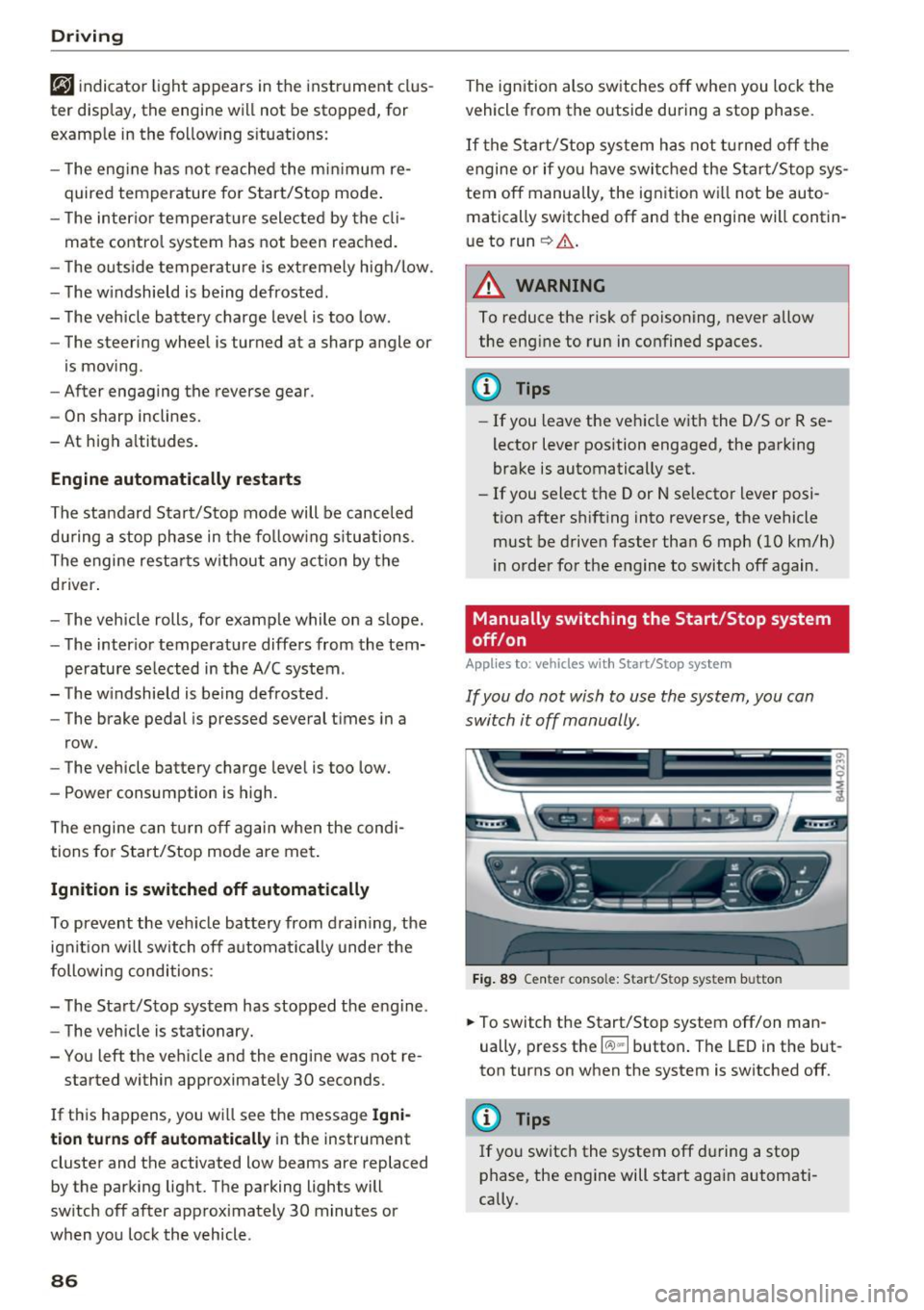
Fig . 89 Ce nter console: Start/Sto p system button
-
.,. To switch the Start/Stop system off/on man
ually, press t he
l(:.l) .. I button . The LED in the but
ton turns on when the system is switched off.
@ Tips
If you switch the system off du ring a stop
phase, the engine will start aga in automati
cally.
Page 89 of 402
u co .... N r-... N .... 0
0
:E: '
Applies to: vehicles wit h Start/Stop system
Automatic start /stop deacti vated: Please
restart engine manually
This message appears whe n specific condi tions
are not met dur ing a stop phase. The Star t/Stop
system wi ll not be ab le to restart the engine . The
engine must be started with the
I STAR T ENGINE STOPI button.
Automatic st art /stop system: malfunct ion!
Function unavailable. Pl ease contact Service
There is a malfunction in the Start/Stop system .
Drive the ve hicle to an author ized A udi dealer or
author iz ed Service Facility as soon as poss ible to
have the ma lfunction corrected.
Electromechanical
parking brake
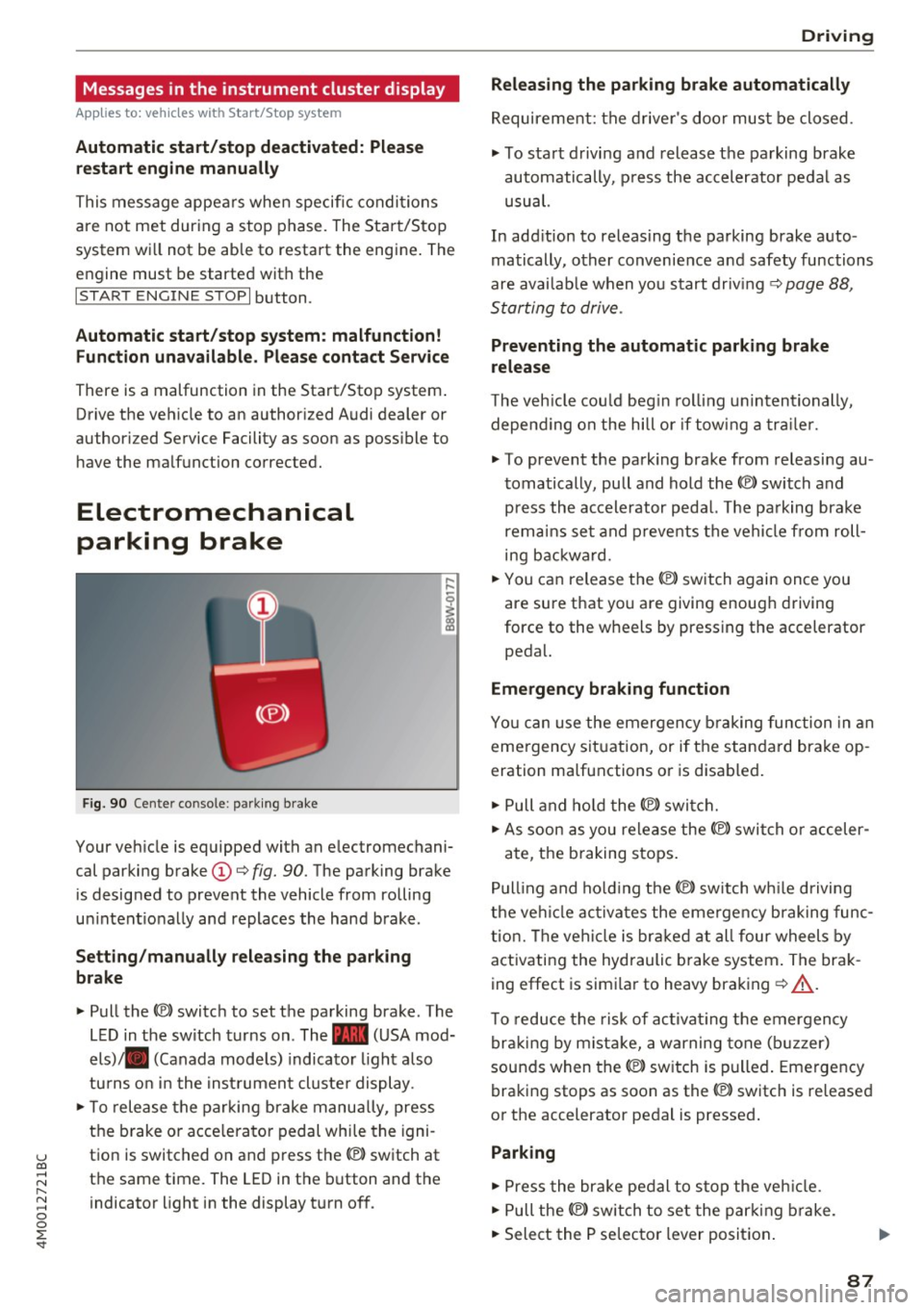
F ig . 90 Cen ter co nso le: park ing brake
Your veh icle is equipped with an electromechani
cal parki ng brake
(D ¢ fig. 90. The parking brake
is designed to prevent the vehicle from rolling
u ni ntent io nally and replaces the hand brake.
Setting /manually releasing the parking
brake
"' Pull the(®) switch to set the pa rking brake . The
L ED in t he switch turns on. The -(USA mod
els) . (Canada mode ls) indicato r light a lso
tu rns o n in the inst rument cl uste r display .
"'T o release the parking b rake manu ally, press
the b rake o r acce lera to r pedal whi le the igni
t ion is switched on and press th e® ) switch at
the same time. The LED in the b utton and the
indicator light in the display t urn of f.
D riving
Releasing the parking brake automatically
Requirement: the d rive r's doo r mus t be closed.
"' To start d rivi ng and release the parking brake
automatically, p ress the accelerator pedal as
usual.
In add it ion to releas ing the parking brake auto
matically, other convenie nce a nd safety functions
are avai lab le when you start driving ¢
page 88,
S tarting to drive .
Preventing the automatic parking brake
release
The veh icle cou ld beg in rol ling u nintentionally,
depe nding on the hill or if tow ing a traile r.
"' To prevent the park ing brake from releasi ng au
t omatically, pu ll and hold the®) switch and
p ress the accele rator peda l. The parking brake
remain s se t a nd p revents the vehi cle from roll
ing b ackwa rd.
"' You can release the®) switch again once you
are sure that yo u are giving enoug h driving
force to the wheels by pressing the accelerator
peda l.
Emergency braking function
You ca n use the emergency b raking function in an
eme rgency sit uation, or if the standard brake op
eration ma lfunctions o r is disab led .
"' Pull and ho ld the(®) switch .
"' As soon as you release the ®> switch or acceler -
ate, t he b raking stops .
Pu lling and ho ld ing the®) switch w hile driving
t h e ve hicl e ac tiva tes the eme rge ncy brak ing func
tion. The ve hicl e is brak ed a t all four wheels by
activating the hydraulic b rake system . The brak
ing effect is simi lar to heavy braking ¢
A_.
To reduce the risk of ac tivat ing the emergency
b raki ng by mist ake, a war ning tone (b uzzer)
sounds when the®) switch is p ulled . Emergency
braking stops as soon as the(®) switch is released
o r the accelerator pedal is pressed .
Parking
"'Press the bra ke pedal to stop the veh icle .
"' Pull the®) switch to set the par king brake.
"' Select the P se lec tor lever position .
87
Page 93 of 402
u (0 ...... N r--. N ...... 0
0
:E
disp layed. The accuracy depends on the driv ing
situation and is normally around 1
°. T he side
ways angle of your vehicle should not exceed the
yellow range in the gauge. If it reaches the red range, there is a risk that the vehicle might tip
c::, A .
Dis playing the til t angle di splay
.. Select in the Infotainment system: IMENUI but-
ton
>V ehicle > Lift / Offro ad or Allro ad *.
Showing the additional display
To change the contents shown in the rig ht area of
the screen, select in the Infota inment system:
right control button
> Additiona l d isplay.
Angle :
this displays the c urren t steering wheel
angle and the maxim um angle that was reached
during a drive . These values are reset when the
ignition is switched off .
Posit ion : disp lays the height, direction and geo
coordinates of the current vehicle pos ition.
Off : only the air suspension display remains o n.
& WARNING
- Do no t exceed the yellow range in the
gauge . Your vehicle can tip, which i ncreases
the risk of an acc ident.
- Under some circumsta nces, the vehicle can
tip over or til t sideways even if the sideways
angle is low . The angle display does not re
place the driver's attention. To reduce the
risk of an accident, make sure the vehicle
does not t ip , especia lly when you are driving
at h igh speeds.
Automatic transmission
Introduction
The automat ic transmission is controlle d elec
tronica lly . Power is transfe rred using a torque
converte r.
When a
m oderate driving styl e is used , the
transmission selects the most economical driving mode. The t ransmission upshifts at a lower RPM
D rivi ng
and downs hifts at a higher RPM to improve fue l
efficiency.
T he tra nsmission switches to a sporty mode after
a kick-down or when the driver uses a
s porty
dri ving style
characterized by quick acce lerator
peda l movements, heavy acceleration, frequent
changes in speed and t raveling at the maximum
speed .
If desired, the driver can also se lect the gears
manually ( tiptronic mode ) c::, page 94.
Selecting a selector lever position
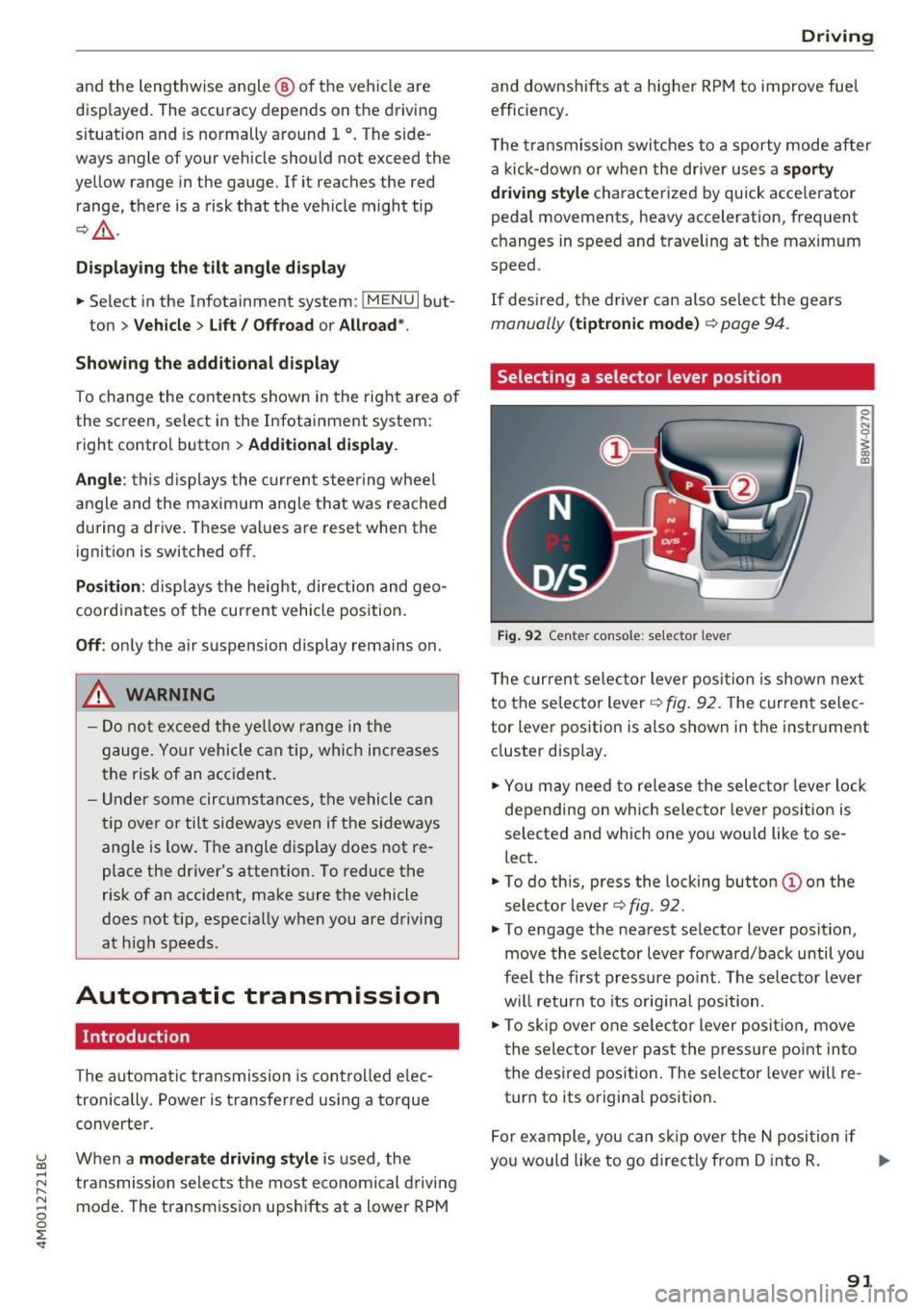
Fig . 92 Cen te r conso le: se lecto r lever
0 ,.._ N 0
~ a, m
T he curren t se lector lever posi tion is show n next
to the se lector lever
c::, fig. 92. The curren t se lec
tor lever position is a lso shown in t he instrument
cluster disp lay.
.. You may need to release the selector lever lock
depending on wh ich selecto r lever pos it ion is
selected and which one you wou ld like to se
lect .
.. To do th is, press the locking button(!) on the
selector lever
<=> fig . 92.
.. To engage the nearest selector lever position,
move the selector lever forward/back until you
fee l the first pressure po int. The selec to r lever
w ill return to its orig inal position .
.. To skip over one selec tor lever posit io n, move
the selector lever past the pressure point into
the desired position. The selector lever will re
turn to its origina l position .
F or ex ample , you can s kip over the N position if
yo u wou ld like to go d irectly from D into R . ..,.
91
Page 104 of 402
Ass is tance sy stems
Assistance systems
Electronic speed Limiter
Your v ehicle may be factory equipped with tires
that are rated for a maximum speed of 130 mph (210 km/h). This is less than the maximum sp eed
of your vehicle . To reduce the risk of sudden tire
failure and loss of control if the vehicle is operat ed at excessive speeds, your vehicle also has an
electronic speed limiter . The electronic speed
lim iter prevents your vehicle from going faster
than the t ire speed rating. For mo re information
<=> page 333.
If the engine control unit receives faulty vehicle
road speed s ignals , the Malfunction Indicator
L amp (MIL)
¢..ffi will illumina te . If this occurs,
con tact the nearest au thorized A ud i dealer for
assistance.
_& WARNING
Always observe the posted speed limits and
adjust you r speed to suit prevailing road, traf
fic and weather conditions. Never drive your
vehicle faster than the maximum speed rating
of the tires installed .
Speed warning system
Introduction
Applies to: vehicles with speed warning system
The speed warning system helps you to stay be
low a specified maximum speed that can be set,
changed or deleted in the Infotainment system.
-
The speed warning system warns you if you are
exceeding the maximum speed that you have set .
A wa rning tone will sound as soon as you r speed
ex ceeds the s tored v alue s light ly. Th e indicato r
light also turns on in the instrument cluster dis
p lay
ct] (USA models)/ [SJ (Canada models) and
a message . The indicator light
(CJ / [SJ and the
message turn off if the speed falls back be low
the stored maximum speed.
Se tting a threshold is recommended if you would
like to be reminded when yo u reach a certain
maximum speed. Situations where you may want
to do so include driving in a country with a gene r-
102
al speed limit or if there is a spec ified maximum
speed for winter tires.
Setting the warning threshold
Se lect in the Infotainment system: I M EN U I but
ton
> Vehicle > left co ntro l bu tton > Driver as sis
tance
> Speed warning > Manu al.
(D Tips
Regardless of the speed warning sys tem, you
shou ld alw ays mo nitor your speed using the
speedometer and make sure yo u are fo llow ing
the lega l speed limit.
Cruise control system
Switching on
Applies to: vehicles with cruise control system
The cruise control sys tem makes it possible to
drive at a constant speed starting at
15 mph
(20kmlh) .
0
f
~
0
Fig. 9 6 Operat ing lever : cru ise co ntro l sys te m
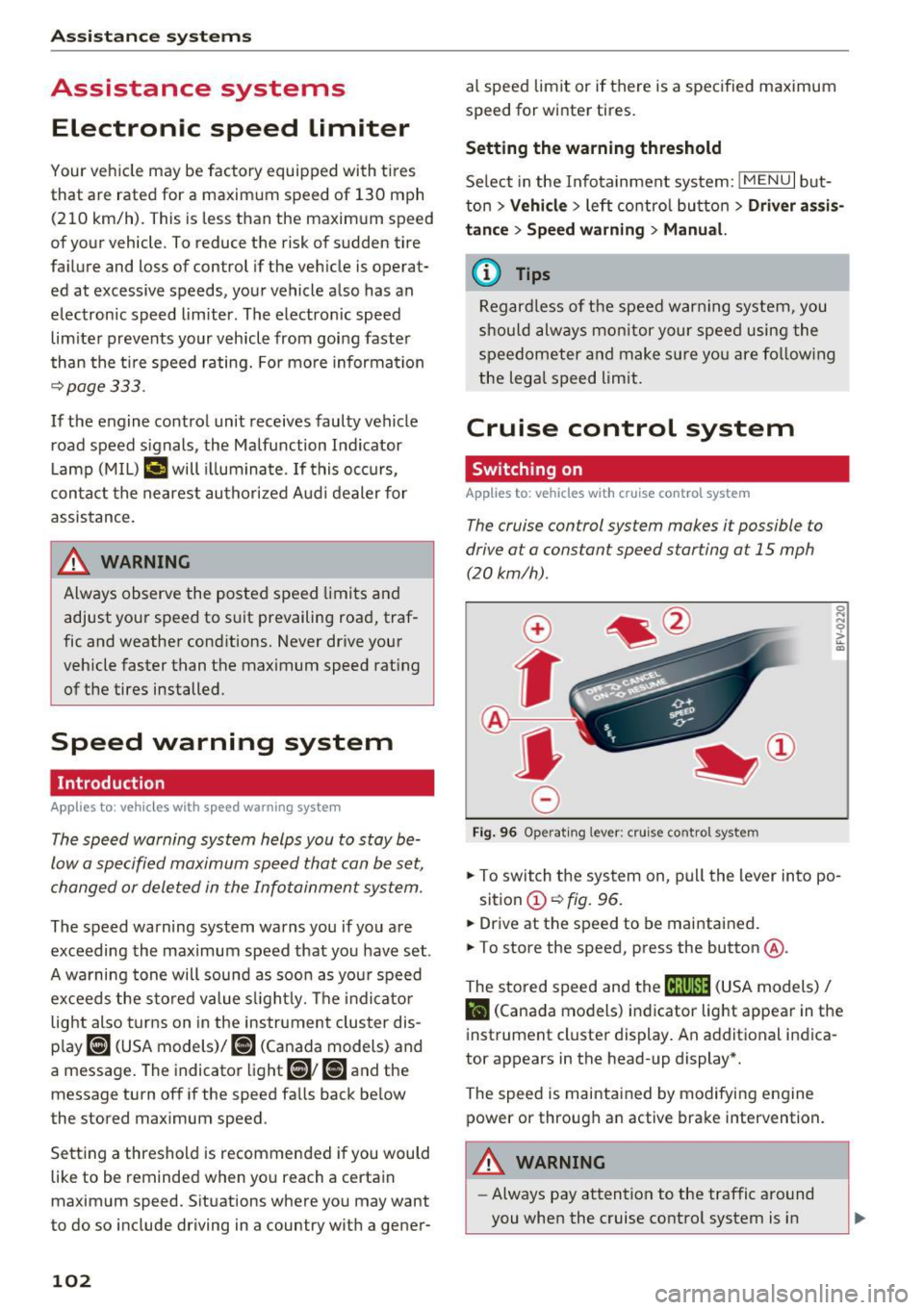
.,. To switch the system on , pu ll the lever into po -
sition
(D <=> fig. 96 .
.. Drive at the speed to be mai ntained.
.. To store the speed, press the button @.
The stored speed and the
ftji(l)~14 (USA models) I
l'I (Cana da models) indicator light appear in the
instrument cluster display. An additional indica
tor appears in the head-up display *.
The speed is maintained by modifying engine power or through an active brake intervention.
A WARNING
- Always pay attention to the traffic around
you when the cruise control system is in
-
Page 105 of 402

u co ...... N r-... N ...... 0
0
:E: '
your speed and the distance between your
vehicle and other vehicles.
- For safety reasons, cruise control should not
be used in the city, in stop-and-go traffic, on
winding roads and when road conditions are poor (such as ice, fog, gravel, heavy rain and
hydroplaning), because th is increases the
risk of an accident.
- Switch the cruise control off temporar ily
when driving in turn ing lanes, h ighway exits
o r in construction zones.
- Please note that unconsciously "resting"
your foot on the accelerator pedal prevents the cruise control from b raking. This is be
ca use p ressing the acce le ra to r peda l ove r
rides the cruise contro l system.
- If a brake system ma lf u nction such as over
heating occurs when the c ruise contro l sys
tem is switched on, the braking function in
the system may be switched off . The rest of
the cruise control system functions remain act ive as long as the
@;\l)Mj (USA models) /
Bl (Canada models) indicator light is on.
Before driving downhill a long distance on a
steep hill, decrease your speed and select a
lower gear. Th is makes use of the eng ine
braking effect and relieves the brakes.
(D} Tips
The brake lights turn on when the brakes are app lied a utomat ically.
Changing the speed
Applies to: vehicles with cruise control system
.,. To increase/decrease the speed in 1 mph (1
km/h) increments, br iefly
tap the lever toward
0 10 ¢ page 102, fig. 96 to the first level.
.,. To inc rease/decrease the speed in 5 mph (10
km/h) i ncrements, br iefly
tap the lever toward
0 10 to t he second level.
.,. To increase or decrease the speed quickly,
hold
the lever toward 0 10 to the first or second
level until the desired speed is reached .
Ass ista nce sys te m s
Overriding the speed
Applies to: vehicles with cruise control system
You can press the acce le rato r pedal to increase
you r speed, for ex ample if you want to pass
someone . The speed you set ear lier will resume
as soon as you release the acce lerator pedal.
However, if you are exceeding the stored speed
by a considerable amount fo r a long time, the
c ruise contro l system will tempora rily switch off.
The
1Q;jl )~ij (USA mode ls) 1111 (Canada mode ls) in
dicator light in the instrument cluster turns
off
and the stored speed is maintained.
Preselecting a speed
Applies to: vehicles with cruise control system
You can pre-select your desired speed when the
vehicle is stationary.
.,. Switch the ignit ion on.
.,. Pull the lever into position
(D ¢ page 102,
fig.
96.
.,. To increase or decrease the speed, tap the lever
toward
0 10 .
This function makes it possible, fo r example, to
save the speed you want before driving on the
highway. Once you are on the expressway, acti
vate the cruise control system by pulling the lev er into position
(D .
Switching off
Applies to: vehicles with cruise control system
Deact ivating temporarily
.,. Press the brake pedal, or
.,. Press the lever toward @(not locked into
p lace)
¢ page 102, fig . 96.
Switching off completely
.,. Press the lever into position @(clicked into
place), or
.,. Switch the ignit ion off .
The speed you stored will be maintained if the cruise contro l has been switched off temporarily .
To resume the stored speed, release the brake pedal and pull the lever to position
(D . .,.
103
Page 106 of 402
Assistance systems
Switching the ignition off will erase the stored
speed.
A WARNING
You should only resume the stored speed if it
is not too high for existing traffic cond itions.
Otherwise you can increase the r isk of an acci
dent.
Camera-based traffic
sign recognition
Description
Applies to: ve hicles with ca mera·based t raffic sign recogni·
tion
F ig. 97 Instrument cluste r: traff ic sign recogn it ion
F ig. 98 Windsh ield: came ra window for t raffic s ig n recog
ni tio n
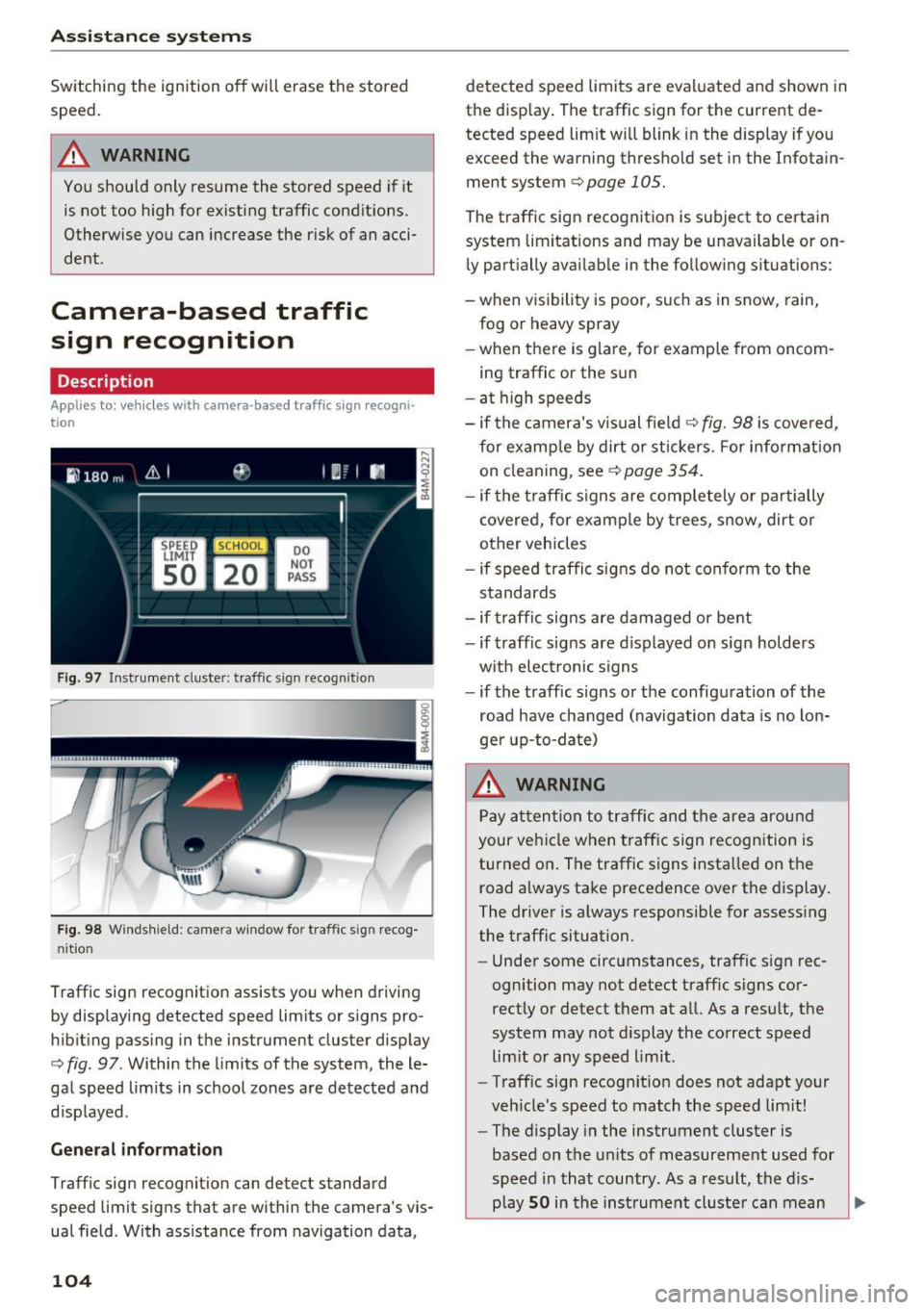
Traff ic sign recognition assists you when driving
by displaying detected speed limits or s igns pro
hibiting passing in the instrument cluster display
c:;, fig . 97 . Within the limits of the system, the le
gal speed lim its in school zones are detected and
disp layed .
General information
Traffic sign recognit ion can detect standard
speed limit signs that are within the camera's vis
ual field . With ass istance from navigation data,
104
detected speed limits are evaluated and shown in
the display . The traffic sign for the current de
tected speed lim it will blink in the display if you
exceed the warning thresho ld set in the Infotain
ment system
c;, page 105.
The traffic sign recognition is subject to certain
system limitations and may be unavai lable or on
ly partially avai lable in the follow ing situations :
- when visibility is poor, such as in snow, rain,
fog or heavy spray
-when there is glare, for example from oncom
ing traffic or the sun
- at high speeds
- if the camera's visual field
¢ fig. 98 is covered,
for examp le by dirt or st ickers. For info rmation
on cleaning, see
¢page 354 .
-if the tra ffic signs are completely or partially
covered, for examp le by trees, snow, dirt or
other vehicles
- if speed traffic signs do not conform to the
standards
- if traffic signs are damaged or bent
- if traffic signs are displayed on sign holders
w ith electronic signs
- if the traffic signs or the configuration of the
road have changed (navigation data is no lon
ger up-to-date)
.&_ WARNING
Pay attention to traffic and the area around
your vehicle when traffic sign recognition is
turned on . The traffic signs insta lled on the
road always take precedence over the display.
The driver is always responsible for assess ing
the traffic situation.
- Under some circumstances, traffic sign rec
ognition may not detect traffic signs cor
rectly or detect them at a ll. As a result, the
system may not display the correct speed
lim it or any speed limit .
- Traff ic sign recognit ion does not adapt your
veh icle's speed to match the speed limit!
- The display in the instrument cluster is
based on the units of measurement used for
speed in that country. As a result, the dis
play
SO in the instrument cluster can mean
-
Page 107 of 402
u (0 ...... N r--. N ...... 0
0
:E
country.
Operation
App lies to: ve hicles with camera -based t raff ic s ign recogni
tio n
Fig. 99 Instrument cluste r: addi tio nal d isp lay
Accessing traffic sign recognition
.. Select: the first tab> Traffic signs.
Setting a speed warning
You can set a warning threshold down to 10 mph (15 km/h) . The traffic sign for the current detect
ed speed limit w ill blink in the disp lay if you ex
ceed the set threshold .
.. Select in the Infotainment system:
!MENUI but
ton >
Vehicle > left control button > Driver as
sistance> Speed warning > Traffic sign based
warning.
Additional display
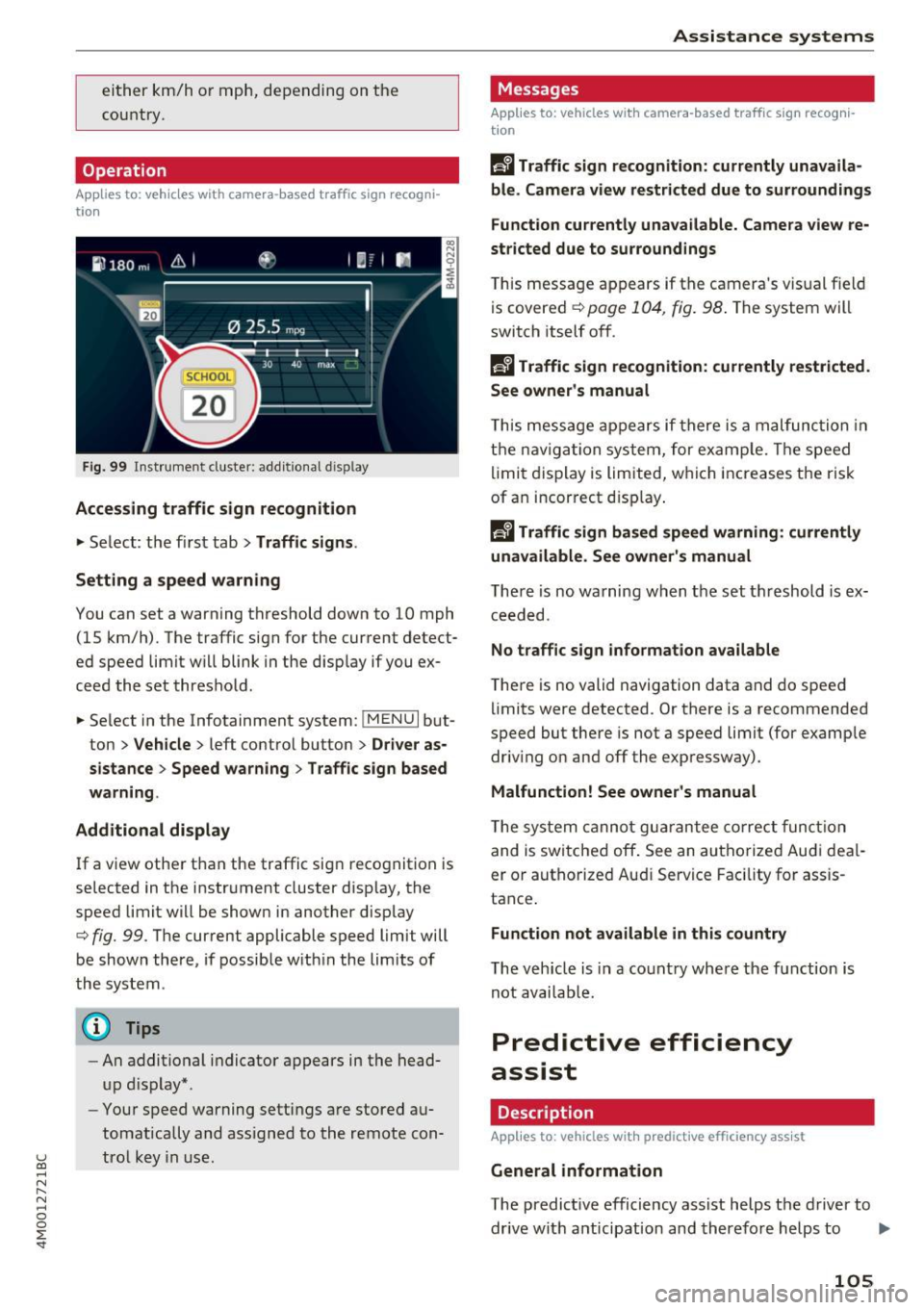
If a view other than the traffic sign recognition is
selected in the instrument cluster display, the
speed limi t will be shown in another display
c::> fig. 99. The current applicable speed limit will
be shown there, if possible within the limits of
the system .
(D Tips
-An additional indicator appears in the head
up display* .
- Your speed warning settings are stored au
tomatically and assigned to the remote con
trol key in use.
Assistance systems
Messages
Applies to: veh icles w ith camera -based traff ic sign recog ni
tion
f!'A Traffic sign recognition: currently unavaila
ble. Camera view restricted due to surroundings
Function currently unavailable . Camera view re
stricted due to surroundings
This message appears if the camera's visual field
is covered
c::> page 104, fig. 98 . The system will
switch itself off.
R Traffic sign recognition: currently restricted .
See owner's manual
T his message appears if there is a malfunction in
the navigation system, for example. Th e speed
limit display is limited, which increases the risk
of an incorrect display.
f!'A Traffic sign based speed warning: currently
unavailable. See owner's manual
There is no warning when the set threshold is ex
ceeded.
No traffic sign information available
There is no valid navigation data and do speed
lim its were detected . Or there is a recommended
speed but there is not a speed limit (for example
driv ing on and off the expressway) .
Malfunction! See owner 's manual
The system cannot guarantee correct function
and is switched off . See an autho rized Audi deal
er or authorized Aud i Service Facility for assis
tance .
Function not available in this country
The vehicle is in a country where the function is
not availab le.
Predictive efficiency
assist
Description
App lies to : veh icles w it h predictive effic iency ass ist
General information
The predict ive efficiency assist helps the driver to
drive with anticipat ion and therefore helps to ..,_
105
Page 108 of 402
Assistance systems
save fuel. The system accesses predictive trip da
ta (including speed limits, inclines and the radius
of c urves) from the navigat ion system* . Informa
tion from the camera-based traff ic sign recogn i
tion* is also applied to recognize traffic signs
,:::;,page 104 .
The messages displayed depend on the naviga
tion data* being up-to-date and the correct iden
tification by the traffic sign recognition*.
When adaptive cruise contro l* is switched off,
the predictive efficiency ass ist only provides noti
f ications without controlled interventions. When
adapt ive cruise control* is switched on, the sys
tem responds to upcoming situations automati
cally .
Vehicles with adaptive cruise control*
Refer to predictive control c::;, page 113.
Indicator in the instrument cluster display
Predictive messages appear in the instrument
cluster display to show the driver the appropriate
time to coast when a situation ahead requires
you to drive at a lower speed.
The messages are only shown if the cr uise control
system* or adaptive cruise contro l* is switched
off.
An additional indicat or appears in the head-up
display* .
Symbol Meaning
Remove your foot from the acceler-
~
ator pedal to slow down, because
there is a situat ion ahead that re-
quires a lower speed.
If you see
Driver assistance in the inst rument
cluster display, the following symbo ls wi ll indi
cate which situation the system is currently re
acting to.
Symbol Meaning
USA models:
MPH Speed limit
km/h
Canada models :
Speed limit
106
Symbol Meaning
_J!L Intersection
,ir
~ T raffic circle .. Of );
If there are multiple situations, then these situa
tions will appear in order in the display .
.8, WARNING
Pay attention to traffic and the area around
your vehicle when the efficiency ass ist is
switched on. The driver is always respons ible
for assessing the traffic situation .
© Tips
- The wo rding of the message may vary de
pending on the driving mode set in drive se
lect*
¢page 134 and the current selector
lever position. No messages are disp layed
when in the S selector lever position or in
Dynamic mode .
- When a route is p lanned using the nav iga
tion system*, then the message feed is
based on th is route. Without route guid
ance, the system uses an assumed route for
the message feed.
- There will not be a message for every s itua
t ion ahead, for example if there is not
enough distance remaining to react to the
situat ion .
- No messages are displayed when at speeds
under 20 mph (30 km/h) .
Settings in the Infotainment system
Applies to: vehicles with predictive efficiency ass ist
.. In the Infotainment system, select: I MENU I
button > Vehicle > left control button > Driver
assistance
> Efficiency assist.
Pred ictive messages are shown when this func
tion is switched o n.
(D Tips
No predictive messages are shown on vehicles
without a navigation system .
-
Page 111 of 402
u (0 ...... N r--. N ...... 0
0
:E
possibl e pass ing maneuver as low. For example,
if a vehicle that was already detected @turns or
changes lanes, the adaptive cruise control reac ts
to the stationary vehicle ahead of it@ .
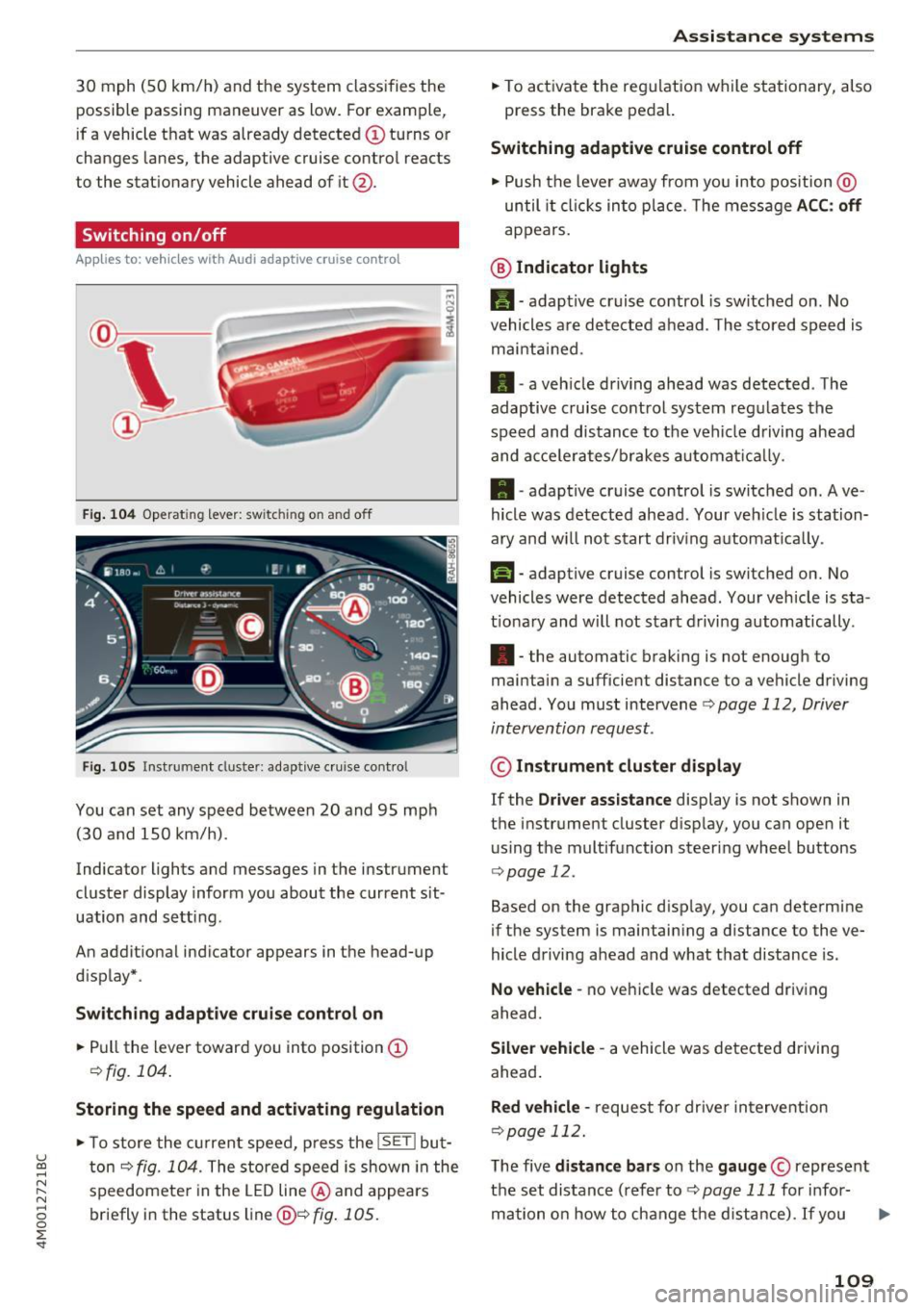
Switching on /off
App lies to: vehicles with Audi adaptive cruise contro l
Fig. 104 Operat in g lever: switc hing on and off
Fig. 105 Instr ument clus te r: adap tive cru ise cont ro l
You can set any speed between 20 and 95 mph
(30 and 150 km/h).
Indicator lights and messages in the instrument
cluster display inform you about the current sit
uation and setting .
An additional indicato r appears in the head-up
d isplay* .
Switching adaptive cruise control on
.. Pull the lever toward you into position@
¢fig. 104 .
Storing the speed and activating regulation
• To store the current speed, press the lSE Tl but
ton ¢
fig. 104. The stored speed is shown in the
speedomete r in the LED line @ and appears
briefly in the status line@¢
fig. 105.
Assistance systems
• To activate the regulation while stationary, also
press the brake pedal.
Switching adaptive cruise control off
• Push the lever away from you into position @
until it clicks into place. T he message ACC: off
appears.
@ Indicator lights
II-adaptive cruise control is switched on . No
vehicles are detected ahead. The stored speed is
maintained.
• -a veh icle dr iving ahead was detected . The
adaptive cruise control system regu lates the
speed and distance to the vehi cle driving ahead
and acce le rat es/b rakes automat ically.
• -adaptive cruise control is switched on . Ave
hicle was detected ahead. Your ve hicle is station
ary and w ill not start driving automat ica lly .
fai-adaptive cruise control is switched on. No
vehicles were detected ahead . Your vehicle is sta
t iona ry and will not start driving automatically.
•- the automatic braking is not enough to
maintain a sufficient distance to a vehicle driving
ahead . You must intervene
¢ page 112, Driver
intervention request.
© Instrument cluster display
If the Driver assistance display is not shown in
the instrument cluster d isp lay, you can open it
using the multifunction steering wheel buttons
¢page 12.
Based on the graphic disp lay, you can determine
if the system is maintain ing a d istance to the ve
hicle driving ahead and what that distance is.
No vehicle -no vehicle was detected driving
ahead .
Silver vehicle -a vehicle was detected driving
ahead .
Red vehicle -request for driver intervention
¢page 112.
The five distance bars on the gauge © represent
the set distance (refer to¢
page 111 for info r-
mation on how to change the d istance). If you .,.
109