display AUDI Q7 2017 Owner´s Manual
[x] Cancel search | Manufacturer: AUDI, Model Year: 2017, Model line: Q7, Model: AUDI Q7 2017Pages: 402, PDF Size: 100.39 MB
Page 54 of 402
Lights and Vision
Interior lighting
Applies to : ve hicles w it h inte rior lig htin g
~ Select in the Infotainment system: IMENU I but
ton
> Vehi cle> left contro l bu tton > Vehicle
settings > Interior lighting.
The interior lighting turns on when you switch
the head ligh ts on while the igni tion is on .
The storage compartment in the door is illumi
nated when yo u reach your hand into the storage
compartment.
Ver sion 1
To adjust the brightness of individua l zones, se
lect
Front brightness *, Door b rightne ss or Foot
well brightnes s.
Turn the control knob to the left
or to the right. Press the control knob to co nfirm
the br ightness .
Version 2
Select and confirm one of the displayed profiles
by press ing the control knob.
Individual: you can customize the brightness and
color of individual zones. Press the r ight control
button. Press the control knob again to confirm
the settings.
Audi drive select: the interior and conto ur light
ing color changes depending on the driving mode
selected in drive select*
<=> page 134.
(D Tips
The setting is a utomat ica lly stored and as
signed to the remote control key that is be ing
used.
52
Instrument illumination
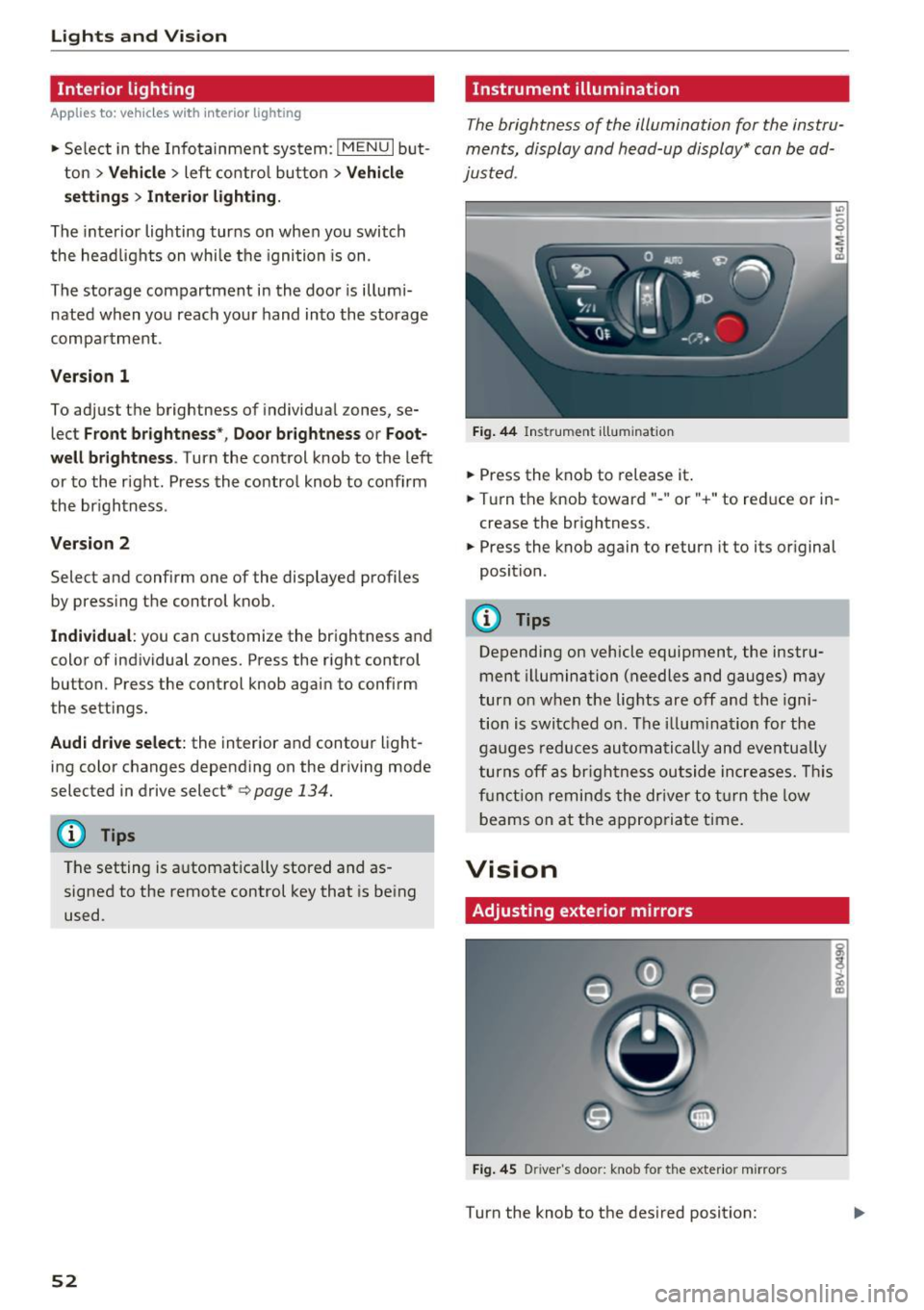
The brightness of the illumination for the instru
ments, display and head-up display* can be ad
justed .
"' t==~====== =-===~=:::::::=====~ ~~
~
Fig. 44 Ins trumen t ill uminat ion
~ Press the knob to release it .
~ Turn the knob toward" -" or" +" to reduce or in
crease the br ightness.
~ Press the knob again to return it to its original
position.
(!) Tips
Depending on vehicle equipment, the instru
ment illumination (needles and gauges) may
turn on when t he lig hts are off and the igni
tion is switched o n. The i llum ination for the
gaug es reduces automatically and eve ntua lly
turn s off a s br igh tne ss ou tside incre ases. This
f u nct io n remin ds the dr ive r to tur n the low
b eams on at the a ppropriate t ime.
Vision
Adjusting exterior mirrors
Fi g. 4 5 D river 's doo r: knob for the exter io r mirrors
Turn the knob to the des ired position:
Page 60 of 402
Lights and Vision
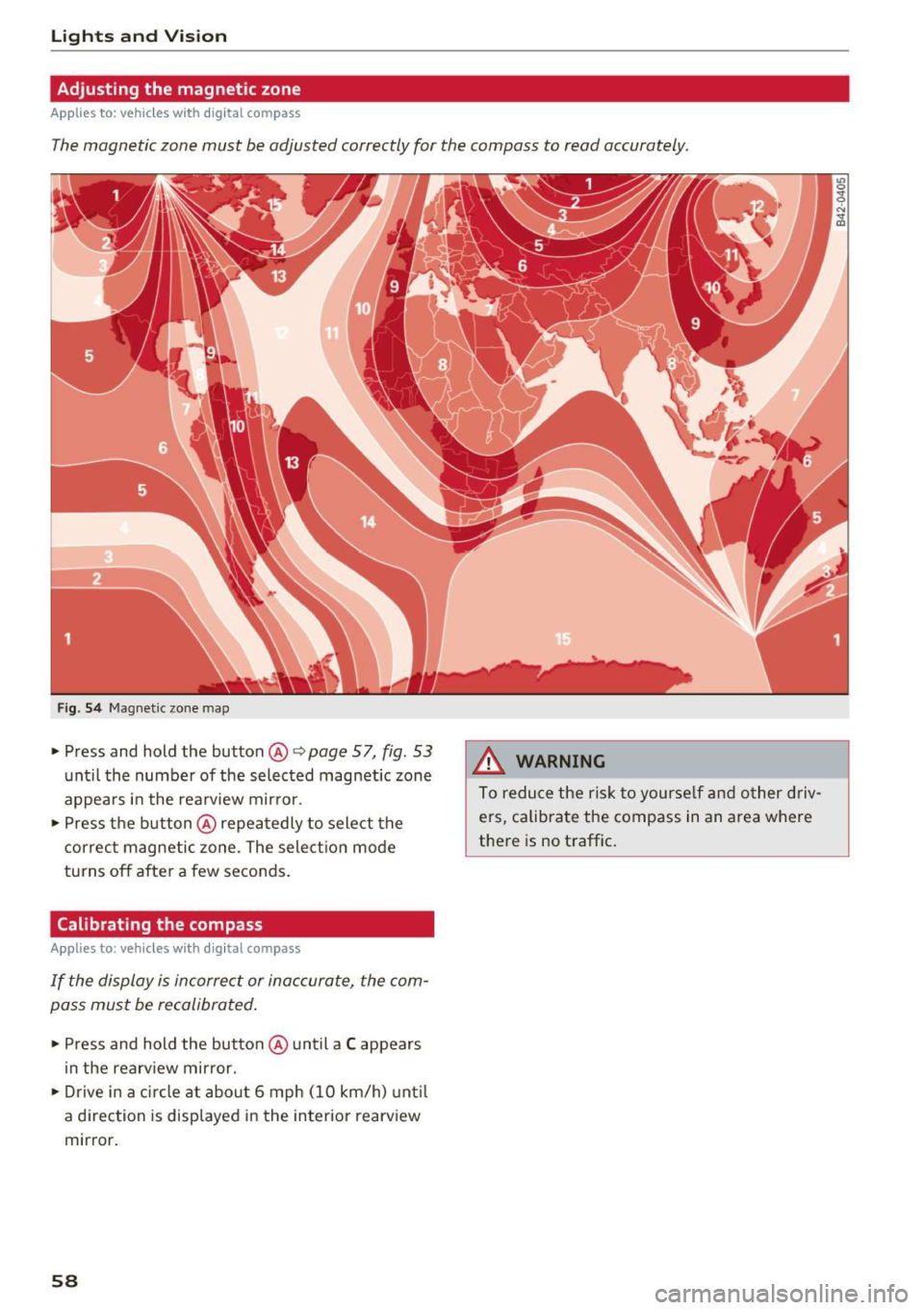
Adjusting the magnetic zone
Applies to: ve hicles w ith d ig ital compass
The magnetic zone must be adjusted correctly for the compass to read accurately.
Fig. 54 Magnetic zone map
• Press and hold the button@~ page 57, fig. 53
unt il the number of the selected magnetic zone
appears in the rea rview mir ror .
• Press the b utton @repeatedly to select the
correc t magnetic zone . The sele ct ion mode
turns off after a few seconds .
Calibrating the compass
App lies to: ve hicles with d ig ital compass
If the display is incorrect or inaccurate, the com
pass must be recalibrated .
• Press and hold the button @ until a C appears
in the rearv iew mirror.
• Drive in a circle at about 6 mph ( 10 km/h) unt il
a d irec tion is displayed i n the in terior rearv iew
mirror .
58
A WARNING
To reduce the ris k to yourse lf and o ther driv·
e rs, calibra te the compass in an area where
there is no traffic .
Page 63 of 402
u (0 ...... N r--. N ...... 0
0
:E
-To reduce the risk of an accident, the seat
can only be adjusted when the vehicle is sta
tionary .
- Be careful when adjusting the seat. Adjust
ing the seat without paying attention can
pinch fingers or limbs, which increases the
risk of injury.
-A lways pull forward on the backrest to make
sure it is check if it is correctly locked in
place.
Entry /exit assistance (second row seats )
Applies to: vehicles with entry assistance
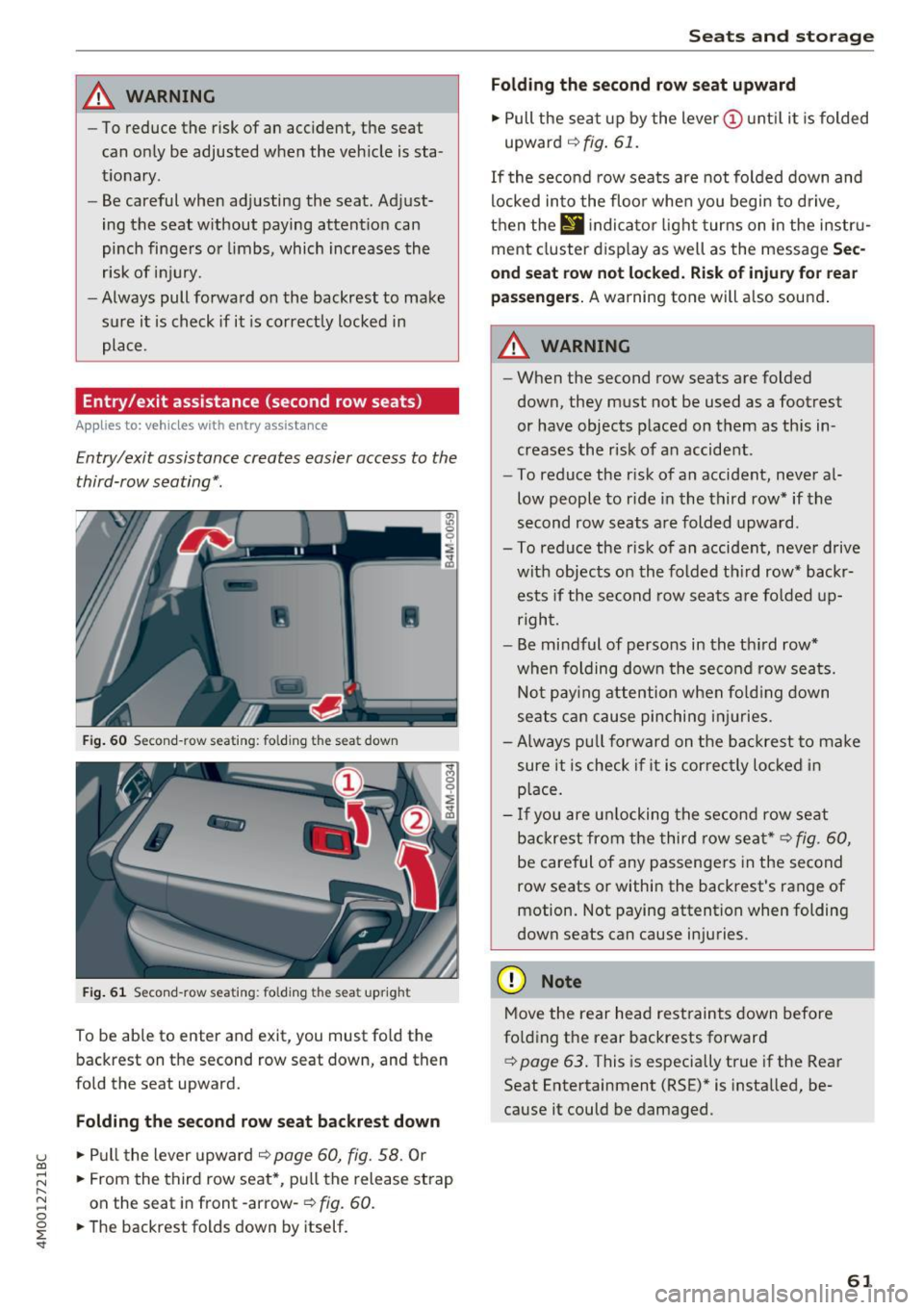
Entry/exit assistance creates easier access to the
third-row seating*.
•
Fig. 60 Second-row seat ing: folding th e seat down
Fig. 61 Second-row seating : fo lding the seat upright
To be able to enter and exit, you must fold the
backrest on the second row seat down, and then
fold the seat upward.
Folding the second row seat backrest down
.,. Pull the lever upward o:::> page 60, fig. 58. Or
.,. From the third row seat*, pull the release strap
on the seat in front -arrow-
o:::> fig. 60.
.,. The backrest folds down by itself.
Seats and storage
Folding the second row seat upward
.,. Pull the seat up by the lever(!) until it is folded
upward
o:::> fig. 61.
If the second row seats are not folded down and
locked into the floor when you begin to drive,
then the
II ind icator light turns on in the instru
ment cluster display as well as the message
Sec
ond seat row not locked. Risk of injury for rear
passengers.
A warning tone will also sound.
A WARNING
-- When the second row seats are folded
down, they must not be used as a footrest
or have objects placed on them as this in
creases the risk of an accident.
- To reduce the risk of an accident, never al
low people to ride in the third row* if the
second row seats are folded upward.
- To reduce the risk of an accident, never drive with objects on the folded third row* backrests if the second row seats are folded up
right.
- Be mindful of persons in the third row*
when folding down the second row seats.
Not paying attention when folding down
seats can cause pinching injuries.
- Always pull forward on the backrest to make
sure it is check if it is correctly locked in
place.
- If you are unlocking the second row seat
backrest from the third row seat*
o:::> fig. 60,
be careful of any passengers in the second
row seats or within the backrest's range of
motion. Not paying attention when folding
down seats can cause injuries .
(D Note
Move the rear head restraints down before
folding the rear backrests forward
¢ page 63. This is especially true if the Rear
Seat Entertainment (RSE)* is installed, be
cause it could be damaged.
61
Page 75 of 402
u co ...... N r-... N ...... 0
0
:E: '
matica lly when the outside temperature is be low
zero. When the cooling mode is switched on,
efx
the vehicle interior is cooled and dehumidified as
quickly as possible.
c'.E) Recirculation mode
In recircu lation mode, the air inside the vehicle is
circu lated and fi ltered. This prevents the unfil
tered air o utside the vehicle from entering the
vehicle interior. Switching recirculation mode on when driving through a tunnel or when sitting in
traffic is recommended
<=> ,& .
Using the button, recircu lation mode is switched
on and off using the~ button. You can also
switch off the recirculation mode by pressing the knob @ (left side) or the off using the :!: button .
AUTO
Automatic mode
Automatic mode maintains a constant tempera
ture inside the veh icle. Air temperature, airflow
and air distribution are controlled automatically .
You can switch automatic mode on or off by
pressing the knob @ (left side) .
Temperature
You can adjust the temperature between 60°F
(+16°()
and 84°F (+28°() by turning the knob
@ . If outs ide of this range,
LO or HI will appear
in the cl imate control system display . At both of
these sett ings, the cl imate control system runs
continuously at maximum cool ing or heating
power. There is no temperature regulation.
8fr Blower
You can manually adjust the volume of air gener
ated by the blower to your preference by turning
the knob
(D . The blower should always run at a
low setting to prevent the windows from fogging
and to ensure a continuous exchange of air inside
the veh icle. To have the blower regulated auto
mat ically, press the knob @(left side).
Air distribution
You can use the buttons to select the vents
where the air will flow. To have the a ir dist ribu
tion regulated automatically, p ress the knob@
(left s ide).
Warm and cold
J ,J Seat heating/ventilation*
If you press the JI~ button, the seat heating/
ventilation is switches on at the highest leve l (3) .
The LEDs indicate the temperature level. To re
duce the temperature, press the button again. To
switch the seat heating/ventilation off, press the button repeatedly until the LED turns off.
3E Defogging
The windshield and side windows are defrosted
or cleared of condensation as quickly as possible.
The maximum amount of air flows mainly from
the vents below the windsh ield. Recirculation
mode switches off. The temperature should be
set at
+72°F (+22°() or higher . The temperature
is controlled automat ically .
Defrost is switched on and off switched on and
off using the~ button. You can sw itch the func
t ion off by pressing the knob @(left s ide).
Applies to vehicles with winds hield de fogger: the
windshield defogger switches on automatically
when outside temperatures are low. If you would like to sw itch the windshield defroster on man
ually, press the :!: button . The LED in the button
blinks .
,!! Rear window defogger
Press the button~ to switch the rear window de
fogger on. It only operates when the engine is running . It switches off automatically after
10 to
20 minutes, depending on the outs ide tempera
ture .
To keep the rear window defogger on continuous ly, press and hold the~ button longer than
three seconds . This is stored until the ign ition is
switched off .
Synchronization
The function is activated by pressing and holding
the knob @ (left side) . When synchron ization is
switched on, the settings for the driver's side are applied to the front passenger's side and the rear
(except fo r seat heating/vent ilation*). Synchro ni
zation switches off if the settings are changed on
the front passenger's side or in the rear. ..,.
73
Page 79 of 402
u co ...... N r-... N ...... 0
0
:E: '
Use the rocker switch(;) to select the funct io n.
When synchronization is switched on, the set
tings for the driver's side are applied to the front
passenger's side and the rear (except for seat
heating/ventilation*). When the settings on the
front passenger 's side or in the rear are changed,
the synchron izat ion is automatically sw itched off
and
4-zone appears in the display .
SET REAR
function
Use the rocker switch (D to select the funct ion .
When the function is switched on, you can adjust
all settings for the rear using the climate control
system controls in the cockpit . The rear climate
control system controls cannot be operated at
the same time. This function switches off auto
matically after a certain period of time or after
l eaving the menu.
Vents
You can open or close the center and rear vents in
the cockpit and the vents in the rear center con
sole and door pillars using the ridged thumb
wheels. The levers adjust the direct io n of the air
flow from the vents. The w ide ven t is opened and
closed using the~ button ~
page 8, fig. 2@ .
Residual heat
You can activate the residual heat funct ion when
the ignition is switched off by pressing the knob
@ (left side). The residual heat from the coolant
is used to heat the vehicle inter io r. The resid ual
heat function switches off automatically after
about 15 min utes.
& WARNING
- You should not use the recirculation mode
for an extended period of time, because no
fresh a ir is drawn in and the windows can
fog when coo ling mode is switched off . This
increases the risk of an accident .
- Individuals with reduced sensitivity to pain
or temperature could develop burns when
using the seat heating function . To reduce
the risk of injury, these ind iv iduals should
not use seat heating.
Warm and cold
(D Note
To avoid damage to the heating elements in
the seats, do not kneel on the seats or place
heavy loads on a small area of the seat.
(D Tips
It is not possible to operate the rear climate
control system controls when the power ch ild
safety lock is switched on. With With the
SET REAR function, you can apply all settings
to the rear using the climate control system
controls in the cockpit
~ page 43.
Setup
Applies to: vehicles with 4 -zone deluxe automat ic climate
contro l
The climate control system basic settings are ac
cessed in the Infotainment system .
.. Select in the Infotainment system: I MENU! but
ton
> Vehicle > l eft control b utton > Air condi
tioning
Seat heating/seat ventilation*
You can adjust the seat heating/ventilation bal
ance fo r the driver, front passenger and rear pas
sengers .
Footwell temperature
You can adjust the footwell temperature so that
it is cooler or warmer.
Auto recirculation
When switched on, automat ic rec irculat ion con
trols the recirculation mode automatically . You
must press the
® MAX button if fog forms on
the windows.
Automatic auxiliary heater*
The aux iliary heater he lps to warm the vehicle in
terior more quickly.
Steering wheel heating
Applies to: vehicles with stee ring wheel heating
The steering wheel rim can be heated .
.. Press the button on the multifunction steering
wheel to switch the steering wheel heating on ..,_
77
Page 80 of 402
Warm and cold
and off ~ ¢ page 14, fig. 11. The message
Steering wheel heating: on /Stee ring wheel
heating : off
appears in t he instr ument cluster
display.
The temperatu re is maintaine d at a constant lev
e l when steering whee l heating is switched on.
T he stee ring wheel heat ing settings are s to re d
a utomatically and ass igned to the remote cont ro l
key that is in use .
78
Page 86 of 402
Driving
Ple ase pre ss brake pedal
This message appears if you do not press the
brake pedal whe n starting the eng ine.
Ill Rem ote control key : key not recognized . Is
the key still in th e ve hicle ?
This indicator light turns on and th is message ap
pears if the ignit ion key was removed from the
ve hicle when the engine was running . If the igni
tion key is no longe r in the veh icle, you cannot
sw itch on the ignit ion or sta rt the engine once
you stop it. You also cannot loc k the vehicle from
the o uts ide.
Shift to P, otherwi se vehicl e can roll awa y.
D oor s do not lo ck if gea rshift i s not in P
This message appears for safety reasons if the
selecto r lever is in the N position whe n you
sw itch the ignition off . Move the selector lever to
the P pos ition. Otherwise the vehicle is not pro
tected from rolling and it cannot be locked.
II Rem ote control key : hold b ack of k ey
again st th e designat ed are a. S ee owner' s m an
ual
If the indicator light turns on and th is message
appears, there is a malfunction
c::> page 84.
S hift to P before le aving ca r, otherw ise vehicle
can r oll away
This message appears if the driver's door is
opened while the ignition is switched on and the
transmission has not been shifted to the P posi
tion . Shift the transmission into the P position
and turn off the ignition if you are leav ing the ve
h icle. Otherwise the veh icle could roll. Also see
c::> page 86 .
84
Starting the engine when there is a
malfunction
It may not be possible to start the engine under
certain cir cumstances, for example if the battery
in the vehicle key is drained, if interference is af
fected the key or if there is a system malfunc
tion.
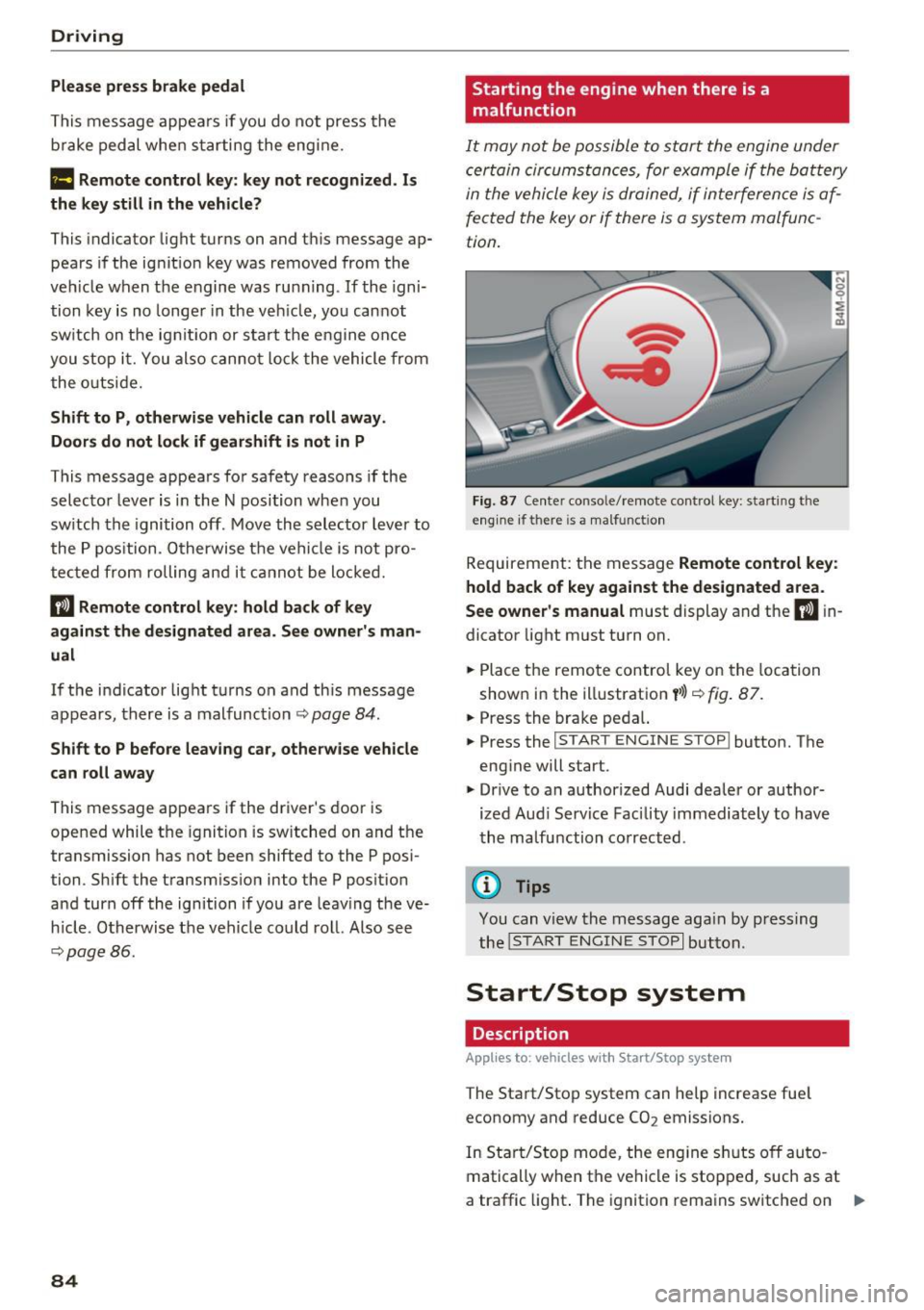
F ig. 87 Ce nte r conso le/ remote control key: start ing t he
eng ine if there is a ma lfunct ion
Requireme nt: the message Remote control ke y:
hold back of ke y aga in st the des ignated area.
S ee own er's manual
must display and the II in
dicator light must turn on.
.,. Place the remo te control key on the loca tion
shown in the illustration
y >l} c::> fig . 87.
.,. Press the brake pedal.
... Press the
!START ENGINE STOP ! button. The
engine will start.
.,. Drive to an authorized Audi dealer or author
ized Aud i Serv ice Facility immediately to have
the ma lfunction corrected .
@ Tips
You can view the message aga in by press ing
the
I S TAR T ENGI NE STOP I button.
Start/Stop system
Description
Applies to: vehicles with Start/Stop system
The Start/Stop system can help increase fue l
economy and reduce CO2 emissions.
In Sta rt/Stop mode, the eng ine s huts off auto
matically when the vehicle is stopped, such as at
a traffic light . The ignition remains switched on .,.
Page 87 of 402
u (0 ...... N r--. N ...... 0
0
:E
automatically when needed.
The Start/Stop system is automatically activ ated
as soon as the igni tion is switched on .
Basic requirements for Start /Stop mode
- The driver's door must be closed.
- The driver 's sea t belt much be fas tened .
- The hood must be closed .
- The vehicle must have driven faster than 2 mph
(3 km/h) since the last time it stopped.
- A trailer must not be hitched to the vehicle .
I f you leave the vehicle during a stop phase, the
e ngine can be restarted withi n app rox imately 30
seconds if the following requirements are met:
- The driver's door must be closed, the dr iver
must be wear ing the safety belt and the brake
peda l mus t be p ressed . Or:
- The driver's door must be closed, the bra ke
pedal mus t be pressed and a gear m ust be se
lected .
(D Note
Always sw itch the Start/Stop system off when
driving through water~
page 84.
@ Tips
The engine stops shortly before the vehicle
comes to a stop
1>.
Stopping /starting the engine
Applies to: vehicles with Start/Stop system
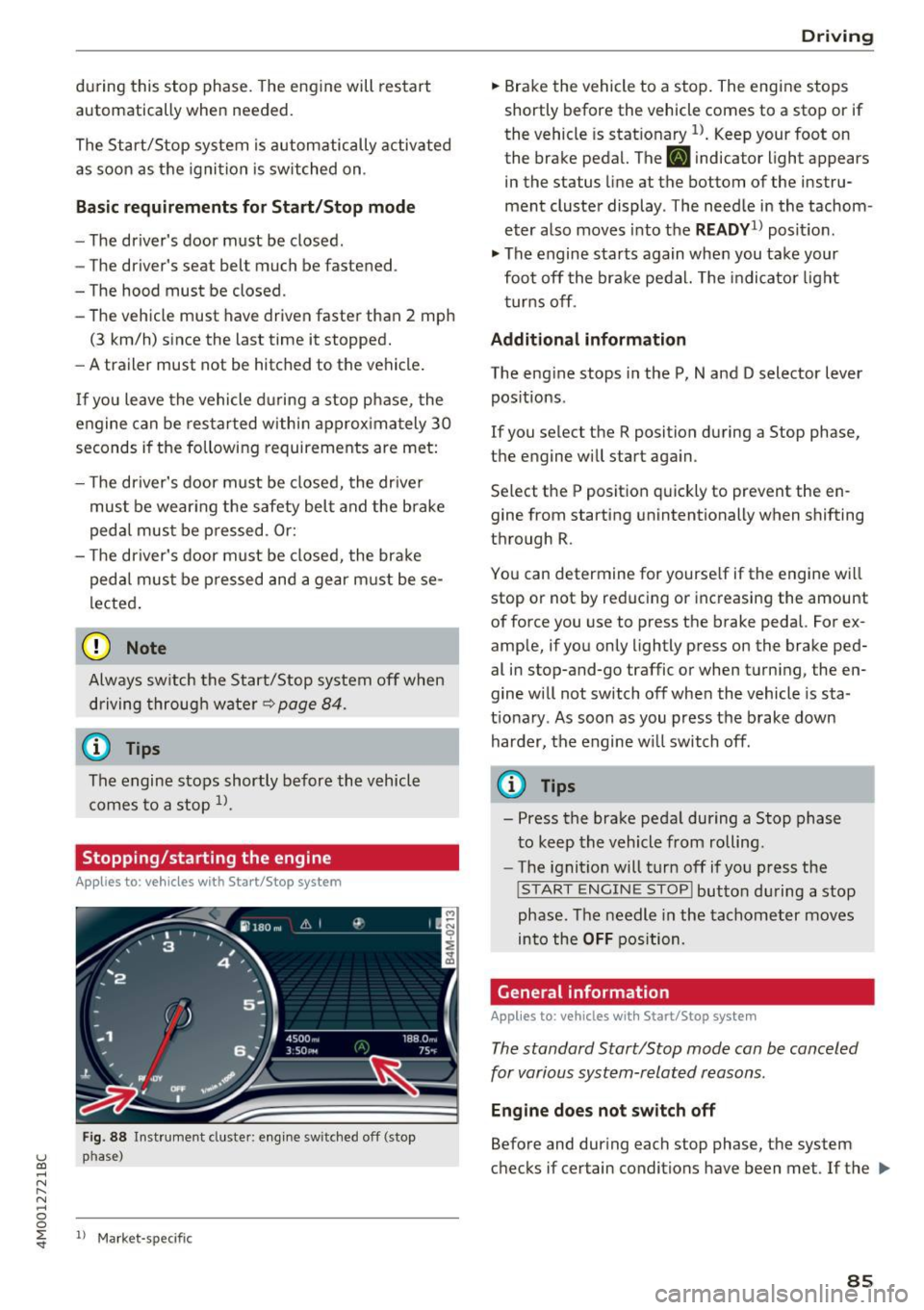
Fig . 88 Inst rument cluste r: engine sw itched off (stop
p h ase )
ll Mark et-sp ecific
D rivi ng
.,. Brake the vehicle to a stop. The engine stops
shortly before the vehicle comes to a stop or if
the vehicle is stat ionary
l) . Keep your foot on
the brake pedal. The
[I] indicator light appears
in the status line at the bottom of the instru
ment cluster display . T he need le in the tachom
eter also moves into the
READY1l posit io n .
.,. The engine starts again when you take your
foot off the brake pedal. The indicator light
t urns off .
Additional inform ation
The eng ine stops in the P, N and D selector lever
positions .
If you select the R position during a Stop phase,
the engine will star t again .
Se lect the P position quickly to prevent the en
gine from sta rting unintentionally when shifting
through R .
You can determ ine for yourse lf if the eng ine will
stop or not by reducing or increasing the amount
of force you use to press the brake pedal. For ex
ample, if you only lightly pre ss on the brake ped
al in stop-and-go traffic or when turn ing, the en
gine w ill not switch off when the vehicle is sta
t ionary . As soon as you press the brake down
harder, the engine w ill switch off .
(D Tips
- Press the brake peda l during a Stop phase
to keep the vehicle from rolling.
- The ignition will turn off if you press the
!S TART ENGINE STOPI button during a stop
phase . The needle in the tachometer moves
into the
OFF position.
Gene ral information
Applies to: vehicles with Start/Stop system
The standard Start/Stop mode can be canceled
for various system-related reasons .
Engine doe s not switch off
Before and during each stop phase, the system
checks if certain conditions have been met . If the
liJl,,
8 5
Page 89 of 402
u co .... N r-... N .... 0
0
:E: '
Applies to: vehicles wit h Start/Stop system
Automatic start /stop deacti vated: Please
restart engine manually
This message appears whe n specific condi tions
are not met dur ing a stop phase. The Star t/Stop
system wi ll not be ab le to restart the engine . The
engine must be started with the
I STAR T ENGINE STOPI button.
Automatic st art /stop system: malfunct ion!
Function unavailable. Pl ease contact Service
There is a malfunction in the Start/Stop system .
Drive the ve hicle to an author ized A udi dealer or
author iz ed Service Facility as soon as poss ible to
have the ma lfunction corrected.
Electromechanical
parking brake
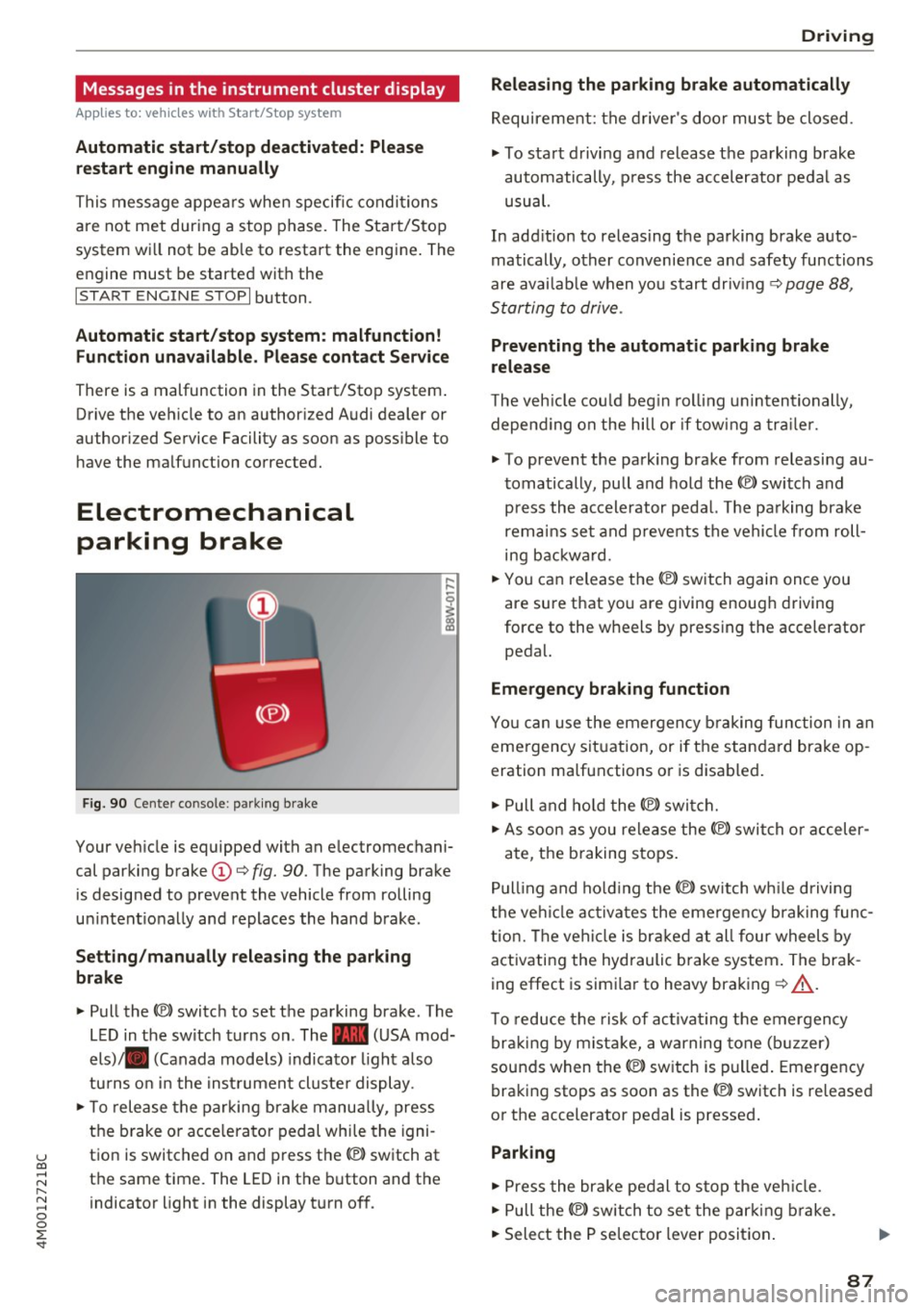
F ig . 90 Cen ter co nso le: park ing brake
Your veh icle is equipped with an electromechani
cal parki ng brake
(D ¢ fig. 90. The parking brake
is designed to prevent the vehicle from rolling
u ni ntent io nally and replaces the hand brake.
Setting /manually releasing the parking
brake
"' Pull the(®) switch to set the pa rking brake . The
L ED in t he switch turns on. The -(USA mod
els) . (Canada mode ls) indicato r light a lso
tu rns o n in the inst rument cl uste r display .
"'T o release the parking b rake manu ally, press
the b rake o r acce lera to r pedal whi le the igni
t ion is switched on and press th e® ) switch at
the same time. The LED in the b utton and the
indicator light in the display t urn of f.
D riving
Releasing the parking brake automatically
Requirement: the d rive r's doo r mus t be closed.
"' To start d rivi ng and release the parking brake
automatically, p ress the accelerator pedal as
usual.
In add it ion to releas ing the parking brake auto
matically, other convenie nce a nd safety functions
are avai lab le when you start driving ¢
page 88,
S tarting to drive .
Preventing the automatic parking brake
release
The veh icle cou ld beg in rol ling u nintentionally,
depe nding on the hill or if tow ing a traile r.
"' To prevent the park ing brake from releasi ng au
t omatically, pu ll and hold the®) switch and
p ress the accele rator peda l. The parking brake
remain s se t a nd p revents the vehi cle from roll
ing b ackwa rd.
"' You can release the®) switch again once you
are sure that yo u are giving enoug h driving
force to the wheels by pressing the accelerator
peda l.
Emergency braking function
You ca n use the emergency b raking function in an
eme rgency sit uation, or if the standard brake op
eration ma lfunctions o r is disab led .
"' Pull and ho ld the(®) switch .
"' As soon as you release the ®> switch or acceler -
ate, t he b raking stops .
Pu lling and ho ld ing the®) switch w hile driving
t h e ve hicl e ac tiva tes the eme rge ncy brak ing func
tion. The ve hicl e is brak ed a t all four wheels by
activating the hydraulic b rake system . The brak
ing effect is simi lar to heavy braking ¢
A_.
To reduce the risk of ac tivat ing the emergency
b raki ng by mist ake, a war ning tone (b uzzer)
sounds when the®) switch is p ulled . Emergency
braking stops as soon as the(®) switch is released
o r the accelerator pedal is pressed .
Parking
"'Press the bra ke pedal to stop the veh icle .
"' Pull the®) switch to set the par king brake.
"' Select the P se lec tor lever position .
87
Page 92 of 402
Driving
Incline angle
A rising difference in a ltitude (incline) on a 109
yard (100 m) stretch is given in perce ntage or de
g rees . Data indicating whether the vehicle can
drive up an incline by itself (dependent on the
road surface and the engine power among other
factors). Maximum permitted incline angle: 31
°
G round clearance
The distance between the road s urface and the
lowest point on the vehicle underbody .
-Vehi cles with steel su sp en si on : gro und clear
ance : 8 .3 in (210 mm)
- Vehi cles with air suspen sion* : maximum
ground clear ance: 9.7 in (245 mm)
&, WARNING
Exceed ing the specified max imum values can
lead to severe personal injur ies or vehicle
damage.
- All data was co llec ted on f lat, firm, non
s li ppery road surfaces and under d ry weath
er conditions .
- Ideal conditions do not apply to offroad driving. Neve r go a ll the way up to the maxi
mum va lues , but rather always leave a sa fe
ty margin.
Messages
There is only one motto when driving in difficult
conditions and offroad: drive slowly and with
caution!
Observe the fo llowing when driv ing on unpaved
roads:
• Only drive in terrain that is s uita b le for the ve
hicle and your d riving ability. Never take any
u nnecessary risks!
• Drive slowly and carefu lly.
• Pay attention to the
ground clearance of your
vehicle.
• Activate the
offroad mode as needed
¢ page 149.
• Use the hill desc ent assist when dr iv ing down
steep h ills
9page 150.
90
Difficult terrain and off -road
When dr iving in unf ami liar areas and off road,
drive slowly and keep on the watch for unexpect
ed obstacles (such as potho les, rocks, tree
stumps, etc .).
To p revent the vehicle from bottom ing o ut and to
reduce the risk of underbody damage, yo u should
drive across uneven gro und on only one side of
the ve hicle so that only two of your wheels cross
the uneven area, instead of driving across the
center of the uneve n area with all four wheels.
D rive quickly thro ugh sandy or marshy off-road
sections and do not stop, if at all possib le .
Driving through water
Also read the information fo und in 9 page 79.
Driving on a slope
If you a re ever unable to drive up a h ill, do not try
to turn around . Dr ive back down in
reve rse in
stead . Othe rw ise you run the risk of tipping over .
If the vehicle threatens to t ip over when dr iving
across a slope, you must immediat ely steer
downhill in the direction of the slope .
Do not park your vehicle on steep hills .
To reduce the risk of tipping over, drive on hills in
the d irection of the downward slope (fall line) -
ne ver crosswise.
Tilt angle display
Description
Applie s to: ve hicles w ith a tilt ang le d isp lay
I l 1ft r offr:'l;ic1
·, 1
~ '
Allroad -
0
l • . ,. _,....
J
Comfort ~ ~
Auto Jl• 11· 0- .
Dynam ic
~ ~
Individual 11 • 11•
.,t,.
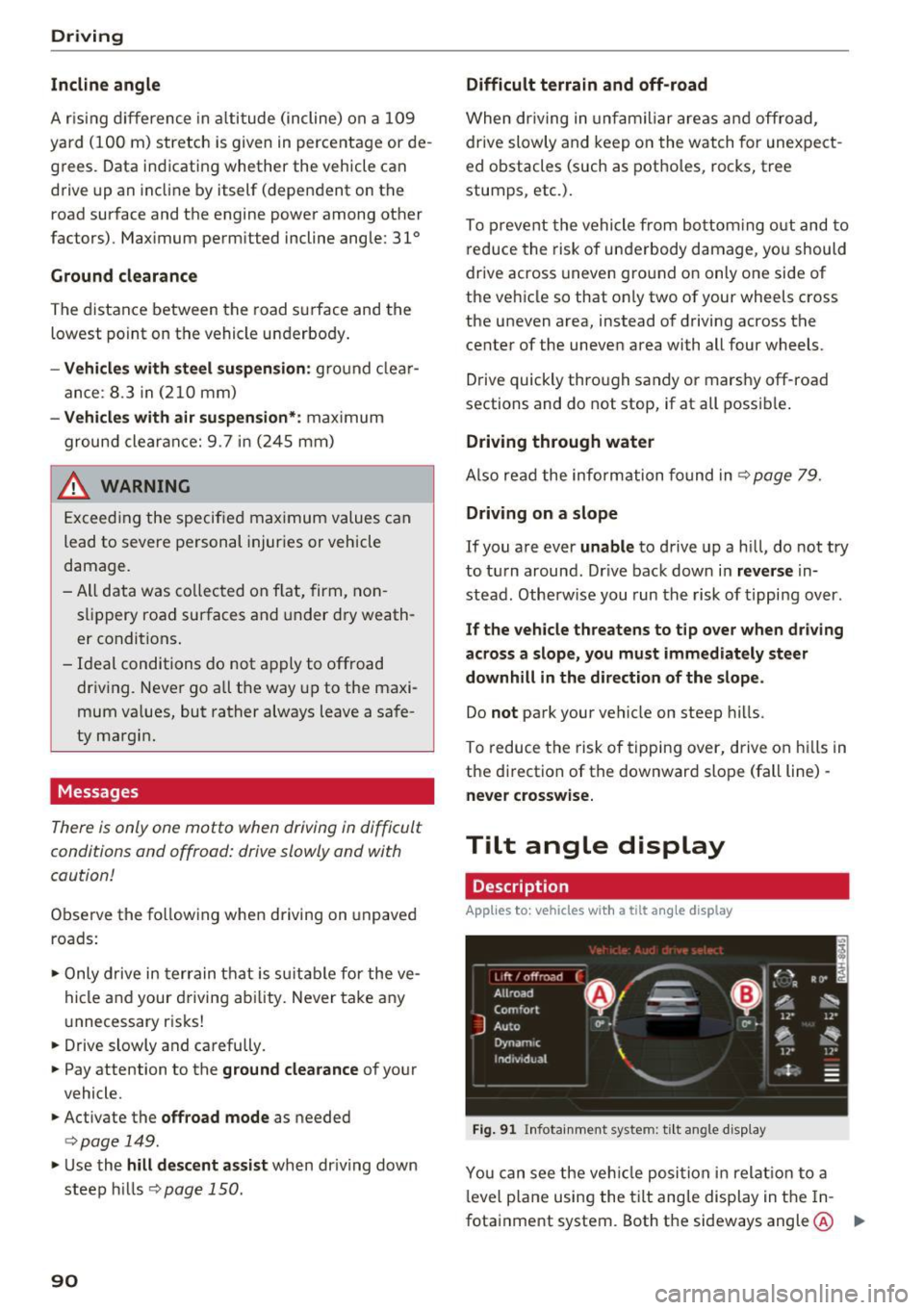
F ig. 91 I n fota inme nt system : til t an gle d isp lay
You can see the ve hicle position in relat io n to a
l evel p lane using the t ilt ang le display in the In
fotainment system . Both the sideways angle @ .,.