display AUDI Q7 2017 Owner´s Manual
[x] Cancel search | Manufacturer: AUDI, Model Year: 2017, Model line: Q7, Model: AUDI Q7 2017Pages: 402, PDF Size: 100.39 MB
Page 121 of 402
u co ...... N r-... N ...... 0
0
:E: '
gerous situation as critical if a vehicle driving
ahead brakes sudden ly, if your own vehicle is ap
proaching a significantly s lower vehicle at high
speed or when there is an oncoming vehicle dur
ing a turning maneuver .
If detection is not possible, then pre sense front
does not react.
Warnings
App lies to: veh icles with Audi adaptive cruise contro l
Fig. 115 In strument clus te r: approac h warning
General information
The system recognizes various dangerous situa
tions. The
early warning occurs if:
- a vehicle driving ahead brakes suddenly,
- your own vehicle approaches a s ignificantly
s lower vehicle o r stationary vehicle in the direc
tion of travel.
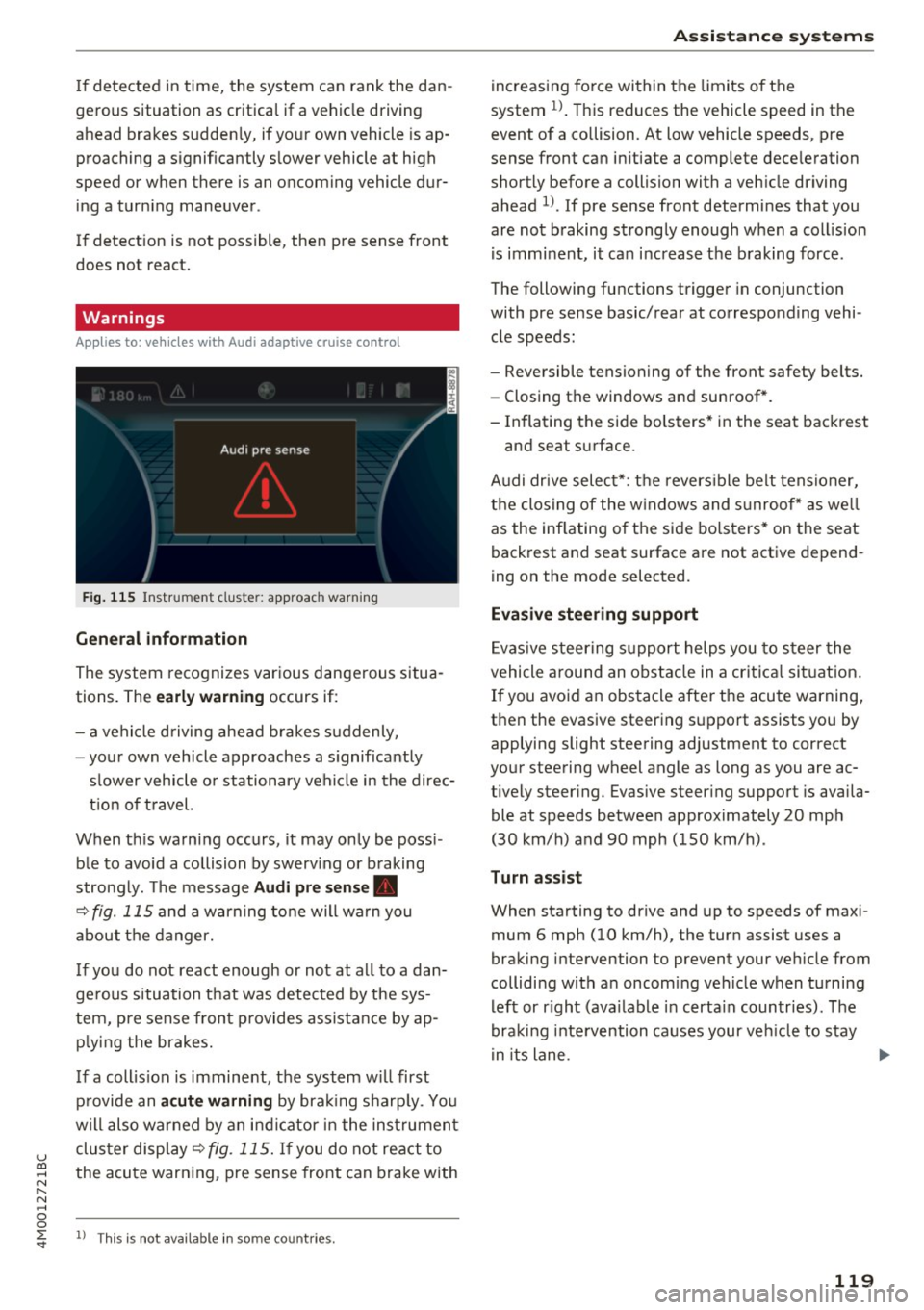
When this warning occurs, it may only be poss i
ble to avoid a collision by swerv ing or b raking
strong ly. Th e message
Audi pre sense .
¢ fig. 115 and a warning tone will warn you
about the danger.
If you do not react enough or not at all to a dan
ge rous situation that was detected by the sys
tem, pre sense front provides assistance by ap
p ly ing the brakes.
If a collis ion is imminent, the system w ill first
provide an
acute warning by braking sharp ly. You
will also warned by an ind icator in the instrument
cluster display¢
fig. 115. If you do not react to
the acute warning, pre sense front can brake with
l) This is not availa ble in so m e co untries.
Assistance systems
increasing force within the limits of the
system
1l . This reduces the vehicle speed in the
event of a collision. At low vehicle speeds, pre
sense front can in itiate a complete deceleration
shortly before a collision with a veh icle driving
ahead
l ). If pre sense front determines that you
are not braking strongly enough when a collis ion
is imminent, it can increase the braking force .
The following functions trigger in conjunc tion
with pre sense basic/rear at corresponding vehi
cle speeds :
- Reversible tensioning of the front safety belts. - Closing the windows and sunroof*.
- Inflating the side bolsters* in the seat backrest
and seat surface.
Audi dr ive select*: the reversible belt tensioner,
the closing of the windows and s unroof* as we ll
as the inflating of the side bolsters* on the seat
backrest and seat surface are not active depend
ing on the mode selected.
Evasive steering support
Evasiv e steering support helps you to steer the
vehicle around an obstacle in a critical situation.
If you avoid an obstacle after the acute warning,
then the evasive steering support assists you by applying slight steering adjustment to correct
your steering wheel angle as long as you are ac
t ively steer ing. Evasive steer ing support is availa
ble at speeds between approximately 20 mph
(30 km/h) and 90 mph (150 km/h) .
Turn assist
When starting to drive and up to speeds of maxi
mum 6 mph (10 km/h), the turn assist uses a
braking intervention to prevent your ve hicle from
colliding w ith an oncoming vehicle when turning
left or r ight (ava ilable in certa in countries). The
braking intervention causes your vehicle to stay
i n its lane . ..,.
119
Page 126 of 402
Ass is tance sy stems
Switching on /off
Applies to: ve hicles w ith Audi active lane assist
Fig. 116 Turn signa l lever : button for act ive lane assist
F ig. 117 Windsh ield: camera window for ac tive lane assist
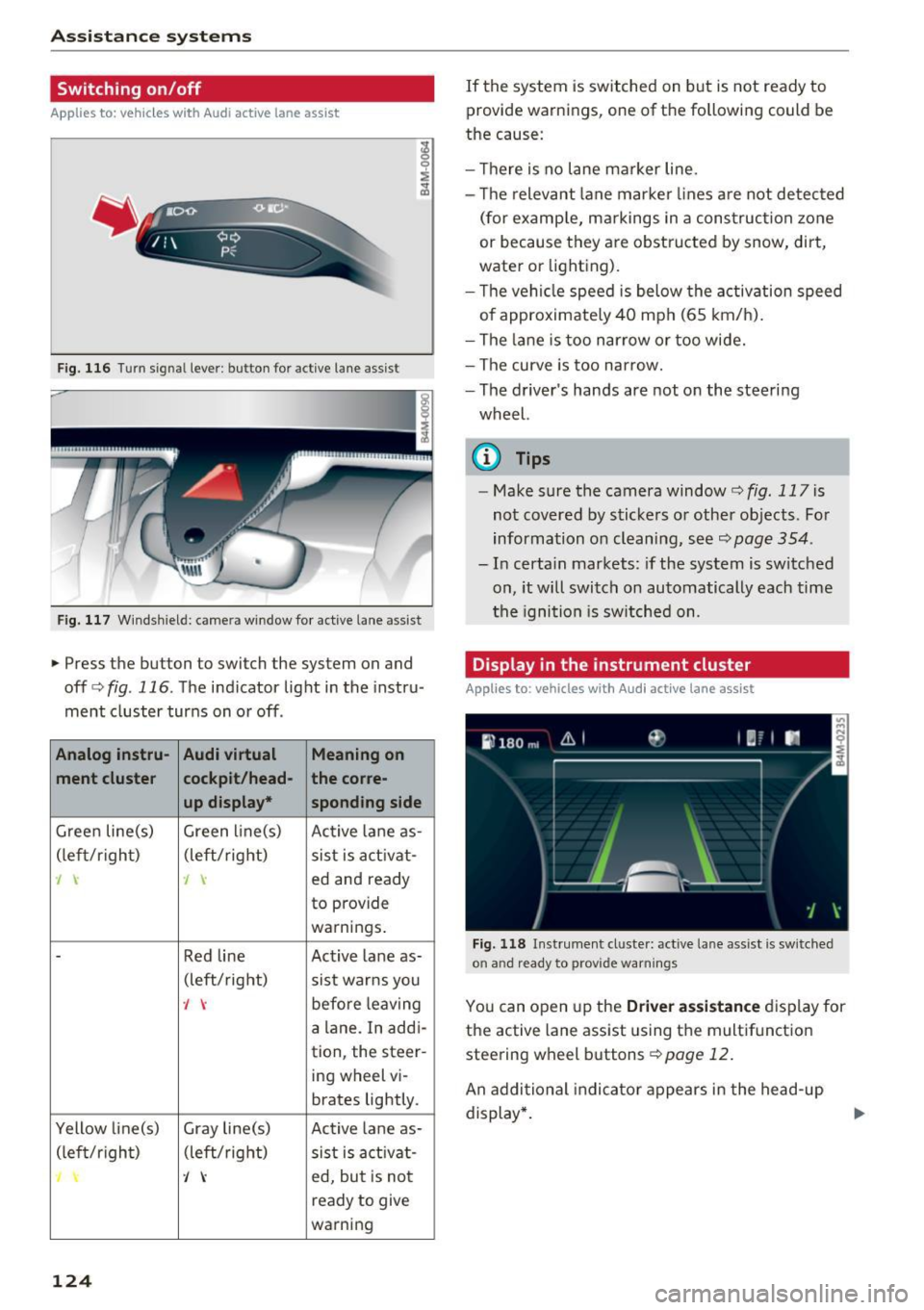
• Press the button to switch the system on and
off<=:>fig . 116 . The indicator light in the instru
ment cluster turns on or off .
Analog instru- Audi virtual Meaning on
ment cluster cockpit/head- the co
rre -
up displa y•
spond ing side
Gree n line(s) Green li ne(s)
Active lane as-
(left/r ight) (left/right)
sist is act ivat-
J J ed and ready
to provide
warnings .
-Red line Act ive lane as-
(left/ right)
sist warns you
., before leaving
a lane. In addi-
tion, the steer-
ing wheel vi-
brates lightly.
Yellow line(s) Gray line(s) Active lane as-
(left/r ig h t) (left/right) sist is act ivat -
J ed, but is not
ready to give
warning
124
If the system is switched on but is not ready to
provide warnings, one of the following could be
the cause:
- T here is no lane marker line.
- The relevant lane marker lines a re not detected
(for examp le, ma rkings in a construction zone
or because they are obstructed by snow, dirt,
wate r or lighting).
- Th e vehi cle speed is below the activation speed
of approximately 40 mph (65 km/h).
- The lane is too nar row or too wide.
- The curve is too narrow.
- The driver's hands are not on the steering
wheel.
(0 Tips
- Make sure the camera window¢ fig. 117 is
not covered by stickers or other objects. For
information on cleaning, see~
page 354.
- In certain markets: if the system is switched
on, it will switch on automatically each time
t he ignition is sw itched on.
Display in the instrument cluster
App lies to: vehicles wit h Aud i ac tive lane ass ist
F ig. 118 Instrument cluste r: active lane assist is sw itched
on and ready to provide warnings
You can open up the D river ass is t a nce disp lay for
the active lane assist using the multifunct ion
steering wheel buttons¢
page 12.
An additional indicator appears in the head -up
display *.
Page 127 of 402
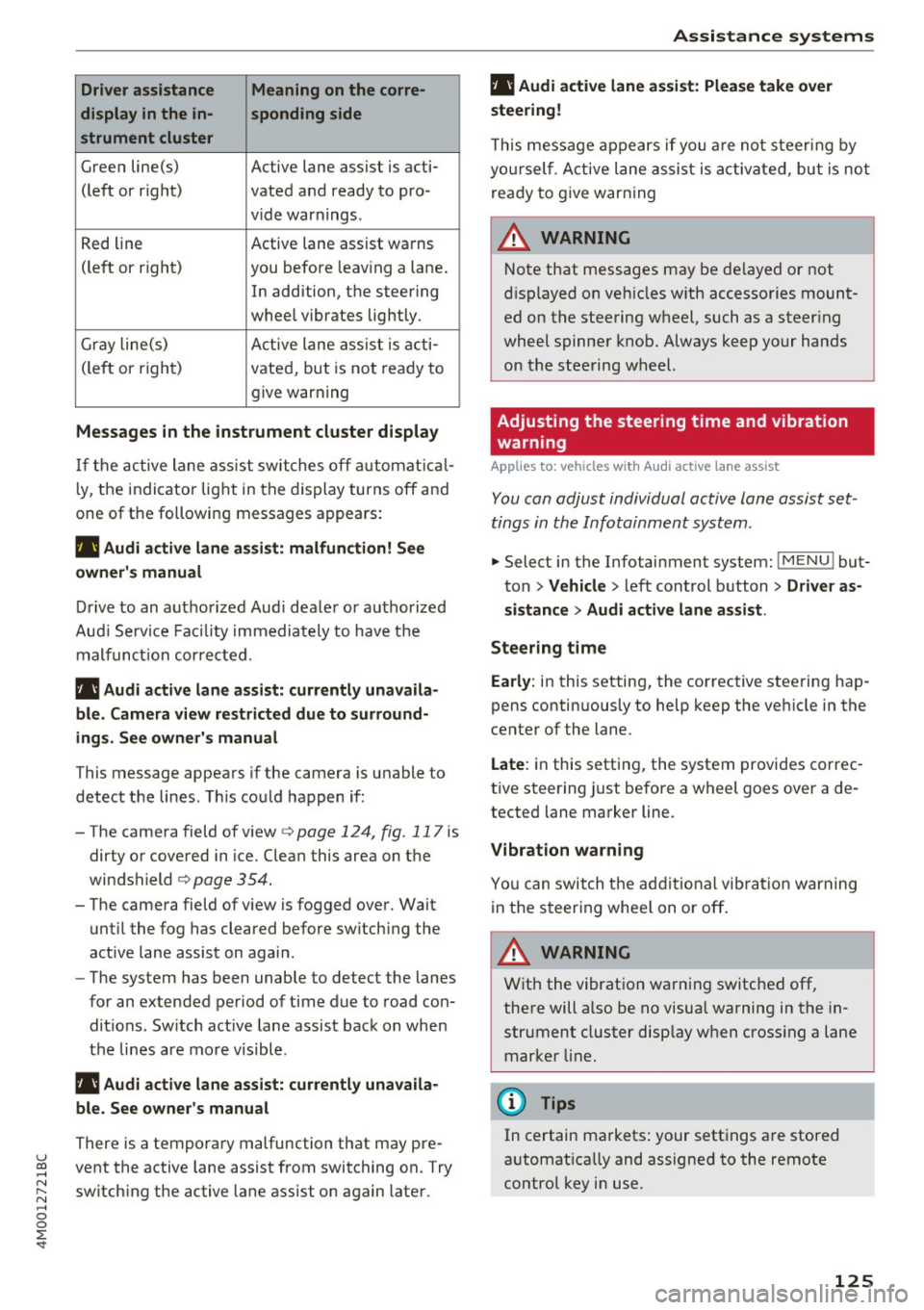
Driver assistance Meaning on the corre-
display in the in- sponding side
strument cluster
G reen line(s) Active lane assist is acti-
(left or right) vated and ready to pro -
v ide warnings .
R ed line Active lane assist warns
(le ft or right) you before leav ing a lane .
In addition, the steering
whee l vibrates lightly.
Gr ay line(s) A ctive lane ass ist is a cti -
(le ft or righ t) vate d, bu t is not rea dy to
give warning
Messages in the instrument cluster display
If t h e active lane as sist swi tches off automat ical
l y, the indicator lig ht in the dis play turns off an d
one of the followin g messages appea rs:
rl1 Audi a ctive lane assist: malfunction! See
owner's manual
Dri ve to an autho rize d Aud i dea le r o r a uthorized
Au di Serv ice Fac ility immediately to hav e th e
mal func tion cor re cte d.
rl1 Aud i active lane assist: currently unavaila
ble . Camera view restricted due to surround
ings . See owner's manual
This message appea rs if the camera is u nable to
detect t he lines . T his co uld happen if :
-The came ra field of v iew
c> page 124, fig . 117 is
dirty o r covered in ice. Clean this area on t he
windshield
c> page 354 .
- The came ra field of v iew is fogged ove r. Wait
unt il the fog has cleared before sw itching the
active lane assist on agai n.
- The system has been unable to detect the lanes
fo r an extended period of time due to road con
ditions. Sw itch act ive lane assist back on when
t h e lines are mo re visible.
rl1 Audi active lane assist: currently unavaila
ble. See owner's manual
There is a tempora ry malfunction that may pre -
u ~ vent the active lane assist from switching on. Try
N ~ switch ing the active lane assist on again later .
.... 0
0
:E: '
rl1 Audi active lane assist: Please take over
steering!
T h is m essa ge appears if yo u are not s teer ing by
yo ursel f. A ct ive lane assis t is a ctiva te d , but is no t
r e ad y to g ive warning
A WARNING
N ote that messages may be de layed or not
di sp layed o n ve hicles w ith accesso ries moun t
ed on the stee ring w heel, such as a steer ing
whee l spinne r knob . Always keep your hands
on the stee ring wheel.
Adjusting the steering time and vibration
warning
Applies to: veh icles w ith Audi active lane assist
You can adjust individual active lane assist set
tings in the Infotainment system .
-
.,. Select in the Infotainment system: I M ENU ! but
ton
> Vehicle > l eft control b utton > Driver as
sistance
> Audi active lane assist .
Steering time
Early: in this setting, the corrective stee ring hap
pens contin uously to help keep t he ve hicle in the
center of the lane.
Late : in this setting, the system provides co rrec
t ive steer ing just before a wheel goes over a de
tected lane marker line.
Vibration warning
Yo u can swit ch t he a dditiona l vib ra tion warn ing
in the s teer ing whee l on or off .
A WARNING
With the vibrat io n wa rni ng switched off,
the re will a lso be no visual warnin g in the in
str ument cluster disp lay w hen cross ing a lane
mar ker lin e.
(I} Tips
In certain ma rkets : your sett ings a re stored
a utomat ica lly and assigne d to the remote
control key i n use.
125
Page 128 of 402

Assistance systems
Audi side assist
Description
Applies to: vehicles with Aud i side ass ist
0 9
!
F ig. 119 Sensor detec tfon range
Fig. 120 Display on the exterior m irro r
Side assist (lane change assist) helps you monitor
your blind spot and traffic behind your vehicle.
W ith in the limits of the system, it warns you
about vehicles that are coming close r or that are
traveling with you w ithin sensor range(!)
c>fig. 119. If a lane change is classified as criti
cal, the disp lay@ in the exterior mirror turns on
c>fig . 120.
The display in the left exter ior mirror provides as
sistance when making a lane change to the left,
while the disp lay in the right exterior mirror pro
vides assistance when making a lane change to
the right .
Information stage
As long as you do not activate the turn signal,
side assist
informs you about vehicl es that are
detected and classified as critical. The disp lay in
the mirror turns on, but is dim .
The display remains dim in the information stage
so that your view toward the front is not distur
bed.
126
Warning stage
If the display in a mirror blinks brightly when you
activate a turn signal, side assist is
warning you
about detected vehicles that it has classified as critical.
If this happens, check traffic by glancing
in the exterior mirrors and over your shoulder
c> .&. in General information on page 127.
Applies to: vehicles with active lane assist: the
display in the mirror can also blink if you have not
activated a turn signal: if you are approaching a
detected lane marker line and it appears you will
be leaving the lane, side assist will warn you
about detected vehicles that it has class ified as
critical.
(D Tips
You can adjust the br ightness on of the d is
play on the rearview mirror
c> page 128.
Page 129 of 402

u (0 ...... N r--. N ...... 0
0
:E
Applies to: vehicles with Audi side assist
®
@
©
Fig. 121 Dr iving s ituatio ns
AUD I
Fig. 122 Rear of the vehicle: position of the senso rs
Side assist functions at speeds above approxi
mately 9 mph ( 15 km/h) .
@ Vehicles that are approaching
N
0
0
:i;
" al
In certain cases, a vehicle will be classified as
critical for a lane change even if it is still some
what far away. The faste r a veh icle approaches,
t he sooner the display in the exterio r mirror w ill
turn on.
@ Vehicles traveling with you
Vehicles traveli ng with you are ind icated in the
exte rior mi rror if they are classified as critical for
a lane change. All vehicles detected by side assist
Assistance systems
are indicated by the time they ente r your "blind
spot", at the latest.
© Vehicles you are passing
If you s low ly pass a vehi cle that side assist has
de tected (the difference in speed between the
vehicle and your vehicle is less than approximate
ly 9 mph (15 km/h)), the disp lay in the exterior
mirror turns on as soon as the vehicle enters your
blind spot.
T he display w ill not turn on if you quickly pass a
vehicle that side assist has detected (the differ ence in speed is greater than approximate ly 9
mph (15 km/h)) .
Functional limitations
The radar sensors are designed to detect the left
and right adjacent lanes when the road lanes are
the normal width. In some situations, the display
in the exterior mirror may turn on even though
there is no veh icle located in the area that is criti
cal for a lane change. For example :
- If the lanes are narrow or if your are driving on
the edge of your lane. If this is the case, the
system may have detected a vehicle in another lane that is
not adjacent to your current lane .
- If you are driving through a curve . Side assist
may react to a vehicle that is in the same lane
or one lane over from the adjacent lane .
- If side assist reacts to other objects (such as
roadside structures like guard rails).
- In poor weather conditions. The side assist
functions are limited.
Do not cover the radar sensors
c:> fig. 122 with
stickers, deposits, bicycle wheels or other ob
jects, because th is will impair the function . Do
not use s ide assist when towing a trai ler. For in
formation on cleaning, see
c:> page 354.
A WARNING
-- Always pay attention to traffic and to the
area around your vehicle . S ide assist cannot
replace a driver's attention. The driver alone
is always responsible for lane changes and
-
similar driving maneuvers . IJI,
127
Page 130 of 402

Ass is tan ce sys tems
-In some situations, the system may not
function or its funct ion may be limited. For
example:
- I f vehicles are approach ing or being left
behind very quickly. The display may not
turn on in time.
- I n poor weather conditions such as heavy
rain, snow or heavy mist.
- On very wide lanes, in tight curves, or if
there is a rise in the road su rface. Vehicles
in the adjacent lane may not be detec ted
because they are outside of the sensor
range.
@ Note
The sensors can be displaced by impacts o r
damage to the bumper, whee l housing and
underbody. This can impair the system . Have
an authorized Audi dealer or authorized Audi
Service Facility check their function.
(D Tips
- If the window g lass in the driver's doo r or
front passenger's door has been tinted, the
display in the exterior mirror may be incor
rect.
- For an explanation on conformity with the
FCC regulations in the United States and the
Industry Canada regulations, see
c::> page384.
Switching on/off
Applies to: veh icles with Audi side assist
The system can be switched on/off in the Info
tainment system.
If the system is activated, the displays in the ex
ter ior mirrors will turn on briefly when the ign i
tion is sw itched on .
.,. Se lect in the Infotainment system:
IMENU I but
ton
> V ehicle > left contro l button > Driver a s
sistance
> Audi side ass ist . Off switches the
system off.
128
(D Tips
When you switch side assist on or off, the ex it
warning system activates or deact ivates
c::> page 129.
Setting the display brightness
Applies to: vehicles with Audi side ass ist
The display brightness con be adjusted in the In
fotainment system.
.,. Select in the Infotainment system : IMENU! but
ton
> V eh icle > left control button > Dri ver as
s ist ance
> Audi side a ssist.
The display br ightness adjusts au tomatically to
the brightness of the surroundings, both in the information and in the warni ng stage. In very
dark or very bright surroundings, the automatic
adjustment will set the display to the minimum or max imum level. In such cases, you may notice
no change when ad justing the br ightness, or the
change may only be noticeab le once the sur
r oundi ngs change.
Adjust the brightness to a level where the display
i n the information stage will not disrupt your
view ahead. If you change the br ightness, the dis
play in the exterior mirror w ill briefly show the
br ightness leve l in t he i nfo rmation stage . The
brightness of the warning st age is linked to the
brightness in the information stage and is adjust
ed a long with the information stage .
(D Tips
-Side ass ist is not a ctive while you are mak
ing the adjustment.
- Yo ur setti ngs are a utomat ica lly stored and
assigned to the remote control key being
used .
Page 131 of 402

u (0 ...... N r--. N ...... 0
0
:E
Applies to: vehicles with Audi side assist
Fig . 123 Example dis play
Fig. 124 Door: warning str ip
When the veh icle is stationary, the exit warning
system warns the passengers of a possible colli
sion when opening the door . Within the limits of
the system, the system monitors the areas be
hind and next to the vehicle using the radar sen
sors
~ page 127, fig. 122 . Moving objects that
are approaching from behind, such as cars, are
detected
~ fig. 123.
When you open the door, the warning strip on
the affected door blinks ¢
fig. 124 if another
road us er is detected and the situation is classi
f ied as critical. The display in the exterior mirror
on the affected s ide flashes at the same time . If
the door is already open and another road user is
detected and the situation is classified as critical,
then the corresponding displays turn on.
A WARNING
-A lways pay attention to traffic and to the
area around your vehicle. The exit warning
system does not replace the attention of the
passengers. The vehicle passengers are al-
Assistance systems
ways responsible for opening the doors and
exiting the vehicle.
- The exit warning system can be available for
up to approximately three minutes after un
locking the vehicle and opening the door as
well as after switching off the ignition . Then
the system switches off with a brief flashing
of the displays.
- The exit warning system cannot notify you
of every approaching object or person, such
as joggers or pedestrians .
A WARNING
The exit warning system is subject to limita
tions and cannot warn you before every im
pending collision:
- If the vehicle is too wide for the parking
space and covered by the neighboring
vehicles.
- Approaching objects or people such as cy
clists or skateboarders may not be detected
under certain circumstances.
- The system does not react to stationary ob
jects.
- The view of the radar sensors may be im
paired by leaves, snow, heavy spray or dirt .
Clean the area in front of the sensors
c:o page 127, fig. 122.
(D Note
Also read the information in r:o© in General
information on page 128 .
(D Tips
-The exit warning system is switched on and
off through the side assist~
page 128.
-The display brightness for the exit warning
system cannot be adjusted.
- The system is not available when towing a
trailer.
-
129
Page 132 of 402

Assistance systems
Rear cross-traffic assist
Applies to: vehicles w ith rear cross -traff ic ass ist
Fig . 125 Example display
Fig. 126 Infotainment system: rear cross-traffic assist dis
play
The rear cross-traffic assist can warn the driver of
a potential collision with approaching cross-traf
fic when driving in reverse. Within its limits, the
system monitors the areas behind and next to
the vehicle using the radar sensors when leaving
a parking space
r::!.>page 127, fig. 122. Moving ob
jects that are approaching, such as cars, are de
tected
r::!.>fig. 125.
If the system detects critical cross traffic when
backing out of a parking space, it will react as fol
lows:
- Visual indicator : an indicator appears in the In
fotainment system display with a red arrow
symbol. The arrow points in the direction from
which the object is approaching
r::!.> fig. 126.
-Audible warning signal : a continuous tone may
sound as an additional indicator when driving in
reverse.
- Automatic brake activation : a brief activation
of the brakes may also warn you of a potential
collision with an approaching object.
130
Requirements for using the rear cross-traffic
assist:
- The parking aid must be switched on
c>page 138.
-Reverse gear must be engaged.
- The speed must not be higher than approxi-
mately 9 mph (15 km/h).
A WARNING
- The rear cross-traffic assist is an assist sys
tem and cannot prevent a collision by itself.
The driver must always intervene. The driver
is always responsible for braking at the cor
rect time.
- Please note that the rear cross-traffic assist
may activate the brakes unexpectedly. Se
cure any cargo that you are transporting to reduce the risk of damage or injury.
- An additional brake activation may be trig gered within 20 seconds after an automatic
brake activation.
- If there is an acoustic warning signal from the rear cross-traffic assist, then the parking system may not warn you of detected
obstacles under certain circumstances.
- The view of the radar sensors may be im
paired by leaves, snow, heavy spray or dirt.
Clean the area in front of the sensors
r::!.>page 127, fig. 122.
A WARNING
The rear cross-traffic assist is subject to limi
tations and cannot warn you before every im pending collision:
- If the vehicle is too wide for the parking
space and covered by the neighboring
vehicles.
- People, such as cyclists, joggers, in line skat
ers and pedestrians, may not be detected
under certain circumstances.
- If you are in a parallel parking space or diag
onal parking space.
(D Note
Also read the information in r::!.>0 in General
information on page 128.
Page 133 of 402

@ Tips
-You can cancel the automatic brake activa
tion w ith increasing bra king fo rce if you ap
ply the brakes yourse lf or accelerate cons id
erab ly.
- In some situations, rea r cross-traffic assist
may warn yo u even if there is no cross traffic
i n a cr itical a rea , for examp le w hen back ing
i nto a parki ng space or ma neuver ing.
- The rea r cross-traffic ass ist also switches off
whe n you switch off the ESC.
- The rea r cross traffic assist switches on and
off thro ugh the pa rking aid
qpag e 138.
- The system is not available when towin g a
trailer.
Messages
A ppl ies to: ve hicles with Audi side assist
A message appears in the inst rument cluste r dis
p lay if the s ide ass ist swi tches off autom atically .
@j Audi side assist: malfunction! Please contact
Service
@j Audi side assist and exit warning : malfunc
tion! Please contact Service
The system ca nnot gu ara nt ee th at i t w ill detec t
ve hicl es co rrectly and it has switched off. The
sensors have been moved o r are faulty . Have t he
system checked by an a uthorized Audi dealer or
author ized Audi Se rvice Facility s oon.
@j Audi side assist: currently unavailable. Sen
sor vision restricted due to surroundings . See
owner 's manual
@j Audi side assist and exit warning : currently
unavailable. Sensor vision restricted due to sur
roundings
The rad ar senso r vis io n i s im paire d. T he ar ea in
fr on t of the senso rs must no t be covered by bik e
r ac ks, st ic kers, leaves, snow or any other o bjects.
C lea n the area i n front of the senso rs, if necessa
ry
¢ page 127, fig. 122.
~ @j Audi side assist: currently unavailable. See ......
~ owner 's manual
N ...... 0
0
:E: '
@j Audi side assist and exit warning: currently
unavailable. See owner's manual
S id e assi st cann ot be sw itche d on a t this tim e be
cau se the re is a m alfu nct ion ( for e xample, the
ba tte ry c harge leve l may be to o low) .
@j Audi side assist: unavailable in towing mode
@j Audi side assist and exit warning: currently
unavailable. Towing mode
S ide assist switches off automatically when the
electrical connecto r in t he factory-installed trail
er hitch is connected . There is no guarantee the
system will sw itch o ff when us ing a ret rofi tted
t rail er h itch . Do not u se side assist and the ex it
warni ng w hen tow ing a tra ile r.
[II Rear parking aid : obstacle detection restrict
ed
The rear c ross-traffic ass ist is not available. E i
t h er the ESC is sw itched off, or the rada r senso rs
may be cove re d by a b ike rack, stic ke rs, leaves,
snow o r other objects . Swi tc h the ESC on, or
cle an the area in fron t of th e senso rs if necessa ry
~ page 127, fig. 122. If thi s m essage co ntin ue s
to be displayed, dr ive imme dia tely to an author
i z ed Audi deal er or author ized Audi Service Facili
ty to have the ma lf u nction re paire d.
Night vision assist
Description
App lies to : vehicles wit h night vision assist
The night vision assist can detect, highlight and,
if necessary , warn about pedestrians and large
wild animals .
Nigh t vision assist he lps yo u when it is dark by
u sing an infra red came ra to monit or the a rea in
front of your ve hicle , w ith in the limits of the sys
tem .
It can disp lay objec ts up to a dis tance of ap
prox ima tely 1 000 feet (300 m) . T he thermal im
age dete cted by the came ra is show n in t he in
s tru me nt clus ter di sp lay . W arm a reas appea r
lig hter a nd co ld ar eas ap pea r dar ker.
131
Page 134 of 402
Ass is tance sy stems
Highlighting detected pedestrians and wild
animals
Applies to: vehicles with night vision ass ist
F ig. 127 Instrument cluster: yellow highl ighted pedes
trians
F ig . 128 Instrument cluster: symbol when the infrared im
age is not vi sible
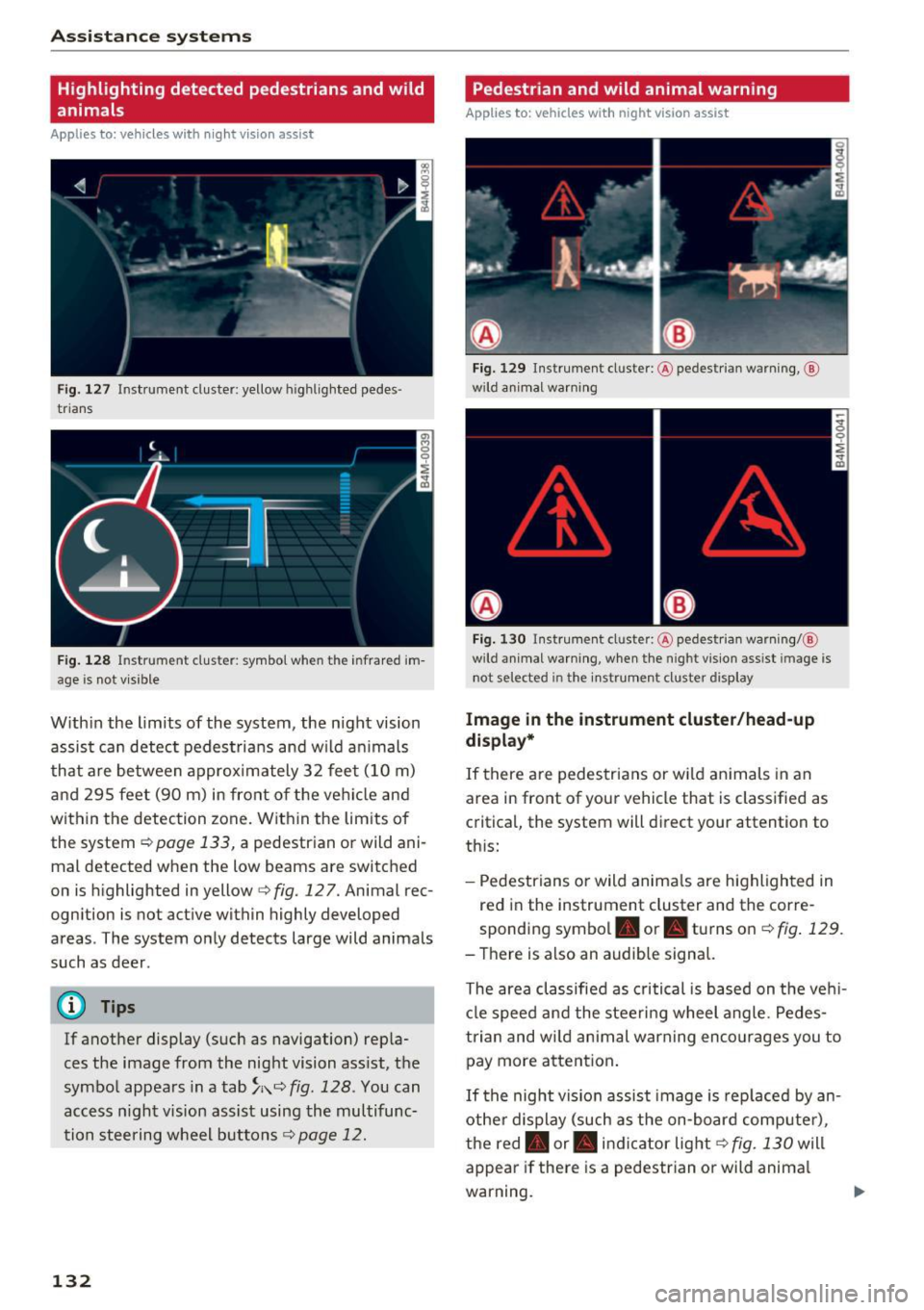
With in the limits of the system, the night vision
assist can detect pedes tria ns and w ild an imals
that are between approximately 32 feet (10 m)
and 295 feet (90 m) in front of the vehicle and
within the detection zone. Within the limits of
the system
r:::;, page 133, a pedestrian or wild ani
mal detected when the low beams are switched
on is highlighted in yellow
i=> fig. 127. Animal rec
ognition is not active within highly developed
areas . The system only detects large wild animals
such as deer .
@ Tips
If another display (such as navigation) repla
ces the image from the night vision ass ist, the
symbol appears in a tab
~ i\. r:::;, fig. 128 . You can
access n ight vision assist using the multifunc
tion steering wheel buttons
r:::;, page 12.
132
Pedestrian and wild animal warning
Applies to: vehicles with night vision assist
Fig. 12 9 Instrument cl uster: @ pedest rian warning, @
wild anim al warn ing
Fi g. 130 Instr ument clus ter: @pedest ria n warning/ @
wild animal warning, when the nigh t vision ass ist im age is
not selected in the instru men t cluste r display
Image in the instrument cluster /head-up
di spl ay *
If there are pedes trians or wild an imals in an
area in front of your vehicle that is classified as
critical, the system will direct your attention to
th is:
- Pedestrians or wild anima ls are highlighted in
red in the instrument cluster and the corre
sponding symbol. or. turns on
r:::;, fig. 129 .
- There is also an audible signal.
The area classified as c ritical is based on the veh i
cle speed and the steeri ng wheel angle . Pedes
trian and wild animal warning enco urages you to
pay more attention.
If the night vision assist image is rep laced by an
othe r d isplay (such as the on-board compute r),
the red. or. in di cator light
r:::;, fig. 130 will
appear if there is a pedestrian or wild anima l
warning.