reset AUDI Q7 2017 Owner´s Manual
[x] Cancel search | Manufacturer: AUDI, Model Year: 2017, Model line: Q7, Model: AUDI Q7 2017Pages: 402, PDF Size: 100.39 MB
Page 244 of 402
Media
Show DVD menu
The DVD main menu opens in the Info tainmen t
sys tem display.
-Selecting a menu item : select and confirm a
menu i tem.
Or : move yo ur finger on the M MI
t ouch contro l pa d* and press the contro l kno b.
Audio trackll
You can manually set the a udio track (language
and aud io format). The language and aud io for
mat op tions depend on t he v ideo DVD.
Subtitles1l
You can set subt itles for playback manua lly. The
languages available depend on t he DVD.
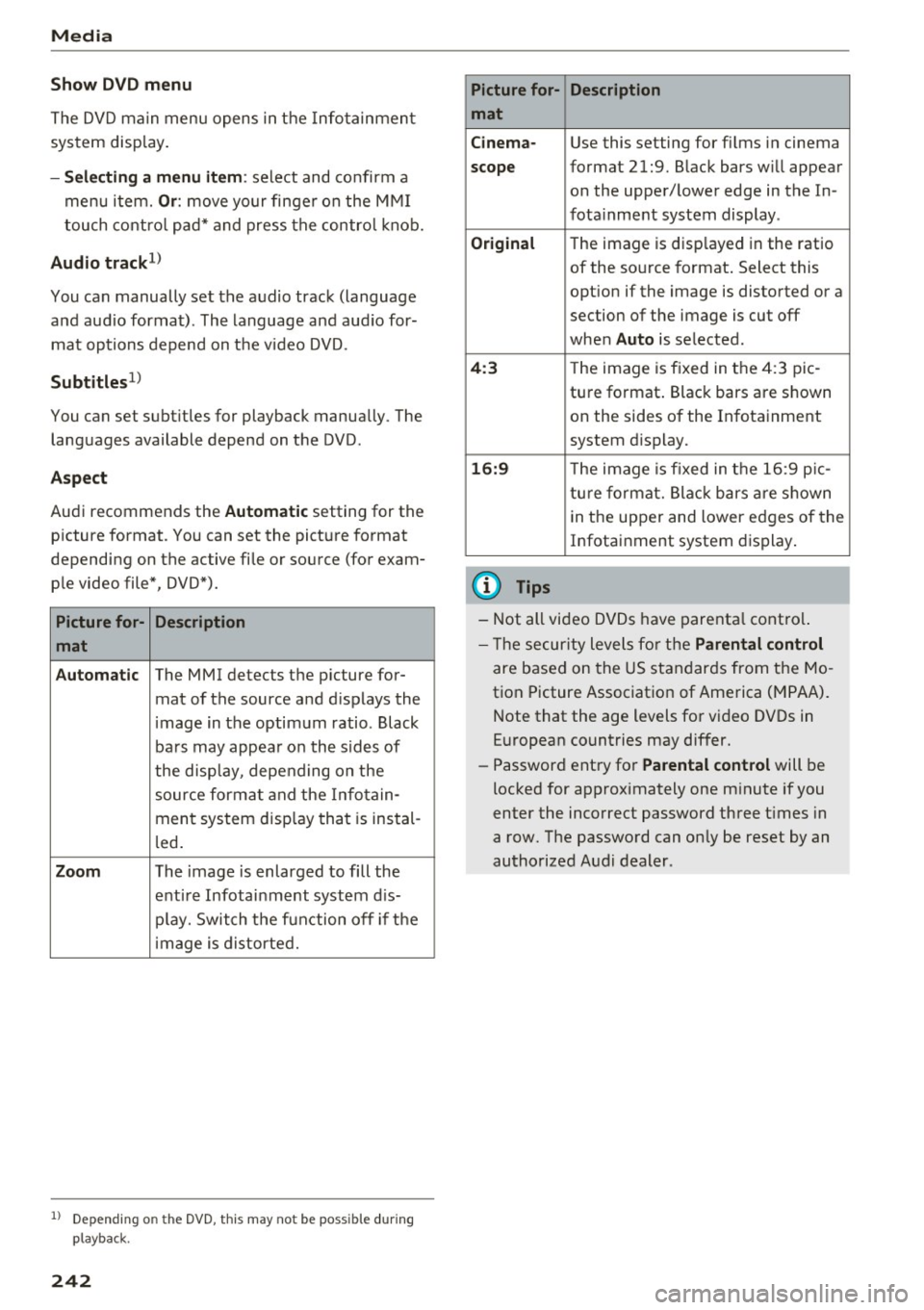
A spect
Aud i recommends the Automatic setting for the
p icture format. You can set the pict ure format
depending on the active fi le or source (for exam
p le video file*, DVD*).
Picture for- Description
mat
Automatic
The MMI detects the p icture for-
mat of the source and d isp lays the
i mage in the optim um ratio. Black
ba rs may appea r on the s id es of
the disp lay, depe nding on the
source forma t and the Infotain -
ment sys tem disp lay tha t is instal-
l ed .
Zoom The image is enlarged to fill the
enti re Infotai nment system d is-
pl ay. Switch the f un ction off i f th e
i mage is distorte d.
l) Depend ing o n the DVD, this may not be possib le during
playback.
242
Picture for- Description
mat
Cinema -
Use this setting for fi lms in cinema
scope format 21:9. B lack bars w ill appear
on the upper/ lower edge in the In-
fota inment system display .
Original The image is displayed in the rat io
of the so urce format . Select this
opt ion if the image is disto rted or a
section of the image is cut off
when
Auto is selected.
4 :3 Th e image is f ixed in the 4:3 pie -
tu re format . Black bars are s hown
on the sides of the In fota inment
system display.
16:9 Th e image is fixed in the 1 6:9 pie -
t u re fo rmat. Bla ck bars a re s hown
in t he upper and lower e dges of the
Infotai nment system display .
(D Tips
-Not all video D VDs have parenta l cont rol.
- T he secur ity leve ls fo r the
Parental control
are based on the US standar ds from the Mo
t ion Picture Associat ion of Ame rica (MPAA).
N ote that the a ge levels fo r video DVDs in
E uropean countries may differ.
- Password ent ry fo r
Parental control will be
locked for approximately one m inute if you
enter the inco rrect password three t imes in
a row. The passwo rd can on ly be reset by an
authorized Audi dealer.
Page 247 of 402
u co ..... N r--... N ..... 0
0
:E: '
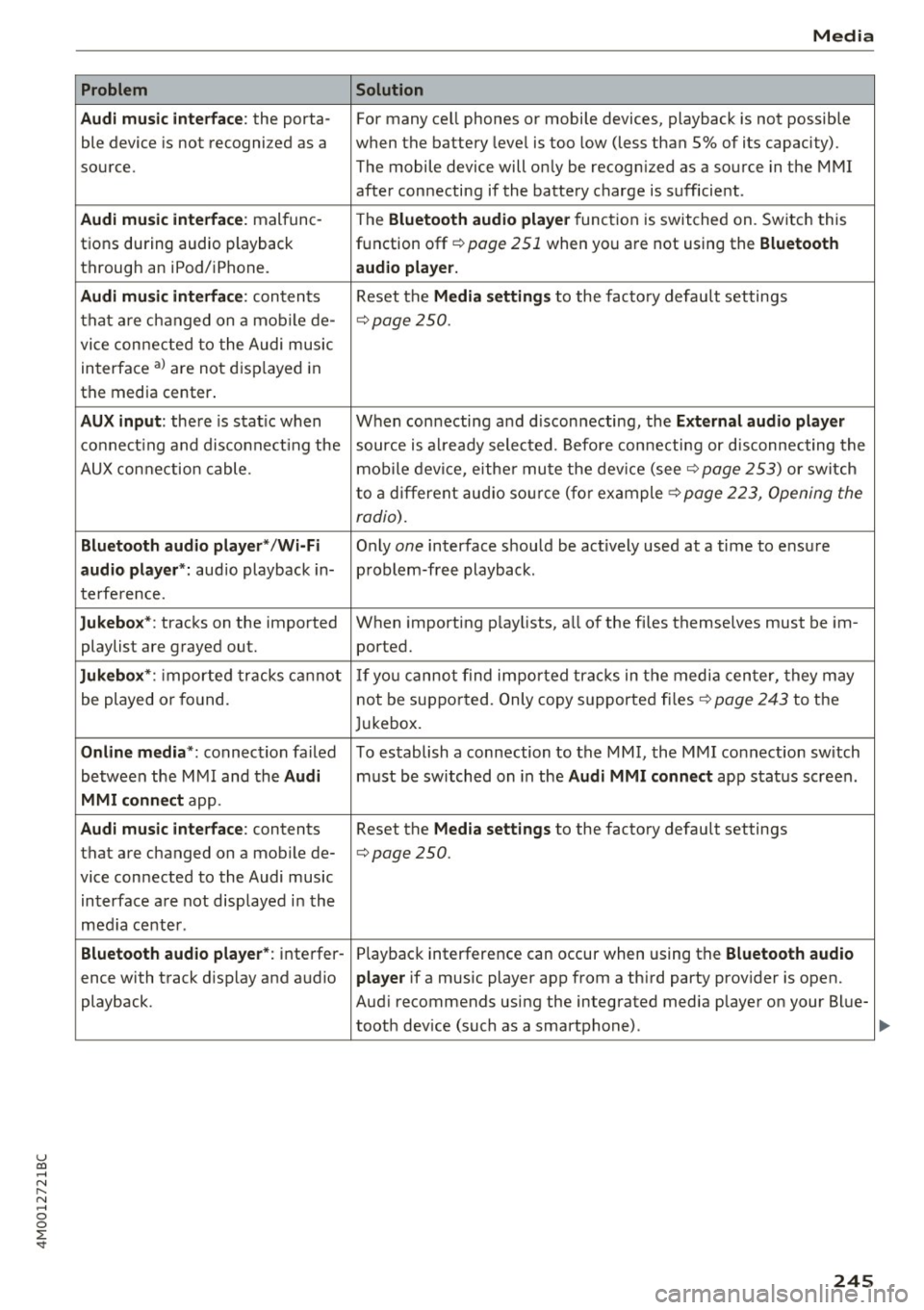
Audi music interface :
the porta-
ble device is not recogni zed as a
source.
Audi music interface : malfunc-
tions during audio playback
through an iPod/ iPhone.
Audi music interface : contents
that are changed on a mobile de-
vice connected to the Audi music
interface al are not displayed in
the media center.
AUX input: there is stat ic when
connecting and disconnecting the
AUX connection cable .
Bluetooth audio player* /Wi-Fi
audio player *:
aud io playback in-
terference.
Jukebox* : tracks on the imported
playlist are grayed out.
Jukebox* : imported tracks cannot
be played or found.
Online media *: connection failed
between the MMI and the
Audi
MMI connect
app.
Audi music interface: contents
that are changed on a mobile de-
vice connected to the Audi music interface are not displayed in the
med ia center .
Bluetooth audio player *: interfer-
ence with track d isplay and audio
playback.
Media
Solution
For many ce ll phones or mobile devices, playback is not possible
when the battery level is too low (less than 5% of its capacity).
The mobile de-vice will only be recognized as a source in the MMI
after connecting if the battery charge is sufficient .
The
Bluetooth audio player f unction is switched on. Switch this
function off
c:> page 2 51 when you a re not using the Bluetooth
audio player.
Reset the Media settings to the facto ry defau lt settings
c:> page250.
When connecting a nd disconnecting, the External audio player
source is already selected. Before connecting or disconnecting the
mobile device, either mute the device (see
c:> page 253) or switch
to a different audio source (for example
c:> page 223, Opening the
radio) .
Only one interface should be act ively used at a time to ensure
problem-free playback .
When importing playlists, a ll of the fi les themselves must be im-
ported.
If yo u cannot find impor ted tracks in the media center, they may
not be supported. Only copy supported files
c:> page 243 to the
Jukebox.
To establish a connection to the MMI, the MMI connection sw itch
must be switched on in the
Audi MMI connect app status screen .
Reset the
Media settings to the factory default settings
c:> page 250.
Playback interference can occur when using the Bluetooth audio
player
if a music player app from a th ird party provider is open.
Aud i recommends using the integrated media player on your Blue-
tooth dev ice (such as a smartphone) .
245
Page 252 of 402
System settings
wait for the signal tone (beep) to say a new
command.
Volume: yo u can adjust the volume of the
p rompts by turning the control knob.
Individual speech training (only when the vehi
cle is stat ionary): you can adapt the voice recog
n it ion system to your voice or pronunciation in
order to improve the system's ability to recognize
your speech . Individua l training is comprised of
20 speech entries that consist of commands and
sequences of numbers. You can delete the pro
grammed voice tra ining w ith the
Reset individu
al speech training
function.
Display brightness
You can adjust the brightness of the Infotain
m ent system disp lay by turning the contro l knob.
Factory settings
The following functions can be reset to the facto
ry default settings :
-Sound settings
- Radio
- Media settings
- Jukebox *
- Directory
-Telephone
- Bluetooth and Wi-Fi*
- Navigation settings*
- Navigation and online memory *
- Voice recognition system*
- Shortcut keys
- Message settings*
-Apps*
-Tool tips
- Audi connect *
- Audi smartphone interface*
You can se lect the desired functions individually
or all at once with the option
Select all entries .
Select and confirm Restore factory settings .
(D Tips
Make sure that not only the settings were de
leted but also the stored data, if applicable .
250
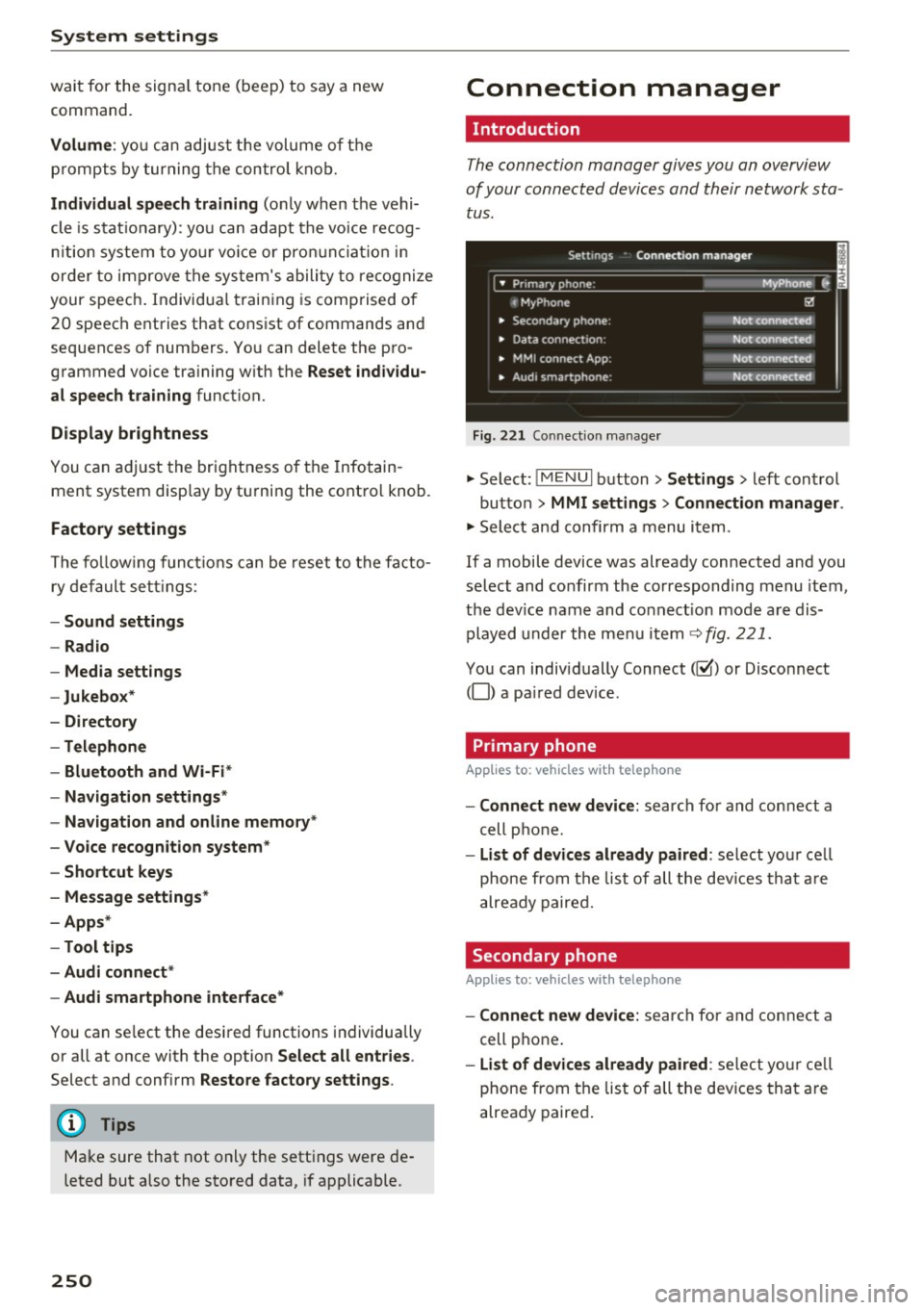
Connection manager
' Introduction
The connection manager gives you an overview
of your connected devices and their network sta
tus.
Settings Conne·ction manager I
====- .. · ~•_P_n_m_•~~-h~o_n~e_: ________ _____ M_ y ~ Phone ~
, MyPhone
• Secondary phone:
• Data connection :
• MMI connect App:
" Audi smartphone:
Fig. 221 Connect io n manager
@
Not connected
Not connected
Not connected
Not connected
"Select : !M ENUI button> Settings > left control
button >
MMI settings> Connection manager .
"Select and confirm a menu item.
If a mobile device was already connected and you
select and confirm the corresponding menu item,
the dev ice name and co nnect ion mode are dis
played under the menu item
c:!;> fig. 221.
You can individually Connect(~ or Disconnect
(0) a paired device .
' Primary phone
Applies to: vehicles with telephone
- Connect new device: search for and connect a
cell phone.
- List of devices already paired : select you r cell
phone from the list of all the devices that are
already paired.
Secondary phone
Applies to: vehicles with telephone
-Connect new device: search for and connect a
cell phone .
-list of devices already paired : select yo ur cell
phone from the list of all the devices that are
already paired.
Page 254 of 402
System settings
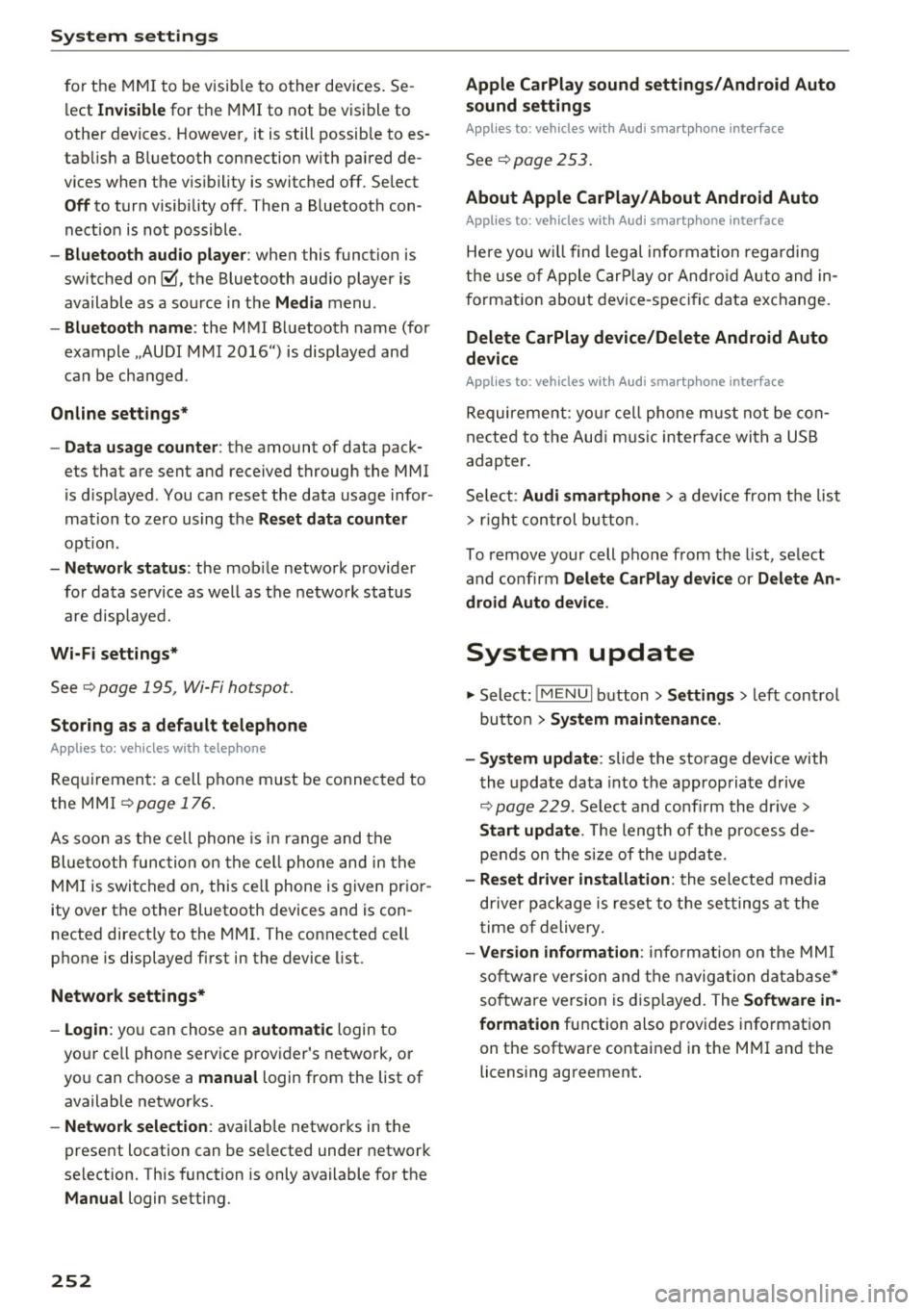
for the MMI to be visib le to other devices . Se
lect
Invisible for the MMI to not be visible to
other devices. However, it is still possib le to es
tab lish a Bluetooth connection with paired de
vices when the v is ibility is switched off. Select
Off to turn visibility off . Then a Bluetooth con
nect ion is not possible .
-Bluetooth audio player : when this function is
switched on~. the Bluetooth aud io player is
available as a sou rce in the
Media menu .
-Bluetooth name : the MMI Bluetooth name (for
example .,AUDI MMI 2016") is displayed and
can be changed .
Online settings*
- Data usage counter :
the amount of data pack
ets that are sent and received through the MMI
is d isplayed . You can reset the data usage infor
mation to zero using the
Reset data counter
option.
-Network status: the mobile network p rovider
for data service as well as the network status
are displayed.
Wi-Fi settings*
See c> page 195, Wi-Fi hotspot.
Storing as a default telephone
Applies to: vehicles with telephone
Requirement: a cell phone must be connected to
the MMI
c> page 176 .
As soon as the cell phone is in range and the
Bluetooth function on the ce ll phone and in the
MMI is switched on, this cell phone is given prior
ity over the other Bluetooth devices and is con
nected directly to the MMI. The connected cell
phone is displayed first in the device list.
Network settings*
- Login :
you can chose an automatic login to
your ce ll phone service provider's network, or
yo u can choose a
manual login from the list of
available networks.
- Network selection: available networ ks in the
present location can be selected under network
selection. This function is only available for the
Manual login setting.
252
Apple CarPlay sound settings/ Android Auto
sound settings
Applies to: vehicles with Audi smartphone interface
See ¢ page 253.
About Apple CarPlay/ About Android Auto
Applies to: vehicles with Audi smartphone interface
Here you w ill find lega l informa tion regarding
the use of Apple CarPlay or Andro id Auto and in
formation about device-specific data exchange.
Delete CarPlay device/Delete Android Auto
device
Applies to: vehicles with Audi smartphone interface
Requirement: yo ur cell phone must not be con
nected to the Aud i m usic interface with a USB
adapter .
Select:
Audi smartphone > a device from the list
> r igh t control button.
To remove your cell phone from the list, select
and confirm
Delete CarPlay device or Delete An
droid Auto device .
System update
.,,. Select : !ME NUI button> Settings > left control
button >
System maintenance.
- System update:
slide the storage device with
the update data into the appropriate drive
¢ page 229. Select and confi rm the drive>
Start update. The length of the process de
pends on the size of the update.
- Reset driver installation: the selected media
driver package is reset to the settings at the
time of delivery.
-Version information : info rmation on the MMI
sof tware version and the navigation database*
so ftware version is disp layed. The
Software in
formation
function also prov ides information
on the software contained in the MMI and the
licensing agreement.
Page 257 of 402
u co ...... N r-... N ...... 0
0
Information on the software contained in the inst rument cluster and the license agreement .
Press the reset bu tton 10.01 ll twi ce wi thin five
seconds of sw itch ing t he igni tion on .
::E l) Not avai lable in all vehicles. '
255
Page 334 of 402
Check ing and F illing
- Do not use a glass cleaner that contains
paint solvents, because this could damage
the pa int .
Service interval display
The service interval display detects when your ve
hicle is due for service.
Checking service int ervals
You can check the remaining distance or time un
til the next oil change or next inspection in the
Infotainment system .
.. Se lect in the Infotainment system: the
I MENU I
button
> Vehicle > left contro l button > Ser vice
& check s > Ser vice inte rval s.
Resetting the indicator
An author ized Audi dealer or author ized A udi
Serv ice Facility will rese t the serv ice interval d is
p lay after performing serv ice .
I f you have changed the oil yourself, you must re
set the oil change interva l.
.. Select in the Infotainment system: the!MENUI
button
> Vehicle > left contro l button > Service
& chec ks > Service interval s > Reset oil change
interval.
If an oil change or inspection is due, you can ac
cess it in the Infotainment system. The display
wo rks in two stages:
- Servic e reminde r: after a certain distance is
driven, a message appears in the inst rument
cluster d isp lay every time the ign ition is switch
ed on. The rema ining distance and t ime is d is
played br iefly.
- Service due : if your vehicle has reached a serv
ice i nterval, a message appears briefly after
swi tching the igni tion on.
(D Note
- Only reset the oil change indicato r if the oil
was changed.
- Fo llow ing the service i ntervals is c ritical to
maintain ing the service life a nd va lue of
you r vehicle, especia lly the engine. Even if
332
the mileage on the vehicle is low, do not ex
ceed the time for the next service .
Page 395 of 402
u co ...... N r-... N ...... 0
0
:E: '
Parking location
Aud i connect vehicle control . . . . . . . . . . . 200
Parking sy stem
refer to Parking systems . . . . . . . . . . 139, 140
Parking systems . . . . . . . . . . . . . . . . . . . . . . 138
Peripheral cameras . . . . . . . . . . . . . . . . . . 143
Rearview came ra . . . . . . . . . . . . . . . . . . . . 140
Se ttings . . . . . . . . . . . . . . . . . . . . . . . . . . . 146
Trailer hitch . . . . . . . . . . . . . . . . . . . . . . . . 147
Particulate filter (diesel) ......... ..... .
Parts replaceme nt ................ ... .
PASSENGER AIR BAG light ....... .. .. .. .
Paths (Owner's Manual)
Pause (audio/video file) ............... .
Pedals . ... .. .. ................ ..... . 321
383
285 159
237
261
Index
Prompt
refer to Command (voice recognition sys-
tem) . . . . . . . . . . . . . . . . . . . . . . . . . . . . . . 168
Proper occupant seat ing pos itions . . . . . . . 257
Proper safety belt position . . . . . . . . . . . . . . 269
Proper seating position Front passenger . . . . . . . . . . . . . . . . . . . . . 258
Occupants. . . . . . . . . . . . . . . . . . . . . . . . . . 25 7
Rear passengers . . . . . . . . . . . . . . . . . . . . . 258
Protecting . . . . . . . . . . . . . . . . . . . . . . . . . . . 356
Q
quattro .... .... .. ................. . .
Selective wheel torque control ..... .. . .
Question What happens to unbelted occupants? 152
148
266
Pedestrian detection . . . . . . . . . . . . . . . . . . 131
Peripheral display . . . . . . . . . . . . . . . . . . . . . 139
R
Personal route assistance
Phonebook 211
refer to Contacts . . . . .
. . . . . . . . . . . . . . . 184
Physical principles of a frontal collision . . . 266
Picture format (video) . . . . . . . . . . . . . . . . . 240
Playback (med ia) . . . . . . . . . . . . . . . . . . . . . 237
Playlist . . . . . . . . . . . . . . . . . . . . . . . . . . . . . 240
Point of interest . . . . . . . . . . . . . . . . . . . . . . 208
Point of interest search . . . . . . . . . . . . . . . . 209
also refer to Point of interest . . . . . . . . . . 208
Polishing . . . . . . . . . . . . . . . . . . . . . . . . . . . . 356
Pollutant filter (automatic A/C system) . . . . 71
Predictive efficiency assist . . . . . . . . . . . . . . 105
Pregnant women
Special considerations when wearing a safe-
ty belt . . . . . . . . . . . . . . . . . . . . . . . . . . . . . 270
pre sense
refer to Audi pre sense .. .. .. .. .. .. .. . 117
Presentation mode . . . . . . . . . . . . . . . . . . . . 214
Presets (radio) . . . . . . . . . . . . . . . . . . . . . . . 226
Pressure Tire pressure monitoring system . . . . . . . 351
Prewarming . . . . . . . . . . . . . . . . . . . . . . . . . . 82
Program guide
Radio ... .. .. ................ ..... . 224
Programming buttons (multifunct ion steer ing
wheel) . . . . . . . . . . . . . . . . . . . . . . . . . . . . . . . 14 Radio ..
.. .. .. ... ... ... .. ..... ... .. .. 223
Additional station information . . . . . . . . . 225
Presets 226
Radio text . . . . . . . . . . . . . . . . . . . . . . . . . . 224
Station list . . . . . . . . . . . . . . . . . . . . . . . . . 223
Rail carrier. . . . . . . . . . . . . . . . . . . . . . . . . . . 377
Rain/light sensor Headlights . . . . . . . . . . . . . . . . . . . . . . . . . . 48
I nterval mode (wipers) . . . . . . . . . . . . . . . . 55
Raising the vehicle . . . . . . . . . . . . . . . . . . . . 376
Random
refer to Shuffle . . . . . . . . . . . . . . . . . . . . . 240
Range (fuel lev el) . . . . . . . . . . . . . . . . . . . . . . 15
Reading lights . . . . . . . . . . . . . . . . . . . . . . . . . 51
Rear axle steering
refer to All-wheel steering . . . . . . . . . . . . 152
Rear fog lights . . . . . . . . . . . . . . . . . . . . . . . . 48
Rear lid
refer to L uggage compartment lid . . . . . . . 40
Rear lowering . . . . . . . . . . . . . . . . . . . . . . . . 137
Rear Seat Entertainment preparation
refer to Audi Entertainment mobile
Rearv iew camera 236
refer to Par
king systems . . . . . . . . . . 139, 140
Rear window defogger . . . . . . . . . . . . . . . 73, 76
Rear window washer system . . . . . . . . . . . . . 55
REAR (button) . . . . . . . . . . . . . . . . . . . . . . . . . 76
393
Page 396 of 402
Index
Recirculation mode (automatic climate con-
trol) . . . . . . . . . . . . . . . . . . . . . . . . . . . . . . 73, 76
Recuperation . . . . . . . . . . . . . . . . . . . . . . . . . 15
Refueling .. .. .. ................... ... 316
Fuel filler door emergency release . . . . . . 318
Remote control
refer to Remote control key . . . . . . . . . . . . 35
Remote control key . . . . . . . . . . . . . . . . . . . . 35
Remote control operation Garage door opener (Home link) . . . . . . . . . 46
Remote locking and unlocking
Audi connect vehicle control . . . . . . . . . . . 200
Removing the caps (wheel bolts) . . . . . . . . . 363
Repair manuals . . . . . . . . . . . . . . . . . . . . . . . 381
Repairs Airbag system . . . . . . . . . . . . . . . . . . . . . . 288
Replacement key . . . . . . . . . . . . . . . . . . . . . . 35
Replacing Light bulbs . . . . . . . . . . . . . . . . . . . . . . . . . 371
Replacing wiper blades . . . . . . . . . . . . . . 56, 57
Reporting Safety Defects . . . . . . . . . . . 263, 264
Reset
refer to Restart (MMI) . . . . . . . . . . . . . . . . 254
Reset button (trip odometer) . . . . . . . . . . . . 12
Resetting the trip odometer . . . . . . . . . . . . . 12
Residual heat (automatic climate control) 74, 77
Restart (MMI) . . . . . . . . . . . . . . . . . . . . . . . . 254
Retractor . . . . . . . . . . . . . . . . . . . . . . . . . . . . 268
Reverse gear . . . . . . . . . . . . . . . . . . . . . . . . . . 91
Rewinding (audio/video file) . . . . . . . . . . . . 237
Right control button . . . . . . . . . . . . . . . . . . . . 13
Rims . . . . . . . . . . . . . . . . . . . . . . . . . . . . . . . 348
Cleaning . . . . . . . . . . . . . . . . . . . . . . . . . . . 355
Ringtone settings . . . . . . . . . . . . . . . . . . . . . 186
Road carrier . . . . . . . . . . . . . . . . . . . . . . . . . 377
Road noise compensation . . . . . . . . . . . . . . 253
Roaming
refer to Data connection . . . . . . . . . . . . . . 196
Roof rack . . . . . . . . . . . . . . . . . . . . . . . . . . . . . 70
Roof load . . . . . . . . . . . . . . . . . . . . . . . . . . . 70
also refer to Roof rack . . . . . . . . . . . . . . . . . 70
Route criteria . . . . . . . . . . . . . . . . . . . . . . . . 214
Route guidance
refer to Navigation ............ ...... .
Run-flat (tires) . .. ................... .
Running direction (tires)
394
205
352
365
s
Safe driving habits
Safety 256
A irbag system . . . . . . . . . . . . . . . . . . . . . . 273
Belts . . . . . . . . . . . . . . . . . . . . . . . . . . . . . . 265
Cargo . . . . . . . . . . . . . . . . . . . . . . . . . . . . . 261
Correct seating position . . . . . . . . . . . . . . 257
Pedal area . . . . . . . . . . . . . . . . . . . . . . . . . . 261
Telephone.... ... .. .. ............... 176
Safety belt height adjustment . . . . . . . . . . . 271
Safety belt position . . . . . . . . . . . . . . . . . . . 269
Safety belt height adjustment . . . . . . . . . 271
Safety belts worn by pregnant women . . . 270
Safety belt pretensioner Service and disposal. . . . . . . . . . . . . . . . . . 272
Safety belts . . . . . . . . . . . . . . . . . . . . . . 265, 268
Cleaning . . . . . . . . . . . . . . . . . . . . . . . . . . . 356
Danger to passengers who do not wear a
safety belt . . . . . . . . . . . . . . . . . . . . . . . . . 266
Fastening . . . . . . . . . . . . . . . . . . . . . . . . . . 268
Improperly worn . . . . . . . . . . . . . . . . . . . . 271
Not worn . . . . . . . . . . . . . . . . . . . . . . . . . . 266
Safety belt position . . . . . . . . . . . . . . . . . . 269
Safety instructions . . . . . . . . . . . . . . . . . . . 268
Securing child safety seats . . . . . . . . . . . . 306
Spec ial considerat ions for pregnant wom-
en . . . . . . . . . . . . . . . . . . . . . . . . . . . . . . . . 270
Unfastening . . . . . . . . . . . . . . . . . . . . . . . . 270
Warning/indicator light . . . . . . . . . . . . . . 265
Worn properly . . . . . . . . . . . . . . . . . . . . . . 267
Safety belt warning light Safety instructions 265
for side curtain airbags . . . . . . . . . . . . . . . 294
for using child safety seats . . . . . . . . . . . . 299
for using safety belts . . . . . . . . . . . . . . . . . 268
Monitoring the Advanced Airbag System 287
Saving fuel Energy consumers . . . . . . . . . . . . . . . . . . . . 16
Recuperation . . . . . . . . . . . . . . . . . . . . . . . . 15
Scan (radio) . . . . . . . . . . . . . . . . . . . . . . . . . . 224
Screen
refer to Disp lay . . . . . . . . . . . . . . . . . . . . . . 12
Screwdriver . . . . . . . . . . . . . . . . . . . . . . . . . . 360
SD card reader (MMI) . . . . . . . . . . . . . . . . . . 229
SDS
refer to Voice recognition system . . . . . . . 168
Search area (point of interest) . . . . . . . . . . . 208