page 34 AUDI Q7 2018 Owner´s Manual
[x] Cancel search | Manufacturer: AUDI, Model Year: 2018, Model line: Q7, Model: AUDI Q7 2018Pages: 398, PDF Size: 185.58 MB
Page 138 of 398
Parking systems
Switching on/off
Applies to: vehicles with rearview camera
Switching on/off
• Press the P,11.A button in the center console
¢ page 134, fig . 129. A short confirmat ion
tone sounds and the LED in the button turns
on.
Switching on automatically
The system switches on automat ically when re
verse gear is engaged while the engine is run
n ing. A brief confirmation tone will sound.
Switching off automatically
The system switches off automatically when driv
ing forward faster than 6 mph (10 km/h) .
Perpendicular parking
Applies to: vehicles with rearview camera
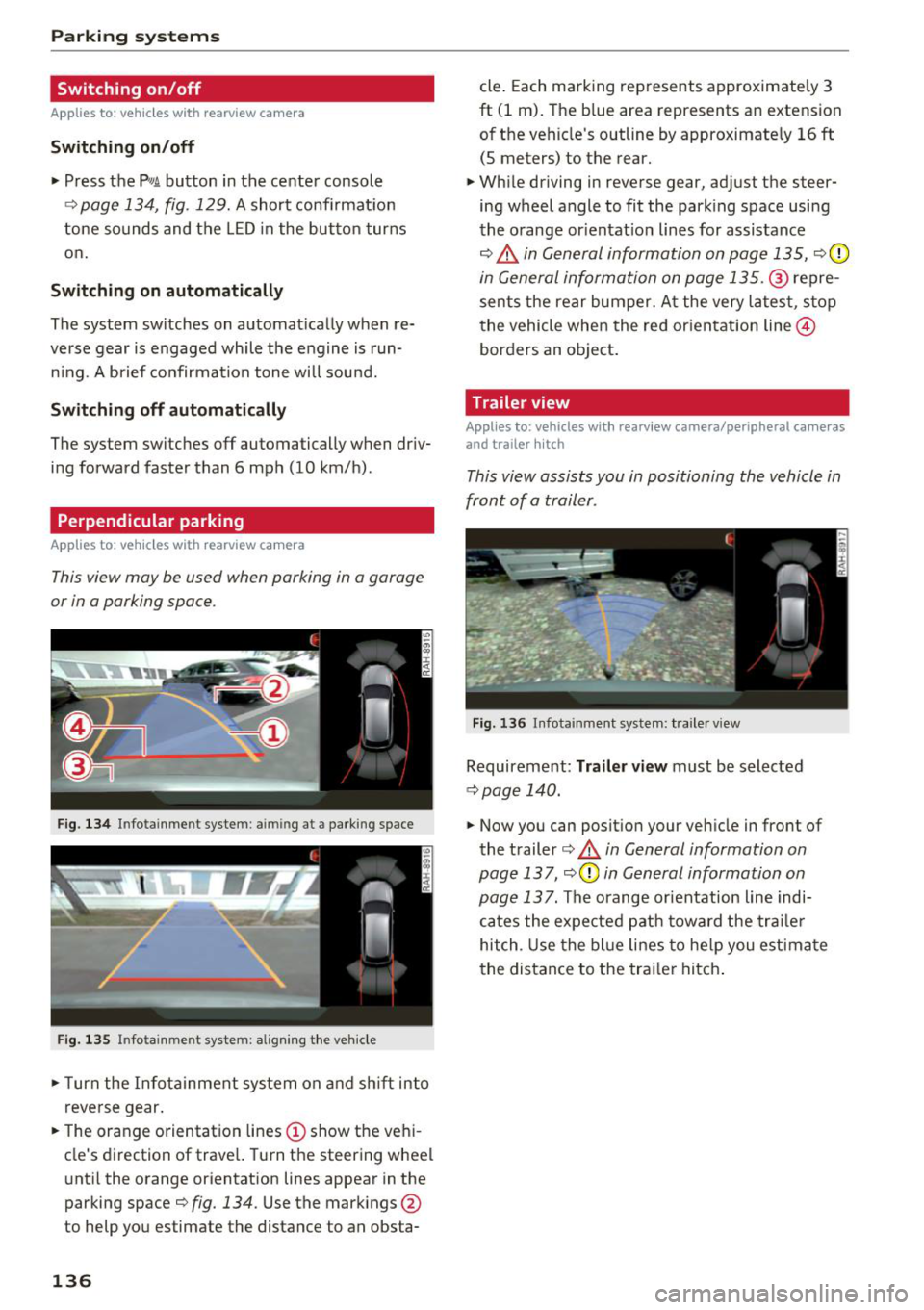
This view may be used when parking in a garage
or in a parking space .
Fig. 134 In fotainme nt system : aimin g at a parking space
Fig. 135 Infotainment system: alig ning the vehicle
• Turn the Infota inment system on and shift into
reverse gear.
• The orange orientation lines
(D show the vehi
cle's direction of travel. Turn the steering wheel
until the orange orientation lines appear in the
parking space¢
fig. 134. Use the markings @
to help you estimate the distance to an obsta-
136
cle. Each marking represents approximately 3
ft (1 m). The blue area represents an extension
of the vehicle's outline by approximately
16 ft
(5 meters) to the rear.
• While driving in reverse gear, adjust the steer
ing wheel angle to fit the park ing space using
the orange or ientat io n lines for assistance
¢.&, in General information on page 135, ¢0
in General information on page 135 .@ repre
sents the rear bumper. At the very latest, stop
the vehicle when the red or ientation line@
borders an object.
Trailer view
Applies to: vehicles with rearv iew camera/peripheral cameras
and trailer hitch
This view assists you in positioning the vehicle in
front of a trailer.
Fig. 136 Infota inment system: trailer view
Requirement: Tra iler view must be selected
¢ page 140.
• Now you can position your vehicle in front of
the trailer
¢ .&, in General information on
page 137 ,
¢(\[) in General information on
page 13
7. The orange orientation line indi
cates the expected path toward the trailer
hitch . Use the blue lines to help you estimate
the distance to the trailer hitch.
Page 139 of 398
a co ...... N r--. N ...... 0
0
:E '
Introduction
Applies to: vehicles with peripheral cameras
With this equipment, the park ing system p lus*
¢
page 133 is supplemented w ith various pe riph
e ral cameras. The four cameras give you the fol
l owing views: area around the vehicle, front cor
ner view and rear corner view, view in front of the
vehicle and behind the vehicle .
General information
Applies to: vehicles with peripheral cameras
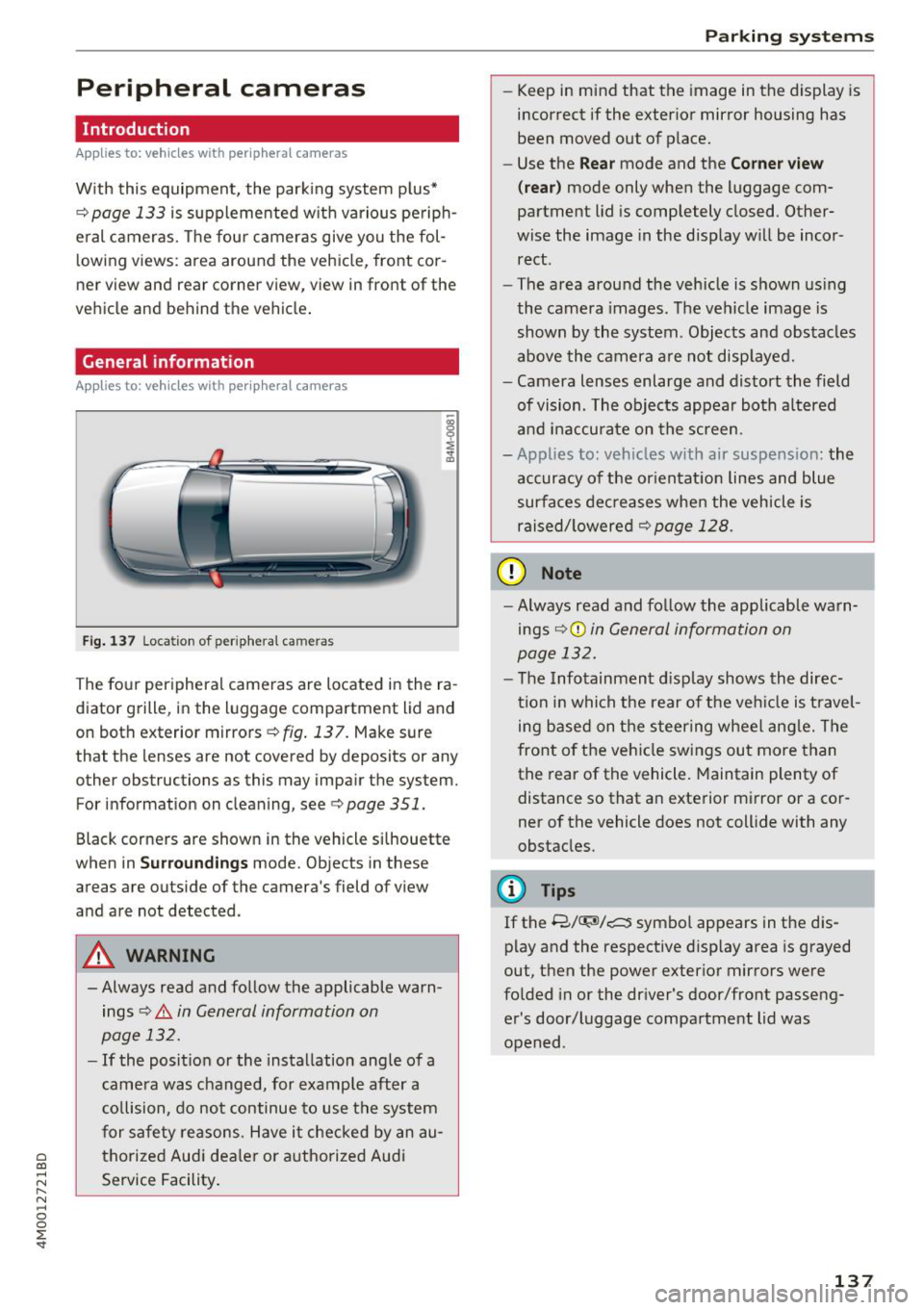
Fig. 137 Location of periphera l cameras
The four peripheral cameras are located in the ra
diator grille, in the luggage compartment lid and
on both exterior mirrors
¢ fig. 137. Make sure
that the lenses are not covered by deposits or any
other obstructions as this may impair the system. For information on cleaning, see¢
page 351.
Black corners are shown in the vehicle si lhouette
when in
S u rro und ing s mode. Objects in these
areas are outside of the camera's field of view
and are not detected.
A WARNING
-Always read and follow the applicable warn ings
¢.&. in General information on
page 132.
- If the position or the installation angle of a
came ra was changed, for example after a
co llision, do not continue to use the system
for safety reasons. Have it checked by an au
thorized Audi dea le r or authorized Audi
Service Facility .
Parking systems
- Keep in mind that the image in the display is
incorrect if the exterior mirror housing has
been moved out of p lace.
- Use the
Re ar mode and the Co rner view
(r ea r)
mode only when the luggage com
partment lid is completely closed. Other
wise the image in the display will be incor
rect.
- The area around the vehicle is shown using
the camera images. The vehicle image is
shown by the system . Objects and obstacles
above the camera a re not disp layed.
- Camera lenses enlarge and distort the field
of vision. The objects appear both a ltered
and ina ccurate on the screen.
- Applies to: vehicles with air suspension: the
accuracy of the or ientat ion lines and blue
surfaces dec reases whe n the veh icle is
raised/ lowered¢
page 128.
(D Note
- Always read and fo llow the applicable wa rn
ings ¢Ci)
in General information on
page 132.
- The Infotainment d isplay shows the direc
tion in which the rear of the veh icle is travel
ing based on the steering wheel ang le. The
front of the vehicle swings out more than
the rear of the vehicle. Maintain plenty of distance so that an exterior mirror or a cor
ner of the vehicle does not collide with any
obstacles.
(l) Tips
If the 8/~/c::; symbol appears in the dis
play and the respective disp lay area is grayed
out, then the power exterior mirrors were
fo lded in or the dr iver's door/front passeng
er's door/luggage compartment lid was
opened .
137
Page 140 of 398
Parking systems
Switching on/off
Applies to: ve hicles w ith per ip heral cameras
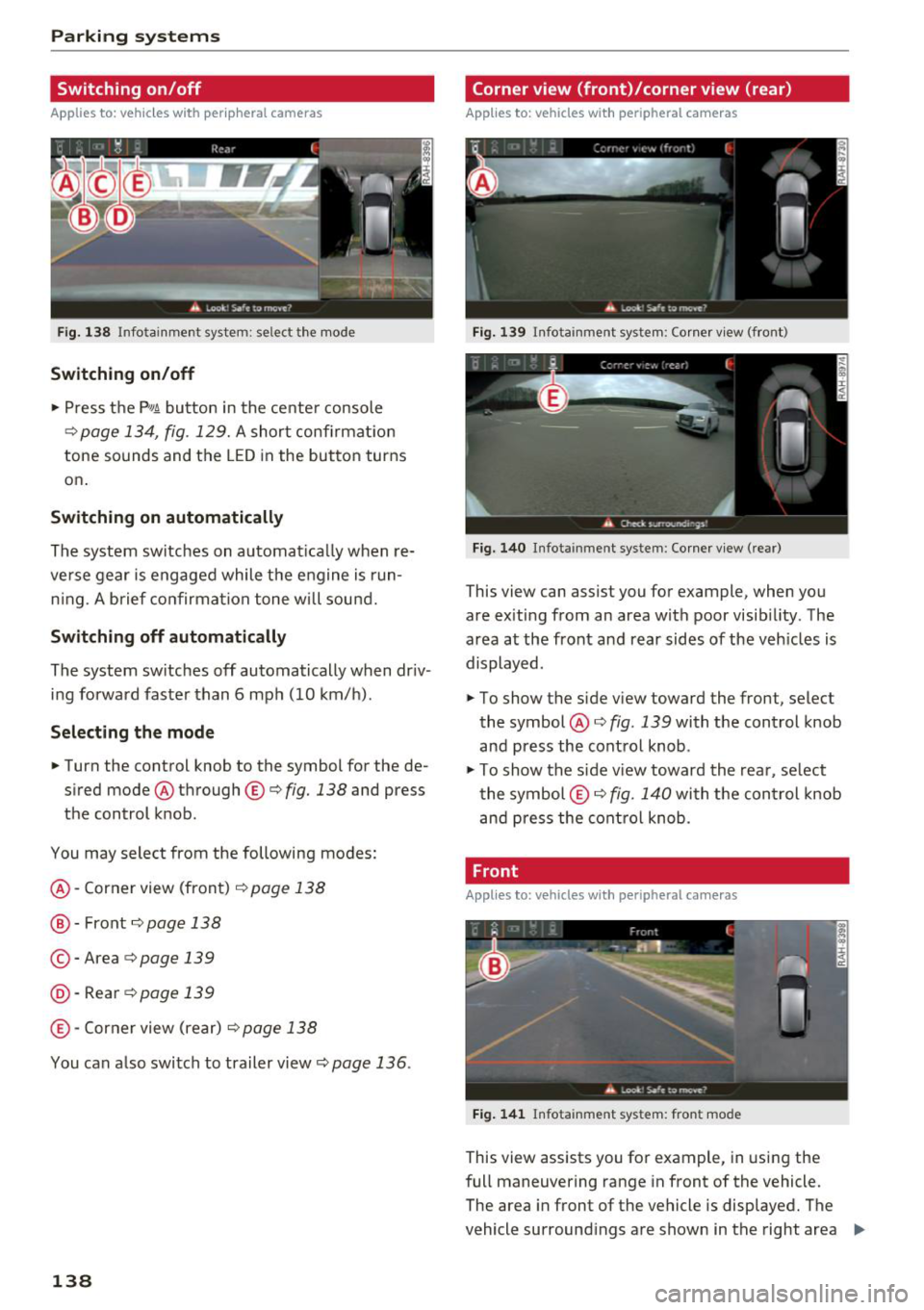
Fig. 138 Infotainment system: se lect the mode
Switching on/off
"' Press the p,qA button in the center console
¢ page 134, fig. 129. A short confirmation
tone sounds and the LED in the button turns
on .
Switching on automatically
The system switches on a utomatica lly when re
ve rse gear is engaged while the engine is run
n ing. A brief confirmation tone will sound.
Switching off automatically
The system switches off automatically when dr iv
ing forward faster than 6 mph (10 km/h) .
Selecting the mode
"'Turn the control knob to the symbol for the de
sired mode @through ©¢fig. 138 and press
the control knob .
You may select from the following modes:
@ -Corner view (front)¢ page 138
@ -Front¢ page 138
© -Area ¢ page 139
@ ·Rear ¢ page 139
© -Corner view (rear) ¢ page 138
You can also switch to trailer view¢ page 136.
138
Corner view (front)/corner view (rear)
Applies to : vehicles with peripheral cameras
Fig. 139 Infota inment system: Corner view (front)
Fig. 140 Infota inmen t system : Corner view (rear)
This view can assist you for example, when you
are exiting from an area with poor visibi lity. The
area at the front and rear sides of the veh icles is
displayed.
"' To show the side view toward the front, select
the symbol @¢
fig. 139 with the control knob
and press the control knob .
"' To show the side v iew toward the rear, se lect
the symbol ©¢ fig. 140 with the con trol knob
and press the control knob.
Front
Applies to: vehicles wi th peripheral ca meras
Fig. 1 41 Infota inment system: front mode
This view assists you for example, in using the
full maneuvering range in front of the vehicle.
The area in front of the vehicle is displayed. The
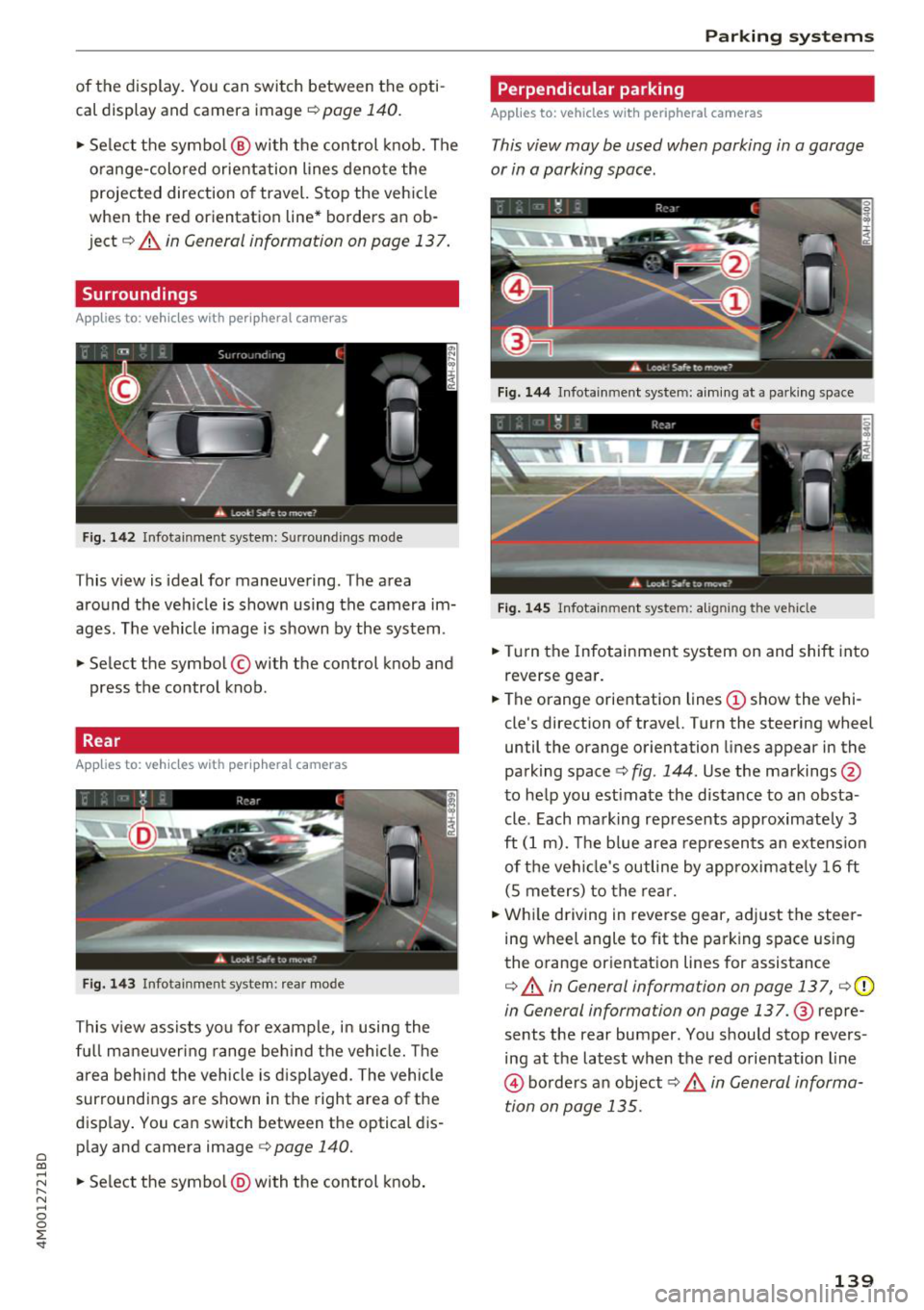
vehicle surround ings are shown in the right area
Ill>
Page 141 of 398
a co ...... N r--. N ...... 0
0
:E '
cal display and camera image¢
page 140.
"'Se lect the symbol @ with the control knob. The
o range-colored orientation lines denote the
projected direction of travel. Stop the vehicle
when the red orientation line* borders an ob
ject¢ &.
in General information on page 137.
Surroundings
Applies to: vehicles with peripheral cameras
Fig. 142 Infotainment system: Surroundings mode
This view is ideal for maneuvering. The area
around the vehicle is shown using the camera im
ages . The vehicle image is shown by the system.
"' Select the symbol © with the control knob and
press the control knob.
Rear
Applies to: vehicles with peripheral cameras
F ig . 143 Infotainment system: rear mode
This view assists you for example, in using the
fu ll mane uvering range beh ind t he vehi cle. The
a rea behind the vehicle is d isplayed. The vehicle
surroundings are shown in the right area of the
disp lay . You can switch between the optical dis
play and camera image <=>
page 140.
"'Se lect the symbol @) with the control knob .
Parking systems
Perpendicular parking
Applies to: vehicles with peripheral cameras
This view may be used when parking in a garage
or in a parking space.
Fig . 144 Infotainment system: a im ing at a park ing space
Fig . 14 5 Infotainment system: aligning the vehicle
"'Turn the Infotainmen t system on and shift into
reverse gea r.
"' The orange orientation lines(!) show the vehi
cle's direction
of travel. Turn the steering wheel
until the orange orientation lines appear in the
parking space
c:> fig . 144 . Use the markings @
to help you estimate the distance to an obsta
cle. Each mark ing rep resents approximately 3
ft
(1 m). The b lue area represen ts an extension
of t he vehi cle's outline by app roximate ly
1 6 ft
(S me ters) to the rear.
"' Whi le driving in reverse gear, adj ust the steer
ing wheel angle to fit the parking space using
the o range or ientat ion lines for assistance
c:> &. in General information on page 137, ¢ (D
in General information on page 137.@ repre
sents the rear bumper. You should stop revers
ing at the lates t when the red orientation line
@ bo rders a n object c:> .& in General informa
tion on page 135.
139
Page 142 of 398
Parking syste m s
Adjusting the parking aid
Applies to: vehicles with a rear parking system/parking sys
tem plus/rearview camera/peripheral cameras
The functions are adjusted in the Infotainment
system .
.,. Se lect in the Infota inment system: IM ENU I but
ton
> Vehi cle > left contro l bu tton > Driv er a s
s is ta nce > Par kin g aid .
Or
.,. When the parking aid is active, se lect in the In -
fotainment system : rig ht contro l button *.
End sy stem * -stop t he parking aid
Acti vate automaticall y* -switch automatic acti
vation on/off
Front volume * -volume for the front area
Rear volume -volume for th e re ar ar ea
Entertainm ent f ader -the vol ume of t he aud io/
video source is lowered when t he parking system
is turned on.
The new value is g iven b riefly du ring the adjus t
ment.
Vie w* -switch between an optical d isplay
( Graphic ) and camera image ( Cam era ) in the
r ight section of the display.
Tr ail er view * -show trailer view
*Auto. front /rear came ra change * -the view be
h ind the veh icle
( Rear mode) is displayed auto
mat ically when you shift into reverse gear. The
v iew in front of the vehicle
( Front mode) is d is
played automatically when you shift into the for
ward gea rs. When first activat ing in a forward
gea r with the
P,, 1~ button, the front s ide v iew is
d isp layed
( Corn er view (fr ont ) mode).
If you do not set the./, the view behind the vehi
cle
( Rear mode) is a lways d isplayed and it does
not swi tch to the
Front mode whe n a forward
gea r is selec ted .
(0 Tips
-Seve ral menus can be accessed w ith the
r ight contro l button only when the park ing
a id is ac tive.
- The settings for volume and automatic act i
vation* are au toma tically s to red and as-
140
signed to the remote control key be ing
used .
Error messages
Applies to: vehicles with a rear parking system/parking sys
tem plus/rearview camera/peripheral cameras
Ill Rear parking aid : malfunction! Obstacles
cannot b e dete cted
Ill Front par king aid: m alfunction! Obstacles
cannot b e detected
Ill Pa rking aid : malfunct ion ! Obstacles cannot
b e detected
When one of these messages appears, there is a
system malfunction. The L ED in the
Pw, button al
so blinks when sw itching it on. The relevant mes
sage on ly appears again when you manually acti
vate the park ing aid with the button .
[ii Rear parking aid: obstacle detection re stri ct
ed
The rear cross -traffic assist* ¢ page 124, Rear
cross-traffic assist
is not available. Either the ESC
i s sw itched off, or the radar sensors may be cov
ered by a bike rack, stickers, leaves, snow or oth
er objects. Swi tch the ESC on , or clean the area in
front of the sensors if necessary¢
page 121,
fig . 115 .
If this message cont inues to be d is
played, drive immed iate ly to an authori zed Audi
dealer or author ized A udi Service Fac il ity to have
t h e mal funct ion repaired .
Parking system plus *
If a sensor or speaker is faulty, the IM symbol
will appear in front of/behind the vehicle in the
Infotai nment system d isplay. If a rear sensor is
faulty, only obs tacles that are in areas @ and @
are show n
¢page 133, fig. 128 . If a front senso r
i s fa ulty, only obstacles that are in areas © and
@ are s hown.
Peripheral cameras*
There is a system malfunction if the% symbol
appea rs and the co rresponding area of the dis
play is shown in black . The camera is no t wo rking
in this area.
Page 148 of 398
Intellig ent T echn olo gy
{QJ Note
- Never let the brakes "rub" by pressing the
pedal light ly when braking is not actually
necessary. This causes the brakes to over
heat and increases braking d istance and
causes wear .
- Before driv ing downhill a long distance on a
steep hill, decrease your speed and select a
lower gear. This makes use of the engine
braking effect and rel ieves the brakes. If
you need to b rake additionally, b rake in in
te rvals a nd not conti nuously.
@ Tips
-If the brake booster is not wo rking, you
must press the brake pedal with much more
fo rce than no rma l.
- If you ret rofit your vehicle with a front spoil
e r, whee l cove rs o r similar items, ma ke sure
th at the a ir flow to the front whee ls is not
i nterr upted. Ot herw ise the bra ke sys tem
can become too hot.
Electromechanical
steering, all-wheel
steering
The electromechanical steering supports the
driver's steering movements.
Power steering adapts electronically based on
the vehicle speed.
Indicator lights and me ssa ges
• Steering: malfuncti on! Plea se st o p vehicle
If this indicator light turns on and stays on and
this message appears, the power steering may
have failed.
Stop the vehicle in a safe location as soon as pos
sib le. Do
not continue driving. See an authorized
Audi dea ler or authorized Audi Service Facility for
assistance .
• Stee ring: malfunction! Plea se stop vehicle.
Pa y attention t o di sta nce at sid e
If t his ind icator light tu rns o n and stays o n and
this message appears, t he a ll-wheel steer ing*
146
may have fai led . The side of the vehicle may need
more space on the road .
Reduce you r speed and stop the vehicle in a safe
l oca tion with eno ugh space on the s ides as soon
as possible. Do
n ot continue driving. See an au
thorized Audi dea ler or authorized Audi Service
Facility for assistance.
'I-ij S te e ring : m alfun cti on! You can c ontinue
dri ving
If the indicato r light turns on and the message
appears, the steeri ng wheel may be more d iffi
cu lt to move or more sensitive than usu al. The
steering wheel may a lso be at an ang le when
driving straight.
D rive slowly to an a uth orized Audi dea ler or au
t h orized Aud i Serv ice Facili ty to have t he mal
f unction corrected .
l:r-ij Stee ring : malfun ction! Adapt driving sty le .
Lar ger turnin g radiu s
If the indicator l ight turns on and this message
appears, the all-whee l stee ring* may have fa iled .
Please note that the vehicle has a larger t urning
r ad ius and the st abil ity w hen turning a corner is
lik e tha t of a vehicle wi thout a ll -wheel s teer ing.
The steering whee l may also be at an angle when
driving straight.
D rive slowly to an a uth o rized Audi dea ler or au
t h orized Aud i Serv ice Facili ty to have t he mal
function corrected .
(D Tips
-If the . or l;rfl indi cato r light only stays on
for a sho rt time, you may cont inue driv ing.
- For add itiona l information o n all-wheel
steeri ng*, see
r=.>page 128.
ALL-wheel drive (quattro)
General information
In all whee l dr ive, the dr iv ing power is distr ibut
ed between all fou r whee ls when needed. This
happe ns automatically depend ing on your dr iving
behav ior as we ll as the curren t road cond it ions.
A lso see
r=.> page 142, Electronic stabilization
control (ESC). ..,.
Page 149 of 398
Cl a:, ...... N
" N ,-1 0
0
::r '
power variably to the front and rear ax le . It works
together with se lective whee l torque contro l,
which activates when driving through curves
c:::;, page 142. With the sport differentia l", power
distribution to the rear wheels is variable and can be adjusted using the drive select
¢ page 128.
The all wheel drive concept is designed for high
engine power. Your vehicle is exceptionally pow
erful and has excellent driving characteristics
both under normal driving condit ions and on
snow and ice . Always read and fo llow safety pre
cautions
c:::;, /1),.. .
Winter tires
By us ing all wheel drive, your vehicle has good
forward motion with standard tires in w inter con
ditions . However, using winter or all season tires
on
all four wheels in the winter is recommended,
because this will improve the
braking effect.
Snow chains
If there are snow chain laws, snow chains must
also be used on vehicles with all wheel drive
c:::;, page 346, Snow chains .
Replacing tires
For vehicles with all wheel dr ive, only wheels w ith
the same rolling circumference should be used .
Avoid using tires w ith different tread depths
c:::;, page 33 7, New tires or wheels.
A WARNING
- Also, in vehicles with al l wheel drive, adapt
yo ur driv in g style to the current road and
traffic conditions. Do not let the increased
safety provided tempt you into taking risks,
because this increases the risk of an acci
dent.
- T he braking ability of your vehicle is limited
to the traction of the wheels. In this way, it
is not different from a two whee l drive vehi
cle. Do not be tempted to accelerate to a
high speed when the road is slippery, be
cause this increases the risk of a n accident.
- Note that on wet streets, the front wheels
can "hydroplane" if driving at speeds that
are too high. Unlike front wheel drive
Intelligent Technology
vehicles, the engine does not rev higher sud
denly when the vehicle begins hydroplaning.
For this reason, adapt your speed to the
road conditions to reduce the risk of an acci
dent.
Energy management
Your vehicle is equipped with an intelligent ener
gy management system for distributing electrici
ty. This significantly improves the start ing ability
and increases the vehicle battery life.
(D Tips
-If you dr ive short distances frequently, the
vehicle battery may not charge enough
w hile driving . As a result, convenience func
tions for e lectr ical equipment may be tem
porarily unavailable.
- The vehicle battery w ill gradually drain if
the vehicle is not driven for long periods of
time, or if electr ical eq uipm ent is used
when the engine is not running. To ensure
that the vehicle can still be started, the
electrical equipment wi ll be reduced or
switched off.
Notice about data
recorded by the Event
Data Recorder and
vehicle control modules
Event Data Recorder
This vehicle is equipped with an Event Data Re
corder (EDR). The main purpose of an EDR is to
record, in certain crash or near crash-like situa
t ions, such as an airbag deployment or hitt ing a
road obstacle, data that w ill ass ist in understand
ing how a vehicle's systems performed. The EDR
is des igned to record data related to vehicle dy
nam ics and safety systems for a short per iod of
time, typicall y 30 seconds or less. The EDR in this
vehicle is designed to record such data as:
- How various systems in your veh icle were oper
ating;
- Whether or not the driver and passenger safety
be lts were buckled/fastened; .,.
147
Page 151 of 398
a co ...... N r--. N ...... 0
0
:E '
Traffic safety information
Audi recommend s performing certain Infotain
ment system fun ctions, such as entering a desti
nation, only when the vehicle is stationary . Al
ways be prepared to stop operating the Infotain
ment system in the interest of your safety and
the safety of other road users.
_& WARNING
Only use the Infotainment system when traf
fic conditions permit and always in a way that
allows you to maintain complete control over
your vehicle.
@ Tips
Certain functions are not available while driv
ing .
Introduction
The Multi Media Interface, or MMI for short,
combines various systems for communication,
navigation* and entertainment in your Audi. You
can opera te the MMI using the MMI control pan
el, the multifunction steering wheel or the voice
recognition system*.
Fig. 148 MMI control pane l wit h MMI touc h
Multi Media Inte rface
Fig. 149 MMI co ntro l pane l w itho ut MM I to uch
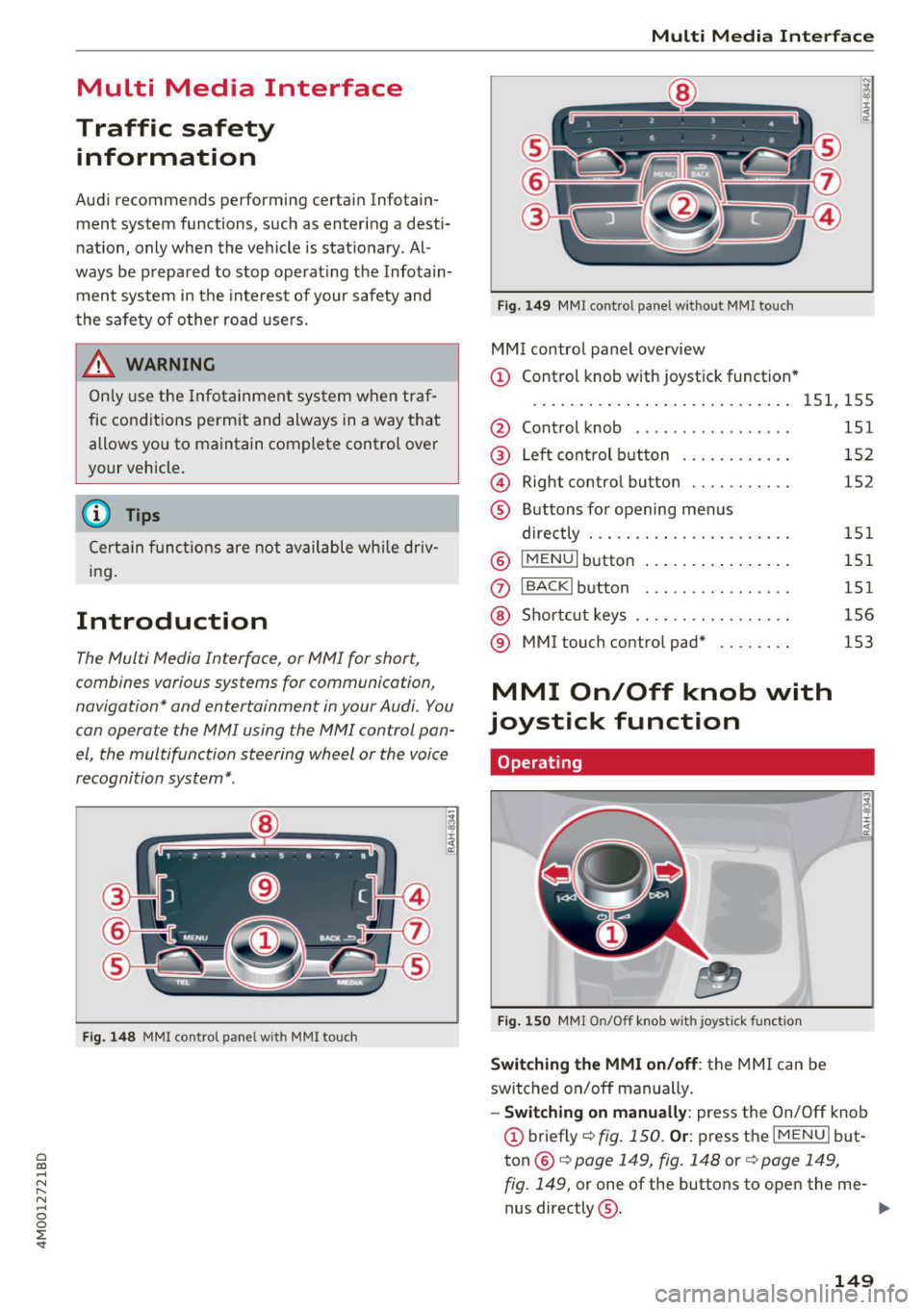
MM I control panel overview
(D Control knob with joystick function *
....... ... ... .. ............. 151, 155
@ Control knob . . . . . . . . . . . . . . . . . 151
@ Left control button . . . . . . . . . . . . 152
@ Right control button . . . . . . . . . . . 152
® Buttons for opening menus
directly . . . . . . . . . . . . . . . . . . . . . . 151
®
I MENUI button . . . . . . . . . . . . . . . . 151
(J) IBACKI button . . . . . . . . . . . . . . . . 151
@ Shortcut keys . . . . . . . . . . . . . . . . . 156
® MMI touch contro l pad* . . . . . . . . 153
MMI On/Off knob with
joystick function
Operating
Fig. 150 MMI On/Off knob with joystick function
Switching the MMI on/off: the MMI can be
switched on/off manually .
- Switching on manually: press the On/Off knob
(D briefly c::> fig. 150 . Or: press the IM ENU I but
ton ®
c::> page 149, fig. 148 or¢ page 149,
fig . 149,
or one of the buttons to open the me-
nus directly @. ..,.
149
Page 152 of 398
Multi Media Interface
-Switching off manually : press and hold the
On/Off knob@¢
fig. 150 until the MMI
switches off . If the M MI has been sw itched off
manually, it does
not switch on again automati
ca lly the next time the ignition is switched on.
Additional functions:
- Adjusting the volume:
turn the On/Off knob (D
¢fig . 150 .
-Muting : press the On/Off knob (D ¢ fig. 150
briefly.
-Selecting the previous/next function (for ex
ample, a radio station/track):
press the On/Off
knob
(D ¢ fig . 150 briefly toward the left l
-Fast forwarding/rewinding (for example
songs) :
press and hold the On/Off knob (D
¢ fig. 150 toward the left l
.8. WARNING
Adjust the volume of the audio system so that
signals from outside the vehicle, such as po
lice and fire sirens, can be heard easily at all
times.
(D Tips
The MMI switch es off automatically if the en
gine is not r unning and the vehicle battery is
low.
Infotainment system
display
Switching on/off
" Press the to l button to switch the Info tainment
system on and off.
When the MMI is switched on and the display is
switched off, you can operate ce rtain funct ions
using the On/Off knob with the MMI joystick
function
¢ page 149.
(D Tips
There may be delays when switching on the
display.
150
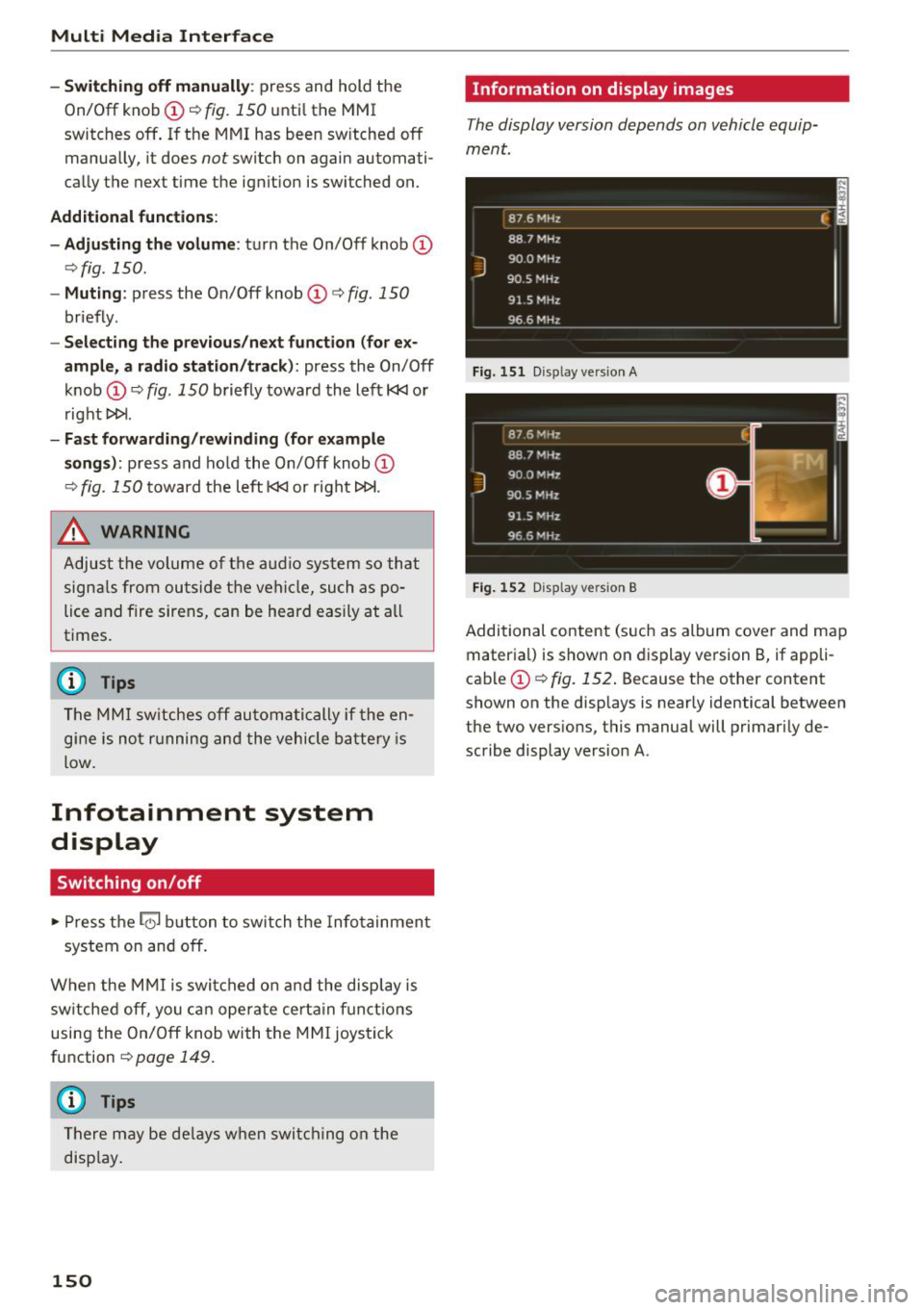
Information on display images
The display version depends on vehicle equip
ment.
Fig. 151 Disp lay ve rs ion A
Fig. 15 2 Disp lay ve rs ion B
Additional content (such as album cover and map
material) is shown on display version B, if appli
cable
(D ¢ fig. 152. Because the other content
shown on the displays is nearly identical between
the two vers ions, this manual will primarily de
scribe display version A.
Page 153 of 398
a co ...... N r--. N ...... 0
0
:E -
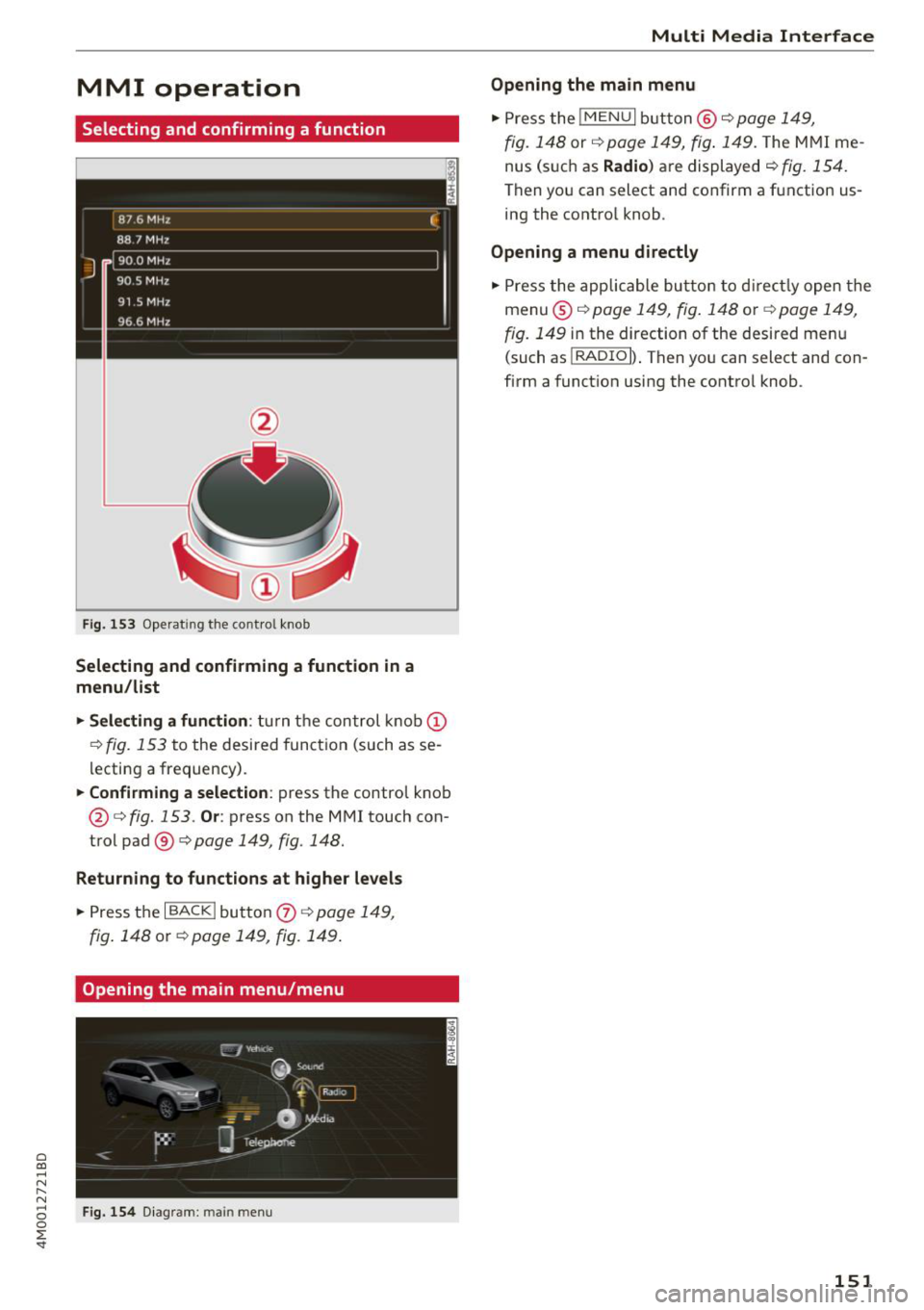
Selecting and confirming a function
Fig . 153 Operat ing the cont ro l knob
Selecting and confirming a function in a
menu/list
.,. Selecting a function :
turn t he control knob (D
¢ fig . 153 to the desired funct ion (such as se
l ecting a frequency) .
.,. Confirming a selection : press the control kno b
@ ¢
fig. 153 . Or: press on the M MI touch con
trol pad®¢
page 149, fig. 148.
Returning to functions at higher levels
.,. Press the I BACK I but to n 0 ¢ page 14 9,
fig . 148 or ¢ page 149, fig. 149 .
Opening the main menu/menu
Fig . 1 54 D iagram : main menu
Multi Media Inte rface
Opening the main menu
.,. Press the I MENU I b utt on @ ¢ page 149,
fig. 14 8 or ¢ page 149, fig. 149. The M MI me
nus (s uch as
Radio ) are displayed¢ fig. 154.
Then yo u can select and confirm a f unction us
ing the contro l knob .
Opening a menu directly
.,. Press the applicab le bu tton to d irect ly o pen the
menu ®¢
page 14 9, fig . 148 or¢ page 149,
fig . 149 in the direction of the desired men u
(such as
I RADIO I ) . Then you can select and con
firm a funct ion using the contro l knob .
151