page 34 AUDI Q7 2018 Owner´s Manual
[x] Cancel search | Manufacturer: AUDI, Model Year: 2018, Model line: Q7, Model: AUDI Q7 2018Pages: 398, PDF Size: 185.58 MB
Page 188 of 398
Tele phone
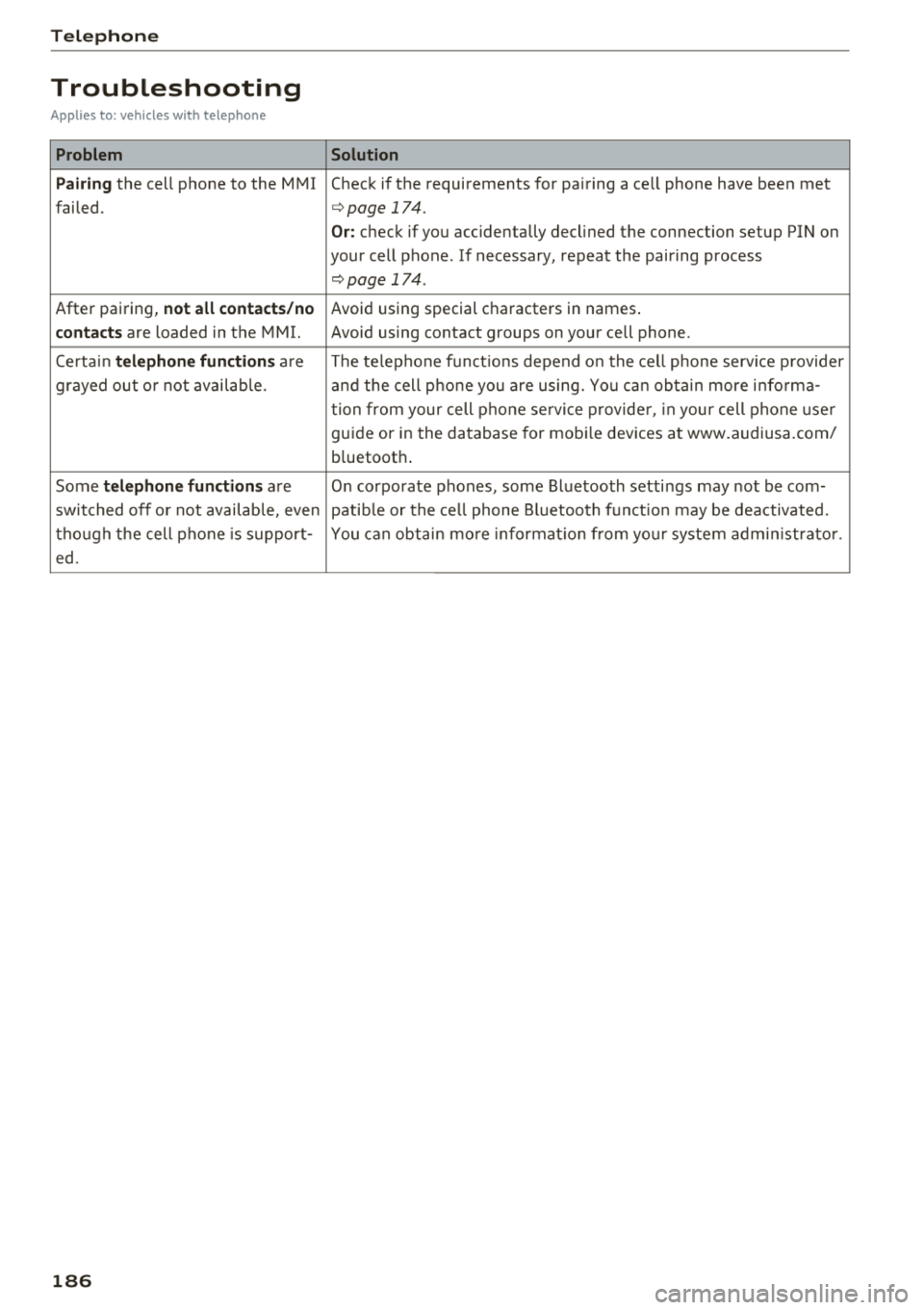
Troubleshooting
Applies to: vehicles with telephone
Problem Solution
P airing
the cell phone to the MMI Check if the requirements for pairing a ce ll phone have been met
failed.
c:::;, page 174.
Or: check if you accidentally declined the connection setup PIN on
your cell phone . If necessary, repeat the pairing process
¢ page 174 .
After pairing, not all contact s/no Avoid using special characters in names .
contac ts are loaded in the MMI. Avoid using contact groups on your cell phone .
Certa in
te le phon e function s are The te lephone funct ions depend o n the cell phone serv ice p rovider
grayed out o r not availab le. a nd the cell p ho ne you are using. Yo u ca n obtain more i nfo rma -
tion from your cell p hone se rvice p rovide r, in your cell phone use r
guide or in the database for mobi le devices at www .audiusa.com/
b luetooth .
Some
t el ephon e func tio ns are On corporate phones, some Bluetooth settings may not be com-
switched off o r not availab le, even patib le or the ce ll phone Bluetooth funct ion may be deactivated.
tho ugh the cell phone is support- You can obtain more informat io n from yo ur system admi nistrator.
ed .
186
Page 189 of 398
Cl a:, ...... N
" N ...... 0
0
::r '
Introduction
Applies to vehicles with Audi connect (Infotainment)
With Audi connect Infotainment services, on line information is transmit ted directly to the vehicle
and then integrated .
A WARNING
To reduce the r isk of an accident, only use
Aud i connect Infotainment serv ices when
road a nd traffic cond it ions permit. A lways
read and fo llow the notes in
~ page 149,
Traffic safety information.
Setup
Requirements for Audi connect (Infotainment)
Applies to vehicles with Audi connect (Infotainment)
-
The data connection fo r Audi connect Infota in
ment services is made th ro ugh an embedded SIM
card (eS IM card) that is equipped in the ve hicle.
The follow ing requ irements must be met to use
the embedded SIM card :
- You have already reg istered at
www .aud iusa .com/myaudi and ass igned a vehi
cle .
- You have also already logged in to your myAudi
account under Audi connect pl an for the em
bedded SIM card and accepted the terms of use
given there. For add it io nal information, co ntact
an a utho rized Aud i dea le r o r auth orized Aud i
Service Facility .
Then your Audi connect Infota inment serv ices are
activated and can be used in your veh icle.
(D Tips
- After the free subscr iption has ended or the
data volume has been used up, data packets
ca n be pu rchased for the use of Audi co n
nect Infota inme nt serv ices. Yo u ca n find ad
dit iona l information about fees and p ur
chasing at www .a udiusa.com/myaudi.
Audi conn ect (Inf otainment )
-Read this chapter before operating
~ page 194, Audi connect (Infotainment)
general information .
Configuration through
myAudi
Audi connect (Infotainment) configuration
Applies to vehicles with Audi connect (Infotainment)
Some Audi connect Infotainment services must
be configured through your personal myAudi ac
count before using them for the first time.
- If you do not have a persona l myAudi account
yet, you can register on line at
www.audiusa.com/myaudi.
- Add your vehicle to your myAudi account.
- Act iva te/config ure the A udi connect (Infotain -
ment) services you would like for your ve hicle in
your myAudi account.
- For some Audi connect Infotainment services,
you may also have to enter your myAudi user
data or your myAudi PIN when accessing serv ices in the MMI to connect you r vehicle to
myAudi.
For detailed information on configuration, visit
www .audiusa .com/myaudi.
Logging into myAudi in the vehicle
Applies to vehicles with Audi connect (Infotainment)
To use some Audi connect Infotainment services
(such as Twitter*), you must first connect your
v e hicl e to myAudi to transfer your personal s et
tings from your myAudi account.
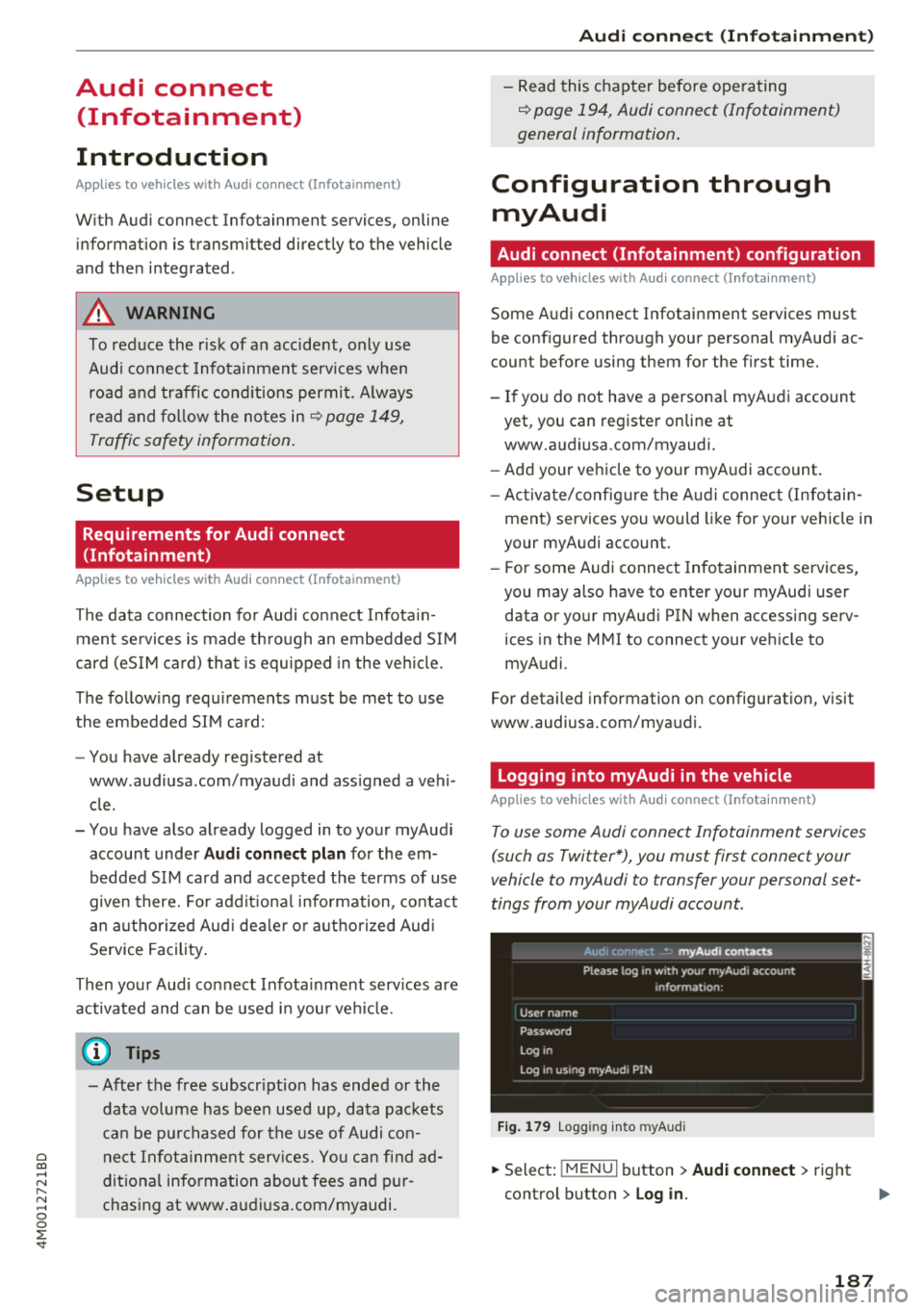
F ig . 17 9 Logg ing in to m yAud i
.,. Sel ect: !MENU I button> Audi conne ct > right
control button > Log in.
18 7
Page 190 of 398
Audi connect (Infotainment)
,.. Enter your myAudi user data. Or : enter your
eight-digit myAudi PIN .
,.. Confirm your entry with
OK .
Then yo u can open yo ur persona l se tt ings from
your myAudi account in you r vehicle .
(D Tips
You can re ceive you r myAudi P IN if you have
se t up a myAud i account. For addi tional infor
mation, see www.audi usa .com/mya udi.
Opening Audi connect
(Infotainment)
A pp lies to ve hicles with A udi co nnect (Infotainment)
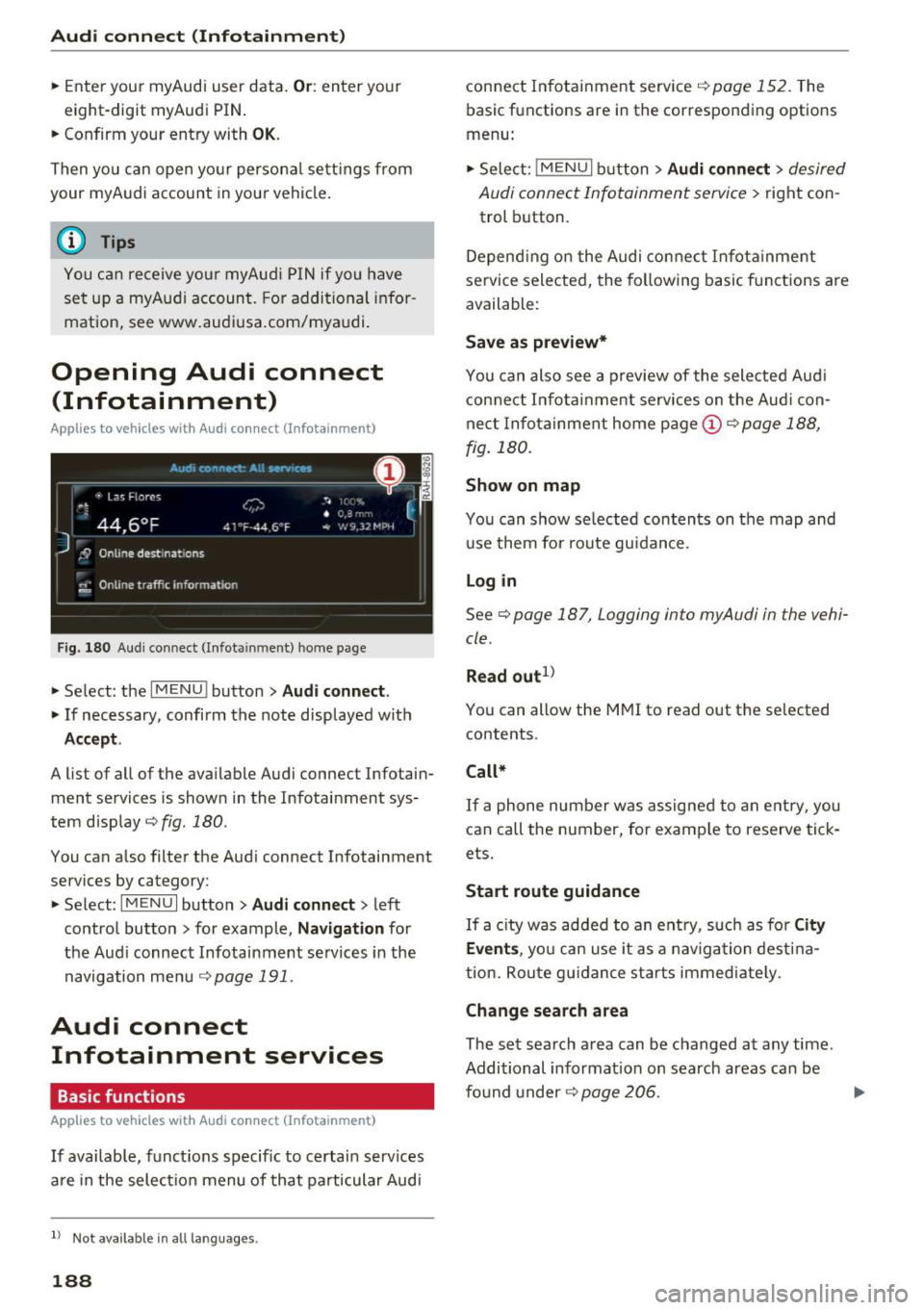
Fig . 180 Aud i co nn ect (I n fota inment) ho m e p age
,.. Se lect : the IMENU ! button> Audi connect .
,.. If necessary, confi rm the note disp layed wit h
Accept.
A list of all of the ava ilable Audi connect Infotain
ment services is shown in the Infotai nment sys
tem disp lay ¢
fig. 180 .
You can a lso filte r the Aud i connect Infotainment
services by category:
,.. Se lect :
I MENU I button> Audi connect > left
contro l button> for example,
Navigation for
the Aud i connect Infotainment se rvices in the
navigation me nu
¢page 191.
Audi connect
Infotainment services
Basic functions
A pp lies to veh icles with A udi co nnect (Infota inment)
If available, funct ions specific to certain services
a re in the selec tion menu of that particular Aud i
ll Not availa ble in a ll la n guage s.
188
connect In fota inme nt service ¢ page 152. The
basic functions are in the correspon ding options
menu:
,.. Sele ct:
!ME NUI butt on> Audi connect > desired
Audi connect Infotainment servi ce>
right con
trol b utton .
Depend ing o n the Audi connect In fota inme nt
se rvice selected, the follow ing basic f unc tions are
available :
Save as preview*
You can also see a preview of the selected Aud i
con nect In fo tai nment services on the Aud i con
nect In fo ta inment home page@¢
page 188,
fig . 180.
Show on map
You can show selected con ten ts on the map and
u se them fo r route gu idan ce .
Log in
See¢ page 187, Logging into myAudi in the vehi
cle .
Read out
1>
You can a llow the M MI to read out the selected
contents .
Call*
If a p hone num ber w as assigne d to an e ntry, you
can call the number, for e xamp le to reserve tick
ets.
Start route guidance
If a city was ad ded to an e ntry, suc h as fo r City
Events ,
you ca n use it as a navig ation dest ina
t ion. Rou te g uidance st art s immediate ly.
Change search area
The se t sea rch area can be changed at any time.
Additional informat io n on search areas can be
fo und under ¢
page 206 .
Page 191 of 398
a co ...... N r--. N ...... 0
0
:E '
Regardless of the fu nction selected, you c an
close a n Aud i connect Infotainmen t se rvice at any
time a nd return to the home screen
r::!> page 188,
fig . 180 .
Parking information
Applies to: vehicles with parking informa tion
Information on parking locations and fees in the
selected search area (for example
Nearby ).
~ Select and co nfirm Parking information.
You c an use the rig ht cont rol bu tton t o sort the
p a rking locations
By distance or By availability.
Travel information
Applies to: veh icles with travel informa tion
Information on attractions in the selecte d search
area.
~ S e lect and co nfirm Travel information .
~ Select and co nfirm an attraction to display t he
details .
Fuel prices
Applies to: veh icles with fuel prices
Information on gas stations with the lowest fue l
p rices fo r your vehicle in the selected search area.
~ Se lect and co nfirm Fuel price s.
You can use the right cont rol button to sort the
f u el p ric es
By price or By distance .
1l Servic e in pre para tio n at t he t ime of pr intin g. C an add l at
e r or i s onl y ava il able in certa in reg ion s.
Audi connect (Infotainment)
Traffic light information
Applies to: vehicles with traffic light information
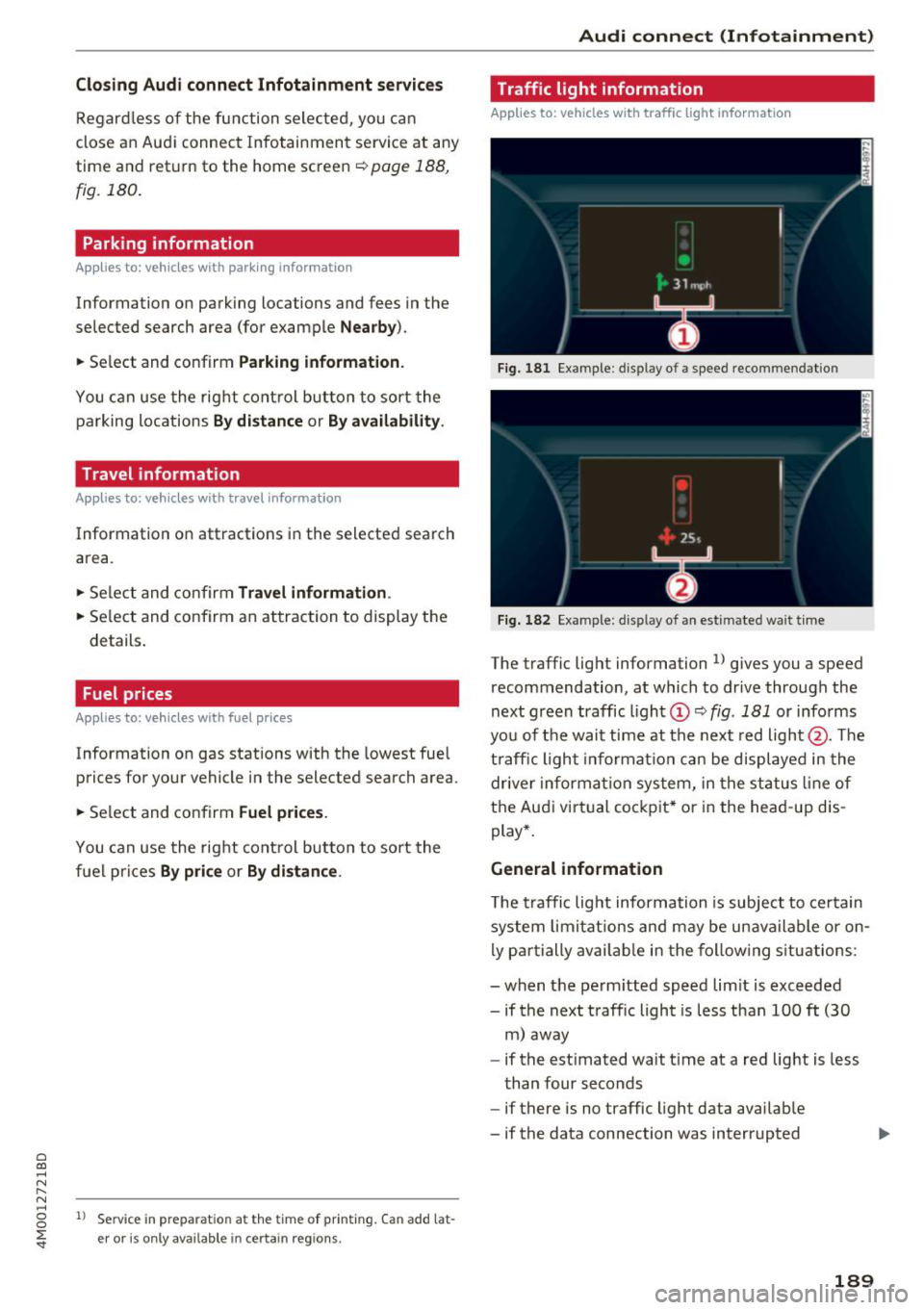
Fig. 18 1 Examp le : dis play o f a spee d recom menda tio n
Fig . 182 Example: d isp lay of an est imated wa it t ime
The traffic lig ht information l) gives you a speed
recommendation, at which to dr ive through the
next green traffic ligh t
(D r::!> fig . 181 or i nfo rms
yo u of t he wai t time at th e next red light @. Th e
t ra ffic ligh t informat ion ca n be displaye d in the
drive r informa tion syste m, in the st atus lin e of
t h e Au di virtu al co ckpit* or in the he ad-up d is
play *.
General information
T he traffi c lig ht informa tion is subject to ce rt ain
s ystem lim itat ions an d may be un availa ble or on
l y p art ially avail abl e in the fo llow ing s ituations:
- when the pe rmitted speed l im it is exceede d
- if the next t raffic light is less than 100
ft (30
m ) away
- if the est imated wait t ime at a red lig ht is less
than four seconds
- if there is no traffic light data avai lab le
- if the data connection was interrupted
189
Page 192 of 398
Audi conn ect (Infotainment)
- when the camera-based traffic sign recogni
tion* is malfunctioning ¢
page 97
- when the re are warnings from t he camera-
based traffic sign recognition*
Switching traffic light information on and
o ff
- Se lect: I MENU I button > Audi connect > Tra ffi c
li g ht info rmati on >
On (~ ) or Off (0 ).
A WARNING
-When traffic light information is shown, a l
so always pay attention to the traffic situa
t ion, the distance to other vehicles and the
area around the ve hicle. The driver is always
respons ible for assessing the traff ic situa
t ion .
- Always adapt your speed to the current
weather, road and traff ic conditions. The
displayed information must never cause you
to ignore lega l traffic regulations and pose a
safety risk.
- Regardless of the traffic light info rmat ion,
yo u should always monitor yo ur speed using
the speedometer and make su re yo u are ad
her ing to the legal speed lim it .
- T he traffic light information does not adjust
yo ur vehicle 's speed to the speed recom
mendat ion shown in the display.
(D Tips
- Traffic light information is not yet ava ilable
i n all cit ies and is not nationw ide .
- Un its of measurement and language set
ti ngs a re d isplayed based on how they were
set in the MMI sys tem set tings
¢ page 245 .
-Always read the chap ter¢ page 194, Audi
connect (Infotainment) general informa
tion .
Weather
Applies to: vehicles with weather information
Information on current weather cond itions as
well as weathe r fo recasts for the selected sea rch
area .
190
-
.. Select and confirm Weather .
You can also disp lay the current weat her condi
t ions on the map , fo r example.
.,. Select: left control button
> on entry .
Flight information
Applies to: vehicles with flight information
Information on flights and current arrival/depar
ture times in the selected search area .
.,. Select and confirm
Flight inf orm ation .
City events
Applies to: vehicles with City events
Information on events in various categories in
the desired search area.
.,. Select
Cit y Event s > left co ntro l button > cate
gory.
Online news
Applies to: vehicles with on line news
You can check the c urrent headlines of your fa
vorite publications in the MMI.
Requirement: yo ur myAud i acco un t must be s ub
scribed to news feeds and your vehicle must be
connected to myAudi
¢ page 187 .
.,. Sele ct: Online n ew s > desired newsfeed > a
headline.
The entire news a rticle w ill be dis
played .
© Tips
If yo u ha ve not s ubs cribe d to a ny pe rsonal
n ewsfeeds in your myA udi account, pre -con
figured newsfeeds will be disp layed .
Twitter
Applies to: vehicles with Twitter
You can access the most important fun ctions in
your Twitter account through your
MMI.
Requirement:
You must have co nnected your myAudi account
with Tw itter. You can f ind additional information
fo r th is on line at www .audiusa .com/myaud i. .,.
Page 193 of 398
Cl a:, ...... N
" N ...... 0
0
::r '
r=> page 187 .
.,. Se lect Twi tter > left co ntrol button > desired
function
(for example, T rend s).
The fo llow ing categories can be selected in the
Twitt er menu:
- My tw eets: News Feed and the Tweets you have
posted are l isted.
- Home: the Tweets for everyone you follow are
displayed .
-Trend s: topics on Twitter that are currently
popular w ith in a country .
Different functions are availab le depending on
the Twitter category you have selected:
- New tweet : you can post a new tweet using
pre -made templates or using myAudi tem
plates that you have created yourse lf.
- Refre sh : the selected Twitter function is re
freshed.
- Fa vo rite : mark a Tweet as favorite to show you
liked it.
- Retwee t: you can quote a Tweet to share it with
others.
(D Tips
- Other se tt in gs such as accoun t, la ng uage,
Tweet security and location settings
cannot
be changed in the MMI. These c hanges must
be made on the Twitter website .
- You can on ly connect
one Twitter account
with your myAudi acco unt .
- Audi con nect (Infotainment) makes i t possi
b le to access Twitter . Permanent avai lability
ca nnot be guaranteed, because t hat de
pends on Twitter.
Travel (travel guide)
Applies to: vehicles with Travel (travel guide)
You can use the Audi MMI connect opp to store
points of interest on your mobile device (such as a smartphone) and then use them for route
guidance in the MMI.
Requirement:
Audi connect (Inf otainment )
The Audi MMI connect app must be insta lled and
open on your mobi le device .
Yo u m ust be logged into your myA udi account in
the
Audi MMI conne ct app and you must have se
l ected your vehicle.
T he Wi-Fi function on your mob ile dev ice and on
t h e M MI m ust be switched on.
T he MMI must be connected to the network .
.,. Select:
!MENUI button> Audi connect > left
control button >
Information category> Tra v
el.
After opening the trave l guide, trave l tips in your
area w ill be displayed including current ratings as
well as the corresponding category .
.,. Press the left control button to change the cat
egory (such as bars nearby) .
A WARNING
-
-It is o nly safe to use tablets, laptops, mo
b ile dev ices and other sim ila r devi ces when
t he vehicle is s ta ti onary bec ause, li ke a ll
loose objec ts, they co uld be thrown around
the inside of the ve hicle in a crash and cause
serio us inj uries . Store these types of devices
securely while driving.
- Do not use any wireless devices on the front
seats within range of the airbags whi le dr iv
ing. Also read the warnings in the chapte r
r::> page 2 73, Front airbags.
@ Note
Always fo llow the information fo und in ¢ @ in
Wi -Fi hotspot on page 194.
(D Tips
Units o f measurement, language settings and
time are shown in the Infotainment system
display based on how they were set in the
M MI system sett ings
r::> page 245.
Audi connect (Infotainment) in navigation
Applies to: vehicles with a navigation system and Audi con
nec t (Infotainment)
.,. Select: !MENUI button> Audi connect > left
control button >
Na vigation .
191
Page 194 of 398
Audi conn ect (Infotainment)
The fo llowing A udi connect Infotainment services
are current ly availab le:
- Nav igat ion with
s atellit e map1> ¢ page 215.
-Po int of Int eres t (POI) online search with
v o ic e re cogni tion
(such as restaurants) : plan
r oute g uidance using t he M MI con trol panel
¢ pag e 207 and the voice recognition system
¢ page 167.
- Set up dest ina tions in your MMI using yo ur
myAudi account or the satellite map vie w l)
¢ page 215.
-Onlin e traffic inform ation : receive up-to -the
minute traffic information about accidents,
road construction and other incidents
¢ page 219.
-Map updat e: import navigation map updates
directly to your v ehicl e using an SD card or as
an on line update¢ page 216.
(D Tips
-For the map update Audi connect Infotain
ment service via SD card, check the current
software vers ion in your vehicle and then
check www.aud iusa.com/myaudi to see if a
newer version is ava ilable. You can a lso have
the new navigation data installed by an Audi
dealer, wh ich can be done for an additional
ch arge.
- You can find add itiona l information abo ut
the
map updat e on line at
www.audiusa.com/myaud i.
Audi connect (Infotainment) in Media
menu
Applies to vehicles with Audi connect (Infotainment)
~ Select : IMENUI button> Audi conne ct > right
cont rol button >
Ente rt a inment .
- Online m edia and Internet radio :
offers access
to different online media servic es as we ll as In
ternet radio and operation through the MM I us
ing the
Audi MMI connect app ¢page 230.
ll AUDI AG pr ovide s access to services fro m third party pro
v ider s. Pe rma ne nt ava ilabil ity c anno t be guara nteed, be
c a use that depen ds on th e th ird party provider.
192
Applies to: vehicles with Wi-Fi audio player
-Wi -F i audio pla yer: you can access the med ia
center through a Wi-Fi connected media player (such as a smartphone)
¢ page 229.
& WARNING
It is only safe to use tablets, laptops, mobile
devices and other simi lar devices when the ve
hicle is stationary beca use, like a ll loose ob
jects, they could be thrown around the inside
of the vehicle in a crash and cause serious in
juries . Store these types of devices securely
while driv ing .
@ Note
Always fo llow the information fo und in ¢ \@ in
Wi-Fi hotspot on page 194.
(D Tips
- Also see the chapter¢ page 194, Audi con
nect (Infotainment) general information.
- For more information on t he Wi -Fi audio
player and supported devices, contact an
authori zed Aud i dealer or autho riz ed Aud i
Service Facility.
Additional options
Applies to vehicles with Audi connect (Infotainment)
~ Select: ! M ENUI button> Audi conn ect > right
cont rol button .
The following options are available in the Aud i
connect In fota inment services overview :
About Audi connect
Here you wi ll find lega l information for Audi con
nect (Infotainment) usage.
L o g in *
See ¢page 187, Logging into myAudi in the vehi
cle.
Connection manager
See ¢ page 246 .
Page 195 of 398
Cl a:, ...... N
" N ...... 0
0
::r '
The validity and expirat io n date of yo ur licenses
are displayed. When the function is switched on
10, the message Warning befo re sub scription
e x pire s
will display to warn you that your license
is about to expire.
R efr es h
The content of the selected A udi connect Info
tainment service o r the entire A udi connect (Info
tainment) list is updated .
Data privacy
Requirement: the ign it ion must be switched on.
Location and personal data are transmitted when
using Aud i connect services . If you do not want
this information to be transm itted, act ivate data
privacy .
-Acti vate pri vacy: the data conn ection is limit ed
or deactivated. Some Audi connect services will
not be available. In veh icles w ith Audi connect
emergency call and service¢
page 201, loca
t ion and veh icle data will be transmitted via the
emergency call in cases of eme rgency . For on
line roadside assistance*, only the voice call is
made a nd no data is transmitted.
- Deacti vate data priv acy : if the data connect ion
is limited or deactivated, you ca n sw itch on the
data connection for the use of all Aud i connect
services . Se lect and confirm
A ctiv ate dat a con
nection .
(D Tips
Applies to: vehicles with emergency call function
In vehicles with Audi connect emergency ca ll
and service, a data connection is requi red. It
cannot be deact ivated. Location data is only
transmitted together with vehicle data when
emergency calls are made .
Audi connect (Inf otainment )
Wi-Fi hotspot
Applies to: veh icles w ith Wi-Fi hotspot
You can us e the fvlfv/I as a W i-Fi hotspot to con
nec t up to eigh t Wi-Fi devices to the Interne t.
While driving, res tricted use of unsecured , ligh t,
small wireless devices is only possible from the
rear of the vehicle .
Requirement: the ignition must be sw itched on .
.. Select:
IMENU I button> Telephone > right con-
trol button >
Wi-Fi setting s.
The following sett ings can be selected:
Wi -Fi
The MMI Wi-Fi hotspot is deactivated at the fac
tory. Sw itch the W i- Fi hotspot to
Hots pot before
establ ish ing a con nection between your ve hicle
and yo ur Wi-Fi device.
-On: the MMI Wi-Fi hotspot is act ive and v is ible
to other dev ices. You can connect your W i- Fi
dev ice to the MMI and use the Inte rnet co nnec
t ion if necess ary.
- Off : the M MI Wi-Fi hotspot is deactivated. An
I nte rnet co nnect ion for W i-Fi devices is not
possible .
A WARNING
= -
- To reduce the risk o f an accident, use t he
Audi connect Infotainment services with a
W i-Fi hotspot only in the rear seat when the
veh icle is in mot ion, or only when the vehi
cle is stat ionary.
- It is only safe to use tablets, laptops, mo bile dev ices and other simi lar devices when
the vehicle is stationary because, like all loose objects, they could be thrown around
the inside of the vehicle in a c rash and cause
ser io us inj uries . Store these types of dev ices
secure ly while drivi ng.
- D o not use any wireless dev ices on the front
seats within ra nge of the airbags whi le dr iv
i n g. A lso read the warnings in t he chapte r
¢ page 2 73, Front airbags .
-As the d river, do not allow usage of the W i
F i ho tspot to d is tra ct yo u from dr iv ing, as
this cou ld increase the r isk o f an accident .
193
Page 196 of 398
Audi conn ect (Infotainment)
@ Note
- Under some conditions, certain mobile devi
ces and operat ing systems may a utomati
cally switch from your vehicle's Wi-Fi hot
spot to the device's mobile data connection.
In that event, standard text and data usage
rates would apply while t he dev ice's mob ile
data connection is in use . P lease refer to
documentat ion p rovided by yo ur mobi le de
v ice 's man ufac tur e and yo ur d ata ca rr ie r for
d eta ils, re lated terms and privacy state
ment.
- You are responsible fo r all p re caut io ns tak
en fo r data p rotection, an ti- v irus pro tec tion
and protection against loss of data on mo
bile devices that are used to access the In
ternet thro ugh the W i-F i hotspot.
(D Tips
- In vehicles without Audi connect ( Infotain
ment)*, the use of the Wi -Fi hotspot is only
possib le for the Wi-Fi audio p layer*. A data
connection to the Internet cannot be estab
li shed.
- For additional informat ion about the Aud i
connect Infotai nment services, visit
www .audiusa .com/myaud i.
Configuring the data
connection
Applies to vehicles with Audi connect (Infotainment)
The data connection for Audi connect Infotain
ment servic es is pr e-configured at the factory.
However, if o configuration should be n ecessary,
you con adjust the following settings .
"Se lect: I M ENUI button> right control b utton>
Connection manager.
" Se lect : rig ht contro l button > Online settings >
Data connection settings .
Using the Data connection settings menu, you
can set when an Internet connection shou ld be
made. The Int ernet conn ection disconnects auto
mat ica lly once the requested Audi connect Info
tainment service no longer requires any d ata.
The fo llowing settings can be selected:
194
Audi connect (MMI)
With the Audi conne ct (MMI) func tion, you can
Allow or Den y the use of Audi connect Info tain
ment services if the connection is set to
No re
que st or With request.
Wi-Fi devices*
U sing the Wi -Fi d evice s function, yo u can Allow
or Deny a co n ne cti on t o the Inte rnet .
& WARNING
- As t he driver, do not a llow usage o f the Wi
F i hotspot to distract yo u from driving, as
this could increase the r is k of an accide nt.
- It is on ly safe to use tablets, laptops, mo
bi le devices and other simi lar devices when
the vehicle is stat ionary because, like a ll
loose objects, they co uld be thrown around
the inside of the ve hicle in a crash and cause
serious injuries . Store these types of devices
securely wh ile d riving .
- Do not use any wireless devices on the front
seats within range of the airbags while dr iv
ing . Also read the warnings in t he chapter
r:!) page 2 73, Front airbags .
@ Note
Always fo llow the information found in ¢ (!) in
Wi-Fi hotspot on page 194 .
Audi connect
(Infotainment) general
information
Audi connect Infotainment services
Applies to vehicles with Audi connect (Infotainment)
(D Tips
-Yo u ca n only use serv ices suppo rte d b y Aud i
connect (In fotainment) if yo u have the op
tional MMI Navigation plus eq uipment with
M MI touch* and A udi connect (Infotain
ment).
- Use of the L TE* mobile network standard is
not ava ilab le in every country. Contact an
authorized Audi dealer o r autho rized Aud i
Page 197 of 398
Cl a:, ...... N
" N ...... 0
0
::r '
- Usage of Audi connect Infotainment serv
ices depends on the availability of services
through third party providers .
- A udi connect Infotainment services are only
available within the cell phone network cov
erage from yo ur cell phone service provider.
- Audi connect Infotainment services are available in the USA . Audi connect Infotain
ment services are currently not available in
Canada or in Mexico.
- Also read the information in the chapter
¢ page 174, Telephone.
-Availability, scope, providers, screen display
and costs of serv ices may vary depend ing on
the country, model, model year, end dev ice
and rates. For additional informat ion, visit
www.audiusa.com.
- An init ial registration/activation on the
myAudi platform at www.aud iusa.com/
myaudi is requ ired to use individual serv
i ces. You can contact an autho rized Aud i
dealer or Audi connect (Infotainment) cus
tomer service a t (877) SOS-AUDI (2834) to
receive information on options fo r exp and
i ng you r usage and any costs that may re
su lt.
- The Audi connect Infotainment services are
a Wi -Fi/lnternet -based system. If the sys
tem does not function correctly even
though all of the requirements are met,
please try again later or contact Audi con
nect (Infota inment) customer service at
(877) SOS-AUDI (2834).
- For detailed information on Audi connect
(Infotainment) and the Terms of Use, refer
to www .audiusa.com.
Data protection
Applies to vehicles with Audi connect (Infotainment)
(1) Tips
- You can find add itiona l information in your
MM I in the opt ions menu fo r the selec ted
A udi connect Infotainment service and also
on line at www.audiusa .com .
- Your privacy is important to us.
Audi conn ect (Inf otainment )
- AUDI AG collects, processes, shares and
transmits your personal information in ac
co rdance w ith legal reg ulations in o rder to
ensure p roper function and availab ility of
the individua l Audi connect Infotainment
serv ices. You can view the complete, current
and valid Audi connect (Infotainment) data
protec tion po licy in you r M MI. The myAud i
pla tform is availab le for to you to a ct ivate
a dd itio nal Audi conne ct Infotainment serv
i c es and to t ransfe r data to your ve hicl e,
among other services . A one -time registra
tion is require d to establish a connection to
your vehicle. Fo r th is purpose, AUDI AG co l
lects, processes, transm its and uses your re
quired persona l information as required for
you to use the services provided by AUDI
AG. Your informat ion is not distrib uted to
third pa rties. Using your cell phone with
your myAudi p latform allows you to trans
m it d ata fo r yo ur Audi conne ct I nfot ain
ment serv ices functions to yo ur vehicle and
you can allow specific vehicle data to be
transmitted from yo ur vehicle.
- By activating special information se rvices
that are part of your Aud i connect (Infotain
ment) portfolio, you can use these functions
directly in you r vehicle by ente ring data to
confirm your identity (to use soc ial net
works , for example). To do this, the ident ifi
cat ion information you provided is forward
ed with the request to the respec tive service
prov ider. Then you can access yo ur person al
c ontent using a se cu re conne ct ion. T his con
t en t is displaye d in the vehicle for you r use .
Your personal conten t is not stored w ith in
Audi AG. The necessary connection informa tion is processed and used for prov iding
serv ices and the prope r funct ion of the serv
ices in accordance with applicable legal
guide lines.
- You can find additional info rmation in your
MMI in the options menu for the selected
Audi connect Infotainment service and a lso
online at www .a u diusa.com.
- By p roviding Aud i connect Infotainment
serv ices, Audi of America is au thorized to
collec t, p rocess, transmi t and transfer
195