display AUDI Q7 2018 Owner´s Manual
[x] Cancel search | Manufacturer: AUDI, Model Year: 2018, Model line: Q7, Model: AUDI Q7 2018Pages: 398, PDF Size: 185.58 MB
Page 330 of 398
Checking and Filling
& WARNING
- A highly explosive mixture of gases can form
when charging batter ies . Only charge the
vehicle battery in well-vent ilated areas .
- A drained vehicle battery can freeze at tem
peratures a round 32 QF (0 QC) . A frozen or
thawed veh icle battery must not be charged
and must not be used anymore. If ice fo rms,
the battery housing ca n crack and ba tte ry
electrolyte can lea k out, which increases the
risk of an explosion and chemi cal bu rns.
Contact an authorized Au di dea le r o r au
tho rized Audi Serv ice Facility fo r more info r
mation.
- Do not connect o r disconnect the ch arging
cable while charg ing because this increases
t h e risk of an exp losion.
(D Tips
- Only charge the vehicle battery through the
con nections in the engine compartment .
- Read a ll of t he manufacture r's ins tructions
for the charger befo re charg ing the vehicle
battery.
Windshield washer system
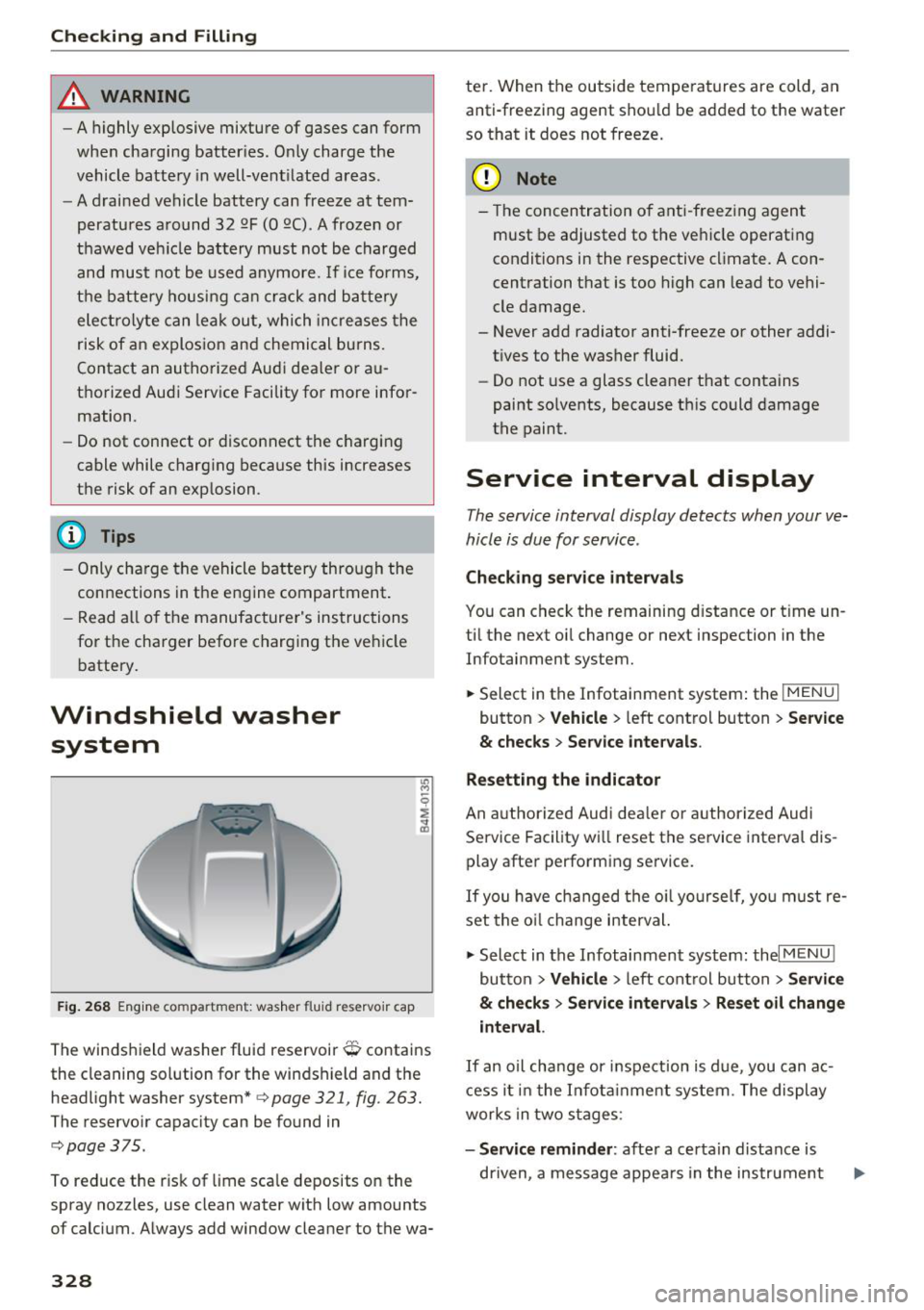
F ig. 26 8 Eng ine co mpa rtment: was her fluid reservo ir cap
The winds hield washer fluid reservoir O contains
the cleaning solution for the windshield and the
headlight washer system*
c> page 321, fig . 263.
The reservo ir capacity can be found in
c:;, page 375.
To reduce the r isk of lime sca le deposits o n the
spray nozzles, use clean water with low amounts
of calcium . Always add window cleane r to the wa-
328
te r. When the outside tempe ratures are cold, an
anti-freezing agent shou ld be added to the water
so that it does not freeze.
(D Note
- The concentration o f anti -freezing agent
must be adjusted to the ve hicle operating
conditions in the respective cl imate. A con
centration that is too high can lead to vehi
cle damage.
- Never add radiator anti-freeze or other addi tives to the washer fluid.
- Do not use a glass cleaner t hat contains
paint so lvents, because t his could damage
the paint.
Service interval display
The service interval display detects when your ve
hicle is due for service .
Checking service intervals
You can check the remaining d istance or t ime un
ti l the next oi l change or next inspection in the
Infotainment system.
.,. Select in the Infotainment system : the
I MENU I
button > Veh icle > left cont rol button > Se rvi ce
& checks > Service inter vals .
Resetting the indicator
An a utho rized Audi deal er or author ized Audi
Se rvice Facility wi ll reset the service interval dis
play after performing se rvice .
If you have changed the o il yourself, yo u must re
set the o il change interval.
.,. Select in the Infotainment system: thel
MENU !
button > Vehicle > left cont rol button > S ervice
& checks > Service intervals > Reset oil change
interval.
I f an o il cha nge or inspection is due, you can ac
cess i t in the I nfot ainment system . T he display
works in two s tages :
-Service reminder : after a certa in distance is
dr iven, a message appea rs in the instrument
Page 331 of 398
Cl a:, ...... N
" N ...... 0
0
::r '
ed on . The remaining distance and time is
displayed br iefly.
- Service due : if your vehicle has reached a serv
ice interval, a message appears briefly after
switching the ignition on.
({;D) Note
-Only reset the oil change indicator if the oil
was changed .
- Following the service intervals is critical to
maintaining t he service life and va lue of
your vehicle, especia lly the engine . Even if
the mileage on the vehicle is low, do not ex
ceed the time for the next service.
Checking and Filling
329
Page 350 of 398
Wheels
Please note that the TPMS is not a substitute for
proper tire maintenance, and it is the driver's re
sponsibility to maintain correct tire pressure,
even if under-inflation has not reached the level
to trigger illumination of the TPMS low tire pres
sure telltale.
Your vehicle has also been equipped with a TPMS
malfunction indicator to indicate when the sys
tem is not operating properly. The TPMS mal
function indicator is combined with the low tire pressure telltale. When the system detects a
malfunction, the telltale will flash for approxi
mately one minute and then remain continuously
illuminated. This sequence will continue upon
subsequent vehicle start-ups as long as the mal
function exists.
When the malfunction indicator is illuminated,
the system may not be able to detect or signal
low tire pressure as intended. TPMS malfunctions
may occur for a variety of reasons, including the
installation of replacement or alternate tires or
wheels on the vehicle that prevent the TPMS
from functioning properly . Always check the
TPMS malfunction telltale after replacing one or
more tires or wheels on your vehicle to ensure
that the replacement or alternate tires and
wheels allow the TPMS to continue to function
properly.
If the tire pressure monitoring indicator
appears
Applies to: vehicles with Tire Pressure Monitoring System in
dic ato r
The tire pressure indicator in the instrument
cluster informs you if the tire pressure is too low
or if there is a system malfunction.
Using the ABS sensors, the tire pressure monitor
ing system compares the tire tread circumfer
ence and vibration characteristics of the individu
al tires . If the pressure changes in one or more
tires, this is indicated in the instrument cluster
display with an indicator light
RI] and a message.
If only one tire is affected , the location of that
tire will be indicated.
The tire pressures must be stored in the Infotain
ment system again each time the pressures
348
change (switching between partial and full load
pressure) or after changing or replacing a tire on
your vehicle ~
page 349. The tire pressure moni
toring system only monitors the tire pressure you have stored. Refer to the tire pressure label for
the recommended tire pressure for your vehicle
~ page 340, fig . 272.
Tire tread circumference and vibration character
istics can change and cause a tire pressure warn
ing if:
- the tire pressure in one or more tires is too low
- the tires have structural damage
- the tire was replaced or the tire pressure was
changed and it was not stored
~ page 349
- tires that are only partially used are replaced
with new tires
Indicator lights
RI] -loss of pressure in at least one tire~,& .
Check the tires and replace or repair if necessary.
Check/correct the pressures of all four tires and
store the pressure again in the Infotainment sys
tem
~ page 349.
m (Tire Pressure Monitoring System) Tire
pressure: malfunction! See owner's manual.
If
m appears after switching the ignition on or
while driving and the
RI] indicator light in the in
strument cluster blinks for approximately one
minute and then stays on, there is system mal
function. Try to store the correct tire pressures
~ page 349. In some cases, you must drive for
several minutes after storing the pressures until
the indicator light turns off . If the indicator light
does turn off or turns on again after a short peri
od of time, drive to an authorized Audi dealer or
authorized Audi Service Facility immediately to
have the malfunction corrected.
& WARNING
- If the tire pressure indicator appears in the
display, reduce your speed immediately and
avoid any hard steering or braking maneu
vers. Stop as soon as possible and check the
tires and their pressure.
Page 355 of 398
Cl a:, ...... N
" N ...... 0
0
::r '
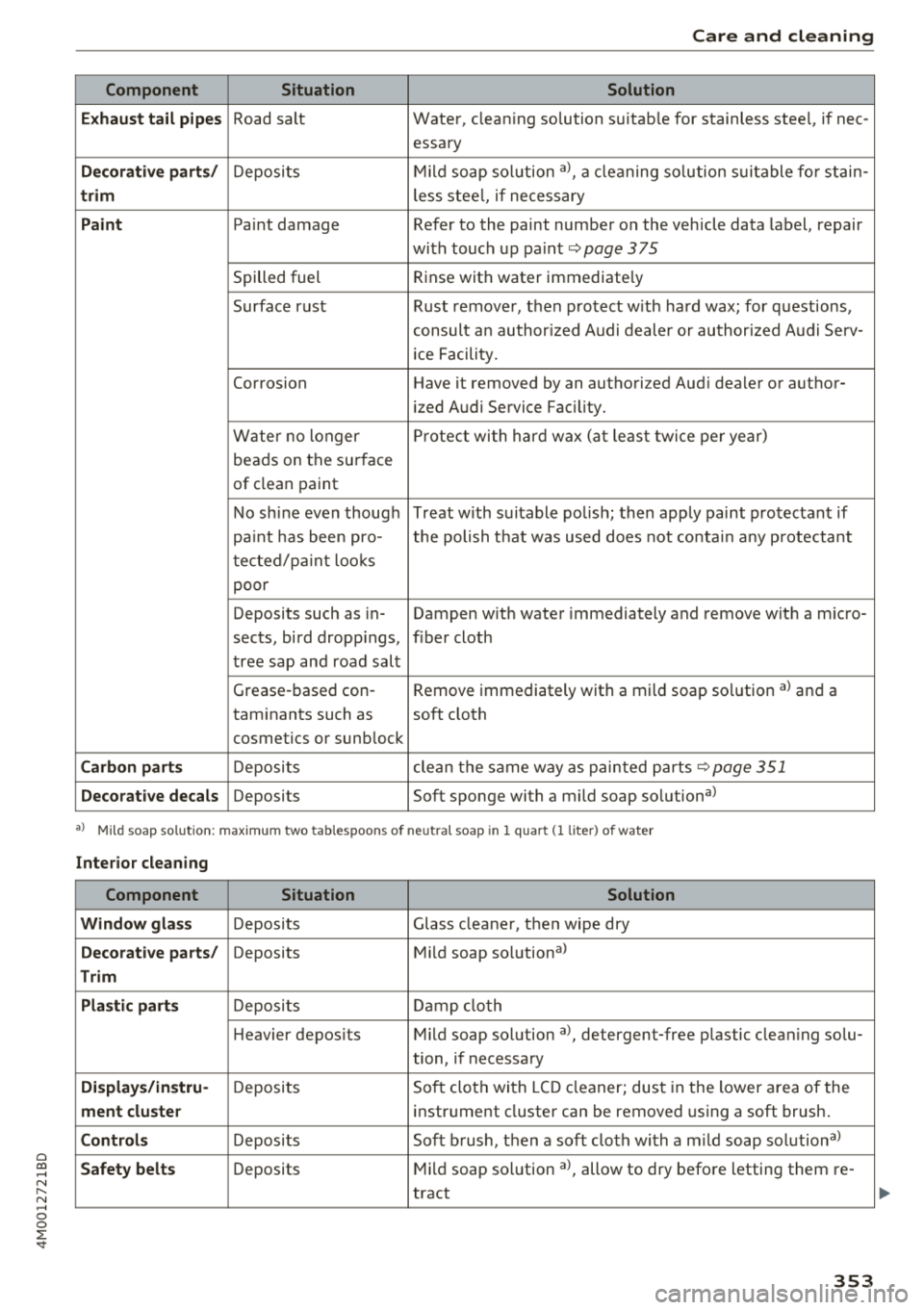
Component Situation Solution
Exhaust tail pipes
Road salt Water, cleaning solution suitab le for stainless steel, if nee -
essary
Decorative parts/ Deposits Mild
soap solution a>, a cleaning solution suitable for stain-
trim less steel, if necessary
Paint Paint damage Refer to the paint number on the vehicle data label, repair
with touch up paint
r:=;, page 375
Spilled fuel Rinse
with water immediate ly
Surface rust Rust remover, then protect with hard wax; for questions,
consult an author ized Audi dealer or author ized Audi Serv-
ic e Facility.
Corrosion Have it removed by an authorized Aud i dealer or author-
ized Audi Service Fac ility.
Water no longer Protect
with hard wax (at least twice per year)
beads on the surface
of clean paint
No shine even though Treat with suitable polish; then apply paint protectant if
pa int has been pro- the polish t hat was used does not contain any protectant
tected/paint looks
poor
Deposits such as in- Dampen w ith water immediately and remove with a m icro-
sects, bird dropp ings, f iber cloth
tree sap and road salt
Grease-based con- Remove immediately with a mild soap solution a) and a
taminants such as soft cloth
cosmetics or sunb lock
Carbon parts Deposits clean the same way as painted parts r:=;,page 351
Decorative decals Deposits Soft sponge with a mild soap solutiona>
•> Mi ld soap solution: maximu m two tab lespoons of ne utral soap in 1 quar t (1 lite r) of water
Interior cleaning
Component Situation Solution
Window glass
Deposits Glass cleaner, then wipe dry
Decorative parts/ Deposits Mild soap solutional
Trim
Plastic parts
Deposits Damp cloth
H eavier depos its Mild soap solution a>, detergent-free p lastic clean ing solu-
tion, if necessary
Displays/instru-Deposits Soft cloth with LCD cleaner; dust in the lower area of the
ment cluster instrument cluster can be removed using a soft brush.
Controls Deposits Soft brush, then a soft cloth with a m ild soap solutiona>
Safety belts Deposits Mild
soap solution a>, allow to dry before letting them re -
tract
353
Page 357 of 398
Cl a:, ...... N
" N ...... 0
0
::r '
one direction and not back and forth.
- N ever remove snow or ice from door win
dows and mirrors using warm or hot water
because this could cause cracks to form .
- To avoid damage to the rear w indow de
fogger, do not apply any stickers on the
heating wires on the inside of the window .
-Deco rati ve parts /trim
- Never use chrome care or cleaning prod-
ucts.
- Paint
-To red uce the risk of scratches, the vehicle
must be free of dirt and dus t before pol
ishing or waxing .
- To preven t pa int damage, do not pol ish or
wax the ve hicle in direct sunlight.
- To red uce the risk of pa int damage, do not
polish away rust spots.
- Remove cosmetics and sunscreen immedi
a tely- these could damage the pa int.
- Displa ys/ instrument cluster
- Make sure that the instrument cluster is
switched off and has cooled off before
cleaning it.
- Displays, the instrument cluster and the
trim surrounding it must not be cleaned
w ith dry clean ing methods because they
cou ld become scratched.
- Make sure no fluids enter the spaces be
tween the instrument cluster and the
trim, because that could cause damage.
- Controls
- Make sure that no fluids enter the con-
trols, because this could cause damage.
- Safety belt s
-Do not remove the safety belts to clean
them .
- N ever clean safety belts or their compo
nents chemically or with corrosive fl uids
or so lvents and never allow sharp objects
to come into contact with the safety belts.
Th is could cause damage to the belt web
bing.
- If there is damage to the webbing, the
connect ions, the retractors or the buckles,
Care and cleaning
have them replaced by an authorized Aud i
dealer or authorized Audi Service Facility .
-Te xtile s/artificial leather / Alcantara
- Never treat art ificial leather/A lcantara
with leather care products, solvents, floor
polish, shoe polish, spot remove or s imilar
p roducts.
- Have a spec ialist remove stubborn stains
to prevent damage .
- Never use steam cleaners, brushes, hard
sponges, etc. when cleaning.
- Do not turn on the seat heating" to dry the
seat .
- Objects w ith sharp edges, such as zippers
or rivets on clothing or be lts, can cause
damage to the surface .
- Open hook and loop fasteners, for exam
ple on clothing, can damage seat covers .
Make sure hook and loop fasteners are
closed .
-Natural l eath er
- Neve r trea t leathe r wi th solvents, floor
polish, shoe polish, spot remover or sim i
lar products .
- Obje cts w ith sharp edges, such as zippe rs
or rivets on clothing or be lts, can cause
damage to the surface .
- Neve r use steam cleaners, brushes, hard
sponges, etc. when cleaning .
- Do not turn on the seat heating" to dry the
seat.
- To he lp prevent the leather from fad ing,
do not leave the vehicle in direct sunlight
for long periods of time . If leaving the ve
hicle parked for long periods of time, you
should cover the leather to protect it from
d irect sunlight.
(D Tips
- Insects are easier to remove from paint that
has been freshly waxed.
- Regular waxing can prevent rust spots from
forming.
355
Page 369 of 398
a co ...... N r--. N ...... 0
0
:E '
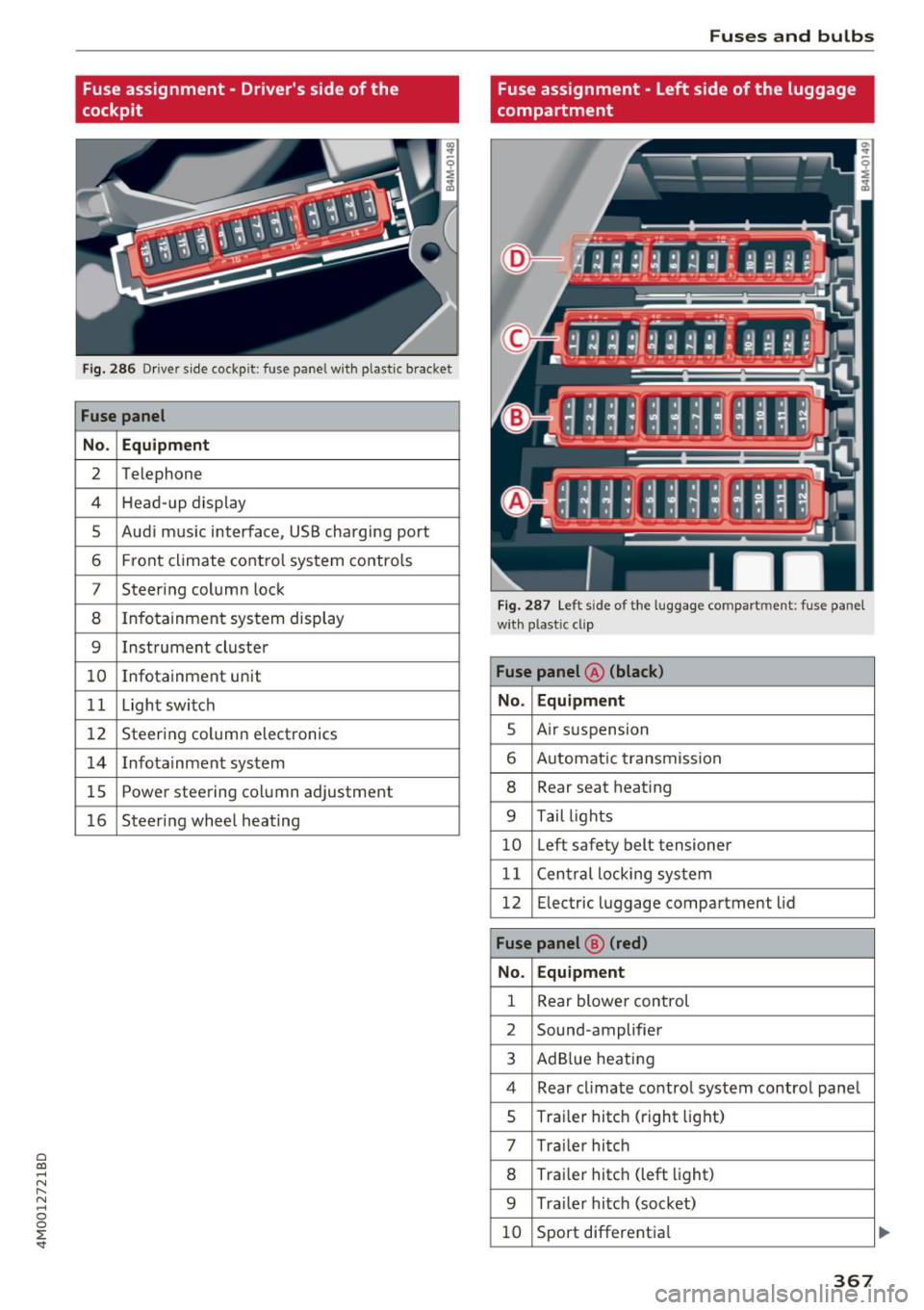
cockpit
Fig . 28 6 Driver s ide cockp it : fuse panel wit h plastic bracket
Fuse panel
No . Equipment
2 Telephone
4 Head- up display
5 Aud i m usic interface, USB charging port
6 Front climate co ntro l system contro ls
7 Steer ing column lock
8 Infotainment sys tem display
9 Instrument cluste r
10 Infotainment unit
1 1 Light switch
12 Steerin g column electronics
14 Infotainmen t sys tem
1 5 Powe r steering co lumn adjustment
16 Steeri ng whee l heating
Fuses and bulbs
Fuse assignment - Left side of the luggage
compartment
F ig. 28 7 Le ft s ide of the l uggage co mpart ment : fuse pa nel
wi th plastic cl ip
Fuse panel @ (black)
No . Equipment
s Air s usp ension
6 A utomat ic t ransmiss io n
8 Rear seat heat ing
9 T ail ligh ts
10 Left safety belt tensioner
11 C en tral locki ng sys tem
12 Electric luggage compartment lid
Fuse panel @ (red)
No. Equipment
1 Rear blower control
2 Sound -amplifier
3 Ad Blue heat ing
4 Rear cl imate co ntro l system contro l pane l
s Traile r hitc h (right lig ht)
7 Tra ile r hi tc h
8 Tra ile r hitc h (left light)
9 Tra ile r hitc h (soc ket)
10 Sport different ia l
367
...
Page 383 of 398
Cl a:, ...... N
" N ...... 0
0
::r '
A/C MAX (button) .................. .
A/C (button)
. .. ................ ... .
67, 71
67, 70
ABS
.. .. .. .. .. ............... .. .. .. . 142
Accessories 60,379
Active lane assist
Cleaning the camera area . . . . . . . . . . . . . 352
also refer to Audi active lane assist . . . . . 117
Adaptive air suspension
refer to Air suspension ........ .. .. .. .
Adaptive cruise control ................ .
C leaning the sensor ................. .
Messages .... ................ ..... .
Predictive control
............. .. .. .. .
Ad Blue .. .. .. .. ............. .. .. .. .. . 128
102
352 110
100
314
Messages .... ................ ..... . 314
Additional accessories . . . . . . . . . . . . . . . . . 3 79
Adjusting air distribution (automatic climate
control) . . . . . . . . . . . . . . . . . . . . . . . . . . . 68, 71
Adjusting the additional display . . . . . . . . . . 14
Adjusting the rear seats . . . . . . . . . . . . . . . . . 55
Adjusting the sound . . . . . . . . . . . . . . . . . . . 249
Adjusting the temperature (automatic climate
control) . . . . . . . . . . . . . . . . . . . . . . . . . . . 68 71
,
Adjusting the volume . . . . . . . . . . . . . . . . . . . 15
Advanced key
refer to Convenience key . . . . . . . . . . . . . . . 77
Airbag . . . . . . . . . . . . . . . . . . . . . . . . . . . . . . 269
Airbag system . . . . . . . . . . . . . . . . . . . . 269, 287
Advanced Airbag System components . . . 276
Care . . . . . . . . . . . . . . . . . . . . . . . . . . . . . . 284
Children · · · · · · · · · · · · · · ...... .. .. .. . 293
Ch ild restraints
............ .. .. .. .. .
Components (front airbags) ...... .. .. .
Danger of fitting a child safety seat on the
front passenger seat ................ .
Disposal ..... ................ ..... .
Front airbags ................ .. .. .. .
How do the front airbags work? . .. .. .. .
How many airbags does my vehicle have?
How the Advanced Airbag System compo -
nents work together ........... ... .. .
Indicator light ............... .. .. .. .
Monitoring . .. ............. .. .. .. .. .
PASSENGER AIR BAG light ....... .. .. .
Repairs .... .. ................ ..... . 293
276
270
284
274
279
276
278
281
281
281
284
Index
Safety instructions . . . . . . . . . . . . . . . . . . . 283
When must the system be inspected? . . . 281
Air suspension . . . . . . . . . . . . . . . . . . . . . . . 128
Alarm system
refer to Anti-theft alarm system . . . . . . . . . 35
Alignment pin (changing the wheel) . . . . . . 357
All-weather lights . . . . . . . . . . . . . . . . . . . . . . 43
All-wheel steering . . . . . . . . . . . . . . . . 128, 146
All season tires
All wheel drive
refer to quattro
AM I 34S
146
refer to Audi music interface . . . . . . . 231, 232
Android Auto
refer to Audi smartphone interface
Anti-freeze 243
Windshield washer system . . . . . . . . . . . . 328
Anti-lock braking system
refer to ABS . . . . . . . . . . . . . . . . . . . . . . . . 142
Anti-Slip Regulation
refer to ASR . . . . . . . . . . . . . . . . . . . . . . . . 142
Anti-theft alarm system . . . . . . . . . . . . . . . . . 35
Apple CarPlay
refer to Audi smartphone interface . . . . . 243
Ashtray . . . . . . . . . . . . . . . . . . . . . . . . . . . . . . 60
ASR · · ... .. .. .. .. .. ............. .. .. 142
Audi active lane assist . . . . . . . . . . . . . . . . . 117
Messages
119
Audi adaptive cruise control
Distance display, distance warning . . . . . . 110
Traffic jam assist . . . . . . . . . . . . . . . . . . . . 109
Audi connect emergency call and service . . 201
Online roadside assistance . . . . . . . . . . . . 202
Audi connect vehicle control . . . . . . . . . . . . 197
Parking location . . . . . . . . . . . . . . . . . . . . . 198
Remote locking and unlock ing . . . . . . . . . 198
Vehicle status report . . . . . . . . . . . . . . . . . 198
Audi connect (Infotainment) ........ 187, 194
Data protection . . . . . . . . . . . . . . . . . . . . . 195
Services overview
. .. ... .. ..... ... .. ..
Start ing .. .. .. .. .. ............. .. . .
Audi drive select .
.. .. ............... ..
Audi Entertainment mobile 188
188
128
233
Audi music interface . . . . . . . . . . . . . . . . . . . 231
Audi music stream
refer to Wi-Fi . . . . . . . . . . . . . . . . . . . . . . . 229
381
Page 386 of 398
Index
Contacts . . . . . . . . . . . . . . . . . . . . . . . . . . . . 183
Additional directory . . . . . . . . . . . . . . . . . . 247
Importing/exporting . . . . . . . . . . . . . . . . . 184
Memory capacity . . . . . . . . . . . . . . . . . . . . 185
Storing as destination . . . . . . . . . . . . . . . . 211
Control buttons (operating the MMI) . . . . . 152
Control knob with joystick function (MMI op
eration) . . . . . . . . . . . . . . . . . . . . . . . . . . . . . 155
Convenience key Switching the ignition on . . . . . . . . . . . . . . 77
Unlocking/locking . . . . . . . . . . . . . . . . . . . . 32
Convenience opening/closing . . . . . . . . . . . . 39
Convertible child safety seats . . . . . . . . . . . 299
Convertible locking retractor
Activating . . . . . . . . . . . . . . . . . . . . . . . . . . 304
Deactivating . . . . . . . . . . . . . . . . . . . . . . . . 305
Using to secure a child safety seat . . . . . . 304
Cooled glove compartment . . . . . . . . . . . . . . 61
Cooling mode (automatic climate
control) ........................ 67, 70, 71
Cooling system Adding coolant . . . . . . . . . . . . . . . . . . . . . . 325
Coolant . . . . . . . . . . . . . . . . . . . . . . . . . . . . 324
Coolant level checking . . . . . . . . . . . . . . . . 325
Coolant temperature indicator . . . . . . . . . . 11
Crosshairs . . . . . . . . . . . . . . . . . . . . . . . . . . . 205
Cruise control system . . . . . . . . . . . . . . . . . . . 95
Cup holders . . . . . . . . . . . . . . . . . . . . . . . . . . . 61
Current consumption 16
D
Data connection . . . . . . . . . . . . . . . . . . . . . . 194
Data protection . . . . . . . . . . . . . . . . . . . . . . . 195
Data recorder . . . . . . . . . . . . . . . . . . . . . . . . 14 7
Date . . . . . . . . . . . . . . . . . . . . . . . . . . . . . 16, 245
Date display . . . . . . . . . . . . . . . . . . . . . . . . . 245
Daytime running lights . . . . . . . . . . . . . . . . . 43
Declaration of compliance . . . . . . . . . . . . . . 380
DEF
refer to Ad Blue . . . . . . . . . . . . . . . . . . . . . . 314
Defrosting (windows) . . . . . . . . . . . . . . . . 68, 71
DEF (instrument cluster) . . . . . . . . . . . . . . . . 12
Demo mode
refer to Presentation mode . . . . . . . . . . . . 21 1
Destination on the map . . . . . . . . . . . . . . . . 205
Determining correct load limit 344
384
Diesel
Diesel particulate filter
Diesel Exhaust Fluid (DEF) 317
refertoAdBlue ... .. .. ............. .. 314
Diesel fuel . . . . . . . . . . . . . . . . . . . . . . . . . . . 311
Digital compass . . . . . . . . . . . . . . . . . . . . . . . 52
Digital Rights Management . . . . . . . . . . . . . 225
Dimensions . . . . . . . . . . . . . . . . . . . . . . . . . . 375
Dimming the exterior mirrors . . . . . . . . . . . . 48
Dimming the rearview mirror . . . . . . . . . . . . 48
Directory
refer to Contacts . . . . . . . . . . . . . . . . . . . . 183
Display . . . . . . . . . . . . . . . . . . . . . . . . . . . . . . 12
Cleaning . . . . . . . . . . . . . . . . . . . . . . . . . . . 353
Infotainment system display . . . . . . 150, 246
Multifunction steering wheel . . . . . . . . . . . 12
Versions (MMI) . . . . . . . . . . . . . . . . . . . . . . 150
Distance . . . . . . . . . . . . . . . . . . . . . . . . . . . . . 16
Doors Closing aid . . . . . . . . . . . . . . . . . . . . . . . . . . 29
Mechanically locking . . . . . . . . . . . . . . . . . . 34
Driver information system
Changing views . . . . . . . . . . . . . . . . . . . . . . 12
Energy consumers . . . . . . . . . . . . . . . . . . . . 16
On-board computer . . . . . . . . . . . . . . . . . . . 16
Outside temperature display . . . . . . . . . . . . 10
Service interval display . . . . . . . . . . . . . . . 328
V iew . . . . . . . . . . . . . . . . . . . . . . . . . . . . . . . 14
Driver seat
refer to Seating position 253
Drives
refer to Media . . . . . . . . . . . . . . . . . . 225, 234
Drive select
refer to Audi drive select . . . . . . . . . . . . . . 128
Driving economically . . . . . . . . . . . . . . . . . . . 74
Driving offroad . . . . . . . . . . . . . . . . . . . . . . . . 83
Driving on hills . . . . . . . . . . . . . . . . . . . . . . . . 84
Driving safely . . . . . . . . . . . . . . . . . . . . . . . . 252
Driving through water . . . . . . . . . . . . . . . . . . 74
Driving time . . . . . . . . . . . . . . . . . . . . . . . . . . 16
DVD drive (media drives) . . . . . . . . . . . . . . . 226
Dynamic volume
refer to System volume . . . . . . . . . . . . . . . 250
E
E-mail
181
Page 387 of 398
Cl a:, ...... N
" N ...... 0
0
::r '
Economical route . . . . . . . . . . . . . . . . . . . . . 210
E DS . . . . . . . . . . . . . . . . . . . . . . . . . . . . . . . . 142
E lectromechanical parking brake . . . . . . . . . 81
Electromechanical steering . . . . . . . . . . . . . 146
Electronic immobilizer . . . . . . . . . . . . . . . . . . 30
E lectronic stab ilization control
refer to ESC . . . . . . . . . . . . . . . . . . . . 142 , 143
Emergency assistance . . . . . . . . . . . . . . . . . 357
Emergency braking function . . . . . . . . . . . . . 82
Emergency call function
Aud i connect emergency cal l and serv ice . 201
Emergency flashers . . . . . . . . . . . . . . . . . . . . 45
Emergency operation
Fu el fi ller door . . . . . . . . . . . . . . . . . . . . . . 314
E mergency starting . . . . . . . . . . . . . . . . . . . 369
Emissions control system . . . . . . . . . . . . . . 317
Energy management . . . . . . . . . . . . . . . . . . 147
Engine Coolant . . . . . . . . . . . . . . . . . . . . . . . . . . . . 324
Start/Stop system . . . . . . . . . . . . . . . . . . . . 79
Starting/stopping . . . . . . . . . . . . . . . . . . . . 77
Starting with jumper cab les . . . . . . . . . . . 369
Engine compartment
Opening/closing the hood . . . . . . . . . . . . . 320
Overview. .. .. ............. .. .. .. .. . 321
Safety precautions . . . . . . . . . . . . . . . . . . . 319
Engine oil Adding . . . . . . . . . . . . . . . . . . . . . . . . . . . . 321
Changing . . . . . . . . . . . . . . . . . . . . . . . . . . 323
Checking oi l level . . . . . . . . . . . . . . . . . . . . 321
Consumption . . . . . . . . . . . . . . . . . . . . . . . 321
Temperature display . . . . . . . . . . . . . . . . . . 17
Engine sound . . . . . . . . . . . . . . . . . . . . . . . . 128
Engine Start/Stop mode
refer to Start/Stop system . . . . . . . . . . 79, 81
E ng ine stop
refer to Sta rt/Stop system 79,81
Enhanced view . . . . . . . . . . . . . . . . . . . . . . . . 14
Entering characters/numbers (speller) . . . . 157
E nter ing letters (speller) . . . . . . . . . . . . . . . 157
Entertainment sliding menu . . . . . . . . . . . . 155
Entry/exit lighting . . . . . . . . . . . . . . . . . . . . . 45
Entry assistance
Rear seats . . . . . . . . . . . . . . . . . . . . . . . . . . . 56
Index
Environment
Proper disposa l of drained engine oil 323
Unleaded gasoline . . . . . . . . . . . . . . . . . . . 310
ESC . . . . . . . . . . . . . . . . . . . . . . . . . . . . . . . . 142
Hi ll descent assist . . . . . . . . . . . . . . . . . . . 144
Offroad mode . . . . . . . . . . . . . . . . . . . . . . . 143
Evasive steering support . . . . . . . . . . . . . . . 113
Event Data Recorder ( EDR) . . . . . . . . . . . . . 14 7
Exterior lighting . . . . . . . . . . . . . . . . . . . . . . . 43
Exterior mirrors . . . . . . . . . . . . . . . . . . . . . . . 4 7
Externa l voice operation . . . . . . . . . . . . . . . . 172
F
Factory default settings
Multi Media Interface . . . . . . . . . . . . . . . . 246
Fader (sound) . . . . . . . . . . . . . . . . . . . . . . . . 249
Fastening Booster seats . . . . . . . . . . . . . . . . . . . . . . . 301
Convertible child safety seats . . . . . . . . . . 299
Infant seats . . . . . . . . . . . . . . . . . . . . . . . . 297
Fast forwarding/rewinding (audio/video
file) . . . . . . . . . . . . . . . . . . . . . . . . . . . . . . . . 234
Fast forwarding (audio/video file) . . . . . . . . 234
Fast route 210
Favorites Media . . . . . . . . . . . . . . . . . . . . . . . . . . . . . 237
Navigation . . . . . . . . . . . . . . . . . . . . . . . . . 205
Telephone. .. .. .. ................. .. 179
Federal Communications Commission (FCC) 380
File formats (media drives) . . . . . . . . . . . . . 240
Floor mats . . . . . . . . . . . . . . . . . . . . . . . . . . . 257
Folding the backrest down/up . . . . . . . . . . . . 57
Foot pedals . . . . . . . . . . . . . . . . . . . . . . . . . . 256
For the sake of the environment Environmentally-friendly driving . . . . . . . . 74
Fueling . . . . . . . . . . . . . . . . . . . . . . . . . . . . 312
Leaks. .... .. .. .. ................. .. 320
Warming up the engine . . . . . . . . . . . . . . . . 77
Free text search . . . . . . . . . . . . . . . . . . . . . . 158
Media . . . . . . . . . . . . . . . . . . . . . . . . . . . . . 236
Navigation . . . . . . . . . . . . . . . . . . . . . . . . . 204
Radio . . . . . . . . . . . . . . . . . . . . . . . . . . . . . 221
Telephone . . . . . . . . . . . . . . . . . . . . . . . . . . 183
Freeze protection Coolant . . . . . . . . . . . . . . . . . . . . . . . . . . . . 324
Frequency band . . . . . . . . . . . . . . . . . . 220, 223
385
Page 393 of 398
Cl a:, ...... N
" N ...... 0
0
::r '
Securing chi ld safety seats . . . . . . . . . . . . 302
Special considerations for pregnant wom-
en . . . . . . . . . . . . . . . . . . . . . . . . . . . . . . . .
266
Unfastening . . . . . . . . . . . . . . . . . . . . . . . . 266
Warning/indicator light . . . . . . . . . . . . . . 261
Worn properly . . . . . . . . . . . . . . . . . . . . . . 263
Safety belt warning light . . . . . . . . . . . . . . . 261
Safety instructions
for side curta in airbags . . . . . . . . . . . . . . .
290
for using chi ld safety seats . . . . . . . . . . . . 295
for using safety be lts . . . . . . . . . . . . . . . . . 264
Monitoring the Advanced Airbag System 283
Saving fuel
Energy consumers . . . . . . . . . . . . . . . . . . . .
16
Recuperation . . . . . . . . . . . . . . . . . . . . . . . . 16
Scan (radio) . . . . . . . . . . . . . . . . . . . . . . . . . . 221
Screen
refer to Display . . . . . . . . . . . . . . . . . . . . . . 12
Screwdriver . . . . . . . . . . . . . . . . . . . . . . . . . . 357
SD card reader (MMI) . . . . . . . . . . . . . . . . . . 226
sos
refer to Speech dialog system . . . . . . . . . . 166
Search area (point of interest) . . . . . . . . . . . 206
Search function
refer to Free text search
Seat adjustment 158 ,236
Head restraints . . . . . . . . . . . . . . . . . . . . . 255
Seat belts
refer to Safety belts . . . . . . . . . . . . . . . . . . 261
Seat heating/ventilation . . . . . . . . . . . . . 68, 71
Seating capacity . . . . . . . . . . . . . . . . . . . . . . 261
Seating position
Driver . . . . . . . . . . . . . . . . . . . . . . . . . . . . .
253
Front passenger . . . . . . . . . . . . . . . . . . . . . 254
How to adjust the front seats . . . . . . . . . . 254
Incorrect seat position . . . . . . . . . . . . . . . 256
Occupants . . . . . . . . . . . . . . . . . . . . . . . . . . 253
Rear passengers . . . . . . . . . . . . . . . . . . . . . 254
Seats
Adjusting . . . . . . . . . . . . . . . . . . . . . . . . . . .
54
Adjusting the rear seats . . . . . . . . . . . . . . . 55
Cleaning . . . . . . . . . . . . . . . . . . . . . . . . . . . 354
Correct seating position . . . . . . . . . . . . . . 253
Number of seats . . . . . . . . . . . . . . . . . . . . 261
Secondary phone . . . . . . . . . . . . . . . . . 176, 247
Selecting a source (media) . . . . . . . . . . . . . . 234
Index
Selection menu ...... .......... 13, 152, 156
Selective catalytic reduction
refer to Ad Blue. .. .. ............... .. 314
Selective wheel torque control . . . . . . . . . . 142
Selector lever
Selector lever positions . . . . . . . . . . . . . . . .
86
Self-learning navigation
refer to Personal route assistance . . . . . . 209
Service and disposal
Safety belt pretensioner . . . . . . . . . . . . . .
268
Service interval display . . . . . . . . . . . . . . . . . 328
Service pos ition
refer to Replacing wiper blades . . . . . . . . . 51
SET REAR (button) . . . . . . . . . . . . . . . . . . . . . 72
Settings
Directory . . . . . . . . . . . . . . . . . . . . . . . . . . .
185
Map...... .. .. .. .. ............... .. 214
Media 237
Navigation . . . . . . . . . . . . . . . . . . . . . . . . . 211
Radio . . . . . . . . . . . . . . . . . . . . . . . . . . . . . 223
System (MMI) . . . . . . . . . . . . . . . . . . . . . . . 245
Telephone. . . . . . . . . . . . . . . . . . . . . . . . . . 184
Vo ice recognit ion system . . . . . . . . . . . . . 245
Setting the language . . . . . . . . . . . . . . . . . . 245
Shade Rear window/rear doors . . . . . . . . . . . . . . .
49
Sh ift paddles . . . . . . . . . . . . . . . . . . . . . . . . . . 89
Ship carrier . . . . . . . . . . . . . . . . . . . . . . . . . . 374
Shortcut keys ..... .. ............. 149, 156
Shuffle ........ .. .. ................ . 237
Side airbags 285
How they work . . . . . . . . . . . . . . . . . . . . . . 287
Side assist
Cleaning the sensors . . . . . . . . . . . . . . . . .
352
also refer to
Audi side assist . . . . . . . . . . . 120
S id e curta in airbags . . . . . . . . . . . . . . . . . . . 288
Description . . . . . . . . . . . . . . . . . . . . . . . . . 288
How they work . . . . . . . . . . . . . . . . . . . . . . 289
Safety instructions . . . . . . . . . . . . . . . . . . . 290
SiriusXM alert notifications . . . . . . . . . . . . . 222
Snow chains
Socket 346
refer to
Power sources . . . . . . . . . . . . . . . . . 60
Software update
refer to Map update. ................ . 191
refer to
System update (MMI) . . . . . . . . . . 248
391