rear AUDI Q7 2018 Owner´s Manual
[x] Cancel search | Manufacturer: AUDI, Model Year: 2018, Model line: Q7, Model: AUDI Q7 2018Pages: 398, PDF Size: 185.58 MB
Page 47 of 398
~ Headlight a ssistant : ma lfun ction! See own
er 's manual
Drive to an autho rized Aud i de aler o r a uthorized
Aud i Service Facility immedia tely to have the
mal funct ion corrected. You can still switc h the
high beams on or off manually.
i:a Headlight a ssistant : currently unavailable.
Camera view restricted due to surroundings .
See owner 's manual
The camera view is b locked, fo r example by a
s ticker o r debris.
The senso r is located betwee n the interior rear
view mir ror and the wi ndshield . Do not p lace any
sti cke rs in t his area on the wi ndshi eld .
,& WARNING
High beam assis tan t is only i ntended to assist
th e drive r. The dr iver is still re sponsib le for
contro lling the headlights and may need to
switch them on and off manually depend ing
on light and visib ility conditions. It may be
necessary to ope rate them manua lly in s itua
tions such as:
- In adverse weather cond itions such as fog,
heavy ra in, b low ing snow or sp raying water .
- On roads where oncoming traffic may be
partially obsc ured, such as expressways .
- W hen there are road users t hat do not have
s ufficient lighting, s uc h as bicyclers o r
vehicles with dirty ta il lamps.
- In tight cu rves and on steep hills .
- In poo rly lit areas .
- Wi th stro ng ref lec to rs , such as s igns.
- I f the area of t he windsh ield near the se nso r
is f ogg ed ove r, dir ty, i cy or covere d w ith a
sti cker.
Adjusting the exterior lighting
The fun ctions are adjust ed in the Infotainment
system.
• Select in the Info tainment sys tem : !M ENUI but-
a ton >Vehicle > left contro l butto n > Vehicle co
~ settings > Exterior lighting .
N ~ 0
0
:E '
Automatic headlights
Yo u ca n adju st the following se ttings in the Au
tomatic headlights
men u:
Activation time -you can adjust if the headlig hts
swi tch on
Early , Medium or Late ac cord ing to t he
sensi tivity of t he light sensor.
Headlight assistant * -you can switch the h igh
beam assis tan t* on and off.
Entry/exit lighting
When it is dark, the Entry /exit lighting ill umi
nates the area a round the vehicle when unlocking
the ve hicle and afte r swi tc h ing off the ignit io n
and opening the dr ive r's door .
The
Entry /exit lighting only works when it is
dark and the ligh t sw itch is in the
AUTO position.
Daytime running lights
USA models :
the daytime r unning lig hts can be
switched on/off . Select
On or Off.
Canada model s:
th is fu ncti on canno t be switche d
off. They act ivate au tomatically eac h time the ig
nition is switched on.
Emergency flashers
--- -- ---=-
~--- --~--
-----______ ,
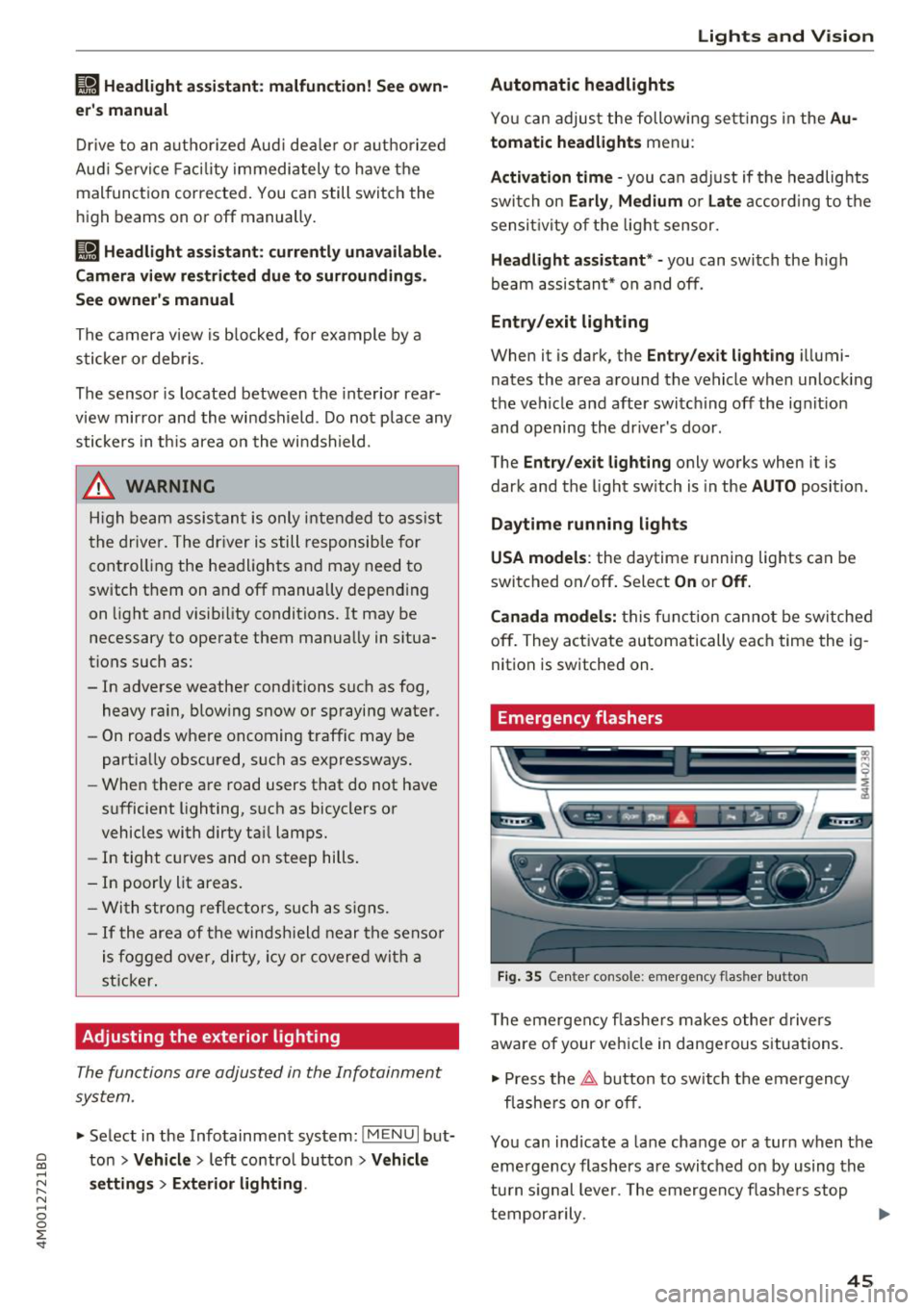
~-=-- ·- o,o,6 .. -i, "'.A - ~
Fig. 3 5 Cente r con so le: eme rgen cy fl asher bu tto n
T he eme rgen cy fla she rs m akes othe r dr iv e rs
aware of your vehi cle in dangerous situa tions.
• Press the~ button to sw itch t he emergency
fl as he rs on or off .
You can ind icate a lane change or a turn when the
eme rgency flashers are swi tched on by using the
tu rn s ignal leve r. T he emergen cy flashe rs stop
tempor arily. ""
45
Page 48 of 398
Lights and Vision
The emergency flashers also work when the igni
t ion is turn ed off .
(D Tips
You s hou ld sw itch the emergency flashers on
if:
- you are the last car in a traff ic jam so that
a ll other vehicles approaching from behind
can see your vehicle
- your ve hicle has bro ke n down or you are
having an eme rgency
- you r vehicle i s being towed or if yo u are tow
ing another vehicle
Interior lighting
Front interior lighting
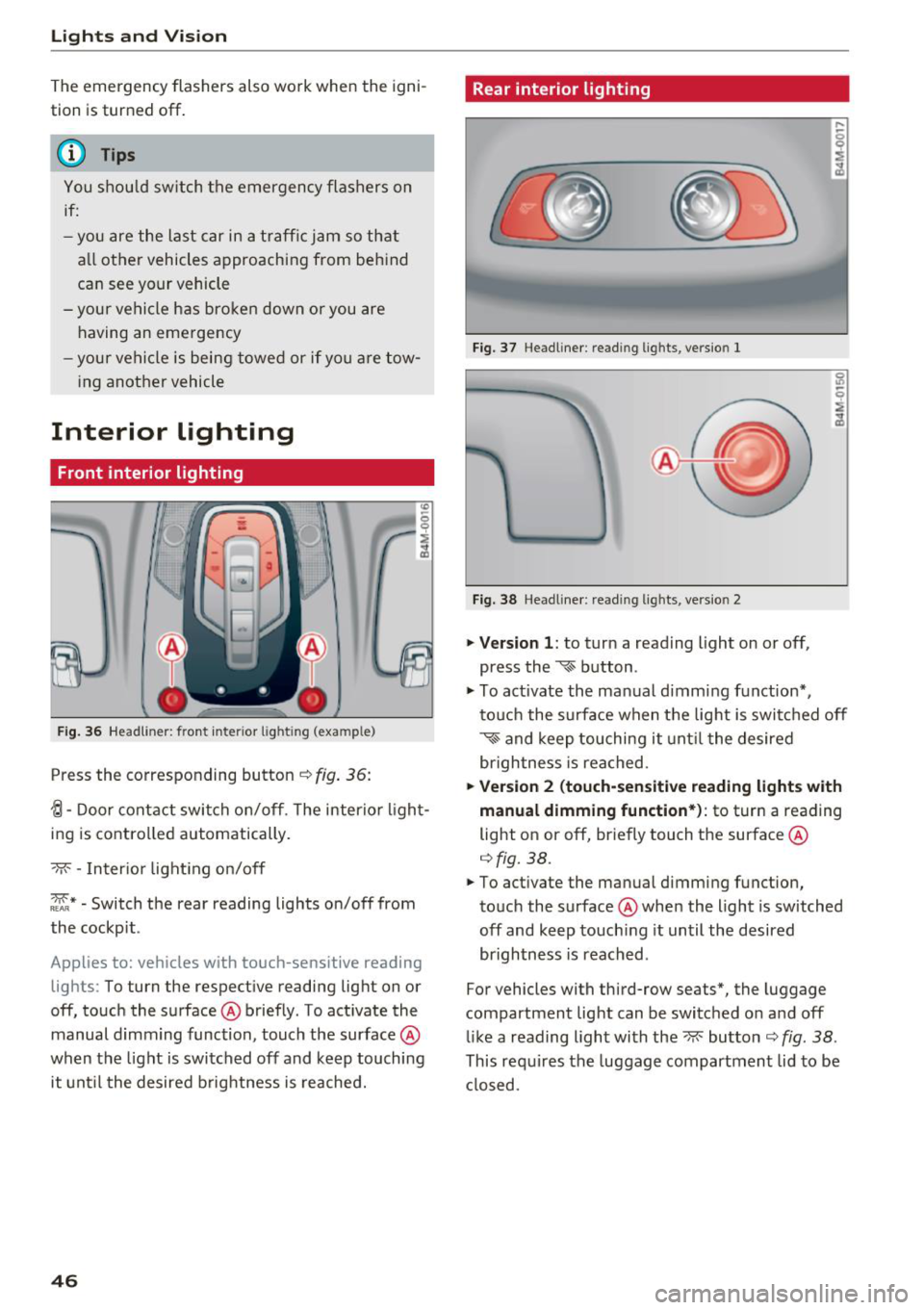
F ig. 36 Headlin er: fr ont in te ri or l ig htin g (exa mple)
Press the co rresponding button ¢ fig. 36:
{l-Door contac t swi tch on/off . T he interior ligh t
ing is controlled automatically.
- M- -In ter ior light ing o n/off
~ * -Switch the rear reading lights on/off from
the cockpit .
App lies to: ve hicles w ith to uch-se nsiti ve reading
lig hts: To turn the respect ive reading light on or
off, touch the surface @ briefly . To act ivate the
manual d imm ing function , touch the surface @
when the light is switched off and keep touching
it unt il t he desired b rightness is reached.
46
Rear interior lighting
Fi g. 3 7 Headline r: re ad in g light s, ve rs io n l
Fi g. 38 Headline r: re ad in g l igh ts , vers io n 2
.. Version 1 : to turn a read ing l ight on or off,
press the
~ b utton .
.. To ac tivate the ma nual dimming f unct ion* ,
t o uch the s urface when the lig ht is swi tc h ed off
~ and keep touching it unt il t he de sired
brigh tness is reached.
.. Ver sion 2 (touch-sensiti ve reading light s with
manual dimming function* ):
to turn a reading
light on or off, br iefly touch the surface @
¢fig. 38 .
.. To activate the manual dimming function,
to uch the surface @whe n the light is switched
off and keep touch ing it until the desired
brightness is reached .
For vehicles with third-row seats*, the luggage
compartment lig ht can be switc hed o n and off
li ke a reading light with the~ button ¢
fig. 38 .
This re quires the luggage compartment lid to be
cl osed.
Page 50 of 398
Lights and Vi sion
0 -all adjustment functions are deactivated .
Q/P -adjusting the left/right exter io r mir ror.
Move the knob in the desired direction .
4iil -Heats * the m irror glass depending on the
outside temperature .
8 - Folds the exterior mirrors*. To fold the mir
rors out, turn the knob to one of the other posi
tions . In the Infotainment system, you can select
if the mirrors fold in automat ica lly when you lock
the vehicle
~ page 34.
F ront pas senger 's e xterior mirror tilt
function*
To help you see the curb when back ing into a
pa rking space, t he surface of the mir ror tilts
slightly . Fo r thi s to happen, t he knob must be in
t he pos it io n for the front passenger's exterior
mirror.
You can adjust the t ilted m irror surface by turn
i n g the knob in the des ired direction. Whe n you
move ou t of reverse and in to anothe r gear, the
new mirror position is stored and assigned to the
key yo u are using.
The mir ror goes back into its o rig inal posi tion
once yo u drive forward faster than 9 mph
(15 km/h) or tu rn the ignition
off .
A WARNING
Curved mir ror surfaces (for examp le convex)
enlarge t he f ie ld of vision . Howeve r, they
make objects i n the mirror appear sma ller
and farther away. You may est imate inco r
rectly when you use these mirrors to ga uge
your distance from the vehicles behind you
when c hanging lanes, wh ic h increases the r is k
of an a ccident.
@ Note
- Applies to vehicles with power folding exte
rior m irrors : if the mirror housing was
moved by outside forces (such as an impact
whe n m aneuver ing), you m ust use the pow
e r fold ing func tion to fo ld the m irror all t he
way o ut. The m irro rs will make a loud no ise
when they latch into p lace . The mirror hous
ing must not be moved back i nto place by
48
hand because this would impair the func
tion of the mirror mechanism.
- Applies to vehicles wi thou t power folding
exterior mirrors : if the mirror housing was
moved by outside forces (such as a n impact
when maneuvering), you must move it back
in place by hand.
- If you wash the vehicle in a n automatic ca r
wash, you must fold the exter ior mirrors in
to reduce the r isk of damage to the m irrors.
Never fold power fo ld ing exterior mirrors*
by hand. On ly fold them in and out using
the power cont rols.
(D Tips
- If the power adjust ing function malfunc
t ions, the glass in both mir rors can be ad
justed by p ressing on t he edge of it by hand .
- The exterior m irror settings are sto red w ith
the memory fu nct io n* ~
page 59.
Dimming the mirrors
Your vehicle is equipped with a manual or auto
matic* dimming rearview mirror .
Manual dimming rear view mirror
.,. Pull the lever on the bottom of the m irror back.
Automatic dimming rearvi ew mirror*
.,. The inte rior and exte rior m irrors d im a utomat i
cally when ligh t shi nes on them, for examp le
from headlig hts on a vehicle behind you.
A WARNING
If th e g lass on an a utomatic dimming m irror
b reaks, e lectrolyte can lea k out. T his liquid
can irritate the skin, eyes and respiratory sys
tem . If there is contact w it h the fluid, flush
i mmediately with p lenty of water. Consult a
phys ic ian if necessa ry .
- Repeated or long-term exposure to e lectro
ly te fl uid ca n lead to ir ritation of the air
ways, espec ia lly in people with ast hma o r
o ther resp iratory condi tions. Take deep
b re at hs immedia tely afte r leav ing t he veh i
cle or, if this is no t possib le, open all of the
doors and windows as wide as possib le .
Page 51 of 398
a co ...... N r--. N ...... 0
0
:E '
them thoroughly with a large amount of
clean water for at least 15 minutes and then
seek medical attention .
- If electrolyte flu id comes into contact with
the skin, flush the affected area with clean
water for at least 15 minutes and then clean
with soap and water and seek medical at
tention. Clean affected clothing and shoes
thoroughly before wearing again .
- If the fluid was swallowed and the person is
conscious, flush the mouth with water for at
least 15 minutes. Do not induce vomiting
unless this is recommended by medical pro
fessionals. Seek medical attention immedi
ately.
(D Note
If the glass on an automatic dimming mirror
breaks, electrolyte can leak out. This liquid
damages plastic surfaces and paint. Clean
this liquid as quickly as possible, for example
with a wet sponge.
(D Tips
- If the light reaching the rearview mirror is
obstructed, the automatic dimming mirror
will not function correctly,
- The automatic dimming mirrors do not dim
when the interior lighting is turned on or
the reverse gear is selected .
Sun visors
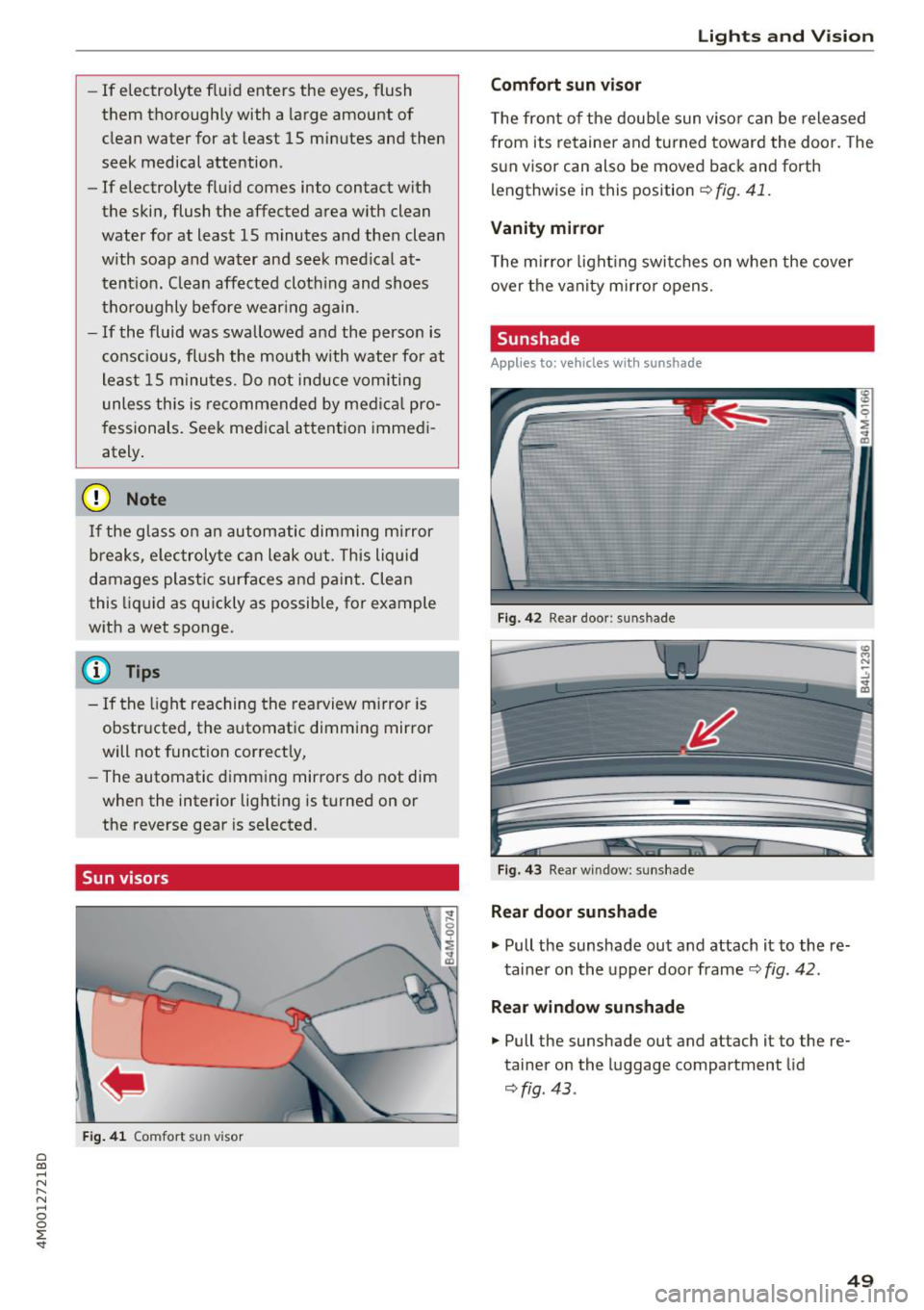
Fig. 41 Comfort s un visor
Lights and Vision
Comfort sun visor
The front of the double sun visor can be released
from its retainer and turned toward the door . The
sun visor can also be moved back and forth
lengthwise in this position
~ fig. 41.
Vanity mirror
The mirror lighting switches on when the cover
over the vanity mirror opens.
Sunshade
Applies to: vehicles with sunshade
Fig. 42 R ear door: sun shade
Fig. 43 Rear w indow : sunshade
Rear door sunshade
.,. Pull the sunshade out and attach it to the re
tainer on the upper door frame
~ fig. 42.
Rear window sunshade
.,. Pull the sunshade out and attach it to the re
tainer on the luggage compartment lid
~fig . 43 .
49
Page 52 of 398
Lights and Vision
Windshield wipers
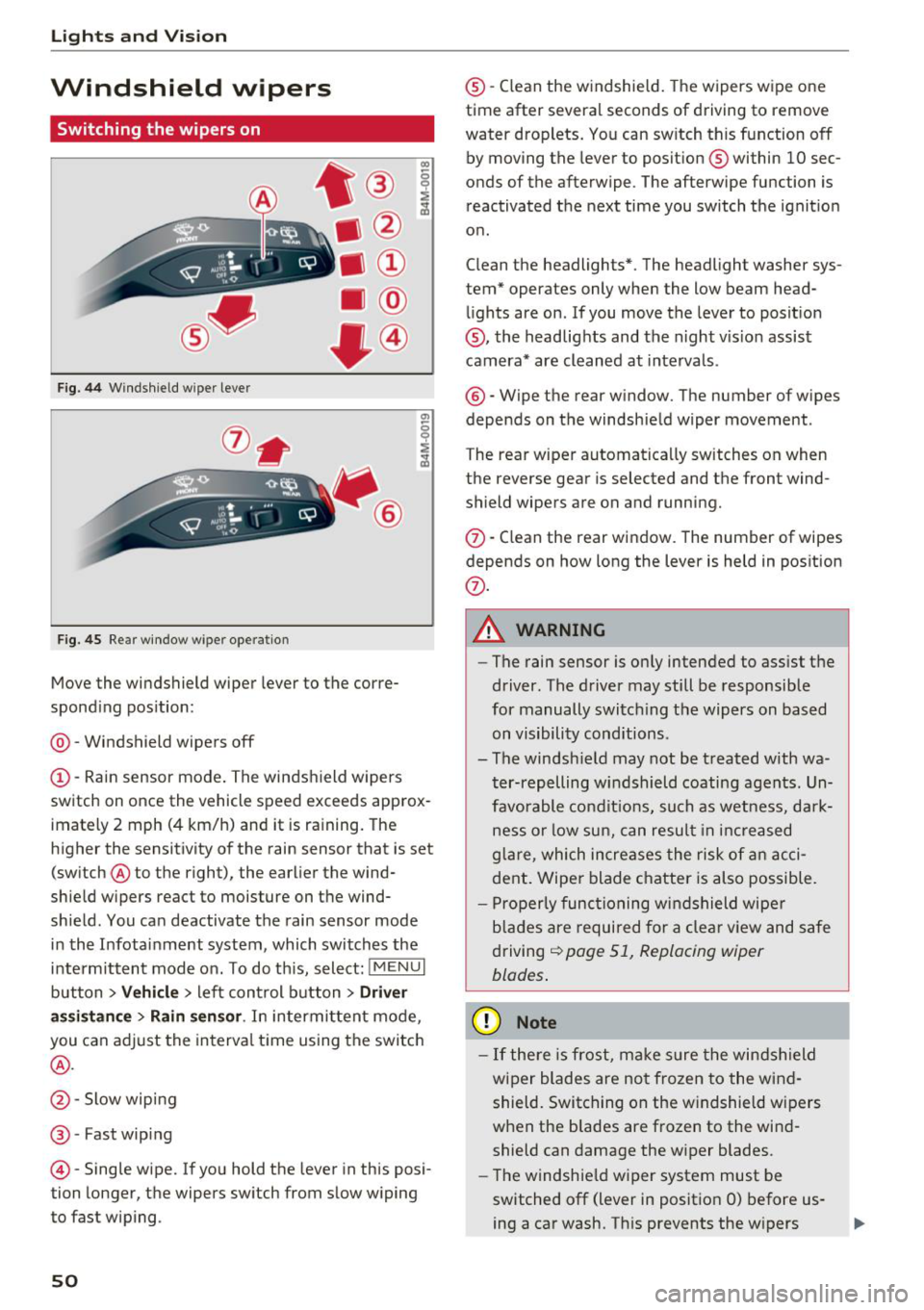
Switching the wipers on
Fig. 44 Windshield wiper lever
Fig. 45 Rear window w ipe r operation
•® I
• @
• @
• @
•®
Move the windshield wiper lever to the corre
sponding position:
@ -Windshield wipers off
(D-Rain sensor mode. The windshield wipers
switch on once the vehicle speed exceeds approx
imately 2 mph (4 km/h) and it is raining. The
higher the sensitivity of the rain sensor that is set (switch ® to the right), the earlier the wind
shield wipers react to moisture on the wind
shield. You can deactivate the rain sensor mode
in the Infotainment system , which switches the
intermittent mode on. To do this, select:
! MENUI
button > Vehicle > left control button > Driver
assistance
> Rain sensor . In intermittent mode,
you can adjust the interval time using the switch
®·
@ -Slow wiping
®-Fast wiping
©-Single wipe. If you hold the lever in this posi
tion longer, the wipers switch from slow wiping
to fast wiping .
50
®-Clean the w indshield. The wipers wipe one
time after several seconds of driving to remove
water droplets. You can switch this function off
by moving the lever to position ® within 10 sec
onds of the afterwipe . The afterwipe function is
reactivated the next time you switch the ignition
on .
Clean the headlights*. The headlight washer sys
tem* operates only when the low beam head lights are on . If you move the lever to position
@, the headlights and the night v is ion assist
camera* are cleaned at intervals.
®-Wipe the rear window. The number of wipes
depends on the windshield wiper movement .
The rear wiper automatically switches on when
the reverse gear is selected and the front wind
shield wipers are on and running.
(f) -Clean the rear window . The number of wipes
depends on how long the lever is held in position
(f) .
A WARNING
-The rain sensor is only intended to assist the
driver . The driver may still be responsible
for manually switching the wipers on based on visibility conditions.
- The windsh ield may not be treated with wa
ter-repelling windshield coating agents. Un
favorable conditions, such as wetness, dark
ness or low sun, can result in increased
glare, which increases the risk of an acci
dent. Wiper blade chatter is also possible.
- Properly functioning windshield wiper
blades are required for a clear view and safe
driving
¢ page 51, Replacing wiper
blades .
(D Note
-If there is frost, make sure the windshield
wiper blades are not frozen to the wind
shield. Switching on the windshield wipers
when the blades are frozen to the wind
shield can damage the wiper blades.
- The windshield wiper system must be
switched off (lever in position 0) before us
ing a car wash. This prevents the w ipers
Page 53 of 398
Cl a:, ...... N
" N ...... 0
0
::r '
ing damage to the windshie ld wiper system .
(D Tips
-The windshield wipers switch off when the
ignition is switched off . You can activate the
windshield wipers after the ignition is switched back on by moving the windsh ield
wiper lever to any posit ion.
- Worn or dirty windshield wiper blades result
in streaking. This can affect the rain sensor
funct ion. Check your windshield wiper
blades regularly.
- The washer fluid nozzles for the windshie ld
washer system are heated at low tempera
tures when the ignition is on .
- When stopping temporarily, such as at a
traffic light, the speed of the windshield
wipers automatically reduces by one level.
Cleaning the wiper blades
Clean the wiper blades when you see wiper
strea ks. Use a soft clot h and a glass cleane r.
Windshield wiper
.. Place the windshield wiper arms in the service
pos ition
¢ page 51 .
.. Fold the w indshield wiper arms away from the
windshield .
Rear window wiper
.. Fold the w iper arm away from the rear window .
A WARNING
Dirty windshield wiper blades can impair v i
sion, which increases the risk of an accident .
-
Lights and Vision
Replacing wiper blades
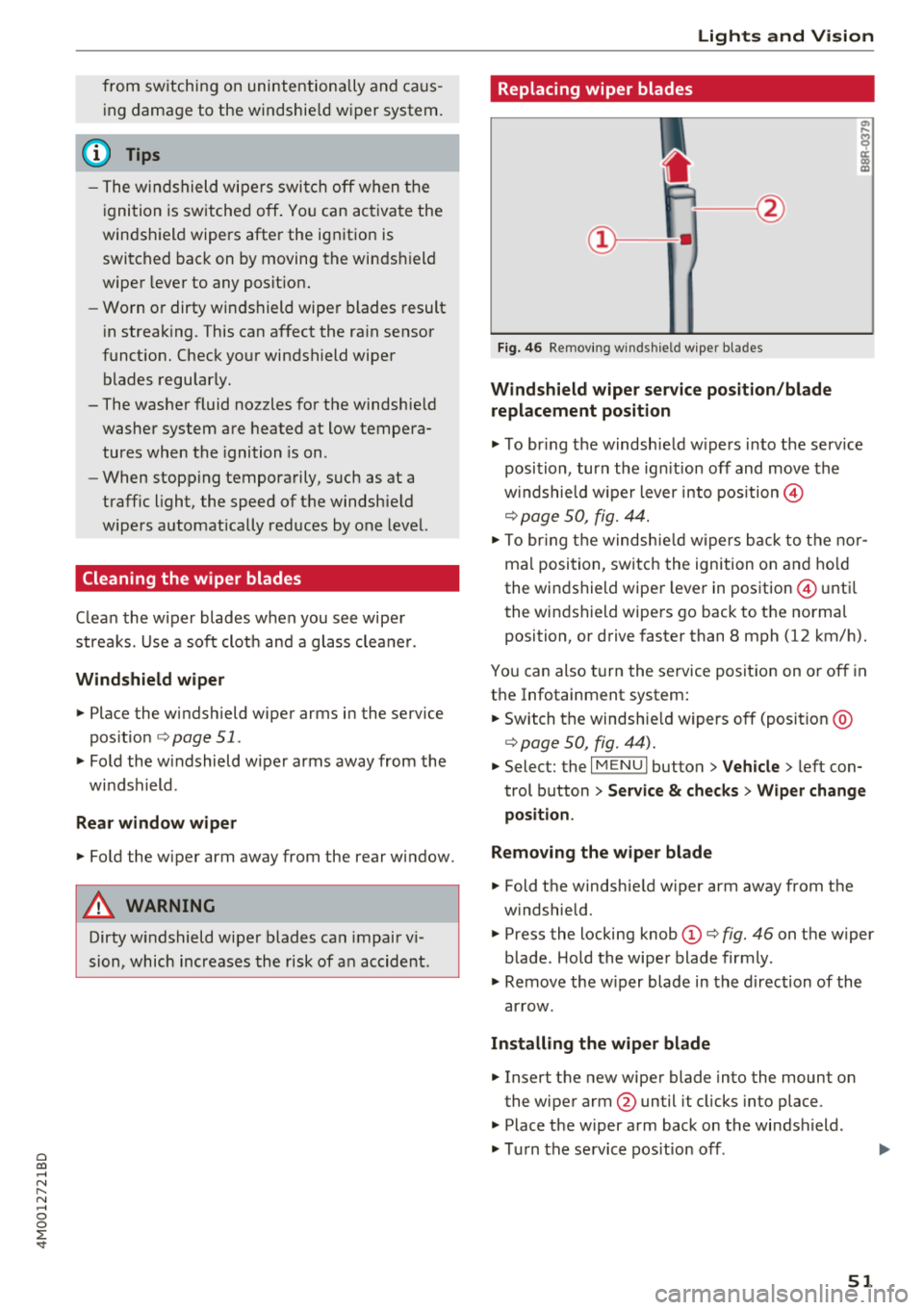
Fig. 46 Removing windshield wiper blades
Windshield wiper service position/blade
replacement position
.. To br ing the windsh ield w ipers into the serv ice
position , turn the ign ition off and move the
w indshie ld w iper lever into position@
¢ page 50, fig. 44.
.. To bring the windshie ld wip ers back to the nor
mal position, switch the ignition on and hold
the windshield wiper lever in position @ until
the windshield wipers go back to the normal
position, or drive faster than 8 mph (12 km/h).
You can also turn the service position on or off in
the Infotainment system:
.. Switch the windshie ld wipers off (position @
¢page 50, fig. 44) .
.. Select: the I MENU I button >V ehicle > left con
trol button
> Service & checks > Wiper change
position .
Removing the wiper blade
.. Fold the windshie ld wiper arm away from the
w indshield.
.. Press the locking knob
(D ¢ fig. 46 on the wiper
blade . Hold the wiper blade firmly.
.. Remove the w iper blade in the direction of the
arrow.
Installing the wiper blade
.. Insert the new wiper blade into the mount on
the wiper arm @until it clicks into place .
.. Place the wiper arm back on the windshield .
.. Turn the service position off.
51
Page 54 of 398
Lights and Vision
A WARNING
For safety reasons, the windshield wiper
blades should be replaced once or twice each
year.
@ Note
- Only fold the windshield wipers away when they are in the service position. Otherwise,
you risk damaging the paint on the hood or
the windshield w iper motor .
- You should not move your vehicle or operate
the w indshield wiper lever when the wiper
arms are folded away from the windshield.
The windshield wipe rs would move back in
to their original position and could damage
the hood and windshield.
- To reduce the risk of damage to the wiper
system, always loosen blades which are fro
zen to the windshield before operating the
wipers.
- To reduce the risk of damage to the wiper
blades, do not use gasoline, kerosene, paint
thinner, or other so lvents on or near the
wiper blades.
- To reduce the risk of damage to the wiper
arms or other components, do not attempt
to move the wipers by hand.
(D Tips
- You can also use the service position, for ex
ample, if you want to protect the windshield
from icing by using a cover.
- You cannot activate the service position
when the hood is open.
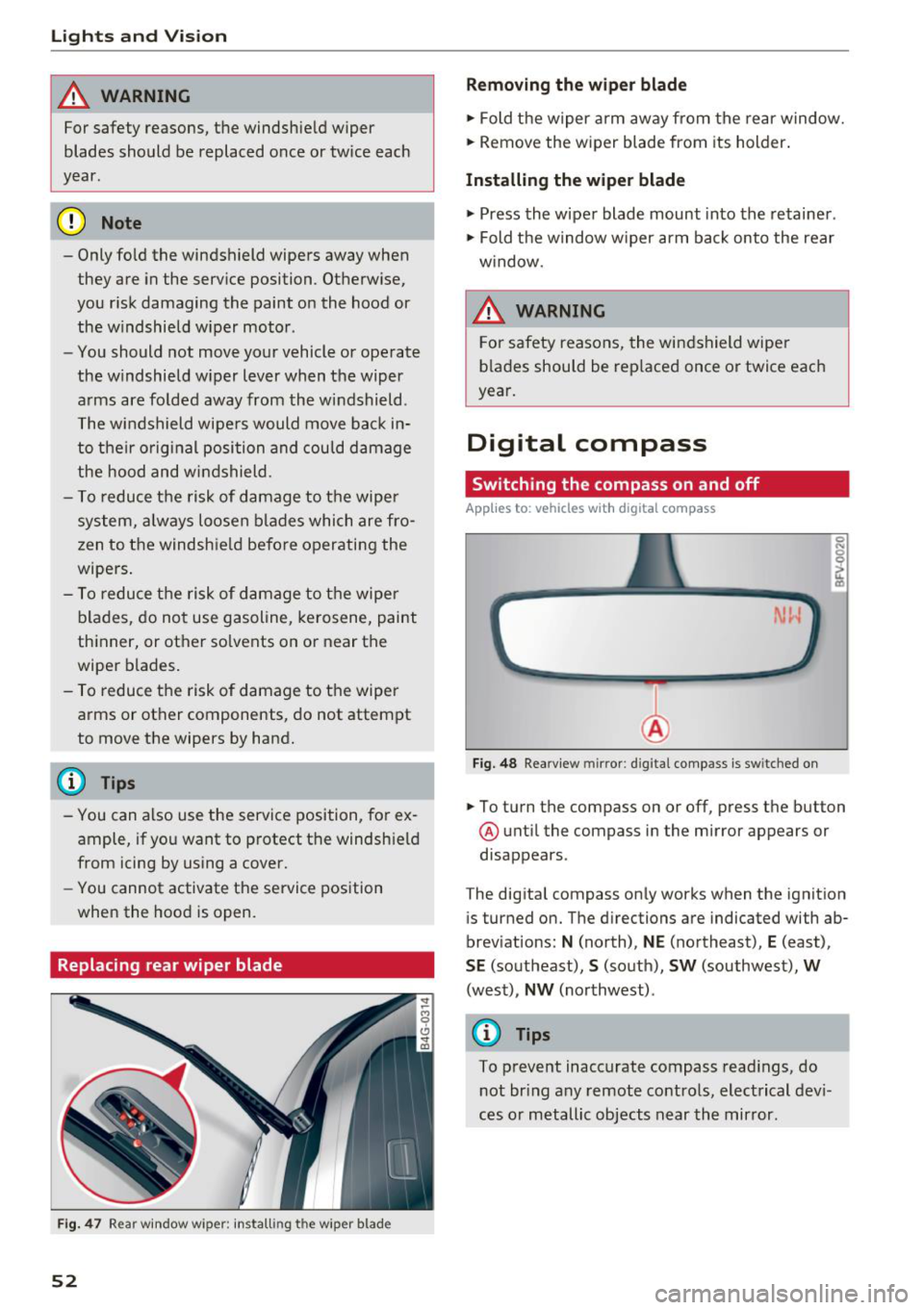
Replacing rear wiper blade
F ig. 47 Rear window w iper : install ing t he wiper blad e
52
Removing the wiper blade
.,. Fold the wiper arm away from the rear window.
.,. Remove the wiper blade from its holder .
Installing the wiper blade
.,. Press the wiper blade mount into the retainer .
.,. Fold the window w iper arm back onto the rear
w indow.
6 WARNING
For safety reasons , the windshield wiper
blades should be replaced once or twice each
year.
Digital compass
Switching the compass on and off
App lies to: vehicles with digital compass
Fig. 48 Rearview mirror: d ig ital compass is sw itched on
.,. To turn the compass on or off, press the button
@ until the compass in the mirror appears or
disappears.
The digital compass only works when the ignition is turned on. The directions are indicated with ab
breviations:
N (north), NE (northeast), E (east),
SE (southeast), S (south), SW (southwest), W
(west), NW (northwest) .
(0 Tips
To prevent inaccurate compass readings, do
not bring any remote controls, electrical devi
ces or metallic objects near the mirror .
Page 55 of 398
a co ...... N r--. N ...... 0
0
:E '
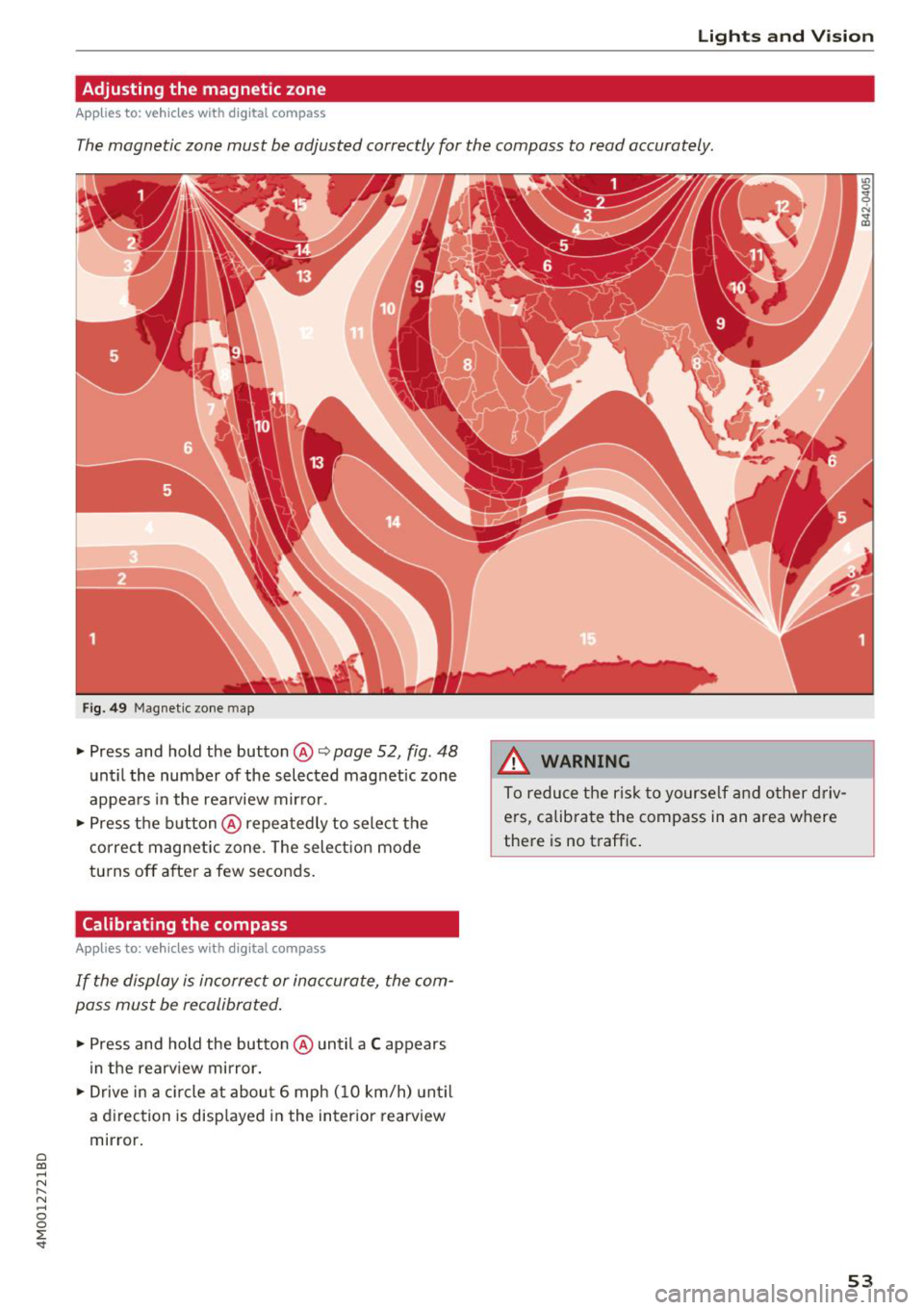
Adjusting the magnetic zone
A pplies to: ve hicles with d ig ital compass
The magnetic zone must be adjusted correctly for the compass to read accurately.
Fig . 49 Magnetic zone map
• Press and hold the button @ Q page 52, fig. 48
unt il the number of the selected magnetic zone
appea rs in the rearview mir ror .
• Press t he b utton @repeatedly to sele ct the
correc t magnetic zone . The sele ct ion mode
tu rns off after a few seconds .
Calibrating the compass
Appl ies to: ve hicles w ith d ig ital compass
I f the display is in corre ct or inaccurate, the com
pass mus t be recalibrated .
• Press and hold the button @ until a C appears
in the rearv iew mirror.
• Drive in a c ircle at about 6 mph ( 10 km/h) unti l
a d irec tion is disp laye d in the in ter ior rearview
mir ror.
A WARNING
To reduce the risk to yourse lf a nd o ther driv
ers, calib ra te the compass in an area where
the re is no t raffic .
.
53
Page 56 of 398
Seats and stor age
Seats and storage
General information
A WARNING
See c> page 252, Driving safety for important
information, tips, suggestions and warnings
that you should read and follow for your own
safety and the safety of yo ur passengers .
Front seats
Power seat adjustment
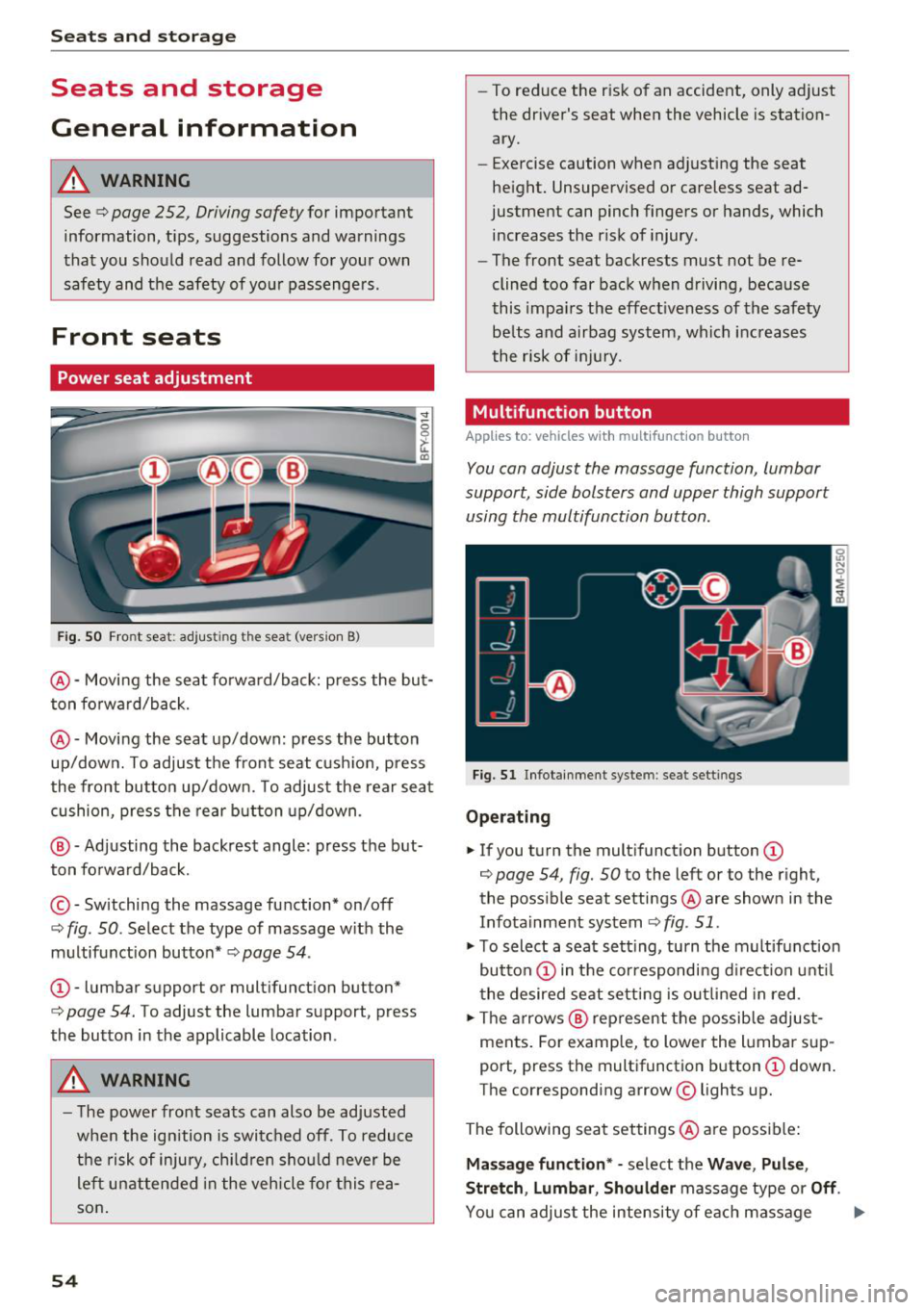
Fig. SO Front seat : adjust ing the seat (vers ion 8)
@ -Moving the seat fo rward/back: press the but
ton fo rward/back.
@ -Moving the seat up/down: press the button
up/down. To adjust the front seat cush ion, press
the front button up/down. To adjust the rear seat
cushion, press the rear button up/down .
@ -Adjusting the backrest angle: press the but
ton fo rwa rd/back.
© - Switching the massage function* on/off
¢ fig. 50. Select the type of massage w ith the
m ultifunction button*
c> page 54 .
CD-lumbar support or mult ifunction button*
¢ page 54. To adjust the lumbar support, press
the button in the applicable location .
A WARNING
-The power front seats can also be adjusted
when the ign ition is switched off. To reduce
the risk of injury, chi ld ren should never be
le ft unattended in the vehicle for this rea
son .
54
-To reduce the risk of an accident, only adjust
the dr iver's seat when the vehicle is station
ary.
- Exercise caution when adjusting the seat
he ight. Unsupervised or careless seat ad
justment can pinch fingers or hands, which
increases the risk of injury.
- The front seat backrests must not be re
clined too far back when driving, because
this impa irs the effect iveness of the safety
be lts and airbag system, which increases
the risk of inj ury.
Multifunction button
App lies to : vehicles wi th mu lt ifunct ion b utto n
You can adjust the massage function, lumbar
support, side bolsters and upper thigh support
using the multifunction button.
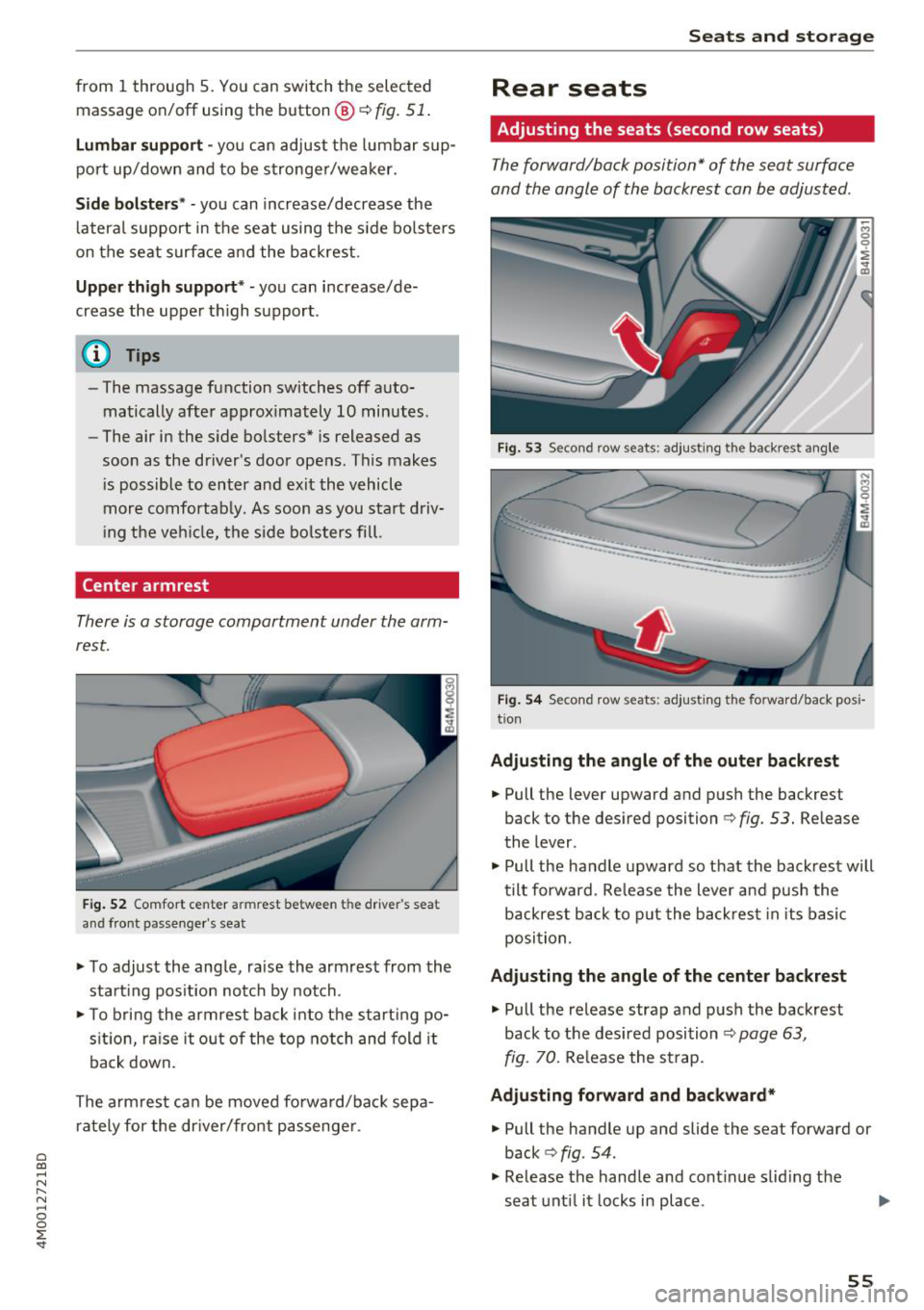
Fig. 51 Infotainment syste m: seat settings
Ope rating
.,. If you turn the mult ifunct ion b utton CD
¢ page 54, fig. 50 to the left or to the r ight,
the poss ible seat settings @are shown in the
Infota inment system
c> fig . 51 .
.,. To select a seat sett ing, turn the multifunction
button
CD in the cor respondi ng d irection unti l
the desired seat setting is outlined in red .
.,. The arrows @ rep resent the possib le adjust
ments. For example, to lower the lumba r sup
port, press the multifunction button
CD down .
The corresponding arrow © lights up.
The following seat settings @are poss ible:
Ma ssa ge fun ction * -se lect the Wave , Pul se ,
Stretch , Lumbar , Shoulder
massage type or Off.
You can adjus t the intensity of each massage
Page 57 of 398
a co ...... N r--. N ...... 0
0
:E '
fig. 51 .
Lumbar support -yo u can adjust the lumbar sup
port up/down and to be stronger/weaker.
Side bol ster s* -you can increase/decrease the
lateral support in the seat using the s ide bo lsters
on the seat surface and the backrest.
Upp er thigh support * -you can increase/de
crease the upper th igh support.
(D Tips
-The massage function switches off auto
matically after approximately 10 minutes.
- The air in the side bolsters* is released as
soon as the driver's door opens. This makes
i s possible to enter and exit the vehicle
more comfortab ly. As soon as you start driv
ing the veh icle, the s ide bo lsters fill.
Center armrest
There is a storage compartment under the arm
rest.
F ig . 52 Comfort center armrest between the driver 's sea t
and front passenge r's seat
'" To adjust the angle, raise the armrest from the
sta rt ing pos ition notch by notch.
'"T o bri ng the armrest back into the starting po
s it ion, ra ise it out of the top notch and fold it
back down.
The armrest can be moved forwa rd/back sepa
rately for the dr iver/front passenge r.
S eats and storag e
Rear seats
Adjusting the seats (second row seats)
The forward/back position" of the seat surface
and the angle of the backrest can be adjusted .
Fig . 53 Second row seats: adjusting the backrest ang le
...... _ .. _ __ ---::.._ ..
·-·-----
~ M 0
0
~ ., m
Fig . 54 Second row seats: adjusting the forward/back pos i
tion
Ad ju sting the angle of th e outer back rest
'" Pull the lever upward and push the backrest
back to the desired position ¢
fig. 53. Release
the lever .
'" Pull the handle upward so that the backrest will
tilt forward. Re lease the lever and push the
backrest back to p ut the back rest in its basic
position.
Ad justin g the angle of the cent er bac krest
'" Pull the release strap and push the backrest
back to the des ired position
¢ page 63,
fig. 70.
Release the st rap.
Ad ju sting fo rward and backward*
'" Pull the handle up and slide the seat forward or
back ¢
fig. 54 .
'" Release the handle and cont inue slid ing the
seat unt il it locks in place.
55