rear AUDI Q7 2018 Owner´s Manual
[x] Cancel search | Manufacturer: AUDI, Model Year: 2018, Model line: Q7, Model: AUDI Q7 2018Pages: 398, PDF Size: 185.58 MB
Page 58 of 398
Seats and storage
A WARNING
-To reduce the risk of an accident, the seat
can only be adjusted when the vehicle is sta
tionary.
- Be careful when adjusting the seat. Adjust
ing the seat without paying attention can
pinch fingers or limbs, which increases the
risk of injury.
- Always pull forward on the backrest to make
sure it is check if it is correctly locked in
place.
Entry/exit assistance (second row seats)
Applies to: ve hicles with entry ass istance
Entry/exit assistance creates easier access to the
third-row seating*.
•
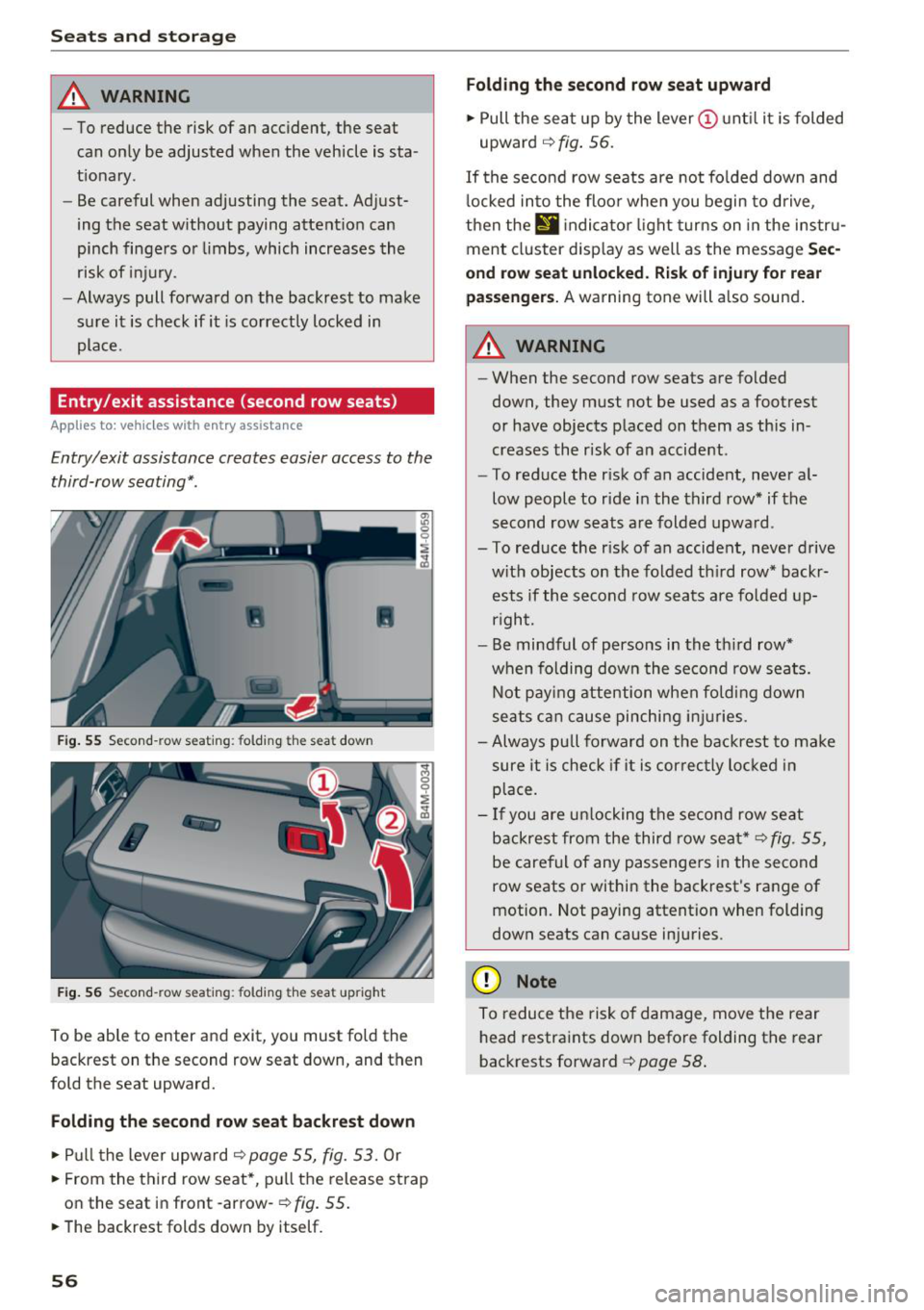
Fig. 55 Second-row seating: folding th e seat down
Fig. 56 Second-row seating: folding th e seat upright
To be able to enter and exit, you must fold the
backrest on the second row seat down, and then
fold the seat upward.
Folding the second row seat backrest down
.,. Pull the lever upward ~ page 55, fig. 53. Or
.,. From the third row seat*, pull the release strap
on the seat in front -arrow-
r:=;, fig. 55 .
.,. The backrest folds down by itself.
56
Folding the second row seat upward
.,. Pull the seat up by the lever (I) until it is folded
upward
~ fig. 56.
If the second row seats are not folded down and
locked into the floor when you begin to drive,
then thE'
d indicator light turns on in the instru
ment cluster display as well as the message
Sec
ond row seat unlocked. Risk of injury for rear
passengers.
A warning tone will also sound.
A WARNING
- When the second row seats are folded
down, they must not be used as a footrest
or have objects placed on them as this in
creases the risk of an accident .
- To reduce the risk of an accident, never al
low people to ride in the third row* if the
second row seats are folded upward.
- To reduce the risk of an accident, never drive w ith objects on the folded th ird row* backr
ests if the second row seats are folded up
rig ht.
- Be mindful of persons in the third row*
when folding down the second row seats.
Not paying attention when folding down
seats can cause pinching injuries.
- Always pull forward on the backrest to make
sure it is check if it is correctly locked in
place.
- If you are unlocking the second row seat
backrest from the third row seat*
r:=;, fig. 55,
be careful of any passengers in the second
row seats or within the backrest's range of
motion. Not paying attention when folding
down seats can cause injuries.
(D Note
To reduce the risk of damage, move the rear
head restraints down before folding the rear
backrests forward
r:=;, page 58.
Page 59 of 398
Folding the backrest down/up (third row
seats)
Ap plies to vehicles w it h th ird row seats
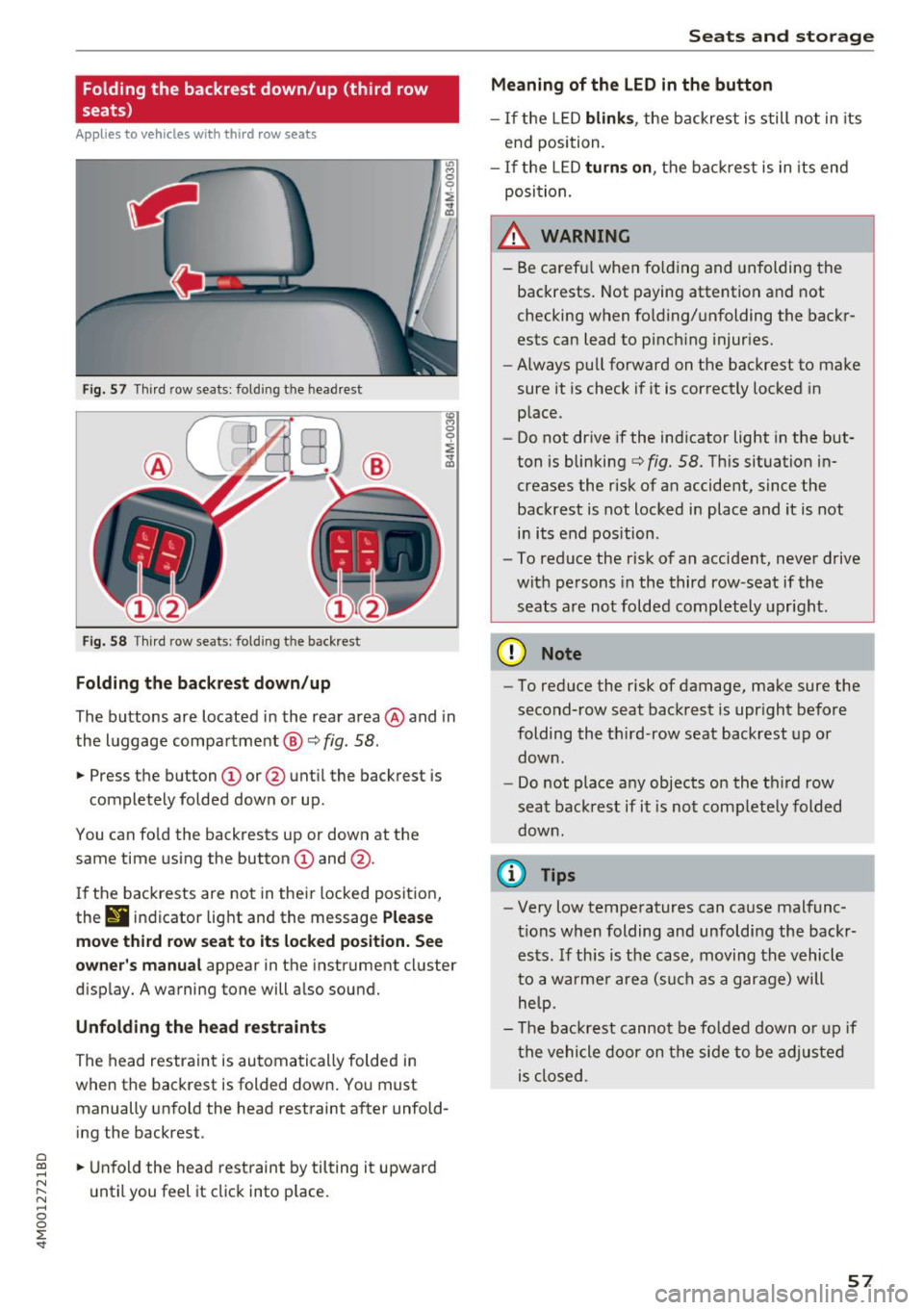
F ig . 57 Thir d row seats : fol ding the headrest
Fig. 58 Th ird row seat s: fol ding t he backrest
Folding the backrest down /up
The buttons are located in the rear area @and in
the luggage compa rtment @
c::> fig. 58.
... Press the button CD or @ unt il the backrest is
completely folded down or up .
You can fo ld the backrests up or down at th e
same time using the button
CD and @.
I f the backrests are not in their locked position,
the
9 indicator light and the message Ple ase
mo ve third ro w s eat to it s locked po siti on . See
owner 's manual
appear in the instrument cluster
d isplay. A warning tone will a lso sound.
Unfold ing the head r estraints
The head restraint is automatically folded in
when the backrest is folded down. You must manually unfold the head restraint after unfold
ing the backrest .
a
~ ... Unfold the head rest raint by tilting it upward
N ~ u ntil you feel it click into p lace.
~ 0
0
:E '
Meaning of the LED in the button
- If the LED blink s, the backrest is still not in its
end position.
- I f the L ED
turn s on , the bac krest is in its end
posi tion.
A WARNING
- Be carefu l when fo lding and unfolding the
backrests. Not paying attention and not
checking when fo lding/unfolding the backr
ests can lead to pinch ing injur ies.
- Always pull forward on the backrest to make
sure it is check if it is correctly locked in place.
- Do not drive if the indicator light in the but
ton is blinking
c::> fig. 58. Th is situation in
creases the risk of an accident, since the
backrest is not locked in place and it is not
in its end position .
- To reduce the r isk of an accident, never drive
with pe rsons in the third row -seat if the
seats are not folded completely upright .
(D Note
-To reduce the risk of damage, make sure the
second-row seat backrest is upr ight before
folding the th ird -row seat backrest up or
down .
- Do not place any objects on the third row
seat backrest if it is not comp letely folded
down .
(D Tips
-Very low temperatures can cause malfunc
tions when folding and unfoldi ng the backr
ests. If th is is the case, moving the vehicle
to a warmer a rea (s uch as a garage) will
help.
- The backrest canno t be fo lded down o r up if
the vehicle door on the side to be adjusted is closed .
57
Page 60 of 398
Seats and storage
Head restraints
Front head restraints
Applies to: vehicles with adjustable head restraints
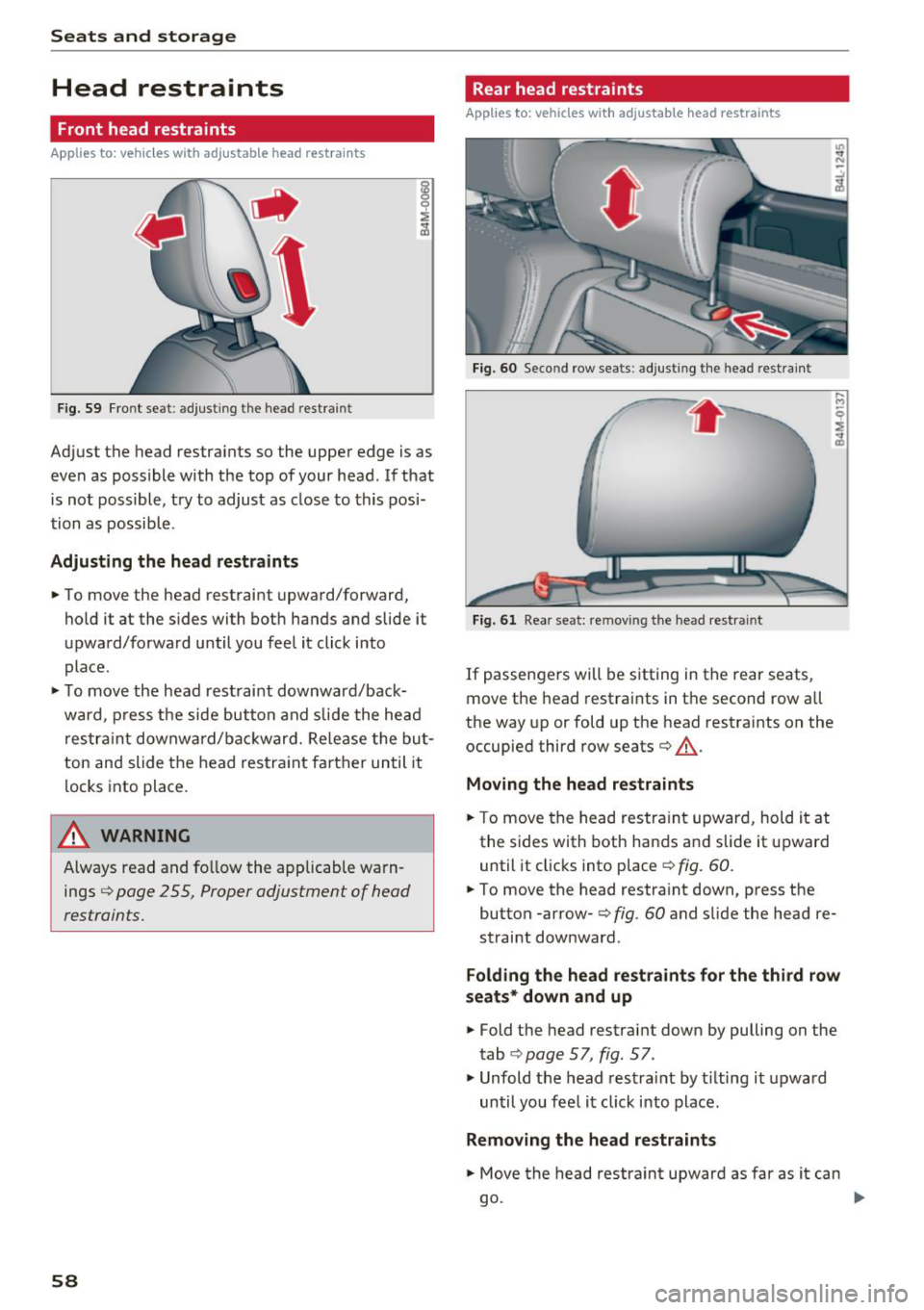
Fig. 59 Front seat: adjust in g the head restrain t
Adjust the head restraints so the upper edge is as
even as possible with the top of your head . If that
is not possible, try to adjust as close to this posi
tion as possible .
Adjusting the head rest raints
.. To move the head restraint upward/forward,
hold it at the s ides with both hands and slide it
upward/forward until you feel it click into
place .
.. To move the head restraint downward/back
ward , press the side button and slide the head
restraint downward/bac kward. Release the but
ton and slide the head restraint farther until it
locks into place.
_& WARNING
Always read and fo llow the applicable warn
ings
¢ page 2 55, Proper adjustment of head
restraints.
58
Rear head restraints
Applies to: vehicles with adjustable head restraints
Fig. 60 Second row sea ts : adjus ting the head restr ain t
Fig. 61 Rear seat : rem ovin g the head re str ain t
If passengers will be sitting in the rear seats,
move the head restraints in the second row all
the way up or fold up the head restraints on the
occupied third row seats¢_&.
Moving the head restraints
.. To move the head restraint upward, hold it at
the sides with both hands and slide it upward
until it clicks into place
¢ fig . 60.
.. To move the head restraint down, press the
button -arrow-
c> fig . 60 and slide the head re
straint downward .
Folding the head restraints for the third row
seats* down and up
.. Fold the head restraint down by pulling on the
tab
¢ page 57, fig. 57 .
., Unfold the head restrai nt by t ilting it upward
until you feel it click into place.
Removing the head restraints
.. Move the head restraint upward as far as it can
go . ..,
Page 63 of 398
a co ...... N r--. N ...... 0
0
:E '
sole*, in the rear* and on the luggage compart
ment side tr im panel* .
USB ports @
You can cha rge mobi le devices and/or connect to
the Audi music interface* us ing t he USB ports*.
F or additional information about the USB ports,
see
¢ page 2 31, Multimedia connections.
.8, WARNING
Incorrect usage ca n lead to serio us injuries or
burns . To reduce the risk of injuries, never
leave children unattended in the vehicle with
the vehicle key.
CD Note
- D isconnect the connectors from the power
sources carefully to reduce the risk of dam
aging them .
- To reduce the risk of damage to the vehicle
electrical system, never attempt to charge
the vehicle battery by connecting accesso
ries that prov ide power, such as solar panels
or battery chargers, to the power sources.
- To reduce t he risk of damage to the power
sources, only use plugs and connectors that
fit correctly.
Storage
Cup holde rs
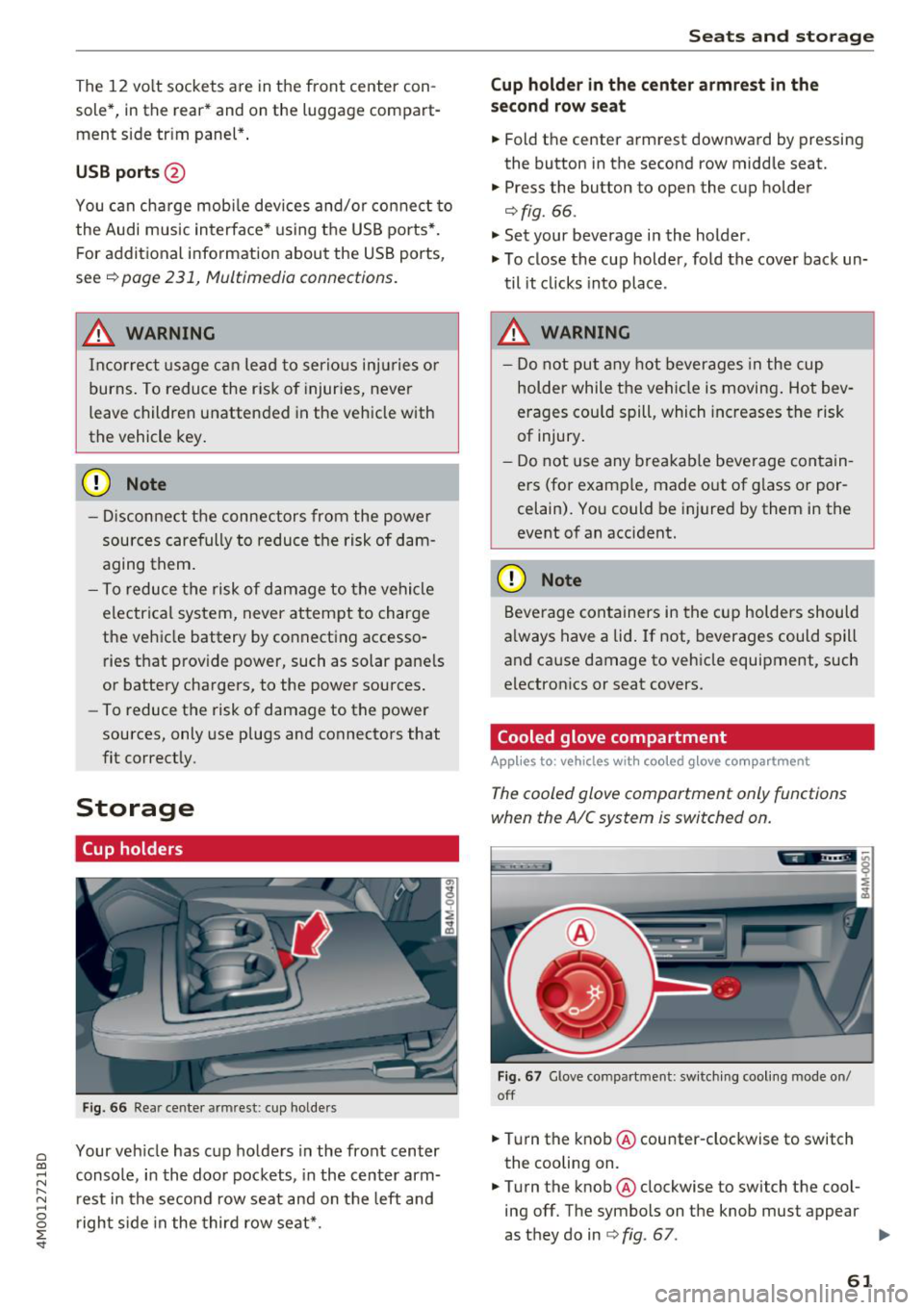
F ig . 66 Rear center armrest: cup holde rs
Your vehicle has c up holders in the front center
console, in the door pockets, in the center arm
rest in the second row seat and on the left and
right s ide in the third row seat*.
S eats and storag e
Cup holde r in the cent er ar mrest in th e
s e co nd row seat
.,. Fold the center armrest downward by pressing
the button in the second row middle seat.
.,. Press the button to open the cup holder
¢ fig. 66.
"'Set your beverage in the holder.
"' To close the cup holder, fold the cover back un
til it clicks into place .
.8, WARNING
-
-Do not put any hot beverages in the cup
holder while the vehicle is moving . Hot bev
erages cou ld spill, which increases the risk
of injury .
- Do not use any breakab le beverage contain
ers (for example, made out of g lass or por
celain). You could be injured by them in the
event of an accident.
CD Note
Beverage containers in the cup holders should
a lways have a lid . If not, beverages could spill
and cause damage to vehicle equipment, such
electron ics or seat covers.
Cooled glove compartment
Applies to : vehicles wi th coo led g love co mpartment
The cooled glove comportment only functions
when the AIC system is switched on.
Fig . 67 G love compartment: sw itch ing cool ing mode on/
off
.,. Turn the knob @counter-clockwise to switch
the cooling on.
.,. Turn the knob@clockwise to switch the cool
ing off. The symbols on the knob must appear
as they do in
¢ fig. 67. ..,.
61
Page 64 of 398
Seats and stor age
If the heat ing is sw itched on, switching the glove
compartment cooling mode off is recommended.
Additional storage compartments
You will find a variety of storage compartments
and holders at various locations in the vehicle.
- Glove compartment: the glove compartment
can be locked using the mechanical key
q page 30, Key set.
-In the door trim pane ls
- Safety vest compartment in the doo r trim pan-
els on the driver 's side and front passenger's
s ide
- Storage compartment* in the center conso le
- Storage compartment unde r the fron t center
armrest
- Ga rment hooks above the rea r doo rs
- Nets on the backrests of the front seats
- Net on the left luggage compartment trim pan-
el
.&, WARNING
-
- Always keep t he g love compartment lid
cl osed while d riving to reduce the risk of in
jury.
- Only use the storage compartments in the
doo r trim pane ls to sto re small objects that
will not st ick o ut of the compartment and
impair the range of the side airbags.
- Make s ure tha t the view to the rear is not
obstructed by hanging garments.
- Hang only lightwe ight cloth ing and be sure
that there a re no heavy or sha rp-edged ob
jects in the pockets.
- Do not use coat h angers to ha ng the cloth
ing because t his could impair the effective
ness of the s ide cu rtain airbags .
Luggage compartment
General information
.&, WARNING
-
Read and follow the important sa fety precau
tions in
q page 257, Storing cargo correctly.
62
Luggage compartment cover
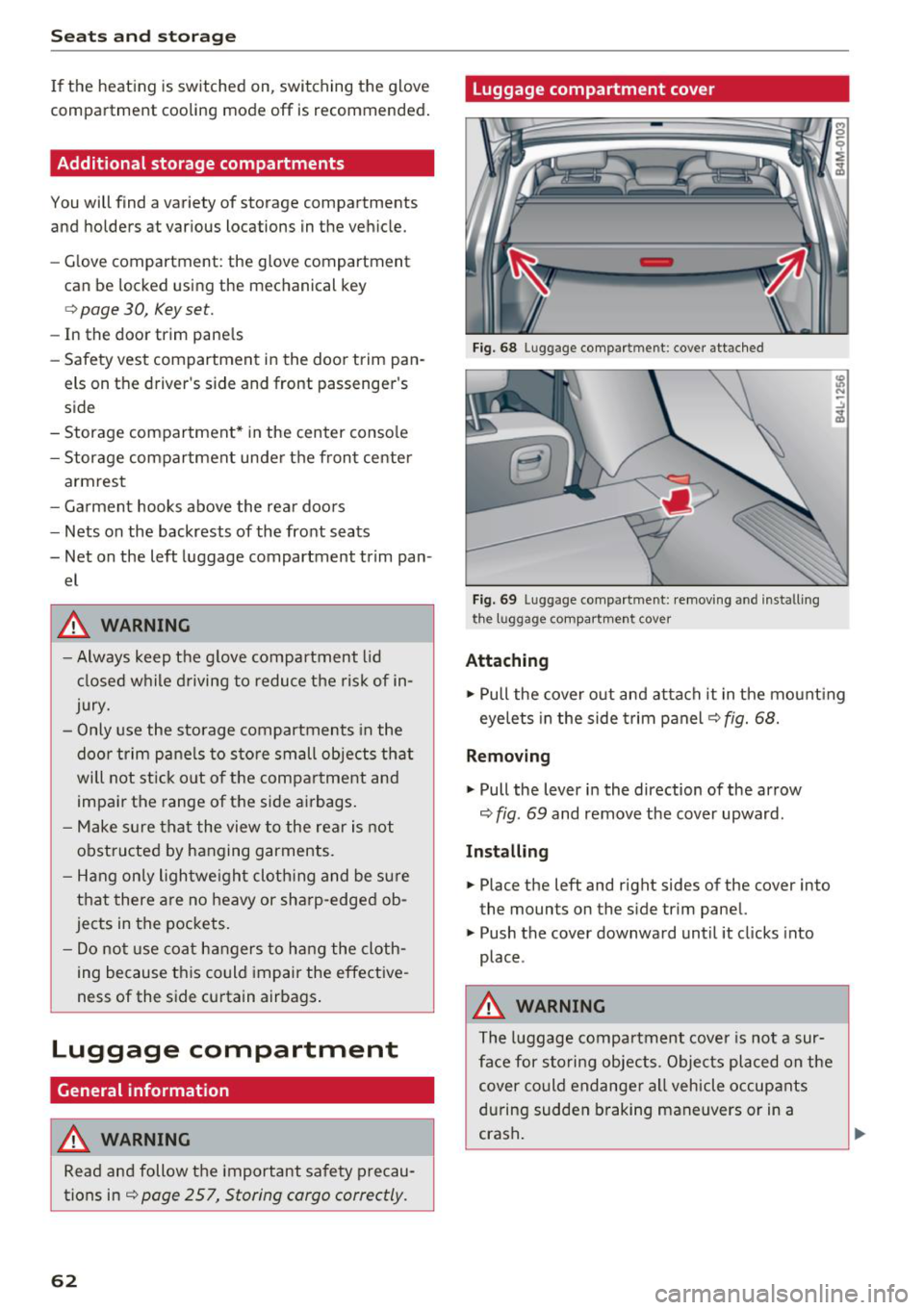
Fig. 68 Luggage compartment: cover attached
Fi g. 69 Luggage compa rtment: removi ng and install ing
the l1,1ggage compart ment cover
Attaching
.,. Pull the cover o ut and attach it in the mount ing
eyelets in the side t rim panel
q fig. 68.
Removing
.,. Pull the lever in the direction of the arrow
q fig. 69 and remove the cover upward.
Installing
.,. Place the left and right sides of the cover into
the mounts on the side trim panel.
.,. Push the cover downward until it clicks into
place .
.&, WARNING
The luggage compartment cove r is no t a sur
face for storing objects. Objects placed on the cover could endange r a ll vehicle occupants
during sudden braking maneuvers or in a
crash .
Page 65 of 398
a co ...... N r--. N ...... 0
0
:E -
-Let the luggage compartment cover ro ll up
s low ly to reduce the r isk of damage.
- Also read and fo llow the applicable warn
ings
c;> 0 in Folding the backrest down/up
(third row seats) on page 57.
Increasing the size of the luggage
compartment
The backrests can be folded down individually*
or together.
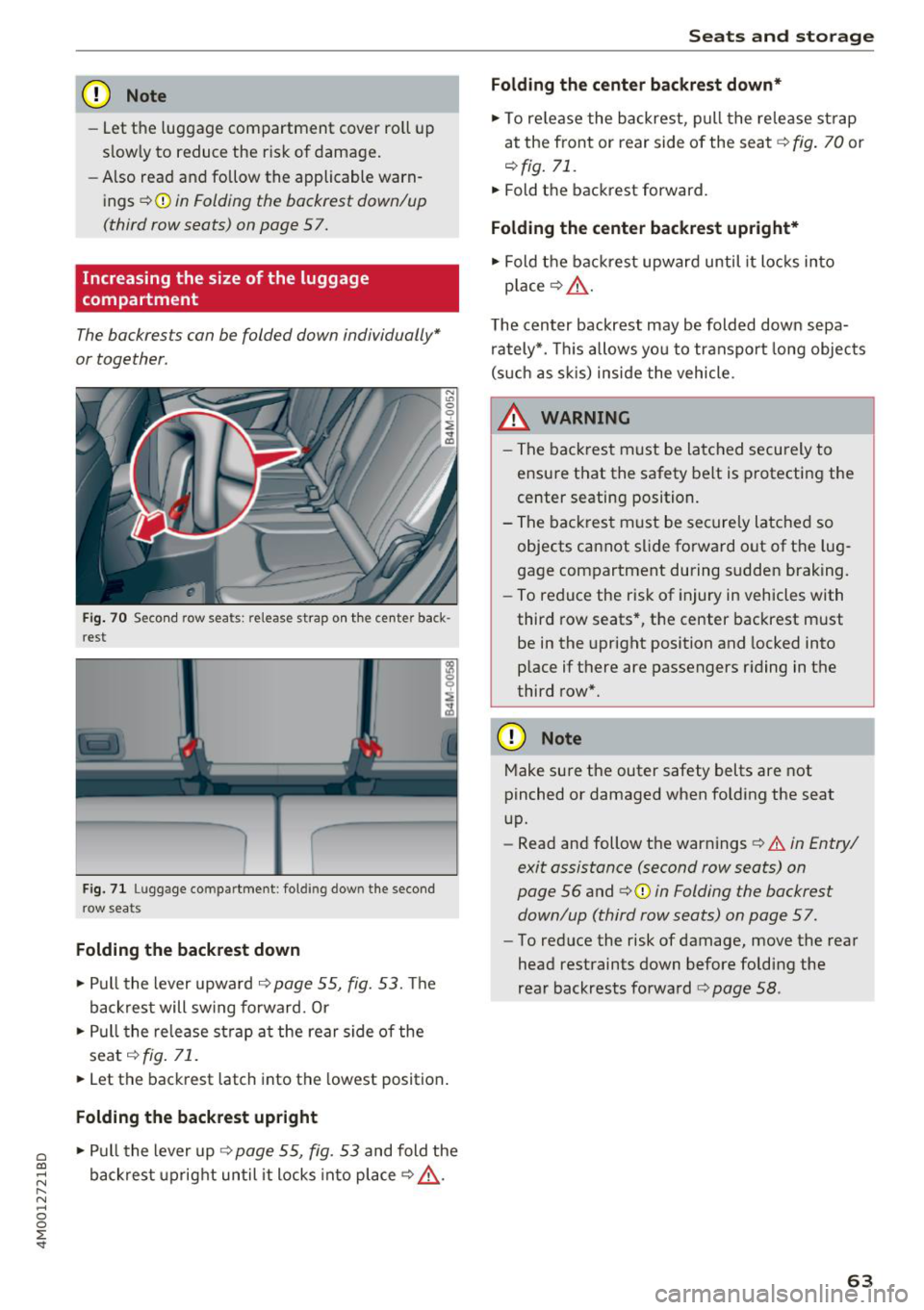
F ig. 70 Seco nd row seats: release strap o n th e center back
r est
F ig. 71 Luggage compartment : fold ing dow n the second
row seats
Folding the backrest down
.. Pull the lever upward c;> page 55, fig. 53. Th e
backrest will sw ing fo rward. Or
.. Pull the release strap at the rear side of the
seat
c;> fig . 71 .
.. Let the backrest latch into the lowest position .
Folding the backrest upright
.. Pull the lever up c;> page 55, fig. 53 and fold the
backrest upright until it locks into place
c;> ,.&. .
Seats and storag e
Folding the center b ackrest down *
.. To re lease the backrest, p ull the release st rap
at the front or rear side of the seat
c;> fig. 70 or
r::!> fig. 71.
.. Fold the backrest forward.
Folding the center backrest upr ight*
.. Fold t he backrest upward until it locks into
place
c;> .&, .
The center backrest may be folded down sepa
rately*. This allows yo u to transport long objects
(s uch as s kis) inside the vehicle.
A WARNING
-- The backrest must be latched securely to
ensure that the safety belt is protecting the
center seating position.
- The backrest must be securely latched so objects cannot slide forward out of the lug
gage compartment during sudden braking.
- To reduce the risk of injury in vehicles with
third row seats*, the center backrest must
be in the upright position and locked into
p lace if there are passengers riding in the
third row*.
CD Note
Make su re the outer safety belts are not
pinched or damaged when folding the seat
up.
- Read and follow the warnings
c;> .&. in Entry/
exit assistance (second row seats) on
page 56
and ¢ 0 in Folding the backrest
down/up (third row seats) on page 57.
- To reduce the risk of damage, move the rear
head restraints down before folding the
rear backrests fo rwa rd
r::!> page 58 .
63
Page 68 of 398
Warm and cold
Warm and cold
Climate control system
Description
A pp lies to: ve hicles w ith 3 -zo ne del uxe automatic c limate
co ntrol or 4-zo ne de luxe au tomatic cl imate co ntrol
The climate control system warms, cools and re
moves humidity from the air in the vehicle interi
or.
It is the most effective when the windows and
sunroof* are closed . If there is a bu ild-up of heat
inside the vehicle, ventilat ion can he lp to speed
up the cooling process.
In all heating mode functions except for
defrost,
the blower on ly switches to a h igher speed once
the engine coolant has reached a suffic ient tem
perature.
Pollut ant filt er
The pollutant filter removes pollutants such as
dust and pollen from the a ir .
K ey recognit ion
The climate control settings are automatically
stored and assigned to the remote control key
that is in use .
66
@ For the sake of the environment
- If you would like to reduce fuel consump
t ion, sw itch the air conditioning off. This
will also reduce emissions.
- In vehicles with a diesel engine, you can
switch the auxiliary heater off in the Info
tainment system.
(D Tips
- To prevent interference with the heating
and cooling output and to prevent the win
dows from fogging over, the a ir intake in
front of the windshield must be free of ice,
snow or leaves.
- Condensation from the cooling system can
dr ip and form a puddle of water under the
vehicle . This is normal and does not mean
there is a leak.
- The energy management system may tem porarily switch off certain functions, such as
the seat heating* or rear window defogger.
T hese systems are ava ilable again as soon
as the ene rgy supply has been restored.
Page 69 of 398
Warm and cold
3 zone deluxe automatic climate control
Operation
Applies to: vehicles with 3-zone deluxe automatic climate control
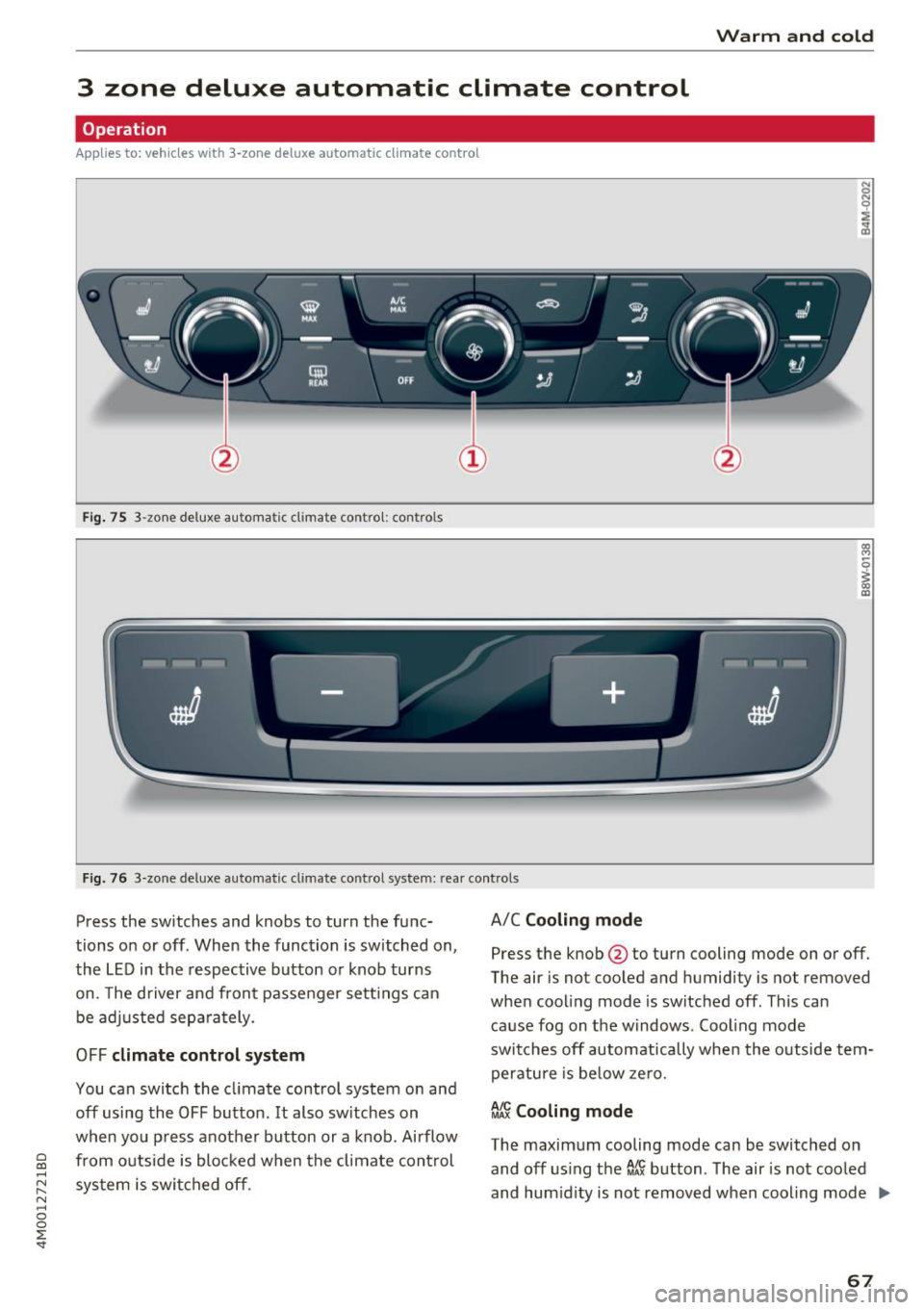
Fig. 75 3-zone deluxe automat ic cl imate control : controls
F ig. 76 3-zone de luxe automatic climate co ntrol system: rear controls
Press the switches and knobs to turn the func
tions on or off . When the function is switched on,
the LED in the respective button or knob turns
on. The driver and front passenger sett ings can
be adjusted separately.
OFF climate control system
You can switch the climate control system on and
off using the OFF button . It also sw itches on
when you p ress another button or a knob. Airflow
a from outside is blocked when the climate control co ......
~ system is switched off.
N ...... 0
0
:E -
Press the knob@to turn cooling mode on or off.
The air is not cooled and humidity is no t
removed
when cooling mode is switched off . This can
cause fog on the windows . Cool ing mode
switches off automatically when the out side tem
perature is be low zero.
~J Cooling mode
The maximum cooling mode can be switched on and off using the
ef.~ button . The air is not cooled
and hum idity is not
removed when cooling mode .,.
67
Page 70 of 398
Warm and cold
is switched off. This can cause fog on the win
dows . Cooling mode switches off automatica lly
when the outside temperature is below zero.
When the cooling mode is switched on,~ the
vehicle interior is coo led and dehumidified as
qu ickly as possible .
~ Recirculation mode
In recirculation mode, the air inside the vehicle is
circu lated and fi ltered. This prevents the unfil
tered a ir outside the vehicle from entering the
veh icle inter ior . Switch ing recirculation mode on
when dr iv ing through a tunnel or when s itting in
traffic is recommended
~ ,& .
Using the button, recircu lation mode is switched
on and off using the~ button. You can also
sw itch off the recirculation mode by pressing the
knob @ (left side) or the off using the
3% button.
AUTO Automatic mode
Automatic mode maintains a constant tempera
ture inside the vehicle. Air temperature, airflow
and a ir distribu tion are controlled automatically .
You can switch automatic mode on or off by
pressing the knob @ (left side) .
Temperature
You can adjust the temperature between 60°F
( + 16°()
and 84°F ( +28°() by turn ing the knob
@ . If outs ide of this range,
LO or HI will appear
in the climate control system d isplay . At both of
these settings, the climate control system runs
cont inuously at maximum cooling or heating
power. The re is no temperature regulation.
8fr Blower
You can manually adjust the volume of a ir gener
ated by the blower to your preference by turning
the knob @. The blower should a lways run at a
low sett ing to prevent the windows from fogging
and to ensure a continuous exchange of air insid e
the vehicle . To have the b lower regulated auto
matica lly, press the knob@ (left side).
Air distribution
You can use the buttons to select the vents
where the air will flow. To have the air distribu-
68
tion regulated automatically, press the knob @
( left side).
J ~ Seat heating/ventilation*
Pressing the JI~ button switches the seat
heating/ventilation on at the highest setting
( leve l 3). The LEDs indicate the temperature lev
e l. To reduce the temperature, press the button
again. To switch the seat heating/ventilation off,
press the button repeatedly until the LED turns
off.
3%: Defogging
The windshield and side windows are defrosted
or cleared of condensation as quick ly as possible.
The maximum amount of air flows mainly from
the vents below the windshield. Recirculation mode switches off. The temperature should be
set at
+ 72°F (+22°() or higher . The tempera ture
i s controlled automat ically .
Defrost is switched on and off switched on and
off using the~ button. You can sw itch the func
tion off by pressing the knob@Cleft side).
Applies to vehicles with windshield defogger: the
windshield defogger switches on automatically
when outside temperatures are low . If you would
like to sw itch the winds hield defros ter on man
ually, press the~ button . The LED in the button
blinks .
f!. Rear window defogger
Press the button~ to switch the rear window de
fogger on. It on ly operates when the engine is
running . It switches off automatically after
10 to
20 minutes, depending on the outs ide tempera
ture .
To keep the rear window defogger on cont inuous
ly, press and hold the~ button longer than
three seconds . This is stored until the ign ition is
switched off .
Synchronization
The function is activated by pressing and holding
the knob @ (left side) . The temperature disp lays
will blink briefly . When synchron izat ion is switch
ed on, the settings for the driver's side are ap-
plied to the front passenger's side and the rear .,.
Page 71 of 398
Cl a:, .... N
" N .... 0
0
::r '
zation switches off if the settings are changed on
the front passenger's side or in the rear .
Vents
You can open or close the center and rear vents in
the cockpit and the vents in the rear center con
sole and door pi llars using the ridged thumb
wheels. The levers adjust the direction of th e air
f low from the vents.
Re sidu al heat
You can activate the residua l heat f unct ion when
the ignition is switched off by pressing the knob
@ Cleft side) . The residua l heat from the coolant
is used to heat the vehicle interior. The residual
heat function switches
off automatically after
about 15 minutes.
A WARNING
- You should not use the recirculation mode
for an extended per iod of t ime, because no
fresh a ir is draw n in and the w indows ca n
fog whe n coo ling mode is sw itched off. Th is
increases the risk of a n accide nt.
- Individua ls with reduced sensitivity to pain
o r temperat ure co ul d deve lop burns when
Warm and c old
using the seat heating function . To red uce
the risk of in jury, these individua ls sho uld
not use seat heating.
@ Note
To avoid damage to the heating elements in
the seats, do not knee l on the seats o r place
heavy loads on a small area of the seat.
Setup
Applies to : vehicles with 3-zone deluxe automat ic climate
control
The climate control system basic settings are ac
cessed in the Infotainment system.
.,. Select in the Infotainment system: I M ENU ! but
ton
> Vehicle > left cont rol b utton > Air condi
tioning
Seat heating /seat ventilation*
You can adjust the seat heat ing/vent ilat ion bal
ance fo r the d river a nd front passenger .
Automatic auxili ary heater *
The auxiliary heater he lps to warm the vehicle in
terior more quickly.
69