warning light AUDI Q7 2018 Owner´s Manual
[x] Cancel search | Manufacturer: AUDI, Model Year: 2018, Model line: Q7, Model: AUDI Q7 2018Pages: 398, PDF Size: 185.58 MB
Page 35 of 398
a co ...... N r--. N ...... 0
0
:E '
.,. Grip the door handle . The door unlocks auto-
matically.
... Pull on the door handle to open the door.
Locking the v ehicl e
.,. Se lect the "P" position. The vehicle cannot be
locked if "P" is not se lected .
.,. To lock the veh icle, close the door and touch
the sensor in the door hand le
once c:> fig. 20 . Do
not hold the door handl e while doing this .
You can u nlock/lock the vehicle at eve ry door.
The remote cont rol key cannot be more than ap
proximately 4 f eet (1.S m) away from the door
handle. It makes no difference whether the mas
ter key is in you r jacket pocket or in your brief
case, for example .
If you hold the door handle while locking, this
can impair th e lock ing funct ion.
The door ca nnot be opened for a br ief per iod di
rect ly after locking it. Th is way you have the op
portunity to check if the doors locked correctly.
The settings in the Infotainment system deter mine i f the entire vehicle or only one of the doors
is unlocked when unlocking the vehicle
c:> page34 .
_& WARNING
Read and following all WARNINGS<=>&. in De
scription on page
29.
(D Tips
I f your vehicle is left standing fo r a long peri
od of time, note the following:
- The energy management system gradually
turns off unnecessary convenience functions
to prevent the vehicle battery from draining
and to maintain the vehicle 's abi lity to start
for as long as possib le. You may not be able
to unlock your vehicle us ing the convenience
key .
Op eni ng and clos ing
(D Tips
Unlocking with the convenience key (keyless
access) can be deactivated in the Infotain-
ment system
<=> page 34.
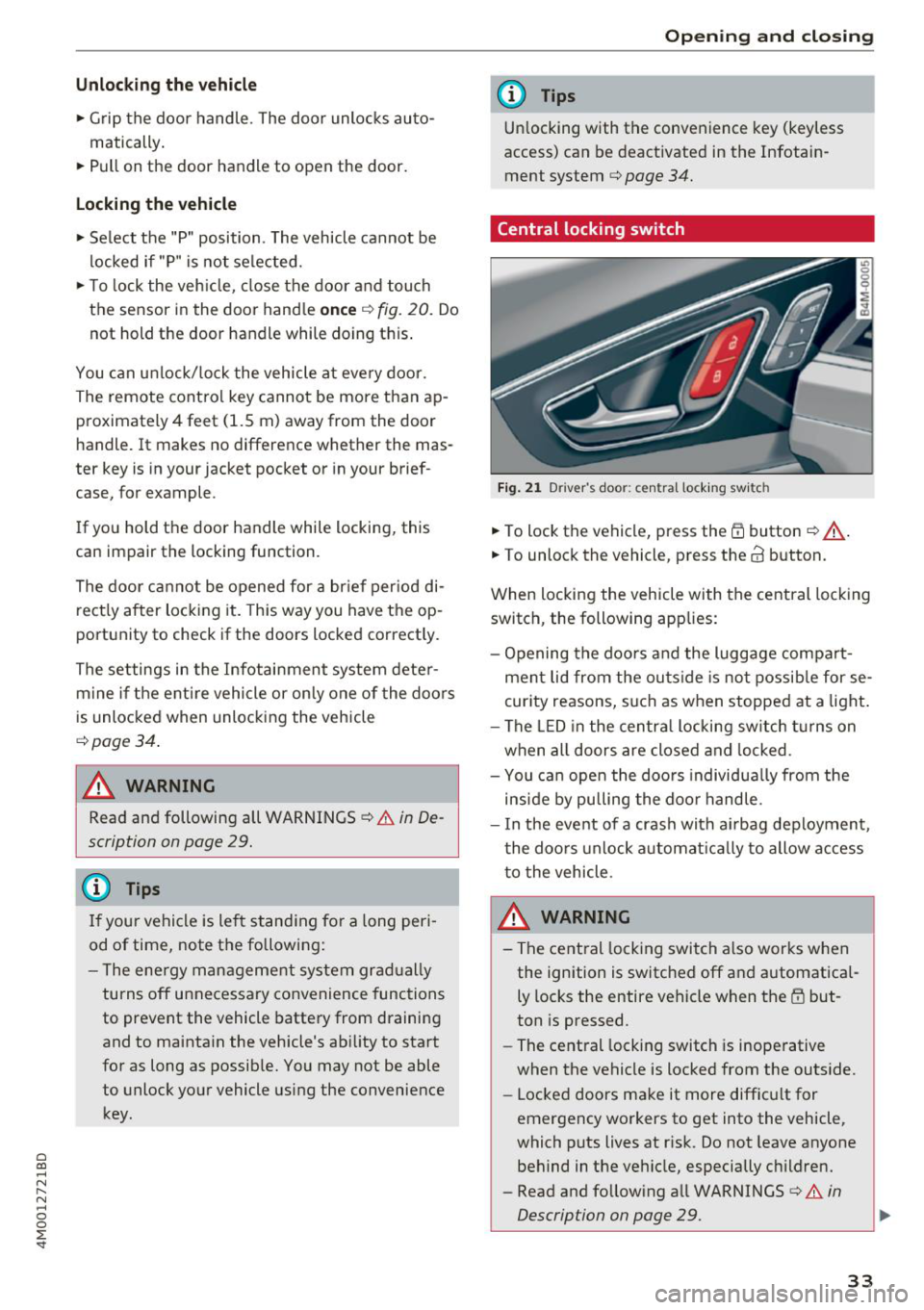
Central locking switch
Fig . 2 1 D rive r's doo r: centra l lock ing swi tc h
... To lock the vehicle, press the Efi button <=> A-
.. To unlock th e vehicl e, pr ess the @ button.
When locking the vehicle with the central locking switch , the following app lies:
- Opening the doors and the luggage compart ment lid from the outside is no t possib le for se
curity reasons, such as when stopped at a light .
- The LED in the centra l locking sw itch turns on
when all doors are closed and locked .
- You ca n open the doo rs individua lly from the
inside by pulling the doo r handle .
- I n the event of a crash with ai rbag deployment ,
the doo rs unlock a utoma tically to allow access
to the vehicle .
.&_ WARNING ~ -
- The central locking switch a lso works when
the ignition is switched off and automatica l
ly locks the entire vehicle when the
Efi but
ton is pressed .
- The central locking switch is inoperative
when the vehicle is locked from the outs ide.
- Locked doors make it more difficult for
emergency workers to get into the vehicle,
which puts lives at risk. Do not leave anyone
behind in the vehicle, especially children.
- Read and following all WARNINGS
c:> &. in
Description on page
29 . ..,.
33
Page 37 of 398
a co ...... N r--. N ...... 0
0
:E '
... Insert the key in the inside slot and turn it all
the way to the right (right door) or left (left
door).
A WARNING
Read and following all WARNINGS¢.& in De
scription on page 29.
Anti-theft alarm system
If the anti-theft alarm system detects a veh icle
break-in, audio and visua l warning signals are
triggered. The anti-theft alarm system is sw itch
ed on or off when locking/unlocking yo ur vehicle .
If the alarm is triggered, it will shut off automat
ically after a certain amount of time .
Switching the alarm off manually
""To switch the alarm off, press the crl button on
the remote control key or switch the ignition
on.
Break-in security feature
The alarm will sound if there is a break-in at the
doors, hood, and/or luggage compartment lid.
Luggage compartment
Lid
Automatic luggage compartment lid
The luggage compartment lid can be opened and
closed electrically.
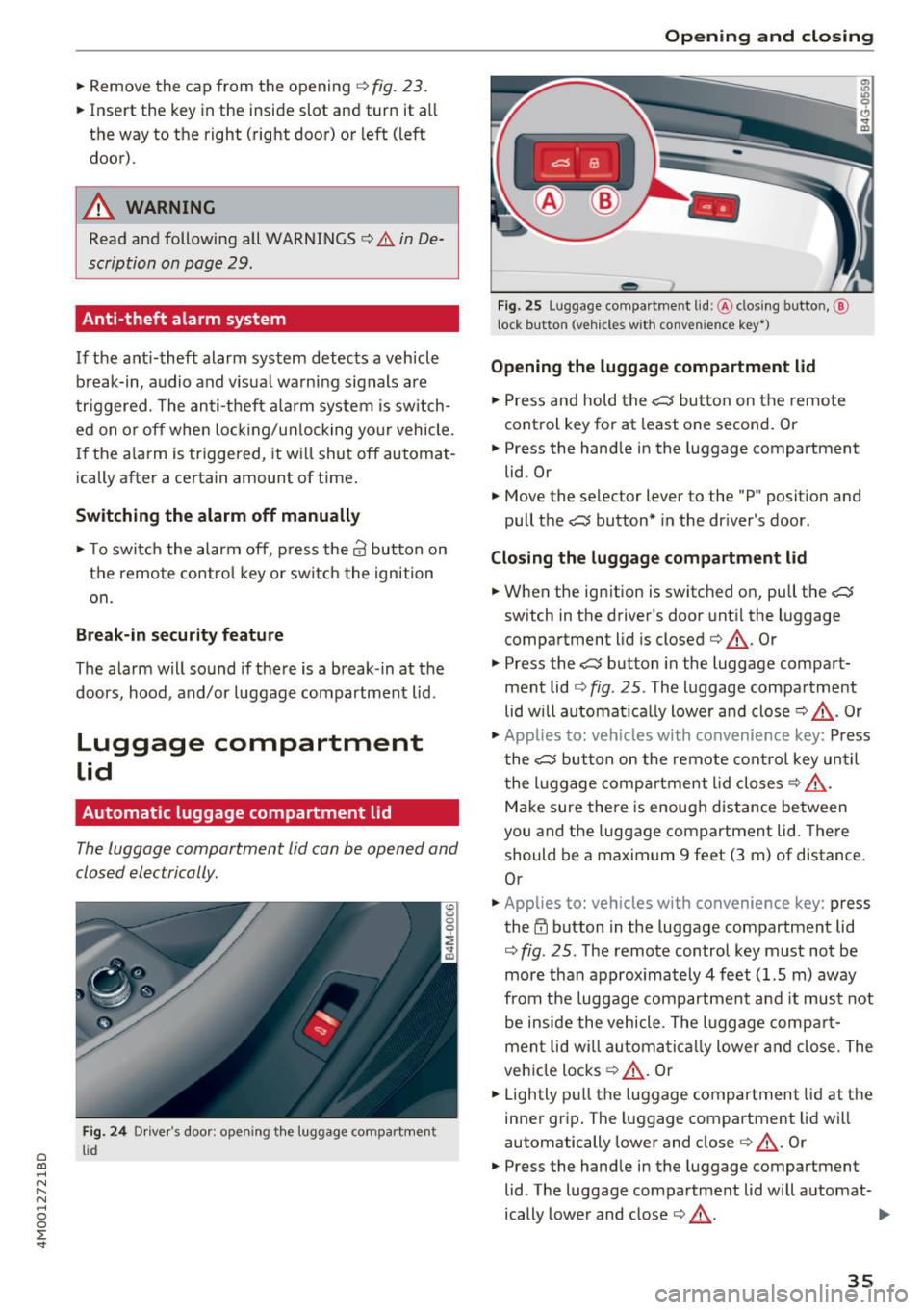
Fig. 24 Driver's door; opening th e luggage compartment
lid
Opening and closing
---
' c:::s lil
--
Fig. 25 Luggage compartment lid: @clos ing button, @
t ock button (vehicles with convenience key•)
Opening the luggage compartment lid
"" Press and hold the .c:::5 button on the remote
control key for at least one second. Or
"" Press the hand le in the luggage compartment
lid. Or
"" Move the selector lever to the "P" position and
pull the
.c:::5 button* in the driver's door.
Closing the luggage compartment lid
... When the ignition is switched on, pull the c::;;
switch in the driver's door until the luggage
compartment lid is closed ¢ &_ . Or
"" Press the
c::;; button in the luggage compart
ment lid¢
fig. 25. The luggage compartment
lid will automat ica lly lower and close¢&_. Or
"" Applies to: vehicles with convenience key: Press
the
.c:::5 button on the remote control key until
the luggage compartment lid closes¢&_.
Make sure there is enough distance between
you and the luggage compartment lid. There
should be a maximum 9 feet (3 m) of distance.
Or
"" Applies to: vehicles with convenience key : press
the~ button in the luggage compartment lid
¢
fig . 25. The remote control key must not be
more than approx imately 4 feet (1.5 m) away
from the luggage compartment and it must not
be inside the vehicle . The luggage compar t
ment lid wi ll automatically lower and close. The
vehicle locks¢&_ . Or
... Lightly pull the luggage compartment lid at the
inner grip. The luggage compartment lid will
automatically lower and close
c> &_ . Or
"" Press the handle in the luggage compartment
lid . The luggage compartment lid will automat-
ically lower and close
c> &_. .,.
35
Page 40 of 398

Opening and clo sin g
Luggage compartment lid emergency
release
Fig. 27 Inner luggage compart men t lid : acces s to the
emergency rel ease
.. Remove the mechanica l key ¢ page 31 .
.. Pry out the cover using the mechanical key
¢fig . 27.
.. Press the lever in the direction of the arrow to
release the luggage compartment lid .
Child safety lock
The child safety lock prevents the rear doors
from being opened from the inside and the rear
power windows from be operated.
Fig . 28 Sect io n of drive r's door: c hild safety lock butto ns
a,
~ co a,
.. To activate/deactivate the inner door handle
and the power window switch for the respective
rear door , press the left/right
t button in the
driver 's door ¢
fig. 28 . The indicator light in the
button turns on/b links .
.. To activate/deact ivate the child safety lock on
both sides, you must press the
T buttons one
after the othe r.
It is not possible to operate the rear climate con
trol system* when the child safety lock is switch
ed on . T he
S ET REAR function allows you to app ly
38
a ll settings to the rear using the climate control
system controls in the cockpit
¢ page 72.
Message in th e instrument cluster di splay
(BJ Childproof catch : ma lfun ction! Plea se con
tac t Service
There is a ma lfunction in the ch ild safety lock .
Press the
t button aga in .
If the message stays on, dr ive immediately to an
authorized Audi dealer or authorized Audi Serv ice
Facility to have the malfunction repaired.
A WARNING
- If you leave the vehicle, sw itch the ignition
off and take the veh icle key with you. This
app lies pa rtic ula rly whe n children remain in
the vehicle. Otherwise chi ldren cou ld start
the engine or operate e lectrica l equipment
(such as power windows), which increases
the risk of an accident.
- A ma lfunction in the chi ld safety lock could
allow the rear doors to be opened from the
inside, which increases the risk of an acci
dent.
Power windows
Controls
The driver can control all power windows .
Fig. 29 D river 's doo r: pow er w indow con trols
A ll power window switches are equipped with a
two-stage function:
Opening and closing the windows
co ~ M 0
=> co a,
.. To open o r close the window comp letely, press
the swit ch down o r pull the swit ch up b riefly to .,.
Page 43 of 398
a co ...... N r--. N ...... 0
0
:E '
Description
Applies to: vehicles with garage door opener (Homelink)
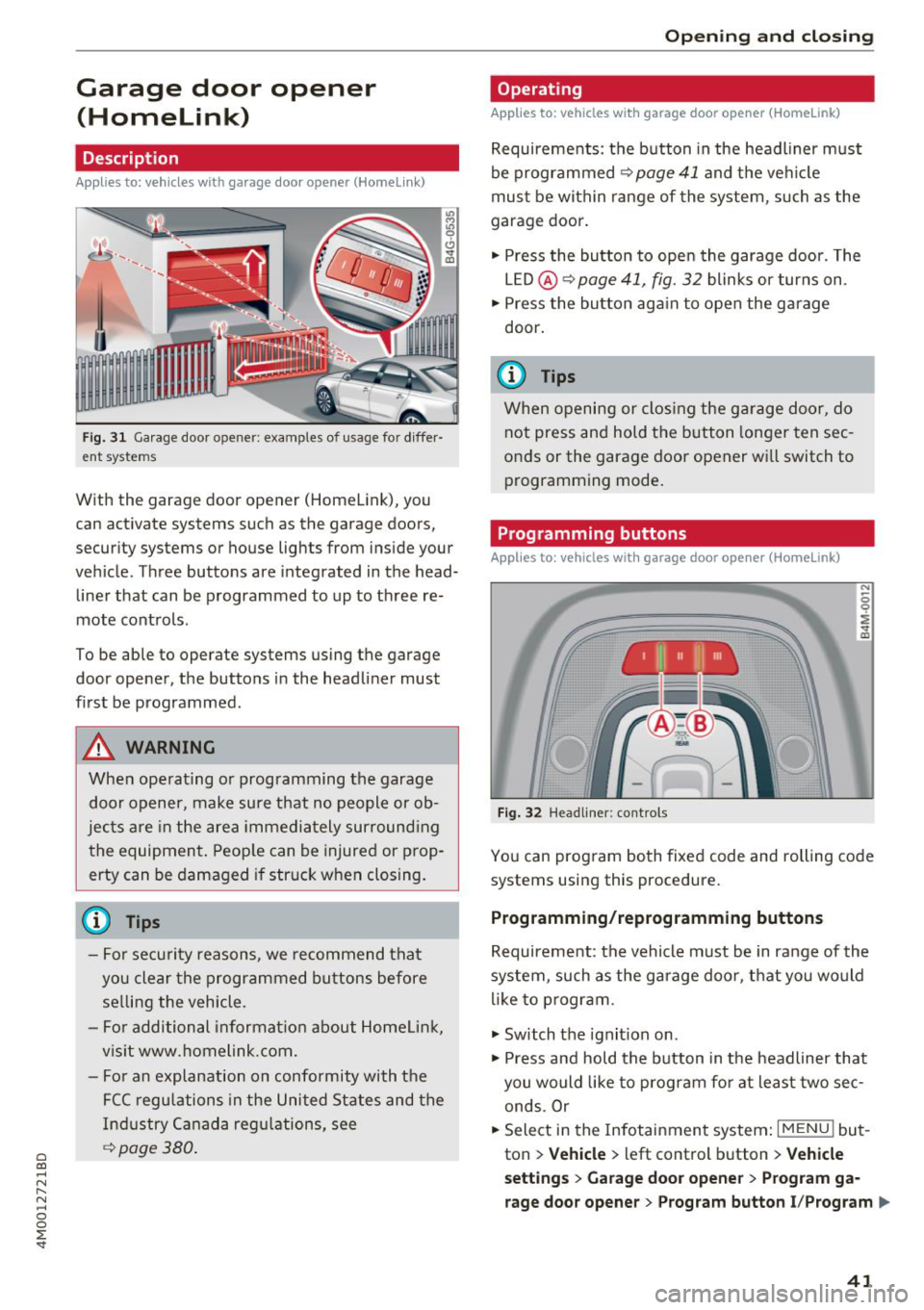
Fig. 31 Garage door opener: examples of usage for diffe r·
ent systems
With the garag e door opener (Homelink), you
can activate systems such as the garage doors,
security systems or house lights from inside your
vehicle. Three buttons are integrated in the head·
liner that can be programmed to up to three re
mote controls .
To be able to operate systems using the garage
door opener, the buttons in the headliner must
first be programmed .
A WARNING
When operating or programming the garage
door opener, make sure that no people or ob·
jects are in the area immediately surround ing
the equipment. Peop le can be injured or prop
erty can be damaged if struck when closing.
- For security reasons, we recommend that you clear the programmed buttons before selling the vehicle.
- For additional informat ion about Homelink,
visit www.homelink.com.
- Fo r an explanation on conformity with the
FCC regulations in the United States and the
Industry Canada regu lations, see
¢ page 380 .
Openi ng and clos ing
Operating
Applies to: vehicles with garage door opener (Home link)
Requirements : the button in the headl iner must
be programmed
<>page 41 and the veh icle
must be within range of the system, such as the
garage door .
., Press the button to open the garage door. The
LED @<>
page 41, fig. 32 blinks or turns on .
.. Press the button aga in to open the garage
door.
@ Tips
When opening or closing the garage door, do not press and hold the button longer ten sec
onds or the garage door opener wi ll switch to
programming mode.
Programming buttons
Applies to: vehicles with garage door opener (Home Link)
Fig . 32 H eadlin er: controls
You can prog ram both fixed code and rolling code
systems using this procedure.
Programming /reprogramming buttons
Requirement: the vehicle must be in range of the
system , such as the garage door, that you would
li ke to p rogram.
., Switch the ignit ion on .
., Press and hold the button in the headliner that
you would like to program fo r at least two sec·
ends .Or
.. Select in the Infotainment system:
I MENU ! but
ton
> Ve hicle > left control button > V ehi cle
s et tin g s
> G arage doo r opener > Pro gra m g a
rage do or opener
> Program butto n I/Prog ram ll>
41
Page 45 of 398
a co ...... N r--. N ...... 0
0
:E "
Exterior Lighting
Switching the lights on and off
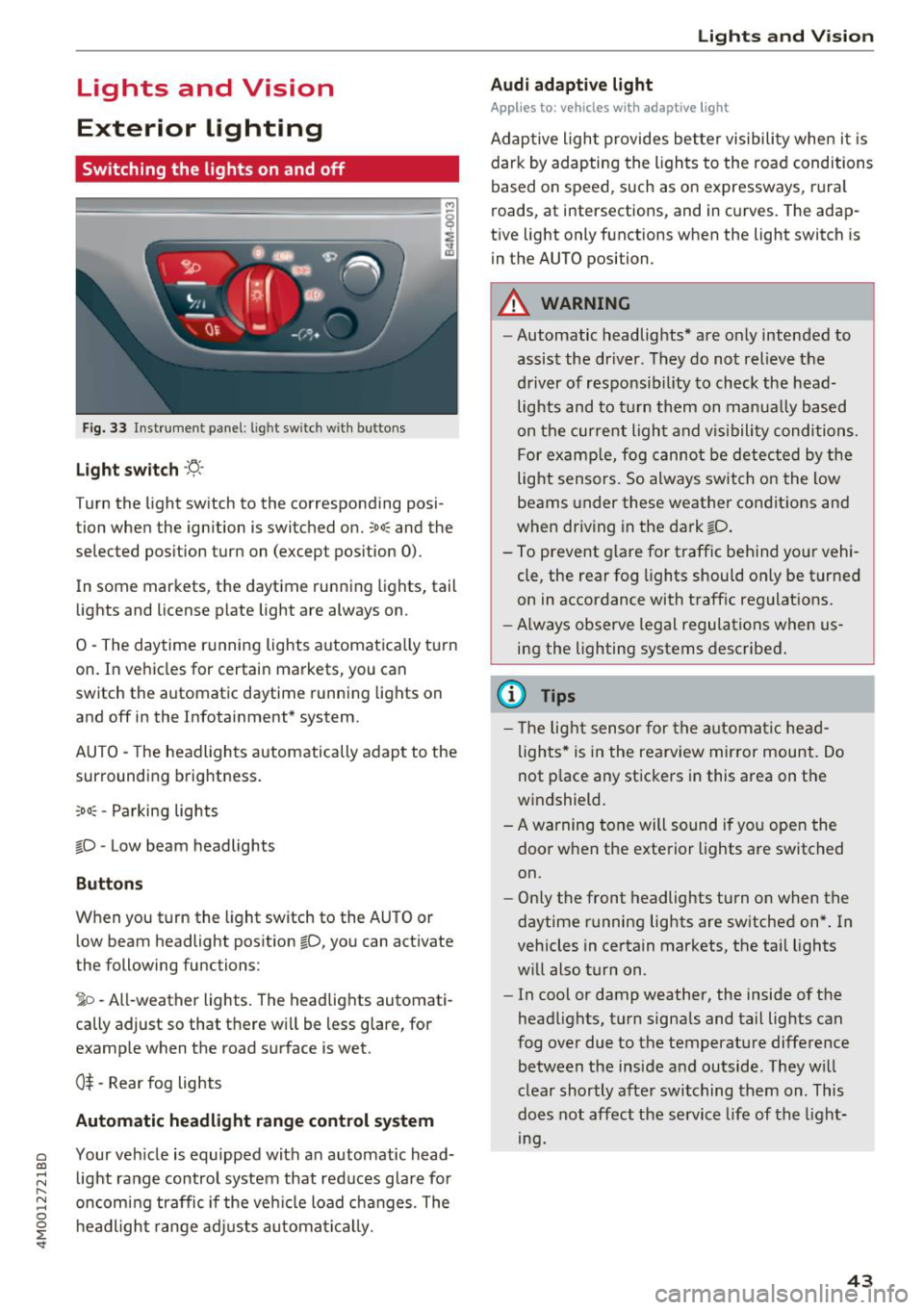
Fig. 33 Instrument pa nel: lig ht switc h with buttons
Light switch ·'!:! ·
Turn the light sw itch to the corresponding posi
tion when the ignition is switched on.
:oo: and the
selected pos ition turn on (except pos ition 0).
In some markets, the daytime running lights, tail
lights and license plate light are always on .
0 -The daytime running lights automatica lly t urn
on. In vehicles for certain markets, you can
switch the a utomat ic daytime running lights on
and off in the Infotainment* system.
A UTO -The headlights automatic ally adapt to the
surrounding brightness.
:o o: -Parking lights
io -Low beam headlights
Buttons
When you t urn the light switch to the AU TO or
low beam headlight pos ition
io, you can activate
the following functions:
1o -All-weather lights. The headlights automati
cally adjust so that t here w ill be less glare, for
examp le when the road surface is wet.
0$ -Rear fog lights
Automatic headlight range control system
Your veh icle is equipped with an automatic head
light range control system that red uces g lare fo r
oncom ing traffic if the veh icle load c hanges . The
headl ig ht ra nge ad justs automa tic a lly.
Lights and V ision
Audi adaptive light
Appl ies to: vehicles with adaptive light
Adaptive ligh t provides better visibili ty whe n it i s
dark by adapting the lights to the road conditions
based on speed , such as on e xpressways, rura l
roads, at intersections, and in c urves. The adap
t ive light only functions when the light sw itch is
i n the AUTO position .
A WARNING
--Automatic headlights* are on ly intended to
assist the driver. They do not relieve the
driver of responsibil ity to check the head
lights and to t urn t hem on manua lly based
on t he curren t ligh t and v is ibility condition s.
For examp le, fog canno t be detec ted by the
light sensors. So always switch on the low
beams under these weather co nditions and
when driv ing in the da rk
io .
- To prevent glare for traffic behind yo ur vehi
cle, the rear fog lights should only be turned
on in accordance with traff ic regulat ions.
- Always observe legal regulations when us
ing the lighting systems desc ribed .
(D Tips
- The lig ht sensor for the automat ic he ad
lights * is in the rearview mir ror mount. Do
not p lace any st ickers in this area on the
windshield.
- A warning tone will sound if you open the door when the exte rior lights a re switched
on .
- Only t he front headlights turn on when t he
daytime running lights are switched on *. In
vehicles in certain markets, the tail lights
w ill also turn on .
- In cool or damp weather, the inside of the
head lights, turn signa ls and tail lights can
fog over due to the temperature diffe rence
between the inside and outside . They will
clear shortly afte r swi tching them on . This
does not aff ect the service life of the light
mg.
43
Page 46 of 398
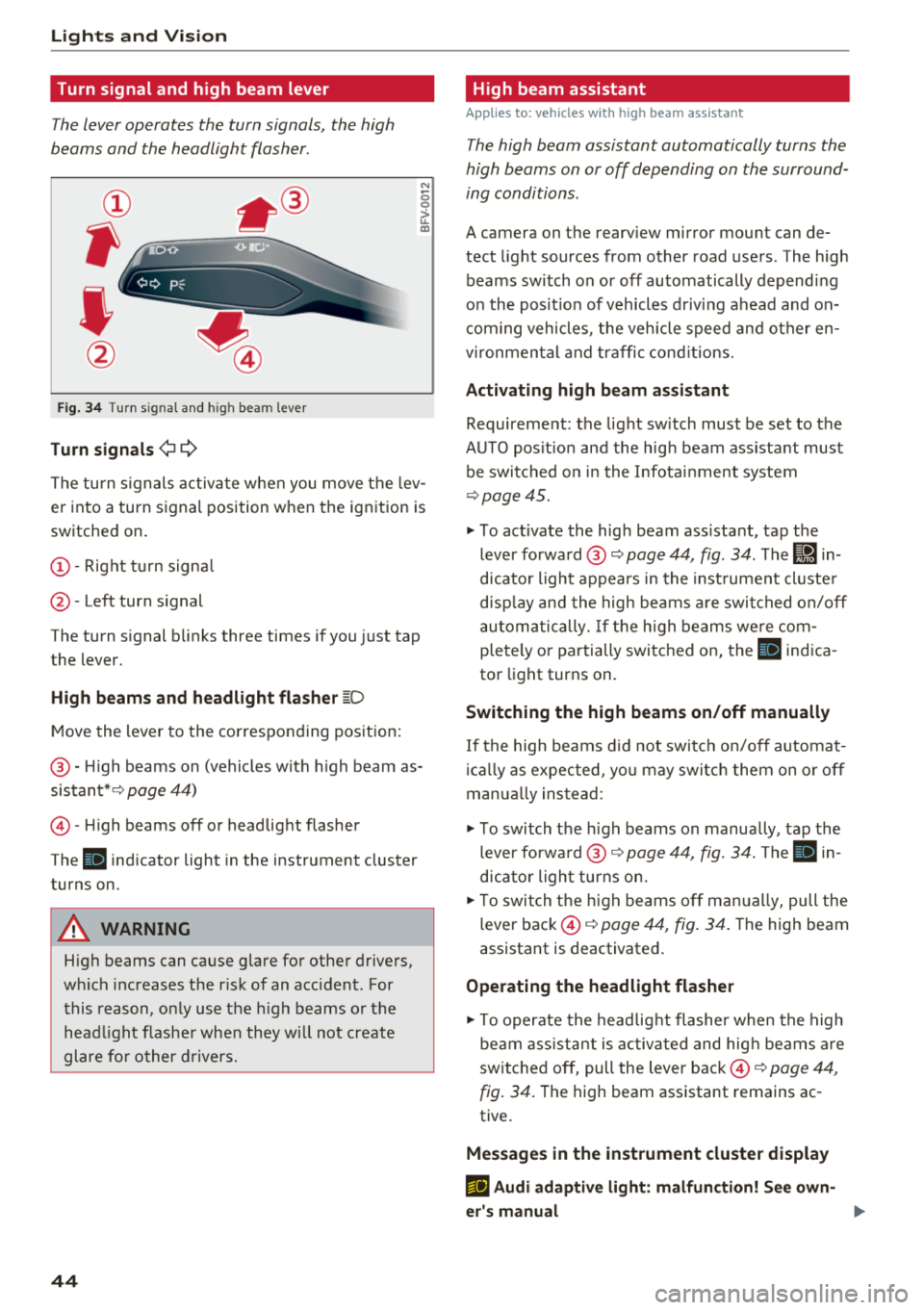
Lights and Vi sion
Turn signal and high beam lever
The lever operates the turn signals, the high
beams and the headlight flasher .
®
,
I
@
Fig . 34 Turn s ig nal and hig h bea m le ver
Tu rn signal s ¢i Q
N
0 0
> u. a,
The turn s ignals activa te when you move the lev
er into a turn signal position w hen the ignition is
switched on.
(D -Right tu rn signa l
@-Left turn signal
The turn signal b links three times if you just tap
the lever.
High b eams and h eadlight flash er ~D
Move the lever to the corresponding position:
@ -H igh beams on (vehicles with h igh beam as
sistant* ¢
page 44)
©-H igh beams off or headlight flasher
The
ii indicator light in the instrument cluster
turns on .
A WARNING
High beams can cause glare for other drivers,
wh ich increases the risk of an accident . For
this reason, only use the h igh beams or the
head light flasher when they w ill not create
glare fo r other d rivers.
44
High beam assistant
App lies to : vehicles wit h high bea m ass istant
The high beam assistant automatically turns the
high beams on or off depending on the surround
ing conditions .
A camera on the rearv iew mirror mou nt can de
tect light sources from other road users . The high
beams switch on or off automatically depend ing
on the pos it ion of vehicles d riving ahead and on
com ing vehicles , the veh icle speed and other en
v ironmental and traffic cond it ions.
Activ ating high b eam ass istant
Requirement: the light sw itch must be set to the
AUTO pos it ion and the high beam ass istant must
be switched o n in the Infota inment system
¢page 45.
"'To act ivate the high beam ass istant, tap the
lever forward @~
page 44, fig . 34 . The Iii in
dicator light appears in the inst rument cluste r
disp lay and the high beams a re swit ched on/off
automa tically. If t he h igh beams we re com
pletely or pa rtially switched on, the
IIJ indica
tor light turns on.
Switching the high beams on /off manually
If the high beams d id not switch on/off automat
i ca lly as expected, yo u may switch them on or off
manua lly ins tead :
"' To switch the h igh beams on manually, tap the
lever forward @~
page 44, fig. 34. The ii in
dicator light turns on.
"'T o switch the h igh beams off man ua lly, pull the
lever back ©¢
page 44, fig. 34 . The high beam
assistant is deactivat ed.
Operating the headlight flasher
"' To operate the headlig ht flasher when the high
beam ass istant is activated and hig h beams are
switched off, pull the lever back ©¢
page 44,
fig. 34 .
The high beam assistant remains ac
tive.
Messag es in the instrument cluster display
m;J Audi adaptiv e light : malfun ction! Se e own
e r's manual
Page 47 of 398
~ Headlight a ssistant : ma lfun ction! See own
er 's manual
Drive to an autho rized Aud i de aler o r a uthorized
Aud i Service Facility immedia tely to have the
mal funct ion corrected. You can still switc h the
high beams on or off manually.
i:a Headlight a ssistant : currently unavailable.
Camera view restricted due to surroundings .
See owner 's manual
The camera view is b locked, fo r example by a
s ticker o r debris.
The senso r is located betwee n the interior rear
view mir ror and the wi ndshield . Do not p lace any
sti cke rs in t his area on the wi ndshi eld .
,& WARNING
High beam assis tan t is only i ntended to assist
th e drive r. The dr iver is still re sponsib le for
contro lling the headlights and may need to
switch them on and off manually depend ing
on light and visib ility conditions. It may be
necessary to ope rate them manua lly in s itua
tions such as:
- In adverse weather cond itions such as fog,
heavy ra in, b low ing snow or sp raying water .
- On roads where oncoming traffic may be
partially obsc ured, such as expressways .
- W hen there are road users t hat do not have
s ufficient lighting, s uc h as bicyclers o r
vehicles with dirty ta il lamps.
- In tight cu rves and on steep hills .
- In poo rly lit areas .
- Wi th stro ng ref lec to rs , such as s igns.
- I f the area of t he windsh ield near the se nso r
is f ogg ed ove r, dir ty, i cy or covere d w ith a
sti cker.
Adjusting the exterior lighting
The fun ctions are adjust ed in the Infotainment
system.
• Select in the Info tainment sys tem : !M ENUI but-
a ton >Vehicle > left contro l butto n > Vehicle co
~ settings > Exterior lighting .
N ~ 0
0
:E '
Automatic headlights
Yo u ca n adju st the following se ttings in the Au
tomatic headlights
men u:
Activation time -you can adjust if the headlig hts
swi tch on
Early , Medium or Late ac cord ing to t he
sensi tivity of t he light sensor.
Headlight assistant * -you can switch the h igh
beam assis tan t* on and off.
Entry/exit lighting
When it is dark, the Entry /exit lighting ill umi
nates the area a round the vehicle when unlocking
the ve hicle and afte r swi tc h ing off the ignit io n
and opening the dr ive r's door .
The
Entry /exit lighting only works when it is
dark and the ligh t sw itch is in the
AUTO position.
Daytime running lights
USA models :
the daytime r unning lig hts can be
switched on/off . Select
On or Off.
Canada model s:
th is fu ncti on canno t be switche d
off. They act ivate au tomatically eac h time the ig
nition is switched on.
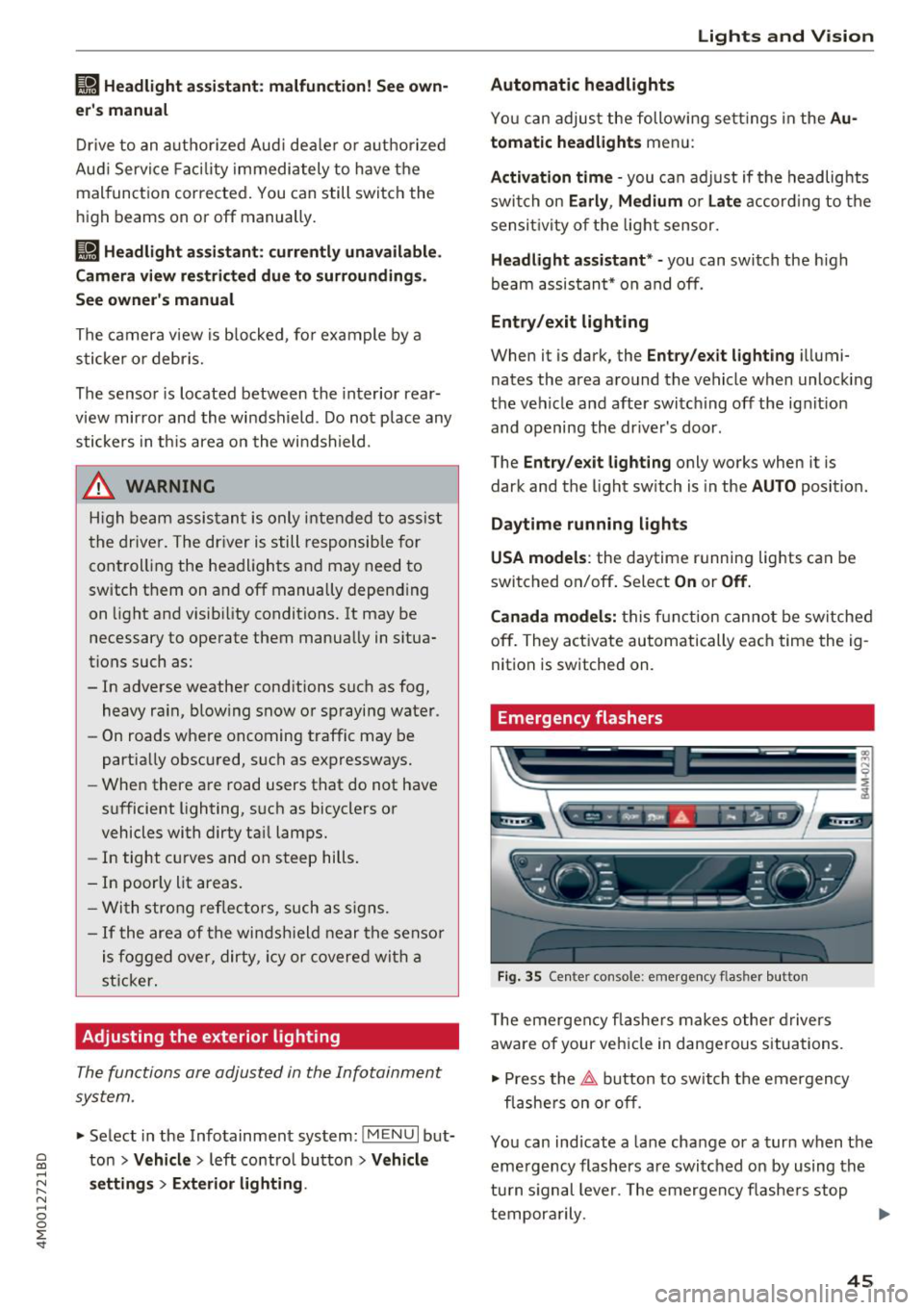
Emergency flashers
--- -- ---=-
~--- --~--
-----______ ,
~-=-- ·- o,o,6 .. -i, "'.A - ~
Fig. 3 5 Cente r con so le: eme rgen cy fl asher bu tto n
T he eme rgen cy fla she rs m akes othe r dr iv e rs
aware of your vehi cle in dangerous situa tions.
• Press the~ button to sw itch t he emergency
fl as he rs on or off .
You can ind icate a lane change or a turn when the
eme rgency flashers are swi tched on by using the
tu rn s ignal leve r. T he emergen cy flashe rs stop
tempor arily. ""
45
Page 50 of 398
Lights and Vi sion
0 -all adjustment functions are deactivated .
Q/P -adjusting the left/right exter io r mir ror.
Move the knob in the desired direction .
4iil -Heats * the m irror glass depending on the
outside temperature .
8 - Folds the exterior mirrors*. To fold the mir
rors out, turn the knob to one of the other posi
tions . In the Infotainment system, you can select
if the mirrors fold in automat ica lly when you lock
the vehicle
~ page 34.
F ront pas senger 's e xterior mirror tilt
function*
To help you see the curb when back ing into a
pa rking space, t he surface of the mir ror tilts
slightly . Fo r thi s to happen, t he knob must be in
t he pos it io n for the front passenger's exterior
mirror.
You can adjust the t ilted m irror surface by turn
i n g the knob in the des ired direction. Whe n you
move ou t of reverse and in to anothe r gear, the
new mirror position is stored and assigned to the
key yo u are using.
The mir ror goes back into its o rig inal posi tion
once yo u drive forward faster than 9 mph
(15 km/h) or tu rn the ignition
off .
A WARNING
Curved mir ror surfaces (for examp le convex)
enlarge t he f ie ld of vision . Howeve r, they
make objects i n the mirror appear sma ller
and farther away. You may est imate inco r
rectly when you use these mirrors to ga uge
your distance from the vehicles behind you
when c hanging lanes, wh ic h increases the r is k
of an a ccident.
@ Note
- Applies to vehicles with power folding exte
rior m irrors : if the mirror housing was
moved by outside forces (such as an impact
whe n m aneuver ing), you m ust use the pow
e r fold ing func tion to fo ld the m irror all t he
way o ut. The m irro rs will make a loud no ise
when they latch into p lace . The mirror hous
ing must not be moved back i nto place by
48
hand because this would impair the func
tion of the mirror mechanism.
- Applies to vehicles wi thou t power folding
exterior mirrors : if the mirror housing was
moved by outside forces (such as a n impact
when maneuvering), you must move it back
in place by hand.
- If you wash the vehicle in a n automatic ca r
wash, you must fold the exter ior mirrors in
to reduce the r isk of damage to the m irrors.
Never fold power fo ld ing exterior mirrors*
by hand. On ly fold them in and out using
the power cont rols.
(D Tips
- If the power adjust ing function malfunc
t ions, the glass in both mir rors can be ad
justed by p ressing on t he edge of it by hand .
- The exterior m irror settings are sto red w ith
the memory fu nct io n* ~
page 59.
Dimming the mirrors
Your vehicle is equipped with a manual or auto
matic* dimming rearview mirror .
Manual dimming rear view mirror
.,. Pull the lever on the bottom of the m irror back.
Automatic dimming rearvi ew mirror*
.,. The inte rior and exte rior m irrors d im a utomat i
cally when ligh t shi nes on them, for examp le
from headlig hts on a vehicle behind you.
A WARNING
If th e g lass on an a utomatic dimming m irror
b reaks, e lectrolyte can lea k out. T his liquid
can irritate the skin, eyes and respiratory sys
tem . If there is contact w it h the fluid, flush
i mmediately with p lenty of water. Consult a
phys ic ian if necessa ry .
- Repeated or long-term exposure to e lectro
ly te fl uid ca n lead to ir ritation of the air
ways, espec ia lly in people with ast hma o r
o ther resp iratory condi tions. Take deep
b re at hs immedia tely afte r leav ing t he veh i
cle or, if this is no t possib le, open all of the
doors and windows as wide as possib le .
Page 52 of 398
Lights and Vision
Windshield wipers
Switching the wipers on
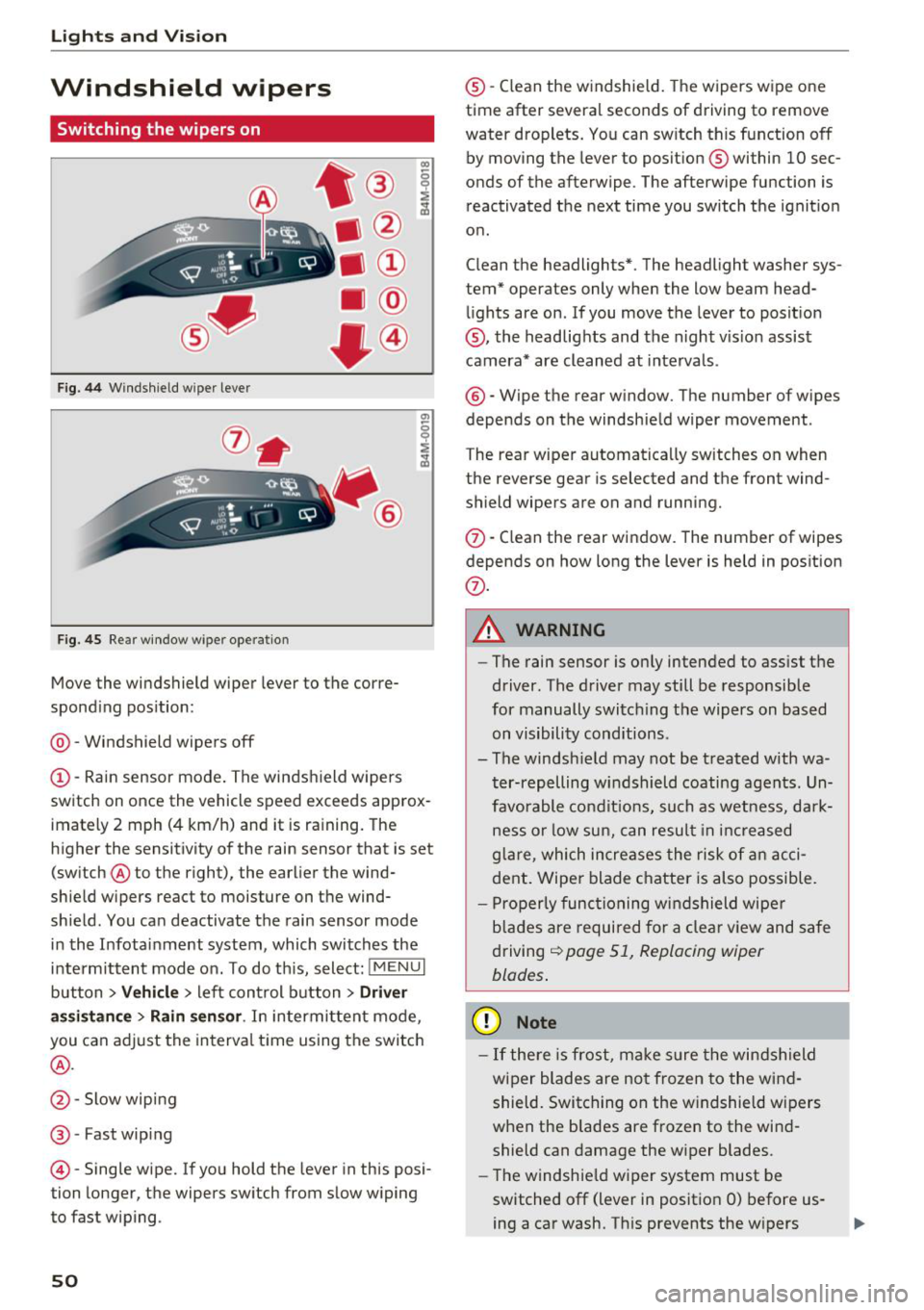
Fig. 44 Windshield wiper lever
Fig. 45 Rear window w ipe r operation
•® I
• @
• @
• @
•®
Move the windshield wiper lever to the corre
sponding position:
@ -Windshield wipers off
(D-Rain sensor mode. The windshield wipers
switch on once the vehicle speed exceeds approx
imately 2 mph (4 km/h) and it is raining. The
higher the sensitivity of the rain sensor that is set (switch ® to the right), the earlier the wind
shield wipers react to moisture on the wind
shield. You can deactivate the rain sensor mode
in the Infotainment system , which switches the
intermittent mode on. To do this, select:
! MENUI
button > Vehicle > left control button > Driver
assistance
> Rain sensor . In intermittent mode,
you can adjust the interval time using the switch
®·
@ -Slow wiping
®-Fast wiping
©-Single wipe. If you hold the lever in this posi
tion longer, the wipers switch from slow wiping
to fast wiping .
50
®-Clean the w indshield. The wipers wipe one
time after several seconds of driving to remove
water droplets. You can switch this function off
by moving the lever to position ® within 10 sec
onds of the afterwipe . The afterwipe function is
reactivated the next time you switch the ignition
on .
Clean the headlights*. The headlight washer sys
tem* operates only when the low beam head lights are on . If you move the lever to position
@, the headlights and the night v is ion assist
camera* are cleaned at intervals.
®-Wipe the rear window. The number of wipes
depends on the windshield wiper movement .
The rear wiper automatically switches on when
the reverse gear is selected and the front wind
shield wipers are on and running.
(f) -Clean the rear window . The number of wipes
depends on how long the lever is held in position
(f) .
A WARNING
-The rain sensor is only intended to assist the
driver . The driver may still be responsible
for manually switching the wipers on based on visibility conditions.
- The windsh ield may not be treated with wa
ter-repelling windshield coating agents. Un
favorable conditions, such as wetness, dark
ness or low sun, can result in increased
glare, which increases the risk of an acci
dent. Wiper blade chatter is also possible.
- Properly functioning windshield wiper
blades are required for a clear view and safe
driving
¢ page 51, Replacing wiper
blades .
(D Note
-If there is frost, make sure the windshield
wiper blades are not frozen to the wind
shield. Switching on the windshield wipers
when the blades are frozen to the wind
shield can damage the wiper blades.
- The windshield wiper system must be
switched off (lever in position 0) before us
ing a car wash. This prevents the w ipers
Page 53 of 398
Cl a:, ...... N
" N ...... 0
0
::r '
ing damage to the windshie ld wiper system .
(D Tips
-The windshield wipers switch off when the
ignition is switched off . You can activate the
windshield wipers after the ignition is switched back on by moving the windsh ield
wiper lever to any posit ion.
- Worn or dirty windshield wiper blades result
in streaking. This can affect the rain sensor
funct ion. Check your windshield wiper
blades regularly.
- The washer fluid nozzles for the windshie ld
washer system are heated at low tempera
tures when the ignition is on .
- When stopping temporarily, such as at a
traffic light, the speed of the windshield
wipers automatically reduces by one level.
Cleaning the wiper blades
Clean the wiper blades when you see wiper
strea ks. Use a soft clot h and a glass cleane r.
Windshield wiper
.. Place the windshield wiper arms in the service
pos ition
¢ page 51 .
.. Fold the w indshield wiper arms away from the
windshield .
Rear window wiper
.. Fold the w iper arm away from the rear window .
A WARNING
Dirty windshield wiper blades can impair v i
sion, which increases the risk of an accident .
-
Lights and Vision
Replacing wiper blades
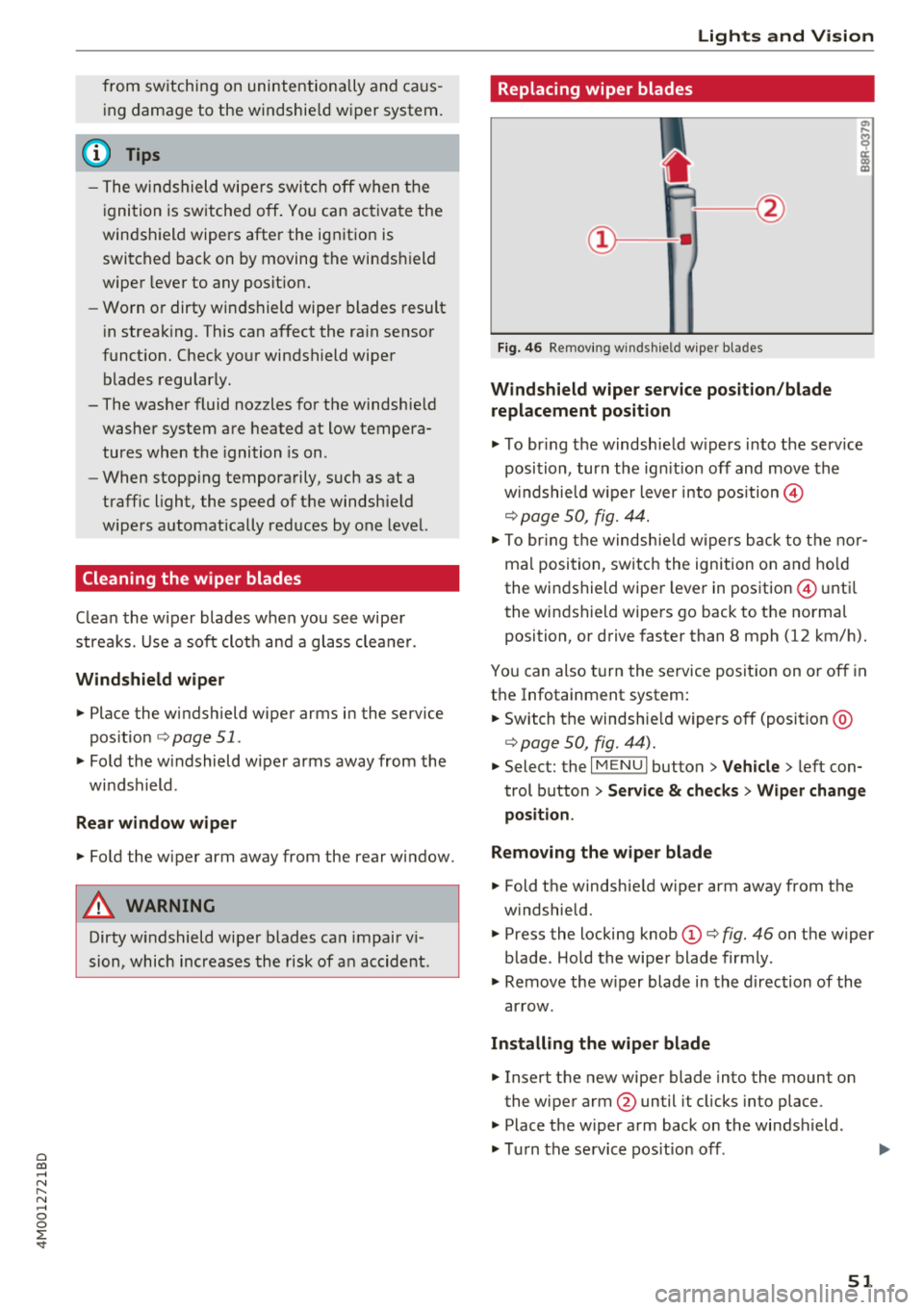
Fig. 46 Removing windshield wiper blades
Windshield wiper service position/blade
replacement position
.. To br ing the windsh ield w ipers into the serv ice
position , turn the ign ition off and move the
w indshie ld w iper lever into position@
¢ page 50, fig. 44.
.. To bring the windshie ld wip ers back to the nor
mal position, switch the ignition on and hold
the windshield wiper lever in position @ until
the windshield wipers go back to the normal
position, or drive faster than 8 mph (12 km/h).
You can also turn the service position on or off in
the Infotainment system:
.. Switch the windshie ld wipers off (position @
¢page 50, fig. 44) .
.. Select: the I MENU I button >V ehicle > left con
trol button
> Service & checks > Wiper change
position .
Removing the wiper blade
.. Fold the windshie ld wiper arm away from the
w indshield.
.. Press the locking knob
(D ¢ fig. 46 on the wiper
blade . Hold the wiper blade firmly.
.. Remove the w iper blade in the direction of the
arrow.
Installing the wiper blade
.. Insert the new wiper blade into the mount on
the wiper arm @until it clicks into place .
.. Place the wiper arm back on the windshield .
.. Turn the service position off.
51