display AUDI Q7 2018 Owner´s Manual
[x] Cancel search | Manufacturer: AUDI, Model Year: 2018, Model line: Q7, Model: AUDI Q7 2018Pages: 398, PDF Size: 185.58 MB
Page 75 of 398
Cl a:, ...... N
" N ...... 0
0
::r '
Steering wheel heating: on /Steering wheel
heating: off
appears in t he instr ument cluster
display.
The temperat ure is maintaine d at a constant lev
e l w hen steering w heel heating is switched on.
The stee ring w heel hea ting setti ngs are store d
autom atically and ass igned to the remote cont ro l
k ey that is in use .
Warm and cold
73
Page 81 of 398
a co ...... N r--. N ...... 0
0
:E '
if you open the d river's doo r when the engine is
running .
Please press the brake pedal
This message appea rs if you do no t press the
b ra ke pedal whe n star tin g the eng ine.
Ill Remote control key : key not detected. Is the
key still in the vehicle?
This indicato r light turns on and t his message ap
pears if the ignit ion key was removed from the
ve hicle when the e ngine was ru nning. If the ign i
tion key is no longe r in the ve hicle, yo u ca nn ot
sw itch on t he ign it ion or s tart the e ngine once
you s top i t. You also canno t lock the vehicle from
the outs id e.
Shift to P, otherwise vehicle can roll away.
Doors do not lock if gearshift is not in P
This message appea rs for safety reasons if the
selecto r lever is in the "N" pos ition w hen you
sw itch the ign ition off. Move the selector leve r to
the "P " pos it io n. Otherwise the vehicle is no t pro
tec ted fro m rol ling an d it ca nnot be lo cke d.
II Remote control key : hold back of key
against the designated area . See owner's man
ual
If t he indicator lig ht turns on and th is message
appears , th ere is a mal function
c:> page 79 .
Shift to P before leaving vehicle , otherwise vehi
cle can roll away
This message appears if the driver's door is
opened while t he ignitio n is switched on and t he
transmission has not been shifted to the "P" pos i
tion. Sh ift the transmiss ion i nto the "P" position
and turn off the ignition if you are leav ing t he ve
h icle. Otherwise t he ve hicle could ro ll. Also see
c:> page 80 .
Driving
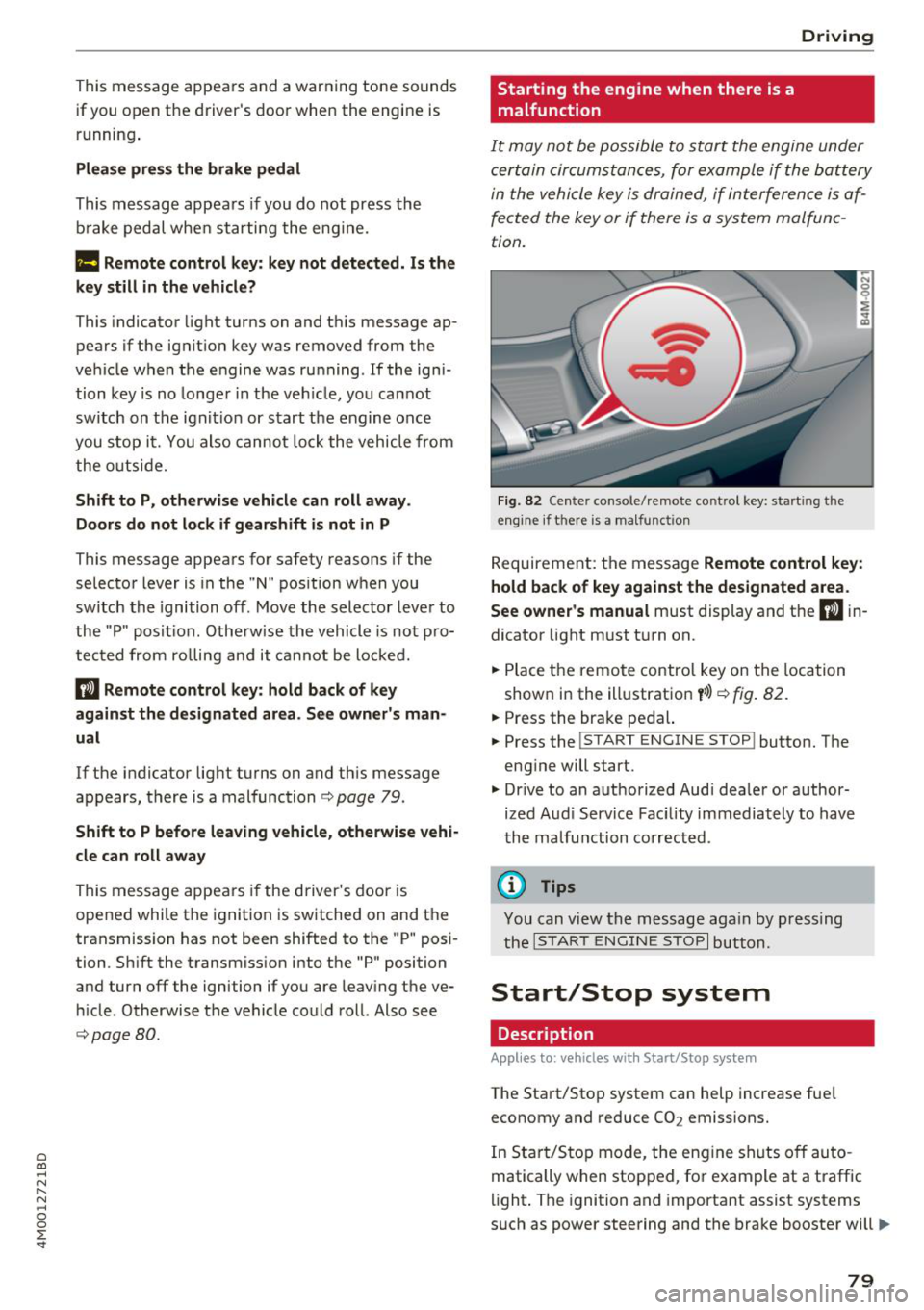
Starting the engine when there is a malfunction
It may not be possibl e to sta rt the e ngine under
ce rta in circ um stance s, for exam ple if the bat te ry
in the vehicle key is dr ained, if in terfere nce is af
fected the key or if there is a system malfunc
tion.
Fig . 82 Ce nter console/ re m ote contro l key: starting the
e n g in e if there is a ma lfunction
R eq uirement: the message Remote control key :
hold back of key against the designated area .
See owner's manual
must display and the II i n
dicator light m ust t urn on.
.. Place t he remote contro l key on the loc ation
show n in the illustrat ion
y >l) c:> fig . 82.
.. Press the bra ke pe dal.
.. Press the
!S TART ENGINE STOP ! button. T he
eng ine will start.
.,. Dr ive to an a uth orized Audi dea ler or a uthor
ized Aud i Serv ice Fac ility immediately to have
t he ma lfu nction corrected.
(D Tips
You can view the message aga in by pr essing
th e
I S TA RT ENGI NE ST OP I button.
Start/Stop system
Description
Applies to: vehicles wi th Start/Stop syste m
The Start/Stop system can help increase fue l
economy and reduce CO
2 emissions.
In Sta rt/S to p mode, the eng ine shuts o ff au to
matically when stop ped, fo r example at a t raff ic
li ght . The ignition and importa nt assist systems
s uch as power steering and the brake booste r will
IJI,,,
79
Page 87 of 398
Difficult terrain and off-road
When driving in unfamiliar areas and offroad,
drive slowly and keep on the watch for unexpect
ed obstacles (such as potholes, rocks, tree
stumps, etc.).
To prevent the vehicle from bottoming out and to
reduce the risk of underbody damage, you should
drive across uneven ground on only one side of
the vehicle so that only two of your wheels cross
the uneven area, instead of driving across the
center of the uneven area with all four wheels.
Drive quickly through sandy or marshy off-road
sections and do not stop , if at all possible.
Driving through water
Also read the information found in r=;, page 74.
Driving on a slope
If you are ever unable to drive up a hill, do not try
to turn around . Drive back down in
reverse in
stead . Otherwise you run the risk of t ipping over.
If the vehicle threatens to tip over when driving
across a slope, you must immediately steer
downhill in the direction of the slope.
Do not park your vehicle on steep hills .
To reduce the r isk of tipping over, drive on hills in
the direction of the downward slope (fa ll line) -
never crosswise.
Tilt angle display
Description
Applies to: vehicles wit h a tilt ang le display
110 · I l 1ft / offrnortr1 ( ~ ....
All road
!r
-
Q
l " __,.._
Comfort 4 ~
J
ll" 11• Auto O" •
Dynamic
~ ~
Individual 11• I/"
~t-;s
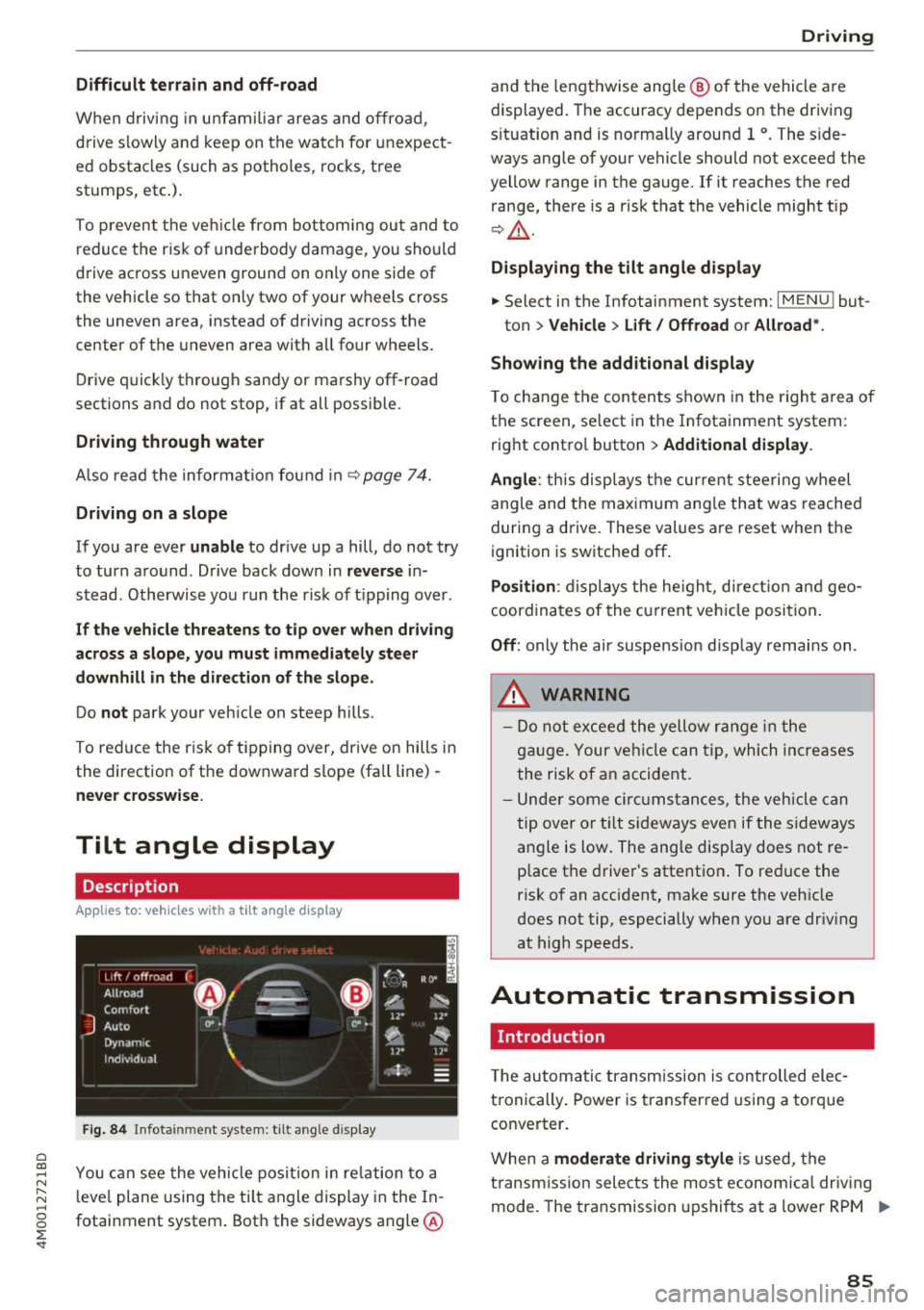
Fig. 84 Infotainment system : tilt angle d isplay
a
~ You can see the vehicle position in relation to a N
~ leve l plane using the tilt angle display in the In-~
g fotainment system . Both the sideways angle @
:E '
and the lengthwise ang le @ of the vehicle are
displayed. The accuracy depends on the driving
s ituation and is norma lly around 1
°. The side
ways angle of your vehicle should not exceed the
yellow range in the gauge. If it reaches the red
range, there is a risk that the vehicle might tip
r=;,_& .
Displaying the tilt angle display
.. Select in the Infotainment system: I MENU ! but-
ton>
Vehicle > Lift/ Offroad or Allroad*.
Showing the additional display
To change the contents shown in the right area of
the screen, se lect in the Infotainment system:
right control button>
Additional display.
Angle :
this disp lays the current steering wheel
angle and the maximum angle that was reached
during a drive . These values are reset when the
ignition is switched off .
Position: displays the height, direct ion and geo
coordinates of the current vehicle posit ion.
Off : only the air suspension display remains on .
.&_ WARNING
- Do not exceed the yellow range in the
gauge. Your vehicle can tip, which increases
the risk of an accident.
- Under some circumstances , the vehicle can
tip over or tilt sideways even if the sideways
angle is low. The angle display does not re
p lace the driver's attention . To reduce the
risk of an accident, make sure the vehicle
does not tip, especially when you are driv ing
at high speeds.
Automatic transmission
Introduction
T he automatic transmission is controlled elec
tronically . Power is transferred using a torque
converter.
When a
moderate driving style is used, the
transmission selects the most economical driving
mode. The transmission upshifts at a lower RPM .,.
85
Page 88 of 398
Driving
and downshifts at a higher RPM to improve fuel
efficiency.
The transm ission switches to a spo rty mode afte r
a ki ck-down or when the drive r uses a
sp o rty
driving sty le
character ized by quick accelerator
pedal movements, heavy acce leration, frequent
changes in speed and traveling at the maximum
speed.
I f desired, the driver can a lso select the gears
manually ( tiptronic mode)¢ page 89.
Selecting a selector lever position
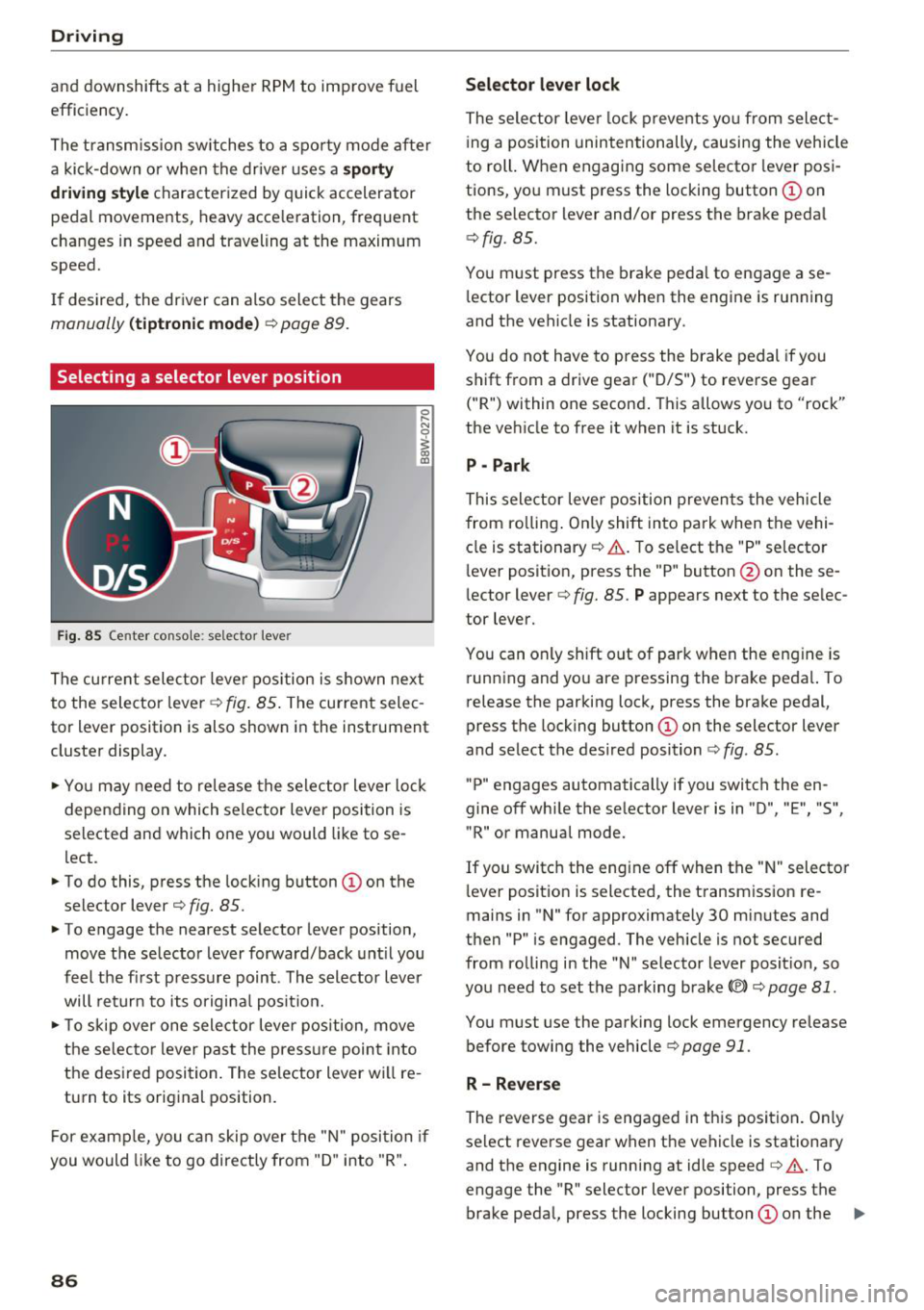
Fig. 85 Center conso le : se lec tor lever
The cu rrent selecto r leve r pos ition is s hown nex t
to the selector lever ~
fig. 85 . The current selec
tor lever position is also shown in the instrument
cluste r display .
.. Yo u may need to re lease the selec tor lever lo ck
depen ding on which selector lever position is
selected and which one you would like to se
lect.
.. To do this, press the lock ing button
(I) on the
selector lever¢
fig. 85.
.. To engage the nearest selector lever position,
move the se lector lever forward/back unt il you
feel t he fi rst press ure point. The selector lever
will ret urn to its origina l posit ion.
.. To skip over one sele ctor lever pos ition, move
the selecto r lever past the press ure point into
the des ired posi tion . The se lector lever will re
turn to its original position.
F or examp le, you c an skip over t he "N" position if
you would like to go directly from "D " into "R".
86
Selector lever lock
The selector leve r lock prevents yo u from select
i ng a position unintentionally , causing the vehicle
to roll. When engag ing some selecto r lever pos i
tions, you must press the locking button @on
the selector lever and/or press the brake peda l
¢fig. 85.
You m ust press the brake peda l to engage a se
l ector lever position when the engine is running
and the vehicle is stationary .
You do not have to press the brake pedal if you
shift from a drive gear
(" D/S") to reverse gear
("R") within one second . This allows yo u to "rock"
the veh icle to free it when it is stuck.
P - Park
This selector leve r position preven ts the vehicle
from ro lling . On ly shift into park when the vehi
cle is stationary ¢&. . T o se lect the "P" selecto r
l ever posit ion, press the "P " button @on these
lector lever¢
fig. 85. P appears next to the se lec
tor lever.
You can only shift out of park when the engine is run ning and you are pressing the brake peda l. To
release the parking lock, press the brake pedal,
press the locking button @on the selector lever
and select the des ired position ¢
fig. 85.
"P" engages automatically if you switch the en
gine off whi le the se lector lever is in "D ", "E", "S",
"R" or manual mode.
If you switc h the eng ine off when the " N" selecto r
l ever posit ion is selected, the t ransm iss ion re
mains in "N " for approximately 30 min utes and
then "P" is engaged. The vehicle is not secured
from ro lling in the "N " selector lever posit ion, so
yo u need to set the parking brake®)¢
page 81.
You must use the park ing lock emergency release
before towing the vehicle¢
page 91.
R- Reverse
The reverse gear is engaged in th is posi tion . On ly
select reverse gear when the vehicle is stationary and the engine is running at idle speed¢&. . T o
engage the "R" selector lever position, press the brake peda l, press the locking button
(I) on the ..,.
Page 92 of 398
Driving Transmission malfunction
• Transmi ssion: malfunction! Please stop ve
hicle and shift to P
Do not cont inue d rivi ng. Selec t the "P" selector
lever position and co ntact an authorized Au di
de aler or auth o riz e d Aud i Serv ice Facili ty fo r as
si st ance.
[O] Selector lever: malfunction! You can contin
ue driving . Please contact Service
There is a system malfunct io n in the t ransm is
sion . Drive to an author ized A udi dealer or au
thor ized A udi Se rvice Fac il ity immed iate ly to have
t he ma lfunction co rrecte d.
[O] P button: malfunction! Auto P when engine
off . Please contact Service
There is a malfunction in the "P " button on t he
selecto r leve r. The transmission a utomat ically
e ngages "P" when you switch off the eng ine.
Dr ive to an a utho rized Aud i dea le r or a uthorized
Aud i Serv ice Facility immedia tely to have t he
malfunc tion corrected.
[O] Selector lever: malfunction! Gear change on
ly possible using both paddle levers. Please con
tact Service
There is a system malfunct io n in the t ransm is
sion. You can conti nue d riving w ith rest ricted
f un ction . The selecto r leve r is not working . Gears
can only be se lec ted by tapping bo th sh ift pad
d les a t the sam e time w hen t he v ehicl e is station
a ry ~
page 8 9, fig . 87. Pa y a tten tio n t o th ese
lec ted t rans mi ssion positio n in t he ins tru ment
cluste r display. The par king lock eng ages au to
mat ica lly w hen you t urn off the engine . Drive to
an author ized A udi dealer or authorized A udi
Serv ice Facility immediately to have the mal func
tion cor rected.
[O] Transmission: Please press brake pedal and
select gear again
Pr es s t he bra ke peda l and se lec t the des ired se
lec to r l eve r pos it io n ag ain. Y ou ca n then con tinue
d riving .
[O] Transmis sion: too hot. Please adapt driving
style
90
T he transmission tem peratu re has inc reased sig
nificantly . Drive very cautio usly o r ta ke a break
from driving until the temperature ret urns to t he
no rma l range and t he indicato r light turns off.
[O] Transmission: malfunction! You can contin
ue driving. See owner's manual
T he re is a s ystem malfunc tion in the tran smi s
s io n. You m ay con tinu e dr ivin g. Drive to an au
t h ori ze d Aud i dea le r o r a uthorized Audi Se rvice
Fac ility soon to have the malf unct io n correcte d.
[il Transmission : malfunction! You can contin
ue driving in D until engine is off
There is a syst em malfunc tion in th e transmis
s io n. The trans missio n is swi tching to eme rge ncy
mo de.
If yo u tu rn th e e ngine off, you w ill not be
a ble to se le ct any o the r se le ct or lever posi tio ns
a ft er sta rting t he engine aga in . D rive to an a u
t h orized Audi dea le r or a uthorized Audi Se rvice
Facility immed iate ly to have the ma lfunction cor
r ected .
[O] Transmission: malfunction! You can contin
ue driving with limited function. Please contact
Service
T he re is a sys tem m alf unc tion in the tran smis
s io n. The transmission is switc hing to eme rgency
mode. This mode only s hifts into ce rtain gears or
will no longer shift at a ll. The eng ine may sta ll.
D rive to an author ized A udi dealer or autho rized
Audi Se rvice Facility immed iate ly to have the
malfunction corrected .
[O] Transmission: malfunction! You can contin
ue driving w ith limited function. No reverse
gear
There is a system malfunction in the tra nsmis
s io n. The transmission is switc hing to eme rge ncy
mode. Th is mode only s hifts int o ce rtain gears or
will no longer sh ift at a ll. The eng ine may sta ll.
Yo u cannot engage the reve rse gear. Dr ive to a n
a uth orize d Aud i dea le r o r auth orized Aud i Serv ice
Fac il ity i mmed iat ely to hav e the ma lfunction cor
r ec ted .
[O] Danger of rolling away! P not possible.
Please apply parking brake
Page 96 of 398
Trail er to wing
If you have to drive th rough diffic ult road condi
tions, you can raise the vehicle again after hitch
ing the trai ler or after adjust ing the tongue
weight .
{QJ Note
Applies to: vehicles with air suspension
-Changes in temperature or load can affect
the he ight of the vehicle.
- Set the a ir suspension to the standard vehi
cle heig ht, otherwise the applicab le tongue
weig ht no longer applies to your vehicle .
(D Tips
-Use chocks when parking on incl ines if the
trailer is loaded.
- We recommend also having the vehicle in spected between the inspection intervals if
you are towing a trai ler frequently.
- Avo id driving wit h a trailer du ring the vehi
cle break-i n period .
Driving with a trailer
Driving with a trailer requires extra caution.
Speed
Adhere to the legal speed l imi ts. Follow t he lega l
regulations specif ic to the country.
As the speed inc reases, the d riving stability of
the t railer dec reases . The refore you sho uld not
exceed t he max imum legal speed limit when
there are unfavorable road, weather and/or wind
conditions. This especially applies when driving
downhill.
You must a lways reduce yo ur speed as soon as
you not ice even the s lightest swinging motion of
the trailer . Never try to "straighten out" the trail
er by accelerating.
The weig ht dis trib ution is very poo r if t he ve hicle
is empty and the trailer is loaded. However if you
must drive under these circumstances, t hen drive
especia lly slowly.
94
Brak es
Brake in a time ly manner. Downs hift be fo re dr iv
i ng down hill so that the engine can assist with
braking ~&, .
When using a t railer w it h over run bra kes, fi rst
brake ge ntly t hen q uickl y. This red uces the r isk o f
jerking while braking if the trailer wheels lock up .
Engine coolant temperatur e
Pay attention specifically to the coolant tempera
ture display when there a re high outs ide temper
at ures , and whe n driving on long i nclines
~ page 11. Shift to a highe r gear in a t imely man
ner .
A WARNING
Constant braking causes the b rakes to over
h eat and substantially reduces bra king per
formance, increases b raking distance o r caus
es complete failure of the brake system.
-
Page 97 of 398
a co ...... N r--. N ...... 0
0
:E '
Description
App lies to: vehicles with speed warning system
The speed warning system helps you to stay be
low a specified maximum speed that can be set,
changed or deleted in the Infotainment system .
The speed warning system warns you if you are
exceeding the maximum speed that you have set .
A warning tone will sound as soon as your speed
exceeds the stored value slightly . The indicator
l ight also turns on in the instr ument cluster d is
p lav
[0] (USA models)/ [81 (Ca nada models) and
a message. The indica tor l igh t
[0]/ [OJ and the
message turn off if the speed fa lls back be low
the stored maximum speed.
Sett ing a threshold is recommended if you would
like to be reminded when yo u reach a certa in
maximum speed . Situations where you may want
to do so include driving in a country with a gener
al speed lim it or if there is a specified maximum
speed for winter tires.
Setting the warning threshold
Select in the I nfotai nment system:
IMENU I but
ton
> Ve hicle > le ft control button > Dri ver a ss is
tance
> Speed warning > Manual.
@ Tips
Regard less of the speed warning system, you
should always monitor yo ur speed using the
speedomete r and make sure you are following
the legal speed limit.
A ssi st a nce systems
Cruise control system
Switching on
Applies to: vehicles with cruise control system
The cruise con trol system makes it possible to
drive at a constant speed starting at 15 mph
(20 km/h) .
0
f
~
0
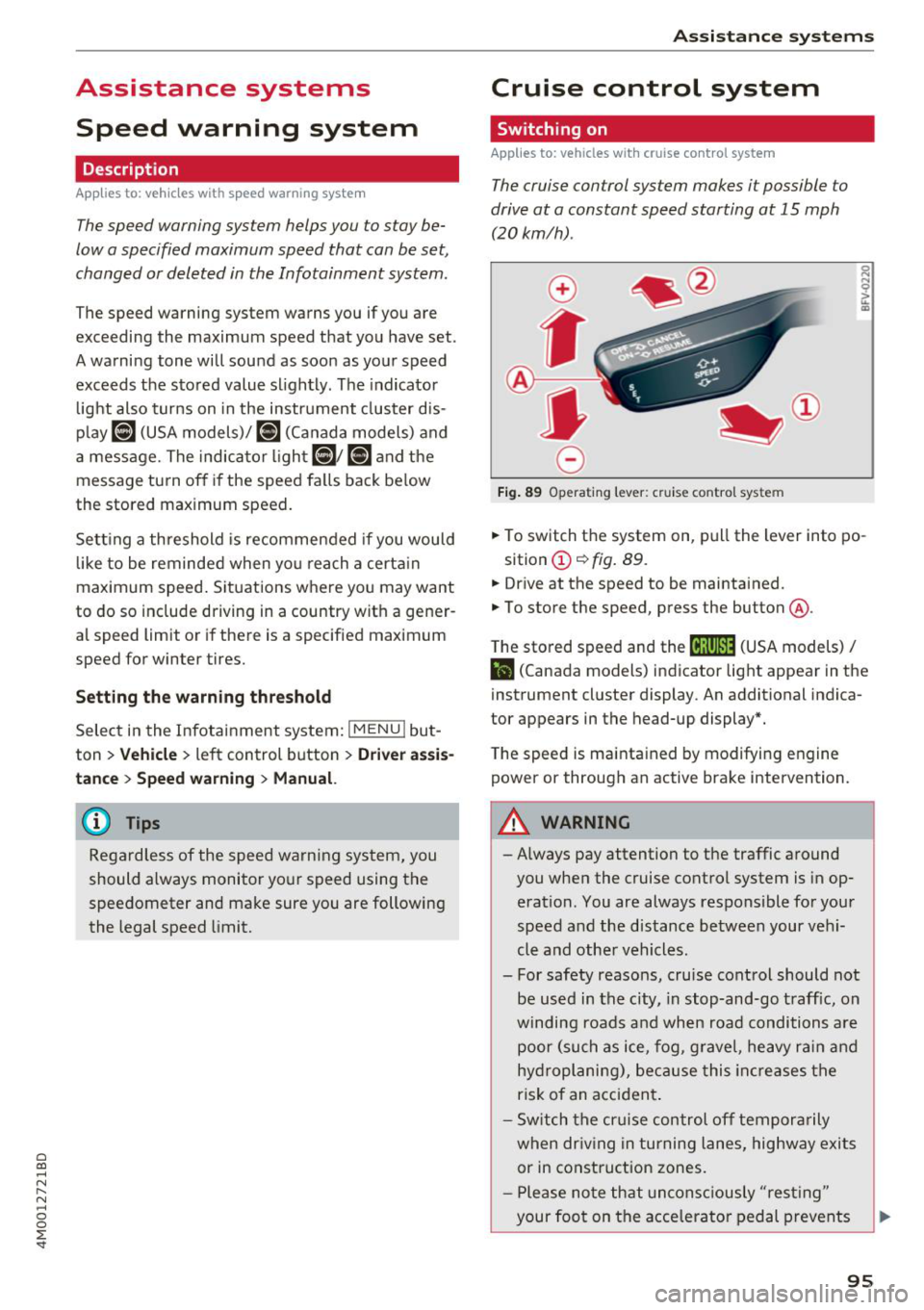
Fig. 89 Op era ting leve r: cru ise co ntrol sys te m
.,. To switch t he system on, pull the lever into po-
sition
(D ¢ fig. 89 .
.,. Drive at the speed to be maintained.
.,. To store the speed, press the button @.
T he stored speed and the
@jltJ~i, (USA models) /
l'I (Canada models) ind icator lig ht appear in the
instrument cluster display . An additional indica
tor appears in the head-up display*.
T he speed is mainta ined by modifyi ng engine
power or through an active brake intervention.
A WARNING
- Always pay attention to the traffic a round
you when the cruise control system is in op
eration . You are always responsible for you r
speed and the distance be tween your ve hi
cle and othe r vehicles .
- For safety reasons, cru ise cont rol should not
be used in the city, in stop -and-go t raff ic, on
winding roads a nd when road conditions a re
poor (su ch as ice, fog, g rave l, heavy ra in and
hy droplani ng), bec ause this in cr eases the
risk of an acciden t.
- S witch the cr uise con trol off tempor arily
when dr iv in g in turning lanes, highway exits
or in construction zones.
- P lease no te th at uncon sc iously "resting "
your foot on the accelerator ped al prevents
95
Page 99 of 398

a co ,-1 N r--. N ,-1 0
0
:E "
sign recognition
Description
App lies to: ve hicles with camera-based traffic sign recogni
tio n
~ 180 m1 & I f1' I! ' I Pl I
! IJ' mm .. I~ / .-.
I 1:9:11 " '
) ' a!i ,,' i '
Fig. 90 Instrument cluster: traff ic sign recognition
F ig. 9 1 Windsh ield: camera window for t raffic sign recog
nition
Traffic sign recognit io n assis ts you when driving
by d isp lay ing detected speed limits or signs pro
h ibit ing passing in the instrument cluster d isp lay
c::> fig . 90 . Within the limits of the system, the le
gal speed lim its in school zones are detected and
d isp layed.
General info rmation
Traffic sign recognit ion can detect standa rd
speed limit sig ns that are within the camera's vis
ua l field. With assistance from navigation data,
detected speed limits are evaluated and shown in
the disp lay . The traffic sign for the current de
tected speed l imit will bli nk in the display if you
exceed the war ning th reshold set in the Infotain
ment system
c::> page 98 .
The traffic sign recogn ition is subject to certain
system limitations and may be unavailab le or on
ly partia lly available in the followi ng situations:
A ssi st a nce systems
- when visibility is poor, s uch as in snow, rain,
fog or heavy spray
- when there is glare, for example from oncom
ing traffic or the sun
- at high speeds
- if the camera 's visual field
c::> fig. 91 is cove red,
for examp le by dirt or st icke rs. For i nfo rmation
on cleaning, see
c::> page 351 .
- if the traff ic signs are comp letely or partially
covered, for examp le by trees, snow, dirt or
other vehicles
- if speed traffic signs do not conform to the
stand ards
- if traffic signs are damage d or ben t
- if traff ic sig ns are d isplayed o n sig n holders
w ith elec tronic s igns
- if the traffic signs o r the configu ration of the
road have changed (navigation data is no lon
ge r up-to-da te)
_&. WARNING
P ay atten tion to traffic and the area around
your vehicle when traffic sign recogn ition is
turned on . The traffic signs insta lled on the
road a lways ta ke precedence over the display.
The driver is a lways responsible for assessing
the traffic situation.
- Under some circ umstances, traffic s ign rec
ognition may not detect traff ic signs cor
rectly or detect them at a ll. As a resu lt, the
system may not dis play the correct speed lim it or any speed limit.
- Traffic sign recognit ion does not adapt your
veh icle's speed to match the speed limit!
- The display in the instrument cluster is
based on the units of measurement used for
speed in that country. As a result, the dis p lay
50 i n t he inst rument cl uste r can mean
eithe r km/h or mph, depend ing o n the cou n
try.
-
97
Page 100 of 398

Ass is tance sy stem s
Operating
Applies to: vehicles with camera -based traffic sign recogni
tion
F ig . 92 Instrument clus te r: addi tiona l d isplay
Ac ces sing traffic sign recogn iti on
... Se lect: the first tab> T ra ffic si gns.
Setting a speed warning
You can set a warn ing th reshold down to 10 mph
(15 km/h). The traffic sign for the current detect
ed speed limit w ill blink in the disp lay if you ex
ceed the set thresho ld.
... Select in the Infotainment system:
IM ENU I but
ton >
V ehi cle> left contro l button > Driver a s·
s is tan ce
> S pe ed war ning > Tr affic sign ba sed
w arning .
Add itional display
If a view other than the traffic sign recognit ion is
selected in the instrument cluster disp lay, the
speed limit w ill be shown in another disp lay
~ fig. 92 . The cur rent applicable speed limit will
be shown there , if possib le with in the limits of
the system.
(D Tips
- An additional indicator appears in the head
up d isplay*.
- Your speed warning settings a re stored au
tomatically and ass igned to the remote con
tro l key in use .
Messages
Applies to: vehicles with camera-based traffic sign recogn i
tion
P!\i Traffi c sign recognition : curren tly unavaila
ble _ Camera view limit ed du e to su rrounding s
98
Function currentl y una va ilable. Camera view re
stricted due to surroun ding s
This message appears if the camera's v is ual fie ld
i s covered ~
page 97, fig. 91. The system will
switch itself o ff.
la Tr affic sign r ecog nition : currentl y limit ed .
Se e owner' s manua l
This message appears if there is a malfunct ion in
the nav igation system, for example . The speed
li mit d isplay is limited, wh ich inc reases the risk
of an incorrect d isp lay.
P!\i Traffic sign based speed warnin g: current ly
una vail able . Se e own er' s manual
There is no warning when the set threshold is ex
ceeded .
No traffic sign inf ormation available
There is no valid navigation data and do speed
li mits were detected. Or there is a recommended
speed but there is not a speed lim it (for examp le
driv ing on and off the expr essway) .
Malfun ction! S ee owner's manu al
The system cannot guarantee correct funct ion
and is switched off. See an autho rized Aud i dea l
er or autho rized Aud i Serv ice Faci lity for assis
tance.
Functi on not av ailable in this country
The vehicle is in a country where the function is
not availab le .
Lap timer
Introduction
Applies to: vehicles with lap t imer
You can measure and analyze lap times with the
lap timer in the display.
Opening the lap timer
... Open the first Vehicle tab (trip computer) using
the
l <1 1>I button on the multifunction steering
wheel.
... Sele ct on the m ultifunction steering wheel : lef t
cont rol b utton
> Lap time s. Ill-
Page 101 of 398
Cl a:, ...... N
" N ...... 0
0
::r '
.,. On t he mult if u nct ion s teer ing whee l, tur n the
l e ft thumbw hee l
0 ~ page 12 unt il t he desired
menu item is displayed in the instrument cl us
ter .
.,. Press the left thumbwhee l to confirm the selec
t ion.
A WARNING
Your focus should always be on driving your
veh icle safely . As the dr ive r, yo u have com
plete responsib ility for safety in traffic. Only
use t he f unctions s uch as the lap time r in s uch
a way tha t you alw ays ma int ain com plete con
tr ol ove r your vehicle in all tra ffic s itu ations.
(D Tips
You ca n ret rieve information from the t rip
computer while t he lap t ime r stopwatch i s
r u nning.
Lap times and timing
Applies to: vehicles with lap timer
Requirement: the lap t imer must be o pen
~ page 98 .
Timing laps
.,. To start tim ing manually, se lect Start lap 1 in
the menu .
-
.,. To start tim ing a utomat ica lly as soon as you
begin to drive, select
Drive off to start lap 1 or
Start by driving off in the men u .
.,. To measure the lap t ime, select
New lap in the
menu. T his starts timing the next lap at the
same t ime.
After completing a lap, the difference between
the last lap and the previous best lap time w ill be
ind icated with a"-" or" +".
Pausing timing and displaying a split time
.,. To insert a pa use m , se lect Pau se in t he menu.
.,. To resume timing, se lect
Re sume in the men u .
.,. To display a split time, se lect
Split time in the
men u. The split t ime
[fw] appears for approxi
mately 10 seconds in the instrument cluste r.
The timing of the current lap continues.
A ss istance systems
Resetting timing
.,. Using the mul tifun cti on steer ing whee l, sele ct
Re set time s in the menu.
(D Tips
- A m axim um of 99 lap t imes can be meas
ure d.
- If tim ing is pa used, you can continue i t later
even if yo u swi tc h t he ign ition o ff.
- Saved lap ti mes ca nnot be indiv id ua lly de
le ted from the tot al results.
- Th e saved lap t ime r va lues w ill remain after
sw itching the ign ition off.
Lap statistics
Applies to: vehicles with lap timer
Displaying lap statistics
You can display the numbe r of laps dr iven, the
fas test lap" +", the slowes t lap" -", and the aver
age t ime "0" in the instr ument cluster .
.,. On the multifunc tion steering w heel, select the
left contro l bu tton
> Lap stati stic s o r Sta tis
tics .
.,. Turn the thumbwheel down o r up to display the
individual lap times .
.,. To return to t he lap timing that was begun,
press the left thumbwheel.
Resetting lap statistics
.,. On the mul tif unc tion stee ring w heel, selec t:
the right control button
> Reset statistics.
(D Tips
The lap st atis tic s lis t the lap t imes fo r th e l ast
3 0 l aps . The fastest and slowes t lap time o ut
of up to 99 meas ured laps are a lso d isplayed.
Predictive efficiency
assist
Introduction
T he predict ive e fficiency assist he lps the driver to
drive with anticipation and therefore helps to
save fuel. The system accesses p redictive t rip da -
ta (including speed limits, inclines and the radius
Iii"
99