brake AUDI Q7 2018 Owner´s Manual
[x] Cancel search | Manufacturer: AUDI, Model Year: 2018, Model line: Q7, Model: AUDI Q7 2018Pages: 398, PDF Size: 185.58 MB
Page 126 of 398
Ass is tance sy stem s
Rear cross-traffic assist
Applies to: ve hicles w ith rear cross -traff ic ass ist
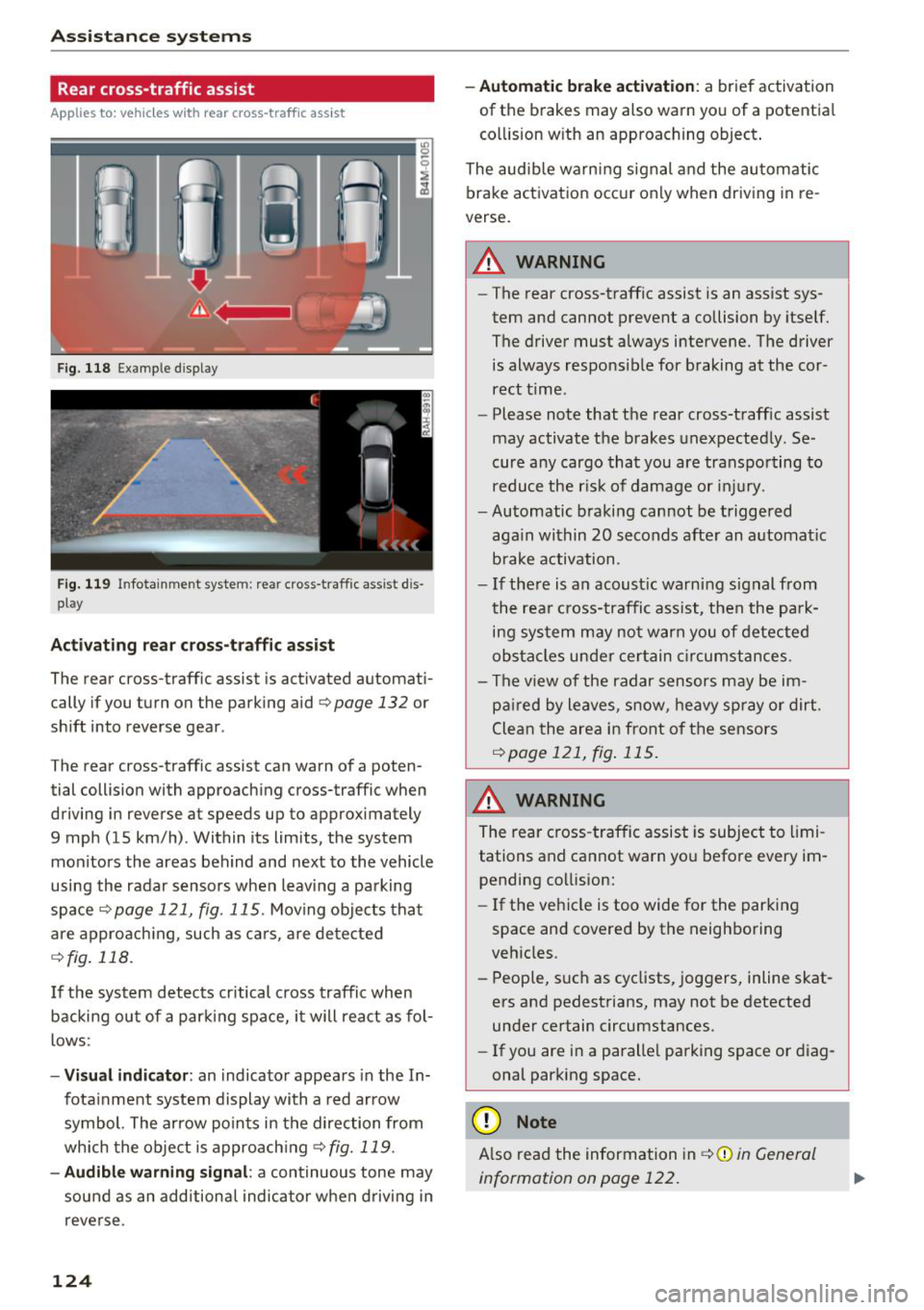
F ig. 118 Example display
Fig . 119 Infotainment system: rear cross-traffic assist dis
play
Acti vating re ar c ro ss -tr affic assist
The rear cross-traffic assist is act ivated automat i
cally if you turn on the parking aid
Qpage 132 or
shift into reverse gear .
The rear cross-traffic assist can warn of a poten
tial collision with approaching cross-traffic when
driving in reverse at speeds up to approximately
9 mph (15 km/h) . Within its limits, the system
monitors the areas behind and next to the vehicle
using the radar sensors when leav ing a parking
space
Qpage 121, fig. 115. Moving objects tha t
are appro ach ing, such as ca rs, a re detected
Q fig . 118.
If the sys tem detects cr itical cross traffic when
backing ou t of a par king space, i t will react as fol
lows:
- Vi sua l indicator : an indicator appea rs in the In
fota inment system display with a red arrow
symbol. The ar row points in the direction from
which the object is approach ing
Q fig. 119.
- Audib le warning signal :
a continuous tone may
sound as an additional indicator when driving i n
reve rse .
124 -
Automat ic brake act ivation :
a brief activation
of the brakes may also warn you of a potentia l
co llision w ith an approaching object .
The audib le warn ing signal and the automatic
brake activation occ ur only when driving in re
verse.
A WARNING
- The rear cross-traffic assist is an assist sys
tem and cannot prevent a collision by itself.
The driver must always intervene. The driver
is always responsible for braking at the cor rect t ime.
- Please note that the rear cross-traff ic assist
may activate the brakes unexpectedly. Se
cure a ny cargo that you are transpo rting to
reduce the r is k of damage or inju ry.
- Automatic braking cannot be triggered
aga in within 20 seconds afte r an a utomat ic
brake activation.
- If the re is a n acoust ic warning signal from
the rea r cross-traffic assist, then the park
ing system may no t w arn you of detected
obstacles under ce rtain c ircumstances.
- The v iew of the radar sensors may be im
pa ired by leaves, snow, heavy spray or dirt.
Clea n the area i n front of t he sensors
Qpage 121, fig . 115.
,&. WARNING
The rear cross-traffic assist is subject to limi
tations and cannot warn you befo re every im
pending collision:
- If the vehicle is too wide for the parking
space and covered by the neighboring
veh icles.
- People, s uch as cyclists, joggers, inline skat
ers and pedestrians, may not be detected
under certain circumstances.
- If you are in a paralle l parking space or diag
onal parking space.
(D Note
A lso read the information in Q (D in General
information on page 122.
-
Page 127 of 398
(D Tips
-You can cance l the automatic brake activa
t ion w ith increas ing bra king fo rce if you ap
p ly the brakes yourse lf or accelerate cons id
erab ly.
- In some situations, rear cross-traffic assist may warn you even if there is no cross traffic
in a cr itical area, for examp le when back ing
i nto a parking space or maneuver ing .
- The rea r cross-traffic ass ist also switches off
when you switch off the ESC.
- The system is not available when towing a
trailer.
Messages
Applies to: vehicles with Audi side assist
A message appears in the inst rument cluste r dis
p lay if the s ide ass ist switches off automatically .
@j Audi side assist: malfunction! Please contact
Service
@j Audi side assi st and e xit warning: malfunc
tion! Please contact Service
The system cannot guarantee that it will detec t
ve hicles correctly and it has switched off. The
sensors have been mov ed or a re faulty. Have t he
system checked by an a uthori zed Audi dea ler or
author ized Audi Service Facility soon.
@j Audi side assi st: cu rrently unavailable. Sen
sor vision restricted due to surroundings . See
owner 's manual
($j Audi side as sist and e xit warning: currently
unavailable. Sensor vision restricted due to su r
roundings
The rad ar senso r vis io n i s impa ired. The area in
fron t of the senso rs must no t be covered by b ike
rac ks, stic kers, leaves, snow or any other ob jects.
C lea n the area in f ront of th e sensors, if necessa
ry ¢
page 121, fig. 115.
($j Audi side as sist: currentl y unavailable. See
owner 's manual
Cl
~ ($j Audi side ass ist and exit warning : currently N
~ unavailable . See owner 's manual ,-1 0
0
::r '
S ide assist cannot be switched on at this time be
ca use there is a ma lfunction (for example, the
batte ry c harge leve l may be too low).
($1 Audi side assi st: unavailable in t owing mode
($j Audi side assist and ex it warning: currently
unavailable . Towing mode
S ide ass ist switches off automatically when the
electrical connecto r in t he factory-installed trail
er hitch is connected . There is no guarantee the
system will sw itch off w hen us ing a ret rofitted
t railer h itch . Do no t use side assist and the ex it
warning when tow ing a tra ile r.
Ill Rear parking aid: obstacle detect ion restrict
ed
The rear cross-traffic ass ist is not available . E i
ther the ESC is sw itched off, or the rada r senso rs
may be cove red by a b ike rack, st icke rs , leaves,
snow o r othe r objects . Switc h the ESC on, o r
cl ea n the area in fron t of the senso rs if necess ary
¢page 12 1, fig . 115. If thi s message con tinues
to be displayed, drive imme dia tely to an author
ized Audi dea ler or authorized Audi Service Facili
ty to have the ma lf u nction repaired.
Night vision assist
Description
Applies to: vehicles with night vision assist
The night vision assist can detect, highlight and,
if necessary, warn about pedestrians and large
wild animals.
N ight vision assist he lps yo u when it is dark by
u sing an infra red camera to mon itor the area in
front of your ve hicle, w ith in the limits of the sys
tem . It ca n disp lay objects up to a distance of ap
prox ima tely 1 000 feet (300 m). The thermal im
age de te cte d by t he came ra is show n in t he in
str ument cluster disp lay . Wa rm areas appear
li ghter and co ld areas a ppear da rker.
125
Page 136 of 398
Parking systems
sound was muted, no tone will sound. Pay atten
t ion to the vehicle's surroundings when you start
to drive.
Switching on /off
Applies to: ve hicles w ith parkin g system plus
~- ---- - --=--
·-~ -----
C
- --"I:, J r~-, .,_ ... r-= J
' ' 1
, -. :;;;; 1~ ,~~
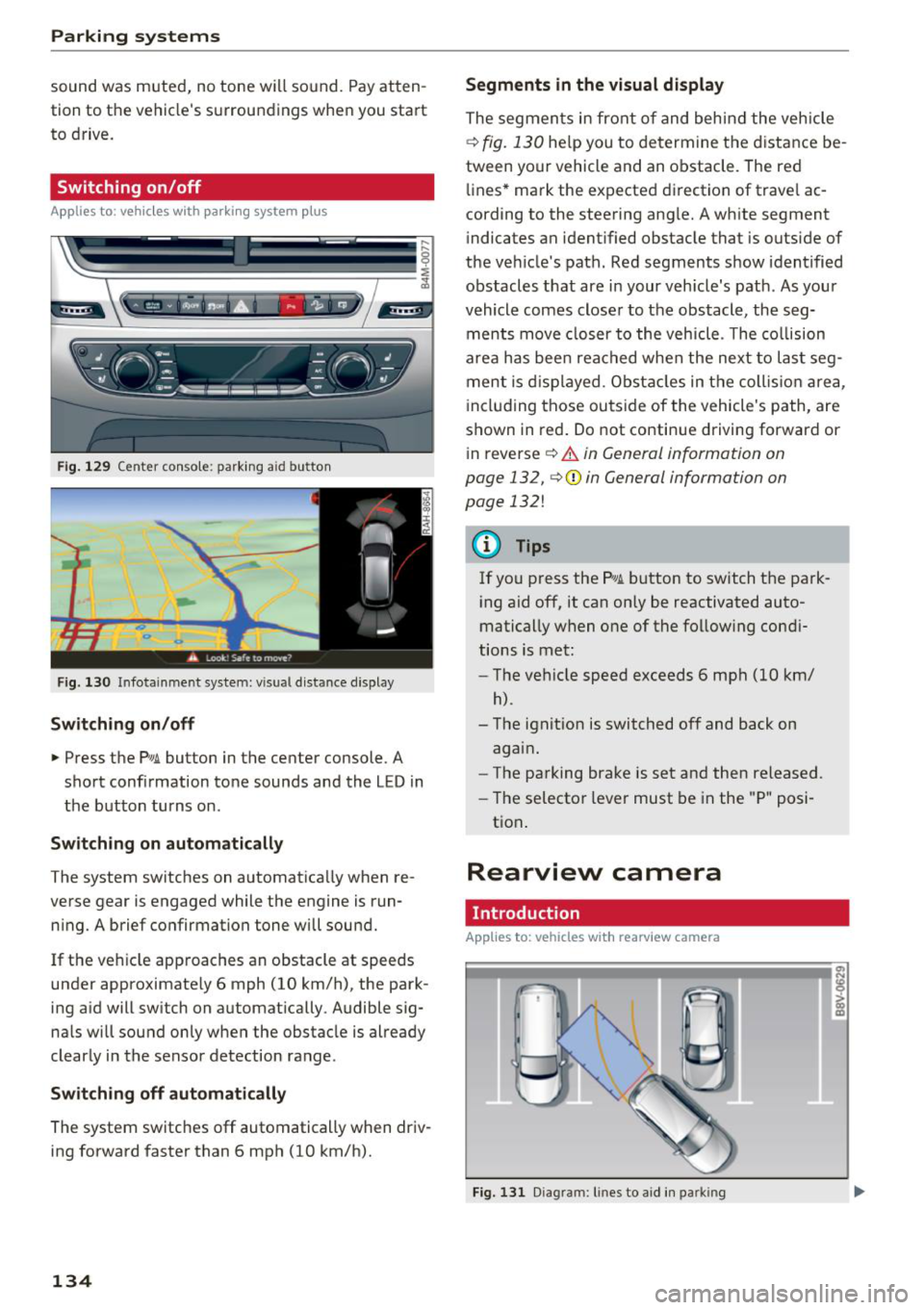
Fig. 129 C en ter consol e: park ing a id butt on
Fig. 130 In fot ainme nt system: v is ual d ist ance d is play
Switching on/off
.,. Press the Pw A button in the center console . A
short confirmation tone sounds and the L ED in
the button turns on.
Switching on automatically
The system switches on automatically when re
verse gear is engaged while the engine is run ning. A brief confirmation tone will sound.
If the veh icle approaches an obstacle at speeds
under approximate ly 6 mph (10 km/h), the park
ing aid will switch on automatically . Audible sig
na ls will sound only when the obstacle is already
clearly in the sensor detection range .
Switching off automatically
The system switches off automatically when driv
ing forward faster than 6 mph (10 km/h).
134
Segments in the visual display
The segments in front of and behind the vehicle
i::> fig. 130 help you to determine the distance be
tween your vehicle and an obstacle . The red
lines* mark the expected d irection of trave l ac
cording to the steering ang le. A white segment
indicates an identified obstacle that is outside of
the veh icle 's path. Red segments show identified
obstacles that are in your veh icle's path . As your
vehicle comes closer to the obstacle , the seg
ments move closer to the vehicle . T he collision
area has been reached when the next to last seg
ment is displayed . Obstacles in the collis ion area,
i ncluding those outside of the vehicle's path, are
shown in red. Do not continue driving forward or
in reverse
i::> .&. in General information on
page 132,
i::> Q) in General information on
page 132!
(D Tips
If you press the P,qA button to switch the park
ing aid off, it can only be reactivated auto
matically when one of the following condi
tions is met:
- The vehicle speed exceeds 6 mph (10 km/
h) .
-The ignit ion is switched off and back on
again .
- The parking brake is set and then released .
- The selector lever must be in the "P" posi-
tion .
Rearview camera
Introduct ion
Applies to: vehicles with rearview camera
Fig. 131 D iagram: lin es to aid in parkin g
Page 144 of 398
Intelligent Technology
Intelligent Technology Electronic stabilization
control (ESC)
Description
Elect ronic stabili zation control ( ESC) suppo rts
driver safety. It red uces the risk of slipping and
improves dr iving stabi lity. ESC detects crit ica l sit
uations such as when the vehicle is overstee ring
and understeer ing or the wheels a re spinning.
The vehicle is stabilized by applying the brakes or
reducing eng ine torq ue. When t he ESC engages,
the
D.1 ind icator lig ht blinks in the ins trument
cluste r.
The fo llow ing systems are in tegrated in the ESC:
Anti-lock braking system (ABS)
ABS p reve nts the whee ls from lock ing whe n brak
ing. The vehicle can st ill be steered even d uring
hard brak ing. Apply steady press ure to the bra ke
pedal. Do not pump the pedal. A puls ing in t he
b rake pedal indicates that the system is act ing to
s tabili ze the vehicle .
Brake assist system
The brake assist system can decrease brak ing dis
tance. It inc reases brak ing power when the d river
presses the brake pedal q uick ly in eme rgency sit
uations . You must press and hold t he b rake pedal
until the dangerous si tuatio n is ove r. In veh icles
w ith adapt ive c ruise con trol*, the bra ke assist
sys te m is more sensitive if t he di stan ce detec ted
t o the veh icle dr iv ing a head is too small.
O n ve hicl es w ith ac tiva ted and funct io ni ng night
vision assist*, the b rake ass ist system ca n re
spon d mo re sens it ively if there is a w arn ing.
Anti-Slip Regulation (ASR)
ASR red uces eng ine power when the drive wheels
beg in sp inning a nd adap ts the force to the road
conditions . This makes it easie r to start, acceler
ate and dr ive u p hill s.
Electronic differential lock (EDL)
EDL applies the brakes to a wheel that sta rts
sp inning and transfers the drive power to t he
142
othe r driving whee ls. This func tion is no t ava ila
ble at higher s peeds .
I n extre me cases , EDL au tomat ic al ly swi tches off
to keep t he b rake o n the br aked whee l from ove r
h eating. The ve hicle is still wo rking co rrect ly. EDL
will switc h on agai n automatically when condi
tions have returned to normal.
Power steering
The ES C ca n also support veh icle st ability
t hr ough stee ring .
Selective wheel torque control
Selective w heel to rque con trol is used when d riv
i ng on curves. Bra king is targeted towa rd t he
whee ls on the ins ide of the cu rve as needed . T his
a llows mo re pre cise dr iv ing in curves .
Automatic post -collision braking system
The "automat ic post -coll is io n braking system"
can hel p t o reduce the risk of sl iding and of addi
tiona l co llisions after an acc iden t. If th e a irbag
c ontro l modu le de tects a collision, t he ve hicle is
bra ked by th e ESC.
The veh icle does not brake automatically if :
- the drive r presses t he acce lerator pedal, or
- the ESC, the brake system or the ve hicle elect ri-
cal system are not functioning.
A WARNING
- The ESC and its integ rated systems can not
overcom e the lim its impos ed by natura l
p hys ica l laws . Thi s is es pec ially impo rtan t
on s lippery or w et roa ds. If th e sys tems be
g in a cting to s tabili ze y our v ehicle, you
s hould immedi ately alter your speed to
mat ch the ro ad and traffic condition s. D o
not let the i ncreased safety provide d tem pt
you into taking risks . This could increase
your r is k of a coll is io n.
- Please note the r is k of a col lision increases
w hen dr iv in g fast, especia lly t hrough c urves
a nd on s lippery or wet roa ds, an d when dr iv
ing too close to objects ahead. The ESC and
its integrated sys tems ca nnot always pre
v en t co llisions -there is st ill a risk of acc i
dents!
Page 146 of 398
Intelligent Technology
A WARNING
You should only switch offroad mode on or switch ESC/ ASR off if your driving abilities
and the traff ic conditions perm it. There is a
r isk of slid ing.
- The stabilization function is limited when
offroad mode is switched on. The dr iving
wheels co uld spin and the vehicle could
swerve, especially on slick or slippery road
surfaces.
- T here is no vehicle stab ilizat ion when ESC/
ASR are switched off.
Hill descent assist
Hill descent assist makes it possible to drive
down a hill at a constant speed.
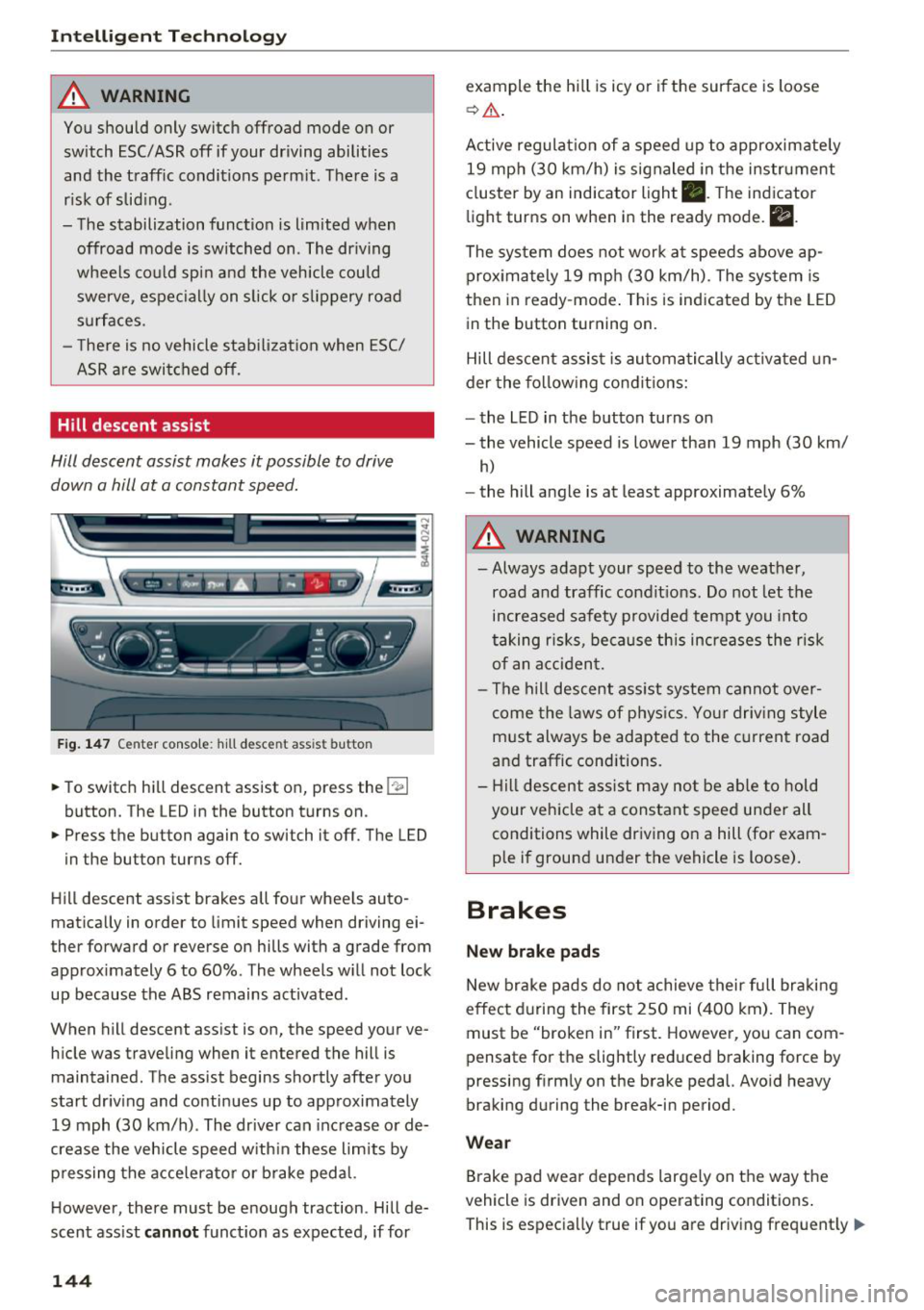
Fig. 147 Center console: hill desce nt ass ist button
.. To switch hill descent assist on, press the !~ I
button. The LED in the button turns on.
.. Press the button again to switch it off. The LED
in the button turns off.
Hill descent assist brakes all four wheels auto
matically in order to limit speed when driving ei
ther forward or reverse on hills with a grade from
approximately 6 to 60%. The wheels w ill not lock
up because the ABS remains activated.
When hill descent assist is on, the speed your ve
hicle was traveling when it entered the hill is maintained. The assist begins shortly after you
start driv ing and continues up to approximately
19 mph (30 km/h) . The driver can increase or de
crease the vehicle speed w ith in these limits by
pressing the accelerator or brake pedal.
However, there must be enough traction . Hill de
scent assist
cannot function as expected, if for
144
example the hill is icy or if the surface is loose
~ .&. .
Active regulat ion of a speed up to approximately
19 mph (30 km/h) is signaled in the instrument
cluster by an indicator light •. T he indicator
light turns on when in the ready mode.
II.
The system does not work at speeds above ap
prox imately 19 mph (30 km/h) . The system is
then in ready-mode . This is indicated by the LED
in the button turning on.
Hill descent assist is automatically activated un
der the following conditions:
- the LED in the button turns on
- the vehicle speed is lower than 19 mph (30 km/
h)
-the hill angle is at least approximately 6%
A WARNING
-
- Always adapt your speed to the weather,
road and traffic conditions. Do not let the
increased safety provided tempt you into
taking risks, because this increases the risk
of an accident.
- The hill descent assist system cannot over
come the laws of phys ics. Your driving style
must always be adapted to the current road
and traffic cond itions .
- Hill descent assist may not be able to hold
your veh icle at a constant speed under all
conditions while driving on a hill (for exam
ple if ground under the vehicle is loose).
Brakes
New brake pads
New brake pads do not achieve their full braking
effect during the first 250 mi (400 km). They
must be "broken in" first. However, you can com
pensate for the slightly reduced braking force by
pressing f irmly on the brake pedal. Avo id heavy
braking during the break-in period.
Wear
Brake pad wear depends largely on the way the
vehicle is driven and on operating conditions .
This is especially true if you are driving frequently .,.
Page 147 of 398
Cl a:, ...... N
" N ...... 0
0
::r '
style.
Operating noise
Noises may occur when braking depending on the
speed , braking force and outside conditions such
as temperature and humidity.
Wet conditions or road salt
In certain situations, for example after driving
through water, in heavy ra in or after washing
your car, the braking effect may be reduced due
to moisture or ice on the brake rotors and brake
pads . The brakes must be "dried" first with a few
careful brake applications.
At higher speeds and with the windsh ie ld wipers
turned on, the brake pads press against the brake
rotors for a short amount of time. This action,
which is not felt by the driver, happens at regular
intervals and ensures a better reaction time for
the brakes in wet weather.
The braking effect can also be reduced if you are
driving on salted roads and you do not apply the
brakes for long periods of time . The layer of sa lt
on the brake rotors and pads must be worn off
first when the brakes are applied.
Corrosion
Leaving the vehicle parked for long periods of
time, low mi leage and avoiding heavy braking
can contribute to corrosion on the brake rotors
and to dirty brake pads.
If you usually avoid heavy braking or if there is
corrosion present, occasional heavy braking at
high speeds is recommended to clean the brake
rotors and pads¢
A.
Brake system malfunction
If you notice that the brake pedal travel has sud
denly increased, then a brake circuit in the dual
circuit brake system may have malfunctioned.
Drive to an authorized Audi dea ler or authorized
Audi Service Facility immediately to have the
problem corrected. On the way there, drive with
reduced speed and keep in mind that you will
need a longer distance to stop and you w ill need
to press the brake pedal harder .
Intelligent Technology
Low brake fluid level
When the brake fluid level is low, malfunctions in
the brake system may occur. The brake fluid level
is e lectronica lly monitored.
Brake booster
T he brake booster amplifies the pressure you ap
ply to the brake pedal.
Ceramic brakes
Applies to: vehicles with ceramic brakes
Ceramic brakes provide excellent deceleration
rates .
The break-in period for new ceramic brakes may
be significantly longer than for standard brake
rotors. Due to the properties of the material,
they may cause noises at lower speeds. Ceramic
brakes also absorb more moisture in wet condi
tions. Therefore, there will temporarily be less
braking force than when the brakes are dry. You
can compensate for this by pressing the brake
peda l harder.
& WARNING ~ -
- On ly app ly the brakes for the purpose of
cleaning the brake system when road and
traffic cond itions permit. You must not en
danger other road users. This increases the
risk of an accident .
- Never let the vehicle roll while the engine is
stopped because this increases the risk of an
accident.
- Never place objects in the dr iver's footwell.
An object could end up in the area around
the pedals and prevent you from using
them. You would not be able to use the ped
als if sudden driv in g or braking maneuvers
were needed, which increases the ris k of an
accident.
- Only use floor mats that do not obstruct the
area around the pedals and that can be se
curely fastened in the footwells.
- To reduce the risk of injury, do not place
your foot under the brake pedal.
145
Page 148 of 398
Intellig ent T echn olo gy
{QJ Note
- Never let the brakes "rub" by pressing the
pedal light ly when braking is not actually
necessary. This causes the brakes to over
heat and increases braking d istance and
causes wear .
- Before driv ing downhill a long distance on a
steep hill, decrease your speed and select a
lower gear. This makes use of the engine
braking effect and rel ieves the brakes. If
you need to b rake additionally, b rake in in
te rvals a nd not conti nuously.
@ Tips
-If the brake booster is not wo rking, you
must press the brake pedal with much more
fo rce than no rma l.
- If you ret rofit your vehicle with a front spoil
e r, whee l cove rs o r similar items, ma ke sure
th at the a ir flow to the front whee ls is not
i nterr upted. Ot herw ise the bra ke sys tem
can become too hot.
Electromechanical
steering, all-wheel
steering
The electromechanical steering supports the
driver's steering movements.
Power steering adapts electronically based on
the vehicle speed.
Indicator lights and me ssa ges
• Steering: malfuncti on! Plea se st o p vehicle
If this indicator light turns on and stays on and
this message appears, the power steering may
have failed.
Stop the vehicle in a safe location as soon as pos
sib le. Do
not continue driving. See an authorized
Audi dea ler or authorized Audi Service Facility for
assistance .
• Stee ring: malfunction! Plea se stop vehicle.
Pa y attention t o di sta nce at sid e
If t his ind icator light tu rns o n and stays o n and
this message appears, t he a ll-wheel steer ing*
146
may have fai led . The side of the vehicle may need
more space on the road .
Reduce you r speed and stop the vehicle in a safe
l oca tion with eno ugh space on the s ides as soon
as possible. Do
n ot continue driving. See an au
thorized Audi dea ler or authorized Audi Service
Facility for assistance.
'I-ij S te e ring : m alfun cti on! You can c ontinue
dri ving
If the indicato r light turns on and the message
appears, the steeri ng wheel may be more d iffi
cu lt to move or more sensitive than usu al. The
steering wheel may a lso be at an ang le when
driving straight.
D rive slowly to an a uth orized Audi dea ler or au
t h orized Aud i Serv ice Facili ty to have t he mal
f unction corrected .
l:r-ij Stee ring : malfun ction! Adapt driving sty le .
Lar ger turnin g radiu s
If the indicator l ight turns on and this message
appears, the all-whee l stee ring* may have fa iled .
Please note that the vehicle has a larger t urning
r ad ius and the st abil ity w hen turning a corner is
lik e tha t of a vehicle wi thout a ll -wheel s teer ing.
The steering whee l may also be at an angle when
driving straight.
D rive slowly to an a uth o rized Audi dea ler or au
t h orized Aud i Serv ice Facili ty to have t he mal
function corrected .
(D Tips
-If the . or l;rfl indi cato r light only stays on
for a sho rt time, you may cont inue driv ing.
- For add itiona l information o n all-wheel
steeri ng*, see
r=.>page 128.
ALL-wheel drive (quattro)
General information
In all whee l dr ive, the dr iv ing power is distr ibut
ed between all fou r whee ls when needed. This
happe ns automatically depend ing on your dr iving
behav ior as we ll as the curren t road cond it ions.
A lso see
r=.> page 142, Electronic stabilization
control (ESC). ..,.
Page 150 of 398
Intelligent Technology
-How far (if at all) the driver was depressing the
acce lerator and/or brake pedal; and,
- How fast the vehicle was traveling.
These data can he lp prov ide a better understand
ing of the circumstances in which crashes and in
juries occur. NOTE : EDR data are reco rded by your
vehicle only if a non-trivia l crash situation occurs;
no data are recorded by the EDR under norma l
driving conditions and no personal data (e.g.,
name, gender, age, and crash location) are re
corded. However, other parties, such as law en
forcement, could combine the EDR data w ith the
type of personally identifying data routinely ac
qu ired dur ing a crash invest igat ion.
To read data recorded by an EDR, special equip ment is required, and access to the veh icle or the
EDR is needed . In add it ion to the vehicle manu
facturer, other parties, such as law enforcement,
that have the specia l equipment, ca n read the in
formation if th ey have access to the vehicle or the
EDR .
Some state laws restr ict the retrieval or down
loading of data stored
by ED Rs installed in a vehi
cle for the express purpose of retrieving data af
t er an accident or crash event witho ut the own
er 's consent.
Aud i w ill not access th e ED R and/o r similar data
or give it to othe rs -
- unless the vehicle owner (or lessee if the vehi
cle has been leased) agrees; or
- upon the official request by the police; or
- upon the order of a court of law or a govern-
ment agency; or
- for the defense of a lawsu it through the judicial
discovery process.
- Audi may also use the data for research about
vehicle operation and safety performance or
provide the data to a third party for research
purposes without identifying the specific vehi
cle or information about the identity of its own
er or lessee and on ly after the recorded vehicle
data has been accessed.
Vehicle control modules
Your veh icle is also equipped with a number of
electronic control modules for var ious veh icle
148
systems, such as engine management, emission
contro l, airbags, and safety be lts.
These electronic control modules record d ata
during normal vehicle operation that may be
needed by trained technicians for diagnostic and
repair purposes. The recording capabi lity of these
modules is lim ited to data (no sound is record
ed). Only a small amount of data is actually re
corded over a very limited period of time, or stor
ed when a system fault is detected by a control
module . Some of the data stored may relate to
vehicle speed, direction, or braking, as well as re
straint system use and performance in the event
of a crash. Stored data can also only be read and
down loaded w ith specia l equipment that is di
rectly connected to the vehicle .
(D Tips
Your vehicle may be equipp ed w ith Audi con
nect. Your use of certain Audi connect fea
tures requires wireless services that are pro
vided by a third party wireless telecomm uni
cations provider . For details regarding how in
formation obtained through Aud i connect is
collected, processed, transmitted, used, and
shared, please see your contract with the
wireless telecommunications provider.
Page 258 of 398
Drivin g saf ety
- Never attempt to adjust head restraint
wh ile driving. If you have dr iven off and
must adjust the driver headrest for any rea
son, first stop the vehicle safely before at
tempting to ad just the head restra int.
- Children must always be properly restrained
in a child restraint that is appropriate for
their age and size
c> page 291 .
Examples of improper seating positions
The occupant restraint system can only reduce
the risk of injury if vehicle occupants are properly
seated .
Improper seating positions can cause serious in
jury or deat h. Safety belts can only work when
they are properly positioned on the body . Im
proper seating positions reduce the effect iveness
of safety belts and w ill even increase the r isk of
i n ju ry and death by moving the safety be lt to crit
ical a reas of t he body. Improper seat ing posit ions
a lso increase the risk of serious injury and dea th
when an airbag deploys and strikes an occupant
who is not in the proper seating position. A driver is responsib le for the safety of all vehicle occu
pants and especially for children. Therefore :
~ Never allow anyone to assume an incorrect
seating position when the vehicle is being used
c> & .
The fo llowing bulletins list only some sample po
sitions that wi ll increase the risk of serio us inj ury
and death. Our hope is that these examples will
make you more aware of seating posit ions that
are dangerous.
The refore, when ever th e vehicle i s mo ving :
-never stand up in the vehicle
- never s tand on the seats
- never knee l on the seats
- never r ide with the seatback reclined
- never lie down on the seats
- never lean up against the instrument pane l
- never sit on the edge of the seat
- never sit sideways
- never lea n ou t t he w indow
- never put yo ur feet out the window
256
-never put your feet on the instrument panel
- neve r rest your feet on the seat c ushion or bac k
o f the seat
- neve r ride in the footwell
- never ride in the cargo area
.8, WARNING
Imp roper seating positions in cr ease the risk
of ser ious personal inju ry and dea th whenever
a veh icle is being used.
- Always make sure that all veh icle o ccupants
s tay in a proper sea ting posit ion and a re
proper ly restrained whenever the vehicle is
being used .
Pedal area
Pedals
The pedals must always be free to move and
must never be interfered with by a floor mat or
any other object.
Make sure that all pedals move free ly without in
terference and that nothing prevents them from retur ning to their or ig inal pos itions .
Only use floor mats that leave the pedal area free
and can be secured with floor mat fasteners.
If a bra ke circuit fails, increased brake pedal trav
e l is req uired to bring the vehicle to a fu ll stop.
.8, WARNING
Pedals that cannot move freely can cause loss
of vehicle contro l and increase the r isk of seri
ous injury.
- Never p lace any objects in the driver's foot
wel l. An object could get into the pedal area
and interfere with pedal funct ion. In case of
sudden braking or an acc ident, you would
no t be able to brake o r acce le rate!
- Always make sure that nothing can fall or
move into the driver's footwell.
Page 259 of 398
a co ...... N r--. N ...... 0
0
:E '
Always use floor mats that can be securely at
tached to the floor mat fasteners and do not in
terfere with the free movement of the pedals.
.,. Make sure that the floor mats are properly se
cured and cannot
move and interfere with the
pedals ¢&_ .
Use only floor mats that leave the pedal area un
obstructed and that are firmly secured so that
they cannot slip out of pos it ion . You can obtain
suitab le floor mats from your authorized Audi
deale r.
F loor mat fasteners are installed in your Audi.
Floor mats used in your vehicle must be attached
to these fasteners. Proper ly securing the floor
mats will prevent them from sliding into posi
tions that could interfere with the pedals or im
pa ir safe operation of your vehicle in other ways.
A WARNING
Peda ls that cannot move free ly can result in a
loss of vehicle control and increase the risk of
ser ious personal in jury.
- Always make sure tha t floor mats are p rop
erly sec ured.
- Never place o r install floor mats or other
floo r coverings in the ve hicle that cannot be
prope rly secured in place to prevent them
from slipp ing and interfering with the ped
als or the ability to control t he vehicle .
- Never place o r inst all floo r m ats or o ther
floor coverings on top of already insta lled
floo r mats. Additional floor mats and other
cove rings wi ll reduce the size of the peda l
area and interfere with the pedals.
- Always properly reinstall and secure floor
mats that have been taken o ut for cleaning.
- Always make sure that objects cannot fa ll
into the dr iver footwell while the veh icle is
moving. Objects can become trapped under
the brake peda l and accelerator peda l caus
ing a loss of veh icle control.
Dri ving sa fety
Storing cargo correctly
Loading the luggage compartment
All luggage and other objects must be properly
stowed and secured in the luggage compart
ment .
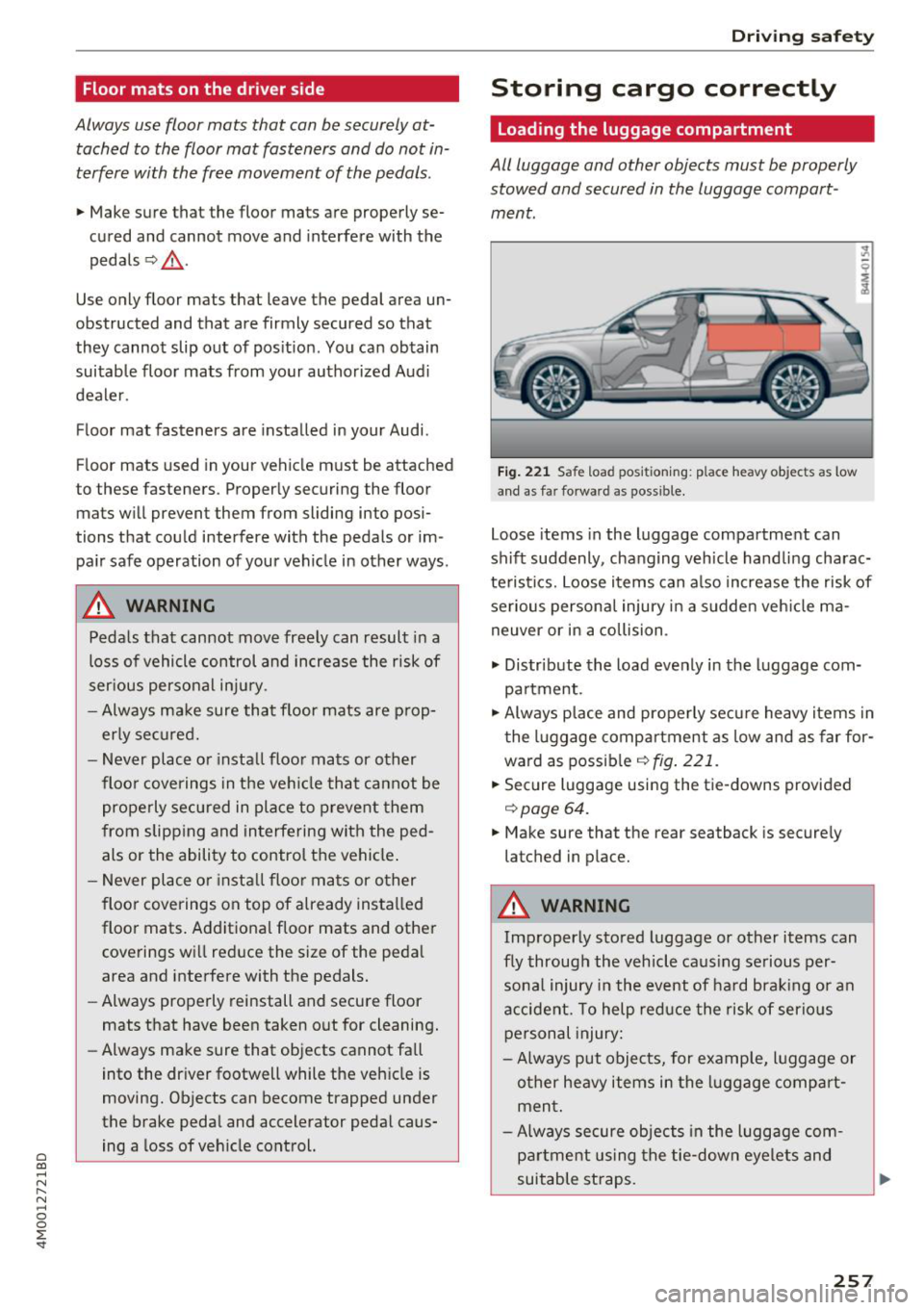
Fig . 221 Safe load pos ition ing: place heavy objects as low
a n d as far forward as possible.
Loose items in the luggage compartment can
sh ift suddenly, changing vehicle hand lin g charac
te ristics. Loo se i tems can a lso increase the risk of
se rious persona l injury in a sudden veh icle ma
neuver or in a collision .
.,. Distr ibute the load evenly in the luggage com
pa rtment .
.,. Always p lace and properly secu re heavy items in
t he l uggage compartment as low and as far for
wa rd as possib le
¢ fig . 221.
.,. Secure luggage usi ng the tie -downs provided
¢ page 64.
.,. Make sure that the rear seatback is secure ly
latched in place.
A WARNING
-
Improperly stored luggage or other items can
f ly through the vehicle ca us ing se rious per
sona l injury i n the event of ha rd bra king or an
accident. To help reduce the risk of serio us
personal injury:
- Always put obje cts, for examp le, l uggage or
o ther heavy item s in the luggage compa rt
men t.
- Always secure objects in the luggage com
p art ment us ing the tie-down eyelets and
suitable straps .
257