light AUDI Q7 2018 Owner´s Manual
[x] Cancel search | Manufacturer: AUDI, Model Year: 2018, Model line: Q7, Model: AUDI Q7 2018Pages: 398, PDF Size: 185.58 MB
Page 117 of 398
Cl a:, ...... N
" N ...... 0
0
::r '
The radar sensors can be displaced by impacts
or damage to the bumper, wheel housing and
underbody. Pre sense rear can be impaired by
this. Have an authorized Audi dealer or au
thorized Audi Service Facility check their func
tion.
(D Tips
- The pre sense rear functions switch off
when towing a trailer.
- The pre sense rear functions may also
switch off if there is a malfunction in the
side assist* system.
Audi pre sense city
Applies to: vehicles with Audi pre sense city
Description
Within the limits of the system, pre sense city
can warn you of impending collisions with
vehicles and pedestrians and initiate the applica
ble braking maneuver if needed. Pre sense city is
active at speeds of approximately 6 mph (10 km/
h) and higher.
A pedestrian warning can occur at speeds up to
SO mph (85 km/h), and vehicle warnings can oc
cur at speeds up to 155 mph (250 km/h). A pre
sense city braking maneuver is possible at speeds up to SO mph (85 km/h).
Warnings
The system recognizes various dangerous situa
tions. The
early warning occurs if:
- a vehicle driving ahead brakes suddenly,
- your own vehicle approaches a significantly
slower vehicle or stationary vehicle in the direc
tion of travel.
- a pedestrian is standing in the lane or is moving
into the lane .
When this warning occurs, it may only be possi ble to avoid a collision by swerving or braking
strongly. The message
Audi pre sense.
r:=;, page 113, fig. 108 and a warning tone will
warn you about the danger .
Assistance systems
Additionally, a jerk on the brakes may occur as an
acute warning when there is an impending colli
sion. If you do not react to the acute warning, pre
sense city can brake to the point of complete de
celeration within the limits of the system. This
reduces the vehicle speed in the event of a colli
sion. The message
Audi pre sense. also ap
pears.
The following functions are triggered in conjunc
tion with pre sense basic/rear:
- Reversible tensioning of the front safety belts.
- Closing the windows and sunroof*.
- Inflating the side bolsters* in the seat backrest
and seat surface.
Audi drive select*: the function is not active de pending on the mode selected.
_&. WARNING
- Pre sense city cannot overcome the laws of
physics.
It is a system designed to assist and
it cannot prevent a collision in every circum
stance. The driver must always intervene.
The driver is always responsible for braking
at the correct time. Do not let the increased
safety provided tempt you into taking risks .
This could increase your risk of a collision.
- The system can deploy incorrectly due to
system-specific limits .
- To reduce the risk of an accident, please
note that the camera does not always detect
every object.
- Pre sense city does not react to animals,
crossing or oncoming vehicles, objects such
as bars, railings or railcars, and objects that
are difficult to detect
r:=;, _& in General infor
mation on page 103.
- In trailer mode, the braking behavior of the
trailer can be different than usual during au
tomatic braking.
_&. WARNING
Pre sense city may be restricted or not availa
ble in the following example situations:
- in heavy fog, rain, spray or snow
- when there are visual obstructions, such as
glare, reflections or variations in light
115
Page 119 of 398
Cl a:, ,-I N
" N ,-I 0
0
::r '
er 's manual
This message appea rs whe n there is a tempora ry
fa il ur e in a subsys tem, such as the ESC. If th is
message appears repeated ly, dr ive to an aut hor
ized A udi dealer or authorized Audi Service Facili
ty to have the malfunction cor rected.
II Audi pre sens e: emergency braking sy ste m
off
This message appea rs if the pre sense f unct ions
are switched off th rough the Info tainment sys
tem or if the system is not ready .
Audi active Lane assist
Description
Applies to: ve hicles with Audi active lane assist
Active lane ass ist (lane departure warning) de
tects lane marker lines with in the l imits of the
system using a camera in the w indshield . If you
a re approac hing a detected lane ma rke r line and
it appea rs like ly that you will leave the lane, t he
system w ill wa rn yo u w it h correct ive steer ing .
You can override this steering at any time. If you pass over a line , the steering whee l wi ll vibrate
lightly. In order for this warn ing vibration to oc
cur, it must first be sw itched on in the Infotain
ment system. Active lane assist is ready for oper
ation when the lane marker line is detected on at least one side of the vehicle .
The system is designed for driv ing on express
ways and highways and therefore only activates
at speeds above approximately 40 mph (65 km/
h).
Applies to: vehicles w ith side assist: if you acti
vate a turn s ignal when active lane ass ist is ready
and it class if ies a lane change as critical because
of vehicles traveling alongside you or approach i ng you, there w ill be not iceable correct ive steer
in g short ly before you leave t he la n e. This will at
temp t to keep your veh icle in t he la n e.
Appl ies to: veh icles w ithout s ide ass ist : the ready
sys tem does not wa rn yo u if you activate a tu rn
sig nal befo re cr oss ing t he lane ma rker line. In
A ss istance systems
thi s case, it assumes that you are chang ing lanes
intentionally .
Applies to: vehicles wi th adaptive c ruise co ntro l:
there is no correct ive s teer ing or warn ings if th e
system recogni zes a dist inct passing maneuver .
If the conditions are met, traffic jam assist
switches on at speeds under app roximately
40 mp h (65 km/h)
q page 109.
A WARNING ,--
-The system warns the driver t hat the vehicle
is leaving the lane using cor rective steering.
The drive r is always responsible fo r keeping
the vehicle within the lane.
- The system can assist the dr iver in keeping
the vehicle in the lane, but it does not dr ive
by itself. A lways keep your hands o n the
s teer ing whee l.
- Cor rect ive stee ring may not occur in certain
si tua tions, such as d uring heavy b raking.
- There may be cases whe re the camera does
not recogni ze all la n e m ar ker lines. Correc
tive stee ring can only take pla ce on the s ide
of the vehi cle where lane marker lines are
detected.
- Othe r road st ru ct ures o r obje cts could poss i
b ly be identifie d uni nten tionally as lane
marker lines . As a res ult, co rrective steerin g
may be unexpected o r may not occ ur.
- T he camera v iew c an be restricte d, for ex
ample by vehi cles dr iving ahea d or by ra in,
snow, heavy spray or lig ht shini ng into the
camera. Th is can result in active lane ass ist
not detecting the lane marker lines or de
tect ing t hem inco rrectly .
- In ce rtain s ituations w he re visibility is low,
the vehicle may switch from an "early" to
"late" steering correct ion.
- Under certain condit ions such as r uts in the
road, a n inclined roadway or crosswinds, the
correct ive steer ing alone may not be enough
to kee p the vehicle in the m iddle of the lane .
- For safety reasons, act ive lane assist must
not be used when there are poor road and/
or weather condit ions such as slippe ry
ro ads, fog, gravel, heavy rain, s now and t he
117
Page 120 of 398
Ass is tance sy stem s
potential for hydroplaning . Using active lane
assist under these conditions may increase
the risk of a crash.
Switching on /off
A pp lies to: ve hicles w ith Audi active lane assist
F ig. 109 Turn signal lever: button for active lane ass ist
F ig .1 10 Windsh ie ld: camera window for act ive lane ass ist
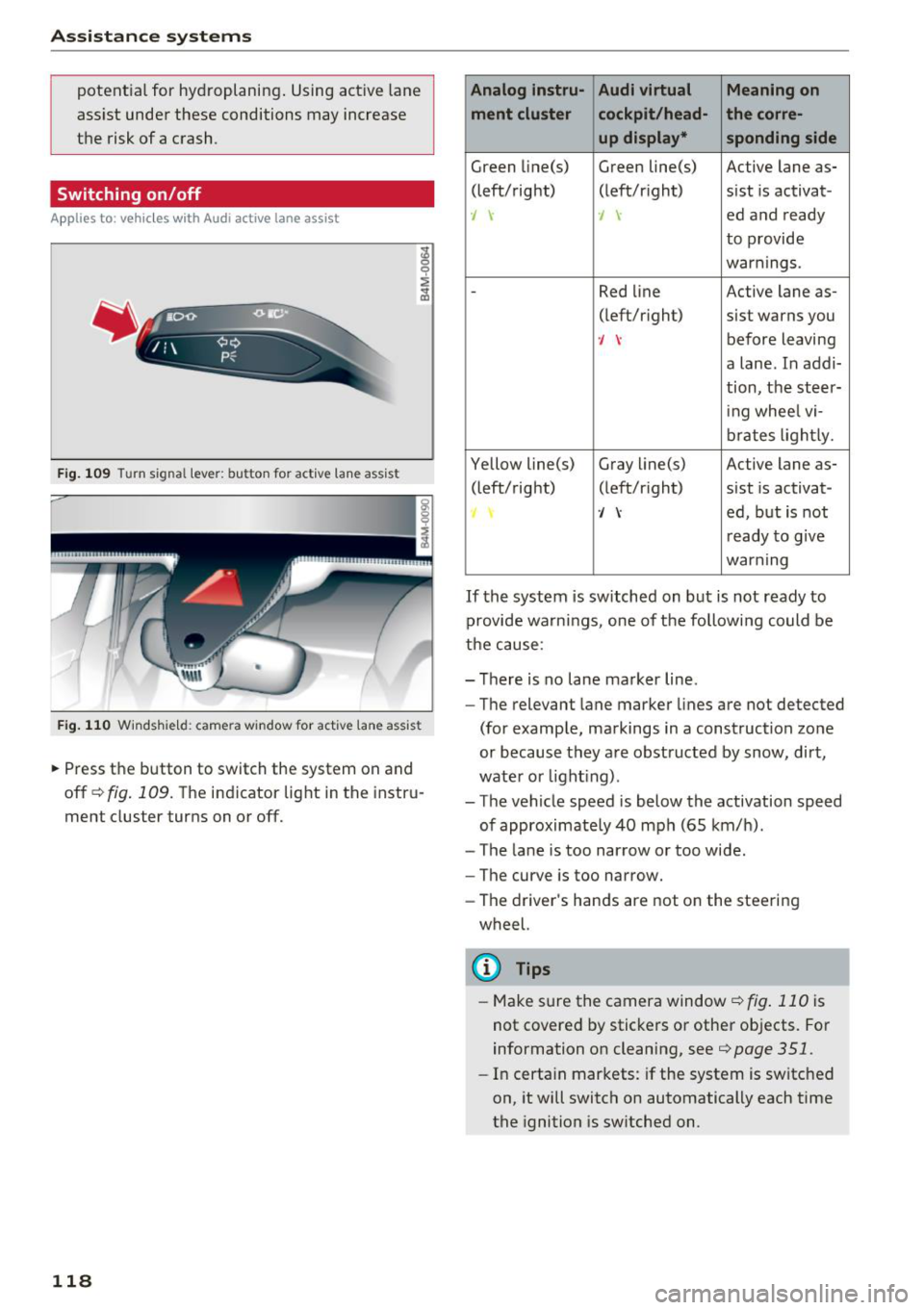
.,.. Press the button to switch the system on and
off
c!;> fig. 109. The indicator light in the instru
ment cluster turns on or off.
118
Analog lnstru- Audi virtual Meaning on
ment cluster cockpit /head- the corre-
up display* sponding side
Green Li ne(s) Green line(s) Active lane as-
(left/right) (left/r ight) sist is activat-
., -J ed and ready
to provide
warnings.
-Red line Active lane as-
(left/r ight) sist warns you
-J before leaving
a lane. In addi-
tion, the steer-
i ng whee l vi-
brates light ly.
Yellow line(s) Gray
li ne(s) Active lane as-
(left/right) (left/r ight) sist is activat-
·/ ed, but is not
r eady to g ive
warning
If the system is switched on but is not ready to
provide warnings, one of the following could be
the cause:
- There is no lane marker line .
- The relevant lane marker lines are not detected
(for example, markings in a construction zo ne
or because they are obstructed by snow, dirt,
wate r or light ing) .
- The vehicle speed is below the activation speed
of approximately 40 mph (65 km/h).
- The lane is too narrow or too wide .
- The curve is too narrow.
- The driver's hands are not on the steering
wheel.
(D Tips
- Make sure the camera window ¢fig . 110 is
not covered by stickers or other objects. For
information on cleaning, see
¢ page 351.
- In certain markets: if the system is switched
on, it will switch on automatically each time
the ignition is sw itched on.
Page 121 of 398
a
Display in the instrument cluster
Applies to: ve hicles with Audi active lane assist
Fig. 1 11 Instrument cluster: active lane ass ist is switched
on a nd ready to provid e warn ings
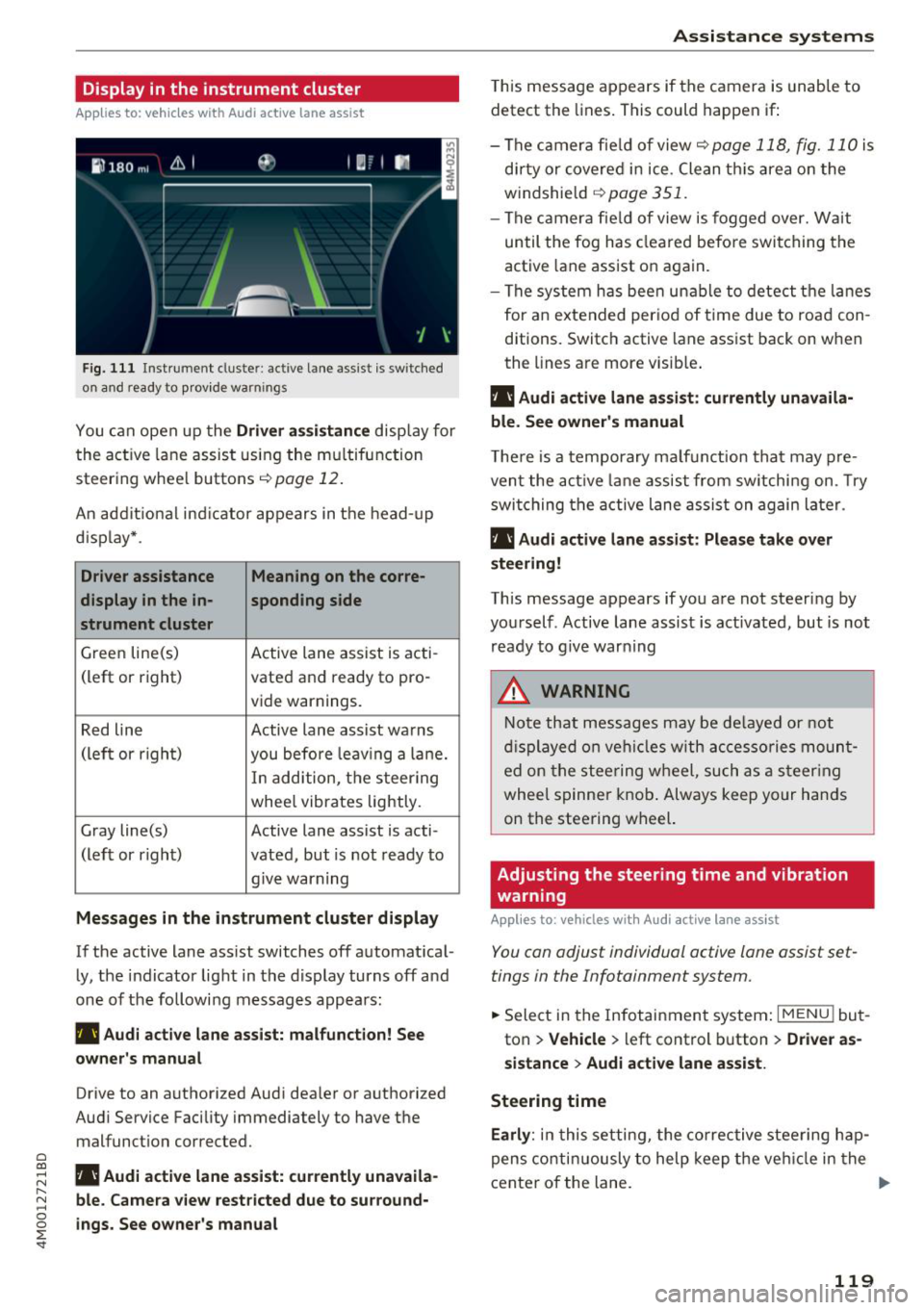
You can open up the Driver a ssis tanc e display for
the act ive lane assist us ing the mu ltifunction
steer ing whee l buttons
c;,page 12 .
An addit ional ind icator appears in the head-up
d isp lay* .
Driver assistance Meaning on the corre-
display in the in -sponding side
s t rument cluster
Green line(s) Active lane assist is acti-
(left or right) vated and ready to pro-
vide warnings.
Red line Active lane assist warns
(left or righ t)
you before leav ing a la ne.
In add ition, t he steering
whee l vibrates lightly.
Gray line(s) Active lane assist is acti-
(left or r ight) vated, but is not ready to
. . give warning
Messages in the instrument cluster display
If the active lane ass ist switches off automat ical
ly, the indicator light in the display turns off and
one of the followi ng messages appears :
rl1 Audi acti ve lane assist: m alfunction! See
owner 's manual
Drive to an authorized Aud i dea ler or authorized
Aud i Service Facility immediately to have the
malfunct ion corrected.
~ rl1 Aud i a ctive lane assist: currently unavaila
r---N ble. Came ra vie w restricted due to su rround-~ 0 ~ ings. See owne r's manual
'
T his message appears if the camera is unable to
detect the lines . This could happen if:
- The camera fie ld of view
c;, page 118, fig. 110 is
di rty or covered in ice . Clean th is area on the
windshield
c;, page 351.
- The c amera fie ld of view is fogged over. Wait
until the fog has cleared befo re switching the
active lane assist on again.
- The system has bee n unable to detect t he la nes
for an e xtended per iod of time due to road con
ditions. Switch active lane assist back on when
the lines are more visib le .
rl1 Audi active lane a ssist : currently unavaila
ble. See owner's manual
T he re is a temporary ma lf u nction tha t may p re
vent the act ive lane assist from sw itchi ng on. Try
swi tching the active lane assist on again later.
rl1 Audi active lane a ssist : Pl ease take over
steering!
This message appears if you are not steering by
you rself . Active lane assist is activated, but is not
ready to g ive warning
A WARNING
N ote that messages may be de layed or not
d isplayed o n ve hicl es w ith ac cessories moun t
ed on the stee ring w heel, such as a steer ing
wheel spinne r knob . Always keep your hands
on the steering wheel.
Adjusting the steering time and vibration
warning
App lies to : vehicles with Audi active la ne ass ist
You can adjust individual active lane assist set
tings in the Infotainment system.
-
.. Select in the Infotainment system: I MENU ! but
ton
> Vehicle > left control b utton > Dri ver as
si stance
> Audi a ctive l ane assist.
Steering time Earl y:
in t his setting, the corrective stee ring hap
pens contin uously to help keep the veh icle in the
center of the lane. ..,_
119
Page 127 of 398
(D Tips
-You can cance l the automatic brake activa
t ion w ith increas ing bra king fo rce if you ap
p ly the brakes yourse lf or accelerate cons id
erab ly.
- In some situations, rear cross-traffic assist may warn you even if there is no cross traffic
in a cr itical area, for examp le when back ing
i nto a parking space or maneuver ing .
- The rea r cross-traffic ass ist also switches off
when you switch off the ESC.
- The system is not available when towing a
trailer.
Messages
Applies to: vehicles with Audi side assist
A message appears in the inst rument cluste r dis
p lay if the s ide ass ist switches off automatically .
@j Audi side assist: malfunction! Please contact
Service
@j Audi side assi st and e xit warning: malfunc
tion! Please contact Service
The system cannot guarantee that it will detec t
ve hicles correctly and it has switched off. The
sensors have been mov ed or a re faulty. Have t he
system checked by an a uthori zed Audi dea ler or
author ized Audi Service Facility soon.
@j Audi side assi st: cu rrently unavailable. Sen
sor vision restricted due to surroundings . See
owner 's manual
($j Audi side as sist and e xit warning: currently
unavailable. Sensor vision restricted due to su r
roundings
The rad ar senso r vis io n i s impa ired. The area in
fron t of the senso rs must no t be covered by b ike
rac ks, stic kers, leaves, snow or any other ob jects.
C lea n the area in f ront of th e sensors, if necessa
ry ¢
page 121, fig. 115.
($j Audi side as sist: currentl y unavailable. See
owner 's manual
Cl
~ ($j Audi side ass ist and exit warning : currently N
~ unavailable . See owner 's manual ,-1 0
0
::r '
S ide assist cannot be switched on at this time be
ca use there is a ma lfunction (for example, the
batte ry c harge leve l may be too low).
($1 Audi side assi st: unavailable in t owing mode
($j Audi side assist and ex it warning: currently
unavailable . Towing mode
S ide ass ist switches off automatically when the
electrical connecto r in t he factory-installed trail
er hitch is connected . There is no guarantee the
system will sw itch off w hen us ing a ret rofitted
t railer h itch . Do no t use side assist and the ex it
warning when tow ing a tra ile r.
Ill Rear parking aid: obstacle detect ion restrict
ed
The rear cross-traffic ass ist is not available . E i
ther the ESC is sw itched off, or the rada r senso rs
may be cove red by a b ike rack, st icke rs , leaves,
snow o r othe r objects . Switc h the ESC on, o r
cl ea n the area in fron t of the senso rs if necess ary
¢page 12 1, fig . 115. If thi s message con tinues
to be displayed, drive imme dia tely to an author
ized Audi dea ler or authorized Audi Service Facili
ty to have the ma lf u nction repaired.
Night vision assist
Description
Applies to: vehicles with night vision assist
The night vision assist can detect, highlight and,
if necessary, warn about pedestrians and large
wild animals.
N ight vision assist he lps yo u when it is dark by
u sing an infra red camera to mon itor the area in
front of your ve hicle, w ith in the limits of the sys
tem . It ca n disp lay objects up to a distance of ap
prox ima tely 1 000 feet (300 m). The thermal im
age de te cte d by t he came ra is show n in t he in
str ument cluster disp lay . Wa rm areas appear
li ghter and co ld areas a ppear da rker.
125
Page 128 of 398
Ass is tance sy stem s
Highlighting detected pedestrians and wild
animals
A pplies to: ve hicles w ith nigh t vision ass ist
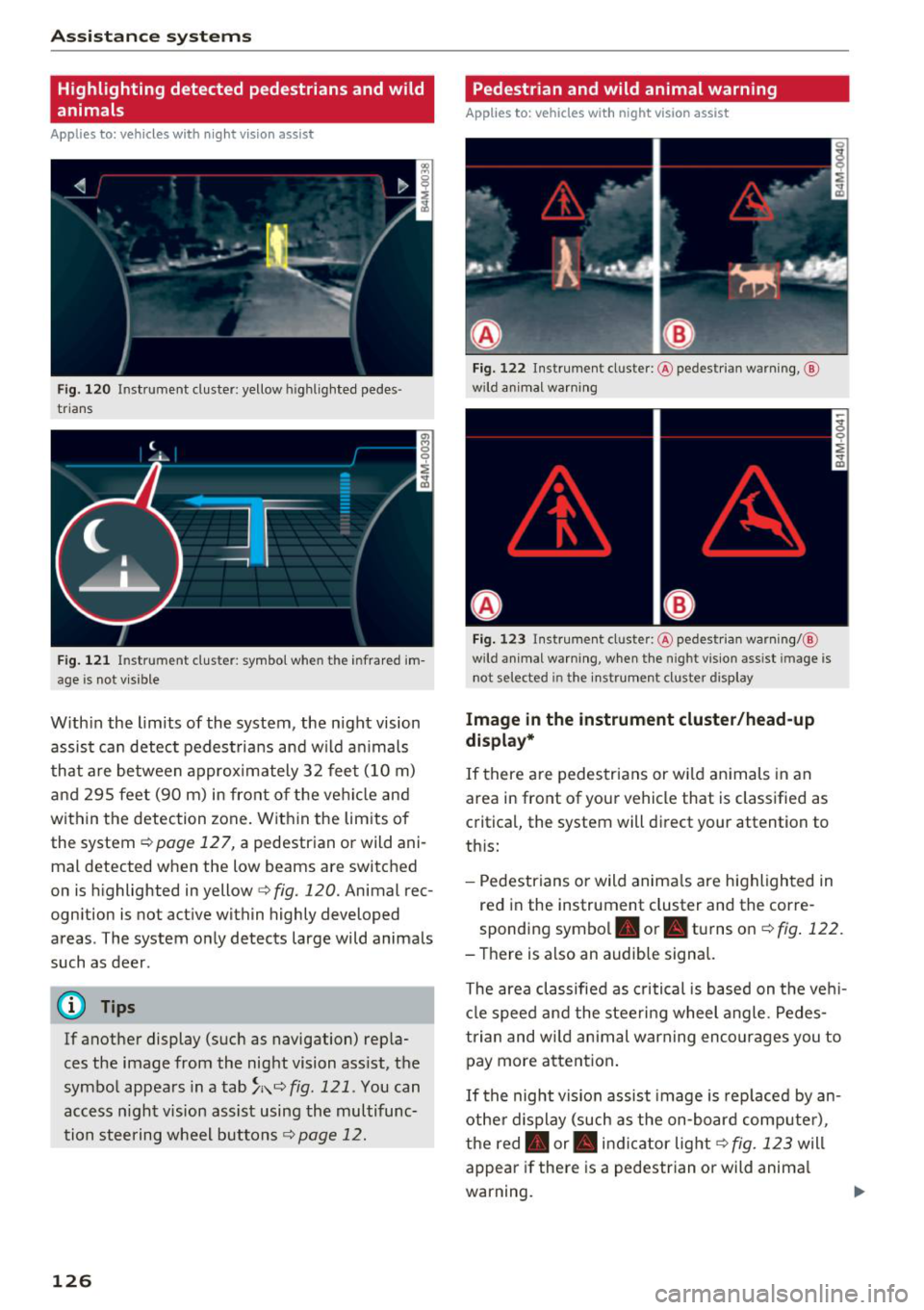
F ig. 120 Instrument cluster: yellow highlighted pedes
trians
F ig. 121 Instrument cluster: symbol when the infrared im
age is not vi sible
With in the limits of the system, the night vision
assist ca n detect pedestria ns and w ild an imals
that are between approximately 32 feet (10 m)
and 295 feet (90 m) in front of the vehicle and
within the detection zone. Within the limits of
the system
¢page 127, a pedestrian or wild ani
mal detected when the low beams are switched
on is highlighted in yellow
c> fig. 120. Animal rec
ognition is not active within highly developed
areas . The system only detects large wild animals
such as deer .
(D Tips
If another display (such as navigation) repla
ces the image from the night vision ass ist, the
symbol appears in a
tab ~;\: =~ fig. 121 . You can
access n ight vision assist using the multifunc
tion steering wheel buttons¢
page 12.
126
Pedestrian and wild animal warning
Applies to : vehicles wit h night vision assis t
Fig. 122 In str ument cluster: @pedestrian warning, @
wild anim al wa rnin g
Fig . 123 Instru ment clus ter: @pedestria n warning/ @
w ild animal warning, when the nigh t vision ass ist im age is
not selected in the instru ment cluster display
Image in the instrument cluster /head-up
di spl ay *
If there are pedestrians or wild an imals in an
area in front of your vehicle that is classified as
critical, the system will direct your attention to
th is:
- Pedestrians or wild anima ls are highlighted in
red in the instrument cluster and the corre
sponding symbol. or. turns on
c::> fig. 122 .
-There is also an audible signal.
The area classified as critical is based on the veh i
cle speed and the steeri ng wheel angle . Pedes
trian and wi ld animal warning enco urages you to
pay more attention .
If the night vision assist image is rep laced by an
othe r display (such as the on-board compute r),
the red. or. in dicator light
c::> fig. 123 will
appear if there is a pedestr ian or wild anima l
warning.
Page 129 of 398
If the head-up display* is switched on and the
night vision assist content is activated, . or.
will appear in the head-up display*.
Marking light*
To direct the driver's attention to a pedestrian,
the headlights can flash on the pedestrian three
times in a row when there is a pedestrian warn ing.
This occurs at speeds above approximately
35 mph (60 km/h) if you are outside of illuminat
ed areas and no detected vehicles are shown. The
high beam assistant* controls the marking
light* <=>
page 44.
The marking light is not used for wild animals.
General information
A ppl ies to: ve hicles w ith nigh t visio n ass ist
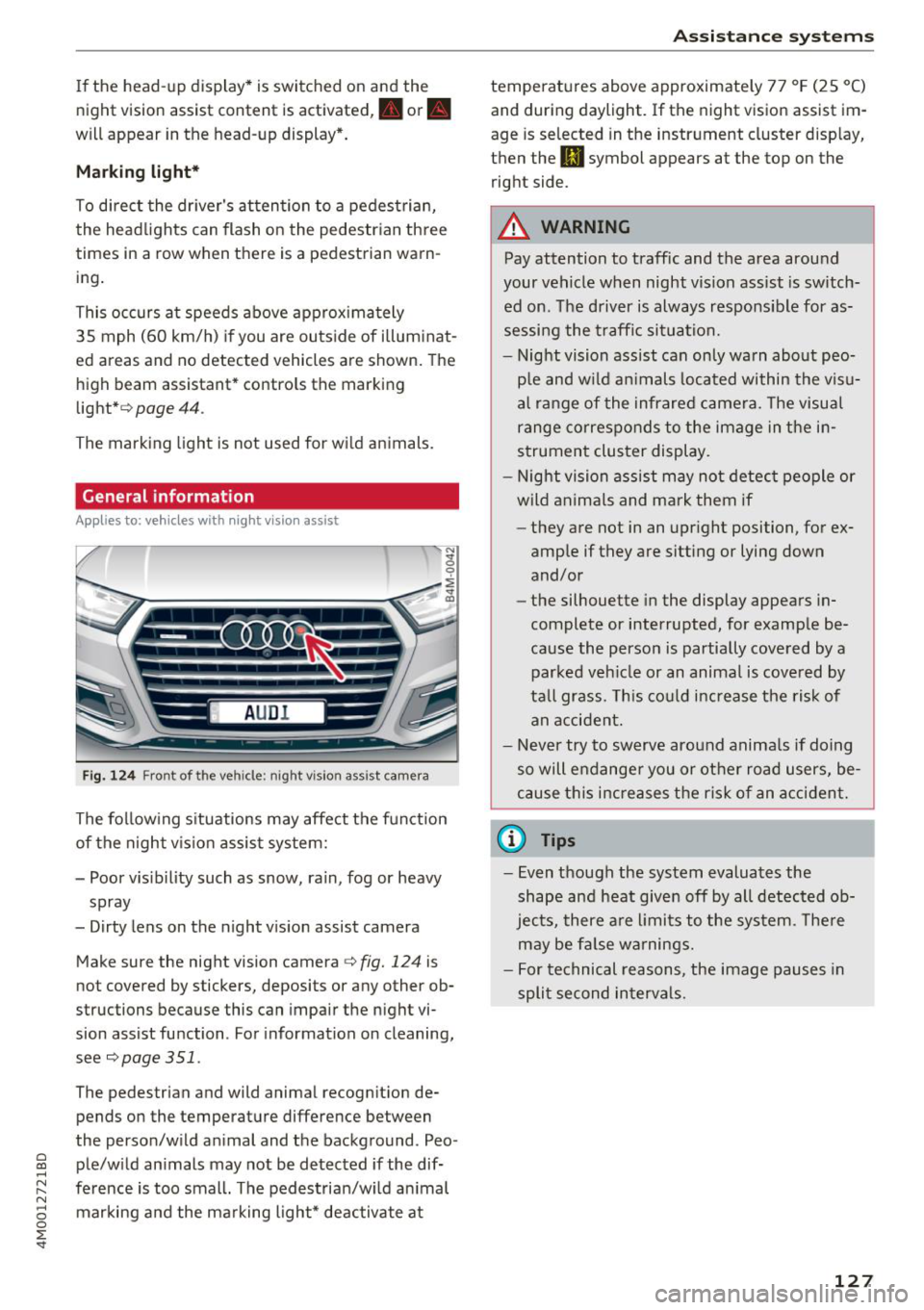
Fig. 124 Front of the ve hicle: night vision ass ist camera
The following situations may affect the function
of the night vision assist system:
- Poor visibility such as snow, rain, fog or heavy spray
- Dirty lens on the night vision assist camera
Make sure the night vision camera <=>
fig. 124 is
not covered by stickers, deposits or any other ob
structions because this can impair the night vi
sion assist function . For information on cleaning,
see<=>
page 351 .
The pedestrian and wild animal recognition de
pends on the temperature difference between
the person/wild animal and the background . Peo -
~ ple/wild animals may not be detected if the dif-,.....
~ ference is too small. The pedestrian/wild animal N
8 marking and the marking light* deactivate at 0 :E '
temperatures above approximately 77 °F (25 °C)
and during daylight. If the night vision assist im
age is selected in the instrument cluster display,
then the
II symbol appears at the top on the
right side.
A WARNING
-Pay attention to traffic and the area around
your vehicle when night vision assist is switch
ed on. The driver is always responsible for as
sessing the traffic situation.
- Night vision assist can only warn about peo
ple and wild animals located within the visu
al range of the infrared camera. The visual
range corresponds to the image in the in
strument cluster display.
- Night vision assist may not detect people or
wild animals and mark them if
- they are not in an upright position, for ex
ample if they are sitting or lying down
and/or
- the silhouette in the display appears in
complete or interrupted, for example be
cause the person is partially covered by a
parked vehicle or an animal is covered by
tall grass. This could increase the risk of
an accident.
- Never try to swerve around animals if doing
so will endanger you or other road users, be
cause this increases the risk of an accident.
@ Tips
- Even though the system evaluates the
shape and heat given off by all detected ob
jects, there are limits to the system . There
may be false warnings.
- For technical reasons, the image pauses in
split second intervals.
-
127
Page 130 of 398
Ass is tance sy stem s
Switching on/off
Applies to: vehicles with night vision assist
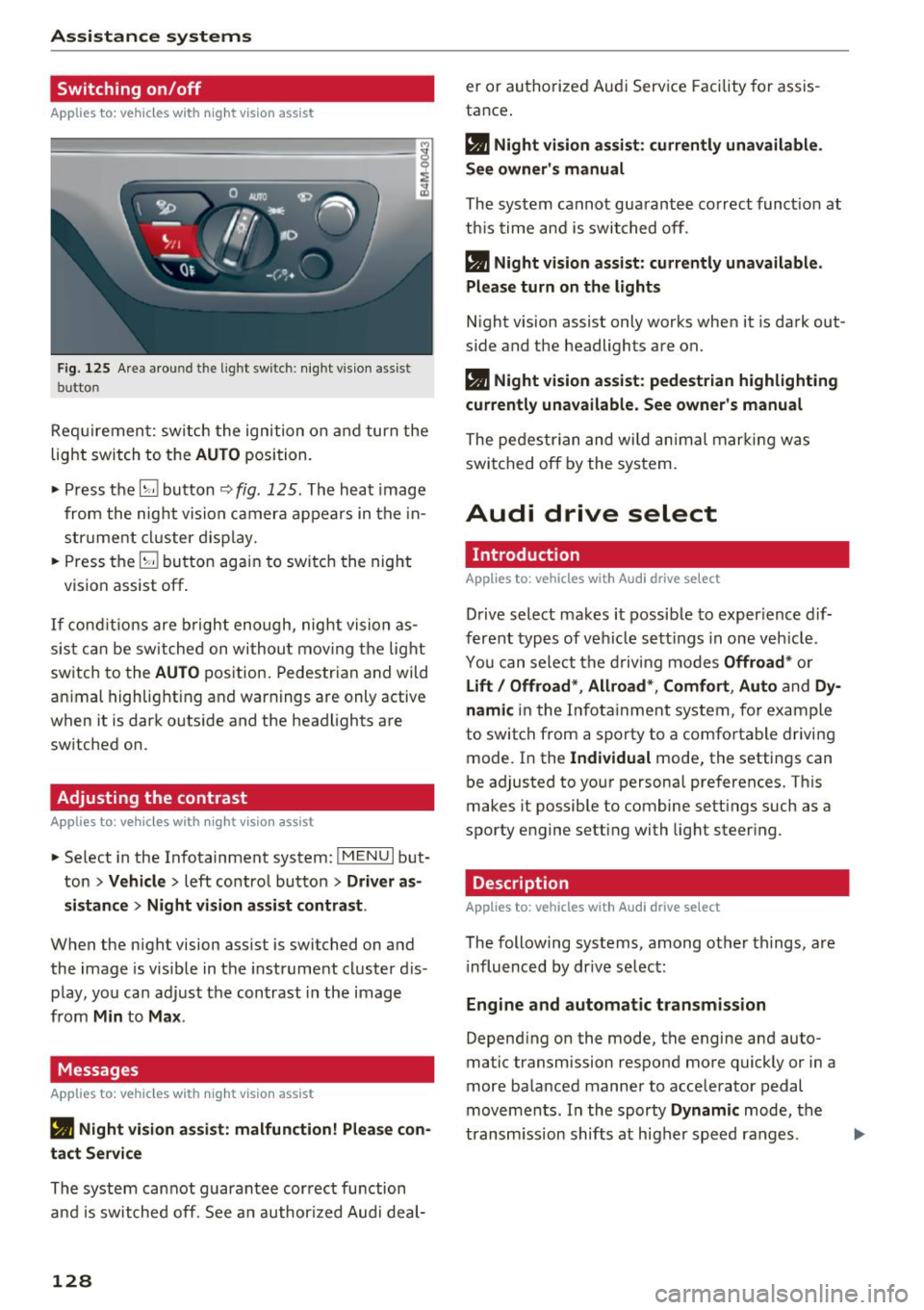
F ig. 125 Are a aro und th e light sw itc h: night vis ion assist
butto n
Requiremen t: sw itch the ignition on and turn the
light switch to the
AUTO position.
.. Press the~ button ~
fig. 125 . The heat image
from the nig ht vision camera appears in the in
str ument cluster d isplay.
.. Press the~ button again to switch the night
vision assist off .
If condit ions are b right enough, night vision as
sis t can be sw itched on withou t mov ing the light
switch to the
AUTO position. Pedestrian and wild
an imal highlighting and warnings are only active
when it is dark outside and the headlights are
sw itched on .
Adjusting the contrast
Applies to: vehicles with night vision assist
.. Select in the Infotainment system: IM ENU I but
ton
> Vehicl e > left control button > Driver a s
si stance
> Nig ht vis ion as sist contra st .
When the night vision assist is switched on and
the image is visible in the instrument cluster d is
p lay , you can adjust the contrast in the image
from
Min to Ma x.
Messages
App lies to: vehicles with night vision assist
• Night vi sion a ssist : malfunction! Plea se con
tact Ser vic e
The system cannot guarantee correct function
and is switched off. See a n author ized Audi deal-
128
er or authori zed Aud i Service Facility fo r assis
tance .
a Night vi sio n assi st: c urrently unav ail able .
See owner's manual
The system cannot guarantee correct funct ion at
th is time and is switched off .
a Night vision ass ist: currently un av ailabl e.
Plea se turn on the lights
Night vision assist only works when it is dark out
side and the headlights are on.
a Night vision ass ist: pedestr ian h ighlighting
curr ent ly unavailable. See owne r's manual
The pedestrian and wi ld animal marki ng was
switched off by the system .
Audi drive select
Introduction
App lies to: vehicles with Aud i drive se lect
Drive select makes it possible to exper ience dif
ferent types of vehicle sett ings in one veh icle .
You can select the d riving modes
Offroad * or
Lift / Offroad *, Allroad *, Comfort , Auto and Dy
namic
in the Infota inment system, for example
to switch from a sporty to a comfo rtable driving
mode. In the
I ndividual mode, the settings can
be adjusted to your personal preferences. This
makes it possible to combine sett ings such as a
sporty engine setting with light steer ing .
Description
Applies to: vehicles with Audi drive select
The following systems, among other th ings, are
i nfluenced by dr ive se lec t:
Engine and automatic tran smis sion
Depend ing on the mode, the engine and auto
matic transmission respond more quickly or in a
more balanced manner to accelerator pedal
movements . In the sporty
Dynam ic mode, the
transm iss ion shifts at higher speed ranges .
Page 134 of 398
Parking syste m s
Parking systems
General information
A pplies to: ve hicles w ith a rea r parking sys te m /parking sys
tem p lus/rearv iew camera/peripheral cameras
Depending on your vehicle 's equipment , various
parking aids will help you when parking and ma
ne uvering.
The
rea r pa rki ng sys te m is an aud ible parking a id
that warns you of obstacles
behind the vehicle
¢ page 133.
The parki ng sys te m plu s assists you when park
ing by aud ibly and visually indicating objects de
tected
in front of and behind the veh icle
¢ page 133.
The rea rv iew ca mera shows the area behind the
veh icle in the Infotainment system d isplay . The
lines in the rearv iew camera image he lp you to
pa rk or maneuve r
¢page 134.
The pe riph eral ca meras give various views to
help you when parking or maneuvering
¢ page 137 . The parking system plus functions
are also available ¢
page 133.
_& WARNING
-Always look for t raff ic and check the area
around your vehicle by looking at it direct ly
as well. The parking system cannot replace
the driver's attention . The driver is always
responsib le when entering or leaving a park
ing space and during similar maneuvers.
- Please note that some surfaces, such as
clothing, are not detected by the system.
-
-Sensors and cameras have blind spots in
which people and objects cannot be detect
ed . Be especially caut ious of small children
and animals.
- Always keep your eyes on the vehicle 's sur
round ings, using the rearview mirror as
well.
- The sensors can be displaced by impacts or
damage to the radiator gr ille, bumper,
wheel housing and the underbody . The park
ing system may be impa ired as a result .
Have a n author ized Audi dealer or author-
132
ized Audi Service Facility check their func
tion .
@ Note
-Some objects are not detected or disp layed
by the system under certain circumstances:
- objects such as barrier chains, trailer draw
bars, vertical poles or fences
- objects above the sensors such as wall ex
tensions
- objects with certain surfaces or structures
such as cha in link fences or powder snow
- If you continue driving closer to a low ob
ject, it may disappear from the sensor range . Note that you will no longer be
warned about th is obstacle .
- Keep enough distance from the curb to re
duce the risk of damage to the rims .
(D Tips
-The system may provide a warning even
though there are no obstacles in the cover
age area in some situations, such as :
- certa in road s urfaces or whe n the re is tall
grass
- externa l ult rasonic sources such as from
cleaning vehicles
- in heavy rain, snow, or th ick vehicle ex
ha ust
- We recommend that you practice par king in
a traffic -free location o r parking lot to be
come familiar with the system . When doing
this, there shou ld be good light and weath
er conditions.
- You can change the vo lume of the signa ls
and the display ¢
page 140.
-Please refer to the instructions for towing a
trai ler located in
¢ page 141.
-What appea rs in the infotainment d isplay is
somewhat time -de layed.
- T he sensors m ust be kept clean and free of
snow and ice for the parking aid to operate .
Page 145 of 398
a co ...... N r--. N ...... 0
0
:E '
accelerating on smooth, slippery surfaces
such as ice and snow. The drive wheels can
spin even when these control systems are
installed and this can affect driving stability
and increase the risk of a collision .
(D Tips
-The ABS and ASR only function correctly
when all four wheels have a similar wear
Switching on and off
Intelligent Technology
condition. Different tire sizes can lead to a
reduction in engine power.
- You may hear noises when the systems de
scribed are working .
- When installing roof rack systems on the
roof rail, the ESC uses sensors to adapt it
self to a different center of grav ity.
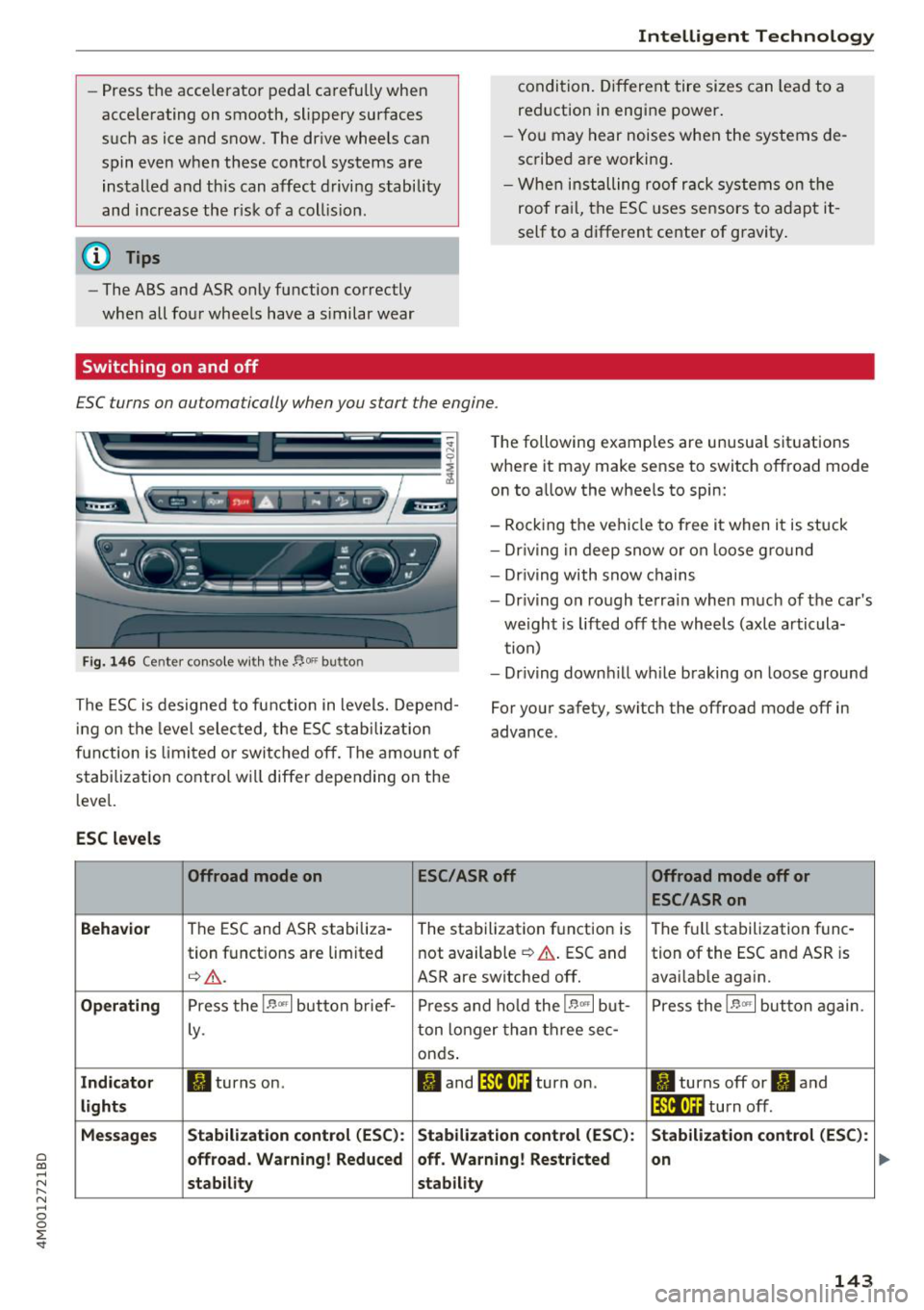
ESC turns on automa tically when you s tar t t he engine .
Fig. 146 Cen ter console w it h the "'°" butto n
The following examples are unusual situations
where it may mak e sense to switch offroad mod e
on to allow the wheels to spin:
- Rocking the vehicle to free it when it is stuck
- Dr iving in deep snow or on loose ground
- Dr iving with snow chains
- Dr iving on rough terrain when much of the car's
weight is lifted off the wheels (axle articula
tion)
- Dr iving downhill wh ile braking on loose ground
The ESC is designed to function in levels. Depend
ing on the level selected , the ESC stabilization
function is limited or switched off. The amount of
stabilization control will differ depending on the
level. For your safety, switch the offroad mode off in
advance.
ESC
levels
Offroad mode on ESC/ASRoff Offroad mode off or
ESC /ASRon
Behavior
The ESC and ASR stabiliza- The stabilization function is The full stabilization func-
tion functions are limited not available
¢ &. ESC and
tion of the ESC and ASR is
q _& . ASR a re switched off. avai lable again .
Operating Press the !-P- ,., 1 button brief-
Press and hold the !-P- "' I but- Press the IE m l button again.
Ly .
ton longer than three sec-
onds .
Indicator II turns on . II and !:f.'iit•)H turn on. II turns off or II and
lights !:f.'iit•Ui turn off.
Messages Stabilization control
(ESC): Stabilization control (ESC): Stabilization control (ESC):
offroad. Warning! Reduced off. Warning!
Restricted
on
stability stability
143