light AUDI Q7 2018 Owner´s Manual
[x] Cancel search | Manufacturer: AUDI, Model Year: 2018, Model line: Q7, Model: AUDI Q7 2018Pages: 398, PDF Size: 185.58 MB
Page 146 of 398
Intelligent Technology
A WARNING
You should only switch offroad mode on or switch ESC/ ASR off if your driving abilities
and the traff ic conditions perm it. There is a
r isk of slid ing.
- The stabilization function is limited when
offroad mode is switched on. The dr iving
wheels co uld spin and the vehicle could
swerve, especially on slick or slippery road
surfaces.
- T here is no vehicle stab ilizat ion when ESC/
ASR are switched off.
Hill descent assist
Hill descent assist makes it possible to drive
down a hill at a constant speed.
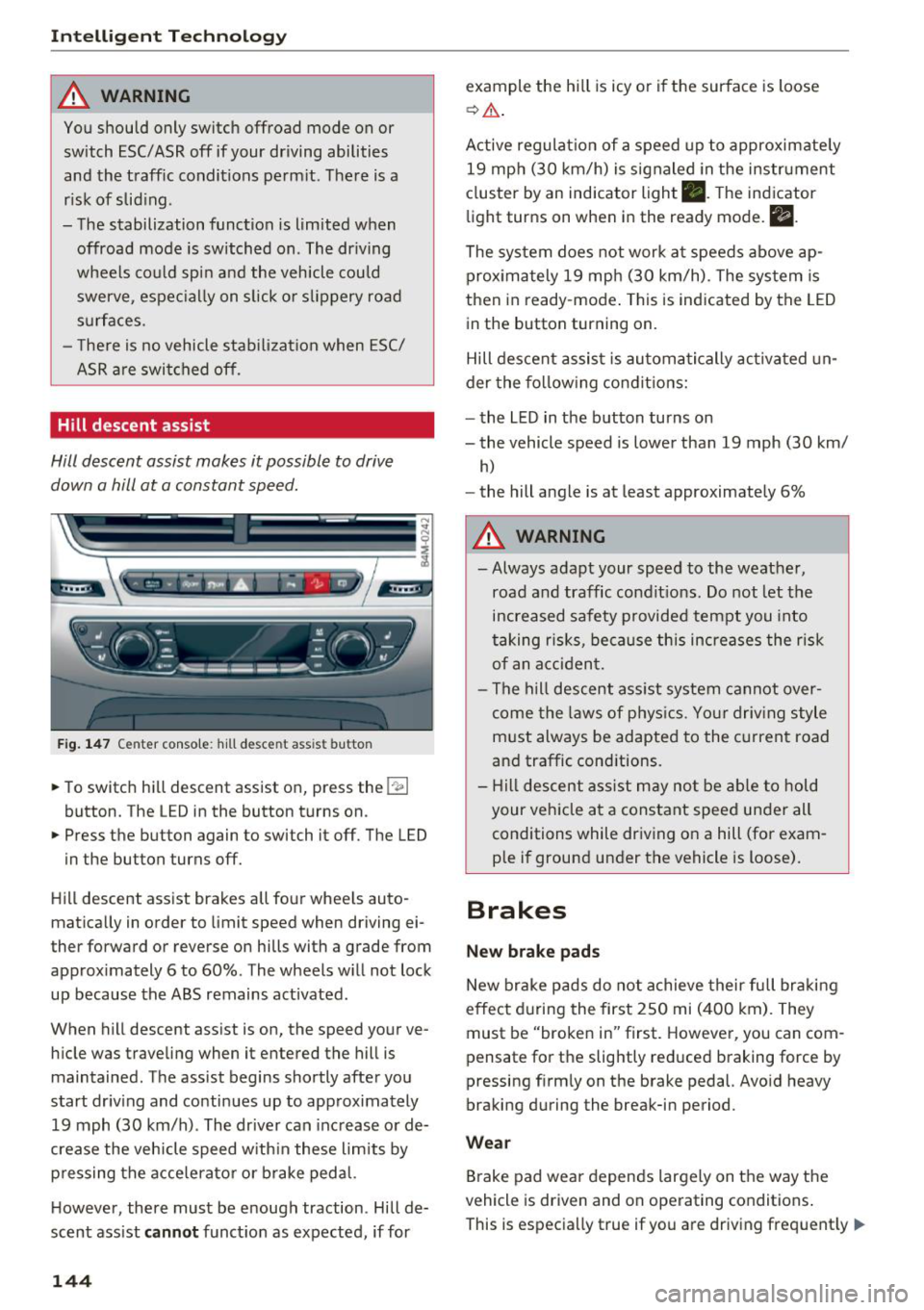
Fig. 147 Center console: hill desce nt ass ist button
.. To switch hill descent assist on, press the !~ I
button. The LED in the button turns on.
.. Press the button again to switch it off. The LED
in the button turns off.
Hill descent assist brakes all four wheels auto
matically in order to limit speed when driving ei
ther forward or reverse on hills with a grade from
approximately 6 to 60%. The wheels w ill not lock
up because the ABS remains activated.
When hill descent assist is on, the speed your ve
hicle was traveling when it entered the hill is maintained. The assist begins shortly after you
start driv ing and continues up to approximately
19 mph (30 km/h) . The driver can increase or de
crease the vehicle speed w ith in these limits by
pressing the accelerator or brake pedal.
However, there must be enough traction . Hill de
scent assist
cannot function as expected, if for
144
example the hill is icy or if the surface is loose
~ .&. .
Active regulat ion of a speed up to approximately
19 mph (30 km/h) is signaled in the instrument
cluster by an indicator light •. T he indicator
light turns on when in the ready mode.
II.
The system does not work at speeds above ap
prox imately 19 mph (30 km/h) . The system is
then in ready-mode . This is indicated by the LED
in the button turning on.
Hill descent assist is automatically activated un
der the following conditions:
- the LED in the button turns on
- the vehicle speed is lower than 19 mph (30 km/
h)
-the hill angle is at least approximately 6%
A WARNING
-
- Always adapt your speed to the weather,
road and traffic conditions. Do not let the
increased safety provided tempt you into
taking risks, because this increases the risk
of an accident.
- The hill descent assist system cannot over
come the laws of phys ics. Your driving style
must always be adapted to the current road
and traffic cond itions .
- Hill descent assist may not be able to hold
your veh icle at a constant speed under all
conditions while driving on a hill (for exam
ple if ground under the vehicle is loose).
Brakes
New brake pads
New brake pads do not achieve their full braking
effect during the first 250 mi (400 km). They
must be "broken in" first. However, you can com
pensate for the slightly reduced braking force by
pressing f irmly on the brake pedal. Avo id heavy
braking during the break-in period.
Wear
Brake pad wear depends largely on the way the
vehicle is driven and on operating conditions .
This is especially true if you are driving frequently .,.
Page 148 of 398
Intellig ent T echn olo gy
{QJ Note
- Never let the brakes "rub" by pressing the
pedal light ly when braking is not actually
necessary. This causes the brakes to over
heat and increases braking d istance and
causes wear .
- Before driv ing downhill a long distance on a
steep hill, decrease your speed and select a
lower gear. This makes use of the engine
braking effect and rel ieves the brakes. If
you need to b rake additionally, b rake in in
te rvals a nd not conti nuously.
@ Tips
-If the brake booster is not wo rking, you
must press the brake pedal with much more
fo rce than no rma l.
- If you ret rofit your vehicle with a front spoil
e r, whee l cove rs o r similar items, ma ke sure
th at the a ir flow to the front whee ls is not
i nterr upted. Ot herw ise the bra ke sys tem
can become too hot.
Electromechanical
steering, all-wheel
steering
The electromechanical steering supports the
driver's steering movements.
Power steering adapts electronically based on
the vehicle speed.
Indicator lights and me ssa ges
• Steering: malfuncti on! Plea se st o p vehicle
If this indicator light turns on and stays on and
this message appears, the power steering may
have failed.
Stop the vehicle in a safe location as soon as pos
sib le. Do
not continue driving. See an authorized
Audi dea ler or authorized Audi Service Facility for
assistance .
• Stee ring: malfunction! Plea se stop vehicle.
Pa y attention t o di sta nce at sid e
If t his ind icator light tu rns o n and stays o n and
this message appears, t he a ll-wheel steer ing*
146
may have fai led . The side of the vehicle may need
more space on the road .
Reduce you r speed and stop the vehicle in a safe
l oca tion with eno ugh space on the s ides as soon
as possible. Do
n ot continue driving. See an au
thorized Audi dea ler or authorized Audi Service
Facility for assistance.
'I-ij S te e ring : m alfun cti on! You can c ontinue
dri ving
If the indicato r light turns on and the message
appears, the steeri ng wheel may be more d iffi
cu lt to move or more sensitive than usu al. The
steering wheel may a lso be at an ang le when
driving straight.
D rive slowly to an a uth orized Audi dea ler or au
t h orized Aud i Serv ice Facili ty to have t he mal
f unction corrected .
l:r-ij Stee ring : malfun ction! Adapt driving sty le .
Lar ger turnin g radiu s
If the indicator l ight turns on and this message
appears, the all-whee l stee ring* may have fa iled .
Please note that the vehicle has a larger t urning
r ad ius and the st abil ity w hen turning a corner is
lik e tha t of a vehicle wi thout a ll -wheel s teer ing.
The steering whee l may also be at an angle when
driving straight.
D rive slowly to an a uth o rized Audi dea ler or au
t h orized Aud i Serv ice Facili ty to have t he mal
function corrected .
(D Tips
-If the . or l;rfl indi cato r light only stays on
for a sho rt time, you may cont inue driv ing.
- For add itiona l information o n all-wheel
steeri ng*, see
r=.>page 128.
ALL-wheel drive (quattro)
General information
In all whee l dr ive, the dr iv ing power is distr ibut
ed between all fou r whee ls when needed. This
happe ns automatically depend ing on your dr iving
behav ior as we ll as the curren t road cond it ions.
A lso see
r=.> page 142, Electronic stabilization
control (ESC). ..,.
Page 160 of 398
Multi Media Int erface
Symbol /Description Description
CD IL IST lorB Switches to the results list.
@ Input field Disp
lays the cur re nt input .
® Resul
ts lis t Displays a
list with suggestions based on the letters already en-
tered.
@
+
Sw itches from lowe r case to upper case let ters o r from upper case
to lowe r case le tters.
® E
Open additional speller options, for example C lose spell er and C le ar
input field
® 11 & 71 Character sets and specia
l characters
0 laoul
Disp lays accented cha racters (suc h as a,<;, ri, o) .
Switches from letter to number inp ut or from n umber to letter in -
® I1231/IABCI
put .
® Adds a space in the input field . ..........
@ Character selection Highlights t he se lected c haracter.
@ ..
Inserts the suggested word* when you p ush the contro l knob up .
@ <&] D eletes t he cha racter to the left o f the cursor .
(D Tips
Opening free text search
Accented c haracters are not available fo r ev
ery let ter. .,.
Select: IME NUI button> desired menu item
(such as Telephone ).
.,. Keep tu rn ing the cont rol knob to the left until
t he
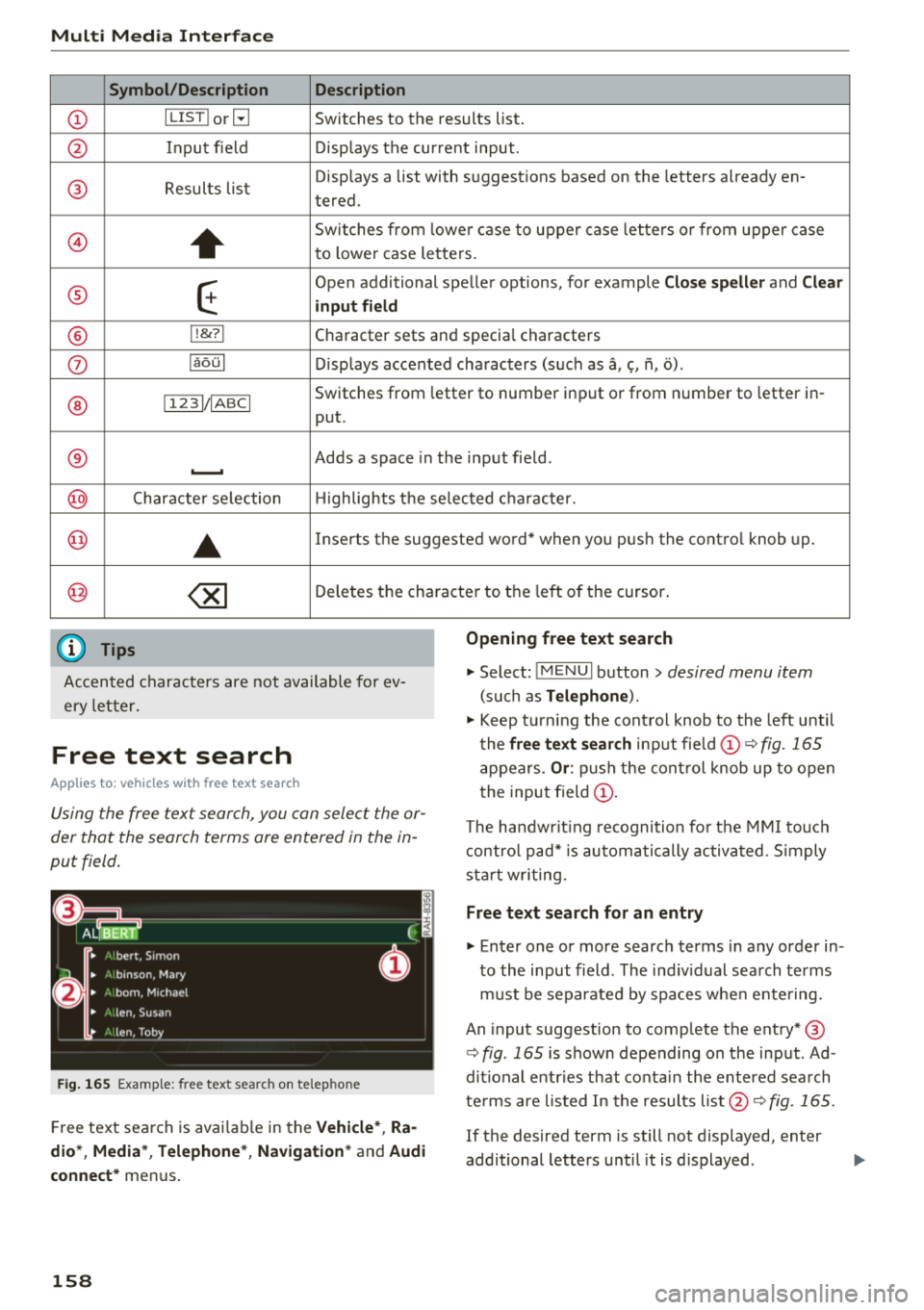
free text sear ch inp ut fie ld CD ¢ fig. 165
appears . Or: push the con trol knob up to open
the input field
CD .
Free text search
Applies to: vehicles with free text search
Using the free text search, you can select the or
der that the search terms are entered in the in
put field .
Fig. 165 Example : free text search on telep hone
Free text sea rch is avai lab le in the Vehicle *, Ra
dio *, Media* , Telephone *, Navigation *
and Audi
conne ct*
menus .
158
The handwr it ing recogni tion fo r th e M MI to uch
con tro l pad* is automatically activated. S imply
st ar t w rit ing.
Free text search for an entry
.,. Enter one or more searc h terms in any order in
to the input field . The ind iv idual sea rch te rms
m ust be separated by spaces whe n ente ring.
An input suggestion to comp lete the entry* ®
¢fig . 165 is shown depe nding on the input . Ad
dit ional entries that co nta in the entered sea rch
te rms are lis ted In the resul ts list @¢
fig. 165.
If the desired term is still not displayed, enter
additional letters until it is d isplayed .
Page 167 of 398
Cl a:, ...... N
" N ...... 0
0
::r '
@ Display of the expressway, highway or main
road onto which you will be turn ing
(J) D irect io n arrow for the upcoming maneuver
@ A bar graph appears when a direction arrow
is displayed. The fewer bars are shown, the
shorter the d istance is unt il the turn .
® Cur rent veh icle posit io n
@ Addit ional information (on -board computer)
The fo llow ing funct ions are a lso available when
ro ute guidance is active:
- Changing th e voic e guidan ce volum e: turn the
r ig ht thumbwhee l up o r down dur ing vo ice
guidance.
A WARNING
The route calculated by the navigation system
is a recommendation for reaching your desti
nation . Obey traff ic lights, stopping restric
tions, one-way streets, lane change restr ic
tions, etc.
(D Tips
- Also see the chapter~ page 8, Controls at a
glance.
- An exclamation point''!'' in front
of the
street name indicates that the information
about this street or this section of the route i s not complete in the navigation data con
tained in the MMI. Obey traffic laws in one
way streets and pedestrian zones .
Multifunction ste ering wheel
165
Page 168 of 398
Voice recognition system
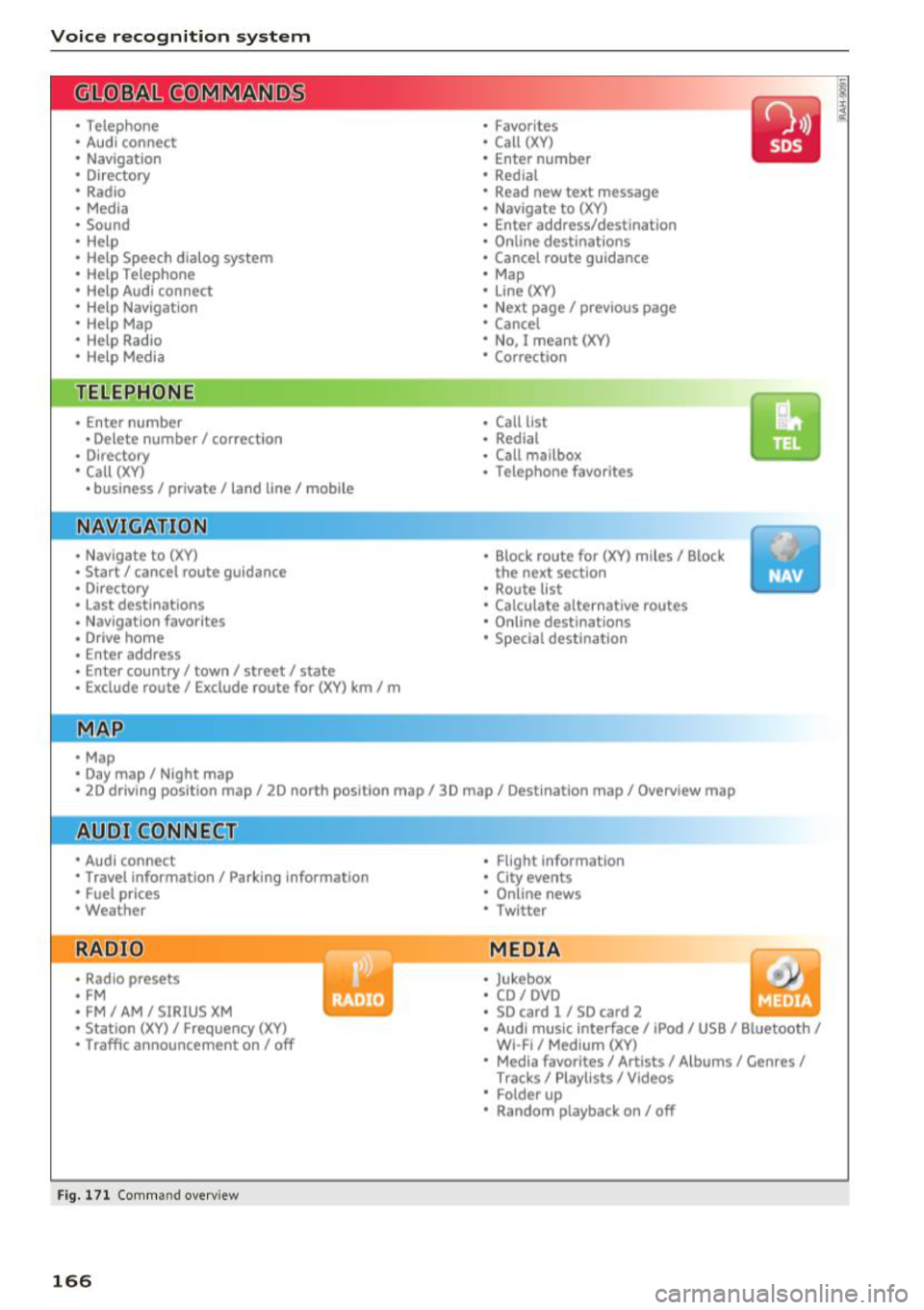
• Telephone
• Audi connect •
Favorites
• Call (XV)
• Navigation
• Directory
• Radio
• Media
• Enter number
• Redial
• Read new text message
• Nav igate to
(XY)
• Sound • Enter address/destination
• Help • Online destinations
• Help Speech dialog system
• Help Telephone •
Cancel route guidance
• Map
• Help Aud i connect •
Line
(XY)
• Help Navigation
• Help
Map
• Help Radio •
Next page/ previous page
• Cancel
• No. I meant (XV)
• Help Media • Correction
TE ~EPflON ~
• Enter number • Call list
• Delete number/ correction
• Redial
• Directory
• Call
(XV)
• Call mailbox
• Telephone favorites
• business
I private/ land tine I mobile
N~~It ~JION
• Nav igate to (XY)
• Start/ cancel route guidance
• Directory
• Last destinations • Block
route for
(XV) miles I Block
the next section
• Route list
• Calculate alternative routes
• Nav igation favorites
• Drive home
• Enter address •
Online destinations
• Special destination
• Enter country
I town I street I state
• Exclude route/ Exclude route for
(XV) km/ m
• Map
• Day map/ Night map
• 2D driving position map/ 2D north position map/ 3D map/ Destination map
I Overview map
~l!IDI CONNECT
• Audi connect
• Travel Information/ Parking Information
• Fuel prices
• Weather
RADIO
• Radio presets
• FM
• FM /AM/ SIRIUS XM
• Station (XV) / Frequency (XV)
• Traffic announcement on/ off
Fig. 171 Comm and overv iew
166
• Flight Informa tion
• City events
• Online news
• Twitter
MEDIA
• Jukebox
• CD
I DVD
• SD card
l / SD card 2
• Audi music Interface/ I Pod/ USB / Bluetooth
I
WI -Fl I Med ium (XV)
• Media favorites
I Artists/ Albums/ Genres I
Tracks I Playll sts / Videos
• Folder up
• Random playback on / off
Page 171 of 398
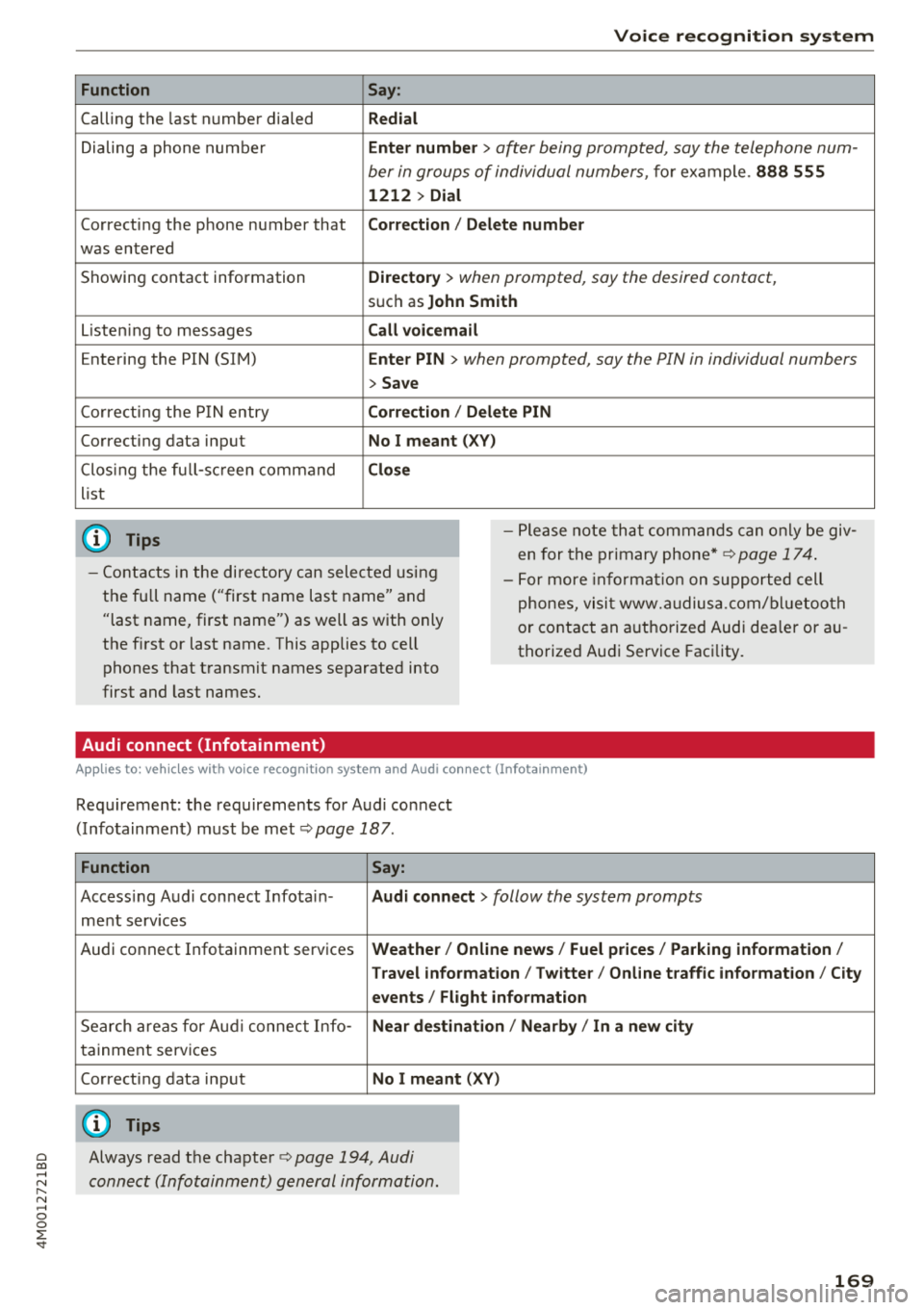
Function
Calling the last number dialed
Dialing a phone num ber
Correcti ng the p hone number that
was entered
Showing contact information
L isten ing to messages
Entering the PIN (SIM)
C orre ct in g the P IN entry
Correcting data input
C los ing the f ull -s cr een command
list
(D Tips
Voice recognition system
Say:
Redial
Enter number
> after being prompted, say the telephone num-
ber in group s of individual numbers,
fo r example. 888 555
1212 > Dial
Correction / Delete number
Directory
> when prompted, say the desired contact,
s u ch as John Smith
Call voicemail
Enter PIN
> when prompted, say the PIN in individual numbers
> Save
Correction / Delete PIN
No I meant ( XV)
Close
- P lease note th at comm an d s can o nly be giv
en for the primary phone*¢
page 1 74.
- Cont acts in the dire ctory can sele cted using
the fu ll name ("first name las t name" and
"last name, first name") as well as with only
the f irst or last nam e. This applies to cell
phones that t ransmit names separate d into
first and last names . -
For more informat io n on s uppo rted cell
phone s, vi sit www.audius a.c om/ blu etoo th
or cont act an a uthorized Audi dea ler or au
thorized Audi Service Fac ility.
Audi connect (Infotainment)
A pp lies to: ve hicles with vo ice recognition syste m and Audi co nnect (Infotainment)
Req uirement: the requirements fo r A udi co nnect
(Info tainmen t) must be met
¢ page 187.
Function Say:
Accessing A udi con nect I nfota in-Audi connect > follow the system prompts
me nt serv ices
Audi co nnect Infotainment services
Weather / Online news / Fuel prices / Parking information /
T ravel infor mation / Twitter / Online traffic information / City
events / Flight information
Search areas for Au di connec t Info -Near destination / Nearby / In a new city
ta inment serv ices
Correcting data inp ut
No I meant (XV)
(D Tips
~ Always read t he cha pte r¢ page 194, Audi
;::j connect (Infotainm ent) g en eral information .
" N ,-1 0
0
::r '
Page 191 of 398
a co ...... N r--. N ...... 0
0
:E '
Regardless of the fu nction selected, you c an
close a n Aud i connect Infotainmen t se rvice at any
time a nd return to the home screen
r::!> page 188,
fig . 180 .
Parking information
Applies to: vehicles with parking informa tion
Information on parking locations and fees in the
selected search area (for example
Nearby ).
~ Select and co nfirm Parking information.
You c an use the rig ht cont rol bu tton t o sort the
p a rking locations
By distance or By availability.
Travel information
Applies to: veh icles with travel informa tion
Information on attractions in the selecte d search
area.
~ S e lect and co nfirm Travel information .
~ Select and co nfirm an attraction to display t he
details .
Fuel prices
Applies to: veh icles with fuel prices
Information on gas stations with the lowest fue l
p rices fo r your vehicle in the selected search area.
~ Se lect and co nfirm Fuel price s.
You can use the right cont rol button to sort the
f u el p ric es
By price or By distance .
1l Servic e in pre para tio n at t he t ime of pr intin g. C an add l at
e r or i s onl y ava il able in certa in reg ion s.
Audi connect (Infotainment)
Traffic light information
Applies to: vehicles with traffic light information
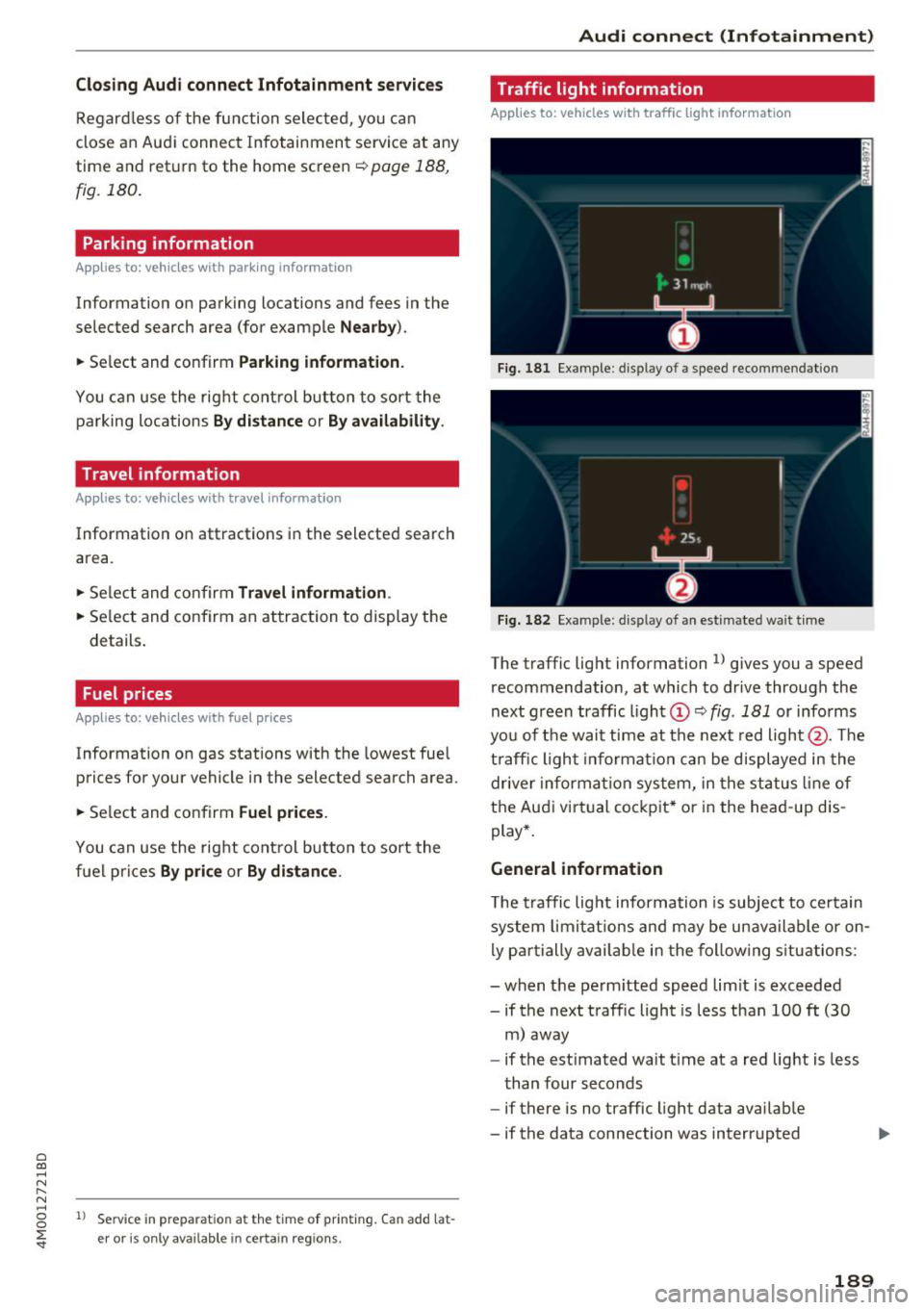
Fig. 18 1 Examp le : dis play o f a spee d recom menda tio n
Fig . 182 Example: d isp lay of an est imated wa it t ime
The traffic lig ht information l) gives you a speed
recommendation, at which to dr ive through the
next green traffic ligh t
(D r::!> fig . 181 or i nfo rms
yo u of t he wai t time at th e next red light @. Th e
t ra ffic ligh t informat ion ca n be displaye d in the
drive r informa tion syste m, in the st atus lin e of
t h e Au di virtu al co ckpit* or in the he ad-up d is
play *.
General information
T he traffi c lig ht informa tion is subject to ce rt ain
s ystem lim itat ions an d may be un availa ble or on
l y p art ially avail abl e in the fo llow ing s ituations:
- when the pe rmitted speed l im it is exceede d
- if the next t raffic light is less than 100
ft (30
m ) away
- if the est imated wait t ime at a red lig ht is less
than four seconds
- if there is no traffic light data avai lab le
- if the data connection was interrupted
189
Page 192 of 398
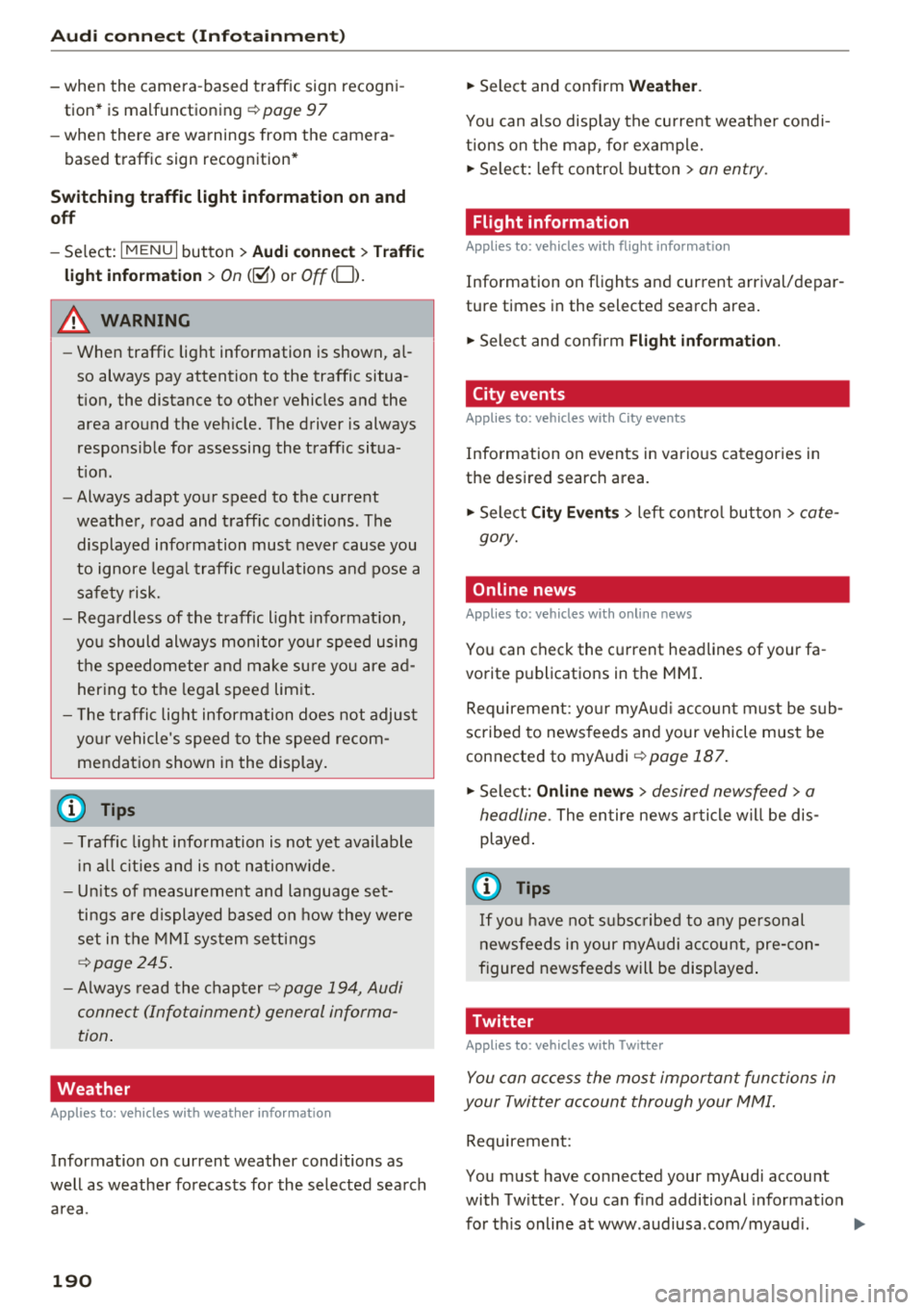
Audi conn ect (Infotainment)
- when the camera-based traffic sign recogni
tion* is malfunctioning ¢
page 97
- when the re are warnings from t he camera-
based traffic sign recognition*
Switching traffic light information on and
o ff
- Se lect: I MENU I button > Audi connect > Tra ffi c
li g ht info rmati on >
On (~ ) or Off (0 ).
A WARNING
-When traffic light information is shown, a l
so always pay attention to the traffic situa
t ion, the distance to other vehicles and the
area around the ve hicle. The driver is always
respons ible for assessing the traff ic situa
t ion .
- Always adapt your speed to the current
weather, road and traff ic conditions. The
displayed information must never cause you
to ignore lega l traffic regulations and pose a
safety risk.
- Regardless of the traffic light info rmat ion,
yo u should always monitor yo ur speed using
the speedometer and make su re yo u are ad
her ing to the legal speed lim it .
- T he traffic light information does not adjust
yo ur vehicle 's speed to the speed recom
mendat ion shown in the display.
(D Tips
- Traffic light information is not yet ava ilable
i n all cit ies and is not nationw ide .
- Un its of measurement and language set
ti ngs a re d isplayed based on how they were
set in the MMI sys tem set tings
¢ page 245 .
-Always read the chap ter¢ page 194, Audi
connect (Infotainment) general informa
tion .
Weather
Applies to: vehicles with weather information
Information on current weather cond itions as
well as weathe r fo recasts for the selected sea rch
area .
190
-
.. Select and confirm Weather .
You can also disp lay the current weat her condi
t ions on the map , fo r example.
.,. Select: left control button
> on entry .
Flight information
Applies to: vehicles with flight information
Information on flights and current arrival/depar
ture times in the selected search area .
.,. Select and confirm
Flight inf orm ation .
City events
Applies to: vehicles with City events
Information on events in various categories in
the desired search area.
.,. Select
Cit y Event s > left co ntro l button > cate
gory.
Online news
Applies to: vehicles with on line news
You can check the c urrent headlines of your fa
vorite publications in the MMI.
Requirement: yo ur myAud i acco un t must be s ub
scribed to news feeds and your vehicle must be
connected to myAudi
¢ page 187 .
.,. Sele ct: Online n ew s > desired newsfeed > a
headline.
The entire news a rticle w ill be dis
played .
© Tips
If yo u ha ve not s ubs cribe d to a ny pe rsonal
n ewsfeeds in your myA udi account, pre -con
figured newsfeeds will be disp layed .
Twitter
Applies to: vehicles with Twitter
You can access the most important fun ctions in
your Twitter account through your
MMI.
Requirement:
You must have co nnected your myAudi account
with Tw itter. You can f ind additional information
fo r th is on line at www .audiusa .com/myaud i. .,.
Page 200 of 398
Audi connect vehicle control
-Pay attention to upper-and lower -case let
ters when entering the vehicle code.
- If you do not have the 10-digit vehicl e code,
contact an authorized Audi dealer or author
ized Audi Service Facility .
Additional options
Applies to vehicles with Audi co nnect vehicle control
License subscription
The validity and expirat ion date of you r subscrip
tions are displayed. When
Warning before sub
scription expires
is activated, a message wi ll be
disp layed warning you that your license is about
to expire.
Select :
!MENU ! button> Audi connect > Display
available functions >
right control button> Li
cense subscription.
Resetting the primary user
F or examp le, you ca n reset the key user when
selling your vehicle in order to deactivate these
services .
Requirement: the ignition must be switched o n.
Select :
!M ENU ! button> Audi connect > right
control button
> Audi connect user management
> Key user > Reset key user .
Warning levels
Requirement: the primary user must have set one
or more warning levels. Secondary users can only
see if a warning level is active or not .
Select:
! MENU ! button> Audi connect > right
control button
> Alerts.
Remote locking and
unlocking
Applies to veh icles with Audi connect vehicle control
You can lock and unlock your veh icle using this
service .
Requirement
-This requires the 4-dig it PIN that you specified
during the verification on www.audiusa.com/
myaud i.
- The vehicle must be stationary.
198
-The ignition must be switched off.
Vehicle status report
Applies to vehicles w ith Aud i connect ve hicle control
The Dr iver Informat ion System collects data un
der certain conditions and sends it to a server.
When data is sto red, you can access va lues such
as these using the service :
- Remaining range,
- Fue l tank level,
- Oil level,
- If the vehicle doors are open/closed or locked/
un locked,
- mi leage,
- Next oil change
- Next service,
- Warning messages,
- If the parking lights are on/off .
A WARNING
Do not ignore messages and warning or ind i
cator lights that turn on in the vehicle be
cause of the info rmation in the status report.
This could lead to break downs in on the road ,
accidents and serious injuries.
Parking location
Applies to vehicles w it h Aud i connect ve hicle co ntrol
The vehicle collects data unde r ce rta in cond it ions
and sends it to a server .
When data is stored, you can access values such
as these using the service :
- Vehicle location display,
- Display of one's own location,
- Route to your vehicle .
If your mob ile dev ice also has a navigation func
tion, you can nav igate to your last known parking
l ocation.
Deactivating and activating parking position
- Select: !MENU!> Audi connect> Car Finder
parking position .
If you do not set./, no location information will
be sent to the server.
Page 205 of 398
Navigation
Opening navigation
Applies to: vehicles with navigation system
The navigation system directs you to your desti
nation, around traffic incidents and on alterna
tive routes, if desired .
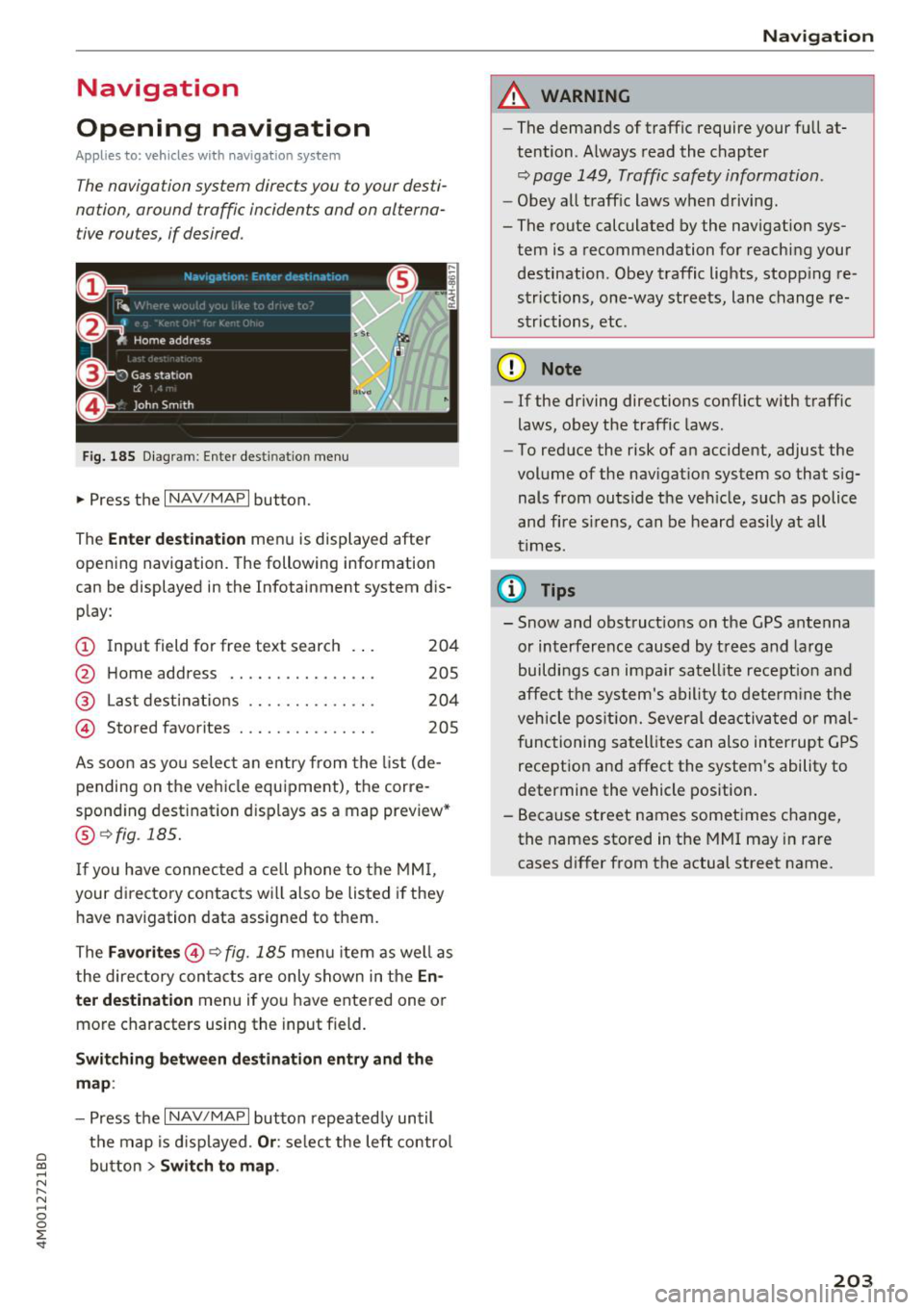
Fig. 185 Diagram: Ente r dest ination menu
.. Press the I NAV/MAPI button.
The
Ente r des tinatio n menu is displayed after
opening navigation. The following information
can be displayed in the Infotainment system dis
play:
(D I nput field for free text search 204
@ Home address . . . . . . . . . . . . . . . . 205
@ Last dest inatio ns . . . . . . . . . . . . . . 204
@ Stored favorites . . . . . . . . . . . . . . . 205
As soon as yo u select an entry from the list (de
pending on the ve hicle equipment), the corre
spond ing destination displays as a map preview*
@ r:::>fig .185.
If you have connec ted a cell phone to the MM I,
your di rectory contacts will also be listed if they
have navigation data assigned to them.
The
Fav orites @r::> fig. 185 menu item as we ll as
the directory contacts are only shown in the
E n
t e r d estination
menu if you have entered one or
more characters using the input field.
Swi tching betw een d estination entr y and th e
map :
-Press the I NAV/MAPI button repeated ly until
the map is d isplayed .
Or: select the left contro l
a ~ button > Switch to map .
N r--. N ~ 0
0
:E '
A WARNING
-The demands of traffic require your full at
tention. Always read the chapter
r:::> page 149, Traffic safety information.
-Obey all traff ic laws when driving.
- The route calculated by the navigation sys-
tem is a recommendation for reaching your
destination. Obey traffic lights, stopp ing re
strictions, one-way streets, lane change re
strictions, etc.
(D Note
- If the driving directions conflict with traffic
laws, obey the traffic laws .
- To reduce the risk of an accident, adjust the
volume of the nav igation system so that sig
nals from outs ide the veh icle, such as police
and f ire s irens, can be heard easily at all
times.
Ci) Tips
- Snow and obstruct ions on the GPS antenna
or interference caused by t rees and large
buildings can impair satell ite recept ion and
affect the system's ability to dete rm ine the
veh icle pos it ion. Several deactivated or mal
functioning satell ites can also interrupt G PS
recept ion and affect the system's ability to
determine the vehicle position.
- Because street names sometimes change, the names stored in the MMI may in rare
cases d iffer from the actual street name.
203