infotainment AUDI R8 COUPE 2020 User Guide
[x] Cancel search | Manufacturer: AUDI, Model Year: 2020, Model line: R8 COUPE, Model: AUDI R8 COUPE 2020Pages: 308, PDF Size: 82.41 MB
Page 45 of 308

4S1012721BA
Lights and Vision
ZA\ WARNING
High beams can cause glare for other drivers,
which increases the risk of an accident. For
this reason, only use the high beams or the
headlight flasher when they will not create
glare for other drivers.
thee
Applies to: vehicles with high beam assistant
The high beam assistant automatically turns the
high beams on or off depending on the surround-
ing conditions.
Asensor on the rearview mirror mount can detect
light sources from other road users. The high
beams switch on or off automatically depending
on the position of vehicles driving ahead and on-
coming vehicles, the vehicle speed, and other en-
vironmental and traffic conditions.
Activating high beam assistant
Requirement: the light switch must be set to AU-
TO, the low beams must be switched on and the
high beam assistant must be switched on in the
Infotainment system > page 44.
> To activate the high beam assistant, press the
lever forward @) > page 42, fig. 51. The 54 in-
dicator light appears in the Infotainment sys-
tem display and the high beams switch on/off
automatically. The indicator light Fad turns on if
the high beams were switched on.
Switching the high beams on or off manually
If the high beams did not switch on or off auto-
matically as expected, you may switch them on or
off manually instead:
> To switch the high beams on manually, press
the lever into position @). The ES indicator
light turns on.
> To switch the high beams off manually, pull the
lever back @). The high beam assistant is deac-
tivated.
Operating the headlight flasher
> To operate the headlight flasher when the high
beam assistant is activated and high beams are
switched off, pull the lever back @). The high
beam assistant remains active.
Messages in Infotainment display
High beam assistant: malfunction! See owner's
manual
Drive immediately to an authorized Audi dealer
or authorized Audi Service Facility to have the
malfunction repaired. You can still switch the
high beams on or off manually.
High beam assistant: currently unavailable.
Camera view limited due to surroundings. See
owner's manual
The camera view is blocked, for example by a
sticker or debris.
The sensor is located between the interior rear-
view mirror and the windshield. Do not place any
stickers
in this area on the windshield.
ZA WARNING
High beam assistant is only intended to assist
the driver. The driver is still responsible for
controlling the headlights and switching them
manually depending on light and visibility
conditions. It may be necessary to operate
them manually in situations such as:
— In adverse weather conditions such as fog,
heavy rain, blowing snow or spraying water.
— On roads where oncoming traffic may be
partially obscured, such as expressways.
— When there are road users that do not have
sufficient lighting, such as bicyclers or vehi-
cles with dirty tail lamps.
—In tight curves and on steep hills.
— In poorly lit areas.
— With strong reflectors, such as signs.
— If the area of the windshield near the sensor
is fogged over, dirty, icy or covered with a
sticker.
G@) Tips
The high beam assistant is deactivated if you
manually switch the high beam high beam
headlights on or off @) instead of waiting for
the system to do it automatically.
43
Page 46 of 308
![AUDI R8 COUPE 2020 User Guide Lights and Vision
Adjusting the exterior lighting
The functions are adjusted in the Infotainment
system.
> Select in the Infotainment system: [MENU] but-
ton > Vehicle > left control b](/img/6/57639/w960_57639-45.png "AUDI R8 COUPE 2020 User Guide Lights and Vision
Adjusting the exterior lighting
The functions are adjusted in the Infotainment
system.
> Select in the Infotainment system: [MENU] but-
ton > Vehicle > left control b")
Lights and Vision
Adjusting the exterior lighting
The functions are adjusted in the Infotainment
system.
> Select in the Infotainment system: [MENU] but-
ton > Vehicle > left control button > Vehicle
settings > Exterior lighting.
Automatic headlights
You can adjust the following settings in the Auto-
matic
headlights menu:
Activation time - You can adjust if the headlights
switch on Early, Medium, or Late according to
the sensitivity of the light sensor.
Headlight assistant* - You can switch the high
beam assistant* on and off. On vehicles with laser
high
beams, the laser light can be activated or
deactivated.
Daytime running lights*
USA models: the daytime running lights can be
switched on or off using the MMI. Select On or
Off.
Canada models: The daytime running lights can-
not be turned off. The lights activate automati-
cally each time the ignition is switched on. This
menu item is shown with a “gray background”.
Entry/exit lighting
The entry lighting function illuminates the area
outside the vehicle when you unlock the vehicle
when it is dark. To switch on the function, select
Entry/exit lighting.
The exit lighting function illuminates the area
outside the vehicle when you turn the ignition off
and open the driver's door when it is dark. To
switch on the function, select Entry/exit light-
ing.
The entry/exit lighting only works when it is dark
and the light switch is in the AUTO position.
44
Emergency flashers
[645-0027
|
Fig. 52 Center console: emergency flasher button
The emergency flashers makes other drivers
aware of your vehicle in dangerous situations.
> Press the A button to switch the emergency
flashers on or off.
You can indicate a lane change or a turn when the
emergency flashers are switched on by using the
turn signal lever. The emergency flashers stop
temporarily.
The emergency flashers also work when the igni-
tion is turned off.
@) Tips
You should switch the emergency flashers on
if:
— you are the last car in a traffic jam so that
all other vehicles approaching from behind
can see your vehicle
— your vehicle has broken down or you are
having an emergency
— your vehicle is being towed or if you are tow-
ing another vehicle
Page 47 of 308
4S1012721BA
Lights and Vision
Interior lighting
Interior lighting
Fig. 53 Headliner: interior lighting
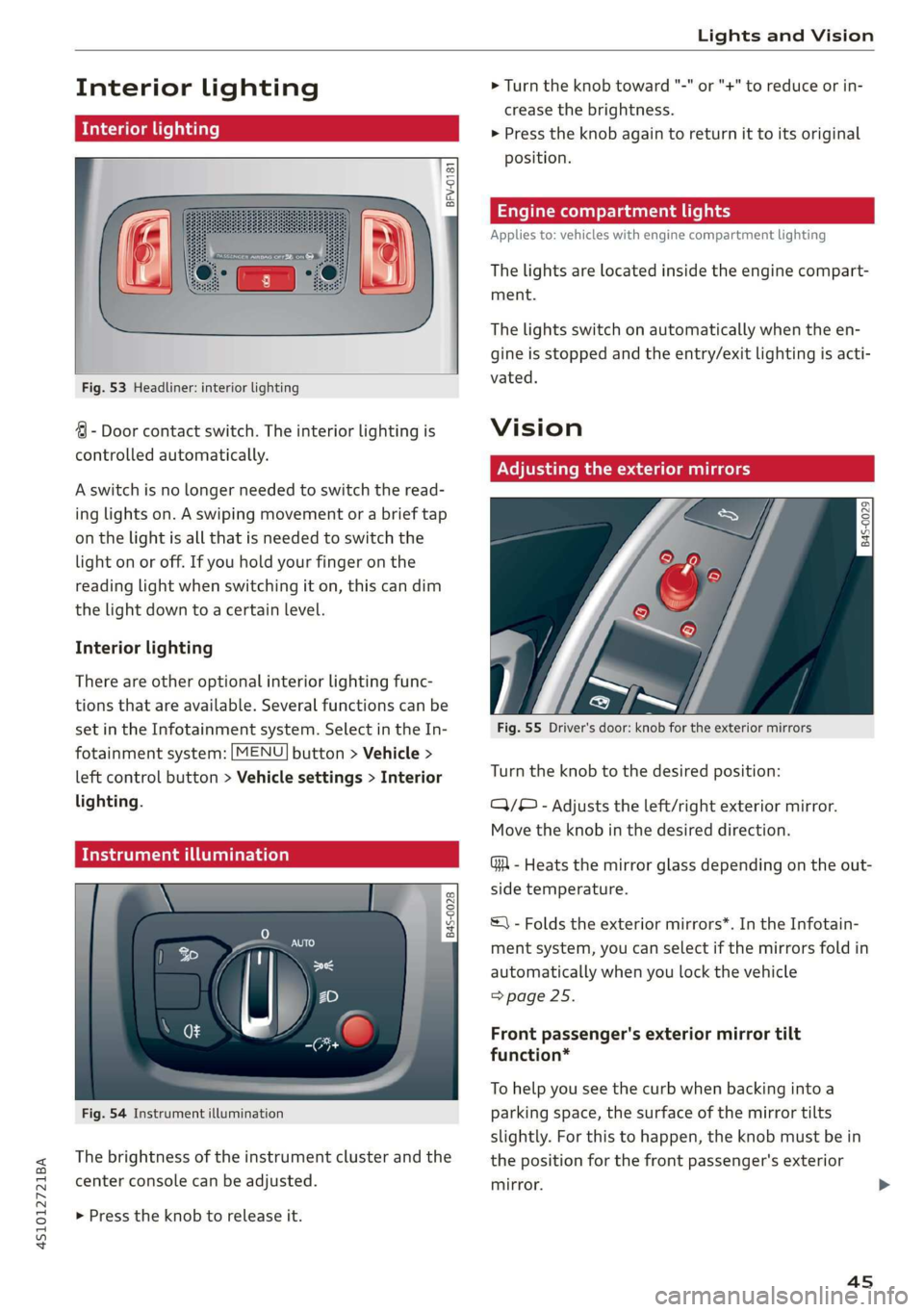
4 - Door contact switch. The interior lighting is
controlled automatically.
A switch is no longer needed to switch the read-
ing lights on. A swiping movement or a brief tap
on the light is all that is needed to switch the
light on or off. If you hold your finger on the
reading light when switching it on, this can dim
the light down to a certain level.
Interior lighting
There are other optional interior lighting func-
tions that are available. Several functions can be
set in the Infotainment system. Select in the In-
fotainment system: [MENU] button > Vehicle >
left control button > Vehicle settings > Interior
lighting.
Tide uae art ceya
© S
Ss Ss
od = a
Fig. 54 Instrument illumination
The brightness of the instrument cluster and the
center console can be adjusted.
> Press the knob to release it.
> Turn the knob toward "-" or "+" to reduce or in-
crease the brightness.
> Press the knob again to return it to its original
position.
Engine compartment lights
Applies to: vehicles with engine compartment lighting
The lights are located inside the engine compart-
ment.
The lights switch on automatically when the en-
gine is stopped and the entry/exit lighting is acti-
vated.
Vision
Adjusting the exterior mirrors
Fig. 55 Driver's door: knob for the exterior mirrors
Turn the knob to the desired position:
QQ/B - Adjusts the left/right exterior mirror.
Move the knob in the desired direction.
GA - Heats the mirror glass depending on the out-
side temperature.
©) - Folds the exterior mirrors*. In the Infotain-
ment system, you can select if the mirrors fold in
automatically when you lock the vehicle
=> page 25.
Front passenger's exterior mirror tilt
function*
To help you see the curb when backing into a
parking space, the surface of the mirror tilts
slightly. For this to happen, the knob must be in
the position for the front passenger's exterior
mirror.
45
Page 49 of 308
4S1012721BA
Lights and Vision
Applies to: vehicles with vanity mirror
§ d g 3
Fig. 56 Sun visor
The vanity mirrors on the sun visors have covers.
Slide the cover in the direction of the arrow.
Windshield wipers
Switching the windshield wipers on
BFV-0019
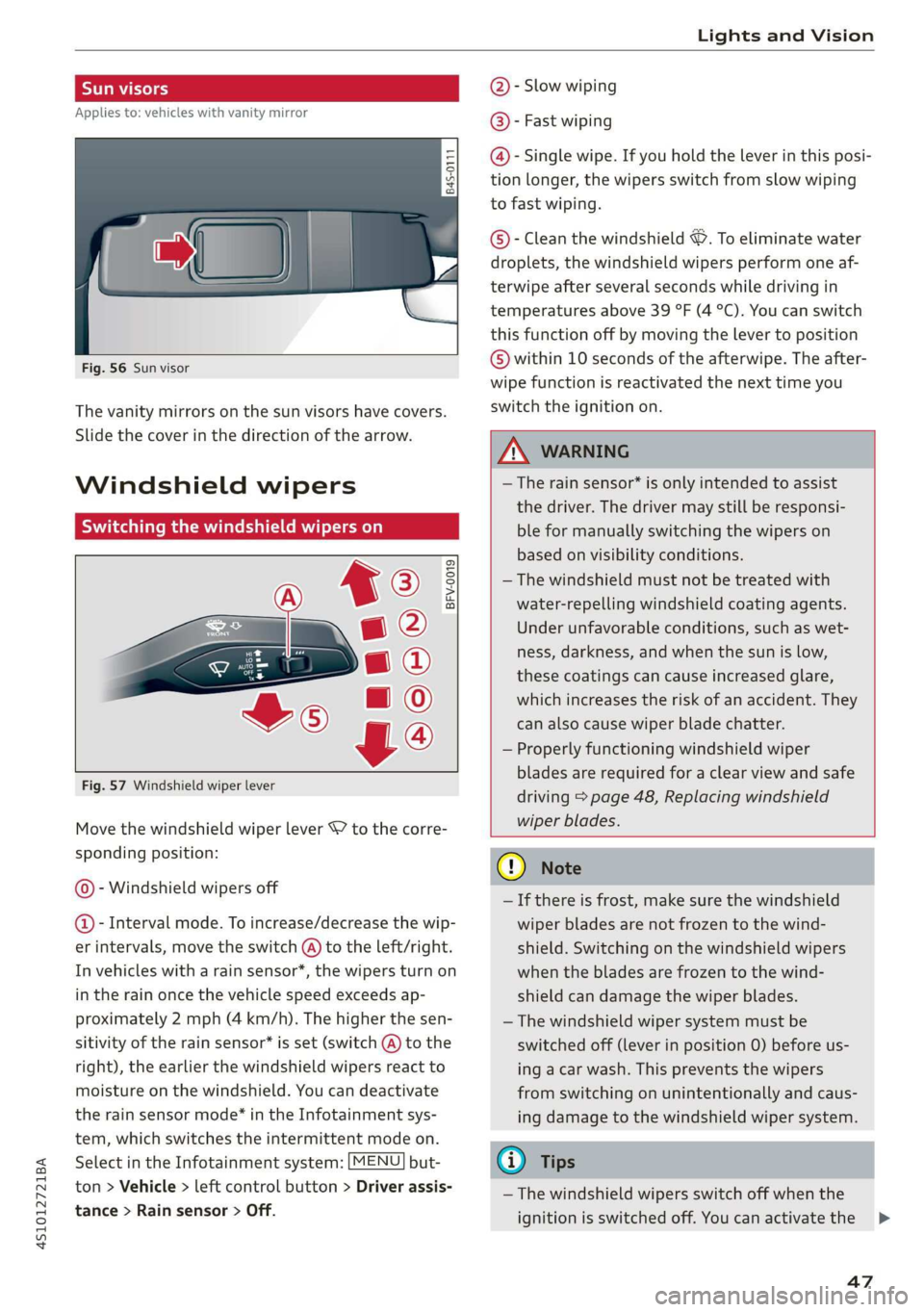
Fig. 57 Windshield wiper lever
Move the windshield wiper lever S7 to the corre-
sponding position:
@- Windshield wipers off
@- Interval mode. To increase/decrease the wip-
er intervals, move the switch @) to the left/right.
In vehicles with a rain sensor*, the wipers turn on
in the rain once the vehicle speed exceeds ap-
proximately 2 mph (4 km/h). The higher the sen-
sitivity of the rain sensor* is set (switch @) to the
right), the earlier the windshield wipers react to
moisture on the windshield. You can deactivate
the rain sensor mode®* in the Infotainment sys-
tem, which switches the intermittent mode on.
Select in the Infotainment system: [MENU] but-
ton > Vehicle > left control button > Driver assis-
tance > Rain sensor > Off.
@- Slow wiping
@®- Fast wiping
@- Single wipe. If you hold the lever in this posi-
tion longer, the wipers switch from slow wiping
to fast wiping.
©®- Clean the windshield ©. To eliminate water
droplets, the windshield wipers perform one af-
terwipe after several seconds while driving in
temperatures above 39 °F (4 °C). You can switch
this function off by moving the lever to position
© within 10 seconds of the afterwipe. The after-
wipe function is reactivated the next time you
switch the ignition on.
Z\ WARNING
—The rain sensor* is only intended to assist
the driver. The driver may still be responsi-
ble for manually switching the wipers on
based on visibility conditions.
—The windshield must not be treated with
water-repelling windshield coating agents.
Under unfavorable conditions, such as wet-
ness, darkness, and when the sun is low,
these coatings can cause increased glare,
which increases the risk of an accident. They
can also cause wiper blade chatter.
— Properly functioning windshield wiper
blades are required for a clear view and safe
driving > page 48, Replacing windshield
wiper blades.
CQ) Note
— If there is frost, make sure the windshield
wiper blades are not frozen to the wind-
shield. Switching on the windshield wipers
when the blades are frozen to the wind-
shield can damage the wiper blades.
— The windshield wiper system must be
switched off (lever in position 0) before us-
ing a car wash. This prevents the wipers
from switching on unintentionally and caus-
ing damage to the windshield wiper system.
@ Tips
— The windshield wipers switch off when the
ignition is switched off. You can activate the
47
>
Page 60 of 308
Warm and cold
— Switching manual recirculation mode on and
off: Press the > button.
— Automatic* recirculation mode: auto recircula-
tion needs to be activated in the Infotainment
system. Select in the Infotainment system:
[MENU] button > Vehicle > left control button >
Vehicle settings > Air conditioning > Auto re-
circulation. The air quality sensor that is de-
signed for diesel and gasoline exhaust auto-
matically switches the recirculation mode on or
off depending on the level of pollutants in the
outside air.
In recirculation mode, the air inside the vehicle is
circulated and filtered. This prevents the unfil-
tered air outside the vehicle from entering the
vehicle interior. Switching recirculation mode on
when driving through a tunnel or when sitting in
traffic is recommended > A.
Pressing the <> button, AUTO or the & button
switches recirculation mode off.
® Defrosting
The windshield and side windows are defrosted
or cleared of condensation as quickly as possible.
The optimum amount of air flows mainly out of
the vents under the windshield. Recirculation
mode switches off. The temperature is controlled
automatically.
The AUTO button switches the defroster off.
OFF climate control system
The climate control system is switched on and off
by pressing the button. It also switches on when
you press another button or a knob. Airflow from
outside is blocked when the climate control sys-
tem is switched off.
{s) Rear window defogger
If the rear window defogger is activated when
the ignition is switched on, the battery manage-
ment determines based on the battery charge if
it is possible to turn on. Otherwise, the rear win-
dow defogger functions with the engine running
and switches off automatically after approxi-
mately 10 - 20 minutes, depending on the out-
side temperature.
58
To prevent the rear window defogger from
switching
off automatically, press and hold the
® button for more than two seconds. This re-
mains stored up to approximately 15 minutes af-
ter turning off the ignition.
ss Seat heating*
If you press the button a the seat heating is
switched on at the highest level (3). The LEDs in-
dicate the temperature level. To reduce the tem-
perature, press the button again. To switch the
seat heating off, press the button repeatedly un-
til the LED turns off.
The seat heating switches automatically from
setting 3 to setting 2 after approximately ten mi-
nutes.
ZA WARNING
— You should not use the recirculation mode
for an extended period of time, because no
fresh air is drawn in and the windows can
fog when cooling mode is switched off. This
increases the risk of an accident.
— Individuals with reduced sensitivity to pain
or temperature could develop burns when
using the seat heating function. To reduce
the risk of injury, these individuals should
not use seat heating.
@) Note
To reduce the risk of damage to the seat heat-
ing elements, do not kneel on the seats or
place heavy pressure on one area of the seat.
(i) Tips
— The setting for the seat heating on the driv-
er's side is assigned to the key that is in use.
— If the front passenger's seat heating is
turned on, it will not turn on again automat-
ically if more than 10 minutes have passed
between switching the ignition off and
switching it on again.
Page 72 of 308
Driving
transmission, because it is not lubricated
under those circumstances > page 278,
Towing.
— The transmission can overheat and be dam-
aged under certain driving and traffic condi-
tions such as frequent starts, creeping for a
long time, or stop-and-go traffic. When the
fs} or i] indicator light turns on, stop the
vehicle at the next opportunity and let the
transmission cool > page 72.
G) Tips
For safety reasons, the parking brake only re-
leases automatically when the driver's door is
closed.
Launch Control Program
The Launch Control Program enables maximum
acceleration.
Requirement: the engine and transmission must
be at operating temperature and the steering
wheel must not be turned. The performance
mode* must be selected or dynamic mode must
be selected in Audi drive select.
> With the engine running, press the |SOFF] but-
ton briefly one time).
> Press the brake pedal firmly with your left foot
and hold it all the way down for at least 1 sec-
ond.
> Press the accelerator pedal down completely at
the same time until the engine reaches a high
RPM that remains constant and the message
appears Launch control program: activated ap-
pears.
> Remove your left foot from the brake.
ZA WARNING
— Always adapt your driving to the traffic flow.
— Only use Launch Control when road and traf-
fic conditions allow it and other drivers will
D_ The ESC light turns on and stays on, and the message Sta-
bilization control (ESC): sport. Warning! Limited stabili-
ty appears temporarily in the Infotainment system to indi-
cate that the system was deactivated.
70
not be endangered or impacted by your driv-
ing and the vehicle's acceleration.
— Please note that the drive wheels can spin
and the vehicle can break away when ESC
sport mode is switched on, especially when
the road is slippery.
— Once the vehicle has started moving, press
the |[& OFF] button briefly to turn the ESC
sport mode off again.
G@) Tips
— The transmission temperature may increase
significantly after using the launch control
program. If that happens, the program may
not be available for a few minutes. It will be
available again after a cool-down period.
— When accelerating using the launch control
program, all vehicle parts are subject to
heavy loads. This can lead to increased wear.
Page 76 of 308
Assist systems
Assist systems
Speed warning system
Applies to: vehicles with speed warning system
The speed warning system helps you to stay be-
low a specified maximum speed that can be set,
changed or deleted in the Infotainment system.
The speed warning system warns you if you are
exceeding the maximum speed that you have set.
A warning tone will sound as soon as your speed
exceeds the stored value slightly. The ow in-
dicator light and a message will appear in the in-
strument cluster display at the same time. The
bbe) indicator light and the message turn off if
the speed falls back below the stored maximum
speed.
Setting a threshold is recommended if you would
like to be reminded when you reach a certain
maximum speed. Situations where you may want
to do so include driving in a country with a gener-
al speed limit or if there is a specified maximum
speed for winter tires.
Setting the warning threshold
> Select in the Infotainment system: [MENU] but-
ton > Vehicle > left control button > Driver as-
sistance > Speed warning > Manual.
G) Tips
Regardless of the speed warning system, you
should always monitor your speed using the
speedometer and make sure you are following
the legal speed limit.
Cruise control system
Applies to: vehicles with cruise control system
The cruise control system assists the driver in
maintaining a constant speed above approxi-
mately 15 mph (20 km/h). The system maintains
the desired speed by braking and accelerating.
74
Z\ WARNING
— Always pay attention to the traffic around
your vehicle when the cruise control system
is in operation. As the driver, you are always
responsible for controlling your vehicle
speed and the distance between your vehicle
and
other vehicles.
— For safety reasons, cruise control should not
be used in the city, in stop-and-go traffic, on
winding roads, and when road conditions are
poor (such as ice, fog, gravel, heavy rain,
and conditions that could lead to hydroplan-
ing), because this increases the risk of an ac-
cident.
— Switch the cruise control off temporarily
when driving in turning lanes, highway exits,
or in construction zones.
—To reduce the risk of an accident, you should
only resume the stored speed if it is suitable
for the current traffic conditions.
() Note
Before driving downhill a long distance on a
steep hill, decrease your speed and select a
lower gear. This makes use of the engine brak-
ing effect and reduces the load placed on the
brakes.
G) Tips
The brake lights turn on when the brakes are
applied automatically.
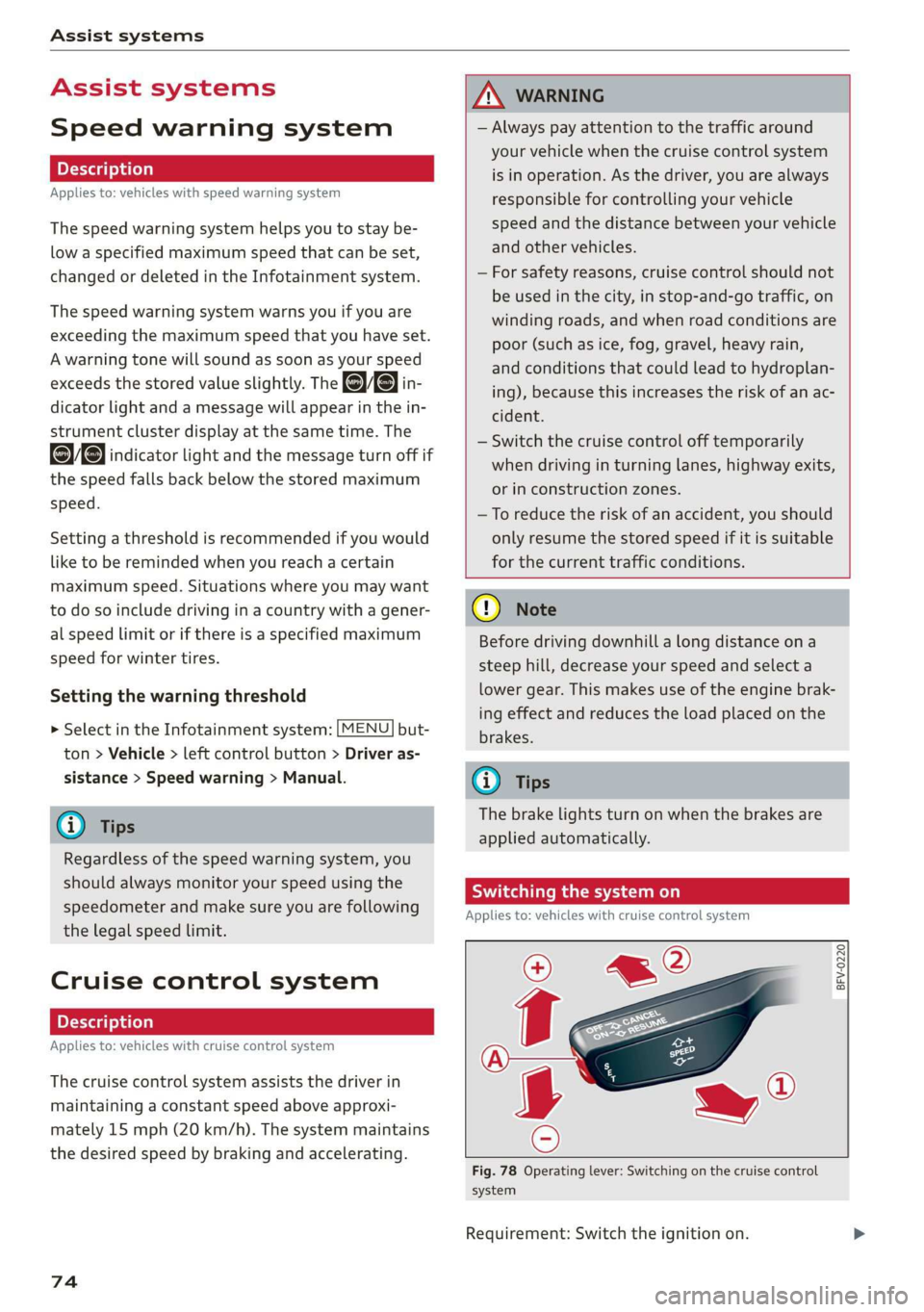
Switching the system on
Applies to: vehicles with cruise control system
BFV-0220
Fig. 78 Operating lever: Switching on the cruise control
system
Requirement: Switch the ignition on.
Page 78 of 308
Assist systems
Applies to: vehicles with cruise control system
ICRUISE| / §) Speed control system: currently un-
available. See owner's manual
If the indicator light turns on and this message
appears, the cruise control system has been deac-
tivated. There is a temporary malfunction, for ex-
ample the brakes are overheating. Switch the
cruise control system on again later.
Lap timer
Lap timer
You can measure and analyze lap times with the
lap timer in the display. The time is measured in
minutes, seconds and 1/10 seconds. With lap
times longer than 60 minutes, the hour is also
shown and the display of 1/10 seconds is re-
moved.
The time measurement on an individual lap ends
after 99 hours 59 minutes and 59 seconds. A new
lap starts automatically after that.
The measurement ends after a maximum of 30
laps. You can then evaluate the lap times or start
a new time measurement.
You can control the lap timer using the controls
on the multifunction steering wheel > page 76.
ZA\ WARNING
Your focus should always be on driving your
vehicle safely. As the driver, you have com-
plete responsibility for safety in traffic. Only
use the functions such as the lap timer in such
a way that you always maintain complete con-
trol over your vehicle in all traffic situations.
G) Tips
You can retrieve information from the trip
computer while the lap timer stopwatch is
running.
76
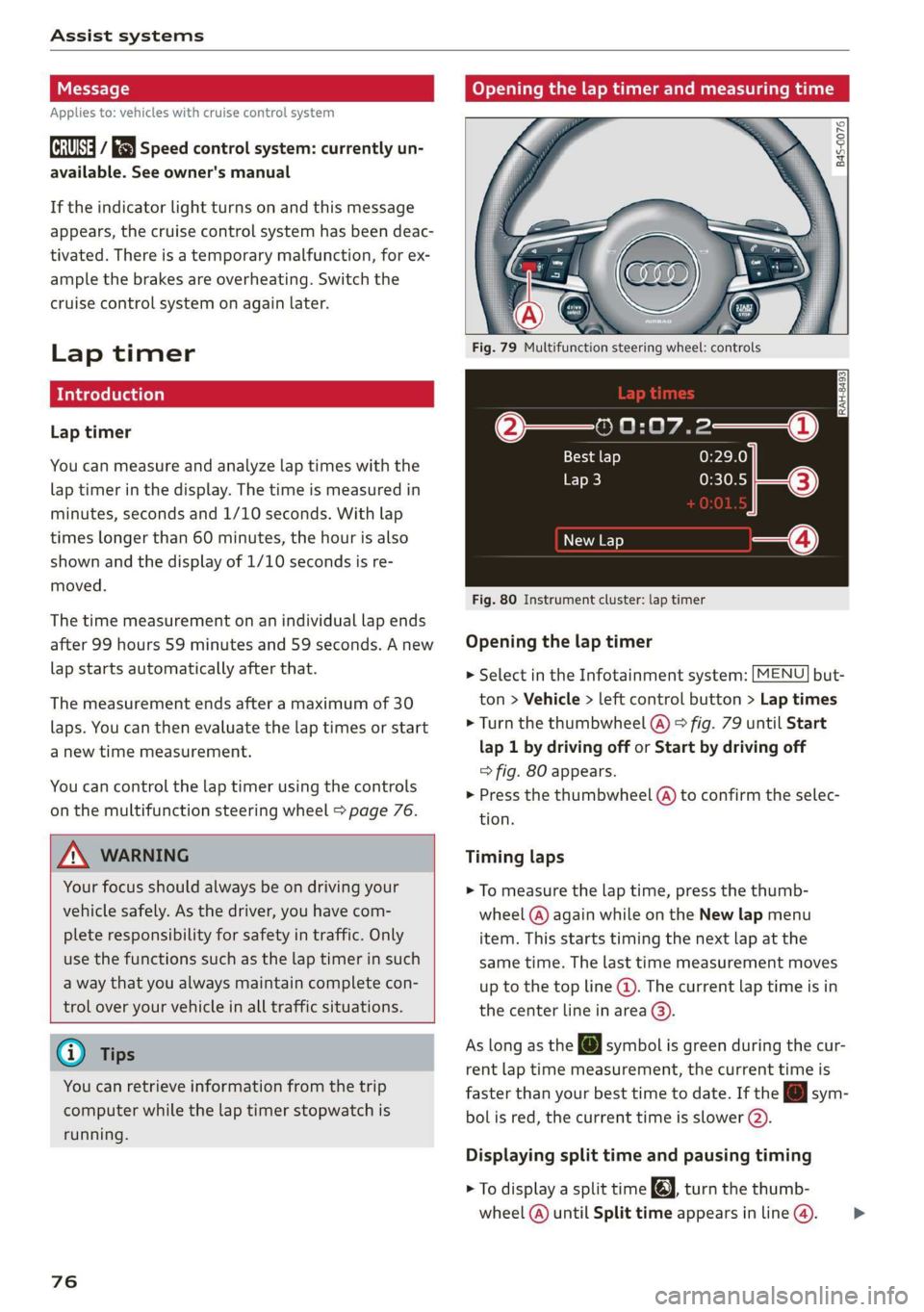
Opening the lap timer and measuring time
B4S-0076
Fig. 79 Multifunction steering wheel: controls
@—» 0:07.2——_@
Best lap 0:29.0
To} 0:30.5
New Lap
Fig. 80 Instrument cluster: lap timer
Opening the lap timer
> Select in the Infotainment system: [MENU] but-
ton > Vehicle > left control button > Lap times
> Turn the thumbwheel @) ° fig. 79 until Start
lap 1 by driving off or Start by driving off
=> fig. 80 appears.
> Press the thumbwheel (a) to confirm the selec-
tion.
Timing laps
> To measure the lap time, press the thumb-
wheel @) again while on the New lap menu
item. This starts timing the next lap at the
same time. The last time measurement moves
up to the top line @). The current lap time is in
the center line in area @).
As
long as the [J symbol is green during the cur-
rent lap time measurement, the current time is
faster than your best time to date. If the @ sym-
bolis red, the current time is slower (@).
Displaying split time and pausing timing
> To display a split time @, turn the thumb-
wheel (@) until Split time appears in line @). >
Page 79 of 308
4S1012721BA
Assist systems
Press the thumbwheel (@) to confirm the selec-
tion. The split time appears for approximately
10 seconds in area @). The timing of the cur-
rent lap continues.
If you would like to insert a pause fi immediate-
ly after the split time, first press the thumbwheel
@ to confirm the menu item Reset values with
OK.
> To insert a pause, turn the thumbwheel @) until
Pause appears in line (). Press the thumbwheel
@ to confirm the selection. The pause symbol
Hl appears in area.
> To continue timing, press the thumbwheel (@).
If timing is paused, you can continue it later even
if you switch the ignition off.
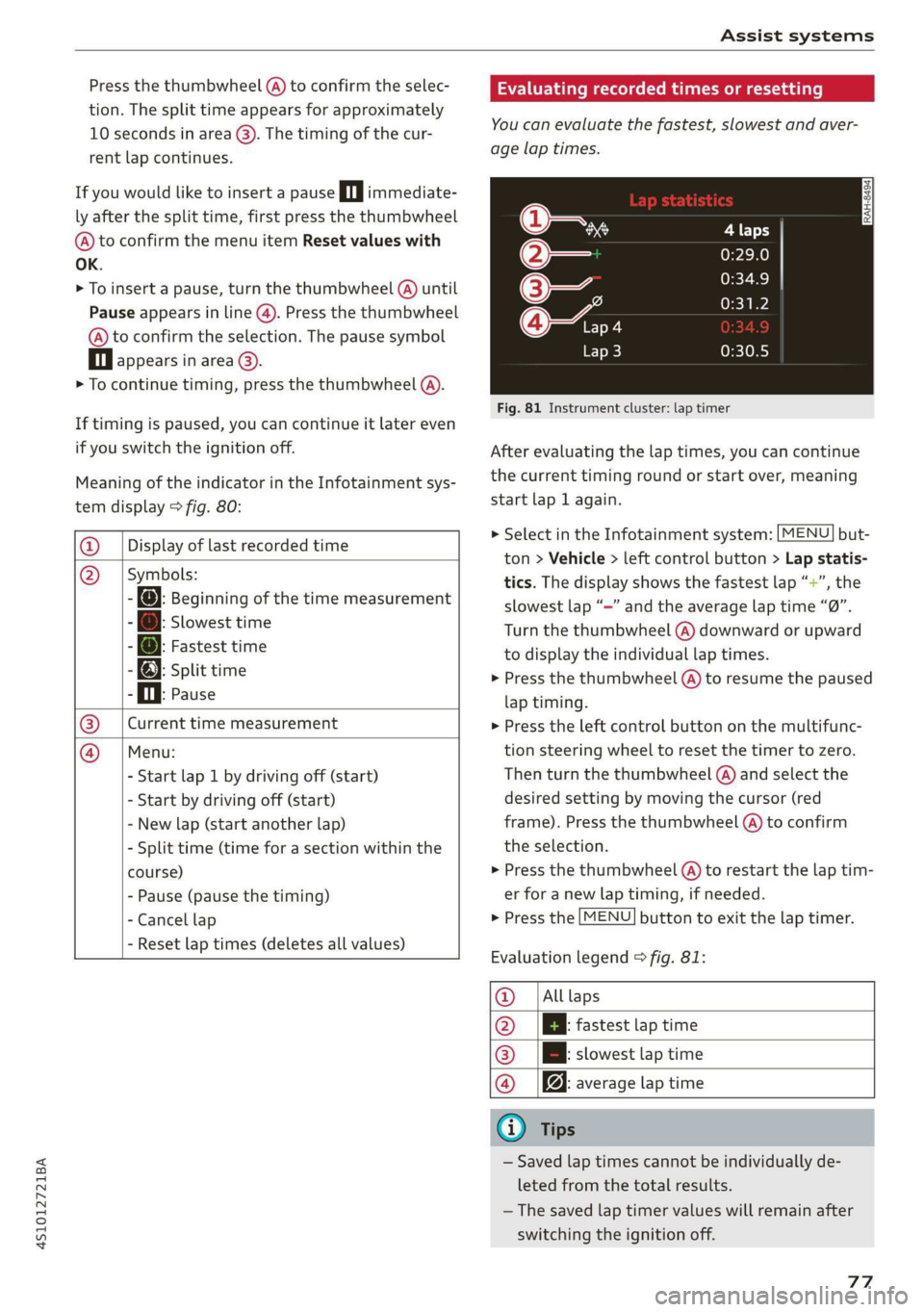
Meaning of the indicator in the Infotainment sys-
tem display > fig. 80:
@ _| Display of last recorded time
@_ |Symbols:
- fo): Beginning of the time measurement
: Slowest time
: @: Fastest time
- @; split time
P i. Pause
Current time measurement
Menu:
- Start lap 1 by driving off (start)
- Start by driving off (start)
- New lap (start another lap)
- Split time (time for a section within the
course)
- Pause (pause the timing)
- Cancel lap
|
- Reset lap times (deletes all values)
Evaluating recorded times or resetting
You can evaluate the fastest, slowest and aver-
age lap times.
Fig. 81 Instrument cluster: lap timer
After evaluating the lap times, you can continue
the current timing round or start over, meaning
start lap 1 again.
> Select in the Infotainment system: [MENU] but-
ton > Vehicle > left control button > Lap statis-
tics. The display shows the fastest lap “+”, the
slowest lap “—” and the average lap time “0”.
Turn the thumbwheel (@) downward or upward
to display the individual lap times.
> Press the thumbwheel () to resume the paused
lap timing.
» Press the left control button on the multifunc-
tion steering wheel to reset the timer to zero.
Then turn the thumbwheel @) and select the
desired setting by moving the cursor (red
frame). Press the thumbwheel @) to confirm
the selection.
> Press the thumbwheel (@) to restart the lap tim-
er for a new lap timing, if needed.
> Press the [MENU] button to exit the lap timer.
Evaluation legend © fig. 81:
@_ |Alllaps
@ |[EBl fastest tap time
@® | slowest lap time
@ |f@ average lap time
G) Tips
— Saved lap times cannot be individually de-
leted from the total results.
—The saved lap timer values will remain after
switching the ignition off.
77
Page 80 of 308
Assist systems
Audi drive select (drive
settings)
Drive select makes it possible to experience dif-
ferent types of vehicle characteristics in one vehi-
cle. The driver can select from four modes: Com-
fort, Auto, Dynamic and Individual using the
ssa button on the steering wheel or through the
Infotainment system to switch between a sporty
and a comfortable driving mode, for example. In
the Individual mode, the settings can be adjust-
ed to your personal preferences. This makes it
possible to combine settings such as a sporty en-
gine setting with light steering.
Z\ WARNING
Using Audi drive select incorrectly can lead to
collisions, other accidents and serious inju-
ries.
The vehicle setup in each mode depends on the
vehicle's features.
Engine and automatic transmission
Depending on the mode, the engine and auto-
matic transmission respond more quickly or in a
more balanced manner to accelerator pedal
movements.
Suspension control (Audi magnetic ride)*
The suspension control uses sensors to record in-
formation regarding steering movements, brak-
ing and acceleration operations by the driver, as
well as information about the road surface, driv-
ing speed, and load. With drive select, you can
adjust the suspension control to sporty (dynam-
ic), comfortable (comfort) or balanced (auto).
Steering
The power steering adapts. Indirect steering that
moves easily as in comfort mode is especially
suited to long drives on a highway. The dynamic
mode provides sporty, direct steering.
78
Torque distribution*
The all wheel drive distributes the drive power to
the rear axle based on the situation. The distribu-
tion of power varies depending on the selected
mode from moderate (Comfort) to sporty (Dy-
namic). The goal is a high level of agility and abil-
ity to accelerate on curves. The vehicle is very re-
sponsive to steering.
Engine sound
The engine sound adapts to the current mode
and can be subtle to sporty.
@ Tips
In some models, the maximum vehicle speed
can only be reached in the auto and dynamic
modes.
Selecting the driving mode
You can choose between comfort, auto, dynamic
and individual.
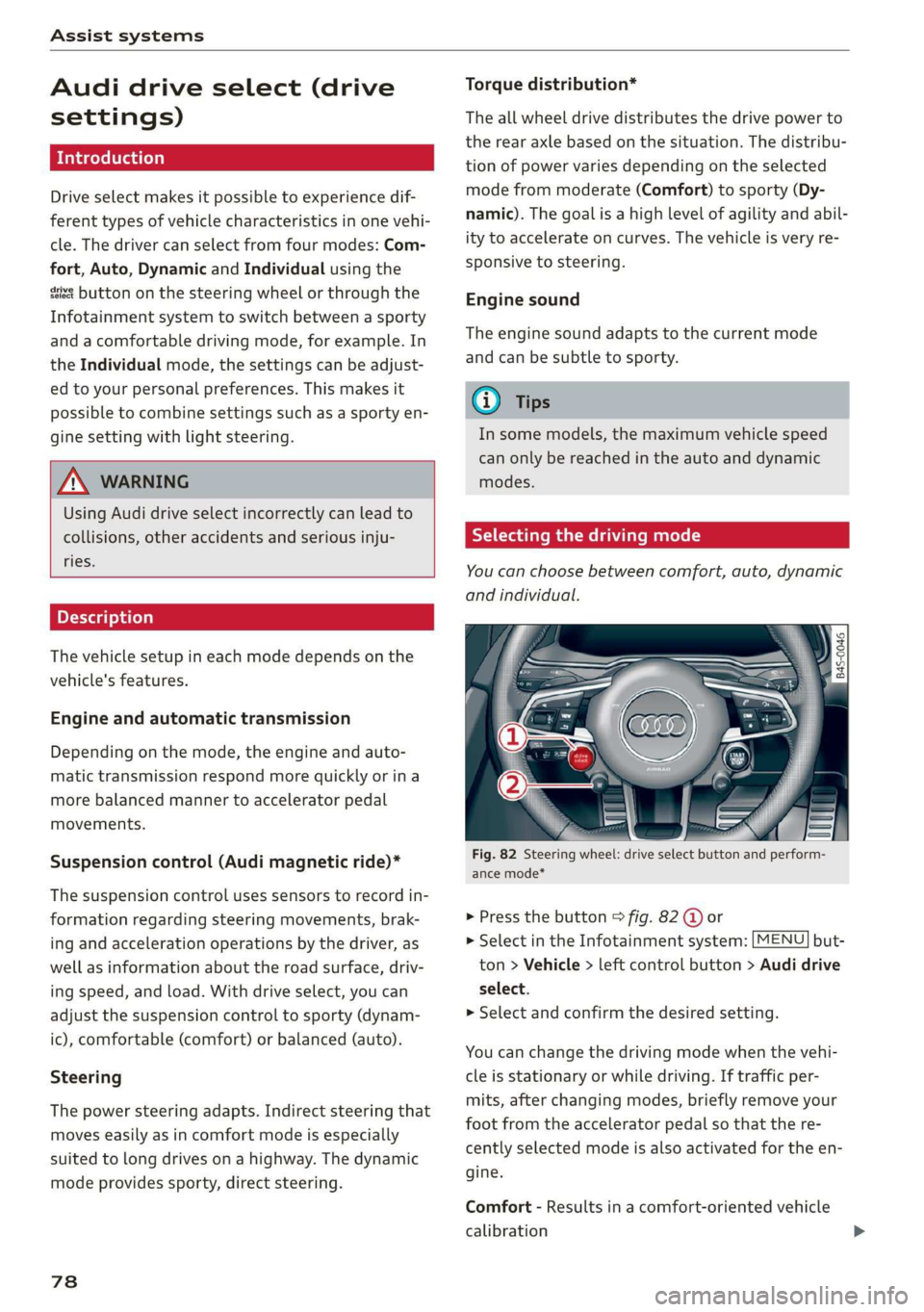
io
):
Fig. 82 Steering wheel: drive select button and perform-
ance mode*
> Press the button > fig. 82 @ or
> Select in the Infotainment system: [MENU] but-
ton > Vehicle > left control button > Audi drive
select.
> Select and confirm the desired setting.
You can change the driving mode when the vehi-
cle is stationary or while driving. If traffic per-
mits, after changing modes, briefly remove your
foot from the accelerator pedal so that the re-
cently selected mode is also activated for the en-
gine.
Comfort - Results in a comfort-oriented vehicle
calibration