warning AUDI R8 SPYDER 2011 Repair Manual
[x] Cancel search | Manufacturer: AUDI, Model Year: 2011, Model line: R8 SPYDER, Model: AUDI R8 SPYDER 2011Pages: 244, PDF Size: 59.74 MB
Page 85 of 244
@ Tips
The warning/indicator light E in the instru
ment cluster comes on in the event of a
malfunct ion. Dr ive to the closest author
ized Aud i dealer as soon as possible and
have the malfunction repaired.
On th e ro ad 83
Page 86 of 244
84 Manual transmission
Manual transmission
Launch Control
Program
Applies to vehicles: with VlO engi ne and manua l trans
mission
The Launch Control Program enables maxi
mum acceleration.
Requirement : The engine must be at operat
ing temperature and the steering wheel must
not be turned.
• With the engine runn ing, press the
[!I but
ton one time. The ESP indicator light
fi in
the Driver Information System display illu
minates and the message
ESP sport· Warn
ing! Restricted stability
appears.
• Press the clutch and hold it down.
• Engage the first gear.
• Press the accelerator peda l all the way down
until the engine speed remains steady at
6500 RPM.
• Release the clutch carefully~.&_ .
.&_ WARNING
-Always adapt your driving to the traffic
flow.
- Only use Launch Control when road and
traffic conditions a llow it and other driv
ers wi ll not be endangered or annoyed by
your driv ing and the vehicle's accelera
tion.
- Please note that the driving wheels can
spin and the vehicle can break away
when ESP is sw itched off, especially
when the road is slippery.
- Once you have accelerated, you should
switch the ESP back on by pressing the
l:m
button.
(D Tips
- When accelerating using the Launch
Control program, all vehicle parts are
subject to heavy loads. This can result in
i ncreased wear.
- The Launch Control Program only func
tions when the parking brake is released and
the vehicle speed is less than 3 mph
(5 km/h).
Page 87 of 244
Automated manual transmission
Description
App lies to vehicles: with R tro nic
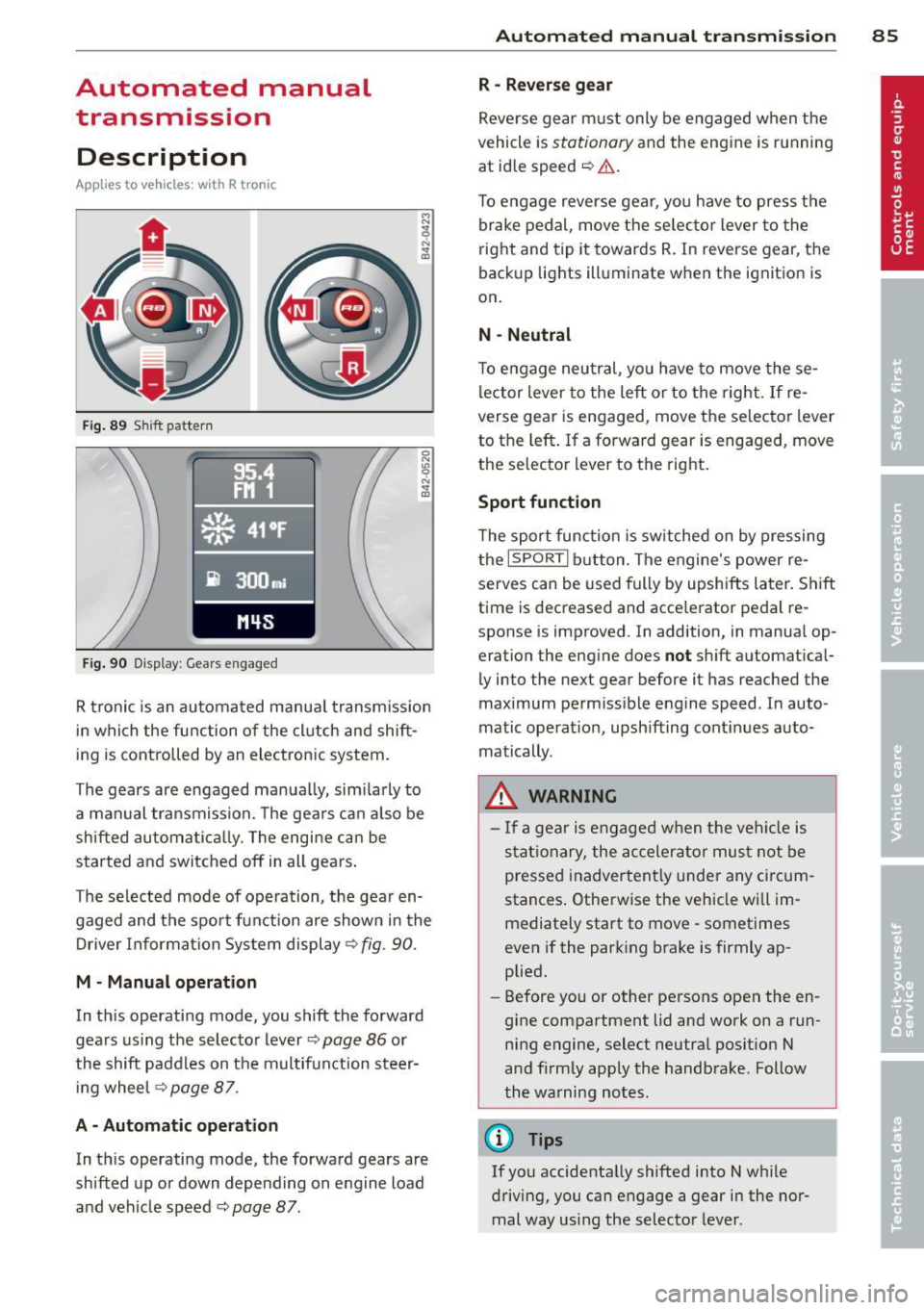
Fig . 89 S hift pattern
F ig. 90 Display : Gear s engaged
R tronic is an au tomated manua l transm iss ion
in which the function of the cl utch and shift
ing is controlled by an electronic system.
The gears are engaged manua lly, sim ilarly to
a manual transmission. The gears ca n also be
shifted automatica lly. The engine can be
started and switched off in all gears .
The selected mode of operation, the gear en gaged and the spor t funct ion are shown in the
Driver Information Sys tem display ¢
fig. 90.
M · Manual operation
In th is operating mode, you shift the forward
gears us ing the selecto r lever
¢ page 86 or
the shift paddles on the multifunction steer i ng whee l
¢page 87.
A - Automati c operation
In th is operating mode, the forward gears are
shifted up or down depending on engine load
and vehicle speed ¢
page 87.
Autom ated manual tr an sm iss ion 85
R -Rever se g ear
Reve rse gear m ust only be engaged when the
vehicle is
stationary and the engine is running
at id le speed
~ ,1. .
To engage reverse gear, you have to press the
brake pedal, move the selec to r lever to the
right and tip it towards R. In reverse gear, the
back up lights ill uminate when the ignition is
on .
N -Neutral
To engage neu tral, yo u have to move these
lector lever to the left or to the right .
If re
verse gear is engaged, move the selector lever
to the left . If a forward gear is engaged , move
the selector lever to the right.
Sport function
T he sport function is sw itched on by pressing
the
I SPORT I b utton. The engine's power re
serves can be used fully by upshifts later. Shift
t ime is decreased and acce lerator pedal re
sponse is improved . In addition, in manua l op
eration the eng ine does
not sh ift a utomat ical
ly into the next gear before it has reached the
maximum perm iss ible engine speed . In auto
matic operat io n, upsh ifting cont inues auto
matically .
_&. WARNING
- If a gear is engaged when the veh icle is
stat ionary, the accelera to r must not be
pressed inadvertent ly under any circum
stances . Otherwise the vehicle wi ll im
mediately start to move· sometimes
even if the park ing brake is firmly ap
plied.
- Before you or other persons open the en
gine compartment lid and work on a run ning engine, select neutral pos ition N
a nd firmly app ly the handbrake . Follow
the warning notes.
(!} Tips
If you accidenta lly shifted into N w hile
driving, you can engage a gear in the nor mal way us ing the selecto r lever.
Page 88 of 244
86 Automated manual transmi ssion
Manual operation
Appl ies to vehicles: with R tronic
R tronic allows the driver to shift gears man
ually.
Starting from a s top
,,. Press and ho ld the brake pedal.
,,. Move the selector lever to the left.
,,. Tap the se lector lever forward
G) .
,,. Re lease the brake pedal and accelerate
c:> & .
Shifting
,,. To shift up, tap the selector lever forward
G) .
,,. To shift down, tap the selector lever to the
rear Q.
Stopping t empor arily
,,. Prevent the vehicle from moving by using
the foot brake, e.g. at traffic signals .
,,. Do not acce lerate. If you do not press either
the brake pedal or the acce lerator pedal for
some time when stationary, neutra l position
N is engaged automatically and a chime
sounds.
P ark ing
,,. Press and ho ld the brake pedal c:> A .
,,. Apply the hand brake firm ly.
,,. Engage a gear.
,,. Switch the ignition
off.
St opping on an incline
,,. Always keep the veh icle stationary using the
foot brake to prevent it from "rolling back"
c:> A . Do not try to prevent the vehicle from
"rolling back" when a gear is engaged by in
creasing engine speed.
,,. Apply the hand brake firmly.
St arting on a h ill
,,. With a gear engaged, remove your foot from
the brake, accelerate and s low ly release the
hand brake.
When acce lerating, R tronic shifts into the
next gear in gears 1, 2, 3, 4 and 5 shortly be- fore the maximum permissible engine speed
is reached. Exception: You have activated the
sport funct ion
r::!) page 85 .
If you have se lected a lower gear than the c ur
rent one, R tronic will shift down only when
the engine wi ll not be over-revved .
You can swi tch to a utoma tic operation at any
t ime
<:!)page 87.
& WARNING ~
- Never leave your vehicle with the engine
r u nning while in gear. If you must leave
your vehicle with the engine running, set the park ing brake f irm ly and engage neu
tral N.
- With the engine r unning and a gear en
gaged, you have to hold the veh icle w ith
the foot brake .
- Do not accelerate when you sh ift gears
with the vehicle stationary and the en
g ine runn ing.
- Before driving down a steep slope, re
duce your speed and shift into a lower
gear with R tronic .
- Do not ride the brakes or apply the brake
pedal too often or too long . Constant
brak ing causes the brakes to overheat
and substantially reduces braking per
formance, increases braking d istance or
causes complete failure of the brake sys
tem .
(D Note
If you must stop on an incline, always ho ld
the veh icle in place with the foot b rake to
prevent it from rolling back. Neve r ho ld
the veh icle on an incline with a slipping
clutch. The clutch was overloaded if
C lutch
overheat ing! If po ssible ple ase stop vehi
cle appears in the Driver Informat ion Sys
tem d isplay.
Page 89 of 244
Automatic operation
Applies to vehicles: with R tronic
The forward gears are shi~ed up or down au
tomatically.
S tartin g from a stop
.. Press and hold the brake pedal.
.. Tap the se lector lever towards A.
.. Release the brake pedal and acce lerate
c::, A.
in Manual operation on page 86.
Under certain circumstances (driving in the
mounta ins for example), it can be beneficial
to switch temporarily to the manua l shift pro
gram
c::> page 86 in order to adjust the gear ra
tios to driving conditions manually.
Kick-down
Applies to vehicles : with R tronic
When you depress the accelerator pedal be
yond the resistance point, R tronic downshifts
into a lower gear, depending on vehicle speed
and engine rpm . The ups hift into the next
h igher gear takes place once the max imum
specified engine speed is reached. Exception:
You have activated the sport funct ion.
A WARNING
Please note that the d rive whee ls can spin
if kick -down is used on a smooth slippery
road - there is a risk of skidding .
Launch Control
Program
Applies to vehicles : with R tronic
The Launch Control Program enables maxi
mum acceleration.
Requirement: The engine must be at operat
ing temperature and the steering wheel must
not be turned .
.. With the engine running, press the
[!I but
ton one t ime. The ESP indicator light
fi in
the Driver Information System display illu minates and the message
ESP sp ort -W arn
in g! Re str icte d s tab ility
appears .
Autom ated manual tr an sm iss ion 8 7
.. Press the brake pedal with your left foot and
hold it down.
.. Engage a gear.
.. Press the
ISPORT I button on the selector lev
er cover.
.. Press the accelerator pedal w ith your right
foot simultaneously unt il the eng ine has
reached a constant speed .
.,. Remove your left foot from the brake
c::, ,& .
A WARNING
-Always adapt your dr iv ing to the traffic
f low.
- On ly use La unch Control when road and
traffic conditions allow it and other driv
ers will not be endangered or annoyed by
your driving and the vehicle's accelera
tion.
- Please note that t he driving wheels can
spin and the vehicle can break away
when ESP is switched off, especially
when the road is slippery .
- Once the starting procedure is complete,
you should sw itch ESP on again by press
ing the
[!I switch.
(D Tips
When accelerat ing using the Launch Con
trol program, all vehicle parts are sub ject
to heavy loads. This can result in increased
wear.
Steering wheel with
shift paddles
Applies to veh icles: with R tronic
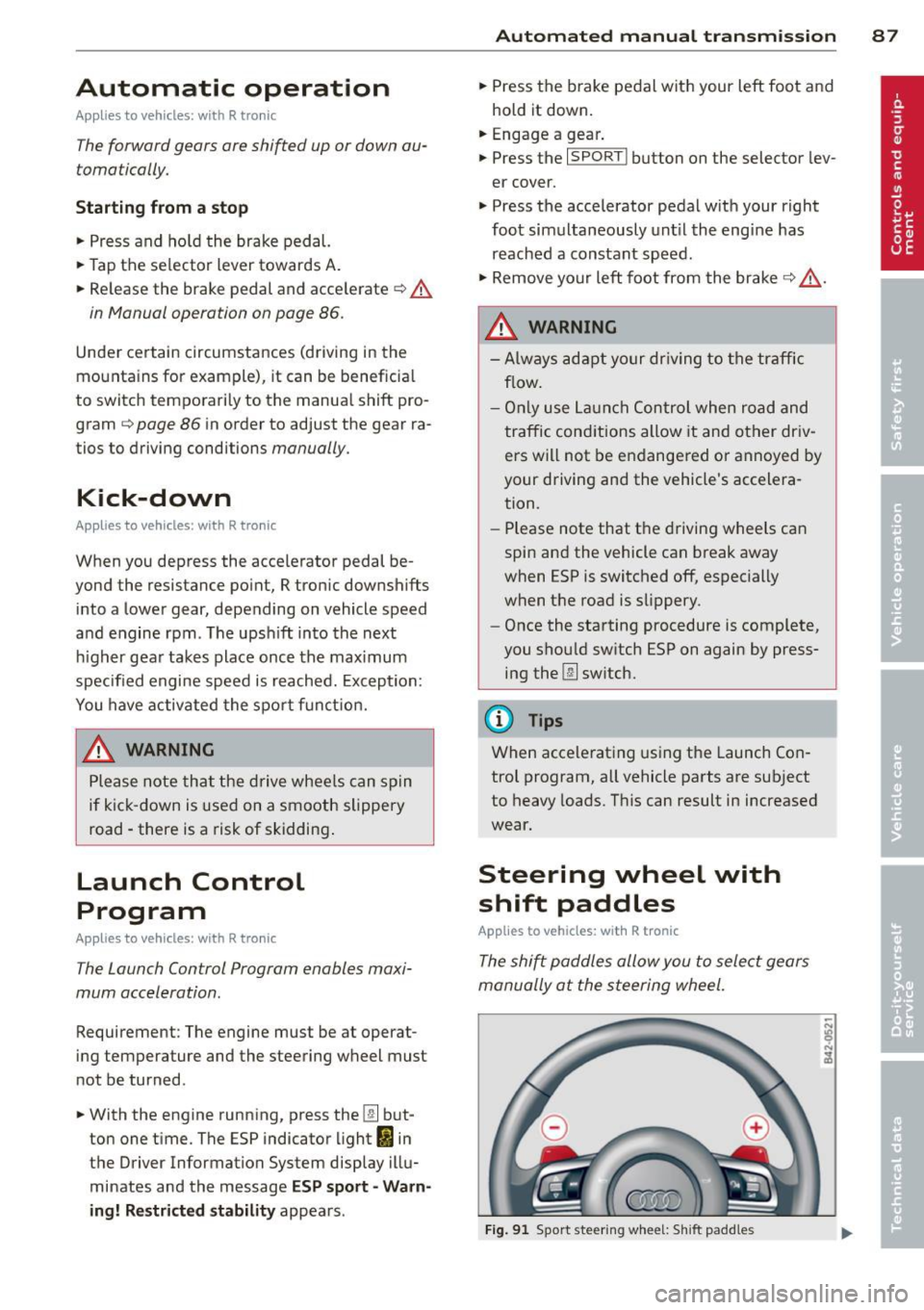
The shi~ paddles allow you to select gears
manually at the steering wheel.
F ig . 91 Sport steering wheel: S hift padd les
Page 92 of 244
90 Parking system
Rear view camera coverage area
The rearview camera shows you the area behind your vehicle in the navigation system dis
play. This area roughly corresponds to the
area in
¢ fig. 94 and (!) ¢fig. 95. Orientation
lines and colored surfaces are projected in the
area shown, which can help you with parking
and maneuvering. Objects that are located in
an area that is not captured by the camera@
¢ fig. 95 and that are closer to the bumper
will not appear on the navigation system dis play.
We recommend that you practice parking with
the rearview camera in a traffic-free location
or parking lot to become familiar with the sys
tem, the orientation lines, and their function.
There should be sufficient light and good
weather conditions when doing so.
In the navigation system display, objects or
vehicles appear closer or further away if:
Objects or vehicles appear closer or farther
away in the navigation system if:
- you are driving in reverse gear from a level
surface onto an incline, or a downward
slope,
- you are driving in reverse gear toward pro-
truding objects.
The accuracy of the o rientation lines and blue
surfaces diminishes if:
- the rearview camera does not provide a reli able image, for example, in poor visibility
conditions or if the lens is dirty,
- the image on the screen is not visible due to
sun glare and reflection .
Caring for the rearview camera lens
The rearview camera is located in the center
of the vehicle above the rear license plate bracket. In order for the rearview camera to
function properly , the camera lens must be
kept clean and free of snow and ice .
- Dampen the lens with a household alcohol
based glass cleaner , and clean the lens with
a dry cloth. - Remove
snow with a hand brush and ice
preferably with a de-icing spray
¢ (D .
A WARNING
--
-The parking system cannot replace the
driver's attention. The driver alone is re
sponsible for parking and similar driving maneuvers .
- Sensors have blind spots in which objects
cannot be detected. Pay special attention
to small children and animals because
the sensors cannot always detect them .
- Always keep your eyes on the vehicle's
surroundings, using the rearview mirror
as well.
- Do not allow yourself to be distracted from traffic by the rearview camera pic
tures in the navigation system display .
- If the position and the installation angle
of the camera has changed, for example,
after a rear end collision, do not continue
to use the system for safety reasons .
Have it checked by an authorized Audi
dealer or other qualified workshop.
(D Note
-Low obstacles already s ignaled by a
warning can disappear from the system's detection range as they are approached
and will not continue to be signaled. Ob
jects such as barrier chains, trailer draw
bars, narrow painted vertical poles or
fences may not be detected by the sys
tem, posing risk of damage.
- Never use warm or hot water to remove
snow or ice from the rearview camera
lens because the lens could crack.
- Never use products that are abrasive
when cleaning the lens.
Page 93 of 244
Switching on and off
Applies to vehicles: with parking system advanced
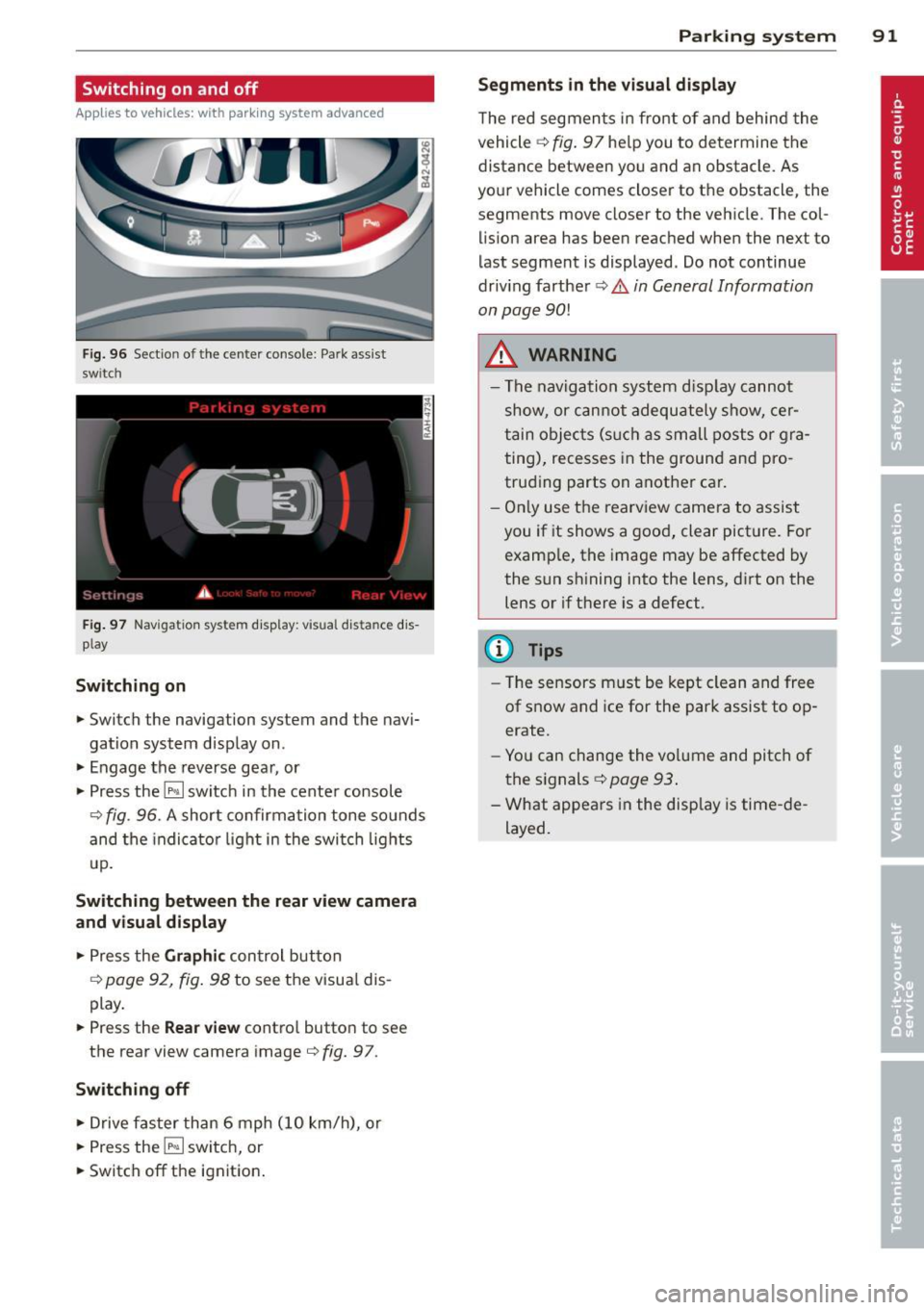
Fig . 96 Section of the center console: Par k ass ist
switch
F ig. 97 Nav igatio n system dis p lay: visual distance d is
play
Switching on
.,. Switch the navigation system and the navi
gation system disp lay on.
.,. Engage the reverse gear, or
.,. Press the
l""' I switc h in the center console
9 fig . 96. A short confirma tion tone so unds
and the indicato r light in the switch lights
up .
Sw itching between the rear v iew camera
and visual display
.,. Press the Graphic con trol button
9 page 9 2, fig . 98 to see the visua l dis
play .
.,. Press the
Rear view contro l button to see
the rear view camera image
c) fig. 9 7.
Switching off
.,. Drive faster than 6 mph (10 km/h), o r
.,. Press the
l""' I switch, or
.,. Switch off the ignition .
Parking system 91
Segm ents in the visual display
The red segmen ts i n fro nt of and behind the
vehicle
c) fig . 97 he lp you to de termine the
distance between yo u and an obstacle. As
you r vehicle comes close r to t he obstacle, the
segments move closer to the vehicle . The col
lision area has been reached when the next to
l ast segment is displayed. Do not continue
driv ing farther
c) .&. in General Information
on page
90!
A WARNING
- Th e nav igation system d isplay cannot
show, or c annot adequately show, cer
tain o bjects (s uch as small posts o r gra
ting), recesses in the groun d and pro
trud ing parts on anothe r ca r.
- On ly use t he rearview came ra to assist
you if it shows a goo d, clear pict ure. For
examp le, the image may be affected by
the sun sh ining into the lens, d irt on the
lens or if there is a defect.
@ Tips
- The sensors m ust be kept clean and free
of s now and ice for the park assist to op
erate .
- Yo u can change the vo lume and pitch of
the s ignals
c::> page 93 .
- What appea rs in the disp lay is time -de
layed.
-
Page 94 of 244
92 Parking system
Reverse parking
Applies to vehicles: with park ing system advanced
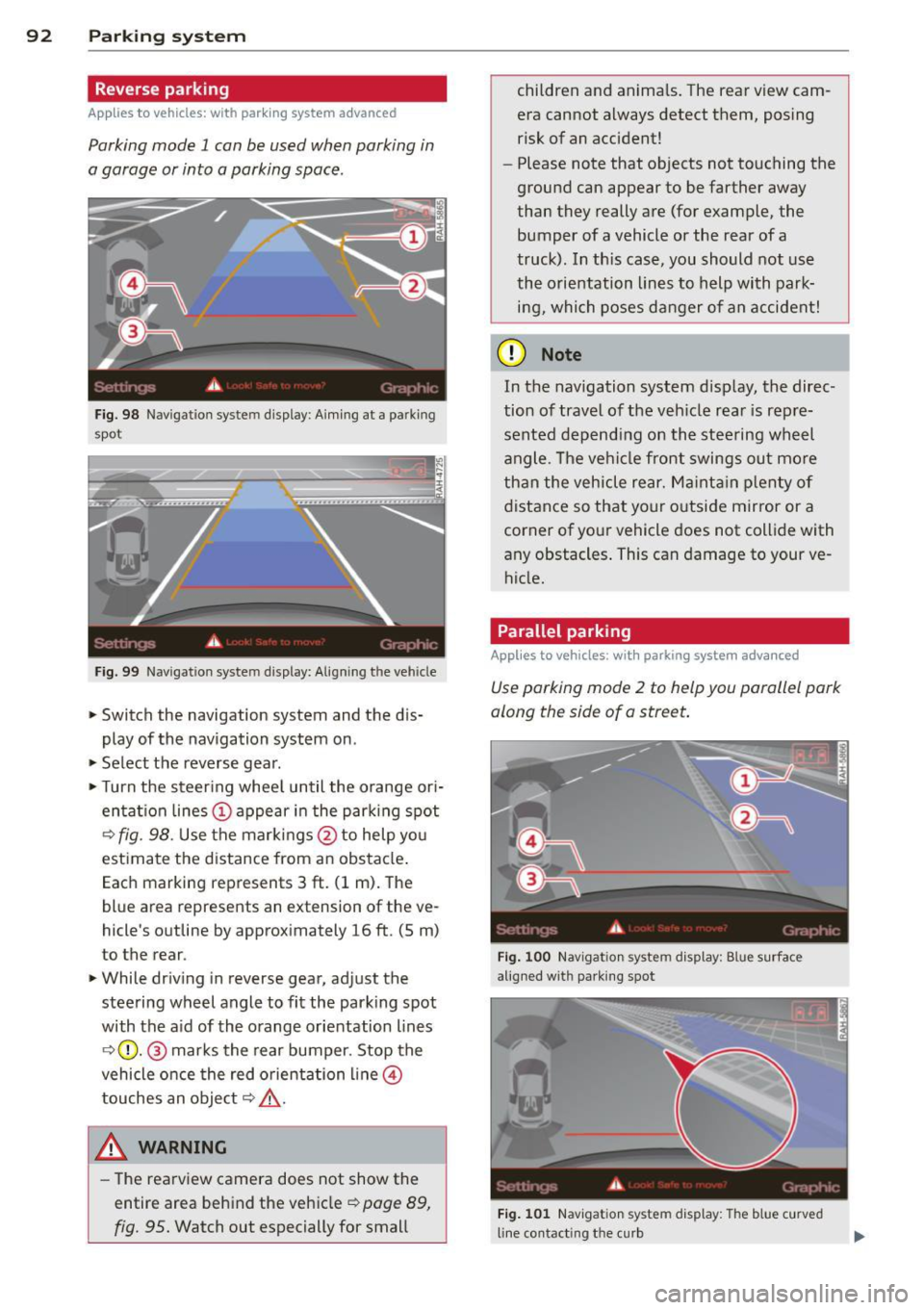
Parking mode 1 con be used when parking in
a garage or into a parking space.
Fig. 98 Navigat ion syste m display : Aiming at a pa rk in g
spot
Fig. 99 Navigation syste m display: Align ing t he ve hicle
> Switch the navigation system and the dis
play of the navigation system on .
.,. Select the reverse gear .
.,. Turn the steer ing whee l until the orange ori
entat ion lines (;) appear in the parking spot
¢ fig. 98. Use the markings@to help yo u
estimate the distance from an obstacle .
Each marking represents 3
ft. (1 m). The
blue area represents an extension of the ve
hicle 's outline by approximately 16
ft. (5 m)
to the rear.
> While driving in reverse gear, adjust the
steering wheel angle to fit the parking spot
with the aid of the orange orientation lines
¢ (}). @ marks the rear bumper. Stop the
vehicle once the red orientation line@
touches an object¢,&. .
A WARNING
-The rearview camera does not show the
entire area behind the vehicle ¢
page 89,
fig. 95.
Watch out especially for small children and anima
ls. The rear view cam
era cannot always detect them, posing
risk of an accident!
- Please note that objects not touching the
ground can appear to be farther away
than they really are (for example, the
bumper of a vehicle or the rear of a
truck) . In th is case, you should not use
the orientation lines to help with park·
ing, which poses danger of an accident!
(D Note
In the navigation system display, the direc·
tion of travel of the vehicle rear is rep re
sented depending on the steering wheel
angle . The vehi cle front swings out more
than the vehicle rear. Maintain plenty of
distance so that your outside mirror or a
corner of your vehicle does not collide with
any obstacles . This can damage to your ve
hicle.
Parallel parking
Applies to vehicles: with parking system advanced
Use parking mode 2 to help you parallel park
along the side of a street.
Fig. 100 Navigat ion sy stem display : B lu e surfac e
alig ned wit h parking spot
Fig. 101 Navigation system display : T h e b lue curved
line contact ing t he curb
Page 95 of 244
The following steps apply only when there is
no obstacle such as a wall near the parking
spot. Otherwise, please read the information
prov ided in the "Parking Next to Obstacles"
section.
~ Activate the turn signal.
~ Position yo ur vehicle parallel to the edge of
the street, approximately 3 ft. (1 m) from a parked vehicle .
~ Switch the navigation system and the nav i
gat ion system display on.
~ Se lect reverse gear . The parking aid tu rns on
and par king mode 1 appears on the display .
~ Press the control bu tto n 1 on the nav igat io n
system ¢
fig. 100. Parking mode 2 appea rs .
~ Backup and align yo ur vehicle so the b lue
area @ borders on the rear end of the vehi
cle or on the parking spot line. The bl ue area
represents an extension of the veh icle's out
line by approximate ly 16 ft (5 meters) to the
rear . The long side of the blue area should
be o n the curb . The entire blue area must fit
i nto the parking spot .
~ With the veh icle s topped, tu rn the s teer ing
whee l to the r ight as far as it w ill go.
~ Back into the park ing spot until the blue
cu rve to uches the curb¢
fig. 101. Stop the
vehicle.
~ With the veh icle stopped, turn the steer ing
wheel to the left as far as it will go .
~ Continue to back into the parking spot un til
the vehicle is parked para llel to the curb .@
marks the rear bumper. Stop the vehicle
when the red orientation line@ borde rs an
object ¢.&, . Keep an eye o n the fron t of
yo ur vehicle while do ing this ¢Ci) .
Parking next to obstacles
When t here is an obstacle (such as a wall)
next to the pa rking spot, choose a spot w it h
mo re space on t he sides. Position the long
side of the b lue a rea so that there is sufficient
space from the curb. The a rea m ust no t be on
the c urb. You w ill also need to start turn ing
the steeri ng wheel much earlie r. T he re should
be a s uffic ient amo unt of space between the
curb and the blue c urve, and the blue c urve
¢
fig. 101 must not touch the curb.
Par king system 93
A WARNING
-The rearview camera does not show the
entire area behind the vehicle¢
page 89,
fig. 95 . Watch out especially for small
children and anima ls . The rea r view cam
e ra can no t always de tect t hem, pos ing
ris k of an accident!
- P lease note that objects not touching the
g rou nd can appear to be far ther away
than they really are (for example, the
bumper of a vehicle or the rea r of a
truck) . In this case , you sho uld not use
the o rientation lines to help with park
ing, which poses danger of an accident!
(D Note
In the navigation system disp lay, the direc
tion of trave l of the vehicle rear is repre
sented depend ing on the stee ring wheel
angle. T he veh icle front swings out more
than the vehicle rear. Ma inta in p lenty of
distance so that you r o utside m irror or a
corner of you r vehicle does no t coll ide with
any obstacles. This can damage to your ve hicle.
(0 Tips
The left o r right o rientation lines and su r
faces will be disp layed, depending on the
turn s ignal being used .
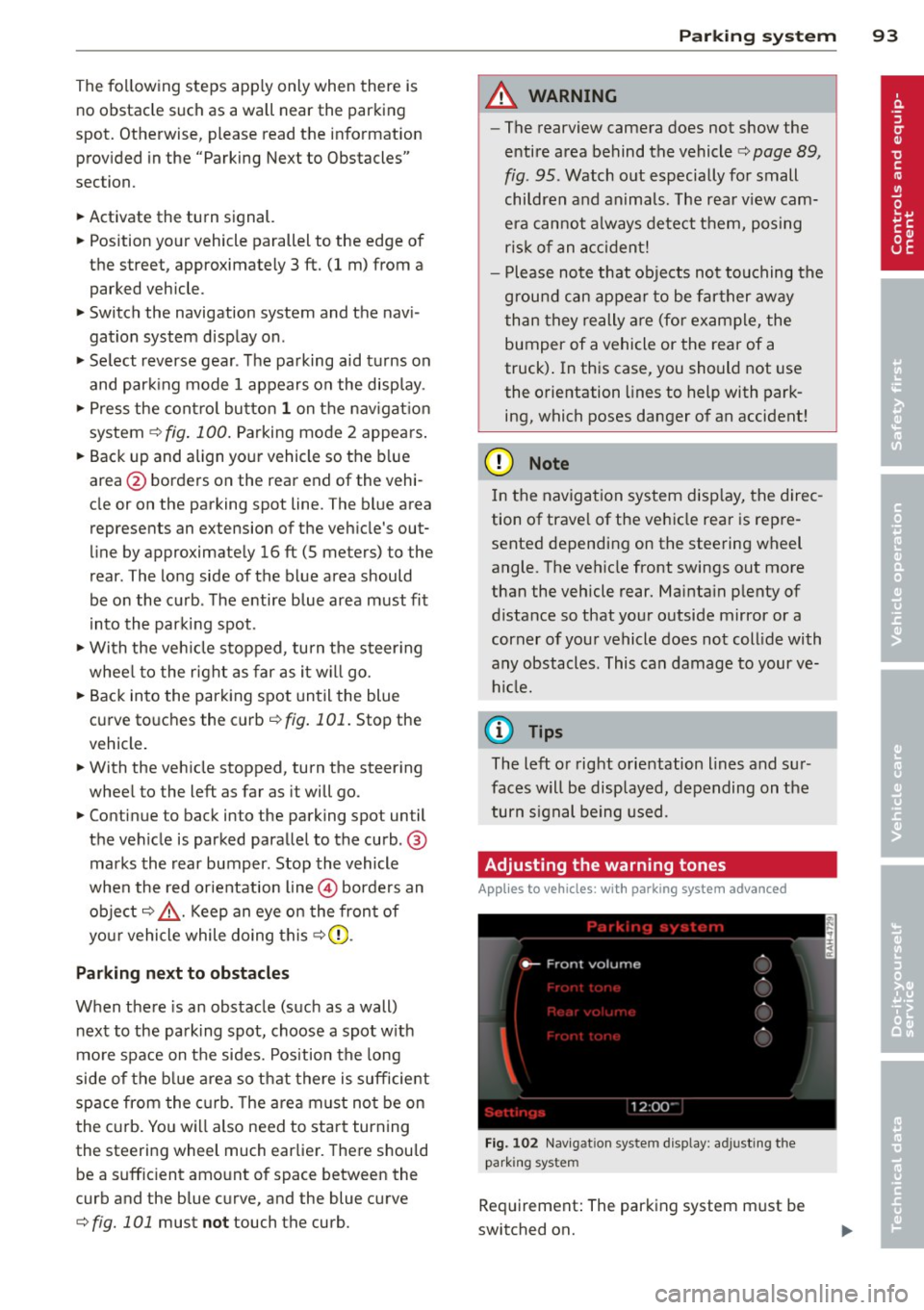
Adjusting the warning tones
Applies to vehicles: wi th parking sys tem adva nced
Fi g. 102 Nav igat io n system d isplay: a djusting t he
park ing s yste m
Req uirement: The parking system m ust be
switched on.
Page 97 of 244
Homelink®
Universal remote
control
General information
Appl ies to vehicles: with Horne Link® universal rem ote
control
The Homelink ® feature can learn up to three
radio frequency codes for most current trans
mitters used for operating garage doors, es tate gates, home or outdoor lighting sys
tems, and other devices.
You must first program the Homelink ® trans
mitter before you can use the system
¢ page 96, Programming the HomeLink ®
transmitter.
In order to program the Home link ® transmit
ter for devices utilizing rolling code, a second
person on a ladder who can safe ly reach the
garage door opener motor is recommended.
I t is also necessary to locate the "learn" but
ton on your garage door opener motor . Refer
to the operat ing instruct ions for the opener,
as the location and color of this button may
vary by manufacturer.
You can still use the origina l remote control
for the device at any time.
A WARNING
-
- Never use the Homelink ® transmitter
with any garage door opener that does
have not the safety stop and reverse fea
tu re as requ ired by federa l safety stand
ards . Th is includes any garage door open
er mode l manufact ured before April 1,
1982.
- A garage door opener which cannot de
te ct an object, signaling the door to stop
and rever se does no t mee t current feder
al safety standards. Using a ga rage doo r
opener witho ut these features increases
risk of serious inj ury or death.
- F or sa fety reasons never release the
par king brake or start the engine while
anyone is stand ing in front of the vehicle .
Hom elin k® 95
-A garage door or an estate gate may
sometimes be set in mot ion when the
Homelink ® remote control is being pro
grammed . If the device is repeatedly ac
tivated, th is can overstrain motor and
damage its e lectrical components -an
overheated moto r is a fire hazard!
- To avo id possib le injuries or property
damage, please always make abso lutely
certain that no persons o r objects are lo
ca ted in the range of motion of any
equ ipment being ope rated .
(D Tips
-If you would li ke more information on
Homel ink ®, w here to purchase the
Homel ink ® compatib le produc ts, or
would like to purchase the Homelink ®
Home Lighting Package, please ca ll toll
free: 1-800-355-3515 .
- For Declaration of Compliance to United States FCC and Ind ustry Canada reg ula
tions ¢
page 212 .