warning light AUDI R8 SPYDER 2012 Owner's Guide
[x] Cancel search | Manufacturer: AUDI, Model Year: 2012, Model line: R8 SPYDER, Model: AUDI R8 SPYDER 2012Pages: 236, PDF Size: 59.24 MB
Page 74 of 236
7 2 On the road
-The eng ine cann ot be started by pushing
or towing the vehicle.
@ For the sake of the env ironment
To avo id unnecessary engine wea r and to
red uce exhaust emissions, do not let your
vehicle stand and warm up . Be ready to
drive off immediately after starting your
veh icle.
Stopping the engine
On vehicles with R tronic*, the engine can be
turned off in the neutral position N and in
each gear (1 -6 and R).
.,. Turn the ign ition key to position ©
¢ page 70, fig. 82.
A WARNING
-Never turn off the eng ine unti l the vehi
cle has come to a complete stop.
- The brake booster and servotronic on ly
work when the engine is running. With
the ignition turned off, you have to apply
more force when stee ring or braking.
S ince you cannot steer and stop no rma l
ly, this can lead t o acciden ts and ser io us
injuries.
- If the engine has bee n under heavy load
fo r an ext ended period of time, heat
builds up i n the engi ne compa rtme nt af
ter the eng ine is sw itched off -there is a
risk of damaging the engine . Allow the
engine to continue to run at idle for a
sho rt time or drive until it has cooled
down before you turn it off¢
page 151.
- If the engine has been under heavy load
for an extended pe riod of time, it can be
come extreme ly hot. You should not park
your vehicle over easily combustible ob
j ects o r areas (e.g. g rass or leaves). There
i s a r isk of start ing a f ire.
(D Tips
After the engine has been switched off, the
radiator fan can continue to run for up to
10 minutes -even with the ignition switch
ed off. It can also sw itch on again after
some time if the coolant tempe rature rises
as the result of heat b uild up or if the en
g ine compartment is heated by the sun 's
r ays and the eng ine is hot.
Parking brake
Parking brake
When the parking brake is set, it prevents the
vehicle from rolling away unintentionally .
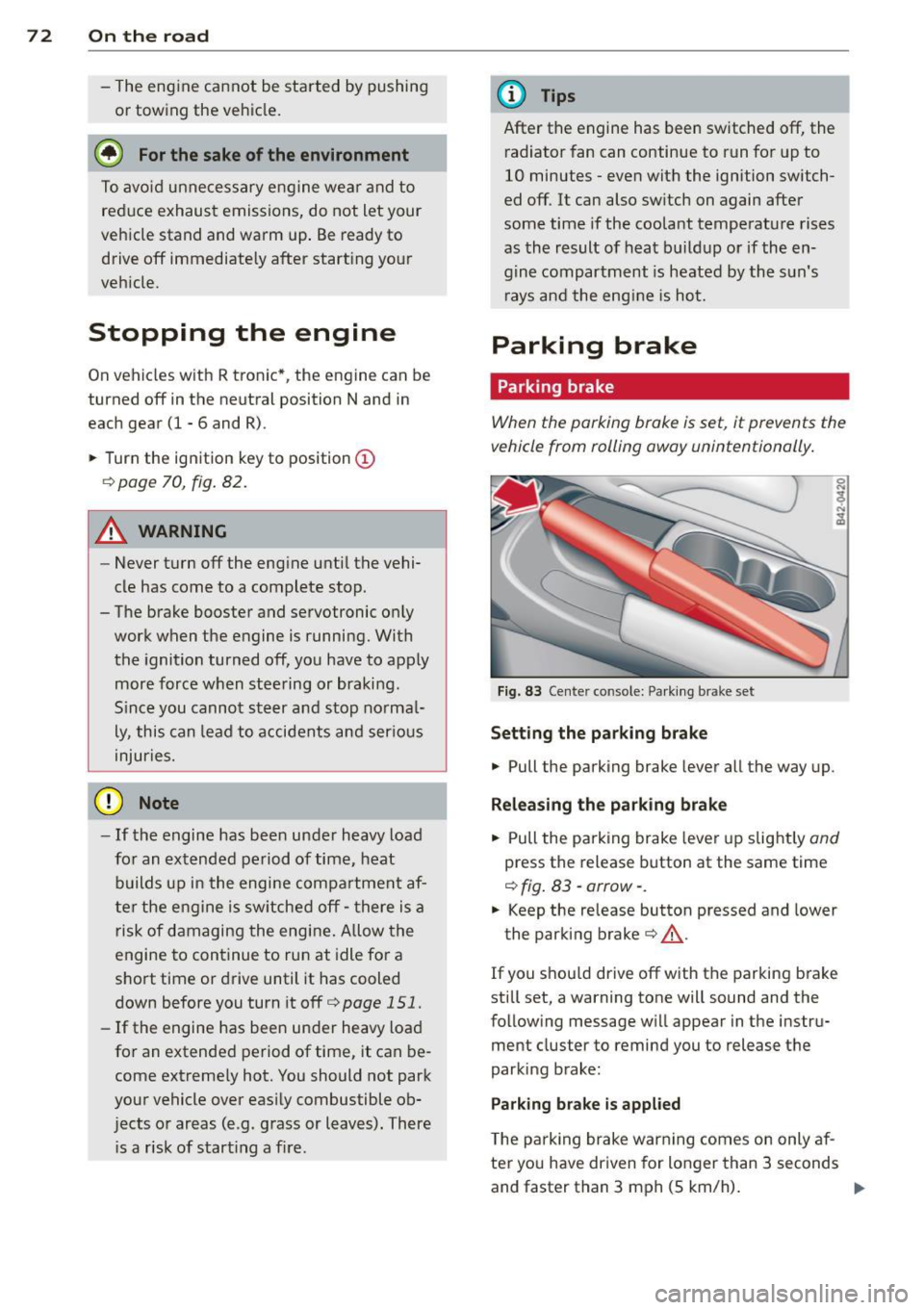
Fig. 83 Center console: Pa rk in g brake set
Setting the parking brake
.,. Pull the parking brake lever a ll the way up.
Releasing the park ing brake
.,. Pull the pa rking brake lever up slight ly and
press the release button at the same time
¢ fig . 83 -arrow- .
.,. Keep the release button pressed and lower
the parking brake¢&_.
If you s hou ld drive off with the parking b rake
st ill set, a warning tone will sound and the
following message wi ll appear in the instru
ment cluster to remind you to release the
parking brake:
Parking brake is applied
T he p arking brake war ning comes on only af
ter yo u have dr iven for longer than 3 seconds
and faster than 3 mph (5 km/h) . .,.
Page 75 of 236
The parking brake warning light_
(USA)/ . (CON) ill uminates when the parking
brake is set and you switch on the ignition .
A WARNING
-
Always release the parking brake com
pletely. A partially engaged brake will
overheat the rear brakes, reduce the ir ef
fectiveness and cause excess ive wear. This
cou ld lead to brake failure and an accident .
(D Note
Only after the ve hicle has come to com
plete stop, should you f irm ly set the park
ing brake and move the gearsh ift lever into
a gear .
Parking
To prevent a parked vehicle from rolling
away, there are a few things you should do.
.,. Stop the vehicle using the brake pedal.
.,. Set the parking brake firmly .
.,. Switc h off the engine .
" Engage a gear
~ &.-
What else you should do when parking
your v ehicle on an incline or decline
T u rn the steering wheel so that if the vehicle
should sta rt to ro ll, it will roll into the curb .
A WARNING
This is how yo u can reduce the risk of in
jury when le aving your veh icle.
- Never par k the vehicle whe re it ca n come
in contac t wi th dry grass, s pilled f uel or
any other flammable mater ials .
- Neve r allow anyone - especially small
ch ildren - to rem ain in the vehicle whe n
it is locked. Locked doors ma ke it mo re
difficult for rescuers to access the pas
senger compartment in the event of an
emergency. Danger to life!
- Never leave c hildren unsupervised in the
vehicle. Children co uld re lease the park
ing brake or move the gea rshift lever out
-
On th e ro ad 73
of gear . The vehicle cou ld sta rt to ro ll
away and cause an acc ident.
- No matte r what the season is, the tem
peratu re in a parked veh icle can reach
dangerous leve ls .
Starting on hills
App lies to vehicles : wit h hill ho ld assist
Hill ho ld assist makes it eas ier to start on
hills .
The system is activated when the brake peda l
is depressed
for a few seconds .
After releasing the brake pedal, the brake
power is held for a
brief moment to prevent
the ve hicle from rolling back when starting .
D uring this t ime, you can easily begin to move
your vehicle.
A WARNING
- If you did not begin moving immed iate ly
after rel easing the brake pedal, the vehi
cle could b eg in to roll bac kward unde r
cer ta in c ircu mstances . Dep ress the brake
pe dal imme diate ly or eng age the p arking
bra ke.
- If the engine sta lls, de pre ss the bra ke
pe dal imme diate ly or engage the pa rking
brake .
- T o prevent the vehicle from ro lling b ack
un intent iona lly when st arting in stop
an d-go tra ffic, keep the brake pedal de
pressed for a few seconds before d riving
off.
(D Tips
You can find o ut if yo ur vehicle is eq uipped
wi th "hi ll hol d assist" at an a uthorized Au
di dealer.
Page 76 of 236
7 4 On the road
Cruise control
Introduction
The cruise control system keeps the speed
constant.
The cruise control system makes it possible to
drive at a constant speed over 20 mph (US
model) or 30 km/h (Canadian model) . This is
true only to the extent that engine power or
engine braking effect allow . Using the system
takes the strain off the "gas pedal foot" - es
pecially on long trips.
In the control mode, the indicator light in the
instrument cluster is lit
aijj(1)~1~ (US model);II
(Canadian model).
The cruise control system automatically
switches itself off immediately under the fol
lowing conditions:
- Pressing the brake pedal.
- Pressing the clutch pedal.
A WARNING
-Always pay attention to traffic even when
the cruise control system is switched on.
You are always responsible for your speed and the distance between your ve
hicle and other vehicles.
- For safety reasons, the cruise control sys
tem should not be used in the city, in
stop-and-go traffic, on twisting roads
and when road conditions are poor (such
as ice, fog, gravel, heavy rain and hydro
planing) -risk of accident.
- Turn off the cruise control system tem
porarily when entering turn lanes, high
way exit lanes or in construction zones.
- Please note that inadvertently "resting"
your foot on the accelerator pedal causes
the cruise control system not to brake.
This is because the cruise control system
is overridden by the driver's acceleration.
(D Note
On manual transmission vehicles: If you
shift into neutral with the cruise control system switched on, always depress the
clutch
pedal! Otherwise the engine will
race and could be damaged as a result.
(D Tips
When driving on steep downward grades,
the cruise control system cannot keep the
speed constant. The vehicle's own weight increases the speed. Shift into a lower gear
in plenty of time or brake the vehicle with
the foot brake.
Saving the speed
The desired speed must be saved.
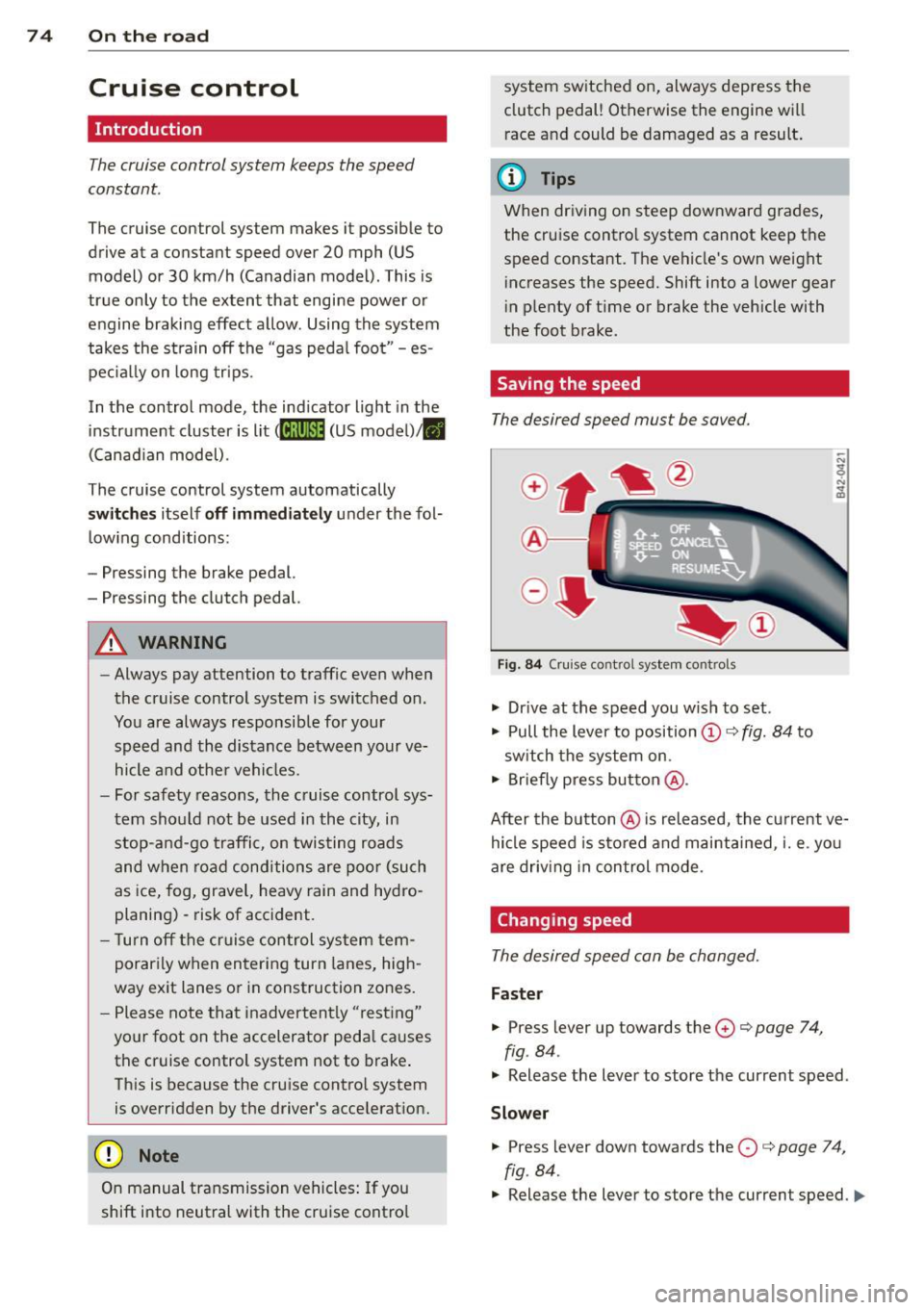
®-
Fig. 84 Cruise control system cont rols
.,. Drive at the speed you wish to set.
.,. Pull the lever to position@¢
fig. 84 to
switch the system on.
.,. Briefly press button @.
After the button @is released, the current ve
hicle speed is stored and maintained,
i. e. you
are driving in control mode .
Changing speed
The desired speed can be changed.
Faster
.,. Press lever up towards the 0 ¢ page 7 4,
fig . 84 .
.,. Release the lever to store the current speed .
Slower
.. Press lever down towards the O ¢ page 74,
fig . 84.
.,. Release the lever to store the current speed. IJ,,,
Page 78 of 236
76 On the road
(D Tips
The warning/indicator light Bin the instru
ment cluster comes on in the event of a malfunct ion. Dr ive to the closest author
ized Audi dealer as soon as possible and
have the malfunction repaired.
Page 79 of 236
Transmission Manual transmission
Gearshift lever
App lies to vehicles: with manual transmission
The clutch pedal must be depressed all the
way before you can start the engine.
T he manual transmission in your Audi is
equipped with an
interlock-feature.
• Depress the clutch pedal all the way.
• Start the engine with the gearshift lever in
Neutral and the clutch pedal depressed.
(D Note
Always depress the clutch pedal fully when
changing gears . Do not hold the vehicle on
a hill with the clutch pedal partially de
pressed. This may cause premature clutch
wear or damage .
@ Tips
- Resting your hand on the gearshift lever
knob while driving will cause premature
wear in the transmission.
- The back-up lights go on when you sh ift
into Reverse w ith the ignition on.
Gearshift pattern (6-speed manual
transmission)
Applies to vehicles: with 6-speed manual transmission
Fig. 86 Gearshift pattern : 6 -speed manual tran smi s
sio n
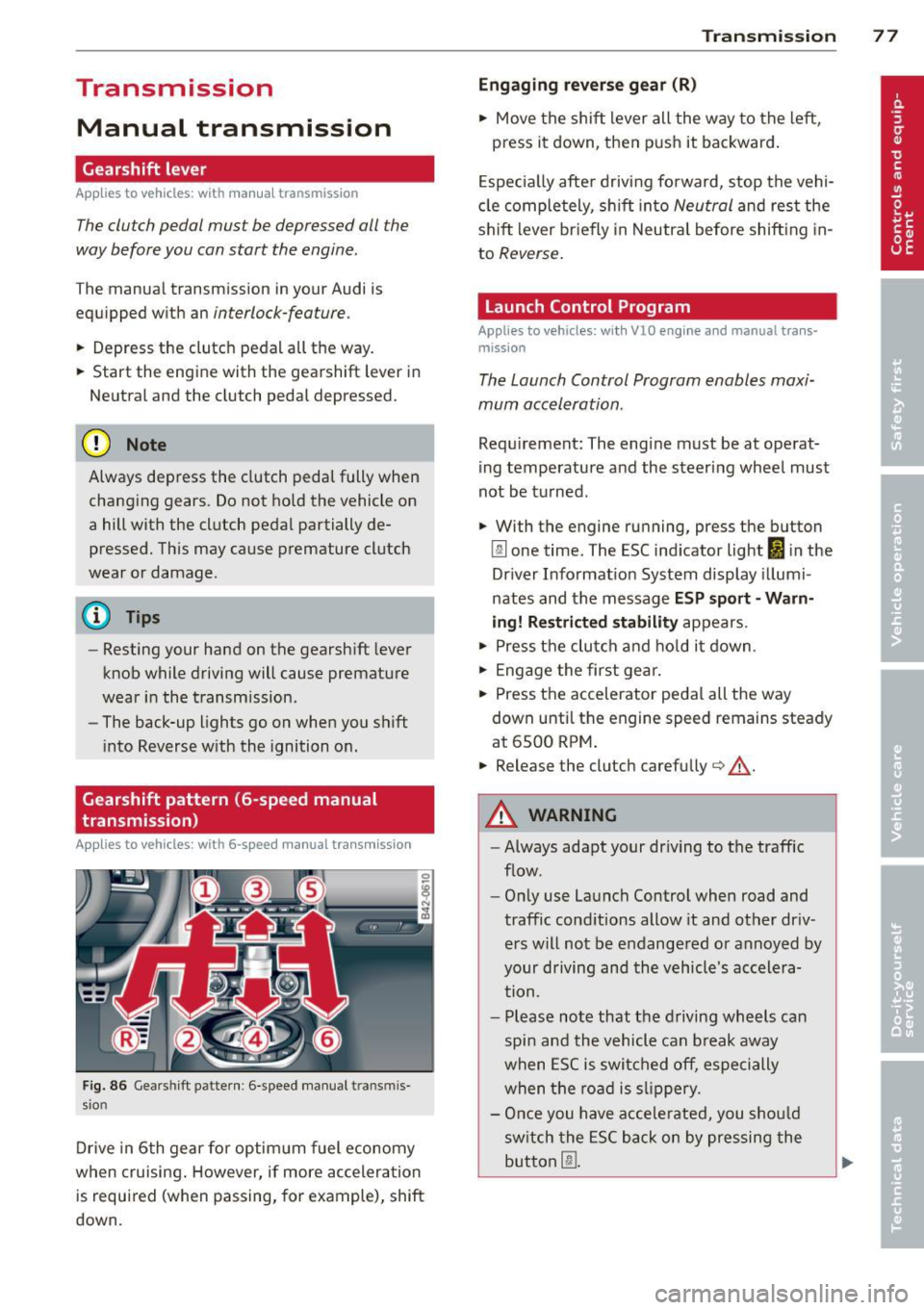
Drive in 6th gear for optim um fuel economy
when cruising . However, if more acceleration
is required (when passing, for example), shift
down.
Transmission 77
Engaging reverse gear (R)
• Move the shift lever all the way to the left,
press it down, then push it backward.
Especially after driving forward, stop the vehi
cle completely, sh ift into
Neutral and rest the
shift lever br iefly in Neutra l before shift ing in
to
Reverse .
Launch Control Program
Applies to vehicles: with VlO eng ine and manual t ra ns·
miss ion
The Launch Control Program enables maxi
mum acceleration .
Requirement: The engine must be at operat
ing temperature and the steering wheel must
not be turned .
• With the engine running, press the button
Im one time. The ESC indicator light 1B in the
Driver Informat ion System display illumi
nates and the message
ESP sport - Warn
ing! Restricted stability
appears.
• Press the clutch and hold it down.
• Engage the first gear.
• Press the accelerator pedal all the way
down until the engine speed remains steady
at 6500 RPM .
• Release the clutch carefu lly <=> .& ..
A WARNING
- Always adapt your dr iving to the traffic
flow.
- Only use Launch Control when road and
traffic conditions allow it and other dr iv
ers will not be endangered or annoyed by
your driving and the vehicle's accelera
tion.
- Please note that the driving wheels can
spin and the vehicle can break away
when ESC is switched off, especially
when the road is slippery.
- Once you have accelerated, you sho uld
sw itch the ESC back on by pressing the
button
[fil .
Page 80 of 236
78 Transmission
@ Tips
-When accelerating using the Launch
Control program, all vehicle parts are
subject to heavy loads. This can result in
increased wear.
- The Launch Control Program only func tions when the parking brake is released
and the vehicle speed is less than 3 mph
(5 km/h).
R tronic
Description
Applies to vehicles: with R tro nic
Fig. 87 Shi ft pattern
Fig. 88 Disp lay: Gea rs engaged
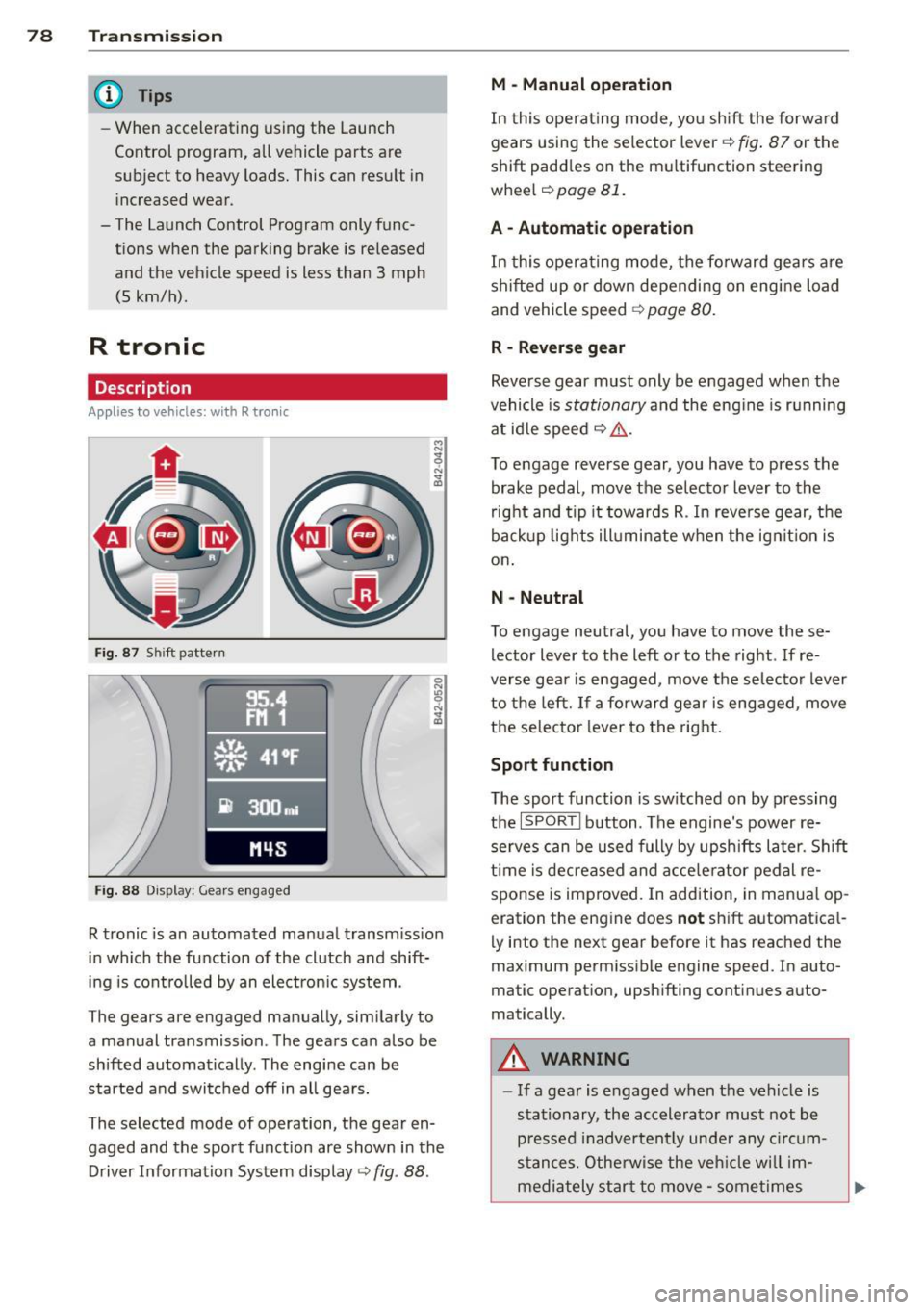
R tronic is an automated manual transmission
in which the function of the clutch and shift
ing is controlled by an electron ic system .
The gears are engaged manually, sim ilarly to
a manual transmission . The gears can also be
shifted automatically . The engine can be
started and switched off in all gears.
The selected mode of operation, the gear en
gaged and the sport function are shown in the
Driver Information System display
Q fig . 88 .
M -Manual operation
In this operat ing mode, you shift the forward
gears using the selector lever
Q fig. 87 or the
shift paddles on the mu ltifunction steering
whee l
Q page 81.
A - Automatic operation
In this opera ting mode, the forward gears are
shifted up or down depending on engine load
and vehicle speed
Q page 80.
R -Reverse gear
Reverse gear must only be engaged when the
vehicle is
stationary and the eng ine is running
at idle speed
¢ ,&. .
To engage reverse gear, you have to press the
brake pedal,
move the selector lever to the
right and tip it to wards R . In reverse gear, the
backup lights illuminate when the ignit ion is
on .
N -Neutral
To engage neutral, you have to move these
lector lever to the left or to the right.
If re
verse gear is engaged,
move the selector lever
to the left.
If a forward gear is engaged , move
the selector lever to the right.
Sport function
The sport function is sw itched on by pressing
the
I SPOR T I button. The engine's power re
serves can be used fully by upshifts later. Shift
time is decreased and accelerator pedal re
sponse is improved. In addition, in manual op
eration the engine does
not shift automatica l
ly into the next gear before it has reached the
maximum permissible engine speed. In auto
matic operation, upsh ifting cont inues auto
matically.
A WARNING
-- If a gear is engaged when the vehicle is
stationary, the accelerato r must not be
p ressed inadvertently under any circum
stances. Otherwise the vehicle w ill im
mediately star t to
move -sometimes
Page 82 of 236
80 Transmi ssion
(0 Note
If you must stop on an incline, always hold
the vehicle in place w ith the foot brake to
prevent it from roll ing back. Never hold
the vehicle on an incline w ith a slipping
clutch. The clutch was overloaded if
Clutch
overheat ing! If possib le pl ea se st op ve hi
cle appears in the Driver Information Sys
t em disp lay.
Automatic operation
Ap plies to ve hicles : wit h R tro nic
The forward gears are shifted up or down au
tomatically.
Startin g from a stop
11-Press and ho ld the brake pedal.
11-Tap the se lector lever towards A .
... Re lease the brake pedal and acce lerate
¢ ,& in Manual operation on page 79 .
Under certain circumstances (driving in the
mounta ins for example), it can be beneficia l
to switch tempo rarily to the manual shift pro
g ram ¢
page 79in order to adjust th e gear ra
tios to driv ing cond itions
manually.
Kick-down
A ppl ies to vehicles : wit h R tro nic
When you depress the accelera to r pedal be
yond the resistance po int, R tron ic downsh ifts
into a lower gear, depending on vehicle speed
and engine rpm. The ups hift into the next
h igher gear takes place once the max imum
specified engine speed is reached. Exception:
You have activated the sport funct ion .
A WARNING
Please note that the drive wheels can spin
if kick-down is used on a smooth slippery
road -there is a risk of skidding.
Launch Control Program
App lies to veh icles : w it h R tro nic
The Launch Control Program enables maxi
mum acceleration .
Requirement: The engine must be at operat
ing temperature and the steering wheel must
not be turned .
... With the engine running, press the
I!! but
ton one time. The ESC ind icator light
I in
the Driver Information System d isplay illu
m inates and the message
ESP sport - Warn
ing! R estr icted stability
appears .
... Press the b rake pedal w it h your l eft foot
and hold i t down.
11-Eng age a gear.
11-Press the I SPORT I button on the selector
lever cover .
... Press the accelerator peda l wit h your right
foot sim ultaneously until the engine has
reached a constant speed .
... Remove your left foot from the brake¢,& .
A WARNING ,-
-Always adapt your dr iving to the traffic
f low.
- Onl y use Launch Control when road and
traffic cond itions allow it and ot her dr iv
ers will not be endange red o r annoyed by
your driving and the vehicle's ac celera
t ion .
- Please note that t he d riving wheels ca n
sp in and the vehicle can br eak away
when ESC is swi tched off, especially
when the roa d is s lippery.
- Once the s tarting procedure is comple te,
you sho uld sw itch ESC on again by press
i n g the
I!] switch.
(D Tips
When a ccele rat ing using the Lau nch Con
t rol program, all vehicle parts are s ubje ct
to heavy loads . This can result in increase d
wear .
-
Page 85 of 236
Rear vi ew camer a coverage area
The rearview camera shows you the a rea be
hind your vehicle in the navigation system dis
p lay. This area roughly corresponds to the
area in¢
fig . 92 and (!) ¢fig. 93 . Orientation
lines and colored surfaces are projected in the
area shown, which can help you with parking
and maneuvering. Objects that are located in
an area that is not captured by the camera @
¢
fig. 93 and that are closer to the bumper
will not appear on the nav igation system dis
p lay.
We recommend that you practice park ing with
the rearview camera in a traffic-free location
or pa rking lot to become familiar w ith the sys
tem, the o rientation l ines, and their function.
There should be sufficient light and good
weather conditions when doing so.
I n the nav igat io n system disp lay, objects or
veh icles appear closer or fu rther away if:
Objects or vehicles appear closer or farther
away in the navigation system if:
- you are driving in reverse gear from a level
surface onto an incline, or a downward
slope,
- you are driving in reverse gear toward pro-
truding objects.
The accuracy of the orientation lines and blue
surfaces dimin ishes if:
- the rearview camera does not provide a reli able image, for examp le, in poor visibility
cond itions or if the lens is dirty,
- the image on the screen is not visible due to
sun g lare and reflect ion .
Caring f or the re arvi ew cam era len s
The rearview camera is located i n the center
of the vehicle above the rear license plate bra cket. In o rder for the rearview camera to
f u nction properly, the came ra lens must be
kept clean and free of snow and ice .
- Dampen the lens with a househo ld alcoho l
based glass cleane r, and clean the lens with
a dry cloth.
Par king system 83
- Remove snow with a hand br ush and ice
preferably with a de-icing spray ¢(D .
A WARNING
-The parking system cannot replace the
driver's attention. The driver alone is re
sponsib le for parking and similar driving
maneuvers.
- Sensors have blind spots in wh ich objects
can not be detected. Pay spec ia l attent ion
to small children and an imals because
the sensors cannot always detect them.
- Always keep your eyes on the vehicle's
sur ro undings, us ing the rearv iew mirro r
as well.
- Do not allow yourself to be distracted from traffic by the rearv iew camera pic
tures in the navigat ion system display.
- If the position and the installation angle
of the camera has changed, for example,
after a rear end collision, do not conti nue
to use the system for safety reasons.
Have it checked by an au thori zed A ud i
dea ler or other q ualified workshop .
(D Note
-Low obstacles a lready s ignaled by a
wa rni ng can disappear from the system's
detect ion range as they are app roached
and wi ll not continue to be signaled. Ob
jects such as barrier chains, trailer d raw
bars, narrow painted vertica l poles or
fences may not be detected by the sys tem, posing risk of damage.
- Never use warm or hot water to remove snow or ice from the rearv iew camera
lens because the lens could crack.
- Never use products that are abrasive when clean ing the lens.
-
Page 86 of 236
84 Parking sy stem
Switching on /off
Appl ies to vehicles: with park ing system advanced
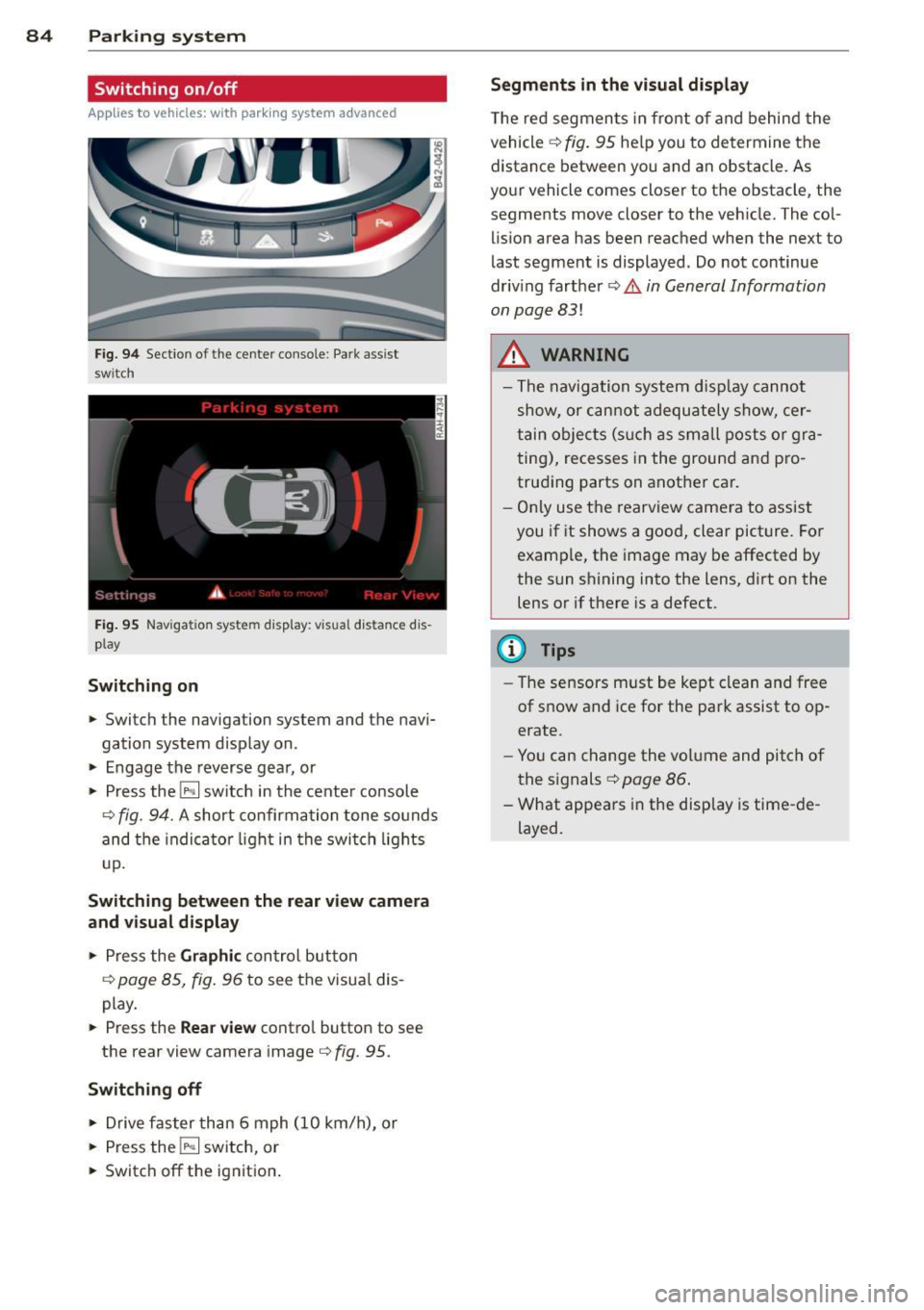
Fig. 9 4 Section of the center console: Pa rk assist
switch
F ig. 95 Nav igatio n system disp lay: visual distance dis
play
Switching on
• Switch the navigation system and the navi
gation system display on.
• Engage the reverse gear, or
• Press the
l"" I switch in the cente r console
¢ fig. 94. A short confirmation tone sounds
and the indica tor light in the swi tch lights
u p.
Switching betwe en the rear v iew camera
and vi sual display
• Press the Graphic con trol button
¢ page 85, fig. 96 to see the visua l dis
play.
• Press the
Rear view contro l button to see
the rear view camera image
¢ fig. 95.
Switching off
• Drive faster than 6 mph (10 km/h), or
• Press the
l"" I switch, or
• Switch off the ignition .
Segments in the vi sual display
T he red segmen ts in front o f and behind the
vehicle ¢
fig. 95 help you to determine the
distance between you and an obstacle. As
your vehicle comes closer to the obstacle, the
segments move closer to the vehicle. The col
lis ion area has been reached when the next to
last segment is displayed. Do not continue
driv ing farther ¢
Ii::.. in General Information
on page 83!
A WARNING
- The navigation system d isp lay cannot
show, or c an not adequately show, cer
tain objec ts (s uch a s sma ll posts o r gra
ting), recesses in the ground and p ro
trud ing parts on another car.
- Only use t he rearv iew came ra to assist
you if it shows a good, clear picture. For examp le, the image may be affected by
the sun shining into the lens, d irt on the
lens or if there is a defect.
(D Tips
- The sensors m ust be kept clean and free
of snow and ice for the park assist to op
erate.
- Yo u can change the volume and pitch of
the s ignals ¢
page 86 .
-What appea rs in the disp lay is time -de
layed.
-
Page 90 of 236
88 Homelin k®
Homelink ®
Universal remote
control
General information
The Homelink universal remote control can
be programmed with hand-held transmitters
from existing equipment.
You must first program the Homelink ® trans
mitter before you can use the system
~ page 88, Programming the Homelink ®
transmitter.
In order to program the Homelink® transmit
ter for devices utilizing rolling code, a second person on a ladder who can safely reach the
garage door opener motor is recommended.
It is also necessary to locate the "learn" but
ton on your garage door opener motor . Refer
to the operating instructions for the opener,
as the location and color of this button may
vary by manufacturer .
You can still use the original remote control
for the device at any time.
A WARNING
-
- Never use the Homelink® transmitter
with any garage door opener that does
have not the safety stop and reverse fea
ture as required by federal safety stand
ards. This includes any garage door open
er model manufactured before April 1,
1982.
- A garage door opener which cannot de
tect an object, signaling the door to stop
and reverse does not meet current feder
al safety standards. Using a garage door
opener without these features increases
risk of serious injury or death.
- For safety reasons never release the
parking brake or start the engine while
anyone is standing in front of the vehicle.
- A garage door or an estate gate may
sometimes be set in motion when the
Homelink ® remote control is being pro
grammed. If the device is repeatedly ac- tivated, this can overstrain motor and
damage its electrical components
-an
overheated motor is a fire hazard!
- To avoid possible injuries or property
damage, please always make absolutely
certain that no persons or objects are lo
cated in the range of motion of any
equipment being operated.
{!) Tips
- If you would like more information on
Homelink ®, where to purchase the
Homelink ® compatible products, or
would like to purchase the Homelink®
Home Lighting Package, please call toll
free: 1-800-355-3515.
- For Declaration of Compliance to United
States FCC and Industry Canada regula
tions ~
page 222.
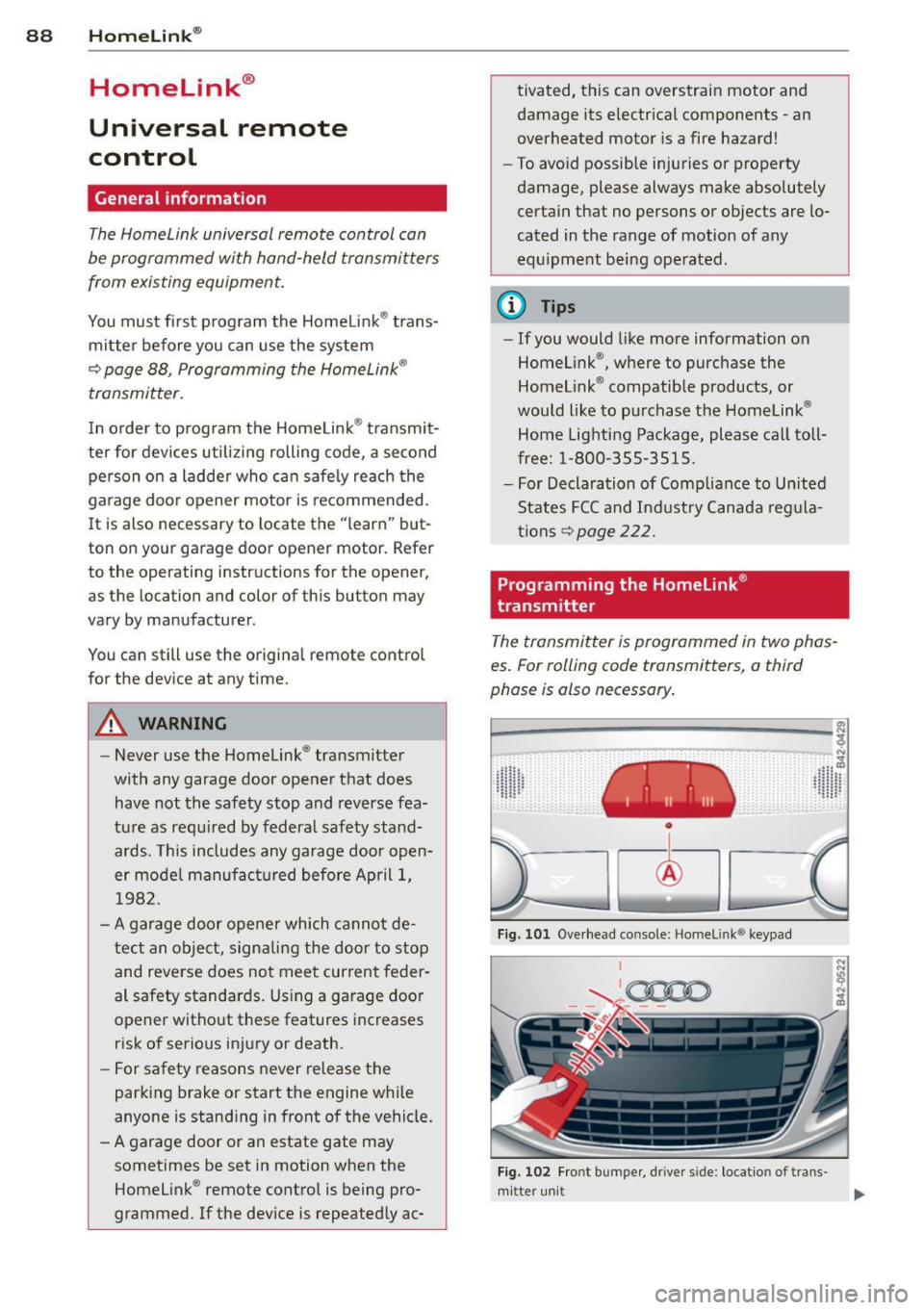
Programming the Homelink ®
transmitter
The transmitter is programmed in two phas
es. For rolling code transmitters, a third
phase is also necessary.
~----------------- ~ ,:.
~
Fig. 101 Overhead console: Homeli nk® keypad
I
'-..~0000 - - ,r.;-_ - -
Fig. 102 Fro nt bumper , driver side : loc ation of trans -
mi tter unit ..,_