light AUDI R8 SPYDER 2014 Owner's Manual
[x] Cancel search | Manufacturer: AUDI, Model Year: 2014, Model line: R8 SPYDER, Model: AUDI R8 SPYDER 2014Pages: 244, PDF Size: 61.06 MB
Page 35 of 244

If you lock the vehicle using the power locking
switch, please note the fol lowing :
- You canno t open the doors from the
ou tside
(in cre ased sec urity, fo r example when you
are stopped at a red light) .
- The L ED in the swi tch ~ ligh ts up when all
the doors and the front lid are closed and
locked.
- You can unlock and open the doors from the
i nside by pull ing o n the doo r hand le.
- You canno t lock the vehicle wi th the centr al
locking switch when the driver's door is
open .
-If you have a crash and the a irbag is acti va t
ed, the doors au tomati cally un lock .
_& WARNING
-If you use the powe r locking switch with
the doors closed , remember that a ll the
vehicle doors will lock.
- Locked doors make it more diffic ult for
emergency workers to get into the vehi
cle, which p uts lives at r isk. Do not leave
anyone beh ind in the vehicle, especially
c h ildren.
Emergency locking
If the power locking system fails (power fail ure) , you will need to lock the passenger door
separately.
; 0
"' ... m
F ig. 26 Passenger 's door : eme rge ncy re lease
F or this purpose, a mecha nic a l loc kin g device
i s pr ovided on t he end panel of the p assenge r
door (on ly visible when the door is open).
• Remove the cap
¢ fig . 26 .
Opening and clo sin g 33
• Insert the key into the inne r slo t and turn it
to the right as far as it can go.
A ft er yo u close the door yo u will no lo nger be
able to open it from the o utsi de. You can o pen
it from the inside, however, by p ulling on the
door latch twice.
Front lid
Opening /closing the front lid
1/
Fi g. 27 Drivers door : remo te front lid re lease
Fi g. 28 Release leve r un de r the fro nt l id
When opening the front lid, the windshield
wipers must be sw itched off and the w iper
arms m ust be folded against the windshie ld.
Otherwise the paint could be damaged .
Opening the front lid • Press the ce nte r button on the master key o r
• Pull the re lease button in the dr iver's door
¢ fig.27 .
• Pull up on the release u nder the front lid
¢ fig. 28 (arrow). Th is re leases t he catch .
• Open the front lid a ll the way .
Closing the front lid
... Pull the front lid down unt il the pressure
from the struts is reduced.
• Close the front lid.
Page 39 of 244
Convertible top
Convertible top
General information
The fabric convertible top opens and closes
automatically . When it is open, it is stored in
the convertible top storage bay. The converti
b le top may be opened or closed at speeds up
to 31 mph (SO km/h) .
The convertible top is wind- and waterproof
under normal conditions. Some moisture may
collect in the vehicle interior, but only under
extreme ly adverse weather conditions such as
torrential rain. That is normal and no cause
for concern.
F ollow the clean ing and maintenance instruc
tions
Q page 159 to ensure the convertible
top remains wind- and waterproof . Also note
the following points:
- Only stow the convert ible top when it is
clean and dry . Grains of sand or coarse dirt
particles can cause abrasions on the conver
tible top when stowed that can lead to dam
age to the fabric over time. Stowing the con
vertible top when it is damp can cause
marks or permanent mildew spots to form .
- Do not leave the convertible top open for
several weeks or the creases in it may be
come discolored . This is especia lly true if the
top was stowed when damp .
- Remove ice and snow before opening the
convertible top. Do not use any sharp edged
objects to remove ice and snow or the con
vertible top could be scratched or damaged.
The rear window may be cleared with a
standard ice scraper.
- Th e fabric in the convertible top loses elas
t icity in sub-zero temperatures. We recom
mend not opening or closing the convertible
top when the temperature is below 32 °F
(0 QC). The convertib le top will not open
when the temperature is 5 °F (-15
Q() or be
low .
Convertible top 3 7
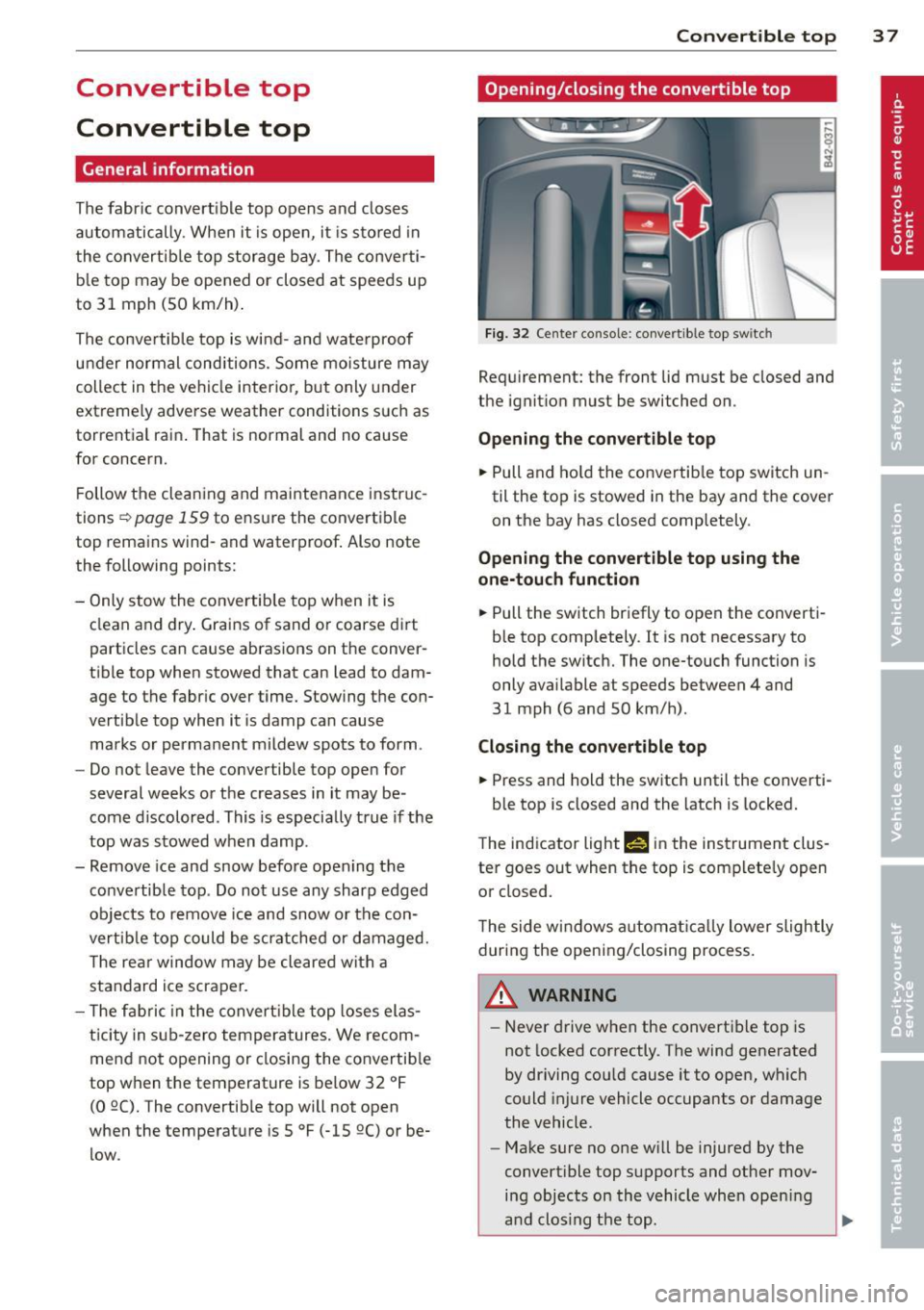
Opening/closing the convertible top
Fig. 32 Center console: convertible top switc h
Requ irement: the front lid must be closed and
the ignition must be switched on .
Opening the convertible top
... Pull and hold the convertib le top switch un
til the top is stowed in the bay and the cover
on the bay has closed completely .
Opening the convertible top using the
one-touch function
... Pull the switch briefly to open the converti
ble top comp letely.
It is not necessary to
hold the switch. The one-touch function is
only available at speeds between 4 and
31 mph (6 and 50 km/h) .
Closing the convertible top
... Press and hold the switch until the converti-
ble top is closed and the latch is locked.
T he ind icator light Nin the instrument clus
ter goes out when the top is complete ly open
or closed.
The side windows a utomat ically lower slightly
during the opening/closing process.
A WARNING
-Never drive when the convert ible top is
not locked correctly. The wind generated
by driving cou ld cause it to open, which
could injure vehicle occupants or damage
the vehicle .
- Make sure no one will be injured by the
convert ible top supports and other mov
ing objects on the vehicle whe n opening
a nd clos ing the top.
Page 41 of 244
Wind deflector
The wind deflector reduces turbulence in the
passenger compartment and makes driving
more comfortable.
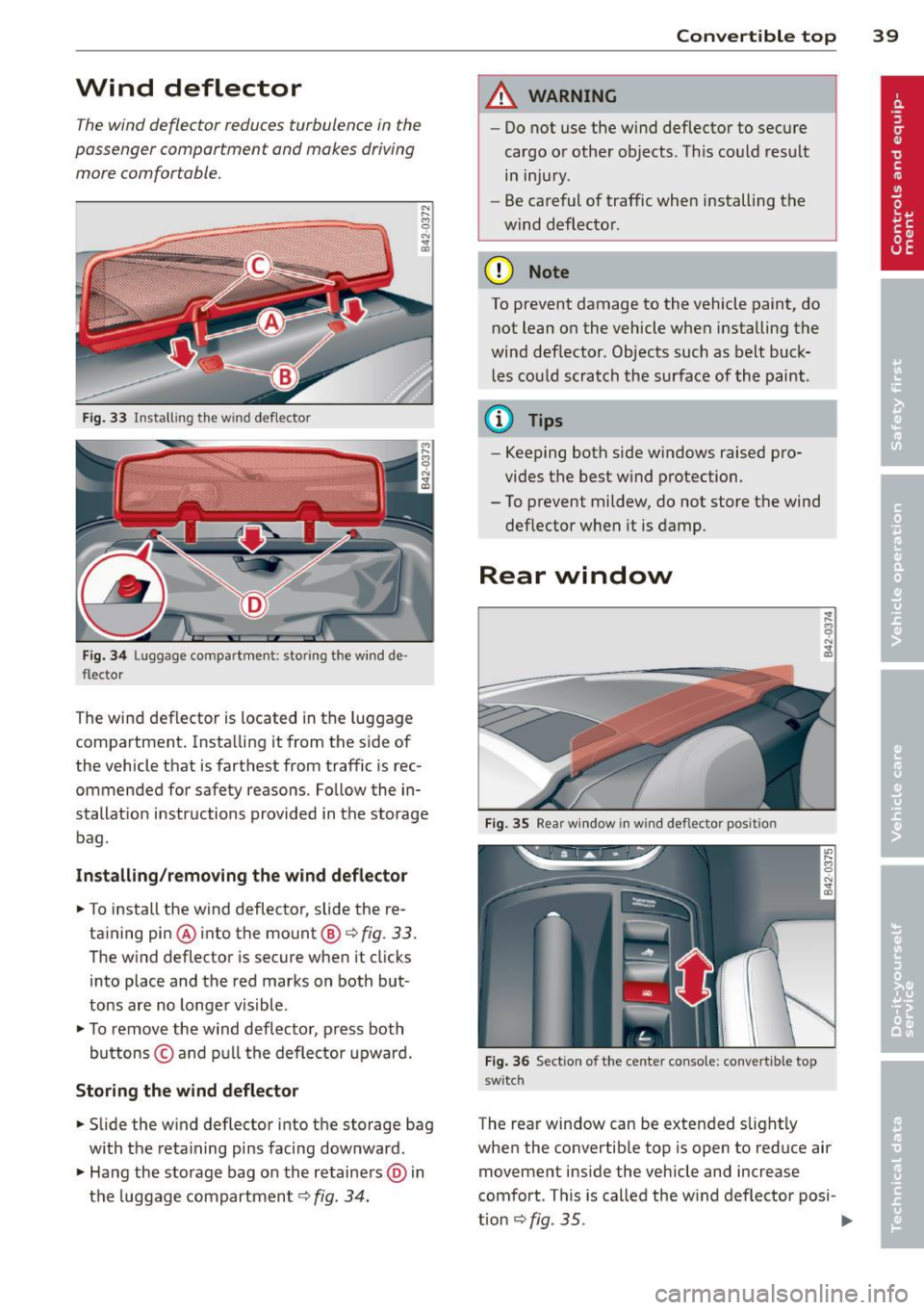
Fig. 33 Install ing the wind deflector
Fig. 34 Luggag .e compart ment: stor ing the wind de ·
flector
The wind deflector is located in the luggage
compartment . Insta lling it from the sid e of
the vehicle that is farthest from traffic is rec
ommended for safety reasons . Fo llow the in·
stallat ion instructions provided in the storage
bag .
Installing /removing the wind deflector
.. To install the wind deflector, slide the re-
taining pin ® into the mount ®~
fig. 33 .
The wind deflector is secure when it clicks
into place and the red marks on both but
tons are no longer visible .
.. To remove the wind deflector , press both
bu ttons © and pull the deflector upward.
Storing the wind deflector
.. Slide the wind deflector into the storage bag
with the retaining pins facing dow nward .
.. Hang the storage bag o n the retainers @) in
the luggage compartment ~
fig. 34.
Convertible top 39
A WARNING
-Do not use the wind deflector to secure
cargo or other objects . Th is could result
in injury.
- Be careful of traffic when installing the
wind deflector.
(D Note
To prevent damage to the vehicle paint, do not lean on the vehicle when installing the
wind deflector . Objects such as belt buck
les could scratch the surface of the paint .
(D Tips
-Keeping both side windows raised pro
vides the best wind protection.
- To prevent mildew, do not store the wind
deflector when it is damp.
Rear window
Fig. 35 Rear window in win d deflecto r position
Fig. 36 Section of the center console: convertible top
swi tc h
The rear window can be extended s light ly
when the convertible top is open to reduce air
movement inside the vehicle and increase
comfort . This is called the w ind deflector posi -
t ion
~ fig. 35 . ..,.
Page 47 of 244
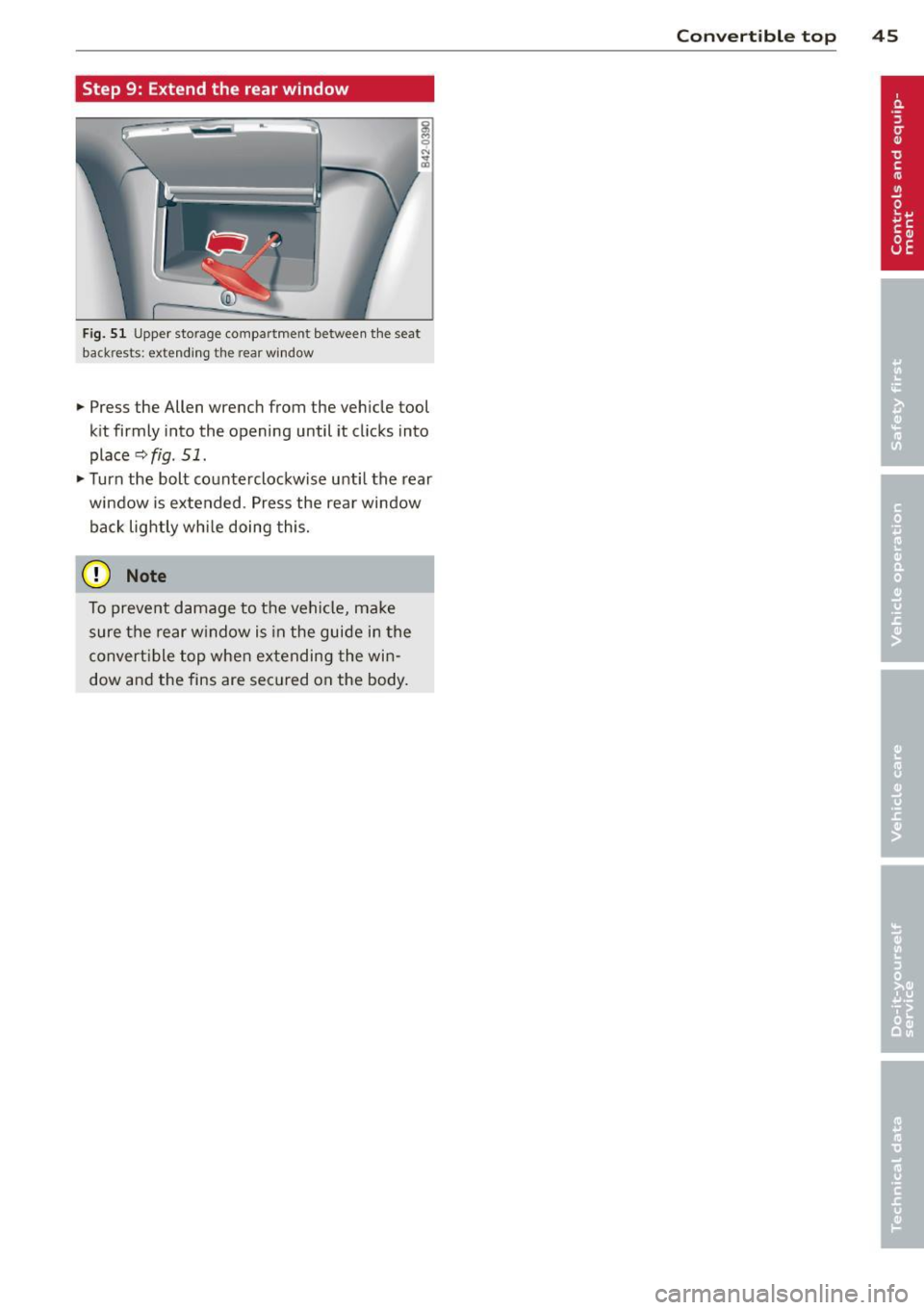
Step 9: Extend the rear window
~ 0 N ... a,
Fig. 51 Upper storage compartment between the seat
backrests: extending the rear w indow
... Press the Allen wrench from the vehicle tool
kit firmly into the opening until it clicks into
place
r::;, fig. 51 .
... Turn the bolt counterclockwise unti l the rear
window is extended. Press the rear window
back lightly whi le doing this.
(D Note
To prevent damage to the vehicle, make
sure the rear w indow is in the guide in the
convert ible top when extending the win
dow and the fins are secured on the body.
Con vert ible top 45
Page 48 of 244

46 Clear vision
Clear vision Lights
Switching the headlights on/off
F ig . 52 Instr ument pane l: light sw itch (automat ic
head· and ta illight control)
Switching on the side marker lights
• Turn the light switch to :oo:.
Switching on the headlights and high
beam
• Turn the light switch to ;D .
• Push the high beam lever forwa rd towards
the instrument panel~
page 47 .
Switching off the lights
• Turn the light switch to 0 .
Switching on automatic head -and
taillight control
• Turn the light switch to AUTO q fig. 52.
The headlights and taillights will come on au·
tomatically when the ignition is switched on
and the light switch is in the position AU TO
(on ly in nighttime conditions). When switch·
ing off the ignit ion, the headlights will go off
and only the side marker lights will remain lit.
Daytime running lights
USA models: The daytime running lights will
come on automatica lly when the ignition is
switched on and the light switch is in the posi·
tion
AUTO (only in daylight cond itions).
Canada models: The daytim e running lights
will come on automatically when the ignition
is switched on and the light switch is in the position
0
, AUTO (on ly in daylight condit ions)
or
:oo:.
Automatic head- and taillight control
In the switch position AUTO the automatic
head· and ta illight control is activated. Light
senso rs are located in the inside mirror hous
ing and constantly check the light conditions
surrounding the vehicle. If ambient bright·
ness falls below a factory set value (e.g. when
driv ing into a tunnel), the head- and taill ights
including the license plate illumination are
automat ically turned on. When amb ient
brightness increases aga in, the external lights
are turned off aga in
q ,&. . In the sw itch posi
t ion
AUTO , the low beams are turned off when
the ignition is switched off. The remaining
lights are turned off when the key is ta ken out
of the ignition lock.
With aut omat ic head- and taillight control,
the high-beam function is also available, but
with one restriction: If you have not switched
the high beams back to low beams during a u
tomat ic head light operation (for examp le, af
ter driving through a tunnel), on ly the low
beams come on the next time automatic
headlights are switched on. To use the high
beams, you first have to pull the h igh beam
lever back and then push the lever forward
again.
The side marker lights and headlights can be
switched on manually by turning the light
switch to the desired position .
Light sensor malfunction
If there is a light sensor ma lfunction, the
symbol
tal comes on in the display. For safety
reasons, the low beams are turned on perma
nently with the sw itch in
AUTO. However, you
can continue to turn the lights on and off us
ing the light switch. Have the light sensor
checked as soon as possible at an authorized
A udi dealer.
Coming home/leaving home function
The function is sw itched on when the sw itch is
i n the
AUTO position and the function is ...,
Page 49 of 244

shown as active in the driver information
system.
The
coming home function illuminates the
area around the vehicle when the ignition is
switched off and the driver 's door is opened.
The length of time the lights rema in on can be
set in the menu display
(Lights> Exterior
lights> coming home) .
The leaving home function illuminates the
area around the vehicle when unlock ing it.
A WARNING
- Never use daytime running lights to see
where you are going. They are not bright enough and will not let you see far
enough ahead for safety, especially at
dusk or when it is dark . Be aware of
changes in outside light conditions when
you are driving and respond by switching
on your low beams.
- Automatic head- and taillight control is
only intended to assist the driver. This
feature does not relieve the driver of his
responsibility to check the headlights
and to turn them on manually according
to the current light and visibility condi
tions. For example, fog and rain cannot
be detected by the light sensors. Conse
quently, always switch the headlights on
under these weather conditions and
when driving in the dark.
- Crashes can happen when you cannot see
the road ahead and when you cannot be
seen by other motorists .
-Always turn on the headlights so that you can see ahead and so that others can see your car from the back.
- Please observe legal regulations when
using the light ing systems descr ibed .
@ Tips
-Always observe the specific local regula
tions for your area when to use your
lights .
- Turn on low beams as evening ap
proaches or in conditions of poor visibili
ty. Clear vision 4
7
- Do not attach stickers to the windshield
in front of the sensors as this can disable
the automatic head- and taillight control
and the automatic glare-dimming of the
rearview mirror(s)*.
- If you remove the ignition from the igni
tion lock while the headlights are still
on, a buzzer will sound as long as the
driver's door is open to remind you to
turn off the lights .
- In the AUTO mode, the low beams are
turned off when the ignition is turned
off. The remaining lights are turned off
when the key is taken out of the ignition .
- In cool or damp weather conditions the
headlights may fog over temporarily on
the inside.
- The critical factor is the temperature
difference between the interior and the
exterior of the headlight Lens.
- With the main beams switched on, the
light-emitting area will be free of con
densation after a short time, however
the edges of the glass may still be fog
ged .
- This physical phenomenon has no ef
fect on the life of your vehicle's light
ing system .
Turn signals and high beam lever
The lever on the left side of the steering col
umn is used to operate the turn signals and the high beam as well as the headlight flash
er.
t
'
Fig. 53 Turn signal and high b eam lever
The turn signal and high beam lever has the
following functions: ..,.
Page 50 of 244
48 Clear vis ion
Turn sign als¢ Q (D@
.,. Push the lever up as far as it can go to turn
on the r ight turn signal or down to turn on
the left turn signal
c;, fig. 53 .
.,. Move the lever briefly until you meet resist
ance and release it to flash three times .
.,. Move the lever (up or down) until you meet
resistance and ho ld it there to determine
the flash ing t ime for the turn signals.
High beam [D @
.,. Push the lever forward to switch on the high
beam.
.,. Pull the lever back towards you to swi tch off
the high beam .
Headl ight fla she r [D ©
.,. Pull the lever toward the steering wheel to
use the headlight f lasher.
Notes on these features
- T he turn signals only work with the igni tion
switched on . The ind icator lights
II or 1M in
the instrument cluster
i::> page 11 also b link .
- After you have turned a corner, the tur n sig -
nal switches off a utomat ica lly.
- T he
high beam works only when the head
li gh ts are on. The indicator light
II in the
instrument cluste r illuminates when the
high beams are on.
- T he
headlight flasher works on ly as long as
yo u hold the lever -even if there are no
li ghts turned on . The indicator light
II in
the instrument cl uster i llum inates when you
use the headl ight f lasher.
A WARNING
Do not use the hig h beam or headlight
flashe r if you know that these could blind
oncoming traffic.
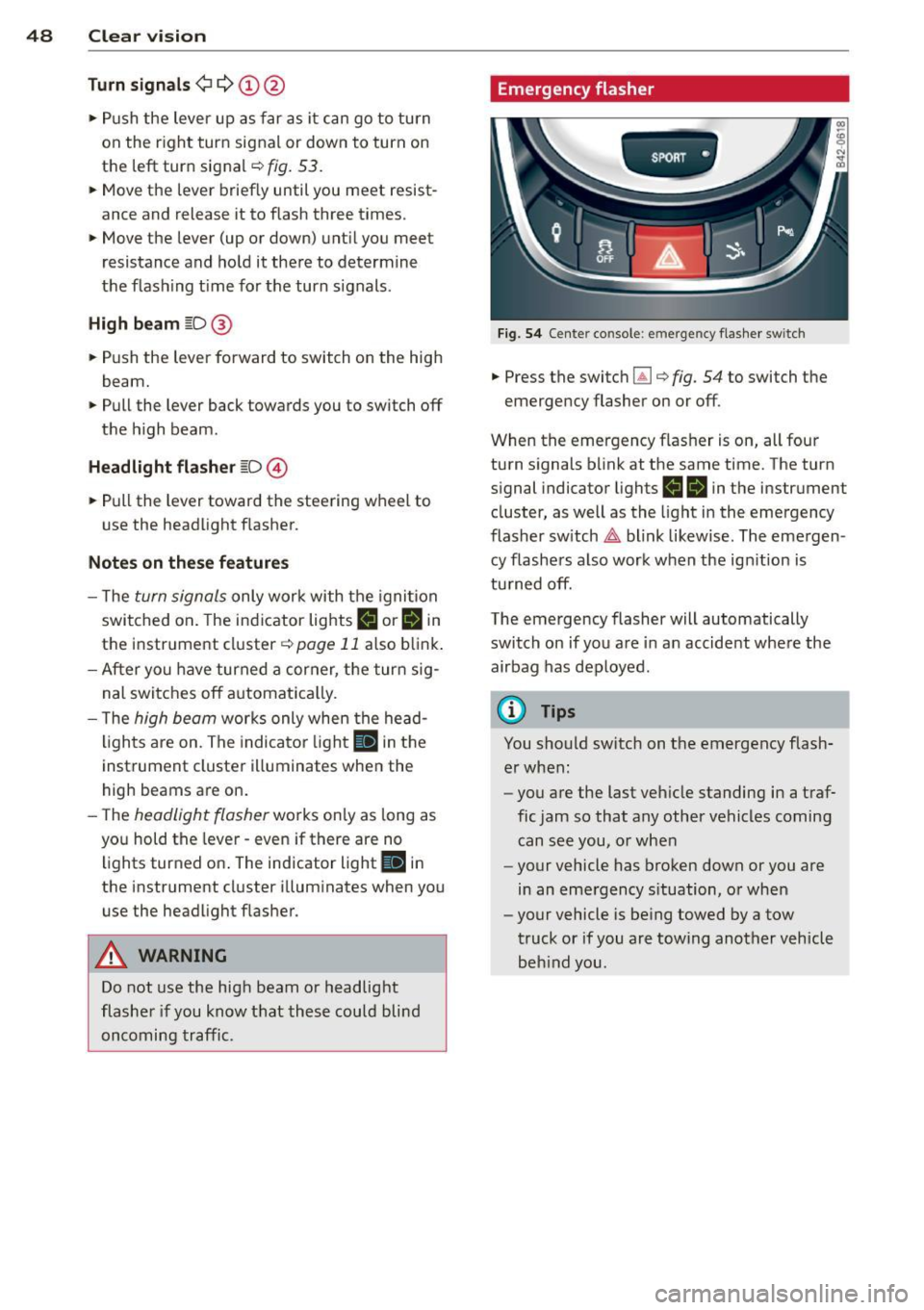
Emergency flasher
SPORT •
Fig. 5 4 Center co nsole : em erge ncy flashe r sw itc h
.,. Press the switc h lil i::> fig. 54 to switch the
emergency flasher on or off .
When the emergency flasher is on, all four
turn s ignals b link at the same time. The turn
s ignal indicator lights
II IB in the instrument
cluster, as well as the light i n the emergency
flasher sw itch
&,. blink likew ise . The eme rgen
cy flashe rs also work when the ign ition is
tu rned off.
The emergency flasher will automatically switch on if you are in an accide nt whe re the
airbag has deployed.
@ Tips
You should sw itch on t he emergency flash
er when :
- you are the last veh icle standing in a traf
fic jam so that any other vehicles coming
can see you, o r w hen
- your vehicle has broken down or you a re
in an eme rgency s ituation, o r when
- your vehicle is be ing towed by a tow
truck or if you are towing another veh icle
beh ind you .
Page 51 of 244

Interior lights
Interior lights
The interior lights include the reading lights
for the driver and the front passenger .
Fig. 55 Section from headliner : In terior lights
Activating door contact circu it
• Press the button @. The LED in the button
illuminates.
Deactivating do or contact circu it
• Press the button @. The LED in the button
goes out.
Fr ont re ad ing l ight s
~
• Press one of the switches ® to turn the
right or left reading light on/off .
"' l1l 0
With the door contact circuit, the interior
lights turn on as soon as you unlock the vehi
cle or open the doors. The interior lights are
also turned on when the ignition key is re
moved. The lights turn off about 30 seconds
after the doors are closed . When the vehicle is
locked or when the ignit ion is tu rned on, the
inte rior lights are turned off .
When a door is open, the interior lights are
turned off after about 10 m inutes to prevent
battery draining.
The brightness of the lights is controlled au
tomatically by a dimmer when they are
switched on/off.
Clear vi sion 49
Instrument panel illumination
The illumination of the instruments, displays
and the center console can be adjusted .
Fig . 56 Instrumen t pa nel illuminat ion
You regu late the brightness of the instr u
ments with the left thumbwheel
C1 ~ fig . 56 .
Ignition ON, light switch at @
With the ign ition switched ON, the glow of
in
strument needles
can be adjusted to appea r
brighter o r dimmer.
Ignition ON, light switch at
:oo~ or ~D.
With the lights switched on, the brightness of
instrument cluster (i.e. needles, gauges and
displays) and center conso le illuminat ion can
be adjusted .
(D Note
The instrument cluster and center conso le
ill umination (gauges and need les) comes
on when you sw itch on the ignition and the
v eh icle headlight s are off . Be awa re of the
fo llow ing difference be tween models bu ilt
to US or Canadian specifications:
- USA mo dels: illumination o f the i nstr u
ment cl uster (gauges and need les), dash
and center conso le around the gearshift
lever is controlled by a light sensor locat
ed in the instrument pane l. The instru
ment pa nel illuminat ion w ill automati
cally become dimmer as the daylight
fades away and eventually will go out completely when outs ide light is very
low. This is to remind you, the dr iver, to
switch o n the hea dlights before it ge ts
too d ark .
Page 52 of 244
50 Clear vis ion
- Canada mode ls: instrument panel illumi
nation will stay bright regard less of the
i ntensity of amb ient light. Always be
aware of changes in outside light condi
tions whi le you are driv ing. Respond in
time to fading daylight by turning the light sw itch to position @,0 (or "AUTO " if
you r ca r is equ ipped with this feature) to
tu rn on your headl igh ts.
Luggage compartment light
The ligh t is loc ated on t he righ t side of the
l uggage compartmen t.
These lights come on automat ica lly when the
front lid is ope ned . T he lights tu rn off au to
mat ica lly if the lid is left open for more t hen
10 minutes .
Vision
Adjusting the exterior mirrors
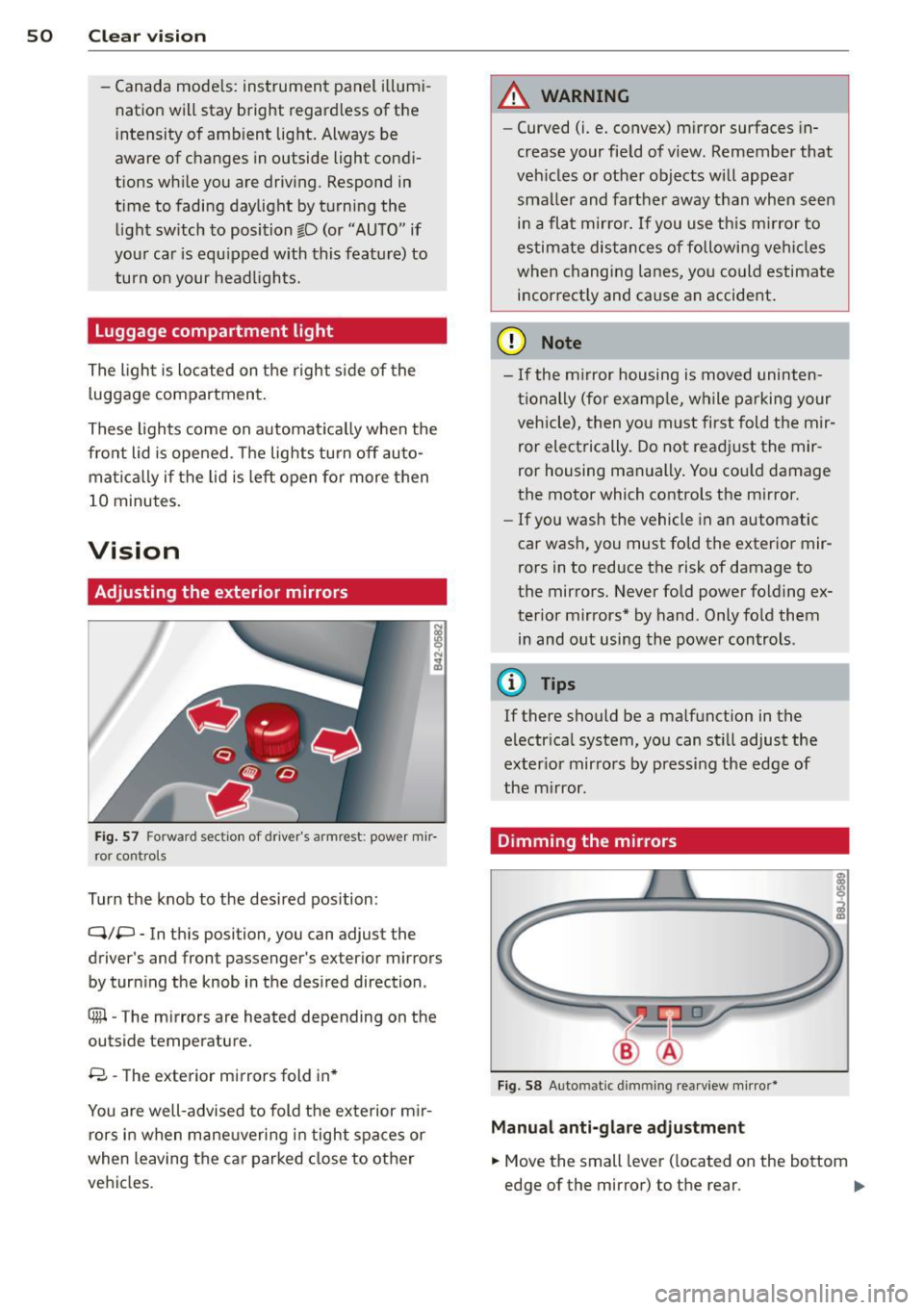
Fig. 57 Forwa rd se cti on of drive r' s armr est: pow er mir
r o r co ntrols
Turn the knob to the desired position :
Q/P - In this position, you can adjust the
driver's and fron t passenger's exter ior mirrors
by turn ing t he knob in the des ired direction .
8 - The exterior mirrors fold in *
You are well-advised to fold the ex te rior m ir
rors in when mane uvering in tight spaces or
when leaving the car parked close to other
vehi cles .
A WARNING
--Curved (i.e . convex) m irror surfaces in-
crease your field of view. Remember that
veh icles or other objects will appea r
sma ller and farther away than when seen
i n a flat mirror.
If you use th is m irror to
estimate dis tances of followi ng ve hicl es
when changing lanes, yo u co uld estimate
i n correct ly and cause an accident .
(D Note
-If the m irror housing is moved uninten
ti onally (for examp le , while p arking your
vehicle), then yo u m ust first fold t he mir
ror electrically. Do not readjust the mir
ror housing manually . You cou ld damage
the motor which controls the mirror .
- If you wash the vehicle in an automatic
car wash, you must fo ld the exter ior mir
rors in to reduce the risk of damage to
the mirro rs . Never fold powe r folding ex
terior mirrors* by hand . Only fold them
in and o ut using the power controls .
@ Tips
If there should be a malf u nction in t he
electr ica l system, you can st ill adjust the
ex ter io r mirrors by pressing the edge of
the m irror.
Dimming the mirrors
Fig . 58 Auto matic dimmin g rearv iew m irro r*
Manu al anti-glare adju stment
.,. Move the small lever ( located on the bottom
edge of the mirror) to the rear .
Ill>
Page 53 of 244

Automatically dimming mirr ors*
• To d im the rearv iew mirror and both exterior
mirrors, press the @ button. The diode @
turns on. The rearview and exterior mirrors dim automat ically when light shines on
them, for example from headlights on ave hicle to the rear.
A WARNING
E lectrolyte flu id can leak from automatic
dimming m irrors if the glass is broken.
Electrolyte flu id can irritate skin, eyes and
respiratory system.
- Repeated or prolonged exposure to elec
tro lyte can cause irritation to the respira
tory system, espec ially among people
with asthma or other respiratory condi
tions . Get fresh air immediately by leav
ing the vehicle or, if that is not possible,
open windows and doors a ll the way.
- If electrolyte gets into the eyes, flush
them thoro ughly with large amounts of
clean water for at least 15 m inutes;
medica l attention is recommended.
- If electrolyte contacts sk in, flush affect
ed area with clean water for at least 15
minutes and then wash affected area
with soap and water; medical attention is recommended . Thoroughly wash af
fected clothing and shoes before reuse .
- If swallowed and person is conscious, rinse mouth w ith water for at least 15
minutes . Do not induce vom iting un less
instructed to do so by medical professio
nal. Get medical attention immediately.
(D Note
Liquid elect rolyte leaking from broken mir
ror glass will damage any p lastic surfaces
it comes i n contact w ith. Clean up spilled
elec trolyte immediately with clean water
and a sponge.
(D Tips
- Switch ing off the dimming func tion of
the i nside rear view m irror also deact i-
Clear vi sion 51
vates the automatic dimming function of
the exterior mirrors .
- T he automatic dimming mirrors do not
dim when the interior lighting is turned
on or the reverse gear is selected .
- Automatic d imm ing fo r the mirror on ly
operates properly if the light striking the
inside mirror is not hindered in any way.
, Sun visors
,.--~ --~-- -------.
Fig . 59 S un vi so r
The vanity mirrors in the sun visors are equip
ped with covers .
Wiper and washer
system
Windshield wiper
The windshield wiper lever controls both the
windshield wipers and the washer system.
Fig . 60 W iper le ver: win ds hiel d wiper le ver positio ns
The windshield wiper lever I:!) fig. 60 has th e
fo llowing positions:
Int ermittent wiping ~1 (acti vating r ain
s e n sor )*
• Move the lever up to position (!).