tow AUDI R8 SPYDER 2015 User Guide
[x] Cancel search | Manufacturer: AUDI, Model Year: 2015, Model line: R8 SPYDER, Model: AUDI R8 SPYDER 2015Pages: 232, PDF Size: 58.36 MB
Page 53 of 232
.... N
l'
N "1: .... I.O
"' N
"' ....
-If swallowed and person is conscious, rinse
mouth with water for at least 15 m inutes.
Do not induce vomit ing unless instructed to
do so by medical professional. Get medical
attent ion immed iate ly .
(D Note
Liquid electro lyte leaking from broken mirror
glass will damage any plastic surfaces it
comes in contact with. C lean up spilled elec
trolyte immed iately w ith clean water and a
sponge.
@ Tips
- Switch ing off the dimming function of the
i nside rear view mir ror also deactivates the
a utomat ic dimming f unction of the exte rior
mir ro rs .
- The au tomatic d imm ing mir ro rs do not d im
when the interior lig hting is turned on or
t h e reverse gear is selecte d.
- Automat ic dimming for the m irror only op
e rates p rope rly if t he lig ht st riking the in
s id e mir ro r i s no t hindere d in any way.
Sun visors
A_.... ,_""''""' 1-----
"~ I~If:._-:::~ ...._ __ ...,....;;;;:;;..,..........., -
~~==.i.=J:Z=t ----------·---
___ , ...... __ ....,.....,_ii,iiiiiiiiioioii=------------i
Fi g. 62 Su n viso r
The vanity mir rors in the sun visors a re eq uipped
with covers .
Clear vi sion
Wiper and washer
system
Windshield wiper
The windshield wiper lever controls bo th the
windshield wipers and the washer system.
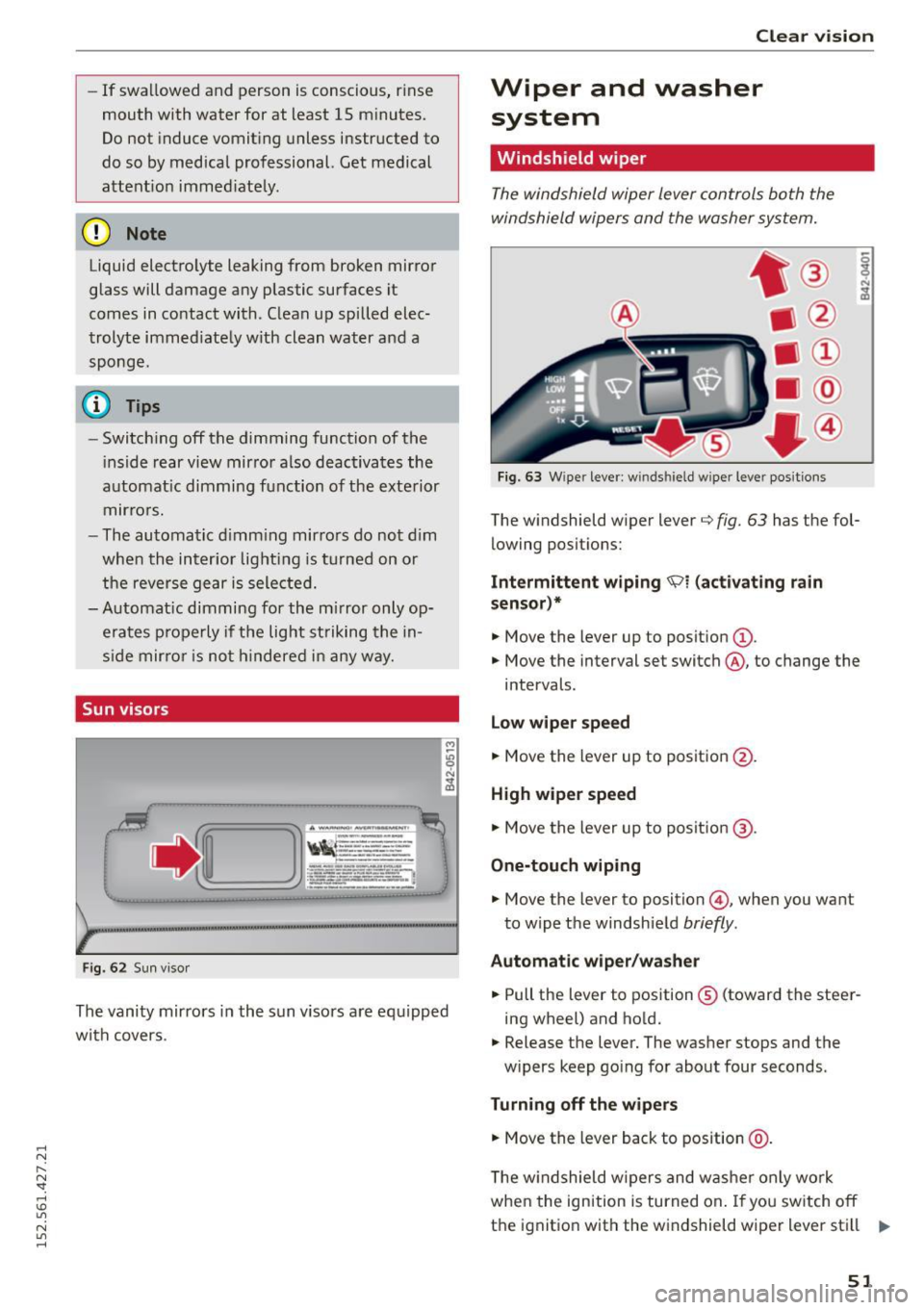
Fi g. 63 W iper lever: w indshield w iper leve r posit ions
The w indshield wiper lever q fig . 63 has the fol
lowing posit ions:
Intermittent wiping ~1 {act ivating rain
sensor)*
• Move the lever up to posit ion (D .
.,. Move the interval set switch@, to change the
intervals.
Low wipe r speed
.,. Move the lever up to posit ion @.
High wiper speed
.,. Move the lever up to posit ion @.
One-touch wiping
.,. Move the lever to position @, when you want
to w ipe the windshie ld
briefly .
Automatic wiper /washer
.,. Pull the lever to position ® (toward the steer
ing wheel) and hold.
.. Release the lever. The washer stops and the
w ipers keep go ing fo r about four seconds.
Turning off the w iper s
.,. Move the lever back to position @ .
The w indshield w ipers and w ashe r only work
whe n the ign ition is turned on . If you sw itch off
t h e ignit ion with the windshield wiper lever sti ll .,..
51
Page 65 of 232
.... N
l'
N "1: .... I.O
"' N
"' ....
@ Tips
If the difference between the desired temper
ature you have set and the vehicle's interior
Air distribution
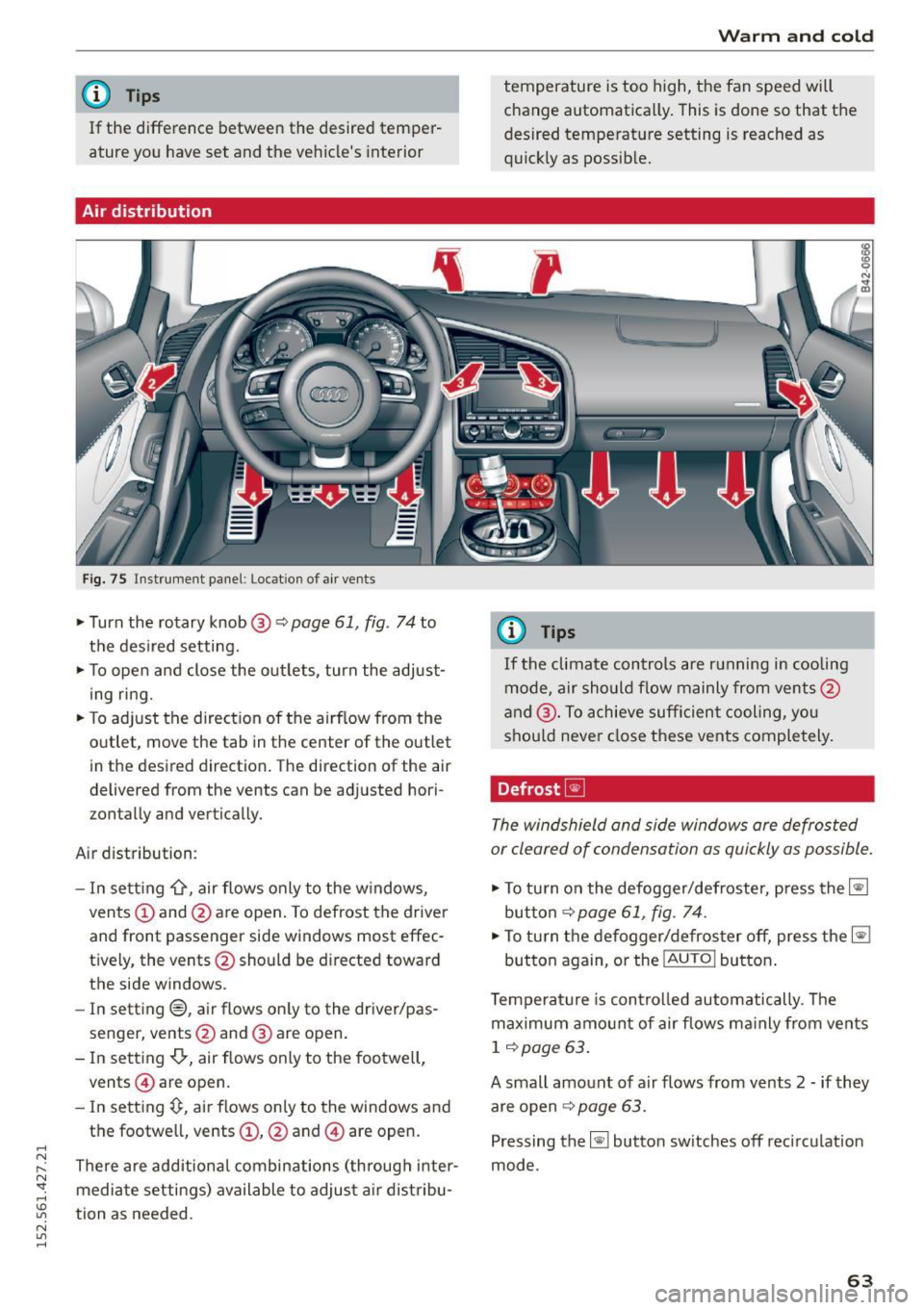
Fig. 75 Instrument panel: Location of air vents
,.. Turn the rotary knob @ q page 61, fig. 74 to
the desired setting.
,.. To open and close the outlets, turn the adjust
ing ring.
,.. To adjust the direction of the airflow from the
outlet, move the tab in the center of the outlet
in the desired direction. The direction of the air
delivered from the vents can be adjusted hori
zontally and vertically.
Air distribution:
- In setting
-0, air flows only to the windows,
vents
(D and @are open. To defrost the driver
and front passenger side windows most effec
t iv ely, the vents @should be directed toward
the side windows .
- In setting®, air flows only to the driver/pas
senger, vents@and @ are open.
- In setting
-0-, air flows only to the footwell,
vents @ are open.
- In setting~. air flows only to the windows and
the footwe ll, vents
(D , @ and @ are open.
There are additional combinations (through inter mediate settings) available to adjust air distribu
tion as needed.
Warm and cold
temperature is too high, the fan speed will
change automatically. This is done so that the
desired temperature setting is reached as
quickly as possible.
(0 Tips
If
the climate controls are running in cooling
mode, air should flow mainly from vents@
and @. To achieve sufficient cooling, you
should never close these vents completely.
Defrost ~
The windshield and side windows are defrosted
or cleared of condensation as quickly as possible.
,.. To turn on the defogger/defroster, press the~
button
~page 61, fig. 74.
,.. To turn the defogger/defroster off, press the~
button again, or the
! AUTO ! button.
Temperature is controlled automatically. The
maximum amount of air flows mainly from vents
1 ~page 63.
A small amount of air flows from vents 2 -if they
are open
~ page 63.
Pressing the~ button switches off recircul ation
mode.
63
Page 70 of 232
On the road
- The engine cannot be started by pushing or
towing the vehicle .
@I For the sake of the environment
To avoid unnecessary eng ine wear and to re
duce exhaust emissions , do not let your vehi
cle stand and warm up. Be ready to drive
off
immediately after starting your vehicle.
Stopping the engine
On vehicle s wi th S tron ic*, the engine can be
turned
off in the neutral position N and in each
gear (1 -7 and R) .
.. Tu rn the ignition key to posit ion (!) co
page 66,
fig. 77 .
A WARNING
- Never turn off the engine until the vehicle
has come to a complete stop .
- The brake booster and servotronic only work
when the eng ine is running . W ith the igni
t ion turned
off , you have to apply more force
when steering or braking. Since you cannot
steer and stop normally , this can lead to ac
c idents and serious injuries .
(D Note
-If the engine has been under heavy load for
an extended period of time, heat builds up
i n the eng ine compartment after the engine
i s switched
off -there is a r isk of damag ing
the engine . A llow the engine to continue to
run at id le for a short time or drive until it
has coo led down before you turn it off
q page 73.
-If the engine has been under heavy load for
an extended period of time, it can become
extremely hot . You should not park your ve
hicle over easily combustible objects or
areas (e .g . grass or leaves) . There is a risk of
starting a fire .
{!) Tips
After the engine has been switched off, the ra
diator fan can continue to run for up to 10 m i
nutes - even w ith the ignition switched
off . It
68
can also switch on again after some time if
the coo lant temperature rises as the result of
heat bu ildup or if the engine compartment is
heated by the sun's rays and the engine is hot .
Parking brake
Parking brake
When the parking brake is set, it prevents the ve
hicle from rolling away unintentionally.
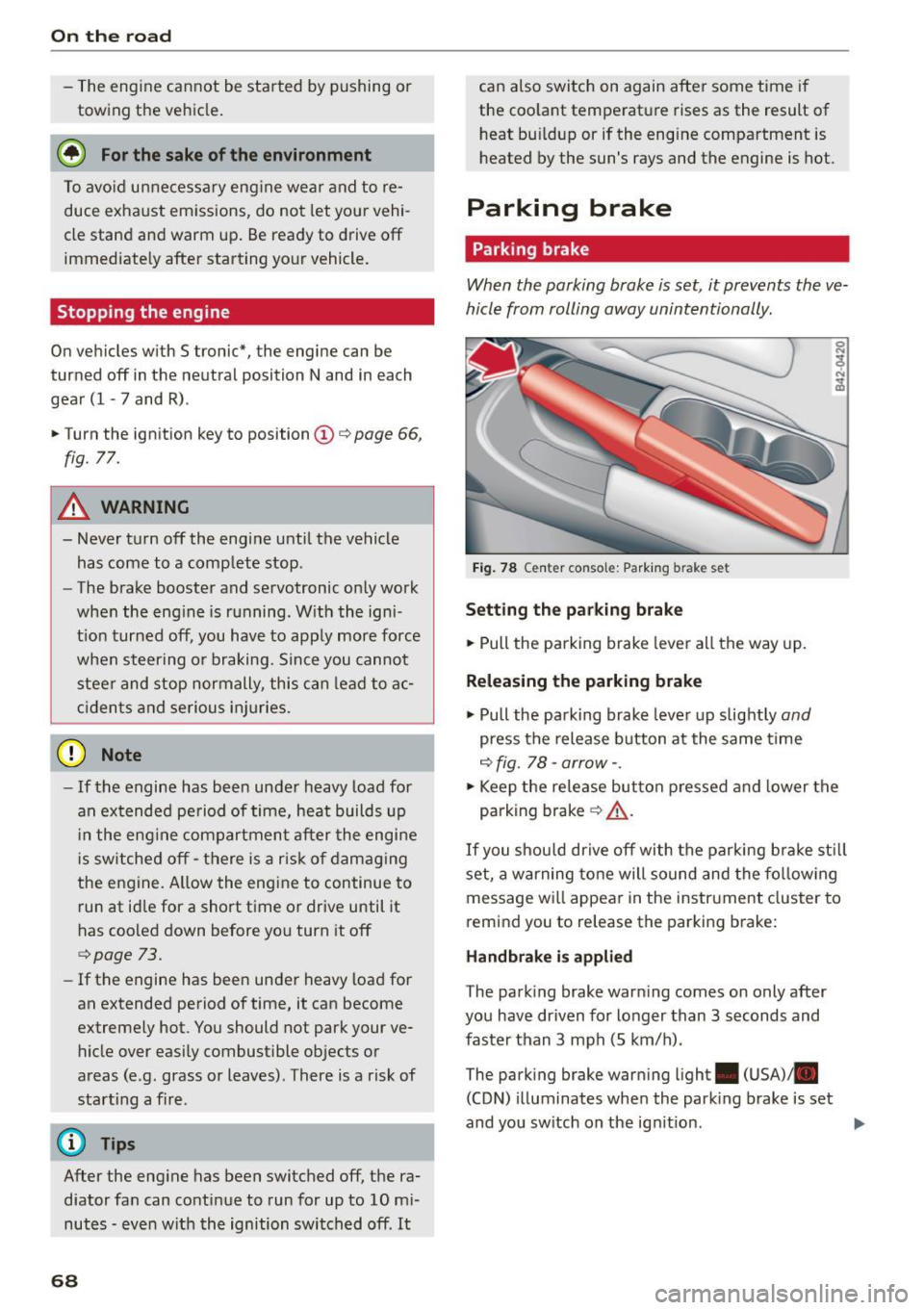
Fig . 78 C ente r co nsol e: Park ing bra ke set
S etting th e pa rking brak e
.. Pull th e parking brake lever all the way up.
Releasing the p arkin g brake
.. Pull the parking brake lever up slightly and
press the release button at the same time
c::> fig . 78 -arrow- .
.. Keep the release button pressed and lower the
parking brak e
q &_.
If you shou ld drive off with the parking bra ke st ill
set, a warning tone will sound and the fo llow ing
message wi ll appear in the instrument cluster to
r e mind you to release the parking brake:
H and brake i s appli ed
T he park ing brake warn ing comes on only after
you have driven for longer than 3 seconds and
faster than 3 mph (5 km/h) .
The parking brake warning ligh t. (USA)/ .
(CON) illuminates whe n the park ing brake is set
and you sw itch on the ign it ion .
Page 74 of 232
On the road
@ Tips
-Vehicles with manua l transmission: You can
attain the set speed only if the currently en
gaged gear a llows it and the engine is not
stressed. Shifting to a h igher or lower gear
promptly will allow the engine to run
smoothly.
- The cruise control cannot maintain a con
stant speed when driving downhill. The ve
hicle will accelerate under its own weight .
Downshift to a lower gea r or use the brakes
to slow down.
Changing speed
.. Press lever in the 0 or O direction¢ page 71,
fig .
Bl to increase or decrease your speed .
.. Re lease the lever to save that speed .
You ca n also press the accelera tor pedal down to
increase your speed, e.g . if you want to pass
someone . The speed you saved earlier will re
sume as soon as you release the accelerator ped
al.
If , however, you exceed your saved speed by
S mph
(10 km/h) for longer than S minutes , the
cruise control will turn off temporarily. The sym
bol will go out but the saved speed will be re
tained.
Presetting your speed
You can preset your desired speed while the vehi
cle is not moving .
.. Turn on the ignition .
.. Pull lever into position@¢
page 71 , fig . Bl .
.. Press the lever in the 0 or O direction to in-
crease or decrease your speed .
.,. Release the lever to save that speed .
This function makes it possible, for example, to
save the speed you want before driving on the
highway. Once on the highway, activate the cruise
control by pulling the lever toward @.
72
Switching the system off
Temporary deactivation
.. Press the brake pedal, or
.. Keep the clutch pedal pressed down longe r, or
.,. Press the lever into position @(not clicked into
place)
¢page 71, fig. Bl, or
.. Drive for longer than 5 minutes at more than
S mph
(10 km/h) above the stored speed .
Switching off completely
.,. Press lever into position @(clicked into place),
or
.. Switch the ignition off.
The system retains the saved speed if you deacti
vate the cruise control temporarily. To resume
the saved speed, release the brake or clutch ped
al and pull the lever to pos ition @.
Switch ing the ignition off erases the saved speed.
.&_ WARNING
You should only return to the saved speed if it
is not too fast for the current traffic condi
tions -risk of an accident!
Audi magnetic ride
Damping can be adjusted to the driver's prefer
ence and it adapts automatically to the current
driving situation .
SPORT •
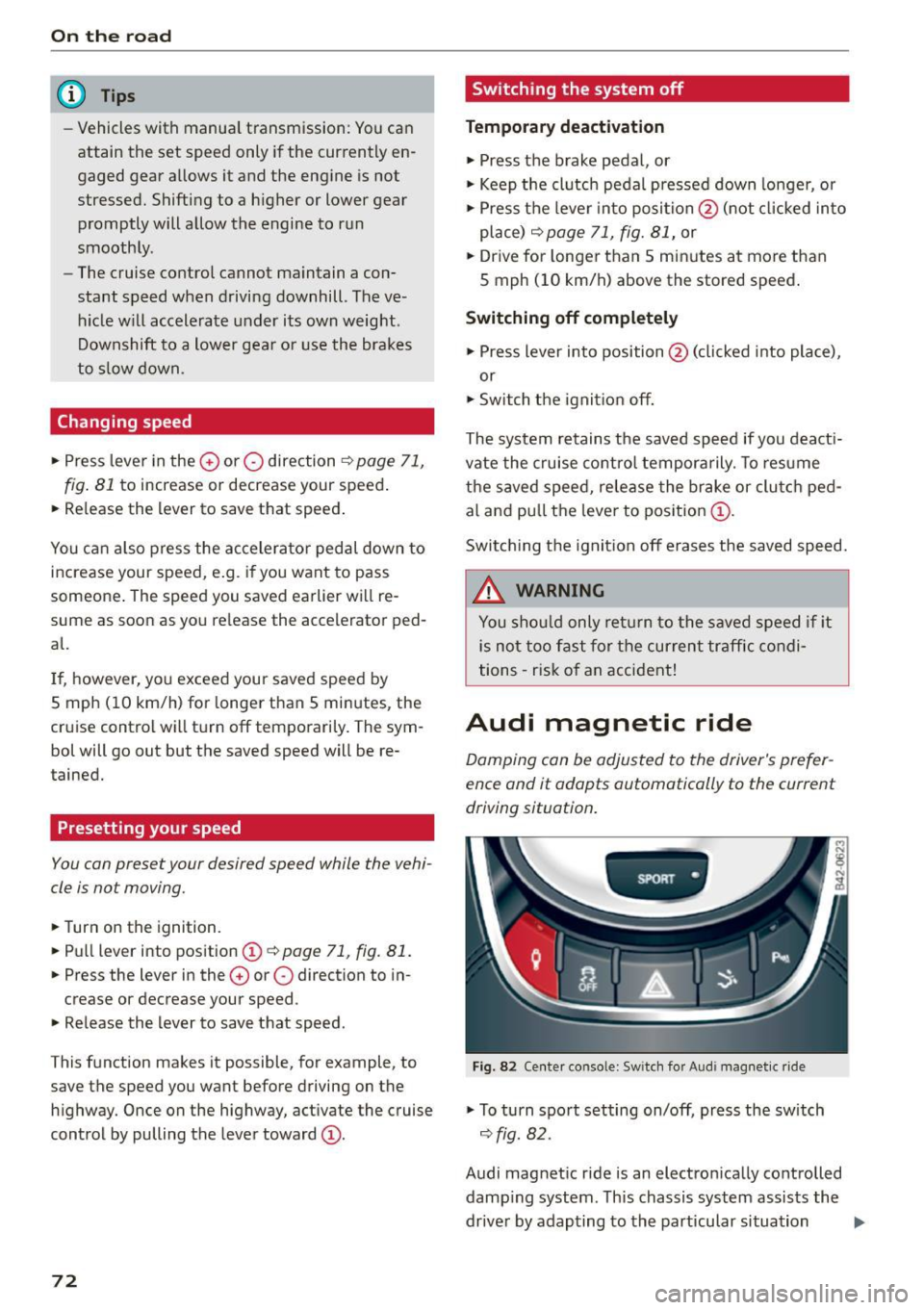
Fig. 82 Center console: Sw itch for Audi magnet ic ride
.,. To turn sport setting on/off, press the sw itch
¢ fig. 82.
Audi magnetic ride is an electronically controlled damp ing system . This chassis system assists the
driver by adapting to the particular situation
liJI,
Page 77 of 232
.... N
l'
N "1: .... I.O
"' N
"' ....
heavy loads. This can result in increased
wear .
- The Launch Control Program only funct ions
when the parking brake is released and the
vehicle speed is less than 3 mph (5 km/h).
S tronic
Description
Applies to vehicles: with S tronic
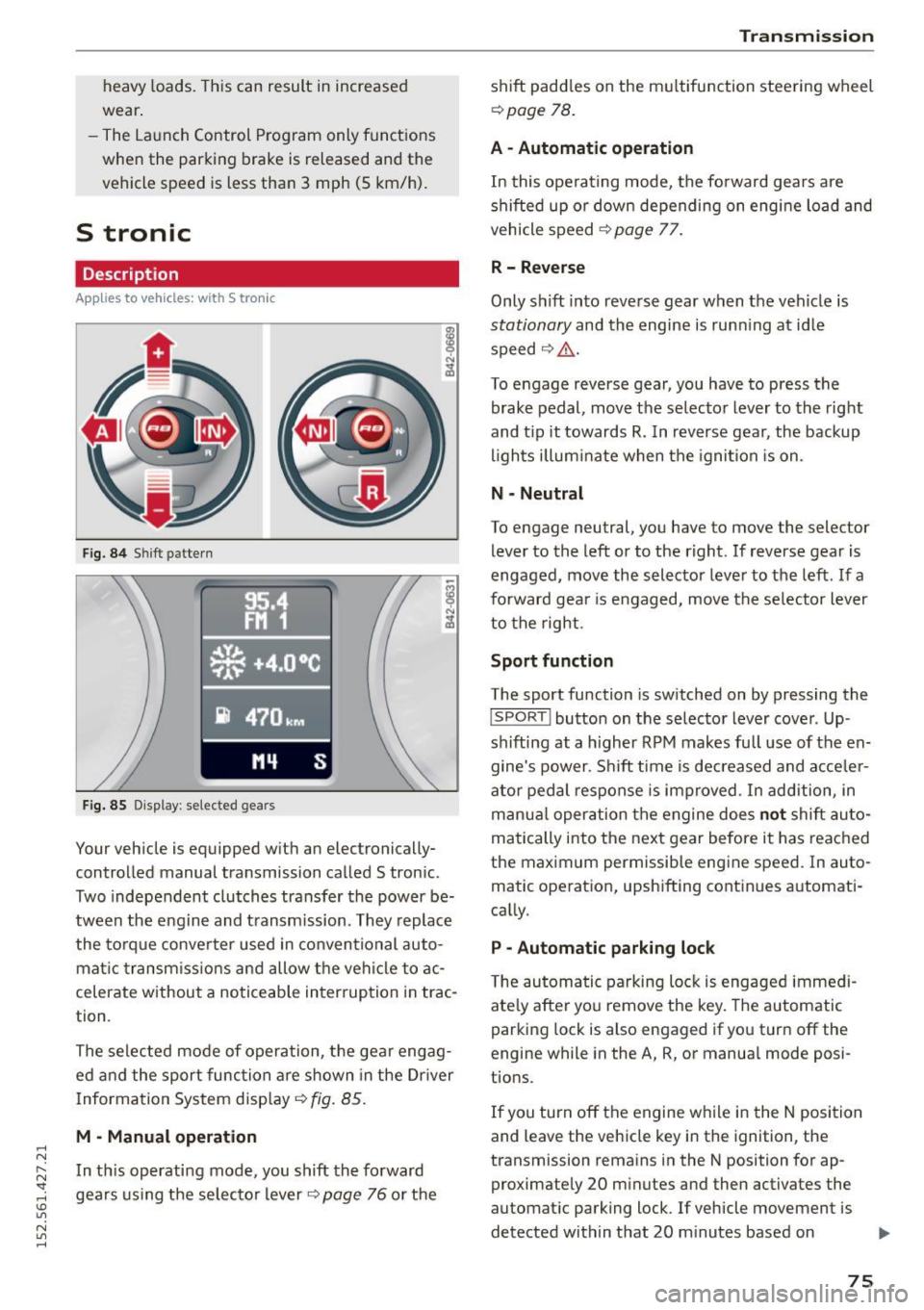
Fig. 84 Shift pattern
Fig. 85 Display : selected gea rs
Your vehicle is equipped with an electronically
controlled manual transmission called S tronic .
Two independent clutches transfer the power be
tween the eng ine and transmission. They replace
the torque converter used in conventional auto
mat ic transmissions and allow the vehicle to ac
celerate without a noticeable interruption in trac
tion .
The selected mode of operation, the gear engag ed and the sport function are shown in the Dr iver
Information System display ¢
fig. 85.
M -Manual operation
In this operating mode, you shift the forward
gears using the selector lever
r=>v page 76 or the
Transmission
shift paddles on the multifunction steering wheel
¢ page 78.
A - Automatic operation
In this operating mode, the forward gears are
shifted up or down depending on engine load and
vehicle speed
¢ page 77.
R- Reverse
Only s hift into reverse gear when the vehicle is
stationary and the engine is runn ing at idle
speed ¢
Li')...
To engage reverse gear, you have to press the
brake pedal, move the selector lever to the right
and t ip it towards
R. In reverse gear, the backup
lights illuminate when the ignition is on .
N -Neutral
To engage neutral, you have to move the selector
lever to the left or to the right . If reverse gear is
engaged,
move the selector lever to the left . If a
forward gea r is engaged, move the selector lever
to the right.
Sport function
The sport function is switched on by pressing the
I SPORT ! button on the selector lever cover . Up
shifting at a higher RPM makes full use of the en
gine's power . Shift time is decreased and acceler
ator pedal response is improved . In addition, in
manua l operation the engine does
not shift au to
matically into the next gear before it has reached
the maximum permissible engine speed. In auto
matic operation, upshifting continues automati
cally.
P -Automatic parking lock
The automatic parking lock is engaged immedi
ately after you remove the key. The automatic
parking lock is also engaged if you turn off the
engine while in the A, R, or manual mode posi
tions .
If you turn off the engine while in the N position
and leave the vehicle key in the ignition, the
transmission remains in the N position for ap proximately 20 minutes and then activates the
automatic parking lock . If vehicle movement is
detected within that 20 minutes based on
IIJI.
75
Page 79 of 232
..... N
r-N "': ..... \!) ..,.,
N ..,., .....
(D Note
If you must stop on an incline, always hold
the vehicle in p lace with the foot brake to pre
vent it from rolling back. Do not try to prevent the vehicle from rolling back when the gear is
engaged by increasing speed, as this may
damage the clutch.
Automatic mode
Applies to vehicles: with S tronic
St arting fro m a stop
"' Press and hold the brake pedal.
"' Tap the se lector lever towards A.
"' Re lease the brake pedal and press the accelera-
tor pedal
¢ ,&. in Manual mode on page 76.
Under certain circumstances (driving in the
mounta ins for example), it can be beneficia l to
switch temporarily to the manual shift program
¢
page 76 in order to adjust the gear ratios to
driving conditions
manually.
Kick-down
Applies to vehicles: with S tronic
When you depress the accelerator pedal beyond
the resistance point, S tronic downsh ifts into a
lower gear, depending on vehicle speed and en
g ine rpm. It shifts up into the next higher gear
once the maximum specified engine RPM is reached . Exception: you have activated the sport
function.
.&, WARNING
Please note that the wheels could spin on
slic k or slippery roads when kick-down is ac
tive.
l) Market -spec ifi c
-
Tra nsm issio n
Launch control program
Applies to vehicles: with S tronic
The Launch Control Program enables maximum
acceleration.
Requirement: The engine must be at operat ing
temperature and the steering wheel must not be
turned.
"' With the engine running, press the
I!]!
!ESC OFFjll button one time . The Ill indicator
light and the message
ESC S port - Cau tion!
Limi ted stabil ity! appears in the driver infor
mation system display.
"' Press the brake pedal with your left foot and
hold it down.
"' Engage a gear.
"' Press the
I SPORT ! button on the selecto r lever
cover.
"' Press the accelerator pedal at the same time
with your right foot unti l the engine has
reached a constant speed.
"' Remove your left foot from the brake¢.&_ .
A WARNING
--
- Always adapt your dr iving to the traffic flow.
- Only use the Launch control program when
road and traffic cond itions allow it and oth
er drivers will not be endangered or both
ered by your driving and the vehicle's accel
eration.
- Please note that the driving wheels can spin
and the vehicle can b reak away when ESC is
sw itched off, espec ial ly when the road is
slippery .
- Once you have accelerated, you sho uld
sw itch the ESC back on by pressing the
[fil
but ton.
(D Tips
- The tra nsmission temperature may increase
signif icant ly afte r using the Launch Contro l
Program. If that happens, the program may
not be availab le for a few minutes . It wi ll be
available again after a cool-down period .
77
Page 81 of 232
.... N
l'
N "1: .... I.O
"' N
"' ....
(D Note
If S tronic has switched to emergency opera
tion mode, you should have the malfunction corrected as soon as possible.
Parking lock emergency release
App lies to vehicles: with S tro nic
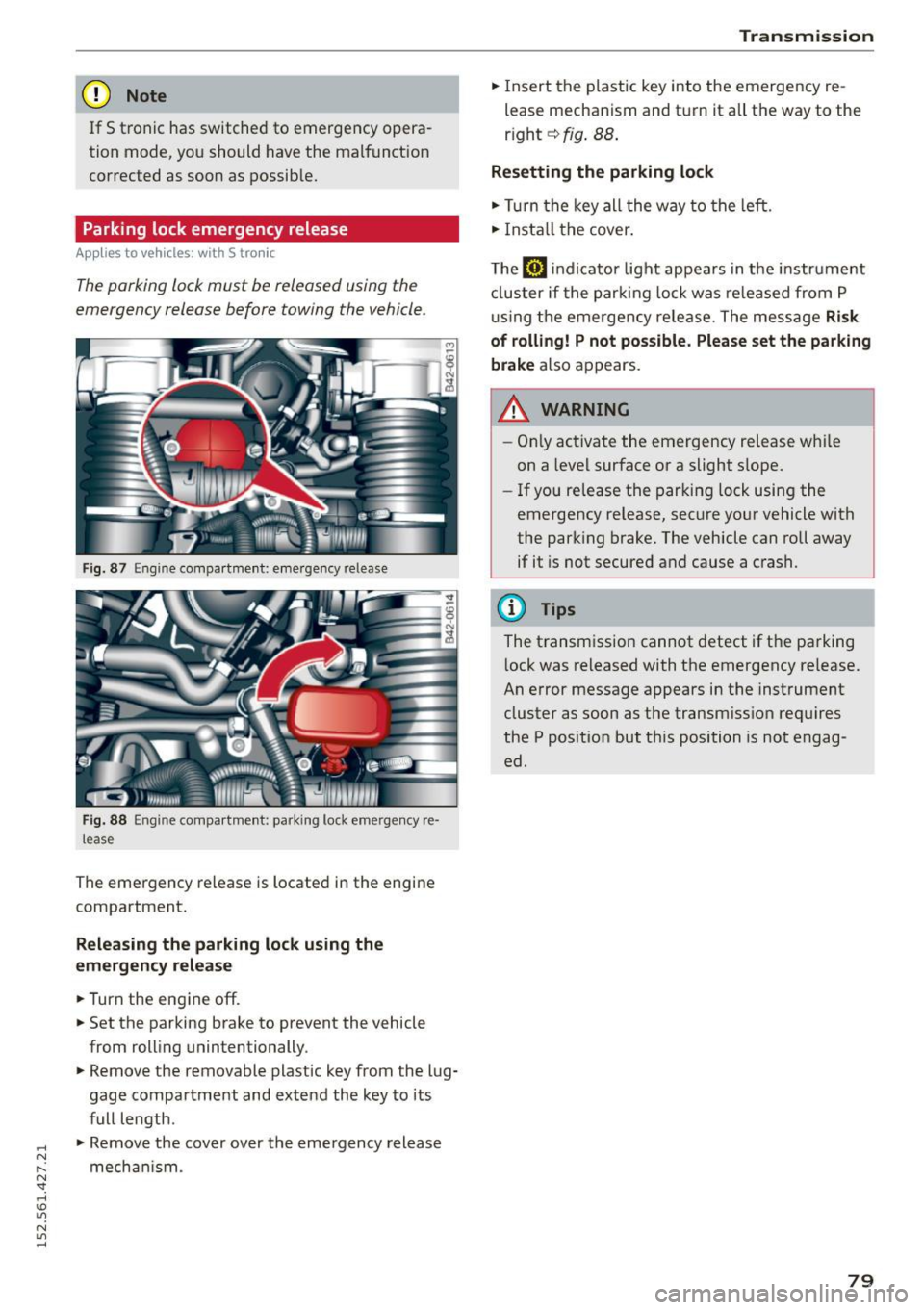
The parking lock must be released using the
emergency release before towing the vehicle.
F ig. 87 Engine compart men t: emergency release
Fig. 88 Engine compa rtment: parking lock emergency re·
lease
The emergency release is located in the engine
compartment.
Releasing the parking lock using the
emergency release
.,. Turn the engine off .
.,. Set the parking brake to prevent the vehicle
from rolling unintentionally .
.,. Remove the removable plastic key from the lug
gage compartment and extend the key to its
full length .
.,. Remove the cover over the emergency release
mechan ism .
Tran smission
.,. Insert the plastic key into the emergency re
lease mechanism and turn it all the way to the
r ight ~
fig. 88.
Resetting the parking lock
.,. Turn the key all the way to the left.
.,. Install the cover.
The
[il indicator light appears in the instrument
cluster if the parking lock was released from
P
using the emergency release. The message Risk
of rolling! P not possible. Please set the parking
brake
also appears.
,&_ WARNING
- Only activate the emergency release whi le
on a level surface or a slight s lope.
- If you release the parking lock using the
emergency release, secure your vehicle with
the parking brake. The vehicle can roll away if it is not secured and cause a crash.
(D Tips
The transmission cannot detect if the parking
l ock was released with the emergency re lease.
An error message appears in the instrument
cluster as soon as the transmiss ion requires
the
P position but th is position is not engag
ed.
79
Page 83 of 232
..... N
r-N "': ..... \!) 1.1'1
N 1.1'1 .....
area roughly corresponds to the area in¢ fig. 91
and (D ~ fig . 92. Orientation lines and colored
surfaces are projected in the area shown, which
can help you with parking and maneuvering. Ob
jec ts that are located in an area that is not cap
tured by the camera@¢
fig. 92 and that are
closer to the bumper will not appea r on the navi
gation system display .
We recommend that you practice park ing with
the rearview camera in a traffic -free location o r
parking lot to become familiar w ith the system,
the orientation lines, a nd their funct ion . There
should be suff icient light and good weather con
d itions w hen do ing so.
In the nav igat io n system display, objects or
vehicles appear closer or fu rther away if:
Objects or vehicles appear closer or farther away in the navigation system if :
- you are driving in reverse gear from a level sur
face onto an incl ine, or a downward slope,
- you are driving in reverse gear toward protrud-
ing objects .
The accuracy o f the orientation lines and blue
surfaces diminishes if:
- the rearv iew came ra does not p rovide a reliab le
image, for example, in poor visibility cond itions
or if the lens is d irty,
- the image on the screen is not visible due to
s u n g lare and reflect ion.
Caring for th e rearvi ew cam era len s
The rearview camera is located in the center of
the vehicle above the rear license p late bracket.
In order for the rearview camera to function
p roperly, the camera lens must be kept clean and
free of snow and ice .
- Dampen the lens with a househo ld alcoho l
based glass cleane r, and clea n the lens with a
dry cloth .
- Remove snow with a hand brush and ice pref
erably with a de- ic ing spray ¢(j) .
A WARNING
- T he pa rking system cannot rep lace the d riv
er' s a ttention . The d rive r alone is responsi-
P a rk ing system
ble for parking and simi lar d riving maneu
vers.
- Sensors have blind spots in whic h objects
cannot be detected. Pay spec ia l attention to
small children and an imals beca use the sen
sors cannot always detect them.
- Always keep your eyes on the vehicle 's sur
round ings, using the rearview mirror as
well.
- Do not allow yourself to be distracted from
traffic by the rearview camera pictures in
the navigation system display .
-If the position and the installation angle of
the camera has changed, for example, after
a rear end collision, do not continue to use
the system fo r safety reasons . Have it
checked by a n author ized Audi dealer or oth
er q ua lif ied wor kshop .
(!) Note
-Low obstacles a lready s ignaled by a war ning
can disappea r from the system 's detection
range as they a re approached and w ill not
cont in ue to be s ignaled . Objec ts such as
barrie r cha ins, trailer draw ba rs, narrow
painted vertical poles o r fences may not be
detected by the system, pos ing risk of dam
age .
- Never use warm or hot wate r to remove
snow or ice from the rearv iew camera lens
because the lens could crack .
- Never use products that a re abrasive when
cleaning the lens .
81
Page 90 of 232
Driving Safely
positions to help reduce the risk of personal
injury if the driver's airbag inflates.
- Never hold the steering wheel at the
12 o'clock position or with your hands at
other positions inside the steering wheel
rim or on the steering wheel hub. Holding
the steering wheel the wrong way can cause
serious injuries to the hands, arms and head
if the driver's airbag inflates
- Pointing the steering wheel toward your
face decreases the ability of the supplemen
tal driver's airbag to protect you in a colli
sion.
-Always sit in an upright position and never
lean against or place any part of your body
too close to the area where the airbags are
located.
- Before driving, always adjust the front seats
and head restraints properly and make sure
that all passengers are properly restrained.
- Never adjust the seats while the vehicle is
moving. Your seat may move unexpectedly
and you could lose control of the vehicle.
- Never drive with the backrest reclined or
tilted far back! The farther the backrests are
tilted back, the greater the risk of injury due
to incorrect positioning of the safety belt and improper seating position.
- Children must always ride in child seats
¢page 122. Special precautions apply
when installing a child seat on the front pas
senger seat
¢page 102.
Proper seating position for the front
passenger
The proper front passenger seating position is
important for safe, relaxed driving .
For your own safety and to reduce the risk of in
jury in the event of an accident, we recommend
that you adjust the seat for the front passenger
to the following position:
.. Adjust the angle of the seatback so that it is in
an upr ight position and your back comes in full
contact with it whenever the vehicle is moving .
.,. Adjust the head restraint so the upper edge is
as even as possible with the top of your head. If
88
that is not possible, try to adjust the head re
straint so that it is as close to this position as
possible
¢ page 89.
.. Keep both feet flat on the floor in front of the
front passenger seat.
.. Fasten and wear safety belts correctly .
For detailed information on how to adjust the
front passenger's seat, see
¢ page 56, General
recommendations.
A WARNING
Front seat passengers who are unbelted, out
of position or too close to the airbag can be
seriously injured or killed by the airbag as it
deploys. To help reduce the risk of serious per
sonal injury:
- Passengers must always sit in an upright po
sition and never lean against or place any
part of their body too close to the area
where the airbags are located.
- Passengers who are unbelted, out of posi
tion or too close to the airbag can be seri
ously injured by an airbag as it deploys with
great force in the blink of an eye.
-Always make sure that there are at least 10 inches (25 cm) between the front pas
senger's breastbone and the instrument panel.
- Always make sure that there are at least
4 inches (10 cm) between the front passen
ger's knees and the lower part of the instru ment panel.
- Each passenger must always sit on a seat of
their own and properly fasten and wear the
safety belt belonging to that seat.
- Before driving, always adjust the front pas
senger seat and head restraint properly.
- Always keep your feet on the floor in front
of the seat. Never rest them on the seat, in
strument panel, out of the window, etc. The
airbag system and safety belt will not be
able to protect you properly and can even in
crease the risk of injury in a crash .
- Never drive with the backrest reclined or
tilted far back! The farther the backrests are
tilted back, the greater the risk of injury due
~
Page 93 of 232
..... N
r-N "': ..... \!) ..,.,
N ..,., .....
mats wi ll prevent them from sliding into posi
tions that cou ld interfere wit h the peda ls or im
pa ir safe operation of your veh icle in other ways .
A WARNING
Pedals that cannot move freely can result in a
loss of vehicle control and increase the r isk of
ser ious personal injury.
- Always make sure that floor mats are prop
erly secured .
- Never place or insta ll floor mats or other
floor coverings in the veh icle that cannot be
properly secured in place to prevent them
from slipping and interfering w ith the ped
als or the ability to control the veh icle.
- Never place or install floor mats or other
floor coverings on top of already installed
floo r mats. Add itiona l floo r mats and other
cove rings w ill reduce the si ze of the pedal
area and interfere w ith the ped als.
- Always properly reinstall and se cu re f loor
m ats that have been taken ou t for clean ing .
- Always make sure that objects cannot fall
into the dr iver footwell while the vehicle is
moving. Objects can become tr apped under
the brake pedal and accelerator peda l caus
ing a loss of vehicle contro l.
Stowing luggage
Loading the luggage compartment
All luggage and other objects must be properly
stowed and secured in the luggage compart
ment .
Loose items in the luggage compartment can
shift suddenly, changing vehicle handling charac
ter istics. Loose items can also increase the risk of
serious personal injury in a sudden veh icle ma
neuver or in a coll is ion.
In a collis ion, the laws of p hys ics mean that even
smal ler items that are loose in the vehicle will
become heavy miss iles that can cause ser ious in
jury . Items in the vehicle possess energy which
va ry w ith vehicle speed and the we ight of the
item. Vehicle speed is the mos t significant fa ctor.
Dr iving Sa fel y
For example, in a frontal collision at a speed o f
30 mp h (48 km/h) , the forces acting o n a 10-lb
(4 .5 kg) object are about 20 t imes the norma l
weight of the item. This means that the weight of the item would sudden ly be about
200 lbs . (90 kg) . You can imagine the injuries
that a 200 lbs. (90 kg) item flyi ng freely throug h
the passeng er compartment co uld cause in a col
li sion like this.
A WARNING
Imp roperly store d luggage or other items c an
fly through the vehicle causing serio us pe r
sonal injury in the event of hard braking or an
accident . To help reduce the risk of ser ious
personal injury:
- Always put o bjects, fo r example, luggage o r
other heavy items in the luggage compart
ment.
A WARNING
Heavy loads w ill influence the way yo ur vehi
cle hand les . To help reduce the r isk of a loss
of contro l leading to serious pe rsonal injury:
- Always keep in mind when transporting
heavy objects , that a change in the center of
grav ity can also cause changes in vehicle
handling .
- Never exceed the Gross Axle We ight Rating
or the G ross Vehicle We ight Rating specified
on the safety compliance stic ker on the left
door jamb. Exceeding pe rm issib le weight
s ta nd ards c an cause the veh icle to slide and
h a ndle differently.
- Please observe informa tion on safe dr iving
~page 86.
A WARNING
Always make sure that the doo rs, all windows
and the front lid a re secure ly close d and
l ocke d to reduce the r isk of injury when the
vehicle is not be ing used .
- Afte r closing the front lid, always make sure
that it is proper ly closed and locked .
- Never leave your vehicle una ttended espe
cially with the f ront lid left open . A child
-
91