ignition AUDI RS5 CABRIOLET 2013 Service Manual
[x] Cancel search | Manufacturer: AUDI, Model Year: 2013, Model line: RS5 CABRIOLET, Model: AUDI RS5 CABRIOLET 2013Pages: 286, PDF Size: 71 MB
Page 88 of 286

86 Transmis sion
In the norm al mode D, the transmission auto
matically selects the suitable gear ratio. It de
pends on engine load, vehicle speed and driv
ing style.
Select the
sport mode S for sporty driving.
The vehicle makes full use of the eng ine 's
power. Shifting may become noticeable when
accelerating.
When the vehicle is stationary or at speeds
below 1 mph (2 km/h), you must always apply
the foot brake before and while moving the lever to D/S out of N.
A WARNING
Read and follow all WARNINGS c> .&. in
Driving the automatic transmission on
page 87.
(D Note
-
Coasting downhill with the transmission in
N and the engine not running will result in
damage to the automatic transmission
and possibly the catalytic converter .
(D Tips
-On vehicles with drive select*, you can
adjust the sporty shift characteristics in
the
Dynamic driving mode.Swill appear
in the instrument cluster display instead
ofD.
- If you accidentally select N while driving,
take your foot off the accelerator pedal immediately and wait for the engine to
slow down to idle before selecting D/S.
-If there is a power failure, the selector
lever will not move out of the P position.
The emergency release can be used if
this happensc>poge
91.
Automatic Shift Lock {ASL)
The Automatic Shift Lock safeguards you
against accidentally shifting into a forward or
the reverse gear and causing the vehicle to
move unintentionally.
Fig. 97 Shift ga te : selecto r le ver lock positio ns and re
lease bu tto n highlighted
The selector lever lock is released as follows:
.. Turn the ignition on .
.,. Step on the brake pedal.
At the same time
press and hold the release button on the
side of the gear selector knob <=>
fig. 97 with
your thumb until you have moved the selec
tor lever to the desired position.
Automatic selector lever lock
The selector lever is locked in the P and N po
sitions when the ignition is turned on . You
must press the brake pedal and the release
button to select another position . As a re
minder to the driver , the following warning
appears in the instrument cluster display
when the selector is in P and N:
When stationary apply brake pedal while se
lecting gear
The Automatic Shift Lock only functions when
the veh icle is stationary or at speeds below
1 mph (2 km/h) .
At speeds above about 1 mph (2 km/h) the
Automatic Shift Lock is automatically deacti
vated in the N position .
A time delay element prevents the selector lever from locking when it is moved through
the N position (going from R to D/S) . The lock
ing element w ill lock the selector lever if the
Ill>
Page 89 of 286

lever is left in N (Neutral) for more than ap
prox imately 2 seconds, without the brake ped
a l being pressed .
Release button
The release button on the selector lever pre
ve nts the leve r from being accide ntally s hifted
into certain positions. Depending on the direc
tion of the shift, the se lector lever locks at d if
ferent positions. The positions are h ighlighted
in the ill ustration
c!> fig . 97.
Ignition key safety interlock
The key cannot be removed from the ignition
un less the se lector lever is in the P park posi
tion . When the ignition key is removed, the
se lector lever wi ll be locked in the P pos ition.
Driving the automatic transmission
Fi g. 98 Shift gate on t he cente r conso le: selector lever
wit h release butto n
Starting the engine
.. The selector lever must be in P or N.
Starting off
.. Press and ho ld the brake pedal.
.. Press and ho ld the release button in these
lector lever handle, se lect the desi red se lec
tor lever pos ition such as D/S and release
the b utton.
.. Wait br iefly until the transmission has shift
ed (you will feel a slight movement).
.. Remove your foot from the brake pedal and
acce le rate.
Stopping temporarily
.. Keep the vehicle stationary us ing the brak
ing pedal, for examp le at traffic lights.
Transm ission 87
.. Do not press the accelerator peda l when do
ing this .
.. To prevent the vehicle from ro lling when yo u
start driv ing, set the parking brake when
stopping on steep inclines
c!> _&. .
.. The parking brake will release automat ica lly
and the vehicle will start mov ing once you
p ress the acce lerator pedal.
Stopping /parking
If the selector lever is not in the P position
when you open the driver's door , the veh icle
could roll . The message
Transmis sion: Car
may roll! Shift to park! appears .
.. Press and hold the brake peda l until the ve-
hicle has come to a complete stop .
.. App ly the parking brake co
page 80 .
.. Select the P selector lever posit ion co_&. .
Stopping on an incline
.. Always press the brake pedal to ho ld the ve
hicle in place and prevent it from "rolling
back" co_&. . Do
not try to prevent the vehi
cle from "rolling back" when a gear is en
gaged by increas ing the engine speed co(!).
Starting on an incline
.. Activate the parking brake .
.. With the driving gear selected, press the ac
celerato r pedal carefully . The parking brake
w ill release automatically if your seat belt is
fastened .
U nder certa in circumstances, such as driving
in the mounta ins, it may be usefu l to sw itch
temporarily to the manual sh ift p rogram in or
d er to ad just the gears to the driv ing cond i
ti ons by hand co
page 89.
On slopes, activate the parking brake first and
then move the selector leve r to the P position .
T his prevents too much st ress from being
placed on the locking me chanism .
&_ WARNING
- T he vehicle can also roll when the engine
is s topped.
~
Page 99 of 286

Audi adaptive cruise control and braking guard 97
~---~-Distance 3: This setting corre
sponds to a distance of 164 feet/SO meters
when traveling at 62 mph (100 km/h), or a
time interval of 1.8 seconds .
~----~ Distance 4: This setting corre
sponds to a distance of 210 feet/64 meters
when traveling at 62 mph (100 km/h), or a
time interval of 2.3 seconds .
A WARNING
Following other vehicles too closely in
creases the risk of collisions and serious
personal injury.
- Setting short distances to the traffic
ahead reduces the time and distance
available to bring your vehicle to a safe
stop and makes it
even more necessary
to pay close attention to traffic.
-Always obey applicable traffic laws, use
good judgment, and select a safe follow
ing distance for the traffic, road and
weather conditions .
¢j) Tips
- Distance 3
is set automatically each time
you switch the ignition on.
- Your standard settings are automatically
stored and assigned to the remote con
trol key being used.
Setting the driving program
Applies to vehicles: with Audi adaptive cruise control
Depending on the selected driving program
and distance, driving behavior when accelerat
ing will
vary from dynamic to comfortable.
Setting the driving program for vehicles
without Audi drive select*
~ In the radio/MMI*, select: !CAR !funct ion
button >
Adaptive cruise control > Driving
prog.
> comfort, standard or dynamic. Or
~ Select : !CARI function button> Car systems*
control button > Driver assist > Adaptive
cruise control
> Driving program* > Com
fort, Standard
or Dynamic. Setting the driving mode for vehicles with
Audi drive select*
Refer to
¢ page 105.
(D Tips
Your settings are automatically stored and
assigned to the remote control key being
used.
Request for driver intervention
Applies to vehicles : with Audi adaptive cruise contro l
Fig. 112 Instrument d uster: request for drive r inte r
ve ntion
In certain situations, the system will prompt
you to take action. This could happen, for ex
ample, if braking by the adaptive cruise con
trol system is not enough to maintain enough
distance to the vehicle ahead.
The instrument cluster will warn you about
the danger ¢
fig. 112:
-A red vehicle is pictured in the display.
- The text
DISTANCE! appears in the status
bar.
- The red indicator light
I blinks .
- In addition, a warning tone sounds .
Page 101 of 286

Audi adaptive cru ise control and brakin g guar d 99
-Always remember that the radar sensor
for the braking guard works only within
defined detection and range limits that
may prevent the proper detection of oth
er vehicles.
- The radar sensor's function and range
can be reduced by rain, snow and heavy
spray. Moving vehicles up ahead may not be promptly detected or may not be de
tected at al l.
- Reflective surfaces includ ing crash barr i
ers or tunnel ent ran ces may impair the
function of the radar sensor.
- You can cance l the braking that is initiat
ed by the system by braking yourself, by
accelerating noticeab ly or by swerving.
- Bra king guard error messages
<> page 99.
- Keep in mind that braking guard can
brake unexpectedly . Always secure any
ca rgo or objects that you are transport
i ng to reduce the risk of d amage or in
ju ry.
Settings in the radio/MM!
Applies to vehicles: with Audi adaptive cruise co ntrol
~ Se lect: ICARI f u nction button> Car system s*
control button > Dri ver assist > Audi brak
ing guard .
Or
~ Select : I CARI funct ion button > A udi braking
guard .
System -
Switch Audi braking g uard On and
Off . When you switch the ignition on, the
message
Aud i braking guard off appears if
the system is sw itched off .
Early warning -The distance and app roac h
warn ings in the display can be switched
On /
Off .
(D Tips
-Your settings are automatically stored
and ass igned to the remote control key
being used at the t imes the settings are
made. -
If you switch the sport mode on, braking
guard switches off automatically
<> page 178.
- Switch braking guard off when you a re
loading the vehicle onto a vehicle carrier,
t rain, ship or other type of transporta
t ion. This can prevent undesired warn
ings from the braking gua rd system.
Messages
App lies to vehicles : wit h Aud i adapt ive c ruise contro l
Braking guard : Off
This driver message appears if the system is
turned off via the radio/MMI *. Otherwise, if
the system is turned off, the informat ion ap
pears every t ime shortly after the start of the
trip.
B raking guard : Activated
T h is dr iver message appears if sharp b rake
pressure was applied due to an acu te warning.
•••
Three white dots appear if a sett ing cannot be
selected w ith the operating lever. For exam
ple, this happens if you want to raise/lower
the speed even though there was no previous
ly saved speed.
ACC: Sensor blocked
This message appears if the sensor v iew is ob
structed, for examp le by leaves, snow, heavy
spray or d irt . Clean the sensor<>
page 92,
fig . 103 .
ACC: not a vailable
T he dr iver mess age appears if there is a mal
function . The adaptive cruise contro l turns off .
A chime sounds as a reminder. Have the sys
tem checked by an authorized Aud i dea ler or
authori zed Aud i Service Fac ility.
ACC: una vailable
T he driver message appears if, for example,
the b ra ke tempe rat ure is too hig h. T he ad ap
t ive cr uise con tro l is temporar ily u nava ilable.
A chime sounds as a reminder .
Page 110 of 286

108 Park ass is t
• press the P1#A button, or
• switch the ignition
off .
Visu al display
Using the segments, you can est imate the dis
tance to an object i n front of or behind the ve
h icle ¢
fig. 122. As yo ur vehicle comes closer
to the obstacle, the segments move closer to
the vehicle . At the latest the co llision area has
been reached when the next to last segment
is displayed. Do not continue driving farther
forward or in reverse¢ &!
8,. WARNING
-The parking system cannot rep lace the
dr iver's attention. The d river is always re
sponsibl e fo r saf ety d uring pa rking and
for all o ther maneuver s.
- Senso rs and cameras have blind spots in
w hic h peop le and objects can not be de
t e cte d. Be especially cau tio us of children
and animals .
- Always keep your eyes on the veh icle's
surroun dings, using the re ar view mirro r
as well .
@ Note
L ow obstacles al ready signa led by a warn
ing can disappear from the system's detec
tion range as they are app roached and will
no t continue to be signa le d. Objects such
as bar rier cha ins, trailer draw ba rs, thin
painted vertical po les o r fences may not be
detected by the system , posing risk of
damage.
@ Tips
- You can change the volume and p itch of
the signals as well as the display
¢ page 113 .
-What appears in the infotainment dis
play is somewhat time-de layed.
-
Parking system (rear,
with rear view camera)
· Introduction
Applies to vehicles: wit h parking system (rear, wi th rear
v iew camera}
Fi g. 123 Park ing mode 1: reve rse p arkin g
Fig. 12 4 Parking mode 2: para ll el park ing
Vehicles with the pa rking system are equipped
with a
rear v iew camera in addit ion to the
acoustic parking system.
You can choose between two modes to assist
yo u w ith parking. For example, you can use
"parking model" when parking in a park ing
space or garage ¢
fig. 123. When you want to
park para llel to the edge of the street, select
"pa rking mode 2" ¢
fig. 124 .
The rear acoustic park ass ist system is inte
grated in t he rear of the veh icle and the rear
view camera is integrated in the rear lid
¢ page 110 .
8,. WARNING
--The rear view camera has b lind spots, in
whi ch ob jects canno t be detec ted. Be es
pec ially careful to che ck for small chil
d ren and anima ls before backing up .
Sma ll children and animals will not a l
ways be detected by the sensors .
Page 112 of 286

110 Park assist
8_ WARNING
-The parking aid cannot replace the driv
er's attention . The driver alone is respon
sible for parking and similar driving ma neuvers.
- Always keep your eyes on the vehicle's
surroundings, using the rear view mirror
as well.
- Do not allow yourself to be distracted
from traffic by the rear view camera pic
tures.
- If the position and the installation angle
of the camera has changed, for example,
after a rear end collision, do not continue
to use the system for safety reasons. Have it checked by a qualified dealership.
0 Note
- Low obstacles already signaled by a
warning can disappear from the system's
detection range as they are approached
and will not continue to be signaled. Ob
jects such as barrier chains, trailer draw
bars, thin painted vertical poles or fen
ces may not be detected by the system, posing risk of damage.
- Never use warm or hot water to remove
snow or ice from the rear view camera
lens -danger of crack formation on the
lens!
- When cleaning the lens, never use prod
ucts that are abrasive.
Switching on/off
Applies to vehicles: with par king system (rear, with rear
view camera)
The rear view camera switches on automati
cally together with the acoustic park assist
when you put the vehicle in reverse.
Switching on
.,. Put the vehicle in reverse gear, the acoustic
parking system with rear view camera is ac
tivated automatically . Activation of the
acoustic parking system is confirmed by a
brief acknowledgement sound.
Switching off
.,. Drive faster than 9 mph (15 km/h) , or
.,. take the vehicle out of reverse gear. The
acoustic parking system is immediately de
activated , and the rear view camera picture
is deactivated autom atically after a period
of about 15 seconds, or
.,. switch off the ignition.
The delay in deactivating the camera provides an uninterrupted view behind the vehicle es
pecially when maneuvering in tight parking
spaces and prevents the picture from turning off the every time you shift out of reverse .
If the warning message appears in the display
but not the rear view camera picture, read and
confirm the warning message . The acoustic
distance signal is always active.
If you press a function button on the MMI
control console, the rear view camera picture
disappears. The rear view camera picture reap
pears the next time you park .
Further information on the warning message
and the MMI control console can be found in
the MM I instruction booklet .
(D Tips
-The rear view camera picture is available
as soon as the MMI Display or the MMI is
switched on, or the start -up phase is
completed .
- Keep the sensors in the rear bumper and
the rear view camera lens clean and free
of snow and ice, so that the parking sys
tem can work properly. Please follow the
additional notes on
~page 113.
Page 115 of 286

(D Note
-In the MMI display, the direction of trav
el of the vehicle rear is represented de
pending on the steering wheel angle.
The vehicle front swings out more than
the vehicle rear. Maintain plenty of dis
tance from an obstacle so that your out
side mirror or a corner of your vehicle
does not collide with any obstacles -dan
ger of accident!
- Remember to maintain sufficient clear
ance from the curb to avoid damaging
the wheel rims.
(j) Tips
The left or right orientation lines and sur
faces will be displayed, depending on the
turn signal being used.
Adjusting the display and warning tones
Applies to vehicles: with parking system (rear, with rear
view camera)
The display and warning tones are adjusted in
the radio or MM!*.
.. Select : I CARI function button > Parking sys·
tern.
Or
.. Select: ~I C~A~R~I function button > Car systems*
control button> Driver assist> Parking aid.
Display
- Off -when the parking system is switched
off, only audible signals are given.
- On -when the parking system is switched
on, the picture from the rear view camera is
displayed.
Warning tones
- Rear volume -
rear sensor volume
-Rear frequency -rear sensor frequency
-Music volume while parking -when the
parking system is switched on, the volume
of the active audio source is lowered.
The newly adjusted value is briefly heard from
the signal generator. The settings are auto matically stored and assigned to the remote
control key.
Park assist 113
A WARNING
- Always make sure that the volume and
frequency of the warning tones is adjust
ed so that you can easily hear the acous
tic distance signal even if the radio is
playing, the air-conditioner blower is on
High or there is a high level of outside
noise.
- Check the settings whenever someone
else has driven the vehicle before you.
@ Tips
- The warning tones can also be adjusted
directly from the rear view camera im
age. Simply press the Settings* control
button.
- Changed settings are activated when
parking assist is switched on again.
Error messages
Applies to vehicles: with parking system (rear, with rear
view camera}
If a warning tone is audible for about five sec
onds when you turn on the ignition, there is a
malfunction in the system. Have the problem
corrected by your authorized Audi dealer.
Keep the sensors in the rear bumper clean and
free from ice so that the acoustic park assist
system can function properly.
Page 118 of 286

116 Homelink®
Programming the transmitter
(version B)
Applies to vehicles: with Homelink
Fig. 133 Distance between t he rad iator grille and the
hand transm itter
P rogramming: phase 1 on th e control unit
1. Sw itch on the ign it ion (do not start the
engine) .
2. Press and hold both of the outer Home
Link buttons
¢ page 114, fig. 131 unti l
the LED @turns off completely (about
20
seconds). Th is procedure clears the stand
ard codes that were set at the factory and
does not need to be repeated again to
p rogram the other buttons .
3 . Briefly press the Homelink button that
you would like to prog ram .
4. Wai t unti l the LED @ beg ins to blin k
q uickly. The Homelink module wi ll now
remain in learning mode for
5 minutes .
5. Now stand in front of your vehicle with
the original hand transmitter for the ga
rage door opener or for the device that
you would like to allocate to the Home
Link button .
P rogramming: pha se 2 on the radiator
gr ille
6 . Hold the orig inal hand transmitter some
what towa rds the center of your vehicle's
r adiato r grille ¢
fig. 133 .
7. Now activate (p ress) the hand transmit
ter.
8 . Pay attention to the tu rn signals fo r your
vehicle when activating the hand trans
mitter . If the emergency flashers blink
three times, the programming was suc
cessful. If the emergency flasher only blinks one time, the S minute time limit for the adaptation has expired or the pro
gramming was unsuccessful. Repeat the
programming from step 3 on the controls
or select another distance from the radia
tor grille.
9 . If the garage door or other devices still
fail to be activated w it h the HomeL ink
control buttons after programming is
comple ted, it is possib le tha t these sys
tems mig ht be work ing with a roll ing code
instead of the normal f ixed code .
A Roll
ing code pro gramming must be per
formed
¢ page 117 .
Program the remaining two buttons accord ing
to the instructions mentioned above . Begin
similarly with the 3rd step if the program
ming connection was successful for the first
button.
Remote contro l units for garage door openers
in Canada are set to stop transmitting radio
frequency signa ls after two seconds. This time
may not be suffic ient for the Homelink sys
tem to learn the radio frequency signa l. Per
form all other steps as described above.
E rasing the button s
.,. Switch on the ignition (do not start the en
gine).
.,. Press and hold both of the outer buttons un
til the LED @turns off completely (about
20 seconds) to erase all of the buttons si
multaneously .
.. Programmed buttons cannot be erased ind i
vidua lly. Reprogram the buttons if necessa
ry .
Reprogramming the buttons
.. Switch on the ignition (do not start the en
gine) .
.. To reprogram an individua l button, press
and hold the b utton until the L ED@starts
to f lash quickly (after abo ut ten seconds).
Release the button immedia tely. The Home
Link module will now remain in learning
mode for 5 minutes.
.,. Continue with step 5.
Page 130 of 286
128 Driving Safely
For safety reasons, rollover protection also de
ploys during front, side and rear collisions
above a certain level of severity .
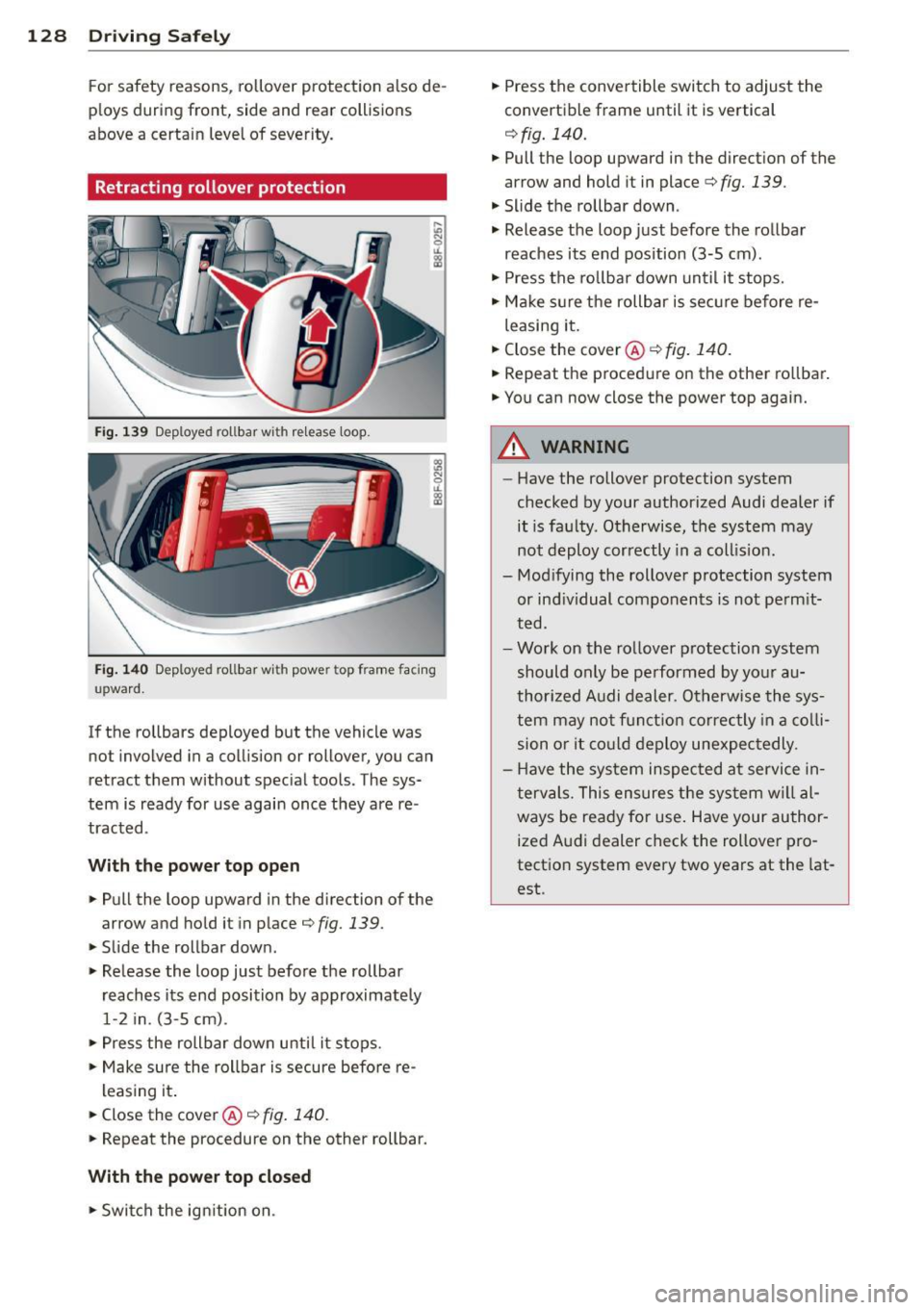
Retracting rollover protection
Fig. 139 Deploye d rollbar w it h re lease loop.
Fig. 140 Deploye d roll bar w ith powe r top frame fa cing
u pward.
If the rollbars deployed but the vehicle was
not involved in a collision or rollover, you can
retract them without special tools. The sys
tem is ready for use again once they are re
tracted .
With the power top open ... Pull the loop upward in the direction of the
arrow and hold it in place¢
fig. 139 .
... Slide the rollbar down .
" Release the loop just before the rollbar
reaches its end position by approximately
1-2 in. (3-5 cm) .
... Press the rollbar down until it stops .
... Make sure the rollbar is secure before re-
leasing it .
... Close the cover@¢
fig. 140 .
... Repeat the procedure on the other rollbar.
With the power top closed "Switch the ignition on . ...
Press the convertible switch to adjust the
convertible frame until it is vertical
¢ fig. 140 .
... Pull the loop upward in the direction of the
arrow and hold it in place¢
fig. 139.
" Slide the rollbar down .
"' Release the loop just before the rollbar
reaches its end position (3-5 cm).
"' Press the rollbar down until it stops.
"' Make sure the rollbar is secure before re-
leasing it .
... Close the cover@¢
fig. 140.
"'Repeat the procedure on the other rollbar .
... You can now close the power top again.
A WARNING -
- Have the rollover protection system
checked by your authorized Audi dealer if it is faulty . Otherwise, the system may
not deploy correctly in a collision.
- Modifying the rollover protection system
or individual components is not permit
ted .
- Work on the rollover protection system
should only be performed by your au
thorized Audi dealer. Otherwise the sys
tem may not function correctly in a colli
sion or it could deploy unexpectedly .
- Have the system inspected at service in
tervals. This ensures the system will al
ways be ready for use. Have your author
ized Audi dealer check the rollover pro
tection system every two years at the lat est .
Page 135 of 286
The front seats are equipped with belt posi
tioners so it is easier to fasten the safety be lts . The belt positioners automatically ex
tend when the door closes and the ignition
switches on ¢
fig. 147.
The belt positioner returns to its starting posi
tion again when
- the tongue in the belt latch engages o r the
belt was not fastened within 60 seconds .
- yo u sw itch the igni tion off.
- you ope n the door.
_& WARNING
- O nly you r autho rized Aud i de ale r shou ld
wor k on the sys tem or remove and instal
ling system components when perform
ing other work .
- T he be lt positioners could cause in jury or
damage if they pinc h peop le or objects
when extending or retracting .
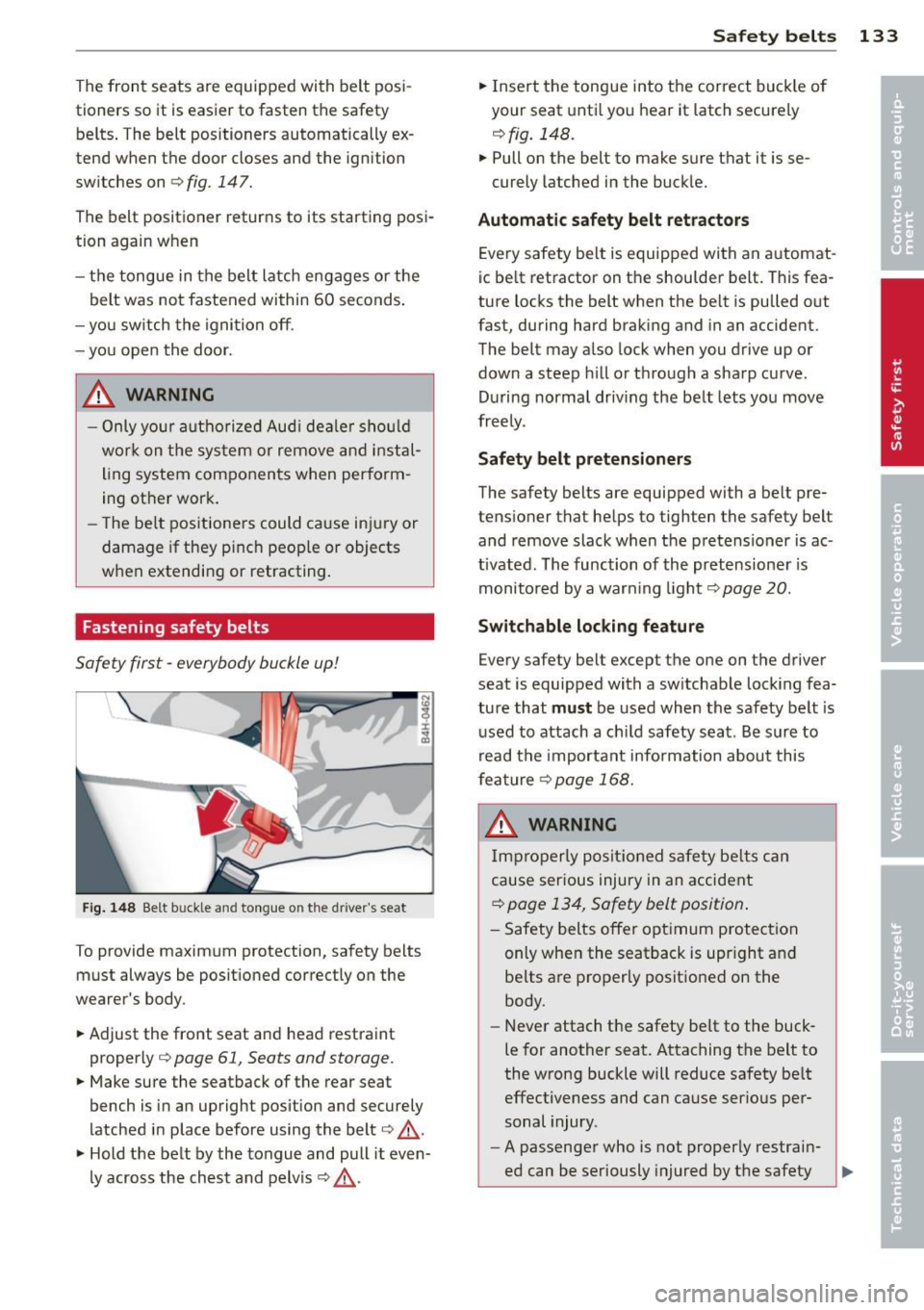
Fastening safety belts
Safety first -everybody buckle up!
Fig . 14 8 Be lt buckle and tongue on t he driver's seat
To provide maximum protection, safety belts
must always be posit ioned correctly on the
wearer's body .
~ Adjust the front seat and head restraint
properly¢
page 61, Seats and storage.
~ Make sure the seatback of the rear seat
bench is in an upright pos ition and securely
latched in place before using the belt¢ ..
&.
~ Hold the belt by the tongue and pull it even-
ly across the chest and pelvis¢,&..
Safety belts 133
~ Insert the tongue into the correct buck le o f
your seat unti l you hear it latch securely
¢ fig. 148.
~ Pull on the belt to make sure that it is se-
curely latched in the buckle.
Automat ic safety belt r etractor s
Every safety belt is equipped with an automat
ic be lt ret ractor on the shoulder belt. This fea
ture locks the belt when the be lt is pulled out
fast, during hard brak ing and in an accident.
The belt may also lock when you drive up or
down a steep h ill or th rough a sharp cu rve.
During normal driv ing the belt lets you move
freely.
Safety belt pretensioners
The safety belts are equipped with a belt pre
tensioner that helps to tighten the safety belt
and remove slack when the pretensioner is ac
tivated. The function of the pretensione r is
monito red by a warn ing light¢
page 20.
Switchable locking fe ature
Every safety belt except the one on the driver
seat is equipped with a sw itchable lock ing fea
ture that
must be used when the safety belt is
used to attach a ch ild safety seat . Be s ure to
read the important information about this
feature
¢page 168.
_& WARNING
Imp roperly posit ioned safety be lts can
cause serious injury in an accident
¢ page 134, Safety belt position .
-Safety belts offer opt imum protection
only when the seatback is upr ight and
be lts are properly posit io ned on the
body.
-
- Never attach the safety be lt to the buck
le for another seat. Attaching the belt to
the wrong buckle will reduce safety be lt
effectiveness and can cause ser ious per
sonal injury.
- A passenger who is not properly restrain-
ed can be seriously injured by the safety .,.