mirror AUDI RS5 COUPE 2015 User Guide
[x] Cancel search | Manufacturer: AUDI, Model Year: 2015, Model line: RS5 COUPE, Model: AUDI RS5 COUPE 2015Pages: 254, PDF Size: 64.12 MB
Page 99 of 254

"' N
0:: loo
rl I.O
"' N
"' rl
Audi side assist Side assist
Description
Applies to vehicles: with Audi side assist
Fig. 101 Se nsor detection range
Fig. 1 02 Display o n the exterio r m irro r
Side assist helps you monitor your blind spot and
traffic behind your veh icle . With in the limits of
the system, it wa rns you about vehicles that are
coming closer or that are traveling w ith you with
i n sensor range
(D c::, fig. 101 : if a lane change is
classified as crit ical , the disp lay @ in the exter io r
mirror
¢ fig. 102 tu rns on.
The display i n the left exterior mirror provides as
sistance when making a lane cha nge to the left,
while the d isp lay in the right exterio r mir ror pro
vides assistance whe n mak ing a lane change to
the r ight .
Information stag e
As long as you do not activate the turn signal,
side assist
informs you about ve hicl es that a re
detected and class ified as crit ica l. The display in
the respective mirror tu rns on, but is dim.
Aud i side assist
The display remains d im intentionally in the in
formation stage so that your view toward the
front is not d isturbed .
Warning sta ge
If you activ ate the turn s ignal, s ide ass ist warns
you about vehicles that are detected a nd classi
fied as critica l. The d isplay in the respective mir
ror blinks brightly . If this happens, check traffic
by g lancing in the rearview mirror and over your
shoulder
c::, .&. in General information on
page 98.
{!) Tips
- Yo u can adjust the brightness of the display
@ c:;, page 99 .
97
Page 100 of 254

Audi side assist
General information
App lies to veh icles: w ith Audi side assis t
®
@
©
Fig. 103 Driving situations
AU Df
Fig. 104 Rear of th e ve hicle: pos it io n of t he sensors
Side assist functions at speeds above approx i
mately 19 mph (30 km/h).
@ Vehicles that are approaching
In certain cases, a vehicle will be classified as
critical for a lane change even if it is still some
what far away. The faste r a vehicle approaches,
the sooner t he d isplay in the exter io r mirro r will
turn on.
@ Vehicles traveling with you
Vehicles traveling w ith you are indicated in the
exterior mirror if they are classified as critical for
a lane change. All vehicles detected by side assist
98
are indicated by the time they enter your "blind
spot", at the latest.
© Vehicles left behind
If you slowly pass a veh icle that side assist has
detected (the difference in speed between the ve
hicle and your vehicle is less than 9 mph (1 S km/
h)), the display in the exterior mirror turns on as
soon as the vehicle enters your blind spot.
T he display will not turn on if you quickly pass a
vehicle that side ass ist has detected (the differ
ence in speed between the vehicle and your vehi
cle is greater than 9 mph (15 km/h)).
Functional limitations
The radar senso rs are designed to detect the left
and right adjacent lanes when the road lanes are
the normal width. In certain situations, the dis
play in the exterior mirror may turn on even
though there is no vehicle located in the area that
i s cr itical for a lane change. For example:
- if the lanes are narrow or if your are dr iving on
the edge of your lane. If thi s is the case, the
system may have detected the vehicle in anoth
er lane that is
not adjacent to your current lane.
- if yo u are driving through a c urve . Side assist
may react to a vehicle that is one lane over from
the adjacent lane.
- if side assist reacts to other objects (such as
high or disp laced guard rails).
- In poor weather conditions . The side assist
functions are limited.
Do not cover the radar senso rs~
fig. 104 with
stickers, deposits, bicycle wheels or other ob
jects, because this will affect the function . For in
format ion on cleaning, refer to~
page 181 .
_& WARNING
-Always pay attention to traffic and to the
area around your veh icle. Side assist cannot
replace a dr iver's attention. The driver alone
is always responsible for lane changes and
sim ilar driv ing maneuvers .
- Improper reliance on the side assist system
can cause collisions and serious personal in-
-
Jury: ~
Page 101 of 254

"' N
0:: loo
rl I.O
"' N
"' rl
-Never rely only on side assist when chang
ing lanes.
- Always check rear view mirrors to make
sure that it is safe to change lanes.
- Side assist cannot detect all vehicles under
all conditions- danger of accident!
- Please note that side assist indicates there
are approaching vehicles, or vehicles in your
blind spot, only after your vehicle has
reached a driving speed of at least 19 mph
(30 km/h).
- In certain situations, the system may not function or its function may be limited. For
example:
- if vehicles are approaching or being left
behind very quickly. The display may not
turn on in time.
- in poor weather conditions such as heavy
rain, snow or heavy mist.
- on very wide lanes, in tight curves or if
there is a rise in the road surface. Vehicles
in the adjacent lane may not be detected
because they are outside of the sensor
range.
(D Note
The sensors can be displaced by impacts or
damage to the bumper, wheel housing and
underbody. This can affect the system. Have
your authorized Audi dealer or authorized
Audi Service Facility check their function.
(!j) Tips
- If the window glass in the driver's door or
front passenger's door has been tinted, the
display in the exterior mirror may be misin
terpreted.
- For Declaration of Compliance to United
States FCC and Industry Canada regulations
¢ page 239.
Audi side assist
Activating and deactivating
App lies to vehic les : wi th Audi s ide ass ist
Fig. 105 Driver 's door : Side ass ist button
" Press the button ¢ A in General information
on page 98 to switch the system on/off. The
LED in the button turns on when side assist is
switched on .
Adjusting the display brightness
App lies to vehicles: wi th Audi s ide ass ist
The signal brightness can be set in the radio or
MM!*.
.,. Select: !CARI function button> Audi side assist.
.,. Select: !CARI function button> Car systems*
control button > Driver assist> Audi side as
sist.
The display brightness adjusts automatically to
the brightness of the surroundings, both in the information and in the warning stage . In very
dark or very bright surroundings, the display is al
ready set to the minimum or maximum level by
the automatic adjustment. In such cases, you
may notice no change when adjusting the bright
ness, or the change may only be noticeable once
the surroundings change.
Adjust the brightness to a level where the display
in the information stage will not disrupt your
view forward. If you change the brightness, the display in the exterior mirror will briefly show the
brightness level in the information stage. The
brightness of the warning stage is linked to the
brightness in the information stage and is adjust
ed along with the information stage adjustment . ..,_
99
Page 110 of 254

Parking System
Reverse Parking
Applies to vehicles: with parking system plus with rear view
camera
Parking mode 1 can be used when parking in a
garage or parking space.
Fig. 114 MMI Display: Aiming at a parking spot
Fig. 115 MMI Display: Align ing the vehicle
.,. Switch the MMI on and select the reverse gear.
.,. Turn the steering wheel until the orange orien
tation lines
(D appear in the parking spot
c::> fig. 114. Use the markings @to help you es
timate the distance from an obstacle. Each
marking corresponds to 3
ft (1 m). The blue
area represents an extension of the vehicle's
outline by approximately 16
ft (5 m) to the
rear .
.,. While driving in reverse gear, adjust the steer
ing wheel angle to fit the parking space with
the aid of the orange orientation lines
c::>@. @
marks the rear bumper. You should stop driving
in reverse as soon as and no later than when
the red orientation line@) abuts an object
c::> .&. !
108
A WARNING
- The rear view camera does not show the en
tire area behind the vehicle
c::> page 106,
fig . 112.
Watch out especially for small chil
dren and animals. The rear view camera can
not always detect them, posing risk of an
accident!
- Please note that objects not touching the
ground can appear to be further away than
they really are (for example, the bumper of
a parked vehicle, a trailer hitch, or the rear
of a truck). In this case, you should not use
the help lines to help with parking, which poses danger of an accident!
cg) Note
- Low obstacles already signaled by a warning can disappear from the system's detection
range as they are approached and will not
continue to be signaled. Objects such as
barrier chains, trailer draw bars, thin paint
ed vertical poles or fences may not be de
tected by the system, posing risk of dam age.
- In the MMI display, the direction of travel of the vehicle rear is represented depending on
the steering wheel angle. The vehicle front
swings out more than the vehicle rear. Main
tain plenty of distance from an obstacle so
that your outside mirror or a corner of your
vehicle does not collide with any obstacles -
danger of accident!
Page 112 of 254
Pa rkin g Sys tem
swings out more than the vehicle rear. Main
tain plenty of distance from an obstacle so
that yo ur o utside mirror or a corner of your
vehicle does not coll ide with any obstacles -
danger of accident!
- Remember to ma intain sufficient clearance
from the curb to avoid damaging the wheel rims .
(D Tips
The left or right orientation lines and surfaces
will be displayed, depending on the turn sig
nal being used.
Adjusting the display and warning tones
App lies to vehicles: with parking system plus/parking system
plus w ith rea r view camera
The display* and warning tones are adjusted in
the radio or MMI*.
" Selec t:
I CARI funct ion button > Park ing s ystem .
Or
"Select : ICARI function button> Car sy stem s*
control button> Driver assi st> Par kin g aid .
D ispl ay*
-Off -when the parking system is switched on,
only audible signals are given.
- On -when the parking sy stem is switched on,
the p ic ture from the rear view came ra is dis
played .
Warning t one s
- Re ar volume -
rear sensor volume
-Rea r fr equency -rear sensor frequency
- Fro nt vo lume -front sensor volume
- Fron t frequenc y -front sensor frequency
- Mu sic volum e w hile pa rking -when the park -
ing system is switched on, the volume of the
active aud io source is lowered.
The newly adjusted value is br iefly heard from
the signal generator . The settings are automati
cally stored and assigned to the remote cont ro l
key.
110
A WARNING
-
- Always make sure that the vo lume and fre-
quency of the warning tones is adjusted so
that you can easily hear the acoustic d is
tance s ignal even if the radio is playing, the
air-condi tioner blowe r is on High or there is
a high level of outside noise.
- Check the settings whenever someone else
has dr iven the vehicle befo re you .
@ Tips
- The warn ing tones can also be adjusted di
rectly from the rear v iew camera image .
Simply press the Settings* cont ro l button.
- Changed settings are activated when park
ing assist is switched on again .
Error messages
Applies to vehicles: with parking system plus with rear view
camera
T here is an erro r in the system if the L ED on the
PwJl. switch is b link ing and you hear a continuous
alarm for a few seconds after switching on the
parking system or when the parking system is al
ready act ivated. Have your authorized Audi dealer
cor rect the erro r.
Keep the sen so rs in the rear bumper clea n and
free from ice so that the acoustic park assist sys
tem can function properly .
(D Tips
If the error is not corrected before you switch
off the ignition, when you switch on the park
i ng system again, the LED in the
Pw A sw itch
will blin k.
Page 113 of 254
M N
0:: loo ,...., \!) ..,.,
N ..,., ,....,
Driving safety
Basics
Safe driving habits
Please remember -safety first!
This chapter contains important information,
tips, instructions and warnings that you need to
read and observe for your own safety, the safety
of your passengers and others . We have summar
ized here what you need to know about safety
belts, airbags , chi ld restraints as well as child
safety. Your safety is for us
priority number 1. Al
ways observe the informat ion and warn ings in
this section - for your own safety as well as that
of your passengers .
The information in this section app lies to all
model ve rsions of your vehicle . Some of the fea
tures described in this sections may be standard
equipment on some models, or may be optional
eq uipment on others .
If you are not sure, ask
your authorized Audi dealer.
A WARNING
- Always make sure that you follow the in
struct ions and heed the WARNINGS in this
Manual. It is in your interest and in the in
terest of your passengers.
- Always keep the complete Owne r's Litera
ture in your Aud i when you lend or sell your
vehicle so that this important info rmation
will always be ava ilable to the driver and
passenge rs.
-
- Always keep the Owner's literature handy so
that you can find it easily if you have ques
tions.
Safety equipment
The safety features are part of the occupant re
straint system and work together to help reduce
the risk of injury in a wide variety of accident sit
uations.
Your safety and the safety of your passenge rs
should not be left to chance. Advances in tec h
nology have made a var iety of fea tures available
to help reduce the r isk o f injury in an accident.
Dr ivin g sa fet y
The following is a list of just a few of the sa fety
features in your A udi:
- sophisticated s afety be lts fo r drive r and a ll pas-
senger seat ing pos itions,
- be lt fo rce limi ters for the front seats,
- belt pretensioners for the seats,
- head restra ints for each seating posit ion,
- front airbags,
- side airbags in the front seats,
- side curtain a irbags,
- specia l LATCH anchorages for child rest raints,
- adjustab le steering colum n.
These ind iv idual safety features, can work to
gether as a system to help protect you and your
passengers in a w ide range of accidents . T hese
features cannot wo rk as a system if they are not
always cor rect ly adjusted and co rrectly used.
Saf ety is ev erybody' s re sponsibility!
Important th ings to do before driving
Safety is everybody 's job! Vehicle and occupant
safety always depends on the informed and care
ful driver .
For your safety and the safety of your passen
gers,
befor e driv ing alway s:
.. Make sure that all lights and signals are operat
ing correctly.
.. Make sure that the tire pressure is correct.
.. Make sure that all w indows are clean and afford
good vis ibility to the outs ide .
.. Secure all luggage and other items carefully
Q page59.
.. Ma ke s ure that nothing can interfere with the
pedals .
.. Adjust front seat, head restraint and mirrors
correctly for your height.
.. Instruct rear seat passengers to adjust the
head restra ints according to their he ight.
.. Make sure to use the r ight child restraint cor
rectly to protect ch ildren
Q page 150, Child
safety .
.. Sit p rope rly in your seat and make su re that
your passengers do the same
Q page 53, Seats
and storage. .,.
111
Page 184 of 254

Care and cleaning
A WARNING
- Only wash the vehicle when the ignition is
off and follow the instructions from the car
wash operator to reduce the risk of acci
dents.
- To reduce the risk of cuts, protect yourse lf
from sharp metal components when wash
ing the underbody or the inside of the wheel
housings.
- After washing the vehicle, the braking effect may be delayed due to moisture on the
brake rotors or ice in the winter . The brakes
must be dried first w ith a few careful brake
applications.
@ Note
- If you wash the vehicle in an automatic car
wash, you must fold the exterior mirrors in
to reduce the risk of damage to the mirrors.
Power folding exterior mirrors* must only
be fo lded in and out us ing the power folding
funct ion.
- To prevent pa int damage, do not wash the
vehicle in direct sunlight .
- To reduce the risk of damage to the surface,
do not use insect removing sponges, kitchen
sponges or similar items.
- Matte finish painted vehicle components:
- To reduce the risk of damage to the sur-
face, do not use polishing agents or hard
wax.
- Never use protective wax. It can destroy
the matte finish effect.
- Do not place any stickers or magnetic
signs on vehicle parts painted with matte
finish paint. The paint could be damaged
when the stickers or magnets are re moved.
@ For the sake of the environment
On ly wash the vehicle in facilities specially de
signed for that purpose. This will reduce the
risk of dirty water contaminated with oil from
entering the sewer system.
182
-
Placing your vehicle out
of service
If you would like to take your vehicle out of serv
ice for a longer time, contact your authorized
Audi dealer or qualified repair facility. They will
advise you of important measures, such as corro
s ion protec tion , maintenance and storage proce
dures. Also follow the information about the bat
tery
~ page 196.
Page 227 of 254
"' N
0:: loo
rl I.O
"' N
"' rl
Fu se pa nel @ (black )
No. Consumer
1 Dynamic steering
2 Electron ic Stabilization Control (module)
A/C system pressure sensor, electrome-
chanical parking brake, HomeLink, auto-
3 mat
ic dimming interior rear view mirror,
air quality/outside air sensor, Electron ic
Stabilization Control (button)
s Sound actuator
6 Headlight range control/headl
ight (corner-
ing light)
7 Headlight (cornering light)
Control modu les (electromechanical park-
8 ing brake, shock absorber, q uattro sport),
DCDC converte r
9 Adaptive
cruise control
10 Shift gate/clutch sensor
11 Side assist
1 2 Headlight range cont ro l, parking system
13 Airbag
14 Rear
wiper (a llroad)
15 Auxiliary fuse (instrument panel)
16 Auxiliary
fuse termina l 15 (engine area)
Fuse p anel @ (brown )
No. C onsumer
2 Brake light sensor
3 Fuel pump
4 Clutch sensor
5
Left seat heating with/without seat venti-
lation
6 Electronic Stabilization Control (electric)
7 Ho rn
8
Front left door (window regulator, central
locking, mirror, switch, lighting)
9 Windshield wiper motor
10 Electronic Stabilization Control (valves) Fu
ses a nd bulb s
No. Consumer
Two-door mode ls: rear left window regula-
11 tor; Four-door
models: rear left door (win-
dow regulator, central locking, switch,
light ing)
12 Rain and l
ight sensor
Fuse panel © (r e d )
No . Con sumer
3 Lumbar support
4 Dynamic steering
5 Inter
ior l ight ing (Cabriolet)
6 Windshie
ld washer system, headlight
washer system
7 Vehicle electrica l system control module 1
8 Vehicle electr ica l system control module 1
9 Left rear
window regulator motor (Ca brio-
let)/su nroof
10 Vehicle electr ica l system co ntrol module 1
11 Right rear
window regulator (Cabriolet)/
sun shade motor
12 Anti-theft
alarm warning system
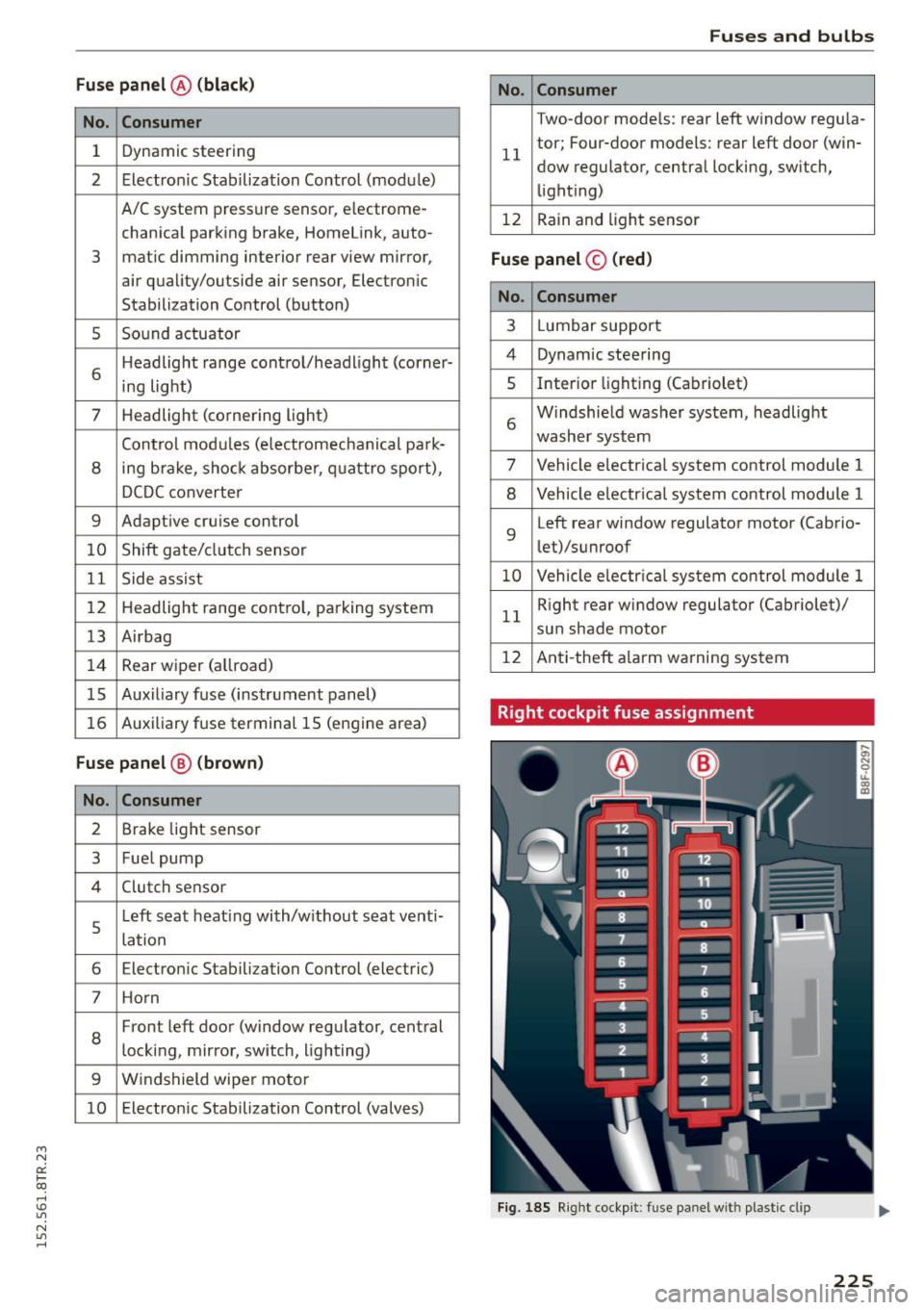
Right cockpit fuse assignment
Fig. 185 Right cockpit: fu se panel with plastic cl ip
225
Page 229 of 254
M N
0:: loo ,...., \!) 1.1'1
N 1.1'1 ,....,
Fuse panel© (brown)
No. Consumer
1 Luggage compartment lid control module
(allroad)
2 12-volt socket, cigarette lighter
3 DCDC converter path 1
4 DCDC converter path 2, sound amplifie r,
rad io
6 Right upper cabin heating (Cabriolet)
7 Electromechanical parking brake
9
Right front door (window regulator, cen-
tral locking, mirror, switch, lighting)
10 Left upper cabin
heating (Cabriolet)
Two-door models: rear right w indow regu-
11 lator; Four-door models: rear
right door
(window regulator, central locking, switch,
lighting)
12 Cell phone prep
Fuse
panel © (black)
No. Consumer
1 Right front seat heating
4 MMI
5 Radio
6 Rear view camera
7 Rear window heater (allroad)
8 Rear
Seat Entertainment
Bulbs
Replacing bulbs
For your safety, we recommend that you have
your authorized Audi dealer replace any bulbs for
you .
It is becoming increasingly more and more diffi
cult to replace vehicle light bulbs since in many
cases , other parts of the car must first be re
moved before you are ab le to get to the bulb .
This applies especially to the light bulbs in the
front of you r ca r which you can only reach
through the engine compartment .
Sheet metal and bulb holders can have sharp
edges that can cause ser ious cuts, parts must be
Fuses and bulbs
correct ly taken apart and then properly put back
together to help prevent breakage of parts and
long term damage from water that can enter
housings that have not been properly resealed.
For your safety, we recommend that you have
your authorized Audi dea ler replace any bulbs for
you, since your dealer has the proper tools, the
correct bulbs and the expertise.
Gas discharge lamp s (Xenon lights)*:
Due to the high electr ical voltage, have the bulbs
replaced by a qualified technician . Head lights
with Xenon light are identified by the high volt
age sticker.
A WARNING
Changing Xenon lamps without the necessary
equipment can cause serious personal injury.
- Bulbs are pressurized and can explode when
being changed . Potential risk of injury!
- On vehicles equipped with gas discharge
bu lbs (Xenon light) * life -threatening injuries
can result from improper handling of the
high -vo ltage portions of such lamps!
-On ly your authorized Audi dealer or quali
fied workshop shou ld change the bulbs in
gas discharge lamps. There are parts with
sharp edges on the openings and on the
bulb holders that can cause serious cuts . If
you are uncertain about what to do, have
the wor k performed by an autho rized Audi
dealer or qualified workshop. Serious per
sonal injury may result from improperly per
formed work .
(D Tips
-If you st ill prefer to replace the light bulbs
yourself, be aware that the eng ine compart
ment is a hazardous area to work
inq page 187 q &..
-It is best to ask your authorized Audi dealer
whenever you want to change a bulb.
227
Page 236 of 254
Technical data
Gross Axle Weight Rating
The Gross Axle Weight Rating is the maximum load that can be appli ed at each axle of the vehi
cle ¢& .
Vehicle capacity weight The vehicle capacity we ight (max. load) is listed
on the driver's side 8 -p ill ar.
_& WARNING
- T he actual Gross Axle Weight Rating at the
front and rear axles should not exceed the
permissible weights, and their combination
must not exceed the Gross Vehicle Weight
Rating .
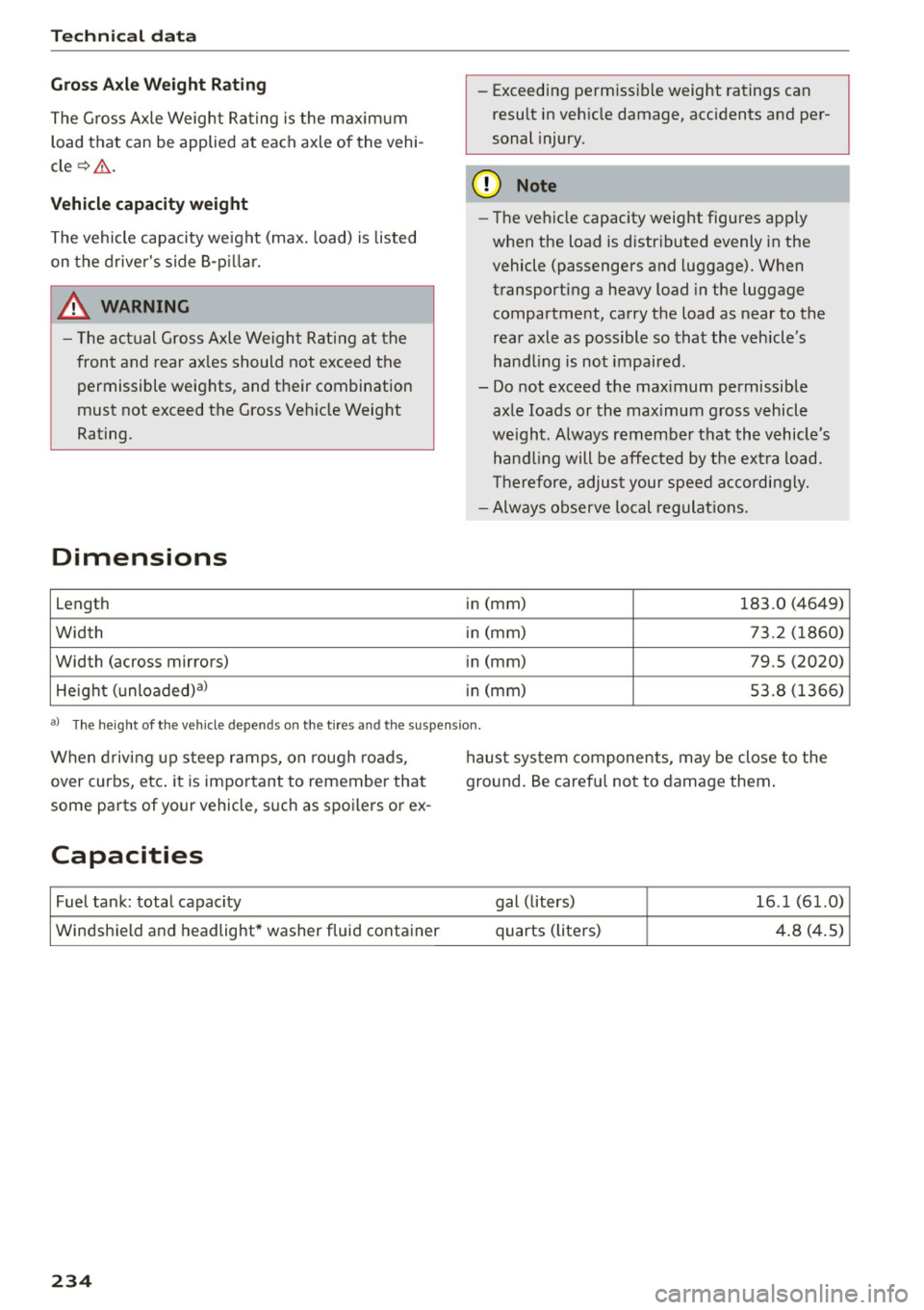
Dimensions
length
Width
Width (across mirrors) He ight (unloaded) al -
Exceeding permissible weight ratings can
result in veh icle damage, acc idents and per
sonal injury.
(D Note
- The vehicle capacity weight figures apply
when the load is distributed evenly in the
vehicle (passengers and luggage). When
transporting a heavy load in the luggage
compartment, carry the load as near to the
rear axle as possible so that the vehicle 's
hand ling is not impaired .
- Do not exceed the maximum permissible
axle loads or the maximum gross vehicle
we ight. Always remember that the vehicle's
hand ling will be affected by the extra load.
T herefore, adjust your speed accordingly.
- Always observe local regulations .
in (mm)
183 .0 (4649)
in (mm) 73 .2 (1860)
in (mm) 79 .5 (2020)
in (mm) 53 .8 (1366)
aJ The height of the vehicle depe nd s on the tires and t he su spen sion.
When driving up steep ramps, on rough roads,
over curbs, etc. it is important to remember that
some parts of your vehicle, such as spoilers or ex-
Capacities
Fuel tank: total capacity
Windshield and headlight* washer fluid container
234
haust system components, may be close to the
ground. Be carefu l not to damage them.
gal (liters)
16 .1 (61.0)
quarts (liters) 4.8 (4 .5)