steering AUDI RS5 COUPE 2015 Owners Manual
[x] Cancel search | Manufacturer: AUDI, Model Year: 2015, Model line: RS5 COUPE, Model: AUDI RS5 COUPE 2015Pages: 254, PDF Size: 64.12 MB
Page 4 of 254
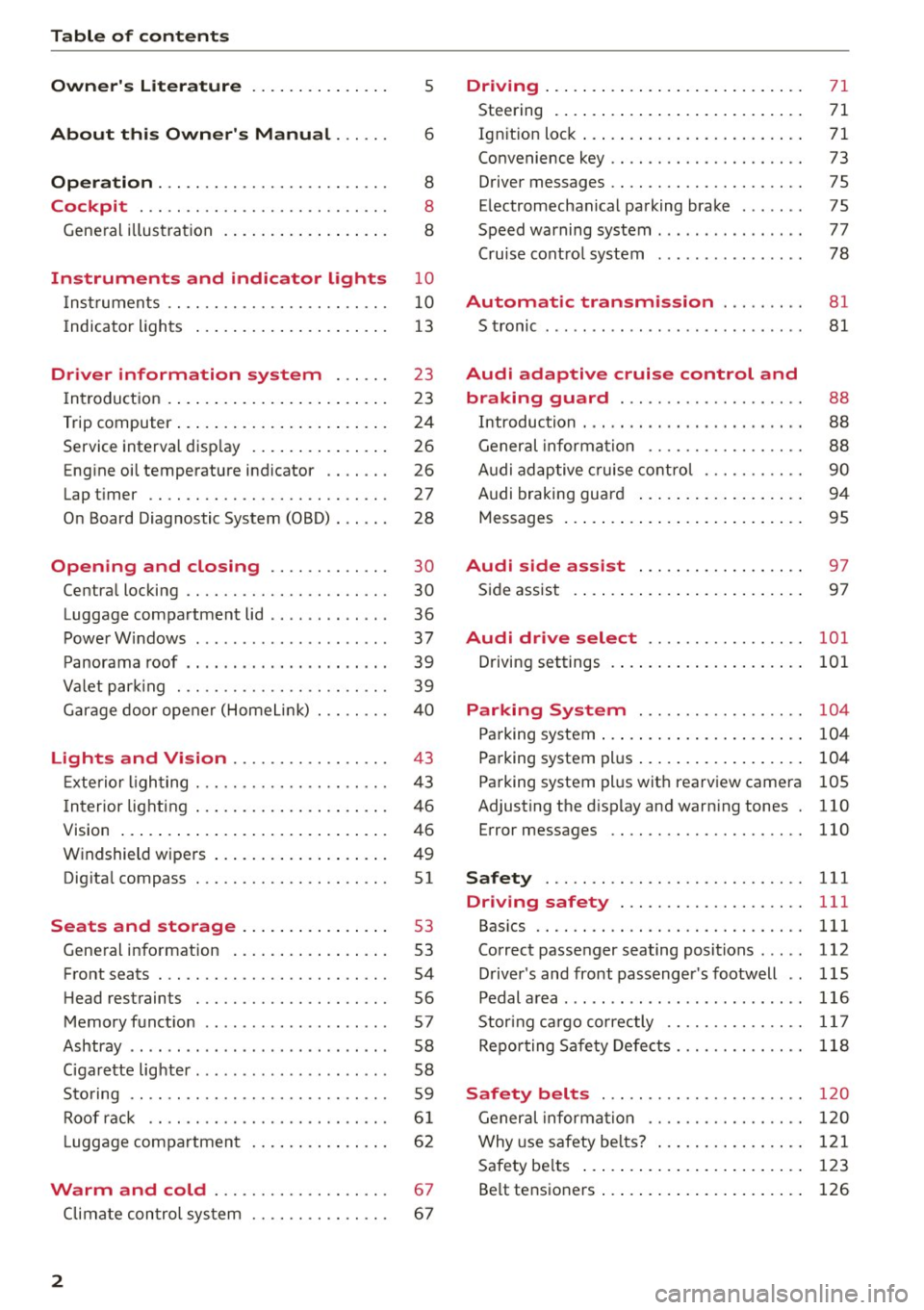
Table of contents
Owner's Literature
About this Owner's Manual ... .. .
Operation ....... ........... .. .. .. .
Cockpi t ... .. ...... ......... .. .. .. .
Gene ral illus tra tion . ..... ... .. .. .. .. .
5
6
8
8
8
Instrument s and indicator lights 10
Instruments . . . . . . . . . . . . . . . . . . . . . . . . 10
Indicator ligh ts . . . . . . . . . . . . . . . . . . . . . 1 3
Driver information sy stem . . . . . . 23
In trodu ct ion . . . . . . . . . . . . . . . . . . . . . . . . 23
Trip computer . . . . . . . . . . . . . . . . . . . . . . . 24
Service interva l disp lay . . . . . . . . . . . . . . . 26
E ng ine oil temperature indicator . . . . . . . 26
Lap t imer . . . . . . . . . . . . . . . . . . . . . . . . . .
27
O n Board Diag nostic System (080) . . . . . . 28
Open ing and closing . . . . . . . . . . . . . 30
Centra l locking . . . . . . . . . . . . . . . . . . . . . . 30
Luggage compartment lid . . . . . . . . . . . . .
36
Powe rW indows . . . . . . . . . . . . . . . . . . . . . 37
P anorama roof . . . . . . . . . . . . . . . . . . . . . . 39
Va let par king . . . . . . . . . . . . . . . . . . . . . . . 39
G arage door ope ner (Home Link) . . . . . . . .
40
Light s and Vi sion . . . . . . . . . . . . . . . . . 43
E xte rio r li ghting . . . . . . . . . . . . . . . . . . . . . 43
I n terior light ing . . . . . . . . . . . . . . . . . . . . . 46
V1s1on ... . ... ... .. .. ..... ... .. .. .. .
W indshield wipers .. ..... ... .. .. .. .. . 46
49
Dig ita l compass . . . . . . . . . . . . . . . . . . . . .
51
Seat s and storage . . . . . . . . . . . . . . . . 53
Gene ral i nfo rmation . . . . . . . . . . . . . . . . . 53
Front seats . . . . . . . . . . . . . . . . . . . . . . . . . 54
H ead restrain ts . . . . . . . . . . . . . . . . . . . . . 56
Memory funct ion . . . . . . . . . . . . . . . . . . . . 57
Ashtray . . . . . . . . . . . . . . . . . . . . . . . . . . . . 58
Ciga rette lig hte r. . . . . . . . . . . . . . . . . . . . . 58
S to ring . . . . . . . . . . . . . . . . . . . . . . . . . . . . 59
Roof rac k . . . . . . . . . . . . . . . . . . . . . . . . . .
6 1
Luggage compartmen t . . . . . . . . . . . . . . . 6 2
Warm and cold . . . . . . . . . . . . . . . . . . . 67
Climate con tro l sys tem . . . . . . . . . . . . . . . 6 7
2
Driving . . . . . . . . . . . . . . . . . . . . . . . . . . . . 71
Steering . . . . . . . . . . . . . . . . . . . . . . . . . . . 71
Ign it ion loc k . . . . . . . . . . . . . . . . . . . . . . . . 71
Convenience key . . . . . . . . . . . . . . . . . . . . . 73
Driver messages . . . . . . . . . . . . . . . . . . . . . 75
E lectromechan ical pa rking brake . . . . . . . 75
Speed warning system . . . . . . . . . . . . . . . .
77
Cru ise cont ro l system . . . . . . . . . . . . . . . . 78
Automatic transmission . . . . . . . . . 81
S tronic . . . . . . . . . . . . . . . . . . . . . . . . . . . . 81
Audi adaptive crui se control and
braking guard . . . . . . . . . . . . . . . . . . . .
88
Introduction . . . . . . . . . . . . . . . . . . . . . . . . 88
General informa tion . . . . . . . . . . . . . . . . . 88
Audi ad aptive cruise cont ro l . . . . . . . . . . . 90
Audi braking guar d . . . . . . . . . . . . . . . . . . 94
Messages . . . . . . . . . . . . . . . . . . . . . . . . . . 95
Audi side as sist . . . . . . . . . . . . . . . . . . 97
Si de assis t . . . . . . . . . . . . . . . . . . . . . . . . . 97
Audi drive select . . . . . . . . . . . . . . . . . 101
Driving settings . . . . . . . . . . . . . . . . . . . . . 101
Parking Sy stem . . . . . . . . . . . . . . . . . . 104
Pa rking system . . . . . . . . . . . . . . . . . . . . . . 104
Pa rking system pl us . . . . . . . . . . . . . . . . . . 104
Parking system pl us w it h rea rv iew camera 105
Adjusting the d isp lay and warn ing tones . 110
Error messages 110
Safety . . . . . . . . . . . . . . . . . . . . . . . . . . . . 111
Driving safety . . . . . . . . . . . . . . . . . . . . 111
Bas ics . . . . . . . . . . . . . . . . . . . . . . . . . . . . . 111
Correc t passe nger seating posi tions . . . . . 112
D river 's and front passenger 's footwell . . 115
Pedal area . .. .. .. .. .. .... ...... ..... 116
Stor ing ca rgo co rrectly . . . . . . . . . . . . . . . 11 7
Re po rt ing Sa fe ty Defe cts . . . . . . . . . . . . . . 118
Safety belts . . . . . . . . . . . . . . . . . . . . . . 120
General informa tion . . . . . . . . . . . . . . . . . 1 20
Why use safety bel ts? . . . . . . . . . . . . . . . . 121
Safety be lts . . . . . . . . . . . . . . . . . . . . . . . . 123
Be lt tens ioners . . . . . . . . . . . . . . . . . . . . . . 126
Page 11 of 254
M N
0:: loo ,...., \!) ..,.,
N ..,., ,....,
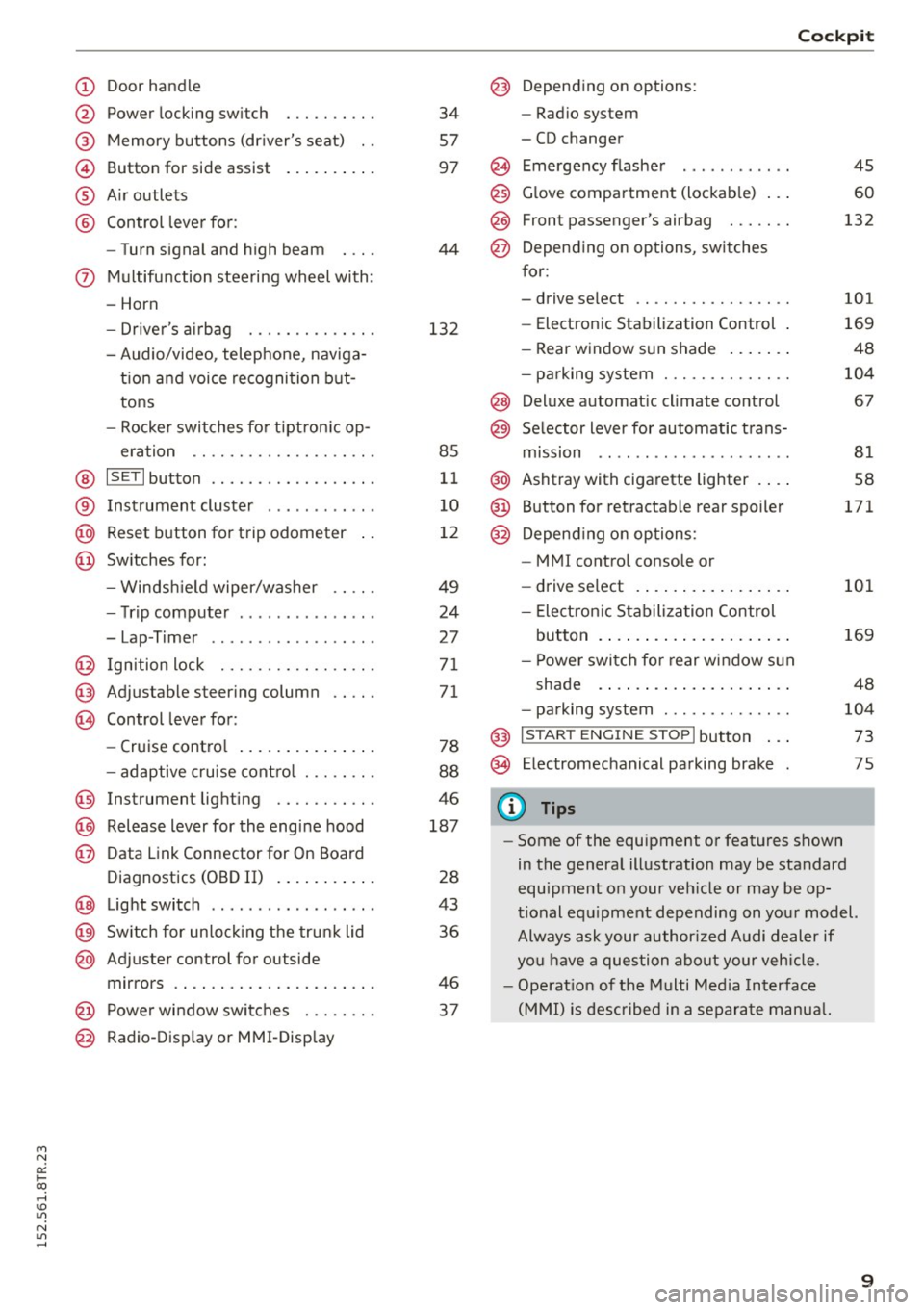
(!) Door handle
@
®
©
®
®
Power locking swi tch
Memory buttons (driver's seat) . .
Button for side assist
A ir outlets
Control lever for :
- Turn signal and high beam
0 Multifunction steering wheel with :
- Horn
- Driver 's airbag ....... .. .. .. .
- Audio/video , telephone, naviga -
t ion and voice recognition but
tons
- Rocker switches for tiptron ic op-
eration ...... .... ... .... .. .
@ ISETI button .... ..... .. .... .. .
® Instrument cluster ........... .
@ Reset button for trip odometer
@ Switches for:
- Windsh ield wiper/washer
- Trip computer .............. .
- Lap -Timer ............ ... .. .
@ Ignition lock ... .... ... .... .. .
@ Adju stable steering column
@ Control lever for:
- Cruise control .............. .
- adaptive cruise control ... .. .. .
@ Instrument lighting .... .. .. .. .
@ Release lever for the engine hood
@ Data Link Connector for On Board
Diagnostics (OBD II) ....... ... .
@ Light switch ................. .
@) Switch for unlock ing the trunk lid
@ Adjuster control for outside
mirrors .. .. .. ........... .. .. .
@ Power window switches . .. .. .. .
@ Radio-Display or MMI-Display 34
57
97
44
132
85
11
10
12
49
24
2 7
71
71
78
88
46
187
28
43
36
46
37
Cockpit
@) Depending on options:
- Radio system
- CD changer
@ Emergency flasher
@
@
@ Glove compartment (lockable) ...
F ront p assenger's airbag . .. .. . .
Depend ing on options, switches
for:
- drive select .. .... ... .... .. . .
- Electronic Stabilization Control .
- Rear window sun shade ...... .
- parking system ...... ..... .. .
@ Deluxe automat ic climate control
@ Selector lever for automatic trans-
mission .. .. .. ..... ......... .
@ Ashtray with cigarette lighter ... .
@ Button for retractable rear spoiler
@ Depend ing on options:
- MM I control console or
- drive select . ............... .
- Electron ic Stabilization Control
45
60
132
101
169
48
104
67
81
58
171
101
button . . . . . . . . . . . . . . . . . . . . . 169
- Power switch for rear window sun
shade . . . . . . . . . . . . . . . . . . . . . 48
- parking system . . . . . . . . . . . . . . 104
@ I S TAR T ENG INE ST OPI button . . . 73
@ Electromechanical parking brake 75
(D Tips
- Some of the equipment or features shown
in the general illustration may be standard
equipment on your vehicle or may be op
tional equipment depending on your model.
Always ask your author ized Audi dealer if
you have a question about your vehicle.
- Operat ion of the Multi Media Interface
(MMI) is described in a separate manual.
9
Page 15 of 254
M N
0:: loo ,...., \!) 1.1"1
N 1.1"1 ,....,
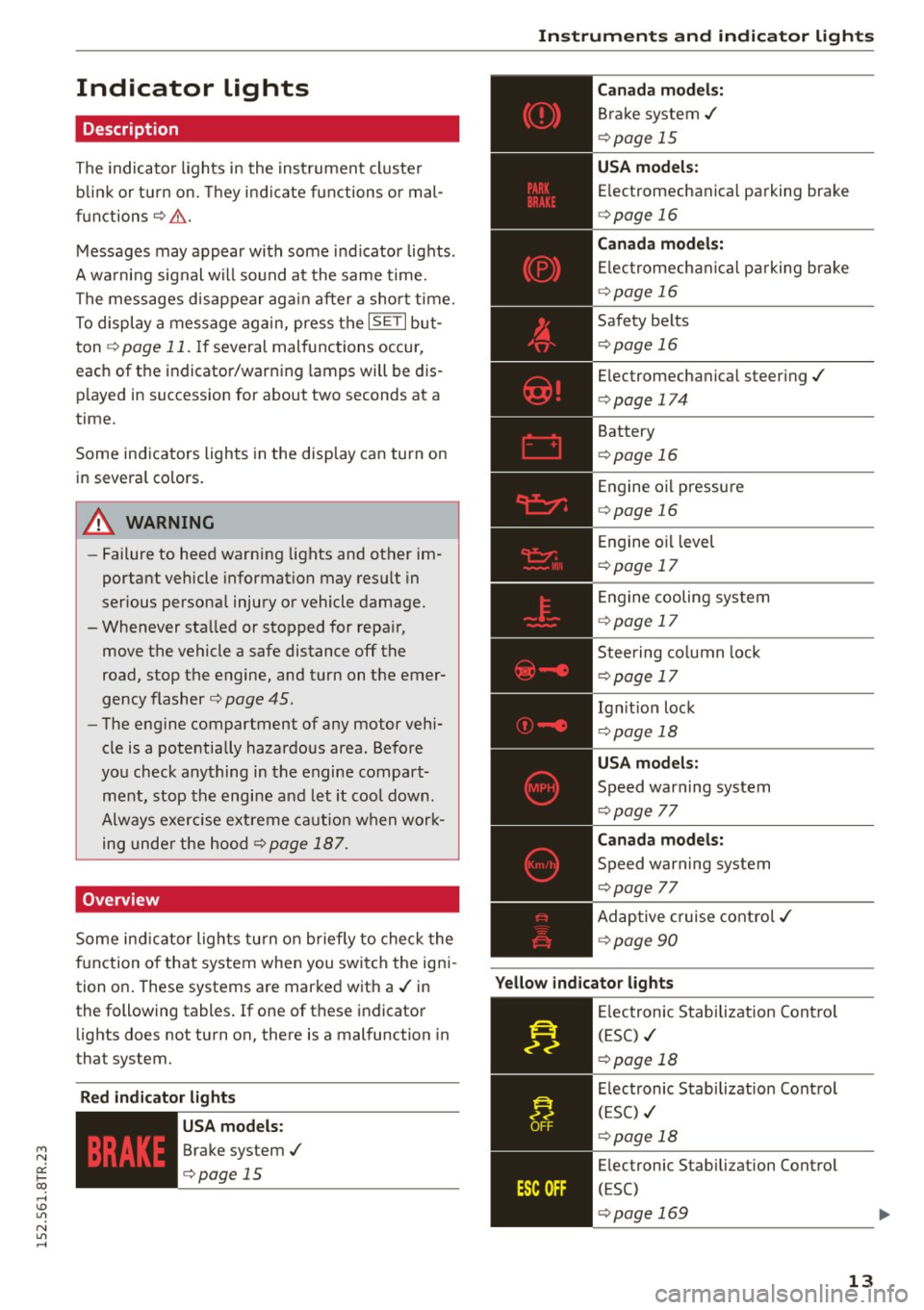
Indicator lights
Description
The indicator lights in the instrument cluster
blink or turn on. They indicate functions or mal
functions¢ &.
Messages may appear with some indicator lights .
A warning signal will sound at the same time.
The messages disappear again after a short time.
To display a message again, press the
I SE TI but
ton ¢
page 11. If several malfunctions occur,
each of the indicator/warning lamps will be dis
p layed in succession for about two seconds at a
time.
Some indicators lights in the display can turn on
in several colors.
8_ WARNING
- Failure to heed warning lights and other im
portant vehicle information may resu lt in
serious personal injury or vehicle damage.
- Whenever sta lled or stopped for repa ir,
move the vehicle a safe distance off the
road, stop the engine, and turn on the emer
gency flasher¢
page 45.
- The engine compartment of any motor vehi
cle is a potentially hazardous area. Before
you check anything in the engine compart
ment, stop the engine and let it cool down.
Always exercise extreme caution when work
ing under the hood¢
page 187.
Overview
Some indicator lights turn on briefly to check the
function of that system when you switch the igni
tion on . These systems are marked with a./ in
the following tables .
If one of these indicator
lights does not turn on, there is a malfunction in
that system.
Red indicator light s
--------------
US A models:
Brake system./
¢page 15 Instruments
and indicator lights
Canada models:
Brake system./
¢page 15
USA models:
Electromechanical parking brake
¢ page 16
Canada models:
Electromechanical parking brake
¢ page 16
Safety belts
¢page 16
Electromechanical steering./
¢page 174
Battery
¢page 16
Engine oil pressure
¢page 16
Engine oil level
¢page 17
Engine cooling system
¢page 17
Steering column lock
¢page 17
Ign it ion lock
¢ page 18
USA models:
Speed warning system
¢page 77
Canad a models:
Speed warning system
¢page 77
Adaptive cruise control./
¢page 90
Yellow indicator lights
--------------
Electronic Stabilization Contro l
(ESC) ./
¢page 18
Electronic Stabilization Contro l
(ESC) ./
¢page 18
Electronic Stabilization Control
(ESC)
¢page 169
13
Page 16 of 254
Instruments and indicator lights
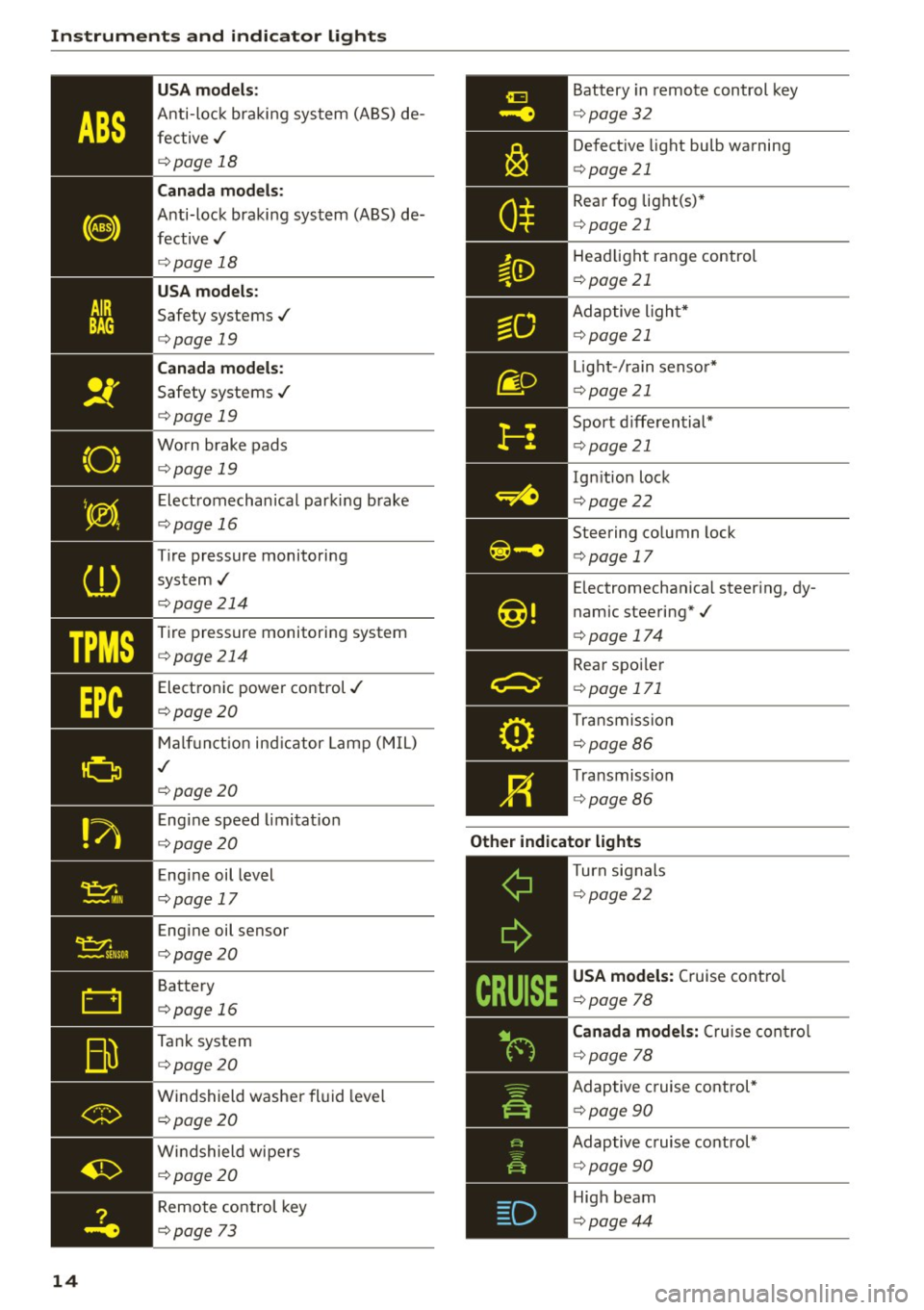
"O~ I I ~ .,
TPMS
14 USA m
odel s:
Anti-loc k braking system (ABS) de
fective,/
¢ page 18
Canada mod els :
Anti-lock braking system (ABS) de
fective,/
¢ page 18
USA models :
Safety systems,/
¢page 19
Canada model s:
Safety systems ./
¢page 19
Worn brake pads
¢ page 19
Electromechanical parking b rake
¢page 16
Tire pressure monitoring
system,/
¢ page214
Tire pressure monitoring system
¢page214
Electronic power control./
¢page20
Malf unct ion ind icator Lamp (MIL)
,I
c::>page 20
Engine speed limitat ion
c::> page20
Engine oil level
c::> page 17
Engine oil sensor
c::>page20
Battery
c::>page 16
Tank system
c::>page20
Windshield washe r fl uid leve l
¢page20
Wi ndshield wipers
¢page20
Remote control key
c>page 73
Battery in remote control key
¢ page32
Defect ive light bulb warning
¢ page 21
Rear fog lig ht(s)*
<=> page 21
Headlight range control
¢page 21
Adaptive l ight*
c> page 21
Light -/ rain senso r*
c> page 21
Sport d iffe rential*
c> page 21
Ignition lock
c>page22
Steering co lumn lock
c> page 17
Electromechanica l steer ing, dy
namic steering*,/
c>page 174
Rear spo ile r
c> page 171
Transmission
c>page86
Transmission
c>page 86
Other indicator light s
--------------Turn signals
c>page22
USA models: Cruise contro l
c>page 78
Canad a model s: C ru ise contro l
c>page 78
Adaptive c ruise cont rol*
c> page 90
Adaptive c ruise control*
c> page 90
High beam
c>page44
Page 19 of 254
M N
0:: loo ,...., \!) 1.1'1
N 1.1'1 ,....,
~ If the engine oil level is correct and the indica
tor light still turns on, turn the engine off and
do not continue driving. Seek profess ional as
sistance.
(D Tips
- The engine oil pressure symbol. is not
an indicator for a low engine oil level. Do
not rely on it. Instead, check the oil level in
your engine at regular intervals, preferably
each time you refuel, and always before
going on a long trip.
- The yellow oil level warning indication
Ill
requires oil refill or workshop service with
out delay. Do not wait until the red oil
pressure warning. starts to flash before
you respond to the low oil level warning
m. By then, your engine may already have
suffered serious damage.
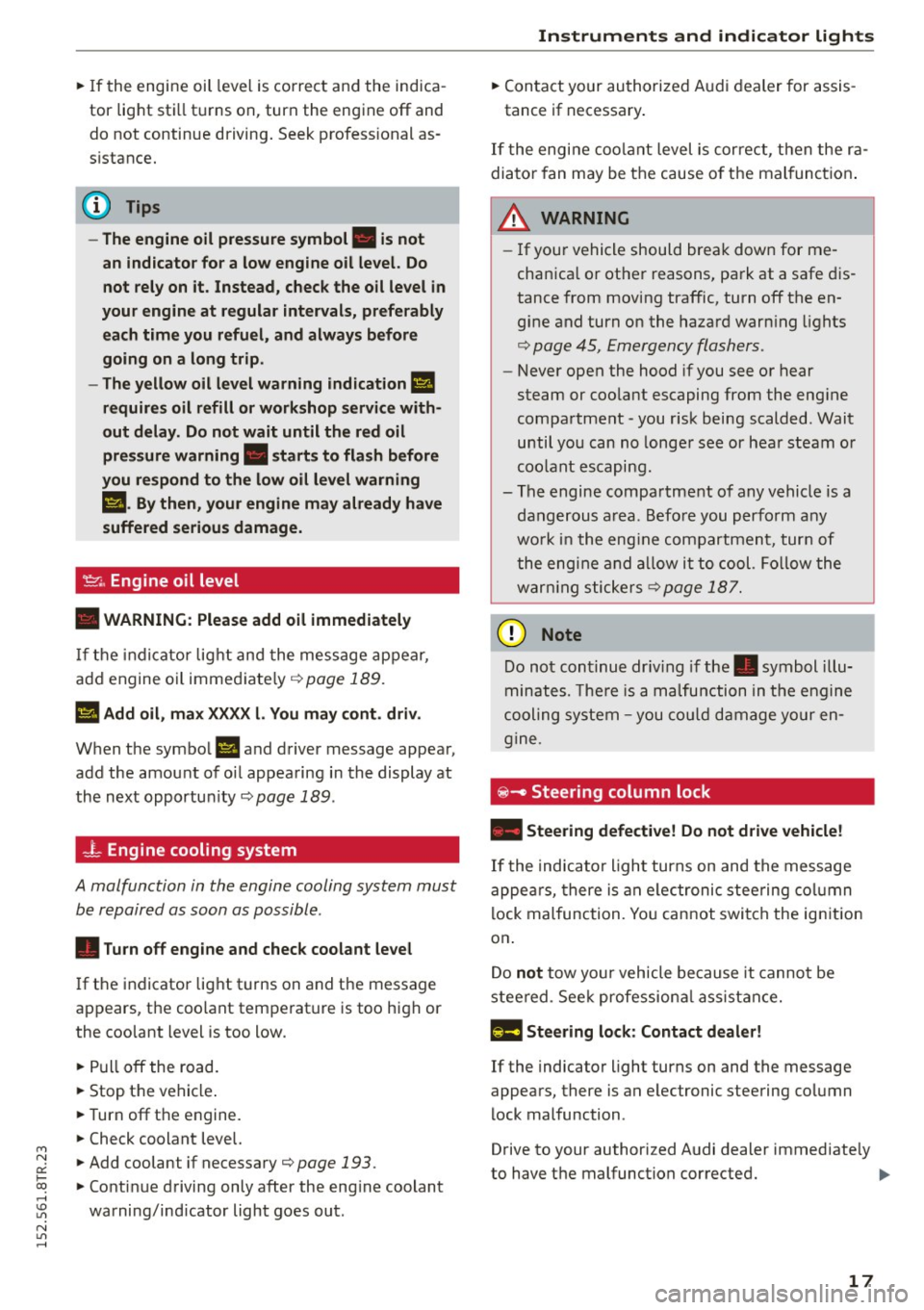
'1::1'., Engine oil level
• WARNING : Please add oil immediately
If the indicator light and the message appear,
add engine oil immediately ¢ page 189.
l!I Add oil, max XXXX l. You may cont . driv.
When the symbol Ill and driver message appea r,
add the amount of oil appearing in the display at
the next opportun ity ¢
page 189 .
-L Engine cooling system
A malfunction in the engine cooling system must
be repaired as soon as possible .
• Turn off engine and check coolant level
If the indicator light turns on and the message
appears , the coolant temperature is too high or
the coolant level is too low .
~ Pull off the road.
~ Stop the vehicle .
~T urnoff the engine.
~ Check coolant level.
~ Add coolant if necessary¢ page 193 .
~ Continue driving only after the eng ine coolant
warning/indicator light goes out .
Instruments and indicator lights
~ Contact your authorized Audi dealer for assis
tance if necessary .
If the engine coolant level is cor rect, then the ra
diator fan may be the cause o f the malfunction .
A WARNING
--If your vehicle should break down for me
chanica l or other reasons, park at a safe dis
tance from moving traffic, turn off the en
gine and turn on the hazard warn ing lights
¢ page 45, Emergency flashers .
-Never open the hood if you see or hear
steam or coolant escaping from the eng ine
compartment -you risk being scalded . Wait
until you can no longer see or hear steam or
coolant escaping.
- The engine compartment of any vehicle is a
dangerous area. Before you perform any
wo rk in the eng ine compartment, turn of
the engine and allow it to cool. Follow the
warn ing stickers
¢ page 187 .
d) Note
Do not continue dr iv in g if the . symbol illu
minates. There is a malfunction in the engine
cooling system -you could damage your en
gine.
iii! -Steering column lock
• Steering defective! Do not d rive vehicle!
If the indicator light turns on and the message
appea rs, there is an electronic steering column
lock malfunction. You cannot switch the ignition
on .
Do
not tow your vehicle because it cannot be
steered . Seek professiona l assistance.
1!;11 Steering lock : Contact dealer!
If the indicator light turns on and the message
appears, there is an elec tronic steering column
lock malfunction .
Drive to your authorized Audi dealer immediate ly
to have the malfunction corrected. ..,.
17
Page 20 of 254
Instruments and indicator lights
A WARNING
Your vehicle must not be towed in the event
of a malfunct ion in the electron ic steer ing col
umn lock because it cannot be stee red due to
the locked steering .
If it is towed w ith the
steering locked, there is the risk of an a cci
dent .
©-Ignition lock
• Ignition lock defective. Conta ct dealer!
If the indicator lig ht t urns on and the message
appears, do
not sw itc h the ignition off because
you may not be able to switch it on again.
Dr ive to your authorized Aud i dea ler immediately
to have the ma lfunction co rrected .
O n ve hicles w ith convenience key*, the engine
should not be sw itched off using the
I STAR T ENGIN E ST OP I button because the engine
cannot be sta rted again afte r the ig nit ion has
been swi tc h ed off .
@ Tips
The symbol's appearance might be different
in some mode ls .
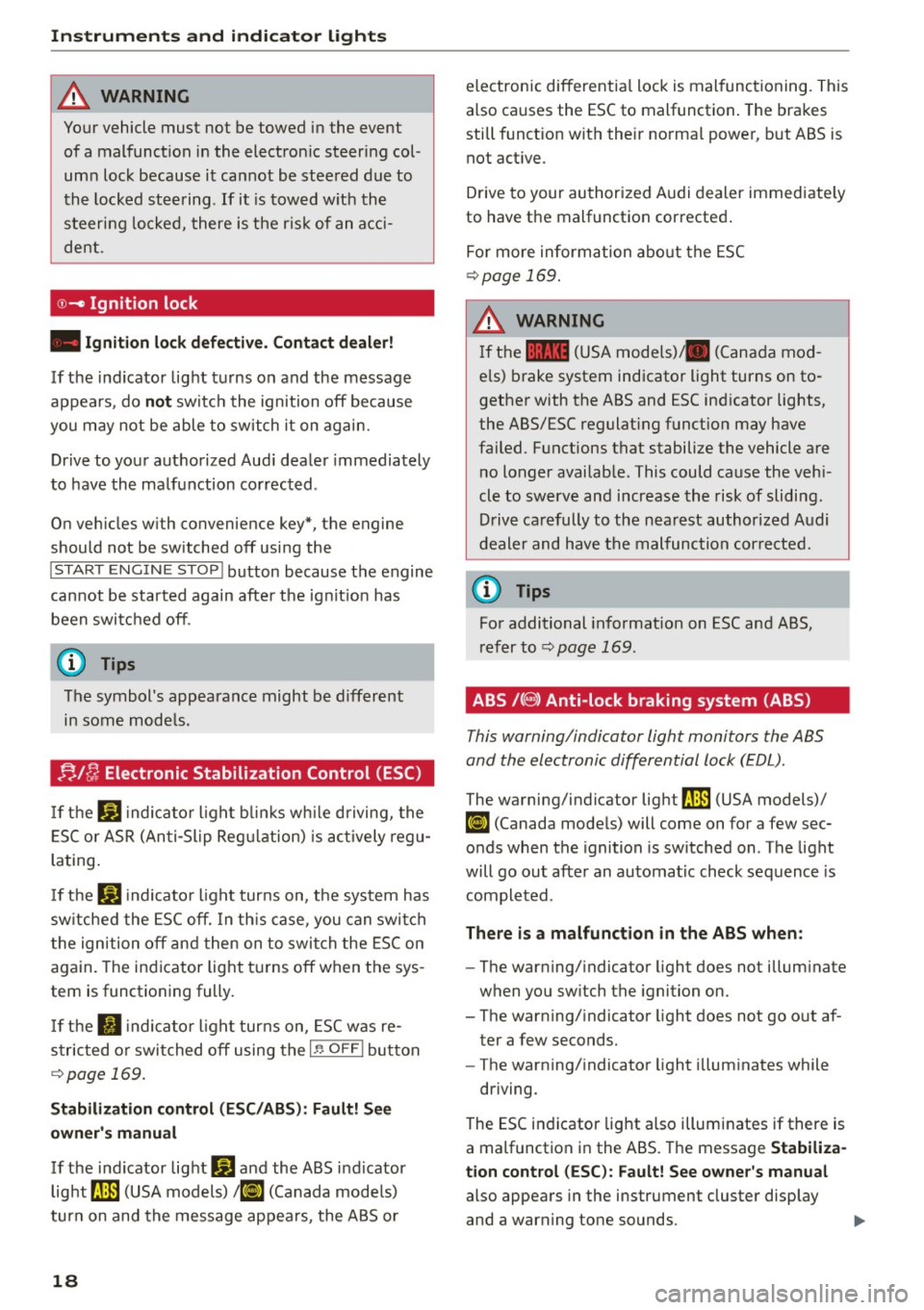
!;. !~ Electronic Stabilization Control (ESC)
If the Ji) indica to r li ght blink s while driving, the
E SC or ASR (An ti- Slip Reg ulation) is ac tively regu
lating.
If t h e DJ indicato r light tur ns on, the system has
sw itche d the ESC off. In th is ca se , you can swi tch
t he ign ition off and then on to swi tch the ESC on
again. The indicator light t urns off when the sys
tem is function ing fully.
If the II indica to r li ght tur ns on, ESC was re
s tric ted or swi tched off using the
I~ O FFI bu tton
c::> page 169.
Stabilization control (ESC /ABS ): Fau lt! S ee
owner 's manual
If the ind icator lig ht Q] and the ABS i ndicator
light ~ (USA models)
111] (Canada mode ls)
tur n on and the message ap pea rs, the ABS or
18
electronic differentia l lock is mal functioning. This
a lso causes the ESC to malfunction . The brakes
still f unct ion wit h their norma l powe r, b ut ABS is
not act ive.
Drive to your authori zed A udi dealer immediate ly
to have the malfunction corrected .
Fo r more information abo ut the ESC
c::> page 169.
A WARNING
If the 11111 (USA models) . (Canada mod
e ls) b rake system indicator light turns on to
gether with the ABS and ESC ind icator lights,
the ABS/ESC regulat ing funct ion may have
failed. F unctions that stabilize the vehicle are
no longer availab le. This could cause the vehi
cle to swerve and increase the risk of slidi ng.
D riv e ca refully to the nea rest authorized A udi
d eale r and have the m alfunc tion corre cte d.
@ Tips
Fo r additional informat ion on ESC and ABS,
ref er to c::> page l 69 .
ABS /(8 ) Anti-lock braking system (ABS)
This warning/indicator light monitors the ABS
and the electronic differential lock (EDL).
The warning/indicator light ~ (USA models)/
Ii] (Canada mode ls) will come on for a few sec
onds when the ignition is sw itched on . T he light
will go out after an automatic check sequence is
completed .
There is a malfunction in the ABS when:
-The war ning/ indicator light does not illum inate
when you sw itch the ignition on.
- The warning/ indicato r light does not go o ut af
ter a few seconds.
- The warning/ indicato r light illum inates while
driving.
The ESC in dicator lig ht also illuminates if there is
a malfunction in the ABS. The message
Stabiliza
tion control (ESC ): Fault! See owner's manual
also appears in the instrument cluster display
and a warn ing tone sounds.
Page 34 of 254
Opening and closing
- Do not remove the key from the ignition lock
unt il the vehicle has come to a complete
stop. Otherwise the steering column lock
could sudden ly engage - causing the risk of
an accident.
(D Tips
- The operati on of the remote control key can
be temporar ily disrupted by i nte rference
from t ransmitters in the v ici ni ty of the ve hi
cle wor king in the same frequency range
(e .g . a cel l phone, rad io equipm ent) .
- Fo r secu rity reasons, replacement keys are
o nly availabl e from authori zed A udi dealer .
- Fo r Declarat ion of Compliance to United
Sta tes FCC an d Industry Canada regulations
<::;> page 239 .
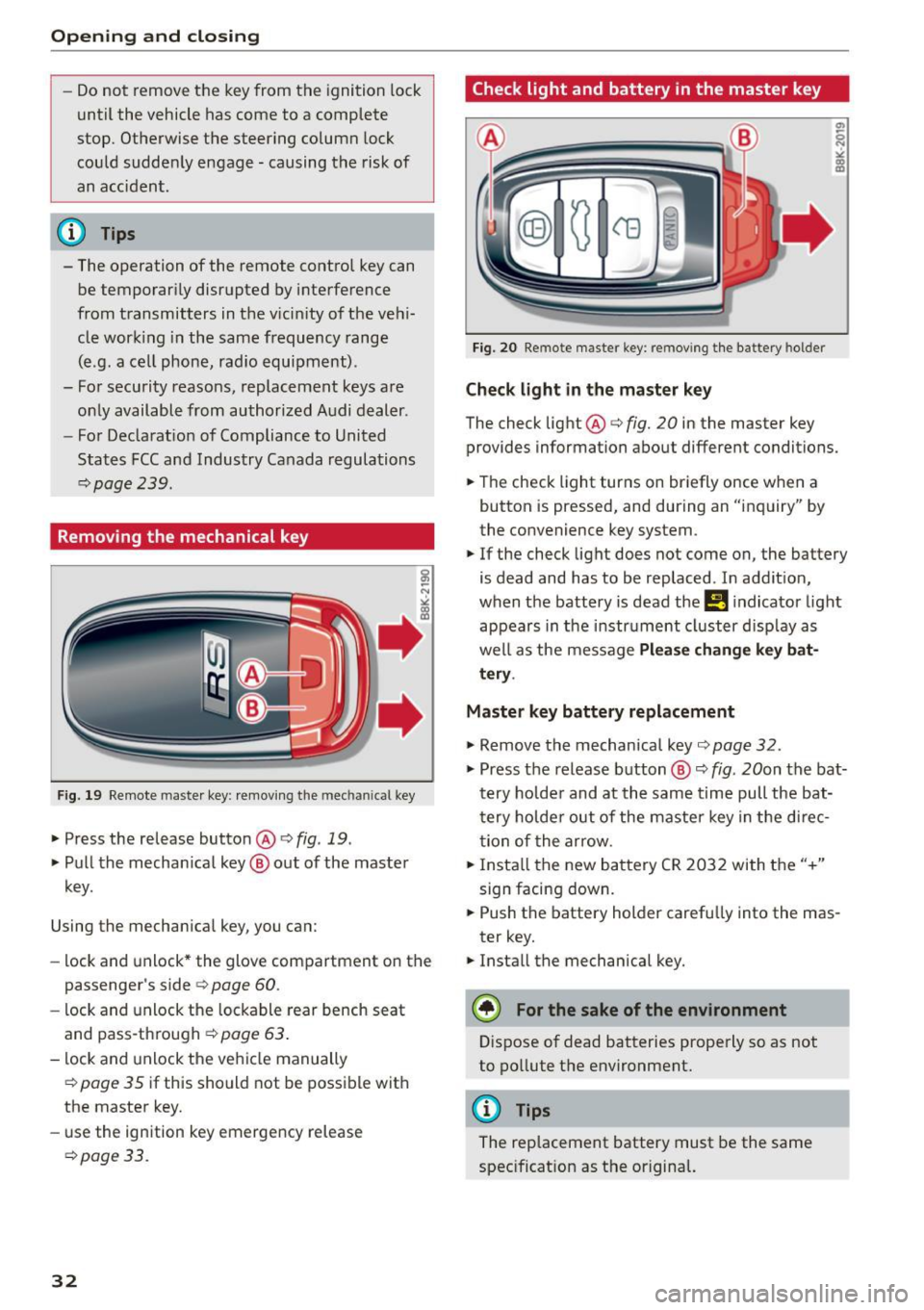
Removing the mechanical key
Fig . 19 Rem ote maste r key : rem ov ing th e m ec hani ca l key
.,. Press the release button@ c> fig. 19 .
.,. Pu ll t he mecha nica l key @ out of the master
key.
Using the mecha nica l key , you can:
- lock and unlock * the glove com partment on t he
passenger's side c>
page 60.
-lock and unlock the lockable rear bench seat
and pass-th rough ¢
page 63.
-lock and unlock the ve hicle manually
¢page 35 if this sho uld not be poss ible with
the maste r key.
- use the ign ition key emergency release
¢ page 3 3.
32
Check light and battery in the master key
Fig. 20 Remote maste r key: re m ovin g th e bat tery hol der
Check light in the ma ster key
The check light@c> fig. 20 in the master key
provides information about different conditions.
.,. The check light turns on br iefly once w he n a
button is pressed, and during an "inquiry" by
the convenience key system .
.,. If the check light does not come on, the battery
is dead and has to be replaced . In addit ion,
when the battery is dead the
!I i ndicator light
appears in the instr ument cluster d isp lay as
we ll as the message
Please change key bat
tery .
Master key battery replacement
.,. Remove the mechanical key c> page 32 .
.,. Press the release b utton @ c> fig. 20on the bat
t e ry ho lde r and at the same time pull the bat
t ery ho lde r out of the maste r key in t he d irec
t ion of the arrow .
.,. Insta ll th e new ba ttery CR 20 32 wi th t he "+"
sign facing down .
.,. Push the battery holder carefu lly into the mas
ter key.
.,. Install the mechanical key.
(® For the sake of the environment
Dispose of dead batteries properly so as not
to po llute t he environment.
@ Tips
The replacement battery must be the same
spec ificat ion as t he or igina l.
Page 45 of 254
Lights and Vision
Exterior Lighting
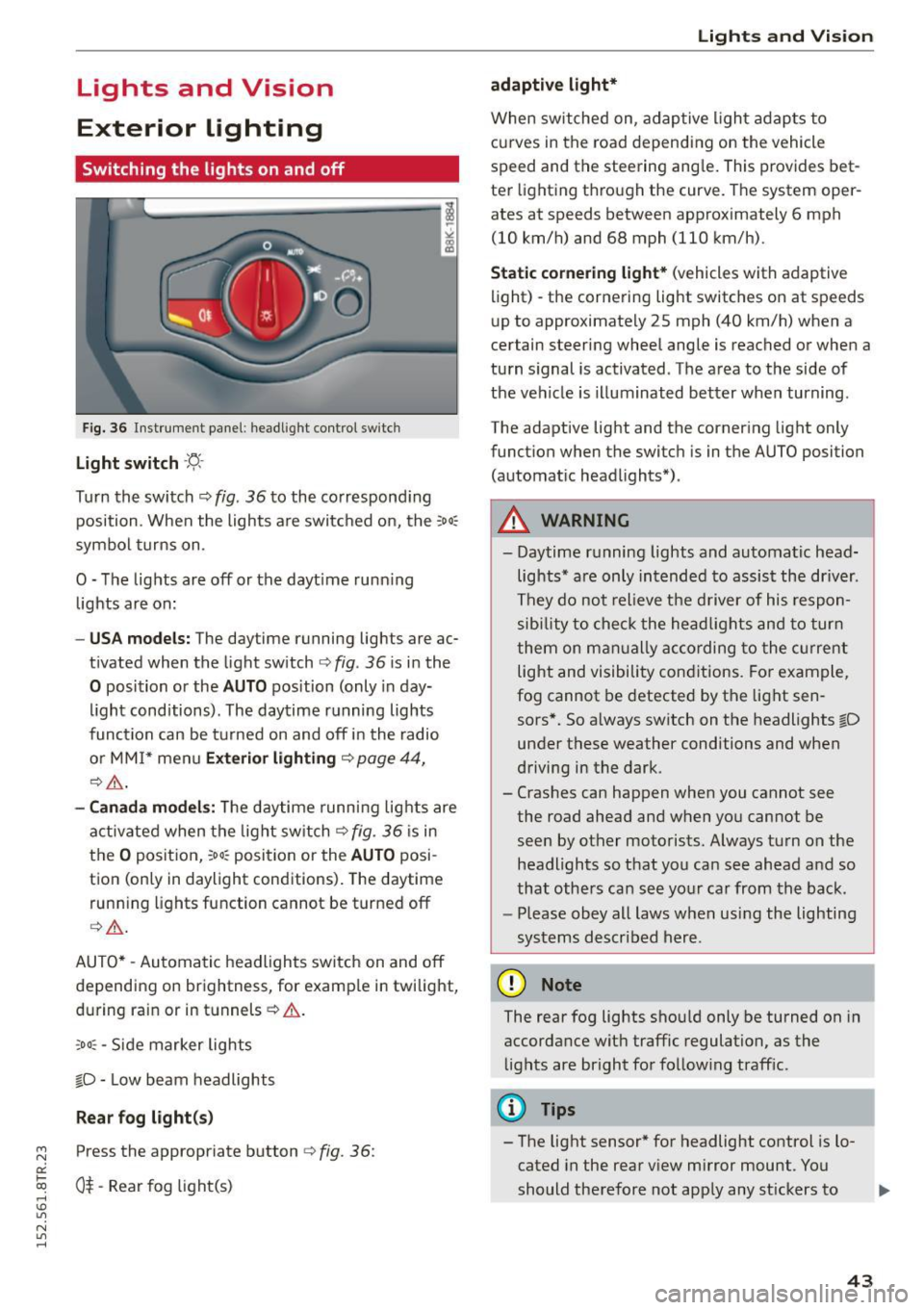
Switching the lights on and off
Fig. 36 In str ument pa ne l: h eadligh t contro l sw itc h
Light switch -'f!,-
Turn th e switch ¢ fig. 36 to the co rrespond ing
position . When the lights a re switc hed on, the :
00
:
symbo l turns on .
O -The lights are off or the dayt ime runn ing
lights are on:
- USA models: The day time running lights are ac
t ivated when the light sw itch ¢
fig. 36 is i n the
O position or the AUTO position (only in day
li ght conditions). The daytime r unning lights
func tion can be turned on and off i n the radio
o r MM I* men u
Exteri or lighting ¢ page 44,
¢ ,& .
-Canada model s: Th e daytime runn ing lig hts are
a ctiv ated when the light sw itch
Q fig . 36 is in
t h e
O position, :oo: position or the AUTO posi
tion (only in daylight conditions) . The daytime
run ning lights function cannot be turned off
Q _&. .
AUTO* -Aut omatic headlights switch on and off
de pending on brightness, for examp le in twilight,
during ra in or in tunnels ¢& .
,o o: -Side marker lights
fD -Low beam headlights
Rear fog light (s)
~ Press the appropriate button ¢ fig. 36:
0::
txi 0$-Rear fog light(s) rl I.O
"' N
"' rl
Lights and Vis ion
adaptive light*
When switched on, adap tive ligh t ad apts to
c u rves in the road depend ing on the vehicle
speed and the steering ang le . This provides bet
te r li ght ing t hrough the curve. The system oper
ates at speeds between approximately 6 mph
(10 km/h) and 68 mph (110 km/h).
Static cornering light* (vehicles with adaptive
light) -the corne ring light switches on at speeds
u p to approximate ly 25 mph (40 km/h) when a
certain steering wheel angle is reached or when a
tu rn s ignal is activated. The a rea to the side of
the ve hicle is illuminated bet ter when turning .
The adaptive light and the corner ing light only
funct ion when the switc h is in t he AUTO position
(automat ic head lights*) .
A WARNING
--Daytime r unning lights and automatic head·
lights * are only in tended to assis t the driver .
Th ey do not relieve the d river of his respon
s ibi lity t o check the he ad lig hts and to tur n
t hem on m anually according to the cur ren t
light and visibility con ditions . Fo r ex am ple,
fog cannot be detected by t he lig ht sen
sors*. So a lways switch on the headlights
fD
un der these weather conditions and when
d riving in the dark .
- Cras hes can happen when you cannot see
the road ahead an d when yo u cannot be
seen by other motorists. Always tu rn on the
headlights so that you can see ahead a nd so
that othe rs can see yo ur ca r from the ba ck.
- Please obey all laws when usi ng the lighting
sys tems described her e.
(D Note
The rear fog lights sho uld only be turned on in
accordance wit h traffic regulation, as the
li g hts are bright fo r fo llow ing traff ic.
(D Tips
- The light sensor * for headlight control is l o
cated in the rear v iew mirror mount . You
should therefore not app ly any st ickers to .,.
43
Page 55 of 254
M N
0:: loo ,...., \!) 1.1'1
N 1.1'1 ,....,
Seats and storage
General information
Why is your seat adjustment so important?
The safety belts and the airbag system can only
provide maximum protection if the front seats are correctly adjusted.
There are various ways of adjusting the front
seats to provide safe and comfortable support
for the driver and the front passenger. Adjust
your seat properly so that:
- you can easily and quickly reach all the switches
and controls in the instrument panel
- your body is properly supported thus reducing
physical stress and fatigue
- the safety belts and a irbag system can offer
maximum protection ¢
page 128.
In the following sections, you will see exactly
how you can best adjust your seats.
There are special regulations and instructions for installing a child safety seat on the front pas
senger's seat. Always follow the information re
garding child safety provided in¢
page 150,
Child safety.
A WARNING -
Refer to¢ page 111, Driving safety for im
portant information, t ips, suggestions and
warnings that you should read and follow for
your own safety and the safety of your pas senge rs.
A WARNING
Incorrect seating position of the dr iver and all
other passengers can resu lt in serious person
al injury.
- Always keep your feet on the floor when the
vehicle is in motion -never put your feet on
top of the instrument pane l, out of the win
dow or on top of the seat cushion. This ap
plies especially to the passengers . If your
seating pos it ion is incorrect, you increase
the risk of injury in the case of sudden brak
ing or an accident. If the airbag inflates and
Seat s and stor age
the seating position is incorrect, this cou ld
result in personal injury or even death.
- It is important for both the driver and front
passenger to keep a distance of at least
10 inches (25 cm) between themselves and
the steering wheel and/or instrument panel.
If you're sitting any closer than this, the air
bag system cannot protect you properly. In
addition, the front seats and head restraints must be adjusted to your body height so
that they can give you max imum protect ion.
- Always try to keep as much distance as pos
sible between yourself and the steer ing
wheel or instrument pane l.
- Do not adjust the driver's o r front passeng
er 's seat while the veh icle is moving. Your
seat may move unexpectedly, causing sud
den loss of vehicle control and persona l in
jury.
If you adjust your seat whi le the vehicle
is moving, you are out of position.
Driver's seat
The correct seat position is important for safe
and relaxed driving.
We recommend that you adjust the dr iver's seat
in the following manner:
"' Adjust the seat in fore and aft direction so that
you can eas ily push the pedals to the floor
while keeping your knees slightly bent¢.&,
in
Why is your seat adjustment so important? on
page 53.
"' Adjust the seatback so that when you sit with
your back against the seatback, you can still
grasp the top of the steering wheel.
"' App lies to veh icles w ith adjustable head re
straints: Adjust the head restraint so the upper
edge is as even as possible with the top of your
head.
If that is not possible, try to adjust the
head restra int so that it is as close to th is posi
t ion as possible ¢
page 56.
A WARNING
Never place any objects in the driver's foot
well. An object could get into the pedal area
and interfere with pedal funct ion. In case of
-
53
Page 73 of 254
"' N
0:: loo
rl I.O
"' N
"' rl
Driving
Steering
Manually adjustable steering wheel
The steering wheel position is fully adjus table up
and down and forward and back .
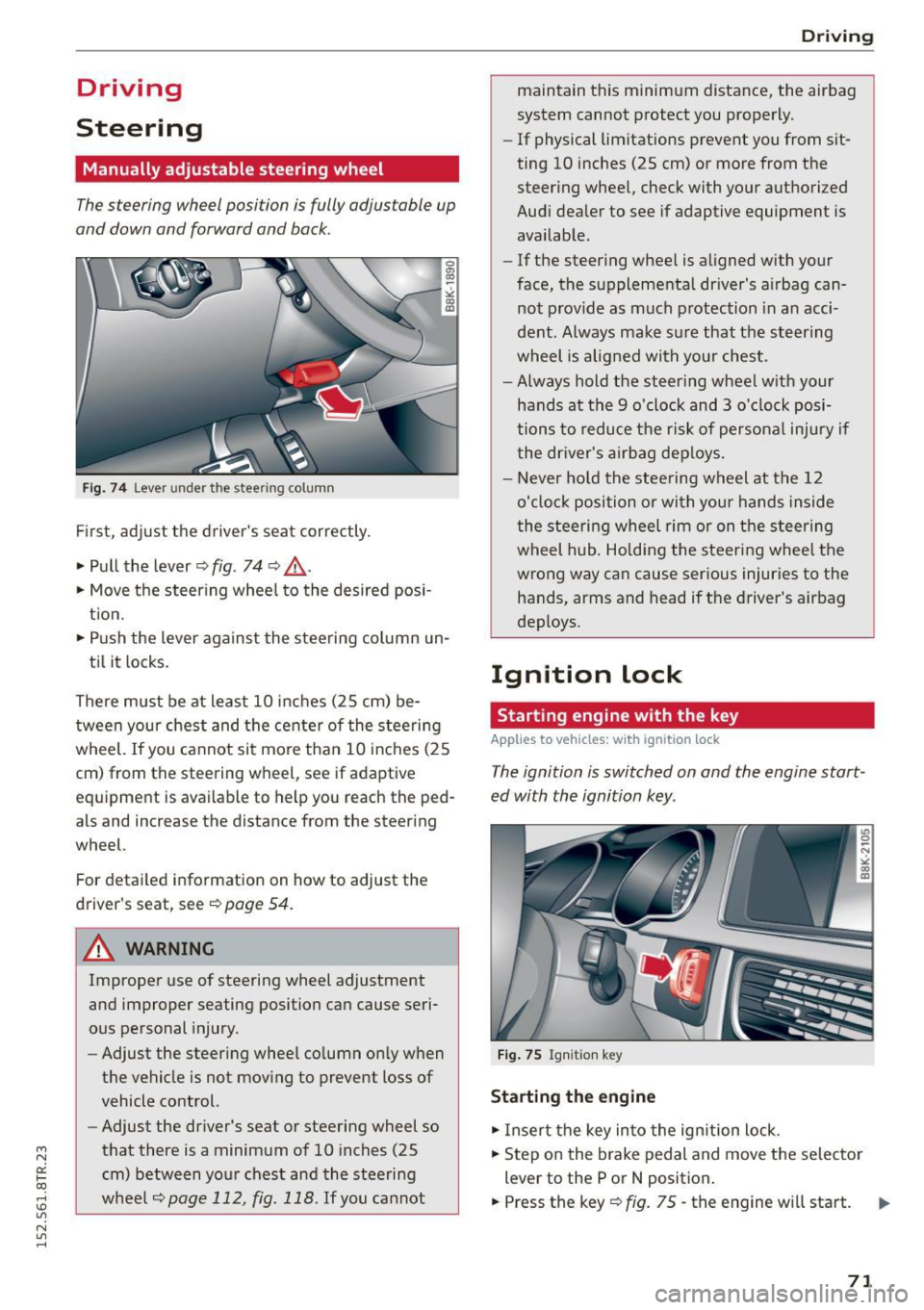
Fig. 74 Lever under the st eering column
First, adjust the driver's seat correctly.
• Pull the lever~
fig. 74 ~ .&, .
• Move the steering wheel to the desired posi
tion.
• Push the lever against the steering column un-
til it locks.
There must be at least 10 inches (25 cm) be tween your chest and the center of the steering
wheel. If you cannot sit more than 10 inches (25
cm) from the steering wheel, see if adaptive
eq uipment is available to help you reach the ped
als and increase the distance from the steering
wheel.
Fo r detailed information on how to adjust the
driver's seat, see
~ page 54 .
.&_ WARNING
Improper use of steering wheel adjustment
and improper seating position can cause seri
ous personal injury.
- Adjust the steering wheel column only when
the vehicle is not moving to prevent loss of
vehicle control.
- Adjust the driver's seat or steering wheel so
that there is a minimum of 10 inches (25
cm) between your chest and the steering
wheel
~page 112, fig. 118 . If you cannot
-
Driving
maintain this minimum distance, the airbag
system cannot protect you properly.
-If phys ical limitations prevent you from sit
ting 10 inches (25 cm) or more from the
steering wheel, check with your authorized
Audi dealer to see if adaptive equipment is
available.
- If the steering wheel is aligned with your
face, the supplemental driver's airbag can
not provide as much protection in an acci
dent. Always make sure that the steering
wheel is aligned with your chest.
- Always hold the steering wheel with your
hands at the 9 o'clock and 3 o'clock posi
tions to reduce the risk of personal injury if
the driver's airbag deploys.
- Never hold the steering wheel at the 12
o'clock position or with your hands inside
the steering wheel rim or on the steering
wheel hub. Holding the steering wheel the
wrong way can cause serious injuries to the
hands, arms and head if the driver's airbag
deploys .
Ignition lock
Starting engine with the key
Applies to vehicles: with ignition lock
The ignition is switched on and the engine start
ed with the ignition key .
Fig. 75 Igni tion key
Starting the engine
• Insert the key into the ignition lock .
• Step on the brake pedal and move the selector
lever to the P or N position.
• Press the key~
fig. 75 -the engine will start.
71